Omnisend AI


 OFFER
OFFER










Learning how to bump an email is essential when you send an important message and hear nothing back. Waiting for a response to your sales pitch, partnership proposition, or an ecommerce offer, and seeing that no one bothers to answer you can be frustrating. As a result, figuring out how to politely bump an email can bring those lost opportunities back.
Bumping, at its core, is simply replying to an existing thread to push your message to the top of the recipient’s inbox. To help you get replies without sounding pushy or aggressive, we’ll cover the exact professional phrasing you need for your communications.
You’ll find ready-to-use templates, step-by-step Outlook instructions, and automation guidance to scale your follow-ups with Omnisend. Here’s what you need to know to recover lost sales and build stronger relationships.
Quick sign up | No credit card required
What is a bump email (and when should you send one)?
A bump email is a short message you can send on an already existing thread to remind the recipient about the conversation you had and bring the thread back to the top of their inbox.
Since there are so many emails being sent to people on a daily basis, important messages can sometimes get buried, and bump emails act as a polite reminder. Just make sure you keep it polite and professional without sounding aggressive, annoyed, or demanding.
These messages are often used for sales outreach, partnership propositions, job applications, customer support check-ins, ecommerce offers, and more. While you might be tempted to send multiple nudges on the same day, it’s usually best to refrain from doing so. You don’t want to come off as needy, especially if you’re the one who gains the most benefit from the deal.
When a bump email is appropriate vs. spammy
As a rule of thumb, it’s recommended to wait at least two or three business days before sending your first bump email. If the recipient still ignores you once you’ve sent your second or third follow-up, it’s best to just leave them alone. At this point, it’s clear that they’re not interested, and you’re also at risk of crossing into the spam territory if you continue, which can also result in your emails starting to bounce.
Persistence is a desirable trait, for sure, but only when done correctly. Otherwise, stalkers could be considered as nothing but persistent people. And we all know that’s not the case. For example, according to Snov, one follow-up can result in nearly 49% increased response rates, but a fourth bump email can come with a 1.6% spam rate, and 2% unsubscribe rate. As you can see, it’s great to follow up in case someone missed the message, but it’s not a good idea to continue harassing them if they don’t answer.
To avoid excessive messaging, either intentional or accidental, you can use Omnisend and set up automations with timing delays and a predefined number of messages. This way, you won’t have to send messages manually, and potentially save yourself from reputation damage.
Good reasons to send a bump email:
- You need a time-sensitive decision or approval
- Reminding a shopper about an abandoned cart
- Checking if a customer support issue was resolved
When not to bump:
- You’re sending unsolicited mass sales pitches
- The recipient has clearly expressed disinterest
- You haven’t received a response after two reminders
How to bump an email professionally and politely
It’s understandable to want to get a response every time you offer or ask for something, but you also need to be considerate and maintain proper email etiquette. It won’t do you any good to damage your relationships or appear overly demanding when there’s no need to do so.
Timing guidelines: How long to wait and how often to follow up
Give people some time to process or think about the message, especially if you’re seeking out busy professionals who aren’t used to ignoring everything to respond immediately. Two to five business days is usually a solid baseline.
Chances are, they’ve already seen your message to some extent but had no time to answer at the moment, and then simply forgot. If they don’t answer after your first bump, extend the wait time to five to seven days so the recipient feels like you respect their time and workload.
If your matter is time-sensitive, then it’s fair to stick to shorter delays. Otherwise, be respectful of the recipients’ time.
Writing a subject line that signals a polite bump
The subject line should be clear, short, and without any unnecessary fluff. If you couldn’t manage to make your subject line concise and catchy enough, why should the recipient think that your email body will be any different?
Also, vague or aggressive subject lines often underperform since they can confuse the reader or trigger their defensive instincts. Stick to straightforward phrasing that references your previous message:
- Following up on (Topic)
- Quick check-in on (Project)
- Gentle follow-up: (Topic)
What to say in the body of a bump email
In case you’re wondering how to start an email for a bump so it’s as effective as can be, provide quick context first. The less the recipient needs to think, the better. Then, take your time to figure out what it is that would appeal to your recipient the most: a free resource, additional information about your proposal, or maybe what moving forward would look like?
Once you’ve figured all that out, close the bump with a simple and visible call to action that requires minimal effort from the reader.
Here are some dos and don’ts of tone and phrasing:
- Do use polite nudging phrases like “Just wanted to circle back…” or “When you have a moment…”
- Do give them an out with “If now isn’t a good time…”
- Don’t demand immediate answers or action
| Polite phrasing | Pushy phrasing |
|---|---|
| “Just checking in on the proposal we discussed.” | “Why haven’t you replied to my proposal yet?” |
| “I know you’re busy, so no rush on this.” | “I need an answer by the end of the day.” |
| “Let me know if you need any more details.” | “You need to confirm this right now.” |
Common mistakes that make bump emails feel pushy
Even well-intentioned messages can backfire if you use the wrong approach. Avoid using a threatening tone or guilt-tripping the recipient for their silence. Sending too many follow-ups or writing long walls of text will also make your message feel like a chore to read.
Bump email templates you can copy and customize
In most cases, you don’t need to reinvent the wheel, and you can simply use reliable professional email examples to save time and keep your tone consistent across emails. One more thing we’d like to note is personalization, which is key to getting responses.
While only 5% of senders tend to personalize each and every one of their messages, research shows that advanced personalization can increase reply rates by up to 18%. Note that we said “advanced” personalization. That means just adding the name isn’t enough. If possible, tailor the message to the recipient’s exact situation to show that you’ve done your homework and know exactly who you’re talking to.
It will take some time, but it’s bound to drive better results. As for templates, you can use them either as complete copy-paste emails or as baselines for improvement.
First bump after no response
The first bump email should be brief and polite, so don’t overdo it by cluttering it up with excessive information. Here are some examples:
Subject line: Following up on (Topic)
Hi (Name),
Just checking in to see if you had the chance to think about (Topic) I mentioned last week. I understand you’re busy, so please give it some thought once you have some free time.
Let me know if you need any additional information.
Best,
(Your Name)
- Customize the topic, the recipient’s name, and then your name
Subject line: Quick question about (Sales pitch)
Hi (Name),
I’m circling back to see if you’ve had some time to think about my (Sales pitch). If you’re interested, I can demonstrate how easy the integration is.
Would you be able to hop on a quick 10-minute call to see how the product works with your (Client’s infrastructure)?
Looking forward to hearing from you,
(Your name)
- Customize the sales pitch, recipient’s name, the client’s infrastructure (if applicable, this is an example of what advanced personalization could look like), and your name.
Second and final bumps in a sequence
The templates for the second and final bumps are slightly more direct and demanding, but still maintain a polite tone. For the final attempt, clearly state that you’ll assume they’re not interested right now.
Here’s an example you can use for the second bump:
Subject line: Is now a better time to talk about (Topic)?
Hi (Name),
I’d like to check one last time if you had the chance to think about (Topic). Do you have any questions I can help clarify so we can move forward?
If yes, please reply by (Date). Otherwise, I’ll assume you’re not interested and stop messaging you.
Have a nice day,
(Your name)
- Customize the topic, the recipient’s name, the final date, and your name.
Here’s an example you can use for the final bump:
Subject line: Closing the loop on (Partnership proposal)
Hi (Name),
Since I haven’t heard back from you in a while, I’ll assume you’re not interested in partnering with us. We hope you’ll find the partner you need for (Establish their pain points).
For now, I’ll stop messaging you, and if things change, feel free to reach out to us via this thread or (Email address or phone number).
Best wishes,
(Your name)
- Customize the proposal, the recipient’s name, the pain points (if applicable, this is another example of potential advanced personalization), email or phone number, and your name.
Cold outreach bump email templates
Cold outreach is a tough task to undertake, so you’ll need to improve a bit instead of just demanding an answer. Here are a couple of examples of what your first or second bumps could look like:
Subject line: Did you know (Product name) can (Solve problem X)?
Hi (Name),
I dug into your company a bit deeper recently and found out that you may have a problem with (Problem). Did you know that (Your product) can solve this easily by (Short explanation)?
Would you like me to demonstrate how it works?
Best,
(Your name)
- Customize the product name, the problem, the recipient’s name, the explanation, and your name.
Subject line: We helped (Relevant company) improve their (Metric) last quarter
Hi (Name),
I know one of your KPIs is improving (Metric). We’ve helped (Relevant company) do this, and they managed to increase (Metric) by (Percentage).
I’d be thrilled to help (Recipient company name) do the same. Reply, and we’ll schedule a time.
Cheers,
(Your name)
- Customize the relevant company name, the metric, the recipient’s name, the percentage, the recipient’s company name, and your name.
Ecommerce-specific bump templates (cart, reviews, promos)
For ecommerce, you don’t need to do any manual email bumps whatsoever. You can just set up automations using Omnisend, and these reminder emails will go off automatically when the time is right.
Here’s an example of an abandoned cart reminder:
Subject line: Forgetting something?
Hi (Name),
We noticed you’ve been shopping with us and made some great choices in your cart. They’re still waiting for you for now, but there’s a chance they might sell out.
Is now a better time to finalize your order?
(Link to cart)
(Abandoned cart items)
Have a great one,
(Your brand name)
- Customize the recipient’s name, the link to cart, the abandoned cart item block, and your brand name
Here’s an example for a post-purchase review email:
Subject line: Did you like your (Product name)?
Hi (Name),
We’re excited you chose our (Product name). We’d love to hear what you think about it. Care to leave a quick review? It will only take 30 seconds of your time.
(Link to review page)
Thanks,
(Brand name)
- Customize the product name, the recipient’s name, the link to the review page, and your brand name
Here’s an example for a promo/offer re-send bump to non-openers or non-clickers:
Subject line: Don’t let your discount go to waste
Hi (Name),
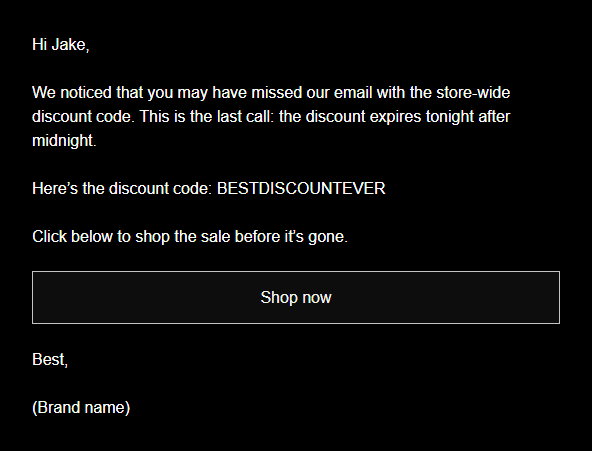
We noticed that you may have missed our email with the store-wide discount code. This is the last call: the discount expires tonight after midnight.
Here’s the discount code: (Discount code)
Click below to shop the sale before it’s gone.
(Link to sale)
Best,
(Brand name)
- Customize the recipient’s name, the discount code, the link to the sale, and your brand name
How to bump an email in Outlook (and other inboxes)
Knowing how to bump an email in Outlook manually is great for one-off messages. While Omnisend automates follow-ups for marketing and ecommerce campaigns, personal correspondence often requires a manual touch.
Manually bumping an email in Outlook
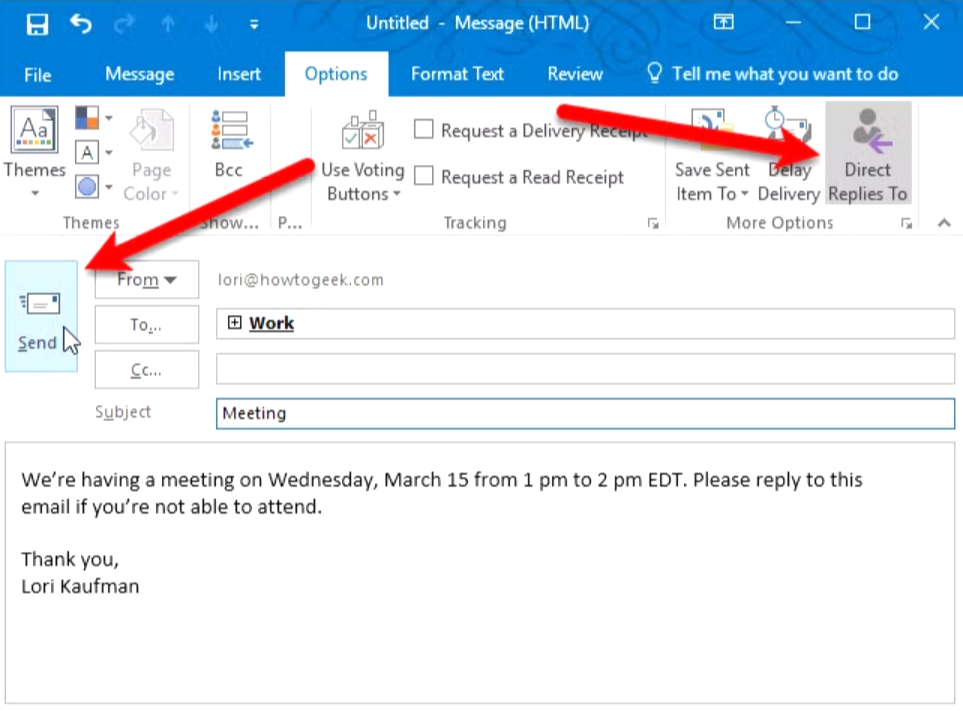
Here’s a step-by-step tutorial showing you how to send a manual bump in Outlook:
- Open your “Sent Items” folder and find the email thread in question
- Click “Reply” or “Reply All” to ensure the previous message remains intact below your new text
- Adjust the subject line to your liking
- Write your brief bump email body and hit send
Using Outlook tools (flags, reminders, categories) to remember bumps
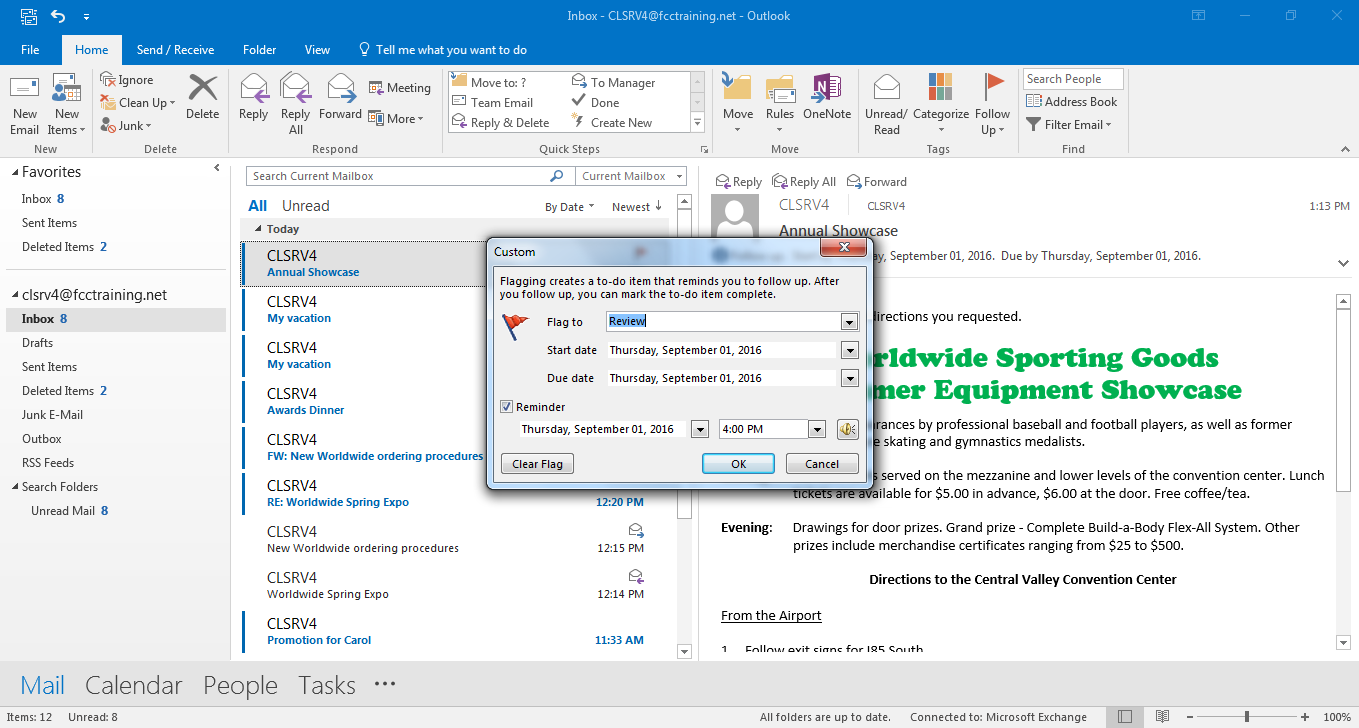
Instead of relying on memory, you can use built-in tools to track pending replies:
- Right-click a sent email and select “Follow Up” to add a flag
- Choose “Add Reminder” to trigger a pop-up alert on a specific date
- Assign specific color categories or move pending emails to a dedicated folder to track your follow-ups
Equivalent bumping tactics in Gmail and other email clients
Other email platforms offer similar manual tracking features:
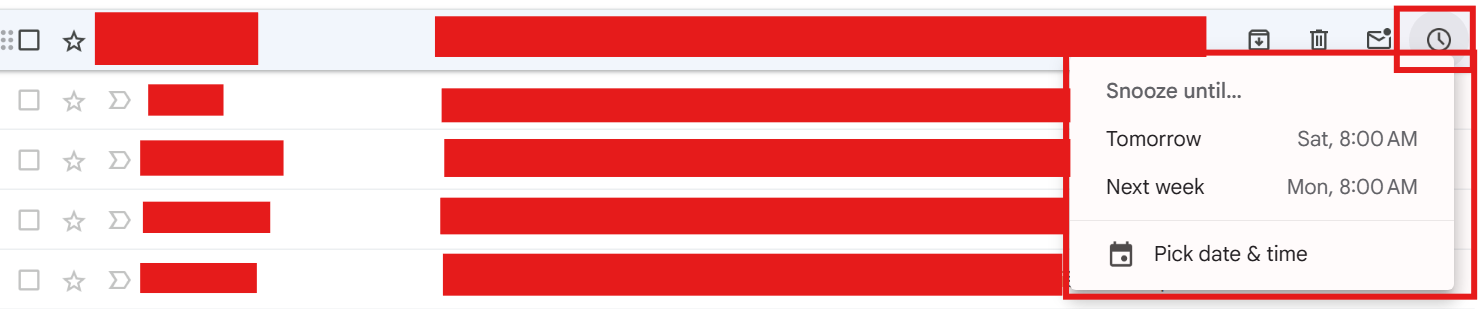
- In Gmail, click the “Snooze” clock icon on a sent email to have it reappear at the top of your inbox later
- Use Gmail’s stars or create a specific label for messages that require a follow-up
- In Apple Mail, use the “Remind Me” feature to schedule a notification for a sent message
Ecommerce and sales use cases for bump emails
Let’s take a look at some of the situations where bump emails are considered effective. We’ll focus solely on ecommerce and sales use cases.
Ecommerce marketing scenarios (abandoned cart, promos, reviews)
Omnisend seamlessly integrates with Shopify, WooCommerce, Wix, and BigCommerce to trigger automated follow-ups based on customer behavior. These bump emails bring shoppers back to complete a purchase or engage with your brand, driving significant revenue.
On average, Omnisend customers get $79 back for every $1 spent, making these automated sequences highly effective. These emails aim to:
- Remind shoppers about items left behind in abandoned cart sequences
- Resend promo campaigns to non-openers or non-clickers
- Gather feedback through post-purchase review requests
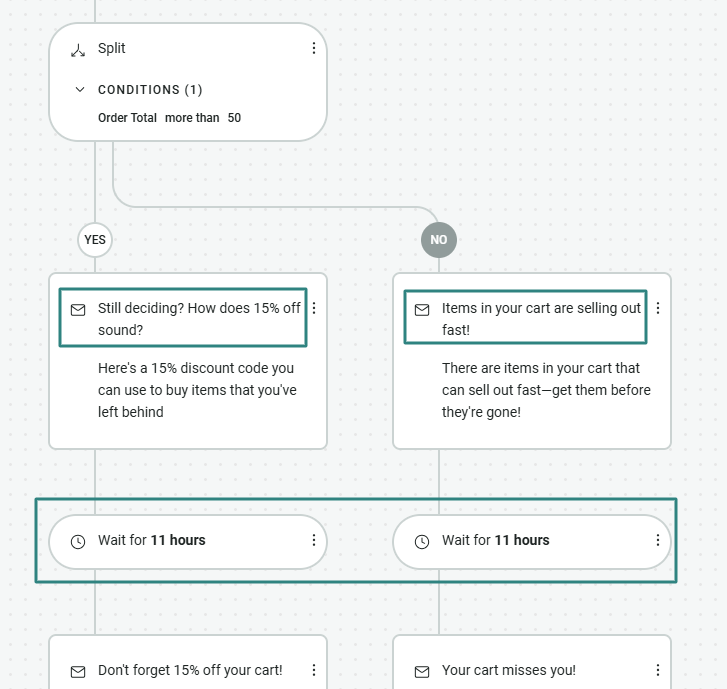
Here’s what an abandoned cart workflow looks like on Omnisend with a split logic to see which reminder subject line performs better:
Sales, PR, and partnership outreach bumps
Bumping cold or warm outreach helps keep your brand more familiar to potential partners, affiliates, influencers, journalists, and more. The impact of the familiarity, though, depends entirely on you. If you’re respectful of their boundaries and don’t end up spamming them, you’ll build a much better image than those who keep sending email bumps endlessly.
To make these bumps more effective, try these:
- Share case studies to build credibility
- Provide social proof or organic media mentions
- Offer solutions to their specific pain points
Customer support and service follow-up bumps
A timely check-in demonstrates excellent service and helps build long-term loyalty. You can use these messages to ensure a smooth post-purchase experience and prevent negative reviews. Combining these emails with global SMS marketing ensures your most critical updates reach the customer on time.
These support messages aim to:
- Check in after a recent support interaction
- Follow up on an unresolved ticket
- Provide updates on a shipping issue
Automate bump emails with Omnisend
If you’re in the ecommerce space, you need different kinds of email bumps. Instead of writing each customer manually, you can automate the entire process and let the platform do the heavy lifting for you.
Turning your bump templates into workflows
You can easily take the provided templates and embed them into Omnisend automation workflows. The intuitive design of the platform helps you scale your communications efficiently without a steep learning curve.
Try adding your bumps to these workflows:
- Abandoned cart sequences
- Browse abandonment triggers
- Post-purchase follow-ups
Segmentation and personalization for higher reply and conversion rates
Omnisend allows you not only to send automated messages but also to personalize these interactions by adding segmentation to the automated workflows. You can insert dynamic personalization fields for first names, and also use behavior-based personalization by sending emails based on the customer’s lifecycle stage.
Target these segments for better results:
- High-value customers
- Recent buyers
- Inactive subscribers
Reporting, ROI, and how Omnisend supports ongoing optimization
Omnisend provides exceptional value, driving a strong ROI of $79 for every $1 spent. You can continually optimize your omnichannel campaigns using our analytics and A/B testing for subject lines and content. Plus, you always have access to award-winning 24/7 customer support.
Manual bumping vs. automated sequences:
- Time saved: Automated messages go out on their own based on your predefined rules, so no continuous manual input is required
- Consistency: You don’t need to remember or flag email threads to send a message, as with automations, everything goes out like clockwork
- Ability to test: Omnisend comes with built-in analytics, so you can measure performance as you go
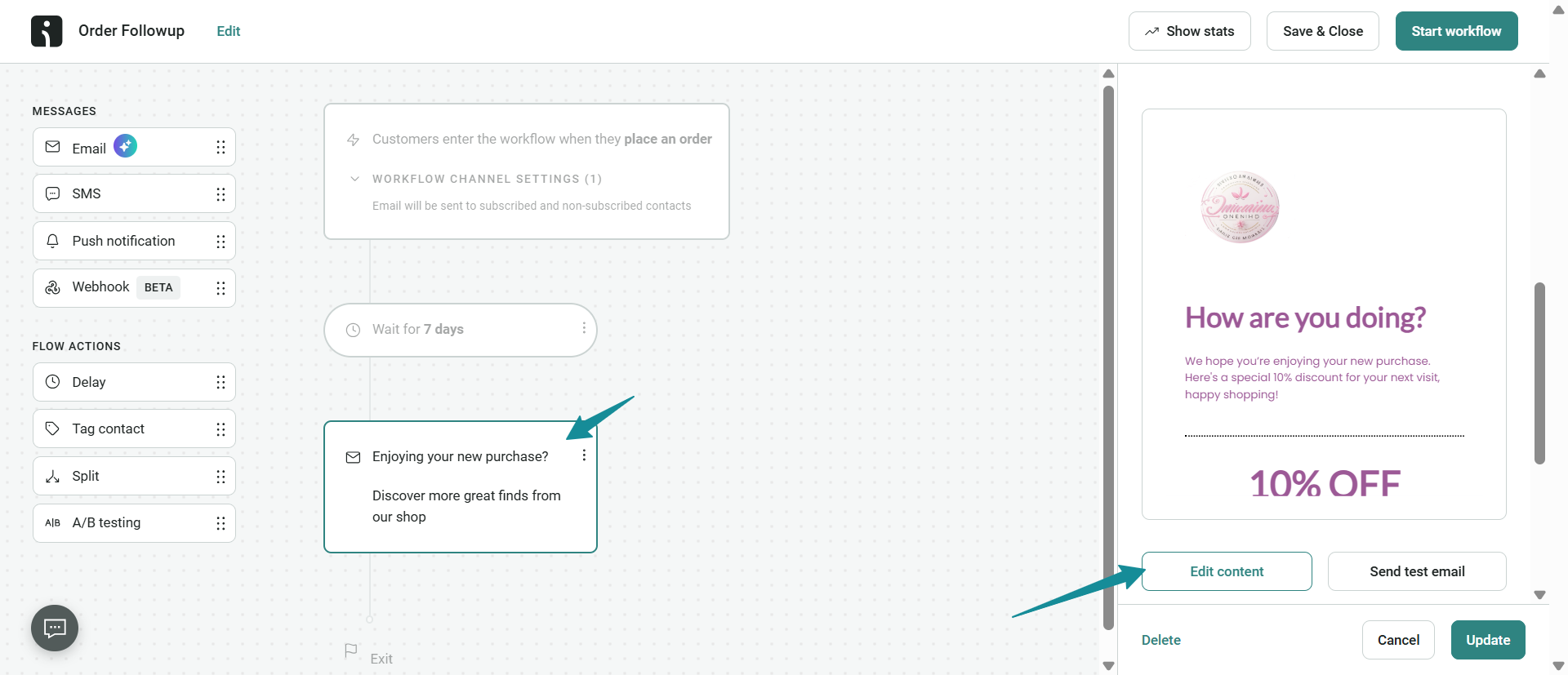
Here’s how the automation builder for a bump email that sends the customer a post-purchase follow-up looks on Omnisend. It automatically sends seven days after the purchase, no additional input required:
“Automation combined with personalization consistently outperforms one-off manual bumps by ensuring the right message reaches the right person at the perfect time.”
— Andrius Šeršniovas, Conversion Specialist at Omnisend
Measure and optimize your bump email performance
Tracking your results is arguably the only way you can consistently get better. That’s why Omnisend makes analytics and reporting as intuitive as possible so you can understand the data without having to hire a data scientist.
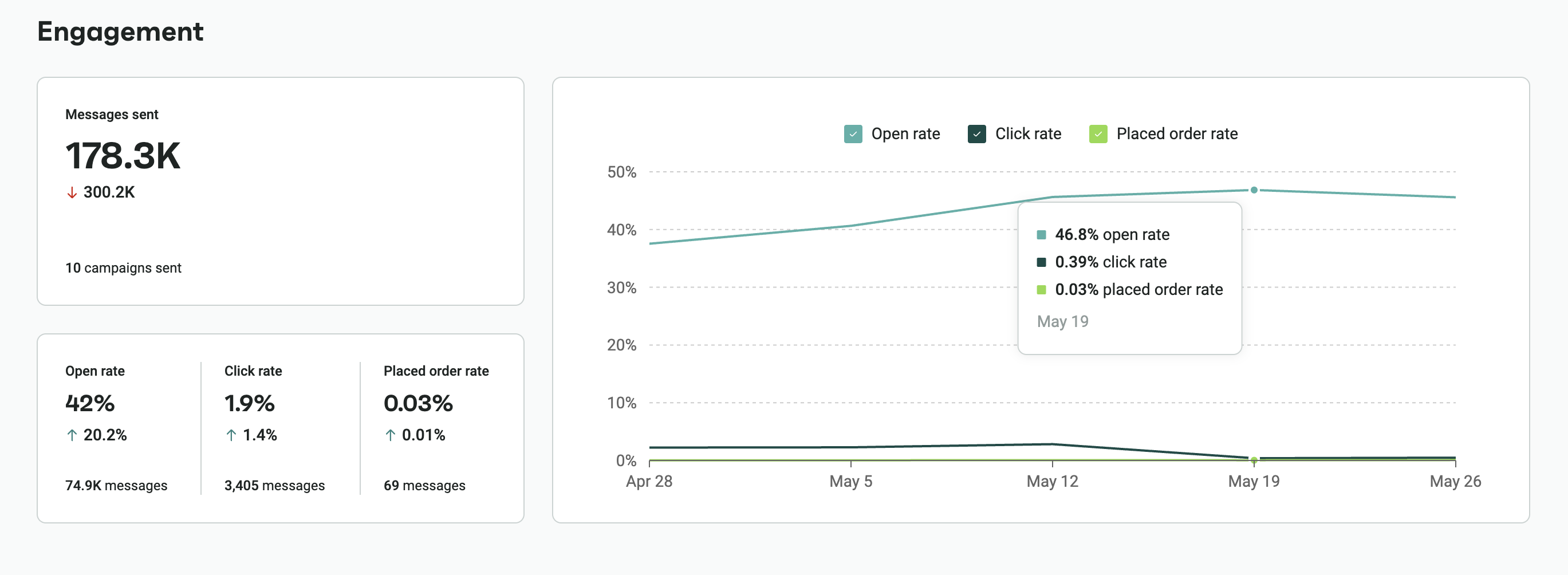
Core metrics to track for bump emails
You don’t need to spend hours looking at data to figure out what it’s trying to tell you. Track these five metrics, and you’ll know everything you need to know about how your bump emails perform:
- Open rate
- Reply rate
- Click-through rate
- Conversion rate
- Unsubscribe/complaint rate
A/B testing subject lines, timing, and content
Litmus has conducted a study where they’ve asked email marketers how they improved their ROI, which was already great by the way (36:1), and 12% noted that A/B testing was a significant part of that.
If you want a slice of that cake, you can try A/B testing these:
- Subject line variations
- Different wait times before bump
- Short vs. slightly longer body copy
Iterating your bump strategy based on data
Once you’ve collected some data, you can use the data to double down on the messages that performed the best. Omnisend’s reporting and A/B features can support this goal for you long-term. You can continually experiment with your messages until every single one of your email bumps consistently drives value.
Conclusion
Knowing how to bump an email and when to do so improves your chances of getting a response and achieving your goal. Just make sure you respect your recipient and don’t start spamming them if they ignore you. Stick to two to three email bumps to maintain your reputation and, well, sanity.
You can easily adapt our provided templates to keep your tone professional and polite. Always remember to wait a few days before sending your nudge. Otherwise, they’ll likely deem you needy or inconsiderate, and not many prospects want to do business with such people.
For ecommerce and sales teams, automating and measuring these sequences with Omnisend saves time and drives better results. You can consistently reach your audience and build stronger relationships without the manual effort.
FAQs
How do I bump a message in an email?
Open the email thread, and click on the “Reply” or “Reply All” button. From there, use one of our templates provided in the article, or come up with your own, and send the message to the recipient.
How do I politely nudge an email?
To be as polite as possible when nudging an email, you need to think about several simple things: don’t demand answers, give them time (a few days after the last nudge), and use gentle phrases.
How do I bump up an email politely?
Be clear and respectful. Come up with a concise subject line that goes straight to the point, and don’t guilt-trip the recipient for not getting back to you. Also, don’t fill the email body full of text. Stick to three or four sentences that say exactly what you want to say.
How do I bump an Outlook email?
It’s straightforward. Find the message you’ve sent to them, click “Reply,” and create the follow-up message. You can also use the flag feature to set up a reminder.