Omnisend AI


 OFFER
OFFER










An email bounce happens when a recipient’s mail server rejects your message and returns it to you. You might hear that occasional bounces are just a normal, harmless part of running campaigns, but that’s not fully true.
High bounce rates actually signal poor list quality and can severely damage your sender reputation. If you ignore them, email bounces will drag down your overall inbox placement. This means fewer people see your offers, which directly hurts your revenue.
It also puts essential transactional messages, like shipping updates or password resets, at risk of failing to deliver. Plus, you face data compliance risks if you continue emailing invalid or inactive addresses.
In this 2026 guide, we’ll break down the different types of bounces, their root causes, and the exact steps you need to take to fix them.
Quick sign up | No credit card required
Key aspects of email bounces
Before you can manage your email deliverability, you first need to understand how these delivery failures work and what causes them. Here’s an overview of the most important elements:
- Hard bounces: Permanent delivery failures that are caused by wrong or non-existent email addresses. You need to identify and remove those immediately before your sender reputation goes down.
- Soft bounces: Temporary issues caused by full mailboxes, busy servers, or excessively large messages. Your email provider will, however, try sending the message later.
- Reputation impact: If your email bounce rates are consistently high, you’ll inevitably damage your sender reputation to the point where your emails may stop reaching inboxes altogether.
In short, some of the most common causes for email bouncing include:
- Invalid email addresses
- Full mailbox
- Subscriber blocking
- Server overloading
- Spam flags
To prevent having to deal with deliverability issues, make sure you clean your email list on a regular basis, use double opt-in in your signup forms to ensure correct email addresses, and monitor your authentication protocols.
What is an email bounce?
An email bounce happens when your message isn’t delivered because the recipient’s server actively rejects it. Instead of safely landing in your subscriber’s inbox, the email gets turned away at the door.
Email delivery takes place behind the scenes via SMTP (Simple Mail Transfer Protocol). When an email fails to reach its destination, the receiving server returns a specific SMTP error code to explain the rejection.
As a result, you receive a bounce notification, officially known as a Non-Delivery Report (NDR) or Delivery Status Notification (DSN). This automated reply is actually very helpful, as it provides the exact error code and the specific reason for the delivery failure.
This feedback helps you clean up your list and improve your sending strategy over time. But to take the right action, you first need to understand that not all bounces are the same.
Types of email bounces
Email bounces generally fall into two main categories: permanent and temporary. The classification depends entirely on the specific SMTP response code the receiving mail server sends back.
Here’s a quick look at the main differences:
| Feature | Hard bounce | Soft bounce |
|---|---|---|
| Permanent | Yes | No |
| Retry | No | Yes |
| Impact on reputation | High | Moderate |
| Action required | Remove immediately | Monitor |
Hard bounce (permanent failure)
A hard bounce indicates a permanent delivery failure. This happens when the email address or the domain you’re trying to reach simply cannot receive email.
Some common reasons for hard bounces include:
- Non-existent email address
- Domain does not exist
- Recipient server completely blocks the sender
You need to take hard bounces very seriously because they have a high negative impact on your deliverability. Consistently hitting invalid addresses signals poor list hygiene to email providers. If left unchecked, this can lead to severe domain and IP reputation damage, sending your future campaigns straight to the spam folder.
When a hard bounce occurs, you need to act immediately by removing the bad email address from your list and never sending any campaigns to it ever again. Even better, you should add these invalid emails to an email suppression list, which will guarantee that you won’t import or email them by accident in the future.
Soft bounce (temporary failure)
A soft bounce is a smaller problem that only indicates a temporary delivery issue that may not even be up to you to fix. The email address is good and valid, and your campaign may reach the inbox simply if you retry later (which is usually done automatically).
These temporary roadblocks often happen because of:
- Full inboxes
- Temporary server issues
- Rate limiting
- Excessively large messages
Since the issue is temporary, you don’t need to delete the contact immediately. Most email service providers will automatically retry sending the message one to three times over a short period. However, we’d recommend monitoring your campaigns for repeated soft bounces to ensure they don’t become a bigger problem down the road.
Keep in mind that soft bounces aren’t always harmless, and they can eventually turn into hard bounces if left unchecked. If a subscriber’s mailbox stays inactive for months, or if a soft bounce persists across multiple campaigns, you should treat it as a permanent failure and scrub the address from your list.
What is an acceptable email bounce rate?
The number of bounced emails directly reflects the quality of your contact list. However, you should understand the difference between your hard bounce rate, which tracks permanent failures, and your overall bounce rate, which includes temporary soft bounces. Monitoring both gives you a clearer picture of your email list health.
As a general rule of thumb, here are some benchmarks for overall bounce rates:
- 0.5 – 1%: Can be considered healthy
- 2%: A warning sign, so keep a close eye on your metrics
- 5%: Danger zone that indicates a serious problem with your list and requires immediate action
Your bounce rate also depends heavily on how you build your audience. A clean, double opt-in list naturally performs better than a risky purchased list from third parties, which often contains spam traps and dead addresses.
Major email providers like Gmail and Outlook monitor these thresholds closely and will quickly penalize senders with consistently high bounces.
There are several straightforward ways to clean up your contacts and get your metrics back on track. Our email deliverability guide is the perfect asset to learn more about how it works.
Why emails bounce
Email bounces happen for a variety of reasons, falling into list, technical, reputation, or policy issues. Let’s look closely at what causes your messages to get rejected.
1. List issues
Your subscriber database is often the biggest source of delivery failures. If you’re using a list that hasn’t been cleaned in years, you will likely hit a big chunk of bad contacts with every send. People change jobs, abandon old inboxes, and deactivate accounts more frequently than you may think. All these things turn once-good emails into hard bounces that we’re trying to avoid.
Common list hygiene problems include:
- Invalid or outdated email addresses
- Innocent typos made during the signup process
- Inactive accounts
Even new subscribers can cause problems if they misspell their own details. To protect your campaigns and sender reputation, you need to prioritize proper list hygiene. Removing inactive subscribers and practicing regular email list cleaning will keep your contacts fresh and accurate.
2. Authentication issues
Mail servers need to verify your identity before they let your messages through to the inbox. If you haven’t done the required setup, you most likely won’t be able to even try to send the campaign using email marketing platforms.
Before you can start doing email marketing, you need to ensure you’re clear of these errors:
- Missing or misconfigured SPF records
- DKIM errors that cause signature validations to fail
- DMARC failures that prevent policy enforcement
If these technical details aren’t properly set up, providers will be suspicious of your activity. As a result, your emails are likely to be rejected, and your deliverability will plummet. To avoid this, always double-check your DNS settings in your hosting provider’s dashboard before launching campaigns.
3. Reputation issues
Frequent bounces and low engagement metrics heavily weaken your sender reputation over time. Email service providers closely monitor how recipients react to your messages to determine your trustworthiness.
A poor sender reputation typically stems from:
- High spam complaints from frustrated subscribers
- Consistently poor list engagement and low open rates
- IP or domain blacklisting by major providers
Once you land on a blacklist, servers will automatically block your emails from reaching their intended targets. This is a deliverability disaster like no other, so make sure you avoid it by sending relevant content to subscriber segments that will benefit from it instead of mass-blasting the same emails to everyone.
4. Technical issues
There are times when your emails might fail due to specific infrastructure problems that are out of your control. While they won’t seriously impact your reputation, especially if they’re rare, they often cause soft bounces that you need to monitor just in case.
Some common technical issues could be:
- Full mailboxes that have no space for new messages
- Temporary server downtime
- Unexpected DNS problems
- Rate limiting for sending too many emails too quickly
- Excessive message sizes
Most of these issues resolve themselves after a short waiting period. However, you can actively prevent size rejections by compressing your images and avoiding massive attachments.
5. Policy issues
Email service providers enforce strict policies to protect their users from malicious or unwanted content. If you ignore these rules, your emails will immediately bounce.
Watch out for these common compliance violations:
- Exceeding email service provider sending limits
- Anti-spam violations
- Content triggering filters (spam words)
On top of that, make sure you’re compliant with regulations like CAN-SPAM. That means you need to avoid using overly promotional language and have an unsubscribe link in your email at all times (footer is a good place). If you ignore these rules, then it’s only a matter of time before your emails go straight to spam or bounce entirely.
How to reduce bounce rates
Reducing bounce rate requires proactive list management, proper setup, and ongoing monitoring.
“Bounces are the silent killer. Nobody sends you an email saying ‘hey, we throttled you.’ You just watch revenue drop.”
– Jimmy Kim, ecommerce email and retention expert.
From Omnisend’s interview, “The new email deliverability rules”
List hygiene
A well-maintained contact list prevents delivery issues right at the source. Maintaining list hygiene ensures you only contact real people who actually want to hear from you.
Here are the most effective ways to protect your data quality:
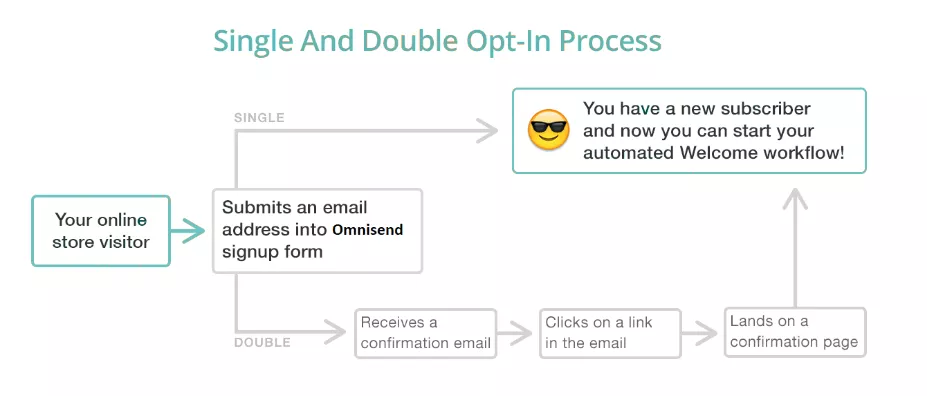
- Double opt-ins: When you require your subscribers to confirm their email address after signing up, you catch typos and fake accounts that can hurt your reputation later on.
- Email verification tools: You can use these tools to check if your list contains fake or invalid addresses before you hit send.
- Removing hard bounces immediately: Once you notice a hard bounce, remove the contact from your list as fast as possible to prevent it from hurting your deliverability.
- Sunsetting inactive contacts: This strategy will gradually remove subscribers who stop engaging with your brand, preventing them from becoming bounces down the road.
- Regular list cleaning: Set up periodic list checks so you always have a clean and engaged audience to work with instead of wasting time and budget on dead accounts.
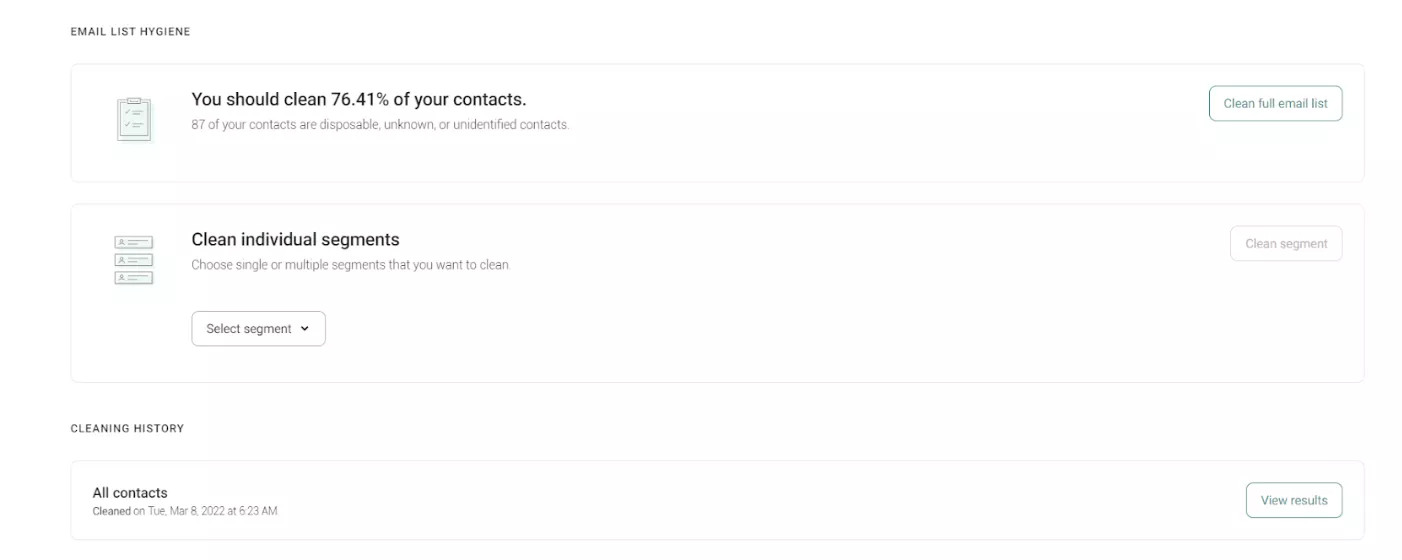
Using double opt-in email verification and automated list cleaning tools, like those available in Omnisend, helps prevent invalid addresses from entering your campaigns in the first place.
Sending practices
Your overall sending strategy is a big factor that influences how mail servers treat your messages. If you want to have a strong sender reputation, you need to define a predictive sending pattern and stick to safe campaign habits.
These strategies will help you maintain a steady delivery rate:
- Warm up for new domains/IPs: If you’re just starting out with a new store, you need to warm up the domain and send in gradually increasing volumes instead of just blasting your very first campaign to 10,000 contacts.
- Define consistent sending volumes: Erratic sending patterns can cause mail providers to flag your activity as suspicious, so it’s best to define a routine and stick with it.
- Avoid sudden list uploads: You’d be safer if you uploaded your contacts in smaller fragments instead of one massive list. Also, don’t message them all at once after doing so.
- Segment engaged vs. inactive subscribers: Segmenting your audience is the key to maintaining a highly active and engaged customer base, and it’s also a good signal for mail providers.
Technical authentication
Mail servers need proof that you’re exactly who you claim to be. If your infrastructure lacks the proper digital signatures, providers will block your messages to protect their users.
Here’s the technical setup you need to have in place:
- Proper SPF setup: It authorizes specific IP addresses and connects them to a domain so you send emails from a validated and authenticated sender
- DKIM signing: It adds a cryptographic signature to your sent messages, which proves they haven’t been meddled with since you’ve clicked “send”
- DMARC enforcement: It provides specific instructions to receiving servers on how to handle emails that fail authentication
- Reverse DNS configuration: It verifies that your IP address matches your domain name before accepting your mail
Staying compliant with these authentication protocols ensures receiving servers view your domain as a credible, secure source.
Monitoring and automation
Managing bounces shouldn’t be a manual chore, nor should it require your continuous attention. Instead, you can rely on automated systems that give you ongoing control over your deliverability without taking up hours of your time.
Focus on setting up these automated protection measures:
- Monitoring bounce rate thresholds: Track your bounce rates automatically and receive alerts the moment your campaigns approach the warning mark so you can fix them before the situation gets worse
- Automatic suppression lists: Suppression lists ensure that you won’t accidentally send to the same dead address again, and automating the addition of hard bounces to these lists is a smart move to make
- Soft bounce retry logic: Your email marketing platform will most likely have this on by default, so you won’t need to configure any settings for this one in that case
- Feedback loop (FBL) usage: You can connect with ISP feedback loops to automatically process spam complaints and remove subscribers who are no longer happy with receiving messages from you
- Regular deliverability audits: Schedule automated reports to review your overall sender health and identify potential risks early on
Conclusion
Email bounces are far from harmless. They directly hurt your deliverability and chip away at your sender reputation with every failed delivery.
To protect your future campaigns, make sure you take these essential steps:
- Monitor your bounce rates closely
- Remove hard bounces immediately
- Maintain strict list hygiene
- Set up your authentication protocols properly
Staying on top of these tasks does more than just lower a metric. It also leads to better inbox placement, higher subscriber engagement, and a stronger sender reputation. Over time, this guarantees long-term deliverability health for your business.
If you want to see exactly where your sender health stands, try auditing your deliverability with Omnisend. Our tools help you catch issues early so your messages always reach the right people.
Quick sign up | No credit card required