
 Omnisend AI


 OFFER
OFFER








Drive sales on autopilot with ecommerce-focused features
See Features
Shopify discount popups can effectively boost email signups and sales, but they must be used strategically to avoid annoying visitors and harming profit margins.
The success of discount popups hinges on timing, targeting, and the relevance of the offer, with top-performing stores achieving conversion rates of 3.5% to 5%+.
Integrating tools like Omnisend allows merchants to automate follow-up communications, enhancing the customer journey and maximizing the long-term value of each popup interaction.
To maintain profitability while using discount popups, consider offers that protect margins, such as free shipping or tiered discounts, and avoid excessive promotions that could devalue your brand.
A Shopify discount popup may seem simple, but it sparks a strong debate among store owners. Some say it drives email signups and instant purchases, while others worry it interrupts visitors or eats into profit margins.
With rising customer acquisition costs, low signup rates, and uncertainty about offering discounts, it’s not uncommon to be skeptical or confused about the effectiveness of popups.
This guide will uncover whether discount popups are effective and when they negatively impact performance. You’ll also learn how to create a Shopify discount popup and connect it to Omnisend’s integrated automations to build a complete customer journey.
Finally, we’ll explore the top tools to consider and show you how to turn your popup into an automated revenue engine, with integrated email and SMS flows.
Quick sign up | No credit card required
What is a Shopify discount popup?
A Shopify discount popup is a targeted message that appears on your store’s website. It offers an incentive in exchange for a visitor’s email address or phone number. Specifically, a Shopify popup discount window is the on-screen box that presents the offer and collects contact details.
Ecommerce brands use discount popups to grow their email lists, increase conversions, reduce cart abandonment, and collect customer data for future marketing.
Common use cases include:
- Welcome popups
- Exit-intent popups
- Cart-based popups
- Scroll or timed popups
However, Shopify itself doesn’t offer an advanced built-in discount popup builder. Many merchants use apps like Omnisend to design high-converting Shopify discount popups. This tool also allows you to deliver discount codes and send automated follow-up emails and SMS messages from a unified dashboard.
This integration turns a simple interaction into a long-term relationship that can bring repeat sales and higher ROI.
How a Shopify discount popup works
When a visitor lands on your website, the Shopify discount popup triggers based on rules that you set. Common triggers include:
- Once a page loads
- After a set time on site
- Exit-intent (when the visitor moves the cursor towards the X button)
- After scrolling a certain percentage of the page
- When the cart value reaches a set amount
After choosing your trigger, the popup follows a simple conversion path. Here’s an example of a basic flow:
- A visitor lands on your store
- Your Shopify discount popup triggers when the customer meets the set conditions
- The visitor enters their email or phone number
- They receive a Shopify discount code instantly
- Your email or SMS tool sends follow-up messages automatically
Types of discount popups
There are many versions of a Shopify discount popup, depending on your goal. Here are the most common types:
- Welcome popups: Shown to first-time visitors. They usually offer deals like “10% off the first order” or “free shipping” to encourage purchases.
- Exit-intent popups: Appear when a visitor wants to leave the site. They’re great for reducing bounce rates and typically offer “last chance” discounts.
- Cart-based popups: Trigger when a cart hits a specific value. They’re ideal for increasing order value and offer incentives like “Spend $50 and get free shipping.”
- Scroll or timed popups: Show after a visitor engages with your content. They’re best for content-heavy stores, offering discounts in exchange for email signups.
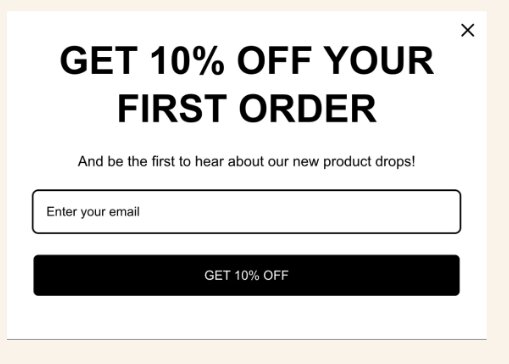
Here’s an example of a clean popup discount from Omnisend with a clear offer, email fields, and a prominent call to action:
Do Shopify discount popups really work? Pros, cons, and benchmarks
A Shopify discount popup can help you increase signups and sales. However, it can also reduce your margins and annoy visitors when overused. The key is striking the ideal balance with great timing, strong targeting, and the right offer.
Shopify discount popup pros
- Quicker email and SMS list growth
- Immediate revenue from first-time buyers
- Better data for segmentation and targeting
- Increased repeat sales through automated follow-ups
Shopify discount popup cons
- Promotion fatigue due to excessive discounting
- Lower profit margins
- Annoyed visitors from poor popup timing
- Reduced premium brand perception
Conversion rate and revenue impact
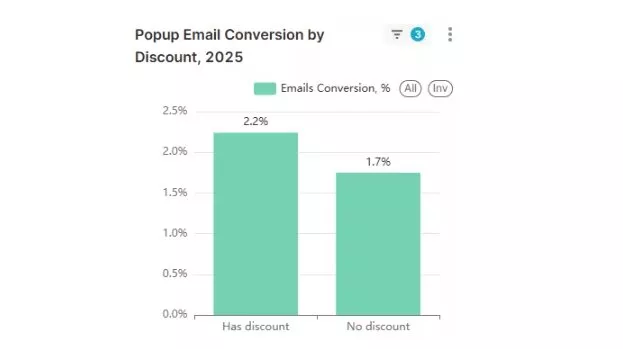
Omnisend’s recent data shows that the average email signup popup conversion rate was 2.1% in 2025. Top-performing stores see 3.5%–5%+ in conversion rates. If you’re getting less than 1.5%, your offer might be weak, or your timing could be off.
Popups with discounts showed a 2.2% conversion rate, while those without had a 1.7% conversion rate, as illustrated below:
A study by Wisepops also found that popup conversion rates varied across industries:
- Ecommerce: 6.88%
- Media: 3.7%
- Education: 2.4%
- B2B: 2.01%
An online clothing store added a 10% off Shopify discount popup that appears on exit intent. Within 30 days, email signups increased by 38%, and first-time purchases rose by 12%.
When discount popups hurt your brand or margins
A Shopify discount popup can backfire if you promote it aggressively. Here’s what causes problems:
- Showing it on every page
- Displaying it as soon as a visitor lands on your website
- Offering huge discounts all the time
- Training customers to “wait for a coupon”
- Stacking discounts on already thin margins
For example, if you offer 20% off sitewide all year, shoppers may never buy at full price. Luxury brands get affected even more because offering constant discounts can weaken premium positioning.
What Shopify merchants say (community opinions)
Community discussions on Reddit show mixed opinions about popups.
One store owner shared: “The pop-up can be annoying, but depending on the design: A modal pop-up after 3 seconds is really annoying. A small pop-up at the bottom of the screen I think is better.” – DeepWork21
Tools like Omnisend help optimize triggers, segment visitors, and automate follow-ups. It helps your Shopify discount popup feel helpful, rather than pushy, while driving maximum ROI.
How to create a Shopify discount popup step-by-step
Designing a high-converting Shopify discount popup requires a strategic process.
Here’s a step-by-step guide on how to add a popup discount on Shopify.
- Define your goal
- Choose your offer
- Target the right audience
- Connect popup app to Shopify
- Create your discount code in Shopify
- Build your popup
- Set triggers and targeting
- Set the success message for automated follow-ups
- Test and publish
Before you start: Goals, offer, and audience
First, decide who you’re targeting and what you want to achieve with your Shopify discount popup. Skipping this step means risking offering an irrelevant discount.
1. Define your goal
Pick a clear objective for your Shopify popup. Do you want to:
- Grow your email list?
- Increase first-time purchases?
- Maximize average order value?
- Recover abandoned carts?
- Improve overall ROI?
Make your goal specific and measurable. Instead of “I want more sales,” say, “I want to increase email signups by 20% in 60 days.”
2. Choose your offer
Your Shopify discount popup offer should provide value while protecting your margins. Here are common options:
- 10% off first order
- Free shipping
- Free gift with purchase
- Tiered discount (10% off $50+, 15% off $100+, etc.)
- Limited-time code for urgency
If you sell high-margin products, a percentage discount may be ideal. However, if your margins are tight, consider offering free shipping or bonus items instead.
3. Target the right audience
You shouldn’t provide the same offer to every visitor. Depending on your goal, you can target:
- New visitors only
- Returning customers
- Visitors who scroll 50% down the page
- People who are about to exit
- Shoppers with items in their carts
For example, you can show a welcome Shopify discount popup only to first-time visitors. The more relevant your Shopify discount popup is, the less intrusive it becomes.
Creating a Shopify discount popup with Omnisend
Omnisend is an intuitive Shopify popup builder for discount codes that also runs your email and SMS flows.
Here’s how you can use it to create a high-performing Shopify discount popup.
4. Connect Omnisend to Shopify
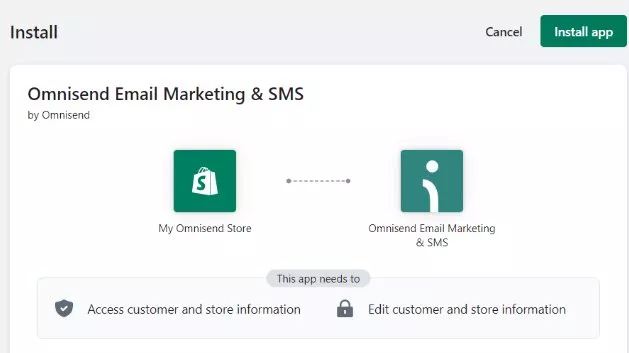
- Install Omnisend from the Shopify App Store
- Approve permissions
- Allow automatic sync of products, customers, and discount codes
5. Create your discount code in Shopify
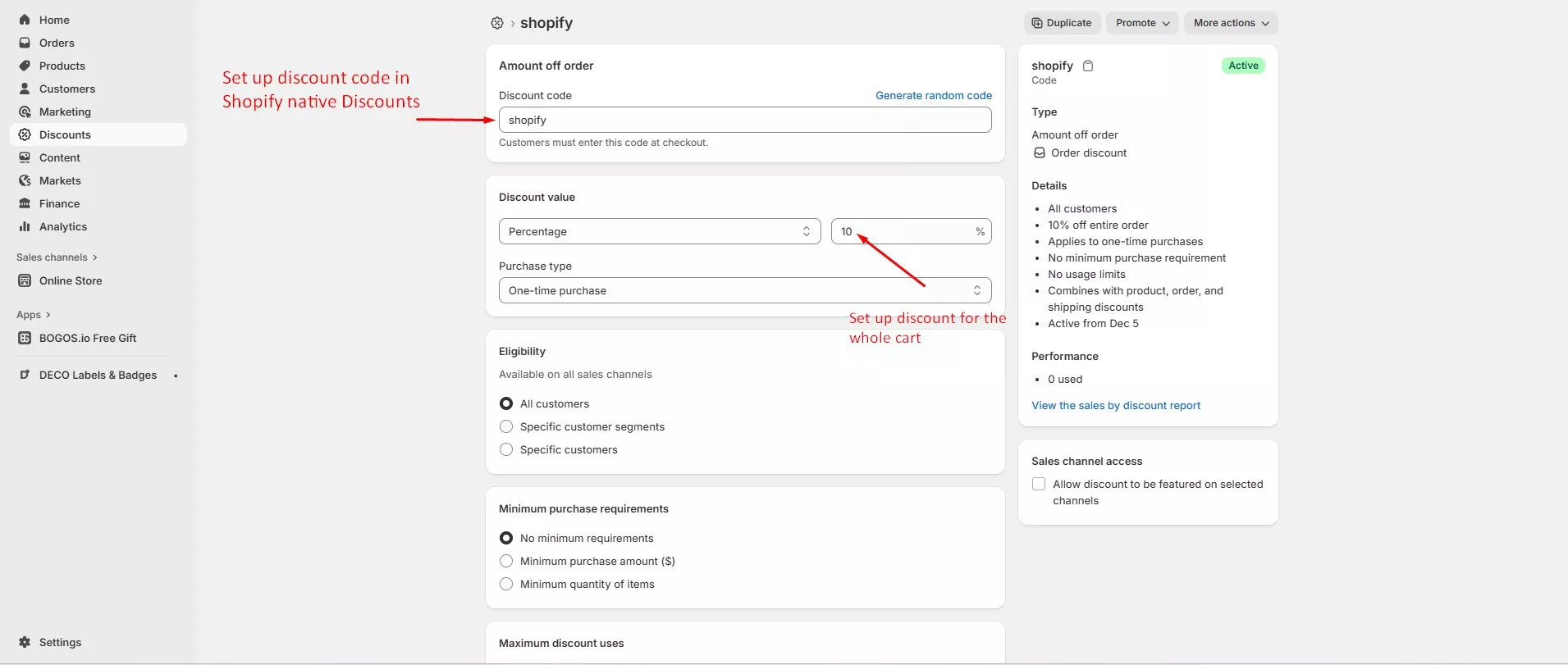
- Go to your Shopify Admin
- Click Discounts
- Select Create discount code
- Under Discount value, choose Percentage, Fixed amount, or Free shipping
- Set usage limits and expiration date
- Click Save
6. Build your popup in Omnisend
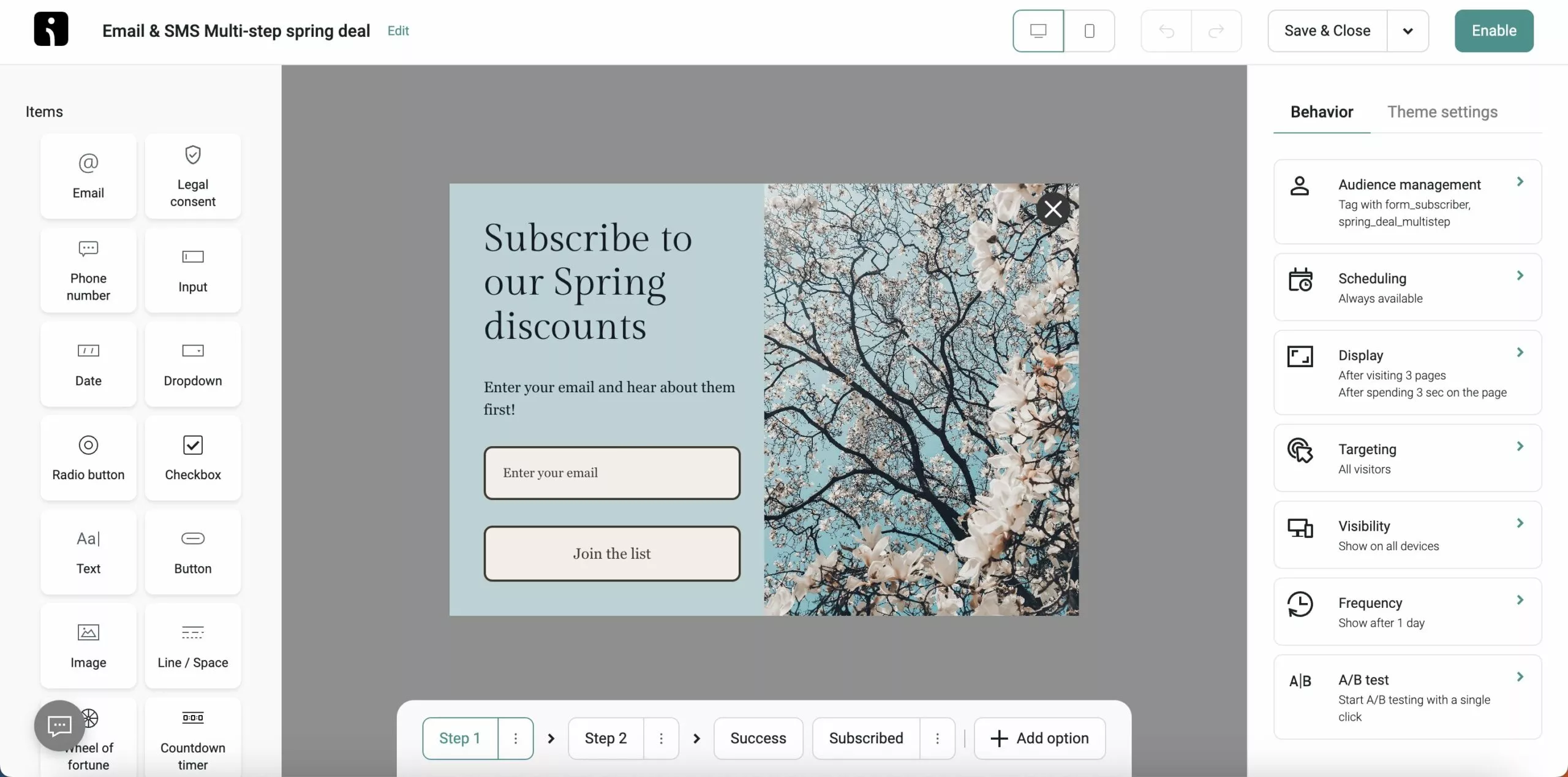
- Now, open Omnisend’s Forms section and click Create form
- Navigate to Style > Popup
- Choose a discount-focused template
- Customize your popup’s headline, description, email/SMS fields, and CTA button
7. Set triggers and targeting
In the Display settings, choose when your popup appears, such as:
- Exit intent (great for retargeting abandoning visitors)
- Time on site (six to 10 seconds works well)
- Scroll percentage
- Cart value trigger
8. Set the success message for automated follow-ups
Create a success email and welcome sequence follow-up after a visitor signs up.
9. Test and publish
Before going live:
- Enter your own email
- Confirm the discount works
- Check the mobile display and loading speed
- Once everything works, click Enable form to publish
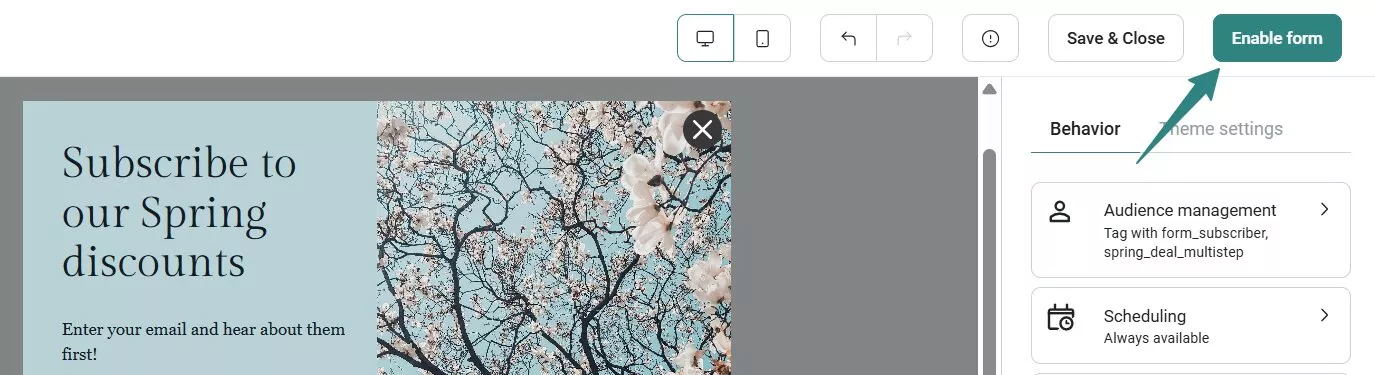
Since Omnisend combines design and automation, your Shopify discount popup drives long-term value, not just one sale. Plus, you get ecommerce-focused features and automated follow-up flows even on its free plan.
Other ways to add a discount popup in Shopify (theme and app store options)
You can also add a Shopify discount popup using:
1. Theme-based popups
Some Shopify themes include basic popup features but lack advanced targeting, SMS capture, and deep automation capabilities.
2. Other apps in the Shopify App Store
You can find many popup tools in the Shopify App Store. However, most work only as design tools without strong ecommerce automation and email/SMS integration.
You only get a popup on your site, which means you have to juggle multiple tools to create a complete marketing journey. Omnisend offers more advanced features and marketing integrations in one place without too much complexity.
Best Shopify discount popup apps and tools
Choosing the right Shopify discount code app can be overwhelming with so many options in the App Store. The key is selecting a tool that aligns with your store’s needs and delivers long-term value.
What to look for in a Shopify discount code app
Before you install any app, evaluate whether it has these key features:
- Deep Shopify integration: Your app should sync with products, customer data, and discount codes automatically
- Automatic discount code syncing: The tool should generate and apply unique codes that match your Shopify settings
- Email and SMS capture: A good Shopify discount popup should collect both email and phone numbers so you can follow up
- Built-in automation and segmentation: After signup, your tool should trigger welcome flows, abandoned cart reminders, and targeted offers automatically
- Flexible pricing and full feature access: Some apps lock key features behind expensive plans — look for tools that offer essential features even in free plans
Omnisend vs standalone popup apps
Unlike other tools, Omnisend offers more than just popups. It integrates seamlessly with Shopify and combines popups with email, SMS, and push automation in one dashboard, as shown below:
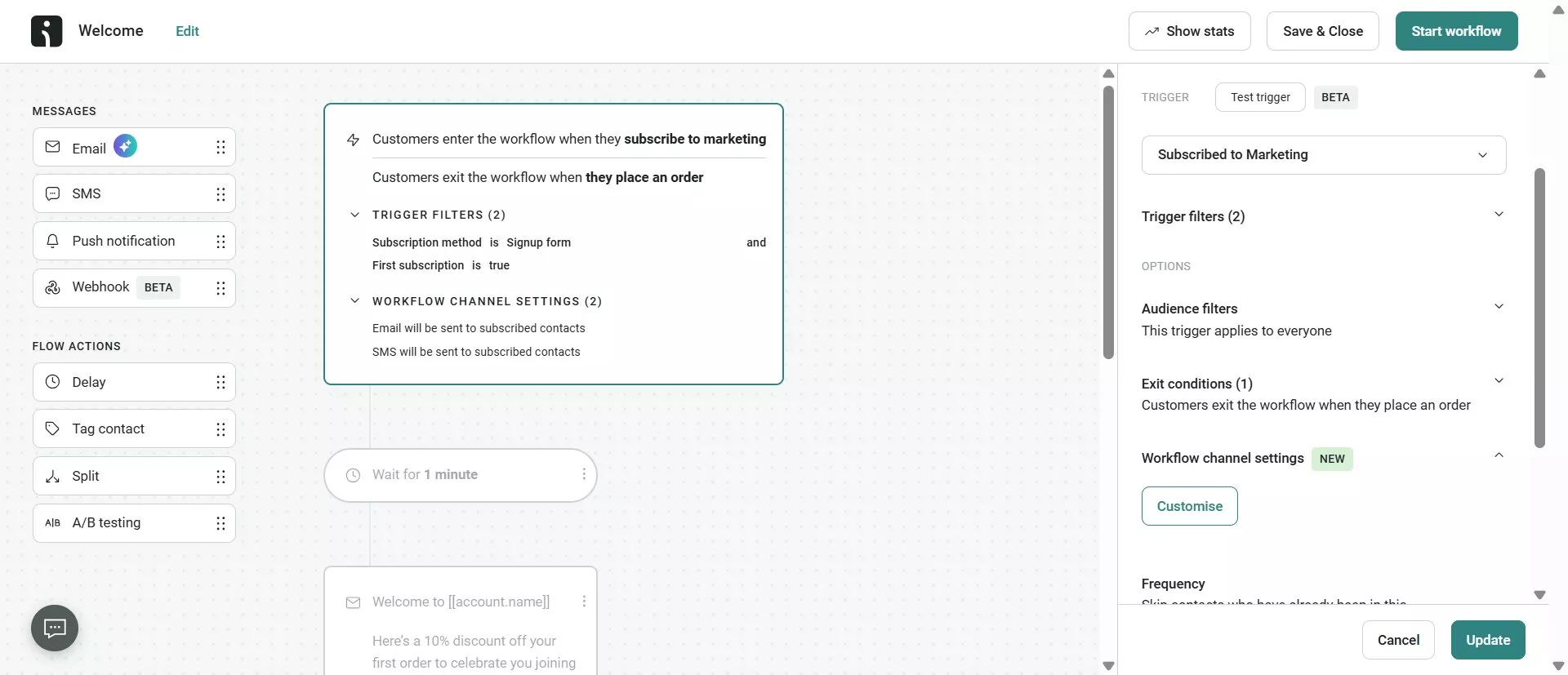
You can build your Shopify discount popup, collect contacts, and trigger campaigns without switching tools. If you sell internationally, Omnisend offers global SMS support in 200+ countries, which other tools lack.
Omnisend also offers a free plan that includes essential ecommerce-focused features. Brands using it report an average ROI of $79 for every $1 spent.
An Omnisend user shares: “I appreciate the automation features and the pop-up campaigns. The creative user interface stands out, and I find it very useful that I can connect multiple apps to my campaigns.” – Songezo M.
Quick overview of other popular Shopify discount code popup tools
You’ll also find several well-known apps in the Shopify App Store:
- Privy: Focuses on popups and email capture with limited automation
- OptiMonk: Great for advanced popup targeting and personalization
- Rivo: Offers basic Shopify discount popups without the extra marketing features
Here’s a simple app comparison:
| Feature | Omnisend | Privy | OptiMonk |
|---|---|---|---|
| Shopify integration | Deep ecommerce sync (products, orders, customers) | Basic | Basic |
| Email automation | Built-in advanced flows | Basic sequences | Requires a third-party tool |
| SMS marketing | Global SMS support | Limited regions | Not a core feature |
| ROI tracking | Full lifecycle revenue tracking | Signup-focused | Onsite conversion |
Most of these tools are ideal if you only need popups. However, if you want your Shopify discount popup to drive long-term growth, an all-in-one platform like Omnisend is a better option. It gives you more control, deeper automation, and stronger ROI.
Smart discount strategies for your Shopify popup
Your Shopify discount popup should drive conversions while protecting your margins. That’s why you need offers that match audience intent and product pricing.
Choosing the right incentive (percentage vs fixed vs free shipping)
Incentives appeal to various audience types and price points. Here are the most common ones:
Percentage discounts (10%, 15%, 20%)
Pros
- Attractive and straightforward
- Great for mid to high-priced products
Cons
- Can shrink margins if you go too high
Best for: Apparel, beauty, and lifestyle brands
Fixed-amount discounts ($10 off, $20 off)
Pros
- Offers clear value
- Easier to control profit impact
Cons
- Less exciting on higher-priced items
Best for: Stores with lower-priced products
Free shipping or non-monetary perks
Pros
- Offers value without reducing profit margins
- Protects your brand’s value perception
Cons
- May not be attractive enough on its own
Best for: Luxury stores with premium brand positioning
Here’s a brief comparison of the top discount strategies:
| Discount type | Margin impact | Best use case |
|---|---|---|
| 10%–20% off | Moderate | Welcome offers |
| $10–$20 off | Controlled | Orders above a set value |
| Free shipping and non-monetary perks | Low | First-time purchases and product launches |
Expert tip: Always align your discount with average order value, profit margin, and long-term growth goals. A good offer should sustainably increase revenue, not just temporary sales.
Protecting margins while using discounts
You can maintain profitability while using a Shopify discount popup by:
- Setting minimum order values like “15% off orders above $100”
- Add caps to percentage discounts (one per customer)
- Use limited-time offers to create urgency
- Exclude low-margin products
For example, a 50% off discount may be high, but you can still apply it strategically. Instead of setting it as a default, use it for clearance sales or seasonal resets.
Discount ideas for first-time vs returning customers
Match your Shopify discount popup to the different stages of the customer journey below:
First-time customers:
- 10%–15% off first purchase
- Free shipping on first order
- Early access to new arrivals
Returning customers:
- Tiered rewards (Spend $100, get $20 off)
- Loyalty-only early sales
- Personalized product bundles
Tools like Omnisend let you segment first-time buyers and repeat customers. This way, your Shopify discount popup shows the right offer to the intended person.
Best practices for Shopify popup design, timing, and user experience
A well-designed Shopify discount popup that appears at the right time and respects customer privacy creates a smooth shopping experience. It also increases conversions, builds trust, and protects your brand’s reputation.
Here are the best practices to follow.
Popup layout, copy, and visuals that convert
To make your Shopify discount popup stand out and grab attention, keep the design clean and the message simple.
Dos:
- Use a strong, benefit-driven headline like “Get 15% off your first order today”
- Show the discount clearly
- Keep form fields minimal (email only or email + phone number)
- Use one clear, contrasting CTA button like “Unlock my 15% off”
- Add large tap-friendly buttons for smaller mobile screens
- Test your popup on mobile before going live
Don’ts:
- Long paragraphs
- Too many form fields
- Cluttered backgrounds that distract from the offer
Our data shows that popups with two to three form fields had a 2.1% conversion rate, while those with more than five had only a 1.4% conversion rate.
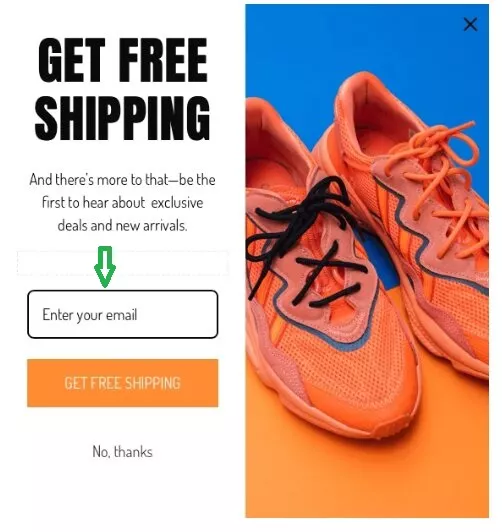
This Omnisend free shipping popup includes a clear headline, visible offer, one email capture field, and prominent CTA:
Targeting, triggers, and frequency caps
Timing is just as important as design. Showing a Shopify discount popup immediately as soon as a page loads risks interrupting the visitor before they even see your products.
Here are some effective starting triggers:
- Exit-intent popups for desktop users
- Six to 10-second time delay for product pages
- 50% scroll on blog pages
Display and timing optimization tips:
- Show once per session
- Hide after signup
- Limit repeat display for seven to 14 days
- Set frequency caps to prevent discount fatigue
Tools like Omnisend let you control triggers and frequency caps. You can fine-tune who sees your Shopify discount popup and how often. This prevents the “annoying popup” problem many shoppers complain about.
Compliance, privacy, and accessibility
Respecting your customers’ privacy while maintaining accessibility makes it more likely for shoppers to share their details willingly.
Make sure you:
- Add a consent checkbox for GDPR or CCPA compliance
- Link to your privacy policy clearly
- Explain how you use customer data
- Provide easy unsubscribe options
- Use readable fonts and high contrast for accessibility
- Add large tap-friendly buttons for smaller mobile screens
Omnisend lets you refine your Shopify discount popup design to improve accessibility and ensure compliance with privacy policies.
Connecting your discount popup to email and SMS automation in Omnisend
Your Shopify discount popup is just the starting point. Real growth happens after someone signs up. When you automate your popup discount Shopify campaign, you turn one email capture into a full customer journey.
Building a high-performing welcome flow
Many platforms prioritize email capture. After someone signs up, they just send the Shopify coupon code and stop there.
Omnisend stands out by guiding visitors toward a purchase using automated welcome workflows.
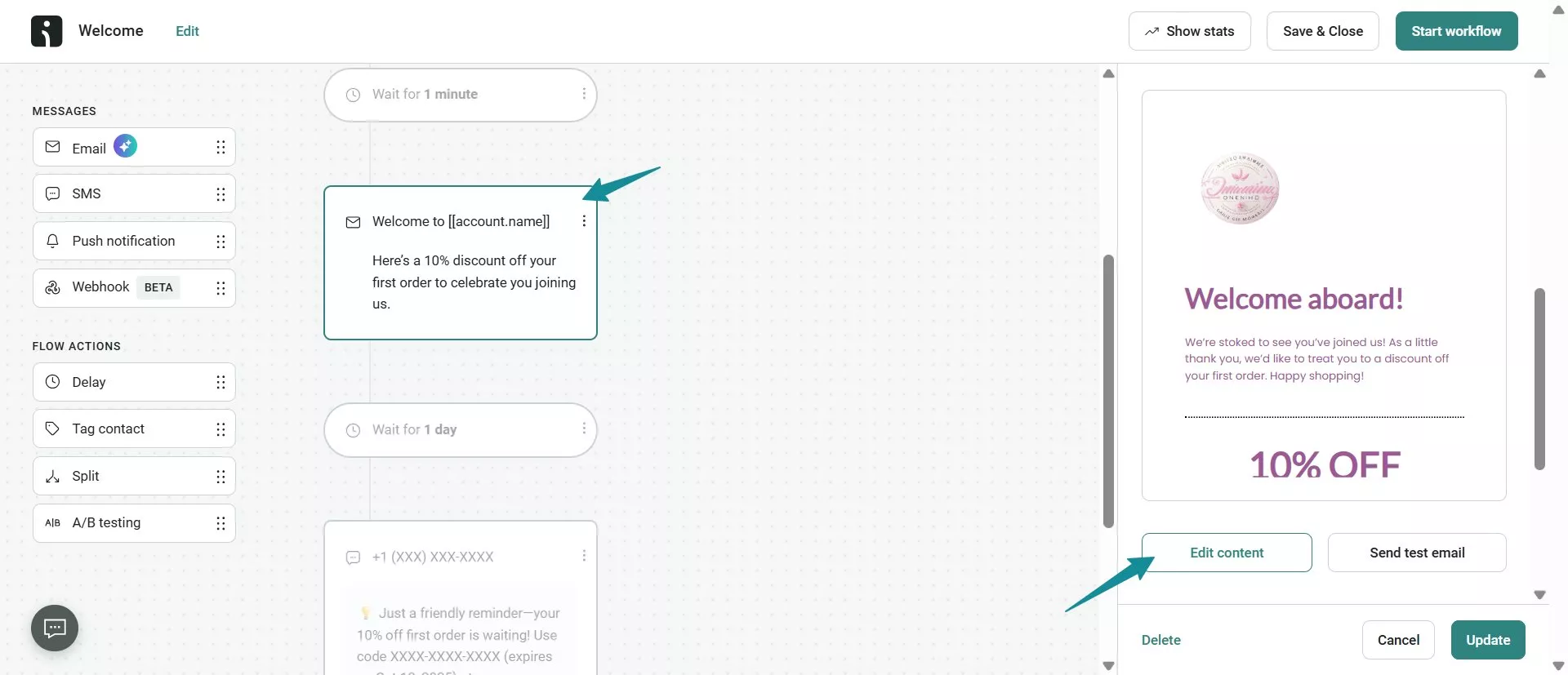
Here’s a simple welcome flow you can build:
- Email one (immediately): Deliver the discount code
- SMS (one to two hours later): Quick reminder with the code
- Email two (day two or three): Share tips on how to use your products
- Email three (day four or five): Build trust with reviews and testimonials
- Email four (day six or seven): Recommend products based on browsing behavior
Here’s a great example of a welcome automation workflow triggered by a discount popup:
Segmenting subscribers based on discount behavior
Visitors may sign up through your Shopify discount popup but take different actions. You can use Omnisend to split these people into different groups so you can send them relevant messages.
Here are key segments to create:
- Used first discount: Upsell or cross-sell complementary products
- Didn’t use the discount: Send a reminder or smaller follow-up incentive
- Clicked but didn’t buy: Share social proof or FAQs
Using email and global SMS together
While email is great for nurturing subscribers, SMS drives urgency, yielding a 98% open rate. By combining both, you reach more customers and drive engagement across devices.
Omnisend supports global SMS, helping you expand your reach across regions. If a customer misses an email, your SMS reminder keeps the offer visible.
Measuring and optimizing your Shopify popup performance
After launching your Shopify discount popup, you need to know whether it’s working. Tracking the right metrics reveals insights into performance and determines areas that need improvement.
Here’s how to monitor and refine your popup results.
Key metrics to track and realistic benchmarks
Popup view rate
This is the percentage of visitors who see your Shopify discount popup.
- Average range: 60%–90%
- Optimized range: 100%
Submission rate (conversion rate)
This tracks the percentage of viewers who sign up.
- Average: 1.5%–3%
- Optimized: 5% and higher
Discount redemption rate
With this metric, you can see the percentage of subscribers who use your Shopify discount popup code.
- Average: 1%–15%
- Optimized: 20% and higher
Revenue per subscriber
This is how much revenue each popup signup generates over time.
- Average: 20%–40%
- Optimized: 50% and higher
Unsubscribe or spam rate
This tracks the percentage of subscribers who unsubscribe from your emails or flag them as spam. If this rises above 0.3%–0.5%, your targeting or messaging may need improvement.
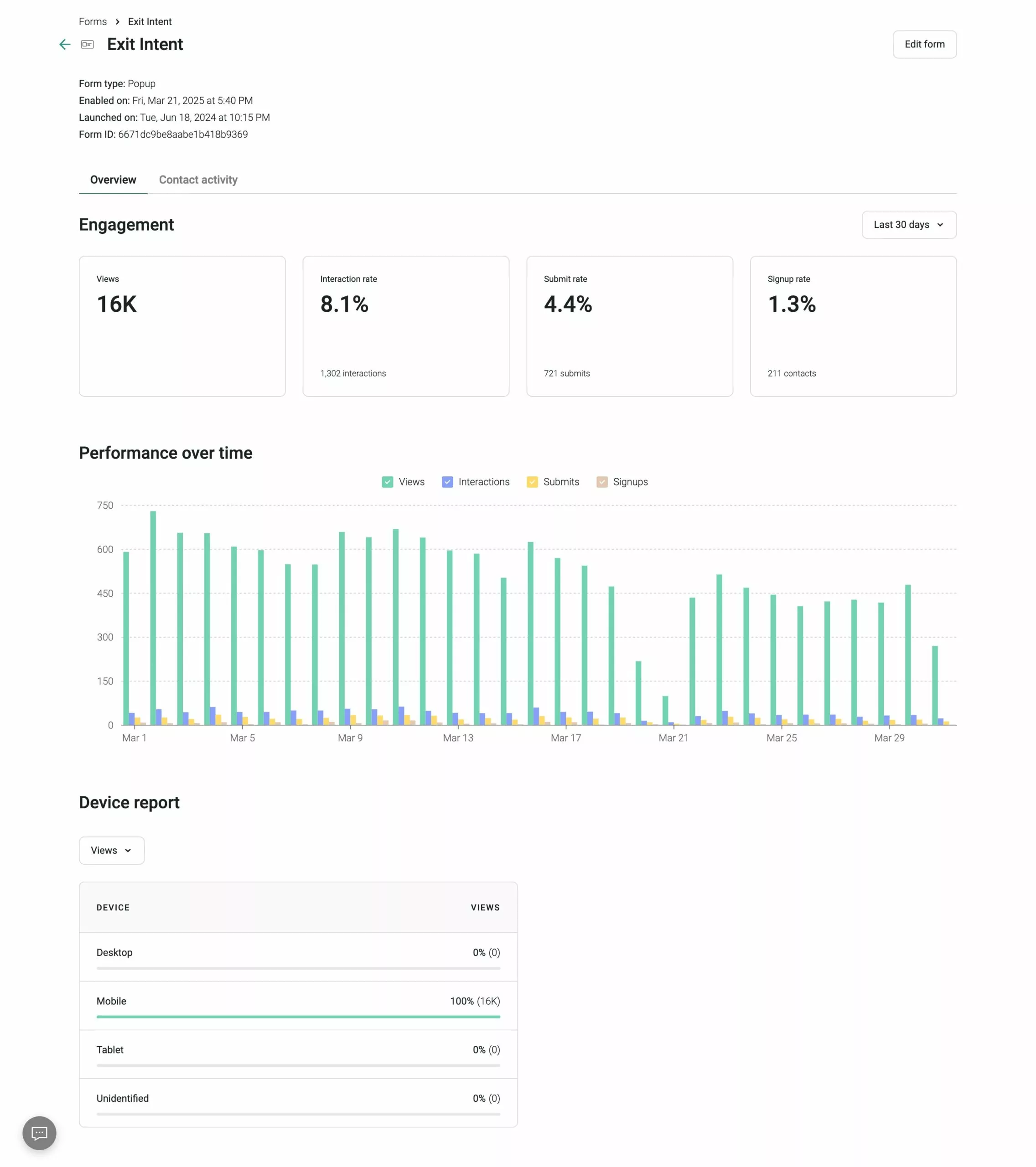
With Omnisend, you can see popup performance and automation revenue in one dashboard. This unified view reveals which Shopify discount popup drives significant sales.
Here’s an example of Omnisend’s dashboard showing popup performance over time:
A/B tests to run on your Shopify popup discount window
Show different versions of your Shopify discount popup to small groups to see which one resonates best. Start with small, regular tests instead of making big changes at once.
Here are some test ideas to try:
- 10% off vs free shipping
- “Get my code” vs “unlock my discount”
- Exit-intent vs 10-second delay trigger
- Email only vs email + SMS field
- Product image vs no image
When and how to refresh or pause your popup
If your Shopify discount popup performance declines over time, it may be time to refresh or pause it.
Here are some signs to watch out for:
- Dropping submission rates for three to four weeks
- Declining redemption rate
- Decreasing revenue from popup subscribers
- Increasing unsubscribe rates
- Returning visitors ignoring the popup
To improve results, refresh the headline, update the design, adjust the offer, or test a new trigger. You can also temporarily pause your popup during major site promotions.
Conclusion
When used right, a Shopify discount popup can drive significant growth for your ecommerce store. Success comes from choosing a relevant offer, designing it correctly, timing it well, and connecting it to automation workflows.
However, setting it up once and forgetting about it may not produce significant results. You should regularly test headlines, adjust triggers, refine your offer, and monitor key metrics to discover what your audience loves most.
Integrated platforms like Omnisend help you transform popups into a coordinated revenue engine across email and SMS, ensuring sustainable growth.
Quick sign up | No credit card required
FAQs
The best Shopify discount popup app depends on your goals. If you want more than just a popup, a tool like Omnisend supports follow-up marketing through email and SMS automations.
Here’s how to create a popup discount on Shopify:
— Install a Shopify popup app like Omnisend from the App Store
— Connect the app to your store
— Create your offer
— Design your Shopify discount popup
— Set up triggers and audience targeting
— Create the success message automation flow
— Test on desktop and mobile
— Publish
To disable your popup, go to your Shopify discount popup app dashboard and turn off the campaign. If your theme includes a built-in popup, disable it in theme settings. Test your site afterward to confirm it no longer appears.
Yes, Shopify lets you create discount codes in your admin panel under Discounts. You can set percentage, fixed amount, or free shipping offers.
Use a Shopify popup builder for discount codes to edit colors, text, images, timing, and form fields. Tools like Omnisend also let you segment audiences and control timing for better targeting.

TABLE OF CONTENTS
TABLE OF CONTENTS


No fluff, no spam, no corporate filler. Just a friendly letter, twice a month.