Omnisend AI


 OFFER
OFFER










Adding SMS keywords to your text messaging tool lets you segment opt-ins and opt-outs per form, campaign, and flow for appropriate targeting and compliance.
Keywords matter to your business, whether you’re an ecommerce store or a lawyer, because they take what would be a generic subscriber list and make it actionable with defined groups. You can target, measure, and grow those groups.
A classic example is your VIPs and deal hunters. You can use the keyword “DEAL” during discounted sales events when collecting SMS subscribers, and switch the wording to “VIP” for any browsers of more high-valued, full-price products.
This article is a practical ecommerce guide to SMS keywords with additional insights for law and other verticals. We’ll demystify compliance, segments, and flows to help you use keywords in ways that grow your list and maximize ROI.
Quick sign up | No credit card required
What are SMS keywords?
Customers who reply to your texts can trigger actions in your SMS tool, provided you create keywords that define those actions. You’ll use them to manage your audience’s preferences and deliver appropriate SMS marketing.
Definition of SMS keywords
An SMS keyword is a word or short phrase that a customer replies with or texts to your number to trigger an action. That action could be subscribing to your list, opting out, requesting a discount code, or anything else you configure in your SMS tool.
You’ll also see them called text keywords, SMS words, or SMS terms. They are the same thing.
SMS keywords in practice
The mechanics are straightforward. You promote a keyword like JOIN or DEALS across your marketing channels. A customer texts it to your number. Your SMS tool recognizes the keyword and does whatever you’ve told it to do, such as:
- Adding customers who respond to a segment, such as deal hunters or back-in-stock subscribers
- Sending a welcome text to new opt-ins
- Triggering an automated text with information
- Processing an opt-out or changing another customer preference
SMS keyword types and use cases
There are four purposes for your SMS keywords:
- Branded, using your company or product name, such as NIKE or HILTON
- Generic, such as JOIN, DEALS, or VIP
- Action-oriented, prompting a response like ORDER or BOOK
- Campaign-oriented, tied to a promotion (for instance, SUMMER25)
Our SMS keyword guide covers the ecommerce and marketing use cases, but SMS keywords work the same way for service businesses like law firms, healthcare, and hospitality.
“SMS keywords are going to help you collect opt-ins, opt-outs, support, promotion, and information requests. Your SMS tool will then handle the segmentation and automation actions you define for those keywords.”
— Iryna Shatalo, Lead of Product Knowledge Enablement at Omnisend
How SMS keywords work: Opt-ins, opt-outs, and compliance basics
The technical and regulatory aspects of SMS keywords are largely something handled by your SMS tool. Provided you use carrier-supported keywords for opt-ins and opt-outs, the verification and actions necessary to organize customers are not manual tasks on your part.
How they work in detail:
Message flow
When a customer texts a keyword to your number, here’s what happens:
- The message arrives at your SMS provider via the carrier network
- Your provider matches the text against your list of active keywords
- Your tool triggers the action you’ve assigned, such as an auto-reply or segment update
- No match results in your SMS tool sending a fallback message or ignoring the text and action entirely
This process works the same whether you’re using a short code (five to six-digit number), a long code (standard phone number), or a toll-free number.
Short codes handle high volumes and are common for large-scale SMS campaigns. Long codes suit conversational, two-way messaging.
Toll-free numbers sit somewhere in between and are popular with ecommerce brands running keyword campaigns alongside customer support.
Opt-in flows and confirmation messages
Your automated response to an opt-in should contain this information:
- Your brand name
- What type of messages will they receive
- Text frequency expectations, such as fortnightly
- Data rates and costs
- How to opt out of future messages
The Telephone Consumer Protection Act, shortened to TCPA, requires you to include the above opt-in messaging. Also, the CTIA guidelines, which carriers follow, recommend the same.
Opt-outs and HELP messages
Carriers reserve six keywords for opt-outs:
- STOP
- QUIT
- CANCEL
- END
- OPT-OUT
- UNSUBSCRIBE
Your SMS tool must recognize all of them and process the opt-out automatically. None are case-sensitive, which helps when subscribers don’t type them perfectly. Omnisend recognizes all these keywords and opts your customers out by default.
Something else Omnisend does is send a final confirmation message to customers, which you’re legally entitled to do, provided you don’t use promotional language. A few options:
- “Your unsubscribe is successful. We won’t send any more texts. Reply YES to opt back in at any time.”
- “Sad to see you go, but that’s the way it is. Reply JOIN to opt back in.”
Short code vs. long code vs. toll-free
Short code, long code, and toll-free are phone number types, each of which you can use within your SMS tool and let customers reply to with text keywords.
The table below explains their differences, pros, and cons:
| Short code | Long code | Toll-free | |
|---|---|---|---|
| What it looks like | Five to six digits (e.g. 12345) | Standard 10-digit phone number | 1-800 style number |
| Best for | High-volume bulk campaigns | Two-way conversations | Keyword campaigns with moderate volume |
| Cost | Most expensive | Cheapest | Mid-range |
| Approval process | Requires carrier approval | Minimal | Verification required, around five business days |
| Sending to USA contacts | Yes | Yes, with registration | Yes, once verified |
How to use keywords in SMS marketing
Your SMS keyword campaign needs a goal, a keyword, an incentive, a welcome flow, and somewhere to promote it. Here’s how to put that together:
- Sign up for an SMS tool with global coverage. Omnisend offers global SMS and unlimited access to all standard features on its Free Forever plan.
- Pick from increasing list growth, product launch opt-ins, flash sale subscriber growth, or audience segmentation for your goal.
- Pick your keyword. One word, easy to spell, impossible to confuse. DEALS, VIP, SALE, or something branded like NIKE25. Avoid anything your customers might misspell or mix up with a competitor.
- Match it to an incentive. A discount code, free shipping, early access, or exclusive content are good enough to grow your SMS list in most cases. You could use the words, “Text VIP20 to 12345 for 20% off your first order” in your marketing.
- Build your auto-reply. Deliver the incentive immediately. Include your brand name, message frequency, data rates, and opt-out instructions within 160 characters max.
- Link it to a welcome automation. Omnisend lets you build keyword-triggered SMS automations followed by an email series from a single keyword opt-in. New subscribers could receive your incentive by text and then an email the next day, as shown in this flow:
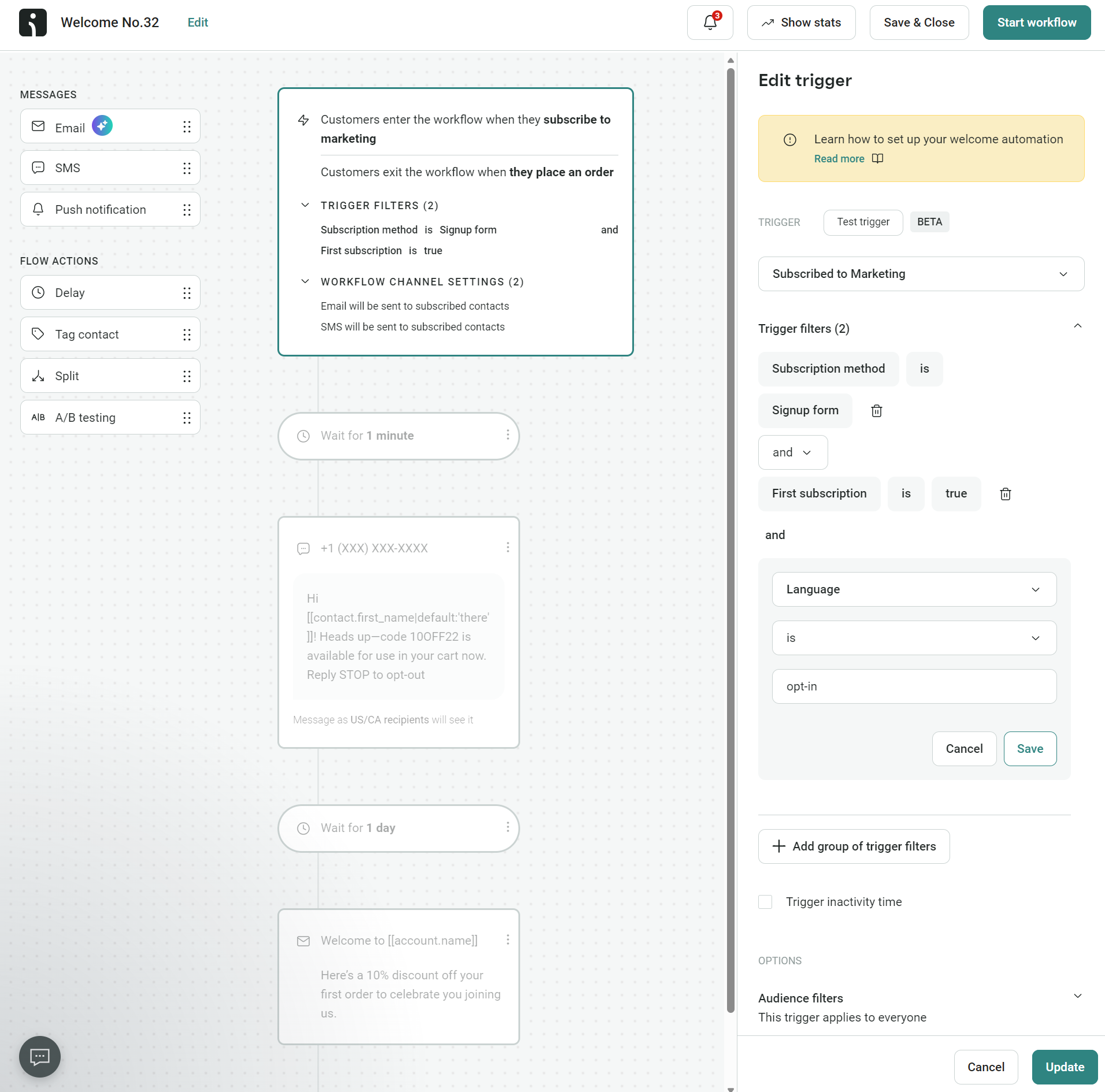
“Customers who opt-in to email and SMS should receive a welcome message on both channels. It’s good practice to send the SMS first and the email second because customers expect to receive a text message sooner. Your email can go into more detail about your brand, offers, and what customers can expect.”
— Desislava Zhivkova, CX Deliverability Team Lead at Omnisend
7. Publish your SMS keywords for marketing, where customers will see them. Channels to consider:
- Website banners. For instance, you could say, “Text ‘JOIN’ to 08891 to enter our competition to win (product)”
- Social media posts. Add your number and keywords to the bottom of all posts.
- Instagram marketing. Include your text keywords on the images you post, or add your keywords to your written post descriptions
- Competitions. Make SMS keywords part of your entry requirements
- Email footers. Suitable for customers who have opted into email but not SMS
- Paid social and PPC ads. Add your SMS keywords and number to your titles and text elements.
- On packing slips. You can also extend your text keywords and marketing language to thank-you cards and other prints
- On in-store receipts. Ask customers to enter their number and a keyword to receive a digital receipt.
8. Keep tabs on your keyword volume usage. Omnisend and other SMS tools track the SMS keywords customers use. You can then use your best-performing keywords in other campaigns to increase opt-ins
Quick sign up | No credit card required
Strategic SMS keyword ideas and examples for ecommerce
Generic keywords like JOIN and SUBSCRIBE get the job done, but they don’t tell you anything about why someone opted in. Strategic keywords segment your audience from the moment they text you, giving your automations better data to work with.
Acquisition keywords
These are for new subscribers who might have only just found your business. The keywords should be descriptive of the offer and encourage people to follow through. Here are some of the acquisition keywords you can use in your marketing:
- WELCOME. You don’t get any more descriptive than that. Your customers will know they are starting the conversation. Your reply: “Welcome to (brand). You’re now subscribed to offers. Get 15% off now. Use code 15OFF.”
- HELLO. An alternative to WELCOME, a bit more conversational. Your reply: “Hi there! You’re on the list, we’ll send updates every week.”
- NEW. Suitable for collection alerts and product notifications. Reply with this, “Thanks for subscribing. You’re on the list. We’ll notify you of all new product drops.”
Engagement keywords
Engagement keywords are for your existing subscribers. They might be at risk of churn, inactive, or regular clickers. In any case, your keywords can target time-sensitive promotions and product updates to create new opt-ins. Here are some keywords to use:
- FLASH. Ties directly to flash sales and creates urgency. Your reply: “Flash sale is live. 40% off everything for 24 hours only: (link).”
- RESTOCK. It lets customers sign up for back-in-stock alerts on sold-out products. Your reply: “Got it. We’ll text you the moment your item is back in stock.”
- DROP. Customers who want to know about new products before everyone else. Your reply: “New releases come to you first. Keep an eye on your texts.”
- EVENT. Give this one to customers who want in on launches or livestreams. Your reply: “Saved your spot. We’ll be in touch with everything you need.”
Retention keywords
Retention keywords reward loyalty and pull back customers who haven’t purchased recently. They should feel exclusive and personal.
- VIP. Your best customers deserve a separate lane. Your reply: “You’re on the VIP list. Expect early access and offers nobody else gets.”
- LOYALTY. For customers who’ll enroll themselves in your rewards program with a single text. Your reply: “Points are counting from now. Check your balance: (link).”
- COMEBACK. Promote this keyword to lapsed customers through email or paid ads. Your reply: “Been a while. 20% off your next order, on us: (code).”
Keywords for product categories
You can tailor SMS keywords to your industry and product categories. A simple example, changing DROP (which suits fashion) to LAUNCH (for SaaS). The table below shows how some of the most popular keywords fit different categories:
| Keyword | Category | Objective | Auto-reply |
|---|---|---|---|
| WELCOME | Any | Grow your list | "Thanks for subscribing, here’s 15% off your first order: (code)." |
| FLASH | Any | Accessing a time-sensitive discount or sale | "Our flash sale is live. You can get 40% off for 24 hours: (link)." |
| DROP | Fashion | Early access to collections and products | "All new drops will hit your phone first. Stay tuned." |
| RESTOCK | Beauty | Back-in-stock alerts for sold-out products | "We'll text you when it's back." |
| VIP | Any | Exclusive member offers | "You're on the VIP list. Expect offers nobody else gets." |
| COMEBACK | Any | Winback discount | "Been a while. 20% off your next order: (code)." |
| NEWIN | Fashion | Seasonal launches | "New season just landed. Browse first: (link)." |
| GLOW | Beauty | Skincare routine opt-in | "Skincare tips and restocks, straight to your phone." |
| PRICEWATCH | Electronics | Price-drop alerts | "We'll text you when the price drops on your item." |
| ROOMREDO | Home goods | Seasonal collection alerts | "Room refresh ideas and new arrivals coming your way." |
SMS keywords for different industries (including lawyers)
The keywords your customers text should be contextual to your industry when appropriate to build trust in your marketing. Here’s how to do just that:
Ecommerce vs. service business SMS keywords
SMS keywords help you segment customers and deliver appropriate messaging, whether you sell products, services, or a bit of both. The difference between text keywords for products and services is in what you’re asking customers to do.
For example:
- Your ecommerce store keywords are FLASH and DROP. A service business would use BOOK, CONSULT, or UPDATE instead. Both keywords ask customers to opt-in, but the ask and value proposition are both different.
Omnisend primarily handles SMS keywords for ecommerce but is also suitable for service businesses, including legal firms. You can use keywords for bookings, consultations, and more.
SMS keywords for lawyers
Lawyers use SMS keywords for qualifying leads and managing client communication, preferences, and consultations via automations. The keywords are always action-oriented, professional, and recognizable language. Examples include:
- CASE. For clients who want information about their case. Your reply: “Thank you for your text. One of our team will call you within an hour.”
- CONSULT. New clients and prospects will use this keyword to book a consultation. Your reply could be, “Request received, we will contact you within 24 hours to discuss your needs.”
- RIGHTS. An educational keyword that triggers an automated text with a link to information. A reply you can use: “Thank you for requesting information on your rights. Visit (link) for the complete info.”
SMS keywords for healthcare and other verticals
The table below shows how the lawyer SMS keywords above translate for different industries:
| Industry | Keyword | Purpose | Auto-reply |
|---|---|---|---|
| Legal | CASE | Case status request | "One of our team will call you within an hour." |
| Legal | CONSULT | Book a consultation | "Request received. We'll contact you within 24 hours." |
| Legal | RIGHTS | Request legal information | "Visit (link) for the complete info on your rights." |
| Healthcare | APPT | Request an appointment | "We'll text you back with available times within the hour." |
| Healthcare | REMIND | Opt-in to appointment reminders | "You're set. We'll text you 24 hours before every appointment." |
| Hospitality | TABLE | Join a restaurant waitlist | "You're on the list. We'll text when your table is ready." |
| Hospitality | CHECKIN | Digital hotel check-in | "Welcome. Your room is ready. Details: (link)." |
| Fitness | CLASS | Book a class or session | "Spot saved. We'll send a reminder the morning of." |
| Real estate | VIEWING | Request a property viewing | "An agent will be in touch today to arrange your viewing." |
Advanced strategies: Segmentation, automation, and unlimited keywords
Running one SMS keyword across every campaign limits your segmentation and automation capabilities. You won’t know who signed up for launches, sales, consultations, made a booking, or anything else you run.
Assigning different keywords to campaigns, product groups, and customer tiers makes sense to properly group people for appropriate messaging.
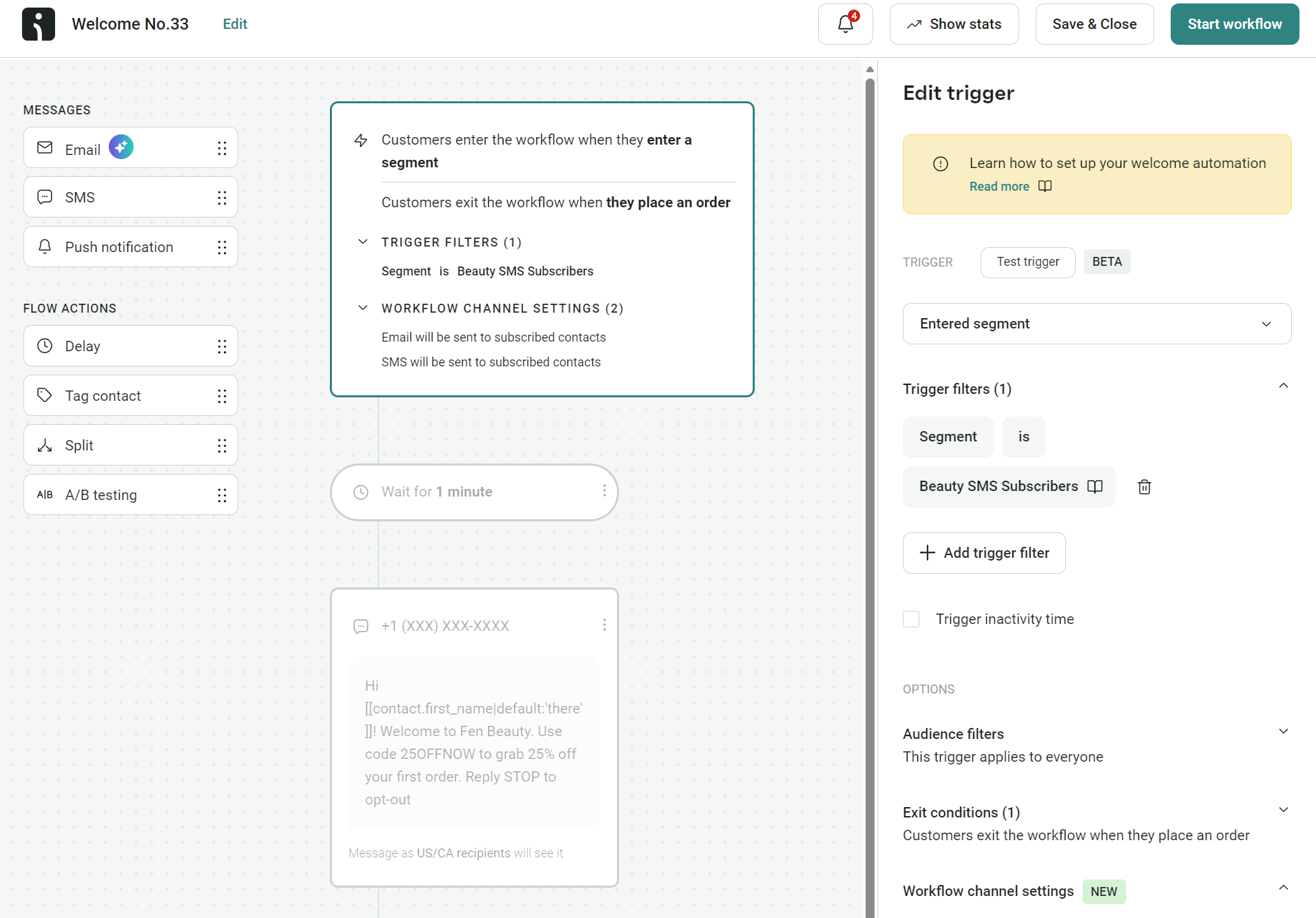
Here’s how a keyword-driven automation can work in Omnisend:
- Your customer texts BEAUTY to your number
- Omnisend then adds them to your beauty product segment
- A welcome SMS triggers for your customer, containing a discount code for beauty products
- An email series follows over the next few days featuring skincare and makeup bestsellers
- All future beauty campaigns reach only the subscribers who opted in through that keyword
The illustration below shows a welcome series flow in Omnisend using “entered segment” as a trigger, with “Beauty SMS subscribers” selected:
You can do the same thing for any product line, region, or loyalty tier. A few examples:
- BEAUTY and HOME if you sell both. Each keyword feeds a different segment with different offers and content.
- LONDON and NYC, if you have physical stores or run regional events. Your subscribers only hear about what’s relevant to where they are.
- VIP and INSIDER for your loyalty tiers. Customers self-select their level, and your flows deliver the perks that match.
- BFCM or SUMMER25 for time-limited campaigns. Create the keyword, run the promotion, and retire it when complete.
Some SMS platforms cap how many keywords you can create or charge extra once you pass a limit. Omnisend gives you unlimited SMS keywords on all plans, including free, so the number of campaigns you run is up to you.
Every plan includes segmentation, automation, and omnichannel flows across SMS, email, and web push. Omnisend customers earned $79 for every $1 spent across those channels in 2025.
“Artificial constraints for keyword usage are not an issue in Omnisend, plus you can create unlimited automations. The Pro plan is perfect if you’re a heavy SMS sender because it includes bonus SMS credits matching your monthly plan price.”
— Evaldas Mockus, VP of Marketing, Omnisend
Measuring and optimizing SMS keyword performance
Your SMS keywords are only as good as the results they produce. Track these metrics to know what’s working:
- Keyword opt-in rate. Low numbers mean your CTA, incentive, or placement needs work. According to SimpleTexting, 85.6% of consumers are opted in to business texts in 2026, up nearly 40% from 2021.
- Conversion rate. Decent opt-in numbers with weak conversions point to a welcome flow problem, not a keyword problem.
- Revenue per subscriber. Compare across keywords to see which campaigns attract your highest-value customers.
- Unsubscribe rate. Spikes after the first message are a sign that your content didn’t deliver on what the keyword promised. Spikes later on suggest frequency issues.
Testing is straightforward. Run two keywords for the same campaign and compare. JOIN against VIP20 might pull different volumes, but the one that converts better is the one worth keeping. Consider running tests for these elements:
- Different incentives. 15% off, free shipping, and early access perform differently depending on your audience, such as Generation Z versus Generation X
- Different placements. A keyword in your Instagram bio attracts a different subscriber than the same keyword on a post-purchase receipt.
Omnisend’s reporting tracks revenue attribution across SMS, email, and web push, so you can see how much each keyword-driven flow generates. Optimizing for better results is how you’ll move from basic SMS to a high-ROI marketing channel.
Common SMS keyword mistakes to avoid
- Keywords that are too long or hard to spell. EXCLUSIVEOFFERS is a typo waiting to happen. Stick to one word, eight letters or fewer.
- Missing compliance language in your auto-reply. Your confirmation message needs your brand name, message frequency, data rates, and opt-out instructions. Skip any of these, and you risk carrier filtering or TCPA violations. Omnisend includes TCPA and GDPR-compliant opt-out language in your texts by default.
- One keyword that’s doing too many jobs. JOIN shouldn’t handle your flash sale, your loyalty program, and your product launches. You lose all segmentation value when everyone lands in the same bucket. Omnisend lets you use multiple SMS keywords for different actions and segment your audience accordingly.
- Not promoting the keyword. A keyword that only exists in your SMS tool settings isn’t generating opt-ins. Put it on your socials, packaging, receipts, and emails.
- Ignoring opt-out spikes. They indicate that you’re targeting the wrong audience or your messaging needs work. Check your segment, frequency, and content before sending the next campaign, or pause your flow and check the same.
Conclusion
SMS keywords are crucial to your text marketing if you have multiple opt-in entry points for sales, competitions, stock alerts, bookings, and other moments.
The reality is that one keyword won’t cut it when you need to segment multiple groups and trigger flows. A high-performing text keyword strategy uses different keywords per campaign, all delivered via a tool that tracks opt-in volume and conversion data.
In 2025, Omnisend customers earned $0.74 per automated SMS, roughly a 49x return per message based on the cost of $0.015 per SMS to USA subscribers. Your SMS marketing can have fantastic results, too, thanks to Omnisend’s unlimited keywords, segments, and flows.
Quick sign up | No credit card required
FAQs
An SMS keyword is a phrase your customer responds with via SMS to trigger actions you define within your SMS tool, such as segment activity and discount flows.
They are your SMS keywords like JOIN, BOOK, and DROP. You can use multiple SMS words to group customers and for targeting.
Branded, generic, action-oriented, and campaign-oriented. A few examples: Branded, you’d use ‘JOINFIN.’ Generic, ‘JOIN’ and ‘DROP.’ Action-oriented, ‘CONSULTATION’ and ‘INFO.’ Campaign-oriented, ‘SUMMER25’ and ‘BFCM22.’
One keyword per segment is a good approach, so you’d have a keyword for VIPs and one for back-in-stock SMS subscribers. You can add more as your SMS strategy grows. Omnisend lets you create unlimited text keywords, segments, and flows.