Omnisend AI


 OFFER
OFFER










If you’re looking for ready-to-copy SMS opt-in message examples, this guide provides 30+ compliant templates built specifically for ecommerce businesses. We’ll explain the rules governing SMS consent, including TCPA, GDPR, and A2P registration requirements, and show you how to collect subscriber consent compliantly.
We’ll cover the different consent types, what a compliant message needs to include, and how to collect numbers properly. The templates are organized by scenario, so you can grab the right one fast.
This article is informational only — it’s not legal advice.
Quick sign up | No credit card required
What is SMS opt-in?
An SMS opt-in is a customer’s permission to receive your marketing texts — typically given by entering their phone number and checking a consent box at checkout, in a popup, or via a keyword text.
This isn’t a best practice you can skip. SMS consent is a legal requirement under laws like the TCPA. Texting people without it can lead to fines, carrier filtering, and blocked sender numbers.
Is SMS opt-in legally required?
Yes. In the US, the TCPA requires customers to give clear permission before you send marketing texts. In the EU, the GDPR and ePrivacy rules require customers to actively agree to receive texts, and pre-ticked boxes aren’t allowed.
The templates below all meet these rules, so you can copy them with confidence. SMS consent is also separate from email consent, so joining your email list doesn’t give you permission to text someone.
For the detailed guidance on regulations, A2P registration steps, GDPR specifics, and compliance requirements, see our SMS regulations guide and SMS compliance checklist.
Types of SMS consent you need to know
Here’s a quick breakdown of the permission levels you’ll work with as you build your list:
- Single opt-in: The customer signs up through a form or keyword and is added to your list right away — no confirmation step. Quick to set up, but typos and fake numbers slip through.
- Double opt-in: After signing up, the customer has to confirm by replying something like “YES.” The extra step filters out bad numbers and tends to produce better deliverability rates.
- Implied consent: Covers transactional messages only — order confirmations, shipping updates, that kind of thing. You still can’t send promos under implied consent.
- Express written consent: The customer actively agrees to receive promotional texts, whether through a signup form, SMS keyword, unticked checkbox, or another documented method. This is the consent level every promotional SMS campaign needs.
Essential elements of a compliant opt-in message
It’s important to understand the difference between the legal requirements for your signup and the actual text message you send. The following seven elements apply specifically to the automated SMS opt-in message a customer receives right after they opt in.
Including these details is a non-negotiable step for your SMS compliance checklist, and together they form the text message disclaimer every confirmation should carry:
1. Business name: State exactly who the message is from so the recipient recognizes you right away.
2. Subscription confirmation: Explicitly confirm that the customer successfully subscribed to your text list.
3. Message frequency: Let your subscribers know exactly how often they’ll hear from you, like “Up to 4 msgs/month.”
4. Data rates: Add the standard carrier heads-up so there are no surprises, usually written as “Msg & data rates may apply.”
5. Opt-out instruction: Give people a quick and easy way to leave your list. Just remind them they can reply with an opt-out text message keyword like “STOP.”
6. Terms and privacy link: Add a direct link to your terms of service and privacy policy to keep everything transparent.
7. Customer support info: Tell the customer how to get assistance, usually by replying “HELP.”
SMS opt-in message templates by scenario
Here are 30+ ready-to-copy SMS opt-in message examples for ecommerce, grouped by scenario, so you can grab the one that fits your campaign. These SMS opt-in examples for ecommerce businesses include promotional offers, text-to-join campaigns, and transactional messages.
If you’re looking for SMS opt-in examples or opt-in message examples you can copy, you’ll find them below.
Single opt-in confirmation
1. Welcome to (Brand)! You’re subscribed to weekly deals and new-arrival alerts. Up to 4 msgs/mo. Msg & data rates may apply. Reply STOP to opt out, HELP for help.
When to use: Right after a one-step signup on a form or checkout box.
2. Hi (Name), thanks for joining (Brand) texts. You’ll be the first to know when your favorite products are back in stock. Msg freq varies. Msg & data rates may apply. Reply STOP to opt out.
When to use: A friendlier, first-name confirmation for lifestyle and apparel brands.
3. (Brand): You’re in. Up to 6 msgs/mo on drops and restocks. Msg & data rates may apply. Reply STOP to cancel, HELP for help.
When to use: A short, no-frills confirmation when screen space is tight.
4. Thanks for subscribing to (Brand)! Here’s the code (CODE) for 10% off your first order. Up to 4 msgs/mo. Msg & data rates may apply. Reply STOP to opt out.
When to use: A single-step signup that promised a welcome discount.
Double opt-in (initial request)
5. It’s (Brand). Reply YES to confirm your SMS subscription for deals and restock alerts. Msg freq varies. Msg & data rates may apply. Reply STOP to opt out, HELP for help.
When to use: To confirm the number and keep your list clean.
6. (Brand) here. Want in on subscriber-only offers? Reply CONFIRM to subscribe. Msg & data rates may apply. Reply STOP to opt out.
When to use: When you prefer a keyword other than YES.
7. You’re almost in! Reply YES to join the (Brand) VIP text club for early access and members-only pricing. Msg & data rates may apply. Reply STOP to cancel.
When to use: A VIP or loyalty-framed confirmation.
8. Confirm your (Brand) subscription to start getting (benefit). Reply YES. Up to 4 msgs/mo. Msg & data rates may apply. Reply STOP to opt out, HELP for help.
When to use: A benefit-led confirmation that restates what they get.
Double opt-in (final confirmation)
9. You’re in! Your (Brand) SMS signup is confirmed. Watch for exclusive offers, product launches, and subscriber-only updates.
When to use: The reply sent after they confirm with YES.
10. You’re all set. Your number is confirmed, and you’ll now receive subscriber-only offers, early access, and product launches from (Brand). Reply STOP to opt out.
When to use: When you want to set a clear monthly frequency cap.
11. Welcome to the (Brand) SMS club! Get ready for early drops and subscriber pricing. Up to 4 msgs/mo. Msg & data rates may apply. Reply STOP to opt out, HELP for help.
When to use: A warmer “welcome to the club” confirmation.
Promotional opt-in (with an offer)
12. Want 15% off your first order? Reply YES to join (Brand) texts for deals and early access. Msg & data rates may apply. Reply STOP to opt out.
When to use: An incentive-led signup from a popup or checkout.
13. Flash sale alert! Want early access to flash sales and limited-time offers from (Brand)? Reply YES to join our SMS list and never miss a deal. Msg & data rates may apply. Reply STOP to opt out.
When to use: A live sale campaign that uses urgency to encourage new SMS signups.
14. Hot drop alert! Want first access to new product drops and exclusive launches? Reply YES to join (Brand) texts. Msg & data rates may apply. Reply STOP to opt out.
When to use: A scarcity-driven launch for retail sales.
15. Unlock free shipping on your next order: Reply YES to join (Brand) texts, and we’ll send the code. Msg & data rates may apply. Reply STOP to opt out.
When to use: A free shipping incentive instead of a percentage discount.
16. VIP early access, (Name): Subscribe to (Brand) texts and shop the (season) sale before anyone else. Reply YES. Msg & data rates may apply. Reply STOP to cancel.
When to use: An exclusivity angle for loyal or high-value shoppers.
Text-to-join keyword
17. Text JOIN to 12345 for exclusive (Brand) offers and restock alerts. Up to 4 msgs/mo. Msg & data rates may apply. Reply STOP to cancel.
When to use: Signage, packaging, and social profiles.
18. Text SAVE to 12345 for 10% off your first order and members-only deals from (Brand). Msg & data rates may apply. Reply STOP to opt out.
When to use: A discount-led keyword for first-time shoppers.
19. Want first dibs on drops? Text (Brand) to 12345 to join our text list. Up to 4 msgs/mo. Msg & data rates may apply. Reply STOP to cancel, HELP for help.
When to use: Printed on packaging inserts and in-store signage.
20. Join (Brand) VIP: text VIP to 12345 for early access, birthday perks, and subscriber pricing. Msg & data rates may apply. Reply STOP to opt out.
When to use: A loyalty program keyword for repeat customers.
Transactional opt-in
21. Thanks for shopping with (Brand)! Want real-time shipping updates by text? Reply YES to subscribe. Reply STOP to opt out.
When to use: At checkout, for order and delivery alerts.
22. Your (Brand) order is confirmed. Reply YES to get text updates at every step, from packed to delivered. Reply STOP to opt out.
When to use: On the order-confirmation screen or message.
23. Want to know the moment (Product) is back? Reply YES for restock alerts from (Brand). Msg & data rates may apply. Reply STOP to cancel.
When to use: Back-in-stock and waitlist signups.
24. Reply YES to get (Brand) appointment reminders by text so you never miss a booking. Msg & data rates may apply. Reply STOP to opt out.
When to use: Service and appointment-based businesses confirming bookings.
Confirmation after a verbal or in-store opt-in
25. Hi! You signed up for (Brand) SMS updates in-store. This confirms your subscription for deals and new arrivals. Msg & data rates may apply. Reply STOP to opt out, HELP for help.
When to use: After collecting consent at the register.
26. Thanks for opting in to (Brand) texts over the phone. You’ll get order news and subscriber offers. Msg & data rates may apply. Reply STOP to opt out.
When to use: After a phone order or support call where consent was given.
27. Great meeting you at (event)! You’re now subscribed to (Brand) texts for offers and updates. Msg & data rates may apply. Reply STOP to cancel, HELP for help.
When to use: After a pop-up, market, or event signup.
Opt-in with an incentive
28. Thanks for signing up, (Name)! Use code (CODE) for (incentive). You’re subscribed! Your reward will arrive shortly. Watch for exclusive offers, early access, and member-only updates from (Brand).
When to use: When you promised a reward for subscribing.
29. Welcome, (Name)! You’ve earned (X) loyalty points for joining (Brand) texts. Up to 4 msgs/mo. Msg & data rates may apply. Reply STOP to opt out.
When to use: A loyalty-points incentive for program members.
30. You’re subscribed! As a member, you’ll get free shipping events, exclusive launches, and early access to new collections. Msg & data rates may apply. Reply STOP to opt out.
When to use: A free shipping reward instead of a discount.
31. Happy early birthday, (Name)! Join (Brand) texts today and get a birthday reward every year, plus exclusive offers and early access. Msg & data rates may apply. Reply STOP to opt out.
When to use: A birthday or anniversary perk that drives long-term opt-ins.
32. Welcome to (Brand) VIP, (Name)! Your first perk: (incentive) with code (CODE). Expect early access and subscriber pricing. Msg & data rates may apply. Reply STOP to opt out, HELP for help.
When to use: A tiered or VIP incentive for your best customers.
How to collect SMS opt-ins
Once your SMS opt-in message templates are ready, you need a compliant way to collect numbers. These four methods cover where most ecommerce opt-ins happen:
Website popups and embedded forms: Capture visitors as they browse with a clear incentive. Omnisend forms include consent checkboxes and timestamped records to help you document subscriber consent.
Checkout opt-in: Let shoppers subscribe while they finish a purchase, when intent is highest. Omnisend’s Shopify integration helps collect checkout opt-ins with built-in consent language.
Keywords (text-to-join): Promote a word like JOIN on social profiles or packaging that customers text to your number to subscribe.
In-person and paper forms: Collect numbers at your store or events with a sign-up sheet or tablet. Make sure printed materials show all required compliance language.
Here are real SMS opt-in examples for ecommerce businesses, including opt-in message examples that show how leading brands collect consent. Notice the shared pattern: a clear incentive, a single consent action, and the required disclosure in plain sight.
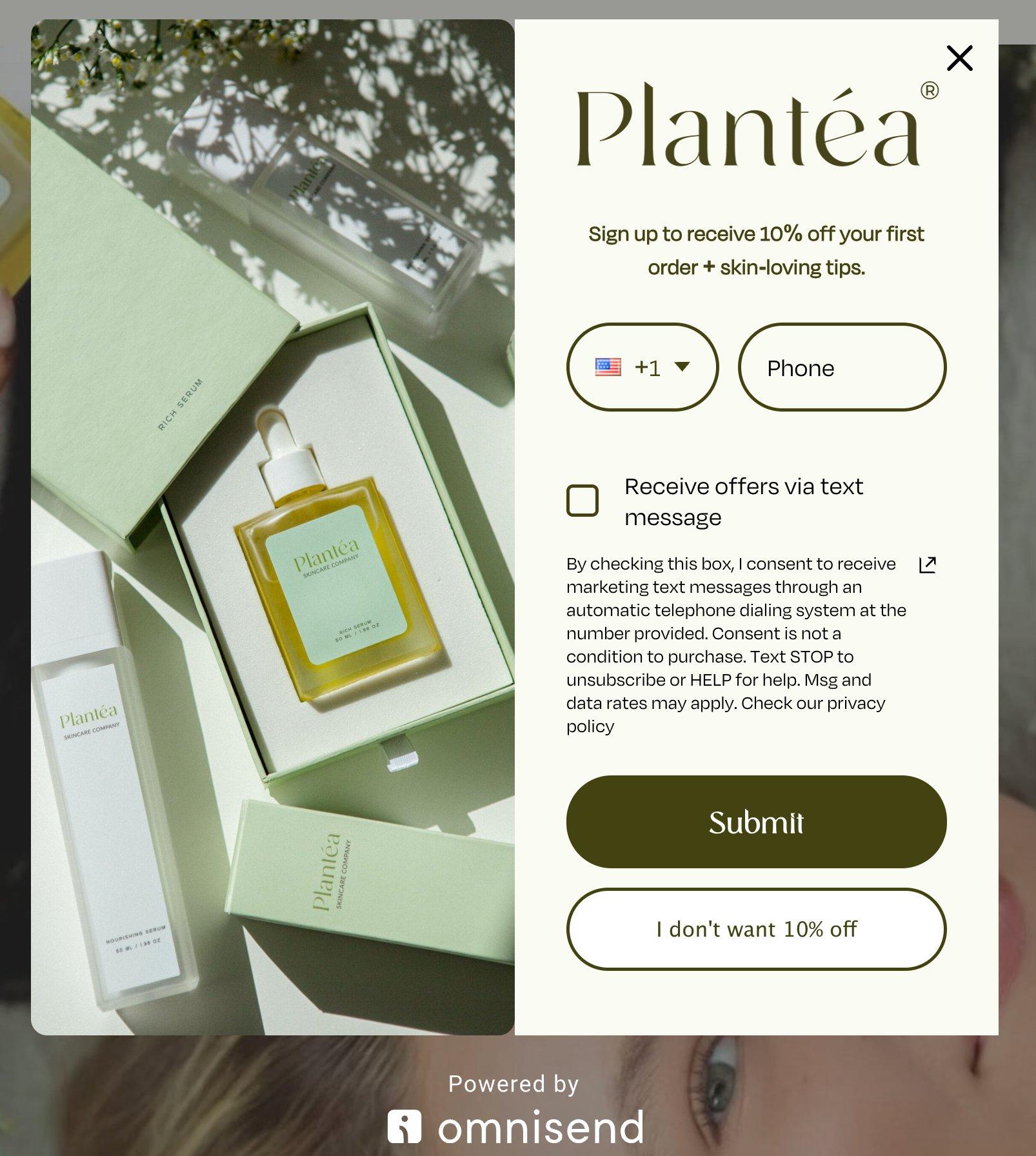
Plantéa
This Omnisend-built SMS campaign keeps a single unticked “receive offers via text” checkbox separate from the phone field, so SMS consent is its own deliberate action. The disclosure covers automatic dialing, STOP, HELP, and rates:
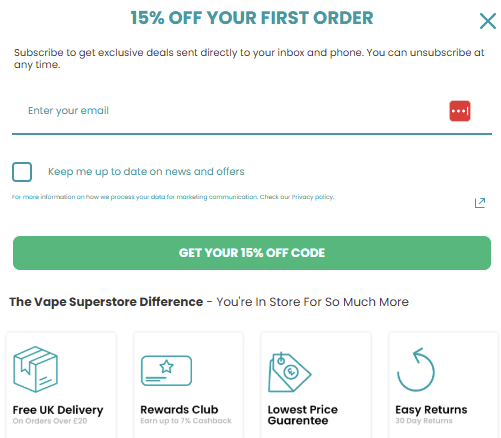
Vape Superstore
Here, the phone number is optional, and the SMS opt-in is a separate unticked checkbox, with consent stated as not a condition of purchase. It’s a clean example of unbundled consent and shows how separating SMS permission from checkout fields can improve signup quality:
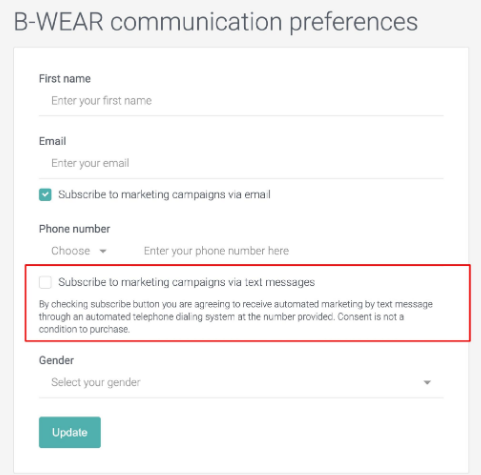
B-Wear
This is an email preferences page with separate checkboxes for email and SMS, so consent is captured per channel rather than bundled. The SMS box carries its own disclosure:
B-Wear Sportswear uses Omnisend across email and SMS. Even though SMS is only about 0.85% of its message volume, the first six months of SMS campaigns paid for almost two years of Omnisend. Read the B-Wear case study
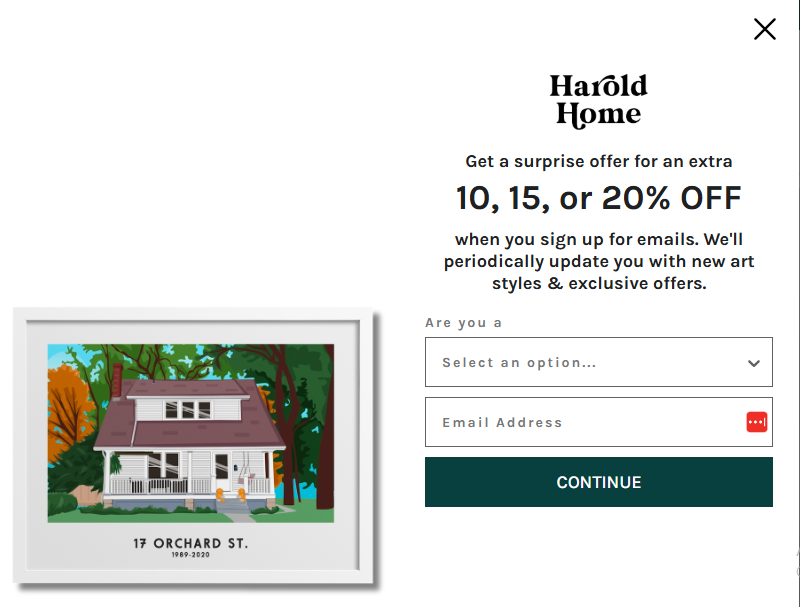
Harold Home
The full consent disclosure (autodialer, STOP, frequency, and privacy and terms links) sits directly under the headline, before the field, so the terms are visible at the moment of signup:
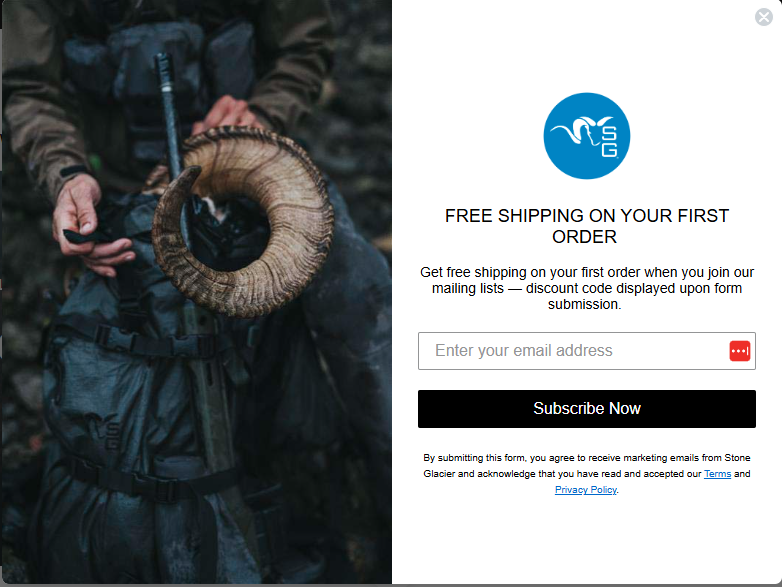
Stone Glacier
This is a single-field popup where the disclosure spells out what the customer is agreeing to and links to the terms and privacy policy beneath the button:
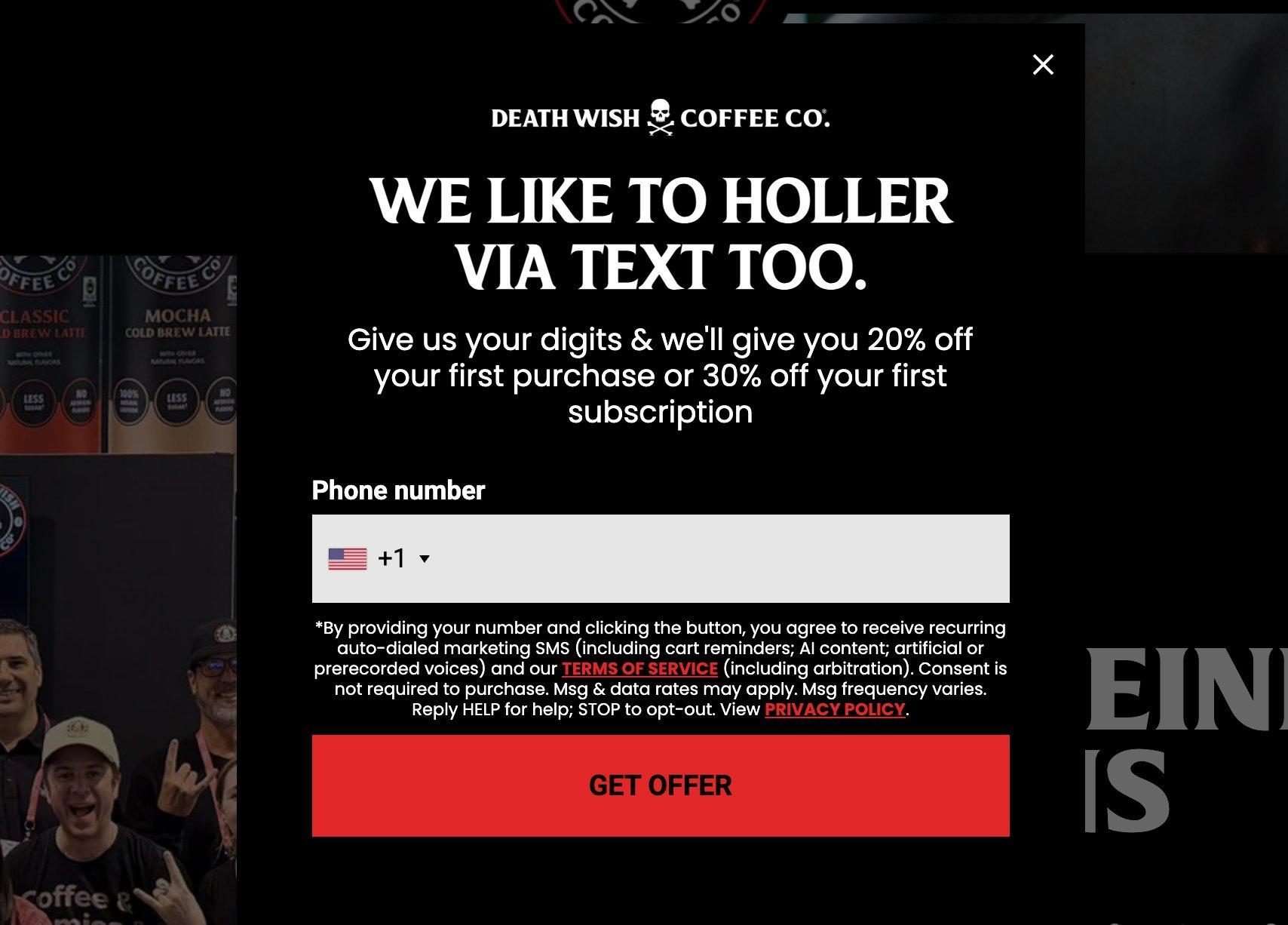
Death Wish Coffee
The consent disclosure (recurring auto-dialed SMS, terms, STOP and HELP, and consent not required to purchase) is kept in plain sight beneath the field:
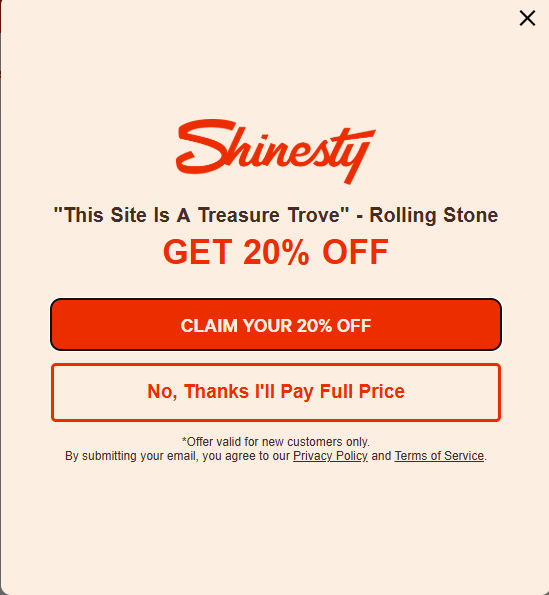
Shinesty
The disclosure names recurring auto-dialed messages, frequency, and STOP and HELP, with consent stated as not required to purchase:
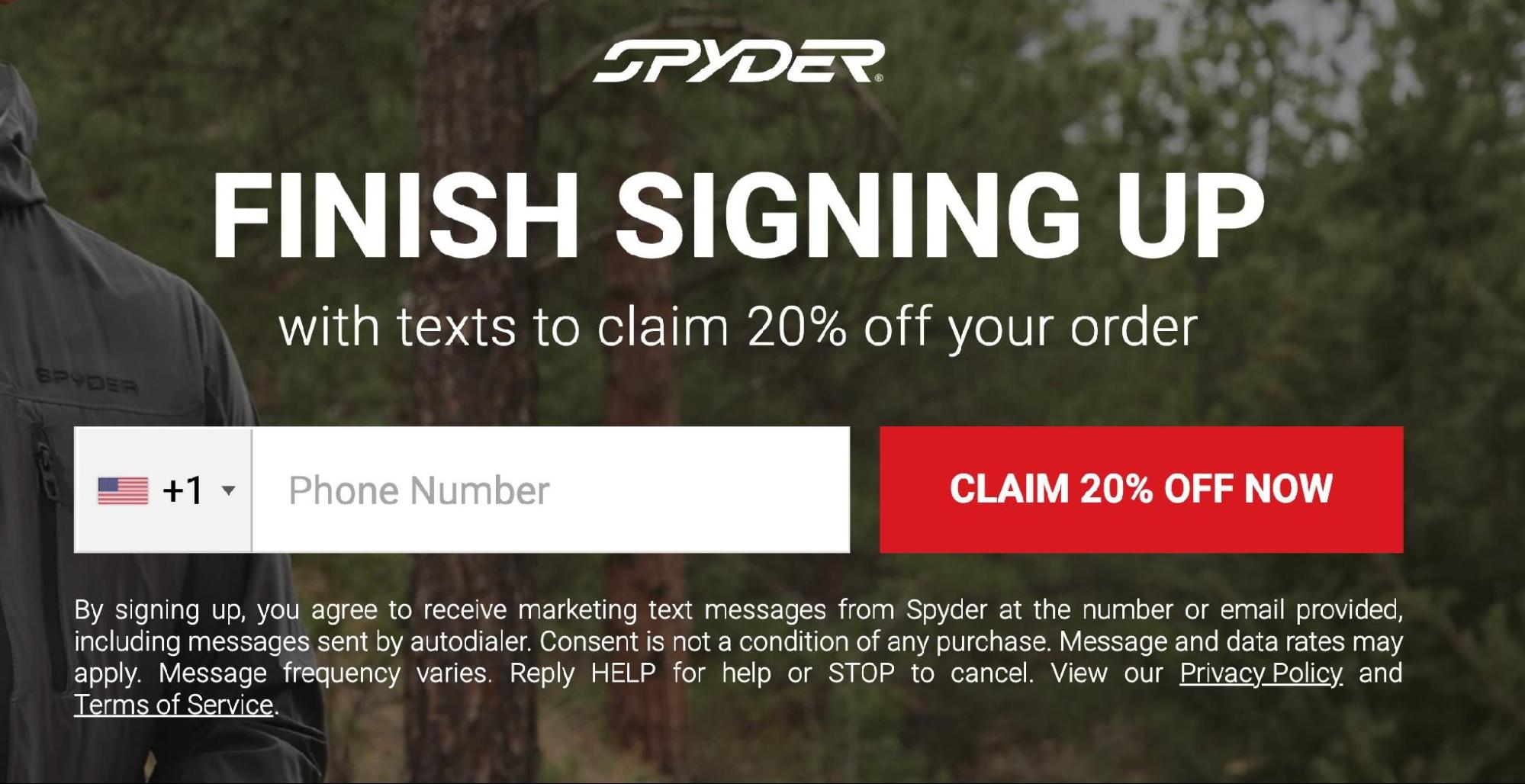
Spyder
This opt-in captures the number after the email step, with consent language covering autodialer, frequency, and STOP and HELP directly below the field.
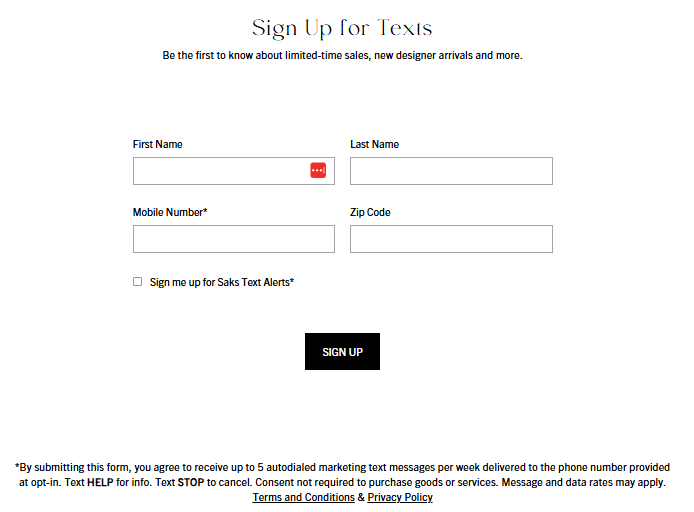
Saks Fifth Avenue
The disclosure states a specific message frequency (up to 5 per week) up front, helping shoppers understand what they’re signing up for before subscribing:
SMS opt-out messages: how to handle unsubscribes
Every marketing text you send must give people a clear way out, usually “Reply STOP to opt out.” Customers may also reply with keywords like END, CANCEL, UNSUBSCRIBE, or QUIT, and you should honor these requests immediately.
There are two parts to manage: the opt-out language in your campaigns and the confirmation message sent after someone unsubscribes.
STOP in every campaign
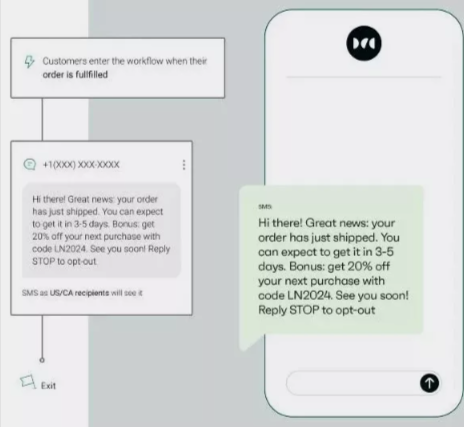
Keep the opt-out instruction visible in your outgoing messages, not buried. Here’s how it looks in a live promotional text:
The opt-out confirmation
This is the single automated reply you send after someone texts STOP. It confirms they’ve been removed and offers a way back in case they changed their mind:
You’re unsubscribed from (Brand) texts and won’t receive more messages. Changed your mind? Reply START to resubscribe.
Omnisend automatically processes STOP and HELP replies, so subscribers are removed immediately without manual work. For the full rules on opt-out handling, see the SMS compliance checklist.
A2P 10DLC registration and SMS opt-in compliance
Carriers vet your SMS program before approving it, and sloppy opt-in language is one of the most common reasons applications get rejected. The templates below are written to pass that review — but you’ll also need to keep consent records on file, since carriers and regulators can ask for proof at any time.
Omnisend stores timestamped consent records automatically. For detailed guidance on compliance requirements and A2P registration, see the SMS compliance checklist.
Best practices for compliant and effective SMS opt-in
Here are eight best practices to build a high-quality, legally sound text messaging list:
1. Be explicit about what subscribers are signing up for: Clearly tell people exactly what type of messages they will receive. This builds trust from the very first interaction.
2. Offer genuine value: One of the biggest benefits of SMS marketing is the direct connection to your customers. Reward them for that access with exclusive discounts or VIP early access.
3. Set frequency expectations: Tell your audience upfront how many texts they can expect per month. This prevents frustration and keeps your unsubscribe rate low.
4. Include opt-out instructions in every message: Every SMS you send should include a way out, typically “Reply STOP to unsubscribe” at the end. It’s also a legal requirement, not just a courtesy.
5. Maintain detailed consent records: Save timestamped proof of how and when each subscriber consented. If a carrier or regulator asks for receipts, you’ll want them on hand.
6. Segment your audience: Use segmentation to send highly relevant, personalized texts. Avoid blasting your entire list with the exact same offer every time.
7. Respect quiet hours: It’s very important to know the best time to send an SMS. The TCPA mandates that you send promotional texts only between 8 AM and 9 PM in the recipient’s local time zone.
8. Avoid generic link shorteners: Don’t use public shorteners like bit.ly — carriers treat them as a spam signal and may filter your message before it’s delivered. Use a branded short domain instead.
The fastest way to a compliant opt-in: use a reliable SMS marketing platform
The templates above work in any platform, but collecting subscribers is easier when forms, consent records, and automations are built in.
Vape Superstore is a good example: its mobile form signup rate climbed from 18% in Klaviyo to 32% in Omnisend, using Omnisend’s multi-step forms and best-practice guidance for SMS marketing.
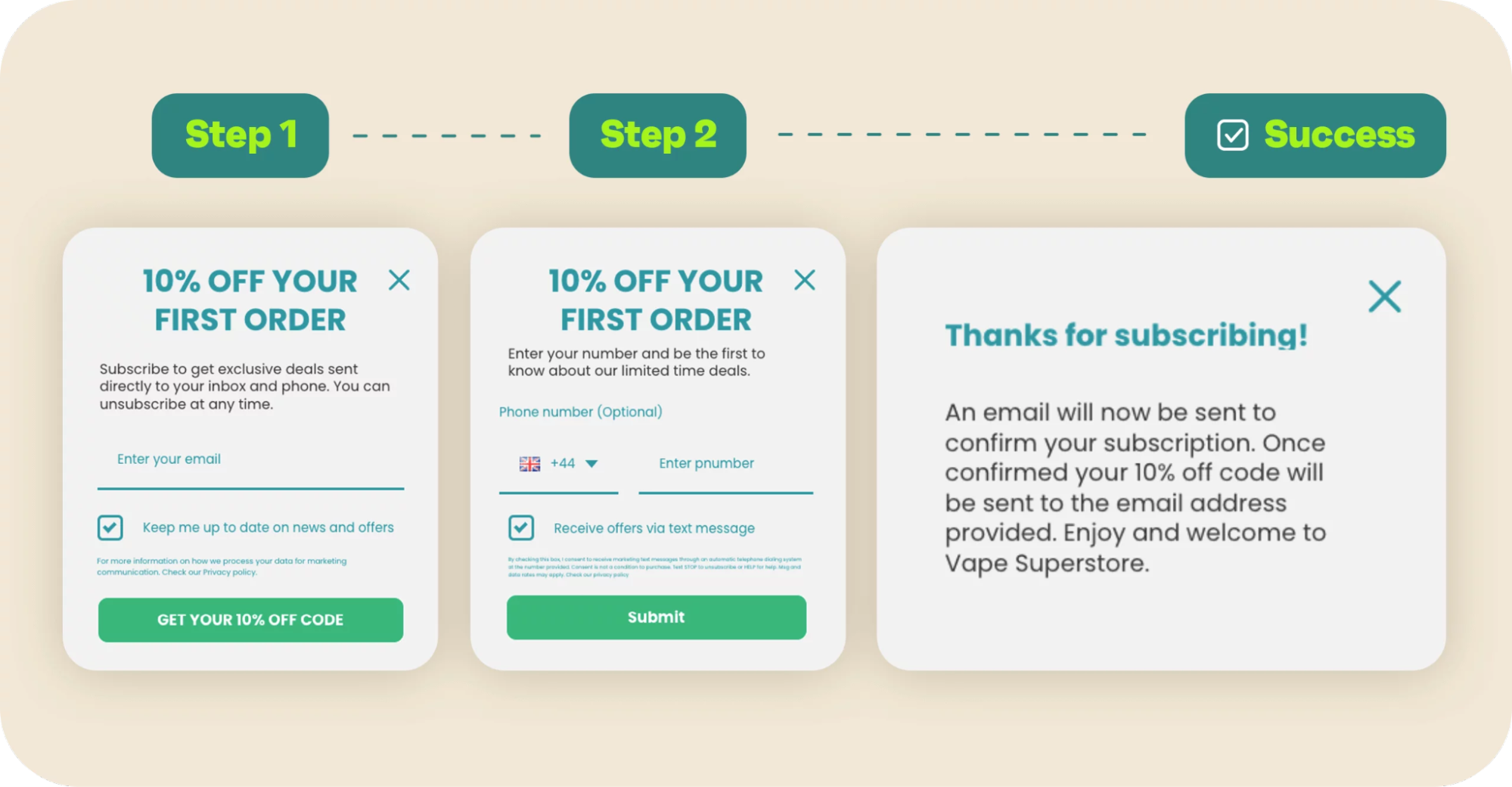
Vape Superstore turned to SMS marketing automations to better connect with its mobile-first audience. Pairing SMS with email through Omnisend led to stronger engagement than using email alone. By using Omnisend’s multi-step forms and following expert best-practice advice, it saw a major increase in signups. Its mobile form conversion rate jumped from 18% on Klaviyo to 32% on Omnisend. If you’re evaluating Klaviyo alternatives for SMS compliance specifically, built-in consent tooling like this is worth comparing.
Read the full Vape Superstore case study
If you’re evaluating Klaviyo alternatives for SMS compliance specifically, built-in consent tooling like this is worth comparing.
For ecommerce teams comparing SMS marketing tools that provide compliant opt-in examples, Omnisend ties the collection and the compliance together:
- Built-in compliance: compliant signup forms, timestamped consent records, and automatic STOP and HELP handling.
- Integrated channels: SMS, email, and push in one platform, so your opt-in and your follow-up stay consistent.
- Pre-built automations: welcome and cart-recovery flows with SMS built in, ready to send from day one.
Together, these features turn a copied template into a complete SMS program, with opt-out handling, consent records, and subscriber management built in.
For ecommerce businesses comparing SMS platforms, built-in consent tools and automation can make it easier to collect subscribers and stay consistent as your program grows.
FAQ
What is the difference between single and double opt-in?
With single opt-in, someone enters their number and they’re on your list — done. Double opt-in adds a confirmation step (usually a reply like “YES”) before they’re subscribed. Double opt-in takes slightly longer to set up, but it catches typos and tends to produce a higher-quality list.
Is SMS consent the same as email consent?
No. SMS consent is a separate requirement that demands explicit written permission to comply with specific mobile carrier regulations. You can’t legally send promotional texts to a customer just because they joined your email newsletter.
How do I opt out of text messages?
Reply STOP to any message — most SMS platforms also recognize UNSUBSCRIBE and CANCEL. You should get a confirmation text after that, and no further messages.
Can I use discounts as SMS opt-in incentives?
Yes — discounts are one of the most common signup incentives, and they work well. Just make sure the form also tells subscribers what kind of texts they’re agreeing to (e.g., “weekly promotions and product drops”), not just the discount itself.
Quick sign up | No credit card required