Omnisend AI


 OFFER
OFFER










Email deliverability measures how often your emails reach your primary inbox instead of the spam folder. To improve this, you must manage sender reputation, authentication, and engagement signals. Inbox providers like Gmail consider these factors when deciding where your email goes.
For ecommerce brands, email deliverability is crucial as it helps promotional campaigns reach their target audience. High send volumes during major campaigns can trigger spam filters, and when emails land in spam, brands lose sales opportunities.
Imagine sending a Black Friday campaign to 100,000 subscribers, only for 30,000 emails never to reach their intended inboxes.
This guide explains what affects email deliverability, how to fix the most common issues, and which metrics and tools help track and improve deliverability.
Quick sign up | No credit card required
How to improve email deliverability: 12 proven steps
Improving email deliverability requires authentication, a healthy sender reputation, and an engaged subscriber list. We’ve outlined 12 strategies for getting your emails into inboxes.
1. Set up SPF, DKIM, and DMARC authentication
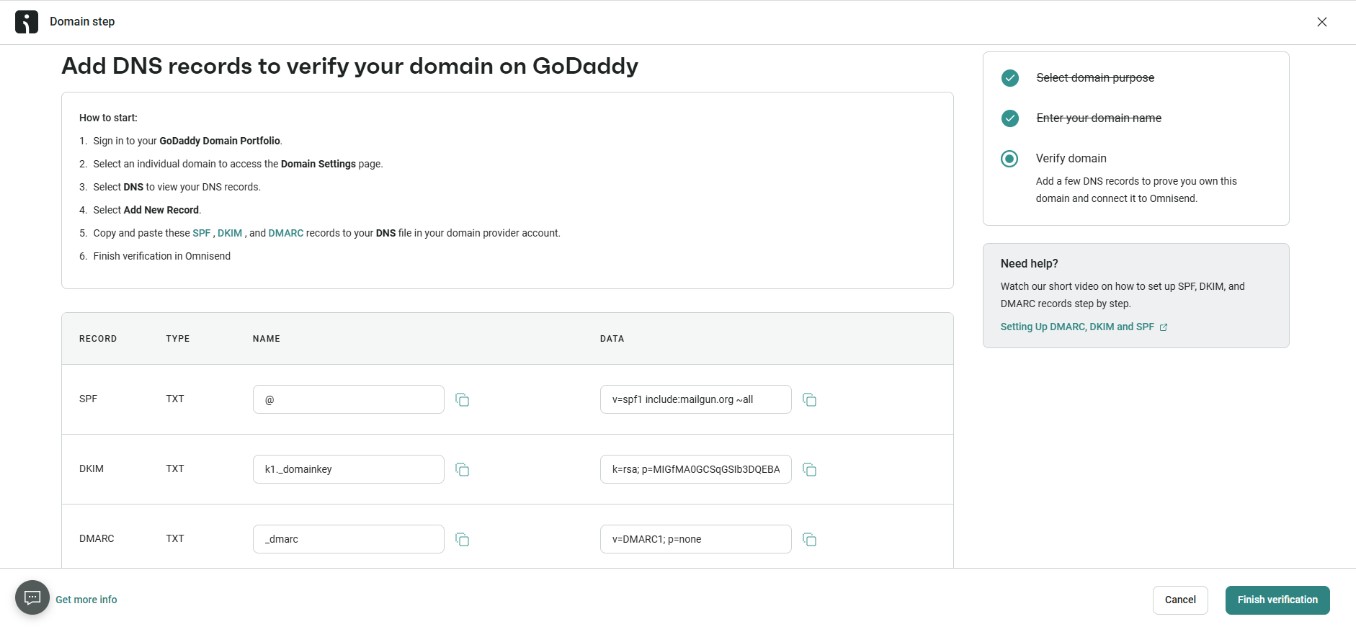
SPF, DKIM, and DMARC are DNS (Domain Name System) records that help authenticate your emails, allowing inbox providers to verify that you’re a legitimate sender. Gmail, Yahoo, and Microsoft require SPF and DKIM and strongly recommend DMARC for all senders.
SPF (Sender Policy Framework) verifies which servers can send emails from your domain. You can set it up by adding a TXT record to your domain’s DNS.
DKIM (DomainKeys Identified Mail) adds a digital signature to emails. It proves that your message wasn’t altered in transit. You can generate a DKIM key from your mailbox provider’s admin dashboard. Then, add it to your DNS as a TXT record.
DMARC means Domain-based Message Authentication, Reporting, and Conformance. It determines what happens when SPF or DKIM checks fail. The steps are as follows:
- p = none: Monitors who are sending emails on your behalf, no action taken
- p = quarantine: Redirects failed emails to the recipient’s spam folder
- p = reject: Blocks unauthenticated emails, so they don’t reach the inbox
Progressing to p = reject offers better protection and trust with mailbox providers. Here’s how to set up email domain authentication on Omnisend:
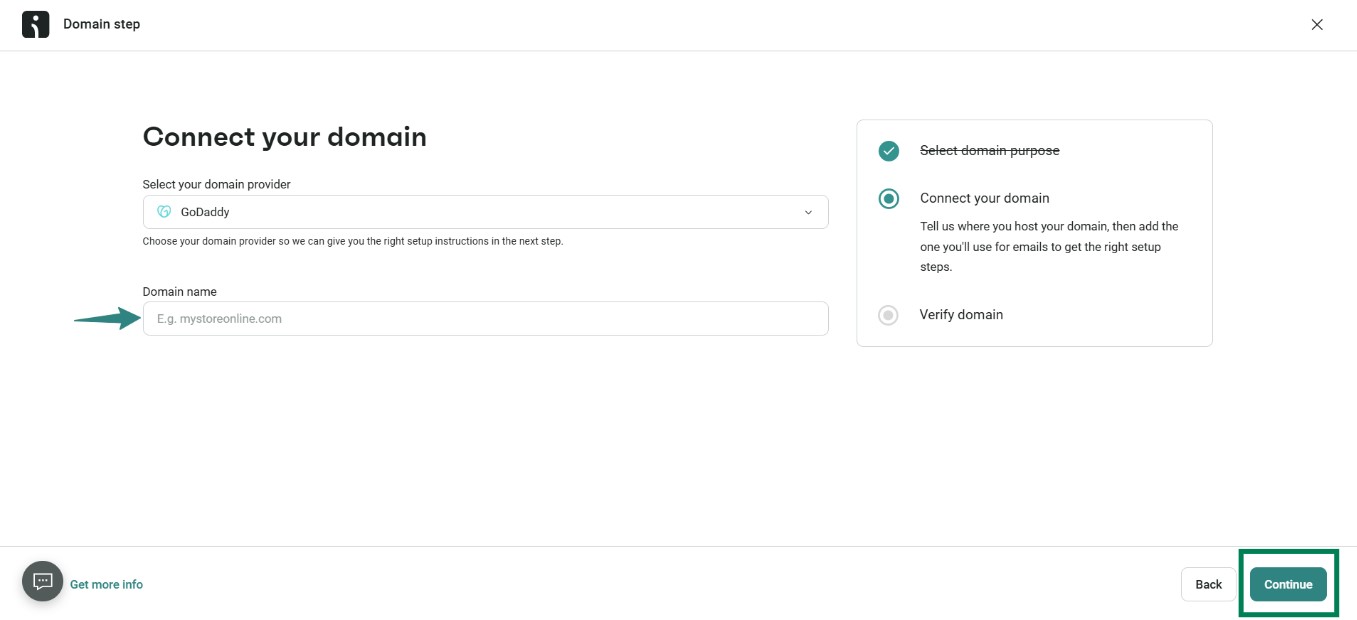
- Go to Store settings > Domains
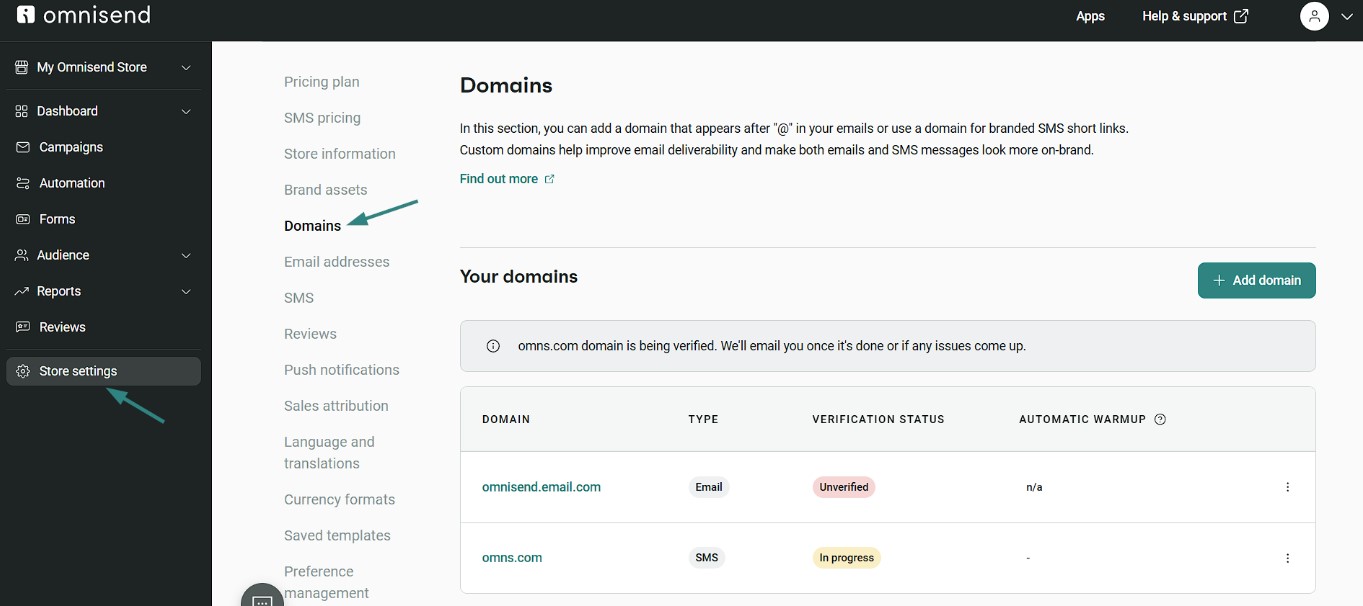
- Click Add domain and select Email
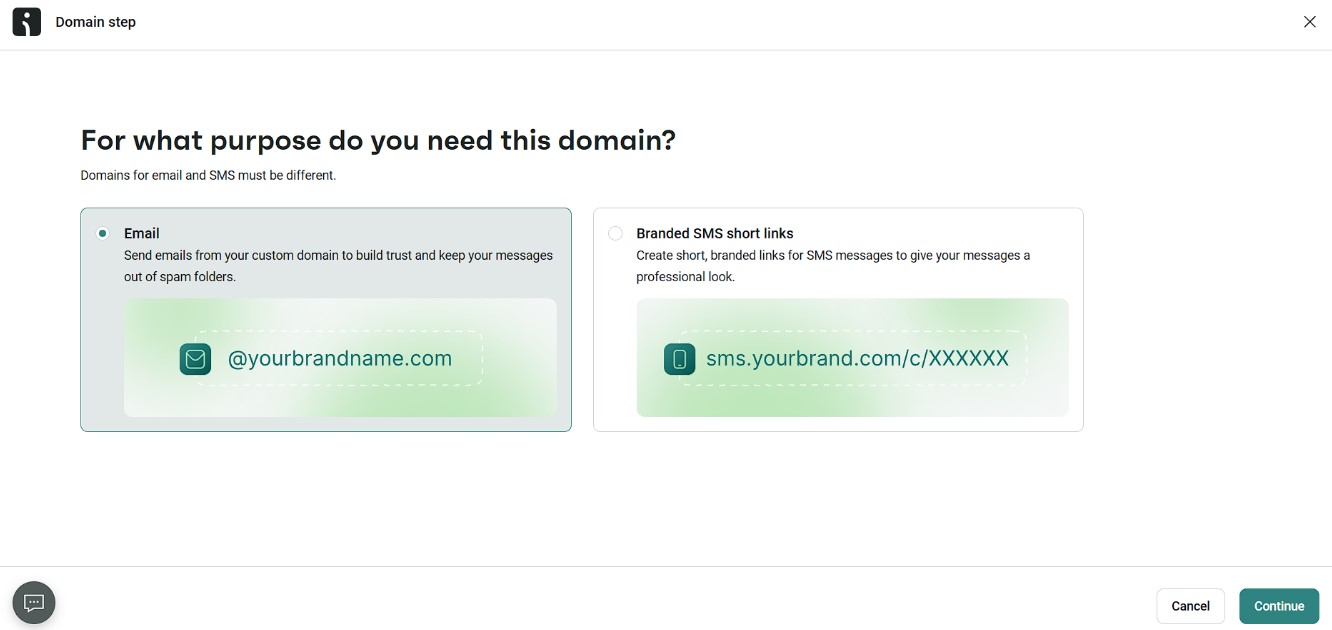
- Choose your domain provider
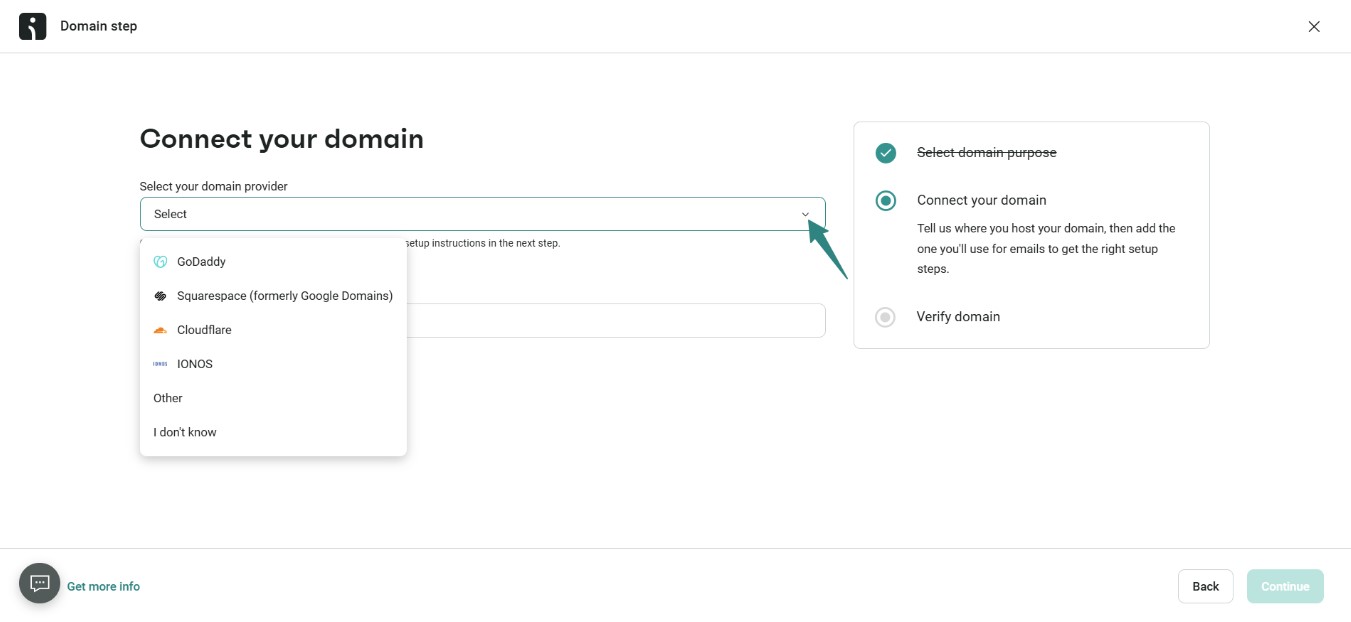
- Enter your domain name/subdomain
- Click Continue to generate the required SPF, DKIM, and DMARC records
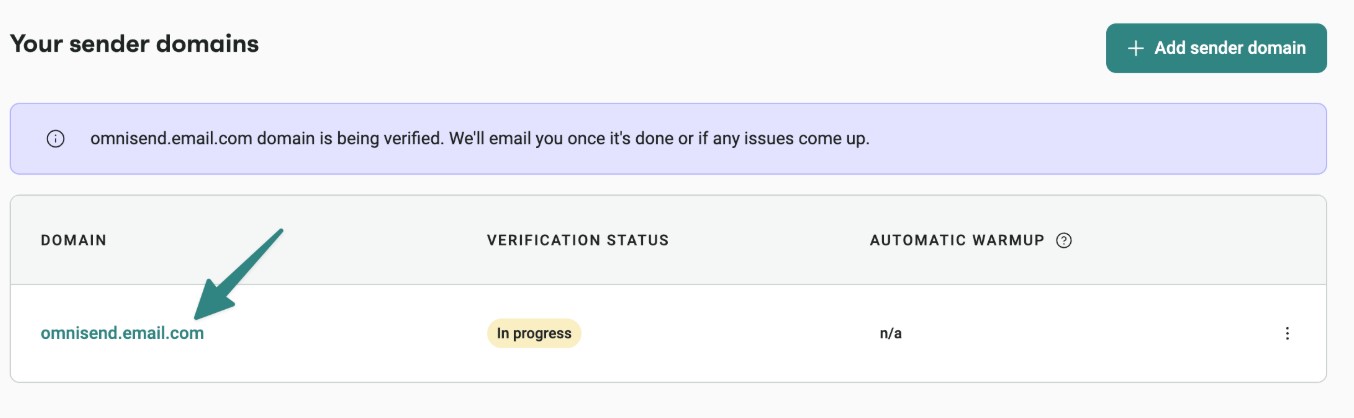
- Add the records to your DNS settings by going back to Store settings > Domains
- Click on your domain name
- On the Domain setup page, you’ll see the records and instructions for adding them to your DNS settings
2. Warm up your IP address and sending domain
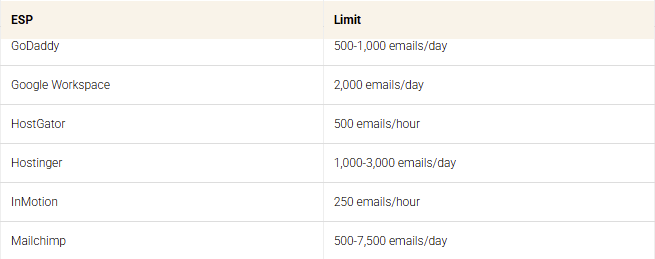
IP and domain warming involves slowly increasing your email volume to prove to email networks that you’re a legitimate sender, not a spammer. Sending at high volume immediately can trigger spam filters.
Most warmup plans take four to eight weeks. Start with active subscribers to maintain strong open and click rates. Engagement from real subscribers can improve email deliverability. A warmup schedule may look like this:
- Week 1: 50-100 emails/day
- Week 2: 200-500 emails/day
- Week 3: 1,000-2,000 emails/day
- Week 4+: Double the volume weekly while monitoring clicks and bounces
Some senders use seed-network tools to speed up email domain warmup. These tools use bots to stimulate email opens. However, AI-powered spam filters can now identify and disregard these artificial engagements.
In fact, using these tools can often damage your sender reputation. A safe way to improve email deliverability is to send warm-up emails to your top 10% most engaged subscribers.
3. Use double opt-in to build a quality list
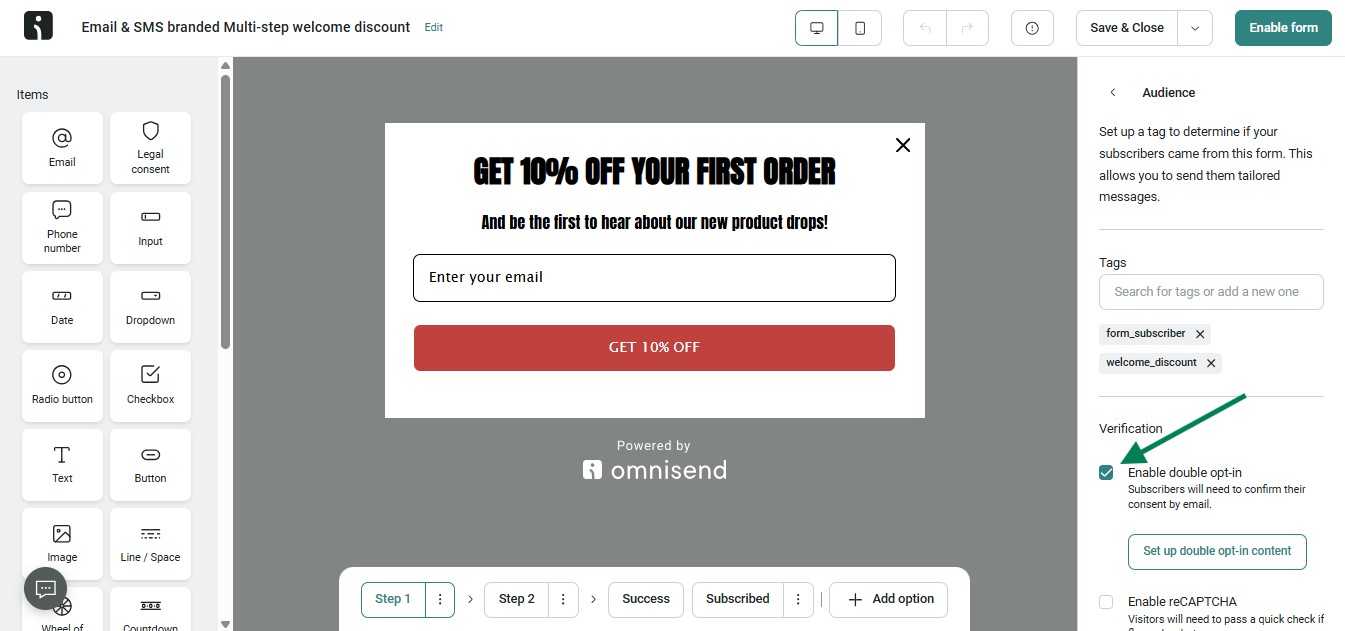
Double opt-in requires people to sign up in two steps. Once a new subscriber enters their email, they must confirm it by clicking a link sent to their inbox. This way, you can ensure that the email address is valid and that the subscriber willingly joined your mailing list.
Single opt-in lists are prone to fake emails, bots, and mistyped addresses. Double opt-in filters these out, improving email deliverability.
The benefits of using a two-step opt-in include:
- Reduces spam complaints from unintended signups
- Improves open and click rates across campaigns
- Builds a list of subscribers who actually want your emails
Most email platforms support this setup. For example, Omnisend users can enable double opt-in within the platform’s signup form settings.
4. Clean your email list regularly
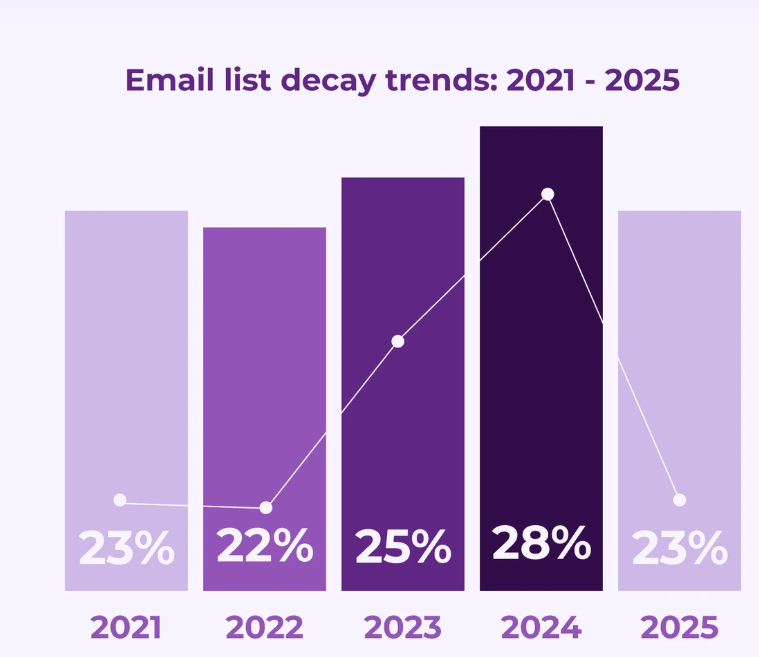
Email list cleaning means removing invalid or inactive contacts. It helps to improve email deliverability by reducing bounce rates and avoiding spam traps.
Ecommerce brands should clean their lists at least once every quarter. They can also do it before peak seasons, such as Black Friday or holiday sales. Here are four list hygiene actions you can take:
- Remove email addresses that fail to deliver, typically after 2–3 hard bounces
- Use a verification tool to detect fake or inactive email addresses
- Remove subscribers who haven’t engaged with your emails in 90–180 days
- Check spam complaints and unsubscribe patterns monthly to remove disengaged contacts
A healthy list attracts actions like clicks, improving email deliverability over time.
5. Segment your audience and personalize sends
Audience segmentation is the process of dividing subscribers into groups based on similarities. Personalization means writing email content to match each group’s intent. Together, they improve email deliverability by generating opens, clicks, replies, and conversions.
Ecommerce brands often start with demographic segmentation, such as age and gender. However, inbox providers use engagement signals — like opens, clicks, and cart activity — to determine inbox placement. Behavioral triggers, such as browsing a product page or abandoning a cart, generate the high-intent signals that matter most.
When emails match what a subscriber already wants, they open, click, and buy. Those engagement signals tell inbox providers your emails belong in the inbox.
Effective ecommerce segments include:
- Shoppers who viewed products but did not buy
- Customers with high cart values or repeat purchases
- Subscribers who open and click emails
- Inactive contacts who have not engaged in 60–90 days
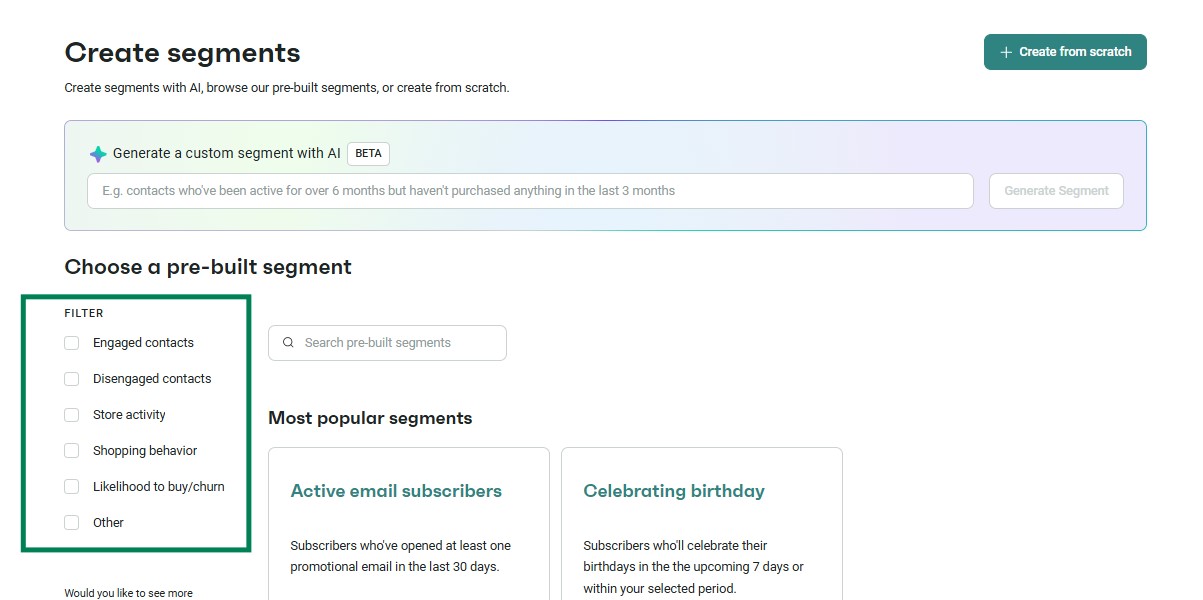
Omnisend lets you create behavioral segments. It uses data on store activity, shopping behavior, and likelihood to buy.
6. Run re-engagement campaigns and sunset inactive subscribers
A re-engagement campaign is a short email sequence. Brands send it to subscribers who have stopped opening or clicking your emails. If they remain inactive after the sequence, a sunset policy removes them from your list. Together, these two steps protect your sender reputation by eliminating contacts who are no longer interested and active.
Mailbox providers track these negative engagement signals, so fixing them early helps protect your sender reputation.
You can use a sunset policy with an inactivity threshold of six months. A re-engagement sequence may look like this:
- Day 1: A “We miss you” message, with a reason to return
- Day 20: A special offer with a discount or free feature
- Day 45: Final check-in, asking whether they still want to receive emails
If subscribers remain inactive after the sequence, remove them from the list. Omnisend allows you to find inactive contacts using pre-built segments. Here’s how you can do it:
7. Make unsubscribing frictionless
A frictionless unsubscribe lets subscribers opt out of your list with a single click. It allows uninterested subscribers to leave, reducing the risk of spam complaints.
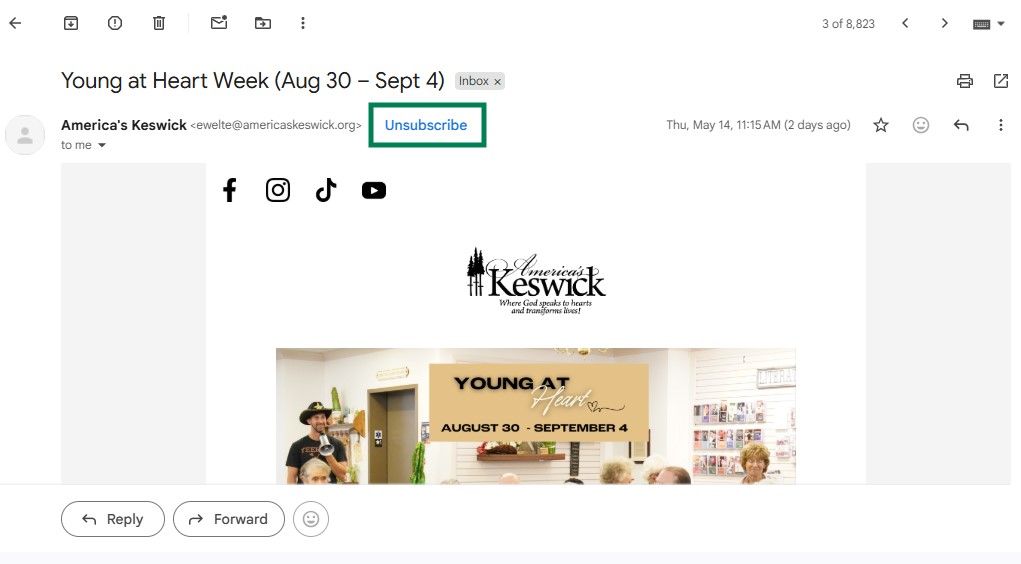
Gmail and Yahoo require one-click unsubscribe headers (RFC 8058) for bulk senders. Microsoft strongly recommends it. This standard lets mailbox providers display unsubscribe options near the sender information. Here’s what it looks like:
Good unsubscribe practices include:
- Display a visible unsubscribe link in every email
- Process unsubscribe requests immediately
- Use a preference center for subscribers who want fewer emails
8. Avoid spam trigger content
Spam trigger content includes elements that can cause filters to mark emails as spam. Mailbox providers review subject lines, email copy, links, images, and email structure. They use these signals to decide if a message belongs in the inbox.
Content quality plays a major role in sender reputation. Even with authenticated emails, senders may struggle to improve email deliverability. It happens if the message looks misleading or too promotional. Common spam triggers include:
- All caps subject lines
- Excessive punctuation like “!!!” or “$$$”
- Aggressive phrases such as “Act now”
Here’s how an email subject line reads with and without spam triggers:
- Before: FREE GIFT INSIDE!!! Limited time — claim yours NOW!!!
- After: Your exclusive gift is waiting — here’s how to claim it
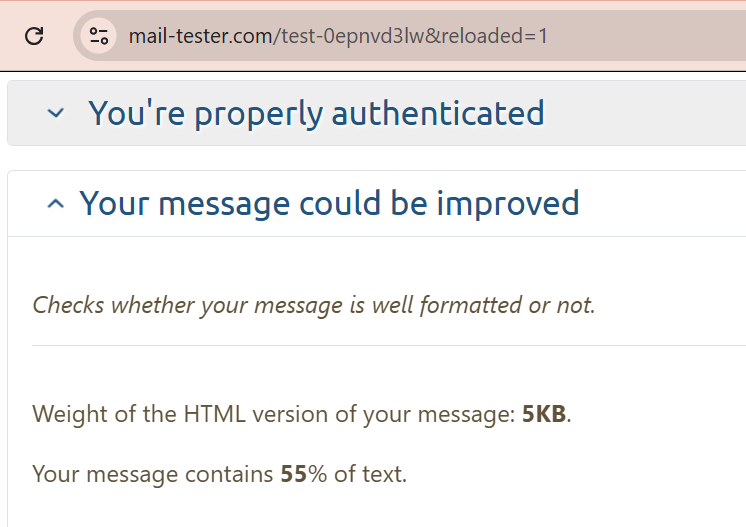
Aim for at least 60% text content and a text length of 500 characters. Emails with large images and scant text can trigger image spam filters. Emails that hide promotional or malicious content within images typically get blocked.
AI-generated inbox summaries pull information from the beginning of the email. So, front-load your main value proposition in the opening sentence.
There are tools available that help you evaluate your content:
9. Optimize your sending frequency and timing
Wrong frequency and timing hurt email deliverability. Too many emails annoy subscribers and can drive spam complaints. On the other hand, too few emails may signal that your account is dormant. Find the right balance to maintain a high sender reputation.
A practical way to manage sending frequency is by using a preference center. It’s a page where subscribers choose how often they hear from you. Here are some helpful frequency and timing practices for your ecommerce business:
- Increase email frequency during peak periods like Black Friday or holiday sales
- Reduce promotional sends during off-peak seasons to avoid subscriber fatigue
- Track open rates, clicks, and unsubscribe trends after changing send frequency
AI-driven send-time optimization analyzes subscriber behavior. It uses the data to predict when they’re most likely to open an email. This helps emails arrive at the right moment for each subscriber.
Watch this webinar to see how AI sharpens email segmentation and campaign strategy.
10. Monitor your sender reputation and key metrics
Sender reputation is the trust score that mailbox providers assign to your domain. A strong reputation can improve email deliverability, while a weak one can push emails to spam or block them.
Checking the right email marketing metrics helps you find sender reputation issues. Some key metrics to track and their action threshold include:
- Spam complaint rate: Google recommends keeping the spam rate below 0.1%, as hitting 0.3% can trigger email blocking.
- Bounce rate: According to Validity’s study, the bounce rate should hover around 1.5% to improve email deliverability
- Open rate: Omnisend’s 2026 ecommerce report shows that the average open rate for campaigns is 30.7%, so if yours drops below 20%, it’s time to act
- Inbox placement rate: Validity reports a global IPR of 83.5%, so try to keep yours above 70%
You can use free resources like Google Postmaster Tools. They assist in tracking domain reputation, spam rates, and authentication issues. The results are in charts and ranges, making them easy to understand.
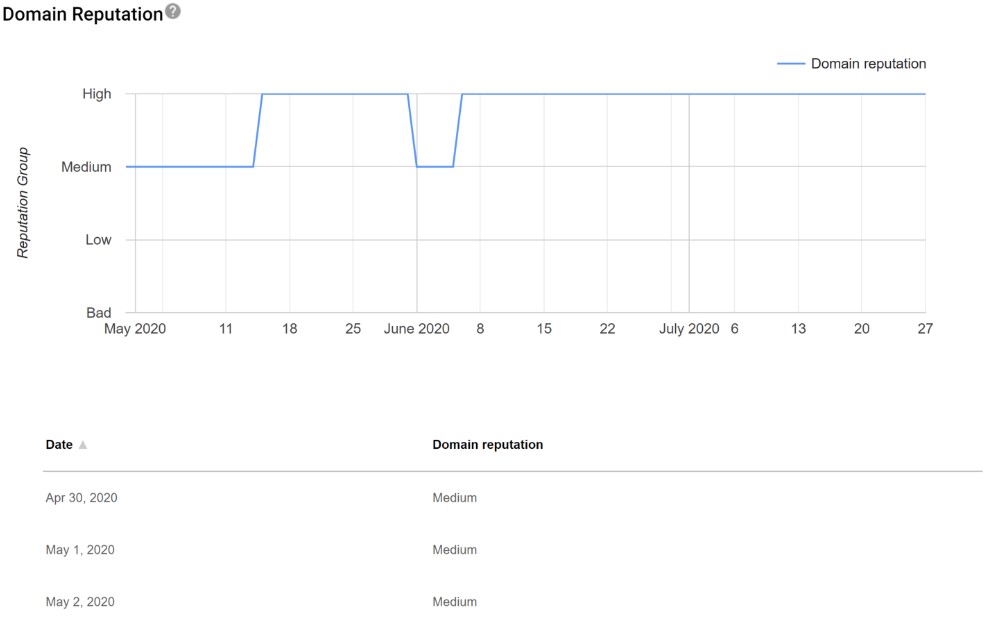
Many email platforms also provide reporting dashboards. For example, Omnisend provides deliverability metrics. These metrics include failed delivery, spam, and unsubscribe rates.
11. Use a dedicated IP address (if volume warrants it)
A dedicated IP address is a unique identifier assigned to a single user for sending emails. A shared IP has many senders on the same email service provider (ESP).
For most ecommerce brands, a shared IP works well. That’s because ESPs monitor the sending behavior of all accounts sharing the IP. Most ecommerce senders on shared IPs benefit from the ESP’s maintained reputation. This setup gives small-volume senders a reliable way to improve email deliverability.
A dedicated IP address makes sense for brands that send more than 100,000+ emails per month. Below are the pros and cons of using a dedicated IP address:
Pros
- Full control over sender reputation
- Malicious actions from other brands can’t block your IP address
- Traces delivery failures to your campaigns for fast action
Cons
- Requires extra recurring fees to maintain
- Low or irregular email volumes make the IP look suspicious to mailbox providers

After its failed deliverability, AcreValue decided on two fixes. It segmented audiences and used a dedicated IP address. The brand saw 60-70% open rates and a 5x increase in click rate.
Read the full case study
12. Set up BIMI to reinforce brand trust
BIMI stands for Brand Indicators for Message Identification. It’s an email standard that displays a brand’s verified logo in recipients’ inboxes. This visual trust signal helps ecommerce brands stand out in crowded inboxes. Here’s an example from Gmail.
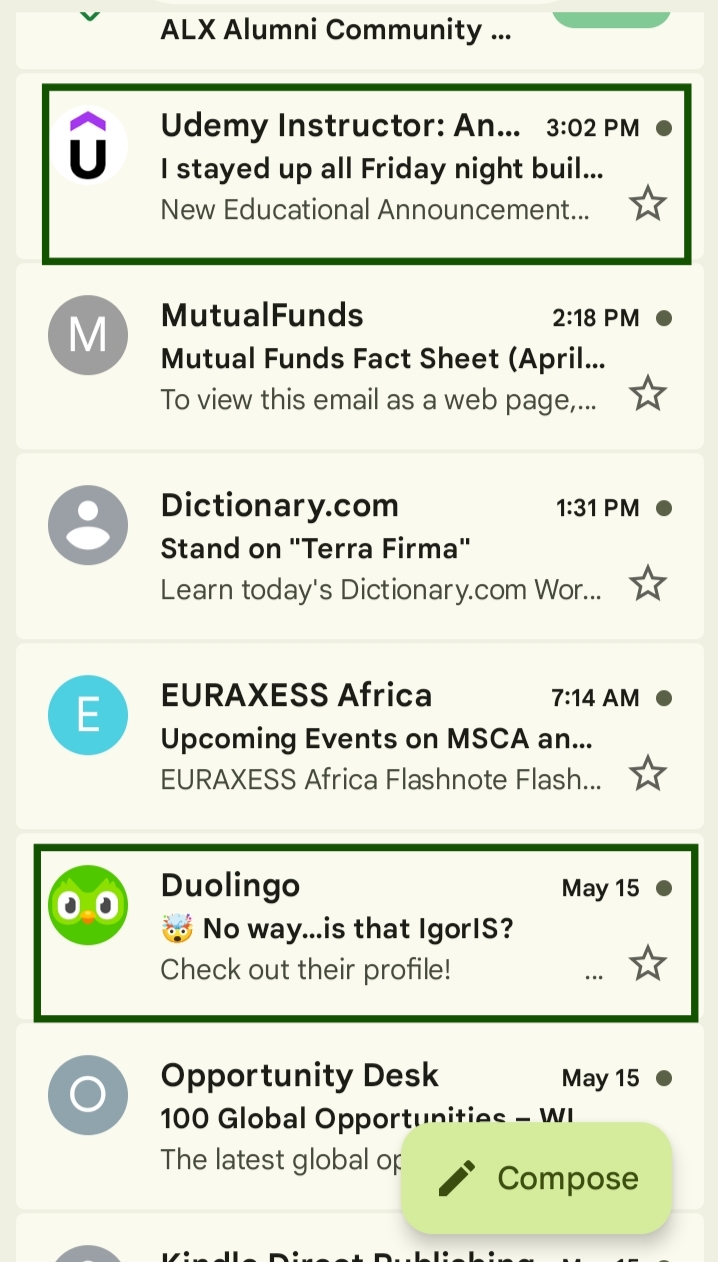
While BIMI doesn’t push emails to the primary inbox, it increases open and click rates. This is because recipients are more likely to open emails from brands they recognize. Higher engagement can improve email deliverability.
The requirements for using BIMI include:
- DMARC policy set to p = quarantine or p = reject
- Verified Mark Certificate (VMC) to prove trademark ownership
- BIMI TXT record linked to your Domain Name System (DNS)
The Common Mark Certificate (CMC) removes the need for a registered trademark. You only need proof that your logo has been in public use for at least 12 months.
Email deliverability for ecommerce: Unique challenges and solutions
Ecommerce brands face email deliverability challenges that other industries don’t. These include a sudden increase in email volume and mixed email streams. Aggressive list growth can also damage sender reputation.
Managing deliverability during peak seasons (BFCM, holiday)
During Black Friday and Cyber Monday, brands send more emails than at other times. Mailbox providers usually treat such occurrences as suspicious behavior. Domains without an established history of high volume face more risk.
A gradual pre-season ramp-up helps mailbox providers recognize your sending patterns. So, 30 days before major campaigns begin, you can start increasing email volume. It prevents your domain from triggering spam filters.
Here’s a pre-season checklist to improve email deliverability:
- Clean your email list and remove inactive subscribers
- Run re-engagement campaigns before peak promotions begin
- Increase sending volume over several weeks
- Focus on engaged subscribers during early campaigns
- Check bounce rates, spam complaints, and inbox placement
Transactional vs. marketing email deliverability
Transactional emails are messages triggered by a customer’s action. They include order confirmations and password resets. Marketing emails promote products or offers.
If you send both emails from the same domain, marketing emails may generate high bounce rates. That record affects every email sent from the domain. It means customers may not receive order confirmations.
Ecommerce brands should use separate subdomains, for example, orders.brand.com for transactional emails and news.brand.com for marketing. It protects transactional emails from marketing reputation issues.
List growth tactics and deliverability tradeoffs
List growth tactics are strategies for building an email list. Some effective methods include popups, lead magnets, and contests.
Fast email list growth often attracts coupon hunters. These users sign up only for free shipping or giveaways. They may even stop engaging after the first sale.
Poor-quality signups can also introduce fake addresses, bots, and spam traps, making it harder to improve email deliverability. To prevent this from happening, here are four quality-first list growth practices:
- Use double opt-in on all signup forms to confirm subscriber intent
- Replace broad offers with customized resources for your ideal subscribers
- Track signup sources to know which channels bring engaged contacts
- Use a sunset policy to remove unengaged segments
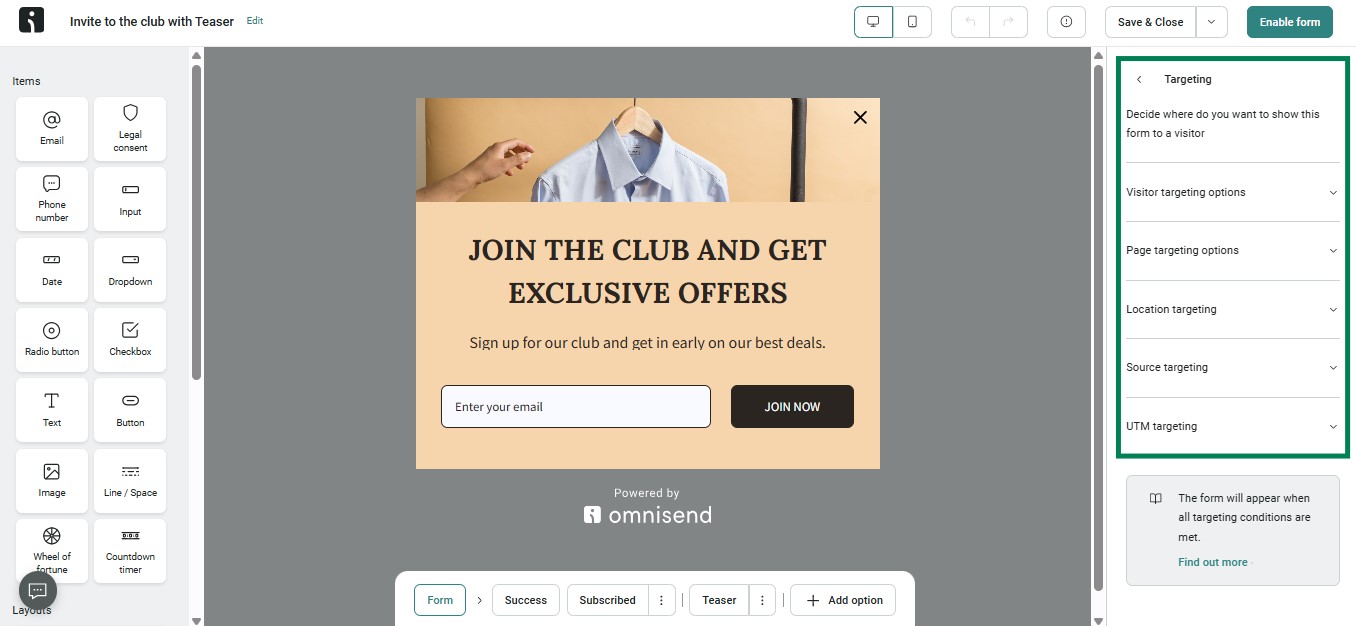
Omnisend provides customizable signup forms with targeting and opt-in controls for healthy list growth and ongoing engagement.
How to check your email deliverability rate
Brands trying to improve email deliverability should use domain checker tools. They should also track key metrics using campaign analytics. The results show where deliverability issues originate and which fixes should come first.
Key metrics to monitor
Tracking the right metrics helps you identify problems before they damage your sender reputation. Check engagement, complaint, and bounce signals rather than relying solely on open rates.
Apple’s Mail Privacy Protection (MPP) makes open rate data less reliable. It records opens even if the recipient never viewed the email. As a result, ecommerce brands should focus on conversion metrics. These include revenue per subscriber and click-to-conversion rate.
The following metrics are essential for tracking sender reputation and inbox performance:
- Inbox placement rate: It’s the percentage of emails reaching the primary inbox. Aim to keep this above 70%.
- Spam complaint rate: The percentage of recipients who mark emails as spam. Keep it below 0.10%.
- Hard bounce rate: The percentage of emails that are never delivered. Try to stay below 2%.
- Soft bounce rate: It’s the percentage of temporary delivery failures. Combined with hard bounce, it shouldn’t exceed 5%.
- Unsubscribe rate: The percentage of users who opt out. Keep it below 0.5%.
Tools to test and monitor deliverability
Email deliverability tools track sender reputation, email authentication, and inbox placement. Here are six tools for you to try:
- Google Postmaster Tools: Tracks domain reputation, spam, and authentication. Best for real-time reputation monitoring.
- Mail-tester: Scores emails, checks authentication, and scans content for spam triggers. Best for quick tests before launching email campaigns.
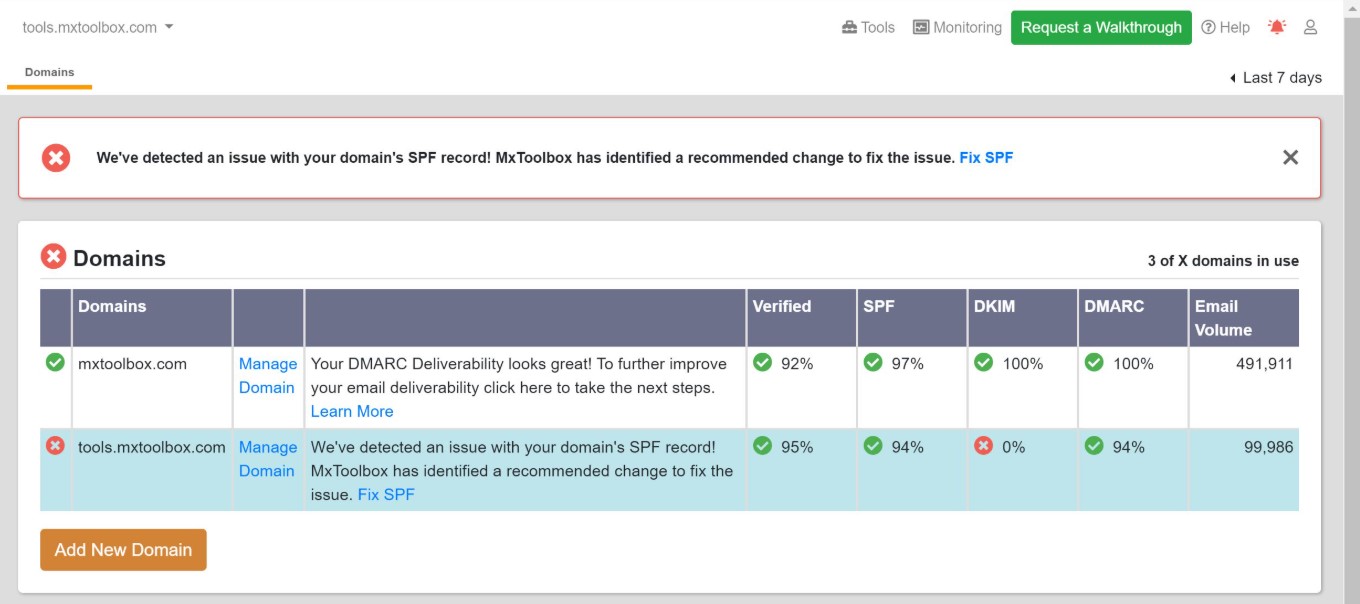
- MXToolbox: Checks DNS records, email blacklists, and server settings. Best for authentication troubleshooting. See what the result interface looks like:
- GlockApps: Tests emails across a seed list to show which folders (inbox, promo, or spam) they land in. Best for inbox placement testing.
- Omnisend: Provides built-in reporting to track metrics like click rates and unsubscribes. Best for monitoring real-time campaign performance metrics.
- Bouncer: Verifies email addresses and cleans risky contacts before sending campaigns. Best for list cleaning.
Current sender requirements: Gmail, Yahoo, and Microsoft
Mailbox providers now enforce strict sender requirements to prevent emails from going to spam folders. Brands, especially bulk senders, must meet these standards to improve email deliverability across Gmail, Yahoo, and Microsoft.
| Provider | Authentication requirements | Spam complaint threshold | Unsubscribe requirement | Enforcement status |
|---|---|---|---|---|
| Gmail | SPF, DKIM, and DMARC | Below 0.10% | One-click unsubscribe (RFC 8058) | Active |
| Yahoo | SPF, DKIM, and DMARC | Below 0.10% | One-click unsubscribe | Active |
| Microsoft | SPF, DKIM, DMARC, and OAuth for SMTP sending | Below 0.10% | Functional links and/or one-click unsubscribe | Active |
All three providers require SPF, DKIM, and DMARC authentication.
Conclusion
Improving email deliverability is an ongoing practice. Authentication, list hygiene, engagement, and content quality need constant attention. They ensure that emails continue to reach the primary inbox.
For ecommerce brands, even small deliverability problems can affect conversions. That’s because every email that lands in spam is a missed opportunity to generate revenue.
Brands that improve email deliverability create stronger customer relationships. They’re more likely to increase engagement and recover revenue from campaigns.
As mailbox providers enforce new standards, you’ll need tools to manage email deliverability. Platforms like Omnisend make deliverability best practices accessible for ecommerce businesses. They offer built-in automation, segmentation, authentication support, and reporting tools.
Quick sign up | No credit card required
FAQ
How can I improve my B2B email deliverability?
You can improve B2B email deliverability by implementing technical authentication and list hygiene. You should also avoid purchasing email lists and sending emails to inactive contacts.
How do I improve email deliverability in WordPress?
Here’s how to improve email deliverability in WordPress:
- Install an SMTP plugin
- Set up DNS authentication
- Use an email address from your domain
- Personalize email content
- Track email performance
An SMTP plugin routes your emails through an authenticated server. It reduces the chances that your messages will end up in spam.
How do I improve cold email deliverability?
Improve cold email deliverability by using a separate sending domain. You also need to input the correct DNS records. Afterward, warm up the domain to build sending history before launching large campaigns.
Which strategy will improve email deliverability?
Set up SPF, DKIM, and DMARC to improve email deliverability. These records verify your identity and help mailbox providers trust your emails. Also, clean up your email list and send emails only to engaged subscribers.
How often should I clean my email list?
You should clean your email list every three to six months. If you run an ecommerce business, remove unengaged contacts before peak sales periods, such as Black Friday.
Also, if you send many emails, maintain your lists every quarter. Consistent cleaning helps to improve email deliverability.
What is the difference between email deliverability and inbox placement rate?
Email deliverability tells you whether an email reaches the recipient’s mail server. Inbox placement rate is the number of emails that land in the primary inbox. So you may send an email, but it might end up in the spam folder.