Omnisend AI


 OFFER
OFFER











Klaviyo is most suited to ecommerce stores focused on revenue and retention rather than standalone campaigns. Established stores will benefit from its advanced features, but smaller ones might overpay for features they don’t use.
Our hands-on testing spanned four days with one goal: helping you figure out if it’s the right tool for your business.
The quick verdict: Is Klaviyo worth it?
Klaviyo is an ecommerce marketing platform for automating emails, texts, and mobile push notifications, with AI-powered agents to handle customer questions. It offers predictive analytics, advanced segmentation, and sophisticated AI tools like Composer. That said, Klaviyo costs rise quickly as your list grows, and smaller teams may find the platform takes a long time to master. Here’s our Klaviyo review verdict at a glance:
| Category | Score | Reasoning |
|---|---|---|
| Ease of use | 3/5 | Guided store integration and setup; basic features are simple to master, though advanced ones take more time to learn |
| Features | 4/5 | Covers list-building, automations, campaigns, multichannel, with reports spanning all efforts |
| Value for money | 3.5/5 | Advanced features justify the cost, but scaling can get expensive |
| Customer support | 3.5/5 | Limits email support to 60 days in the free plan; paid plans get 24/5 live chat support as standard |
| Ecommerce fit | 5/5 | Integrates with all leading platforms with deep data syncs |
Best for: Shopify and WooCommerce stores in the direct-to-consumer (DTC) space, particularly those earning $300K+ revenue a year with a team.
Not ideal for: Beginners on tight budgets. Also, B2B and stores with basic customer journeys where Klaviyo’s advanced features will go unused.
Those are our verdicts, but what do other customers think? The table below provides Klaviyo’s ratings across the four most popular review platforms as of September 2026:
| Platform | Rating | Reviews |
|---|---|---|
| G2 | 4.6/5 | 1,360+ |
| Capterra | 4.6/5 | 530+ |
| Trustpilot | 1.6/5 | 360+ |
| Shopify App Store | 4.7/5 | 3,360+ |
Data as of October 2026
What are the pros and cons of Klaviyo?
Our testing revealed that Klaviyo’s ecommerce fit is its best quality. On the flip side, there’s a learning curve to overcome and pricing considerations.
Pros
- Ecommerce integration. Klaviyo integrates with Shopify, WooCommerce, BigCommerce, Wix, and many more platforms with native apps.
- Automation capabilities. AI recommends flows based on your store integration, or you can select from 60+ pre-built templates.
- Customer profiles and segments. Klaviyo’s CRM data, such as purchase history and CLV, feeds segments and flows for targeting.
G2 user Mohd danish K. said that he likes Klaviyo for “how easy it makes it to build targeted email campaigns and automate customer communication.”
Cons
- Learning curve. Klaviyo’s dashboard has lots of menu items, and the settings for flows, segments, and reports are not always easily accessible.
- Pricing. Klaviyo costs start from $20/month, and the active profile billing structure could see your monthly plan increase quickly.
- Support. Live chat is only available 24/5 without weekend coverage in the Email plan, and Free plans only get email support for 60 days.
Capterra reviewer Dmytro N. cites pricing as his biggest Klaviyo frustration: “The pricing structure scales up quite aggressively as your subscriber list grows, which can be tough for growing brands.”
How much does it cost?
Klaviyo is free for fewer than 250 active profiles and then starts at $20/month for 500 active profiles. Active profiles include opt-ins and non-opt-ins from checkout. Costs increase as your list grows, and add-ons can increase your costs further.
Klaviyo Free plan
Klaviyo’s free plan is for start-ups and testing. It supports 250 active profiles, 500 email sends, and includes $5 of mobile messages/month. You can create campaigns, flows, segments, and custom reports, with limited access to support and AI features.
Klaviyo Profile & Email plan
The Email plan is Klaviyo’s only paid marketing plan. It starts from $20/month for 500 active profiles and a 5,000 send limit, applying a 10x contact send limit across all tiers, with access to all standard email marketing features.
SMS is available as a paid add-on on top of the Email plan, priced per message by country and message type, with bundles starting from $15/month.
How much do Klaviyo prices increase by active profile tier?
Klaviyo pricing starts at $20/month for 500 active profiles and reaches $1,380/month for 100,000 profiles. The per-profile cost generally drops as your list grows, except at 15,000 active profiles, where the monthly price more than doubles from the 10,000 tier ($150 to $350).
The table below compares Klaviyo costs from 500 to 100,000 active profiles. For a complete breakdown, read our Klaviyo pricing guide.
| Active profile count | Klaviyo Email plan | Cost per 1,000 profiles |
|---|---|---|
| 500 | $20/month | – |
| 1,500 | $45/month | $30 |
| 2,500 | $60/month | $24 |
| 5,000 | $100/month | $20 |
| 10,000 | $150/month | $15 |
| 15,000 | $350/month | $23.33 |
| 20,000 | $375/month | $18.75 |
| 35,000 | $550/month | $15.71 |
| 50,000 | $720/month | $14.40 |
| 100,000 | $1,380/month | $13.80 |
Data as of October 2026
You might also want to compare Klaviyo’s costs with other tools. Our email marketing price comparison tool will help you with that.
Klaviyo add-ons that can inflate the cost
Klaviyo’s add-ons can significantly increase your monthly marketing costs. Some add-ons, such as the Advanced Klaviyo Data Platform, are only relevant to enterprise stores, but others, like Composer, are relevant to most.
Here are the add-ons to look out for:
Composer
Starting price: $20 for 2,000 credits (usage-based)
Composer is Klaviyo’s AI marketing agent. Active Klaviyo accounts receive $5 of usage/month that restarts each month.
Customer Agent
Starting price: $50/month for 75 conversations.
A 24/7 AI assistant for your customers, fed by your Klaviyo-store integration. It can chat with your customers on the website or other supported channels. You can train the agent to answer product questions, recommend products, track orders, or escalate issues to a human.
Personalisation
Starting price: $100/month for 500 active profiles.
Personalisation improves on Klaviyo’s standard analytics with multi-touch and omnichannel attribution, customer behavior funnels with cohort analytics, customizable recency, frequency, monetary (RFM) analysis, and custom prediction windows for customer lifetime value (CLV).
Advanced Klaviyo Data Platform (KDP)
Starting price: $500/month for 100,000 total profiles.
Advanced KDP is Klaviyo’s CRM with all Marketing Analytics features, plus unified lifetime customer profiles, predictive analytics with K:AI, and no-code data transformation. Plus, you can connect data from the complete library of 350+ integrations. Unlike Klaviyo’s email plans, Advanced KDP is priced based on all profiles stored in your account, including suppressed and non-subscribed profiles.
Should those add-ons price you out of Klaviyo, then consider cheaper alternatives.
Rechecked as of October 2026
What do customers say about Klaviyo? Patterns from 300 reviews
The top complaints among Klaviyo users were Pricing (~39%), Customer support (~19% of reviews), and Reporting & attribution (~13%), as shown by Omnisend’s analysis of 300 Klaviyo customer reviews from G2, Trustpilot, and Capterra (Omnisend’s Klaviyo Review Analysis 2026).
The analysis was made by manually reading and tagging 300 reviews, 100 each from G2, Trustpilot, and Capterra. The reviews we read ran from late 2024 to mid-2026.
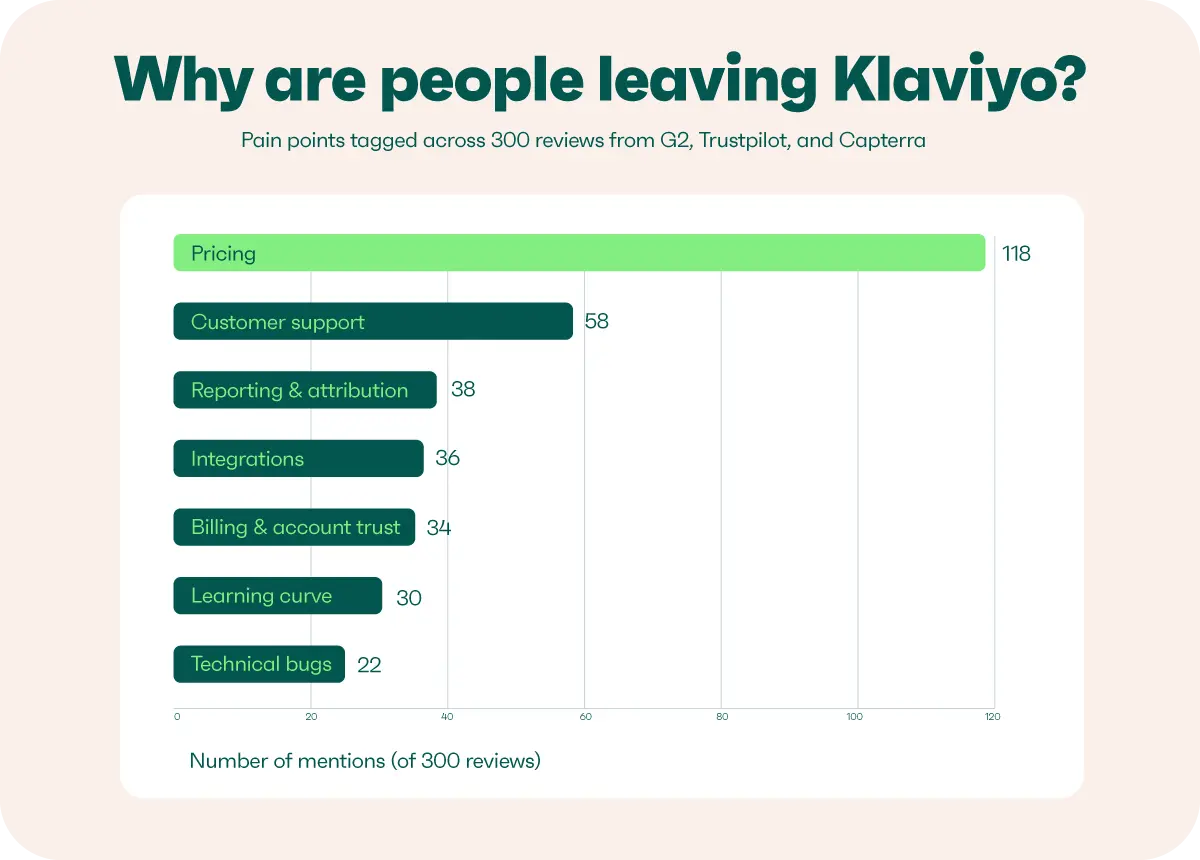
The pricing complaints touched on how Klaviyo counts and manages active profiles. Klaviyo charges all contacts with a valid email who haven’t been suppressed or unsubscribed. Some customers complain about the 90-day suppression cooldown window. If a profile is manually suppressed and then unsuppressed, it cannot be manually suppressed again within the 90-day window and may therefore remain billable.
Customer support is the second most common complaint. Reviewers pointed out that the chatbot struggles to answer questions. The third-top issue is reporting and attribution, where revenue is seen as inflated versus Shopify or GA4.
The table below details the quantity of Klaviyo pain point mentions from 300 reviews:
| Rank | Pain point | Mentions (of 300) | Approximate share |
|---|---|---|---|
| 1 | Pricing | 118 | ~39% |
| 2 | Customer support | 58 | ~19% |
| 3 | Reporting & attribution | 38 | ~13% |
| 4 | Integrations | 36 | ~12% |
| 5 | Billing & account trust | 34 | ~11% |
| 6 | Learning curve | 30 | ~10% |
| 7 | Technical bugs & reliability | 22 | ~7% |
Totals exceed 300 because a review mentioning more than one issue is counted under each.
What do Redditors say about Klaviyo?
Redditors say Klaviyo is worth it for ecommerce stores once email is a proven revenue generator, and for brands that need the automation depth. Additionally, brands that use Klaviyo say that its “stability” is worth paying extra for.
Shopify users are among Klaviyo’s biggest advocates on Reddit. One Redditor switched to Yotpo, but then moved back for its better segment tracking and form integration.
A common pain point is the pricing, not only for the Email plan’s active profiles, but also new features, which some Redditors say are priced “way too high.”
What features does Klaviyo offer?
We reviewed all Klaviyo features relevant to our Shopify store and found that it suits larger, established stores, with smaller ones less likely to need its advanced features.
Our testing included the email editor and templates, automation, segmentation, SMS marketing, translations, sign-up forms, reporting, AI features, integrations, and team capabilities.
Email editor and templates
Klaviyo fits ecommerce brands with or without in-house email design specialists, offering customizable templates and drag-and-drop elements for easy email creation, plus HTML editing.
You can insert dynamic product blocks pulling live data from your store, use conditional content based on customer properties, and preview mobile rendering before sending.
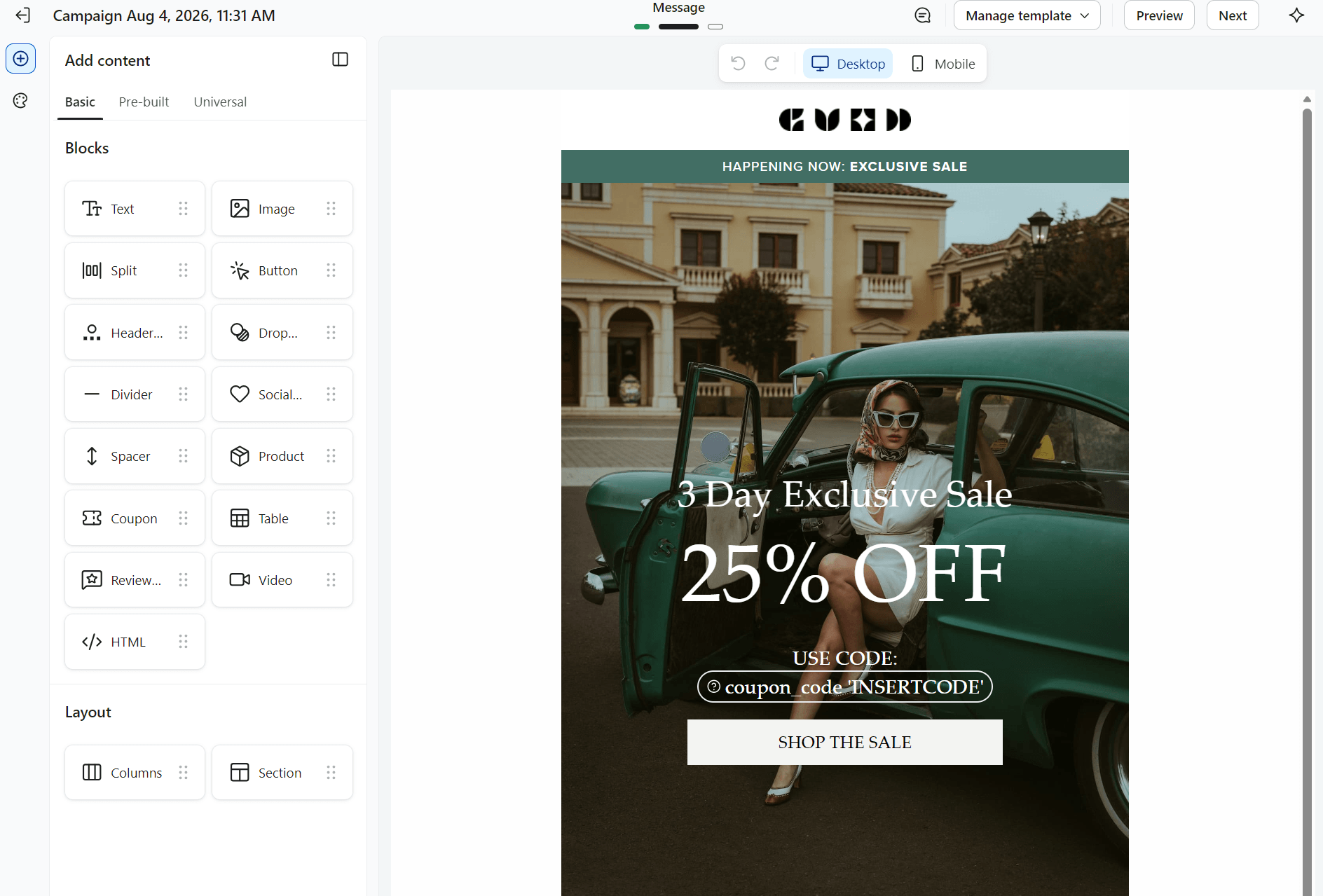
An HTML editing option is also available for users who want full design control. The template library has grown to over 350 options, covering a wide range of ecommerce use cases, such as outreach, reminders, and sales.
The editor’s Add content section includes Basic, Pre-built, and Universal elements, each of which you can drag into a template. It isn’t a difficult email editor to master, with the pre-built templates providing professional designs by default.
Marketing automation and flows
Klaviyo offers 60+ pre-built flow templates covering welcome series, abandoned cart, browse abandonment, post-purchase, and winback sequences.
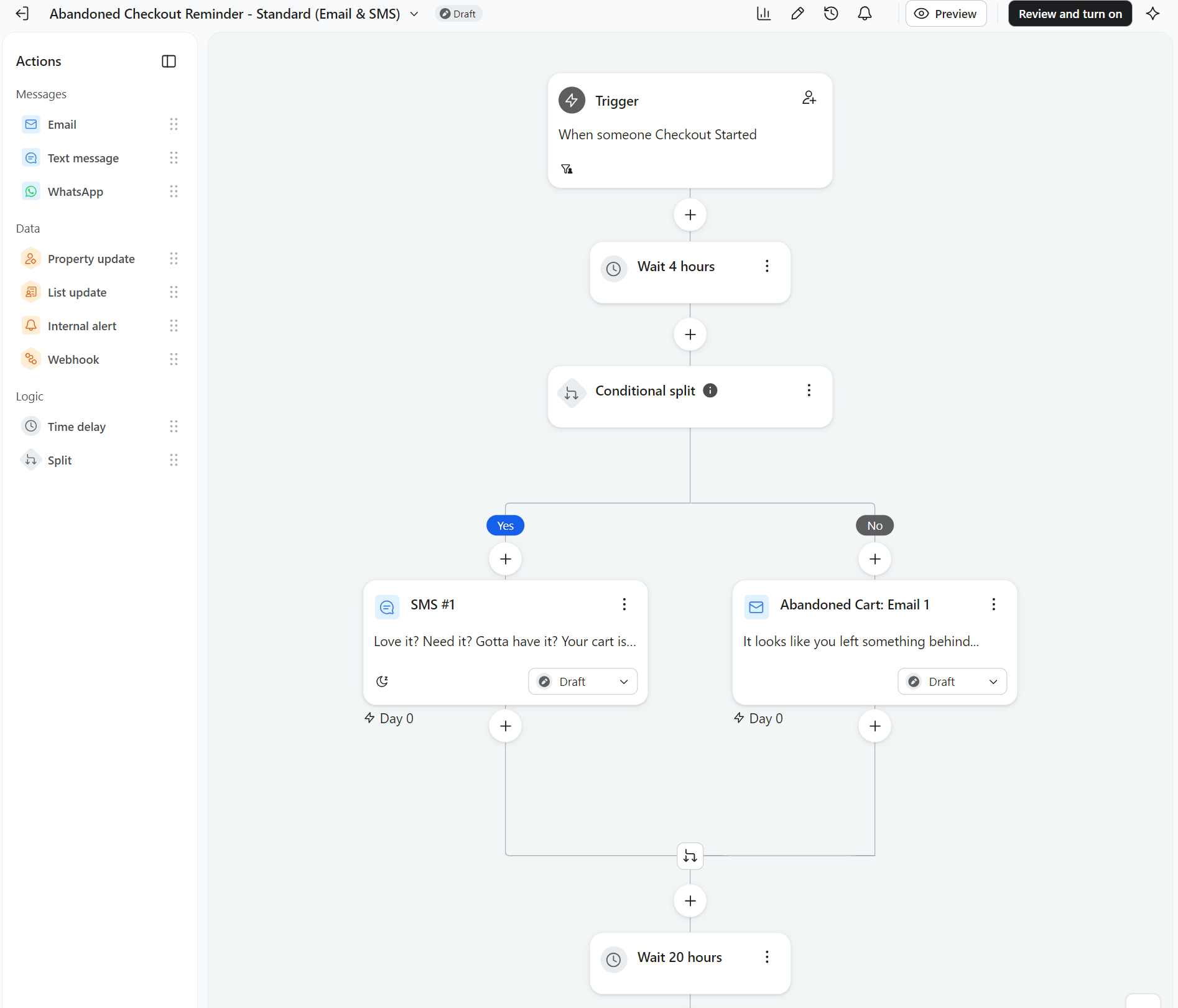
TThe depth of logic lets you split flows based on purchase history, predicted lifetime value, or channel preference.
One G2 reviewer noted: “What I like best about Klaviyo is the segmentation and automation possibilities. We can create different flows based on customer actions, behavior, and lifecycle stage, so communication becomes much more relevant.”
Segmentation
Klaviyo uses customer data from its built-in CRM to automatically place contacts into the right segments. This means you can build segments using real-time behavioral data, purchase history, predicted lifetime value, churn risk, and custom properties.
Take a look at the segment builder interface:
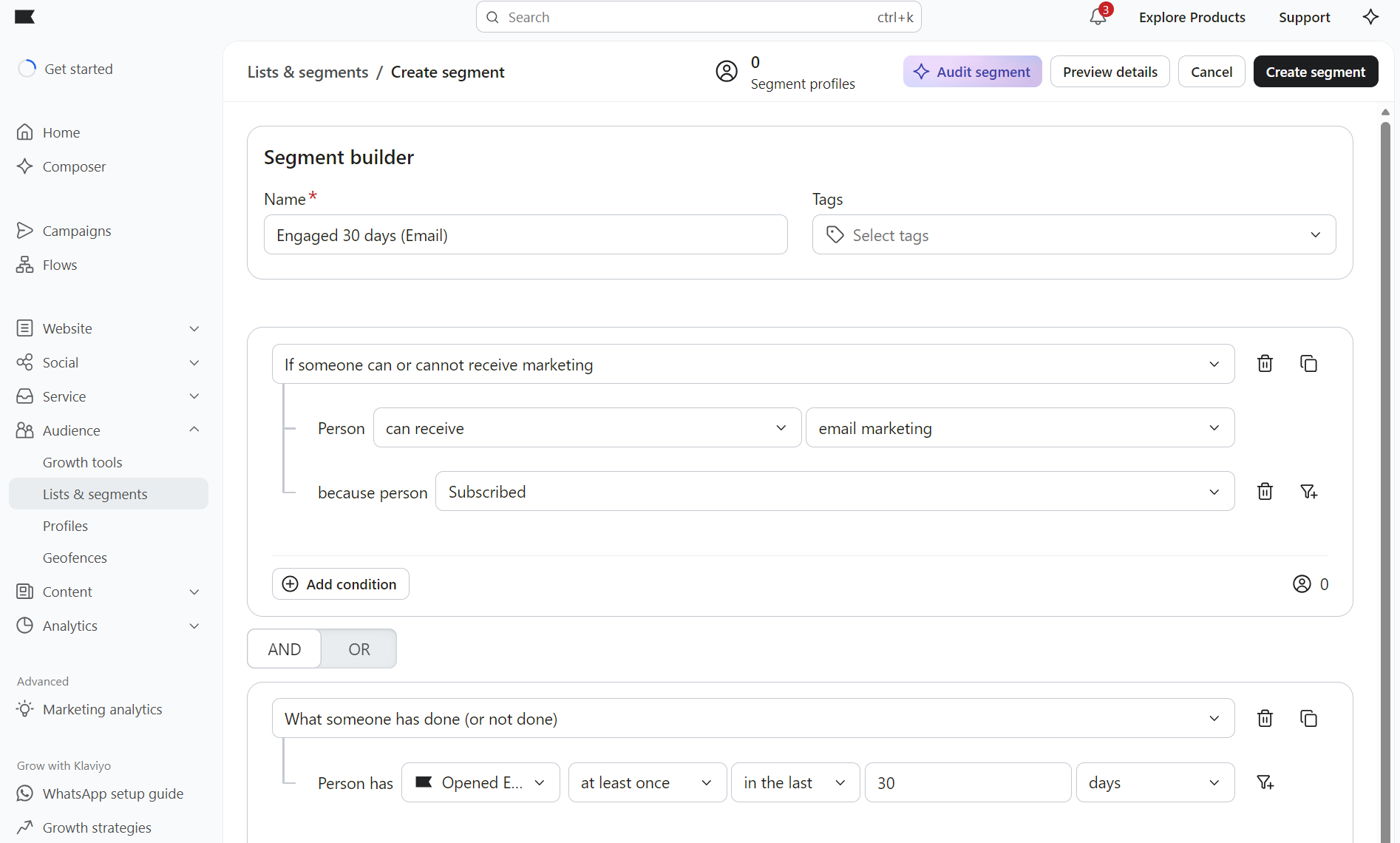
There’s an AI-powered segment builder in Composer that generates segment logic automatically. Composer also audits your segments and recommends improvements.
We also reviewed Klaviyo’s integrations with Meta, Google, Pinterest, TikTok ads, and Criteo; these ensure the customer data behind your emails can target your paid ads too.
Just keep in mind that consent still sits with you, meaning you’re responsible for configuring each sync between platforms and ensuring compliant data use.
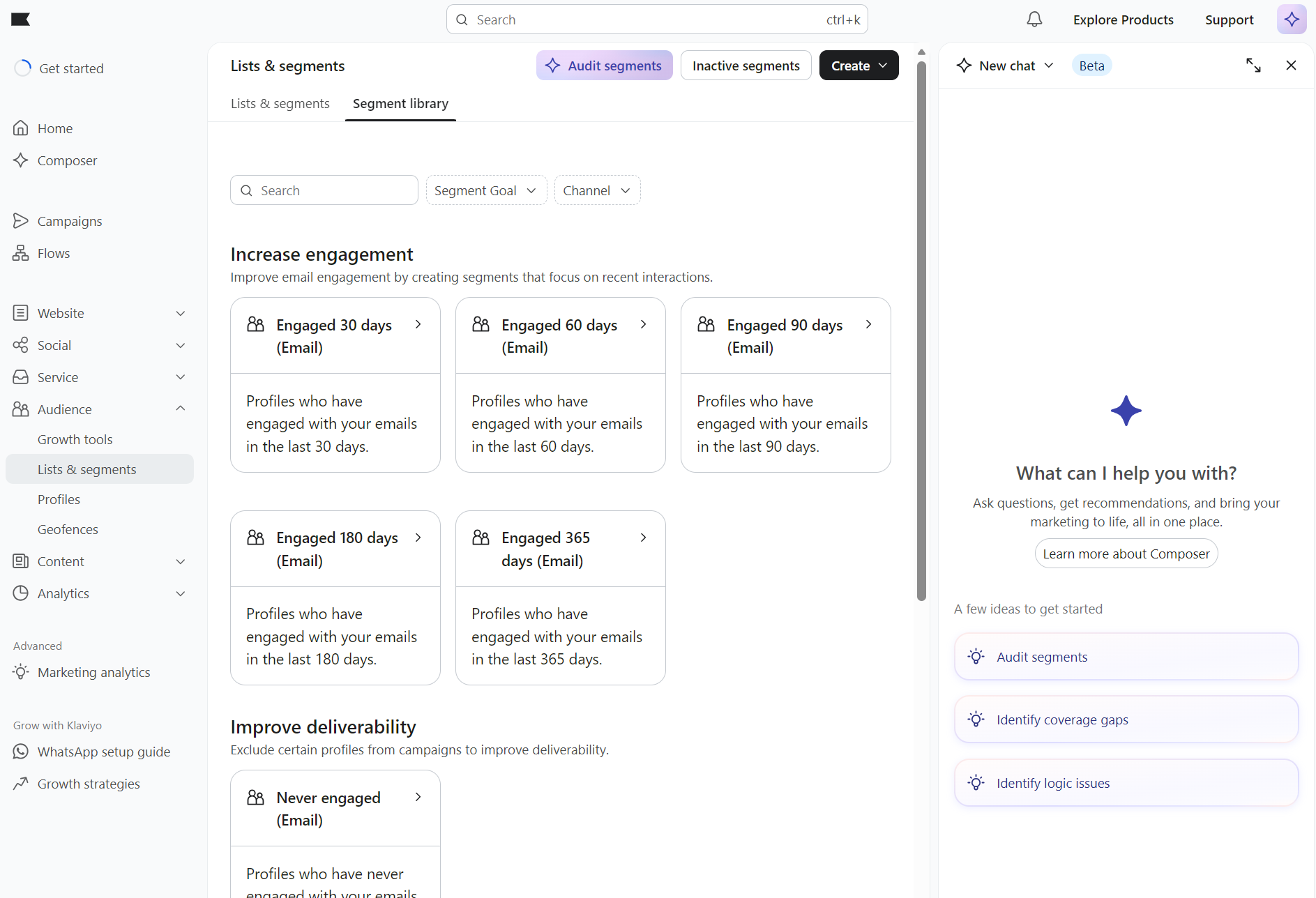
Klaviyo’s pre-built segment library covers engagement, deliverability, past purchasers, and more groups, and lets you filter by channel and segment goal. Three engagement segments are automatically created at sign-up for 30-day, 60-day, and 90-day engaged segments.
SMS marketing
Klaviyo’s SMS marketing lets you send one- and two-way messages to customers depending on their location. You can create standalone SMS campaigns, combine email and SMS in the same flows, apply the same segmentation across both channels, and track performance across them.
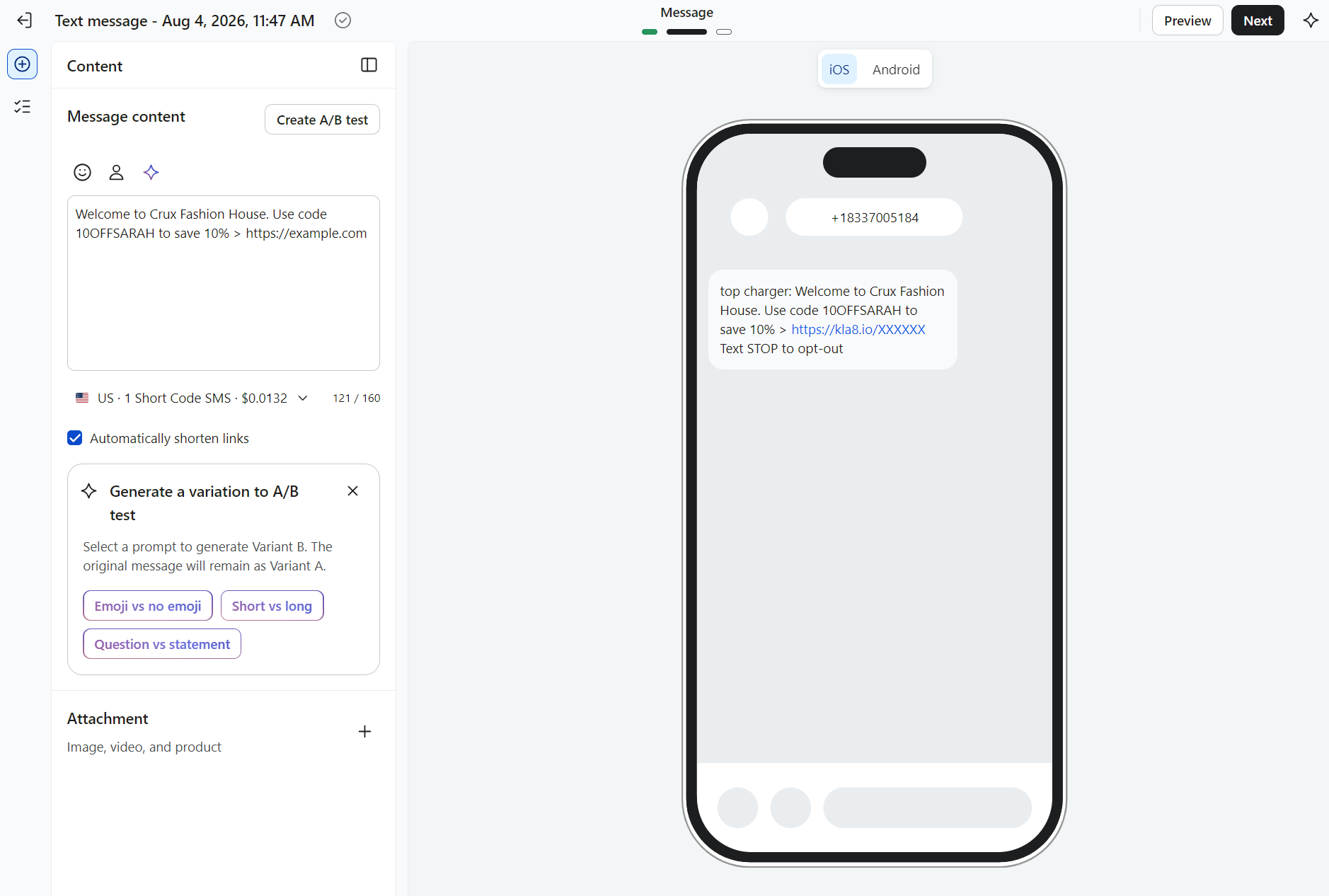
It also includes compliance tools for consent management and opt-out handling.
The limitation, and it’s worth noting, is geographic reach. Klaviyo supports SMS in 23 countries. Brands running global SMS campaigns may find this restrictive compared to some alternatives.
SMS pricing in the US starts at $15/month per bundle on top of the Profile & Email plan. Mobile message balances expire at the end of each billing cycle with no rollover.
One U.S. SMS is $0.011 plus provider fees where applicable. One U.S. MMS is roughly three times that, and international rates vary by country. For instance, the per-message rate starts at $0.031 in Australia.
Smart translations and language support
Klaviyo’s platform interface is available in ten languages: English, French, German, Spanish (Mexican and Spanish varieties), Italian, Korean, Dutch, Polish, Swedish, and Brazilian Portuguese.
Translation of your content is handled by Smart Translations, available in paid plans only.
Smart Translations translates your text blocks, labels, and alt text into any one of 60+ languages. You don’t need to set these manually, as Klaviyo serves the correct language based on your subscriber’s locale or profile properties.
That being said, translation doesn’t cover all the content your emails deliver by default. You must review each output before sending to ensure a high-quality translation.
Links and images can be swapped per language. There’s an important limitation: product feed content isn’t translated automatically, so you’ll need to configure it per language. Static Product Blocks can regionalize this if you use Shopify Markets.
Sign-up forms and pop-ups
Our Klaviyo review found its range of embedded forms, pop-ups, flyouts, full page, and banner formats covers almost everything needed to grow your list.
You can set your forms to show on exit intent and time on page, by location, and based on cart contents, such as showing forms based on total cart value.
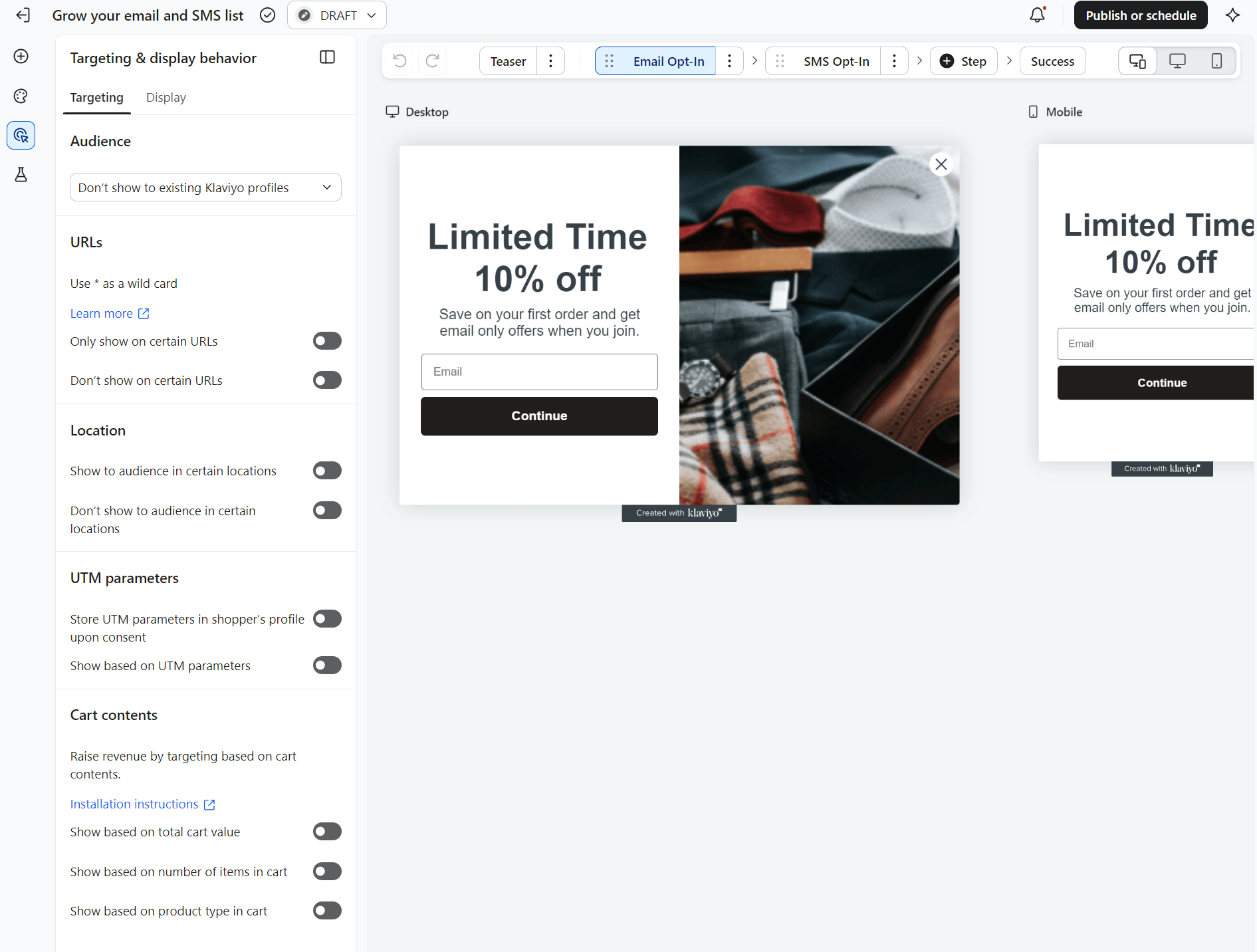
A/B testing is also available for forms to improve sign-up rates.
Klaviyo added a basic landing page feature in February 2026, but it’s still limited compared to dedicated tools. Brands running paid traffic campaigns will likely still need a separate solution.
AI and predictive analytics
K:AI is the name for Klaviyo’s AI. It isn’t an AI suite, but a series of agents and built-in tools available depending on your plan type and add-ons.
Composer is Klaviyo’s marketing agent that spots revenue opportunities, builds audiences, drafts campaigns from a prompt, and audits your work. Klaviyo customers get $5 of Composer usage/month for free and will need to purchase a paid plan once they run out or wait for the next month.
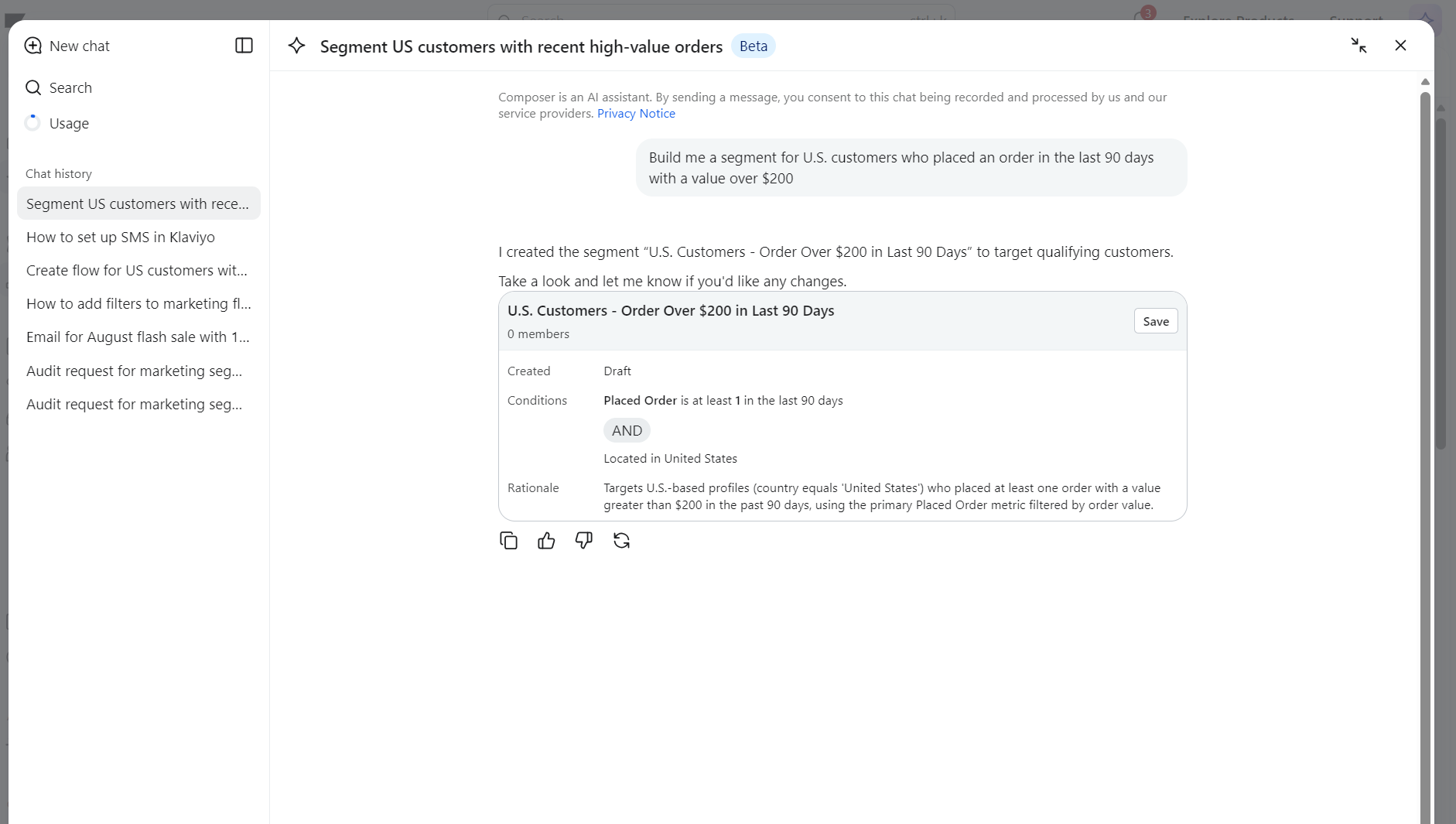
Customer Agent is an add-on that provides your customers with 24/7 support and product recommendations, trained on your data and brand voice.
Klaviyo also includes predictive and generative features for CLV scoring, churn risk, and RFM analysis, as well as content tools such as Brand Voice AI, Segment AI, Flows AI, and Image Remix, and delivery features like personalized send time.
Klaviyo’s predictive analytics are AI-based. AI reads past purchases and browsing, and then forecasts what each customer does next: who’s likely to buy, who might churn, their predicted lifetime value, the best time to reach them, and so on.
Predictive analytics only appears once at least 500 customers have placed an order. You must also have an ecommerce integration or send orders via API, and have at least 180 days of order history with orders placed in the last 30 days. Plus, you must have some customers who have placed three or more orders.
A Model Context Protocol (MCP) server is available across all plans. It connects your Klaviyo data to Claude and ChatGPT. It means that your data isn’t confined to Klaviyo and can stretch into other AI tools.
Reporting and analytics
We appreciate Klaviyo’s reporting depth. Its campaign and flow dashboards tie revenue attribution to your sends, and you can build custom reports from five types: single-metric deep dives, multi-metric reports, and campaign, flow, or product performance reports.
Klaviyo’s benchmark reports compare your performance with industry medians and similar businesses.
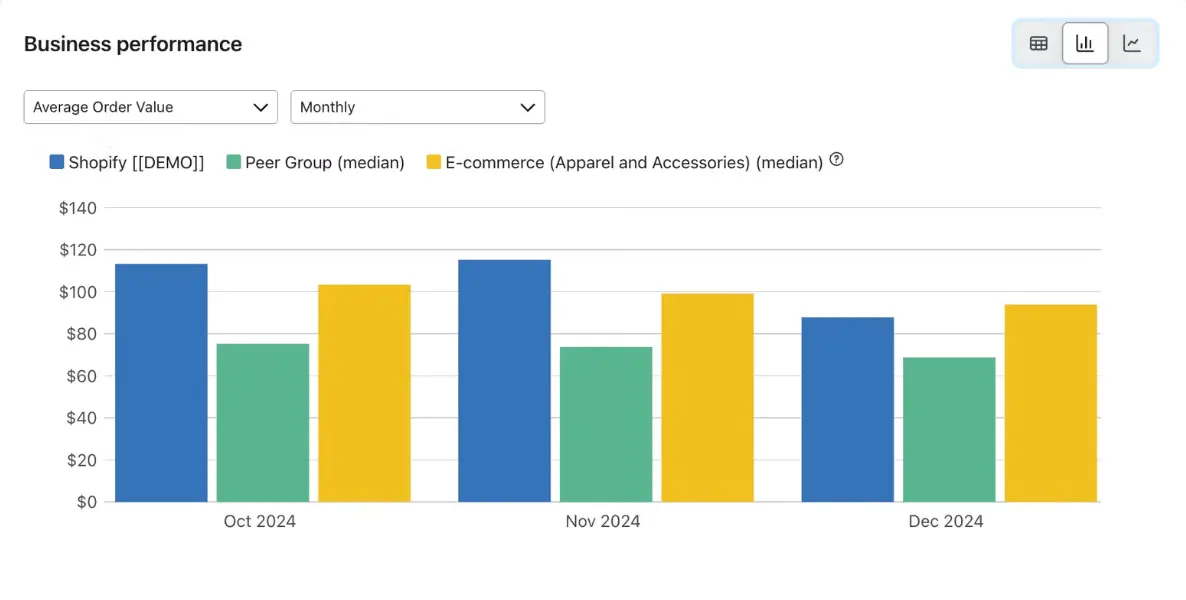
There’s one important caveat. Klaviyo’s email opens and clicks are both credited for up to five days. That can inflate your reported revenue figures if you leave the defaults unconfigured.
Review and tighten your attribution settings early, and check that bot-click filtering is on to keep your data clean.
Klaviyo also provides detailed email deliverability reports. Its Deliverability Hub tracks sender reputation and flags spam complaints, bounces, and unengaged sends before they hurt inbox placement, giving you a sender-reputation score once you’ve sent 1,000 emails in the last 30 days.
The Deliverability Hub also suggests list cleaning and sunsetting inactive profiles when appropriate. There’s also an AI layer, which flags abnormal sending spikes.
Integrations
Klaviyo has 350+ native apps, plus it also connects to Zapier, a middleware connector for thousands more tools.
A good Shopify integration is crucial for ecommerce senders. In our testing, we used the connection to bring customer profiles, order history, and real-time behavioral events into Klaviyo, which could then feed our segments and flows for targeted Shopify marketing.
WooCommerce, BigCommerce, and Magento are all natively supported, as are Salesforce, Gorgias, Recharge, and several others:
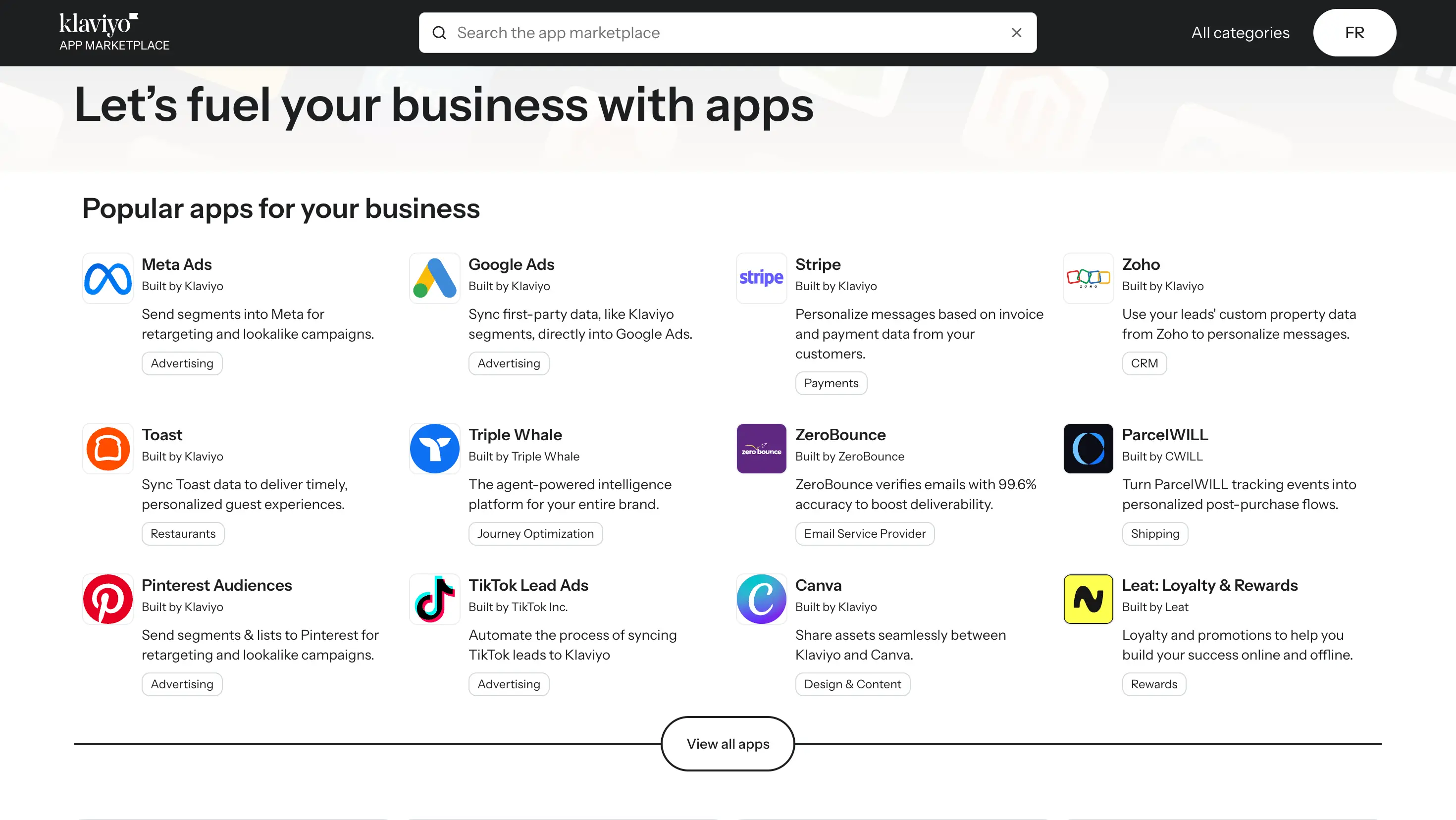
The Shopify integration connects to Shopify Flow, can pull live product and inventory data into emails, and trigger flows based on checkout events in near real time.
Team, seats, and user permissions
Klaviyo is a team-friendly marketing tool with eight user roles: Owner, Admin, Manager, Analyst, Campaign Coordinator, Content Creator, Support, and Social Media Manager. These have different permissions. Only Owners and Admins can add users, while roles such as Manager or Content Creator have limited access to campaigns, analytics, and account settings. As a result, a Content Creator can build templates, but can’t send the campaign, which means you can gate features according to who needs them.
Those user permissions keep your large marketing team tidy, and let you bring in an agency or freelancer on a limited role instead of handing over admin access.
Setting up Klaviyo: How easy is onboarding?
Initial account creation and Shopify connection took us approximately 12 minutes. We went through three steps and four integration screens to connect our ecommerce store to Klaviyo.
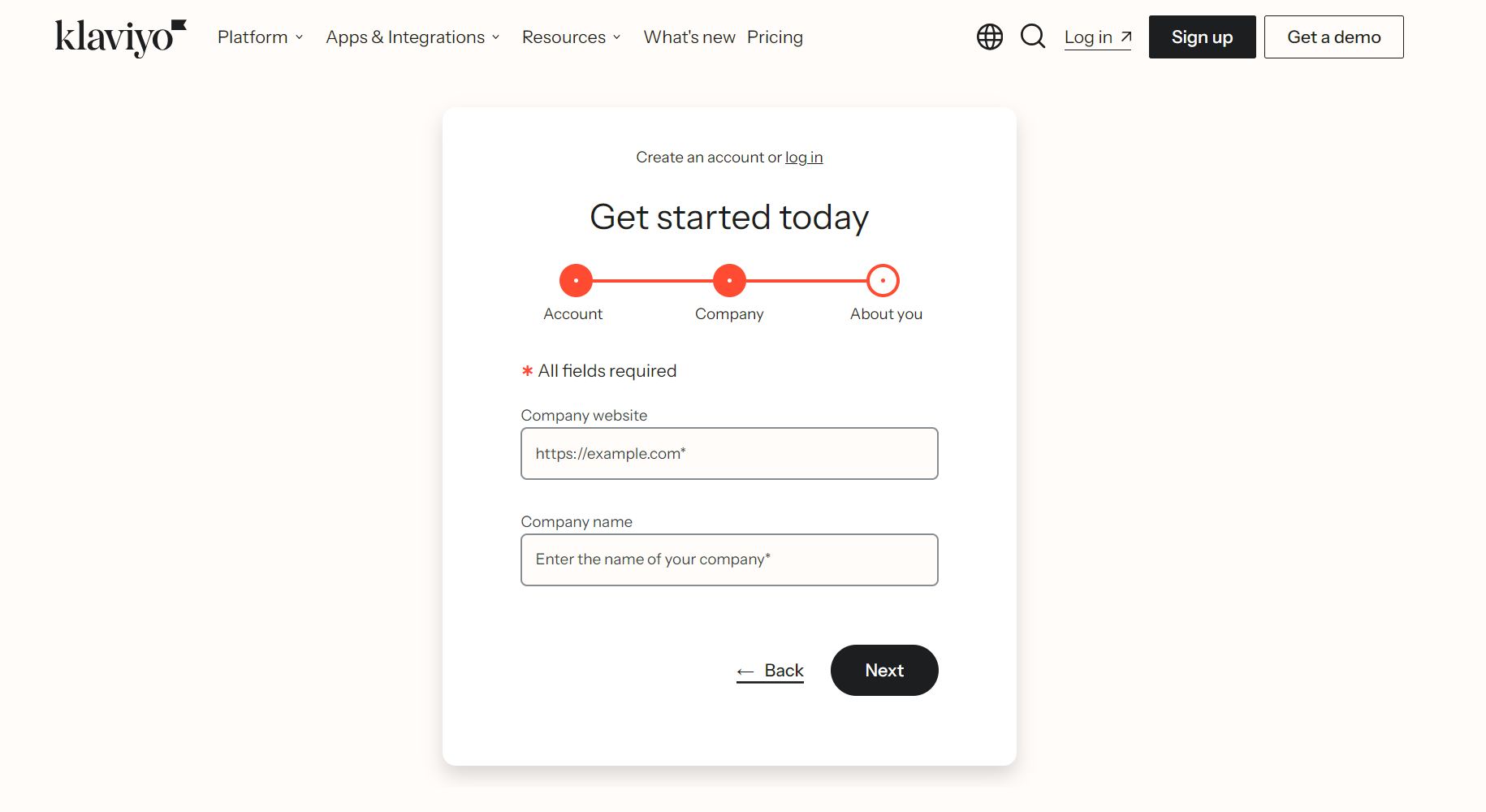
The first step asked for an email address and to create a password. It then led us to the next step, where we were asked for a company website and company name:
In the final step, the form requested a phone number (required) and asked us to select how we would use Klaviyo (for our own business or our client’s business).
We then reached the automated integration screen, which required us to provide a website URL running on one of the supported ecommerce platforms.
For our testing, we added a Shopify store at sign-up. Klaviyo recognized the integration and asked us to continue.
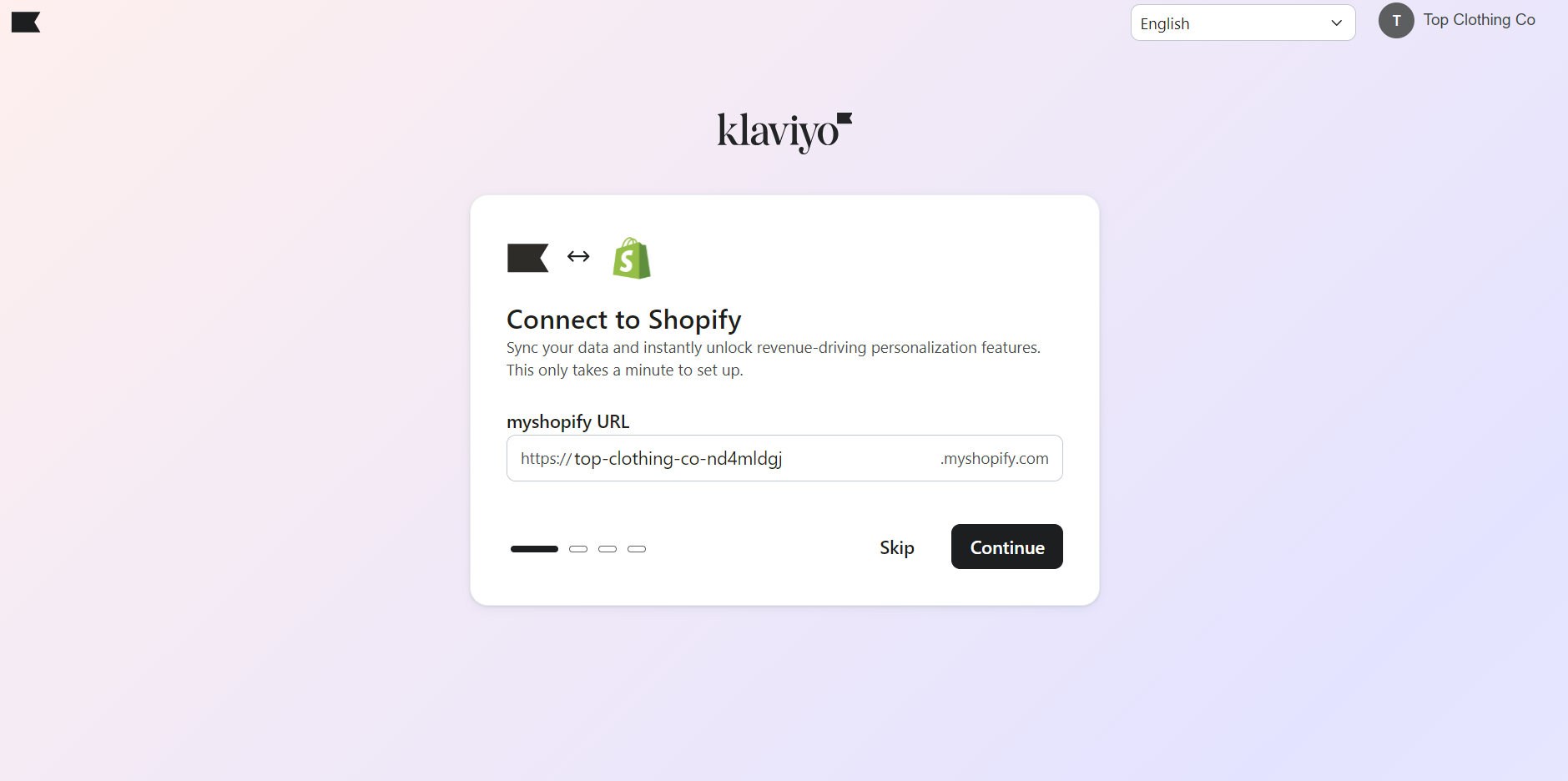
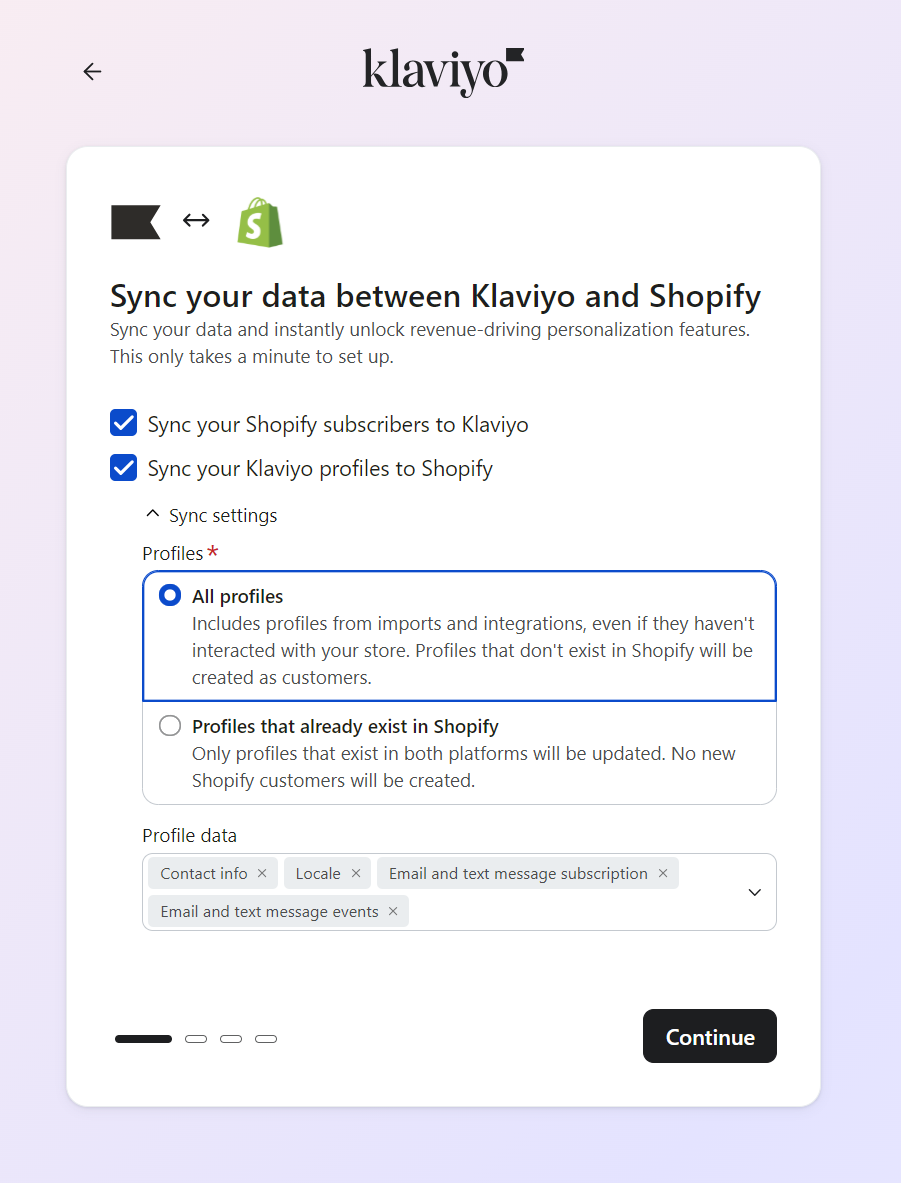
Clicking Continue sent us to the Shopify backend. We clicked Install, and the app automatically installed on our store. We were redirected to the Klaviyo screen to confirm the level of sync required:
The next screen asked us to select what our business offers, what type of business we were, and the messaging channels we were interested in. We selected Email and Text messaging, leaving out Social and WhatsApp for our review.
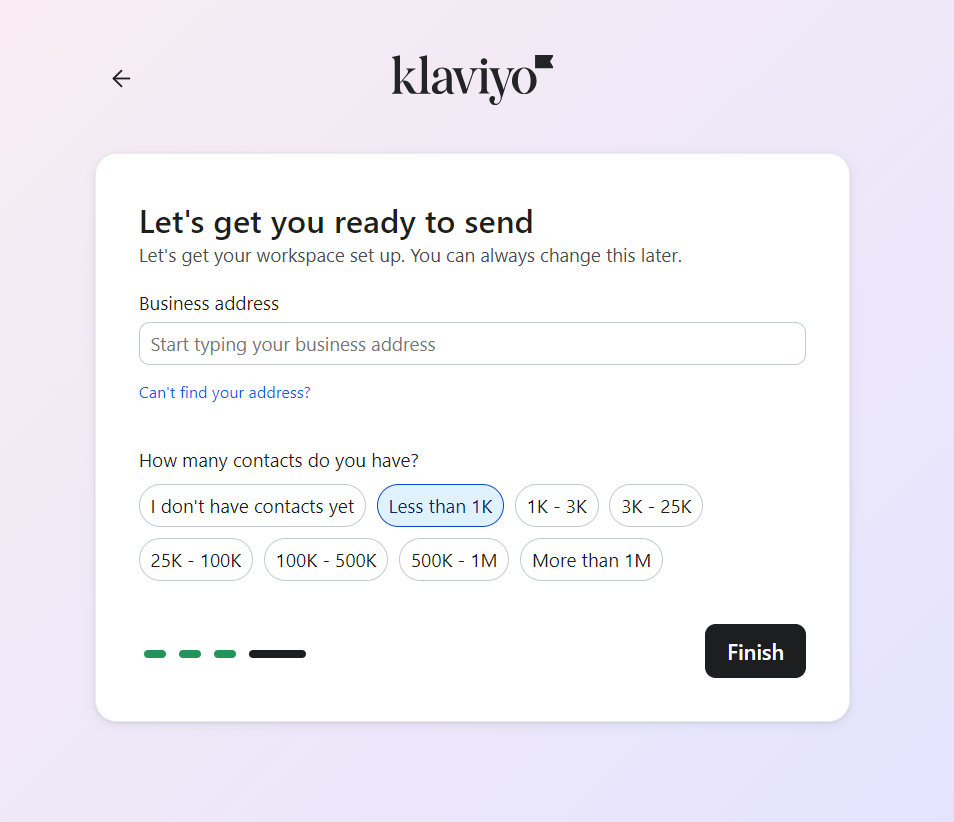
Klaviyo then recommended two brand themes and let us pick our template background color on screen three. Screen four was the final screen, asking us how many contacts we had and to add our business address:
After completing these steps, we hit Klaviyo’s fresh dashboard. It provided immediate next steps to take, such as building forms and flows:
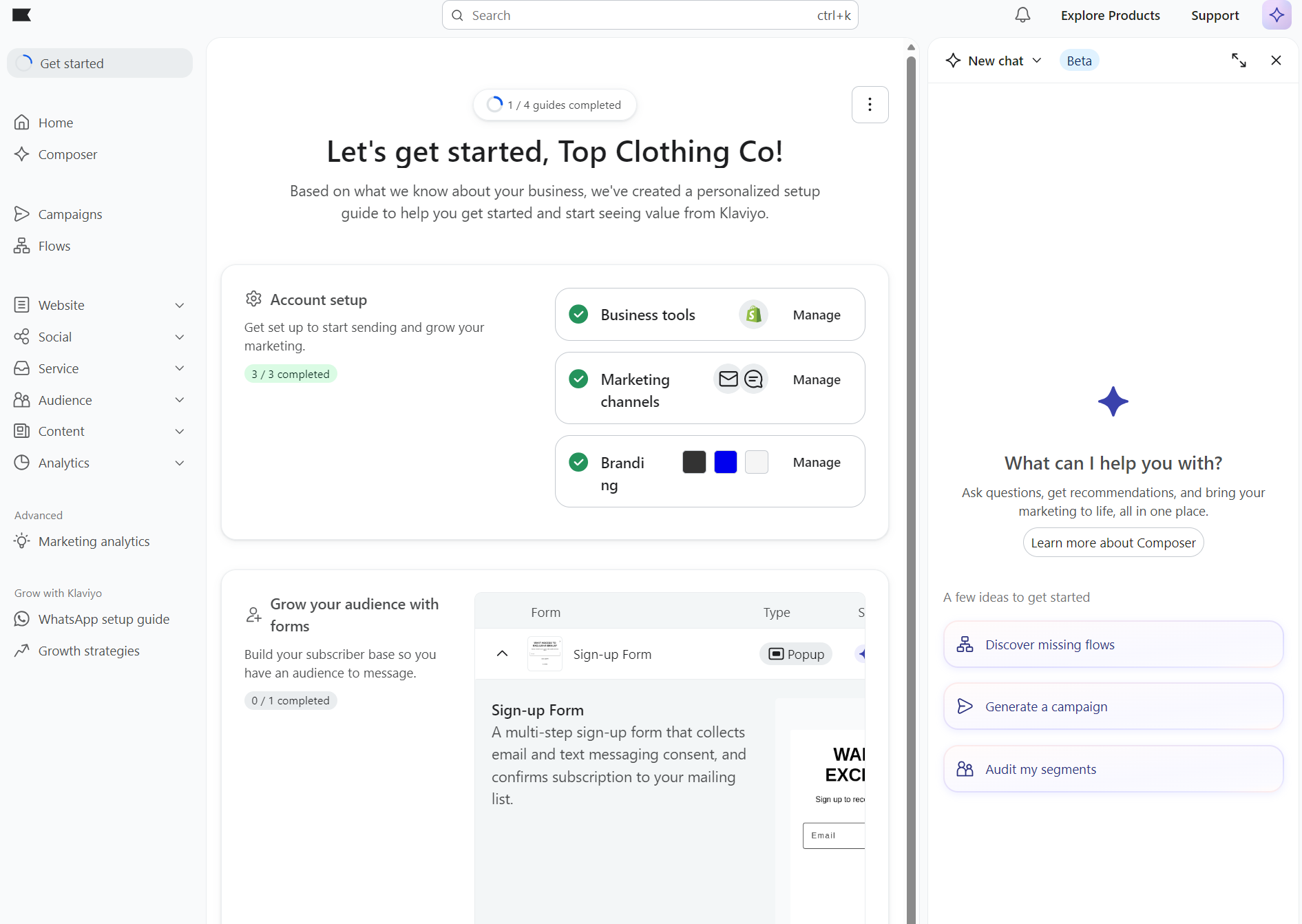
A 12-minute sign-up is all about account creation. Real implementation and onboarding is after that and include data mapping, consent settings, domain authentication, templates, integrations, reporting, and rebuilding or creating automations. If you are selecting email marketing software for your e-commerce, don’t stress about the time required to become operational. It will take time; you want a well-thought-out strategy. But think about the time to first send, or even better, the time to first value. And reserve some extra time for any migration from other tools.

How does Klaviyo compare to Omnisend, Mailchimp, and Drip?
Omnisend covers the core ecommerce features at a lower price, Mailchimp is cheaper and simpler, and Drip lacks predictive features. Here’s how Klaviyo stacks up against the most commonly compared alternatives:
Omnisend
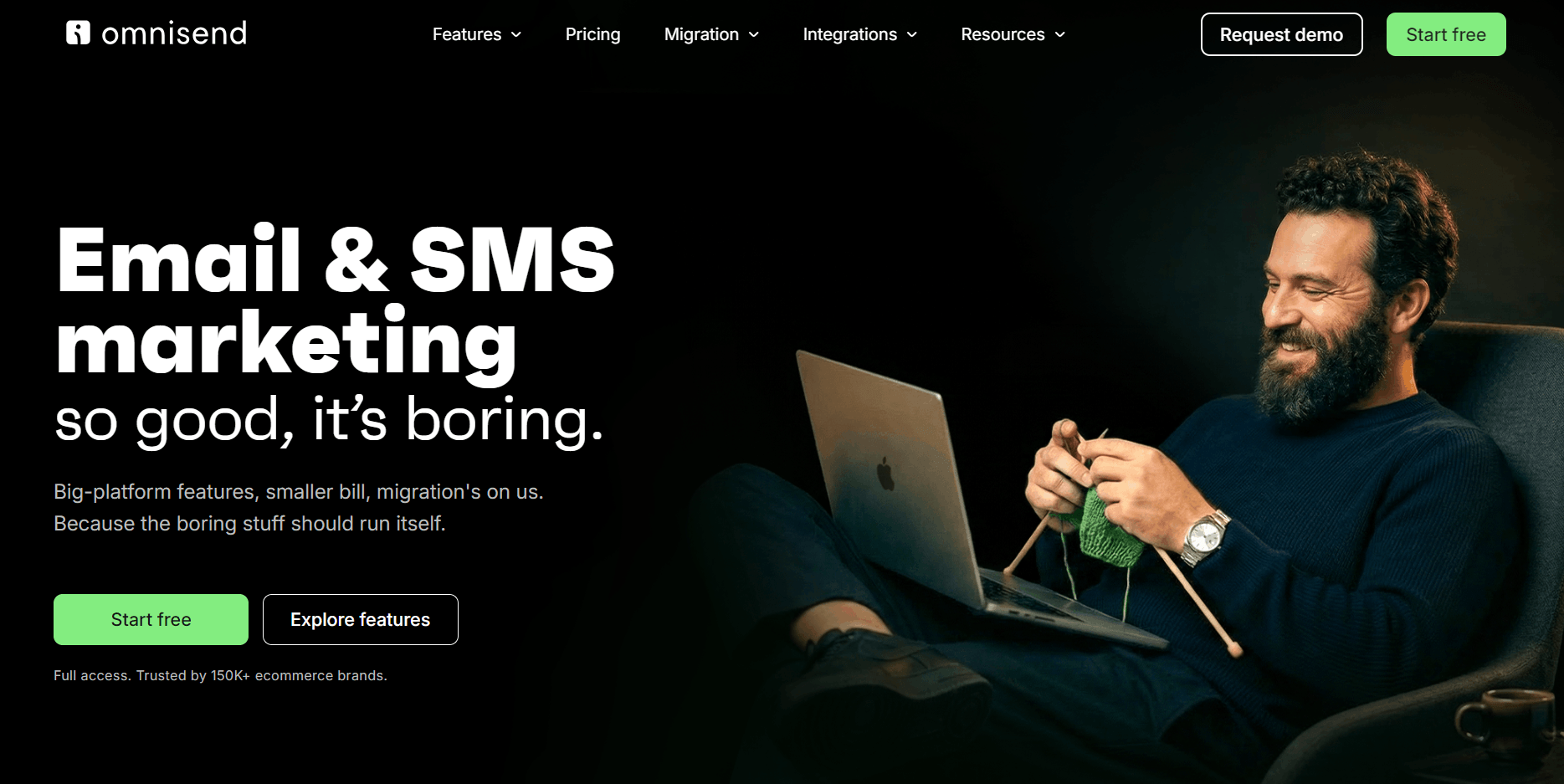
Omnisend offers enterprise-level omnichannel automation minus Klaviyo’s price tag. With an average ROI of $79 for every $1 spent, it’s an excellent Klaviyo alternative for businesses that want to increase their email revenue.
Email and SMS marketing is covered for multichannel marketing with a native Shopify integration that syncs customer behavior, purchase data, and more. There’s also predictive analytics in Customer Breakdown, which uses AI-based RFM analysis for lifecycle stage maps.
| Feature | Klaviyo | Omnisend |
|---|---|---|
| Starting price | $20/month | $16/month |
| Free plan | Up to 250 active profiles | Up to 250 contacts |
| Customer support | Paid plans have 24/5 live chat and 24/7 email support | All plans have 24/7 live chat and email support, including free |
| Landing page builder | Basic | More advanced settings with drag-and-drop templates |
| SMS marketing | 23 countries; bundles start at $15/month | Global coverage, with 190+ countries; bundles start at $10/month |
Data as of October 2026
Klaviyo’s advantage is depth in segmentation, flows, and predictive analytics, which go further than Omnisend with a deeper Shopify-native data sync. It performs extremely well when you have the volume and internal expertise to use it.
Omnisend has a few practical advantages over Klaviyo: global SMS coverage spanning 190+ countries to Klaviyo’s 23, multi-store support with one-click store switching, and no add-ons that can inflate your price beyond your monthly plan.
Additionally, Omnisend offers better value at most contact tiers, 24/7 email and live chat on all plans, and native Shopify integration. Also, if you have 250+ contacts, Omnisend helps you switch from Klaviyo for free.
Watch this video for a complete comparison of Omnisend vs. Klaviyo:
Mailchimp
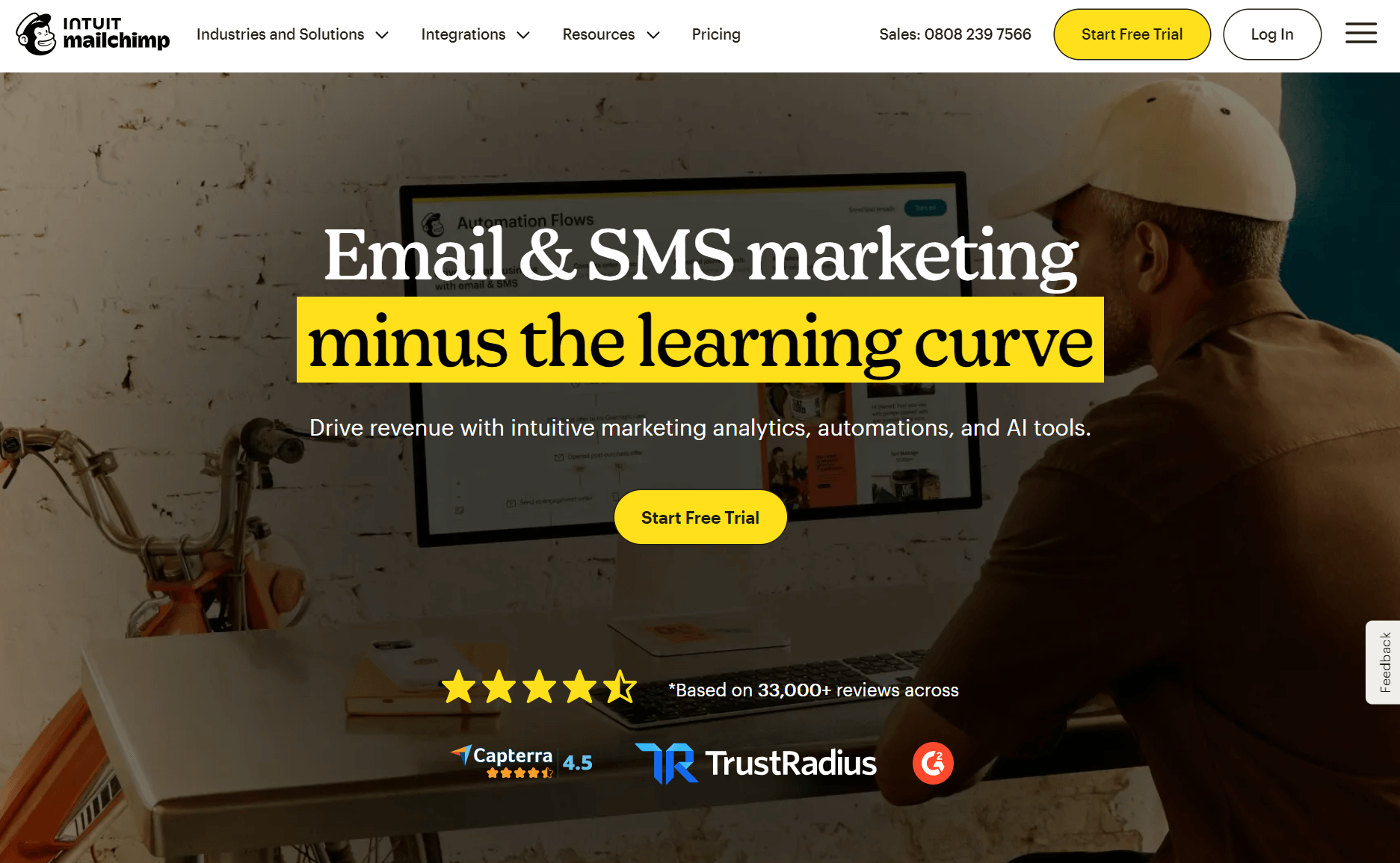
Mailchimp’s much more of a general-use marketing tool than Klaviyo, more suited to email campaigns and lead nurturing than customer journeys.
It has a lower learning curve and entry price with feature restrictions on low-tier plans, and lacks Klaviyo’s granular flows, segments, and reports.
| Feature | Klaviyo | Mailchimp |
|---|---|---|
| Starting price | $20/month | $13/month |
| Free plan | Up to 250 active profiles | Up to 250 contacts |
| Customer support | Paid plans have 24/5 live chat and 24/7 email support | Only paid plans have 24/7 customer support |
| Landing page builder | Basic | More advanced |
| SMS marketing | 23 countries; bundles start at $15/month | 37 countries and territories; bundles start at $20/month |
Data as of October 2026
Drip
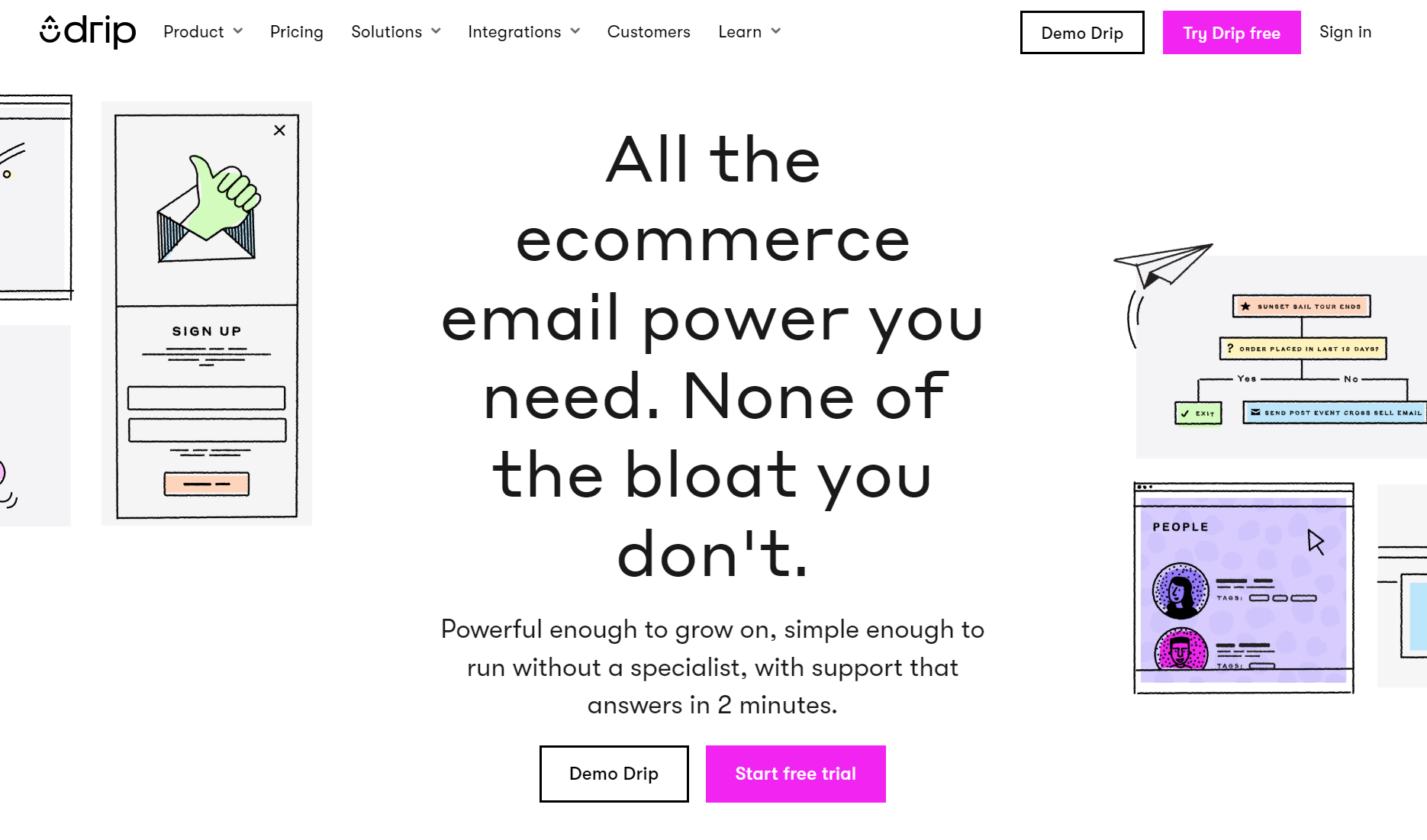
Drip costs less than Klaviyo from its starting threshold of 2,500 contacts and covers your standard ecommerce flows, segments, and reports. What Drip can’t do is forecast, so you segment and build flows based on what a customer has done rather than what they will do next.
| Feature | Klaviyo | Drip |
|---|---|---|
| Starting price at 2,500 contacts* | $60/month | $39/month |
| Free plan | Up to 250 active profiles | No |
| Customer support | Paid plans have 24/5 live chat and 24/7 email support | Business hours only. All customers get email support; live chat is only available to customers paying $99/month+ |
| Landing page builder | Basic | No |
| SMS marketing | 23 countries; bundles start at $15/month | U.S. early access for eligible paid customers; bundles start at $39/month |
Data as of October 2026
*Drip’s paid plan starts at $39/month with 2,500 profiles. To reflect that, we’ve shown Klaviyo’s price at the same contact count, though its plans start at $20/month for 500 profiles.
Who should use Klaviyo, and who should look elsewhere?
Klaviyo is best suited for bigger brands with dedicated marketing resources that can make use of its advanced segmentation, automation, and customer analytics tools. You should consider an alternative if you have a smaller budget, you need email marketing tools with minimal setup, or ship internationally and need wider SMS coverage.
Choose Klaviyo if you:
- Have a Shopify or WooCommerce store with established revenue
- Actively maintain your list and can keep active profiles in check
- Need segmentation depth that uses data from customer profiles
- Have a dedicated email marketer or agency who can manage the setup
- Want email, SMS, and customer reviews in one integrated platform
- Will use the AI, predictive analytics, and CRM data rather than leave them idle
Choose an alternative if you:
- Are a smaller or newer store where budget is tight
- Don’t want checkout non-opt-ins to count towards your billable profile total
- Want campaigns, flows, and segments with minimal setup and learning curve
- Run a B2B or service business, as Klaviyo is built around product-based ecommerce data
- Need weekend live support, which isn’t covered on standard plans
- Ship internationally and need global SMS in more than Klaviyo’s listed 23 countries
Quick sign up | No credit card required
How did we test Klaviyo?
We first signed up for Klaviyo’s free account and tested it over two days. We then purchased the paid Profile & Email plan and tested its features over an additional two days. Our store integration was a Shopify Partners store with dummy data for the sync.
The elements we tested include:
- Email editor and templates
- Automations and flow builder
- Segmentation
- Sign-up forms
- SMS setup
- Reporting and analytics
- AI capabilities available in the Profile & Email plan
- Integrations
- User permissions and team capabilities
Across all these features, we evaluated their ease of use, depth, and ecommerce fit. Some elements scored differently, such as support quality and pricing transparency.
Alongside our hands-on testing, we reviewed reviews on G2, Capterra, Trustpilot, and the Shopify App Store. We also considered the overall score and recent customer sentiment to determine what people appreciate and dislike about Klaviyo.