
 Omnisend AI


 OFFER
OFFER








Drive sales on autopilot with ecommerce-focused features
See FeaturesHere comes November, and with it — the start of the busy holiday season for ecommerce brands.
It’s the time when your emails need to highlight the right products, your forms need to behave exactly the way you want them to, and your account setup shouldn’t get in the way when things speed up.
So you’ll be glad to hear we’ve added a handful of practical updates — from stronger product recommendations to a brand-new integration with Triple Whale.
Keep reading for the full breakdown, or watch this video for a quick summary:
“Price from” filter in Product Recommender
This one’s simple but honestly very handy. You can now set a minimum price for items shown in the Product Recommender block.
It’s a nice bit of control when you want to steer recommendations toward products that make more sense for your brand or just feel more aligned with what you’re promoting.

Wheel of Fortune now plays nicer with your welcome flow
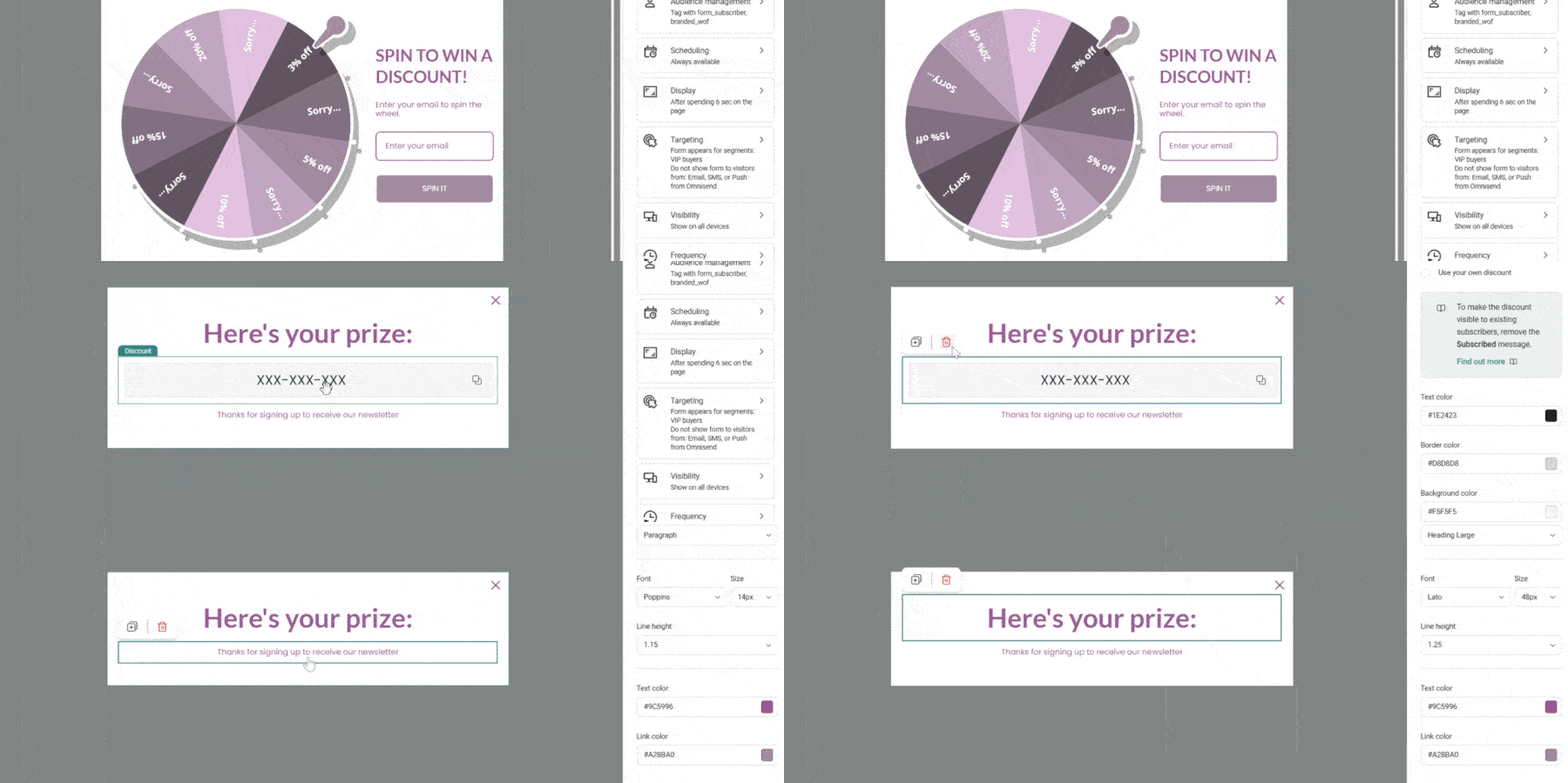
Good news! You can now remove the discount block from Wheel of Fortune forms entirely.
Why’s that helpful? Because you might prefer to send the discount through your Welcome Automation instead of flashing it immediately on the form.
Doing it this way often leads to:
- Higher opens on the first message
- Stonger early engagement
- Better inbox placement over time
A little timing shift can make a noticeable difference.
Clear guidance for “domain already in use”
If you try adding a sender domain that’s already connected elsewhere, you’ll now be able to get clear, actionable steps inside the app instead of a cryptic “nope.”
It’s easier to understand what’s happening, easier to fix, and easier to move on with your day.

Triple Whale joins the mix
Triple Whale is now officially integrated.
If you use it for analytics, you can bring your Omnisend campaign and automation data straight into their dashboard — right alongside paid ads, social, and everything else.
You get one place to compare ROAS, LTV, and cross-channel performance without manually stitching numbers together.

WooCommerce plugin upgrade
Our WooCommerce plugin got a thoughtful update. The interface now uses a cleaner, card-based layout with clearer toggles and more straightforward navigation. Managing settings feels a lot less clunky.

Running a multisite store? Disconnection and resets are now much simpler too — just one click instead of the previous multi-step shuffle.

Partner Portal refresh
Our Partner Portal also got a small refresh this month to make it more intuitive to move around and manage things without hunting for the right spot:
- Payouts Access: You can now access your PartnerStack account directly from the side menu with a single click

- Accounts List: The updated accounts list clearly displays all account statuses and includes a search bar to help you quickly locate any account

- Ownership Transfer: If an ownership transfer is pending, an in-app reminder will prompt you to complete the transfer on time

More tooltips in billing settings
And last but not least – a few additional tooltips are now live in Store Settings → Pricing plan, helping you understand how billable contacts are counted and how your tier is calculated. Short, simple explanations — right where you need them.

TABLE OF CONTENTS
TABLE OF CONTENTS


Subscribe and don’t miss any updates!
No fluff, no spam, no corporate filler. Just a friendly letter, twice a month.