Omnisend AI


 OFFER
OFFER










If you’re looking to improve sales for your BigCommerce store, engaging your customers with on-brand transactional emails is a great place to start.
Transactional emails are the bread and butter of basic ecommerce marketing. In fact, in our Transactional emails statistics report, we found that in 2025, these emails had a 24% higher open rate and a 19-fold higher conversion rate than regular marketing emails.
But what exactly makes transactional emails successful? In this article, we’ll go through the must-have transactional email types, catchy design examples, and show you how to get the most out of your BigCommerce email marketing.
What are BigCommerce transactional emails?
Transactional emails are automated messages that customers receive after purchasing a product or service. These messages usually inform consumer of their purchase status, shipping updates, or password resets.
What makes transactional emails so different is that they’re fully expected by recipients, virtually guaranteeing opening rates. This is the main reason why transactional emails have such high open and conversion rates compared to promotional emails, and why so many businesses focus on them.
Notably, for BigCommerce store owners, transactional emails have two goals:
- To keep customers fully informed of every order stage.
- To reinforce your brand position and nurture long-term engagement.
5 must-have types of BigCommerce transactional emails
Commonly, there are five main BigCommerce transactional email types, and each one is tied to and triggered by a specific customer action. The list below details all of BigCommerce’s email types and their specifics.
- Order confirmation: A brief message informing your shoppers that they’ve placed an order. These emails are essential for keeping your customers in the loop: after all, that’s the least they expect after they make a purchase.
- Shipping confirmation: Automated shipping confirmation emails are sent when your customer’s order has shipped or been delayed. This is another must-have transactional email type, as your customers are likely to get worried about their order if they don’t get tracking updates.
- Cancellation confirmation: When a customer changes their mind about a recent purchase and cancels an order, an automated notification confirms the order has been canceled.
- Customer feedback request: Once your customers have had a chance to try out their new items, it’s always a good idea to follow up after a set period and ask about their experience.
- Password reset: If a customer loses their password, an automatic password reset email makes it easy for them to regain access to their account.
BONUS: Abandoned cart (triggered email). Technically associated with trigger marketing emails, but when we talk about BigCommerce, abandoned cart emails are triggered by specific customer actions.
5 transactional email examples for your BigCommerce store
Now that we’ve covered the must-have types of transactional emails, let’s take a look at five real-life examples.
1. Order confirmation
When it comes to order confirmation emails, you should aim to communicate as efficiently as possible. For this example, let’s look at the kind of confirmation emails River Island sends.
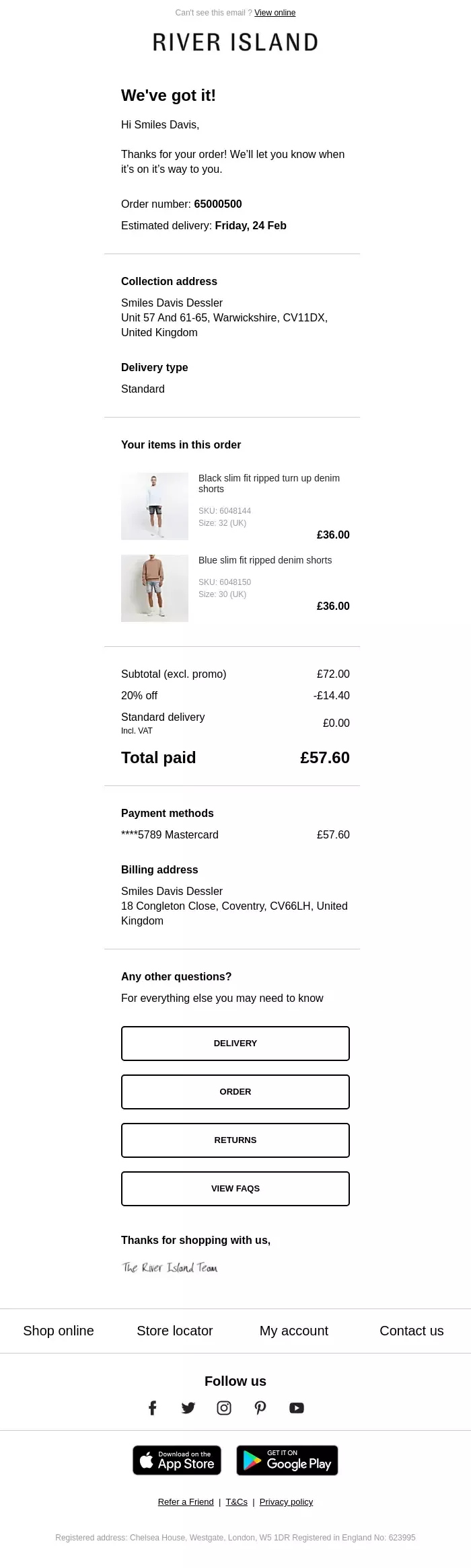
This major retailer provides its customers with all the order information they need. This includes the delivery address, estimated delivery window, order number and date, the products purchased and their prices, and quick navigation to common questions.
Even though the email may seem long, all the important information is laid out above the fold or close to the top. If the customer wants more details, they can scroll down. However, they can see the most relevant info as soon as they open the email.
2. Shipping confirmation
Shipping confirmation emails may not have a high conversion rate, but they have incredibly high open rates because they provide delivery updates. That’s why shipping confirmations play such an important part in the customer experience.
If buyers don’t receive consistent notifications about their order status, they’ll likely reach out to your customer support team, and if they wait too long, customer satisfaction will drop dramatically.
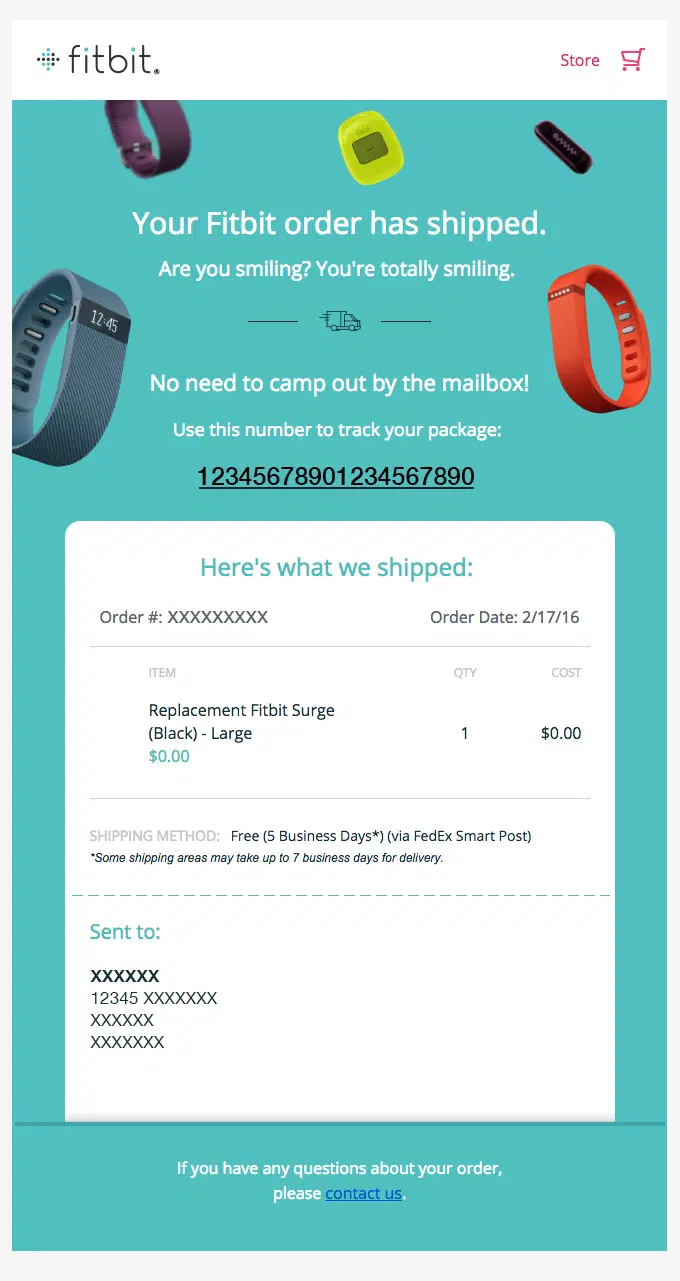
This shipping notification from Fitbit perfectly balances providing the necessary details with the option to contact customer support for any issues or questions.
3. Cancellation confirmation
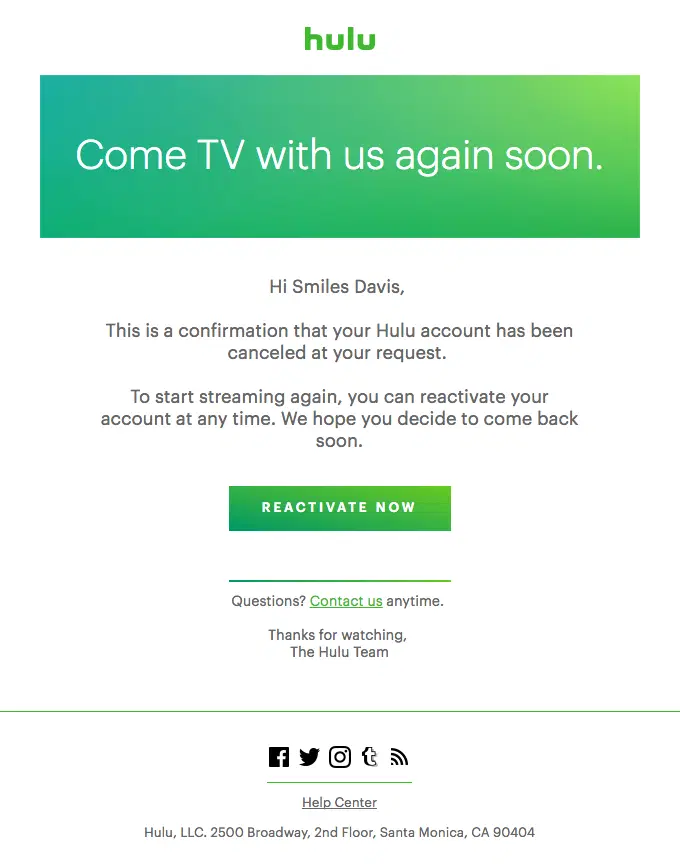
Sometimes, customers may make mistakes or change their minds after placing an order. In that case, they could request cancellation of their order only to replace it with another, either from your brand or another.
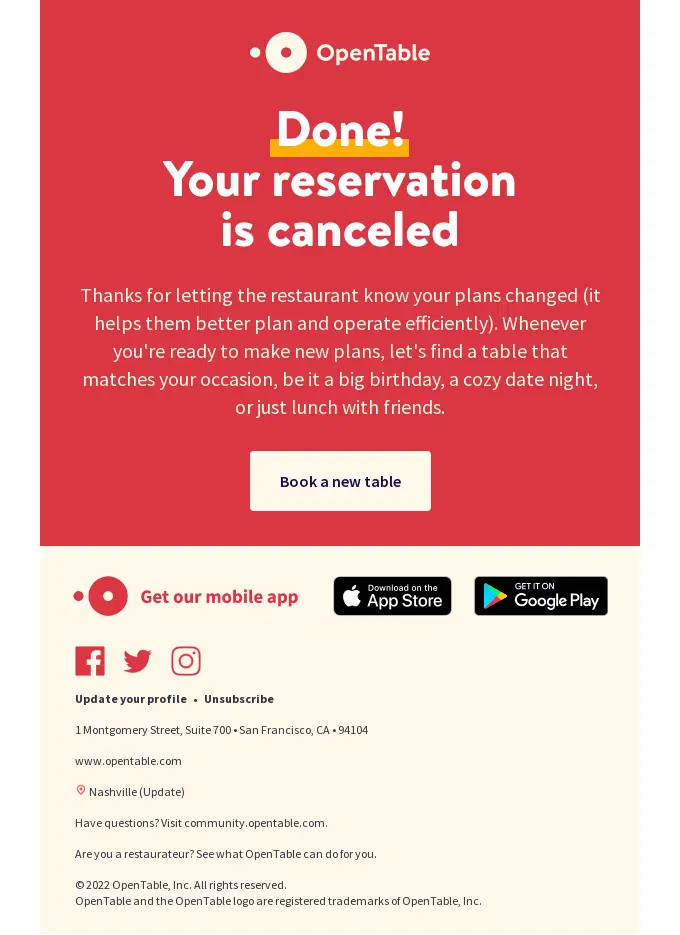
While customers going to competitors is less than ideal, it can also be an opportunity to send a cancellation confirmation email with product recommendations or an invitation to continue using your services later.
4. Customer feedback request
People tend to trust reviews from real customers more than promotional content. Incentivizing feedback will help you capitalize on satisfied customers and let other shoppers voice any concerns they might have about their previous orders.
In the following example, Shake Shack cuts straight to the chase without distracting their customers with too much text.
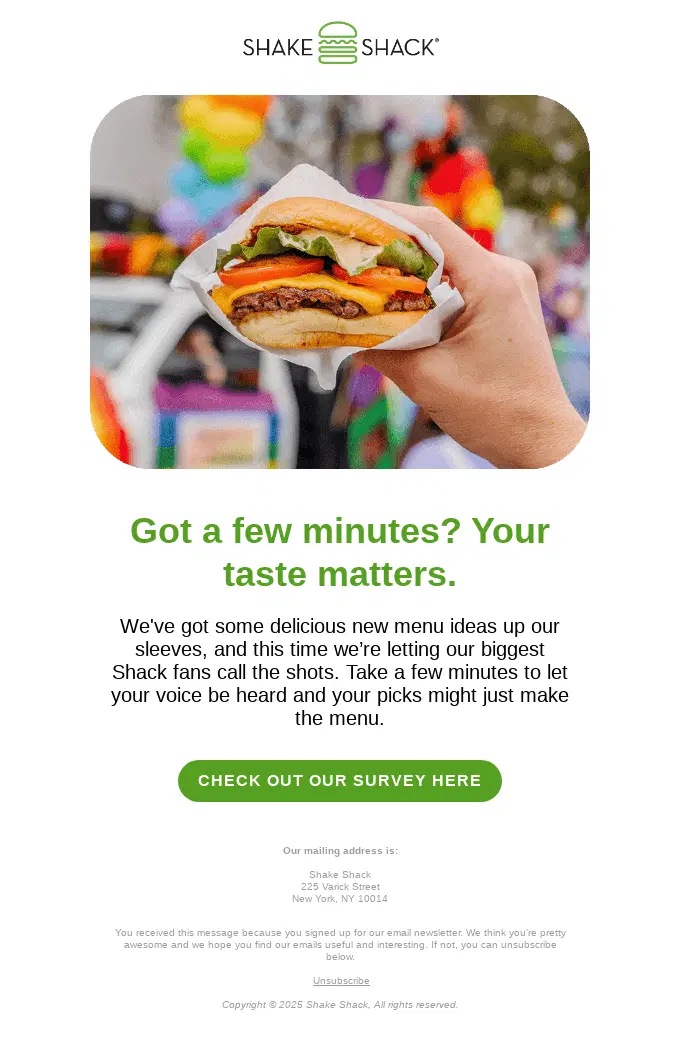
This example is particularly well-written because it’s minimal, straight to the point, and it speaks directly to the recipient, immediately opening with a way to communicate how that recipient is valued. Moreover, this email doesn’t just ask for feedback — it’s asking for insights to help prepare a better menu.
5. Password reset
These days, the average user probably has dozens of different online accounts, so some of your subscribers are likely to forget their passwords. As a result, you want to make your account recovery process as easy and painless as possible to avoid losing customers.
For security reasons, avoid including passwords or other sensitive data in the password reset message itself. Instead, the email should include a link to the password reset page on your website.
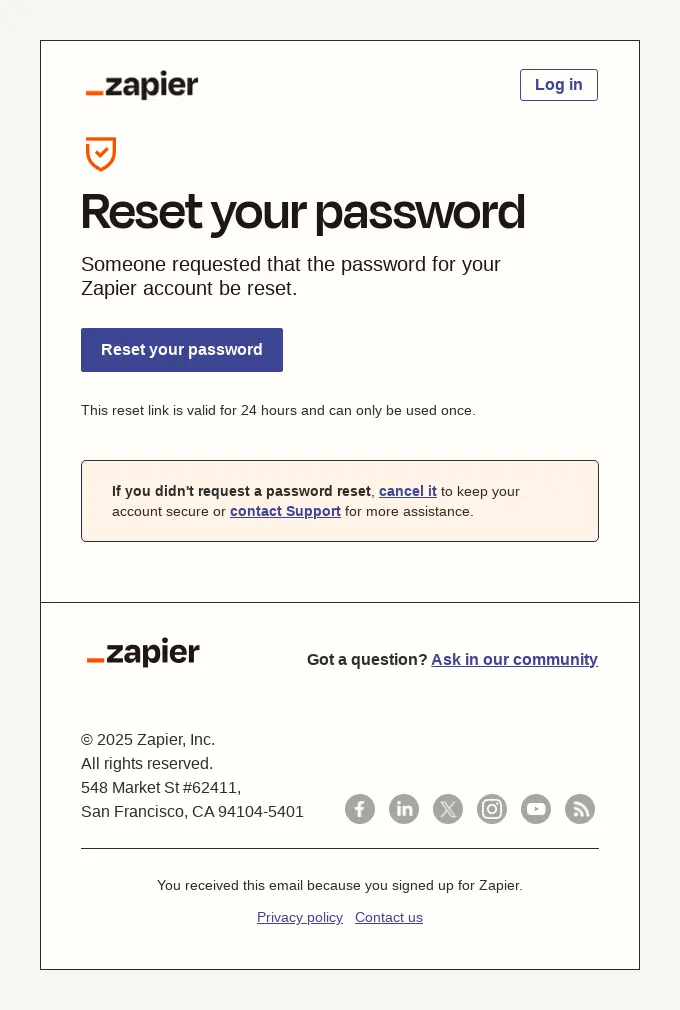
This password reset email from Zapier is clear and direct. The blue/purple “Reset your password” button is easily noticeable and visually guides the reader to the intended action.
There’s no unnecessary noise or clutter, just the necessary directions, time limit for the reset, and additional links to other resources, which are presented as an addition at the bottom.
BigCommerce transactional email best practices
Transactional emails come with a major benefit — high open rates. However, this doesn’t mean that these emails are easier to construct than other emails. If anything, because these emails are opened more than any other email sequence, brands need to make sure their transactional emails count.
- Keep transactional emails transactional. It’s important to maintain separate sequences for promotional emails. Mixing promotional content with transactional emails can hurt deliverability and trust, as ISPs send your emails knowing that they’re expected.
- Prioritize inbox placement. Send your transactional emails only from dedicated subdomains, and properly set up SPF, DKIM, and DMARC. Never share your transactional sending domain with marketing campaigns.
- Write clear, specific subject lines. Even if transactional emails are almost always opened, you need to communicate their content so that customers can easily scan them and immediately understand what your transactional email is about.
- Match your brand design. Commonly, most BigCommerce transactional emails are plain, but they don’t have to be. You can effectively enhance brand awareness and loyalty by using your logo, colors, and typography.
- Send emails without delay. Order confirmations should be sent immediately, and shipping notifications should be sent right after label creation to reduce anxiety and unnecessary customer support requests.
- Place the most important information at the top of the email. All key information, such as order numbers, delivery addresses, estimated arrival dates, and others, should be visible as soon as your emails are opened.
- Use a single and clear CTA. Transactional emails should all be brief and straightforward, so if you need to place a CTA, make sure to center your emails around one primary action. This could be a request to change account details, to leave a review, etc.
BigCommerce transactional email templates
Typically, BigCommerce transactional emails are known for their simplicity, but it’s not always clear how to structure different email types. Consider these BigCommerce email templates and customize them as needed.
Order confirmation template
Subject: Your [Company Name] order #[ORDER NUMBER] is confirmed
Hi [First Name],
Thanks for your order! Here’s a summary of what you’ve purchased:
[ORDER SUMMARY TABLE: product name, qty, price]
Order total: [AMOUNT]
Delivering to: [ADDRESS]
Estimated delivery: [DATE RANGE]
We’ll send you a shipping confirmation as soon as your order is on its way.
[TRACK ORDER BUTTON]
Questions? Reply to this email or visit our Help Center.
Shipping confirmation template
Subject: Your order #[ORDER NUMBER] is on its way!
Hi [First Name],
Good news — your order has shipped. Here’s your tracking info:
Carrier: [CARRIER NAME]
Tracking number: [TRACKING NUMBER]
Estimated delivery: [DATE]
[TRACK YOUR PACKAGE BUTTON]
If you have any questions about your shipment, don’t hesitate to get in touch.
Cancellation/refund confirmation template
Subject: Your order #[ORDER NUMBER] has been cancelled
Hi [First Name],
We’ve processed your cancellation request for order #[ORDER NUMBER]. Your refund of [AMOUNT] will be returned to your original payment method within [X] business days.
Changed your mind? You can place a new order anytime at [STORE URL].
[SHOP AGAIN BUTTON]
Feedback request template
Subject: How did we do, [First Name]?
Hi [First Name],
It’s been [X days] since your order arrived — we’d love to know what you think.
Leaving a review takes less than two minutes, and it helps other shoppers like you make more confident decisions.
[LEAVE A REVIEW BUTTON]
Thank you for shopping with [Store Name].
Password reset template
Subject: Reset your [Store Name] password
Hi [First Name],
We received a request to reset the password for your account. Click the button below to set a new one:
[RESET PASSWORD BUTTON]
This link will expire in [X hours]. If you didn’t request a password reset, you can safely ignore this email — your account is still secure.
How to customize transactional emails in BigCommerce
BigCommerce can be limiting when it comes to sending transactional emails by default. But there are a few ways for you to customize your BigCommerce transactional emails.
Edit BigCommerce’s native transactional emails
BigCommerce allows all customers to edit their transactional email content directly from the admin panel, which makes using BigCommerce even more beneficial.
- Log in to your BigCommerce account to access the admin panel.
- Navigate to Marketing and then click on Transactional Emails.
- Choose which email type (order confirmation, shipment, etc.) you want to customize.
- Edit the email subject line and body text, and turn other email types on or off as needed.
This workflow will make it possible to edit your transactional emails to some degree. Apart from this, BigCommerce lacks features for HTML branding, automation, or advanced customization, which is why many brands use dedicated tools alongside BigCommerce.
Customize and automate them with Omnisend
Omnisend is one of the few email marketing platforms that BigCommerce has chosen as an Elite Technology Partner. Our BigCommerce app provides all the tools you need to create effective, high-converting, and on-brand transactional emails.
By integrating your BigCommerce store with Omnisend, you can create and send engaging transactional emails in minutes using our pre-built templates, with multiple options for every step of the customer journey.
Here’s how you can connect BigCommerce with Omnisend:
- From your BigCommerce admin, go to Apps, visit the BigCommerce marketplace, and locate Omnisend.
- Then, click on the Get this app button and log in to your BigCommerce store.
- Choose to install Omnisend, provide all necessary permissions, and finally, set up your Omnisend account.
- Check if your BigCommerce store is active by going to Channel Manager -> Storefronts and then making it active.
- Go to your Omnisend account and click on the Connect your online store with Omnisend option on the Let’s get started page.
That’s it! Your BigCommerce store is now connected to Omnisend. Just note that on the next page, you’ll be asked to enter your store URL.
- To find this URL, log in to your BigCommerce Account Dashboard and click on the store name within the My Account page.
- Then, scroll down to Details to see the Current Domain, Permanent Address, and Control Panel address URLs.
To create your first transactional email workflow, simply:
- Go to your Omnisend admin panel and navigate to Automation.
- Click +New Workflow, then check Transactional, select the workflow you want to customize, and use Omnisend to make it your own.
For detailed walkthroughs on creating each type of transactional email workflow, see the full how-to guides in our knowledge base.
Wrap up
Great transactional emails are much more than a mere formality. They’re a fundamental part of the online shopping experience, helping you keep your customers in the loop and move them further along your marketing funnel, and request customer feedback.
With the right workflow setup, you can create high-performance transactional emails. Whether you use native BigCommerce customization or combine it with tools like Omnisend to create fully branded, automated flows, setting up automated transactional emails will lead to more satisfied customers and more sales in the long term.
Quick sign up | No credit card required
Frequently asked questions
What are BigCommerce transactional emails?
BigCommerce transactional emails are automated messages commonly sent after customers interact with a company. Placing an order, completing a purchase, canceling an order, or requesting a password reset are all transactional triggers that automatically send the appropriate emails.
Can you customize BigCommerce’s default transactional emails?
Yes, you can customize the default BigCommerce transactional emails, but only to a degree. While BigCommerce does offer a native editor, it has limited functionalities and restricts you to plain-text formatting only.
If you need more customization, you could consider tools like Omnisend, which integrate with BigCommerce and let you create fully branded emails.
Are transactional emails free on BigCommerce?
That’s right. Transactional email marketing for BigCommerce is free, as it’s included with all other plans. Customers can use its built-in plain-text editor to create all main transactional email types.
What’s the difference between transactional and marketing emails?
Specific customer actions mostly trigger transactional emails and are fully expected by them. So, when they make a purchase, choose a shipping option, request a password reset, or initiate an order cancellation, they look forward to these emails. This is also why transactional emails have such high open rates.
In contrast, marketing emails are usually promotional and sent to the entire audience, rather than to opt-in segments, to increase customer engagement and conversions. Common examples include newsletters, campaigns, sale announcements, and others.