
 Omnisend AI


 OFFER
OFFER








Drive sales on autopilot with ecommerce-focused features
See FeaturesKey takeaways 
Focus on key email marketing metrics like delivery rate, open rate, and conversion rate to effectively evaluate and enhance your campaign performance.
Regularly monitoring these metrics helps identify trends, spot issues early, and make data-driven decisions that align with your business goals.
Utilize Omnisend's advanced reporting tools to streamline the tracking and analysis of these metrics, ensuring you can act quickly on insights.
Tailor the metrics you track based on your specific business type and objectives, as not all metrics will be equally relevant to every campaign.
Reveal key takeaways
Seeing dozens of email marketing metrics in the reports can feel overwhelming if you’re not sure which ones really matter and are helpful to you. Afterall, you can only make use of those metrics when you actually understand them.
This article makes those metrics practical and straightforward!
You’ll learn what each metric means, how to calculate it, and why it matters for evaluating email performance.
With Omnisend’s advanced reporting, you can track and analyze these metrics in one place and make informed decisions faster.
Get started free today and monitor email performance with Omnisend
Quick sign up | No credit card required
15 email marketing metrics everyone should know
Email marketing metrics are the key performance indicators that explain how subscribers interact with your emails. They indicate how email campaigns perform across delivery, engagement, and conversions.
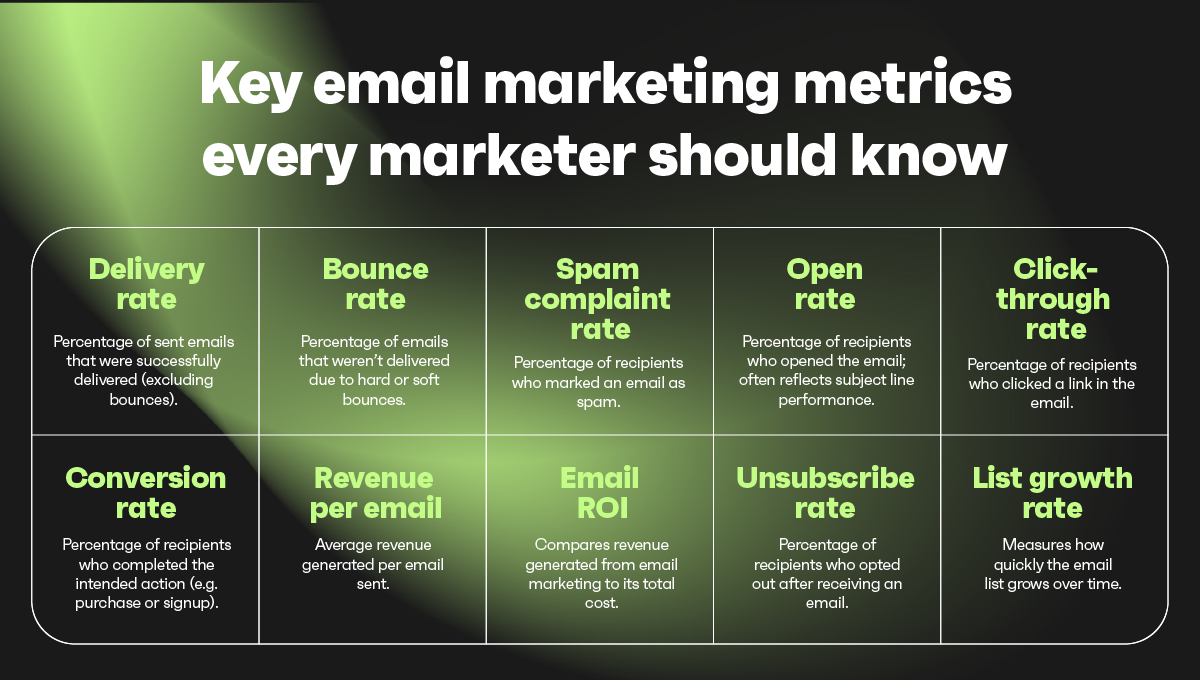
Regularly tracking email marketing metrics makes it easier to understand and manage performance. Frequent checks matter because they:
- Show which emails perform well and which ones need changes
- Help spot early warning signs like engagement or delivery drops
- Make long-term decisions easier by relying on trends, not assumptions
For ecommerce businesses, metrics also help connect emails to customer journeys. You can see how emails support browsing, repeat visits, and purchases. This insight enables you to refine messaging without overcomplicating your approach.
- Delivery rate
- Bounce rate
- Spam complaint rate
- Open rate
- Click-through rate (CTR)
- Click-to-open rate (CTOR)
- Engagement rate
- Conversion rate
- Revenue per email
- Revenue per recipient (RPR)
- Email ROI
- Unsubscribe rate
- List growth rate
- Inbox placement rate
- Email attribution rate
In the following sections, we will get into the details of what each means and why it’s crucial. So, keep reading.
Deliverability email marketing metrics
In email marketing, deliverability refers to whether mailbox providers accept messages and deliver them to recipients.
These delivery email marketing metrics show whether your emails even have a shot at being seen. Without solid delivery, engagement, and conversions can’t happen, so this is the first thing to check.
Omnisend helps you track various email deliverability metrics:
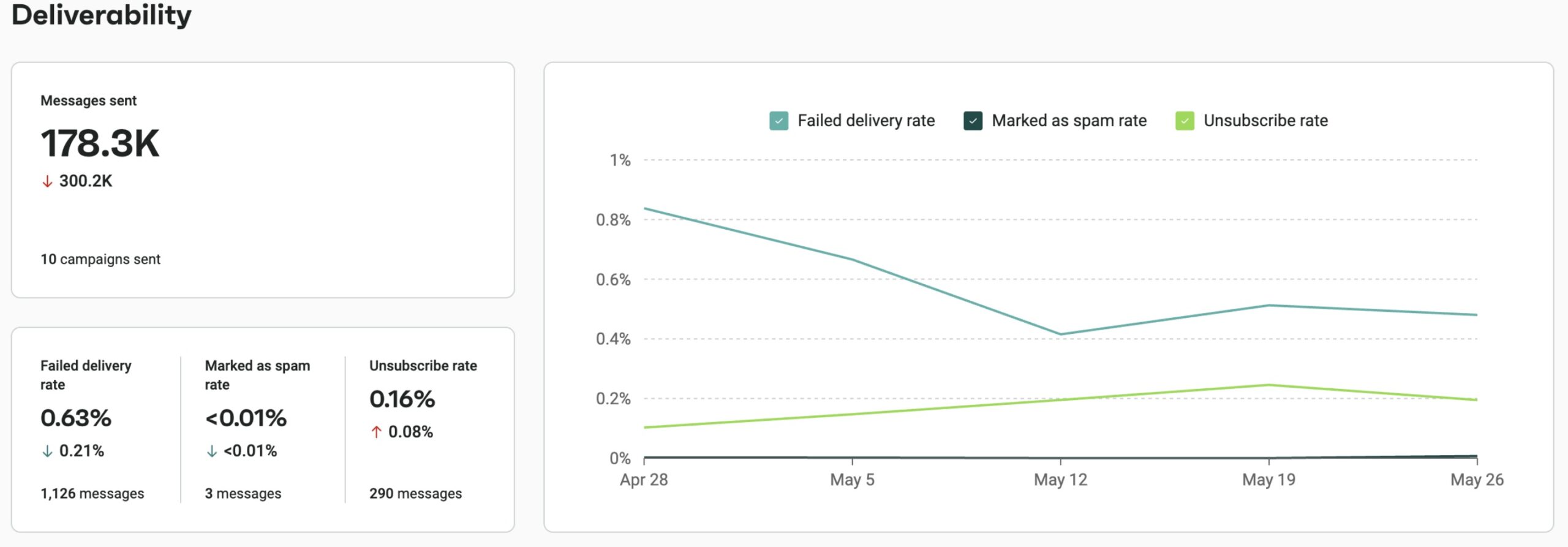
Now, let’s discuss some metrics for email marketing that fall in this category.
1. Delivery rate
Delivery rate tells you what percentage of your emails were delivered rather than bouncing. It essentially tells you whether your emails even reach the recipients’ inboxes.
Here’s how it’s calculated:
Delivery rate = (Emails delivered/emails sent) × 100
Divide the number of emails delivered by the number of emails sent and multiply by 100 to get the rate. Looking at this over time is more helpful than focusing on one campaign.
Why this metric matters
If the delivery rate slips, everything else becomes harder to track. You might think the issue is content when the real problem is that emails aren’t getting through. Monitoring the delivery rate helps you protect engagement and revenue before larger drops occur.
2. Bounce rate
Bounce rate is the percentage of your emails that were rejected and never reached recipients. It’s one of the most evident signs of delivery and indicates quality issues.
It could be a hard bounce or a soft bounce. A hard bounce is a permanent email delivery failure caused by issues like an invalid or non-existent email address, blocked domains, or strict server rules, and a soft bounce is a temporary delivery issue caused by reasons such as a full inbox, server downtime, or message size limits.
Here’s the formula:
Bounce rate = (Emails bounced/emails sent) × 100
Look at your total email sends and then see how many emails failed. When you express that difference as a percentage, the bounce rate becomes much easier to monitor.
Why this metric matters
This metric matters because bounce rate directly affects delivery and list health. A rising bounce rate often means your list needs cleaning or that emails are being sent incorrectly.
3. Spam complaint rate
Spam complaint rate is the percentage of recipients who clicked on “report spam” after getting your email. It tells you when people find your messages annoying, irrelevant, or surprising.
Formula:
Spam complaint rate = (Spam complaints/emails delivered) × 100
Take the number of complaints for a campaign, divide by the total delivered emails, and multiply by 100. This gives a clear percentage you can compare across campaigns and time periods.
Why this metric matters
High complaint rates make inbox providers less likely to trust your sending, which can lower delivery and inbox placement. It’s one of the fastest ways to hurt long-term performance, so watch this metric and fix the causes when it climbs.
Engagement email marketing metrics
Engagement metrics measure what happens after an email reaches someone’s inbox. It could be opens, clicks, and other signals that show people paid attention.
Those metrics are a good sign of interest and relevance, but they’re not the same as revenue. You can get lots of clicks and still see low sales if the rest of the funnel doesn’t work.
Engagement influences delivery and conversions over time. When people interact with your emails, inbox providers take note, which can help future sends perform better.
Omnisend tracks all essential email marketing engagement metrics, including:
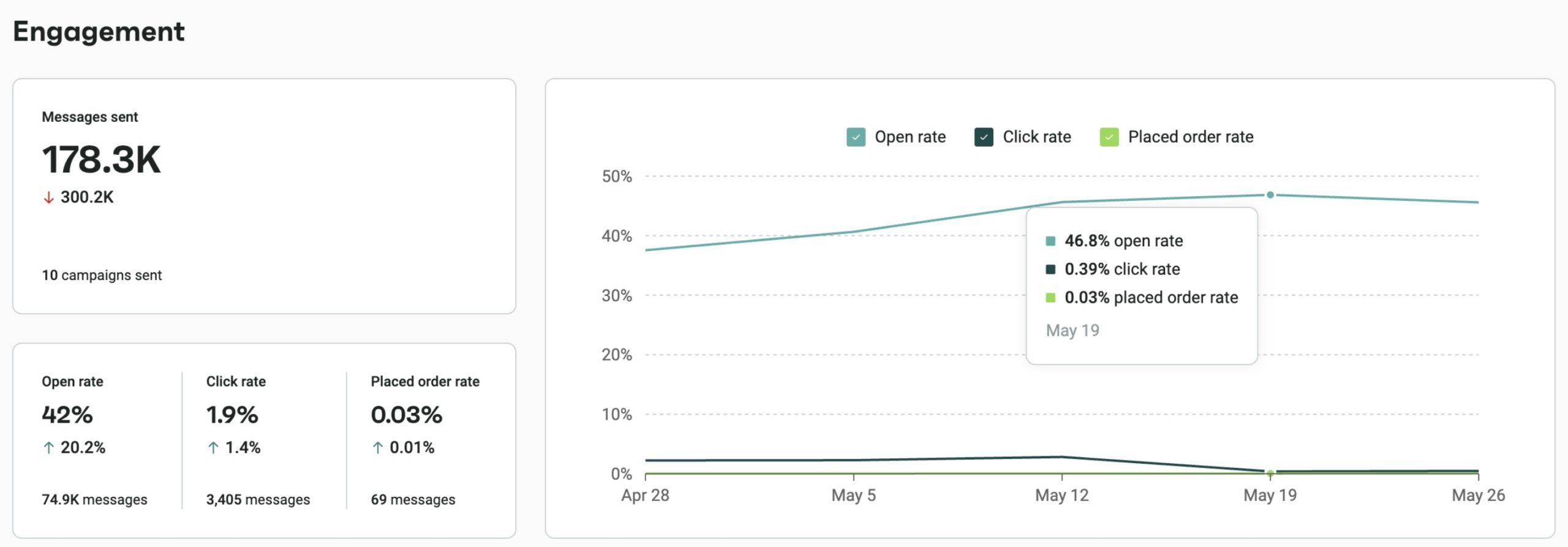
Let’s discuss the top email marketing metrics related to engagement.
4. Open rate
Open rate is the percentage of delivered emails that people actually opened. It’s the first sign that your subject line and sender info got attention.
Formula:
Open rate = (Opened emails/delivered emails) × 100
Grab the number of opens and the delivered count from your report. Divide the number of opens by the number of delivered emails and multiply by 100. Comparing campaigns and time windows yields a valuable metric for spotting patterns.
Why this metric matters
A reasonable open rate shows your subject lines and timing are working. If opens are low, changes to those elements usually help before you tweak the message itself.
Note: Keep in mind that privacy tools and email proxies can inflate or hide opens. Treat open rate as an indicator, not a precise measure of readership.
5. Click-through rate (CTR)
Click-through rate is the percentage of delivered emails that resulted in clicks on links within the email. It measures the immediate engagement after email opens.
The formula is:
CTR = (Clicks/emails delivered) × 100
Check the click count in your report and compare it to the delivered emails. Expressing that as a percentage gives you a clear sense of how often people click.
Why this metric matters
CTR is where interest turns into action. It tells you if people are curious enough to click through. While clicks don’t equal purchases, they show which emails are moving people closer to conversion and where your content needs fixing.
6. Click-to-open rate (CTOR)
Click-to-open rate measures how compelling your email was to those who opened it. It removes unopened emails from the equation, so content is easier to evaluate. It tells you how effective your content was in getting people to click on links and take action.
Formula:
CTOR = (Number of clicks/number of opens) × 100
Look at how many people opened the email and how many clicked on a link. Divide clicks by opens and turn it into a percentage. This removes delivery and subject line effects and keeps the focus on the message.
Why this metric matters
CTOR helps you gauge how effective your email content is once it’s opened. If opens are healthy but CTOR is low, the issue is usually the message itself. This makes CTOR useful for improving copy, layout, and calls to action.
7. Engagement rate
Engagement rate shows how actively recipients interact with your emails once they’re in the inbox. It’s based on a mix of actions that signal interest and attention.
However, remember that engagement definitions can differ by email platforms.
The general formula is:
Engagement rate = (Engagement actions/emails delivered) × 100
To calculate engagement rate, platforms compare tracked interactions with delivered emails and report the result as a percentage. Since engagement can include multiple actions, this metric is usually calculated automatically rather than manually.
Why this metric matters
Engagement rate helps you understand whether emails are holding attention, not just getting opened. It helps spot content fatigue and improve relevance. Strong engagement also sends positive signals to inbox providers and can support better long-term performance.
Conversion and revenue email marketing metrics
Conversion and revenue metrics tell you which email actions become real results, such as sales or lead captures. They move the focus from engagement to actual business value.
These numbers are significant because they indicate whether email is helping you achieve your revenue-based goals. If you run an ecommerce store, tracking conversions and revenue is how you see what actually pays off.
Use Omnisend to track key sales and revenue metrics, such as:
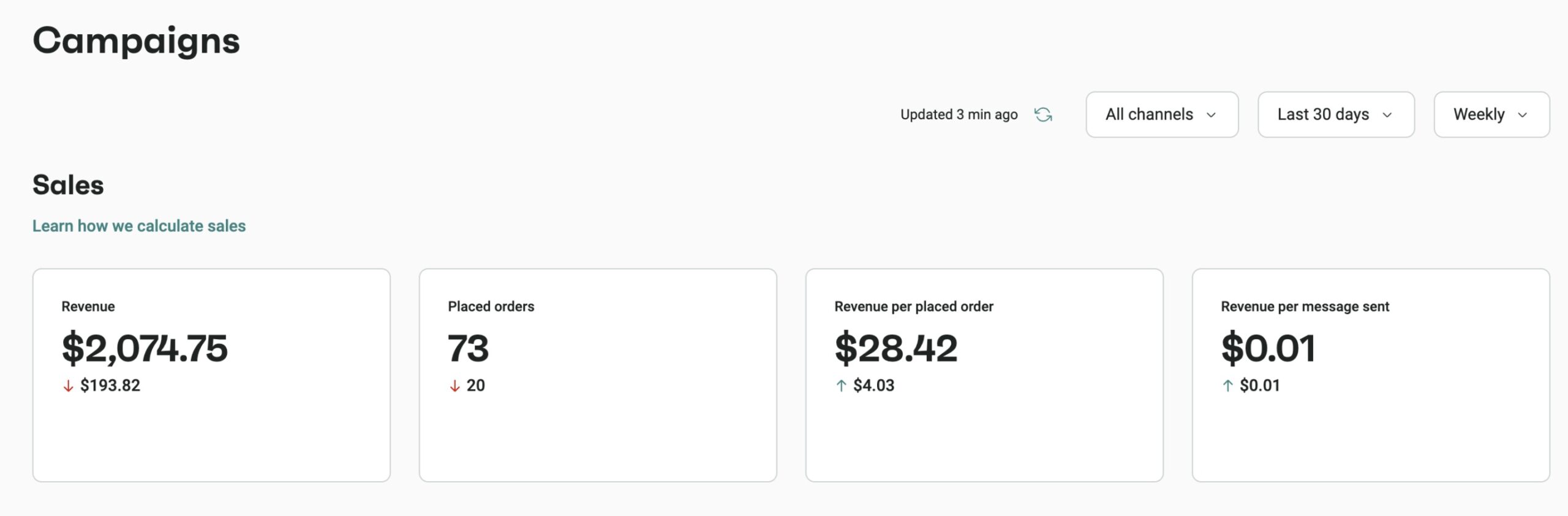
We’ll now walk through the key email marketing conversion metrics you should track and how to interpret them.
8. Conversion rate
Conversion rate is the share of delivered emails that led to the action you set as the goal. It could be anything from purchasing to registering for an event. As long as someone took an intended action after reading your email, it counts as a conversion.
Here’s the formula:
Conversion rate = (Number of conversions/emails delivered) × 100
Pull the count of conversions tied to the campaign and divide it by the number of delivered emails. Convert that to a percentage to compare campaigns or time periods. If you want to test messages versus landing pages, try conversions ÷ clicks as a follow-up metric.
Why this metric matters
This metric links emails to actual outcomes, so it’s how you judge ROI. It helps you see which offers, copy, and links drive results. Improving conversion rate usually has a direct effect on revenue.
9. Revenue per email
Revenue per email measures how much money each email generates on average. It reduces a campaign’s result to a single dollar amount you can use to compare emails.
The formula to calculate this is:
Revenue per email = (Total tracked revenue/delivered emails)
Pull the revenue tied to the email from your analytics, then divide it by the number of delivered emails. Be consistent about what counts as “tied” revenue — same tracking window and attribution model.
Why this metric matters
This metric is helpful for testing offers, frequency, and creativity. If one campaign earns noticeably more per email, copy that approach. For ecommerce stores, revenue per email makes it easy to see which sends actually move the business needle.
10. Revenue per recipient (RPR)
RPR measures the average amount of revenue generated per recipient who got your email. It provides a per-person view of the financial impact rather than a per-email view.
Formula:
RPR = (Campaign revenue/recipients who received the email)
RPR is calculated by dividing campaign revenue by recipient count. Using the same method across sends makes trends easier to spot.
Why this metric matters
RPR helps you judge whether a campaign is financially efficient at the audience level. It’s handy for deciding frequency, evaluating VIP lists, and estimating the impact of scaling a campaign to more recipients.
11. Email ROI
Email ROI measures the return you get from email compared with what you put in. It converts email performance into a simple percentage that shows profit or loss.
Formula:
Email ROI = (Revenue from email − total email spend)/total email spend) × 100
Gather the revenue you can link to email campaigns and add up all email-related costs. Costs can include your sending platform, design and production, agency or staff time, list growth costs, and any tracking or integration fees.
Subtract spend from revenue, divide by spend, and convert to a percent. Keep your methods consistent so you can trust month-to-month changes.
Why this metric matters
ROI makes it easy to see if email efforts pay off and which campaigns deserve scaling. It helps you justify investment and choose tactics that give the best financial return.
List health email marketing metrics
List health metrics focus on whether your subscriber base is strong and sustainable. They measure metrics such as growth, churn, and the number of people who stay engaged over time.
Watching list health tells you whether your list is becoming more valuable or needs cleanup. Healthy lists improve engagement and delivery, which, in turn, help campaigns perform better. Over time, a healthy list makes email a dependable channel for generating revenue and building customer connections.
12. Unsubscribe rate
Unsubscribe rate tells you what share of delivered emails led people to opt out. It’s a simple measure of how many recipients want to stop hearing from you.
Here’s how you can calculate it:
Unsubscribe rate = (Number of unsubscribes/total delivered emails) x 100
Find out how many people unsubscribed during a campaign and divide that by the delivered count. Watch this number over several broadcasts to see if minor issues become a trend.
Why this metric matters
This metric provides a clear indication of relevance and the frequency of your messaging. If it creeps up, try adjusting content, frequency, or list targeting.
Lowering the unsubscribe rate helps preserve list quality and keeps your future sends reaching the right audience.
13. List growth rate
List growth rate measures how quickly your subscriber base changes, accounting for both new signups and losses.
Formula:
List growth rate = (Net new subscribers/list size at period start) × 100
Look at how big your list was at the beginning of the period and how much it has grown since then. The percentage change between those two numbers is your growth rate.
Why this metric matters
Email relies on a steady flow of new, interested subscribers. When growth stalls, results usually follow. This metric helps you decide when to invest more in acquisition or adjust what you’re sending.
Performance and attribution email marketing metrics
Performance and attribution metrics help you understand not just what happened, but why it happened. They measure where the email lands and show how those results are attributed.
This goes beyond basic engagement to reveal which emails actually moved the business forward. Attribution connects email activity to broader outcomes, such as orders, lifetime value, or channel mix, so that you can assess impact more fairly.
14. Inbox placement rate
Inbox placement rate shows whether your emails reach the inbox or get pushed to spam. It’s about visibility, not delivery alone.
It answers the practical question: Did the message get a real chance to be seen?
Inbox placement rate = (Delivered emails delivered to inbox/emails delivered) × 100
To measure inbox placement, brands send test campaigns to lists of sample inboxes across major providers. The results show which providers put your mail in the inbox and which route it to spam. Repeat tests over time to spot changes after you update content or authentication.
Why this metric matters
If your emails land in spam, they’re unlikely to get clicks or sales. Good inbox placement gives your campaigns a fair chance to perform. Tracking this metric helps you protect delivery and improve the value of every send.
15. Email attribution rate
Email attribution rate shows the share of conversions or revenue that you credit to email marketing. It shows whether email is driving results directly or mostly helping other channels.
Here’s the formula to calculate it:
Email attribution rate = (Number of conversions from email/total number of conversions across all channels) x 100
Attribution starts with tracking email clicks and visits using tags or identifiers. Once that’s set, assign conversions or revenue to email based on the attribution model you choose and total them for reporting.
Why this metric matters
Attribution rate links email work to business impact. It helps you see whether emails start, assist, or close sales and lets you compare emails with other channels when deciding where to invest.
Key email marketing metrics by business type
You don’t have to measure every metric to determine whether a campaign is successful. Pick metrics that match what you sell and how you sell it. Goals, audience, and sales cycle change the numbers that matter most. Here’s a short checklist to guide reporting.
| Business type | Why these metrics? | Key email marketing metrics |
|---|---|---|
| Email marketing specialists and freelancers | Need to prove performance, improve campaigns, and show clear value to clients | Delivery rate, open rate, click-through rate, conversion rate, email ROI, engagement rate |
| Ecommerce businesses | Focus on tying email directly to sales and revenue | Conversion rate, revenue per email, revenue per recipient, email ROI, click-through rate, unsubscribe rate |
| Small businesses | Need simple signals to judge relevance and results with limited resources | Open rate, click-through rate, conversion rate, email ROI, unsubscribe rate |
| Mid-sized companies | Balance revenue impact with list quality and long-term growth | Email ROI, revenue per recipient, delivery rate, engagement rate, list growth rate |
Key email marketing metrics for email marketing specialists and freelancers
If you manage email for clients or internal teams, your metrics should show two main things: whether campaigns are performing and whether the overall account is in good shape.
These are the numbers clients and stakeholders usually expect to see in reports:
- Delivery rate
- Open rate
- Click-through rate
- Conversion rate
- Email ROI
- Engagement rate
Key email marketing metrics for ecommerce businesses
Ecommerce teams care about sales first, so pick metrics that tie emails to dollars and orders. Email marketing metrics for online stores should show a direct financial impact. Track these to see which campaigns actually move product:
- Conversion rate
- Revenue per email
- Revenue per recipient
- Email ROI
- Click-through rate
- Unsubscribe rate
Key email marketing metrics for small businesses
For small teams, simplicity wins. Track a handful of reliable metrics, so you know if emails are grabbing attention and whether the campaigns are driving engagement and results. Also, stick to that set each month for a comparable evaluation.
Here are some critical email marketing metrics you should track:
- Open rate
- Click-through rate
- Conversion rate
- Email ROI
- Unsubscribe rate
Key email marketing metrics for mid-sized companies
Mid-sized teams balance testing with steady performance. They focus on scalability, predictability, and ROI. So, track metrics that show financial impact and list health so you can scale what works and explain results to stakeholders.
Here are the top email marketing metrics for mid-sized companies:
- Email ROI
- Revenue per recipient
- Delivery rate
- Engagement rate
- List growth rate
Two free Omnisend tools to benchmark and forecast your email marketing metrics
If you want to turn these metrics into an action plan (not just a report), here are two free Omnisend tools that help you compare performance and estimate impact — fast:
Email ROI calculator
Use Omnisend’s Email ROI Calculator to estimate ROI based on your send volume and campaign costs, then pressure-test what needs to change (higher conversion rate, higher AOV, better deliverability, stronger clicks) to move the number. It’s a practical way to connect engagement metrics to the metric that matters most: profitability.
Email benchmark calculator
Not sure whether your open rate, click rate, conversion rate, or AOV is “good” for your industry? The Email Benchmark Calculator lets you view averages across industries and ecommerce platforms, so you can quickly spot what’s lagging — and where you’re outperforming — before you start optimizing.
Wrapping up
In short, email marketing performance metrics turn activity into impact. Focus on the measures that fit your business and ignore the rest, as clarity beats chasing every stat.
Over time, the right email marketing campaign metrics improve delivery, engagement, and revenue. Email marketing tools like Omnisend give ecommerce brands and marketers the reporting tools to track those metrics and make decisions faster.
And for a broader benchmark lens, Omnisend’s 2026 Ecommerce Marketing Report analyzes performance across 150,000 brands, covering 27 billion emails, 321 million SMS messages, and 458 million push notifications. The report highlights how results are increasingly concentrated (for example, a small share of brands drove a majority of growth) and shows why high-intent lifecycle messaging matters — automations represented just 2% of email sends, but drove 30% of revenue in the dataset.
Sign up for the free plan today and monitor key ecommerce metrics
Quick sign up | No credit card required
FAQs
What is the KPI for email marketing?
It depends on your goal and business needs. For ecommerce that’s often email ROI or revenue per email. For B2B, it might be lead-to-demo conversion. Keep the KPI simple, report it consistently, and use secondary metrics to explain what moved the number last month.
What are good email metrics?
Good email metrics are the ones you can act on. Delivery rate shows reach, open rate shows interest, CTR shows intent, and conversion rate shows results.
How do you measure the success of email marketing?
Success comes from repeatable results, not isolated wins. Track the same core email marketing success metrics each period, including delivery, engagement, and conversions. Use revenue metrics if sales matter.
Comparing trends over time reveals whether changes enhance performance and whether email consistently supports larger business goals.
What are the most important metrics for email marketing?
Some core email marketing metrics include delivery rate to ensure reach, open rate for subject lines, CTR for content strength, conversion rate for results, and email ROI for value.
These are some of the best metrics to track in email marketing.

TABLE OF CONTENTS
TABLE OF CONTENTS


Subscribe and don’t miss any updates!
No fluff, no spam, no corporate filler. Just a friendly letter, twice a month.