Omnisend AI


 OFFER









Email sender reputation is a score that mailbox providers assign to assess the trustworthiness of a sending domain name and IP address. It directly affects whether messages reach the inbox, spam folder, or are blocked. This means a poor email sender reputation can reduce revenue from promotional campaigns because customers never get to see them.
MARKETER TAKEAWAY: Strong ROI cannot be realized if messages are consistently filtered into spam or blocked, so keep spam complaint rates below 0.1% (as Gmail recommends) and address deliverability issues before major email marketing campaigns.
This guide explains in more detail how sender reputation works, which signals have the greatest impact on inbox placement, and how to improve sender reputation before your next campaign.
Why is email sender reputation important for ecommerce brands?
Email sender reputation is important because it determines inbox placement, email revenue, subscriber engagement, and scaling opportunities.
Improves inbox placement
Mailbox providers use sender reputation to assess whether your emails are legitimate and wanted, influencing their chances of reaching the inbox.
Providers carefully evaluate signals such as sending frequency, spam complaints, bounce rates, and subscriber engagement when assessing reliability. If they see something is wrong, they’ll flag your messages appropriately.
For example, Gmail asks senders to keep spam rates below 0.1% (one complaint per 1,000 emails) and never reach 0.3% (three per 1,000).
Protects email revenue
Poor inbox placement can reduce ecommerce revenue when promotional, transactional, and automated emails fail to reach customers. After addressing deliverability issues with Omnisend, 123Presets reported that its revenue had at least doubled compared to its final months with Mailchimp.
This is critical during sales periods like Black Friday, holiday promotions, or flash sales when poor inbox placement can limit campaign reach and reduce opportunities for repeat purchases or conversions.
Gives subscribers more opportunities to engage
Emails that reach subscribers’ inboxes create more opportunities for recipients to open, click, and take action.
123Presets experienced this firsthand after email deliverability issues affected their engagement and revenue.
With Omnisend’s guidance, 123Presets set up a new sending domain, created separate subdomains for campaigns and automations, and gradually warmed up its sending infrastructure. As a result, average click rates increased by 600% and open rates by 62.3%, helping the brand rebuild its sender reputation ahead of Black Friday.
Makes scaling email volume safer
An established sender reputation helps ecommerce brands increase sending volume, expand automated flows, and grow their subscriber base while reducing email deliverability risks.
This aspect is especially important during periods of rapid growth or seasonal campaigns, when sending volume naturally increases.
However, reputation alone doesn’t guarantee inbox placement, so brands should continue monitoring engagement, complaint rates, and other deliverability signs as they scale.
What’s the difference between IP reputation and domain reputation?
IP reputation reflects the sending history of the IP address used to send your emails, while domain reputation tracks your brand’s domain and follows it across email providers.
Domain reputation evaluates the sending history and credibility of your brand’s domain across email activity, including messages sent through different email service providers.
Both influence deliverability, but domain reputation provides mailbox providers with a broader view of a sender’s long-term behavior and authentication practices.
| Factor | IP Reputation | Domain Reputation |
|---|---|---|
| What it tracks | Sending behavior tied to an IP address | Sending behavior tied to a brand’s domain |
| Who controls it | Often shared with the email service provider | Mostly controlled by the brand |
| What happens when switching email providers | May reset or change with a new IP | Usually remains tied to your domain history |
| Importance across Gmail, Microsoft, and Yahoo | Still relevant, especially for large senders | Increasingly critical for inbox placement and credibility |
Should you use a shared or custom email domain?
Custom email domains are essential for ecommerce brands that plan to scale because they give mailbox providers a consistent view of the brand’s sending reputation and help isolate it from other senders’ behavior.
With a shared domain, multiple senders can contribute to the domain’s reputation, while a custom domain ties sending activity more directly to the brand.
This makes a custom domain a stronger foundation for building a long-term sending reputation as email volume and promotional activity grow. Omnisend requires users to have a custom sending domain, regardless of their sending volume.
Before sending from a custom domain, configure the appropriate records with Omnisend.
Should you use a shared or dedicated IP?
Shared IPs are generally better suited to brands with lower or fluctuating sending volumes, allowing them to benefit from established sending infrastructure. Dedicated IPs give brands greater control over their reputation but require consistent sending and careful monitoring.
Omnisend recommends dedicated IPs for brands consistently sending at least 300,000 emails per week with clean, engaged contact lists. Brands sending below this threshold are generally better suited to shared IPs, especially if their sending volume fluctuates or they’re still building their subscriber base.
Omnisend offers dedicated IPs to brands that meet its sending-volume and list-quality criteria. Its Deliverability team reviews each request to determine eligibility and recommend the most suitable setup.
What factors determine your email sender reputation?
Three core factors shape your email sender reputation: subscriber behavior, technical authentication, and list quality.
Together, these factors influence how mailbox providers assess your email-sending practices and decide whether your messages reach the inbox.
1. Behavior
Mailbox providers assess sender behavior through spam complaints, subscriber engagement, and sending patterns. High complaint rates, declining engagement, or sudden spikes in email volume can weaken sender reputation and increase the risk of spam filtering.
Complaint rates and spam reports
Spam complaint rates are among the strongest negative signals for sender reputation because they show that recipients do not want a brand’s email. Gmail recommends keeping user-reported spam rates below 0.1% and preventing them from ever reaching 0.3% or higher. Rates approaching 0.1% should trigger a review of targeting, segmentation, and sending frequency.
High complaint rates can also lead to sending restrictions. Omnisend pauses email campaign sending when spam complaints exceed 0.1% of recipients or a campaign’s bounce rate exceeds 7%, as explained in its Help Center guide.
According to Validity, the average spam complaint rate doubled in only two years, from 2021 to 2023, to 0.07%, making complaint trends an important early warning signal for ecommerce senders.
Engagement signals
Subscriber engagement is a key reputational signal because mailbox providers use recipient behavior to assess whether emails are wanted and should continue reaching the inbox.
Positive signals include clicks, replies, adding a sender to contacts, and consistent interaction over time, while negative ones include ignoring repeated campaigns, moving messages to spam, or unsubscribing.
However, open rates have become less reliable due to privacy features such as Apple Mail Privacy Protection, which can trigger tracking pixels without recipients opening emails. As explained in our email open rate guide, marketers should also monitor clicks and conversions to get a clearer picture of engagement.
According to Omnisend’s 2025 benchmark data, the average click-through rate was 0.74% for promotional campaigns and 4.66% for automated emails. Consistently falling below these benchmarks may indicate weaker engagement, while higher rates suggest a more responsive audience. Compare results against similar email types and your own historical performance to identify meaningful trends.
Sending volume and consistency
Consistent sending patterns protect sender reputation, while sudden volume spikes trigger mailbox-provider scrutiny, throttling, or spam-like filtering.
For example, increasing from 20,000 emails per week to 100,000 overnight can create deliverability risk, especially if engagement doesn’t increase alongside volume.
This matters more as ecommerce activity grows. Omnisend research found that order volume increased 98% year over year in 2025, rising from 82% growth in Q1 to 146% in Q4. Rather than making abrupt changes, increase sending volume in stages. Start with recent purchasers and subscribers who engaged within the last 30 days, then gradually include those active within the last 60–90 days once bounce rates, spam complaints, and engagement remain stable. Keep inactive contacts excluded during this process. For new sending domains or IPs, follow the 20+ day warm-up process outlined in Step 6.
2. Technical trust
Mailbox providers have introduced stricter technical requirements to protect recipients from spam and fraudulent emails. Gmail and Yahoo began enforcing new sender requirements in February 2024, while Microsoft introduced similar authentication rules for high-volume Outlook.com senders in May 2025.
| Email provider | Requirements for bulk senders |
|---|---|
| Gmail (February 2024) | Senders delivering 5,000+ emails daily to personal Gmail accounts must use SPF, DKIM, and DMARC, support one-click unsubscribe for marketing emails, and keep spam complaint rates below 0.1%, never reaching 0.3%. |
| Yahoo (February 2024) | Bulk senders must use SPF, DKIM, and DMARC, support one-click unsubscribe for marketing emails, and maintain spam complaint rates below 0.3%. Yahoo doesn't specify a fixed daily sending threshold. |
| Microsoft Outlook (May 2025) | Domains sending more than 5,000 emails daily to Outlook.com consumer services must pass SPF and DKIM authentication and have a valid DMARC policy with domain alignment. |
For ecommerce brands, failing to meet these requirements can result in emails being filtered into spam or rejected, regardless of content quality.
Email authentication
SPF, DKIM, and DMARC help mailbox providers verify that emails come from legitimate, authorized sources. These email authentication protocols check sending servers, message signatures, and domain alignment to protect against spoofing and tampering.
| Protocol | How it works |
|---|---|
| SPF (Sender Policy Framework) | Checks whether the sending server is authorized to send emails on behalf of a domain. |
| DKIM (DomainKeys Identified Mail) | Uses cryptographic signatures to verify that an email hasn't been altered during transmission and identify the signing domain. |
| DMARC (Domain-based Message Authentication, Reporting, and Conformance) | Checks whether SPF or DKIM passes and aligns with the sender's domain, and specifies how to handle messages that fail authentication. |
Strong authentication reduces phishing concerns and supports reliable inbox placement, especially when sending volume increases during major ecommerce events.
MARKETER TAKEAWAY: Before peak sales periods, verify that SPF, DKIM, and DMARC records are correctly configured. Misaligned authentication records within your DNS can increase the risk of throttling or filtering when sending volume rises.
Content quality and infrastructure
Email content and sending infrastructure influence deliverability: mailbox providers assess content alongside sender reputation, sending behavior, authentication, and subscriber engagement.
Deceptive or technically flawed content increases filtering risk, while weak infrastructure, such as missing authentication or improperly configured domains, undermines deliverability even when the email itself is sound.
Common content issues include:
- Misleading discount claims, such as inflating prices before a sale to create the perception of a massive discount
- Exaggerated urgency, such as claiming an offer ends in five minutes when it runs all week
- Deceptive reply-style subject lines (e.g., using “Re:” or “Fwd:”) when no prior chat exists
- Image-only emails with little or no supporting text
- Broken personalization, such as displaying “Hi, [FirstName]” instead of the recipient’s name
3. List quality
List quality affects sender reputation because invalid, inactive, or risky email addresses can increase bounce rates and expose brands to spam traps. Maintaining a clean subscriber list helps reduce deliverability risks and ensures emails reach people who want to receive them.
Bounce rates
Bounce rate is a key list-quality signal that shows how reliably emails reach valid recipient addresses. Hard bounces indicate permanent delivery failures, usually because an address is invalid or no longer exists, while soft bounces are temporary issues such as a full inbox or server problem. A bounce rate below 2% is generally considered healthy. Consistently higher rates indicate poor list hygiene, data-entry errors, or unverified domains.
Understanding hard and soft bounces determines the appropriate response. Remove or suppress hard bounces promptly, retry soft bounces, and investigate sudden increases for problems with recent list sources or acquisition campaigns.
Spam trap hits and blacklist exposure
Spam traps and blacklisting are serious deliverability risks because they can signal poor list hygiene or abusive sending practices and damage a sender’s domain or IP reputation. Spam traps (also known as honeypots) are decoy addresses used to identify spammers and problematic senders, while blacklists contain domains or IP addresses associated with spam activity.
Even limited exposure can affect inbox placement, so brands should regularly monitor blacklist status, investigate spam trap hits, and address the underlying list or sending practices before reputation problems escalate.
Never buy or rent email lists: they often contain spam traps and invalid addresses, and the people on them never agreed to hear from you.
What are the signs of a poor sender reputation?
A poor sender reputation often shows up through rising spam complaints, delivery failures, and declining subscriber engagement. These warning signs can indicate that mailbox providers are losing trust in your sending practices.
Common signs include:
- Spam complaints rising above 0.1%: An early warning that recipients may consider your emails unwanted.
- Increasing bounce rates: A potential sign of outdated contact lists, invalid addresses, or delivery issues.
- Deferred or blocked emails: Gmail, Yahoo, or Outlook temporarily delaying or rejecting your messages.
- Emails landing in spam: Repeated spam placement during test sends may indicate deliverability problems.
- Blacklist appearances: Your sending domain or IP address appearing on an email blacklist.
- Sudden drops in clicks: A noticeable decline in click-through rates, particularly among recipients using the same mailbox provider.
Monitor these signals together to identify potential reputation problems before they affect more campaigns.
Declining engagement can also indicate that subscribers are receiving too many irrelevant emails. As Boris Pavlov, Senior Deliverability & Compliance Manager at Omnisend, advises:
“Send fewer, but more relevant and important messages — and make sure your segmentation is spot on.”
Reviewing engagement by segment can help identify recipient fatigue before it leads to more unsubscribes or spam complaints.
How to check your email sender reputation
Check your email sender reputation by combining mailbox-provider tools like Google Postmaster Tools, Yahoo Sender Hub, and Microsoft SNDS with third-party reputation scores and blacklist checkers.
These tools provide insights into domain and IP reputation, authentication, spam complaints, bounce rates, and other deliverability signals. Since no universal reputation score exists, comparing results across multiple sources provides a more complete picture of how mailbox providers and monitoring services assess your sending practices.
| Tool | What it measures | Best for |
|---|---|---|
| Google Postmaster Tools | Spam rate, compliance status, authentication, and delivery errors | Monitoring Gmail deliverability |
| Yahoo Sender Hub | Complaint rates and Yahoo sender performance | Tracking Yahoo inbox reputation |
| Microsoft SNDS (Smart Network Data Services) | IP reputation, Outlook/Hotmail traffic data, email volume, and spam complaints | Monitoring Microsoft deliverability |
| Sender Score | Overall IP reputation, from spam complaints to bounce rates | General reputation benchmarking |
| MxToolbox | Blacklist status and DNS configuration | Identifying blacklist and setup issues |
To test inbox placement directly, send a test campaign to a set of seed inboxes across Gmail, Yahoo, and Outlook, then check whether messages land in the inbox, Gmail’s Promotions tab, or spam. This helps identify potential filtering issues before major campaigns, although seed test results should be compared with other deliverability metrics for a more reliable assessment.
What a good email sender reputation score looks like and how to interpret it
On Validity’s Sender Score, which rates individual sending IP addresses on a 0–100 scale, a score above 80 indicates an excellent reputation. However, there’s no universal benchmark because reputation tools use different scoring systems, data sources, and mailbox-provider coverage.
Google Postmaster Tools v2, for example, focuses on spam rates, authentication, compliance, and delivery errors. Its previous High, Medium, Low, and Bad reputation ratings are being retired, so differences between tools are expected.
For example, a Sender Score of 90 doesn’t guarantee good Gmail deliverability if Google Postmaster Tools shows rising spam complaints. Likewise, a low third-party score doesn’t automatically mean every mailbox provider is filtering your emails.
Focus on trends rather than isolated scores, prioritize data from the mailbox provider experiencing problems, and compare findings with engagement metrics and inbox placement tests before making changes.
How to improve your email sender reputation
Improve sender reputation by strengthening authentication, maintaining a clean and engaged subscriber list, sending consistently, and avoiding misleading or spam-like tactics.
Step 1: Check your email authentication
Properly configured email authentication protocols help mailbox providers verify that your emails are legitimately sent from your domain, reducing the risk of spoofing and supporting sender reputation.
Authentication is a core factor in email deliverability, although it works alongside subscriber engagement, list quality, and sending behavior to influence inbox placement.
For ecommerce brands, a strong authentication setup should include:
- Valid SPF covering every service authorized to send on your behalf
- DKIM enabled across marketing, transactional, and other email streams
- DMARC published, starting at p=none and moving to enforcement once all legitimate senders pass
- Aligned domains across your “From” address, SPF, and DKIM
- An authenticated domain or subdomain that you control
Omnisend provides domain verification tools, DNS setup instructions, and dedicated support to help brands configure their sending domains. For more information, check out Omnisend’s guide to SPF, DKIM, and DMARC or follow the step-by-step domain setup instructions.
Regularly monitor authentication and deliverability reports to catch issues early.
Step 2: Use double opt-in and make unsubscribing straightforward
Sender reputation starts with list quality: the people allowed onto it directly affect engagement, bounce rates, and spam complaints.
Double opt-in ensures subscribers want to receive emails, helping reduce fake sign-ups, invalid addresses, and low-engagement contacts.
A visible unsubscribe link in the email footer lets subscribers opt out without marking unwanted messages as spam. Separately, one-click unsubscribe allows recipients to unsubscribe directly through supported inbox interfaces, such as Gmail and Yahoo, without visiting a separate confirmation page. This is a requirement for bulk senders under the 2024 Gmail and Yahoo rules.
Over time, these practices improve list quality and strengthen engagement signals.
Omnisend supports double opt-in sign-up forms and automatically adds unsubscribe links to promotional email footers. Brands can customize and translate unsubscribe page text, reposition unsubscribe links, and use one-click unsubscribe on custom sending domains.
Step 3: Clean your email list regularly
Regular list cleaning protects sender reputation by removing invalid, inactive, or risky addresses that increase bounce rates, reduce engagement, or expose a brand to spam traps. Omnisend automatically unsubscribes contacts whose emails hard-bounce, preventing further marketing emails from being sent to invalid addresses.
As a general rule, clean email lists every three to six months to maintain list hygiene and support deliverability. Removing outdated or faulty addresses also improves engagement data quality and reduces wasted sends.
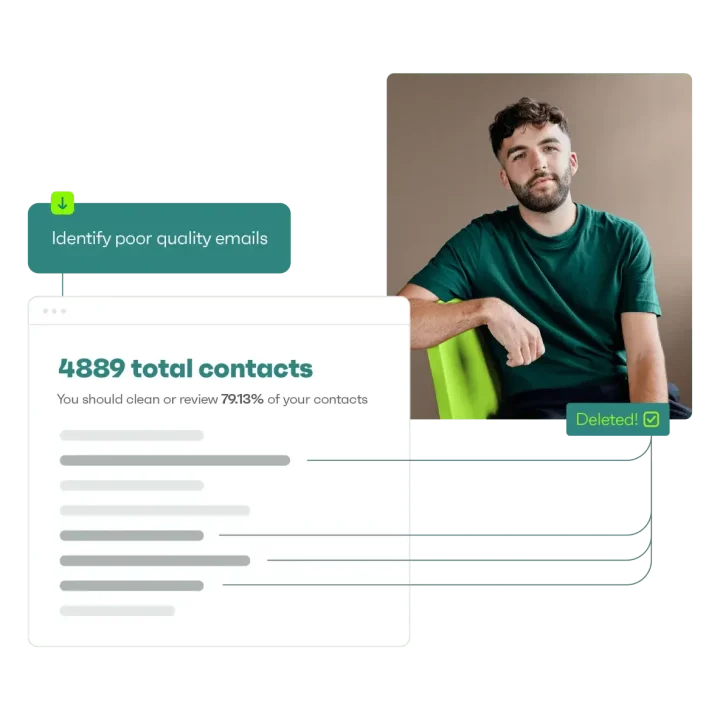
Omnisend’s automated List Cleaning tool helps identify contacts that may require removal or review. It does the following:
- Evaluates poor or risky contacts and recommends how many should be cleaned or reviewed
- Shows the estimated cleaning cost, currently $0.20 per 100 contacts
- Runs hundreds of checks to identify poor-quality contacts, including invalid addresses, spam traps, and typos
- Categorizes contacts as “poor quality,” “disposable or unknown,” or “good quality”
Step 4: Segment by engagement
Segmenting by engagement helps protect sender reputation by prioritizing active subscribers and suppressing persistently inactive ones before they weaken engagement signals. Brands can use email segmentation to group contacts by recent activity, purchase history, or preferences, making campaigns more relevant and identifying audiences for re-engagement.
Reaching customers based on their behavior and timing can also make lifecycle marketing more relevant.
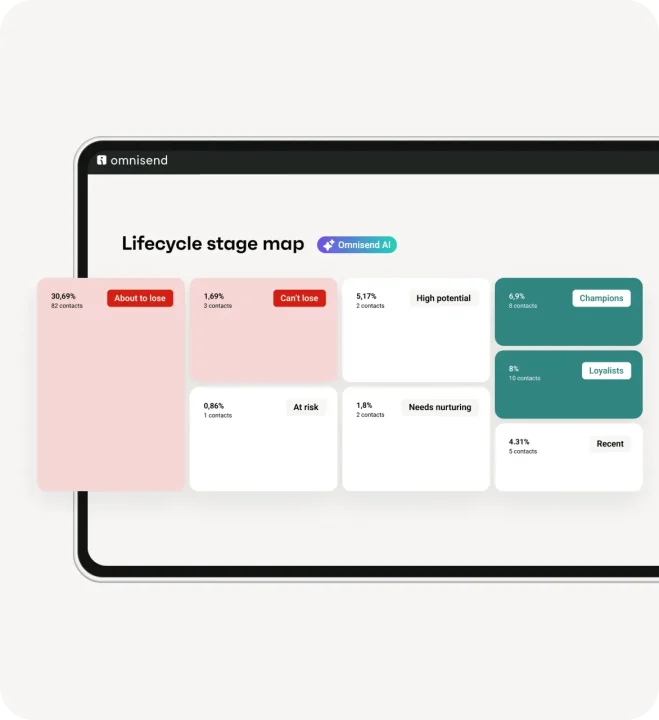
Omnisend’s AI-based segmentation can create segments based on behavior, engagement, and purchase patterns. Marketers can describe a targeting goal, such as frequent buyers or churn risks, and the tool generates a segment with matching filters. Omnisend also provides a lifecycle-stage view, helping marketers identify where customers sit in the journey, from new subscribers to at-risk contacts.
Step 5: Re-engage or sunset inactive subscribers
Re-engagement campaigns should target inactive subscribers who have shown previous interest in the brand, such as customers with past purchases or recently engaged customers who have since lapsed. Long-term cold contacts are usually better candidates for suppression than repeated win-back attempts, since continued emailing can generate negative engagement and waste marketing resources.
With Omnisend, brands can send on-brand reactivation emails to inactive customers and use lifecycle stage mapping and AI-assisted segmentation to identify and target inactive audiences. AI-generated segments can reduce the manual work involved in defining reactivation audiences and filters.

Step 6: Warm up your domain and IP
Domain and IP warming builds sender reputation by gradually increasing the number of emails sent per day to build trust with inbox providers. A controlled ramp-up is essential when launching a new sending domain or IP, since sudden increases can trigger filtering or throttling. Omnisend uses a manual domain warm-up process where marketers export their subscribed contacts, divide them into progressively larger daily batches, and re-import each batch as a separate segment. They then send campaigns to these segments according to a warm-up schedule, monitoring performance before increasing sending volume.
A typical warm-up sequence looks like this:
- Start with high-quality contacts, such as recent purchasers or subscribers engaged within the last 30 days
- Once performance is stable, gradually add older engaged subscribers, such as those active within the last 60–90 days
- Delay or exclude cold contacts until deliverability has stabilized
Omnisend recommends warming up gradually over 20+ days while monitoring complaint rates, bounce rates, engagement, and Google Postmaster signals.
Step 7: Avoid spammy content and misleading tactics
Spammy or misleading tactics such as all-caps text or excessive promotional language undermine subscriber trust and increase the risk of filtering. Use clear subject lines, accurate claims, readable formatting, and direct CTAs that reflect the email’s content.
Omnisend AI supports this process by generating subject line variations and suggesting calls to action that reflect the campaign’s offer. Marketers can review these suggestions and choose wording that avoids misleading urgency. It can also personalize product recommendations based on customer behavior, helping brands create more relevant content and encourage meaningful engagement.
Step 8: Request delisting from blacklists
Only request delisting after the underlying issues have been identified and fixed. Address problems such as poor list hygiene, high spam complaint rates, or missing authentication first; otherwise, the domain or IP may be relisted.
Once the root cause is resolved, identify the specific blacklist affecting the IP or domain and follow its removal process. Provide evidence of corrective actions where required, then continue monitoring complaints, bounces, and other deliverability signals after delisting to prevent recurring issues.
Step 9: Monitor and adjust
Sender reputation requires ongoing monitoring because deliverability can change as engagement, list quality, sending volume, and recipient behavior shift.
Track key signals such as bounce rates, spam complaints, and inbox placement to spot problems before they become broader issues, like long-term damage to sender reputation.
When DMARC reporting is enabled, mailbox providers can send reports showing which servers use your domain and whether emails pass authentication, helping you catch setup errors and spoofing early.
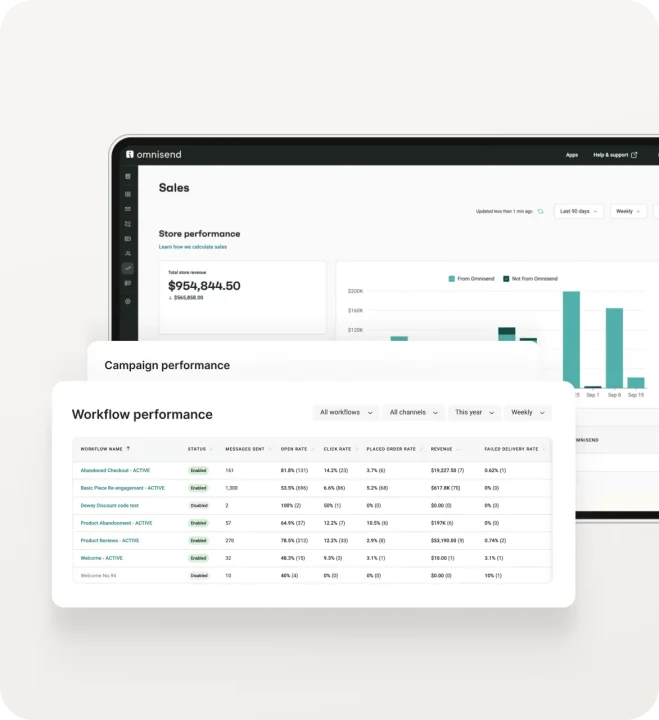
Omnisend’s reporting tools provide visibility into campaign and automation performance, helping marketers identify changes in engagement and deliverability and adjust their strategy accordingly.
Turn sender reputation into a deliverability advantage
Improving sender reputation starts with the fundamentals: authenticating your sending domain, keeping spam complaints and bounce rates low, prioritizing engaged subscribers, and suppressing inactive contacts.
Consistent sending patterns and regular monitoring are equally important. Track Gmail, Yahoo, and Microsoft signals, including spam complaints, delivery errors, and IP performance, to identify potential issues before they affect your campaigns.
Support sender reputation with Omnisend
Omnisend helps protect sender reputation through List Cleaning, engagement-based segmentation, and campaign reporting. These tools help identify risky contacts, prioritize responsive subscribers, and monitor engagement and delivery trends to make informed adjustments.
If you’re ready to put these strategies into action, explore Omnisend’s free plan and discover how its email marketing tools can support your deliverability.
Try it now and explore everything Omnisend offers.
Frequently asked questions (FAQs)
1. How long does it take to improve email sender reputation?
Recovery speed depends on factors such as spam complaint and bounce rates, authentication, and consistent sending volume. Improving list hygiene and targeting engaged subscribers help establish stronger signals during recovery.
2. Can changing email service providers fix sender reputation problems?
3. Does sending too many promotional emails hurt your sender reputation?
Use frequency limits, engagement-based segmentation, and channel preferences to avoid repeatedly contacting subscribers who show declining interest.
4. Can transactional emails affect sender reputation too?
Order confirmations, password resets, shipping updates, and similar messages should use authenticated sending infrastructure, accurate recipient data, and reliable delivery practices to protect the domain’s overall reputation.
5. How often should you check your email sender reputation?
During periods of increased sending volume or deliverability issues, monitor spam complaints, bounce rates, and mailbox-provider reports more frequently.