Omnisend AI


 OFFER
OFFER










Getting a fake order confirmation in your inbox is usually followed by a degree of panic, which is exactly what scammers want: to get you into a vulnerable state of mind. If you just received a suspicious receipt, or you manage an online store and worry about brand impersonation, this guide is for you.
As a matter of fact, 3.4 billion phishing emails are sent daily, and ~83% of them are generated using AI. This results in $25 billion in losses due to phishing every year. You cannot be too safe when it comes to phishing scams.
We’re breaking down the exact red flags consumers need to look for to stop these scams instantly. For merchants, we’ll cover the specific, practical steps required to lock down your domain, prevent email spoofing entirely, and protect your brand reputation.
Quick sign up | No credit card required
What is a fake order confirmation email?
A fake order confirmation email is a phishing tactic in which scammers impersonate legitimate brands to steal your credit card details or account credentials. The setup relies entirely on manufacturing a crisis.
You receive an unexpected receipt for an expensive item, complete with a massive charge. The immediate reaction is panic, which drives you to click the provided link to quickly cancel the unauthorized transaction.
Once you click, you’re in the trap zone. You land on a fraudulent website designed to perfectly replicate the retailer’s actual login, product, or order cancellation page. When you enter your password or credit card details, scammers capture your information.
Other variations may ask you to call a fake customer service number, where a real person talks you into handing over your payment details over the phone.
Spotting these scams used to require nothing more than finding a few glaring typos. Unfortunately, that’s no longer the case. Thanks to Generative AI tools, scammers can now create flawless, highly convincing messages.
In 2026, a fake order confirmation often looks identical to the real thing, so you need to verify the message’s legitimacy before reacting.
How to spot a fake order confirmation email (consumer guide)
Let’s break down what you need to look for when an unexpected receipt lands in your inbox. You can treat this as a checklist that covers all the major red flags in one place. You’ll be able to verify whether the message is legit or a scam easily.
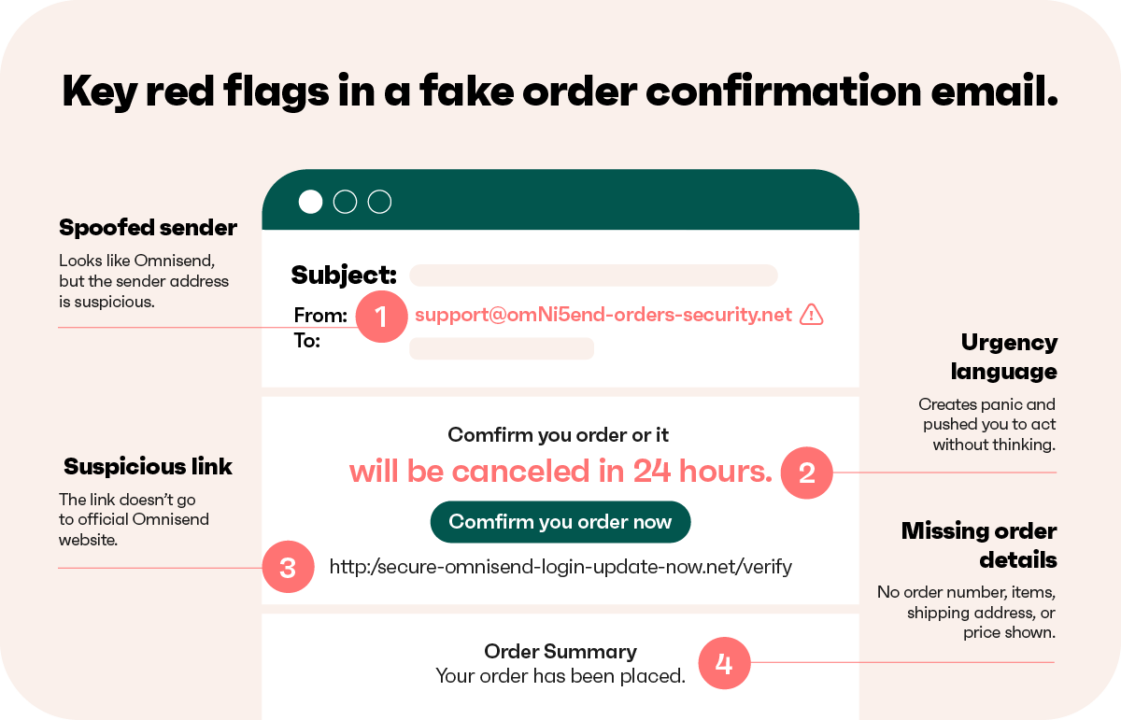
The sender’s email address looks off
The first place to check is the “From” address. Scammers try to make the display name look official, but once you expand the email address, you’ll probably notice some inconsistencies. They rely on you to read quickly, in panic mode, and miss the minor discrepancies in the domain name.
Here are the tricks they use to manipulate email addresses:
- Lookalike domains: Using a zero instead of the letter “o”, for example, [email protected].
- Subdomain tricks: Using familiar or trusted words to hide the real destination, like [email protected].
- Display name spoofing: Setting the visible name as “Customer Support” while the underlying email is a random string of letters, like [email protected].
The email lacks your personal details
Real retailers know who you are and what you bought. A legitimate message includes your actual name and specific shipping details. Scammers use vague language because they send the same email to thousands of people at once. They count on the fact that you might not remember every online purchase you make, hoping you’ll click just to figure out what the order is.
Be aware if you notice any of these:
- Greetings like “Dear Customer” or “Valued Member” instead of your actual name
- Vague subject lines like “Your recent order” without the actual order number
- Mentions of “Your Account” without specifying any of the details
It creates urgency or panic
Phishing relies entirely on psychological pressure. The goal is to bypass your rational thinking and force an immediate reaction. By creating an artificial crisis, scammers push you to act before you have time to analyze the situation or properly check your bank account.
Here are some phrases often used by scammers to induce panic or stress:
- “Your account will be charged in 24 hours”
- “Cancel immediately”
- “Unauthorized purchase detected”
Links don’t go where they claim
Never click a “Cancel Order” or “View Invoice” button unthinkingly. Do some investigating just to be sure you’re not falling for a scam. You can preview the true destination URL by hovering your mouse over the link without clicking it.
On a mobile device, you need to press and hold for a second to safely reveal the destination link. If you’re not sure, the best thing you can do is go to the website manually by opening a new tab and entering the URL yourself. If the warning signs appear when you sign in to your account, fix the issue there.
Here’s how you can identify potentially scammy URLs:
- Mismatched URLs that don’t match the official brand website
- URL shorteners like bit.ly that hide the true destination
- HTTP connections instead of the secure HTTPS
The email has no real order details
An email cannot confirm an order if it refuses to tell you what you supposedly bought. Scammers keep the content deliberately vague so the trap applies to anyone who receives it. If the receipt claims you spent $400 but fails to list a single specific item, it’s almost certainly a fraud attempt.
A legitimate order confirmation will always include:
- An itemized list of the specific products purchased
- Exact quantities and individual prices for each item
- Your verified shipping address and an estimated delivery date
- A clearly formatted, trackable order number
What to do if you receive a fake order confirmation
Receiving a suspicious receipt naturally creates uncertainty about the security of your finances and accounts. Once you know how to spot a fake order confirmation, your priority must shift to containment. You need a structured response to avoid accidentally triggering the trap.
Follow these steps to protect your personal information:
- Don’t click any links, as doing so can instantly trigger malware downloads or take you to credential-stealing websites.
- Never call the phone numbers listed in the email, because scammers set up fake call centers to manipulate you into handing over your payment details.
- Verify the purchase by opening a new browser window, manually entering the store’s URL, and checking your order history.
- Review your recent bank and credit card statements to see if there are any charges related to the fake order confirmation message.
- Report the scam directly to the FTC at reportfraud.ftc.gov to help authorities track and dismantle these fraud networks.
- Forward the fake receipt to the official customer support team of the brand being impersonated so they can monitor the abuse.
- Mark the message as phishing in your email platform to train your provider’s filters to catch similar scams before they reach you.
How scammers use fake order confirmations — and why it works
Order confirmations are the perfect method for attackers because transactional messages consistently achieve open rates above 60%. Also, recipients trust receipts from businesses they know.
When a fake message claims you spent hundreds of dollars on an unrecognized item, it triggers an immediate shock response that completely bypasses your normal resting-heart-rate caution.
Scammers use these tactics to achieve two specific goals. The first is credential harvesting, which gets you to click a link that directs you to a cloned login page to capture your password. In fact, as Hoxhunt reports, 43% of phishing emails rely on malicious links.
The second is phone-based fraud, in which a fake customer support line connects you to an operator who manipulates you into revealing your credit card information.
While you could easily identify phishing emails in the past from spelling errors, Generative AI tools in 2026 eliminate them, making it harder to separate legit emails from scams.
| Tactic | Why it’s effective |
|---|---|
| High-value invoice | Triggers an immediate panic response that forces an instant click to cancel |
| Cloned brand imagery | Replicates official logos and color schemes perfectly to imitate the legitimate website |
| Spoofed sender names | Uses lookalike domain names that mimic real brands at first glance |
| Fake support hotlines | Moves the conversation off email to a live operator who can manipulate you verbally |
How fake order confirmation emails damage your brand (merchant guide)
Imagine a hypothetical scenario: A customer receives a fake order confirmation from “[email protected]”. They click, get phished, and blame your brand for scamming them out of their money.
Even though your actual store database remains completely secure, the victim associates their financial loss directly with your business name. Multiply that by a few hundred or thousand, and you’ve got severe reputational damage on your hands.
It takes a significant operational and financial toll on your business. As Ringly notes, merchants in the USA lose as much as $4.61 for every $1 in fraud, a figure that has increased by 37% since 2020. When scammers manipulate your brand assets, the damage affects everything from customer support resources to customer retention, chargebacks, and more.
Here are the specific business impacts of an unchecked spoofing campaign:
- Erosion of repeat purchases: Victims immediately lose confidence in your brand and stop buying from your store, which instantly reduces their lifetime customer value.
- Surge in support tickets: Your customer success team gets completely overwhelmed handling frantic inquiries from frustrated buyers trying to track down non-existent orders.
- Costly chargeback disputes: Customers often file fraud reports with their credit card companies, which incur chargeback fees and may result in payment processing penalties for your brand.
- Potential deliverability damage: When mailbox providers detect high volumes of unauthenticated spam that carries your brand name, they may blocklist your real domain, causing your legitimate marketing emails to land straight in the spam folder.
How to tell if your domain is being spoofed
Most security guides skip straight to prevention, completely ignoring how to identify an active attack. If you manage a Shopify or WooCommerce store, you cannot wait for the damage to happen before noticing a problem. You need to be proactive to catch scammers early.
Here’s how you can monitor your domain authentication status to see if there are any issues you need to fix:
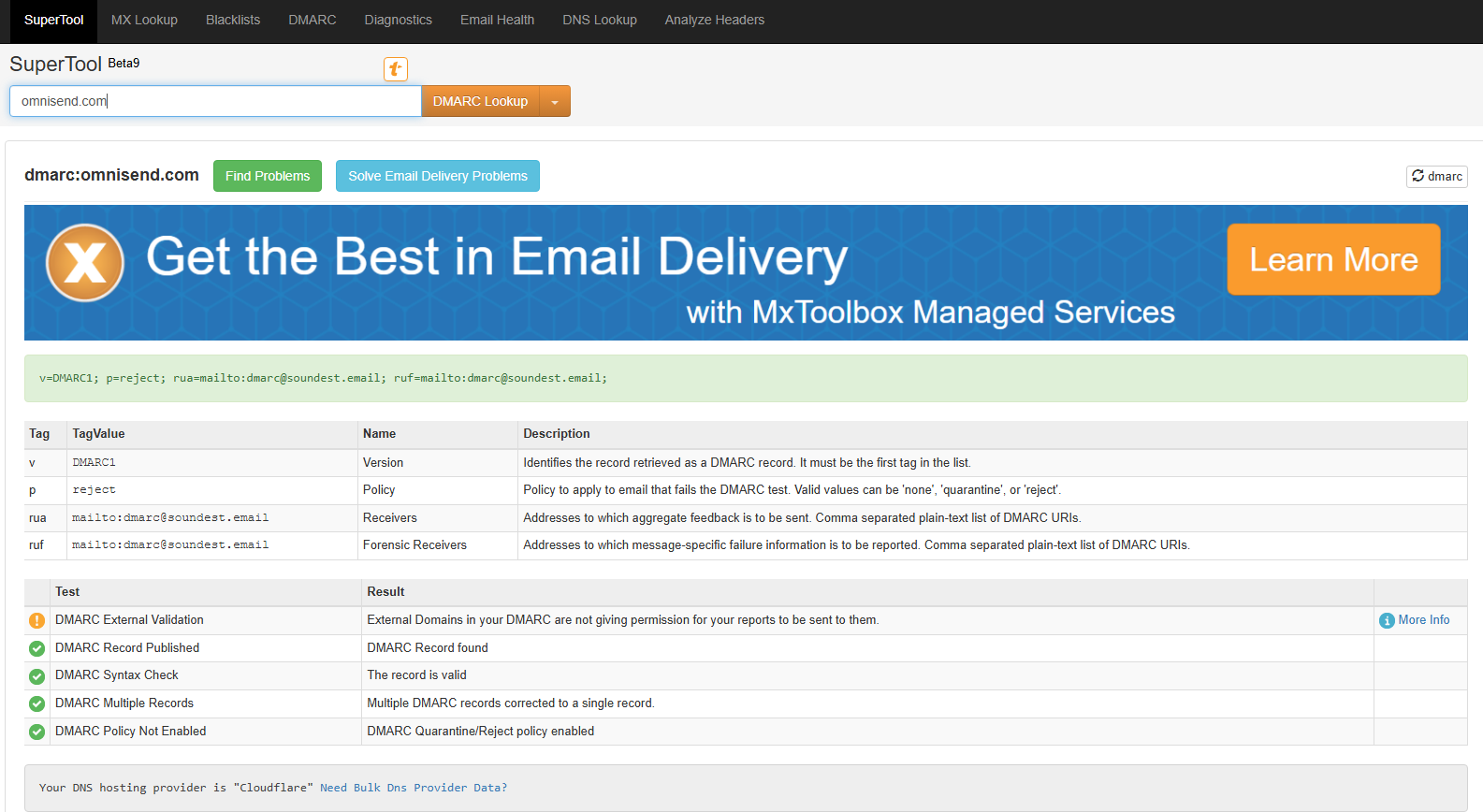
- Check your DMARC reports: Set up reporting to see who is sending messages from your domain. Free services like MXToolbox and Google Postmaster Tools provide clear dashboards for this data. If you see massive volume spikes from unauthorized servers, scammers are most likely spoofing your address.
- Track specific customer complaints: Notify your support team to monitor any messages that mention unexpected purchases. A sudden spike in users complaining about order receipts for items they never bought is a surefire indication of phishing campaigns you need to take care of.
- Create automated brand monitors: Set up Google Alerts that combine your store name with keywords such as “scam,” “phishing,” or “fraud.” People often go to public forums like Reddit or review platforms like Trustpilot to complain about scams and warn others about suspicious emails before contacting your support team directly.
How to protect your brand from email spoofing
Locking down your domain prevents scammers from using your brand name in the first place. This action plan breaks down your defense into three concrete, non-technical layers so any Shopify or WooCommerce store owner can implement them immediately. You won’t need any cybersecurity expertise to be able to do this.
Set up SPF, DKIM, and DMARC
These seemingly random and confusing email authentication terms are actually pretty straightforward to set up, so your identity is verified at all times. Together, they prove to receiving servers that you’re the legitimate sender and that campaigns with discrepancies won’t go through.
| Protocol | What it does | Setup difficulty for merchants |
|---|---|---|
| SPF | A public list of servers authorized to send emails on behalf of your domain | A quick DNS record update provided by your email platform |
| DKIM | A digital signature attached to your messages, proving the contents were not tampered with in transit | Generated automatically by your email provider to paste into your DNS settings |
| DMARC | The strict policy that instructs receiving servers to reject or quarantine emails if they fail SPF or DKIM checks | Requires adding one text record to your domain, starting with a monitoring policy first |
Most modern marketing platforms guide you directly through the entire process. Omnisend comes with an intuitively designed infrastructure that makes authentication highly accessible and straightforward. All you need to do is copy the automatically generated strings and add them to your DNS records.
Then, you can start configuring your order confirmation emails and be sure that they won’t be tampered with or misrepresented. Once you have those three protocols configured, scammers won’t be able to pass the checks, and their fraudulent emails will get blocked before reaching the inbox.
Use BIMI to make your emails visually trustworthy
Brand Indicators for Message Identification (BIMI) is a powerful visual trust layer for your brand. When properly configured, BIMI displays your official, verified company logo right next to your message in a customer’s inbox before they even open the email.
This is a highly effective scam-prevention tool. Customers conditioned to see your verified logo next to legitimate receipts are far less likely to fall for a fake email that claims to be from your store but lacks the usual logo. It provides instant visual confirmation of which sender is authentic and which one is a fraud.
To be eligible for BIMI, you must already have a strict DMARC policy in place. Once your domain authentication is fully locked down, adding BIMI ensures that scammers cannot impersonate your inbox.
They cannot steal your verified logo, which gives your buyers peace of mind the moment a notification appears.
What a legitimate order confirmation email should contain
Technical authentication may stop spoofing-based scams, but your message design can also reassure customers that this is a real receipt. As mentioned before, scammers send fake order confirmations with zero information about the product.
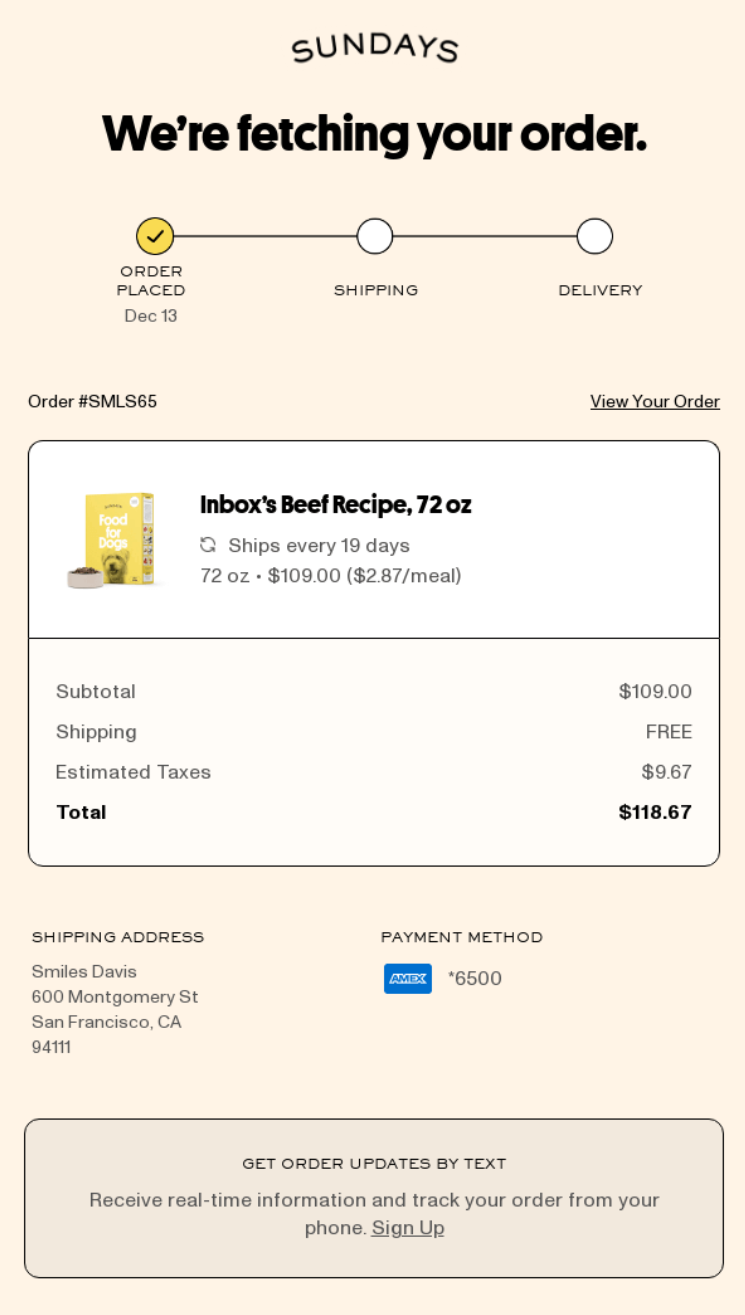
What you need to do is provide all the necessary and relevant product information, such as order number, product name, description, price, shipping details, delivery estimates, and more. You can check some order confirmation templates we’ve prepared if you want more visual cues.
Here’s what you should have inside the order confirmation email in more detail:
- Personalized greeting: Address the buyer by their name, instead of using a generic “Dear Customer”.
- Itemized order summary: List specific product names, quantities, and prices so the customer sees exactly what they bought.
- Clear order number: Provide the order confirmation number at the top of your email so it’s clear and visible.
- Shipping details: Display the customer’s delivery address to remove any lingering doubt.
- Estimated delivery date: Set a clear date range for when the delivery is supposed to arrive and note the delivery service if applicable.
- Direct support contact: Offer all the ways the customer can reach your customer service team.
- Consistent branded design: Match your website’s colors, typography, and logo formatting.
- Authenticated sender domain: Ensure it originates from your verified store URL and matches the brand name exactly.
Here’s what a good order confirmation email could look like:
Send order confirmation emails that your customers will never question
Your brand reputation depends on reaching the inbox safely and in a recognizable way. Omnisend’s transactional email infrastructure is built specifically for strong authentication. The platform manages SPF and DKIM alignment, alongside rigorous sender reputation management, natively within the system.
By handling the technical heavy lifting, we ensure your store sends highly secure, authenticated messages that protect your identity from impersonators.
When you run your post-purchase workflows through Omnisend’s order confirmation automation, every outgoing message is pre-configured for deliverability and brand trust. Your customers receive a personalized, clearly detailed, and visually consistent receipt. As a result, your customers will never mistake your order confirmation for a scam.
With Omnisend, you’ll gain access to a highly accessible, thoughtfully designed interface that drives real business results. As a matter of fact, Omnisend customers earn a documented $79 ROI for every $1 spent, which is an unparalleled number in the email marketing industry.
Conclusion
Consumers now have an actionable checklist to help them identify the red flags of a fake order confirmation and clear instructions on how to respond safely without compromising their data.
At the same time, ecommerce merchants also now know how to detect active spoofing campaigns and lock down their sender domains using proper authentication protocols.
Ultimately, the best defense against brand impersonation is to take all steps to ensure both the technical soundness of your sender accounts and a proper visual design that includes all the necessary information a scammer wouldn’t have.
By consistently sending fully authenticated, highly detailed, and on-brand order confirmation emails, you ensure your buyers will recognize a legitimate receipt from a scam attempt.
AI-generated phishing attacks will continue to scale in both volume and sophistication throughout 2026 and beyond, making proactive brand protection a necessity for all brands.
Quick sign up | No credit card required
FAQ
How to spot a fake order confirmation?
Check full email addresses for signs of spoofing, see if there are any missing details like order numbers or delivery estimates, and look for aggressive language that demands you act fast. These, among some others, are clear signs of attempted scams.
How to identify fake orders?
Check your bank statements to see if there are any charges that the fake order confirmation assumes. You can also check the order history on the retailer’s official page (which you should enter manually rather than clicking anything in the suspicious email). If the data in your bank or account doesn’t match, it’s a scam email.
How to spot a fake purchase order?
Fake purchase orders lack specific data on the items you allegedly purchased. If there are no specific details like order data, product quantities, specific descriptions, and other details that a legitimate email would include, you should disregard and report the email.
How to make an order confirmation?
Use an email marketing platform like Omnisend to automate the entire process. You can add personalized greetings, specific order summaries, support details, and more. On top of that, you’ll need to set up domain authentication so your sender reputation remains intact and scammers can’t impersonate you.
What should I do if I clicked a link in a fake order confirmation email?
Disconnect from the internet immediately to prevent potentially malicious downloads, run a full antivirus scan, and change your passwords on a different, safe device. Also, keep an eye on your bank accounts in case there are any unauthorized charges and report any incidents.
How do I stop scammers from impersonating my store’s email domain?
First, configure SPF, DKIM, and DMARC authentication records in your DNS settings. This way, you’ll prevent unauthorized senders from sending messages on your behalf and ensure your brand reputation stays intact.