
 Omnisend AI


 OFFER
OFFER








Drive sales on autopilot with ecommerce-focused features
See Features
A Shopify spin the wheel popup engages visitors by turning email collection into a fun, interactive game, significantly boosting signup rates.
This gamified approach not only increases email and SMS signups but also improves conversion rates by keeping shoppers on the page longer.
To maximize effectiveness, ensure transparency about prize odds, limit repeat spins, and sync follow-up communications with winners to drive urgency.
Utilizing tools like Omnisend can streamline the integration of spin the wheel popups with your marketing strategy, enhancing lead capture and customer engagement.
A Shopify spin the wheel popup grabs attention instantly and gives visitors a reason to engage instead of bouncing. It’s a format that may offer discounts, subscriptions, and perks in exchange for the buyer’s contacts. This gives your business a non-intrusive way to collect customer information.
In this guide, we explain how these popups work and why they’re effective for increasing signups and conversions. You’ll learn what a spin the wheel popup is and how to keep the practice fair so results stay measurable.
If you want to adopt this for your Shopify store, then keep reading this to the end.
What is a “Spin the Wheel” popup on Shopify?
A Shopify spin the wheel popup is a gamified signup form that lets visitors spin a virtual wheel to win a discount or reward. Instead of asking for an email outright, it turns the opt-in process into a quick, interactive experience.
The mechanics behind it blend play, urgency, and lead capture in one step. Shoppers enter their email, spin, and instantly receive a timed reward.
With average email popup conversions standing at 2.1% in 2025, this gives your business a clear reason to use popups to collect contacts. The best part is that you can non-intrusively achieve this with common trigger rules that include the following:
- Exit intent: Shows the wheel when a visitor moves to close the tab
- Time delay: Appears after a shopper has stayed for a specified duration
- Scroll depth: Activates once someone scrolls far enough down the product page
If you’re planning to integrate the Shopify spin the wheel popup into your online store, you can use some apps that connect directly with Shopify stores. They also work well with email platforms like Omnisend, making it easy to collect emails and automate follow-ups.
The bottom line is that a spin the wheel Shopify popup can capture leads and generate sales when used correctly. For the best results, consider the following setup choices.
- Clearly display prize odds to build trust
- Limit repeat spins to protect margins
- Send automated follow-up emails reminding winners to use their discount before it expires
Why use a spin to win popup on your Shopify store?
Offering people a reward always gets their attention, whether it’s a freebie, a discount, or free access. This is why the Shopify spin the wheel popup is effective. Instead of a static signup box that only asks for emails, a popup invites shoppers to interact and incentivize their contact sharing.
Combining the spinning wheel with these email popup examples, for instance, can hold attention longer and guide them toward a first action.
Here are the key benefits of setting this up on your online shop:
- Increases email and SMS signups: Interactive wheels often collect twice as many contacts as static forms. A visitor who ignores a plain newsletter box may voluntarily spin for a chance to win free shipping and submit their phone number or email at the end. The game element lowers resistance and makes the opt-in feel like a fair exchange.
- Improves conversion rates: The Shopify spin the wheel feature keeps shoppers on the page longer. That extra engagement time gives them space to browse products, read details, and move closer to checkout.
- Creates a fun brand experience: Adding a spin the wheel popup can make a store feel dynamic and memorable. Shoppers are more likely to remember the moment they “won” something, which strengthens brand recall and positive perception.
- Encourages first-time purchases: Winning a discount code gives new visitors a reason to buy sooner. For example, a shopper who planned to compare stores later may place an order once they receive a limited reward.
- Drives urgency and fear of missing out: Timers and single-use prizes push shoppers to act quickly. This is the fear of missing out (FOMO). For example, if a reward expires in 24 hours, they’re likely to check out right away to avoid losing the deal.
How to add a spin the wheel popup to your Shopify store
There are several ways to add a spin the wheel popup to your Shopify store. The example used here is of Omnisend, and here are the prerequisites:
- Ensure your online store has an Omnisend snippet. If you have Shopify or Bigcommerce or are using one of Omnisend’s plugins, like Magento, your snippet is already there. For those using custom API integrations, refer to this installation guide.
- Next, you need to subscribe to Omnisend, which is the best spin the wheel app for Shopify, to access the Wheel of Fortune item. It’s available across all Omnisend plans.
- Ensure the discount codes you plan to use in the Wheel of Fortune are created in your store. This is because Omnisend doesn’t automatically create these codes.
If you have met all the requirements listed above, proceed with the following steps.
1. Create a popup form
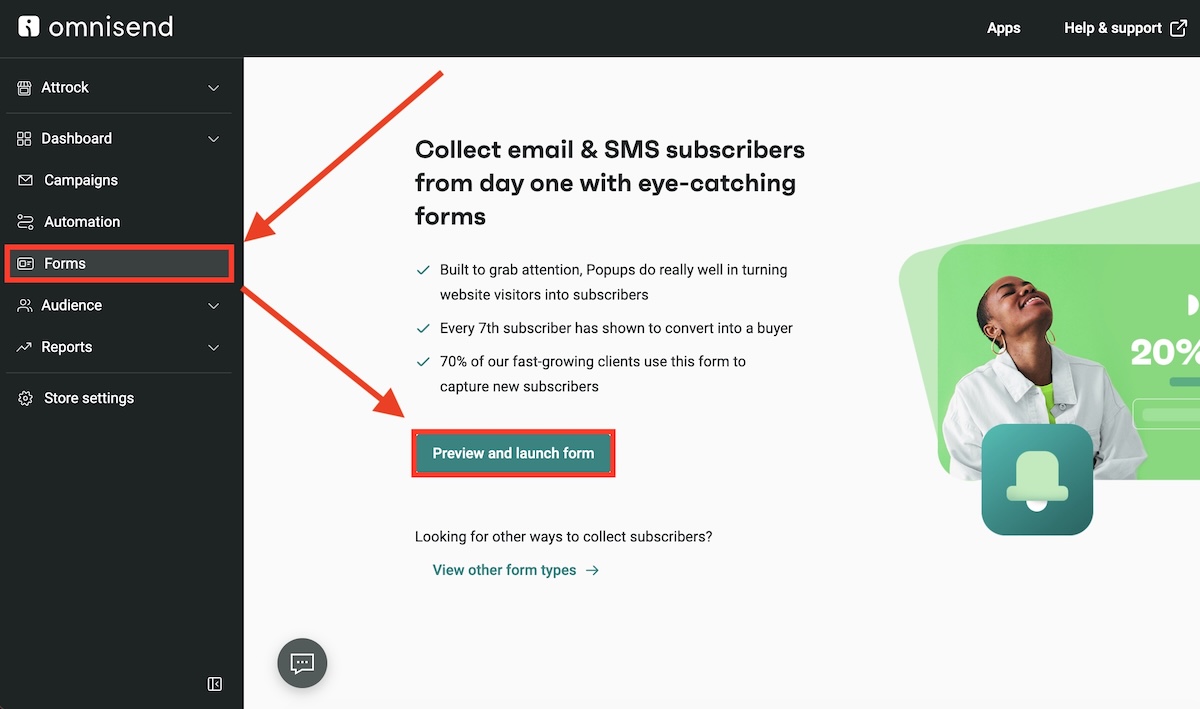
Open Omnisend, then go to the panel on the left and click on Forms, then select “Preview and launch form.” Alternatively, you can choose the Wheel of Fortune preset from the Omnisend template library:
2. Choose Wheel of Fortune
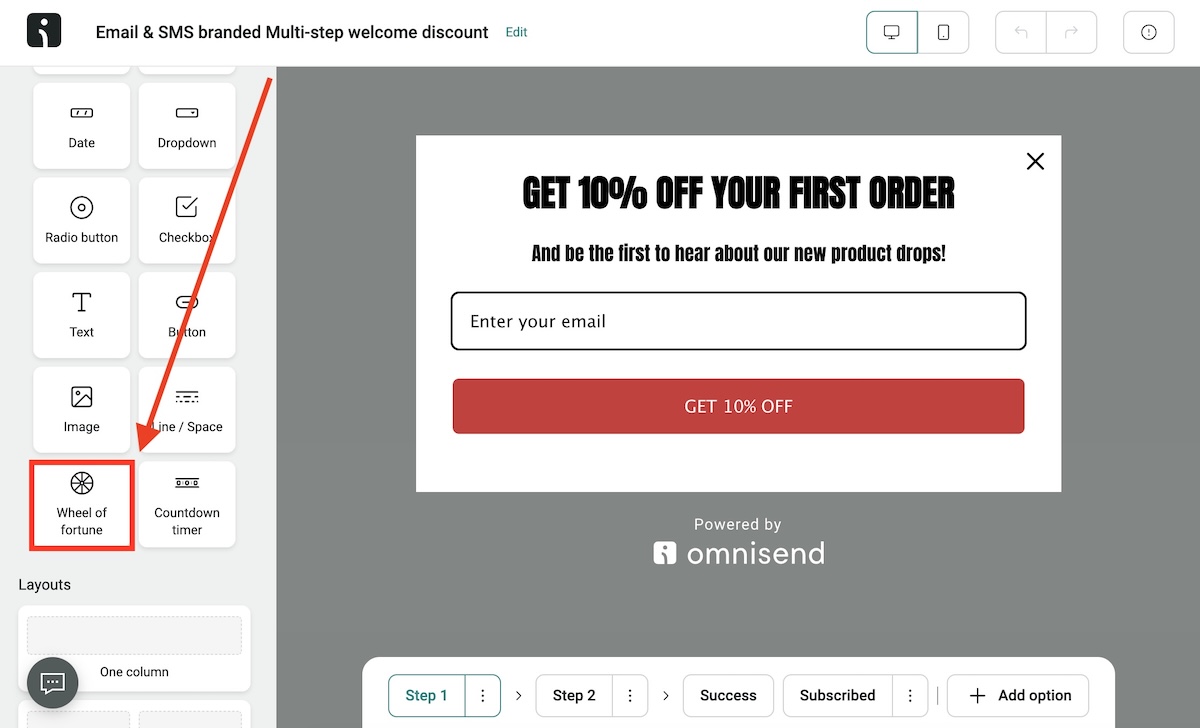
Scroll to the bottom and select “Wheel of Fortune” from the options displayed on the left panel. Drag and drop it into the form you’re creating.
3. Edit the wheel
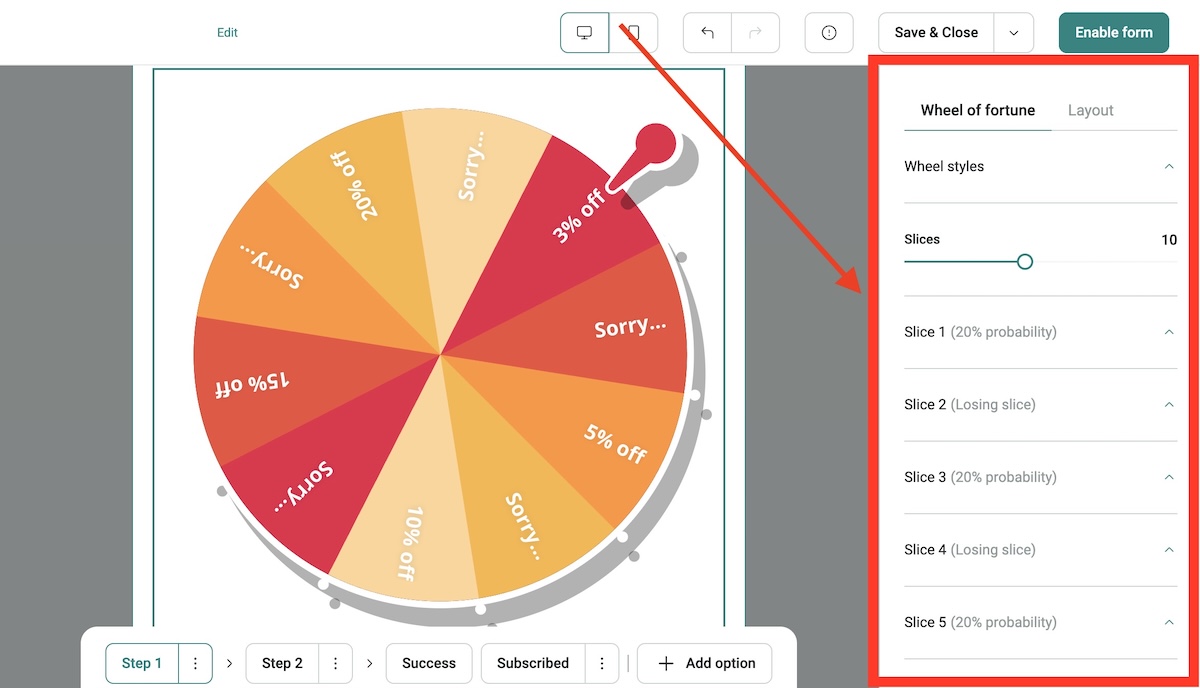
From the right side of your screen, edit the Wheel of Fortune by customizing the following elements:
- Pointer: A customizable arrow that points to a selected slice after spinning
- Width: You can adjust the width of the wheel by manually keying in a percentage or using the slider
- Padding: This lets you adjust the spacing around the wheel so it can fit visibly on any screen
4. Configure wheel slices
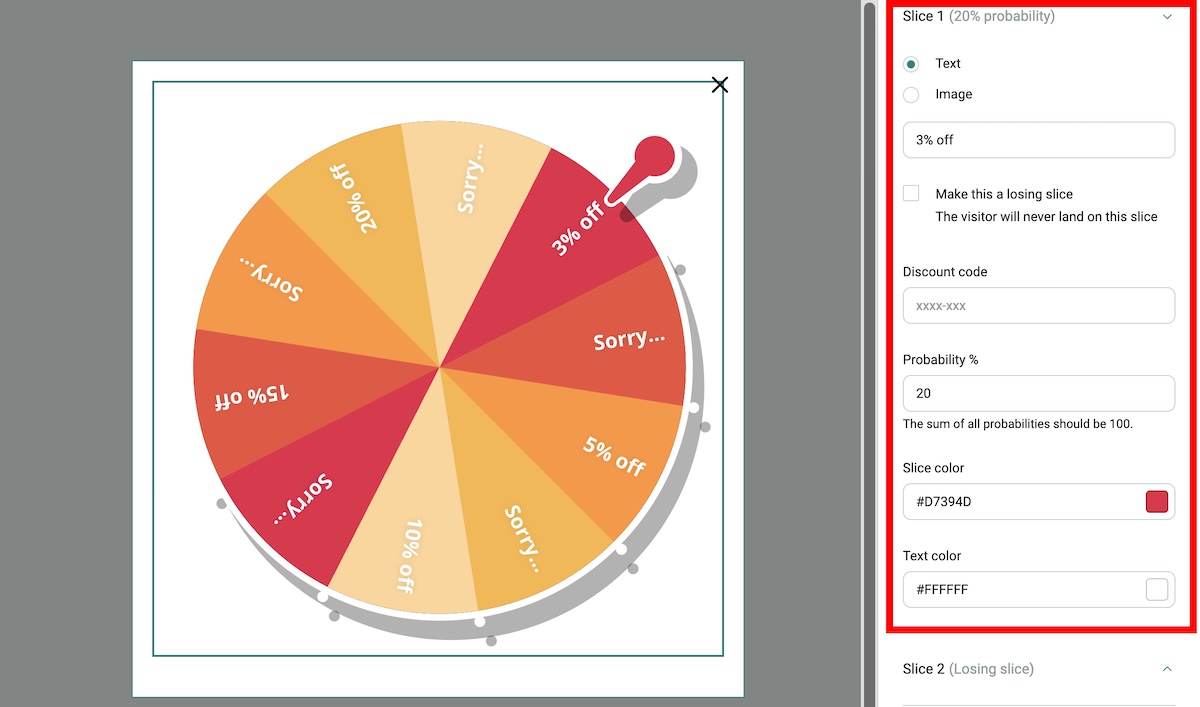
Set the number of slices depending on the offers you want to display. This Omnisend snippet can create three to 20 customizable slices. You can change the color of each slice, add text or images, as well as discount codes and probabilities.
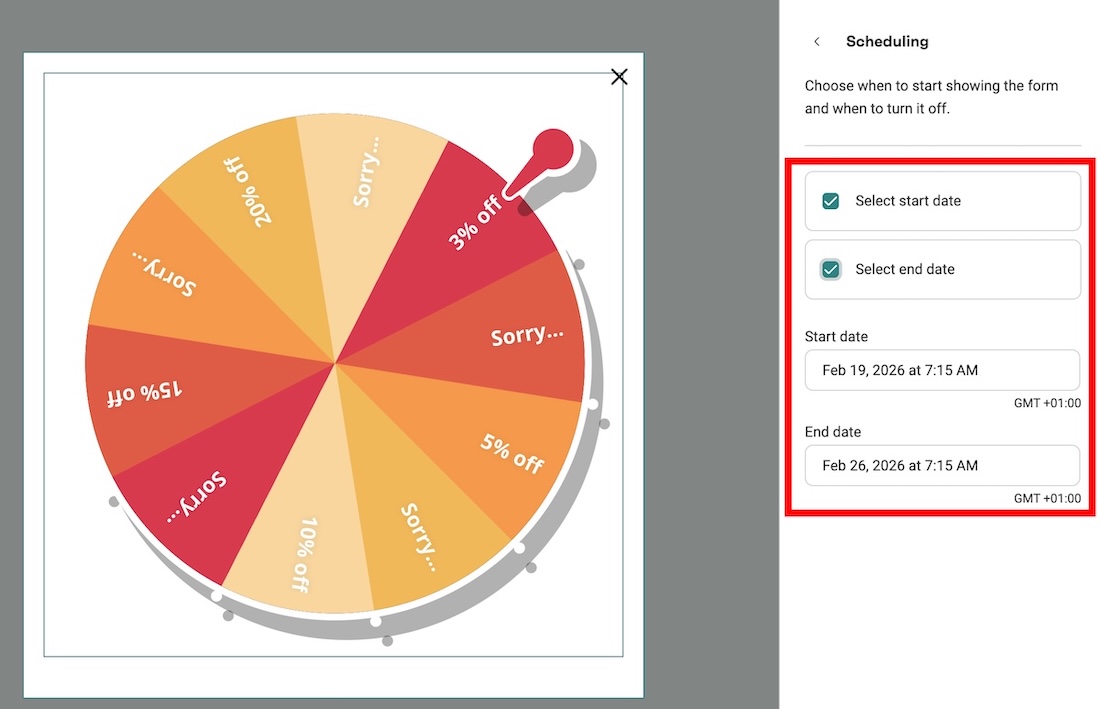
5. Set scheduling
Once you have all the information in place, click on the Behavior tab and choose Scheduling. This lets you set the date and time to start and stop showing the wheel in your store.
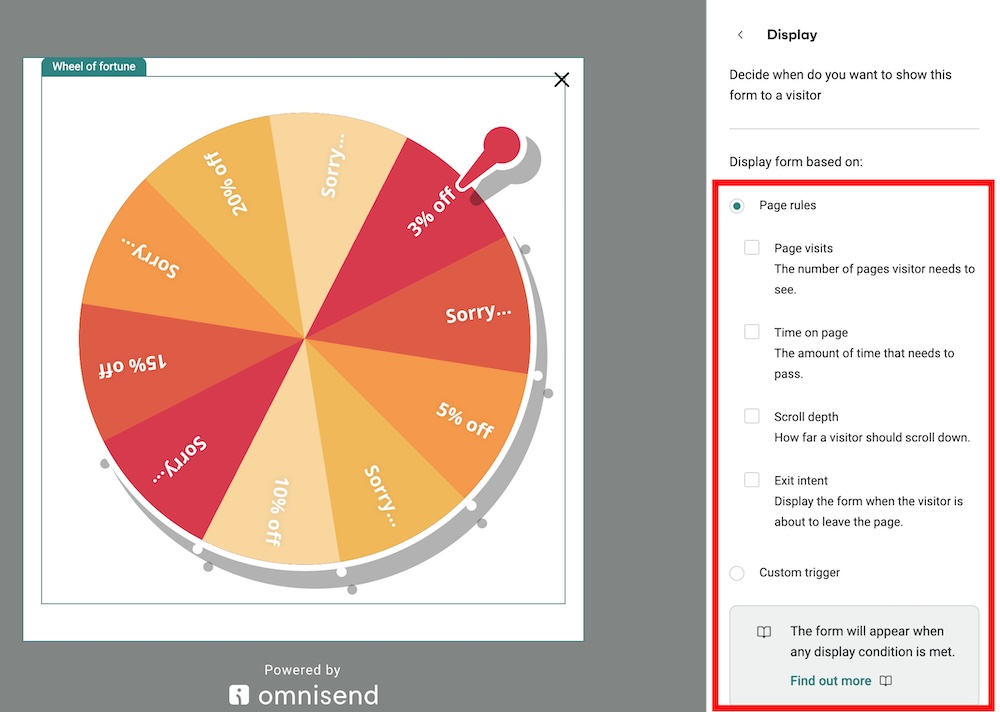
6. Set display rules
Still under the Behavior tab, choose the Display option to control when the visitor is shown the Wheel of Fortune. You can set it based on page rules like visits, scroll depth, exit intent, or your own customized triggers.
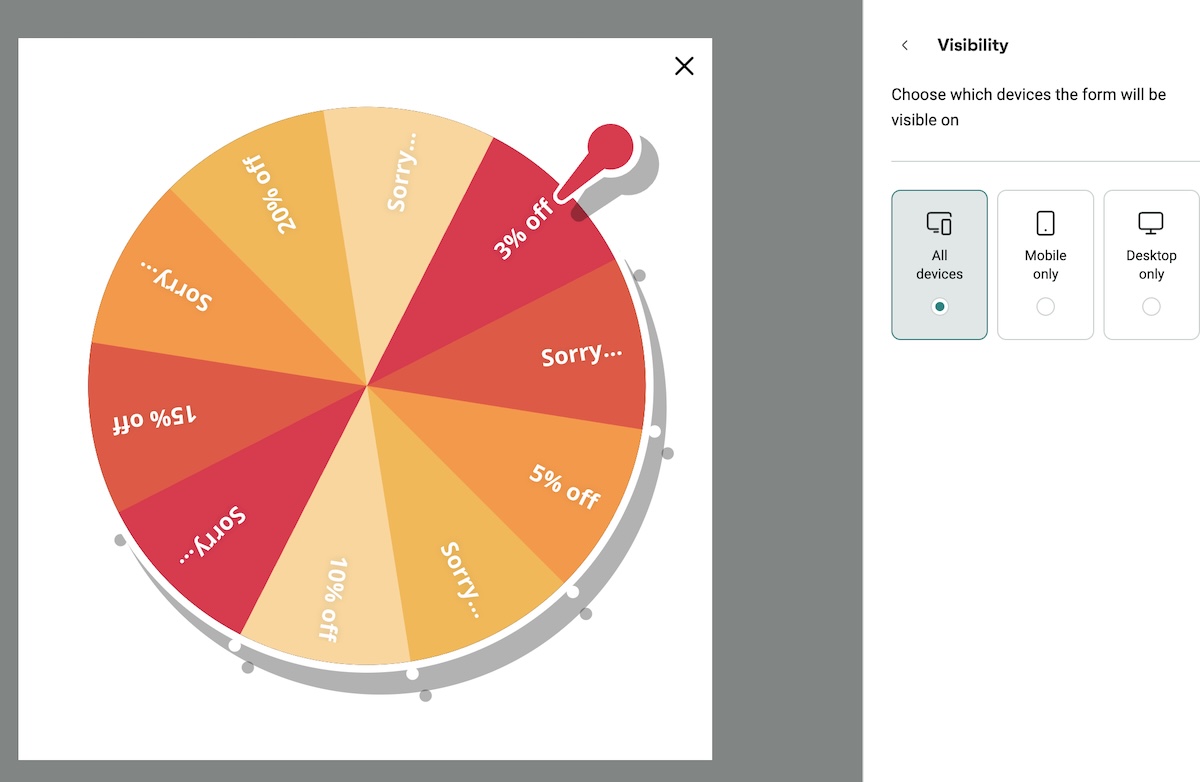
7. Set device visibility
The Omnisend Wheel of Fortune snippet comes with a Visibility option under the Behavior tab. You can choose to show it on all devices or limit it to desktop or mobile only.
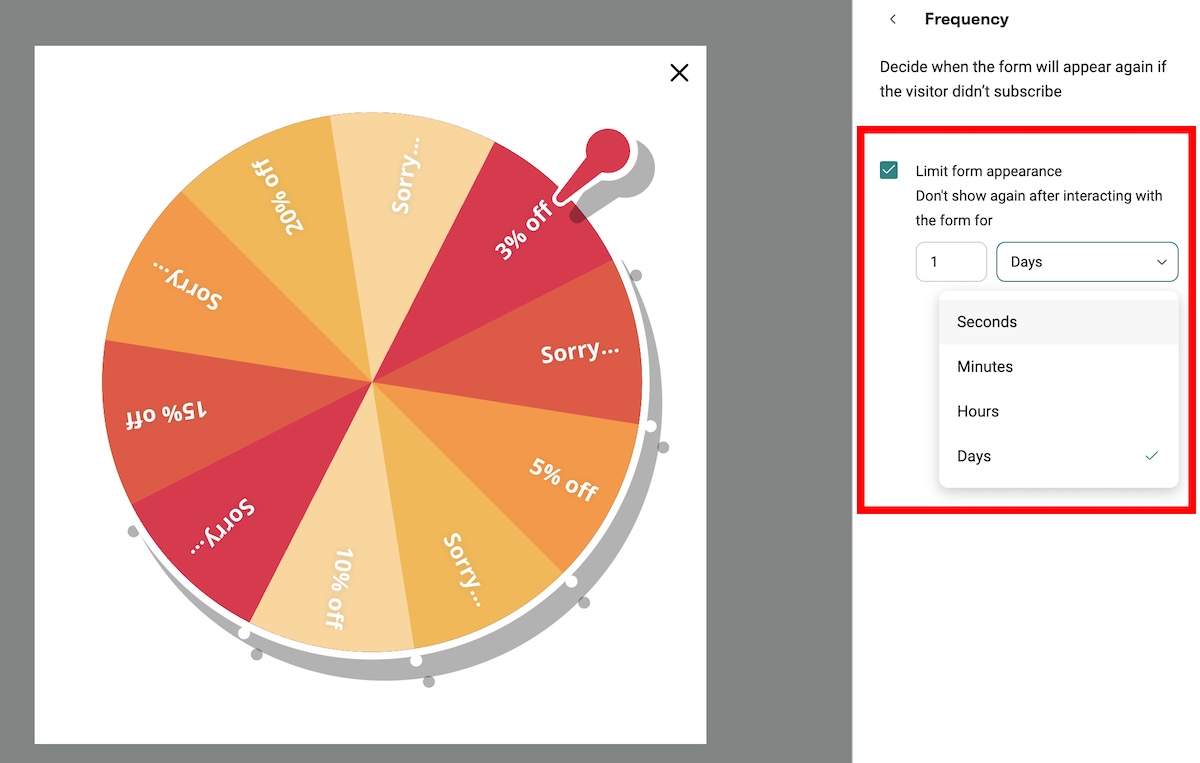
8. Set the frequency
Still under the Behaviour tab, scroll down and select Frequency. This controls how many times a visitor interacts with the Wheel of Fortune when they visit your store.
9. Enable the form
Once you have added all the details you need, tap on the “Enable form” button to publish your wheel of fortune. Check out our more detailed setup guide, which includes multistep forms, among many other things.
Best practices for Shopify gamified popups
Gamified popups can capture attention fast, but results depend on how they’re set up. A well-planned Shopify spin the wheel works best when rewards connect with the customer’s needs.
To ensure fairness, here are some popup best practices to adhere to:
- Limit the number of wins: Control how often large discounts appear to protect profitability. Assign lower probabilities to high-value rewards and higher probabilities to smaller incentives like free shipping or 10% off.
- Rotate offers: Change rewards over time so returning visitors see something fresh. One month you might feature free shipping, and the next a mystery gift or bundle discount. Rotating prizes keep interest high and let you test which incentives drive real orders.
- Optimize for mobile: Most visitors view stores on phones. Therefore, a mobile-friendly spin the wheel ad should limit browsing frustrations. Buttons should be large, text should be readable, and the wheel should not cover product images for long.
- Write a clear call to action copy: Tell visitors exactly what they get and what happens next. A message like “Spin to win 10 percent off your first order” sets a clear expectation and reduces confusion. Direct wording helps shoppers decide quickly.
- Sync with your welcome flow: When someone wins a code, the welcome message can remind them of the offer and show products that match their browsing history. Tools that link popup messages with automation, such as Omnisend on Shopify, make this coordination easier.
- Use SMS follow-up for urgency: If a shopper shares a phone number, send a short reminder before the reward expires. This step helps the Shopify spin the wheel strategy move beyond signups and guide shoppers toward their first purchase.
Ready to gamify your Shopify growth?
A Shopify spin the wheel popup gives stores a practical way to grow their contact list. When visitors interact with a reward-based form, they spend more time on the site, share their contact details, and move closer to a purchase.
To get consistent results, the popup should connect with the rest of your marketing system. Tools with built-in gamified forms, such as Omnisend, make this process more structured.
They allow email + SMS collection, automation flows, and drag-and-drop builders for your online business.
When these elements work together, a Shopify spin the wheel becomes more than a signup tool. It becomes part of a broader strategy that links engagement, messaging, and follow-up.
Shopify spin the wheel FAQs
Yes. Spin the wheel popups on Shopify can increase signups and first orders when rewards feel fair. The game format keeps visitors engaged longer than static forms. This gives stores more opportunities to collect emails and guide shoppers toward checkout.
The best Shopify spin the wheel app depends on your workflow, but many stores choose platforms that link popups with automation. For example, Omnisend connects forms, emails, and reports, which helps track how a Shopify spin the wheel popup leads to purchases.
Limit display frequency to avoid buyer fatigue. Many stores show a Shopify spin the wheel once per session or every few days using cookies. This keeps the popup noticeable without annoying repeat visitors or reducing trust.
Yes. A spin the wheel Shopify app, like Omnisend, lets you assign custom rewards and adjust odds. For example, you can set smaller incentives like free shipping to appear more frequently, while larger discounts appear less often. This helps control margins while keeping the experience engaging for new visitors.

TABLE OF CONTENTS
TABLE OF CONTENTS


No fluff, no spam, no corporate filler. Just a friendly letter, twice a month.