Omnisend AI
 OFFER





October turned out to be a big one for Forms — a lot of what landed this month gives you much more control over how signups happen, when they trigger, and what they look like. There’s also a stack of Automation Workflow improvements, reporting upgrades you’ve been waiting for, and plenty more.
Read on for the full breakdown, or watch the overview if you’re short on time:
Signup Forms can now have up to four steps
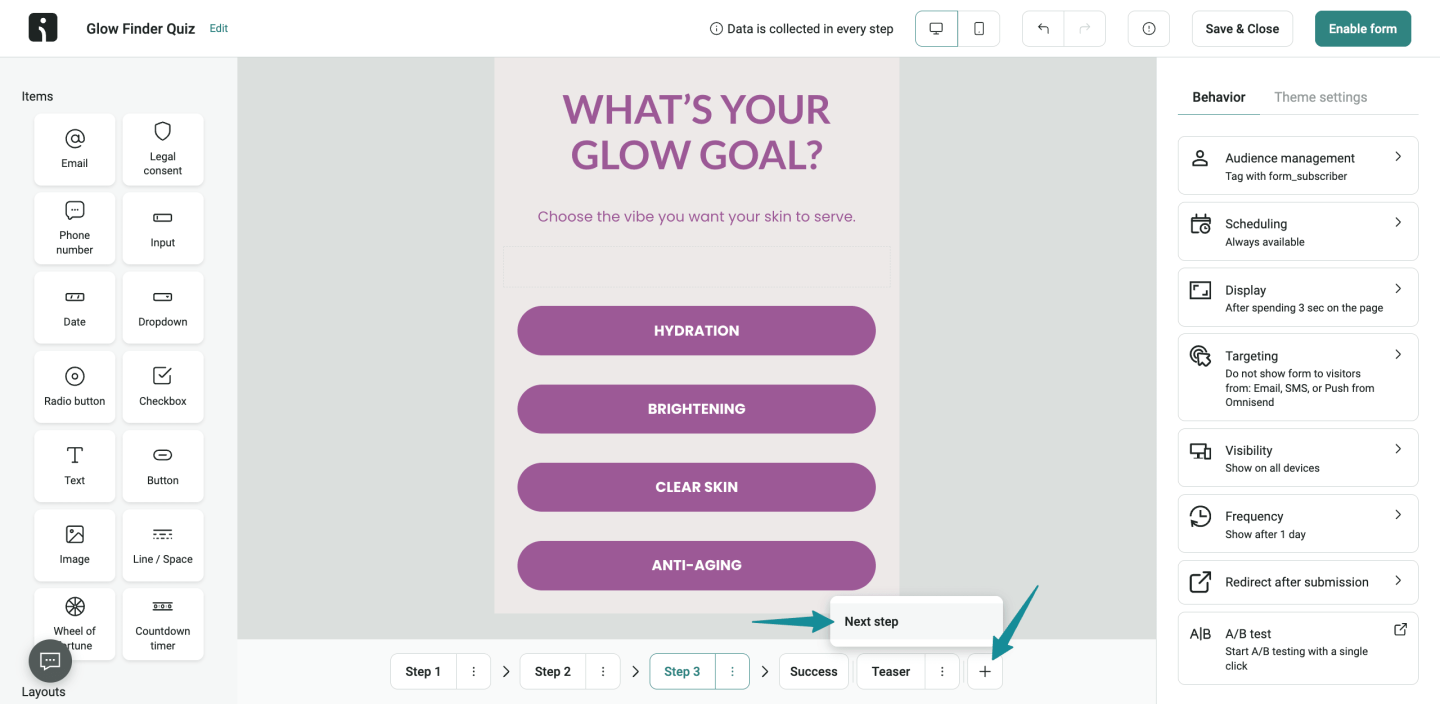
Signup Forms used to max out at two steps — now you can build them with up to four. More room to collect information gradually and create a more guided signup experience.
👉 Create Multi-Step Signup Forms
Target Forms by cart value or item count
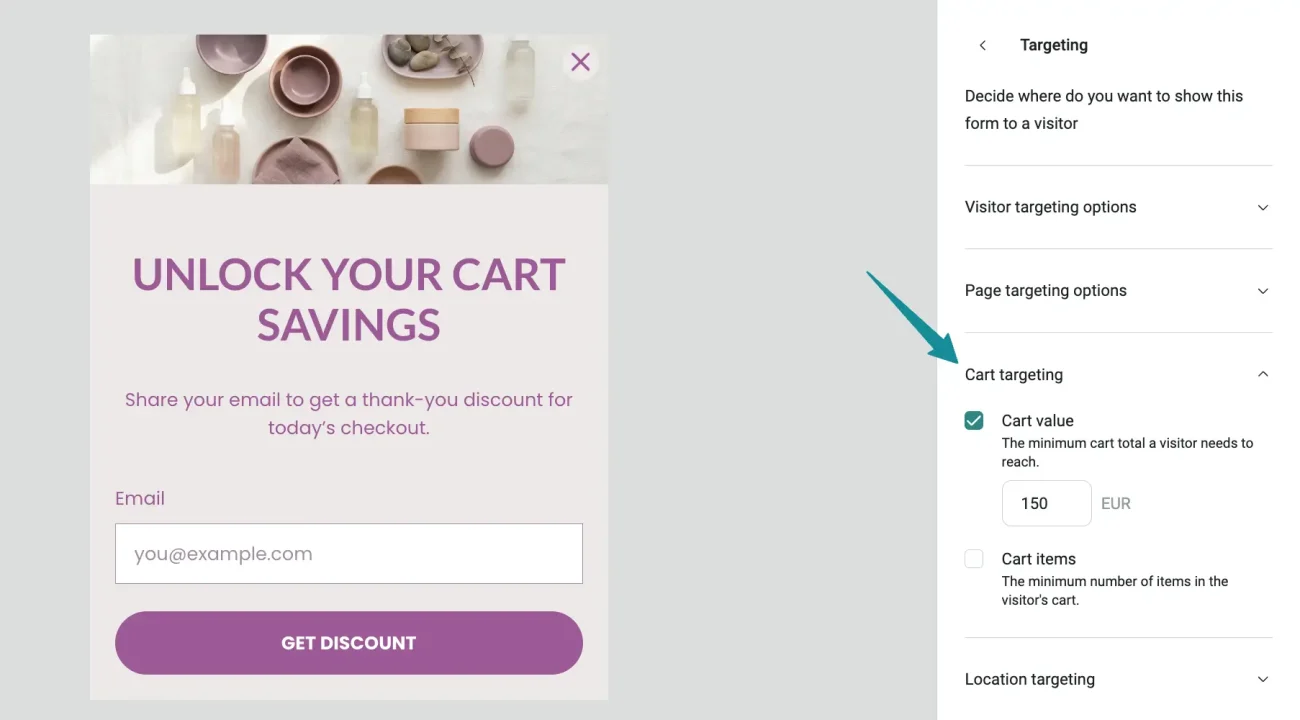
Shopify stores can now show Forms based on what’s currently in a shopper’s cart. Use cart value, item count, or both as targeting conditions — for example, show a specific offer when someone hits a certain basket value.
Available for Shopify stores only.
👉 Signup Forms: Set Up Targeting Settings
Target Embedded Forms the same way as popups
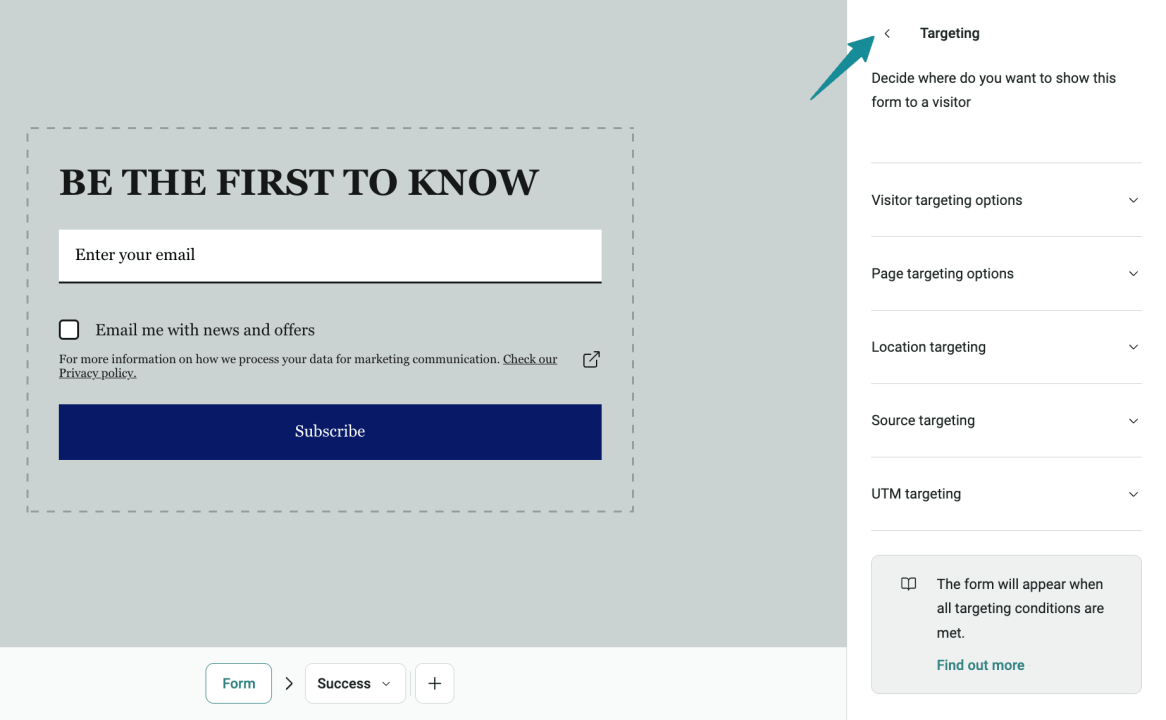
Embedded Forms now support the same targeting options as popup Forms. You can target by:
- Visitor type (all visitors, existing contacts, or a specific Segment)
- URL or product availability
- Location
- Source and UTM parameters
Useful if you want to hide a footer Form from existing contacts, or show a specific Form on out-of-stock product pages.
👉 Create an Embedded Signup Form
Choose how a Form A/B test ends
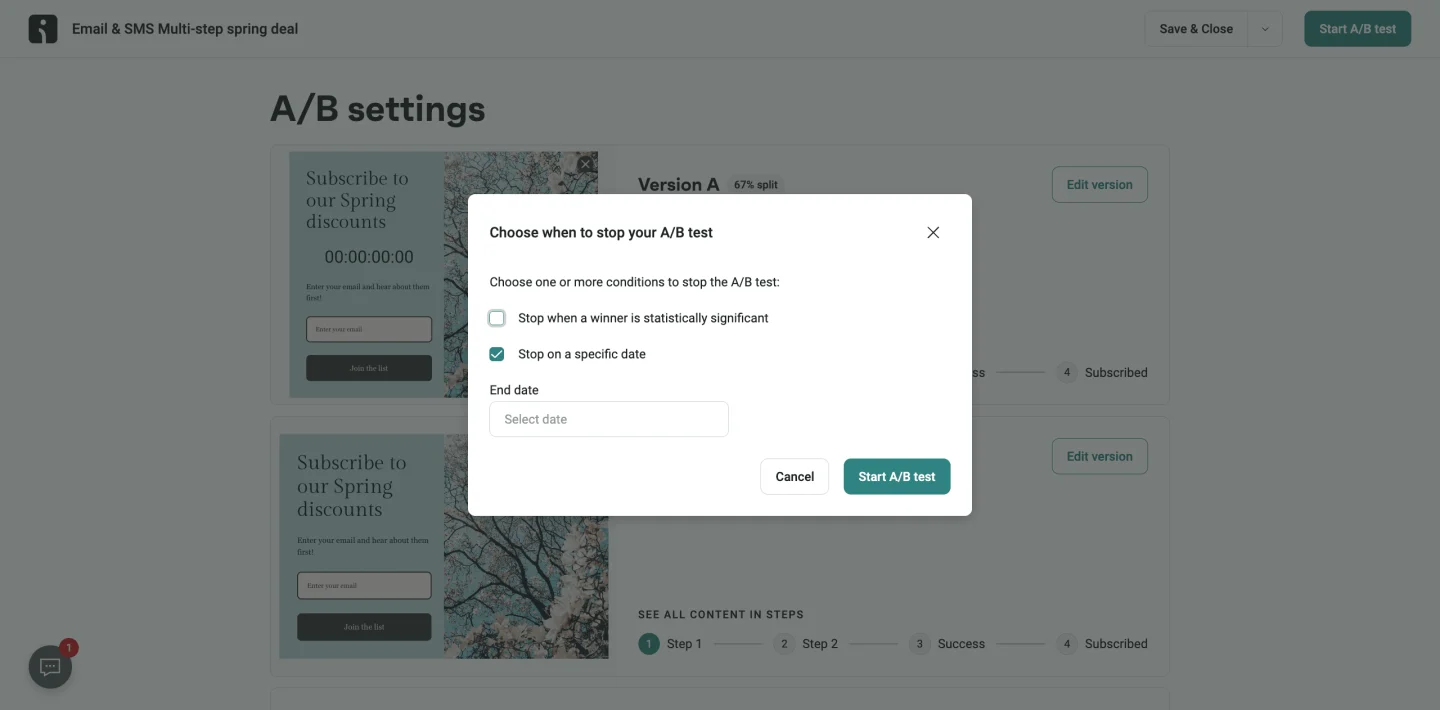
When starting a Form A/B test, you can now choose exactly how it should wrap up:
- Statistical significance — ends when a winner reaches 90% confidence over a seven-day period
- Due date — ends on a selected date, with the variant with the higher signup rate taking the win
- Both — ends as soon as either condition is met
Whichever Form comes out on top continues running afterward.
Pause a Form A/B test
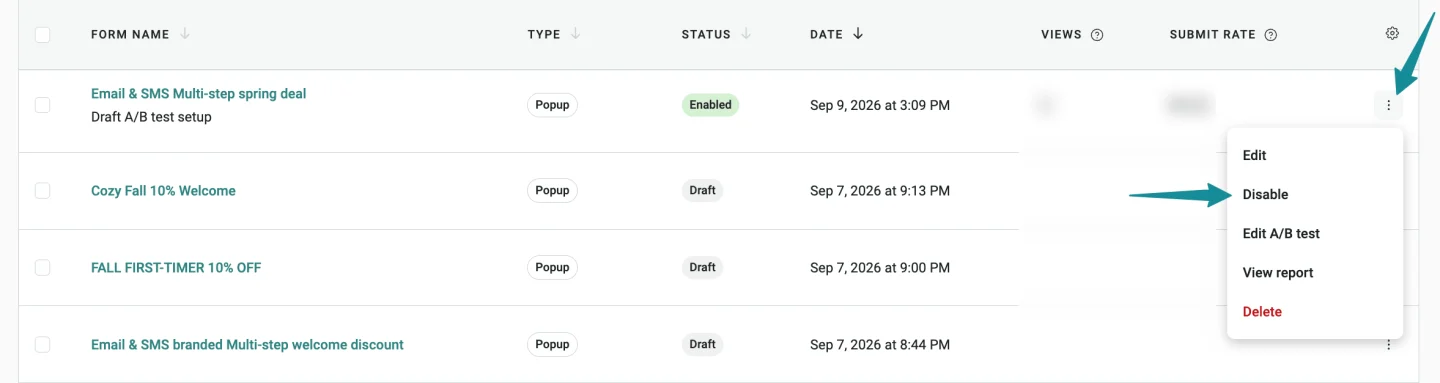
You can now disable a Form A/B test to pause it temporarily, then enable it again later. Disabling doesn’t cancel the test. To end a Form’s A/B tests properly, select a winner.
Customize Countdown timers in Forms
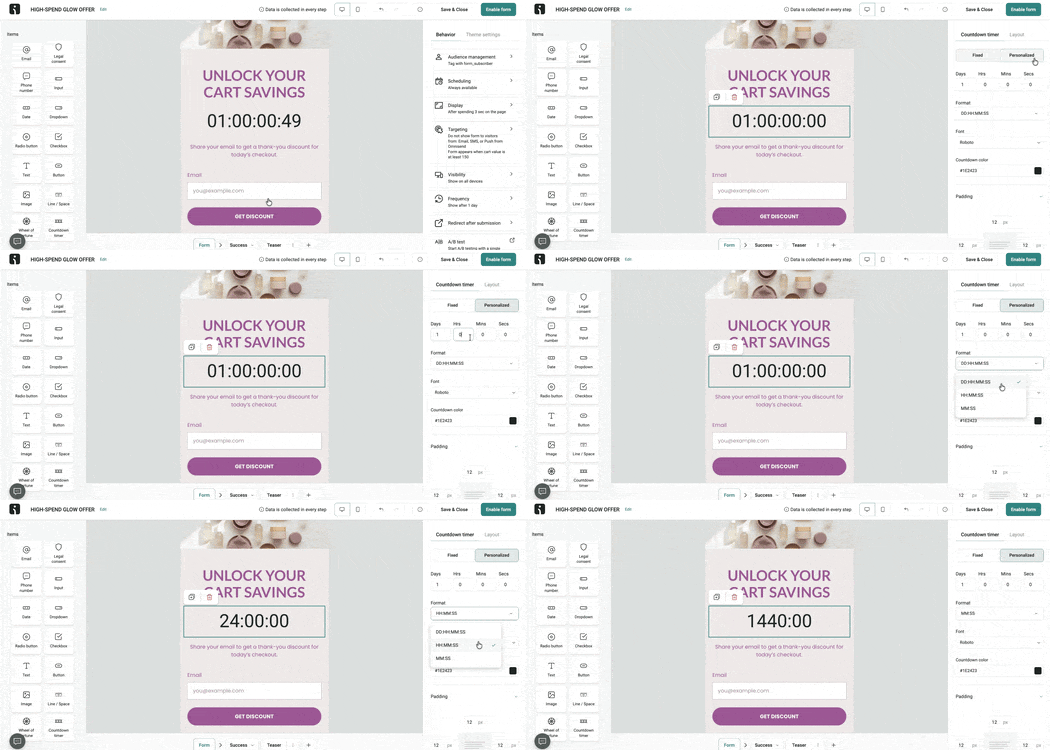
Countdown timers in Forms just got a lot more flexible:
- Personalized timing — set a duration in days, hours, minutes, and seconds. Each visitor’s countdown starts when they see the Form, so you can run ongoing offers without locking in one fixed calendar date.
- Display formats — pick between DD:HH:MM:SS, H:MM:SS, and MM:SS to match your Form design.
Set the Wheel of Fortune spin duration
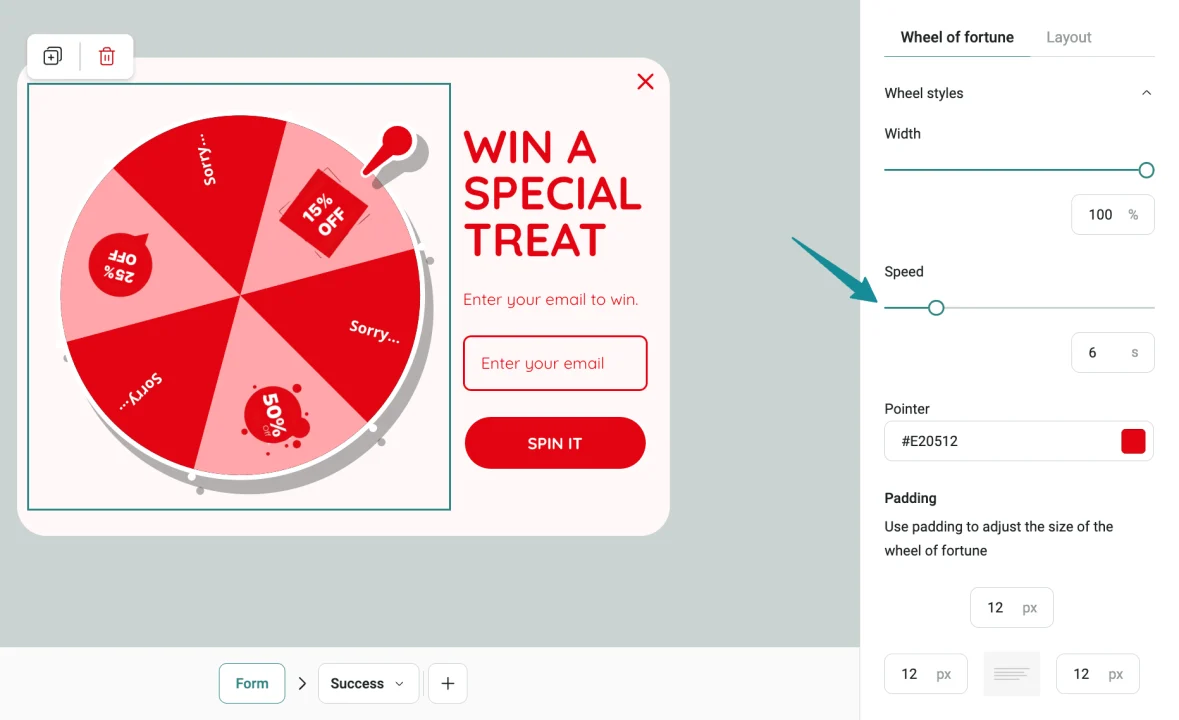
Wheel of Fortune now uses a predictable six-second spin by default, and you can set the spin duration anywhere from one to 30 seconds.
Show a confirmation after a discount code is copied
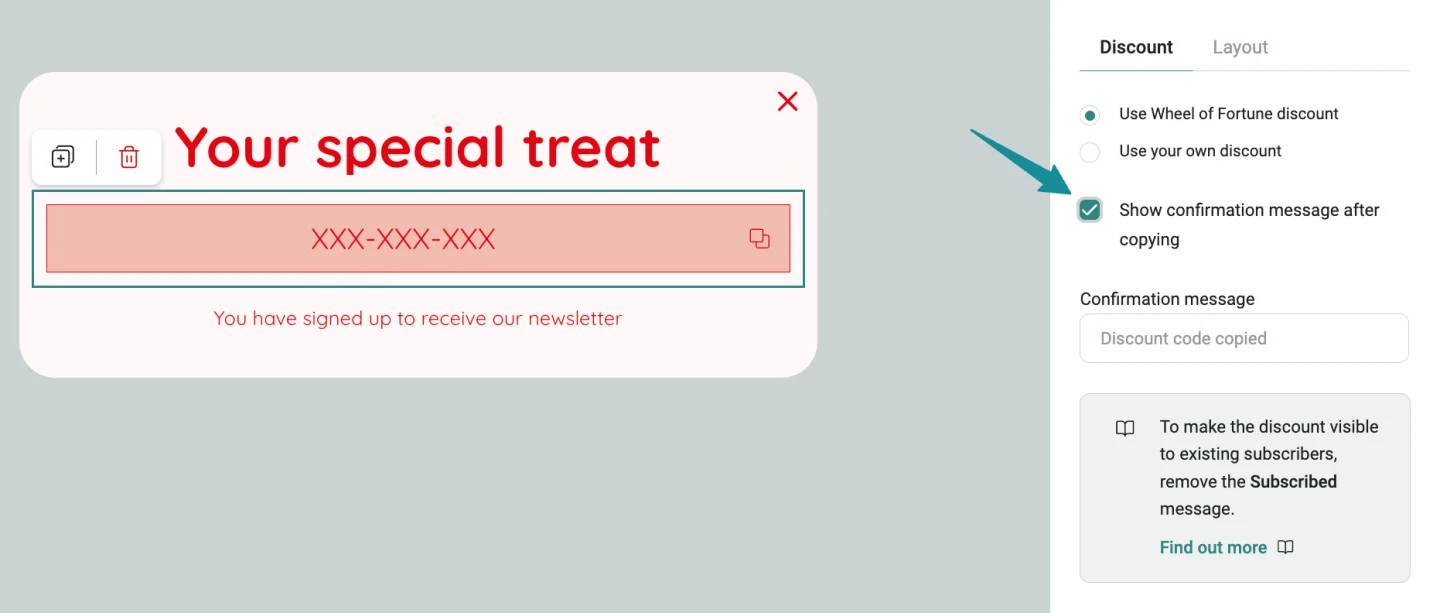
Discount code blocks in Forms can now display an optional confirmation message after a shopper copies the code. Toggle it on or off per Form, and customize the text — something like “Discount code copied.”
Subscript formatting in the Email Builder
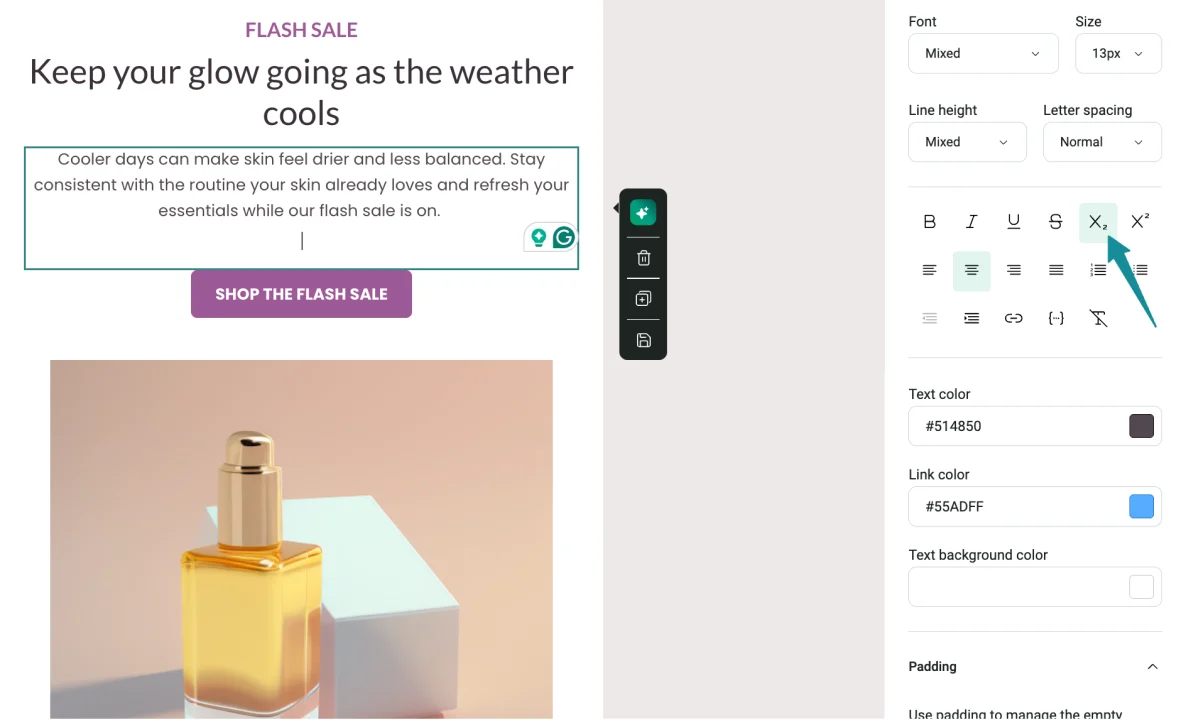
The Email Builder now supports subscript formatting alongside superscript. Both are available when creating or editing email content.
Content blocks land where you drop them
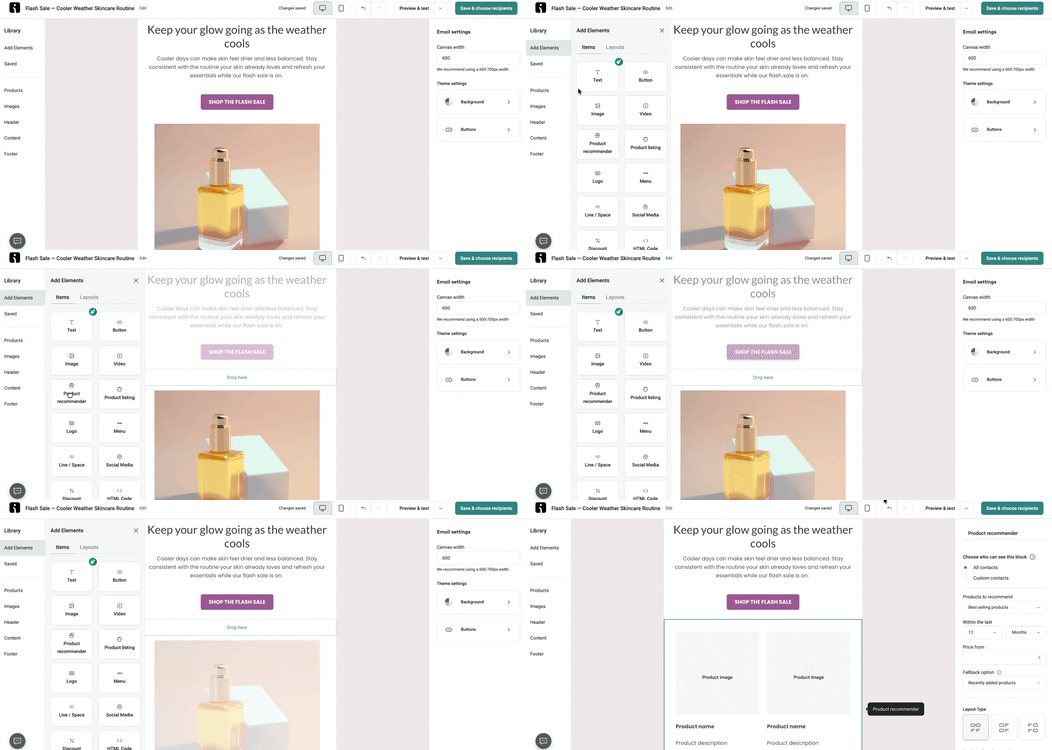
Content blocks now stay closer to the exact position where you drop them, and the Email Builder gives clearer visual feedback when a location doesn’t support the selected block. Less trial-and-error when rearranging emails.
Compare-at prices stay struck through
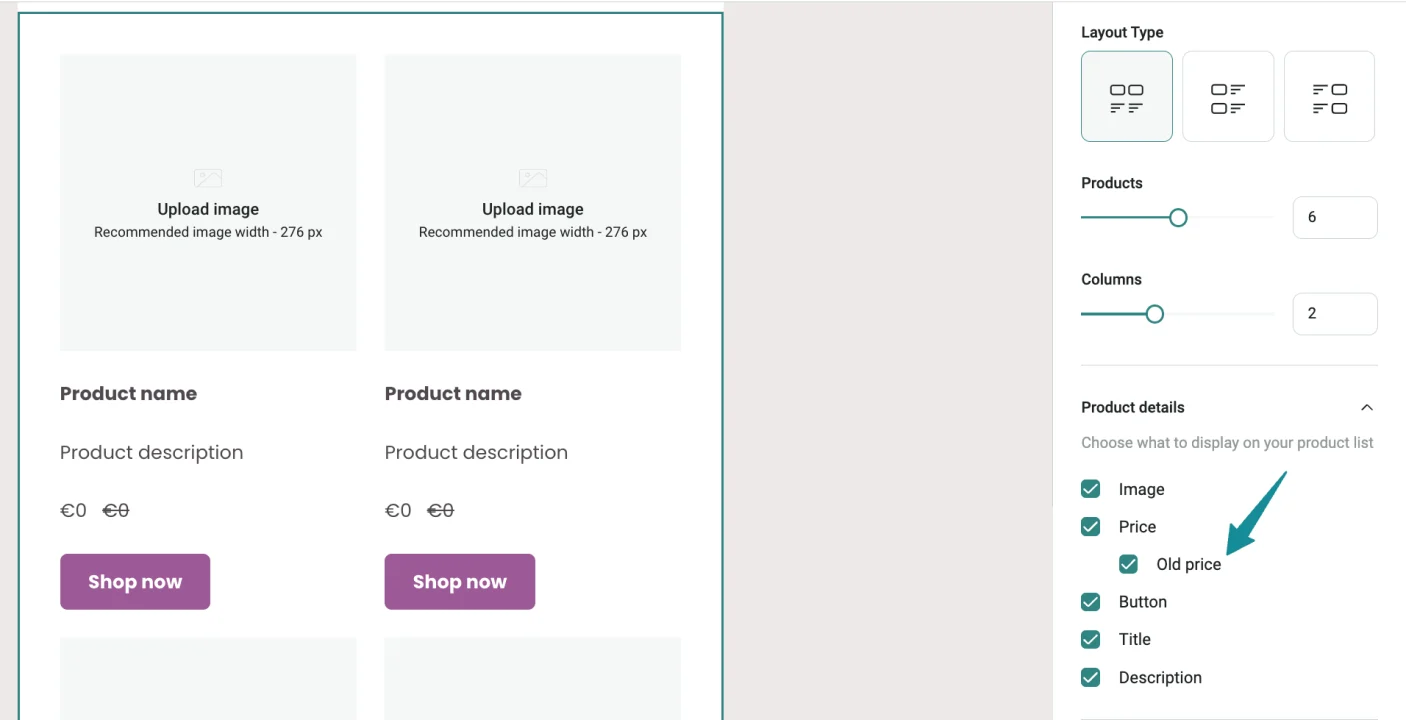
Compare-at prices in Product Blocks now keep their strikethrough while you edit and style the block.
Plain text for Product Block alt text
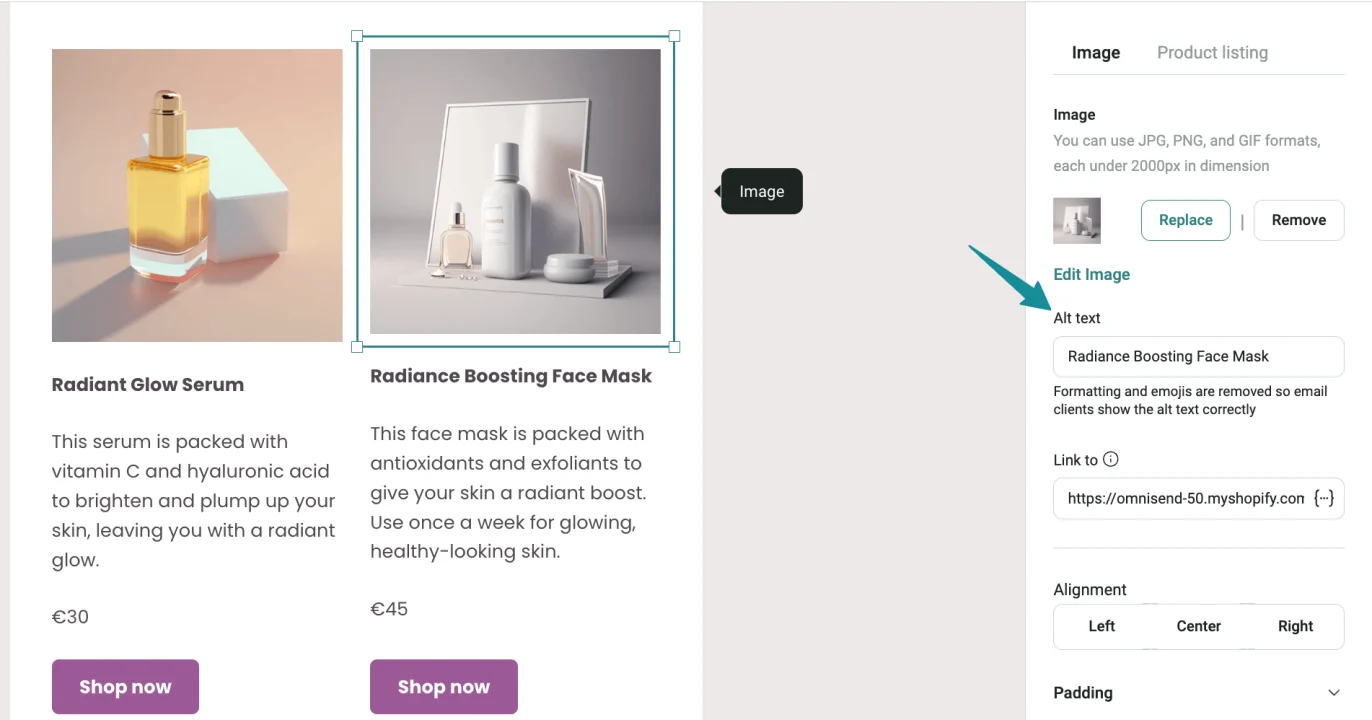
Product Block image Alt Text is now generated from the plain-text version of the product title, with emojis and special characters excluded. Better compatibility across email clients, and clearer Alt Text for subscribers using screen readers or viewing with images blocked.
Start birthday workflows on the first day of the month
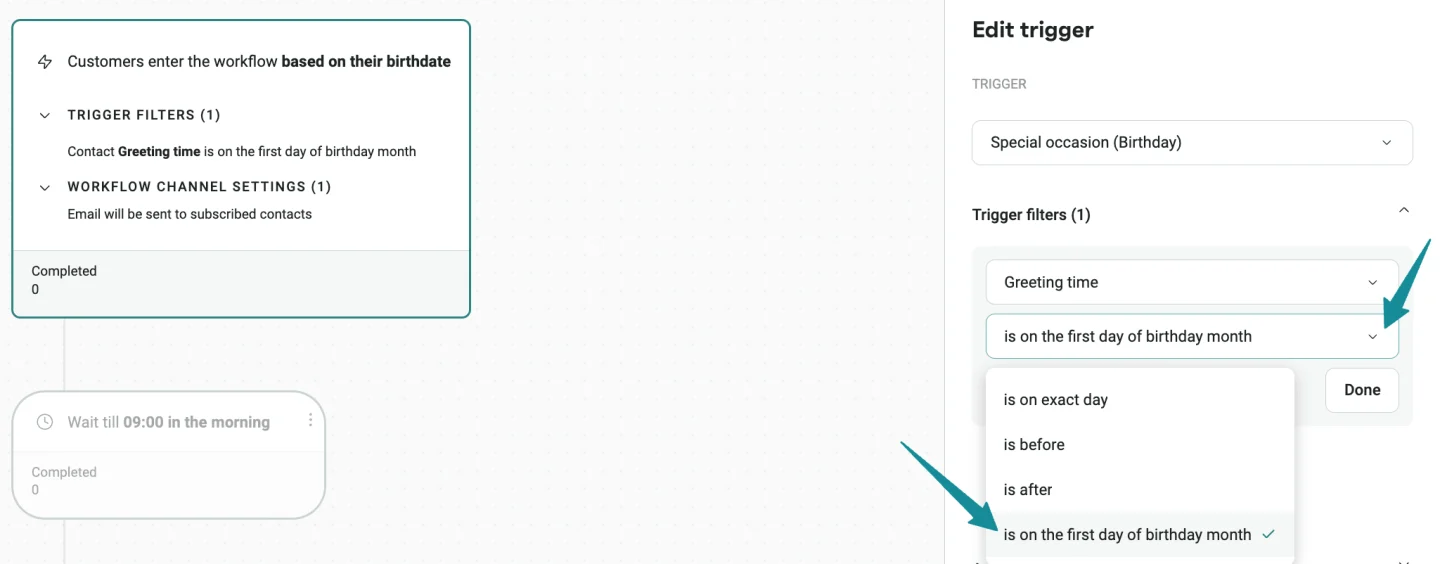
The Special occasion (Birthday) trigger now includes an “is on the first day of birthday month” condition. Contacts whose birthdays fall within the month enter the Automation Workflow on the first — so you can start birthday promotions earlier without creating extra Segments or date-based workarounds.
Find deleted Automation Workflows faster
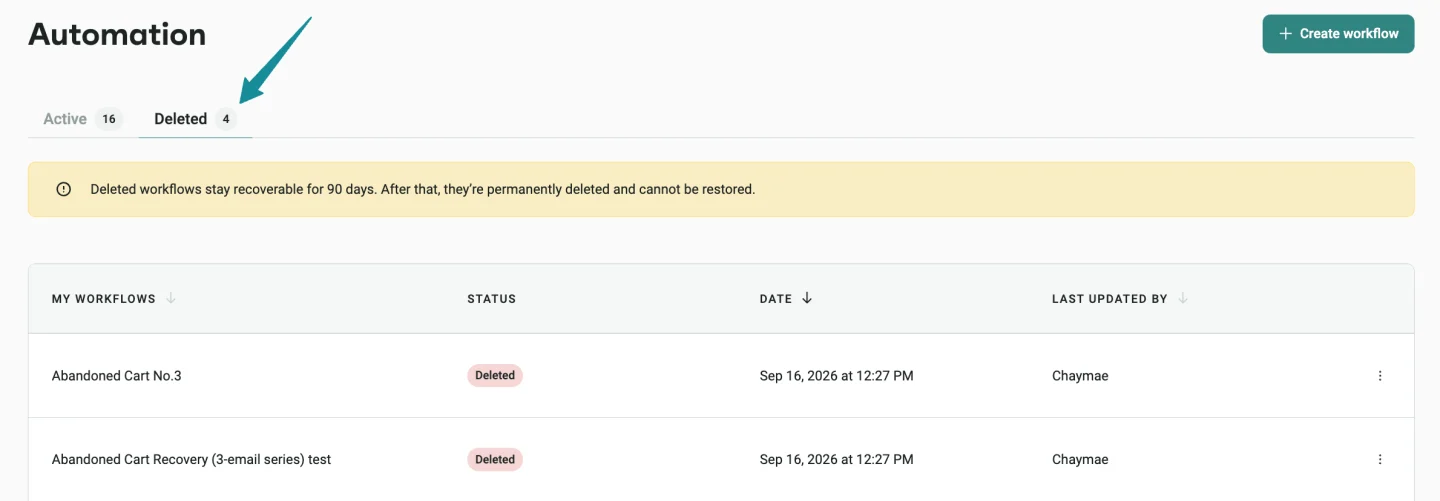
The Automations list now has Active and Deleted tabs, so you can find and reactivate deleted workflows more easily.
Navigate large Automation Workflows more easily
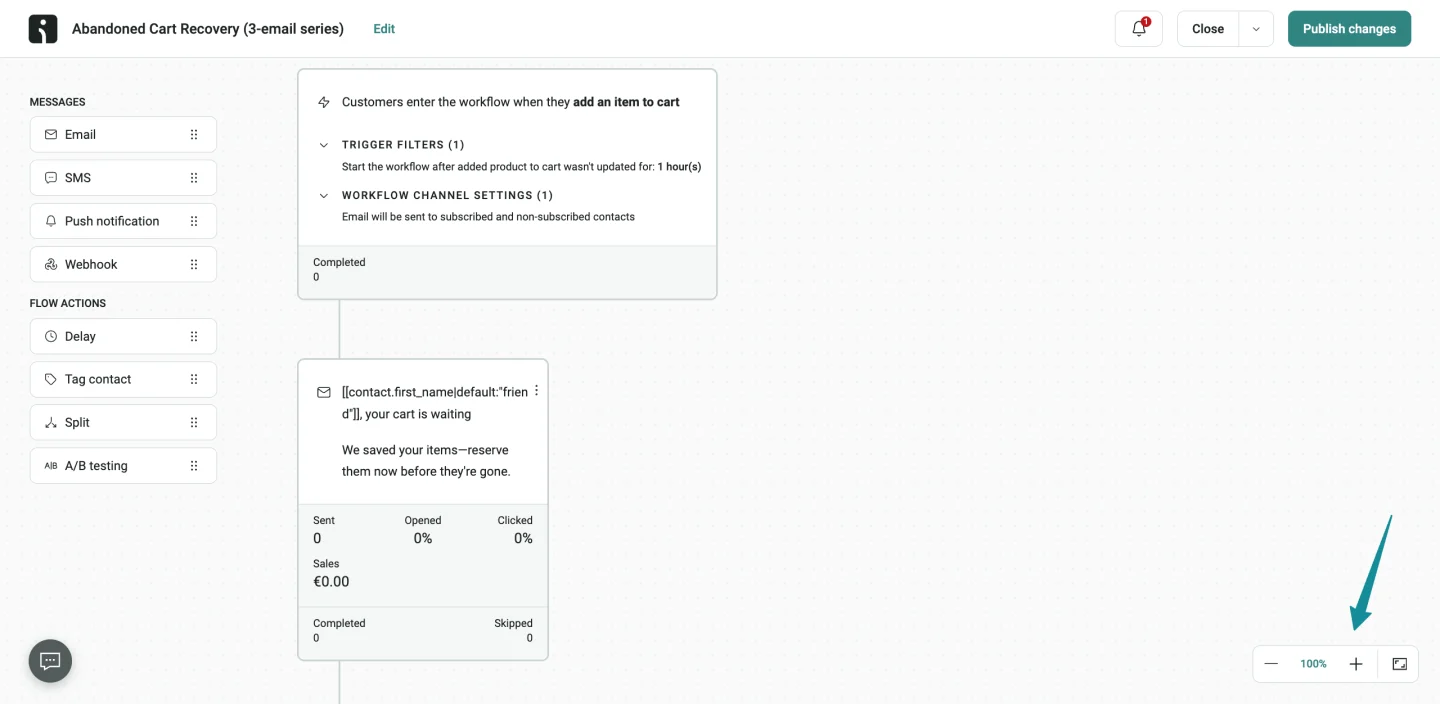
The Workflow Builder now supports zoom from 25% to 200%, fit to screen, and click-and-drag panning — a real help for bigger, more complex workflows.
AI recommendations for customer journeys
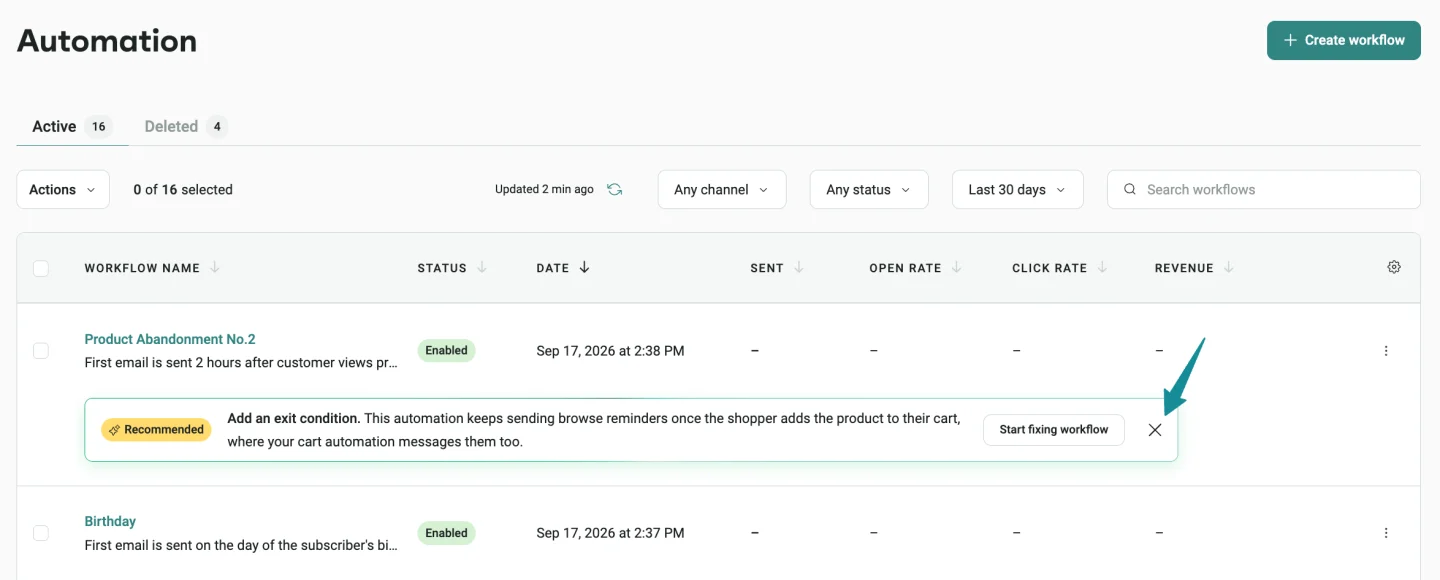
AI recommendations now pick up on more opportunities for Automation Workflows you could add:
- Reorder reminder — one email timed to your store’s typical reorder cycle for replenishable products
- Customer reactivation — two emails sent 30 and 40 days after an order, with a 10% discount in the second
- Second-order nudge — one email for contacts who’ve placed exactly one order, timed to your store’s typical second-order cycle
- Search abandonment — one email sent two hours after an abandoned Shopify search, linking back to the search results without a discount
You can also dismiss any recommendation that doesn’t apply, directly from the Automation list using the X icon.
👉 Omnisend AI: AI Recommendations
Exclude Apple MPP opens from sales attribution
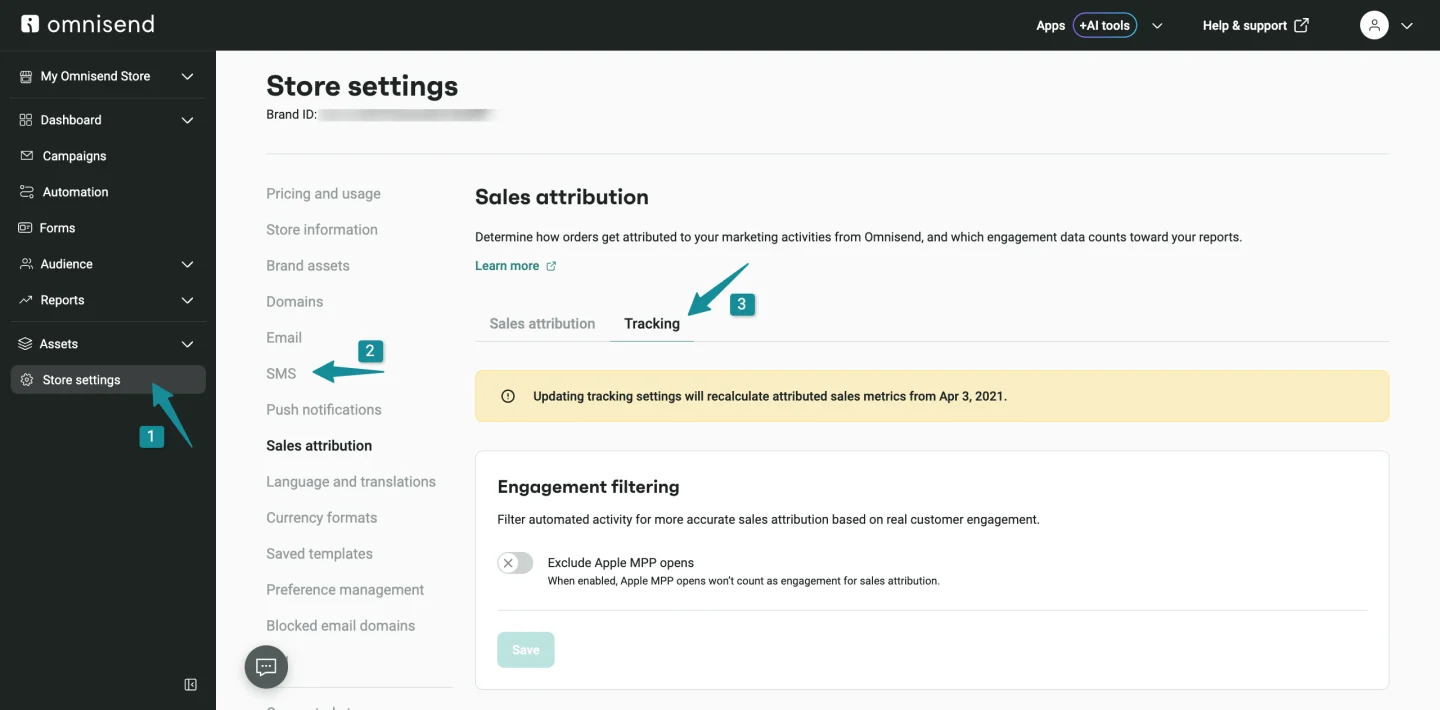
You can now choose whether Apple Mail Privacy Protection opens count as engagement when Omnisend attributes orders and sales.
Head to Settings → Sales attribution → Tracking to change it. When Apple MPP opens are excluded, they no longer contribute to Sales attribution.
Please note that changing this setting recalculates attributed sales metrics from April 3, 2021, and may change attributed order counts and sales volume.
👉 Exclude Apple MPP Opens from Sales Attribution
Compare reports with any previous period
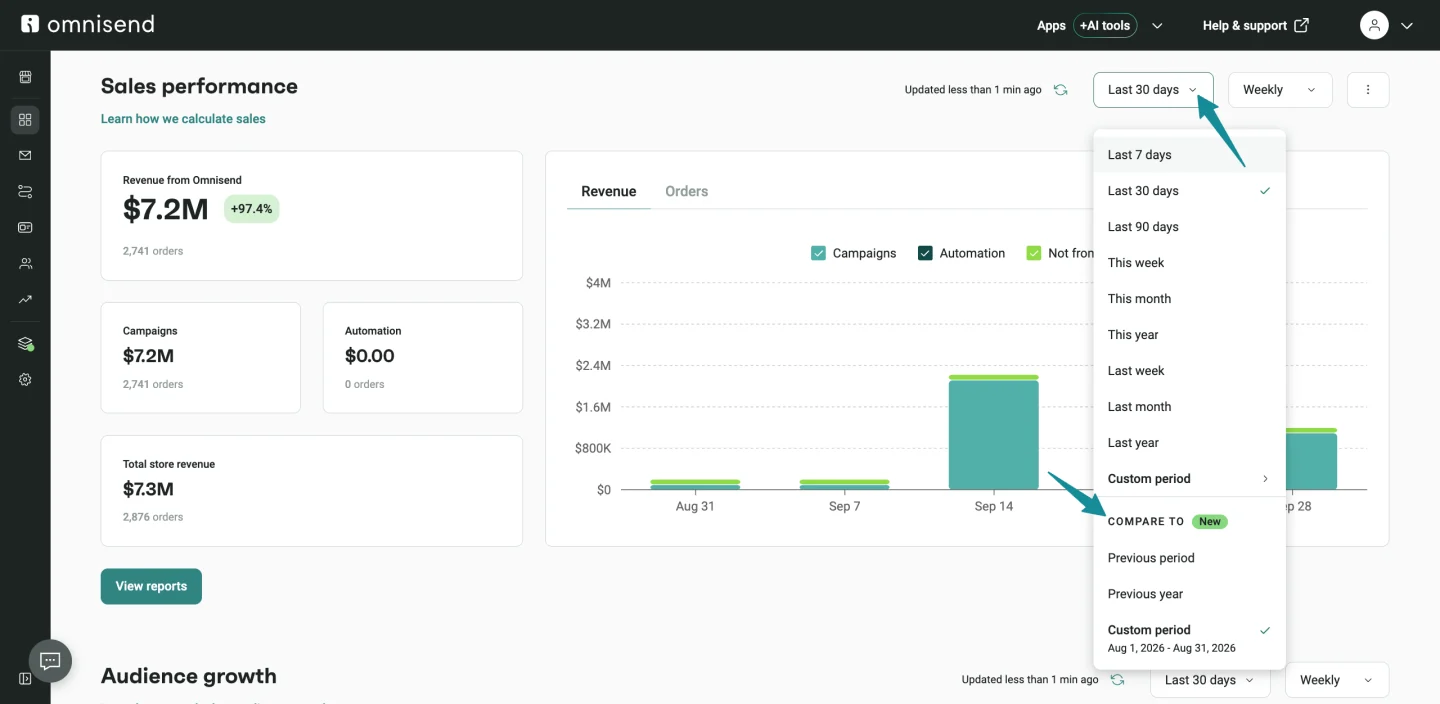
You can now pick the exact benchmark period for your metrics:
- Previous period — compares the immediately preceding period
- Previous year — compares the same dates from the previous year
- Custom period — select any comparison range you want
Comparison dates appear in the date filter, and your selection is remembered between visits. Available in Reports → Sales, Campaigns, and Automations, plus Dashboard → Overview.
Filter Campaign Reports by Campaign
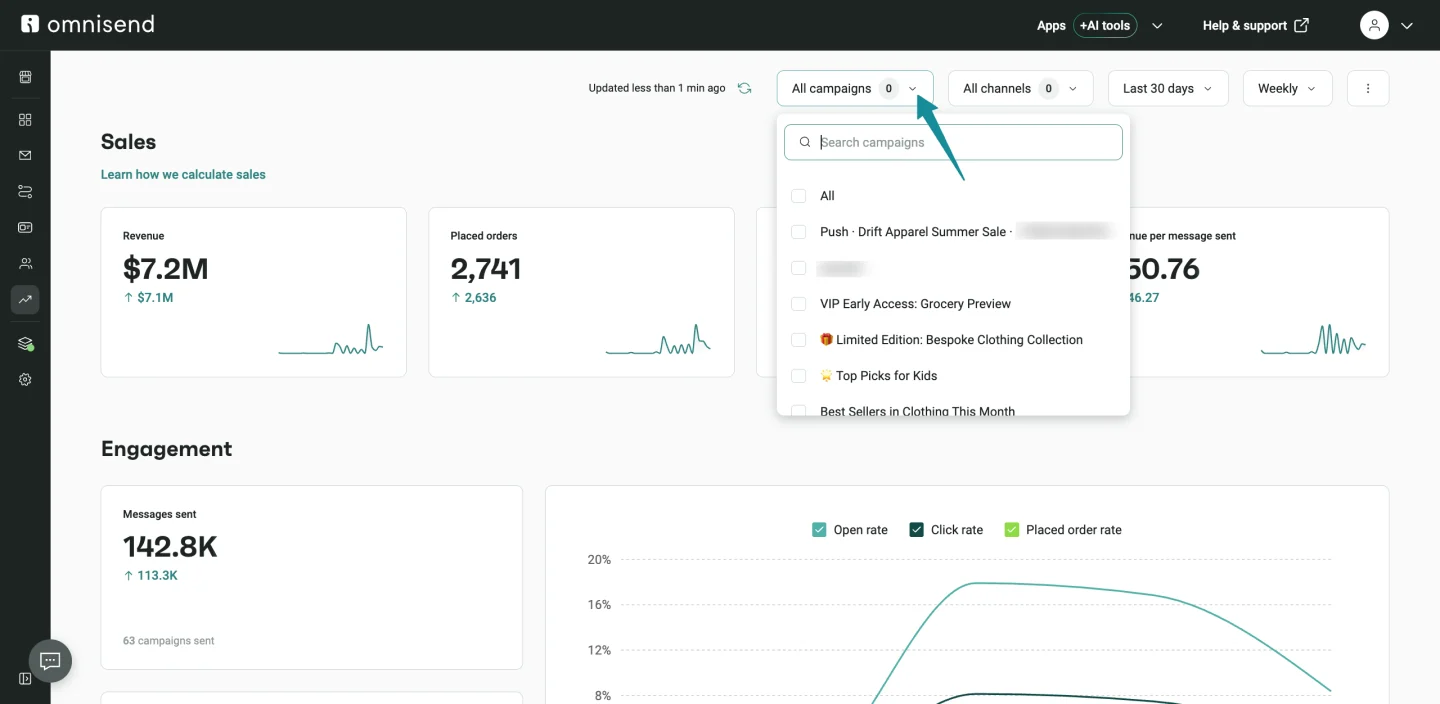
You can now filter data in Reports → Campaigns by searching for and selecting one or more Campaigns. Sales and Engagement metrics update to reflect the selection, making it much easier to compare and investigate specific sends.
View sender details in Email Campaign Reports
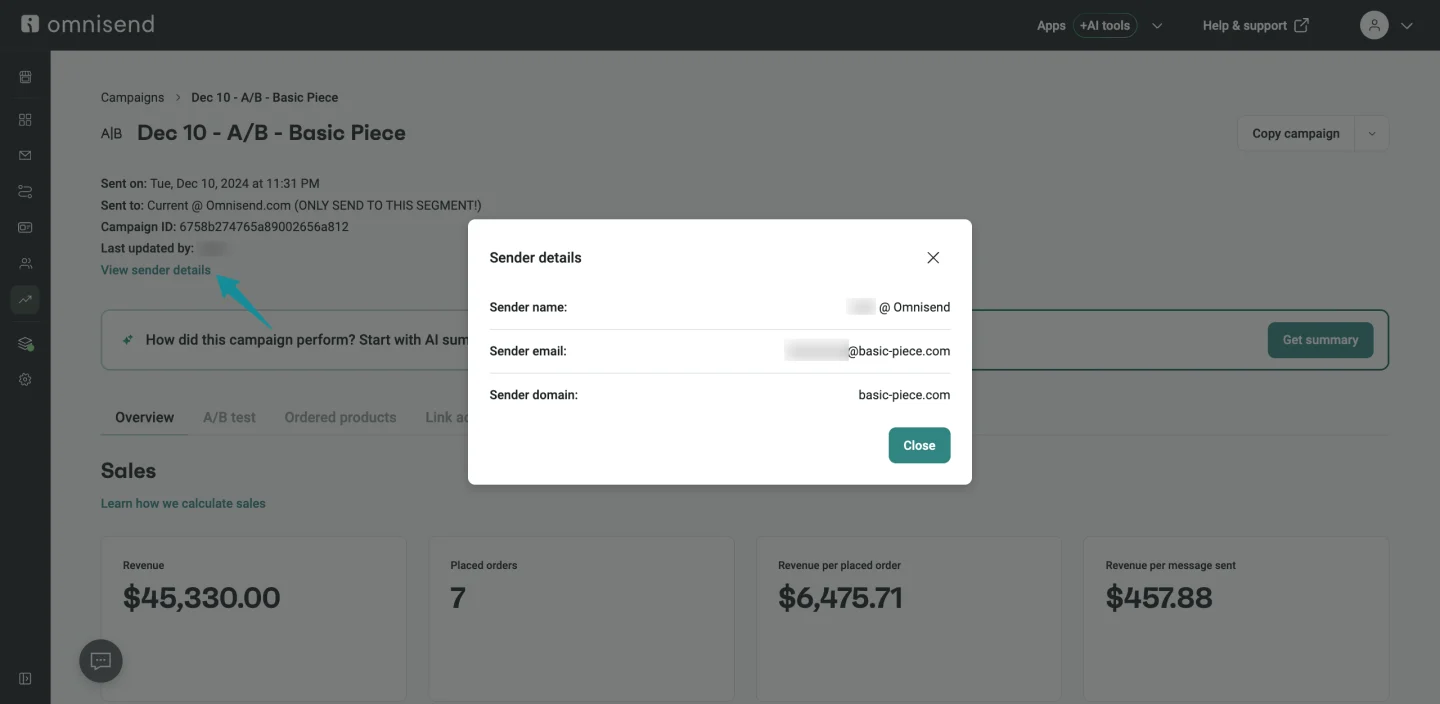
Email and A/B Email Campaign reports now include a View sender details link in the report header. The window shows:
- Sender name
- Sender email
- Sender domain
A quick way to confirm which sender was used without leaving the report.
See who archived a Segment
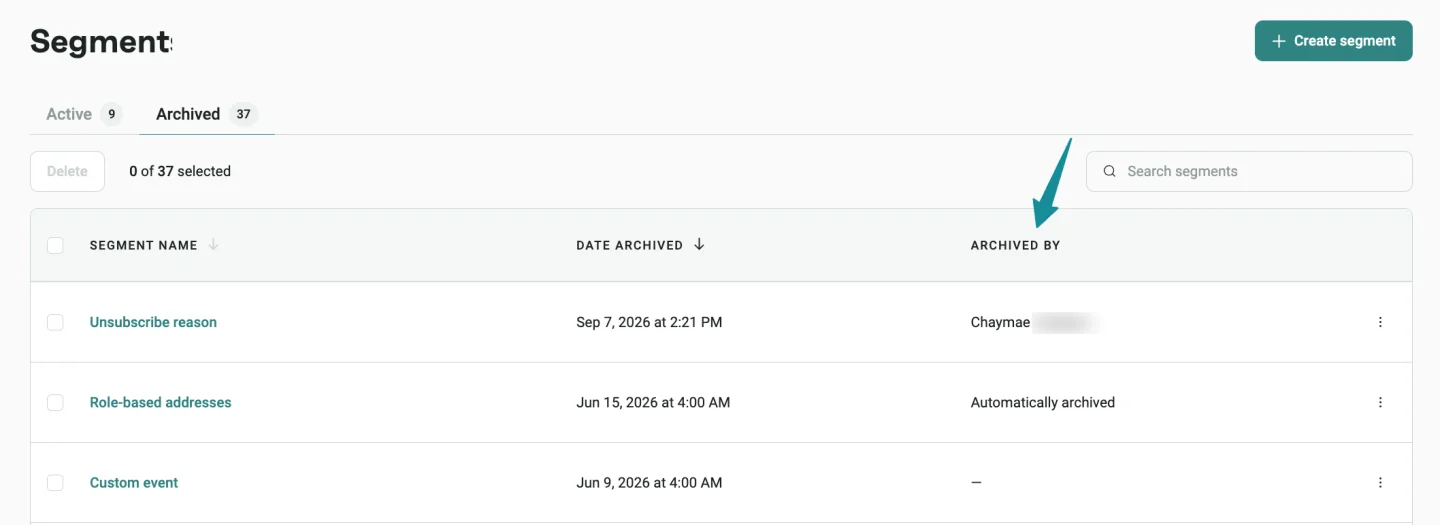
Archived Segments now show the user who archived them, or “Automatically archived” when Omnisend did the archiving. Segments archived before this update show a dash, since attribution wasn’t tracked retroactively.
Include Total spent in Contact exports

Contact exports now include a Total spent column for each contact. Useful for building external audiences based on lifetime value, prioritizing outreach, or putting together reports.
Identify Contact exports more easily
Downloaded contact export files now use the shortened export name shown in the contacts export list, making files easier to identify and match to what they came from.
Show existing preferences on the Public Preference Page
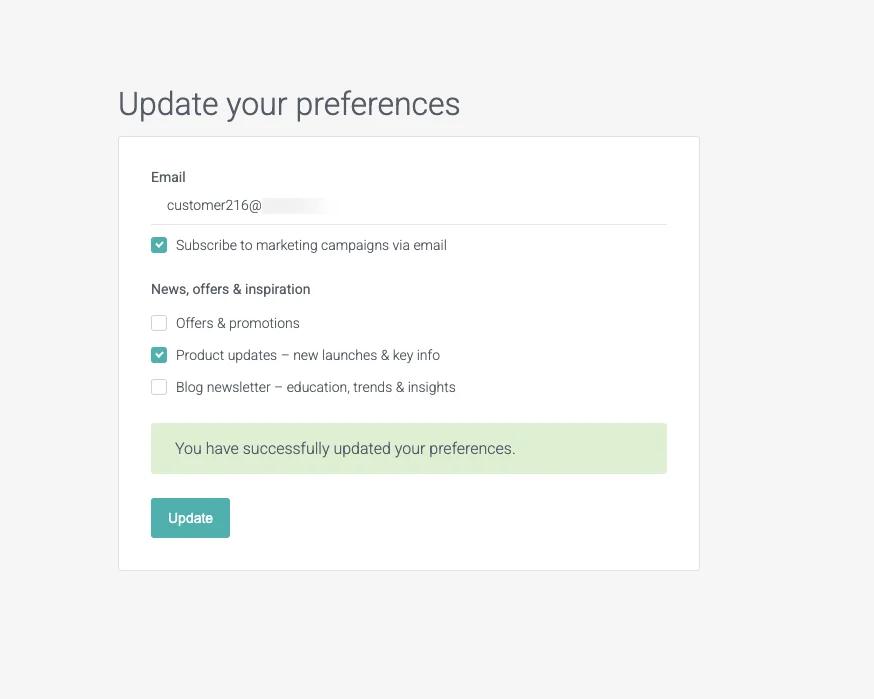
Subscriber-group checkboxes based on custom properties now reflect a contact’s current values, regardless of whether those values were set through the preference page, API, import, or Signup Form. Returning subscribers see their existing preferences instead of an empty selection.
👉 Set Up Subscriber Preference Center
Manage SMS quiet hours by day
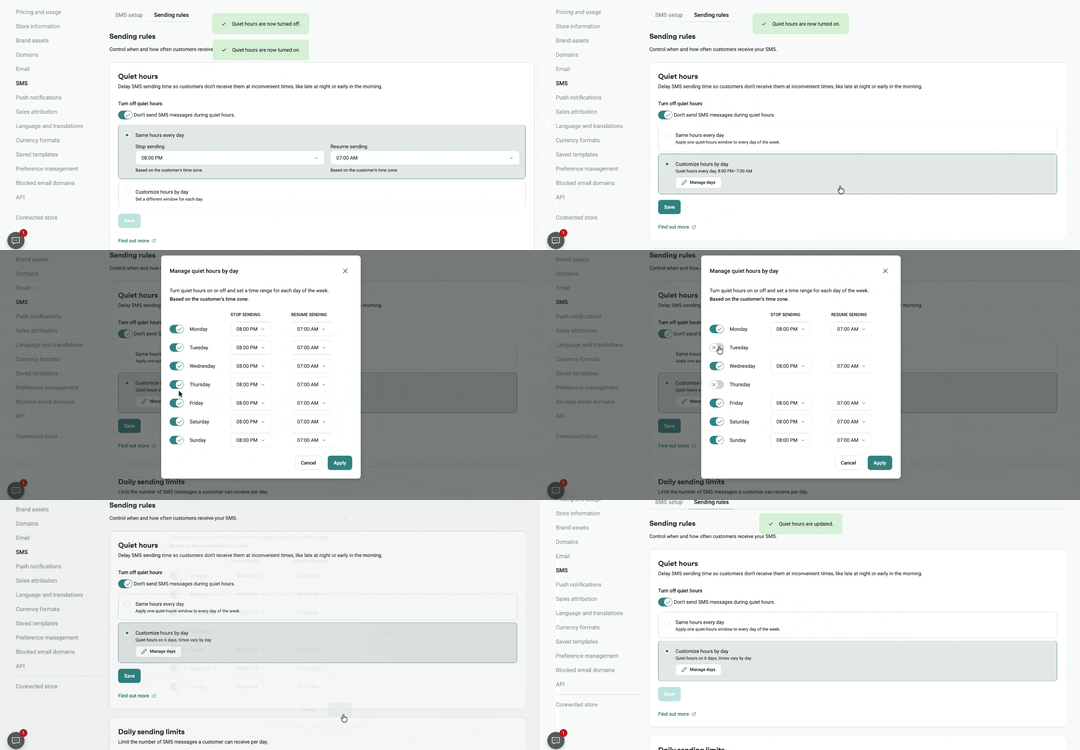
You can now set a different SMS quiet-hours schedule for each weekday. You can also turn quiet hours off on selected days while keeping it enabled globally.
👉 Manage SMS Sending Limits: Frequency & Quiet Hours
Send double opt-in emails from your own domain
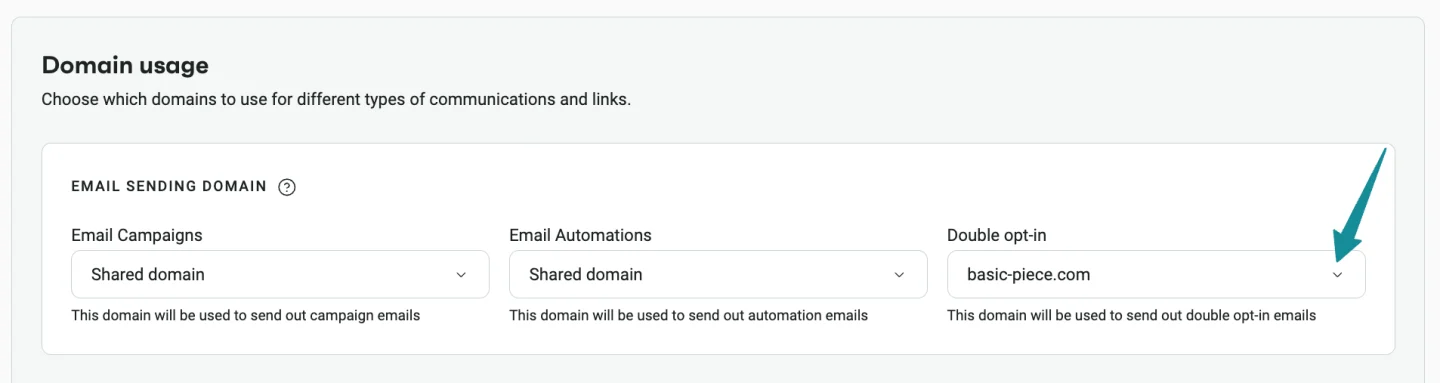
If you have a verified custom sending domain, you can now use it for double opt-in confirmation emails. Head to Domains → Domain usage to choose the domain for double opt-in. Makes the signup experience more consistent and recognizable for subscribers.
👉 Set Up Double Opt-in in Omnisend
Use verified Toll-Free Numbers for SMS to Canada
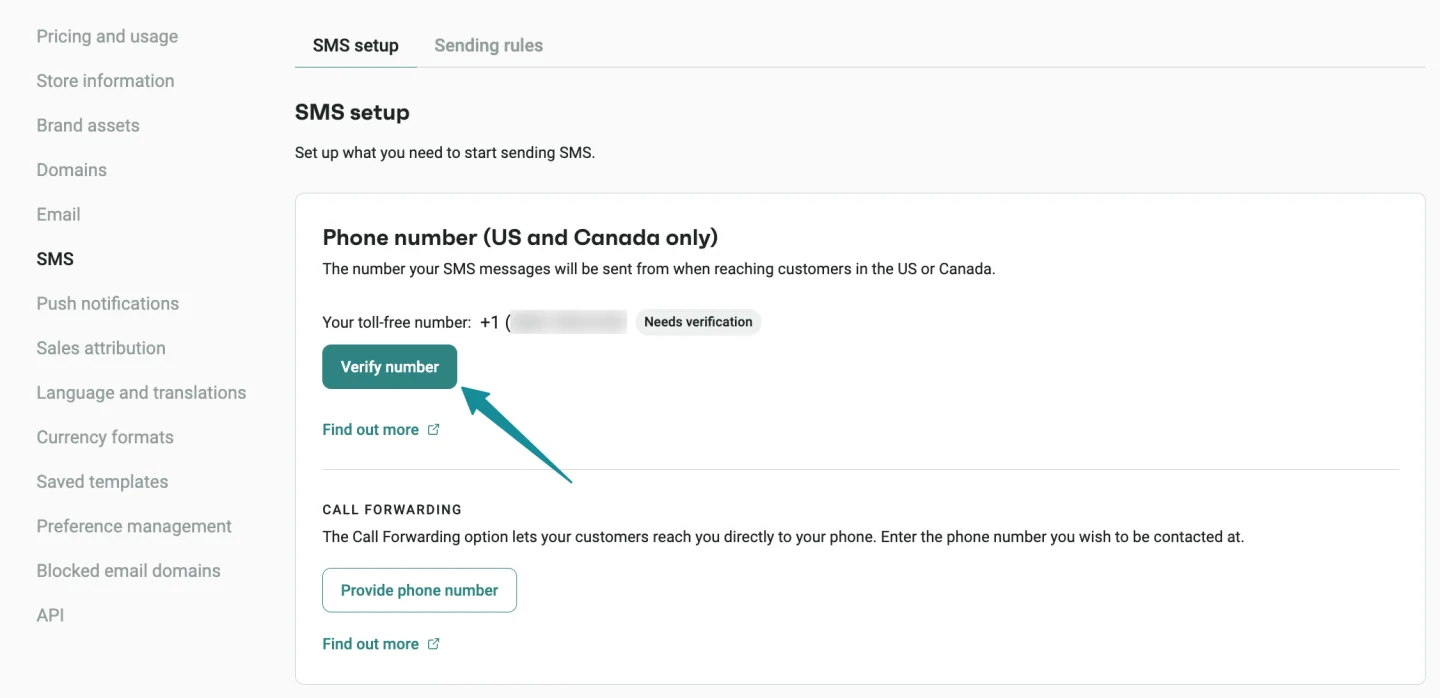
If you have a verified Toll-Free Number (TFN), you can now use it for SMS traffic to both the US and Canada.
If you send SMS to Canada but don’t have a verified TFN, you can temporarily continue sending through an LVN. However, you’ll need to add and verify a TFN before January 1, 2027.
👉 Verify Your Toll-Free Number for SMS
Register a Sender ID for SMS to Spain
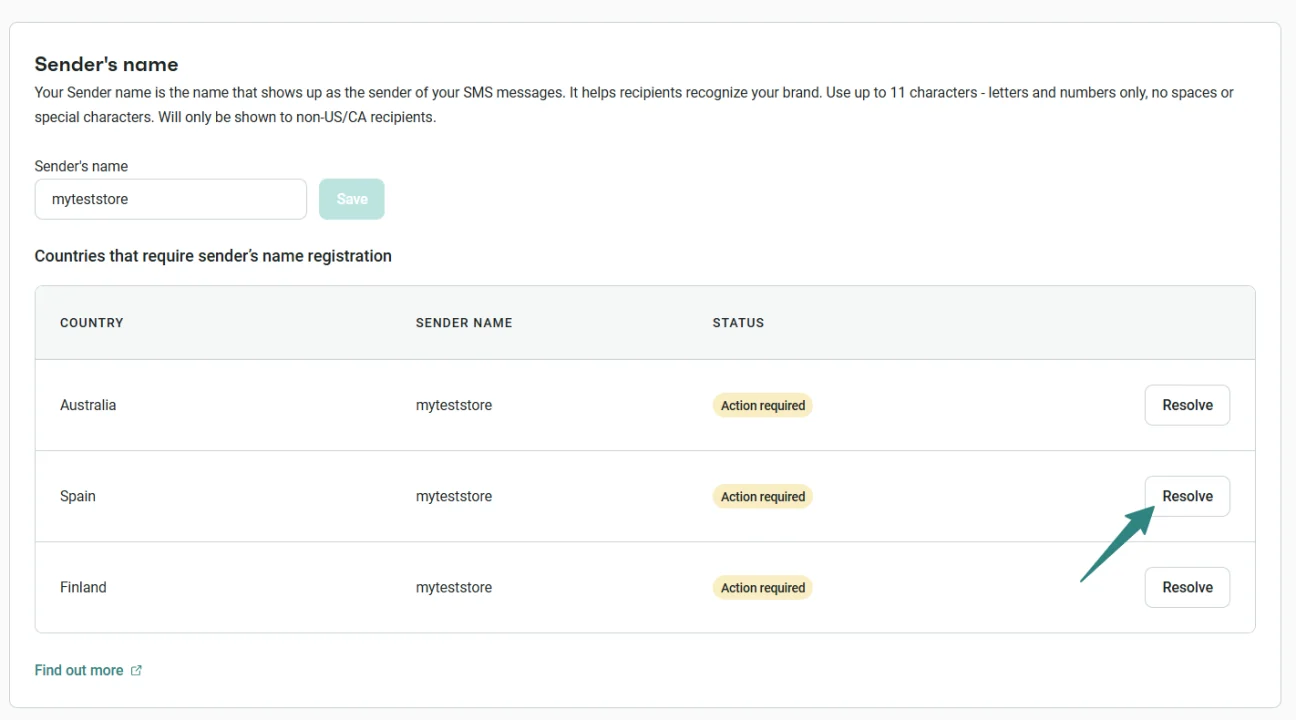
SMS sent to Spanish phone numbers now requires a verified Sender ID registered with Spain’s CNMC Alias Registry.
If you already have an approved Sender ID, you can carry on sending as normal. If you don’t, SMS sending to Spain is paused until you complete the self-serve registration in SMS settings.
👉 Compliance: SMS Sender ID Requirements in Spain
Keep your data for 12 months
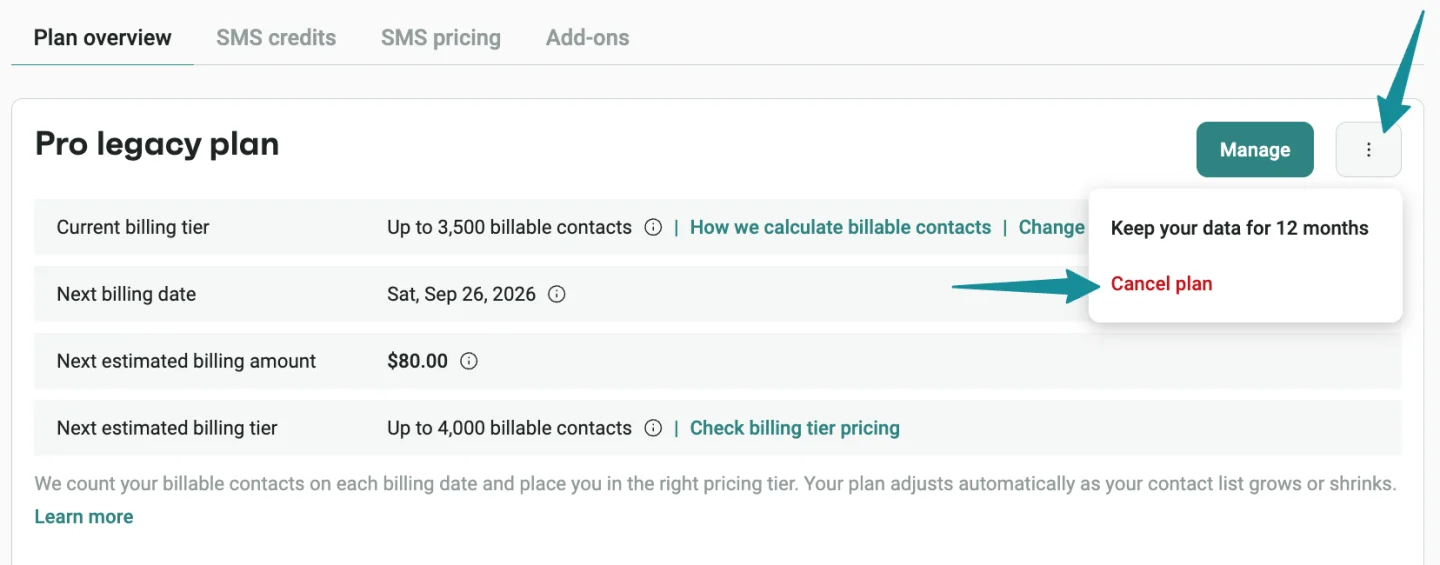
The plan-freezing flow got clearer. The option is now called “Keep your data for 12 months,” and the confirmation step explains the charge due today, how long you’ll keep access to your current plan, when your account will move to the Free plan, and how long your data will be retained.
Cancel an SMS subscription in any billing state
You can now cancel an SMS subscription regardless of its billing state:
- If there’s no unpaid invoice, the subscription stays active until the paid period ends and doesn’t renew.
- If an invoice is unpaid, cancellation takes effect immediately and the invoice is voided.
SMS credits remain valid for 60 days either way.
Review SMS subscription charges before confirming
The SMS subscription purchase flow now includes a Review and confirm step. Before confirming a purchase or upgrade, you’ll see your current SMS subscription, your updated subscription, the amount due today, the recurring cost, and the next billing date. When a Campaign needs more SMS credits than are available, the purchase flow pre-fills the amount needed.
👉 Manage Your Omnisend SMS Credits & Subscription
Encourage two-factor authentication for account users
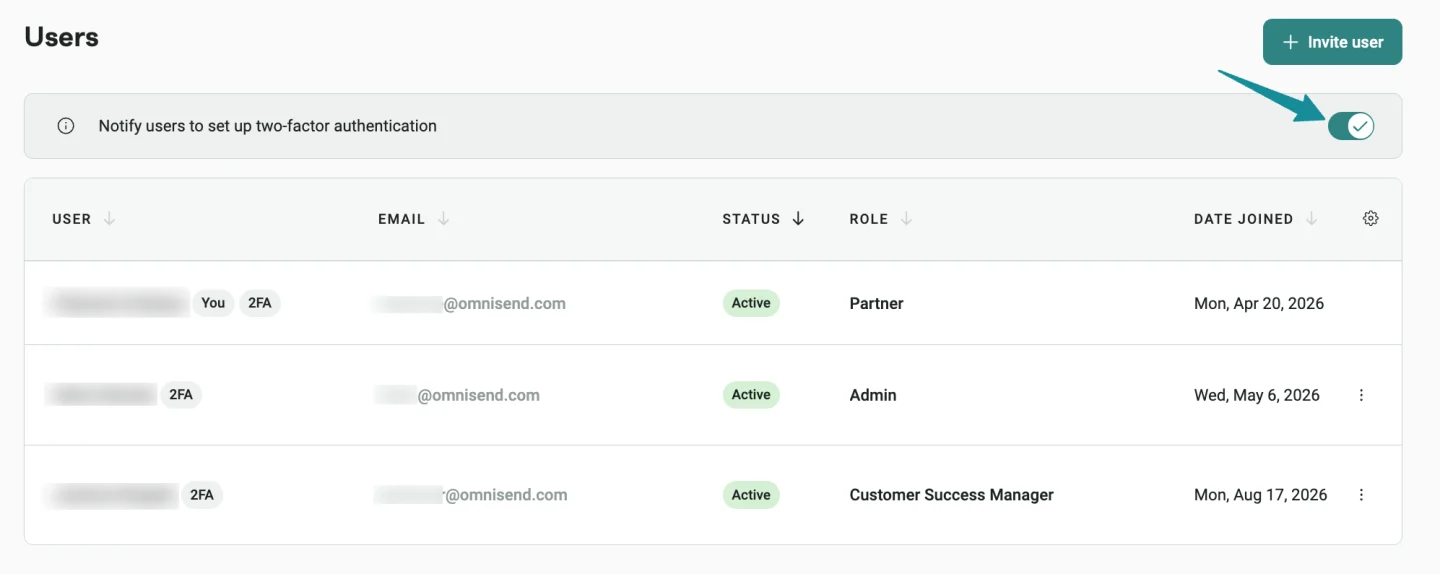
Account Owners can now enable a reminder in Account management → Users that shows each team member full-screen 2FA setup instructions after login.
Two-factor authentication in the Partner Portal
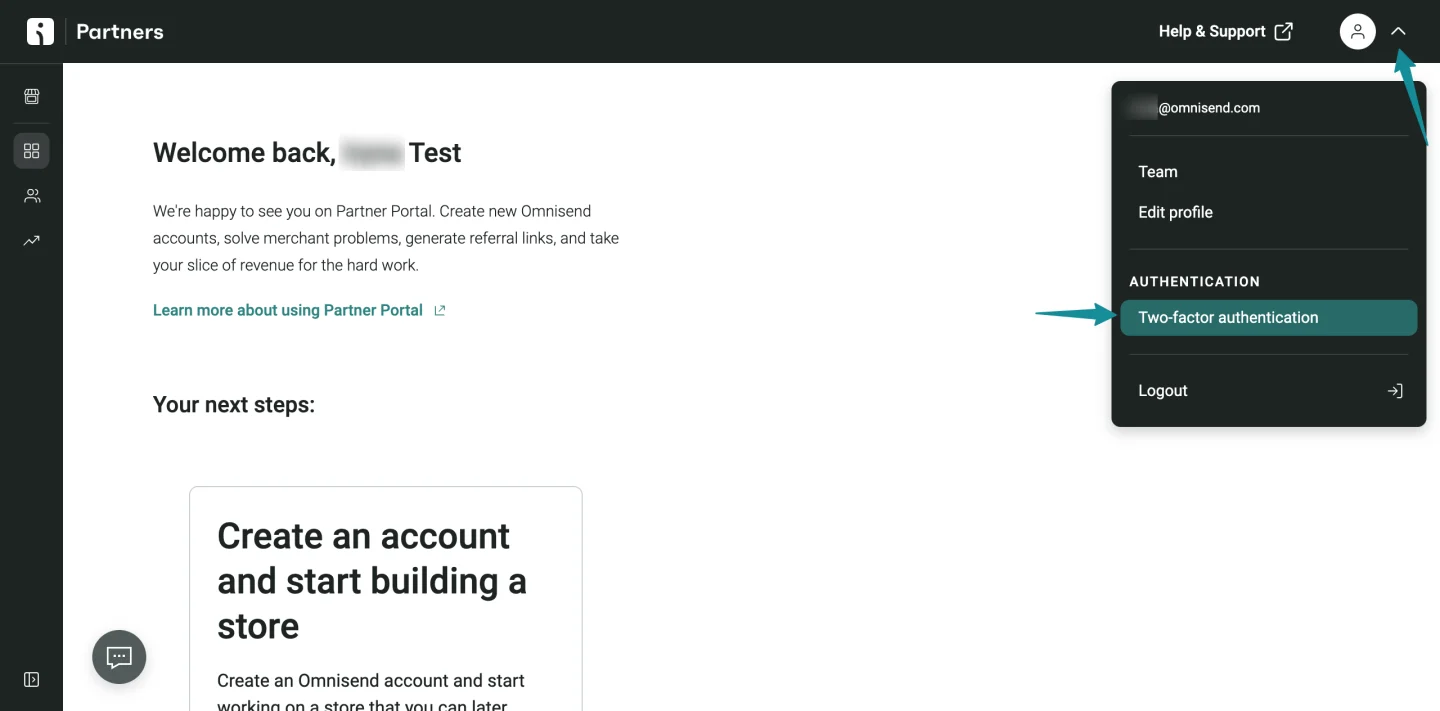
Partner Portal users can now enable authenticator-app-based 2FA, use recovery codes, and turn 2FA off when needed.
👉 Omnisend Partner Portal: Set Up Two-Factor Authentication
Search products by title in the Products API
The public GET /api/products endpoint now supports the optional titleContains parameter. It’s case-insensitive, supports partial title matching, and follows the same behavior as the Omnisend product picker.
👉 Omnisend API: Products API documentation
Track on-site searches in Shopify stores
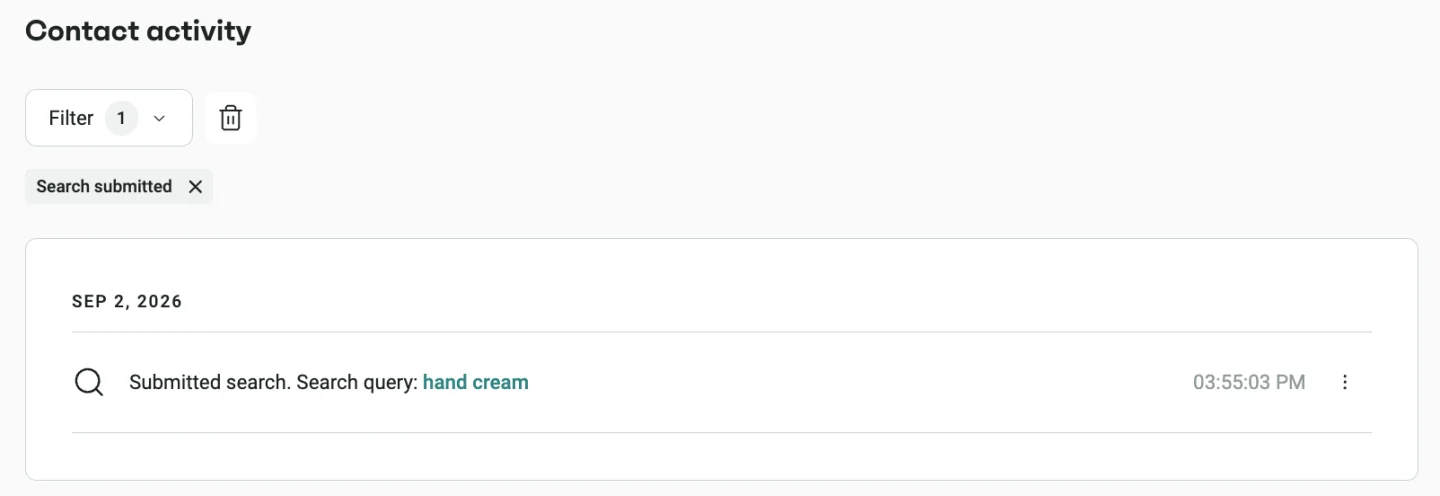
Omnisend now tracks searches submitted on Shopify storefronts. Each search creates a search submitted event that includes:
- The search term
- The words in the search
- The search page URL
- The number of products shown on the results page
Use the event to view search activity on a contact’s timeline, create segments based on search terms, or trigger Automation Workflows after a search.
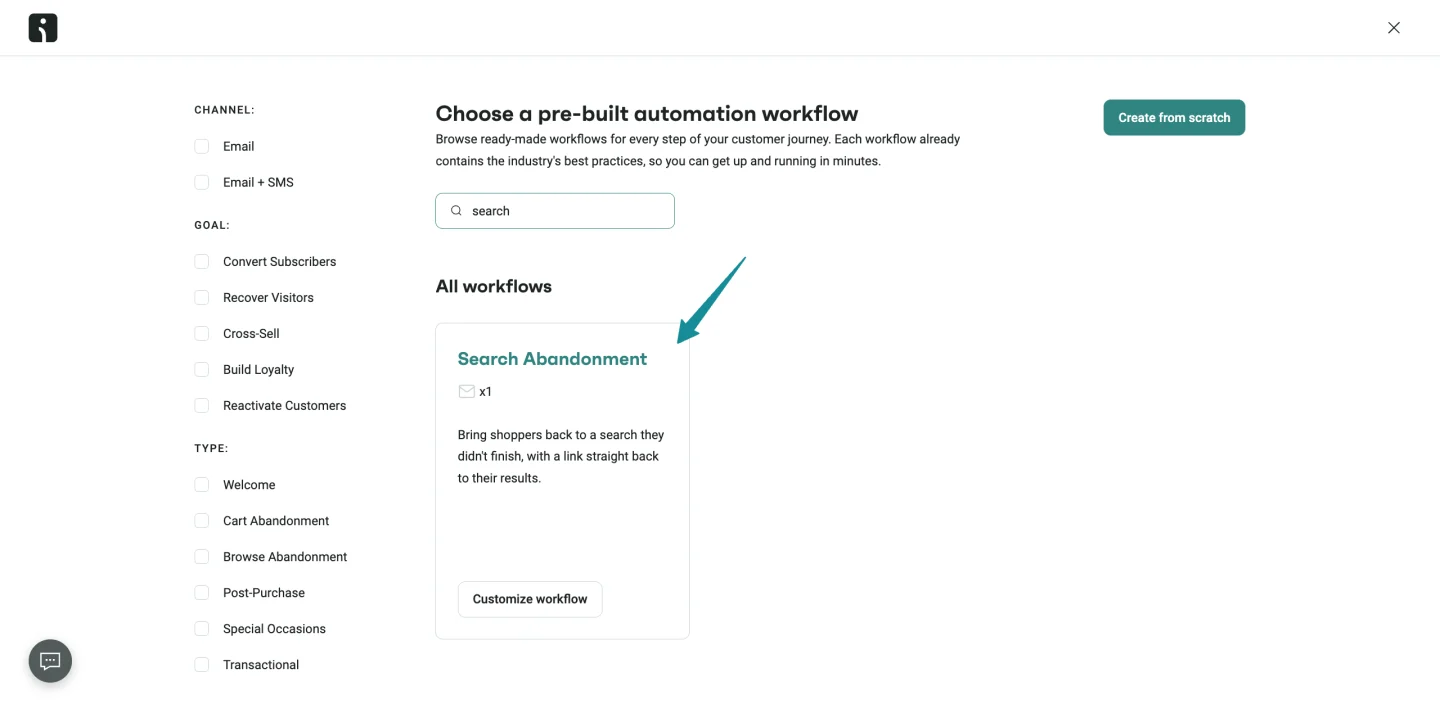
There’s also a new Search Abandonment Automation Workflow preset available for Shopify stores.
Configure Shopify Flow events with an Event name
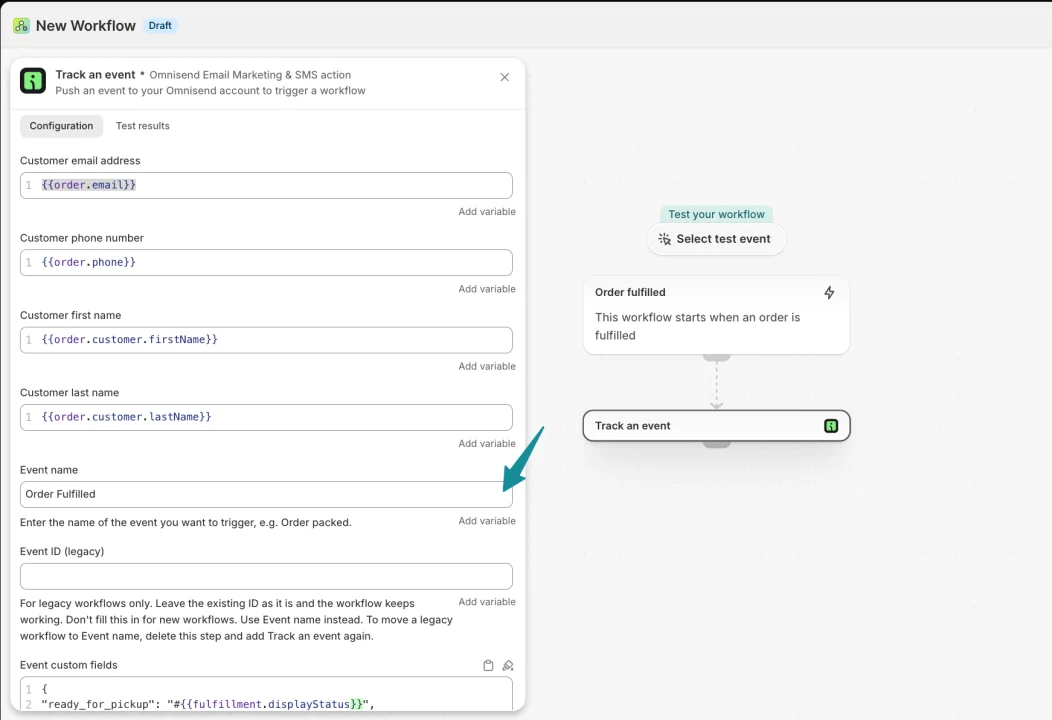
Shopify Plus stores can now configure the Track an event action using an Event name instead of the deprecated Omnisend Event ID.
👉 Integrate Shopify Flow with Omnisend
Connect the WordPress Plugin with OAuth
Omnisend for WordPress plugin version 1.9.0 now uses Omnisend OAuth instead of pasted API keys. Existing API-key connections continue working — no need to reconnect.
👉 Connect WordPress Plugin to Omnisend
Unique discounts in new WooCommerce Automation presets
New WooCommerce Automation Workflows created from presets that include discount blocks now use unique discounts by default instead of static discount codes.
👉 WooCommerce: Add & Configure Discount Item
New integrations
A batch of fresh integrations in the App Market this month:
- PromoLayer — sends Form submissions through a webhook and creates or updates contacts with email, phone, name, and custom properties
- Fomo — sends new contact activity as social-proof notifications
- Mail Ward — screens contacts through a webhook in Automation Workflows, suppresses risky addresses, and supports Segmentation by screening score
- LeadDyno — supports affiliate management, commissions, dashboards, and promotional assets
- Consio — manages inbound and outbound calls, call dispositions, and call-attributed revenue
- Loyaltify.io — manages customers, loyalty cards, campaigns, and transactions
- Gro — connects marketing tools and shares Email, SMS, Campaign, Automation, contact, and Segment data
- Jandex — provides analytics, reporting, engagement insights, revenue analysis, and performance reports
- ShipDay — sends delivery updates to Omnisend as custom events for use in Automation Workflows
- StoreClaw — connects store and channel data for AI-assisted ecommerce operations
- MailMunch — sends Signup Form submissions through a webhook
- ChatWithAds — lets you ask questions about advertising and Omnisend data in plain language
- S: Contact Form Builder — sends Shopify Form submissions as non-subscribed Email contacts with configurable tags
- PopupBoost — syncs subscribers who provide marketing consent
- Bold Subscriptions — sends subscription events to Omnisend
Integration updates
- ReferralCandy now uses live data instead of 12-hour polling. Advocate Enrolled, Referral Completed, and Reward Earned events are sent to Omnisend as custom events in near real time.
A few smaller UI improvements worth knowing about
We ship usability updates every week — here’s what stood out this month:
- See SMS sending statuses in the Estimated SMS credits step. Country-specific issues now appear as status tags in the table. You can view details and resolve applicable issues from the relevant row. Recipients with unresolved toll-free verification requirements are disabled by default, while countries where SMS sending is unavailable are excluded. Verification statuses update automatically without a page reload.
- Open a Segment from a workflow condition. Valid Segment names in trigger filters, audience filters, exit conditions, and split conditions now open the Segment editor in a new tab. Deleted, inaccessible, or unresolved Segments stay as plain text.
- Rename Automation Workflows without hidden spaces. Leading and trailing spaces are removed when a workflow name is saved. Names containing only spaces can’t be saved. Existing names get cleaned up when they’re renamed and saved again.
- Find Forms beyond the 200-Form limit. You can search and select Forms across the full Form library when configuring form-based Automation triggers. Trigger previews resolve the correct Form name, with support for up to 2,000 Forms.
- Open Contact activity from report metrics. Click a metric in a Campaign or Automation report Overview to open the related Contact activity list with the relevant filter applied.
- View message content from a Contact profile. Campaign messages open the report with the preview, A/B Campaigns show both versions and identify the version received, and Automation messages open the Workflow Builder with the relevant message block highlighted.
- Identify send-time optimization in Campaign lists. Campaigns now show whether they use Personalized Sending Time or Time Zone Optimization. Personalized Sending Time Campaigns also show whether optimization is based on opens, clicks, or orders.
- Access Image Library and Brand assets from Assets. The new Assets item in the left-side menu provides access to both from any page.
- Preview product images in Automation emails. Product images now load in the Workflow Builder’s email preview, making it easier to check the final design before sending.
- Preview personalization fallbacks correctly. Test emails and previews now render default values as they would for a contact without personal data. Tags without a fallback render as empty instead of displaying raw personalization syntax.
- Responsive icon in the Forms AI generator. The icon now responds to idle, typing, editing, and thinking states when you use the Generate form or What would you like to change? prompts.
- Consistent green visuals for AI features. AI borders, icons, backgrounds, and text now use Omnisend’s green visual system.
- Enter branded SMS CNAME values more easily. CNAME values are now displayed without a trailing period, making them easier to enter in DNS providers that reject that format.