Omnisend AI


 OFFER
OFFER









Every Black Friday Cyber Monday (BFCM) season starts with a similar to-do list: review last year’s results, tidy the list, build segments, plan your sends, and check your automations. None of it is complicated on its own, but gathering the data for each step can eat up a lot of time.
This year, there’s a different way to do the digging. Once your AI assistant is connected to your Omnisend account through Model Context Protocol (MCP), you can ask for the data, comparisons, and next steps in plain language. Then, when you’re ready, move from analysis to building segments, campaigns, automations, and templates. For the broader concept, see our guide to MCP for email marketing.
If you’re reading this in early-to-mid September, you’re about 11–12 weeks out from Black Friday. That’s early enough for the audit and list-health work to change what happens in November, which is a much nicer position than discovering the problem two days before launch.
The prompts below follow the BFCM countdown from last year’s analysis through post-sale retention. They’re copy-paste ready, with specific follow-ups where the next useful move is, to act on what you found.
Find out more about what MCP is in our video right here:
What you need before you start
Start by connecting your AI assistant to Omnisend. For most people, that means installing the Omnisend Plugin in ChatGPT or using the official Omnisend connector in Claude. The step-by-step setup is covered in Omnisend’s general MCP connection guide, with separate instructions for ChatGPT and Claude. If you use Claude Code, Codex, Cursor, or another MCP client, Omnisend also supports manual connection through its MCP server; the MCP Server v2 API documentation covers that route.
You’ll need an Owner, Admin, Manager, or Partner role in Omnisend to connect.
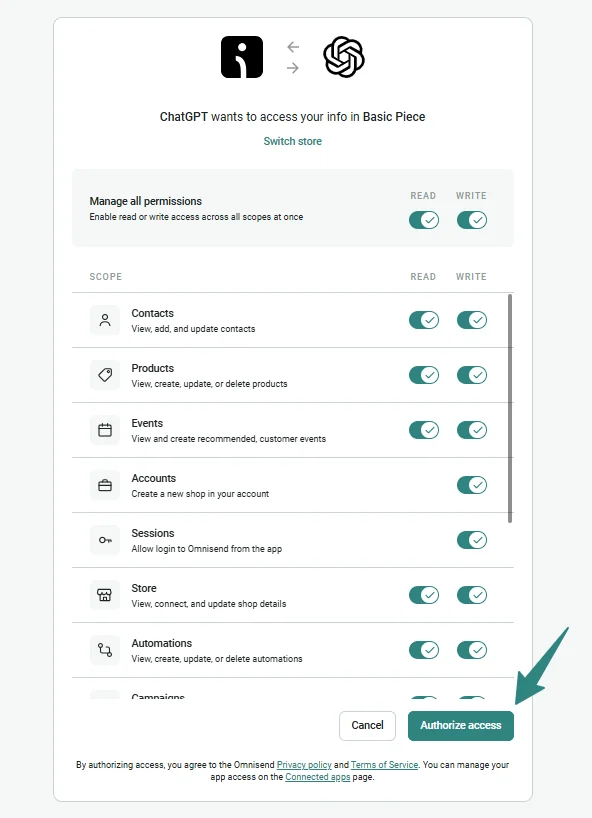
During authorization, you can control read and write permissions separately for each data area. If you want to ease into it, start with the read permissions needed for the audit phases below. Later, when the prompts move into creating segments, campaigns, automations, or templates, enable the relevant write access.
Model tip: We recommend using the more advanced frontier models, as smaller models may lack the reasoning depth required for complex multi-step MCP tasks and may return incomplete or inaccurate answers.
Want the concept before the workflow? Read the Omnisend MCP email marketing explainer first.
Prompts organized by BFCM countdown
The prompts below use the same evidence-first approach as Omnisend’s broader MCP prompt library: ask for the numbers, look for patterns, then decide what deserves action.
Phase 1: Audit last year (10+ weeks out)
Start with the previous BFCM window while there’s still time to use what you find. Omnisend MCP can work across historical campaign and performance data, so you can compare email and SMS activity over a defined date range instead of piecing the story together report by report.
1. Get the full BFCM performance recap
The job: Build one baseline for what happened last year across revenue, campaign performance, and daily sending activity.
Prompt
Review my Omnisend performance from November 20–December 2, 2025.
Break down:
- Attributed revenue by channel, separating email and SMS
- Orders and conversion rate by channel
- My top five campaigns by attributed revenue, with send date, audience, and campaign type
- Daily send volume across the period
- The strongest and weakest revenue days
Compare the channels and days where useful. Show the numbers behind every conclusion, and flag anything you can’t determine from the available data instead of guessing.
What to do with the answer: Treat this as your BFCM baseline, not the finished strategy. Check any important numbers against the corresponding Omnisend reports, then use the next prompt to find out what your strongest campaigns had in common.
2. Find the patterns behind last year’s winners
The job: Work out which campaign choices are worth carrying into this year’s plan.
Prompt
Using my campaigns from November 20–December 2, 2025, analyze the five highest-performing BFCM campaigns you identified.
Look for shared patterns across:
- Send day and time
- Offer or promotion
- Subject line and preheader approach
- Audience or segment
- Email versus SMS
- Campaign timing within the BFCM period
Show the performance numbers that support each pattern. Separate patterns supported by the data from possible explanations that would need more evidence.
Finish with the three findings I should consider when planning this year’s BFCM campaigns.
What to do with the answer: Don’t turn every correlation into a rule. Keep the patterns with clear supporting data, then ask: “Which of these findings are strong enough to use as planning assumptions this year, and which should I test instead?”
3. Find where last year’s BFCM revenue leaked
The job: Identify weak sends, uncovered days, and automation gaps that may have left revenue on the table.
Prompt
Audit my Omnisend activity from November 20–December 2, 2025 for possible BFCM revenue leaks.
Check for:
- Email or SMS campaigns that underperformed compared with my other sends during the same period
- Days with unusually weak campaign coverage or revenue
- Large gaps between sends during high-activity days
- Automations that were active during the period but had weak message-level performance
- Important lifecycle moments that appear to have had little or no automation coverage
For every issue, show the numbers or account evidence behind it. Don’t invent a cause if the data doesn’t establish one.
Rank the findings by likely impact and explain what I should investigate before this year’s BFCM.
What to do with the answer: Check the highest-priority findings in Omnisend before changing anything. Then follow with: “Turn the confirmed issues into a BFCM prep checklist, ordered by what needs the longest runway to fix.”
Phase 2: List health and deliverability runway (6–8 weeks out)
This is the point where problems are still useful to find. Inbox providers judge you on recent engagement, so a weak trend needs weeks of sending to fix. BFCM volume amplifies whatever trend you bring into November. Check the health of the audience you plan to send to before you start increasing campaign frequency.
4. Check for deliverability warning signs
The job: Find bounce, complaint, unsubscribe, and engagement trends that deserve attention before BFCM volume increases.
Prompt
Review my Omnisend deliverability and engagement data for [exact 90-day date range].
Check:
- Bounce rates and whether they are improving or getting worse over the period
- Spam complaint rates and any campaigns associated with unusual increases
- Unsubscribe trends, including any noticeable spikes
- Engagement trends across recent email campaigns
- Any audience or campaign patterns associated with weaker engagement
Show the numbers behind every warning sign and compare earlier versus more recent performance where possible.
Rank the issues by urgency for BFCM preparation. Don’t guess at causes the account data can’t support, and flag anything that needs further investigation.
What to do with the answer: Prioritize issues that have been getting worse rather than reacting to one unusual send. Verify the warning signs in Omnisend, then follow with: “For the confirmed issues, give me a six-week action plan ordered by what needs the most time to improve before BFCM.”
5. Check whether your list is growing in the right places
The job: See which forms are contributing the most new subscribers as BFCM approaches and where list growth is slowing down.
Prompt
Review my subscriber growth and form performance in Omnisend for [exact date range].
Show:
- Total new subscribers over the period and the trend over time
- Which forms generated the most new subscribers
- Which forms have gained or lost momentum during the period
- The sign-up sources contributing the strongest subscriber growth
- Any forms with a noticeable drop in submissions that I should investigate before BFCM
Show the numbers behind each finding. Focus on which forms are contributing to my BFCM-ready list now rather than giving me a general form audit.
Finish with the three forms or sign-up sources I should review first.
What to do with the answer: Use this as a list-building triage rather than rebuilding every form at once. Open the highest-priority forms in Omnisend and decide where the offer, placement, targeting, or creative needs attention; for a deeper form audit, use the prompts in our guide to analyzing form performance with Omnisend MCP.
Phase 3: Segmentation (4–6 weeks out)
Once list health is under control, the next job is deciding who should receive which BFCM messages. Omnisend already gives you several useful audience groups to work with, including previous BFCM buyers, VIP customers, engaged non-buyers, and lower-engagement contacts you may want to suppress.
With the relevant write permissions enabled, MCP can also create segments after you’ve reviewed the logic behind them. That last part is important: check the criteria and estimated audience in Omnisend before using a newly created segment in a campaign.
6. Find last year’s BFCM buyers who haven’t returned
The job: Rebuild an audience of proven BFCM buyers who haven’t purchased since last year’s sale.
Prompt
Find contacts who placed at least one order during November 20–December 2, 2025, but have not placed another order since December 2, 2025.
Show:
- Total contacts who match
- Revenue they generated during that BFCM period
- Their average order value during the period
- The campaigns or channels associated with their purchases, where attribution data is available
Don’t create the segment yet. First, show me the exact segment criteria you would use and flag anything that needs my decision.
What to do with the answer: Review the criteria and make sure the date and purchase conditions match the audience you want. If they do, follow with: “Create this segment in Omnisend and name it ‘BFCM 2025 buyers — no purchase since.’”
7. Build a VIP audience for early access
The job: Identify the customers who deserve first access to this year’s BFCM offer based on their value to your store.
Prompt
Analyze my customer purchase data from [exact 12-month date range] and identify a defensible VIP/high-value customer segment for BFCM early access.
Consider purchase frequency, total revenue, and average order value. Show the distribution behind the thresholds you recommend, rather than choosing arbitrary cutoffs.
Give me:
- Your proposed VIP criteria
- Estimated segment size
- The numbers behind each threshold
- Any alternative threshold I should consider if the audience is too broad or too narrow
Don’t create the segment until I approve the criteria.
What to do with the answer: Choose thresholds that fit the size and economics of your store rather than chasing a generic definition of “VIP.” Once you’re happy with them, ask MCP to create the approved segment in Omnisend for your early-access campaign.
8. Find engaged subscribers who still haven’t bought
The job: Find people showing campaign interest without a purchase, giving you a separate audience for BFCM conversion messaging.
Prompt
Find subscribed contacts who have clicked at least one email campaign during [exact date range] but have never placed an order.
Break down:
- Total contacts who match
- How recently they last clicked
- Which campaigns generated the most clicks from this group
- Any recurring product, offer, or campaign themes in the campaigns they engaged with
Show the account data behind each finding. Don’t assume why they haven’t purchased if the data can’t tell us.
Then suggest segment criteria I can review before creating it.
What to do with the answer: Use the campaign patterns as context for the offer or angle you test with this group. Verify the proposed criteria, then ask: “Create the approved engaged non-buyers segment in Omnisend.”
9. Decide who shouldn’t get peak-volume sends
The job: Identify contacts whose recent engagement makes them poor candidates for your highest BFCM sending frequency.
Prompt
Review my subscribed contacts’ email engagement over [exact 90-day date range] and identify groups I should consider excluding from, or sending less frequently during, peak BFCM campaigns.
Look for clear patterns of prolonged low engagement using the account data available to you.
For each group:
- Show the criteria you used
- Estimate the audience size
- Explain the supporting engagement data
- Recommend whether to suppress the group from peak sends or simply reduce frequency
Don’t create or change any segments yet. Don’t recommend suppression based on assumptions you can’t support with my account data.
What to do with the answer: Suppression affects who receives some of your highest-value campaigns, so verify the proposed rules in Omnisend before applying them. Once you confirm the criteria, ask MCP to create the suppression segment, then review it again before attaching it to any BFCM campaign.
Phase 4: Calendar and creative (3–4 weeks out)
By this point, the analysis should start turning into something you can send. Use the findings from Phase 1 to decide when each campaign goes out, who receives it, and which ideas from last year are worth repeating or testing differently.
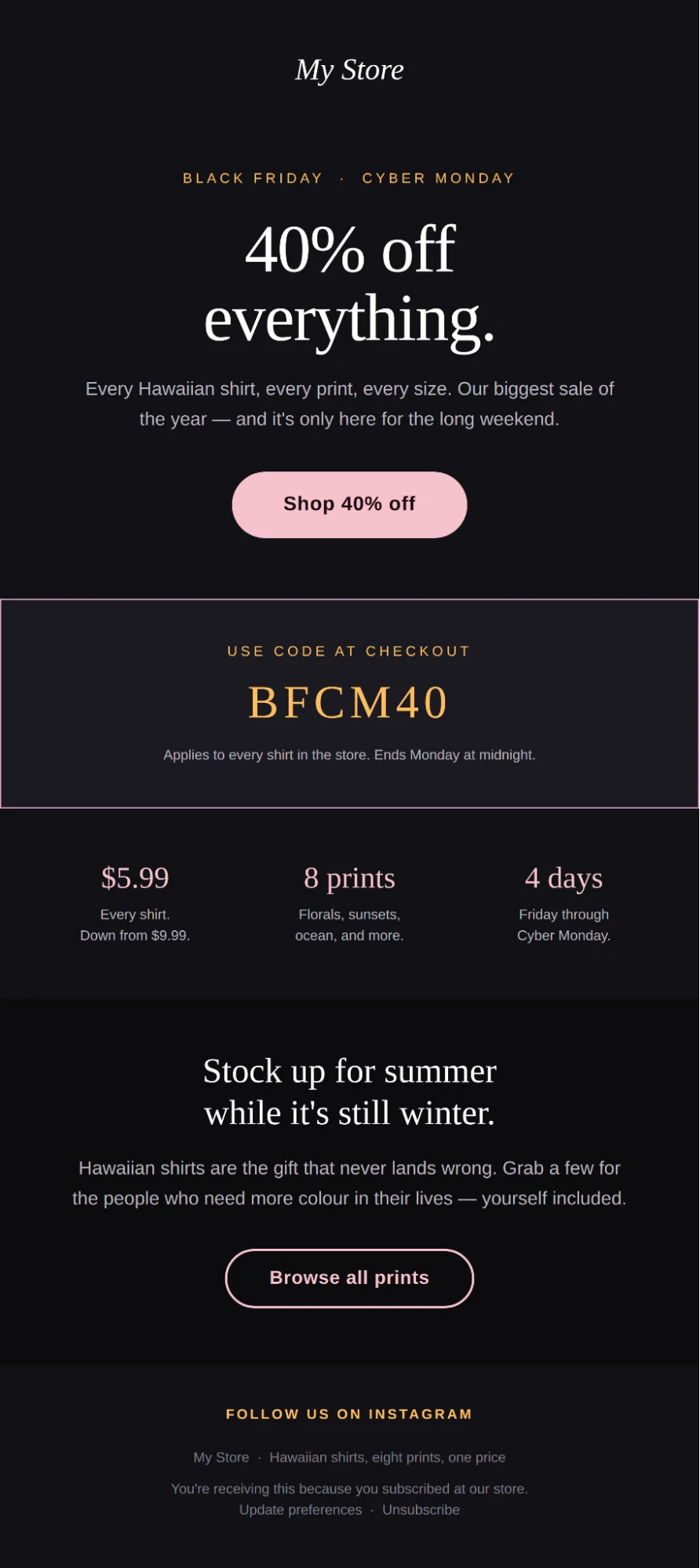
This is also where MCP’s write access becomes especially useful. It can move beyond planning and build an email template inside Omnisend. Generated templates now use Omnisend’s structured email format, pull in your Brand Assets, including your logo, colors, and fonts, and remain editable in the Email Builder afterward.
10. Turn last year’s findings into this year’s send calendar
The job: Build a BFCM campaign calendar around the patterns you found in Phase 1.
Prompt
Using the findings from my November 20–December 2, 2025 BFCM audit, build a campaign calendar for this year from [start date] through [end date].
Cover these stages:
- Early access
- Black Friday
- BFCM weekend
- Cyber Monday
- Sale extension, if appropriate
For each send, include:
- Date
- Audience or segment
- Email, SMS, or both
- Campaign angle
- Offer or message focus
- Which finding from last year supports the recommendation
Use the audience segments we identified earlier where relevant. Don’t invent offers, deadlines, or promotions I haven’t provided. If a slot needs information from me before you can recommend it, mark that clearly.
Keep the calendar focused enough that every send has a distinct job.
What to do with the answer: Check that the proposed frequency makes sense for each audience and that the calendar reflects your confirmed offer dates. Then follow with: “Take the approved calendar and turn each campaign into a one-paragraph creative brief.”
11. Build campaign briefs from last year’s strongest patterns
The job: Give each calendar slot enough direction for copy and creative without simply recreating last year’s campaigns.
Prompt
Take the approved BFCM calendar and the winning patterns from my 2025 BFCM campaign analysis.
Create a campaign brief for each send with:
- Campaign goal
- Target audience
- Main angle
- Offer and deadline, using only details I’ve provided
- Key message
- Recommended subject line direction
- SMS role, where relevant
- Products or categories to feature, if supported by the brief or account data
- The 2025 finding that informed the recommendation
Use last year’s winners as evidence, not templates to copy. Give me a reason for any major recommendation and flag anything that still needs a decision from me.
Don’t invent prices, discounts, product claims, reviews, or urgency.
What to do with the answer: Pick the briefs you want to move forward with and fill any missing offer or product details. For the campaign you want to build first, tell MCP: “Use this approved brief to create the email template in Omnisend.”
12. Generate an editable BFCM email template in Omnisend
The job: Turn an approved campaign brief into an on-brand email you can continue editing in Omnisend.
Prompt
Using only the approved BFCM campaign brief below, create the complete email and build it as a ready-to-edit template in my Omnisend account named “[template name].”
Campaign brief:
[paste approved brief]
Follow these rules:
- Use only the offer, deadline, product information, and claims provided in the brief or available in my Omnisend account
- Don’t invent prices, discounts, reviews, product specifications, or urgency
- Make the offer clear early
- Keep paragraphs short and easy to scan on mobile
- Give every section a distinct purpose and avoid repeating the same message
- If an image is missing, use an editable Omnisend image block rather than an external placeholder image, and describe the intended image in its alt text
Build the email with:
- Subject line and preheader
- Hero headline, supporting copy, and CTA
- Main campaign message
- Relevant product section
- Clear offer reminder
- Final CTA
Build the finished template in Omnisend, not just as copy in this conversation.
What to do with the answer: Open the generated template in the Email Builder and review the copy, images, links, products, offer terms, and mobile layout before using it in a campaign. If your connection predates the Brand Assets update and template creation isn’t available, reconnect MCP first — the feature added a new permission that existing connections may need to authorize.
Phase 5: Automation stress-test (2–3 weeks out)
It’s easy to spend three weeks polishing BFCM campaigns and forget about the automations quietly waiting for all that extra traffic. Give your welcome and abandoned cart automations a check now, before November finds the weak spots for you.
Omnisend’s MCP webinar walks through exactly this kind of automation audit:
The session shows how MCP can compare automation performance, narrow down which workflows deserve attention, and then inspect individual messages rather than treating an automation as one number.
13. Audit your welcome and abandoned cart flows message by message
The job: Find the specific emails, SMS messages, delays, or steps most likely to weaken two high-traffic automations during BFCM.
Prompt
Audit my active welcome and abandoned cart automations in Omnisend using performance data from [exact recent date range].
Walk through each automation message by message and show:
- Sends and attributed revenue for each message
- Open and click performance for email messages
- Conversion performance where available
- Unsubscribe, bounce, or complaint signals that stand out
- How each message compares with the other messages in the same workflow
- Any sharp performance drop between one step and the next
- Delays, splits, or workflow steps that deserve closer review based on the available data
Prioritize the issues that could have the biggest impact when welcome and cart traffic increases during BFCM.
Show the numbers behind each finding. Don’t assume a subject line, offer, delay, or piece of copy caused a performance change unless the data supports that conclusion.
Finish with the three fixes I should investigate first.
What to do with the answer: Don’t overhaul a healthy flow because one metric looks different from the first message — later steps often have a different job. Verify the flagged messages in Omnisend, then follow with: “For these three confirmed issues, tell me what I should test or change before BFCM, without changing the automation yet.”
The message-level approach follows the same logic shown in the webinar: one example found that the first welcome email produced most of the workflow’s revenue, which gave the marketer a clear reason to investigate the weaker later messages instead of rebuilding the whole flow blindly.
14. Find the automation messages that need a BFCM variant
The job: Decide where seasonal messaging adds useful context and where your evergreen automation should stay alone.
Prompt
Review my active welcome and abandoned cart automations and identify which individual messages would benefit from a BFCM-specific version during [exact BFCM offer dates].
My confirmed BFCM details are:
- Offer: [offer]
- Start date: [date]
- End date: [date]
- Discount code, if any: [code or NONE]
- Key products/categories: [products or categories]
For each message you recommend changing, show:
- Automation and message name
- Why the existing message needs seasonal context
- What BFCM information should change
- What should stay evergreen
- Whether a sale deadline should be mentioned
- Any audience, timing, or overlap risk I should review
Use only the BFCM details I provided. Don’t invent offers, deadlines, discount codes, or product claims.
Rank the recommendations by expected importance and leave messages alone when there’s no clear reason to make them seasonal.
What to do with the answer: Before changing anything, make sure the recommendation fits the way the automation is currently set up. Check timing, audience rules, and BFCM deadlines, then let MCP make the approved edits and review them in Omnisend before they go live.
Phase 6: During BFCM (the weekend itself)
When BFCM is underway, you don’t need another long report. You need to know what happened yesterday, what looks off, and what needs attention before today’s campaigns go out.
15. Run your five-minute BFCM morning check
The job: Get one daily view of revenue, campaign performance, deliverability, and anything that looks unusual.
Prompt
Give me a BFCM morning performance check for yesterday, [exact date].
Review my Omnisend data and show:
- Total attributed revenue for the day, split by email and SMS
- Orders and conversion performance by channel
- The three strongest campaigns and the three weakest campaigns, with the numbers behind each ranking
- Any noticeable change in bounce rates, spam complaints, unsubscribes, or engagement
- Any unusual spike or drop in sends, revenue, orders, or campaign performance compared with the previous BFCM day
- Any automation performance change that looks unusual during the same period
Separate confirmed findings from possible explanations. Don’t guess at causes if the available data doesn’t support them.
Finish with the three things I should check first this morning, ranked by urgency.
What to do with the answer: Use the answer to sort today’s priorities. Check anything important in Omnisend first, then ask: “For the confirmed issues only, tell me what needs action before today’s next scheduled send and what can wait until after BFCM.”
Phase 7: Post-BFCM (first week of December)
After BFCM, the focus turns to what you learned and what happens next. Compare this year with last year, then separate the customers who bought for the first time during the sale and plan how you’ll follow up with them.
16. Build the full BFCM executive recap
The job: Compare the complete BFCM window with last year and turn the results into a short report your team can use.
Prompt
Create an executive recap of my BFCM performance for [2026 BFCM date range] and compare it with November 20–December 2, 2025.
Cover:
- Total attributed revenue and orders for each period
- Revenue split between email and SMS
- Conversion performance by channel
- Campaign send volume
- Top and bottom campaigns by attributed revenue
- Automation revenue and any major year-over-year changes
- Subscriber growth during each period
- Bounce, spam complaint, and unsubscribe trends
For every major conclusion, show the numbers and year-over-year change behind it.
Separate confirmed findings from possible explanations. Don’t invent reasons for increases or declines when the account data doesn’t establish them.
Finish with five takeaways: what improved, what declined, what should be repeated next BFCM, and what deserves further investigation.
What to do with the answer: Verify the headline numbers in Omnisend and save the confirmed findings somewhere your team can find them next year. Then ask: “Turn these findings into a prioritized BFCM 2027 lessons list, with the supporting number beside every recommendation.”
17. Find your new BFCM customers and plan what comes next
The job: Separate customers acquired during BFCM from the rest of your audience and plan their first post-sale messages.
Prompt
Find customers whose first recorded purchase was made during [exact BFCM date range].
Show:
- Total number of new BFCM-acquired customers
- Total and average order value from their first orders
- Products or product categories they purchased most often
- The email or SMS campaigns associated with their purchases where attribution is available
- Which of these customers are currently subscribed to email, SMS, or both
Then recommend what I should send this audience during the next 30 days to encourage a second purchase or continued engagement.
Base the recommendations on their purchase and engagement data. Don’t invent discounts or assume they need another promotion.
Before creating anything, show me the exact segment criteria you would use and a simple 30-day retention plan.
What to do with the answer: Review the proposed segment definition and make sure “new BFCM customer” matches how you want to classify acquisition. Once confirmed, ask MCP to create the segment in Omnisend, then use the 30-day plan as the starting point for your December and early-Q1 campaigns.
Guardrails
Use MCP to get to the answer faster, then verify the important parts in Omnisend. That’s especially important when the result could change who you send to, when you send, or what you change in a live campaign.
Use permissions with the same care. Omnisend lets you control read and write access separately for each data area, so there’s no reason to give an AI assistant more access than the task requires.
See the new MCP controls in action
The August 2026 What’s New video gives a quick look at the newer MCP controls and creation features, including granular permissions, Claude support, and Brand Assets in generated templates.
Think of ChatGPT or Claude as the planning layer. Omnisend is where you press send. Before anything goes live, check the audience and exclusions, links, discount codes, offer dates, content, and schedule inside Omnisend. Do the same for AI-created segments, templates, and automation changes before putting them to work.
Short FAQ
Can AI create campaigns and segments in Omnisend now?
Which should I use: ChatGPT or Claude?
What can my AI assistant access in Omnisend?
Ready to start your BFCM audit?
Connect Omnisend to your AI assistant, then run the Phase 1 prompts against last year’s BFCM data to see what worked, what underperformed, and what deserves attention first.
Connect Omnisend MCP
Connect with ChatGPT · Connect with Claude