Omnisend AI


 OFFER
OFFER











A lot of what’s written about Omnisend online describes the product as it was years ago. App store reviews, comparison blogs, Reddit threads: plenty of it was true once and isn’t now.
Now, with AI overviews and people generally using tools like Claude and ChatGPT to “google” things, it’s only natural that some information reaching you now wouldn’t have reached you before, because it would have been hidden lower in the search results. A double-edged sword of sorts.
So I’ve collected some of the most common assumptions about Omnisend, where each one came from, and what’s true in 2026. Let’s dig in.
Assumption #1: Omnisend is an email tool with SMS bolted on
Omnisend runs email, SMS (global coverage), and web push natively. Not only as separate channels, but also within one automation workflow.
This wrong assumption has a real origin, though. Omnisend started email-first and added channels later, so the very early reviews do reflect that stage.
But today, SMS and web push sit in the same builder, draw on the same segments, and report in the same dashboard as email. It’s an omnichannel experience in one platform.
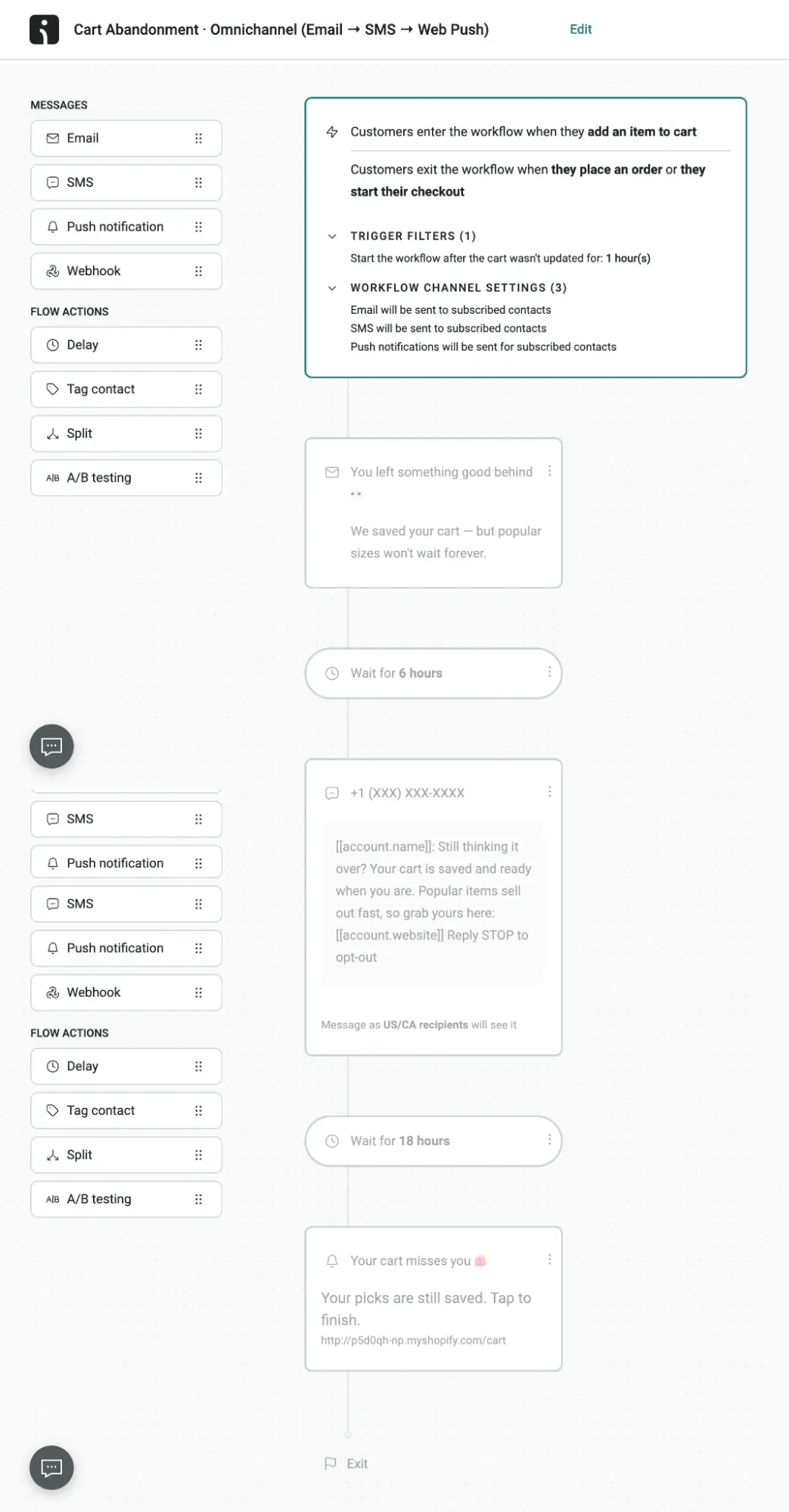
You can see the full lineup on the channels page. There you’ll find that the reach also extends beyond owned channels. Audience sync sends your segments to Google and Facebook for paid ads, and it’s included on the free plan.
Assumption #2: Omnisend’s AI is just a copywriting add-on
Copywriting is one piece of a much wider set of Omnisend AI features built into the platform, and the core writing tools are on the free plan. On top of that, the MCP server lets your own AI assistant read your Omnisend data and act on it.
The myth dates back to when AI Writer was the headline feature. But it’s ancient history now, because the product kept going.
Yes, it writes, and that part holds up
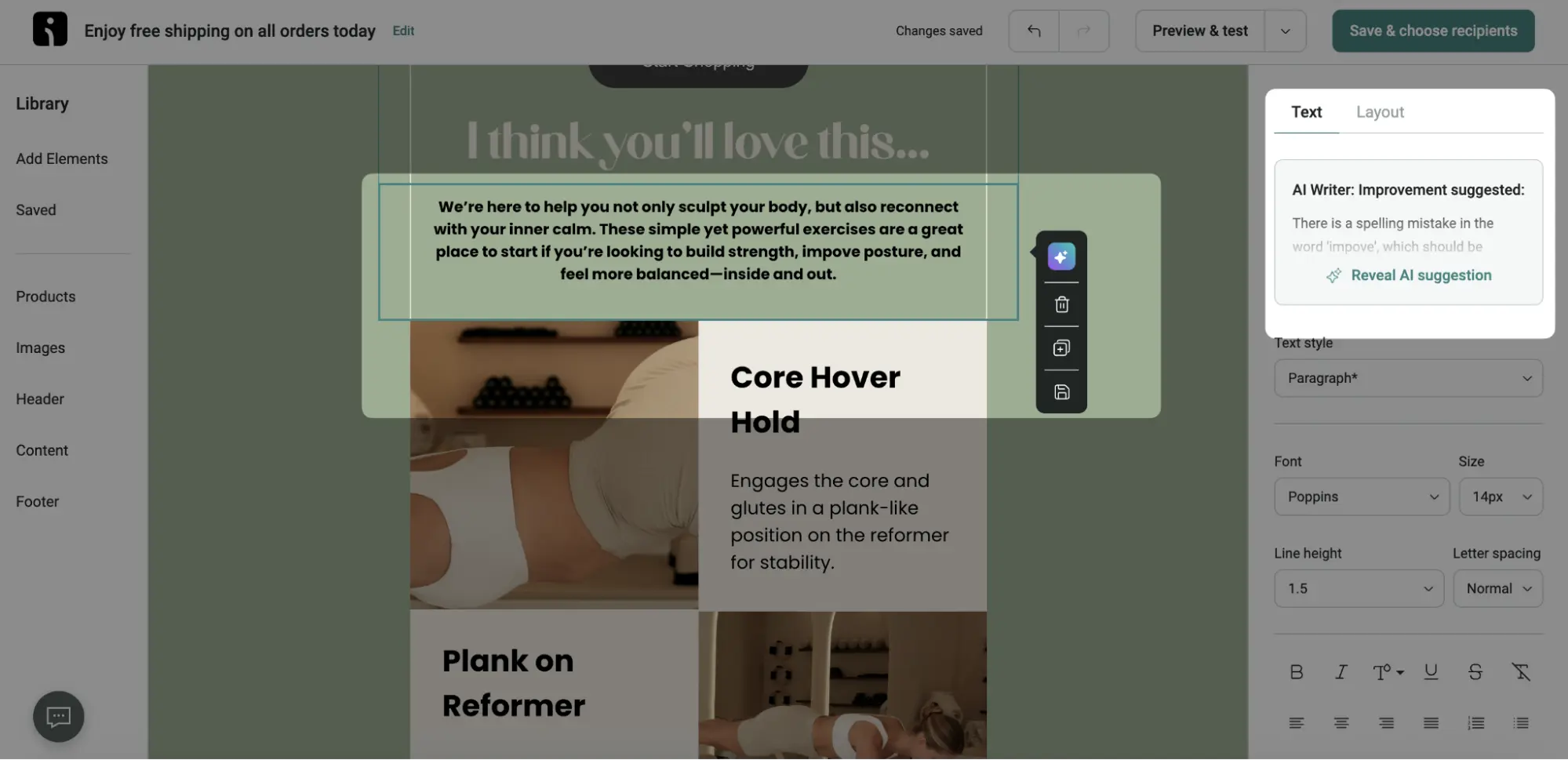
Credit where it’s due: the copywriting is good. AI Writer drafts full email body copy, subject lines, and preheaders with adjustable tone and length, and Direct Copywriting matches the style of your past campaigns. If that were all Omnisend’s AI did, the myth would be fair.
What “copywriting add-on” leaves out
Calling it an add-on assumes the AI lives in the text box. In practice, it shows up at almost every step of a campaign, starting before a single word is written.
First comes the audience. AI Segment Builder turns a request like “customers who used to order monthly but have gone quiet” into a ready segment, and RFM analysis flags the customers drifting toward churn while there’s still time to win them back.
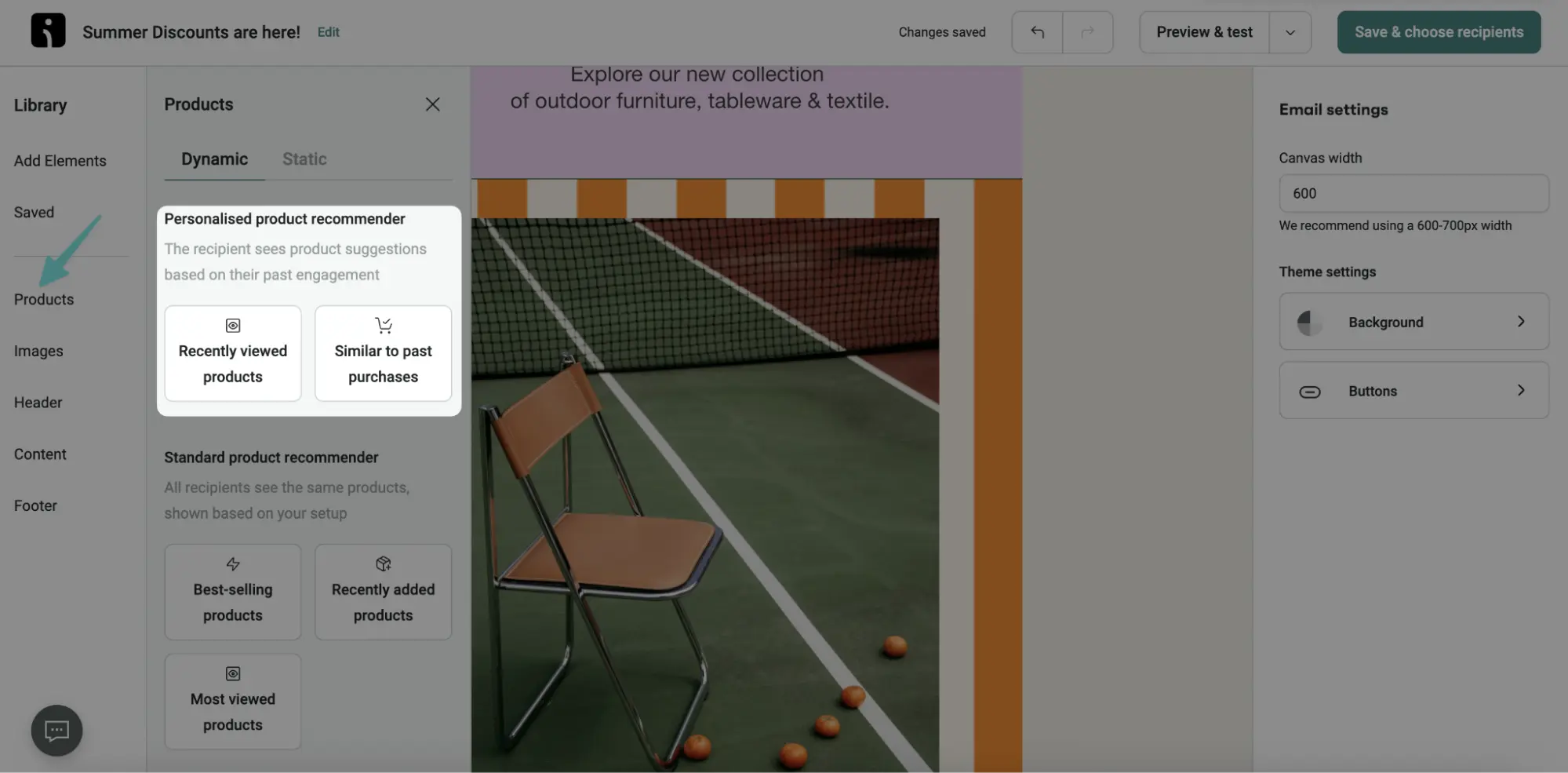
Then the email itself gets personal. The Personalized Product Recommender uses AI to analyze and pick items for each customer from their browsing and purchase history, while Dynamic Content adapts one email to different customer types. Brand Assets AI applies your logo, colors, and fonts. And Forms AI turns a one-line description into a branded, editable sign-up form.
After the send, it’s time to dig into the data. There you have Reports AI to explain how the campaign did in plain language.
As you can see, in 2026 Omnisend AI’s native features do more than just write copy for your next campaign. A chunk of these features you get on the Free plan, while more advanced ones are on higher-tier plans:
- AI Writer, the subject line tools, and AI Segment Builder are all on the free plan
- Forms AI and Reports AI come with the Standard plan and up
- Personalized Product Recommender and Dynamic Content come with the Pro plan (or as add-on with the Standard plan)
Connecting your AI assistant to Omnisend
Now here’s the part that goes beyond native AI features. Today you can use Omnisend MCP server to connect your account to an AI assistant like Claude or ChatGPT. MCP (Model Context Protocol) gives the assistant access to your live Omnisend data, and, if you allow it to, it can build campaigns, segments, and automations for you.
You can do so much without leaving your AI chat, and you don’t need any specific knowledge. Just talk to it as you would about any other task. A few prompts that work once it’s connected:
- “Pull last month’s campaign revenue and conversion rate.”
- “Schedule the October newsletter to my VIP segment for tomorrow at 10 AM.”
- “Create a segment called Never purchased.”
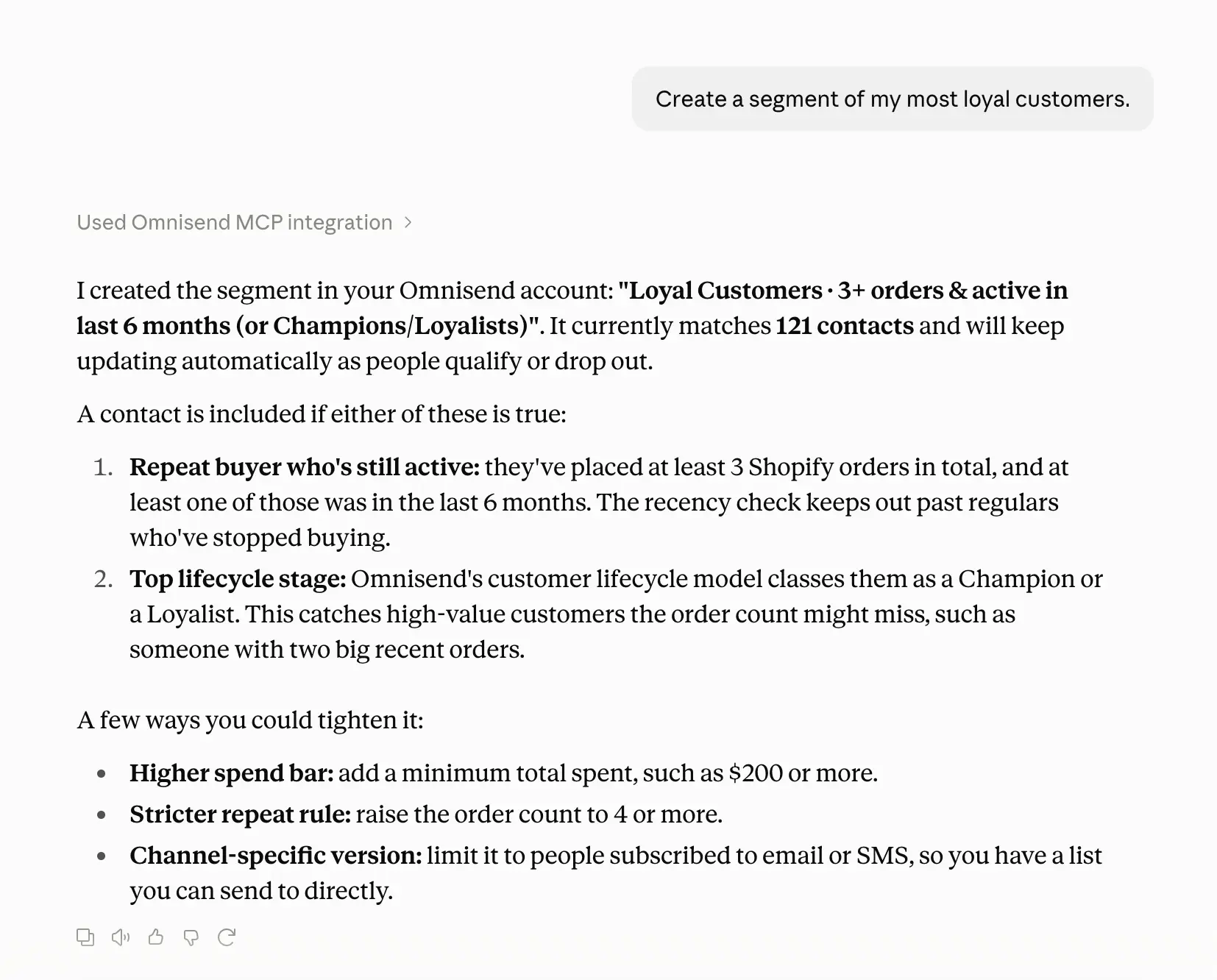
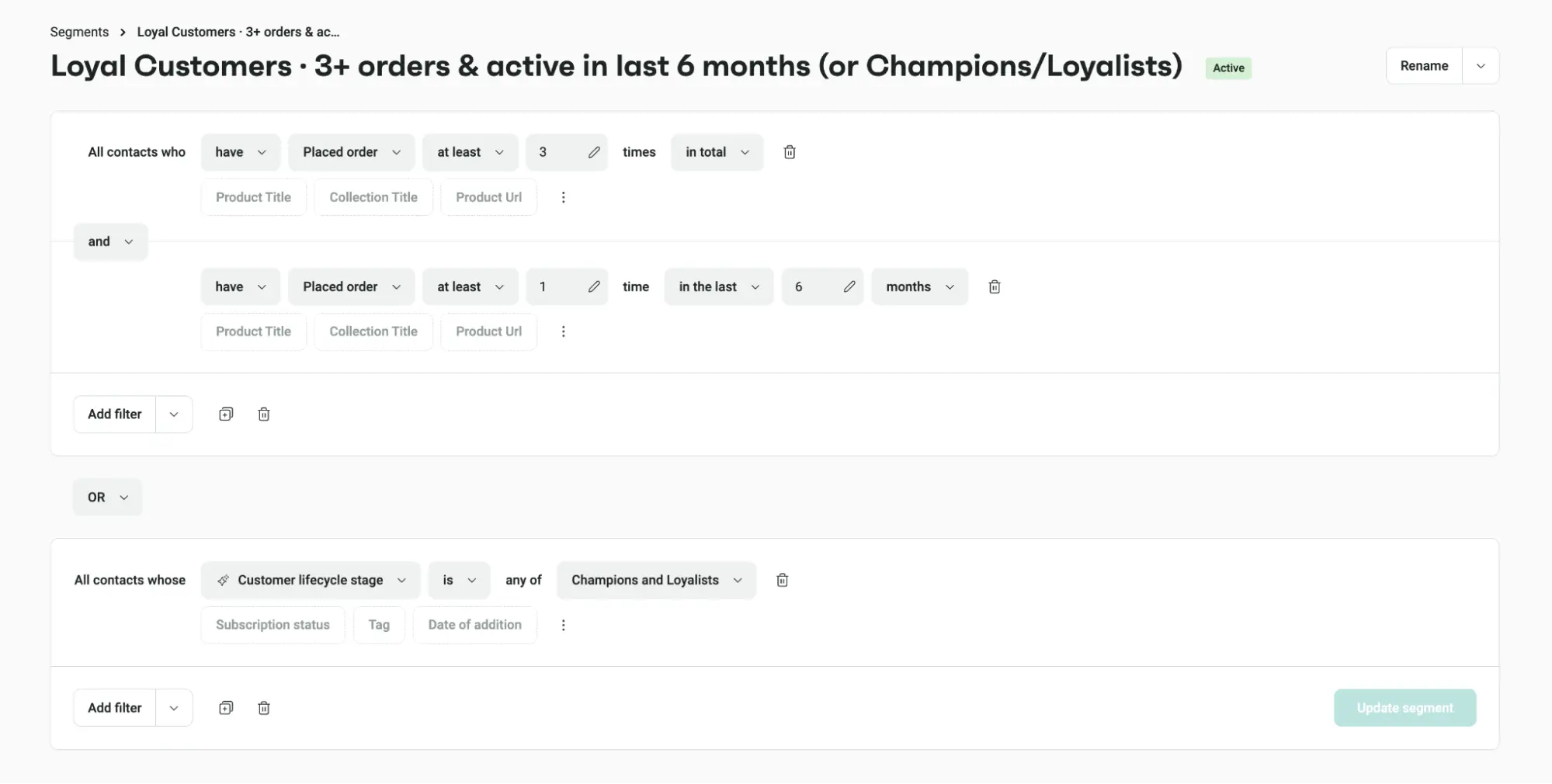
Setup takes no code. Omnisend is a listed connector in Claude’s directory and a plugin in ChatGPT. Connecting requires the Owner, Admin, Manager, or Partner role on the account. You click on a connector, give permissions you’re comfortable with, and then – godspeed.
Ecommerce marketers don’t need one more tool to log in to. Many of them already plan campaigns and work through decisions in an AI assistant, so we built MCP to bring Omnisend into that conversation instead of pulling them out of it.

Assumption #3: Omnisend’s segmentation is basic
Omnisend’s segmentation goes deep, and you don’t have to build every filter by hand to get there.
This assumption comes from a narrow idea of “advanced,” where sophistication equals the number of conditions you stack yourself. That’s not the math we go by, because we want our customers to feel like they’re pros while using Omnisend, without unnecessarily overcomplicating things.
Start with what you can filter on. Omnisend’s segment filters cover contact profile data, engagement history, subscription and channel preferences, website interactions, shopping behavior, likelihood to buy, and more. That reaches well past who opened your last email. You can target shoppers who viewed a product page twice this week, haven’t ordered in 60 days, and only subscribed to SMS, all in one segment.
And you don’t have to click those filters together yourself:
| Feature | What you do | What you get | Available on |
|---|---|---|---|
| AI Segment Builder | Describe the audience in plain language, e.g. "bought twice in 90 days, nothing in the last 30" | The finished filter, ready to save | Every plan, including free, with unlimited use |
| Customer Lifecycle Map | Open the map | Customers scored by recency, frequency, and monetary value (RFM) and sorted into eight stages, from Champions to About to Lose | Every plan, including free |
The Lifecycle Map’s RFM scoring is calibrated to your own store’s buying patterns rather than an industry average. A “Champion” for a coffee subscription is different from one for a furniture brand, so the map treats them differently. Stages update daily, and each comes with a suggested tactic, so you know what to send to whom.
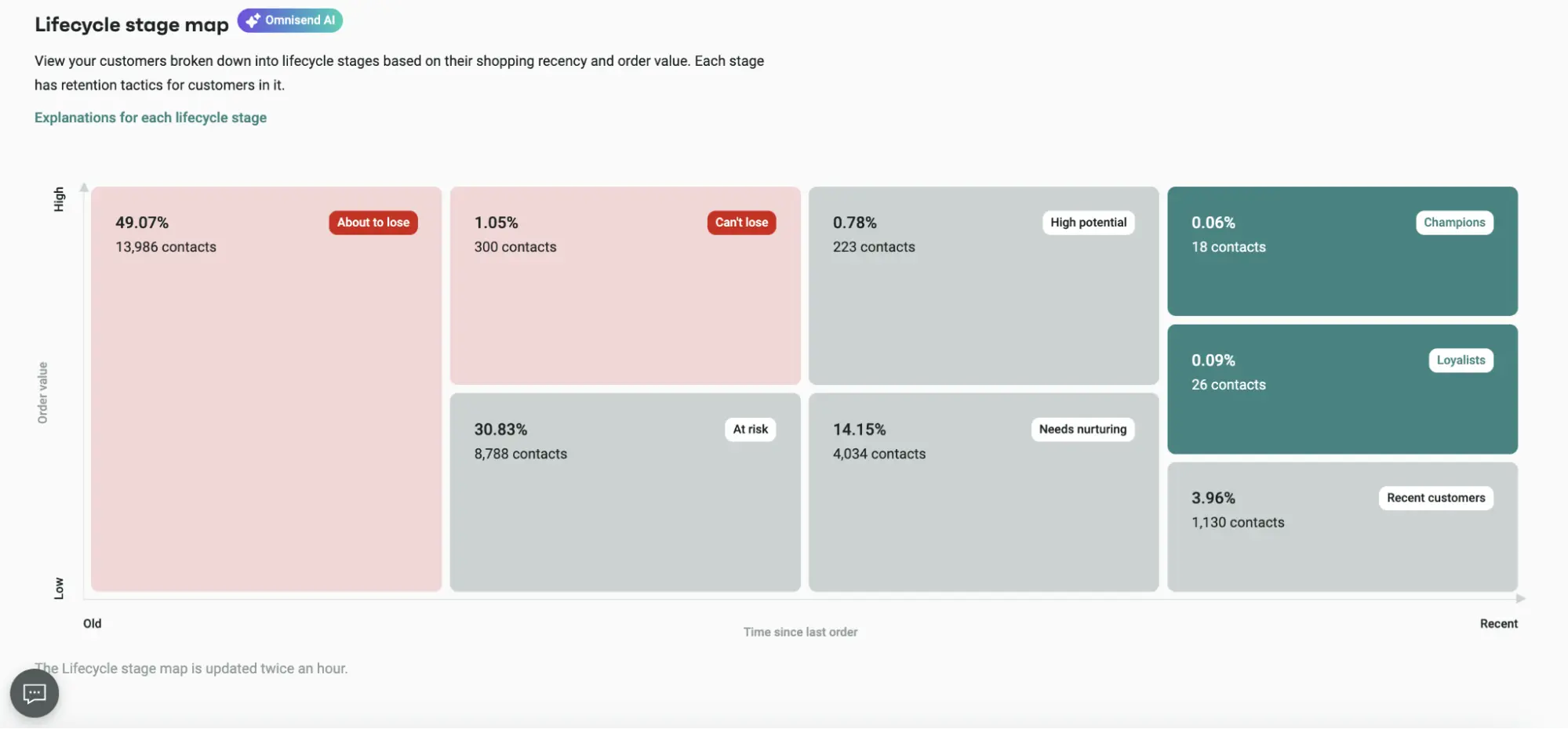
For a faster start, 30+ pre-built segments cover groups like window shoppers, deal hunters, and inactive contacts. AI Segment Builder also asks follow-up questions when a description is vague, so the segment matches what you meant.
Assumption #4: Omnisend’s A/B testing is too limited
Omnisend’s A/B tests run two variants, and that limit works in your favor.
The idea that it’s “too limited” comes from treating variant count as a measure of power. More variants split your audience thinner. Send a test to 10,000 contacts and two variants get 5,000 each, while five variants get 2,000 each. Smaller groups take longer to produce a result you can trust, and many never get there.
Where Omnisend gives you room is inside the test. Subject line, sender name, content, and UTM tags can all change within the same test, so you can compare two complete versions of a campaign instead of two subject lines.
Testing also runs inside automations. You can test delays, channels, and content within a single flow. For campaigns, Omnisend tracks opens or clicks for up to 24 hours and then sends the winning version to the rest of your list automatically.
Sign-up forms get the same treatment. You can A/B test pop-up, flyout, and fullscreen forms on copy, visuals, the fields you ask for, display timing, or the offer itself, and adjust the traffic split from an even 50/50 to something like 80/20. The test ends on a date you choose, or automatically once one version reaches 90% confidence over seven days, and sign-ups from both versions merge into the winner.
Assumption #5: Omnisend doesn’t integrate with much
Omnisend connects with 300+ tools, and more than 80 of them were added in the past 12 months.
Integration lists age fast, so a count quoted from a few years back undersells the current directory by a wide margin.
Coverage now reaches well past ecommerce platforms like Shopify and BigCommerce. The app market includes customer relationship management (CRM), shipping, help desk, and landing page tools, and Triple Whale, Gorgias, Typeform, and Yotpo are among customers’ most-loved apps. For anything missing, the API docs cover custom builds.
Omnisend is also a BigCommerce Elite Partner.
In the end, the raw count matters less than one question: is your tool covered?
Assumption #6: Switching to Omnisend will hurt your deliverability
Deliverability drops when a sender ramps up volume too fast, and that’s true on any platform, including the one you’re leaving.
The myth usually traces back to situations where, after a switch, the full list got a campaign on day one. Mailbox providers see a new sending source with a sudden spike in volume, and more messages land in spam.
First, I think it’s important to keep two terms apart, because I see them mixed up too often:
- Delivery means your email reached the recipient’s mail server
- Deliverability means it landed in the inbox rather than the spam folder
A rushed switch rarely hurts delivery, but it can dent deliverability.
Omnisend sends from shared IPs by default, and those need no warm-up. But if you’re sending 300,000+ emails a week, you can move to a dedicated IP, which takes 15 to 30 days to warm up. You won’t be guessing your way through it, either. Omnisend’s team shares a warm-up plan and a timeline for how fast to raise volume, and supports you along the way. Either way, the safest start is to email your most engaged contacts first and widen from there.
Your deliverability, like anyone else’s, relies on applying best practices, and this responsibility falls on the sender. If you’re migrating to a new ESP, you need to start with a clean list, add proper domain authentication, and have a warm-up plan in place. That’s how you get the infrastructure needed to reach maximum inboxes.
Assumption #7: You’ll outgrow Omnisend
Brands keep growing on Omnisend for years, and the numbers make the case better than any argument.
The myth comes from Omnisend’s reputation as a starter platform for small stores, a label that stuck long after its customers got bigger. Today, many brands known worldwide choose Omnisend for their ecommerce marketing needs – Allbirds, Inglot Canada, Nordace, Medicube, and ZOA being just a few of them.
For example, Salomon Japan sends campaigns to 130,000+ contacts. And their open rates remain around 45%. The team connected Omnisend to its loyalty program through the API, so tier upgrades and birthdays trigger emails automatically.
I’d absolutely recommend Omnisend. It’s intuitive, easy to integrate with Shopify, doesn’t have a steep learning curve, and has great reporting, which helps us to understand the results.
Another great case is Dukier. They grew their Omnisend-attributed revenue more than six times, from €82,857 in 2022 to €518,860 in 2025. Its automations run in five languages across five European markets, and the unsubscribe rate sits at 0.36%.
While Omnisend definitely helped us scale revenue, it also allowed us to do it responsibly — keeping customers engaged, not saturated.
Growth can also mean more stores. One Omnisend account can manage up to 500 stores, with one-click switching between them and centralized billing.
Wrap up
Old reviews describe the Omnisend of a few years ago. But someone put it on their sales deck and never updated it. Others got it pushed on their AI overview because they were looking for something specific that AI really tried to confirm. Yet the product has changed so much since then.
I’m glad I can confidently bust these wrong assumptions today, but one thing is to read it, and another is to experience it. Our Free plan comes with all the standard features, so you don’t have to commit financially to get the gist of how Omnisend works. So I suggest signing up first and letting your experience speak for itself.