Omnisend AI


 OFFER
OFFER










Your event invitation email does the heavy lifting in the lead-up to events to attract RSVPs and get people to complete bookings.
The basics for success include mentioning people by name, delivering details fast, and making it obvious how they can attend your event. Don’t make them jump through hoops, either.
Going a touch further with a professional event email template will give your invite a premium feel, compared to plain-text emails that look like you hastily wrote them in an email client.
Omnisend has free event invitation email templates you can adapt to match your brand. In fact, it can automatically add your brand assets to slash your design time.
This article is a complete guide to event invitation emails. You’ll learn why to send them, how to write them, and discover templates to use.
The topics under discussion:
- Why send event invitation emails?
- How to write an event invitation email: 6-step process
- Key elements of successful event invitation emails
- Event email templates for different occasions
- Event invitation email examples to inspire you
- Event email marketing: Complete campaign strategies
- Event announcement email templates and best practices
Quick sign up | No credit card required
Why send event invitation emails?
Your business hosts or markets events that people need to know about. Event invitation emails are a measurable and effective way to spread the word and encourage bookings.
Omnisend’s pre-built email templates help you create event invitations with minimal effort. When done well, an event invitation can:
- Generate interest in your upcoming events
- Share essential event information
- Secure RSVPs and ensure healthy attendance numbers
- Showcase your branding and maintain your brand presence
- Build relationships and offer a personal touch to your recipients
- Capture user data in the form of conversion rates and recorded attendees
You can also create an event email marketing series via a flow in Omnisend to build anticipation with three or four emails. These automated messages can trigger for your high-intent segments, such as those who have shown interest in events before.
How to write an event invitation email: 6-step process
How do you write an email invitation for an event? Follow these steps to do just that:
- Define your event’s purpose
- Identify your audience
- Create a subject line
- Write your email opening
- Add your event details to a dedicated email section
- Add a descriptive CTA button
1. Define your event’s purpose
The purpose of your event will dictate your subject line, email content, and audience targeting. So, what is it? There are a few possible options:
- Sales, especially if you’re an ecommerce store. Your event invitation email will likely include information about discounts or early access.
- Footfall, likely the case if you’re hosting a branded event and want as many people relevant to your industry as possible there.
- Exposure, getting your business in front of customers, and spreading awareness. You might be an early-stage startup or launching a new service.
2. Identify your audience
There’s a bit more to it than you think. Your event could be for consumers, businesses, Government officials, existing customers, or VIPs only.
Nailing your audience early is crucial because you need segments for them. Segmenting your audience is one of the first things you need to master when learning to send invitation emails for an event, so your emails reach the right people.
3. Create a subject line
Your event has a purpose and an audience. Even so, any email you send to invite people needs to earn its place in inboxes with a decent subject line.
Subject lines for event invite emails should be descriptive and build urgency for registration as the date approaches. Here are some options:
- Join us at [event] on [date] 🎉. It’s clear and purposeful, suitable for all audiences.
- [Name], you’re invited to our [event], yay! Consider more excitable language like this when your audience is young consumers.
- [Event] details available now ✨. A decent option for the first email in your series, and for those who already know of the event, but not the date or itinerary.
4. Write your email opening
If you’re wondering how to write an event invitation email, it’s the opening that sets the tone and helps you keep everything on-brand, so start there with these elements:
- Mention your customer by name if you have the data
- Add the event name
- Bold any details (we’ll cover these in more detail below)
Something like this:
“Hi Nicola,
We’re throwing a launch event at our New York store to show off our latest clothing. You’re one of our most valued customers, a VIP if you will, and we’d love you to come. We’ve added registration information below. Hope you can make it.”
Feel free to reuse that example. It’s for an ecommerce store; adjust the language to formal or a blend if you’re sending to businesses.
5. Add your event details to a dedicated email section
It’s best to add your event details in a dedicated email section after your email opening and CTA button. They’ll back up any information you already mentioned.
Cover these points in all emails in your series:
- Event name
- Event date and time range
- Event registration requirements
Also, your landing page needs to match all these details.
6. Add a descriptive CTA button
Your potential attendee needs a button to click to register for your event. Text links are too diminutive to get noticed. Make your button large and ensure the text is actionable. Here are some text ideas for your button:
- Register for the event
- Register now
- Sign up
- Yes, I want to attend!
Key elements of successful event invitation emails
Your event invitation emails are successful if they attract RSVPs, bookings, and inquiries that lead to the same. If you’re wondering how to write an event invitation email, you’re not alone. It isn’t easy to build desire and get people to act with a single message.
Incorporate these elements for the best results:
- Email subject line
- Personalized opening
- Invitation tone
- Email layout
- Event details
- CTA
Event invitation email subject lines
Successful email event invitation lines encourage opens, of course. How they do that is by standing out in crowded inboxes and delivering upfront value.
Your email subject lines should be:
- Clear
- Concise
- Enticing
- Honest
Subject lines should convey the purpose of the email. For event invitation emails, a direct reference to the event is typically necessary.
However, a bland explanatory subject line might not pique the recipient’s interest. You want to find a balance between something alluring and informative.
Recipients will be more attentive when viewing something personal. Using a person’s first name in the subject line is the easiest way to add personalization.
It’s also important to remain honest with your subject lines. Recipients are more likely to delete your email if you use a spammy subject line or entirely misrepresent the event.
Here are some event invitation email examples with good subject lines:
Termly
Subject line: Reminder To Join Us for Termly’s First Annual Partner Summit 2026
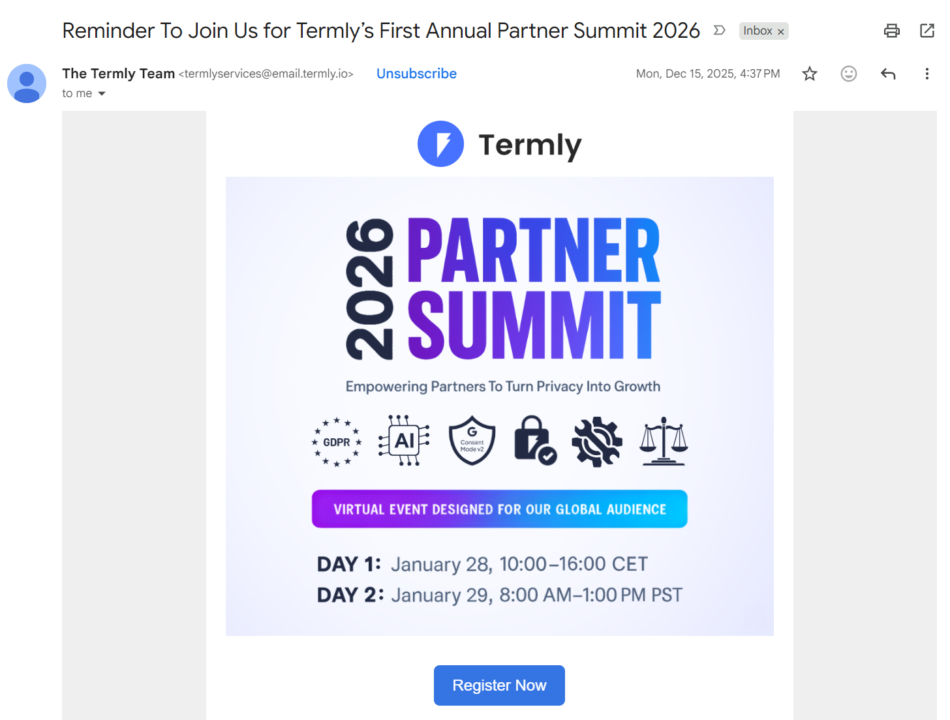
Termly’s subject line works because it leads with the purpose (reminder) and mentions the event by name. Recipients are in no doubt about what the email is about.
Adobe
Subject line: Strategic thinking takes the stage at Adobe Summit
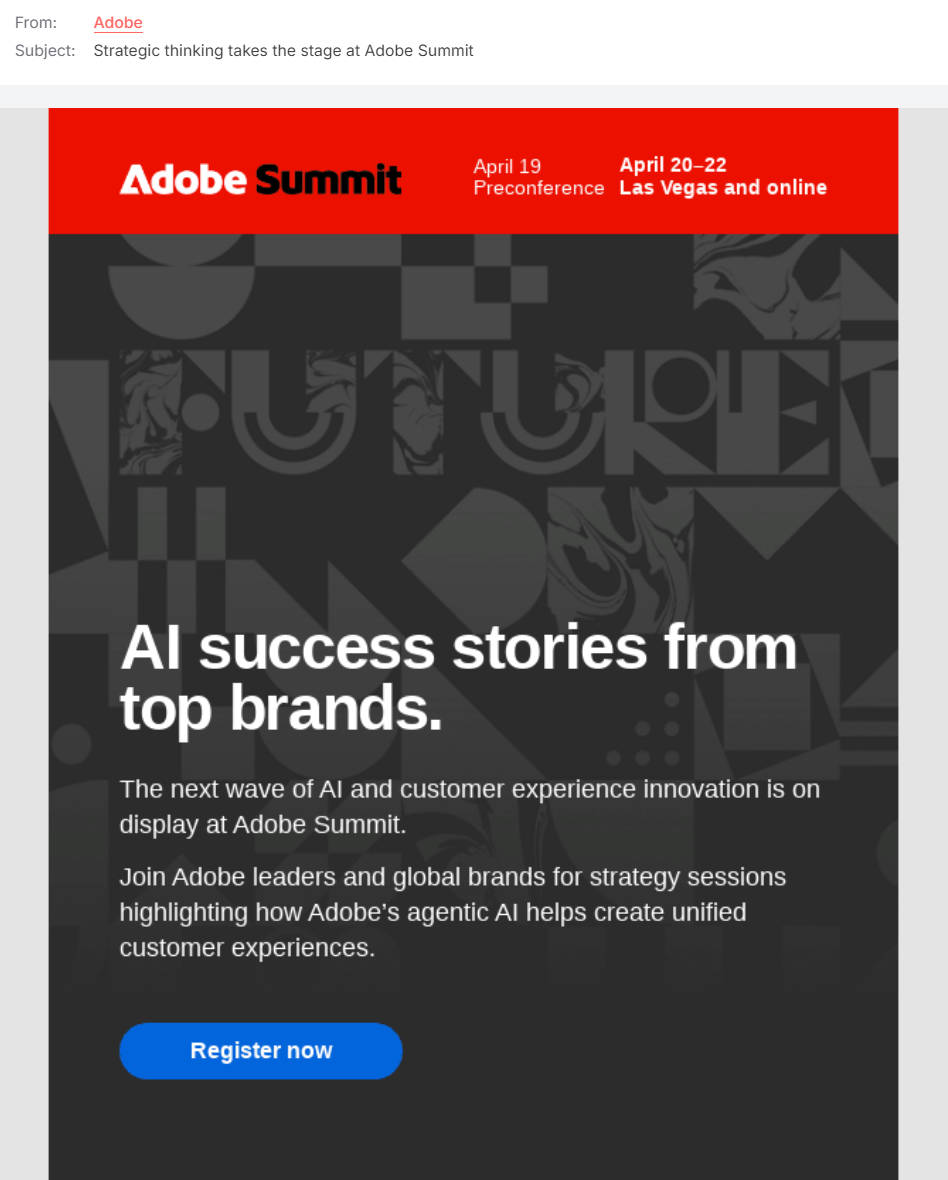
Adobe’s event invitation email uses a descriptive subject line, unlike Termly’s reminder language. That’s because it’s the first part in a series to encourage early signups.
Mini
Subject line: Exceptional offers at the MotorTober Rally Event.
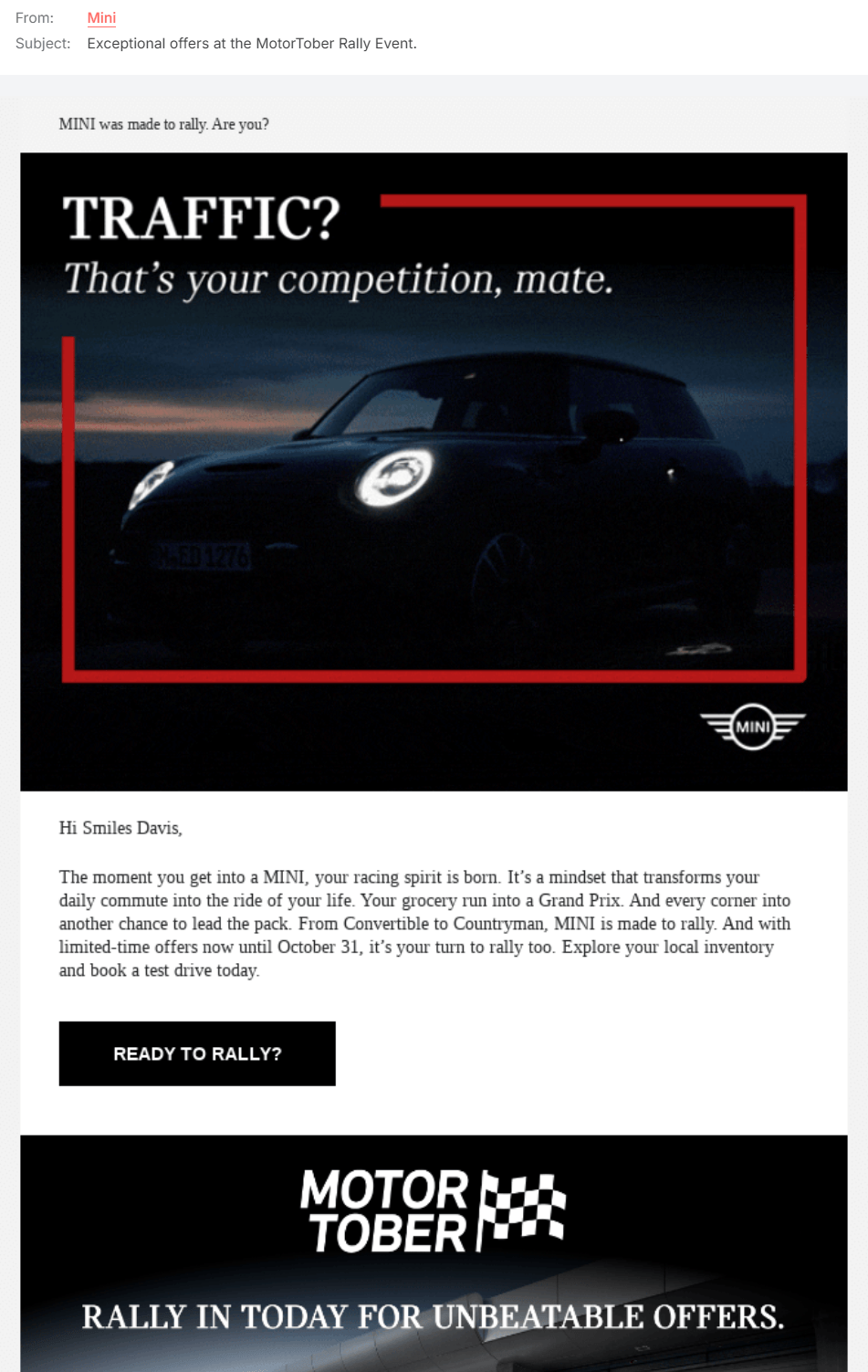
Mini’s subject line leads with the event’s benefit, “exceptional offers”, to encourage open rates. The email’s CTA button is also on-brand with “READY TO RALLY?”
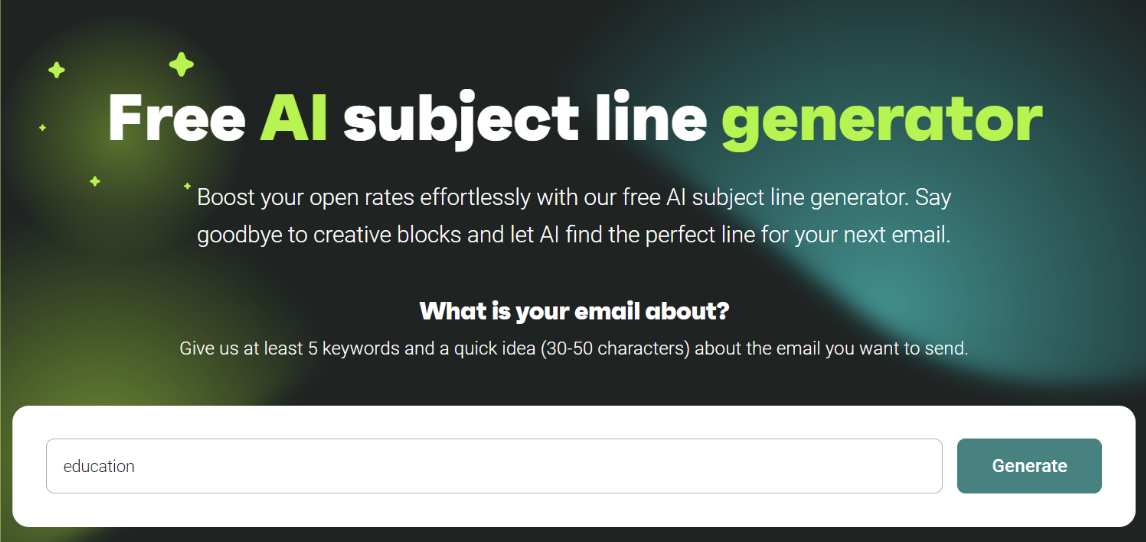
If you need some inspiration or assistance, check out Omnisend’s free subject line generator for your next invitation email.
Personalized opening line
As already mentioned, you can grab your recipient’s attention through a small touch of personalization. Including a recipient’s first name in the opening line of an email event invitation is an excellent way to do this.
This simple but effective addition can:
- Grab the reader’s attention
- Build rapport with the recipient
- Help the recipient feel more personally connected to the event
- Increase the likelihood of an RSVP
Roughly 80% of consumers worldwide say they’re comfortable with personalized experiences, and most go further, actively expecting companies to offer them (BCG).
To enhance this personability and engagement, consider sending an invitation aligned with the recipient’s purchase history.
For email invitations to events, you can also target people in your contact list who have attended similar events. For example, these recipients may receive a personalized touch such as “We loved having you at our last event!” or “Since you loved the last one!”
The event invitation email example below, built in Omnisend, leads with the customer’s name in the opening line and invites them down to the company’s London store for a shopping event:
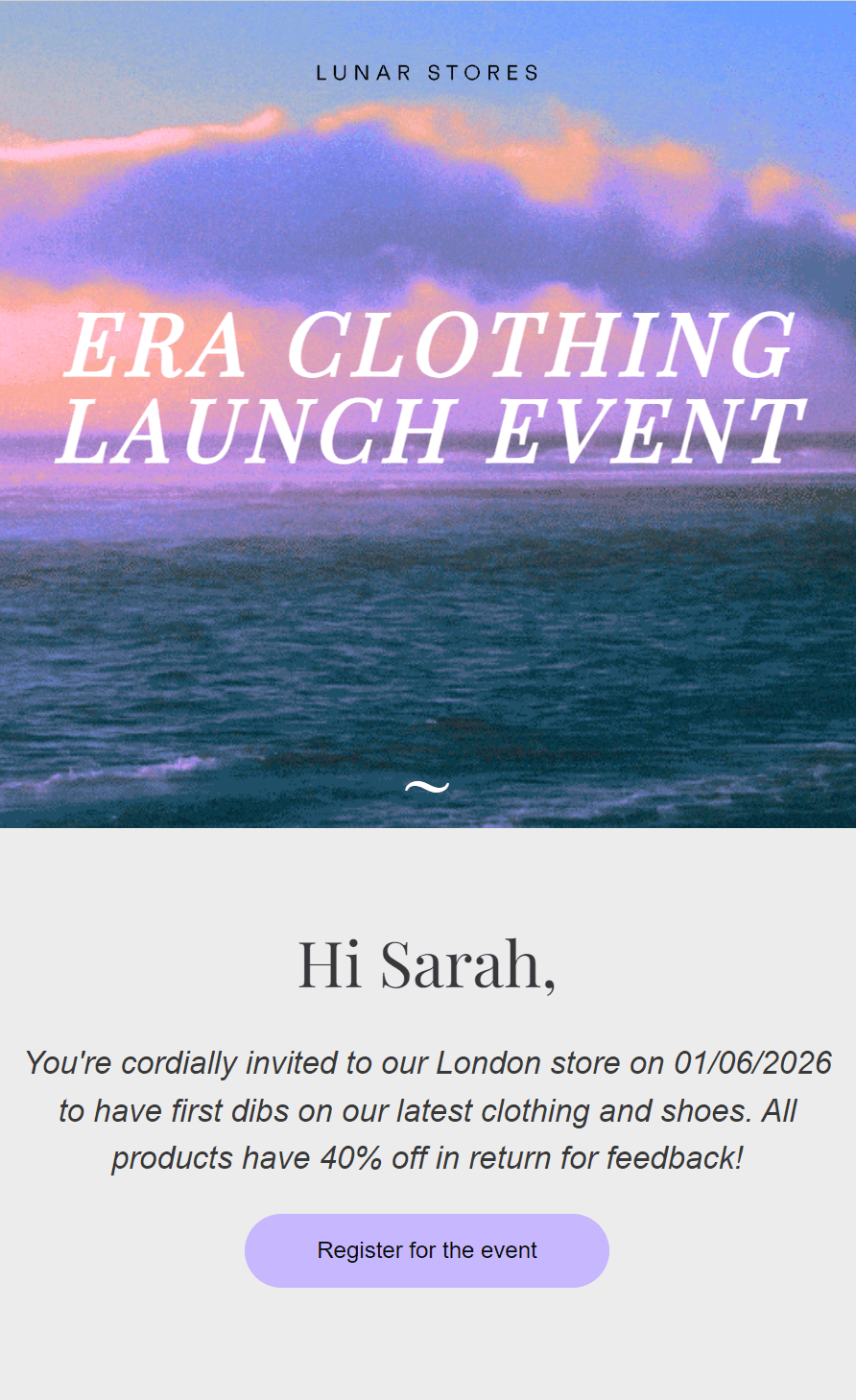
You can build the same event invite email using Omnisend’s templates. There are 250+ to choose from, with complete customization potential via the drag-and-drop editor.
Formal vs. casual invitation tone
One of the most challenging things you’ll experience with event marketing is learning how to write a formal invitation email for an event.
You see, there’s a fine line between being bland and getting people to engage. Sometimes, a touch of casualness is necessary even in the most formal invites.
When to go formal
- For corporate ceremonies and executive events
- With VIPs and Government officials
- For industry conferences, when your brand takes center stage
When to go casual
- Product launches
- Community meetings
- Internal team events and company socials
- Webinars, workshops, and networking sessions
When to blur the line
- Startup and tech events
- Conference afterparties
- Invitations for consumers
Email layout
The layout of an invitation email is crucial to its success. A clean, clear, attention-grabbing event invitation email can be the difference between a recipient RSVPing yes or no.
Effective email event invitation layouts:
- Present information clearly
- Tease information at the start and share more details further on
- Engage readers so they don’t delete your email
- Create interest so readers want to open the next email
The event invitation email example below has a good layout. It teases a smartphone case launch with an image, addresses the customer by name, and invites customers to save on their purchase with two ways to join the event:
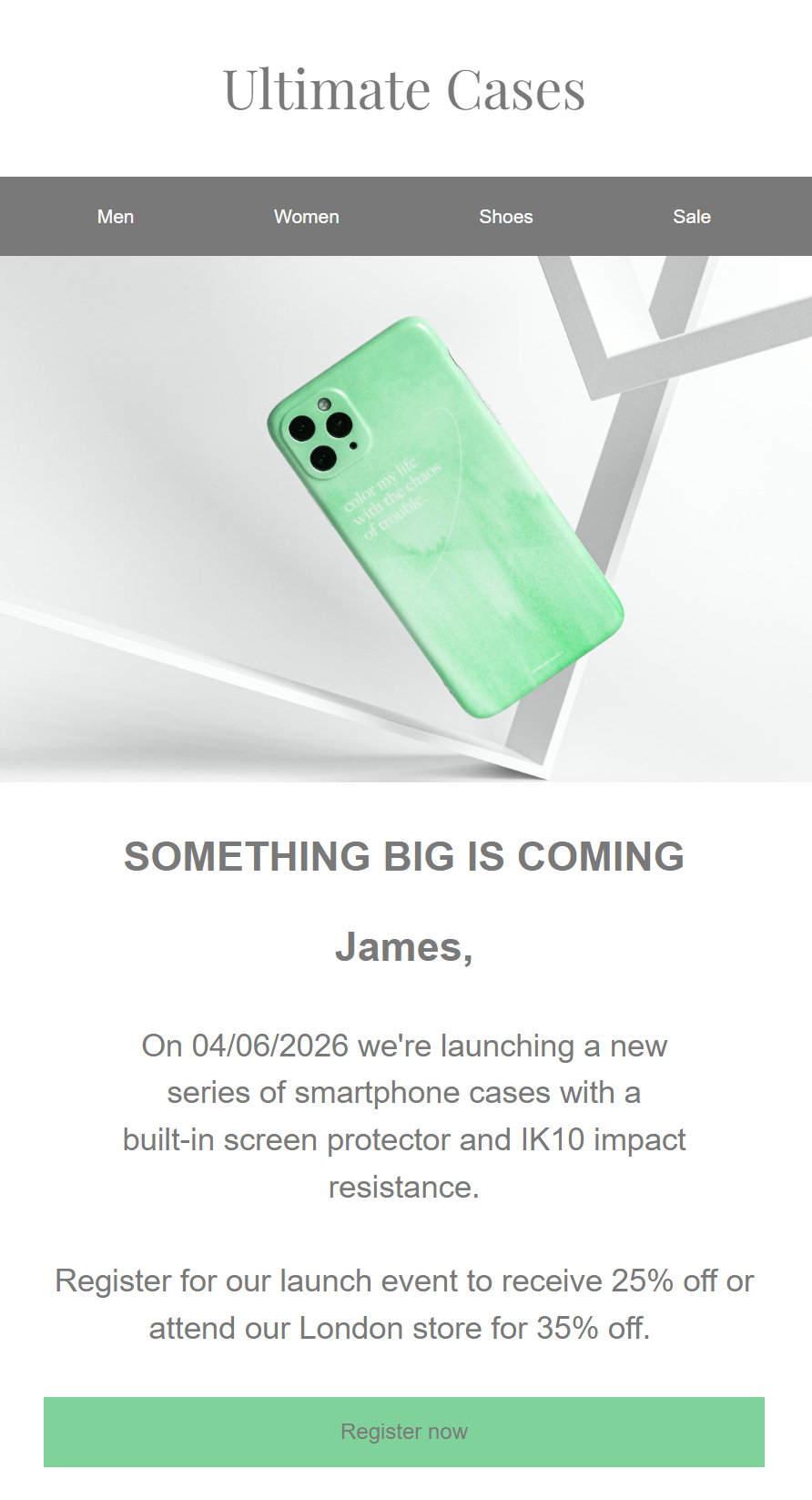
If you’re finding it hard to style your email invitation template for an event, take a look at these 15 email design examples for inspiration. An email event invitation template might be the key to getting you up and running to secure those RSVPs!
Event details
Successful event invitation emails clearly and memorably outline key details. Be sure to include essential event details such as:
- Event name
- Purpose
- Date and time
- Location
- Dress code and theme (if applicable)
- Agenda
- Special attendees or speakers
Event details should be direct and clearly visible.
Additional information could include parking details, directions, dietary restrictions, the menu, and accommodation options.
If it’s a virtual event, you may want to outline technical instructions, such as required software and equipment.
CTA
A final call-to-action (CTA) is one of the most crucial elements of a successful event invitation email. CTAs are elements, often buttons, that encourage people to take a desired action.
For example, try including a button in your email that says:
- Register now
- Don’t miss out
- Secure your place
- Buy at 20% off
You can significantly increase your event registration rate with a descriptive CTA, as it gives recipients the confidence to take the next step.
Colors also matter for CTA buttons, and the more contrast, the better. Your buttons need to pop against the email’s background so they’re easy to find:

Countdown timers are also extremely effective close to CTAs because they add urgency. Check out our definitive guide to countdown in email here.
Event email templates for different occasions
You might need one or a few email invitation templates for events, depending on how many you host and how many different audiences you’re sending to. The templates below are free to use; change the placeholders with your info, and you’re good to go.
Here’s a table to help you pick which event email templates to use:
| Event type | Formality level | Best for | Key elements |
|---|---|---|---|
| Professional meeting | Formal | Internal teams | Attendance confirmation, scheduling flexibility |
| Company party | Casual-professional | Employees | Personality, low-pressure RSVP options |
| Event registration | Neutral | Registered attendees | Confirmation details, event recap, change options |
| Business event | Formal | Clients, partners, stakeholders | Speaker/feature highlights, itinerary, clear RSVP |
| Product launch | Enthusiastic | VIP customers | Exclusivity, excitement, free perks |
| Conference | Professional but warm | Partners, employees, customers | Networking angle, landing page link, and free attendance |
| Webinar | Friendly, instructional | Digital audiences | Software instructions, easy access steps, and a reminder note |
| Fundraiser | Sincere, low-pressure | Supporters, community | Cause details, plus-one option, no donation pressure |
| Party | Fun, on-brand | Ecommerce customers, VIPs | Entertainment details, personality, simple RSVP |
| Lunch | Informal, personal | VIP customers | Personal connection, shared interests, tab covered |
Professional meeting invitation email template
An email to your team calls for a somewhat placid tone, where you want to convey the meeting’s purpose and confirm attendance expectations early, without requiring any input from anyone other than whether they’ll turn up. This template works well:
Subject line: Internal meeting invite
Hi (name),
A team meeting’s coming up.
I’ve booked a meeting in the conference room for (date, time). The whole team must attend if possible, and I can arrange a more suitable date and time if the one I’ve proposed isn’t a goer.
Please confirm your attendance below:
(CTA button)
Thank you,
(Your email signature)
The image below shows the template in practice. Rather than use plain text, this design is on-brand and brings some personality to what would otherwise be a standard invite:
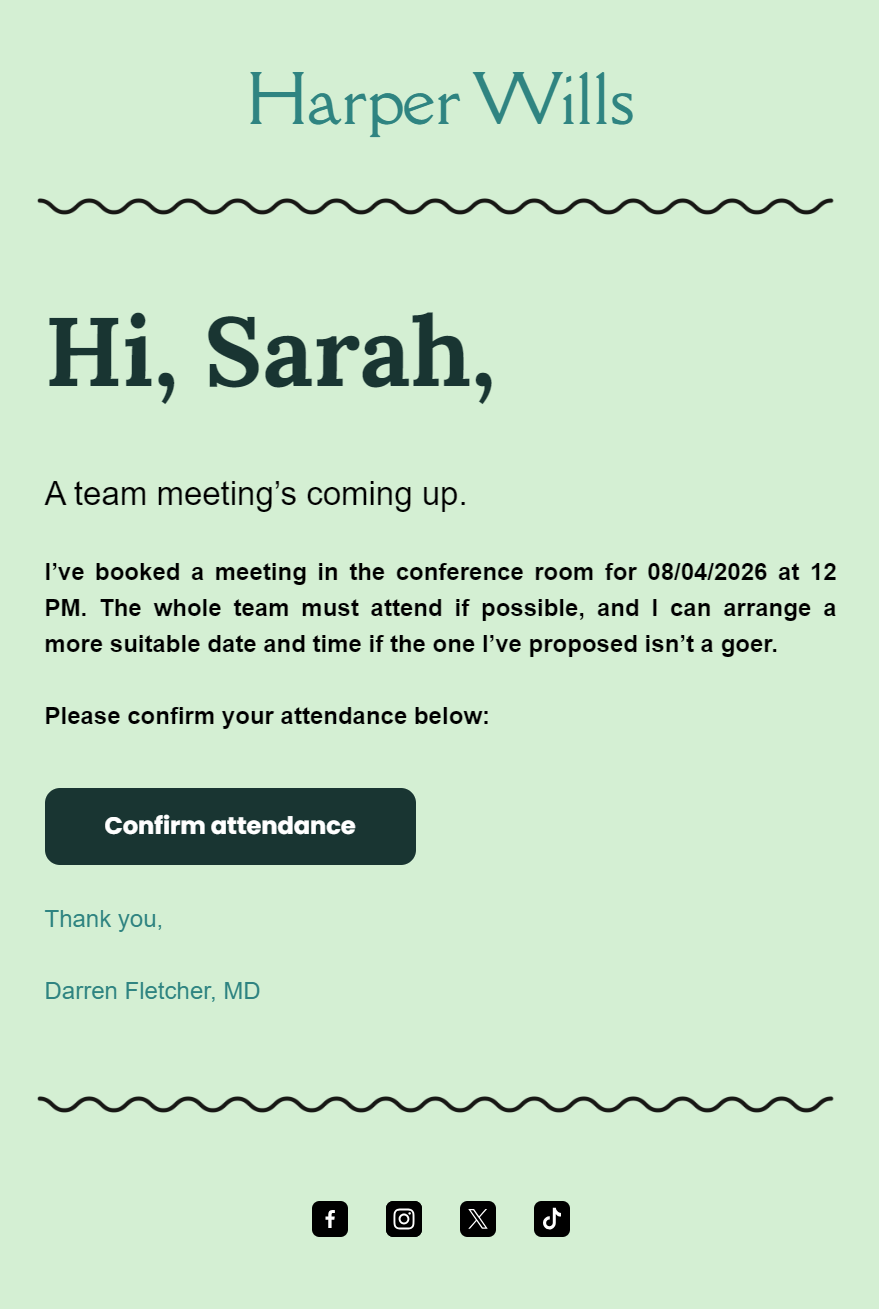
If you like that template, it’s available to use in Omnisend.
Company party invitation email template
Your company party invitation email sample can have a more informal tone than your usual corporate emails. A touch of personality relaxes the event and can encourage signups among those who aren’t that receptive to partying with colleagues.
A template you can use:
Subject line: Let’s get this party started
Exciting news,
We’re hosting a party for all team members at (location) on (date). I’m sending this email because it wouldn’t be the same without you, and we’re planning for the best. I’d appreciate it if you could say yes, no, or maybe to coming along:
(buttons for answers, multiple choice)
You can also reply to this email with any feedback.
Thank you,
(Your email signature)
Event registration email template
People who register for your event need a confirmation message letting them know you’ve received their registration. You can include any e-tickets, discounts, or other information in this email, or keep those details for a later email in your series.
Here’s a post-registration confirmation template you can use:
Subject line: Confirmed, got it, you’re in
CONFIRMED
Thank you, (name),
We’ve received your event registration details, and everything’s confirmed. We’ve added the event details below to remind you about the date and time:
(add your event details here)
If you change your mind, please reply to this email or visit the landing page (link) to update your attendance status.
Thank you,
(Your email signature)
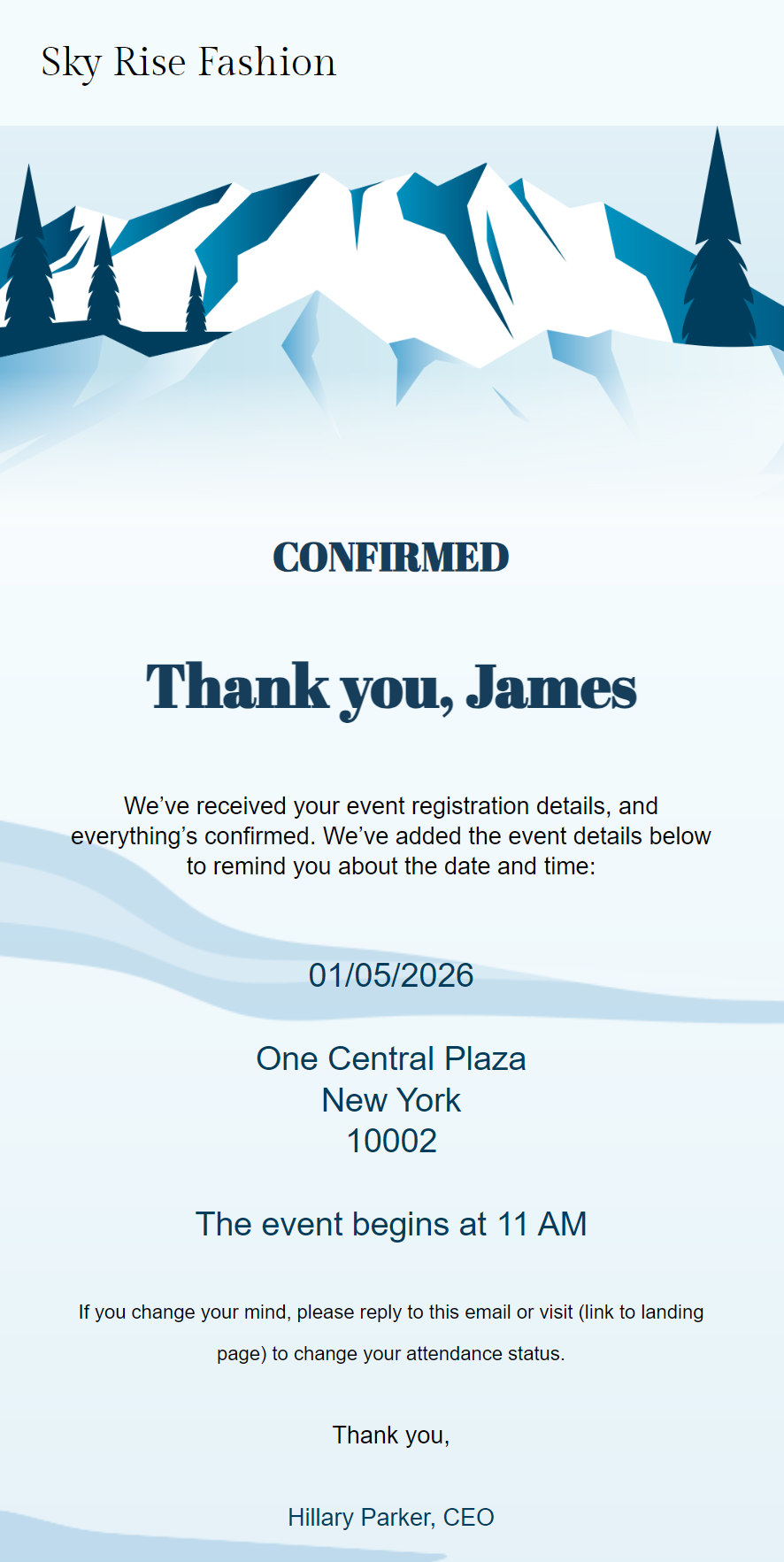
The example below shows what this template looks like with a proper design. We created it in Omnisend using one of its pre-built templates:
Business event invitation email template
Any event you’re planning for your business needs a professional email invite without any flowery language. Get the event’s core value in early (within the first sentence) and add any special points to attract RSVPs. A template that works well:
Subject line: Our (event name) is on, RSVP now
Dear (name),
Our business event hosting (speaker name, special feature) is now confirmed. It’ll take place on (date) at (location). Your attendance is greatly appreciated, and it’s easy enough to confirm using the link below:
(add a link to your event landing page)
Why attend (event name)? Five reasons:
(add your event’s itinerary)
Thank you,
(Your email signature)
Product launch invitation email template
Launching a product is the most exciting reason to send an event invitation email to your ecommerce store and its customers who adore your brand. Your subject line and intro must build excitement and link into the CTA to encourage RSVPs. A template to use:
Subject line: We’re launching (product), and you’re invited!
Hi (name),
We’re extremely excited to announce the launch of (product) and are throwing an exclusive event for it. You’re one of our VIPs, a truly top customer, and we would like for you to come on by and share the love.
Attendance is free, and we’ll have food and drink on the go. Please RSVP to this email, and I’ll book you in. Event details:
(add your event’s name, date, and time)
Looking forward to it,
(Your email signature)
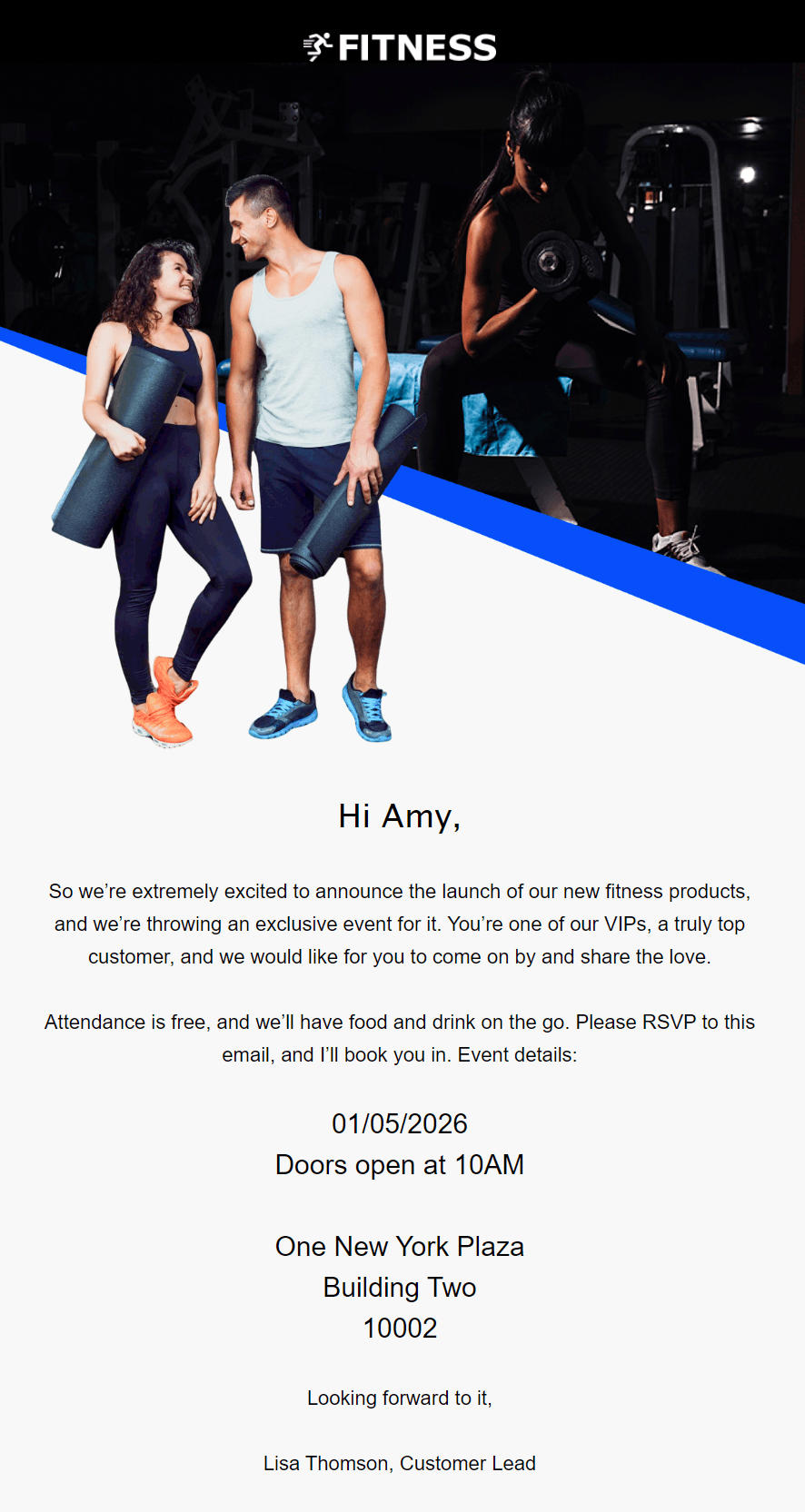
Check out the visual example below with this content in a professional design:
Conference invitation email template
Conferences aren’t the most exciting of events, but that doesn’t mean your conference invite email can’t generate some energy around it. Here’s a template you can use to keep it professional without boring recipients:
Subject line: Conference invite details attached
Hi (name), our conference is coming up,
We’re inviting you to (conference name) as a valued (partner/employee/customer). It’s your chance to connect with like-minded people and share your knowledge.
All conference details can be found below. We’ve provided a link to our landing page to manage bookings. It’s free to attend.
(add a link to your conference landing page)
Thank you,
(Your email signature)
Webinar invitation email template
Webinars are purely digital and easy to attend, but some may find it difficult to use multiple software tools such as Wistia, Zoho, and others. Make it clear how people can attend and add instructions for those who need them. The template below works well:
Subject line: Join our webinar on (date)
Hi (name),
EXCITING NEWS
We’ve got a webinar coming up covering (topic, subject). You’re welcome to attend to share your knowledge and thoughts.
The webinar will use (software). It’s easy to attend. Visit (URL), enter your email, and you’ll get access. We’ll send a reminder in a week.
Thank you,
(Your email signature)
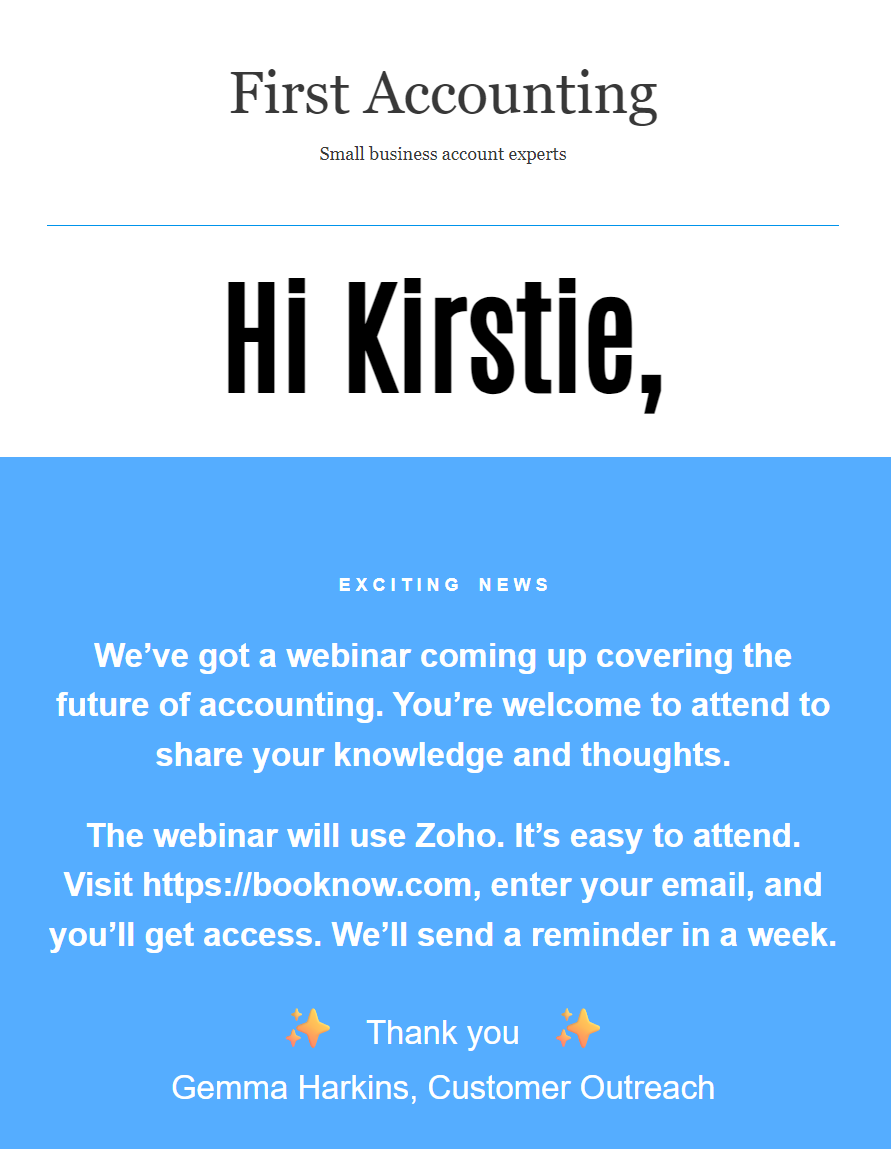
The email design below keeps things professional and places all important webinar event details into a blue box so they’re unmissable:
Fundraising event invitation email template
Fundraisers are money-spinners for charities and other causes. But your event invitation email shouldn’t push that angle. You want to maximize attendance rather than add any pressure with donations. The template below is a good option to keep it professional:
Subject line: Fundraising event for (cause) confirmed
Hi (name),
We’re throwing a fundraising event to spread awareness for (charity/cause). Please RSVP by (date), and we’ll send over a ticket or two if you’re bringing a +1.
(Add information about the charity/cause here. It’s worth adding to hit home the importance of the event to your company)
Thank you,
(Your email signature)
Party invitation template
Party invitation emails are for your ecommerce customers and stakeholders, not employees. Your emails here can have loads of personality and be on-brand to get VIPs and other crucial customer groups to attend. Here’s a template:
Subject line: An invitation to our (party name)
Hi (name),
A party for you and us, it’s a perfect match. We’re getting around (number of people) together on (date) to celebrate (occasion). You’re invited, of course, and all you need to do to grab your ticket is reply to this email with a yes.
The party will have loads of entertainment, food, and drink. Here’s what’s on:
(Include details about what’s on)
See you there!
(Your email signature)
Lunch invitation email template
Lunches are the most informal of events, best reserved for your VIPs. Your lunch event invitation email should create a connection with your customer by referencing them by name and alluding to your shared interests. Here’s a template you can use:
Subject line: Join us for lunch on (date) at (location)
Hi (name),
You love food, and so do we. So, let’s get together for something to eat and catch up on what makes our relationship so special and discuss (topic).
We’ll pick up the tab. Join here > (link to landing page to capture RSVPs)
See you there!
(Your email signature)
Event invitation email examples to inspire you
Check out these event marketing email examples:
1. The Good Trade
Industry: Content publication, fashion
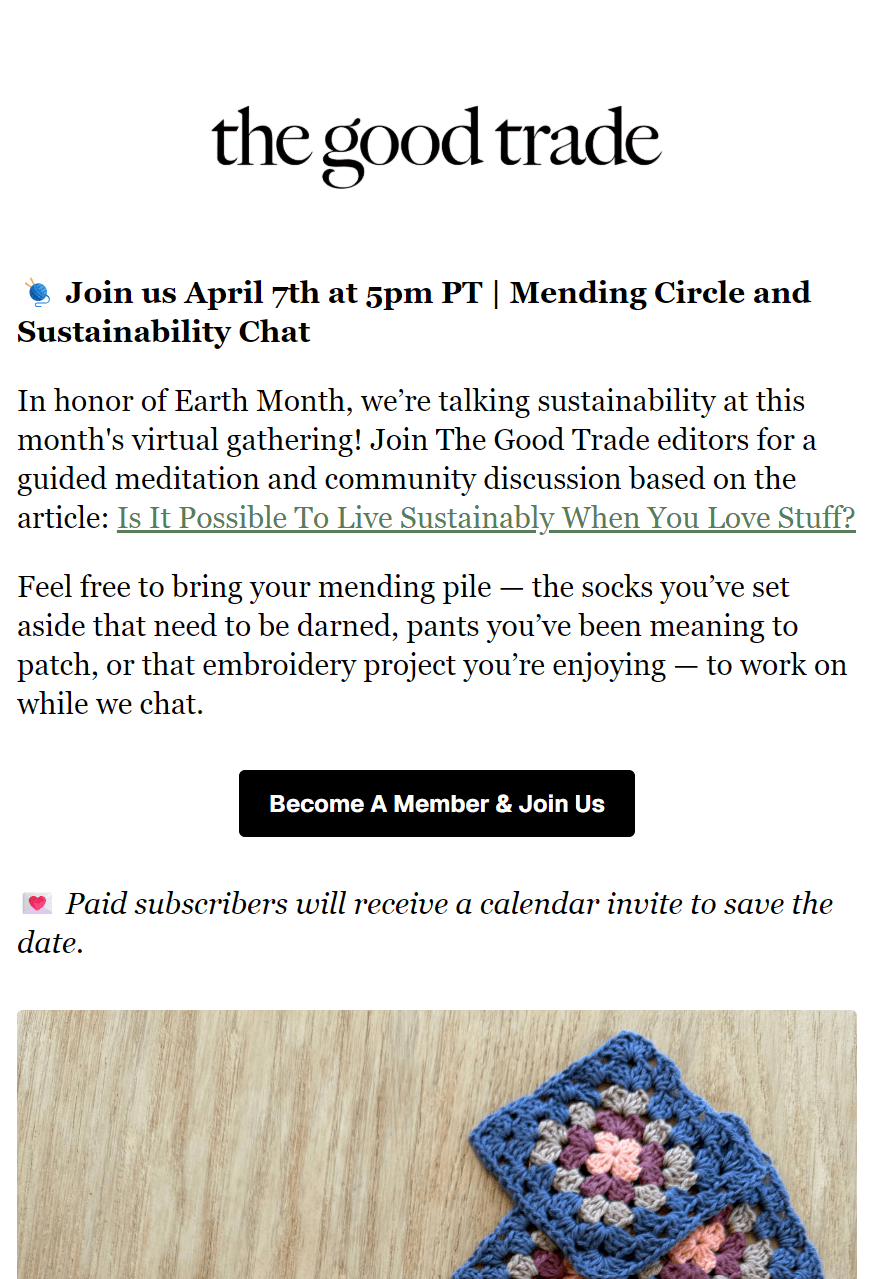
The Good Trade is a US-based fashion and lifestyle content publication. It sends newsletters and hosts exclusive webinars and chat sessions for subscribers, and sends event invitation emails to non-members to increase its sign-up rates.
We appreciate The Good Trade’s email because it leads with the chat event date, time, and the name in bold, giving recipients the information they need at a glance.
The black CTA button is clearly meant for non-members, “Become A Member & Join Us,” and there’s a nod to existing customers with the sentence below mentioning that paid subscribers will receive a calendar invite to save the date.
What works well
- The white background and standard text fonts focus all attention on the message
- Leading with event details provides upfront value
- The black CTA button visually links up with the bold text, creating a journey to action
2. Veeam
Industry: IT software, subscriptions
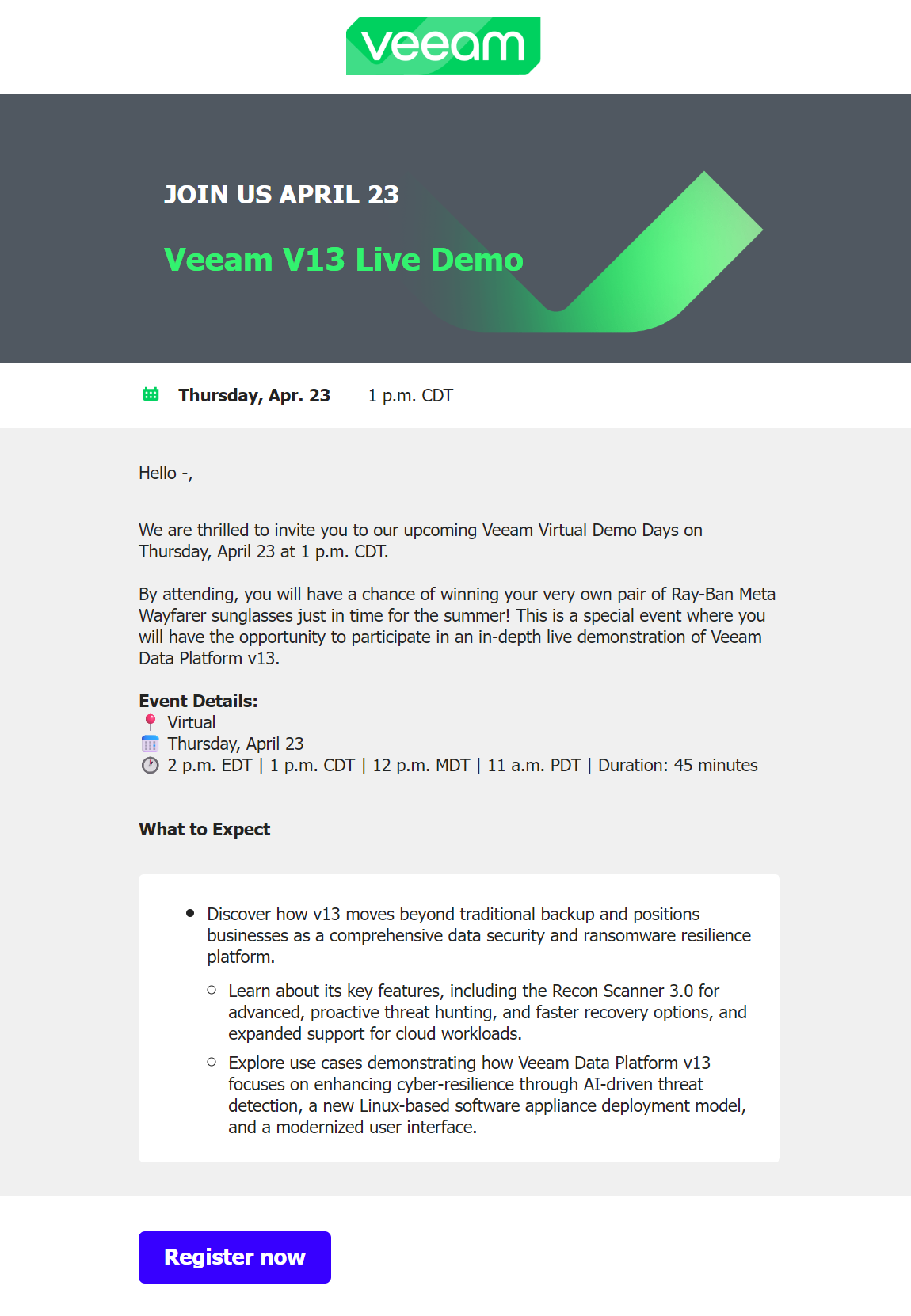
Veeam is an IT solutions company primarily serving the data protection and backup market. It sends invitation emails to subscribers, with the email above promoting its Veeam V13 Live Demo.
The email’s header leads with a branded image and the date and event name in large lettering, with a smaller banner below covering the weekday and time, too. It complements the descriptive subject line, “You’re invited: Veeam V13 virtual demo.”
A unique aspect of Veeam’s email is the giveaway for Ray-Ban Meta Wayfarer sunglasses. One lucky person will win them, and it’s a good enough reason for passive customers to attend who might be receptive to upgrading to V13.
What works well
- The grey top header with a green V graphic is perfectly on-brand
- All event details are available in the header and first content section
- Running a giveaway encourages attendance among hesitant subscribers
3. Teachable
Industry: Knowledge products, ecommerce platform
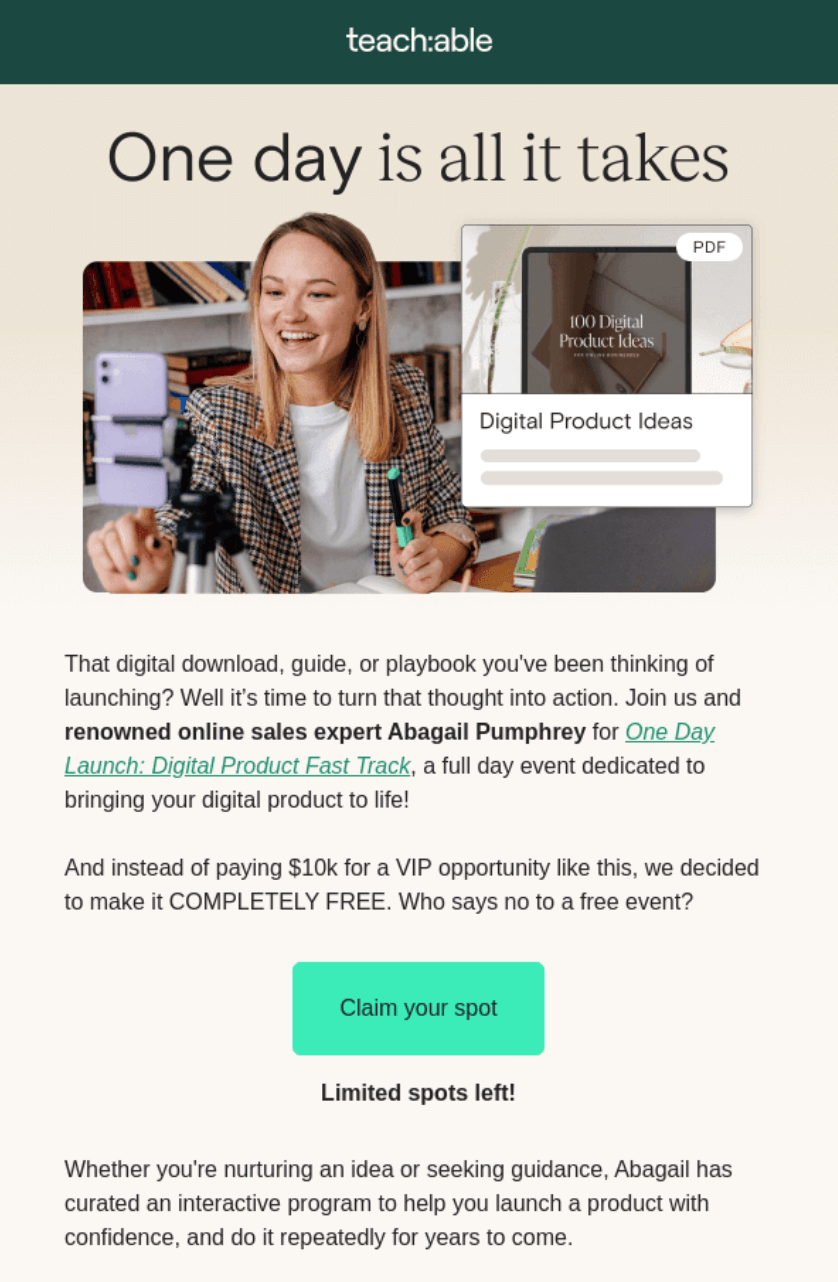
Teachable is an online marketplace for building and selling courses. Its event marketing emails include invites to programs and courses with discounted prices, with the one above promoting the One Day launch: Digital Product Fast Track course.
There are a few things that make this email effective, starting with the image of a woman smiling and enjoying studying. The cheerful tone then extends into the content with a value proposition ($10K in value, available for free).
The green CTA button stands out because it’s a lighter shade than other green elements, and it conveys urgency thanks to the “Limited spots left!” text below it.
What works well
- It has a cheery tone of voice to encourage engagement
- The content establishes authority with the name of the expert in the course
- Mentioning $10K of value for free is about as generous an incentive as you can get
4. Harveys
Industry: Fashion, apparel, ecommerce
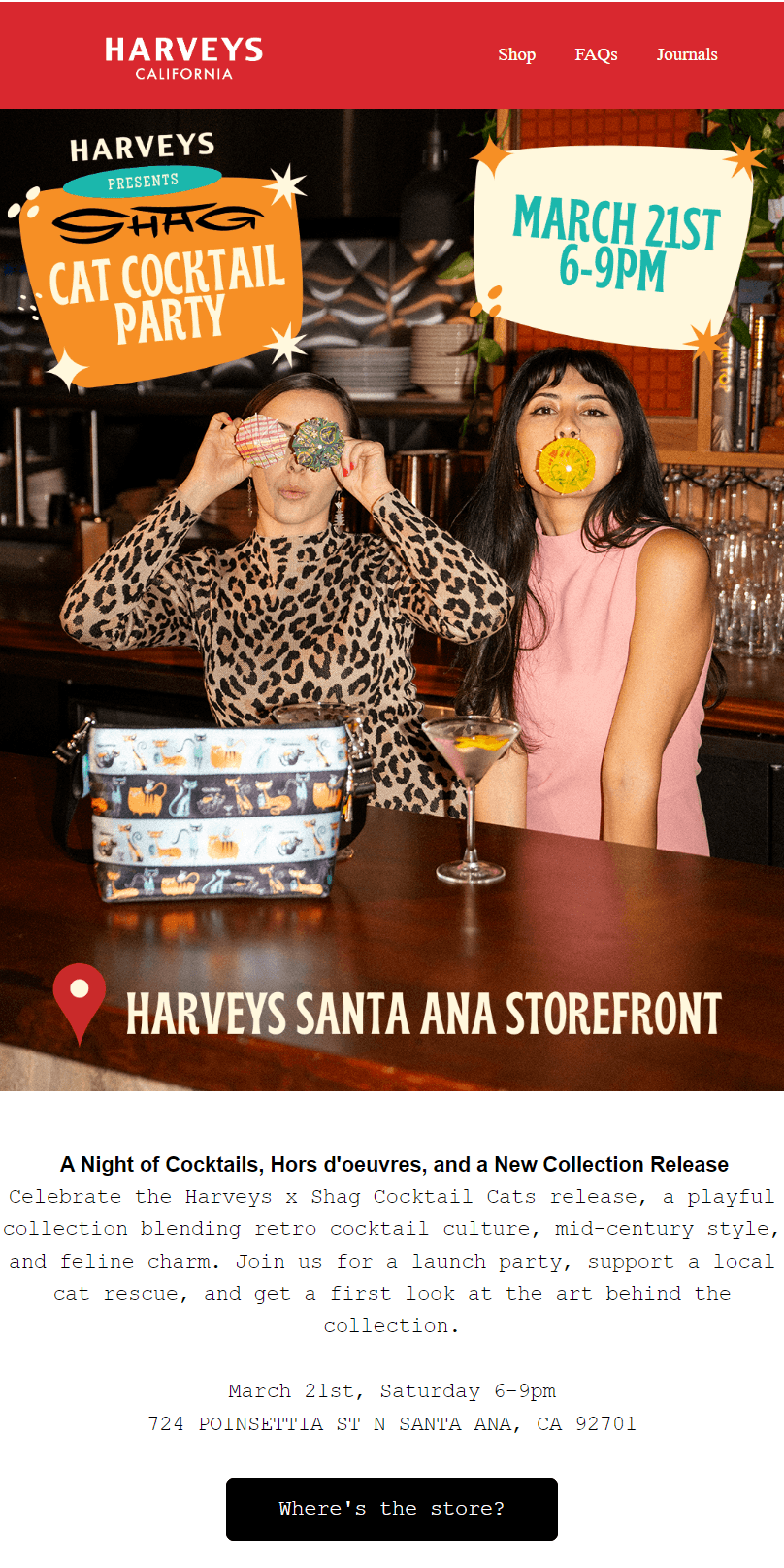
Handbag retailer Harveys launches new products in style with physical store parties. It promoted its latest party via email, inviting VIPs to its California store for a first look at the Harveys x Shag Cocktail Cats release.
The email’s top image does all the heavy lifting. It shows two women having fun behind the bar, with a cocktail and the handbag resting on it, setting the tone for a fun event. It also has a date and time overlay and a location pin with the store name.
“A Night of Cocktails, Hors d’oeuvres, and a New Collection Release” in bold text introduces the content section. Customers need only drop by, so the event’s CTA button links to the company’s Our Store page with location info.
What works well
- The lead image is euphoric and captures the event’s purpose
- The content covers what to expect at the party, not just what’s happening
- It pushes in-store exclusives and giveaways to encourage people to attend and give to charity
5. Space NK
Industry: Beauty, ecommerce
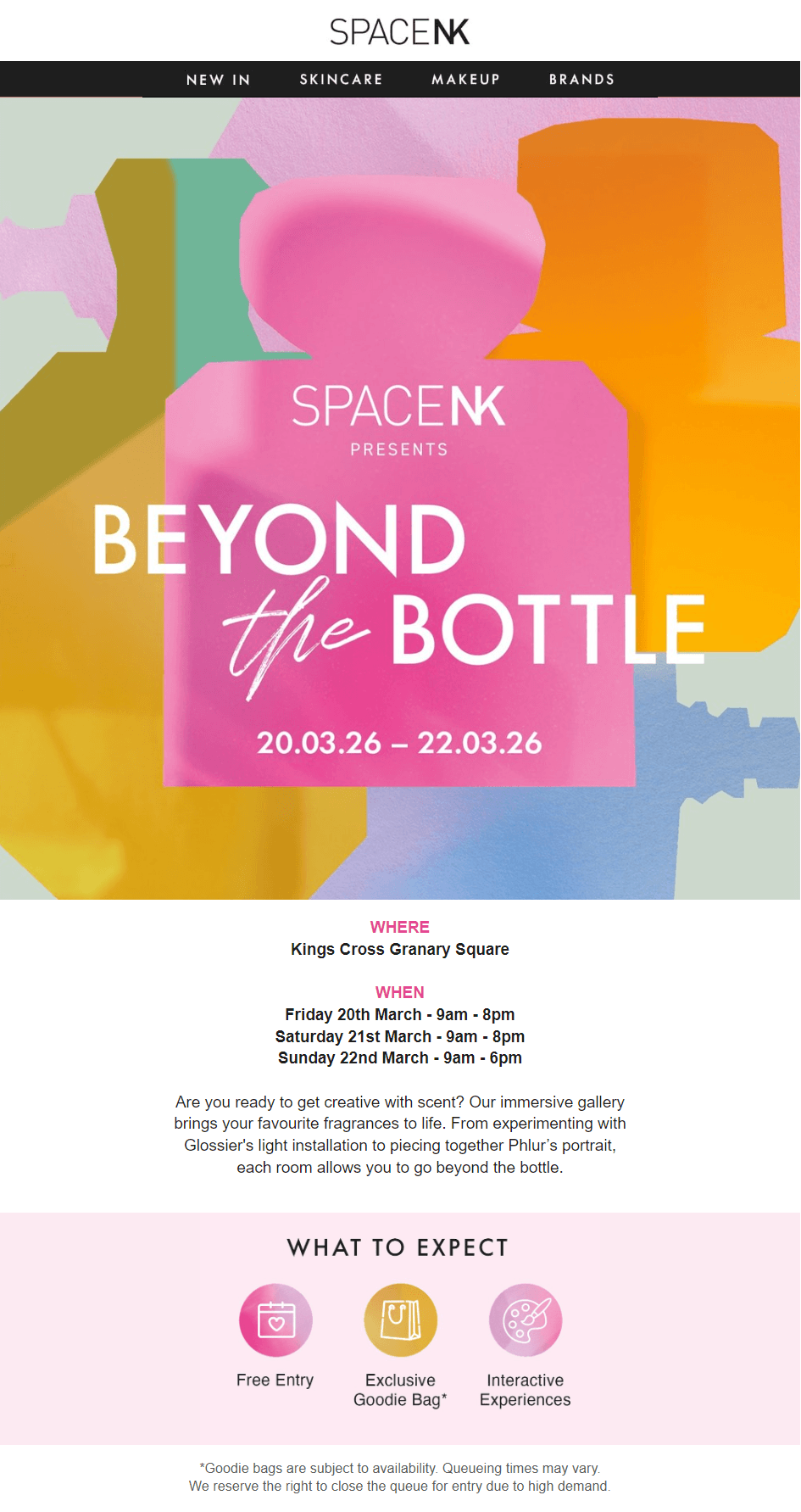
Luxury beauty brand Space NK hosted an event at King’s Cross Granary Square, London, in March 2026, where customers could create their own scents and learn more about scent-making.
Leading its event invitation email with the subject line, “Your exclusive invite to Beyond The Bottle,” made recipients feel special. Opening the email reveals a colorful, on-brand image with overlay text for the event’s name and date range.
The text below the image is descriptive and well laid out. It lists the WHERE, WHEN, and WHAT TO EXPECT, with the latter section using icons to draw the eye. There’s a pink CTA button below it and information about more upcoming events.
What works well
- The subject line makes every recipient feel like a VIP
- The headings, such as WHERE and WHEN, help recipients scan for information
- There’s significantly more content below the fold to nurture customers and encourage shopping, so even non-attendees get value from it
6. Goody
Industry: Business gifts, ecommerce
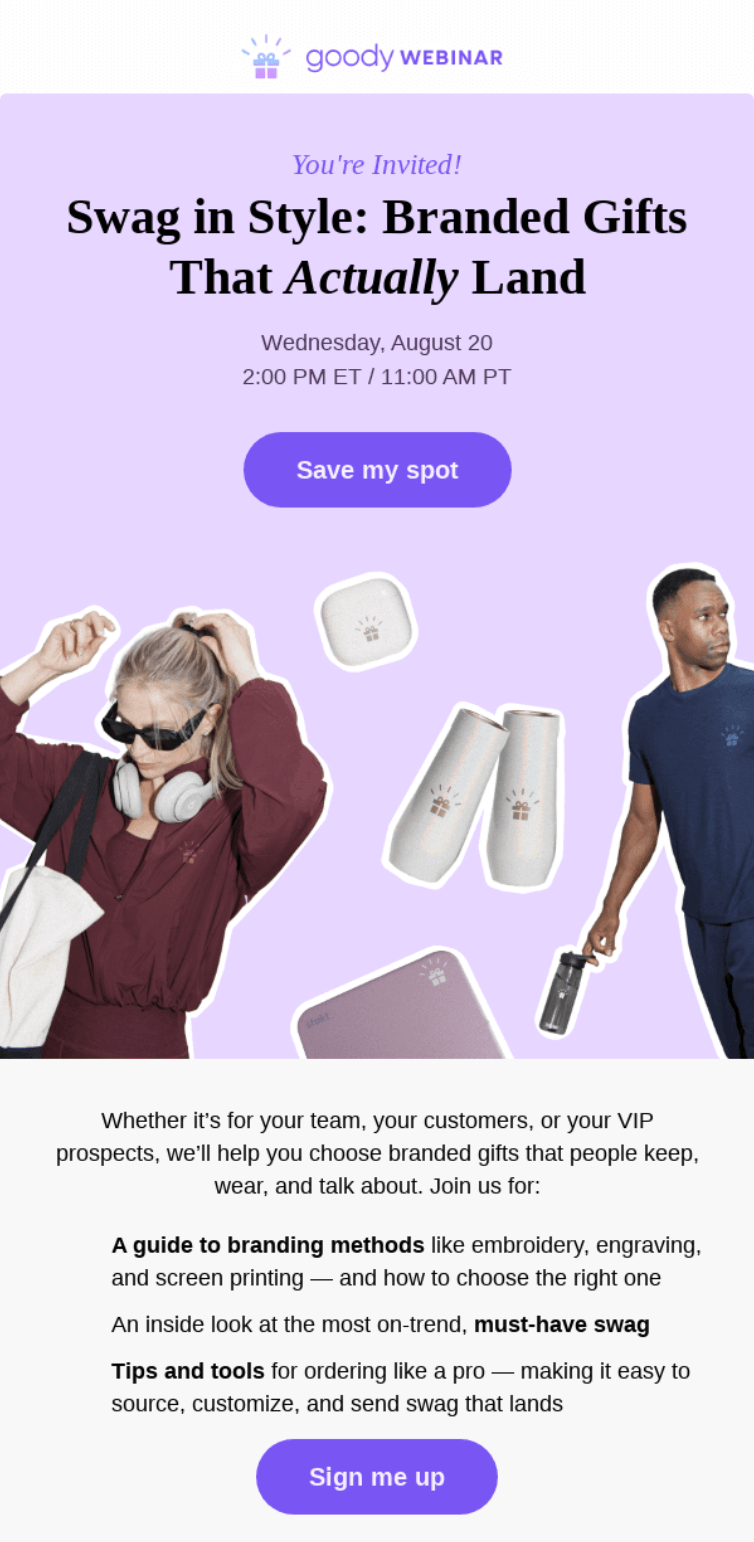
Goody is a corporate gifting platform that lets businesses set a budget and purchase gifts with delivery. It hosts webinars to help customers pick gifts, with the event invitation email above sent to customers who have shown an interest in branded gifts.
It leads with the subject line “You’re invited: SWAG” to set the tone for an edgy webinar. The email’s top image backs it up with a lady snazzily dressed in gift options. There’s a purple “Save my spot” CTA button in the image below the event’s date and time info.
The informal content here offers multiple reasons to attend, including a guide to branding methods, an inside look at must-have swag, and tips and tools. There’s also a meme of Chris Pratt, “when the swag is so good”, a nice touch for younger audiences.
What works well
- The email design appeals to modern brands to push technology and lifestyle products
- Light purple and grey sections separate informational and personality-led content
- There are four purple CTA buttons, each targeting the next swipe on a mobile device
7. Artnet
Industry: Artworks, ecommerce
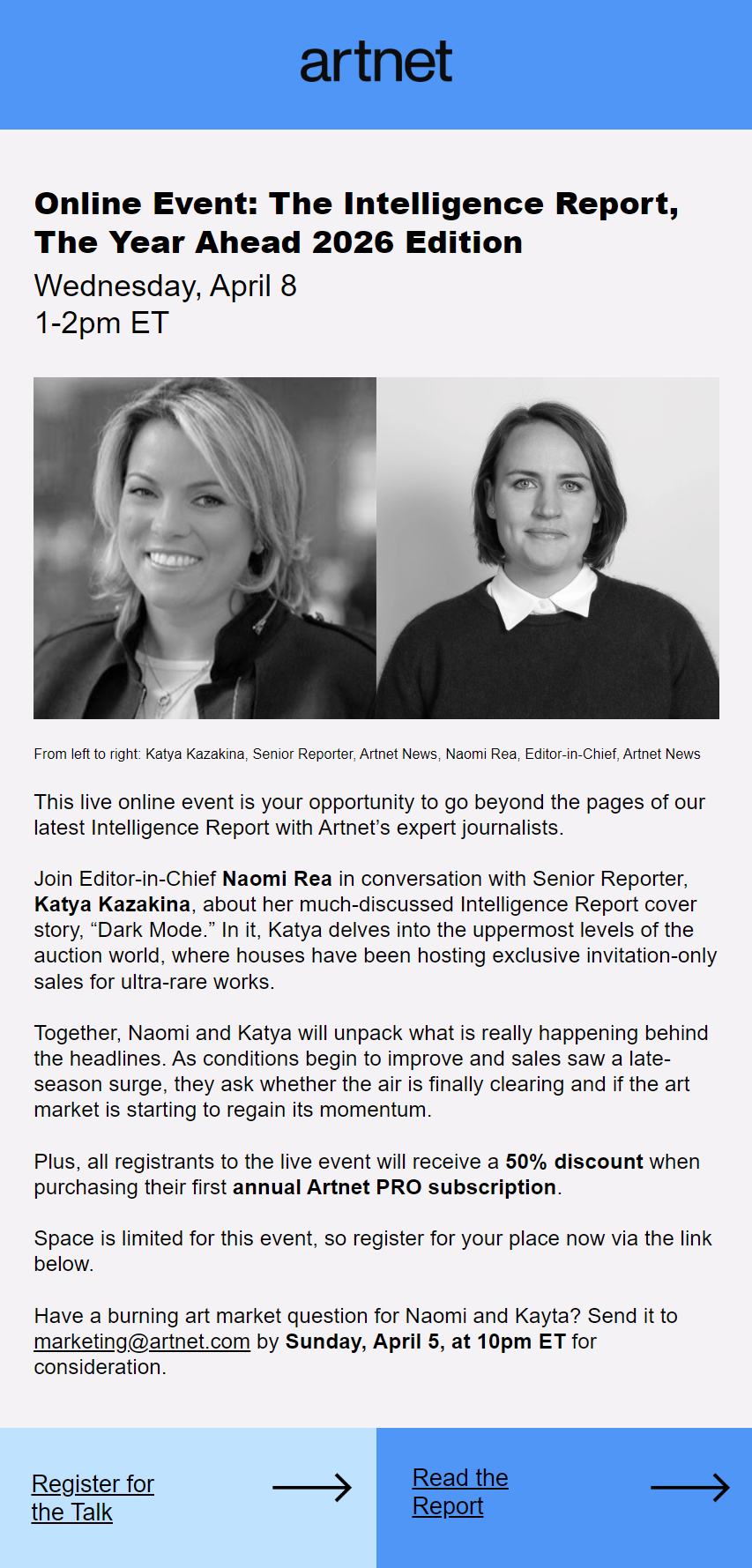
Artnet lets people buy, sell, and research contemporary art in one place. It also hosts regular discussions to build expertise and share market insights.
One of its latest events was a live online conversation between Editor-in-Chief Naomi Rea and Senior Reporter Katya Kazakina, which delved into findings from their latest Intelligence Report.
Its event invitation email leads with the date and time, puts faces to the speakers’ names, and uses two distinct CTAs (one to register, one to read the report beforehand) so recipients can engage at different levels.
What works well
- Photos of the speakers help recipients feel connected to the event
- “Space is limited,” and a deadline for submitting questions creates time pressure
- The 50% Artnet PRO discount sits near the bottom after establishing the event’s value
8. Villa & House
Industry: Designer furniture, online catalog

Designer furniture and homeware retailer Villa & House ran a pop-up fundraiser called The Studio, donating proceeds from sales to the charity Dwell with Dignity.
It attracted visitors to its event with the above email, which uses a hero image to convey the quality on offer and groups the event details below.
Leading with the cause in this email is crucial to its success. Recipients learn why the event matters before being asked to show up, a framing choice that turns the furniture sale into something worth making time for.
What works well
- The event date, time, and location are grouped at the bottom of the first content section, making them easy to find
- A “LEARN MORE” CTA button encourages people to find out more
- The email extends to inviting people to the Dallas showroom, potentially bringing in footfall for additional sales
9. Snowflake
Industry: SaaS, AI data management
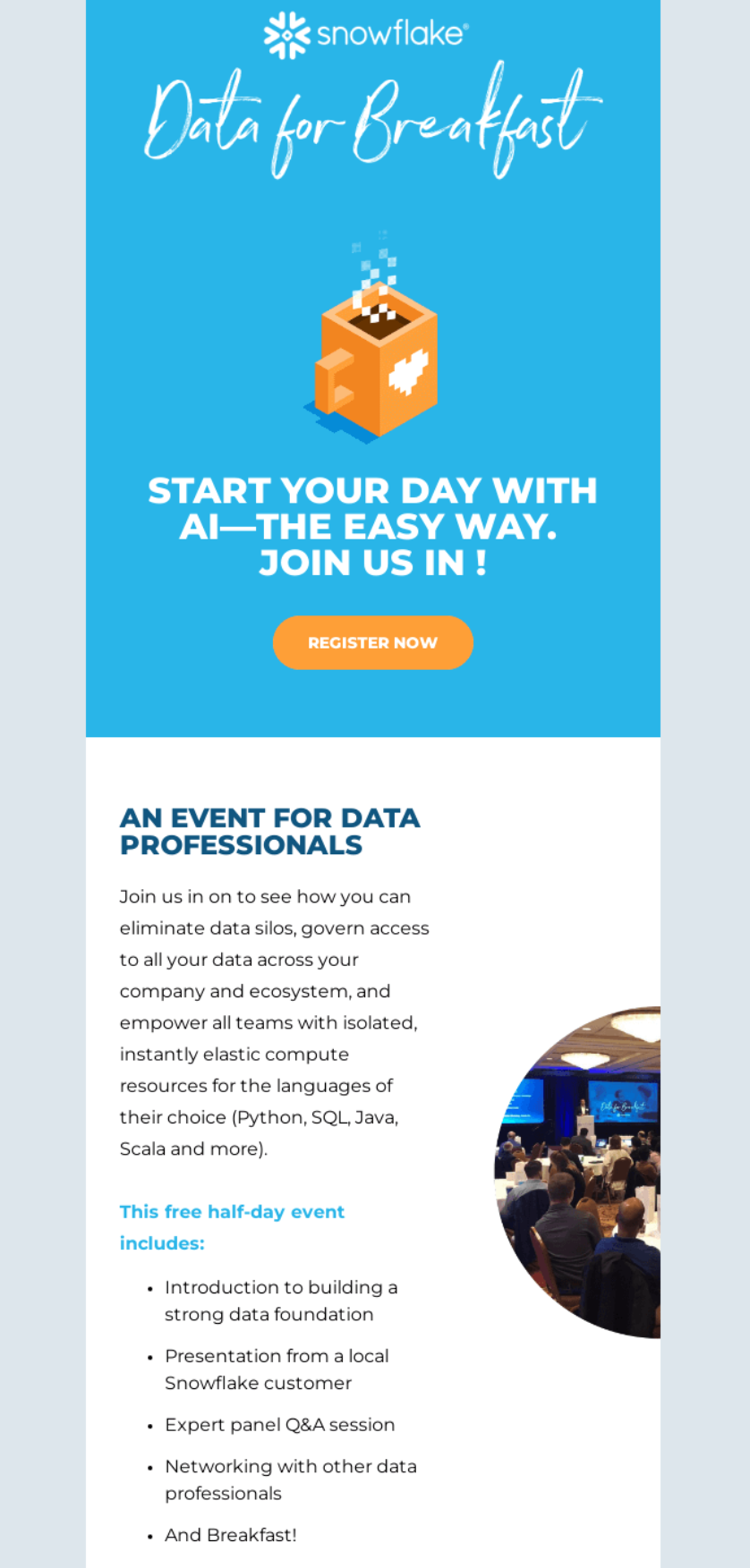
Snowflake is a cloud data platform used by businesses to store, manage, and analyze data. It runs in-person events for data professionals, including its recurring Data for Breakfast series.
The event invitation email above promotes a free half-day session covering data foundations, customer presentations, expert panels, and networking. The playful name and breakfast hook give a technical event a more approachable feel.
Its header does double duty. The “Data for Breakfast” branding and the pixelated coffee cup illustration set the tone, while the “Register Now” CTA sits within the hero, making it the first action recipients see.
What works well
- The bullet-pointed agenda tells recipients exactly what they’ll get
- Calling it a “free half-day” removes two of the biggest barriers to signing up for a corporate event
- The photo of a previous session adds social proof and helps recipients picture themselves in the room
10. HEAL’S
Industry: Contemporary furniture, ecommerce
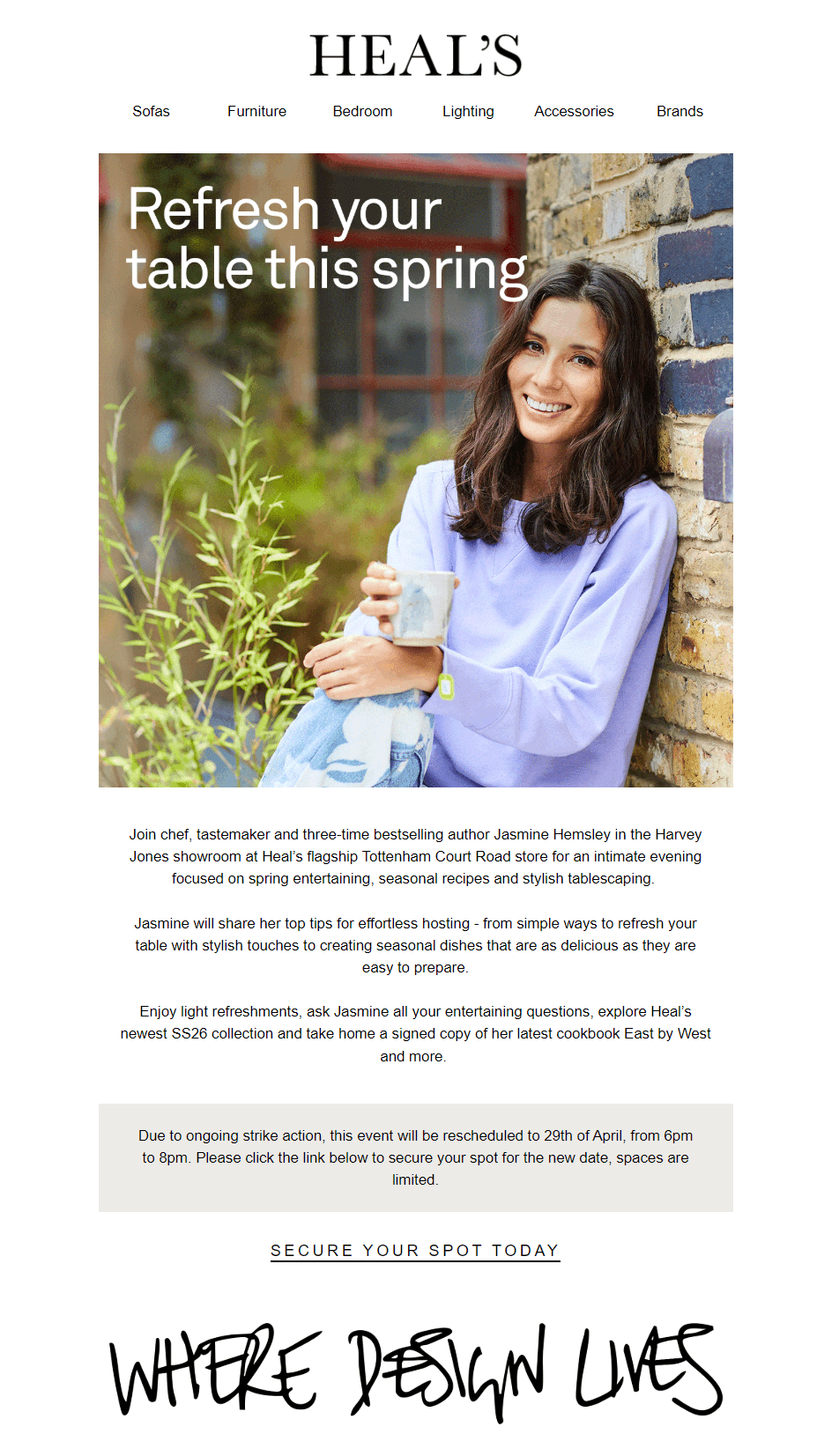
British Furniture retailer Heal’s collaborates with authors and other creatives to host in-store events. The event invitation email example above invites customers to an evening with chef and author Jasmine Hemsley.
Rather than leading with product, the hero image puts Jasmine front and center, giving the email an editorial quality. Perks like refreshments, a Q&A, and a signed cookbook build up throughout the body copy, so by the time recipients reach the CTA, there are multiple reasons to attend.
What works well
- Naming the showroom and store gives the event an exclusive, curated feel
- The rescheduling notice sits in a grey highlight box, so it’s impossible to miss
- Stacking multiple takeaways (tips, recipes, signed cookbook, new collection) gives different types of customers a reason to show up
Event email marketing: Complete campaign strategies
Event email marketing includes pre- and post-event sequences to connect with customers, spread the word, and collect verified (or highly likely) attendees. Sending one email and letting it do all the work will only leave RSVPs on the table.
These are the strategies to follow for maximum success:
Pre-event email sequences
Your event invitation email doesn’t have to be the first showing for your campaign. A pre-event email template and sequence builds anticipation and helps people plan for the event, which in turn increases your RSVPs and attendance numbers.
A series of pre-event email examples looks something like this:
- Email one: A teaser with the date and time, sent six weeks before the event. It gives your audience enough time to plan and save the date.
- Email two: A reminder for three weeks out from your event. This one should set up email three and explain how they can book.
- Email three: The event invitation email, sent two weeks in advance, allowing your recipients to RSVP, book their place, and confirm their attendance.
- Email four: A thank-you email sent to recipients who take action within email three, so that they know their input was registered.
The image below shows how that sequence looks in Omnisend’s flow builder. The first email goes out immediately to the segment, the second after three weeks, and the third after two weeks. A final confirmation message goes out only after the customer RSVPs:
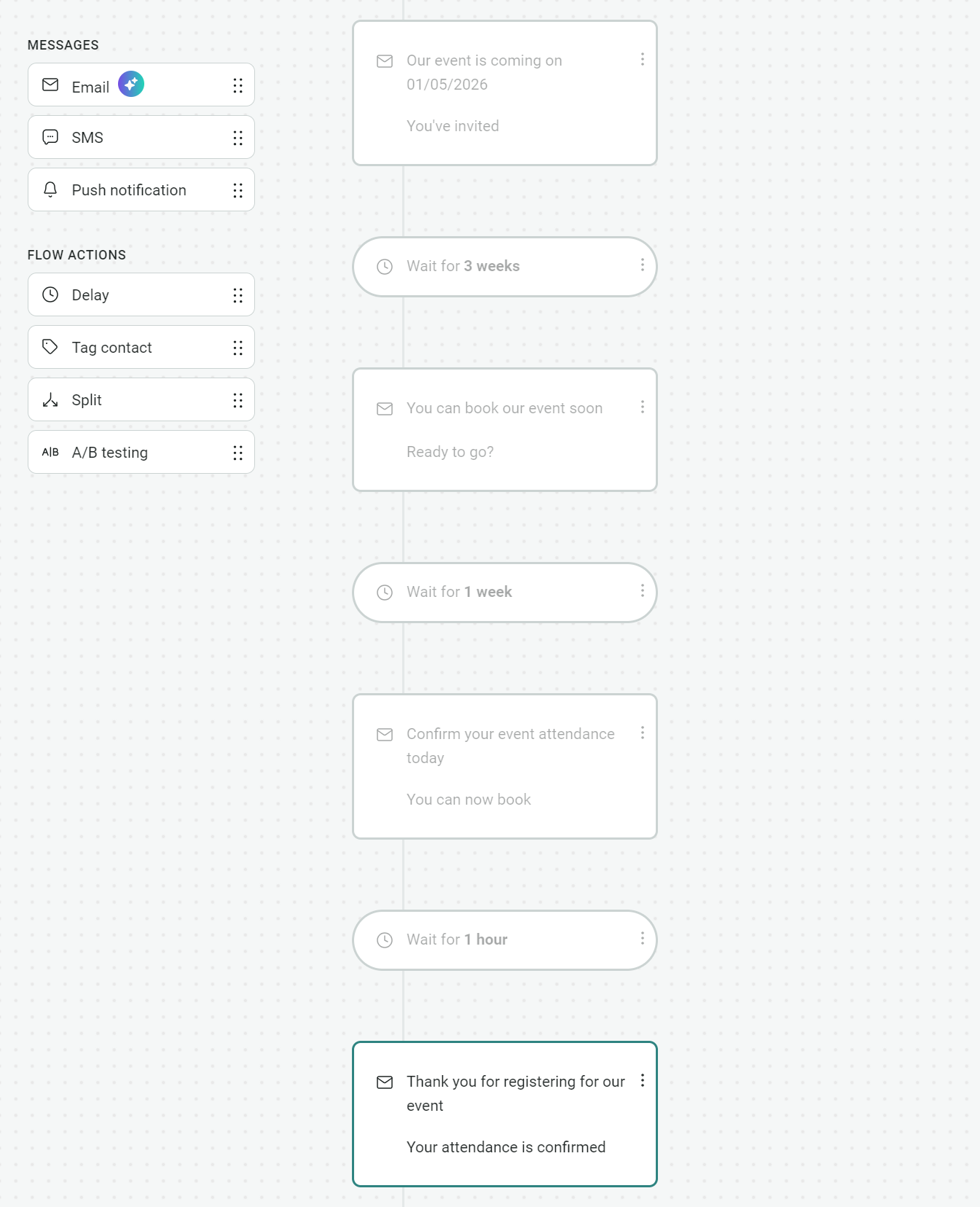
Creating a flow for your event email invitation is best to automate your event email marketing. The alternative is to send manually and schedule emails, which isn’t practical. Plus, you can add an SMS to your Omnisend flows for better visibility.
One-off email invitations have their place, of course. But if you’re trying to generate interest in your event, a multi-touch series works better, as it reaches people over a longer timeframe.
How do you build an email list for an event?
You can use these tactics to build your email event list:
- Add a popup or flyout form on your website to collect addresses. Ask visitors to subscribe to receive news and updates. You can then email them event invites with proper marketing opt-ins.
- Create a landing page for your event and send visitors to it. Your landing page should include a form that collects names and email addresses. Link your landing page to a sitewide banner and promote it across social media.
- Grow your list with social media competitions. If you have decent socials, then use them to grow your list. Competitions always work well. Ask people to submit their email to enter, and you’ll collect plenty of addresses for your event.
- Run event-related polls that collect email addresses. Poll your customers on interesting topics and ask for their email addresses.
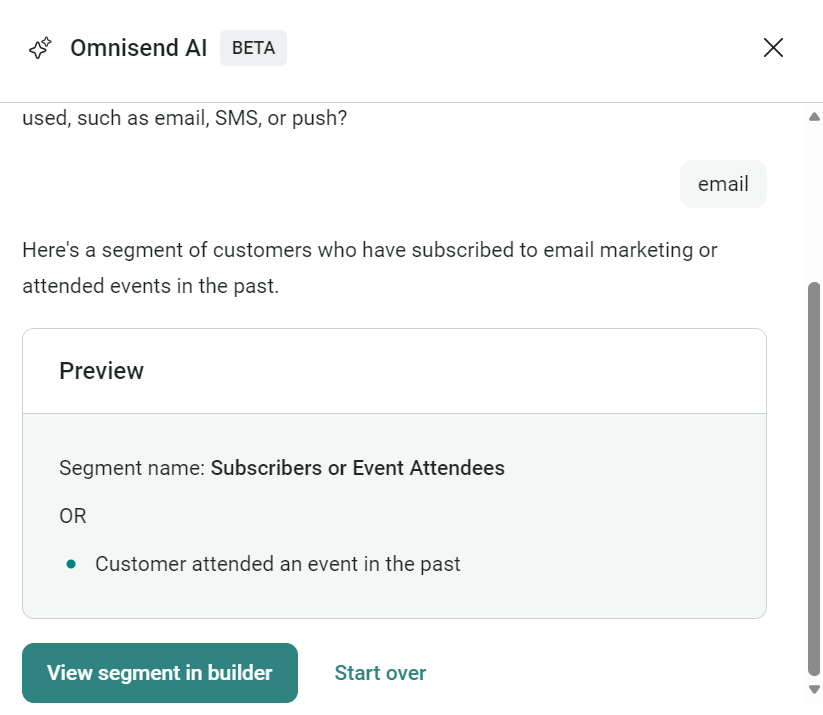
- Segment your customers. Create segments in Omnisend for active subscribers, VIPs, and consumer and business emails. You’ll then have separate lists. Omnisend has pre-built segments, or you can use the AI segment builder. The segment below is for customers who have subscribed to email marketing or attended events:
Event reminder email cadence
The best event email marketing examples we’ve seen stagger their reminder emails across one week, rather than two.
Flooding inboxes is not a good strategy. Instead, they lay the foundation for an event with a knowledge email around one to two months before the invite, and then have a sequence to deliver a respectful reminder cadence that encourages RSVPs.
Here’s a proven cadence your event reminder emails can follow:
- First reminder email, one week before your event
- Second reminder email, four days before the event
- Third reminder email, two days before the event
- Last-minute reminder, 24 hours before the event
Note that if your customer has already booked or responded to your event invitation, your reminder sequence should use different messaging. Change it from a reminder “to book” to a “we’re looking forward to seeing you” reminder.
Post-event follow-up workflows
People who attend your event deserve a thank-you email, and you can also use it to gather feedback and keep the conversation going.
Here’s one of our favorite post-event email examples to say thanks:
Subject line: Thank you kindly for coming to our event
Hi (name),
I’m reaching out personally to thank you for coming to (event name). It attracted professionals from all walks of life, and we had a ball. We’ve got some more exciting stuff coming up soon. In the meantime, reach out to me if you have any follow-up questions about the event.
With regards,
(Your name)
What we like about that post-event workflow is that it leaves the door open to additional conversations. It also makes the recipient feel like they’re getting a personalized email, when in fact it’s an automated message sent to all attendees.
For feedback collection, the post-event email template below is a fantastic place to start:
Subject line: Thanks for coming, how was it?
Hi (name),
A massive thank you for coming to our event. It was our pleasure to see you there. If you wouldn’t mind, could you let us know if you enjoyed it?
The link below will take you to a quick survey:
(Add your link)
If you have any questions, give me a shout,
Thank you,
(Your name)
Event announcement email templates and best practices
Throwing people a random event invite is never as effective as warming them up with a well-timed event announcement email first. Here are some templates and best practices to follow to ensure your event announcement goes down well:
Event announcement vs. invitation emails
Event announcement emails let your customers know an event is taking place, whereas event invitation emails ask them to attend.
You should use both messages in your event email marketing as part of a series. Your announcement email comes first, then an invite, then reminders up until a reasonable time before the event.
It’s good practice to send your announcement email four to six weeks before the event to give your customers ample time to make arrangements. Also, your announcement email should set expectations for the next email in the series (the invite).
Additional reading
15 different types of email (with examples)
Professional event announcement email template
A professional announcement email template is best when your audience is other businesses, SaaS subscribers, and high-end customers with complex sales cycles. Your announcement is to keep things simple and present information clearly.
Here’s a template you can use:
Subject line: (Event name) is coming soon
Hi (name),
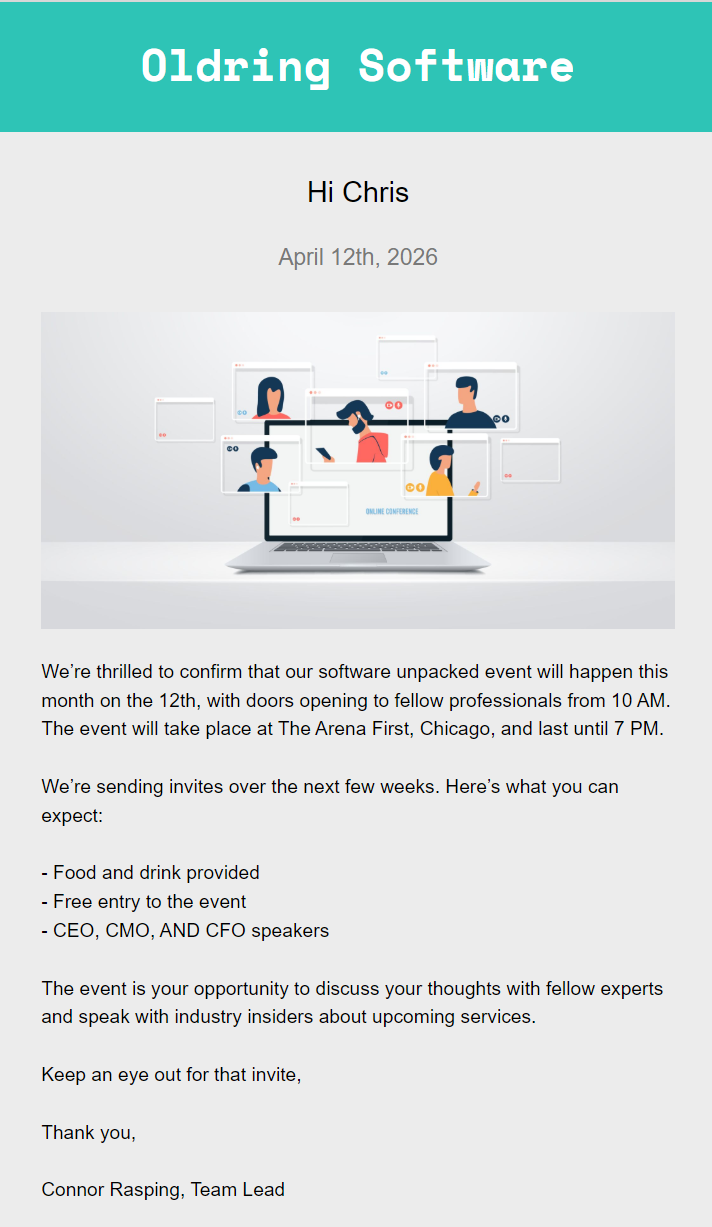
We’re thrilled to confirm that our (event name) will take place this month on the 15th, with doors opening to fellow professionals at 10 AM. The event will take place at (location) and last until 7 PM.
We’re sending invites over the next few weeks. Here’s what you can expect:
(event itinerary)
The event is your opportunity to discuss your thoughts with fellow experts and speak with industry insiders about upcoming services.
Keep an eye out for that invite,
Thank you,
(Your name)
The design example below, built using one of Omnisend’s pre-built templates, shows how good your announcement email can look using this template:
Internal company event announcement template
Sending an internal event announcement email calls for professional, factual language, plus additional insights into what the event is about and who will speak. Dropping the CEO or MD in can help get employees to take notice.
A template you can use:
Subject line: Event for employees and the board
Hi (name),
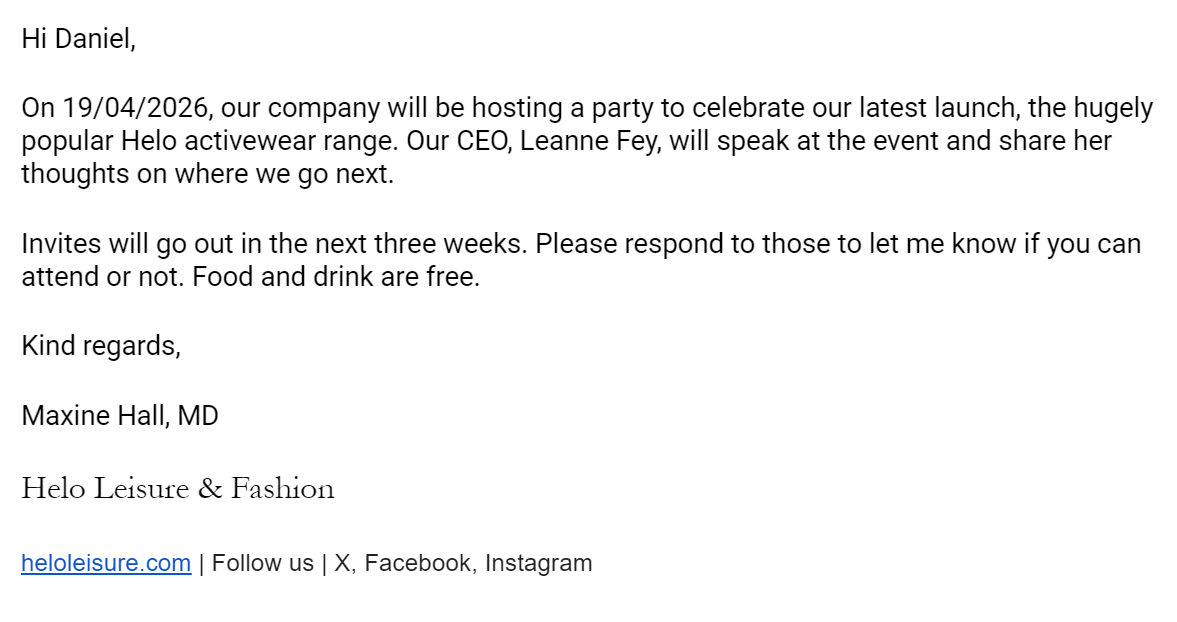
On (date), our company will be hosting a (party or event) to (celebrate/get feedback on/share information on/discuss) our latest (launch/progress). Our CEO, (name), will speak at the event and share (his/her/their) thoughts on where we go next.
Invites will go out in the next three weeks. Please respond to those to let me know whether you can attend. Food and drink are free.
Kind regards,
(name)
(company signature)
Omnisend has professional, pre-built email templates suitable for internal emails, or you can send these as plain text, as shown below:
Public event announcement template
The public is more receptive to event announcement emails with personality, so create more hype in these to generate interest.
Use this email template to get the public on board:
Subject line: We’re hosting the (event name) on (date)
Hi (name),
EXCITING NEWS
We’re putting on an event on (date) to announce our new product launch. The event will provide complete product demos, interviews with partners, and give our VIP customers the chance to test and provide feedback on the production model.
We’ll send invitation details in due course. In the meantime, here’s what the event will include:
(event details)
You’re one of our most important customers, so stay tuned for important additional info.
If you have any questions, give me a shout,
Thank you,
(Your name)
Conclusion
Your event invitation email needs to be professional and cover all crucial information early, so people can quickly verify whether it’s suitable for their schedule.
The core criteria to aim for:
- A descriptive subject line
- A personalized opening line (mention them by name)
- Use a designer template for external invites; a text-based one is fine for internal ones
- Put all the event details into an easily discernible section
- Add a CTA button that describes the appropriate action, such as “RSVP” or “book now”
Additionally, put these approaches into practice:
- Create an event email series for announcements, invites, and reminders, rather than randomly sending one invitation
- Use pre-written templates to guarantee professional language
- Inspire your designs and layouts with high-quality examples and explore Omnisend’s email templates for additional ideas
Omnisend lets you build event-based email marketing series, as well as one-off and scheduled campaigns. It tracks everything, from opens and click-throughs, and has a generous Free Forever plan without any standard feature restrictions. On most contact tiers, paid plans also land at up to 35% less than Klaviyo — and if you’re moving your event flows from another platform, Omnisend’s team rebuilds the full setup in 5 days for free.
Quick sign up | No credit card required
FAQ
Email them with a “Come to (event)” subject line and immediately say “Hi, (name)” in your opening to create a personal connection. Write a one-liner about how much you want them there and thank them for considering attending.
Here are 10 you can use:
1. We’re inviting you down to (event name), and we’d love to have you.
2. Our event is on (date), so please confirm your attendance early to secure your slot.
3. There’s a meeting booked for all (department name) members. Join the meeting to learn about our new procedures.
4. I’m delighted to invite you to our (party name) on (date). Let me know if you can make it.
5. Join us to party at (location) on (date) to celebrate (event purpose).
6. Throwing an amazing event, want you there. Details available below.
7. We’re having lunch at the (hotel name), and you’re invited to attend for free.
8. Team meeting alert. We’re having a meeting on (date) and expect you to attend.
9. Something exciting is coming on (date). It’s a party, of course. You’re free to come along.
10. Invited, you are. Blessed are we. Join us at (event name) on (date) to celebrate.
A few simple lines will do for most events. A good example: “Hi Amy, we’re exhibiting at (trade show name) on (date) and think you’ll have a fantastic time. There’s no entry fee, and we’ll even buy you a coffee. Sounds good? The details are below to RSVP.”
Use the word “Dear” instead of “Hi” before your recipient’s name in the email and avoid contractions, so say “you are” instead of “you’re” and “we are,” not “we’re”. A serif font in your email template can also add formality to your message. Omnisend’s email templates let you add unique fonts to any text.
Send an event invitation email and SMS to your opted-in subscribers and add a banner to your website announcing the event. Create social media posts that let customers book via links and use campaign URLs to track which channels drive the highest RSVPs.