Omnisend AI


 OFFER
OFFER









An event reminder email is a message sent to registered attendees about an upcoming event. It helps ensure attendance.
People who register for events often forget about them as their schedules fill up. Without reminders, attendance can drop, and the return on your event investment suffers.
A well-timed event reminder email can solve this problem. It keeps the event top of mind and helps attendees prepare beforehand. When combined with email automation and smart timing, reminder emails can increase engagement.
In this guide, you’ll learn how to create effective event reminder emails for 2026. We’ll share proven templates, real-world examples, and best practices to reduce no-shows and drive participation.
Go to sections:
- What is an event reminder email?
- Why send event reminder emails?
- How to write an event reminder email
- When to send event reminder emails
- 15 event reminder email subject line examples
- 5 event reminder email templates
- 5 great event reminder email examples
- Summary
Quick sign up | No credit card required
What is an event reminder email?
An event reminder email reminds registered attendees of an upcoming event to improve participation. This message can include important details, such as the event name, date, time, location, and instructions for joining.
Event organizers, marketing teams, business owners, and community managers are the ones who send a reminder email for events. An event reminder email is usually sent a week, a day, and a few hours before an event.
Event reminder emails are used for different types of events, whether it’s in-person, virtual, or hybrid.
Why send event reminder emails?
Event reminders play an important role in event marketing. Here are multiple reasons why sending a reminder email is an excellent idea for a successful event:
- Convey important information: Need to make changes or add last-minute information about the event? Do so in the reminder email.
- Reduce no-shows: Registrants may plan to attend your event, but then forget. A reminder email prompts them to prioritize and attend.
- Increase ROI: Sending event invitation reminders can directly impact your ROI. They encourage more people to attend and participate in revenue-generating activities.
- Encourage last-minute registrations: A timely reminder message encourages attendees to share the information with friends and family. This can help you get some last-minute registrations.
How to write an event reminder email
A good event reminder message should be clear, direct, and easy to read.
Below are simple best practices for writing an effective event reminder email.
Keep it short and simple
Keep your email short and succinct, including only the essential information. Avoid long blocks of text or any promotional content that may distract from the key message. This will ensure more people get the reminder and attend the event.
Avoid heavy design elements or complex layouts that make the message harder to scan. Use clear spacing, short sections, and bullet points for better readability.
Write a clear subject line
Your email subject line can influence the open rate of your event reminder email. It should be clear, effectively hinting at the email’s content.
The subject line should mention that the message is a reminder and state the event name. Also, keep it short — within 40 characters — so it displays properly on mobile devices.
You can personalize the subject line by adding the recipient’s name. Avoid overly promotional language; reminder emails are meant to inform, not sell.
Highlight key event details
Your event reminder email should clearly present important event details. Attendees must also be able to find this information easily.
For example, you can place essential information near the top of the email. You can also use bullet points or short sections to ensure readability even on mobile phones.
An event reminder message should include:
- Event name
- Event date and time
- Time zone (virtual or international events)
- Event location or platform
- Dress code (if required)
- Items attendees should bring
- Contact information for questions
Add the location or access link
An event reminder email should make it easy for attendees to find or join the event. It must clearly share the event location or access link.
For in-person events, include the full address and helpful directions. Adding a link to Google Maps can help attendees navigate more easily. If possible, include parking information as well.
For virtual events, place the webinar or meeting link clearly in the webinar reminder email. Some organizers also add a calendar file that attendees can download. This automatically adds the event to their digital calendar.
Include required preparation
Your event reminder email is a great place to share preparation instructions, especially if your event requires it. Specify exactly what attendees should do before the event. Do they need to bring certain materials, download an app, or register beforehand?
You can also include check-in procedures if it’s required. For example, inform attendees if they should arrive early for registration or security checks.
Accessibility information may also be included. Some attendees need special accommodations, accessible entrances, or assistance during the event.
Use clear CTAs
When learning how to write a reminder email for an event, include visible and simple CTAs. You may place it near the middle or the end of the event reminder message. Also, use buttons or bold text to make it noticeable.
Example CTAs include “Join Event,” “Add to Calendar,” and “Confirm Attendance.”
Include an FAQ section
Attendees will often have questions before an event. Include a short FAQ section in your event reminder email to address them early.
FAQs also reduce support workload. Keep the FAQ section short and focused on the most relevant questions.
Cover questions about:
- Parking availability
- Event duration
- Guest policies
- Refund rules
- Accessibility features
- Extra costs, including meals or materials
Send from a valid reply-to email
Your reminder message for events should come from a real email address that allows replies. This builds trust and improves communication with attendees.
Avoid sending messages from “Do Not Reply” addresses. Attendees may need to ask questions about directions, timing, or event requirements.
Also, use an email address that represents the event or your organization. For example, a simple address like [email protected] or [email protected] is easily recognizable. Recipients are more likely to engage with messages from a sender they recognize.
When to send event reminder emails
The timing of your event reminder emails strongly affects attendance. Even well-planned events can have low turnout if reminders are sent too late or too early.
Virtual and physical events require different timing strategies.
For virtual events
Virtual events require multiple reminders because attendees join from different locations and time zones.
1. Immediate confirmation
The first email you should send is a confirmation email, immediately after registration. Thank them for signing up, provide the event details, and give an “Add to Calendar” button.
2. One week before
Next, you should remind the participants one week before the event. Remind them of the benefits, what you’ll cover, and who will speak at the event. Use a standard event reminder template with an agenda.
3. 24 hours before
At this point, the focus should shift to logistics. Remind attendees of the event time and time zone. Provide the webinar or meeting link.
4. One hour before
This is an important event reminder email in which you should share the joining link and tell people to be prepared to join in an hour.
5. Starting now
Send a final event reminder email right when the event begins. A short message, such as “We are live now,” followed by the join link works well.
For physical events
In-person event reminders should focus on location details and preparation.
1. Two weeks before
This reminder helps attendees start planning their visit. Include useful information, such as travel details, parking availability, and the event dress code. If the event requires preparation, list down what attendees should bring.
2. Three days before
Send a reminder that focuses on the final details. Share the arrival time, event location, and check-in instructions. You can also include contact information in case attendees need help before the event.
3. Morning of event
This reminder should be short and easy to scan. Include a link to the venue map, a quick parking reminder, and a contact number. This helps attendees arrive smoothly and on time.
15 event reminder email subject line examples
The subject line is the first thing attendees see when they receive an event reminder email. It determines whether your message gets opened or ignored.
Below are some event reminder email template ideas for subject lines:
- Reminder: [Event Name] Is Tomorrow
- Don’t Forget: [Event Name] Starts at [Time]
- 24 Hours to Go. See You at [Event Name]
- Final Reminder: Join Us for [Event Name]
- Your Webinar Starts in 1 Hour
- We’re Live Soon: [Event Name]
- Save the Date: [Event Name] This Friday
- It’s Almost Time for [Event Name]
- Countdown to [Event Name] Begins Now
- Last Call: [Event Name] Starts Today
- Starting Soon. Join [Event Name] Now
- See You Tomorrow at [Event Name]!
- Doors Open at [Time]. Don’t Miss It
- Only [X] Hours Until [Event Name]
- We Can’t Wait to See You at [Event Name]
Your subject lines should be short and direct. Use Omnisend’s email subject line generator to create catchy subject lines for your event reminders.
5 event reminder email templates
Below are event reminder email templates to keep attendees engaged and reduce no-shows.
General reminder email template
When to use it: Send this email a week or a few days before the event. It’s ideal for any type of event, whether in-person, online sales events, or hybrid. It encourages attendees to mark their calendars.
Why it works: It’s clear and keeps the event top of mind without overwhelming the recipient.
Subject line: Reminder: Join Us for [Event Name] on [Date]!
Hi [First Name],
Just a quick reminder that [Event Name] is happening on [Date] at [Time].
Location: [Venue Name + Address]
We’re looking forward to an exciting session with top [industry] leaders.
Make sure to prepare any materials or questions you may have.
[CTA Button: Add to Calendar]
[CTA Button: View Event Details]
Best regards,
[Your Name]
[Company Name]
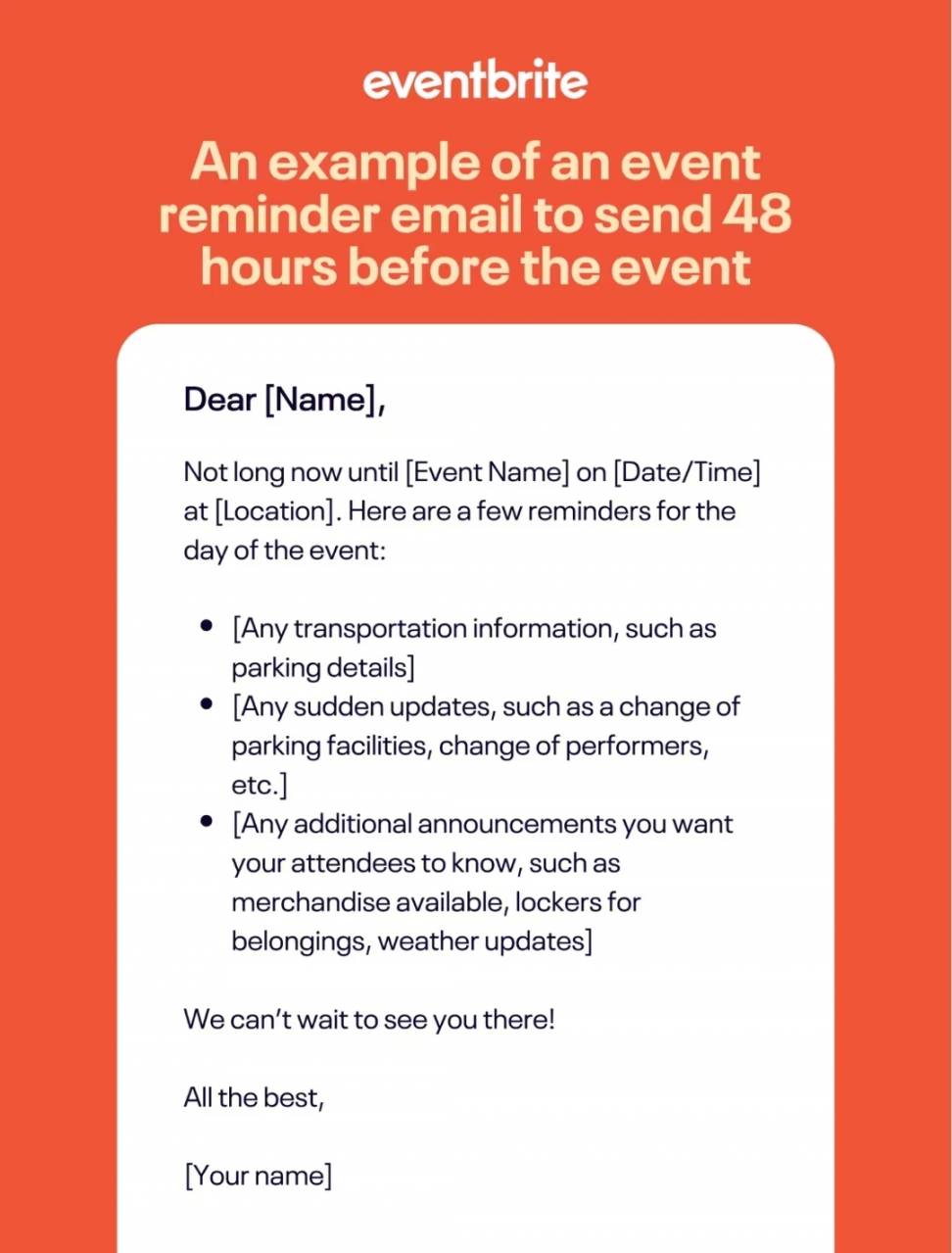
One-week reminder email template
When to use it: Send this reminder one week before the event to build excitement and reinforce the value.
Why it works: It allows attendees to organize their schedule in advance.
Subject line: 1 Week to Go – [Event Name]
Hi [First Name],
Only one week left until [Event Name]. We’re excited to have you join us on [Date] at [Time]. Here’s a quick glance at the agenda:
Session 1: [Topic]
Session 2: [Topic]
Panel Discussion: [Speaker Names]
Make sure you’re prepared with any materials or questions you want to ask. Don’t forget to check your calendar and mark the event so you won’t miss it.
Location: [Venue Name + Address]
OR
Join Online: [Event Link]
[CTA Button: Add to Calendar]
[CTA Button: View Event Details]
We can’t wait to see you and share an amazing experience!
[Your Name]
[Company Name]
24-hour reminder email template
When to use it: Send this email 24 hours before the event. Focus on key logistics and urgent details to ensure attendees are ready.
Why it works: It creates a sense of urgency and provides the necessary information for a smooth event experience.
Subject line: Reminder: [Event Name] Starts Tomorrow
Hi [First Name],
This is a quick reminder that [Event Name] is happening tomorrow, [Date] at [Time].
Location: [Venue Name + Address]
OR
Join Online: [Event Link]
Please plan to arrive 10–15 minutes early for check-in, or log in a few minutes early for virtual sessions. Review the agenda or any materials you may need ahead of time.
[CTA Button: Confirm Attendance]
We can’t wait to see you there!
[Your Name]
[Company Name]
One-hour reminder email template
When to use it: Send this email one hour before the event starts.
Why it works: It ensures attendees are ready to join immediately and reduces the chance of missing the start of the event.
Subject line: [Event Name] Starts in 1 Hour
Hi [Name],
[Event Name] is starting soon! Make sure you’re ready to join us.
Location: [Venue Name + Address]
Join Online: [Event Link]
Check that your device is ready and you have all necessary login information or materials handy.
We’re looking forward to seeing you very soon.
[Your Name]
[Company Name]
Venue/access confirmation email template
When to use it: Send this email a few days before a physical or hybrid event. It ensures attendees know the venue, directions, and any special access instructions.
Why it works: It reduces confusion and improves the attendee experience by providing all location information upfront.
Subject line: Venue Confirmation for [Event Name]
Hi [First Name],
Thank you for registering for [Event Name]! We want to make sure your arrival is smooth.
Venue: [Venue Name + Address]
Directions: [Google Maps Link]
Parking is available on-site, and check-in begins at [Time].
If you have any questions about the venue or arrival, simply reply to this email.
[CTA Button: Contact Support]
We can’t wait to welcome you to the event.
[Your Name]
[Company Name]
5 great event reminder email examples
Explore these event or webinar reminder email examples from well-known brands. Each example highlights practical ideas you can apply when creating your own reminder emails.
1. Apple
In this event reminder email example, Apple clearly communicates the event details and gives recipients a preview of what they’ll experience.
It highlights networking opportunities and learning sessions with industry experts, which shows why attendees shouldn’t miss out:

What it does well:
- Clearly highlights event details like date, time, and agenda
- Includes information about speakers and networking opportunities
Key takeaway: Reminder emails are more persuasive when they restate the event’s value rather than just repeating the logistics.
2. Chimp Essentials
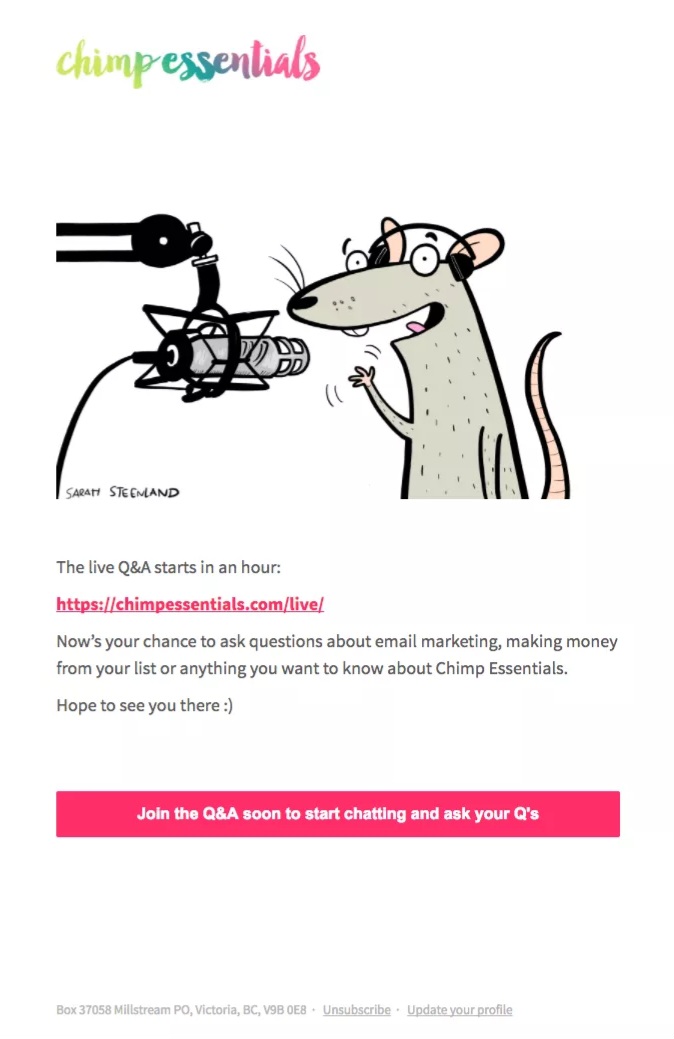
Chimp Essentials sends a reminder email one hour before its webinar begins. This last-minute reminder works well for virtual events because attendees can easily forget about the session during a busy workday.
The email keeps the message short and focused on the most important detail, which is the webinar access link:
What it does well:
- Prominently displays the webinar access link
- Repeats the start time to prevent confusion
Key takeaway: Last-minute reminders should remove barriers so attendees can access the event instantly.
3. Kiwi Wealth
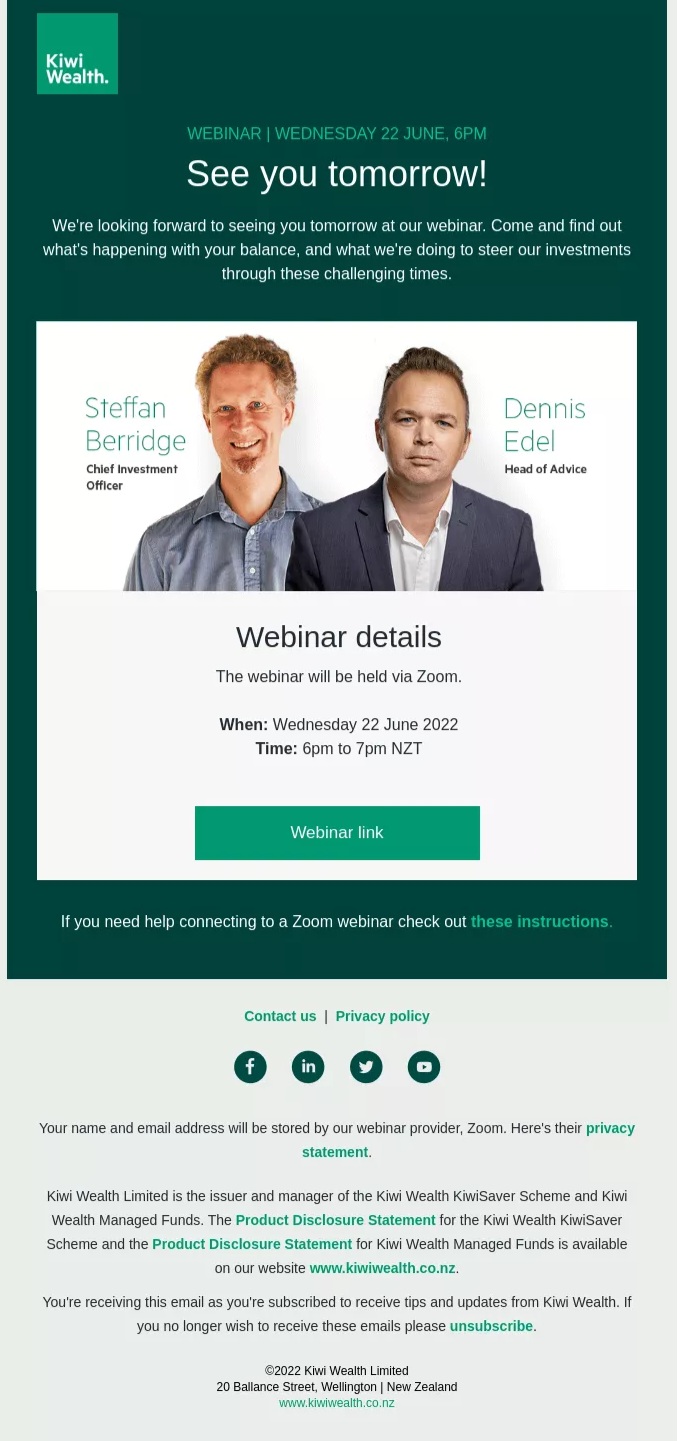
The message below from Kiwi Wealth is one of the most informative webinar reminder email examples. To ensure relevance, it sends the email a day before the event.
The email is well-structured and includes all necessary information, including a preview of key speakers to spark interest. The copy also includes instructions on how to join the webinar.
The email also includes links to its social media pages to increase traffic:
What it does well:
- Introduces the speakers to build credibility and interest
- Shares a preview of the topics to be covered
Key takeaway: A reminder sent a day before the event helps rebuild excitement and reinforces the event’s value.
4. Maze
In this event reminder message, Maze uses the countdown-in-email technique to create urgency and FOMO. The message focuses on encouraging attendees to sign up.
The brand’s celebratory tone and thoughtful layout guide the reader to the “Register for free” button. Maze carefully included two CTAs to improve event registration:
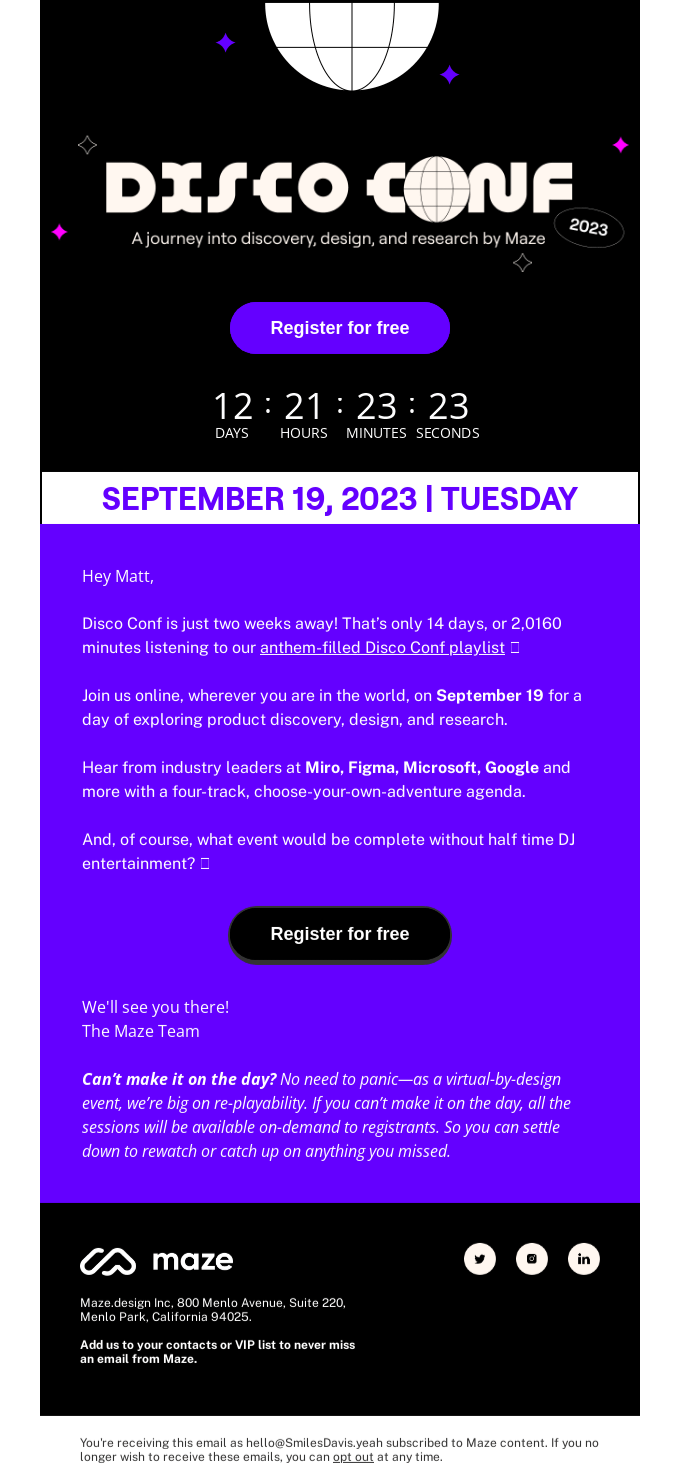
What it does well:
- Emphasizes the approaching event deadline to create urgency
- Highlights the main benefit or learning outcome of the event
Key takeaway: Reminder emails offer conversion opportunities by encouraging undecided subscribers to register before the deadline.
5. Netflix
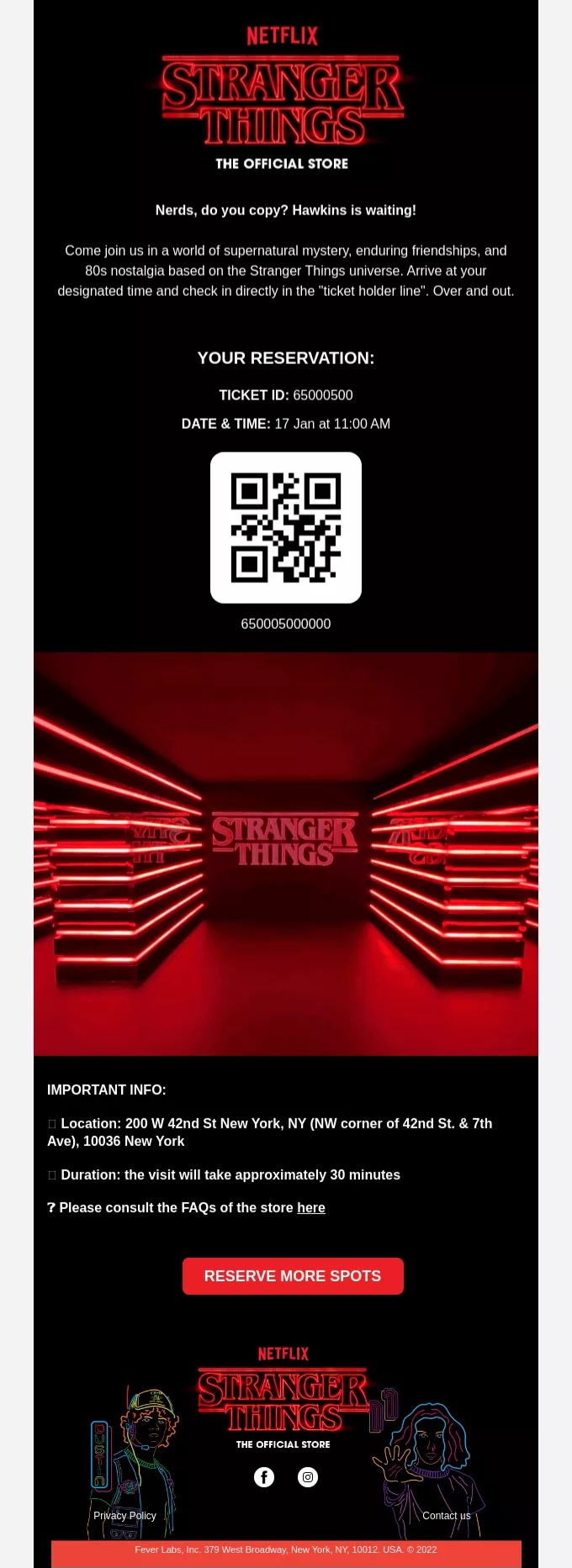
Below is an event reminder email example from Netflix. It includes information on the event and registration.
Incorporating a QR code is clever, offering instant access to information and directions. The CTA also lets subscribers know they can still reserve more spots:
What it does well:
- Confirms event details and the attendee’s reservation
- Includes a QR code for quick access to directions or event information
Key takeaway: Adding convenience tools, such as QR codes or quick-access links, can make an event reminder email more useful.
Summary
Sending timely reminders helps keep your event top of mind and improves attendance. The most effective reminder emails share a few important traits. They are sent at the right time, clearly communicate event details, and guide readers toward a clear action.
The webinar reminder email templates and examples shared in this guide can help you create helpful and compelling emails. By combining the right timing strategy with clear messaging, you can improve engagement and turnout for your events.
You also don’t have to manage these reminders manually. Email marketing platforms like Omnisend can help automate email reminder sequences so every registrant receives the message at the right moment.
Quick sign up | No credit card required