Omnisend AI


 OFFER
OFFER










Push notification marketing is more effective than you’d guess: a 14% click-to-conversion rate, bringing in 28% more revenue year-over-year for companies that use them, and they’re virtually free. Yet, for most, they’re just a marketing afterthought.
These notifications may seem annoying. But they work. If you place them correctly, push notifications pop up right when you need them.
We’ll help you bring push notifications to the forefront of your business. In this article, we’ll go through everything you need to know – the definition, types of notifications, use cases, and copywriting tips.
Once we have that covered, we’ll guide you through setting them up using Omnisend.
Quick sign up | No credit card required
What is push notification marketing?
Push notification marketing is the practice of sending short, clickable messages to users’ devices to improve engagement, conversions, or retention. Push notifications can appear even when your app or website isn’t being directly used.
“You can maximize the impact of push notifications with a strategic approach that leverages them for diverse purposes, such as promotions, updates, and reminders. You want people to find them helpful, not annoying. That way, they’ll look forward to hearing from you. Personalization, timing, and frequency are crucial for this.”
— Karolina Petraškienė, Marketing Lead at Omnisend
You may also sometimes see “push notification advertising” or “push ads”. It’s the same channel, just used in a paid marketing context instead of being sent to your subscribers.
There are two types of push notifications: web and mobile. Web notifications are sent through the browser, usually to a desktop device, if a user has accepted the browser prompt for push notifications. Mobile push notifications are sent to a mobile device when the app is accepted.
Push notifications have a distinct advantage over email and SMS marketing as they don’t have to land in an inbox. They appear directly on the users’ devices, making them harder to ignore and leading to higher engagement rates.
Advanced targeting capabilities let you personalize push messages for every stage of the customer journey, enabling you to communicate strategically with your online shoppers, app users, and various audience segments.
When done right, push marketing provides value to users, building brand loyalty and satisfaction over time. It can also drive traffic, generate leads, and improve sales and revenue.
But you can’t just spam people with notifications. Users have to opt-in to push notifications manually.
Consent is critical to push notification marketing, as it’s covered by the GDPR (EU) and the TCPA (USA). You have to clearly state what users are opting into and allow them to withdraw consent at any time.
How to use push notification marketing
Push notifications are designed to elicit an immediate reaction, so they’re especially effective for certain messages. Instead of simply using push notifications to distribute the same ads you publish on other channels, look for ways to leverage their unique features.
Welcome discounts for new customers
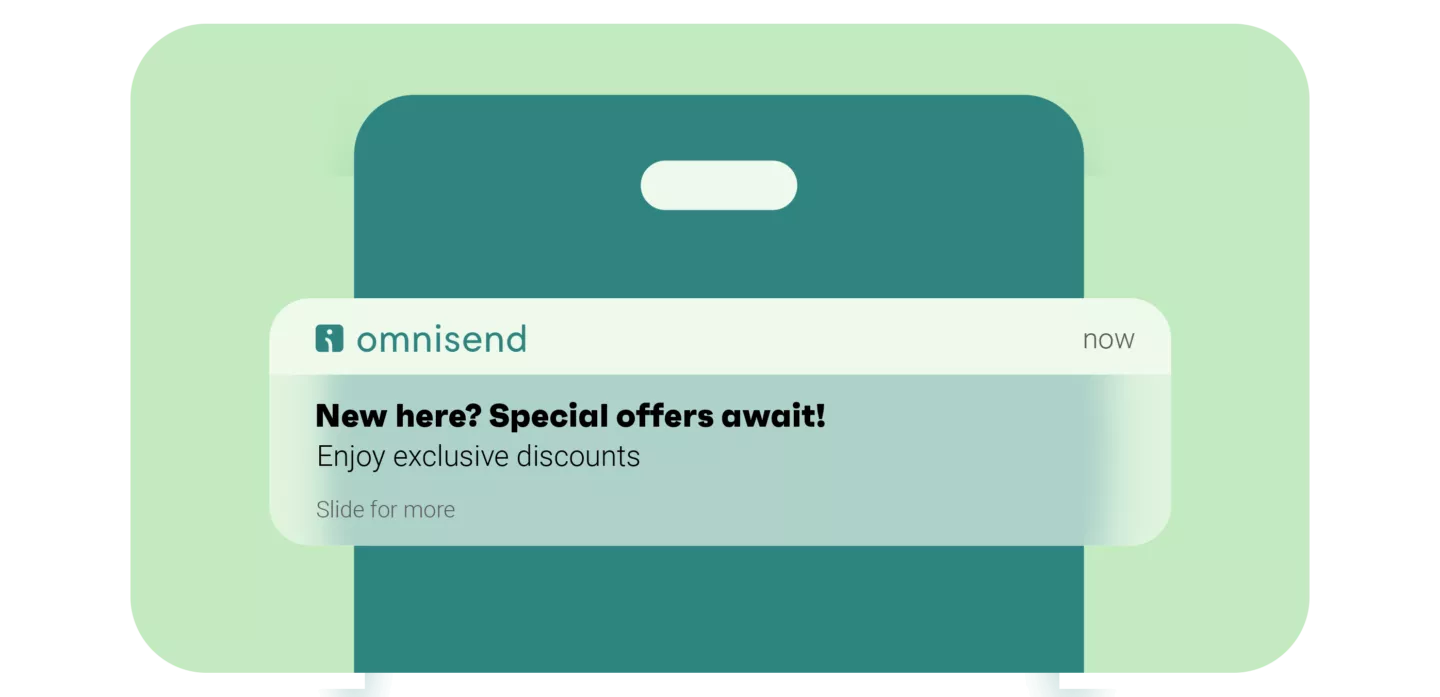
With a push notification marketing strategy, it’s easy to engage and reward subscribers right from signup. Send an instant alert immediately after customers join your list, highlighting exclusive, time-sensitive, first-time offers. Tailor it with their name and make the CTA clear to drive conversions.
Even if you have no exclusive, time-sensitive, or first-time offers, send a welcome push notification immediately rather than waiting.
You can also follow up a few days post-signup with a reminder. This could point them to a customized landing page with deals picked out for them. Base such deals on user profile data and activity.
See how Omnisend encourages new user profile completion with a coupon:
Personalized offers
Enhance the effectiveness of marketing push notifications by tailoring offers to user behavior. For example, you can leverage browsing history for personalized product suggestions. You can also showcase new arrivals for frequent shoppers or send exclusive birthday discounts.
Personalized push messages demonstrate that you know and value subscribers. However, avoid making assumptions or resorting to intrusive targeting. Let profile updates and purchase history guide your customization to delight users.
Automated (personalized) push messages have a 500% higher conversion rate than mass push campaigns. That’s not to say that you shouldn’t do campaigns at all. But if you’re doing push notification marketing, add automated messages as well.
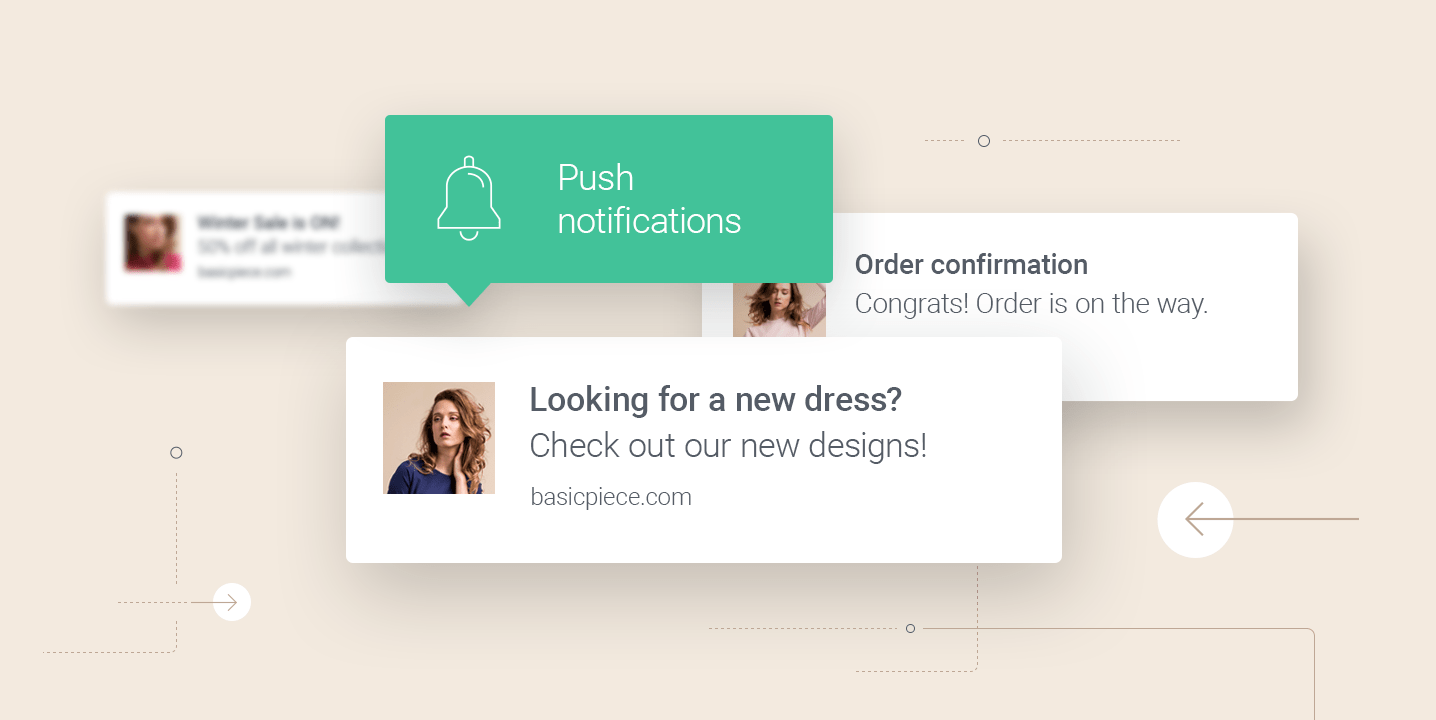
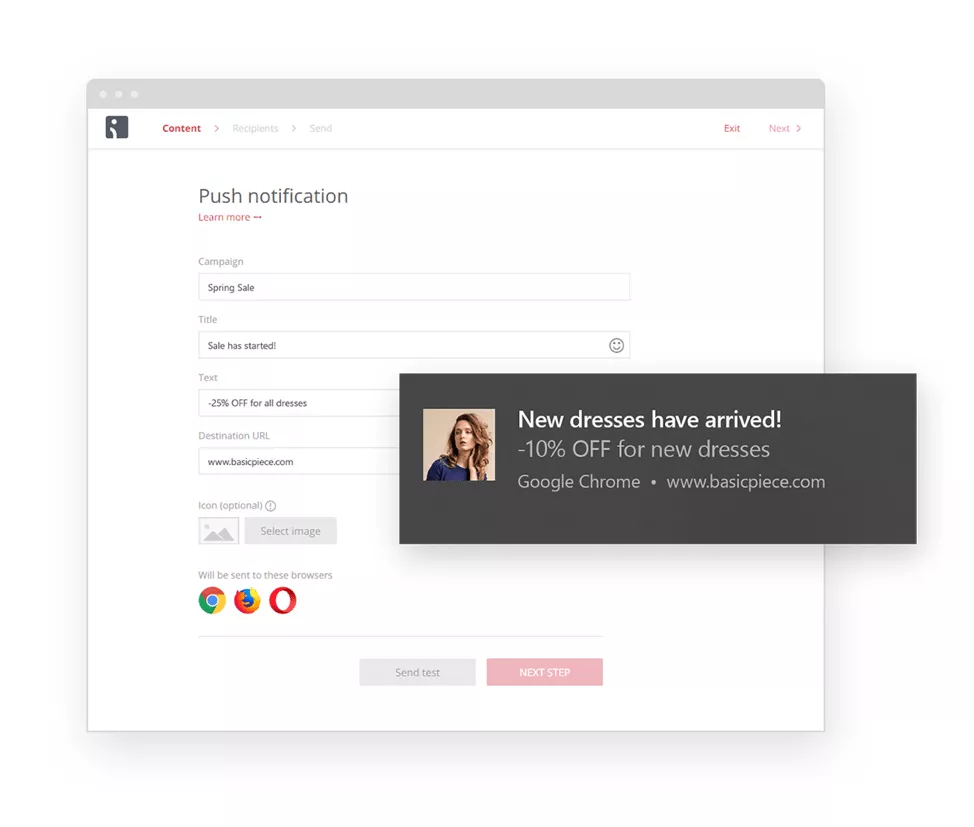
Below is a web push notification message for Basic Piece’s new arrivals:
Abandoned cart recovery
Don’t let abandoned carts hurt your revenue. Recover them with push notifications that remind users of left-behind items. Timely, relevant pushes help to turn abandoned carts into conversions.
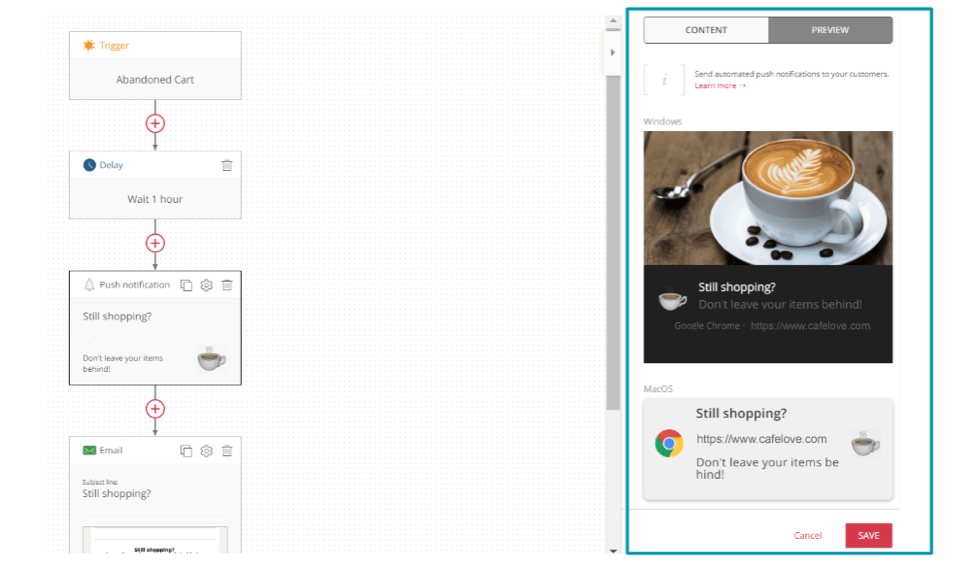
For instance, send a push notification an hour after a user leaves your site and offer free shipping or a discount code for a limited time. Then, follow up with an email reminder that creates FOMO (fear of missing out) and drives them back to your site.
See how Omnisend’s abandoned cart workflow integrates push notifications below:

SAVY’s omnichannel strategy
SAVY built an omnichannel marketing strategy that now includes both email and push notification marketing. They already have over 2,000 subscribers, and combining SMS and email resulted in a 2x increase in loan conversions.
Check out the SAVY case study to find out how to implement SMS, email, and push notifications in one go.
Shipping and order information
Online shoppers expect notifications about things like order confirmations and shipping updates, but you don’t need to send an email or text to let them know. These channels are more intrusive, and most people already receive more emails than they really want to read.
Send push alerts for real-time shipping status changes. These can include items now packaged or delivered, or estimated delivery times. The advantage is that you deliver important information without risking it being lost in crowded email inboxes.
Transactional push messages can reach up to 69% open rates, the highest of any type and beating out most other marketing channels.
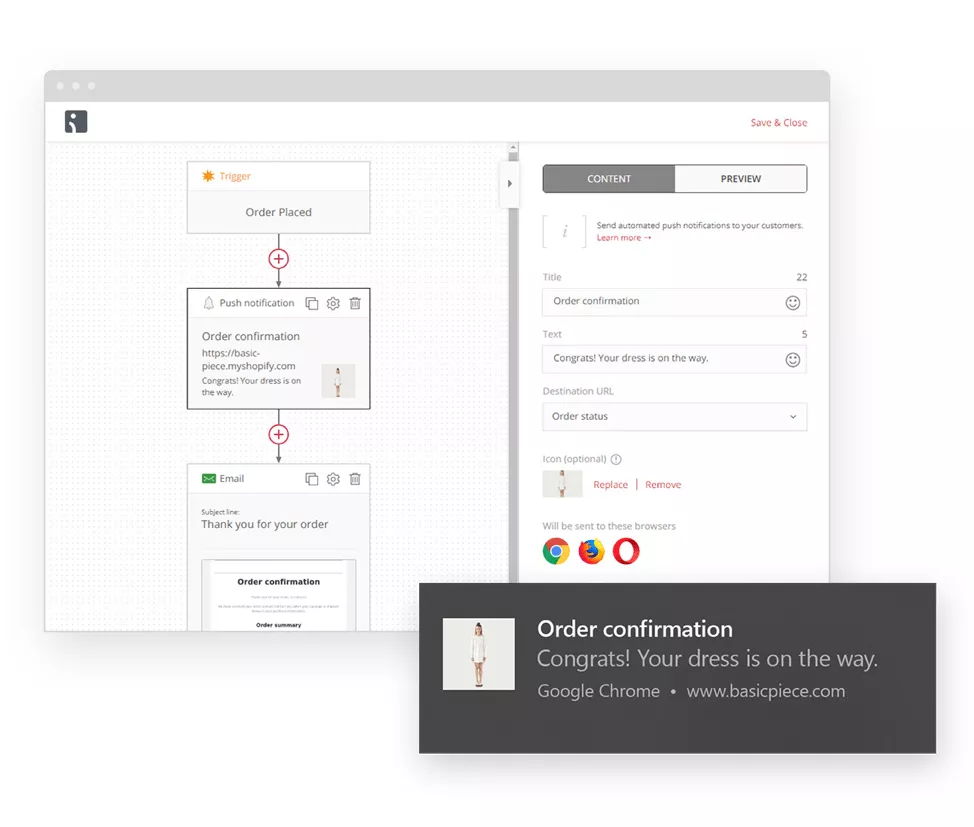
Here’s an order confirmation push notification from Basic Piece:
Browse abandonment campaigns
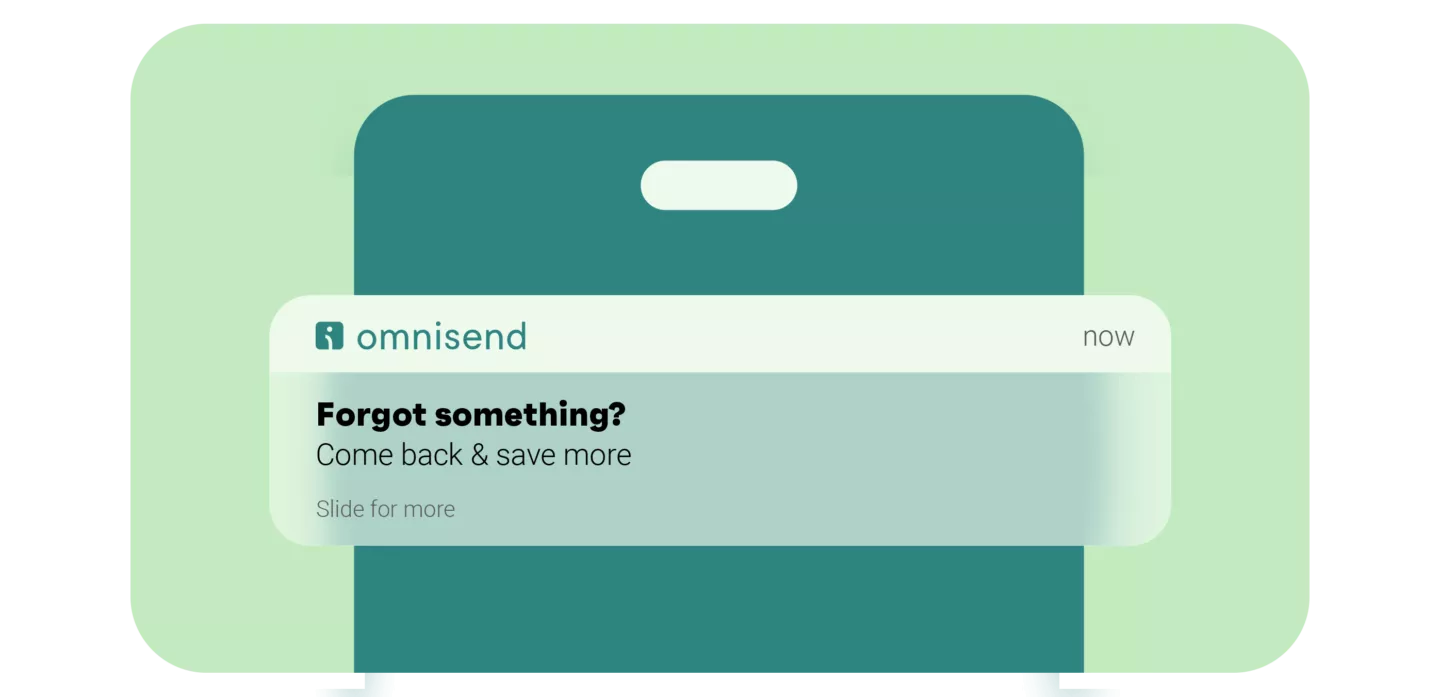
This push notification marketing message targets users who’ve viewed a product page but haven’t added anything to their cart. Include eye-catching images of the abandoned items along with a time-sensitive discount or promo code. These serve to remind and incentivize returning to complete a purchase.
See how Omnisend does it:
Related:
Browse Abandonment Email Guide
Content and educational updates
Content creators can send push notifications for new ebooks, blog posts, and courses to keep their audience engaged and increase website traffic.
However, you must use push notifications strategically, sending timely, relevant messages that your audience wants to receive.
For example, you could alert subscribers when a new article is published with a brief preview and a link to read the full content. Or you could push content recommendations based on their interests and past interactions.
Upsell and upgrade messages
Push messages are a great fit for upsells and upgrades. Imagine buying running shoes and receiving a push notification a little later suggesting moisture-wicking socks or insoles. Highly intuitive, not intrusive, and brings customers back to your store.
With a purchase history, push notifications are even easier to send. Upsell by recommending premium or higher-margin alternatives to products a customer has bought before.
Loyalty programs also fit naturally into upgrade push notifications. Send a message notifying your customer that they’re close to the next reward or an exclusive perk. It’ll give them more motivation to make a purchase.
Add in free shipping, bundled discounts, or one-time offers, and you have the perfect push notification strategy with urgency, personalization, and minimal intrusiveness.
Product and service promotions
Product and service promotions through push messages can generate interest and revenue for any ecommerce business. It’s all about implementing push notifications correctly.
New product launches, restocks, limited-edition drops, and seasonal promotions are all good placements for push notifications. These can be sent to your entire subscriber list, as most naturally convey a sense of urgency or scarcity.
You can also combine product and service promotions with behavioral or customer data. Send push notifications to loyal customers or to those who frequently buy a specific product.
Another option is to give out early access to some products. These push notifications often work best for lifestyle brands, where getting items first plays a part in the purchase decision.
See more examples:
16 best examples of push notifications to increase conversions
How to get started with push notification marketing
We’ll use Omnisend in this tutorial to implement marketing push notifications.
Omnisend is a top-rated platform, boasting nearly five thousand 5-star reviews on Shopify. It makes it easy to set up segmented email and push campaigns and analyze their performance with robust analytics.
You can use our platform to send out and manage both web and mobile push notifications. If you truly want to optimize your omnichannel strategy, Omnisend lets you automate emails and SMS messages as well – everything you need under one roof.
1. Enable push notifications
To enable push notifications for your store, click on your store name in the top right corner of the Omnisend dashboard. Then open Store settings, select Push notifications, and click Collect push channel subscribers.
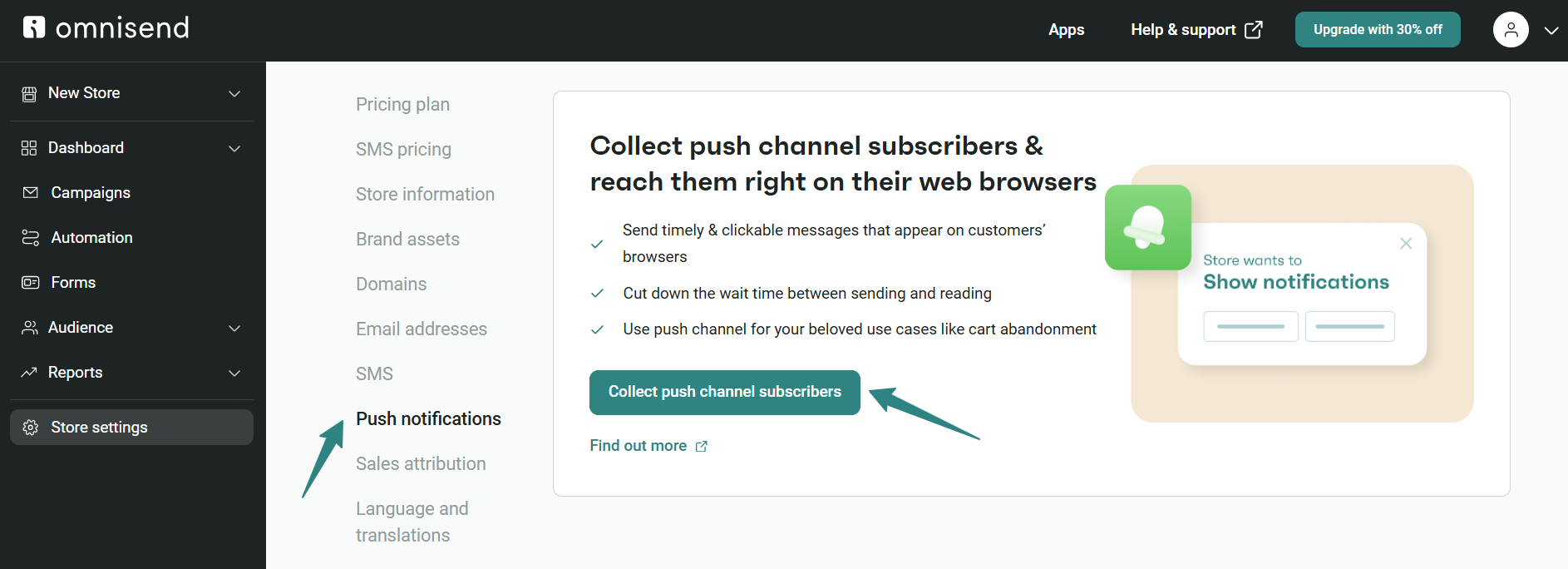
On the next screen, you’ll see three steps to complete to enable push notifications. Start by clicking Download file, follow the guide to upload it, and click on Verify connection when you’re ready.
On some platforms, the steps may be different. Make sure to follow instructions as closely as possible.
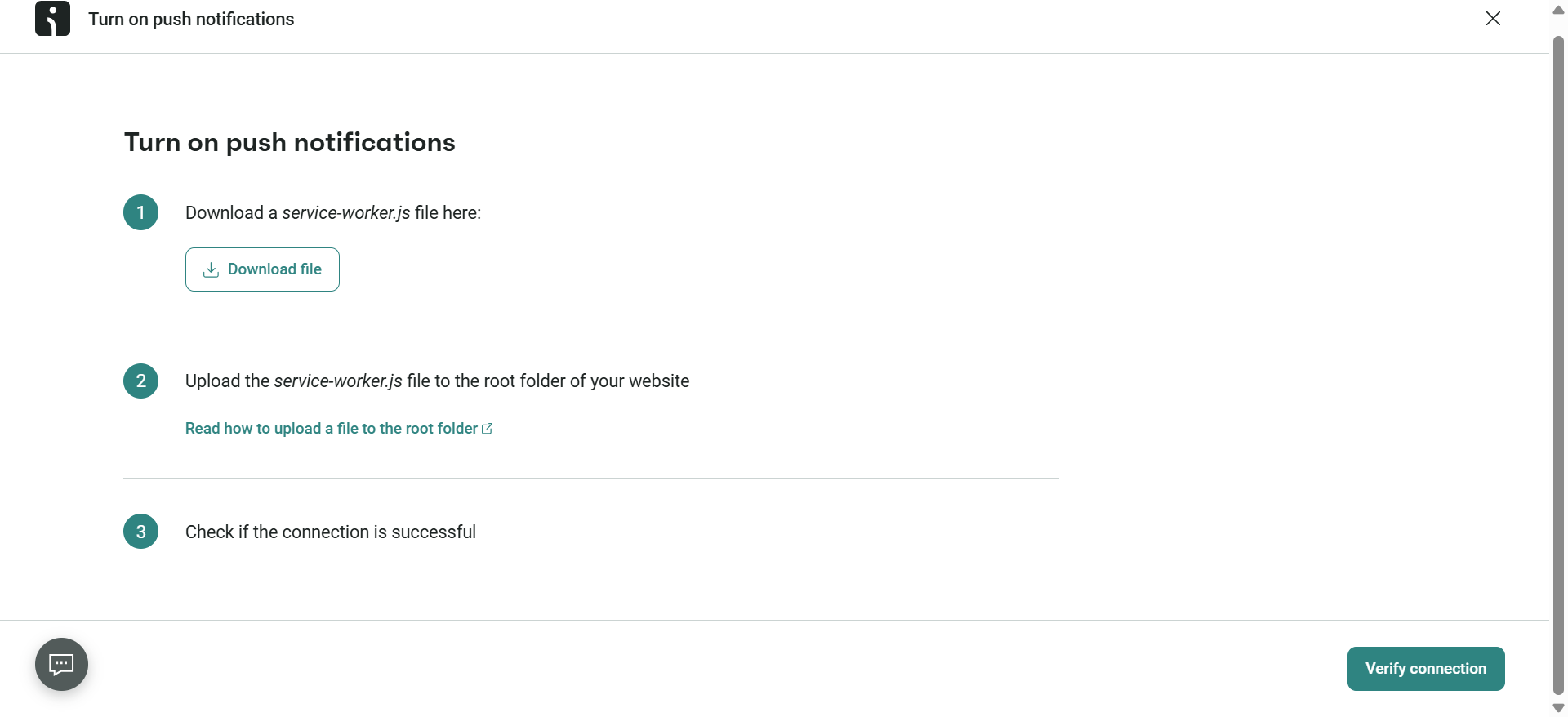
If successful, you’ll receive a confirmation message.

Double-check your results by visiting your website with an Incognito session. A subscription prompt should appear within 15 seconds of browsing.
If an error appears, check that your HTTPS security certificate is enabled. If not, add the certificate and try again.
2. Verify subscribers are being collected
If you haven’t subscribed to your own push notifications yet, do so now by visiting your website using Incognito.
Once you’ve allowed push notifications, go to your Omnisend dashboard. Click on Push notifications, then go to Audience, click on Segments, and Create Segment.
Create a filter by adding Subscription Status is Subscribed to Browser Push Notifications. If there’s at least one subscriber, everything is working correctly.
You can also use that filter to track subscriptions over time.
3. Create your first push notification campaign
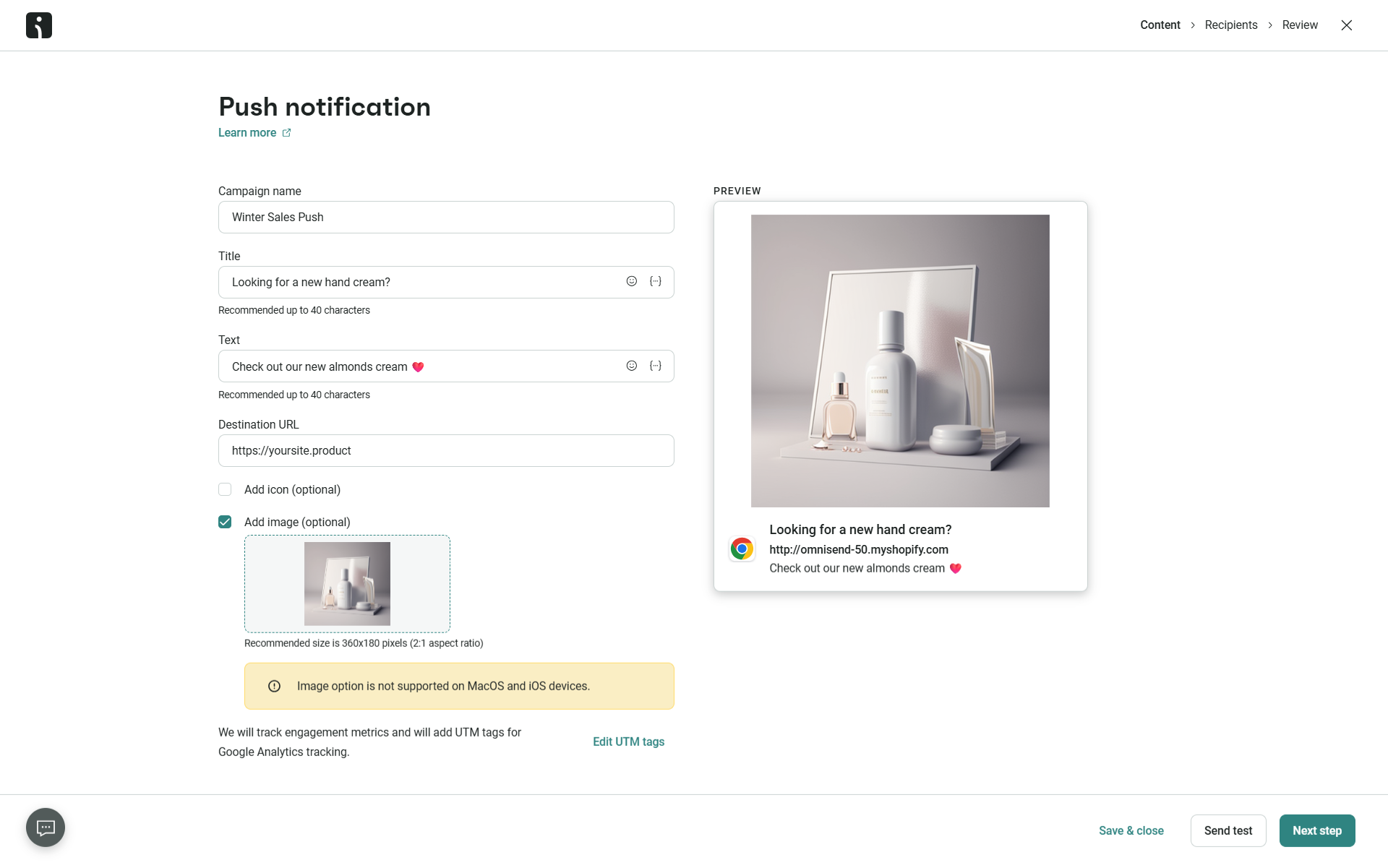
To create your first campaign, go to the Campaigns tab and click + New Campaign. Find Push notification and click Create notification.
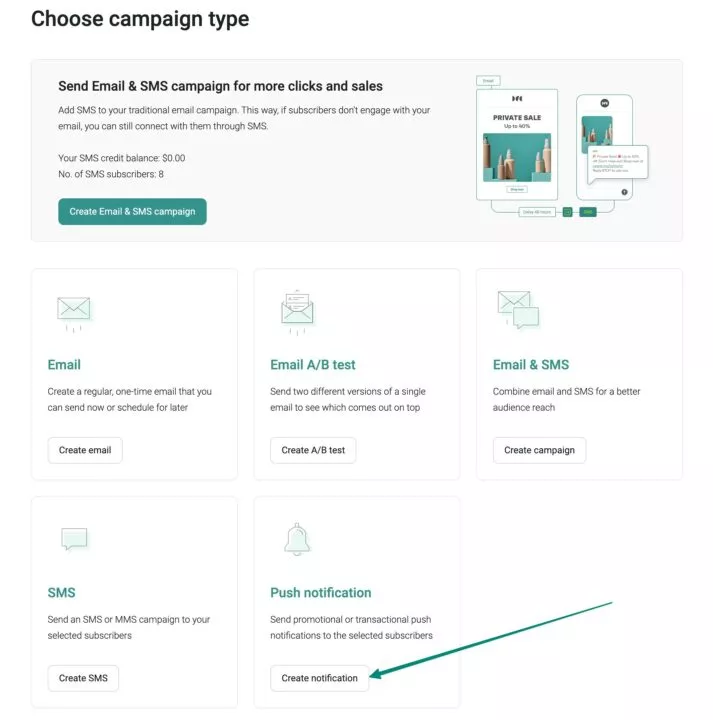
You can edit the title, text, logo, and image of your notification and send a test message to see how it looks.
4. Select your audience
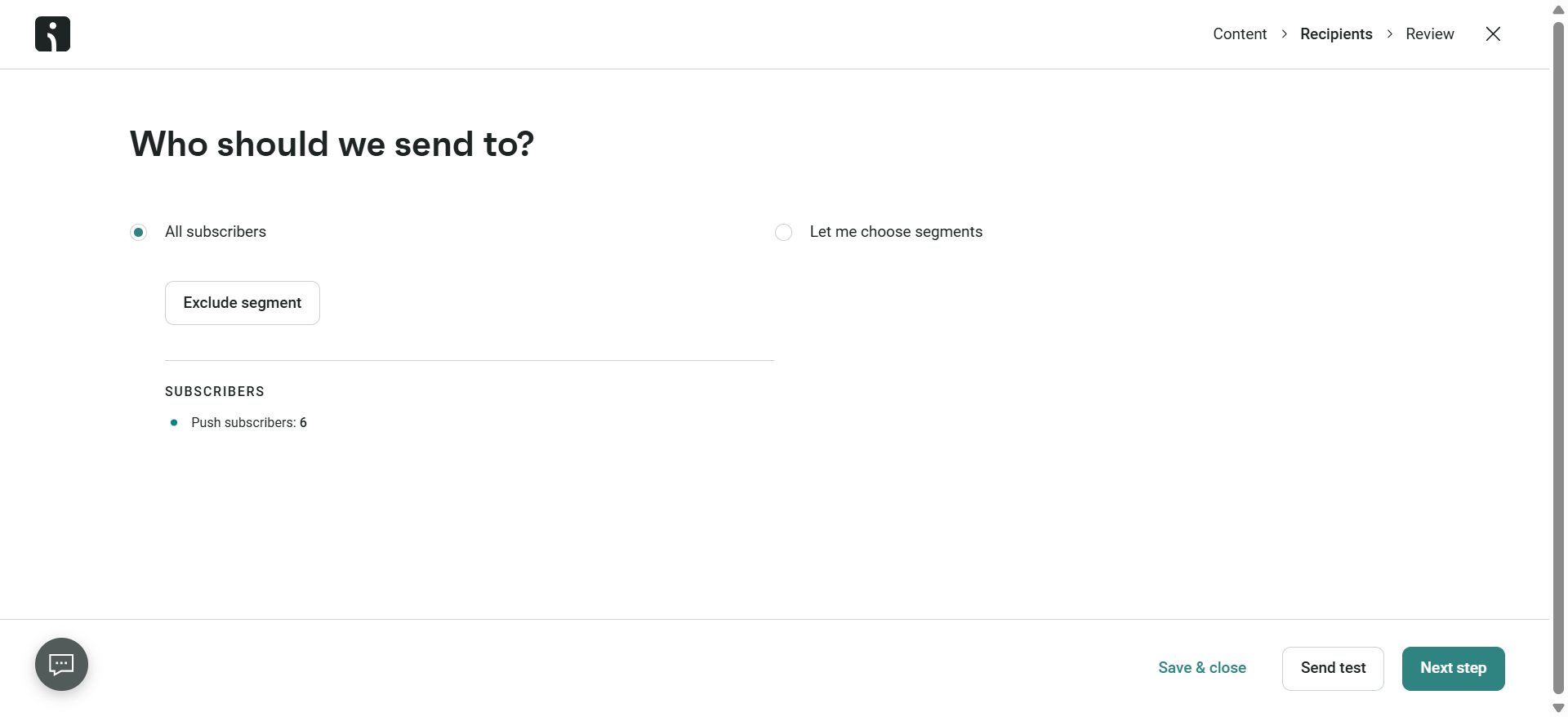
To select your campaign audience, go to the Recipients step. Here, you can choose either All Subscribers or a specific segment that you have created. You can also exclude segments if you like.
Once you’re ready, click on Next step.
5. Review and send
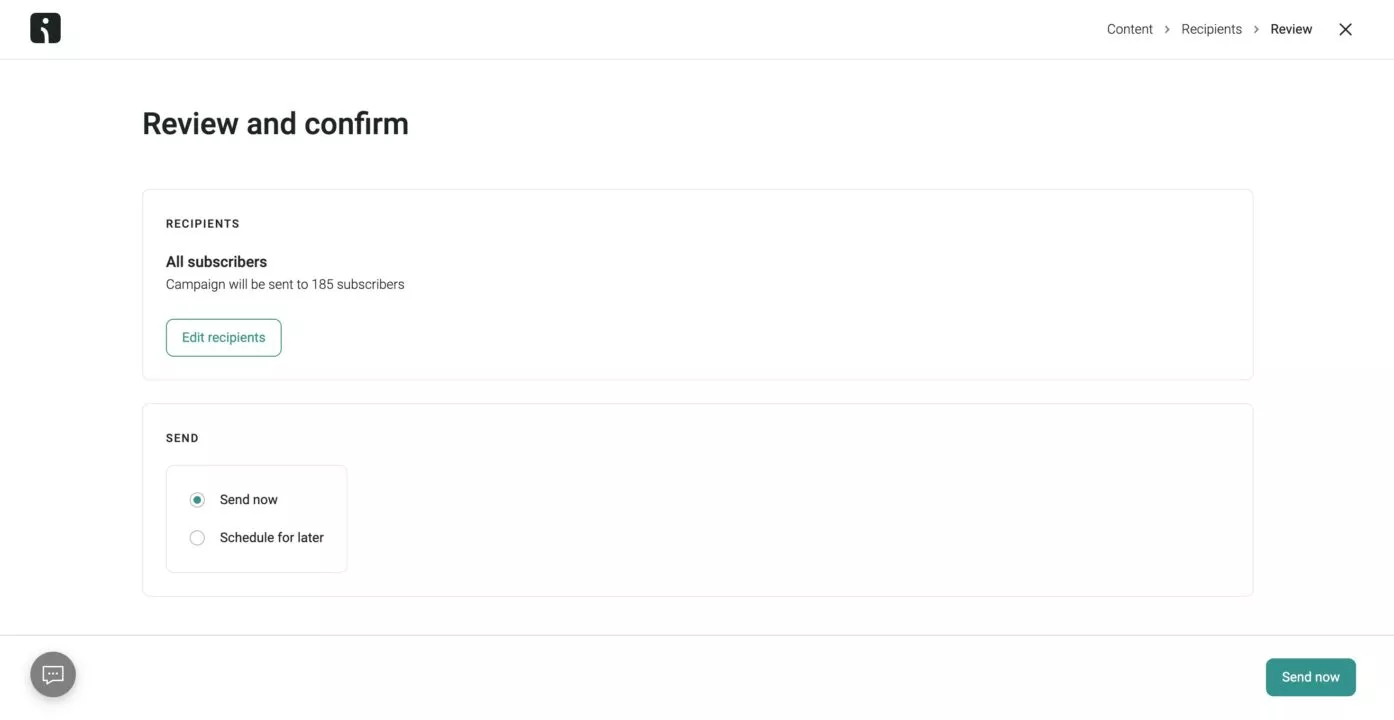
To review and send your campaign, go to the Send step and check your selections. When you are ready, hit Send now or Schedule for later to deliver your campaign to your audience.
6. Integrate pushes with other channels
An effective push notification marketing strategy should coordinate messages across many channels. These include email and SMS. Doing this helps create a consistent, personalized experience for subscribers across different touchpoints.
Omnisend enables you to easily build omnichannel campaigns with push alerts integrated right into your workflows — not as a separate automation. Once added to any flow, you can customize notification content, timing, targeting, and more. For example:
- Send an automated email when a customer makes a purchase. Then, follow up with confirmation and shipping pushes.
- Text an abandoned cart reminder. Then, trigger a personalized push highlighting items left behind.
- Email subscribers about a sale. Then, deliver push alerts when popular products become low in stock.
For more on setting up pushes, please refer to Omnisend’s push notification documentation.
Push notification marketing best practices
The tips above will help you get started with push notifications, but every campaign has room for improvement. No matter where they are right now, the best marketers are constantly looking for ways to improve their approach to push notification marketing and differentiate their brands from the competition. These are a few ideas to help you achieve better results with push notifications.
Combine with email and SMS
Improve your push notification marketing strategy by combining pushes with email and SMS campaigns. You’ll reach your audience across multiple channels and increase engagement.
If you’re not convinced it’s worth it, we found that marketers using three or more channels in a campaign earned a 494% higher order rate than those using a single-channel campaign.
Here are some tips on how to use push notifications for marketing along with email and SMS:
- Use email and SMS to collect customer data, such as browsing history. Then, leverage these rich profiles to personalize real-time push notifications.
- Email subscribers about an upcoming flash sale. Later, amplify the impact with push notifications timed to coincide with the start of the sale.
- Send behavior-based triggers, such as cart abandonment pushes. Have them follow up on corresponding emails or texts to reinforce your messaging.
- Ensure key campaign pushes, such as sales announcements and shipping updates, have email and SMS counterparts. This covers subscribers preferring different channels.
A/B testing
A/B testing, also known as split testing, is an excellent way to optimize your push notification marketing campaigns. Testing different versions of push messages helps you find out what works best for your audience, improving your engagement and conversion rates.
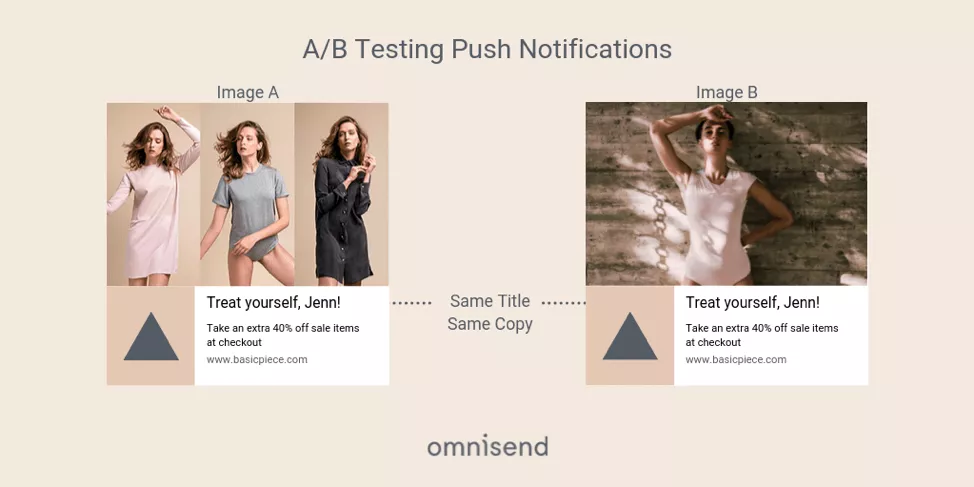
One aspect you can test with push notifications is the image. Images can make your push messages more eye-catching and appealing. However, they also take up space and bandwidth. A/B test variations in graphics, product visuals, or promotional images to see what resonates best.
You can also experiment with your push notification titles to improve open rates. Try urgent-sounding headings like “One day only!” against more neutral options and gauge what makes users more likely to engage. Experiment with wording, length, and tone.
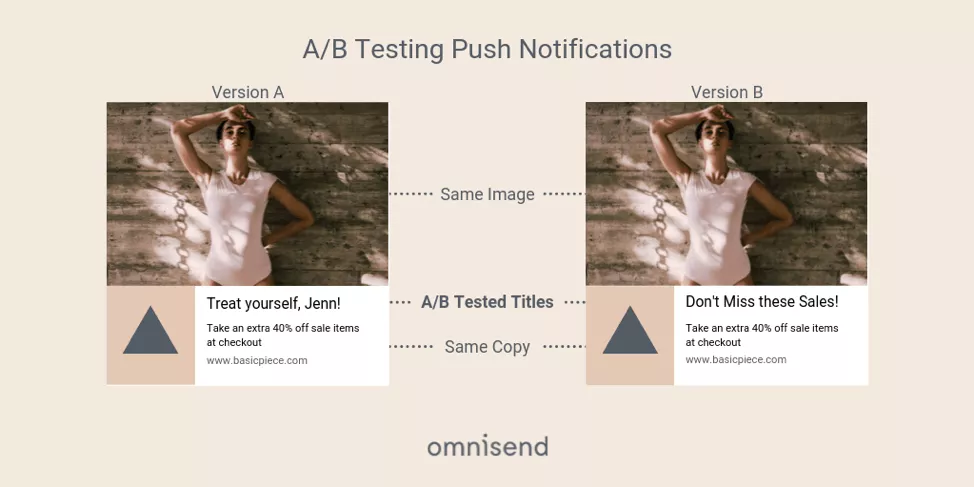
Another effective A/B test is to experiment with send timing. For some audiences, early morning push notifications may work better than evening sends, and vice versa. Experiment with timing, but be sure to respect time zones.
If none of the above piques your interest, test out different CTAs. There’s a world of difference between sending out a “Buy now!” versus a “Save 50%” call to action.
The key is iterating based on marketing metrics and performance data. Let testing reveal the combinations that delight subscribers and drive conversions.
Segmentation and targeting
Sending the same push notification to your entire subscriber base is a quick way to make users opt out. Push notifications are easy to tune out if they’re irrelevant, and they quickly become annoying. Broadcast pushes can still be effective, but use them sparingly.
You’re often better off segmenting your audience in at least two ways:
- Behavior: Create segments based on purchase history, browsing activity, and engagement level.
- Lifecycle stages: Create segments for new users, active buyers, and lapsed customers.
Data supports segmentation as well. On average, the open rate for contextual campaigns is 14.4%, compared to 4.19% for generic ones.
“Segmentation is the core of any marketing strategy. You can apply all the knowledge you already have from emails, SMS, and even paid marketing. Push notifications are no different from other channels in segmentation – users still want relevant materials at the right time.”
— Evaldas Mockus, VP of Marketing, Omnisend
Our platform lets you segment your push notification audience using the same filters you’d use for email and SMS campaigns. You can build behavioral segments for all three channels at once, which saves you time in the long run.
Frequency and timing
Over-sending push messages can be as detrimental as sending broadcasts too often. Users find it intrusive, boring, and annoying, so they opt out.
According to users, receiving two to five messages in one week would push 46% to opt out of push notifications entirely. In addition, sending more than five messages per week drops CTR by 10-20% per additional message.
Timing and frequency are the core of your marketing and retention strategy for push notifications. For most ecommerce brands, sticking to two to three pushes per week is a safe starting point.
You can adjust frequency based on engagement data once you have that. Engagement data also lets you send out notifications at better moments, aligning them with purchase behavior patterns.
Localize the timing of your pushes as well. When a message is delivered at the optimal local time, CTR improves by 10-15% when compared to uniform sends.
“Push notifications are a blank slate marketing channel. When they’re timely, well-written, and relevant, push notifications bring in more sales in an instant. When they’re blasted out randomly, they can even damage the brand. Use them wisely, and you’ll generate better returns. Combine them with email and SMS – you have a gold mine.”
— Bernard Meyer, Sr Director of Comms & Creative
As a general rule of thumb, reaction rates to push notifications tend to be lower in the morning and climb towards the end of the day. You have two peak periods, which are midday (12-1 PM) and early evening (7-8 PM).
Never send push notifications outside working hours. A 2 AM push message from a clothing shop will definitely raise eyebrows.
Opt-in strategy
Push notification subscribers are harder to get than most other subscribers. You have a single opportunity to subscribe a user. If they click “Block”, the prompt will never show again.
Don’t be too hard on yourself, though. A good, steady opt-in rate for web push notifications in ecommerce hovers around 5%. Mobile apps fare much better, easily reaching above 50% in some industries.
Your best bet to drive subscribers to push notifications is to control the timing and framing (also known as a “soft ask”). Instead of bringing up the pop-up as soon as the first page loads, allow the user to browse your website or add something to their cart. Then bring out a branded pop-up, explaining the benefits of subscribing (“Get notified about flash sales and back-in-stock alerts”).
Give your visitors a reason to say “yes” by placing the message at the right time, with the right incentive, and the correct copy. Omnisend’s push notification widget lets you do exactly that – customize the timing and presentation.
Start using push notification marketing today
Push notifications bring in impressive returns when personalized, timed, and combined with email and SMS. Automated pushes driven by behavior convert at roughly 14%, and brands using three or more channels see a 494% higher order rate than those using a single channel.
Your goal is to generate subscribers and then exercise restraint. Segment your audience, optimize send frequency, and let automation do the heavy lifting.
Omnisend lets you add push messages to your existing workflows at no additional cost, so you can start collecting subscribers right now. Combine push notifications with email and SMS to bring out the best results in ecommerce.
Quick sign up | No credit card required