Omnisend AI


 OFFER
OFFER









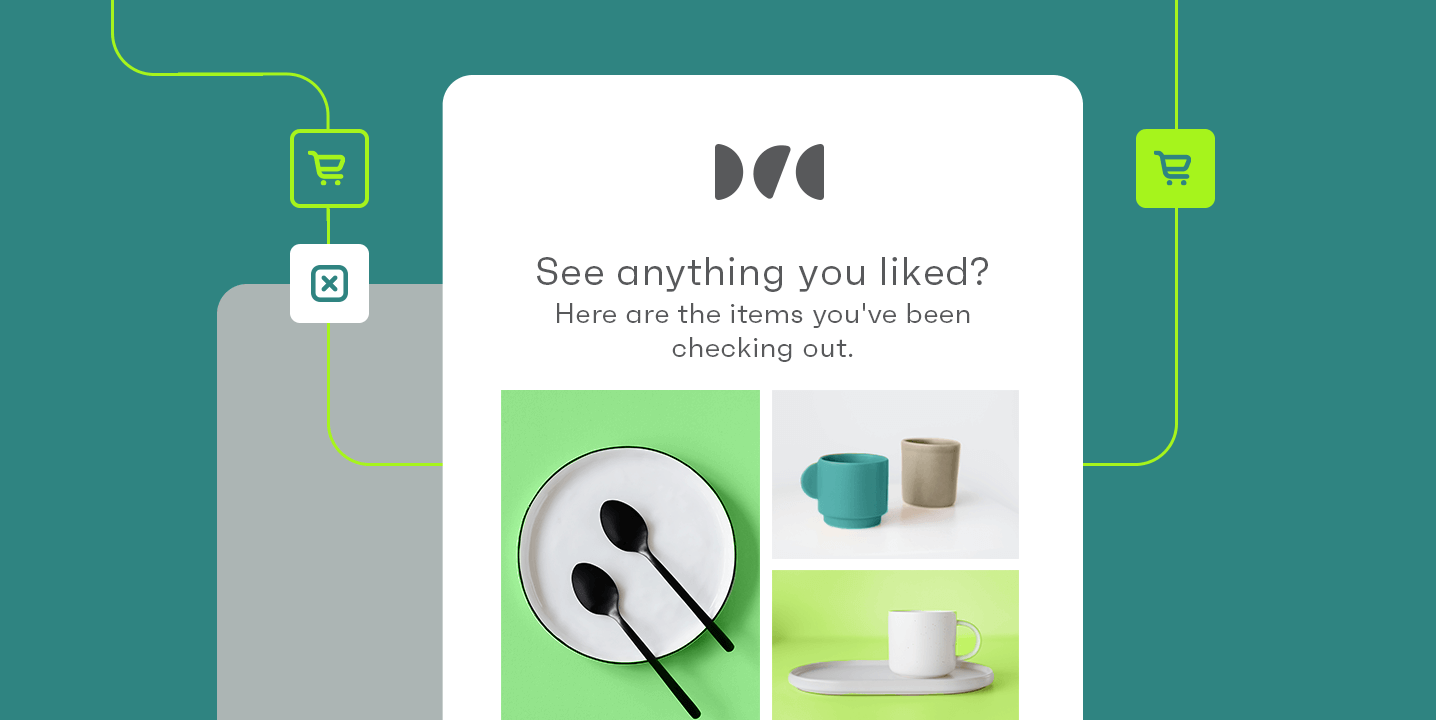

Every browser who leaves your store without adding products to their cart means a lost revenue opportunity. But if you have their email addresses, you can entice them back and recover sales with a browse abandonment email.
It’s possible to recover a significant portion of sales with a well-timed, personalized email. Your email tool, such as Omnisend, will trigger the browse abandonment automation according to the behavior-based triggers you set.
“With a 42.16% open rate and a 10.68% click-to-conversion rate, browse abandonment emails are getting popular.”
Omnisend report, 2026
This article provides 10+ browse abandonment email examples, subject lines you can steal, best practices, and a comparison of different abandonment flows.
Rather watch a video? No problem:
Quick sign up | No credit card required
What is a browse abandonment email?
A browse abandonment email is an automated message sent when a known subscriber visits your store, views products or categories, and then exits without adding anything to their cart. These automated emails are triggered shortly after the visit to re-capture interest and bring shoppers back to your site.
Browse abandonment emails help you engage customers early in their journey before they forget your brand. They are also among the most profitable email automation messages you can send using your email marketing software.
In fact, browse abandonment emails achieved a 42.16% open rate and a 0.59% conversion rate in 2026. This is quite higher than cross-sell and lapsed purchase emails, and can reduce your reliance on paid retargeting ads.
See how browse abandonment emails compare to other common ecommerce email automations, according to Omnisend’s 2026 report:
| Email type | Open rate | Click-to-sent | Conversion rate | Click-to-conversion |
|---|---|---|---|---|
| Product abandonment | 41.48% | 5.45% | 0.74% | 13.65% |
| Welcome | 33.79% | 3.78% | 2.00% | 52.98% |
| Abandoned cart | 35.75% | 3.84% | 1.51% | 39.46% |
| Browse abandonment | 42.16% | 5.49% | 0.59% | 10.68% |
| Cross-sell | 42.09% | 2.93% | 0.75% | 25.50% |
| Lapsed purchase | 33.00% | 1.96% | 0.52% | 26.74% |
Cart abandonment vs. browse abandonment vs. product abandonment
Cart, browse, and product abandonment emails are automated messages sent to shoppers who exit your site without buying. Each type targets customers at different stages of the buying journey with varying levels of purchase intent.
| Email type | Trigger | Buying intent |
|---|---|---|
| Browse abandonment | The visitor leaves after viewing a general page or category | Low |
| Product abandonment | Shopper exits after visiting a specific product page | Medium |
| Cart abandonment | Customer leaves after adding items to their shopping cart | High |
A browse abandonment email targets early-stage visitors who are still exploring. They may not know what they want yet, so your email should guide and inspire them.
Product abandonment automation emails go one step further, engaging shoppers who’ve shown interest in a specific item. Cart abandonment emails, on the other hand, reach the most ready-to-buy customers. Their goal is to nudge shoppers to complete their purchase.
Omnisend’s segmentation and automation workflows let you trigger the right messages based on your shoppers’ exact exit point to maximize revenue recovery.
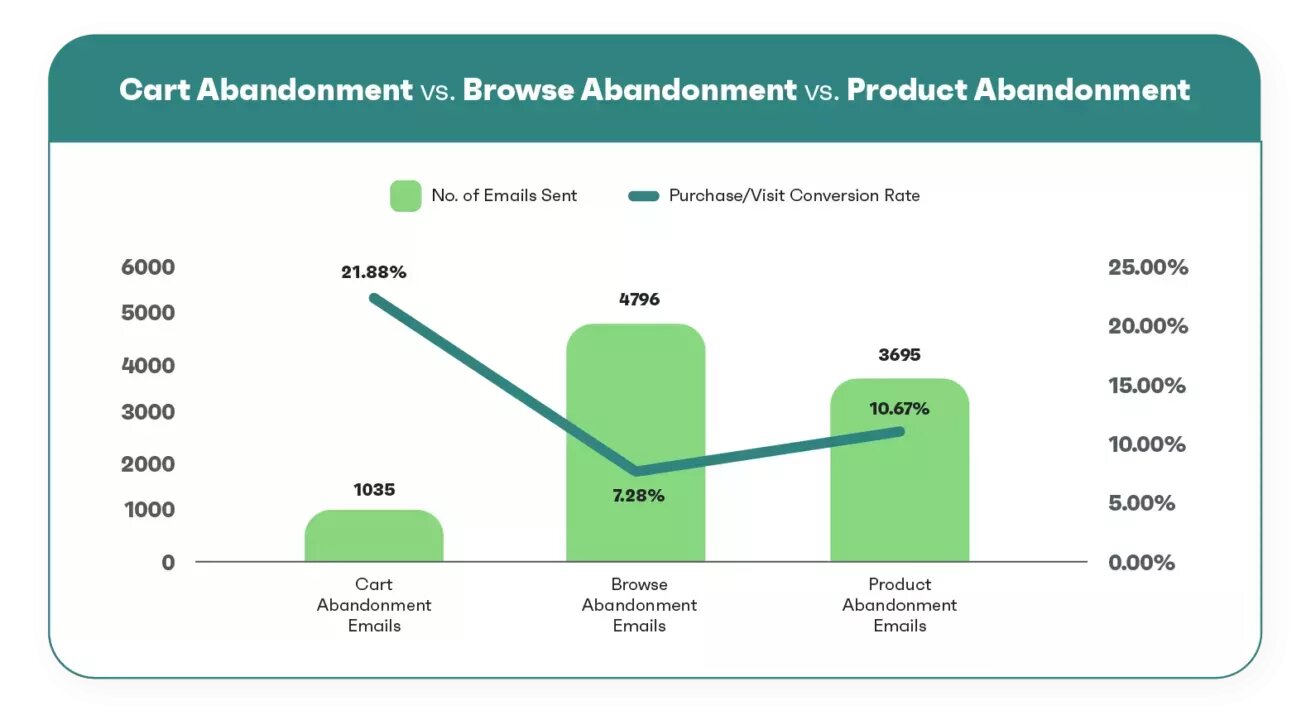
Our data reveals that cart abandonment emails convert at 21.88%, compared to just 7.28% for browse abandonment emails. That’s three times higher, despite reaching smaller audiences:
10+ brilliant browse abandonment email examples
A well-timed email with the right messaging can turn casual browsers into loyal buyers.
Let’s explore some real-world browse abandonment email examples from top brands and discuss the elements that make them engaging. These examples show how you can get creative and transform a shopper’s browsing session into a complete purchase:
1. Timex
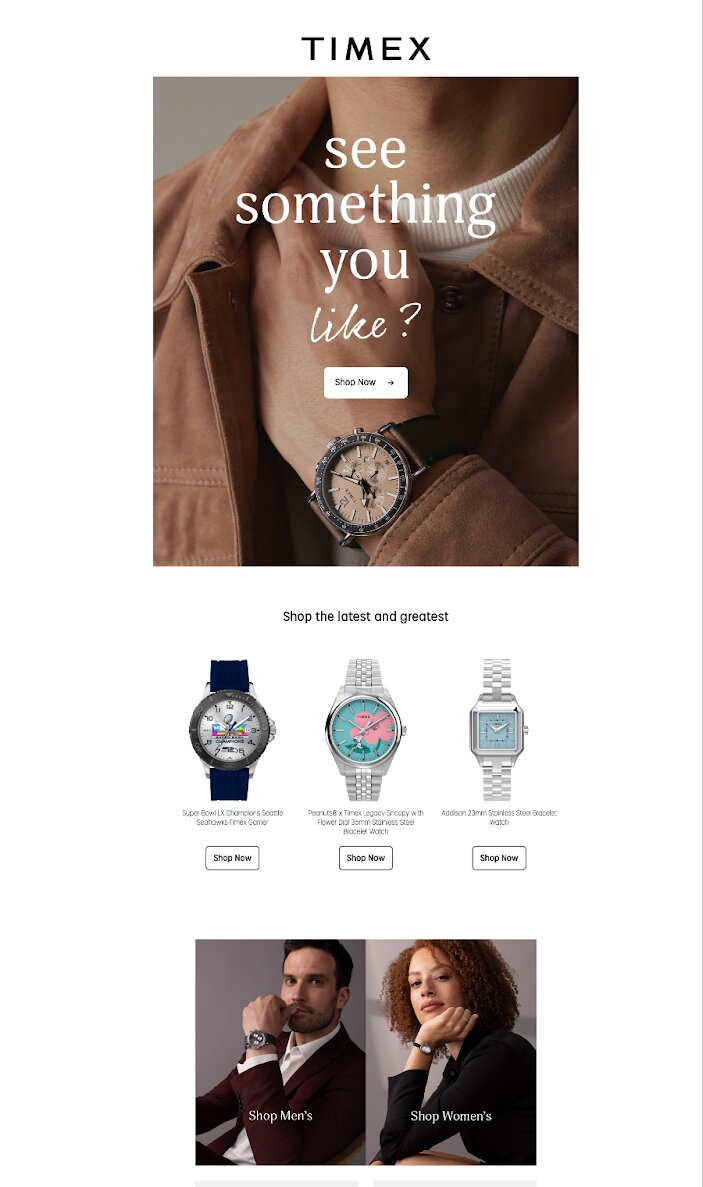
Timex keeps things simple and stylish with its browse abandonment email. A clean layout and high-quality product images immediately pull you in. The headline “see something you like?” is inviting and feels like a friendly nudge. It’s a great way to rekindle interest without making the customer feel pressured.
The email also does a great job of guiding the reader with clear product photos, “Shop Now” CTAS, and shopping categories:
Why we like it
- Friendly and engaging copy
- Clear and simple CTA buttons that guide action
- Relevant product suggestions with high-quality visuals
- Easy navigation with men’s and women’s categories
2. Alyaka
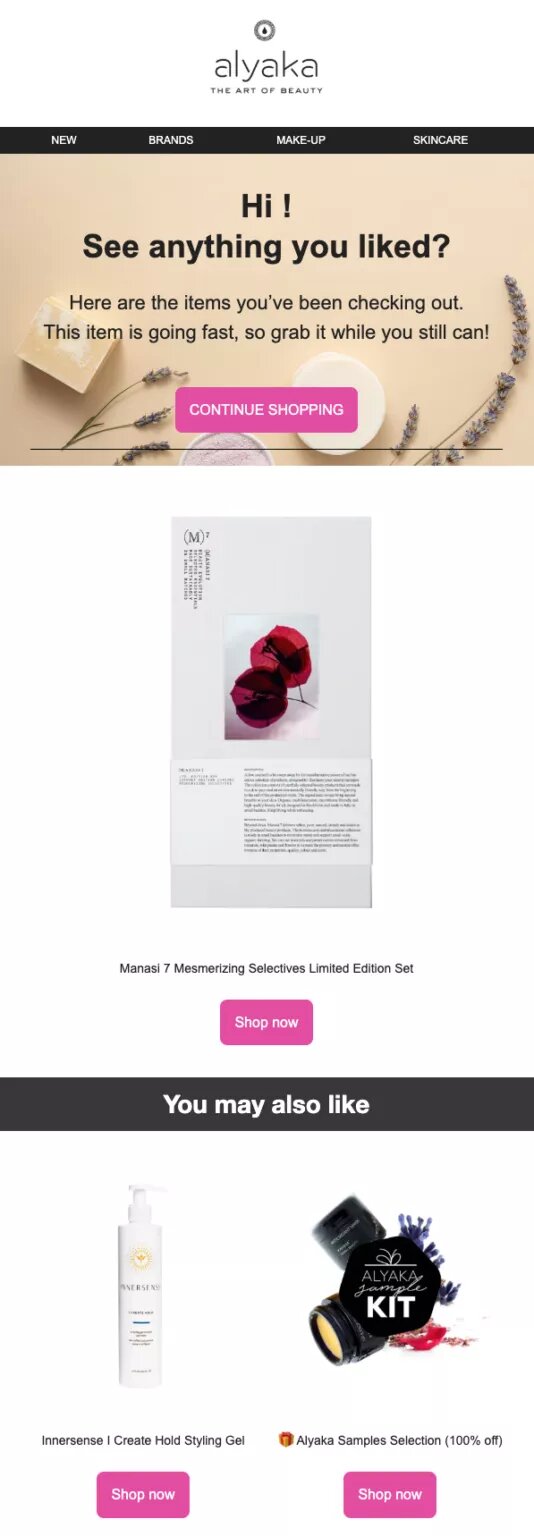
The elegance and persuasion in Alyaka’s browse abandonment email are noteworthy. The friendly yet compelling headline, “See anything you liked?” makes the reader rethink their browsing history.
This browse abandonment email example creates urgency by stating that the item is “going fast.” This triggers FOMO and drives immediate customer action.
It features a clean, minimalistic design that keeps the focus on the product:
Why we like it
- Two CTAs with different navigation options
- Uncluttered layout with product recommendations
- A direct CTA that leads users to the product page
- Strategically placed content doesn’t overwhelm the reader
3. The Knitting Network
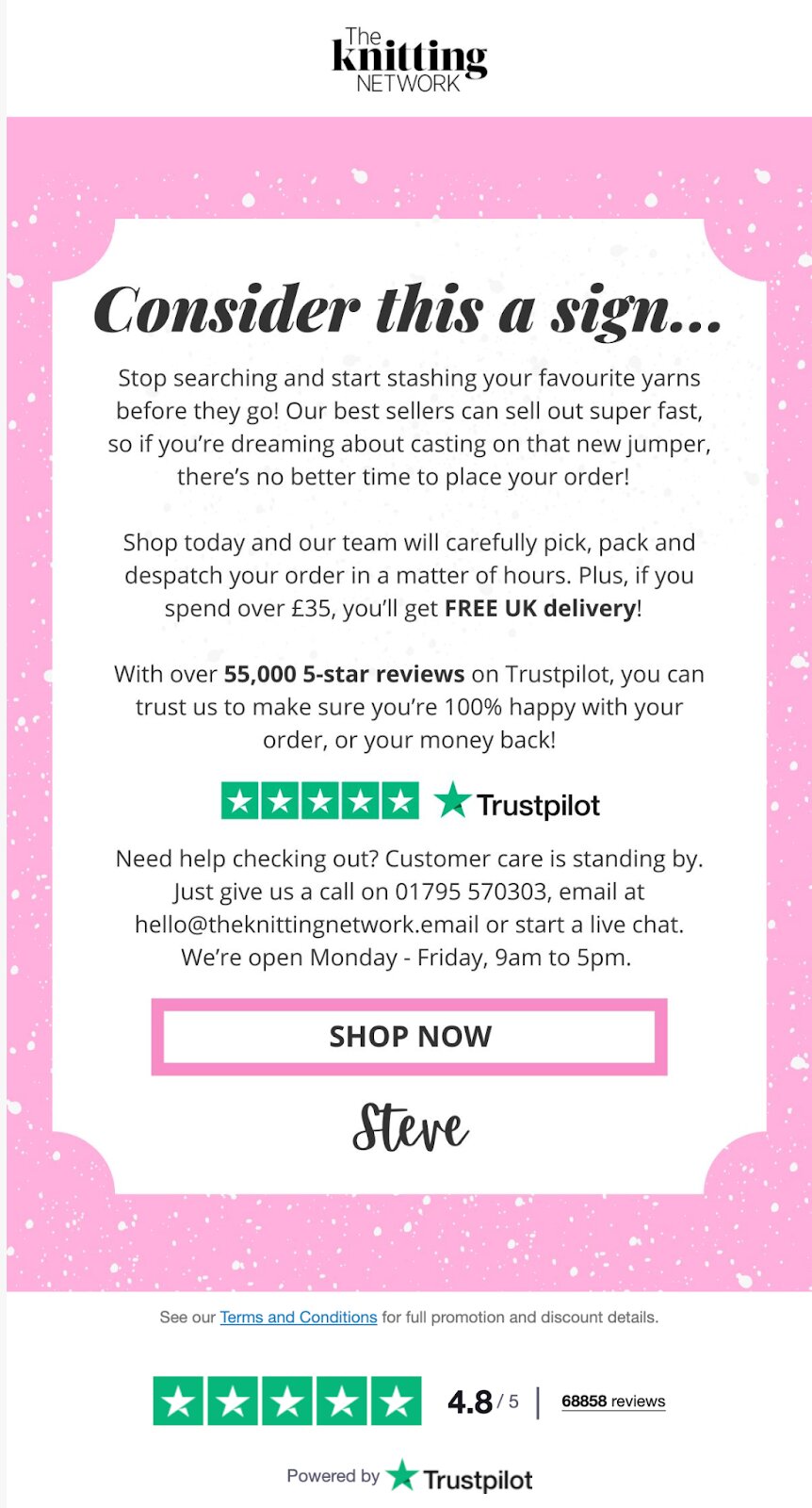
The Knitting Network takes a warm, personal, and convincing approach in its browse abandonment email. The headline “Consider this a sign…” sparks your curiosity right away.
Reminding subscribers that popular yarns sell out quickly adds a sense of urgency. The free shipping offer sweetens the deal , making the visitor even more likely to come back:
Why we like it
- A friendly, conversational tone makes the email feel personal
- The phrase “before they go!” evokes FOMO (fear of missing out)
- There’s clear social proof with thousands of 5-star reviews and ratings
- Including a bold CTA and helpful contact details makes it easy to take action
4. Koio
KOIO’s browse abandonment email opens with “Take Another Look at These,” which feels urgent but still inviting. Then it pulls you in further with aspirational copy, “Endlessly Versatile Picks,” that makes the products feel exciting and worth a second glance. A bright green “SHOP WITH FREE SHIPPING” CTA button is impossible to miss. It turns a potential maybe into an irresistible offer.
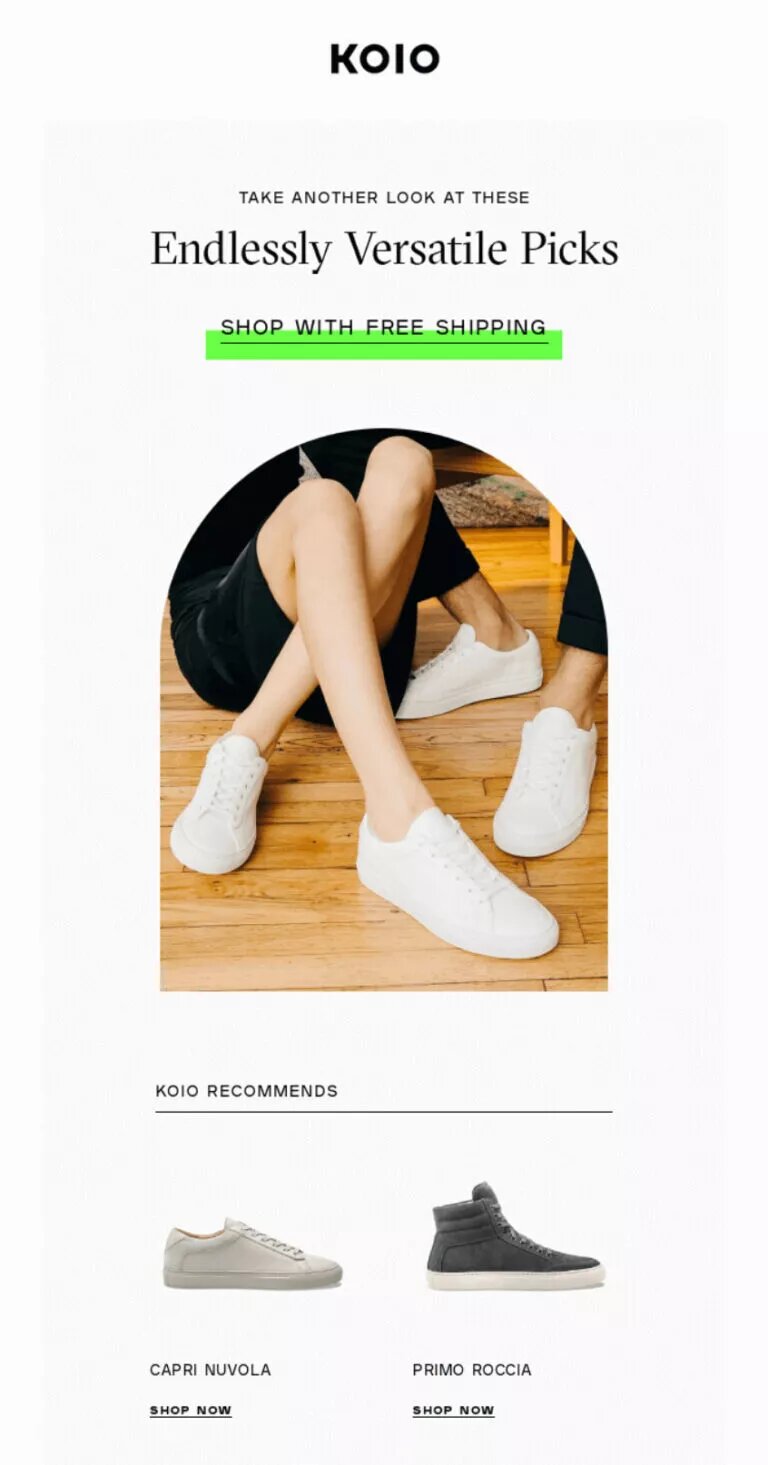
Product images show four shoe styles with prices, giving browsers multiple reasons to return. Lifestyle photography shots show shoppers what the shoes will look like when they wear them.
What we like
- The subject line “Like What You See?” acknowledges browsing without being pushy
- Shoppers get a variety of products instead of being forced to make one choice
- Letting customers try the shoes on before buying removes online shopping hesitation
- Clear benefits like easy returns and free shipping reinforce buyer trust
5. Toynk
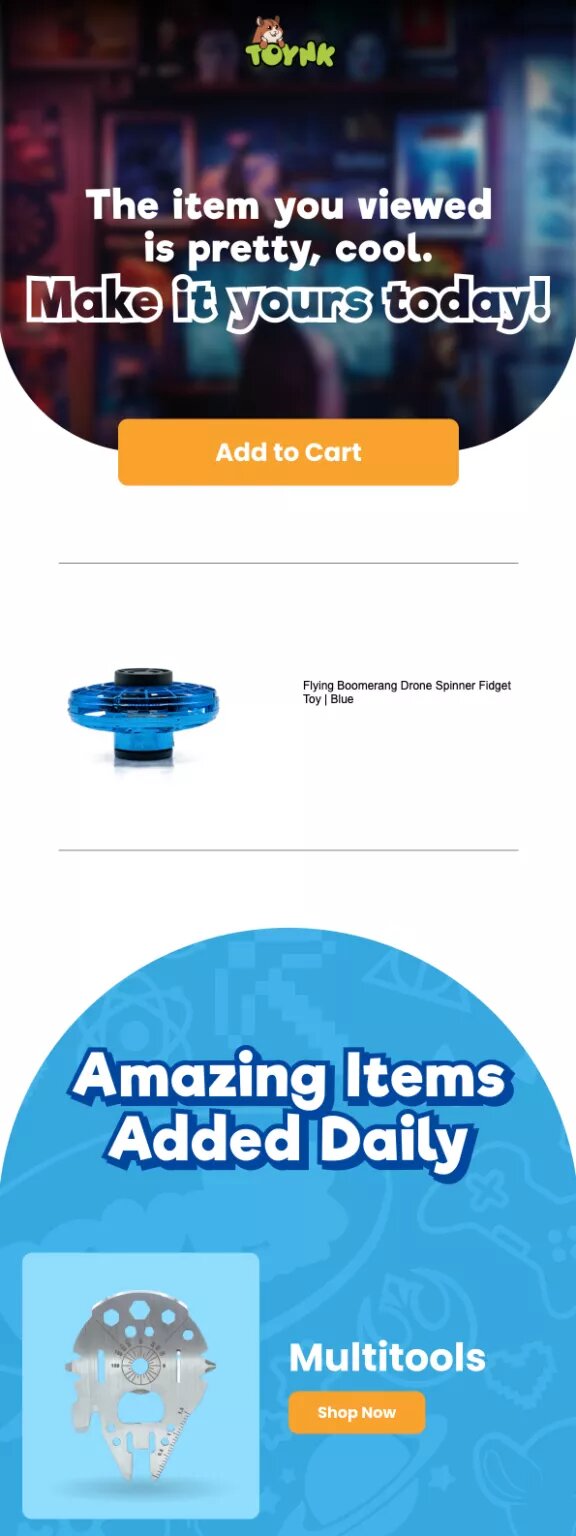
Toynk keeps things bright, colorful, and incredibly engaging with its browse abandonment email. The subject line, “The item you viewed is pretty cool,” sparks curiosity and excitement.
The bold phrase that follows, “Make it yours today,” compels the customer to want to buy the product and pushes them to a decision.
The colorful design and fun visuals create an inviting shopping experience:
Why we like it
- Informal and conversational email tone
- Product recommendations with CTAs
- Pairs the reminder with alternative recommendations
- Bold, high-contrast buttons
6. Holo Taco
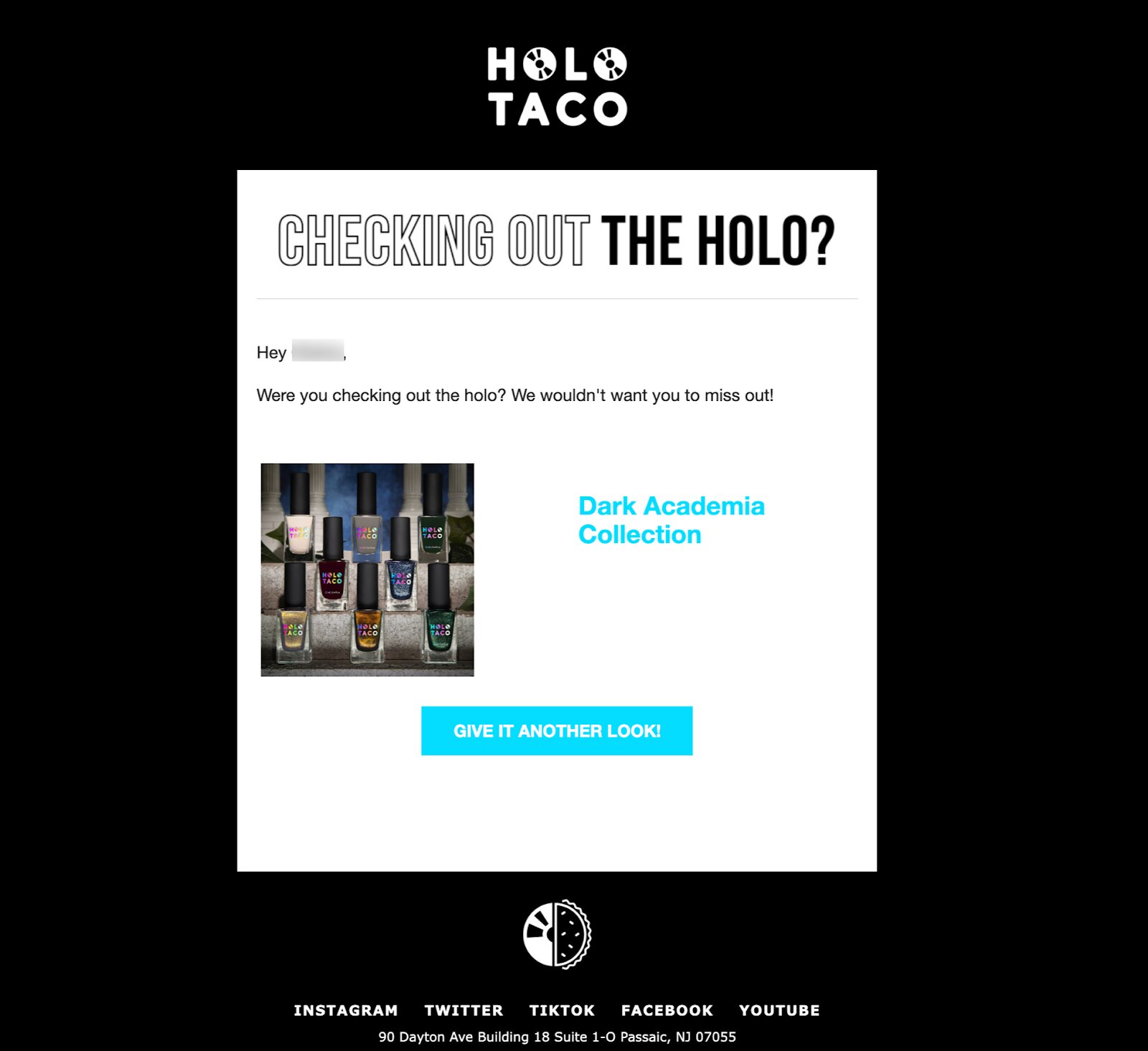
Holo Taco keeps its browse abandonment email short, friendly, and punchy. “Checking out the holo?” feels personal, playful, and totally on brand. Using the reader’s name further makes the message feel like it’s meant just for them.
The customer sees the exact collection they were browsing, paired with a bright, eye-catching CTA button that says “Give it another look!” It’s an effective way to maximize conversions and lower cart abandonment for your Shopify store.
Why we like it
- A simple design that doesn’t distract shoppers
- The warm, friendly tone nudges customers without feeling pushy
- Bright, CTA button that’s easy to spot
- Strong visuals remind customers why they liked the product
7. ASOS
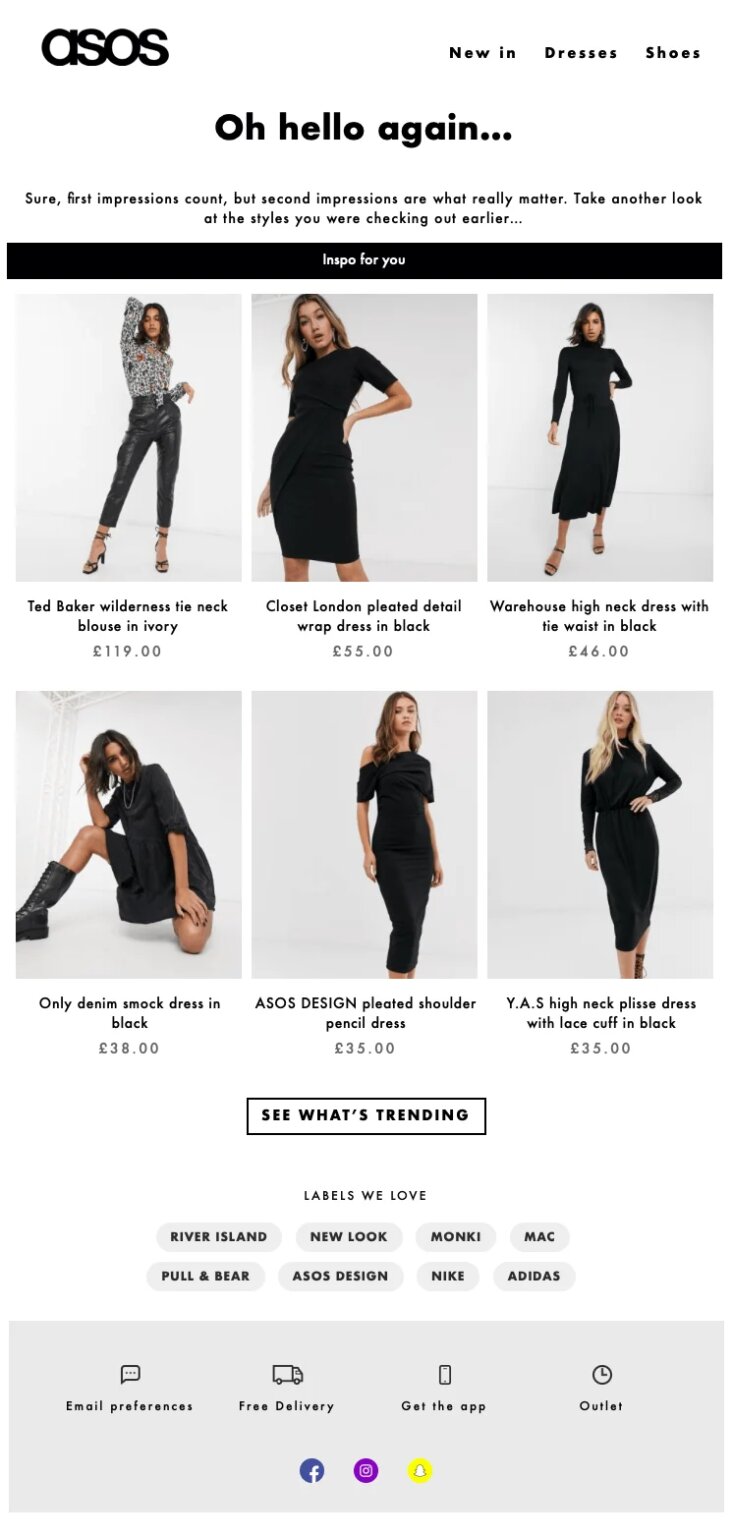
ASOS has one of the best browse abandonment email examples. It takes a relaxed, friendly approach and adds attractive visuals. The headline, “Oh hello again…” feels cheerful and inviting, which makes this a friendly reminder rather than a sales push.
A list of popular brands below offers a chance to check out something different that might interest consumers, increasing the chances of purchase:
Why we like it
- Casual, relatable tone
- Directly references browsing history without being pushy
- CTAs with different purposes to cater to all customer needs
- Simple product-focused design
8. Black Ember
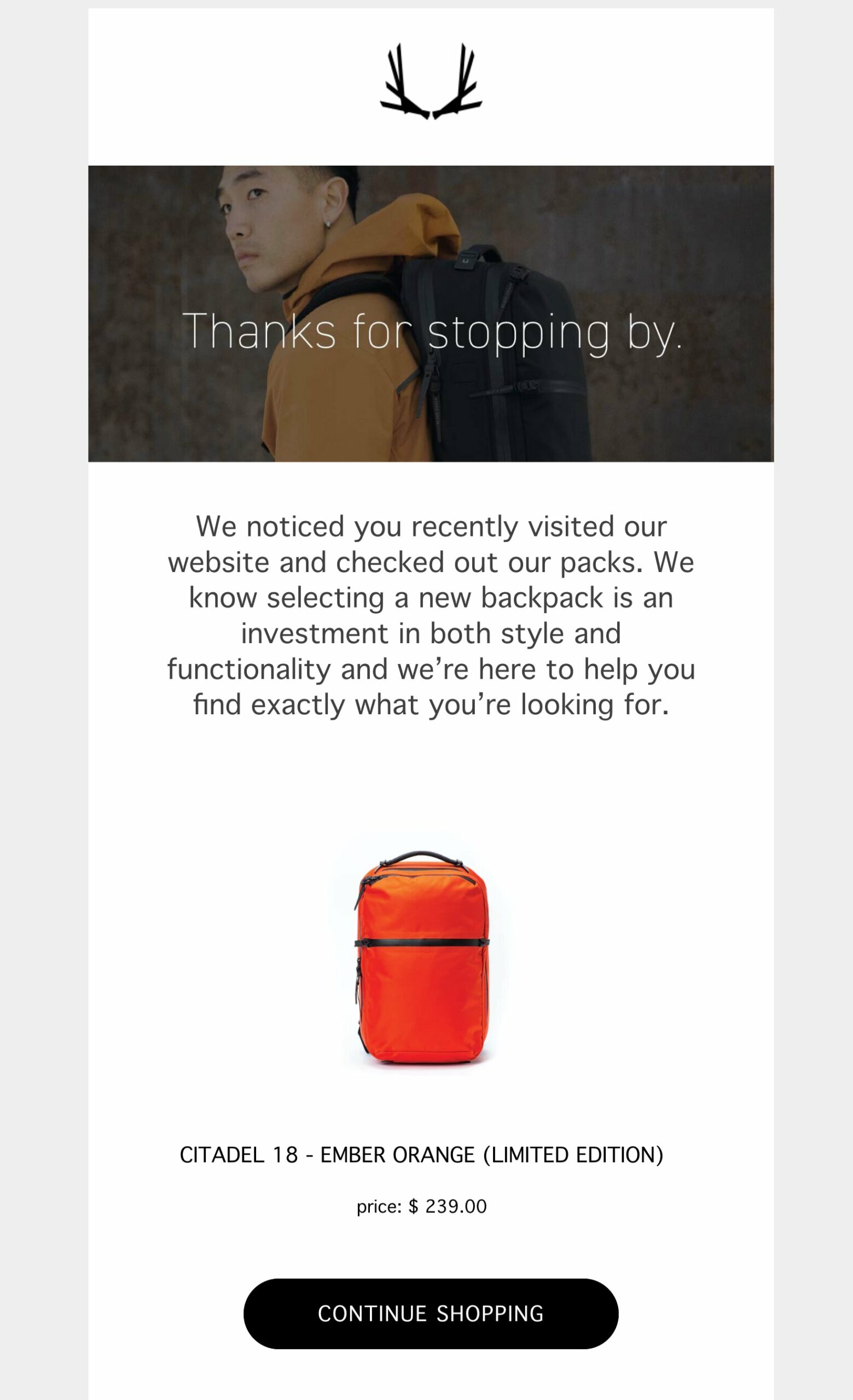
Black Ember ranks among the best cart abandonment email examples for being helpful. It opens with a beautiful lifestyle image and a simple “Thanks for stopping by,” headline.
Instead of pushing shoppers to buy, the copy provides genuine support. It reminds them that a good backpack is an investment. This adds value to the message.
Why we like it
- Customers see clear product details (image, name, and price)
- The supportive tone positions the brand as a helpful guide
- A bold CTA makes it easy for visitors to continue shopping
- The “Limited Edition” tag adds subtle urgency
9. Chewy
It’s hard to say no to a cute dog, which is why Chewy’s browse abandonment email works. It taps into the shopper’s emotions with a cute pet hero image that instantly grabs attention.
The line “Make it yours, er…theirs” hits that sweet spot of humor and charm, while the subject line creates urgency by suggesting the products are waiting for purchase.
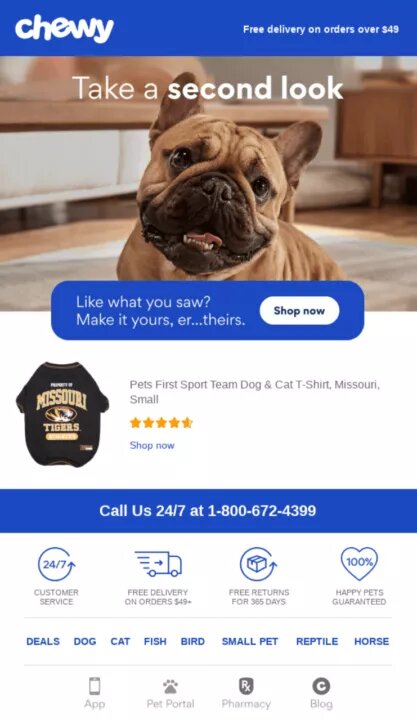
You can clearly see the Missouri Tigers pet shirt, with a five-star rating next to it. The footer also includes support options and guarantees, which make the customers feel reassured.
What’s more, category links (DOG, CAT, FISH, BIRD) invite shoppers to explore more products. Customers can also access the app, pet portal, pharmacy, and blog. This gives them various ways to engage.
What we like
- Adorable pet photos spark the reader’s emotions
- The headline “Take a second look” is inviting and friendly
- Pairing the product with social proof (five-star rating) enhances customer trust
- Shoppers can complete their purchases using various contact methods
Omnisend success story
Dukier’s browse abandonment automation contributed to its 525% revenue growth from email marketing. The pet accessory brand localized cart recovery messages across five languages, achieving a 48.4% open rate and 2.8% conversion rate.
Read the case study
10. Dusk
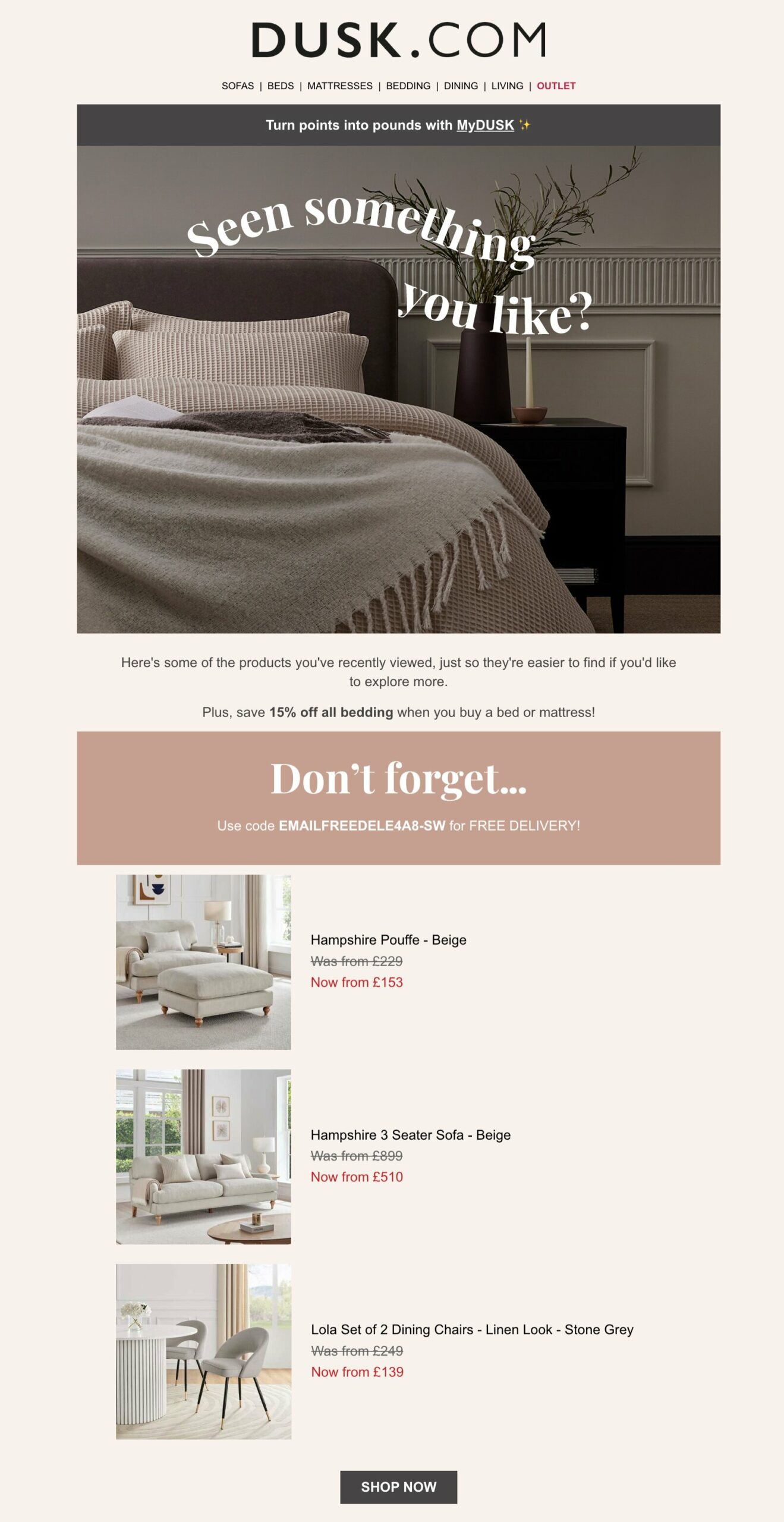
Dusk starts its email with a friendly question: “Seen something you like?” This gently pulls the shopper back in without pressure. It then reminds the visitor what they viewed and reinforces value with price savings.
The email sweetens the deal further with a 15% discount and a free delivery code. It’s a great way to reduce shopping cart abandonment before the customer reaches checkout:
Why we like it
- Its friendly, conversational tone removes pressure
- The 15% discount and free delivery compel the customer to act right away
- Includes high-quality product shots with updated price savings
- The visible “Shop Now” CTA makes it easy for the shopper to take the next step
11. Rael
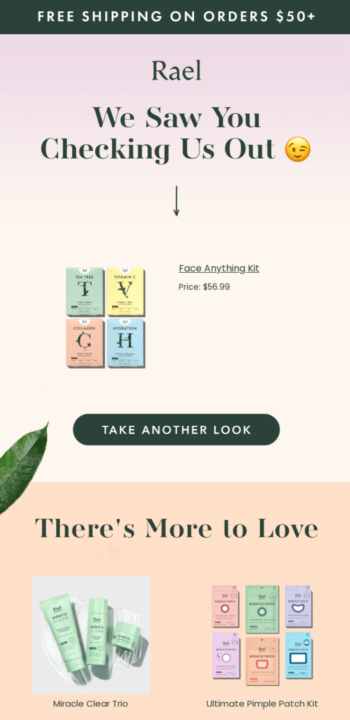
Rael adds personality and charm with the heading: “We Saw You Checking Us Out 😉.” It’s playful, a little cheeky, and very engaging. Plus, the winking emoji makes the email feel friendly. Free shipping on orders $50+ appears prominently at the top.
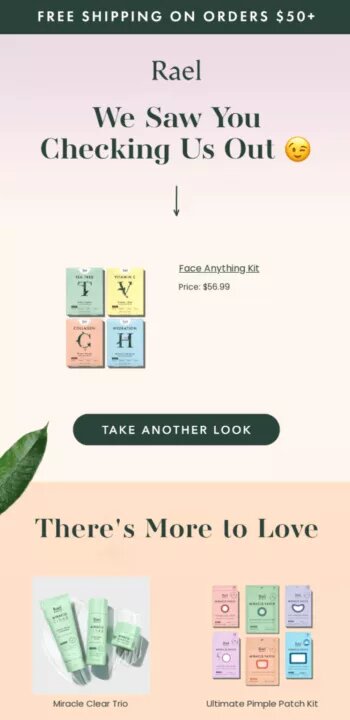
Right away, you see a free shipping offer, which lowers the barrier to buying. Then the email shows the product the shopper viewed, plus a few more options they might like. This gives customers more reasons to come back.
A dark green “TAKE ANOTHER LOOK” button sits below, providing an easy path to conversion.
What we like
- Free shipping threshold ($50+) is displayed immediately
- Playful headline and emoji create a friendly rather than pushy tone
- Multiple product alternatives at different price points expand options
- Bottom icons highlight key brand values (vegan, cruelty-free, subscription savings)
Browse abandonment email subject lines
Your subject line is the first thing email recipients see. It determines whether they open your message or ignore it. A strong browse-abandonment email subject line should be clear, compelling, and personalized.
Here are some of the best browse abandonment subject lines, grouped by intent, so you can test what works best for your audience:
Curiosity and soft nudge
These subject lines gently remind shoppers without pushing too hard:
1. Did you want (Product name)?
2. Still thinking it over?
3. Something caught your eye…
4. This is worth a second look 👀
5. Left mid-scroll? No worries
6. Worth a second glance?
7. You paused here… curious why?
8. Quick peek again?
9. Not ready yet? Totally fine
10. One more look won’t hurt 😉
11. Is this your next (Product name)?
Flattery and personalization
These browse-abandonment email subject lines make readers feel valued.
12. You’ve got great style, (Customer Name)
13. This (Product name) feels very “you”
14. This one’s got your name on it 👌
15. Your taste is top tier. Want to see why?
16. This one matches your vibe
17. ✨Picked just for you ✨
18. Great choice… just saying
19. You found a gem 💎
20. We think you’ll love this one
FOMO / urgency
These give shoppers a reason to act immediately.
21. Don’t let (Product name) slip past you!
22. Almost gone… still interested?
23. You’re this close to getting it 🔥
24. This won’t stay long ⏳
25. Others are eyeing what you viewed 👀
26. Stock is low on the items you browsed
Social proof
These subject lines build trust and confidence.
27. This (Product name) is trending now 🔥
28. People love what you saw ❤️
29. See why others love it!
30. Shoppers keep coming back for this!
No matter which browse abandonment email subject lines you choose, keep them short and clear. Five to seven words, under 40 characters, are ideal because they display well on mobile devices.
Use “you” to make the message feel personal and add customer names or product details whenever possible. Questions also work better than statements because they spark curiosity.
Before sending your browse abandonment email, run it through Omnisend’s free subject line tester. It lets you check length, clarity, scannability, and preview how your message will look in the inbox.
How to set up a browse abandonment email flow
You don’t need technical skills to set up a browse abandonment email flow. Most email marketing platforms track visitor behavior and trigger messages automatically once you enable the feature.
A browse abandonment triggered email sends when a tracked visitor views a product or category page and exits without adding anything to their cart. Your email platform tracks this activity using cookies and user data. Once the shopper leaves, the flow starts based on the timing you choose.
Many of the best browse abandonment flow examples follow a simple three-sequence email structure:
- Email 1 (one to four hours after browsing): Send a friendly reminder to bring visitors back while interest is still high. Show the products or categories they viewed without offering an incentive.
- Email 2 (24–48 hours later): Add a little more persuasion and value. Include social proof, such as customer reviews, ratings, or best-seller tags. You can also test a small incentive, such as free shipping.
- Email 3 (three to five days later): Use your final follow-up to create a sense of urgency. Let them know the stock is running low or the item will sell out soon. You can add a limited-time discount to nudge the final decision.
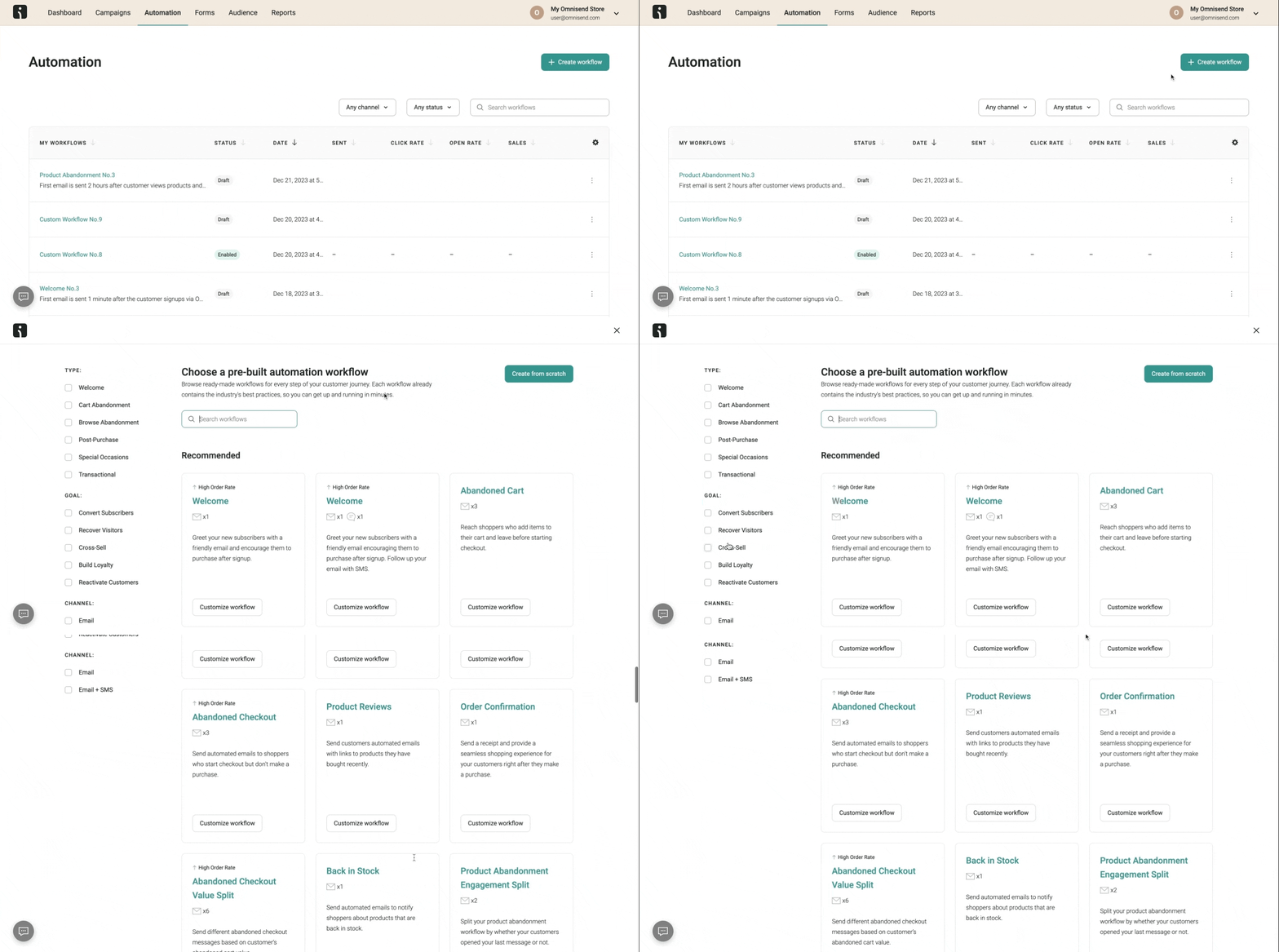
Omnisend offers pre-built browse abandonment automation workflows, so you can launch campaigns quickly. You can also create custom flows that match your store’s needs from scratch:
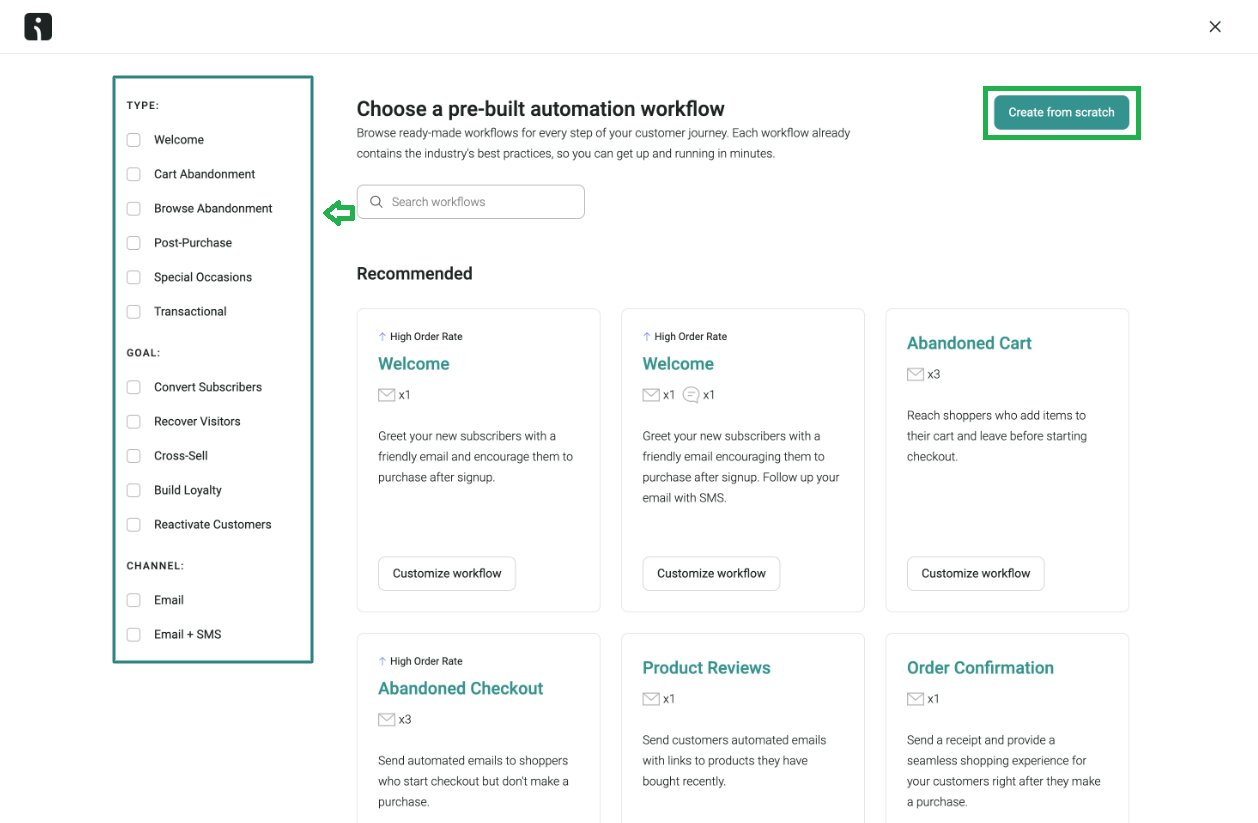
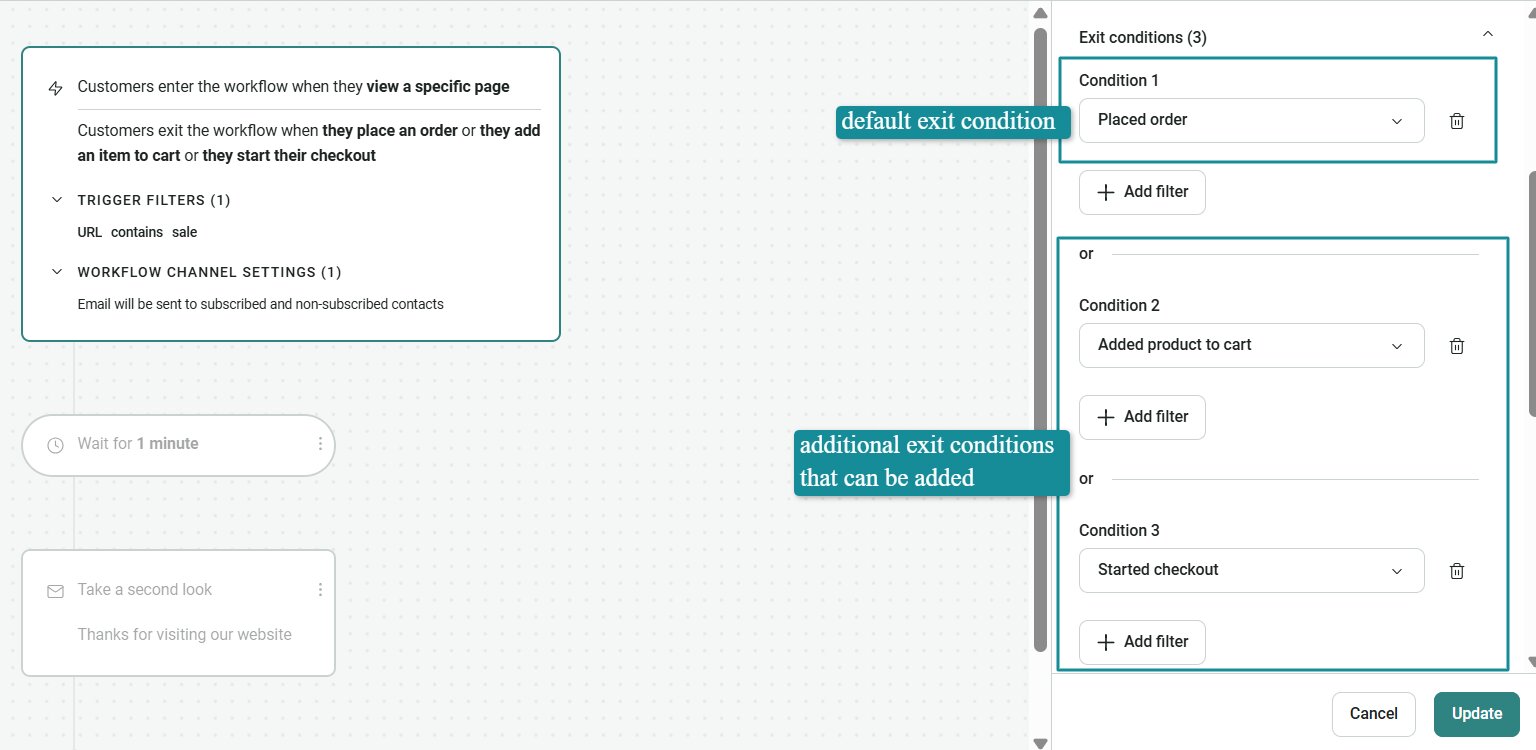
By default, some workflows, such as cart or checkout abandonment, target customers who’ve already made a purchase. However, you can adjust your trigger settings to include subscribers who haven’t bought yet.
You can add exit conditions such as “Added product to cart” or “Started checkout.” This step prevents your customers from getting too many emails from multiple flows at the same time:
Browse abandonment email best practices
Structuring your browse abandonment emails properly ensures your messages feel relevant and helpful, rather than intrusive. Use the following browse abandonment email flow best practices to craft emails that feel personal, engaging, and compelling:
- Personalize your message: Include the customer’s name and reference the specific product collection or category they viewed. Use a different browse abandonment email template for someone who browsed “sale” items versus “new arrivals.”
- Segment visitors by intent: Someone who spends five minutes looking at three different products is more likely to purchase. Use workflow splits to send more direct offers to high-intent users and softer nudges to casual browsers.
- Set exit conditions: If a customer adds an item to their cart or starts the checkout process, remove them from the browse abandonment email flow. This helps you prevent message overlap from different automations.
- Use a clear CTA: Each browse abandonment email should have a single goal and one or two visual CTA buttons like “Shop now,” “Complete your purchase,” or “View your items.” Make it easy to spot and click, even on mobile.
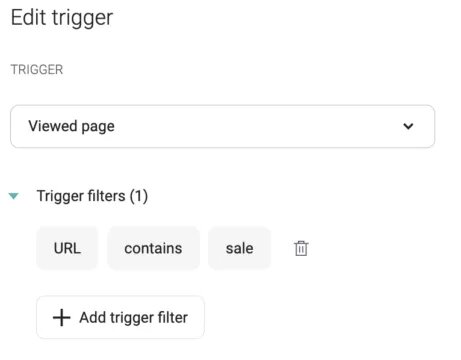
- Set up customizable triggers and filters: Send your browse abandonment email when someone views a product but doesn’t add it to the cart within a set time. Use filters to target the right people, like excluding recent buyers or focusing on high-value visitors.
- Create urgency: Use phrases like “Limited stock,” “Offer ends tonight,” or “Hurry before it’s gone” in your browse abandonment emails. However, be careful not to sound too pushy to avoid annoying your customers.
- Add social proof: Drop a short customer quote or a five-star rating near the bottom of your email. This builds trust without distracting from the main message. It shows the shopper that other people love the products they were just viewing.
- Display payment options: Include small logos for PayPal, Klarna, or other buy-now-pay-later services. This subtly removes price concerns without you needing to write a single extra line of sales copy.
- Reference your loyalty program: Remind shoppers about points, rewards, or exclusive member benefits they can gain after completing an order. This gives them more reason to return to your site.
- Display the browsed items: Showcase the product with high-quality, detailed images of the browsed items. Include multiple angles or a close-up if possible, so the visitor instantly remembers why they were interested.
- Optimize for mobile users: Design your browse abandonment emails with large fonts, tappable buttons, and a vertical layout that looks great on a phone. This makes it easy for shoppers to read your messages and return to your site.
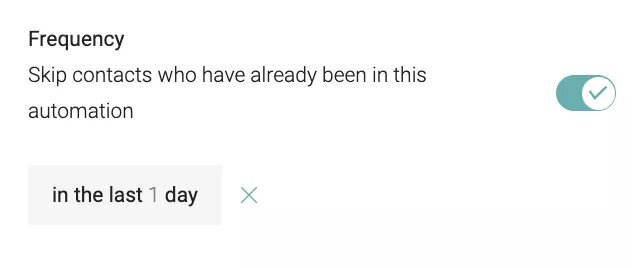
- Set the right frequency: Avoid overwhelming users with too many emails. Instead, space them out over a few days. We recommend a 10–15 day window between triggers. This prevents loyal customers who visit your site often from getting the same email repeatedly.
With a pre-built automation workflow, Omnisend lets you create detailed browse abandonment emails without a steep learning curve. The intuitive automation helps you save hours on creating workflows by letting you select the workflow you need and begin customizing:
Omnisend success story
Bowy Made’s luxury baby brand generates 70% of its revenue from email automations. Pre-purchase flows, including browse abandonment, product abandonment, and cart recovery, together produce five figures monthly.
Read the case study.
FAQs
A browse abandonment email is a friendly nudge rather than a sales pitch, reminding you about a product you checked out but didn’t add to your cart. The best browse abandonment emails make it easy to pick up where you left off — sometimes with a little extra incentive.
Typically, one to three emails over a few days work best for a browse abandonment flow:
— Email 1: Send a simple reminder within one to four hours after browsing
— Email 2: Follow up 24–48 hours later with social proof or a small perk
— Email 3: Create a sense of urgency three to five days later, with a limited-time offer
Too many emails can feel spammy or overwhelming, so keep it simple and strategic.
The best browse abandonment email subject lines feel personal, spark curiosity, and make you want to open the email. Great examples include:
— “Still thinking it over?”
— “You left something worth a second look 👀”
You can also add product or subscriber names for a more personalized touch.
First, set up a browse abandonment trigger to track when shoppers leave without buying. Then, use email marketing platforms to automate the flow, and include personalized product reminders, clear CTAs, and incentives. Finally, test and tweak to see what works best for your audience.
The browse abandonment email trigger kicks in when you check out a product but leave before adding it to your cart. It lets brands send you a quick reminder, similar to the abandoned browse email examples that feel helpful, not pushy. It’s a smart way to bring you back without being annoying.
A browse abandonment email triggers when a visitor views a specific product or category and leaves. A site abandonment email is broader. It triggers when someone visits any page on your website but exits without completing any action. Browse abandonment is more targeted and often drives more conversions than site abandonment.