Omnisend AI


 OFFER
OFFER










SMS marketing best practices are the proven methods that ecommerce brands use to grow revenue from SMS marketing while staying compliant. These best practices can be broken down into five groups and include consent collection, building your subscriber list, and writing effective copy.
They also include setting up SMS automation flows and tracking the performance of your SMS campaigns. In fact, according to Omnisend, SMS automations earned an average of $0.74 per send, compared to just $0.15 for campaigns in 2026.
This guide breaks down 20 text message marketing best practices across five main groups. This is built for Shopify and WooCommerce store owners who want to reduce unsubscribes, improve brand trust, and generate revenue from every SMS sent.
TL;DR
This article covers 20 SMS marketing best practices for ecommerce brands, grouped into five sections — SMS compliance, list growth, copywriting, automation, and measuring SMS performance.
One of the most important SMS best practices for Shopify and WooCommerce store owners is combining consent collection with SMS automation flows to send messages at scale and increase revenue. This guide also includes real SMS marketing benchmark data from 150,000 brands and 321 million SMS messages (Omnisend, 2026).
Quick sign up | No credit card required
What are SMS marketing best practices? (Quick answer)
SMS marketing best practices are proven methods that help ecommerce store owners run compliant SMS campaigns that increase sales. These SMS best practices explain how SMS campaigns are structured to increase conversions. They sit on top of the fundamentals in our guide to SMS marketing and break down into five main groups — consent collection, list growth, copywriting, automation flows, and measuring SMS performance:
- Compliance and consent: Opt-in rules, 10DLC registration, quiet hours, and GDPR and CASL laws
- List growth: Checkout opt-ins, popups, loyalty programs, and QR codes on packaging and in-store
- Copywriting: Writing concise copy and CTAs, avoiding spam triggers, and using MMS strategically
- Automation flows: Welcome, cart recovery, post-purchase, browse abandonment, and winback flows
- Measurement: Key SMS metrics, performance benchmarks, and A/B testing strategies
Group 1 — Compliance and consent: Stay legal and build trust
SMS compliance and consent mean following SMS marketing rules and regulations and obtaining consent from subscribers before sending messages. This serves as the foundation for building customer trust.
In fact, every ecommerce SMS program must follow TCPA rules, ensure 10DLC registration, and comply with GDPR and CASL requirements. These SMS marketing rules not only help avoid legal penalties but also improve SMS delivery.
1. Collect explicit opt-in consent before sending anything
Explicit opt-in consent means a user must clearly agree in writing to receive SMS marketing messages. This is required under the TCPA (Telephone Consumer Protection Act) for US merchants, which regulates marketing texts and calls. A TCPA violation occurs when messages are sent without prior express consent.
The FCC enforces TCPA rules, and violations can result in fines of $500 – $1,500 per message. Class action lawsuits have also led to multi-million-dollar settlements in cases involving unsolicited marketing texts. For example, Geaslin v. Colony Ridge Development LLC resulted in a $1,994,123 settlement in 2025. Explicit opt-in can be collected through single or double opt-in methods.
Single opt-in means a user is added to the SMS list after submitting their phone number through a signup form. Double opt-in requires confirmation by replying “YES” before subscribers are added to your list. However, tools like Omnisend don’t automate double opt-in for SMS. You will have to manually include this step when setting up an automation flow, for example, a welcome SMS asking the user to reply “YES” before being added to the list.
Example of a TCPA-compliant SMS opt-in confirmation message:
Thanks for signing up for [Brand name] SMS alerts. You’re now subscribed to receive updates and offers. Message and data rates may apply. Message frequency varies. Reply STOP to unsubscribe. Need help? Contact [email protected]
A compliant opt-in confirmation must include:
- Brand identity
- Clear subscription confirmation
- Message and data rates disclosure
- STOP opt-out instructions
- Support contact information
2. Register your 10DLC number before you launch
If you’re sending text messages to US customers, you must register your 10-digit long code (10DLC) number. All major US carriers, including AT&T, Verizon, and T-Mobile, require A2P (Application-to-Person) messages to be sent from registered 10DLC numbers, beginning in 2023.
To register, brands must submit their business and campaign details through The Campaign Registry (TCR). Unregistered senders face carrier filtering, such as your messages going to spam folders or getting blocked completely. This reduces SMS delivery and can directly impact revenue.
As a result, your SMS delivery drops, which leads to loss of brand trust and reduced conversions. For example, a Shopify store running a flash sale campaign may fail to reach a portion of customers if messages go to spam folders or get blocked by carriers. This results in lost revenue during peak promotion periods.
To avoid this, you need to register with TCR:
- Register through a Campaign Service Provider (CSP): Brands cannot register directly with TCR. Instead, they must apply through a CSP listed on TCR’s website. Approval typically takes three to five weeks.
- Register your brand: In your CSP dashboard, select “Add new brand” and enter legal business details such as company name, address, country, and tax ID. Website information is optional but recommended.
- Verify your brand identity: All brands must pass identity verification before campaign registration. Unverified brands cannot launch 10DLC campaigns. Some CSPs may charge a small resubmission fee if verification fails.
- Register your campaign: Once verified, select “Add new campaign” and define your use case, for example, marketing messages. Then enter campaign details like message flow, CTAs, and sample texts.
After campaign approval, link your approved campaign to a 10DLC number in your CSP dashboard. This number is then used to send all SMS campaigns.
3. Honor quiet hours and frequency limits
Quiet hours are the time windows during which businesses cannot send marketing SMS. Frequency limits control how often customers can be messaged. Under TCPA rules, Cornell Law mentions promotional SMS must be sent between 8 AM and 9 PM in the recipient’s local time.
The FTSA (Florida Telephone Solicitation Act) is stricter, limiting messages to 8 AM – 8 PM and requiring prior written consent for marketing texts. As an ecommerce store owner, you must also control how often you message customers. This depends on your SMS program, for example:
- Promotional SMS: You can send two to four messages per month, according to Omnisend
- Automated messages: Abandoned cart or browse recovery flows triggered by customer actions are sent at any time
- Transactional messages: Order confirmations and shipping updates can be sent without limits
During high-intent retail periods like Black Friday and Cyber Monday, you can increase sending volume. For example, a Shopify beauty brand sending three promotional messages per month during normal periods can increase to six to seven messages during BFCM. This includes early access offers, cart reminders, and final-hour promotions.
4. Handle GDPR and CASL if you sell internationally
Under GDPR (General Data Protection Regulation), you must have a legal basis to process customer data for SMS marketing. This means collecting consent before you message them. You must also store proof of consent, such as how customers opted in, for example, through a signup form or at checkout. Customers can also request deletion of their data at any time. GDPR violations can result in fines of up to €10 million or 2% of global annual revenue.
CASL requires consent before sending SMS to Canadian users. This can be express consent, such as opting in through a signup form. Or implied consent, which is based on an existing relationship with the customer. This can include a recent purchase or membership to your loyalty club. Implied consent lasts for a specific time period, such as two years or six months after the last transaction date, under CASL SMS marketing guidelines.
Here’s a practical checklist for ecommerce brands to stay compliant with GDPR and CASL when sending SMS to international customers:
GDPR checklist
- Collect express consent before sending SMS
- Store proof of consent (date, time, and source of signup)
- Allow customers to unsubscribe or opt out at any time
- Support data deletion upon customer requests
- Only use data for the purpose customers agreed to
CASL checklist
- Collect express consent through signup forms or checkout
- Track if you have implied consent from purchases or customer relationships
- Monitor implied consent validity timelines, e.g., two years or six months after last interaction
- Include clear opt-out instructions in every SMS
- Maintain records of all customer consent activity
Group 2 — List growth: Build a subscriber base worth messaging
Now we’ll break down the SMS marketing best practices to build a subscriber list for your ecommerce store. Instead of only using basic signup forms to collect opt-ins, you should include Shopify and WooCommerce checkout opt-ins and post-purchase flows.
This is effective because customers are already interested in your brand after making a purchase. This means they’re more likely to subscribe to your list. You should also use loyalty program signups and QR codes on product packaging.
5. Use checkout and post-purchase opt-in for Shopify and WooCommerce
Capture SMS subscribers at checkout and right after they complete their purchase. These are some of the highest-intent opt-in moments. This means you can grow your SMS list faster and increase customer lifetime value (CLV). In fact, according to a Dataships’ LTV analysis, SMS subscribers had $54 higher CLV than non-subscribers.
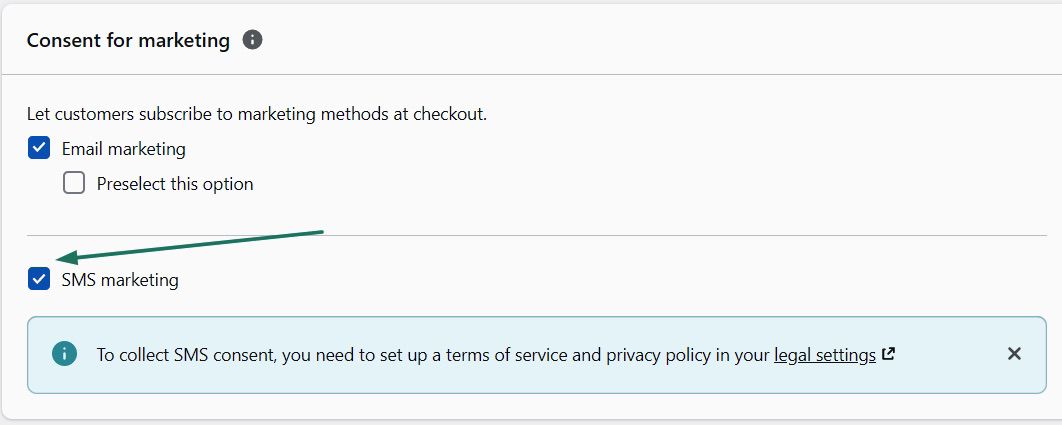
To get started, you can collect opt-ins directly at checkout in Shopify. To enable this, go to your Shopify store Settings > Checkout:
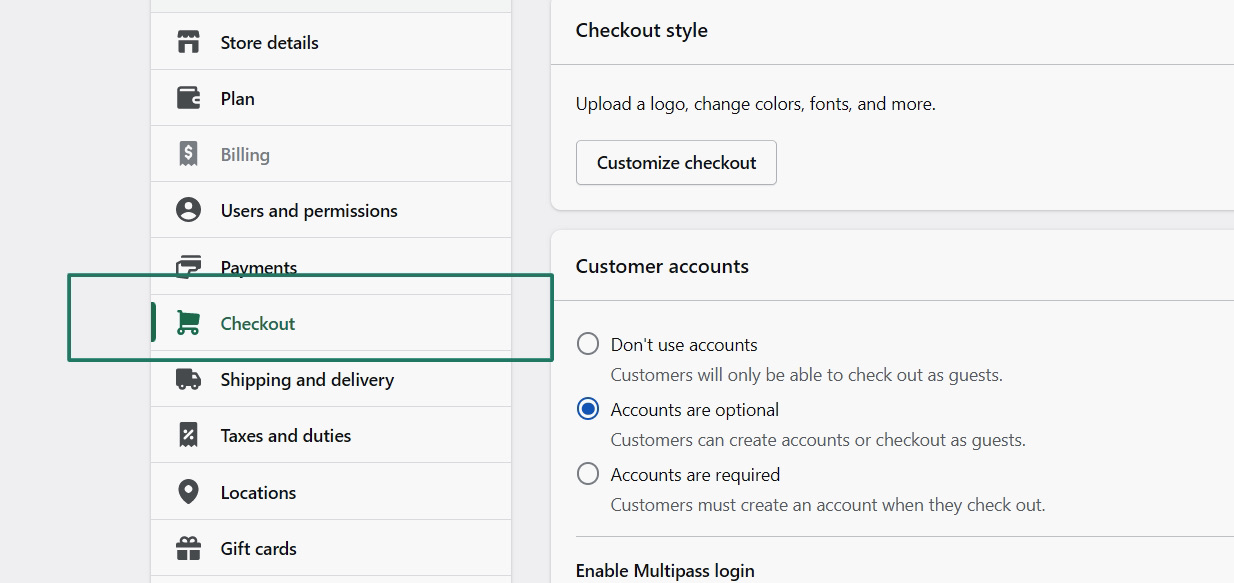
Scroll down to Consent for marketing and click the SMS marketing checkbox option. This is Shopify’s native SMS opt-in at checkout — one of the highest-intent list growth moment:
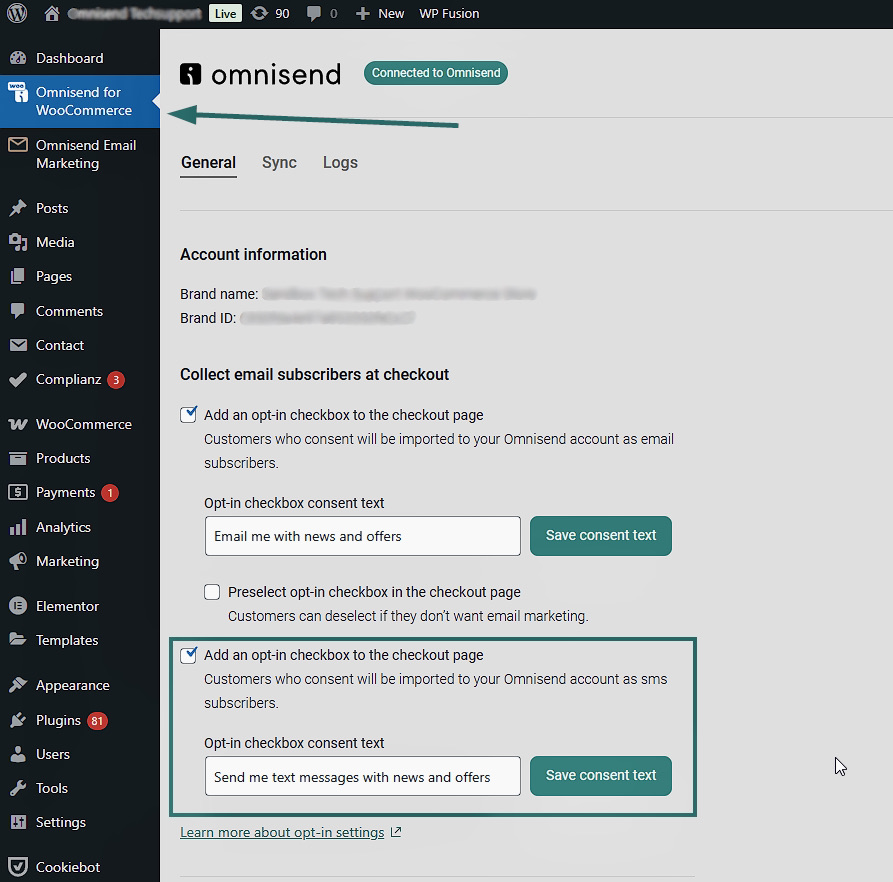
If you’re a WooCommerce store owner, you can also collect SMS opt-ins at checkout using plugins like Omnisend. Go to WordPress > Omnisend Plugin settings. Enable Add an opt-in checkbox to checkout page. Then customize the SMS consent text:
The checkout phase is one of the best opportunities to build your subscriber list. This is because the customers are still engaged after purchasing items.
For example, an ecommerce store selling beauty products can send a post-purchase opt-in message immediately after checkout to encourage future purchases:
“Hey [Name]! Thanks for your Glow order. Reply YES to get early access to our next beauty drop and exclusive VIP offers!”
Once customers opt-in, they enter the post-purchase marketing flow. You can then send messages that include upsells, review requests, and VIP offers.
6. Add SMS to your popup and loyalty program flows
By adding an SMS opt-in to your existing email popup, you can collect contacts for both marketing channels at once (a dual opt-in). This helps you increase your ecommerce marketing reach. For example, you can send subscribers an email campaign, like weekly product drops, and an SMS campaign for flash sale alerts.
You can add SMS to your popups using automation tools like Omnisend. Go to Forms > Create form, or edit an existing one. In the Form builder, you can drag items from the left sidebar into your layout. You can then customize each item in the right-hand menu.
For example, to add an SMS opt-in, simply drag the Phone number field into your form and customize it. Omnisend’s pop-up builder lets you collect SMS and email opt-ins simultaneously:
You can include a reward system in your popup to encourage more people to subscribe to your list. In fact, according to Loyalty Lion, 59% of people are more likely to sign up for a loyalty program.
In practice, the popup shows a clear loyalty reward next to the signup fields. For example, “Join SMS & earn 100 points.” Take a look at this popup example from DanaJo. It offers free shipping and access to VIP sales:
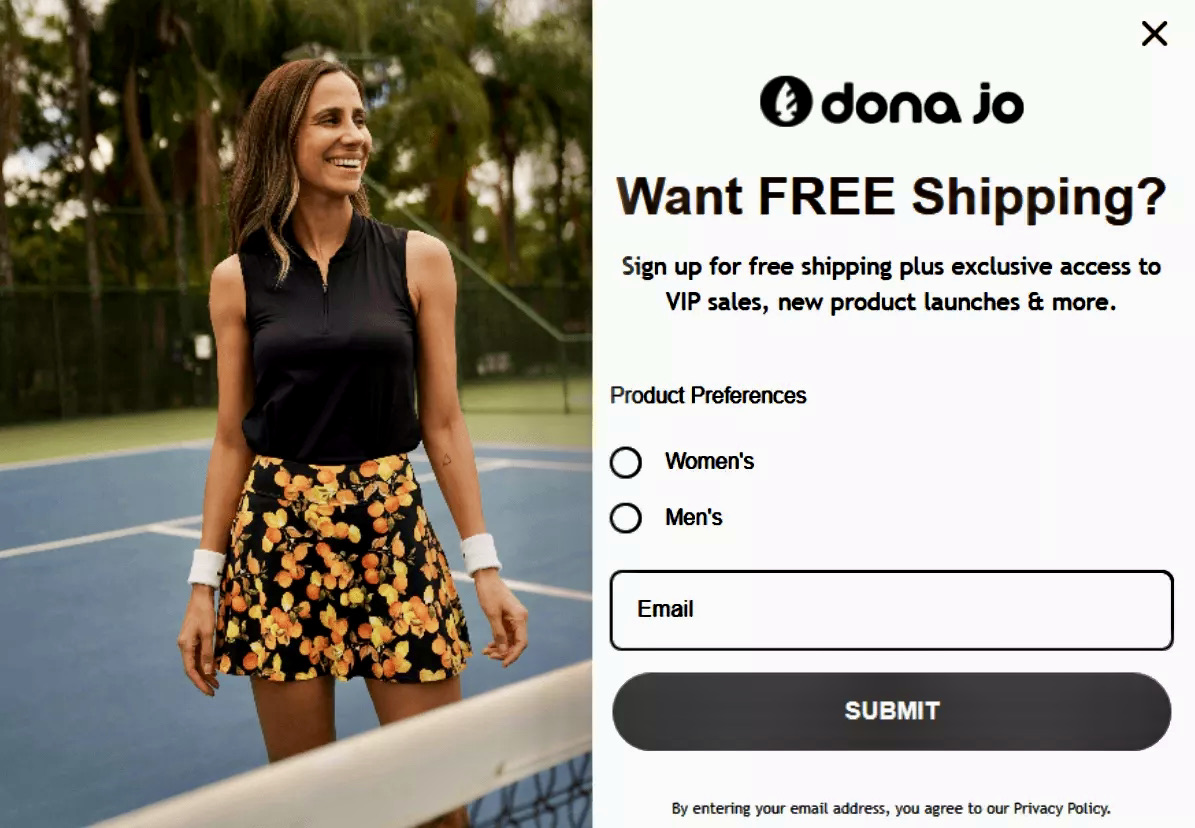
You can use this example as an inspiration to create your own popup. Include an SMS opt-in field with Omnisend’s intuitive drag-and-drop form builder.
7. Use QR codes on packaging and in-store to grow offline
This is one of the most overlooked SMS marketing best practices. You can place QR codes on packaging, shipping inserts, and in-store signage to encourage SMS opt-ins:
- Product packaging: A QR code printed on the product that leads shoppers to a mobile SMS signup form after purchase
- Shipping inserts: A QR code inside the delivery box that customers scan to join SMS updates or claim rewards
- In-store signage: A QR code placed on checkout counters in physical stores that customers scan to join an SMS list
For example, Capri Sun used QR codes on its packaging to send shoppers to an entry page for a prize draw. This resulted in 28k+ entries. This also supported the brand’s goal to grow its customer base, including SMS and email subscribers.
You can also add keyword opt-ins like “Text JOIN to 12345.” This way, customers sign up to your SMS list by texting a keyword to your number. To set this up in tools like Omnisend, go to your Store settings > SMS > Generate a phone number to get a toll-free number. The default keywords are JOIN, SUBSCRIBE, or START.
Then, promote your keyword and phone number through email campaigns, on product packaging, printed receipts, or in-store signage. An example of a promotion is — “Text JOIN to 1-833-XXX-XXXX for 10% off your next order!”
You must also include TCPA disclosure text in your promotions. This should specify what type of messages customers will receive, for example, promotions. You should also include message frequency and opt-out instructions, such as “reply STOP to opt-out.”
Group 3 — Copywriting: Write messages that get clicks
In this section, we break down five SMS marketing best practices to help you create high-converting SMS copy. We’ll cover SMS character limits, message structure, and how to write clear, concise CTAs that increase clicks.
You’ll also learn which messaging to avoid to prevent triggering spam filters, and when it makes sense to use MMS instead of SMS. Follow these SMS marketing tips to improve your SMS content and increase conversions.
8. Keep every message under 160 characters
For standard SMS messages, the limit is 160 characters. If messages exceed this limit, they are automatically split into multiple segments. For example:
- 161 – 320 characters = two messages
- 321 – 480 characters = three messages
Each segment is billed separately, which increases SMS costs. Exceeding the 160-character limit can also create message splits. Meaning, customers receive multiple texts instead of one clean message. Long URLs can also get split across multiple messages.
DM text data shows that messages between 120 – 160 characters achieve a 24.3% CTR, compared to 19.6% for messages between 160 – 320 characters. You should use a simple ecommerce SMS formula to stay within limits. This includes Brand ID + Offer + CTA + Link + Opt-out. Aim for 155 characters. Here’s a before and after example:
Before (231 Characters)
Hey Jane! Our mid-season sale is officially here. We love our customers, so we are giving you 20% off all new arrivals for the next 48 hours. You don’t want to miss this! Click here to shop now: brand.com/sale Reply STOP to opt out.
After (152 Characters)
Hey Jane! Lush Label’s mid-season sale is live. Get 20% off all new arrivals for the next 48 hours only. Shop now: brand.com/sale Reply STOP to opt out.
9. Lead with value, not your brand name
Leading with a brand name instead of an offer delays the value proposition. This means customers may ignore the message before even seeing the offer. Opening with an offer, discount, or benefit can help increase clicks and conversions.
You can also personalize your messages by including the recipient’s name or a product they viewed. Personalization makes messages feel relevant and increases the likelihood of customers making purchases. In fact, according to Deloitte, three in four customers are more likely to buy from brands that use personalization, and they spend 37% more.
See how a generic, brand-first SMS compares to a value-first, personalized version:
- BAD (brand-first, generic): ‘ShopName here! We have a sale today. Check it out: bit.ly/shop. Reply STOP.’ → Brand-first opener, generic CTA, shortened URL (spam trigger), no value statement.
- GOOD (value-first, branded URL): ‘Sara — your wishlist is 25% off until midnight 🛒 Shop now: shopname.co/sale Reply STOP to opt out — ShopName.’ → Name personalization, specific value (25% off), urgency (midnight), one CTA, branded URL, brand sign-off at the end, and 152 characters.
10. Write one CTA per message — and make it specific
Including one clear CTA ensures customers know exactly what action to take next, whether that’s shopping a sale or claiming a discount. When you provide multiple CTAs such as “Shop the sale,” “Read our blog,” or “Follow us on TikTok,” customers are more likely to get overwhelmed and not click on any of them.
You should also make the CTA specific, not generic. This is one of the most important SMS marketing best practices. For example, “Shop the sale” or “Claim your 20% off” can perform better than “Click here.” This is because it tells users exactly what happens next. Here’s how a bad versus a good CTA looks like:
- BAD (two competing CTAs): ShopName: New drop is live 🔥 Shop now: shopname.co/new OR get 10% off your next order: shopname.co/discount Reply STOP.
- GOOD (one CTA, specific): ShopName: New drop is live 🔥 Get 10% off the new collection (today only): shopname.co/new10 Reply STOP.
You must also match your CTA to a specific SMS use case, for example:
- Flash sale: “Shop the 24-hour sale”
- Cart recovery: “Complete your order”
- Loyalty reward: “Claim your points”
- Back-in-stock: “Grab it before it sells out”
11. Avoid spam triggers that get your messages filtered
Mobile carriers such as Verizon, AT&T, and T-Mobile automatically filter text messages before they reach recipients. They analyze your SMS content, links, sending volume, spam complaint rates, and opt-out rates.
If mobile carriers detect suspicious SMS content or sending behavior, such as ALL CAPS text or a sudden increase in sending volume, they may block your messages completely. This damages your sender reputation and reduces SMS delivery.
Over time, if your texts continuously land in spam folders or get blocked, customers will trust your brand less. This leads to lost revenue and increases opt-out rates.
Sender reputation is built over time based on how users respond to your messages, including engagement, complaints, and unsubscribes. To maintain your sender reputation, here are common spam trigger categories to avoid at all costs:
- ALL CAPS text, such as “SHOP NOW”
- Multiple exclamation marks (!!!) and currency symbols ($$$)
- Promotional language that resembles spam campaigns, such as “FREE” or “URGENT”
- Sending marketing SMS to people who have not opted-in
- Increasing your sending volume or frequency suddenly
- Using bit.ly links that hide the real website URLs
12. Know when to use MMS instead of SMS
Use MMS (Multimedia Messaging Service) instead of SMS when visuals directly help increase conversions, such as for product launches, seasonal campaigns, and back-in-stock alerts. MMS supports 1,600 characters vs. 160 for SMS and costs three times more per message. This is why you should only use MMS when the visuals, such as images or GIFs, help increase sales, otherwise it is wasted marketing spend.
For example, for product launches, include a product or lifestyle image to capture attention and increase conversions. Seasonal campaigns, like Black Friday sales, benefit from images that help your message stand out in crowded inboxes. Back-in-stock alerts work best with photos of previously sold-out items.
SMS, on the other hand, is better for reminders or alerts where visuals aren’t needed. For example, cart recovery messages remind customers of products left in their cart. Transactional alerts, such as shipping confirmations, are sent immediately after purchase and include tracking links. Winback messages use discount codes to re-engage customers who already know your brand.
Here’s a quick MMS vs. SMS comparison table:
Group 4 — Automation flows: The SMS sequences that drive ecommerce revenue
The SMS marketing best practices in this group will break down the complete ecommerce flow. This includes welcome automation, cart abandonment, browse abandonment, and back-in-stock alerts. We’ll also break down post-purchase and winback flows.
For each SMS automation, we’ll provide the recommended timing, number of messages in each sequence, performance benchmarks, and examples. You can create these automations in minutes using tools like Omnisend. It integrates with Shopify and automatically triggers these automation workflows based on customer behavior. This is an SMS marketing strategy that drives ecommerce revenue.
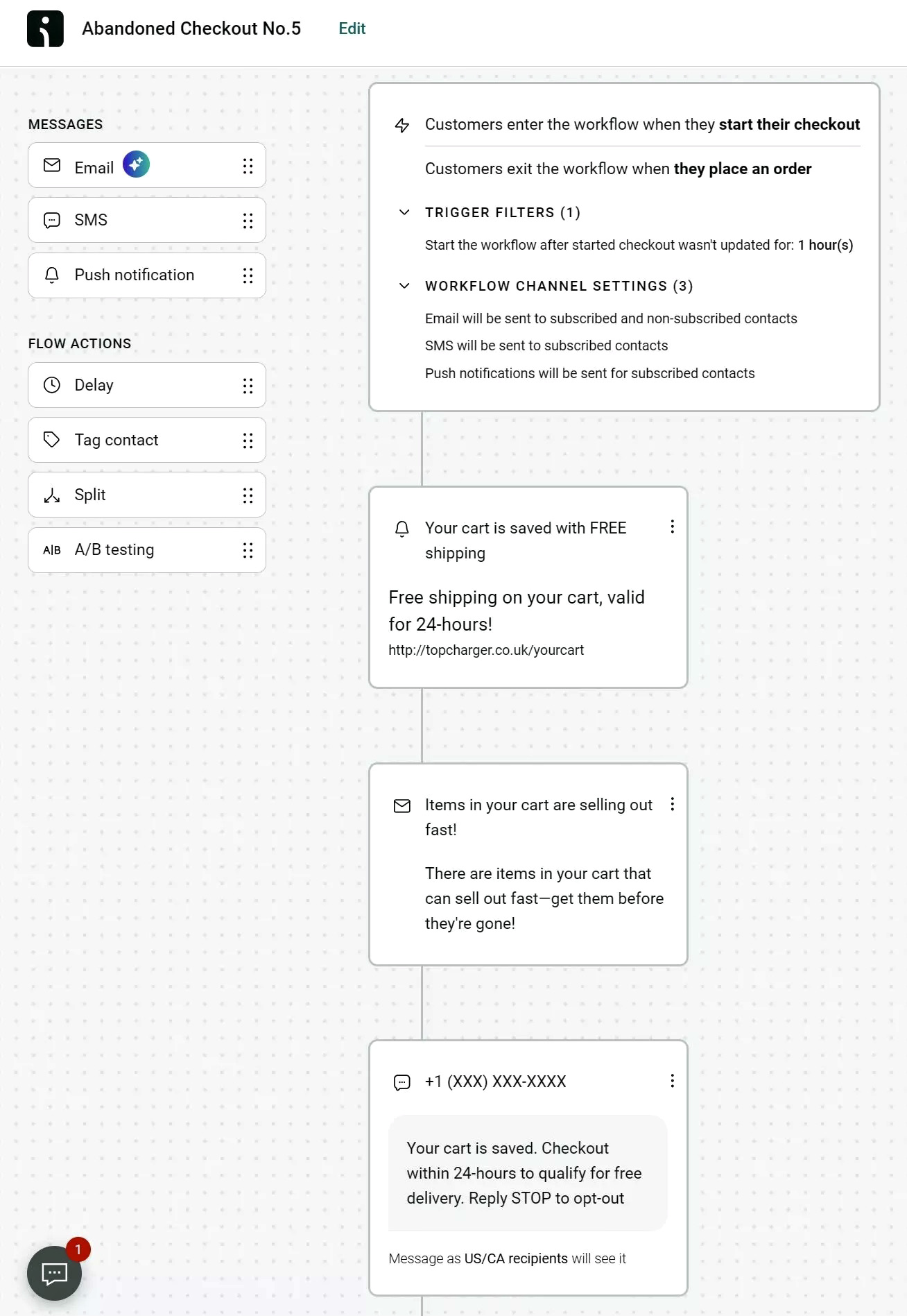
Omnisend’s automation builder lets you map out multi-channel flows with conditional logic — no developer required:
13. Welcome series: Set the tone within 15 minutes
Send your first welcome SMS immediately after someone signs up or within 15 minutes. This is important because people have shown interest in your brand after signing up, and reaching out to them immediately helps increase conversions.
Start with a welcome offer, such as a discount, sent within 15 minutes. If subscribers don’t take action, send another SMS 24 hours later, such as a brand story teaser. For example, you can include information about how products are sourced or made to build trust.
Then, send a preference capture SMS 72 hours later. This message asks customers what they prefer, such as specific products. This helps you personalize messages in the future, which increases sales.
The average open rate for SMS automations is 98%, according to Omnisend. Additionally, Omnisend ecommerce data shows that SMS automations, including welcome series, have a conversion rate of 0.77% compared to just 0.12% for campaigns.
The average revenue per send for SMS automations is $0.74 compared to only $0.15 for campaigns. Here’s an example of a welcome series sequence:
1. Message one (immediately or within 15 minutes): Hey [name], Welcome to [Brand]! Thanks for joining! Here’s 15% off your first order: [Link] Start your glow up with our best-selling serums. Reply STOP to opt out.
Wait 24 hours
2. Message two: Hey [name], did you know [Brand] formulas are vegan and sustainably sourced? We built them for skin that’s sensitive to harsh ingredients. Learn more: [Link] Reply STOP to opt out.
Wait 72 hours
3. Message three: Ready for your perfect routine? Take our 60-second skincare quiz. We’ll match products to your skin + send a surprise bonus: [Link] Reply STOP to opt out.
14. Abandoned cart recovery: the highest-ROI flow in ecommerce
Abandoned cart recovery is one of the highest-revenue SMS automations in ecommerce. It targets shoppers who already showed strong purchase intent by browsing your store and adding items to their carts. The goal is to encourage them to complete their purchases.
Start by sending a short reminder after an hour with product names and a direct checkout link to remind customers to complete their purchase. Wait 24 hours before sending a second message. This can include customer reviews, product benefits, or information on free shipping. After 48 hours, send an urgency message, such as low-stock alerts or an incentive.
You can combine both email and SMS. Send an email first when you want to include product images, reviews, or FAQs about product usage. According to Omnisend, abandoned cart emails have a conversion rate of 1.51% and $2.54 revenue per email. Send an SMS for urgent reminders, like items selling out
The average conversion rate, according to Vite Mobile, for cart abandonment SMS is 10.7%. When sent within one hour, cart abandonment conversion rate can rise 15 – 18%. Average revenue per message for cart abandonment SMS is $3.45.
Some brands have achieved even higher conversion rates. For example, Divatress used Omnisend’s cart abandonment workflow and saw a 29% conversion rate. Here’s an example of a similar flow you can use:
1. Email #1 (sent after one hour):
Subject: “Oops! Did you forget something?”
Body: Hi [First Name], we noticed you left some items in your cart:
- [Product 1]
- [Product 2]
Complete your order now before they’re gone → [Checkout Link]
Wait 24 hours
2. Email #2:
Subject: “Your favorites are waiting — don’t miss out!”
Body: Still thinking it over? Here’s why our customers love these:
- 5-star reviews
- Free shipping over $50
- Easy returns
Grab them while they last → [Checkout Link]
Wait 48 hours
3. SMS: Hey {first_name}, still thinking it over? Here’s 10% off to help you decide: SAVE10. Complete your order here: {abandoned_cart_url} Reply STOP to opt out.
15. Post-purchase flow: Reviews, replenishment, and loyalty
A post-purchase flow is an automated SMS sequence sent after a customer buys something from your store. These messages ask for reviews, remind customers to reorder products they use, and offer them to join loyalty programs.
According to Vite Mobile, post-purchase SMS, such as loyalty rewards, have a conversion rate of 7.9%, and the average revenue per SMS is $2.84. Post-purchase SMS helps turn one-time buyers into repeat customers. Let’s break down the timing for each post-purchase SMS type:
- Review request: Send three to five days after delivery to ask for product feedback
- Replenishment reminder: Send based on product lifecycle, meaning you send a reminder before customers finish using a product so they can reorder
- Loyalty program invitation: Send five to seven days after purchase and encourage customers to join loyalty rewards programs.
For example, Smoothiee’s replenishment reminder includes a limited-time offer to encourage repeat purchases and a product image of a smoothie mix. The SMS reads as follows:
“We’re running a 3-day special on your favorite Strawberry Smash Superfood Smoothie Mix 🍓Get it before you run out: smoothiee.recartsms.com.”
16. Browse abandonment and back-in-stock alerts
Browse abandonment and back-in-stock alerts are automated SMS messages sent when shoppers show interest in a product but do not buy. Send browse abandonment SMS after around 30 – 60 minutes. Sending these messages too early can feel pushy and frustrate potential customers, as they may still be browsing your store. These automations have a CTR of 7.38% – 13.65%. Average revenue per message is $0.93 to $2.85, according to Postscript.
Your browse abandonment SMS should include a product image or product name, a link to the product page, or a discount.
Example: “Hey Lin, we noticed you checked out our Lavender Body Lotion. Grab yours now before it sells out. Enjoy a 15% discount today https://brand.com/lotion. Reply STOP to opt out.”
Back-in-stock alerts also help increase conversion because they target customers who have purchased items from your store before and are waiting for them to be available again. In your back-in-stock alert, include the product name, and create urgency with phrases like “limited stock.” You can also include a date and a time for when the product will be available, like this example:
Example: “Fenty Eau De Parfum is coming back ⏰ It returns Monday 12/6 at 9 am PST. Don’t miss your chance to grab it before it sells out again — limited quantities available. Shop here: https://brand.link/product. Reply STOP to opt out.”
17. Winback flow: Re-engage lapsed customers before you lose them
In ecommerce SMS, “lapsed” means a customer hasn’t purchased or engaged in 90 – 180 days. Before you remove these subscribers from your list, send them winback messages to get them to purchase items from your store again.
With tools like Omnisend, the default time for reactivation messages is set to 30 days. You can start with 30 days and increase your time if open rates remain low. Six months is too long to send winback messages because customers may have already forgotten your brand or moved to a competitor.
Standard promotional campaigns often use incentives around 10% off or free shipping, since customers are already engaged with the brand. Winback campaigns should include larger incentives, like 25%+ off, to re-engage lapsed customers. Here’s an example of a two-message winback sequence you can use:
- Reminder and offer: Hey [Name]! It’s been a while since you shopped with [Brand]. We miss you! Here is 25% off your next order. Shop now: [Link] Reply STOP to opt out.
- Final call: Last chance, [Name]! Your exclusive 25% off code expires tonight. Don’t miss out on restocking your favorites. Shop here: [link] Reply STOP to opt out.
Omnisend mentions that the winback conversion rate is 0.4% to 1.6% for text marketing. This is a lower conversion rate compared to promotional or abandoned cart messages because they target inactive subscribers. However, you can still recover lost revenue by re-engaging customers.
If customers don’t purchase even after sending winback messages, you should remove them from your SMS list. If you keep sending messages to inactive subscribers, mobile carriers can automatically filter your messages into spam or block them. This damages your sender reputation and reduces SMS delivery.
Quick sign up | No credit card required
Group 5 — Measurement: track what actually matters
One of the most important SMS marketing best practices is measuring the performance of your SMS campaigns. Start by taking a look at SMS marketing benchmarks for all the SMS automations and campaigns mentioned in this article.
Then, track the four main metrics for ecommerce stores. These include delivery rate, click-through rate, conversion rate, and unsubscribe rate.
Finally, you need to A/B test your SMS campaign send time, copy, and CTAs to understand what drives conversions and reduces unsubscribe rates.
18. The SMS benchmarks table: What good looks like by flow type
Understanding SMS performance benchmarks is one of the most important SMS marketing best practices. Compare your open rates, click-through rates, and conversion rates against top-performing SMS campaigns. Then, use those insights to optimize your campaigns and increase revenue:
| Flow type | Average open rate | Average CTR | Average conversion rate | Omnisend platform average |
|---|---|---|---|---|
| Welcome series | 98% for all SMS automations | 10.85% for high-performing brands | 5.4% | SMS automation conversion rate is 0.77% |
| Abandoned cart | 95% – 98% | 17.28% | 10.7% | |
| Post-purchase | 98% | 14.26% | 1.51% | |
| Browse abandonment | 98% | 13.65% | 2.38% | |
| Back-in-stock | 98% | 58.70% | 13.80% | |
| Winback | 98% | 6.36% | 2.1% | |
| Promotional blast | 98% | 8.01% | 3.81% | Campaign conversion rate is 0.12% |
Source: Omnisend 2026 ecommerce marketing report, Postscript SMS benchmarks, VoteMobile SMS benchmarks
19. The four metrics every ecommerce SMS program must track
To improve SMS marketing performance, every ecommerce store owner must track four key metrics. These include delivery rate, click-through rate, conversion rate, and unsubscribe rate:
1. Delivery rate: Delivery rate measures how many of your messages successfully reach subscribers’ phones. A healthy benchmark is 98% or higher, according to Omnisend. A delivery rate below this can signal poor list hygiene. You must regularly clean your SMS list by removing inactive subscribers to protect your sender reputation and improve SMS delivery.
2. Click-through rate: CTR shows the percentage of recipients who click links in your messages. Promotional SMS usually gets 3.8 – 6% CTR, while automated flows reach 10 – 14% CTR (Omnisend data). A higher CTR means that your messages are relevant and recipients find your offers valuable.
3. Conversion rate: Conversion rate measures how many recipients complete a purchase after clicking your SMS. Omnisend reports a 0.77% conversion rate for SMS automations and 0.12% for SMS campaigns. You need to attribute SMS revenue correctly.
This means you assign the sale to a specific text message only if the customer engaged with it, via clicking a link, within a designated time window before purchasing.
4. Unsubscribe rate: Unsubscribe rate shows how many subscribers opt out after receiving a message. While rates under 3.5% are generally considered normal, lower is always better. Omnisend considers below 0.3% healthy, 0.5% a warning sign, and 2%+ indicates a “segmentation crisis.” Meaning, your messages are going to the wrong audience.
20. A/B test send time, copy, and CTA — not just subject lines
A/B testing your SMS messages means sending two versions of the same message to different groups of people to see which one performs better. To run a valid test, change only one variable at a time.
Split your audience evenly and send the SMS campaigns. For example, Omnisend mentions that for 1,000 subscribers, you should wait around 24 to 48 hours after sending your A/B test campaigns to see what works. A common mistake is testing multiple variables in one message. For example, changing the CTA and the offer together. This makes it harder to understand which specific element increased conversions.
Here are some of the important variables you can test:
- CTA text inside the message, for example, “Shop now” vs. “Claim your discount”
- Opening line of the SMS, for example, “Last chance today” vs. “Your offer is waiting”
- Offer wording, for example, “20% off” vs. “Free shipping”
- Message format, such as regular SMS vs. MMS with image or GIF
For example, a Shopify store running a flash sale can send two CTA variations in an SMS campaign. The first variation can be — “Flash Sale! Get 25% off all spring styles today only. Shop now: [link] Reply STOP to opt out.”
The second variation can be — “Flash Sale! Get 25% off all spring styles today only. Claim your discount: [link] Reply STOP to opt out.” If the second variation results in more clicks and conversions, you can send it out to the rest of your audience.
Conclusion
SMS marketing best practices are proven methods that Shopify and WooCommerce store owners use to run compliant, high-performing SMS campaigns that increase revenue. The 20 SMS marketing best practices explained in this brief are part of five groups.
These include collecting consent, growing a high-intent subscriber list, writing SMS copy that increases clicks, and setting up SMS automations to increase conversions. They also include measuring SMS performance to optimize campaigns and improve results over time.
Text marketing best practices aren’t about sending more messages. They’re about sending the right message to the right subscriber at the right moment in their customer journey. SMS marketing remains one of the high-ROI channels for Shopify and WooCommerce store owners in 2026. In fact, ecommerce brands that use email and SMS tools such as Omnisend see $79 ROI for every $1 spent.
Quick sign up | No credit card required
FAQ
What are SMS marketing best practices?
SMS marketing best practices are proven methods that ecommerce brands use to improve SMS performance. These text marketing best practices include consent collection, SMS list building, clear copywriting, setting up SMS automation flows, and tracking SMS marketing performance.
How often should I send marketing texts to my customers?
You can send two to four promotional SMS messages per month. Automated messages can be sent anytime because they’re based on customer actions like sign-ups, purchases, or cart activity.
What is the best time to send SMS marketing messages?
The TCPA allows marketing messages to be sent from 8 AM to 9 PM local time. The FTSA is stricter, allowing you to send marketing SMS only from 8 AM to 8 PM. These rules prevent messages from being sent during early mornings or late nights.
How do I stay compliant with SMS marketing laws?
Collect explicit opt-in consent, follow TCPA rules, register 10DLC numbers, and follow GDPR or CASL laws for EU and UK customers. Always include clear opt-out instructions in messages. These are among the most important SMS marketing best practices.
What metrics should I track for SMS marketing?
Track delivery rate, click-through rate, conversion rate, and unsubscribe rate. Delivery rate shows if messages reach customers, click-through rate shows how many people click links in your messages, and conversion rate shows how many people made purchases after clicking links. Unsubscribe rate shows you how many people opt-out from your SMS list.
How do I reduce my SMS unsubscribe rate?
Start by controlling your sending frequency, for example, limit sending promotional SMS to two to four per month. You should also send marketing SMS between 8 AM and 9 PM. Segment your audience based on behavior, such as past purchases or location, to increase the relevance of your messages.
How do I build an SMS subscriber list for my ecommerce store?
Use checkout opt-ins, website popups, loyalty programs, QR codes on product packaging, and post-purchase sign-ups. These help attract engaged subscribers who are more likely to subscribe to your list.