Omnisend AI


 OFFER
OFFER










As September wraps up, we’ve got a packed roundup to share — and this one really does deliver across the board.
This month, we’ve brought a bunch of new tools to the Email Builder, powered up Forms AI with a serious upgrade, rolled out a brand-new AI Recommendations feature across your account, and welcomed the biggest batch of integrations we’ve shipped yet.
Let’s take a closer look at what’s new this September:
Countdown timers, right inside the Email Builder
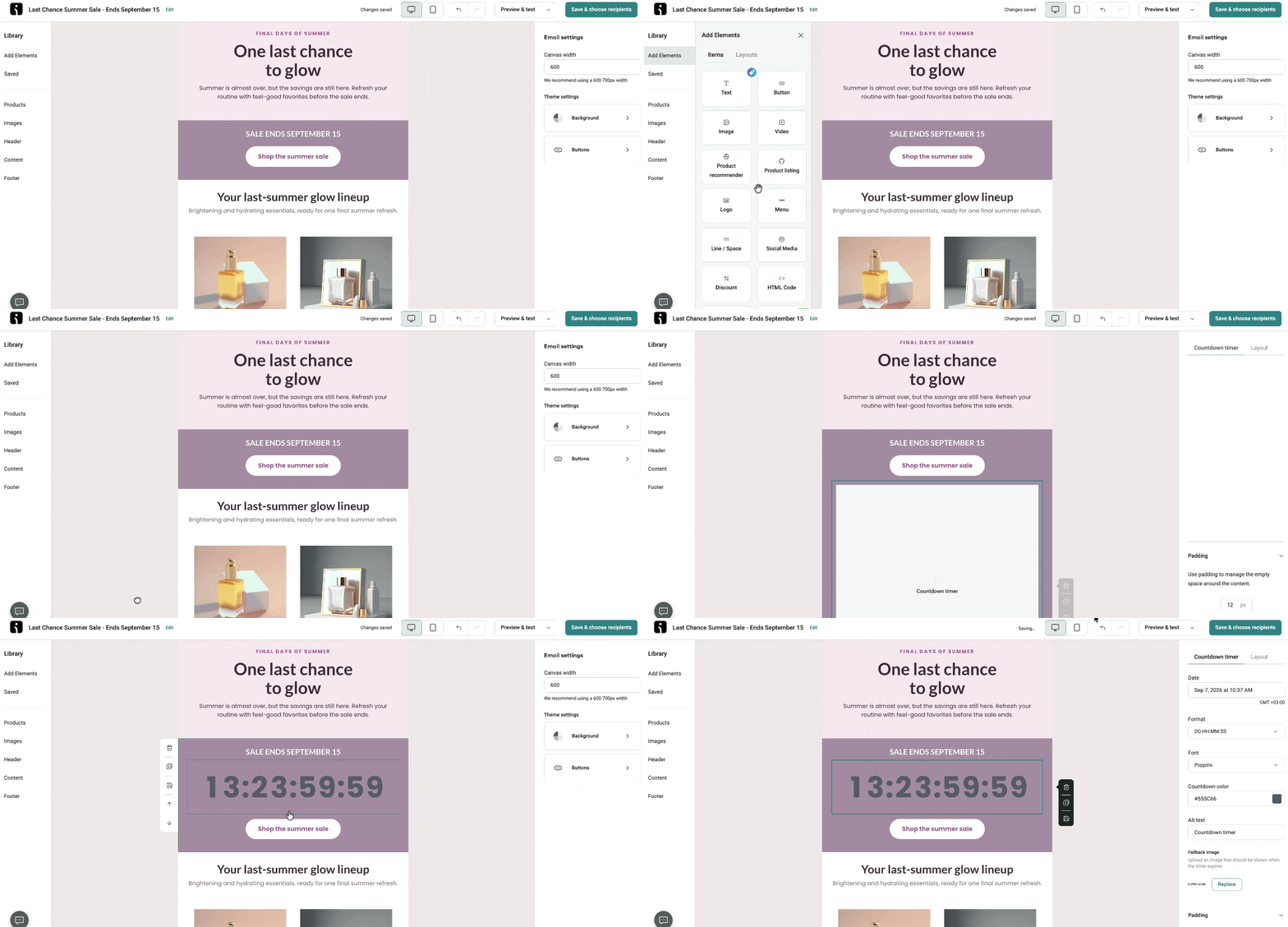
Great news — you can now add Countdown timers directly to your emails without needing a third-party timer tool.
Just head into the Email Builder and set the end date and time, pick the DD:HH:MM:SS format, choose a standard or custom font, set the color and alt text, and upload a fallback image to show once the timer expires. Simple and effective.
Please note: this feature is available on all paid plans except Pro Legacy. If you’re on Free or Pro Legacy, you’ll need to upgrade your plan to use it.
👉 Learn how to Add Countdown Timer to Your Emails
Plain text emails are here
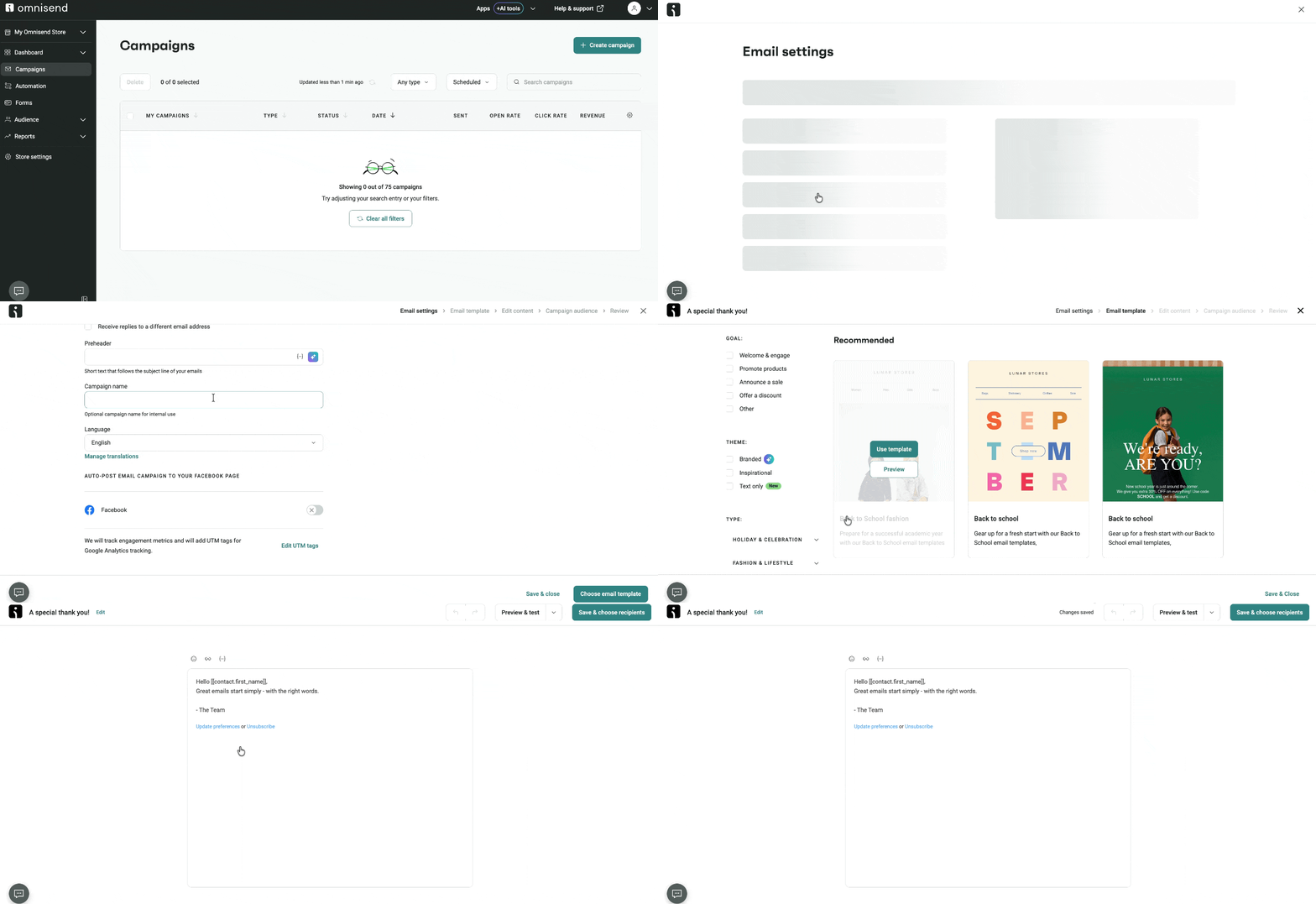
We’re excited to introduce the new Text-only Email Builder, perfect for sending simple, lightweight messages in both Email Campaigns and Automation Workflows.
It supports personalization, links, and emojis — ideal for those moments when a personal, no-frills message lands better than a designed one.
👉 Learn how to Create Text-Only Emails
More control over Discount blocks
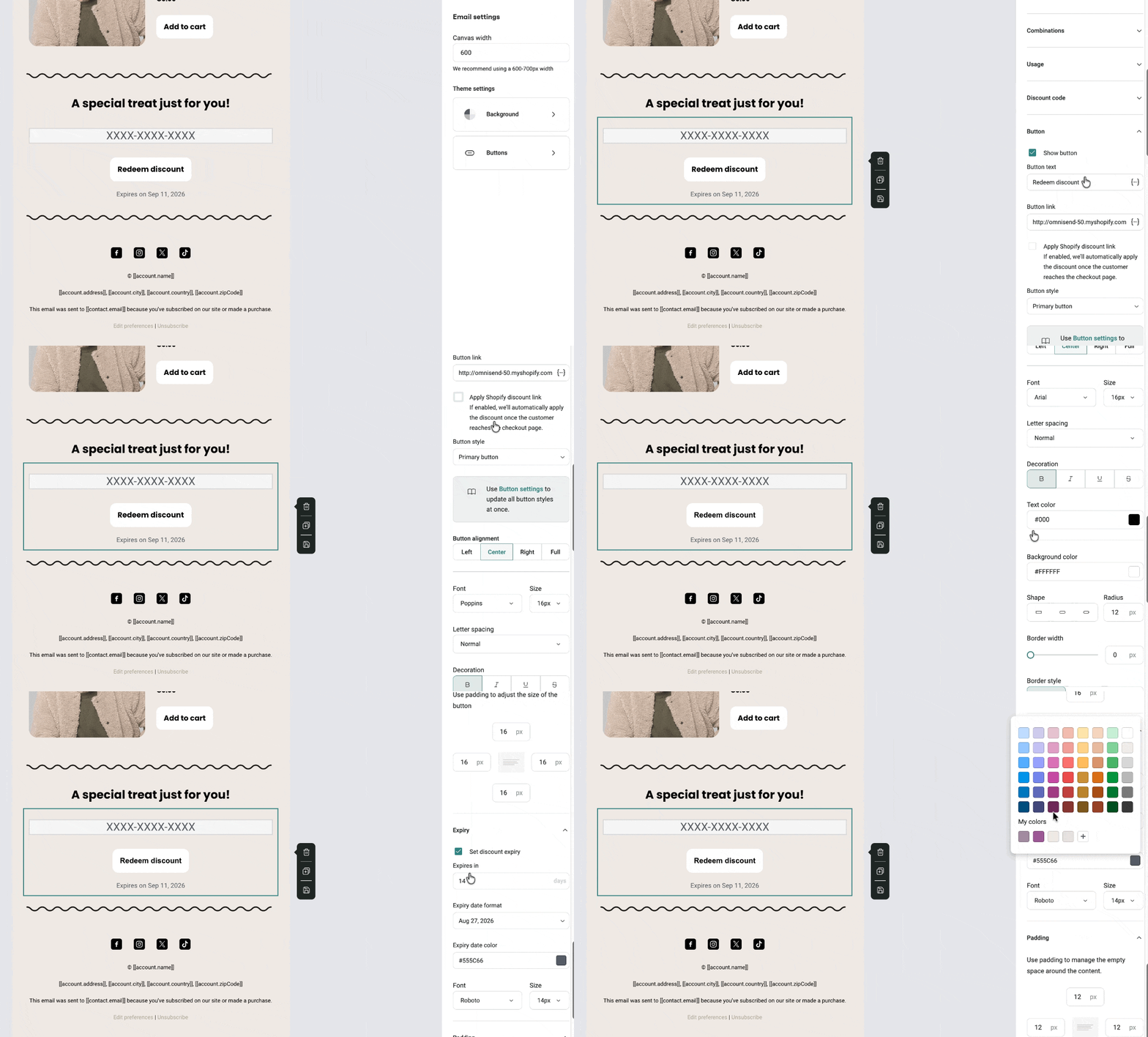
You now have full styling control over every element in the Discount block. Show or hide the CTA button, customize the discount code’s font type and size, and adjust the expiry text’s font, size, and color — all independently.
The result? Discount blocks that actually look like they belong in your emails.
👉 Shopify & BigCommerce guide/WooCommerce guide/Ecommerce Platforms guide
A handful of smaller Email Builder improvements
We’ve also added a bunch of smaller polish updates to the Email Builder this month:
Bulk delete saved content — select and delete multiple items at once from Saved → Universal Layouts and Saved → Items
Image shapes — adjust the corner radius for rounded, circular, or oval images directly in the builder
Pixel dimensions while resizing — see the exact width and height as you drag
Image file name tooltips — hover over any thumbnail to see the full name (shortened past 60 characters, extension always visible)
Download from the Image Library — grab any image you previously uploaded for reuse or backup
Link and name tooltips — hover over truncated links or names in the link panel to see the full value
Superscript formatting — now available straight from the text toolbar
New social icons — native LINE, Reddit, and Bluesky icons added to the Social media block
👉 Omnisend Email Builder: Items
Collect info across multiple form steps
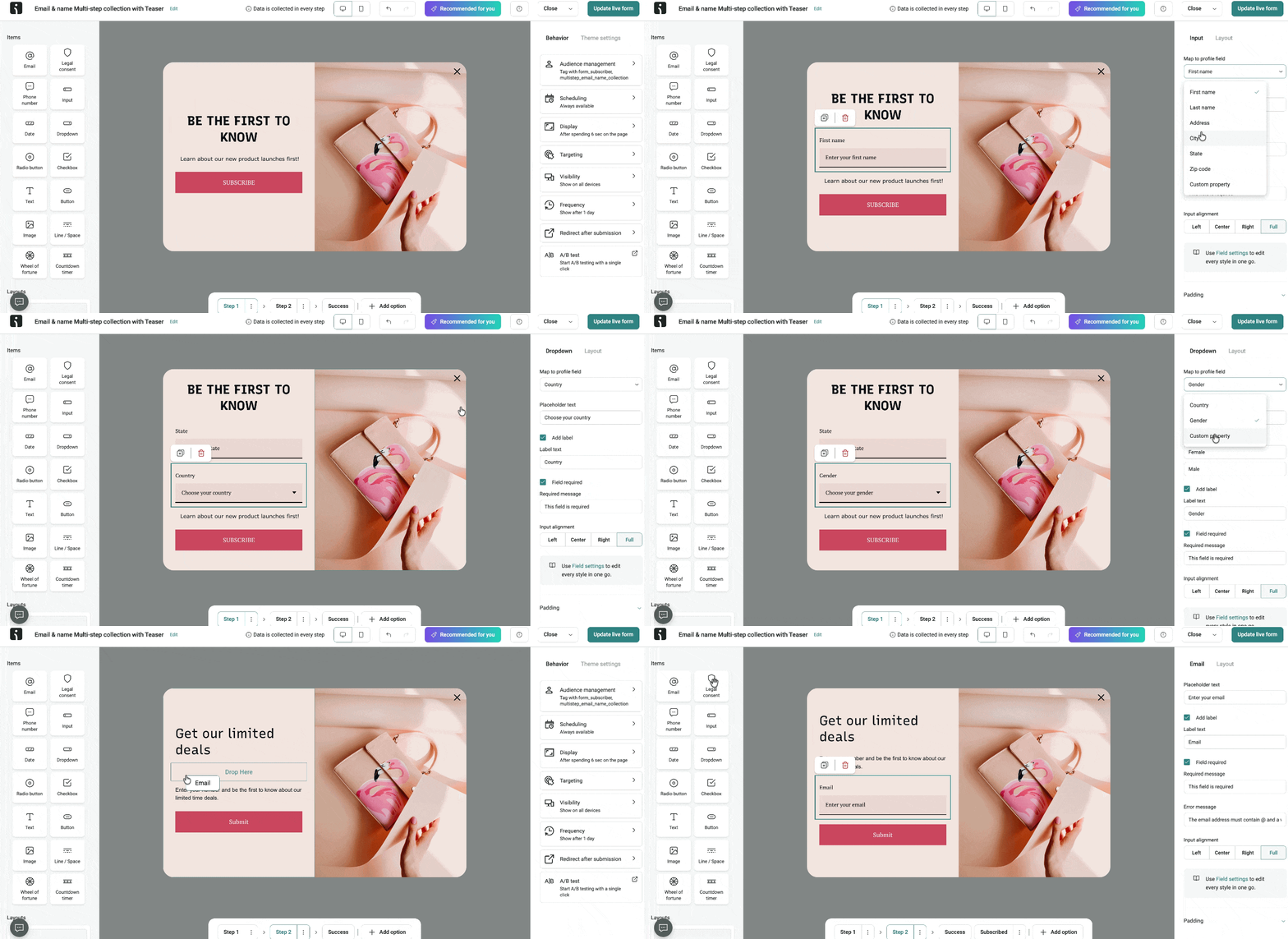
Information fields can now appear on any step of a multi-step Signup Form, giving you more flexibility in how you collect data.
When Omnisend recognizes a returning contact, whatever they submit gets attached to their existing profile — so you can ask for preferences, birthdays, or any other details before asking for an email address. It’s also a great way to ask existing subscribers for more info without making them re-submit their email.
Please note that Wheel of Fortune and Back in Stock forms aren’t supported yet, and landing pages don’t support cookie detection, so email won’t prefill there.
👉 Learn how to Create Multi-Step Signup Forms
Multiple submit buttons on one form step
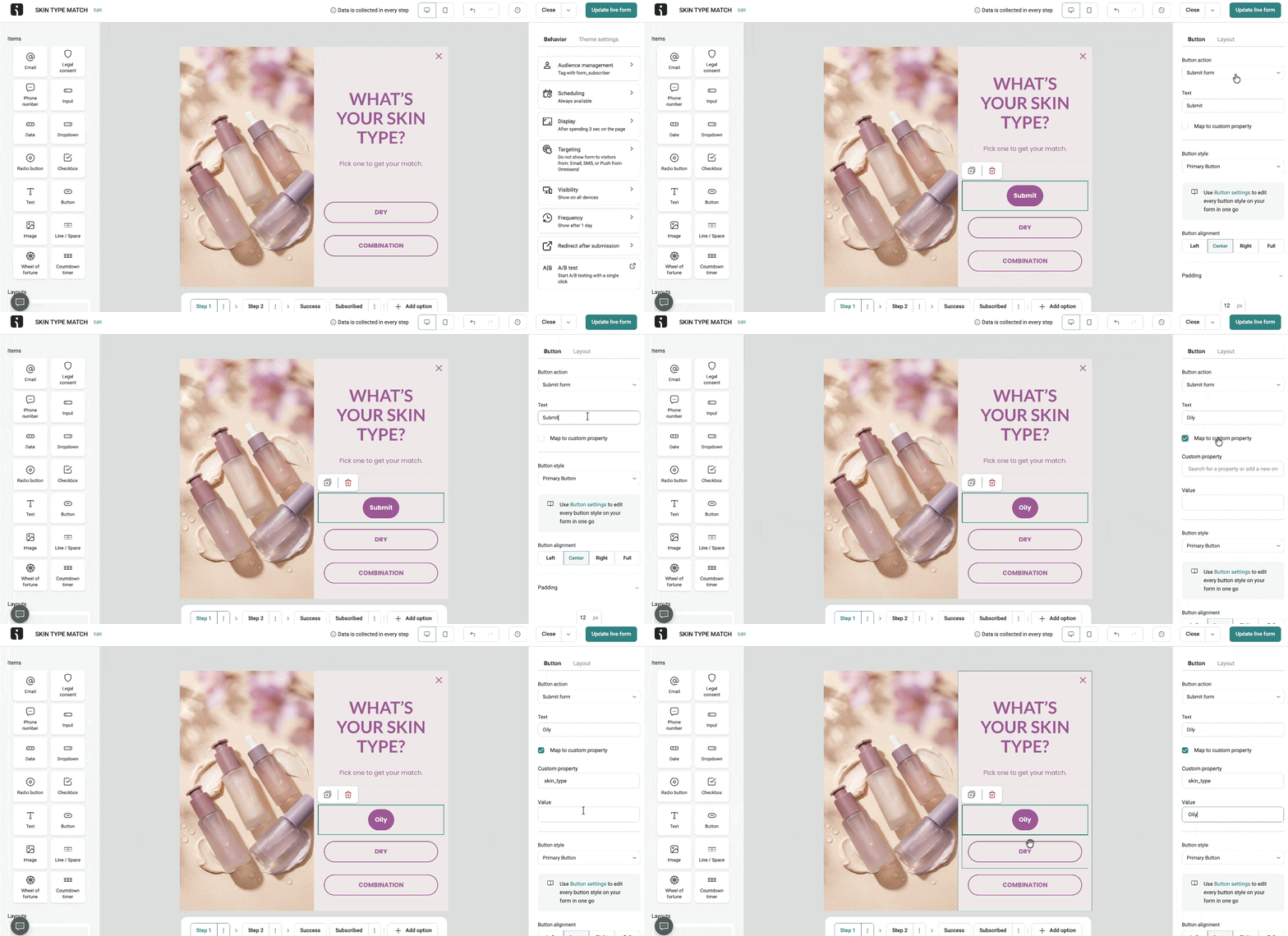
You can now add multiple submit buttons to a single form step and map each one to a contact custom property.
Whichever button the visitor clicks is the value that gets saved. This way, you can ask a question, store the answer directly on the contact profile, and use it for segmentation — all while collecting other data in the same form.
👉 Learn how to Collect Answers with Forms Submit Buttons
Country code control for phone fields
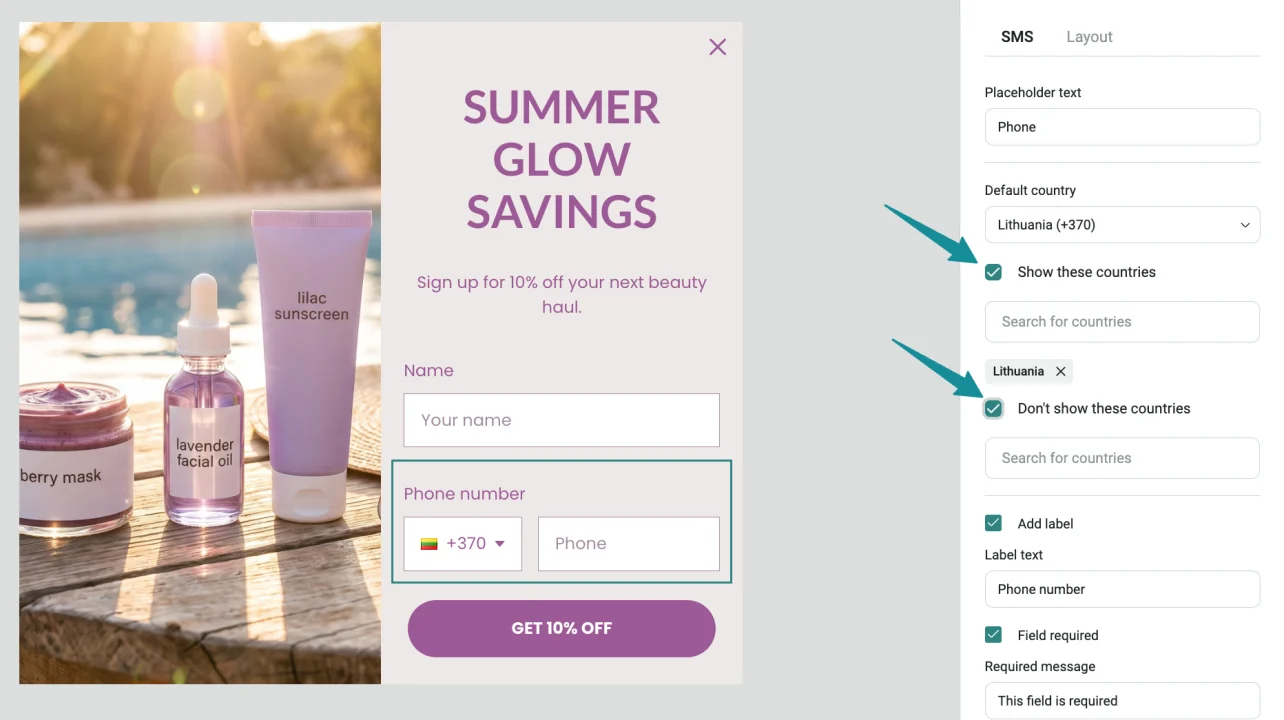
When your Signup Form includes a phone number field, you can now control exactly which countries show up in the country-code dropdown.
Either select the countries you want to allow or exclude specific ones. A simple way to keep SMS signups focused on the markets you actually serve.
Scheduled forms disable themselves automatically
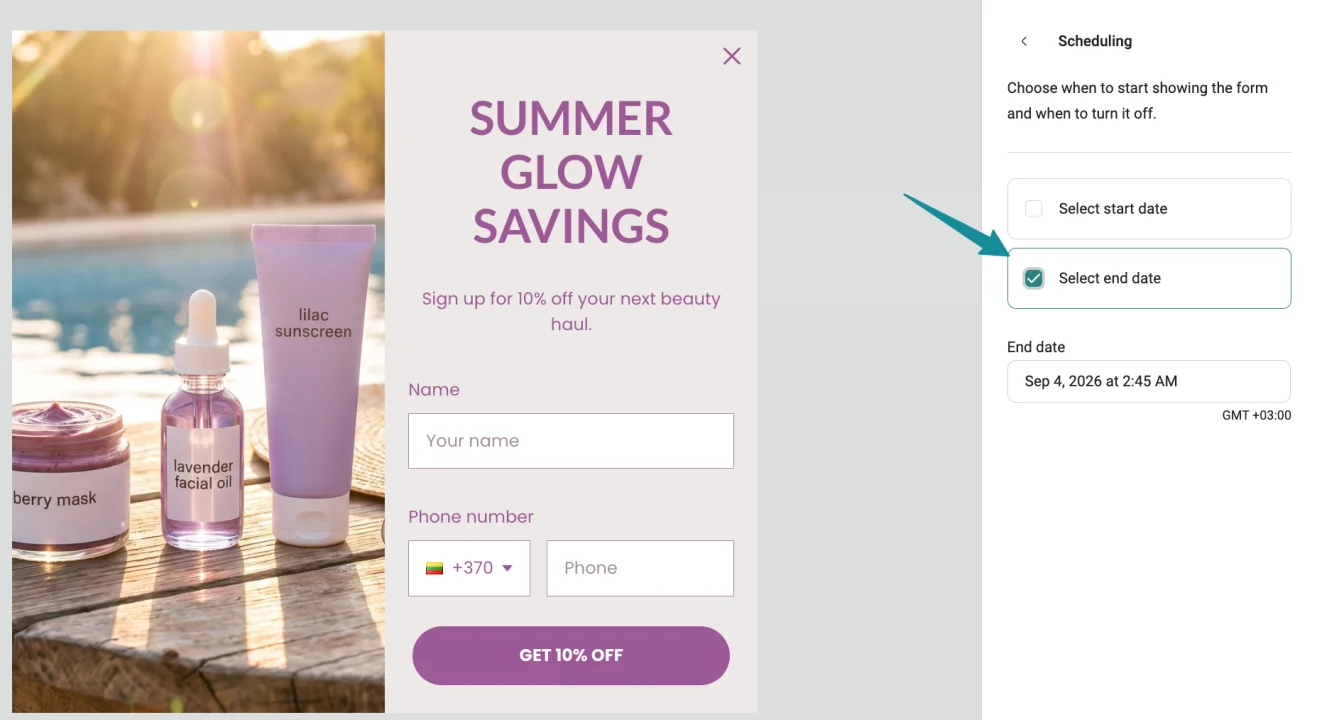
Here’s a nice little quality-of-life update: scheduled Signup Forms now disable themselves automatically once their end date passes.
The form simply stops showing to visitors and is marked as disabled, so your Forms list stays tidy without any extra effort on your part.
Legal checkboxes unchecked by default
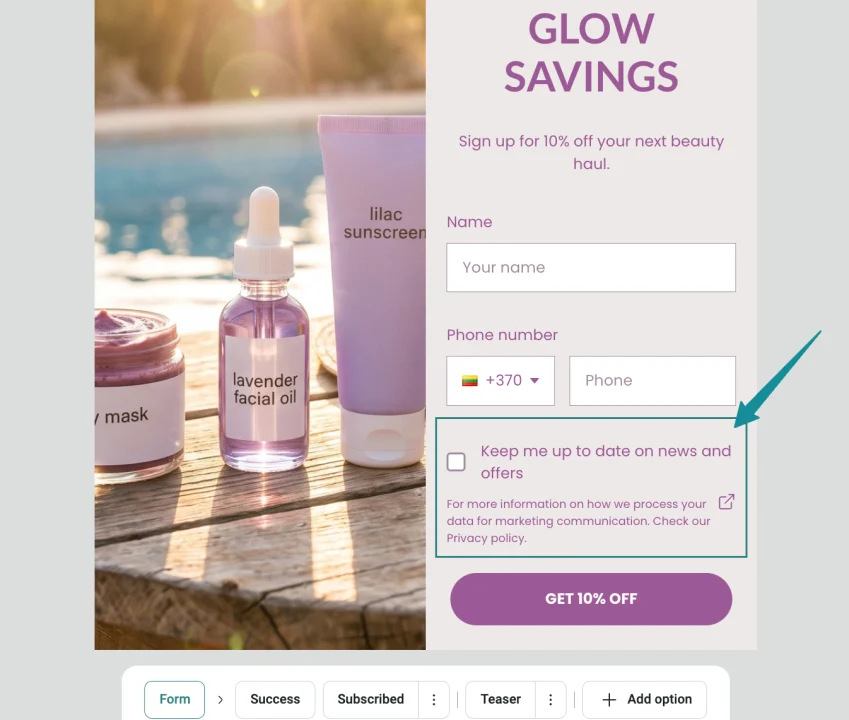
Legal checkboxes in Signup Forms are now unchecked by default in the form builder, matching exactly what visitors see on your live form.
Manage Forms through MCP
Great news for Omnisend MCP users — you can now create, view, update, and delete Signup Forms and Form A/B tests directly through MCP. You can also access Form templates.
👉 Learn how to Connect Omnisend MCP to AI Tools
Send Time Optimization through MCP
Email Campaigns created through Omnisend MCP can now use Send Time Optimization. Build the campaign through MCP and schedule delivery for each contact’s optimal send time — all in one go.
👉 Learn how to Optimize Send Time for Better Performance
Introducing AI Recommendations
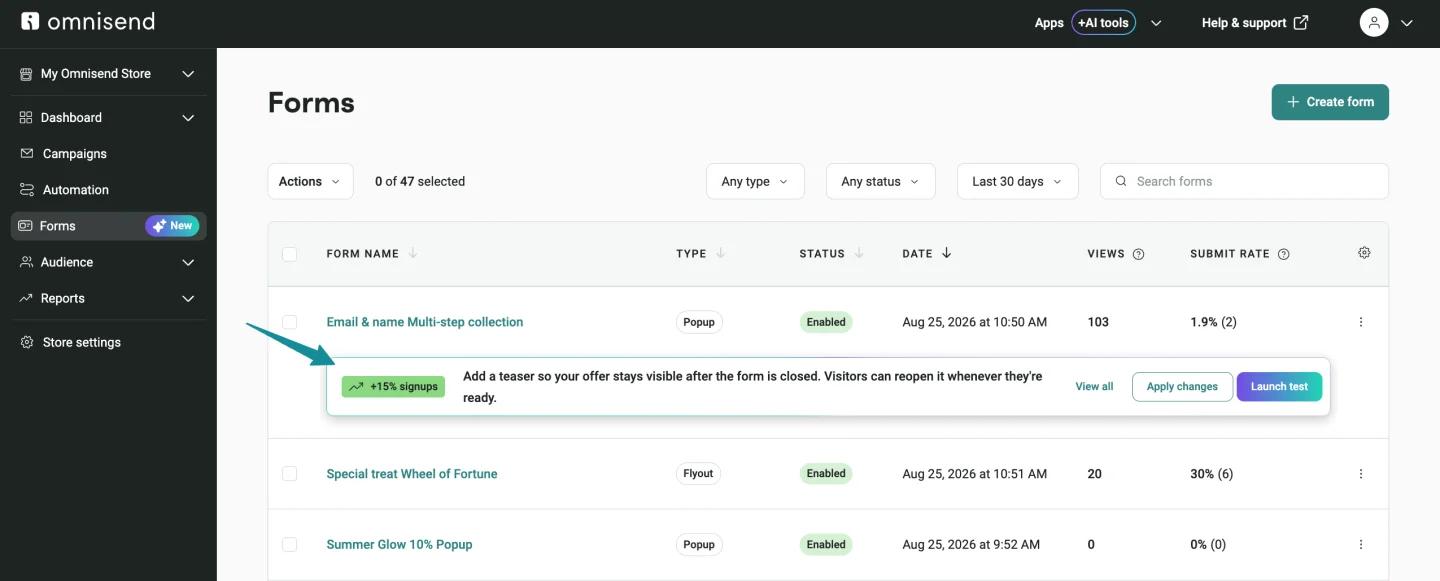
We’re thrilled to introduce AI Recommendations — a brand-new feature that’s already running quietly across your Signup Forms, Email Campaign audiences, and Automation Workflows.
Omnisend AI takes a look at your setup and surfaces opportunities to improve it. Depending on the recommendation, you can preview the suggested change, apply it, test it, or dismiss it.
Here’s what you might see pop up:
- Suggestions to improve your Signup Forms
- More relevant Email Campaign audiences
- Automation Workflow timing, exits, follow-ups, or A/B test tweaks
- Forms and Automation recommendations surfaced directly in Reports AI
👉 Learn more about Omnisend AI: AI Recommendations
Forms AI Assistant just got way more powerful
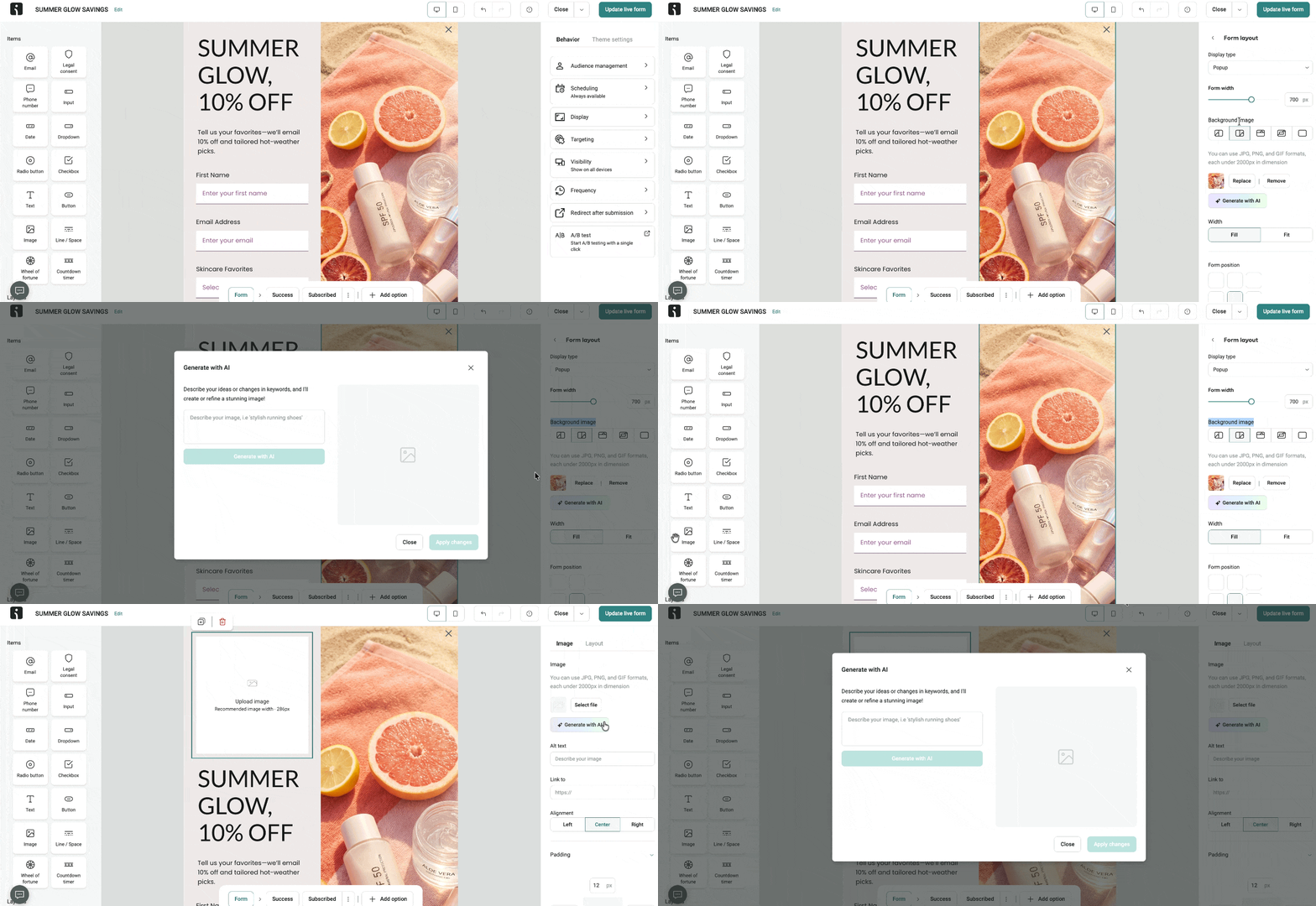
Our Forms AI Assistant can now help you create and configure much more of your Signup Forms. Use it to:
- Configure form settings — scheduling, targeting, visibility, frequency, display settings, contact tags, and post-submit redirect URL
- Build Back in Stock forms end-to-end, targeting included
- Build Wheel of Fortune forms from scratch or by copying an existing one — you can specify the wheel slices and discount codes
- Add countdown timers to any form it builds or copies
- Generate form visuals — images and background images, created right in the Forms builder
👉 Learn more about Omnisend AI: Forms Assistant
Improved AI Segment Builder
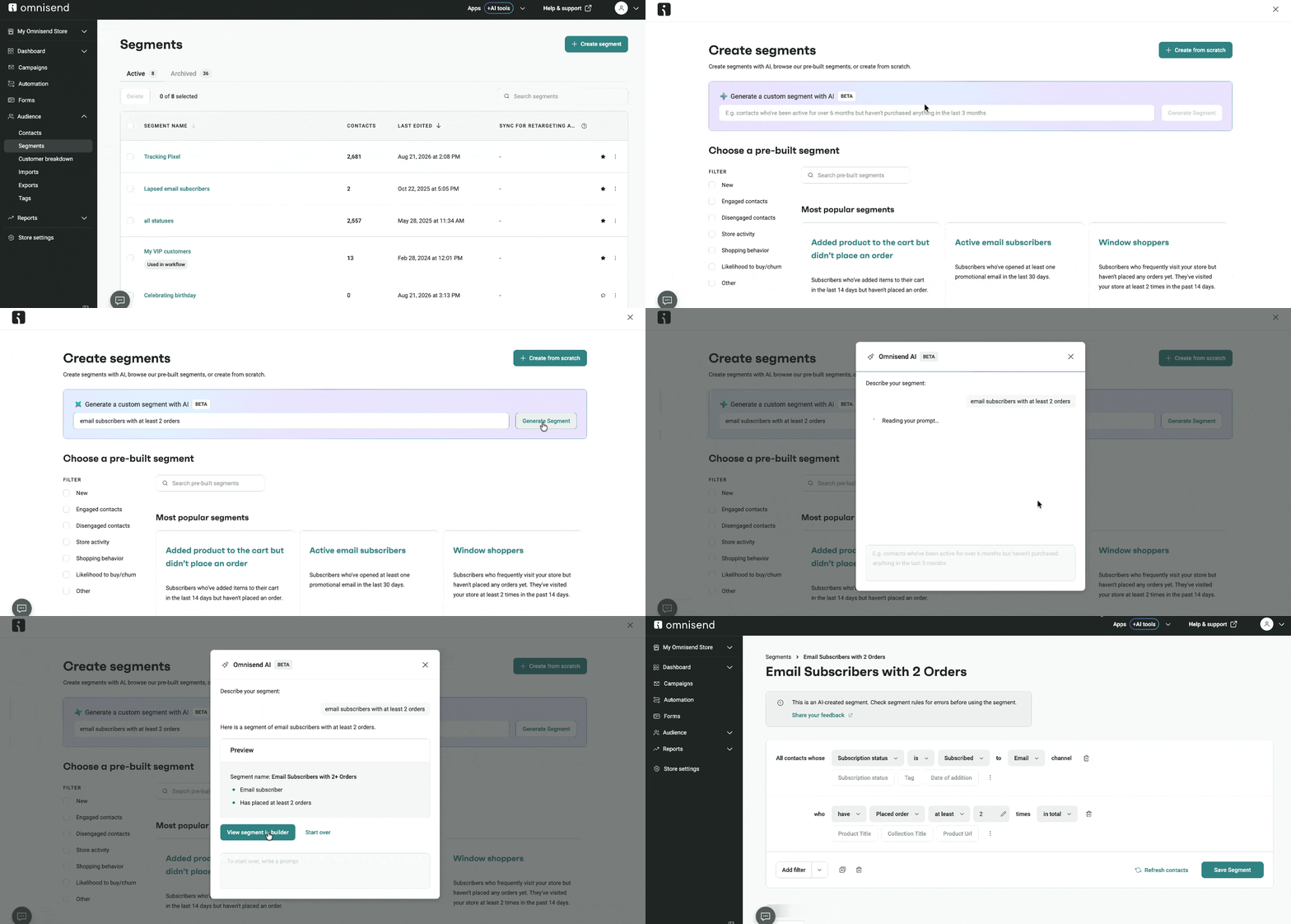
Segment creation now runs on a new AI agent that’s faster, more accurate, and able to handle more complex requests.
It understands the data in your account better too, so segment conditions need less manual correction afterward.
👉 Learn more about AI Segment Builder
Conditional Splits can finally merge back
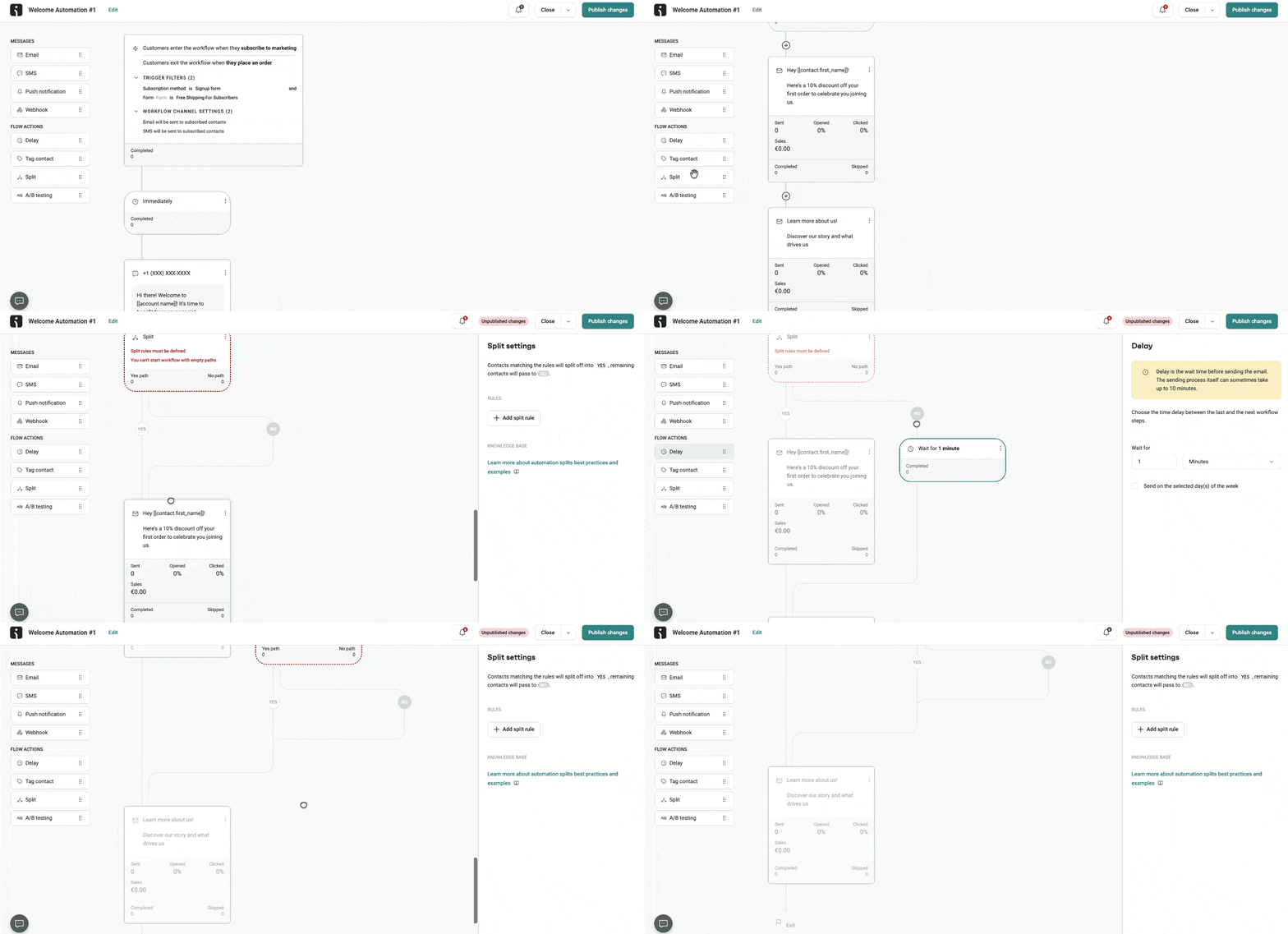
A big win for workflow builders — Conditional Split paths can now merge back into one shared continuation. You can:
- Continue both YES and NO split paths through one shared path
- Add blocks directly below the Split
- Drag and reorder Split blocks after placing them
- Move blocks between the YES and NO paths and the shared continuation
- Use delays at the end of split paths without triggering unnecessary-delay warnings
👉 Learn how to Use Conditional Split to Create Workflow Paths
Total Cart Item Count in Automation conditions
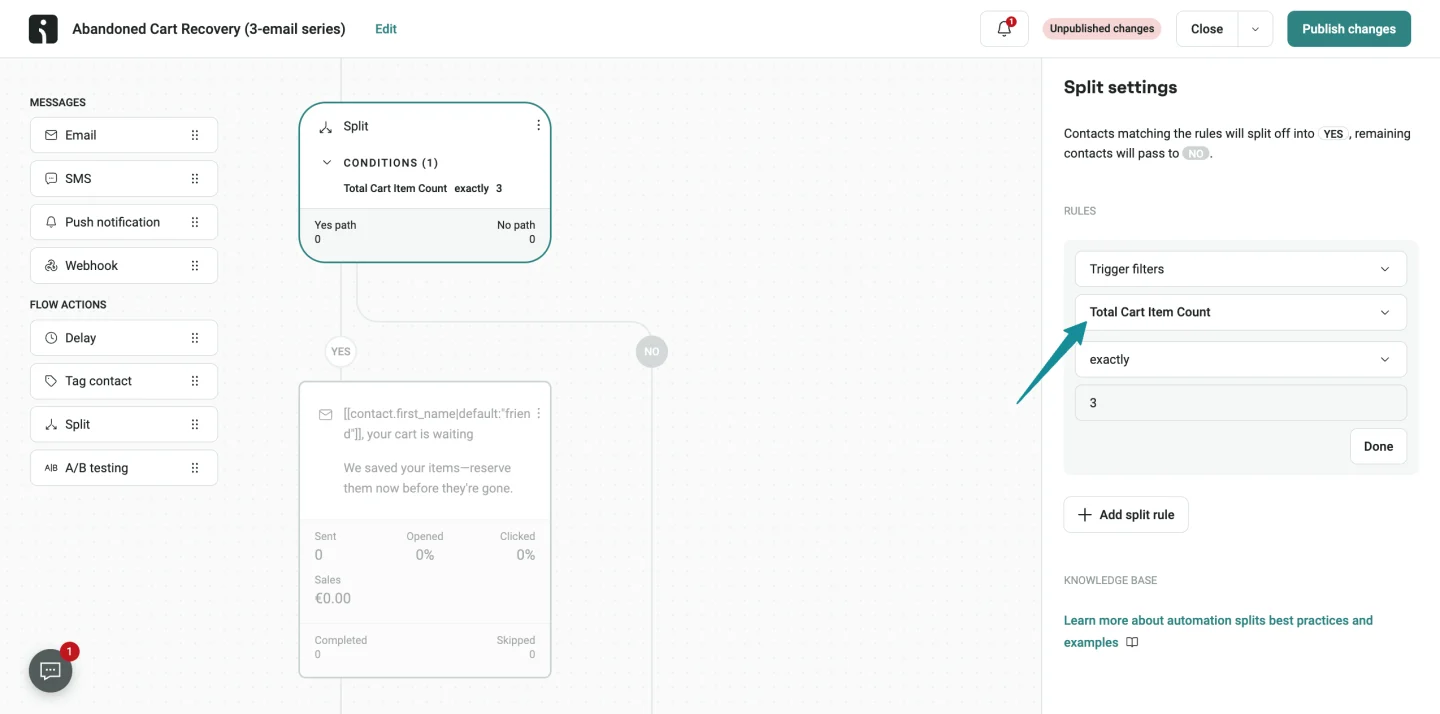
A big win for workflow builders — Conditional Split paths can now merge back into one If your store is on Shopify or BigCommerce, you can now use Total Cart Item Count in the “Added product to cart” condition — as a trigger or an exit condition.
Start or stop a workflow based on how many items are in a contact’s cart. Great for creating more targeted customer journeys.
👉 Learn more about Set Up Automation Workflow Settings
UTM tags for each A/B variant
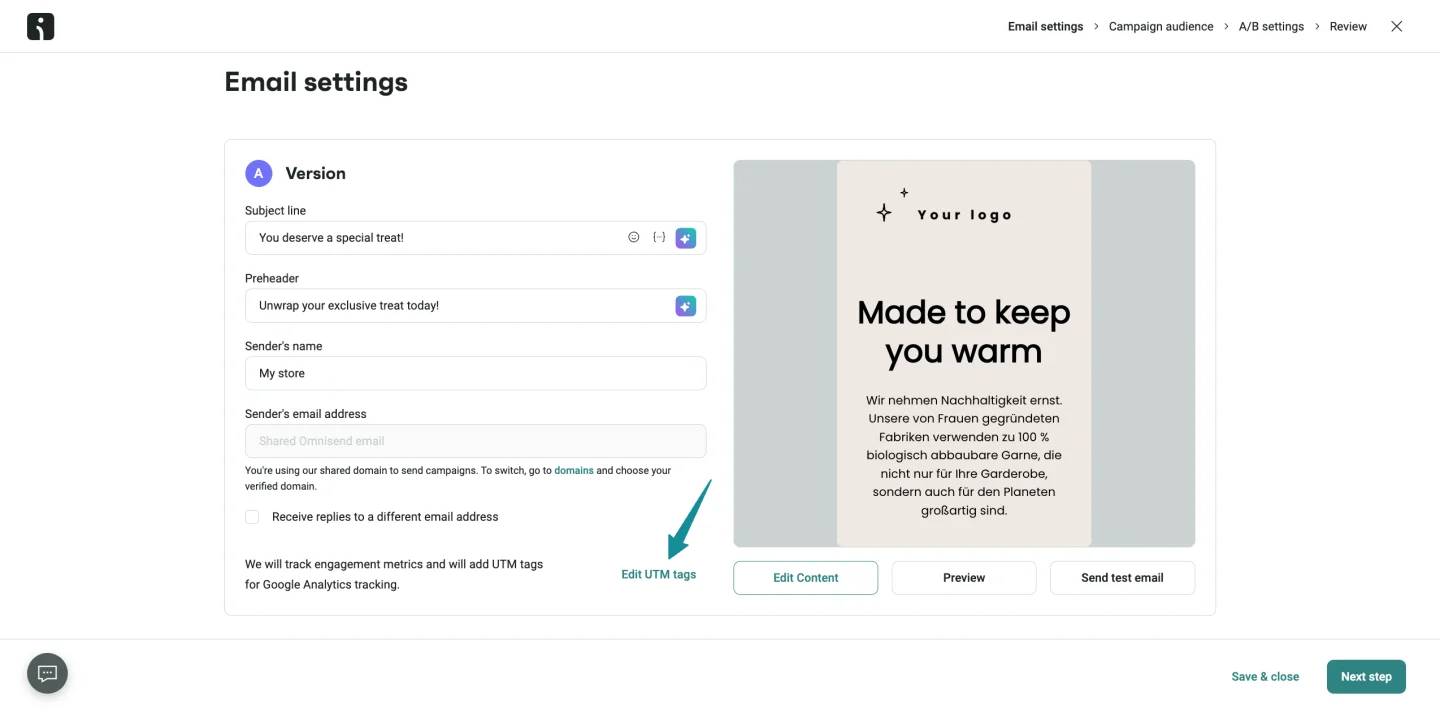
You can now set up UTM tracking separately for each A/B test variant, right in the A/B test setup for your Email Campaigns.
This makes it much easier to distinguish variant traffic in external analytics and compare performance properly.
👉 Learn how to A/B Test Your Email Campaigns
Clearer Contact profile details
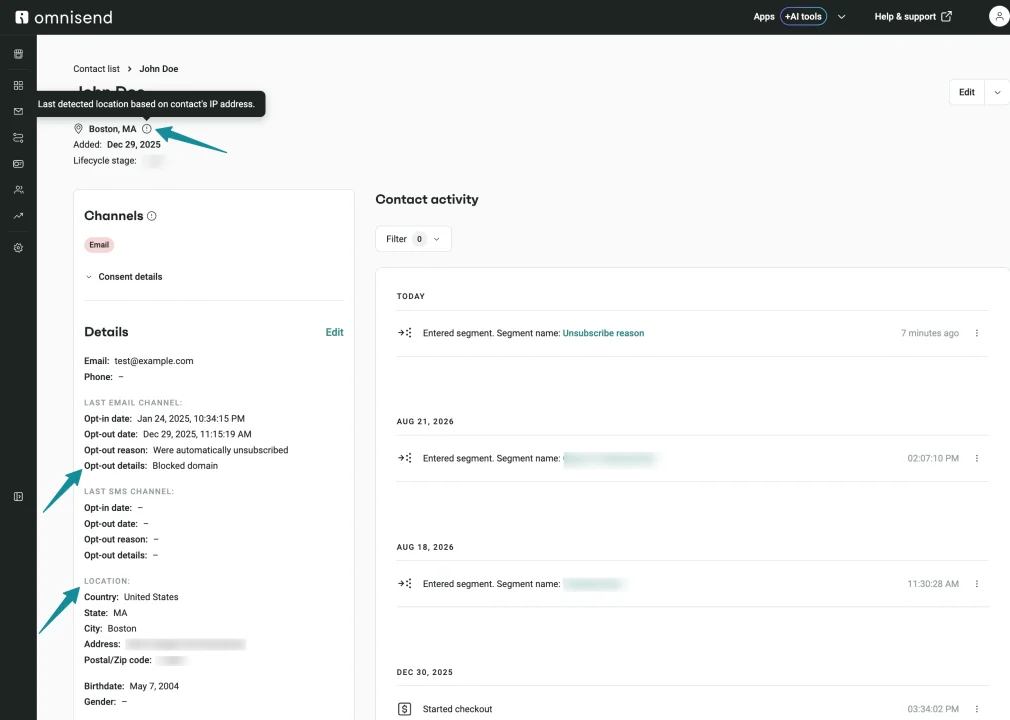
Contact profiles now display Email and SMS consent details and location info in a way that’s much easier to scan:
- Opt-out details — see the specific reason a contact was automatically unsubscribed (like “Blocked email domain”)
- Grouped details — review information under Last email channel, Last SMS channel, and Location
- Last detected location — an info tooltip explains that the location is based on the contact’s IP address
👉 Understand Contact Profile Data
See Active and Archived segments separately
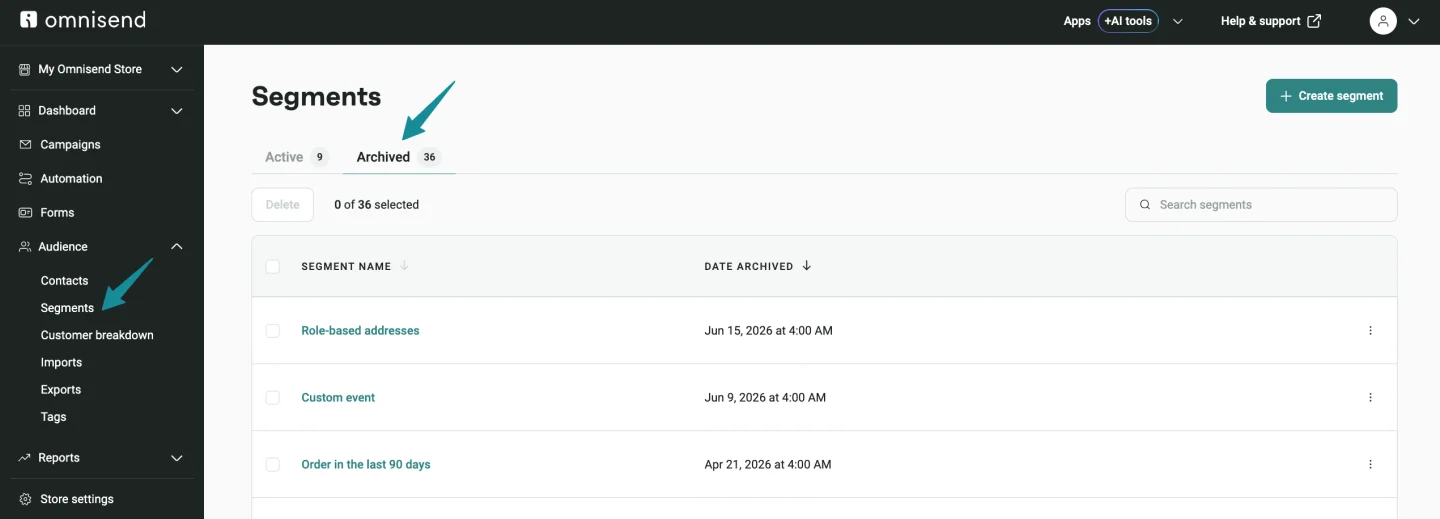
You can now switch between Active and Archived segments using the tabs above the segments table. Each tab shows the number of segments in that category.
If any segments were automatically archived since your last visit, a popover appears on the Archived tab with a View archived segments option.
Clearer validation when adding contacts
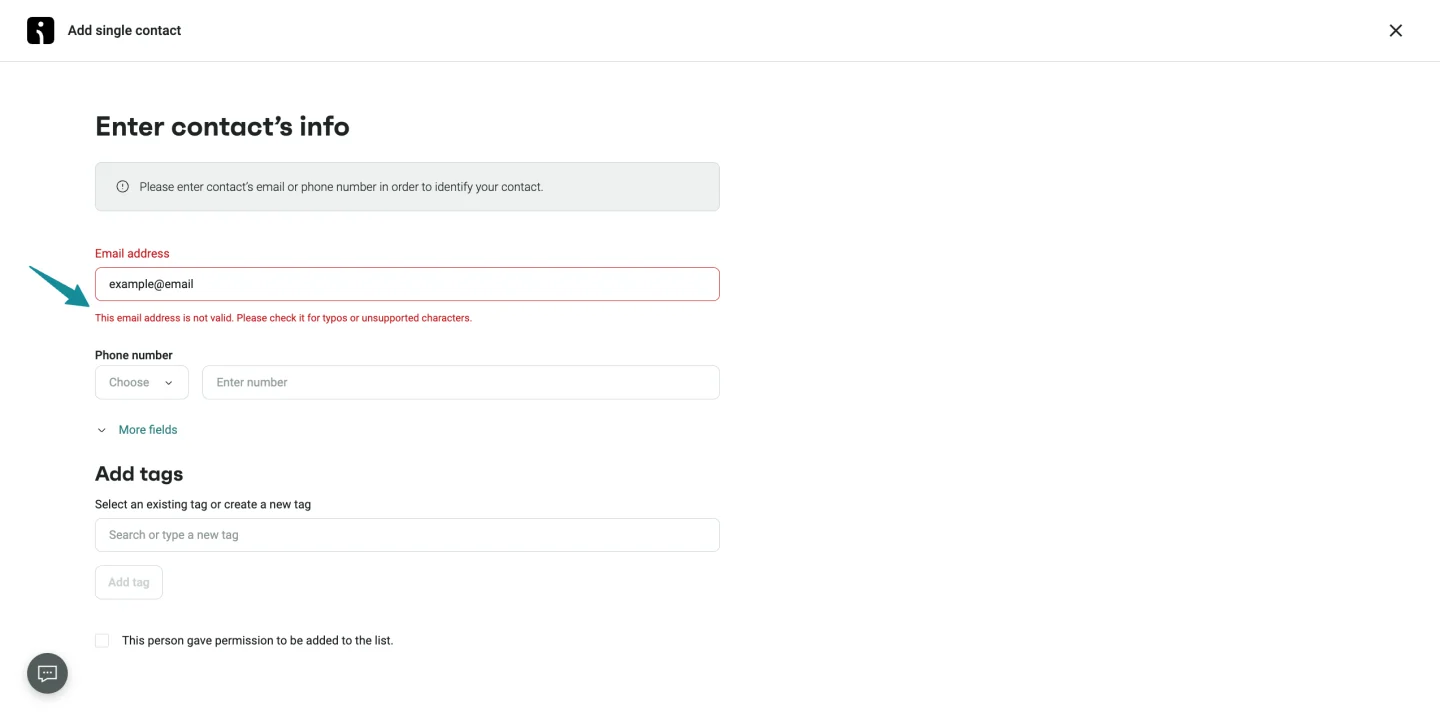
The Audience → Contacts → Add single contact experience now provides specific inline error messages for:
- Invalid email addresses
- Invalid phone numbers
- Duplicate contacts
- Other issues that would prevent a contact from being added
The validation button is now called Add contact. Enter an email address, a phone number, or both, select the consent checkbox, and you’re good to go.
More reliable List Cleaning
If you have a large contact list, you can now start List Cleaning without the process timing out.
And if List Cleaning can’t start, you’ll see a clear message explaining the reason — your account has no contacts, your list doesn’t contain enough contacts, you don’t have the required permission, or the selected segments aren’t available.
👉 Learn how to Clean Your Email List to Improve Deliverability
More clarity and control in Reports
We’ve made several updates to help you get more from your reports — from comparing A/B test results to reviewing performance by hour and exporting data:
- Custom date ranges in Deliverability reports — pick the exact period for Email sender domain and SMS phone number country reports
- Export Email domain performance data as a CSV file
- A/B test Segment performance filters — compare Version A, Version B, or all versions across the entire period, A/B test period, or winner period
- Last updated by in Campaign reports — see who last changed an Email, SMS, Push, or A/B Email Campaign
- Sent SMS previews right from the Campaign list or Campaign report
- Sortable Link Performance — sort links by Unique Clicks or Total Clicks in Campaign and Automation Workflow reports
- Device and Email client reports for Automation Workflows — review engagement with message and Opens/Clicks filters
- Hourly Automation Workflow performance — view a single day as 24 hourly bars in the Channel performance over time chart
- Placed orders in First 24-hour performance — see when attributed orders actually land after an Email Campaign goes out
👉 Omnisend Reports: Individual Campaign and Automation Reports
Contact-level email open-tracking consent
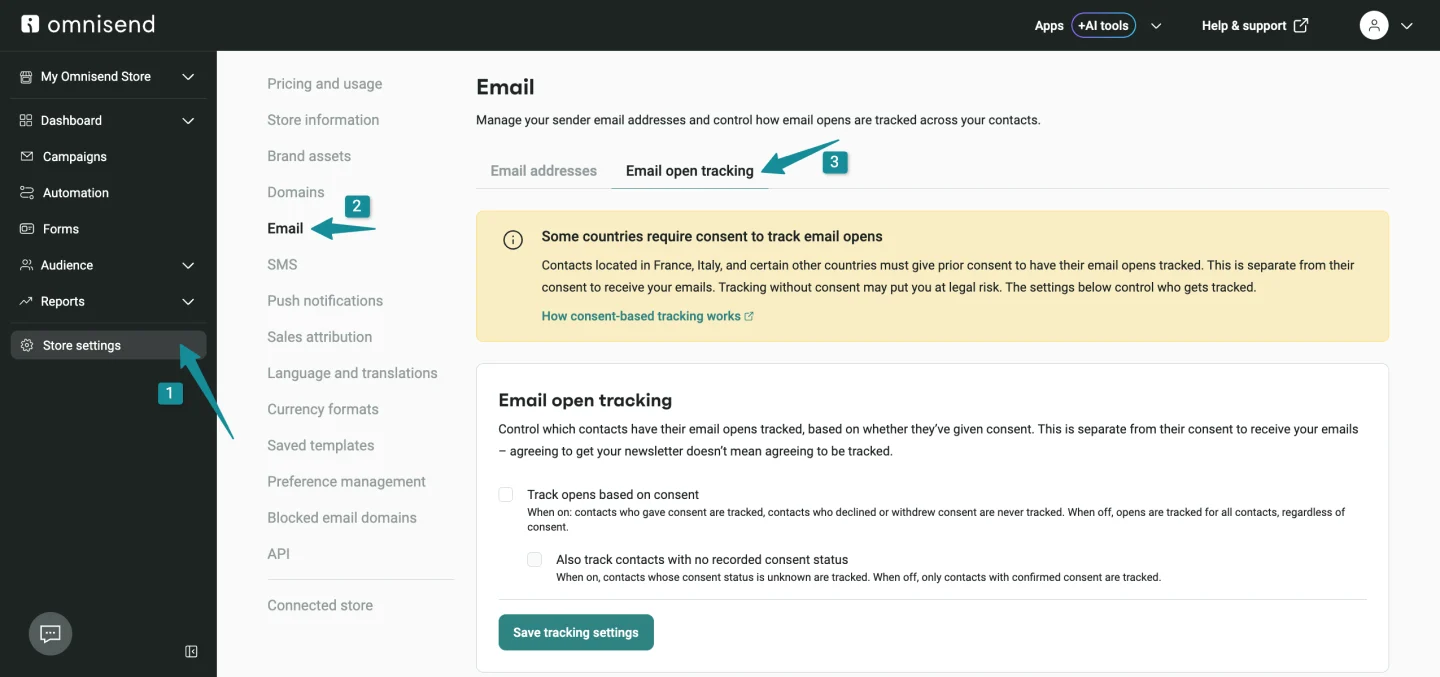
A new Track opens based on consent setting is now available in Store settings → Email → Email open tracking.
Here’s how it works: when consent-based open tracking is enabled, Omnisend checks each contact’s recorded tracking consent before adding the tracking pixel. If a contact doesn’t have the required consent, their opens may not be tracked — which can affect open-rate reporting, open-based segments, Automation conditions, and open-rate A/B tests.
Please note that marketing subscription consent and open-tracking consent are separate. The setting is off by default, so you can configure it based on the consent requirements that apply to your business.
👉 Learn how to Set Up Contact-Level Email Open Tracking Consent
Custom SMS text-to-join keywords
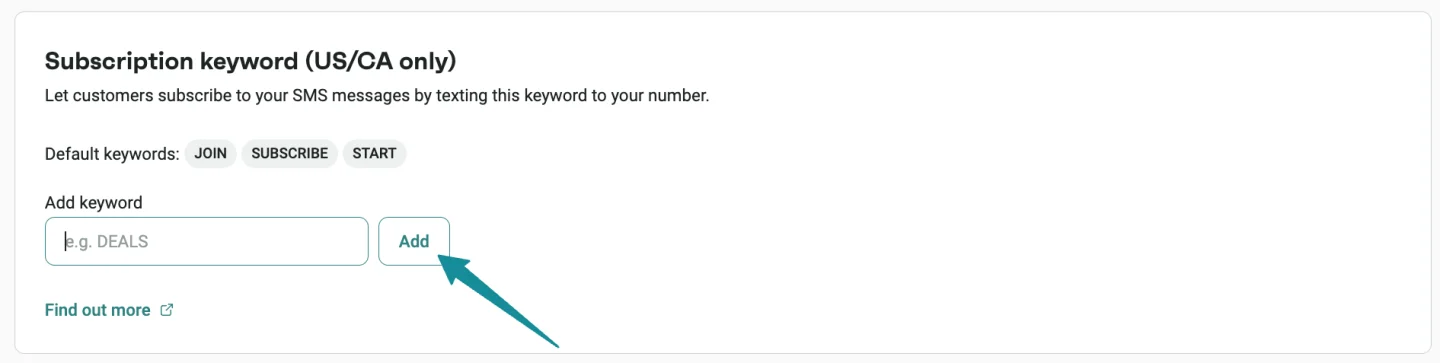
If you send SMS messages to the US or Canada, you can now add up to three custom opt-in keywords in your SMS settings.
The default keywords (JOIN, SUBSCRIBE, START) continue to work. Use keywords your audience actually recognizes — like your brand name. Please note that unsubscribe and help keywords can’t be used as opt-in keywords.
👉 Learn how to Grow Your SMS List with Text-to-Join
Default country for Preference page phone fields
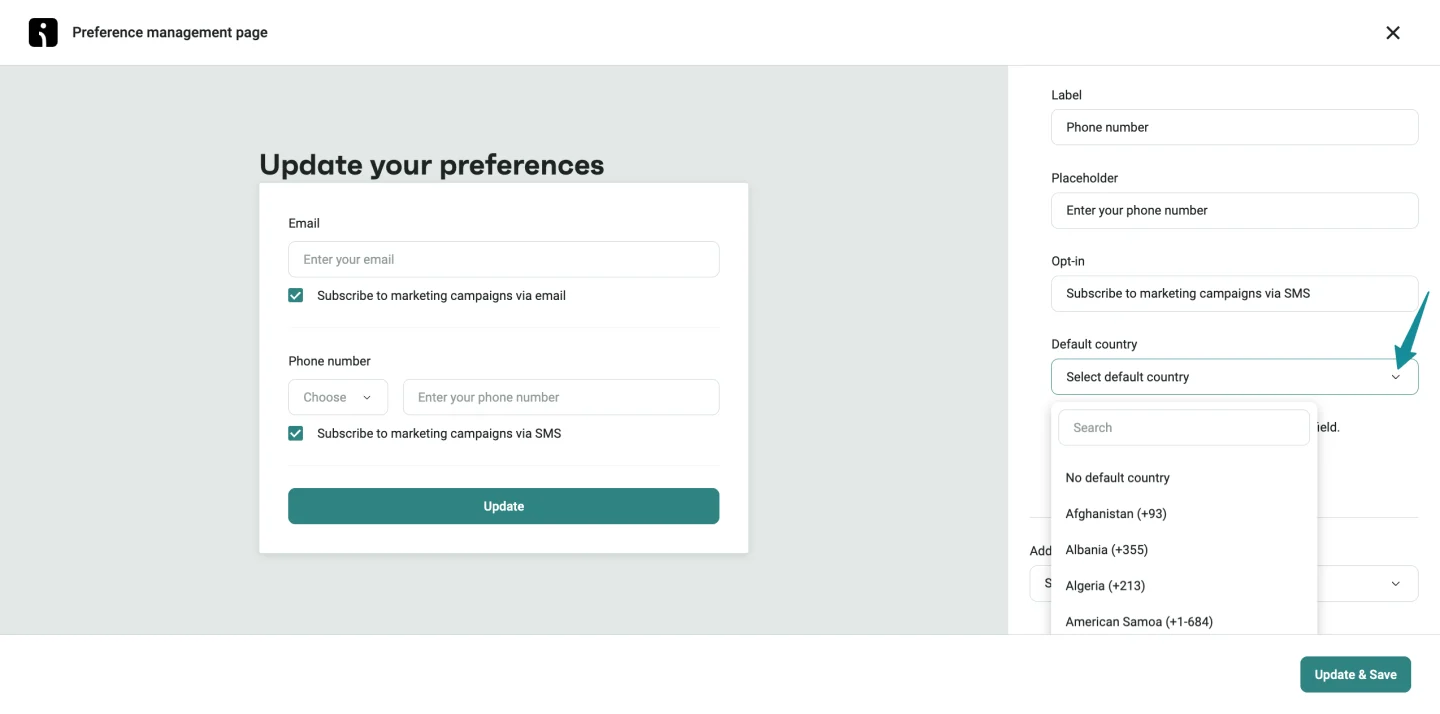
You can now set a default country for the phone number field in Store settings → Preference management → Phone number field.
When a subscriber doesn’t have a saved phone number, the selected country prefix and flag appear automatically. If a contact already has a phone number, it remains unchanged.
👉 Learn how to Set Up Subscriber Preference Center
Manage your store’s default currency
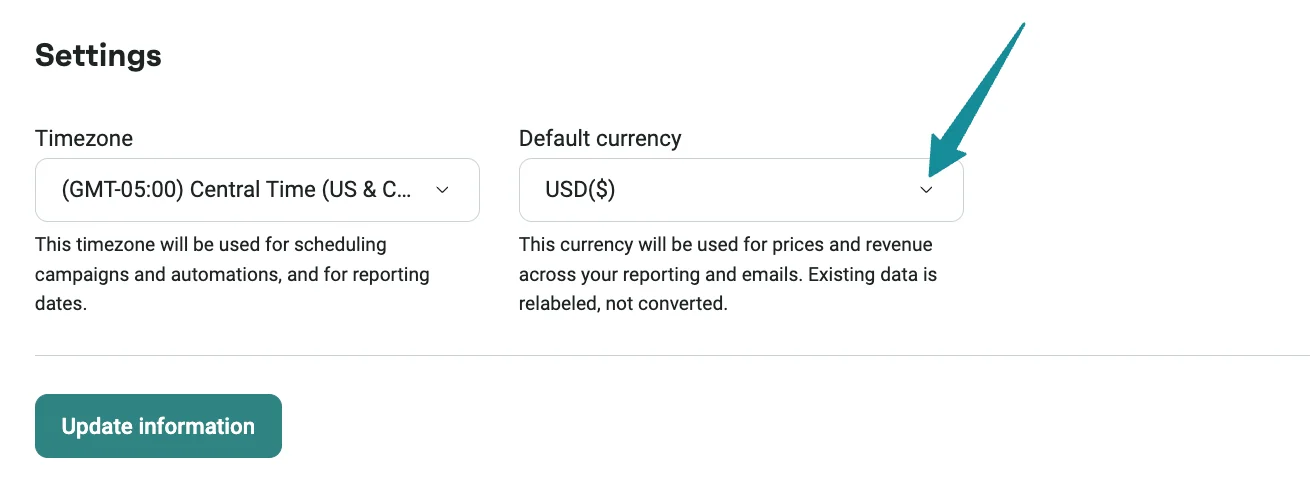
You can now set or change your store’s default currency in Store settings → Store information → Default currency.
The default currency is used to label prices and revenue across your account — including reports, Campaigns, Automation Workflows, and exports.
Retrieve event property values through the API
The new Event Property Values API returns the values stored for selected event properties, such as contact.email or order.currency.
Use these values to populate filters, dropdowns, and segment pickers with data that already exists in your Omnisend account.
You can request values for one event at a time and up to 10 properties per request. The API currently supports standard engagement events — opens, clicks, sends, subscribes, and spam reports. Custom events aren’t supported yet.
👉 API documentation: Query event property values
More API capabilities
The Omnisend API now gives you more ways to manage Forms and create optimized Email Campaigns:
- Manage Forms — create, view, update, and delete Forms and Form A/B tests through the API, plus access Form templates
- Use Send Time Optimization when creating Email Campaigns through the API
👉 Omnisend API Overview and Developer Resources
Ecommerce integration updates
Three solid updates on the ecommerce side this month:
- Shopify Contact Sync — state or province data from Shopify now flows into Omnisend and attaches to the contact’s address. Available for new Shopify imports from August 10, 2026. Existing contacts aren’t backfilled, so the field populates gradually as new data comes in.
- BigCommerce customer groups — now sync to Omnisend as the customerGroup custom contact property, and update automatically when a customer’s group changes. Great for segmentation across wholesale, trade, VIP, or staff pricing groups.
- WooCommerce product imports — product and category data now syncs through Omnisend’s backend using the WooCommerce API, making it more reliable and faster to catch updates.
New integration: Figma
We’re thrilled to welcome Figma into the fold! Connect Figma to Omnisend to automatically sync your designs to the Image Library as PNG files.
Create email banners, social media graphics, and other marketing visuals in Figma, then use them in Omnisend without downloading and re-uploading anything.
👉 Learn how to Integrate Figma with Omnisend
More new integrations
We’ve also welcomed a big batch of new integrations this month across a few categories:
Signup, Quiz, and Subscriber Collection
- Outgrow — sync contacts when visitors complete calculators, quizzes, polls, chatbots, or assessments
- Wufoo — sync form, survey, and event submissions as contacts, and trigger Automations from responses
- DojoMojo — sync sweepstakes participants with standard fields and optional custom properties
- Privy — sync new signups as contacts for segmentation and Automation Workflows
- Rhym — send new lead activity as a New Lead custom event
- Mori Scratch Card Popup — sync subscribers and scratch-card details as custom contact properties
- Mori Spin Wheel — sync subscribers and spin and prize details as custom contact properties
- VeeForm — sync quiz respondents and answers, and trigger workflows from quiz activity
- Popupsmart — sync emails, phone numbers, and popup-specific properties
- Survicate — sync survey respondents and record their answers as a Survey Completed event
- SimiCart — sync new email subscribers from mobile app signups
- LeadQuizzes — sync quiz respondents, save quiz answers as custom properties, and trigger workflows from quiz submissions
Loyalty, Referral, and Rewards
- Refersion — trigger Email or SMS Automation Workflows when affiliates are approved, or conversions are created, approved, or denied
- Lytics — trigger Automation Workflows when contacts enter or exit selected audiences
- GrowSurf — send referral activity as custom events, or sync referral details as custom contact properties
- Redeemly — sync store credit balances and trigger workflows for credit activity
- TrueLoyal — sync loyalty data and trigger workflows based on point activity
Messaging, Customer Support, and Subscriptions
- Spoki — sync contacts created or updated in Spoki and trigger Email or SMS Automation Workflows
- WAX — trigger WhatsApp flows from Omnisend Automation Workflows
- Egentify — send shopping intent and support activity as custom events
- Smartrr — trigger Email or SMS Automation Workflows when subscriptions are created, activated, paused, or canceled
- Rep AI — sync contacts collected through the Subscribe & Get a Discount Power-Up feature
Email Design and Content
- CountdownMail — add animated GIF countdown timers to Campaigns and Automation emails
- Emailify — convert Figma designs into responsive HTML email code for custom HTML Campaigns
- teeinblue — display a customer’s personalization preview image in Omnisend emails
Audience, Analytics, and Attribution
- Vibe — sync contacts from an Omnisend segment to a Vibe advertising audience
- Fullmetrix — build audiences from store data and sync selected audiences to Omnisend
- HYROS — track Omnisend activity in HYROS ad attribution
Ecommerce and Post-Purchase
- Essential Preorder & Back in Stock — sync back-in-stock waitlist signups as contacts to trigger restock alerts and nurture workflows
- Spree Commerce — sync contacts and receive order activity as custom events (these don’t appear in Omnisend order reporting)
- Swap Commerce — send return activity as custom events and trigger targeted Automation Workflows
Search, Revenue, and Social Proof
- Boost AI Search & Discovery — trigger custom events when shoppers search your store or click a search result
- Outcraft AI — use Omnisend audience and behavior data as context for revenue workflows
- ProveSource — send website form submissions as a contact Submission event and sync visitor details
Integration updates
- Redo now supports Order Tracking events in addition to return events, so you can trigger post-purchase Automations based on real-time shipment updates
- Skio now supports cardWillExpire, subscriptionSkipped, subscriptionNextBillingDateUpdated, and subscriptionOutOfStock events. If you already use Skio, please reinstall it and re-enable the relevant Automation Workflows to start receiving the new data
A few smaller UI improvements worth knowing about
We ship usability updates every week — here’s what stood out this month:
- Connected billing and card — add or update billing details in one flow in Account Settings
- Bulk invoice downloads — select multiple invoices in Account Management → Billing History and download them as a single ZIP
- Clearer add-on purchase info — the add-on flow now shows what’s included and the total price in one place
- See which card paid an invoice — invoice details now show the specific card charged, including last 4 digits
- Automatic DNS provider detection during domain setup — no more manual selection
- Review Forms A/B test recommendations — the setup window shows each step of both form versions, so you can review changes before launching
- Clearer sender domain message — if a domain is already in use elsewhere, a banner explains why and lets you verify ownership if it belongs to you
- Improved SMS link-shortening settings — in-app tooltips to clarify Omnisend’s SMS shared short-link domain vs. your verified branded domain
- Scrollable profile menu — all options (Switch store, Log out) are now accessible at high browser zoom levels
- Last-used brand across devices — return to the brand you most recently used, regardless of browser or device
- Remember me for Google login — stay signed in with Remember me on, whether you’re using Google login or email and password
Have questions? Reach out via in-app chat or email us at [email protected] — we’re available 24/7 and happy to help. Want to look back at past updates? Check out the full What’s New collection.