
 Omnisend AI


 OFFER
OFFER








Drive sales on autopilot with ecommerce-focused features
See FeaturesKey takeaways 
Brevo is ideal for small to medium enterprises seeking affordable multichannel marketing, while Klaviyo excels for ecommerce businesses with complex customer journeys.
Pricing structures differ significantly: Brevo charges based on emails sent, while Klaviyo's costs rise with the number of active profiles.
Klaviyo offers advanced automation and analytics features, making it suitable for businesses that require in-depth customer insights and complex workflows.
Brevo provides a user-friendly experience with a built-in CRM and generous free plan, making it accessible for those new to email marketing.
Reveal key takeaways
Narrowing down your choice of email tools with a CRM will naturally bring you to Brevo vs. Klaviyo. Brevo’s the pick if you’re an SME wanting cheap multichannel marketing, and Klaviyo is an ecommerce-first tool, best if you have complex customer journeys.
Both tools have advantages over one another in certain areas, but also significant limitations to consider regarding pricing, per-tier feature restrictions, and capabilities.
This article is a complete Klaviyo vs. Brevo comparison, covering their plans, learning curves, features, automations, integrations, and more. By the end, you’ll know which tool is best for your use case and head into it with a decent idea about what to expect.
Join Omnisend to automate your customer journey and generate maximum revenue with email + SMS flows
Quick sign up | No credit card required
Brevo vs. Klaviyo: Overview
Brevo is a multichannel tool that charges by emails sent and includes 100K free contacts, ideal for large lists with infrequent sending.
Klaviyo is for ecommerce. It charges by active profiles, so it’s more expensive. Yet it goes deeper, refining your customer experience with predictive analytics and advanced flow logic.
Brevo
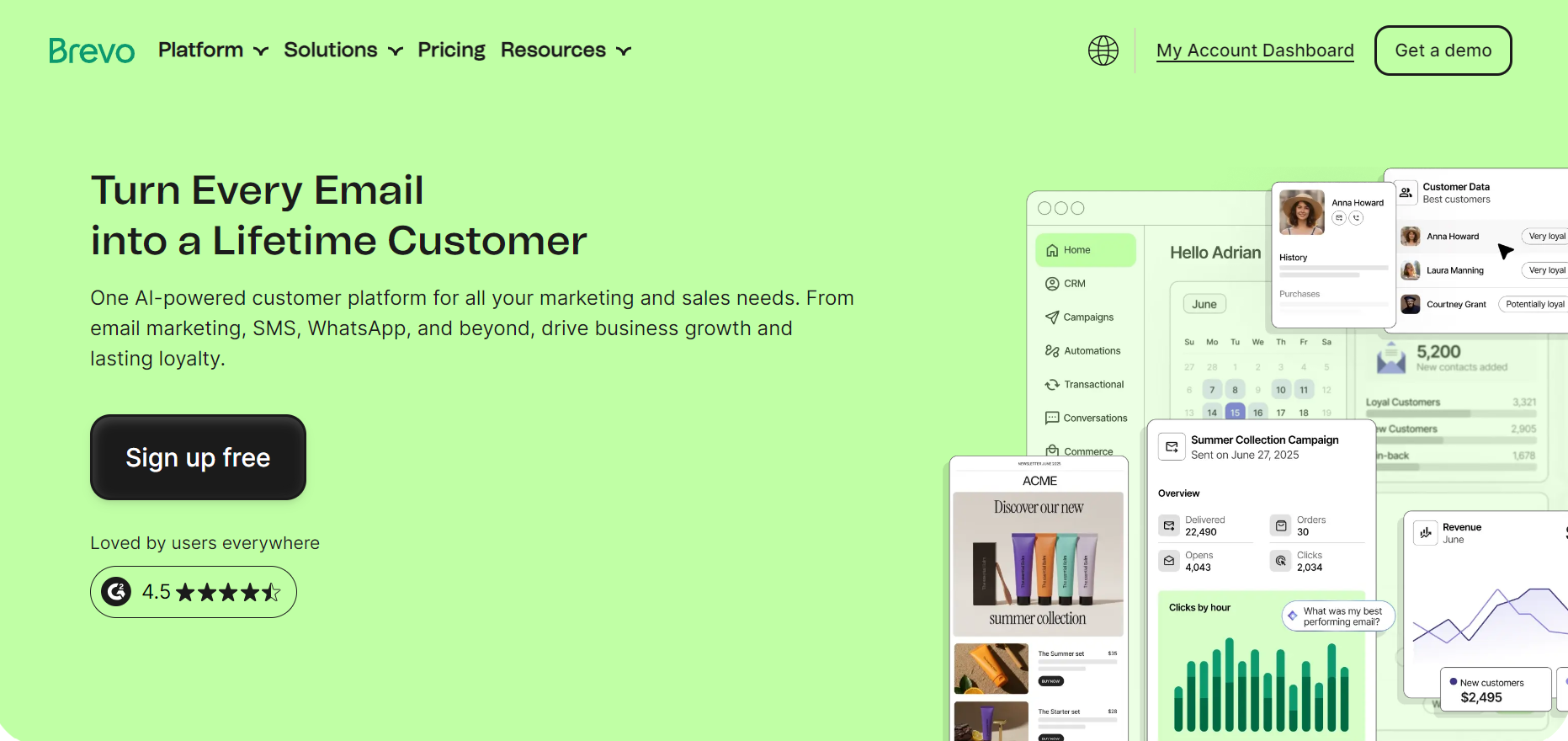
Brevo is an email marketing and CRM suite for small businesses and those with large contact databases but modest sending requirements and multichannel needs.
These are its most appealing features from our Brevo vs. Klaviyo review:
- 100k contacts. Store them indefinitely without paying up to this limit.
- Multichannel. Across email, SMS, WhatsApp, and web push notifications.
- Transactional messaging. Provides email and SMS API access.
- Built-in CRM. Including deal pipelines and lead scoring.
- AI content generator (Aura). You can generate and refine text across all plans.
Klaviyo
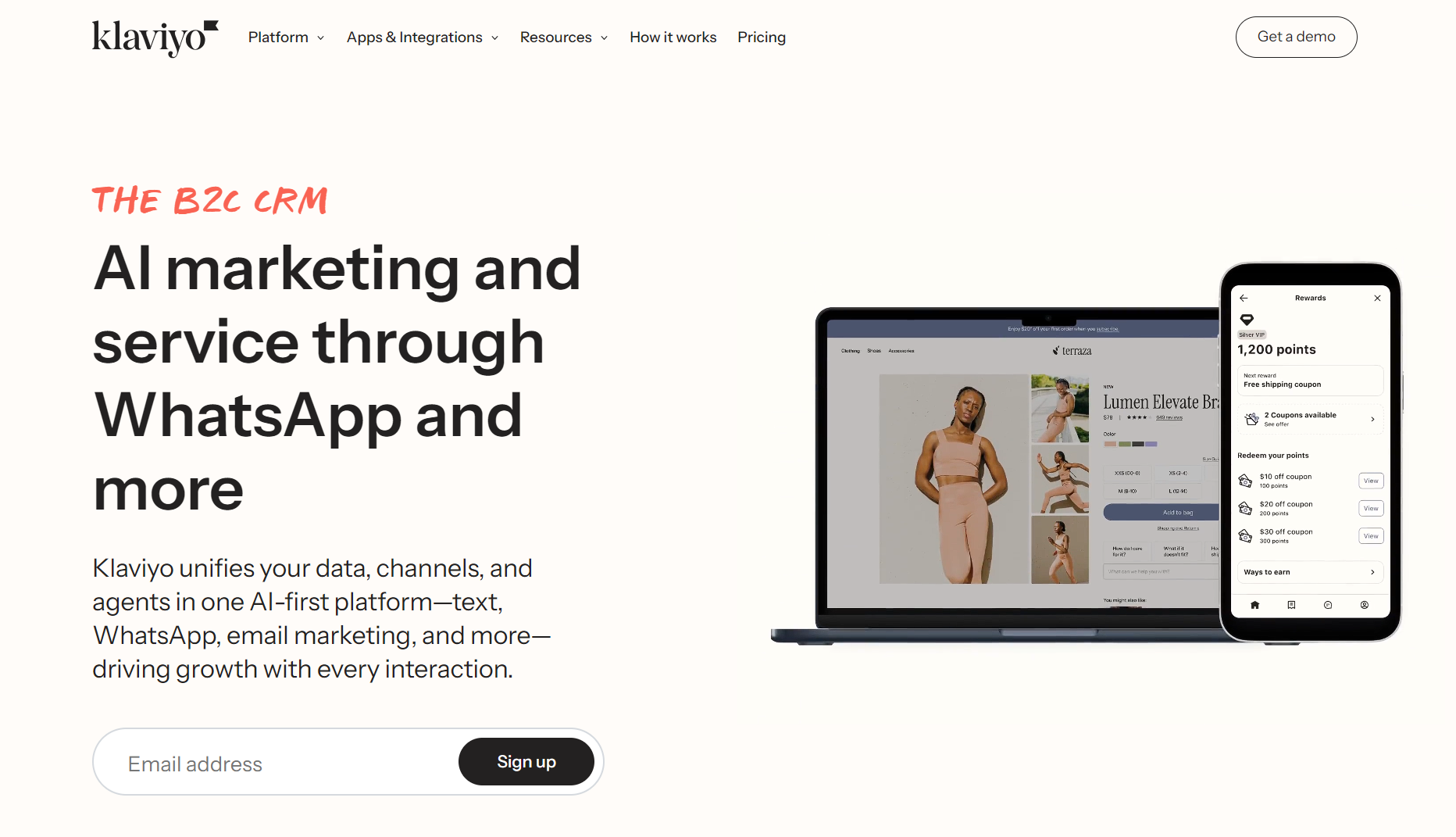
Klaviyo is an ecommerce automation and CRM tool for growing stores with complex customer journeys and data tracking requirements.
With Klaviyo, you get:
- 150 SMS/MMS credits. Even the free plan offers them.
- Predictive analytics. Tracks churn risk, customer lifetime value, and next order date.
- Advanced flow logic. Re-evaluates conditions at every step for appropriate targeting.
- Unified customer profiles. Stores lifetime event history across all channels.
- Industry benchmarking reports. Compare your performance against similar businesses.
Pricing: Brevo vs. Klaviyo
Klaviyo prices its plans by active profiles, so anyone on your list who is considered active counts toward your quota. Your costs grow with your list. Brevo charges by emails sent, or your expected send quota, so your costs increase as you send more emails.
Brevo pricing
Brevo’s Free Forever plan supports 100k contacts and 300 emails/day, equating to approximately 9,000 sends/month. Those numbers are far superior to Klaviyo’s free plan.
Its paid plans include:
- Starter: $9/month for 5,000 sends, includes forms, email templates.
- Standard: $18/month for 5,000 sends, adds A/B testing and marketing automation.
- Professional: $499/month for 150,000 sends, includes multi-user access, contact scoring, and advanced ecommerce features.
Klaviyo pricing
There’s a free Klaviyo plan, good for 250 contacts and 500 emails/month. It also includes 150 SMS/MMS credits. However, it restricts access to key features that make SMS useful, including multichannel segmentation, A/B testing, and attribution.
Its paid plans include:
- Email: $20/month, for up to 500 active profiles and 5,000 emails/month. Includes customer product recommendations and generative AI.
- Email + SMS: $35/month for the same email send limits as the Email plan, plus 1,250 mobile messaging credits/month. Also provides the multichannel features missing from the free and Email plans.
Comparison table
The table below provides a complete Brevo vs. Klaviyo pricing comparison:
| Feature | Brevo | Klaviyo |
|---|---|---|
| Pricing model | Send-based (pay per email) | Profile-based (pay per contact) |
| Free plan | 100K contacts, 300 emails/day | 250 profiles, 500 emails/month |
| Starting price | $9/month (5,000 sends) | $20/month (500 profiles) |
| Best for | Large lists, infrequent sending | Smaller lists, frequent sending |
| Cost increases with | Email volume | Active profile count |
| Cost example: 20,000 email sends | $29/month for the Starter plan | N/A, depends on the number of active profiles in your account |
| Cost example: 20,000 contacts | Depends on how many messages you send to them | $375/month for the Email plan, includes 200,000 emails/month |
How does Omnisend compare?
Omnisend gives you access to all standard features across all plans, including its Free Forever plan. Paid plans start at $16/month for 500 contacts and 6,000 emails/month. Pro starts at $59/month for 2,500 contacts, with unlimited emails and bonus SMS credits equal to your monthly plan cost.
Find out more: Pricing comparison.
Conclusion
Neither wins outright. It’s a tie. Choose Brevo if you want to avoid contact-based pricing and only pay for emails sent. Choose Klaviyo if you send frequently, and you can justify the higher profile-based cost with additional revenue.
Ease of use and learning curve
Both Klaviyo and Brevo offer surface-level features with no learning curve. Pre-built flows, segments, integrations with your ecommerce store, and so on.
However, whereas Brevo remains easy to use across all features, Klaviyo is more complex and gets granular, which may require training and technical support to configure.
Brevo
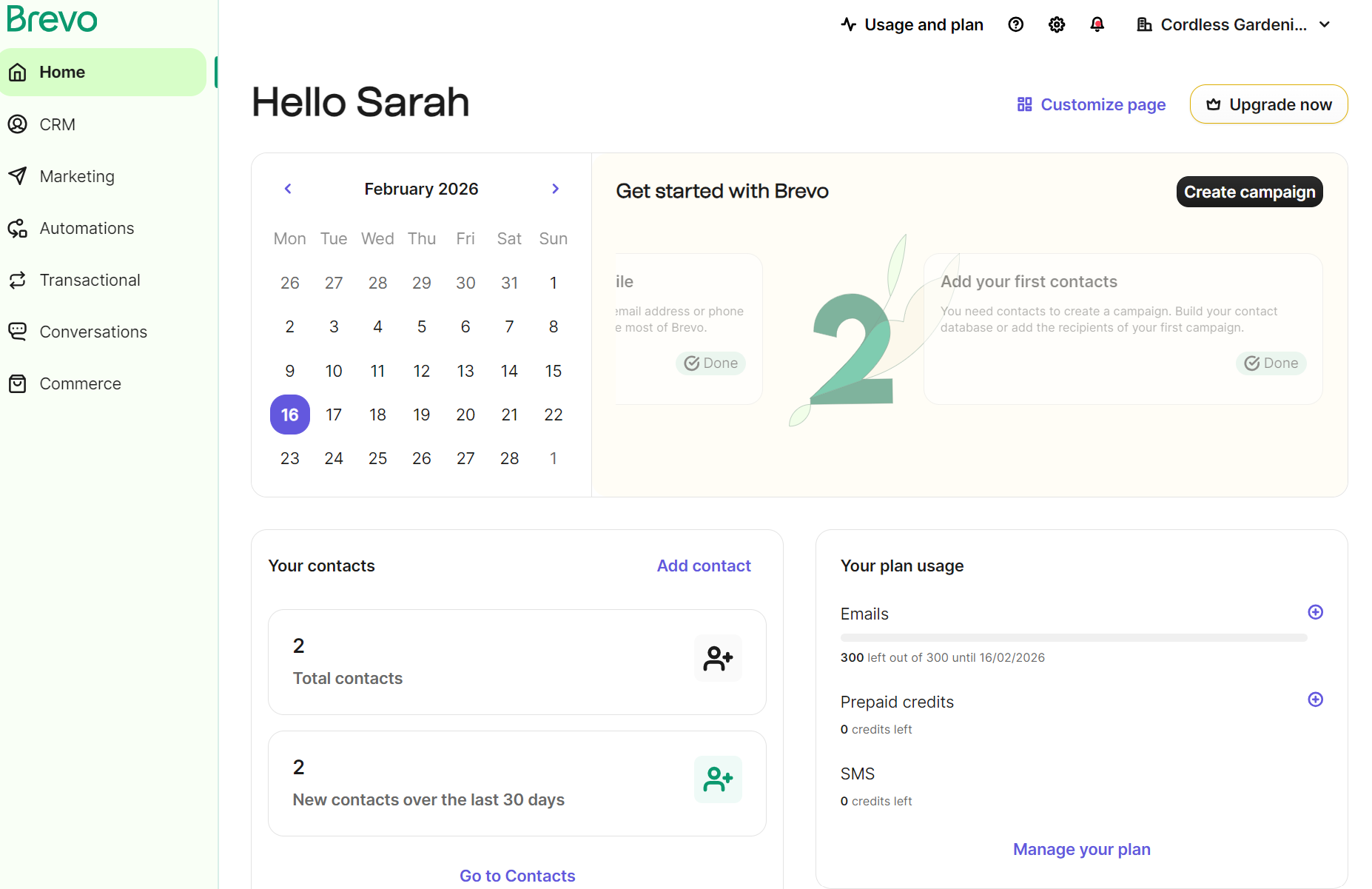
After signing up for Brevo, You’re taken to its dashboard. It has a calendar to show today’s date and prompts you to start with tasks, such as creating a campaign:
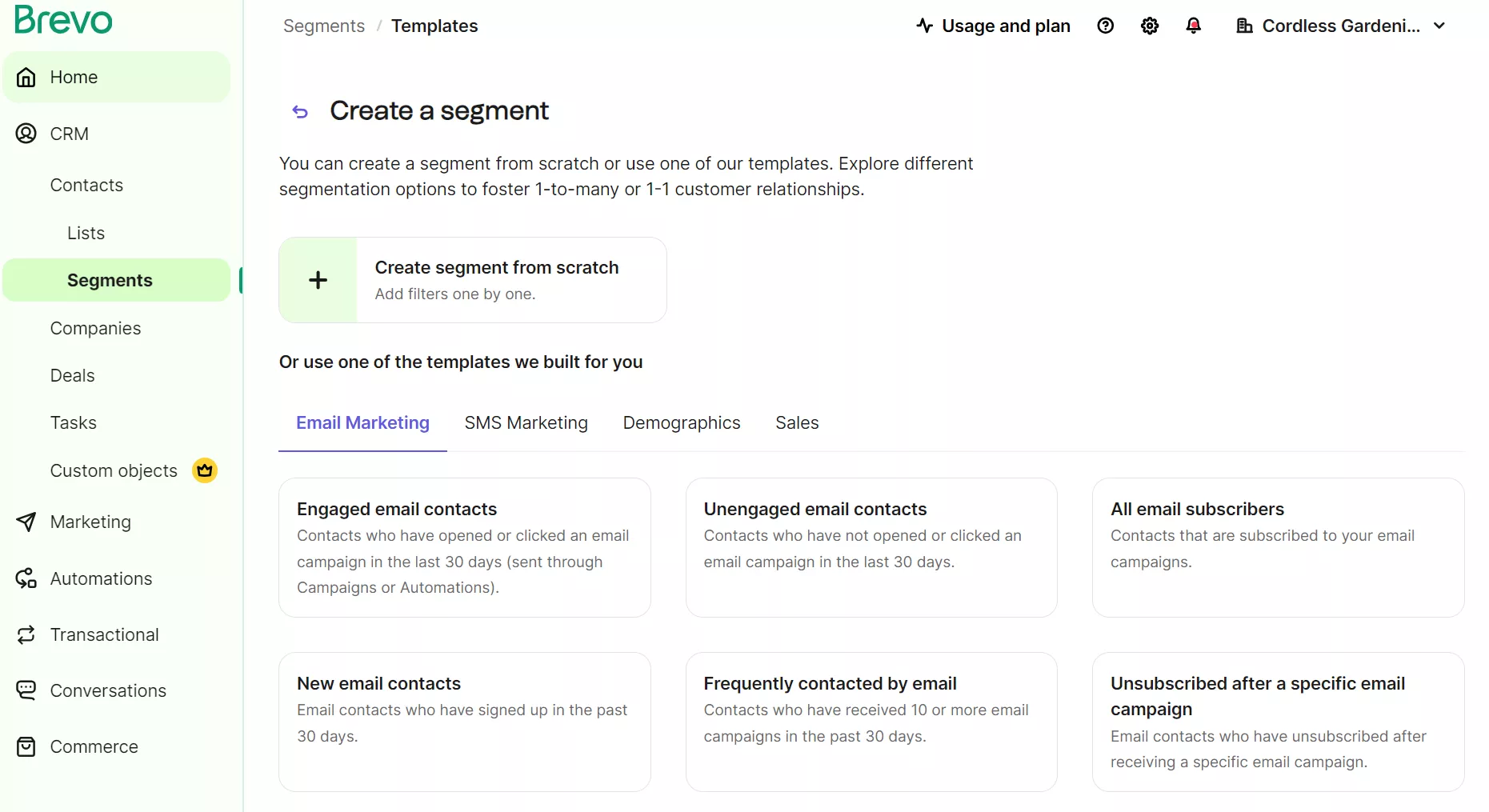
The time to get started creating an automation or campaign is around 10 minutes, including syncing your contacts and adding them to segments:
You can then head to Marketing > Campaigns in the sidebar navigation to open up the campaign creator. Clicking Create campaign opens a popup box to select a channel for a standard campaign, or an automation:
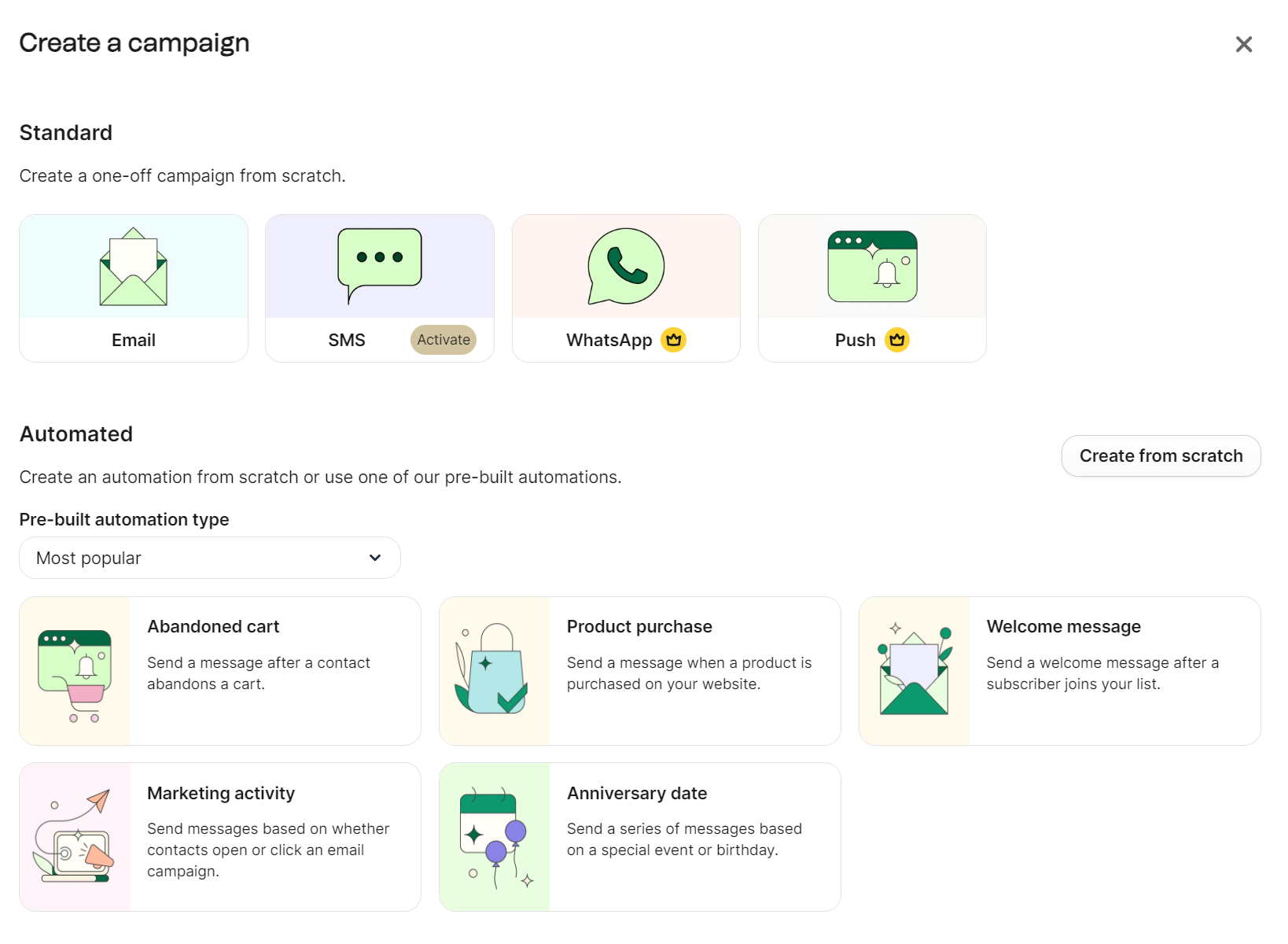
You can then design an email from scratch or use a template. There’s a small learning curve, and everything is easy to find in Brevo.
Klaviyo
Klaviyo’s going to have you spending considerably more time learning features, a by-product of its more complex flow builder, analytics, and audience segmentation.
It’s a good thing, then, that Klaviyo saw fit to add a Get started tab in the sidebar, which reveals a setup guide with steps to connect, turn on tracking, add your list, and more:
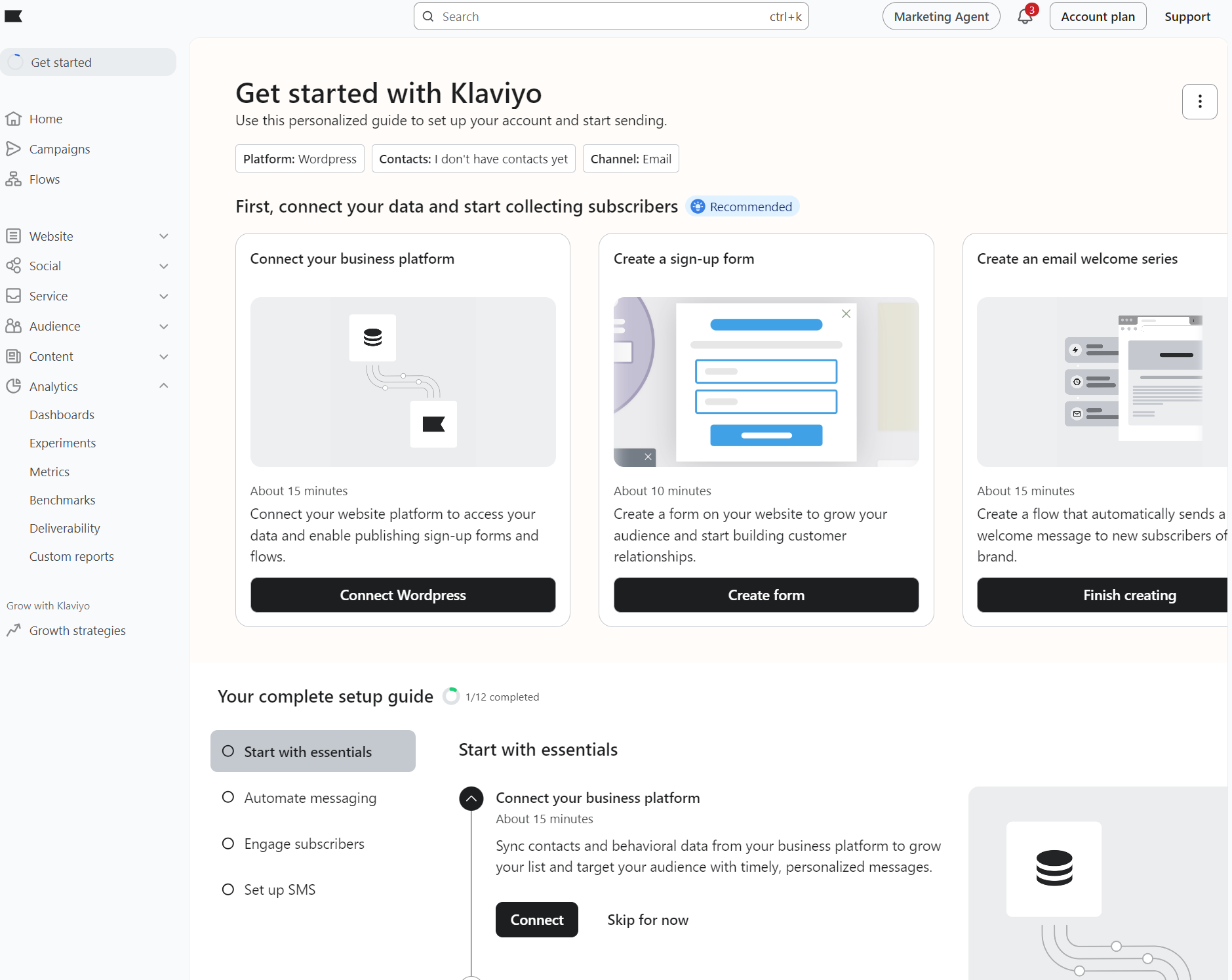
Working your way through those steps will give you a basic Klaviyo configuration that lets you build campaigns, automations, and forms.
Another helpful feature is the Grow with Klaviyo tab. It has built-in resources for learning Klaviyo’s features via the Klaviyo Academy:
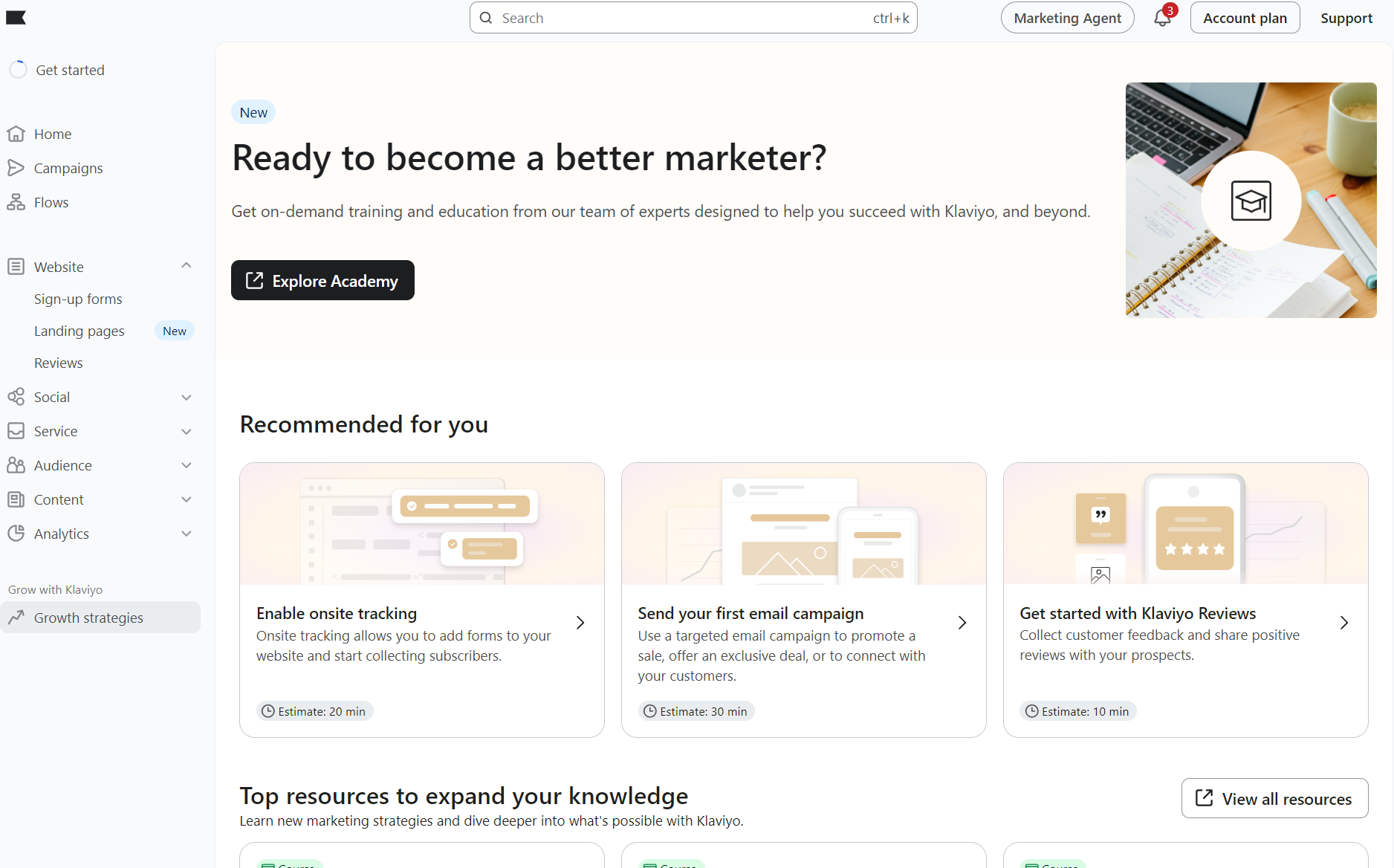
The time to build your first campaign or flow is around the same as Brevo, but you’ll spend more time configuring them with complex filters and triggers.
User reviews
- Brevo
- Klaviyo
- “Klaviyo can feel complex and overwhelming at first, especially when setting up advanced flows or managing large numbers of segments.” Verified user, G2.
Conclusion
Brevo is easier to use than Klaviyo. It gets you going within a few minutes. Klaviyo requires more configuration and learning to optimize its flows and segments.
Email marketing features
If email marketing capabilities are primarily what you want from either Brevo vs. Klaviyo, then you’re going to appreciate both tools.
Email editor
Brevo has a drag-and-drop email editor with blocks, such as title, text, and image, and pre-built sections for content grids, quotes, and promo codes:
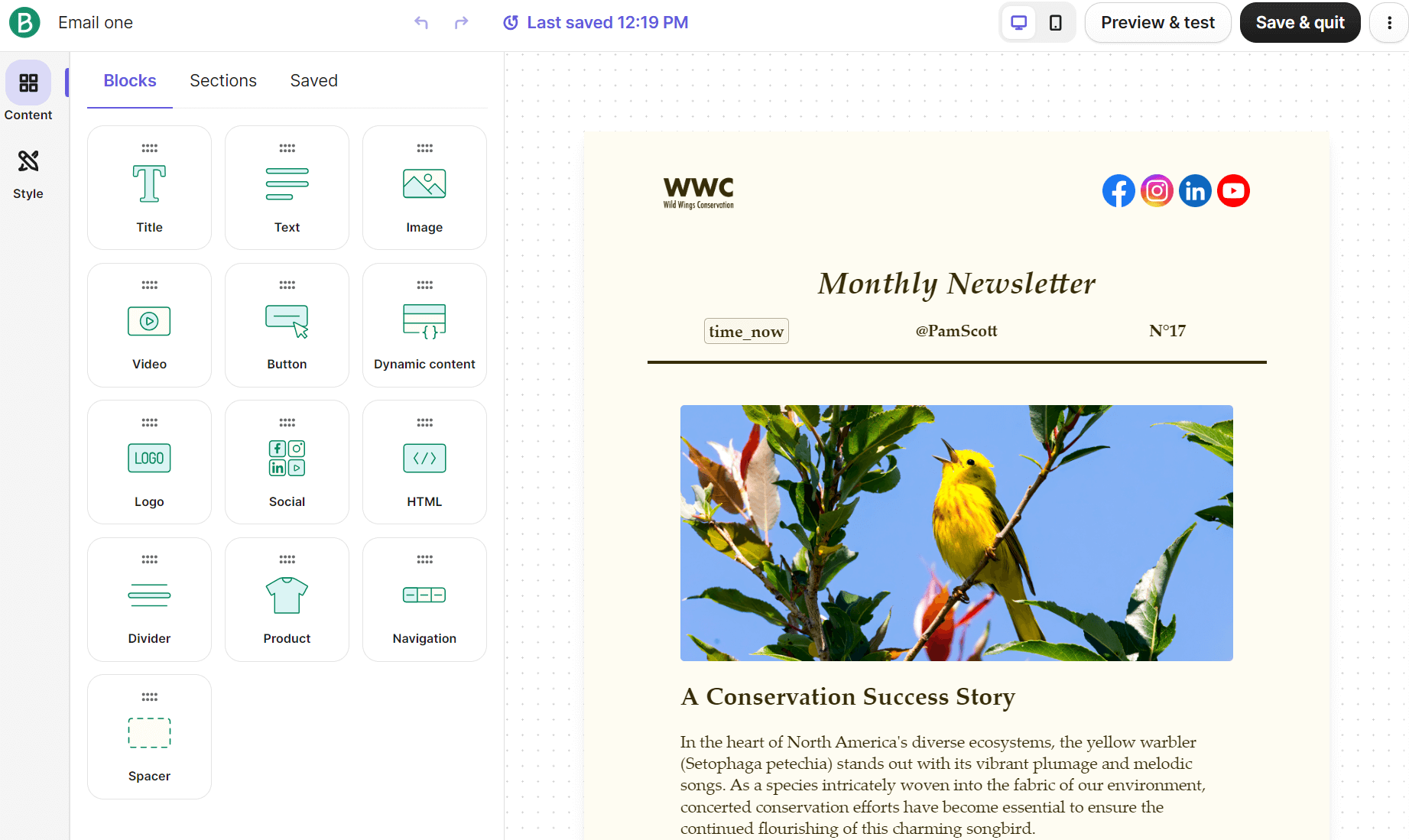
Clicking an element reveals an action menu with a Move button, up and down buttons, and generative AI features, which are available across all plans:

After your edits, you can preview and send a test email, or save and exit, which returns you to the settings menu.
Klaviyo’s email editor also includes a drag-and-drop system with Basic elements (akin to Brevo’s blocks) and prebuilt elements. A notable improvement over Brevo is that you can drag and move text elements from anywhere, instead of having to select a Move button:
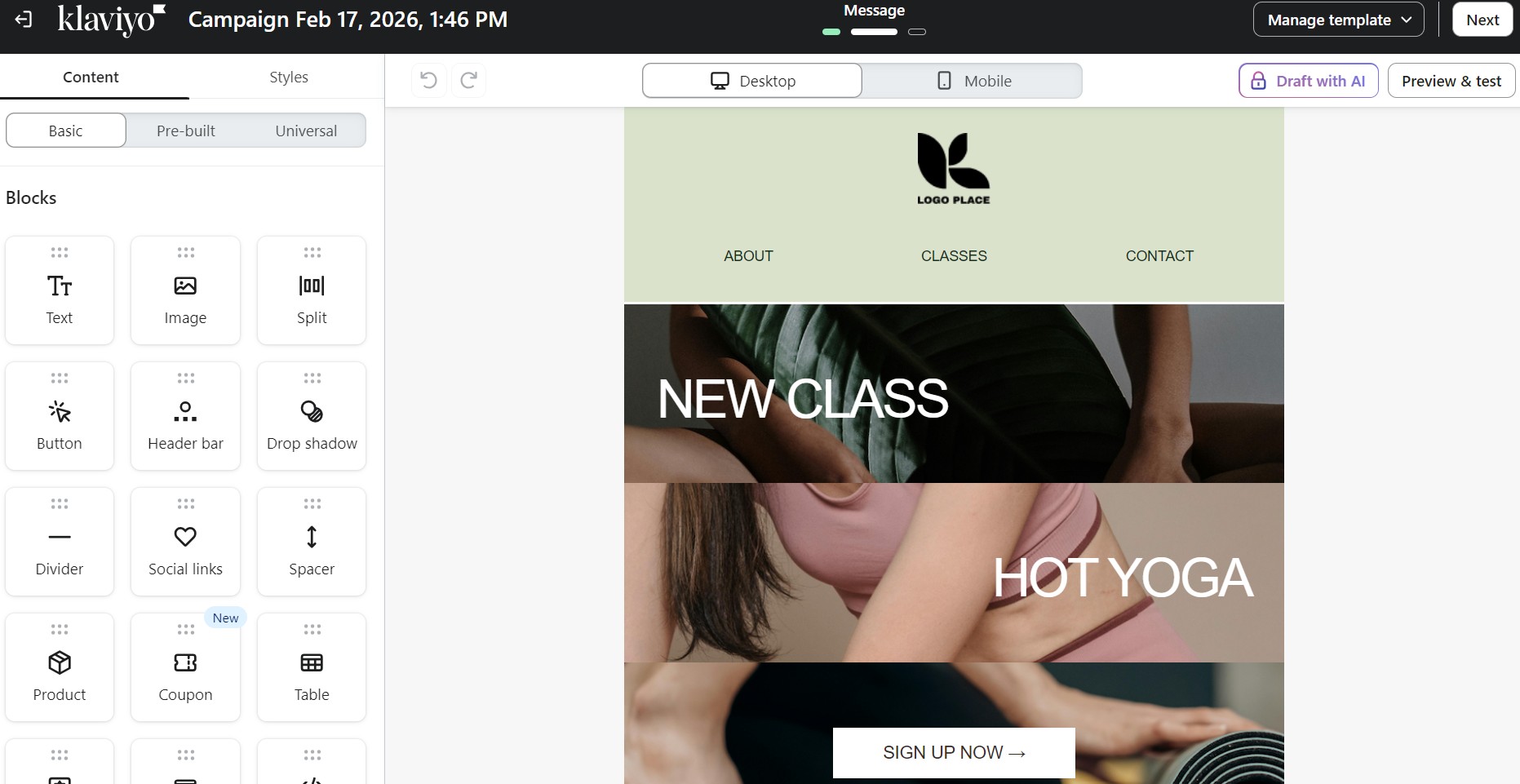
There are also more blocks in Klaviyo vs. Brevo, 15 versus 13, including social links and coupon blocks. Additionally, there’s a layout option for columns and sections.
Templates
Brevo and Klaviyo help you get started designing professional email emails with templates. The quality of their libraries is similar. Klaviyo has significantly more templates, 160+, whereas Brevo only provides 48 within its selection:
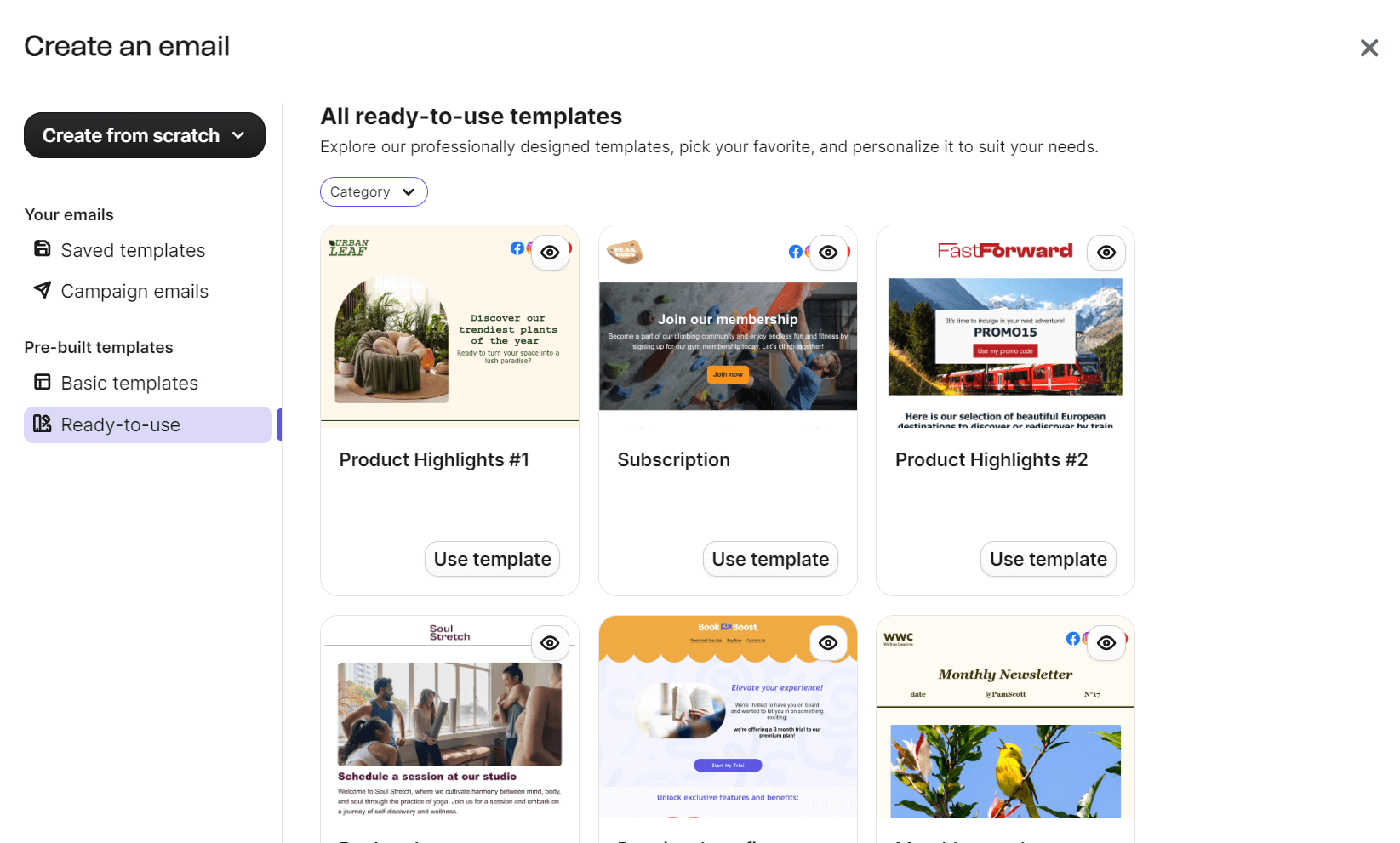
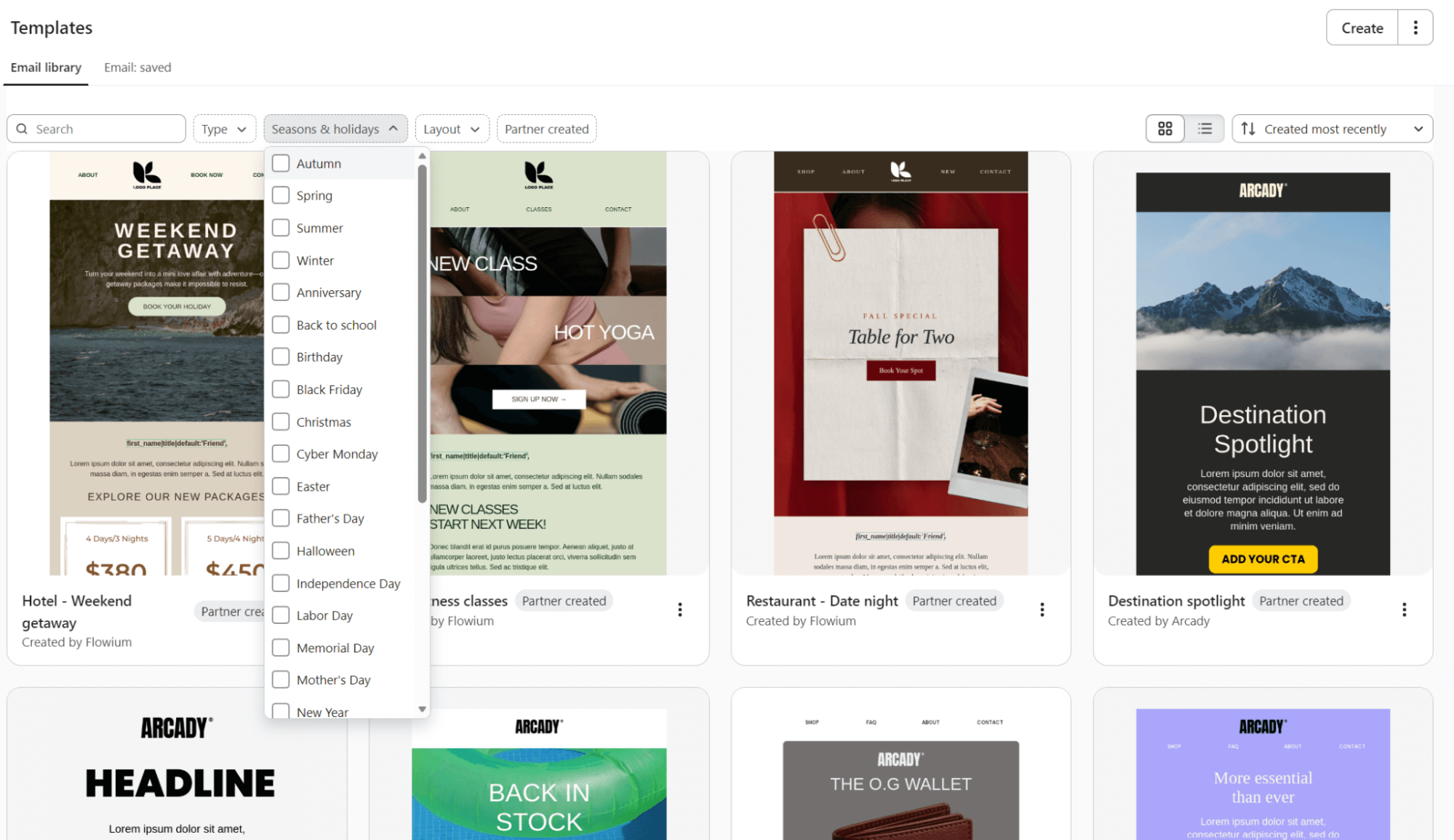
Klaviyo’s templates are not only more numerous but also superior. You can filter by basic layout, deals, confirmation, outreach, reminders, sales, and Shopify. That’s in addition to being able to filter by seasons and holidays:
Personalization
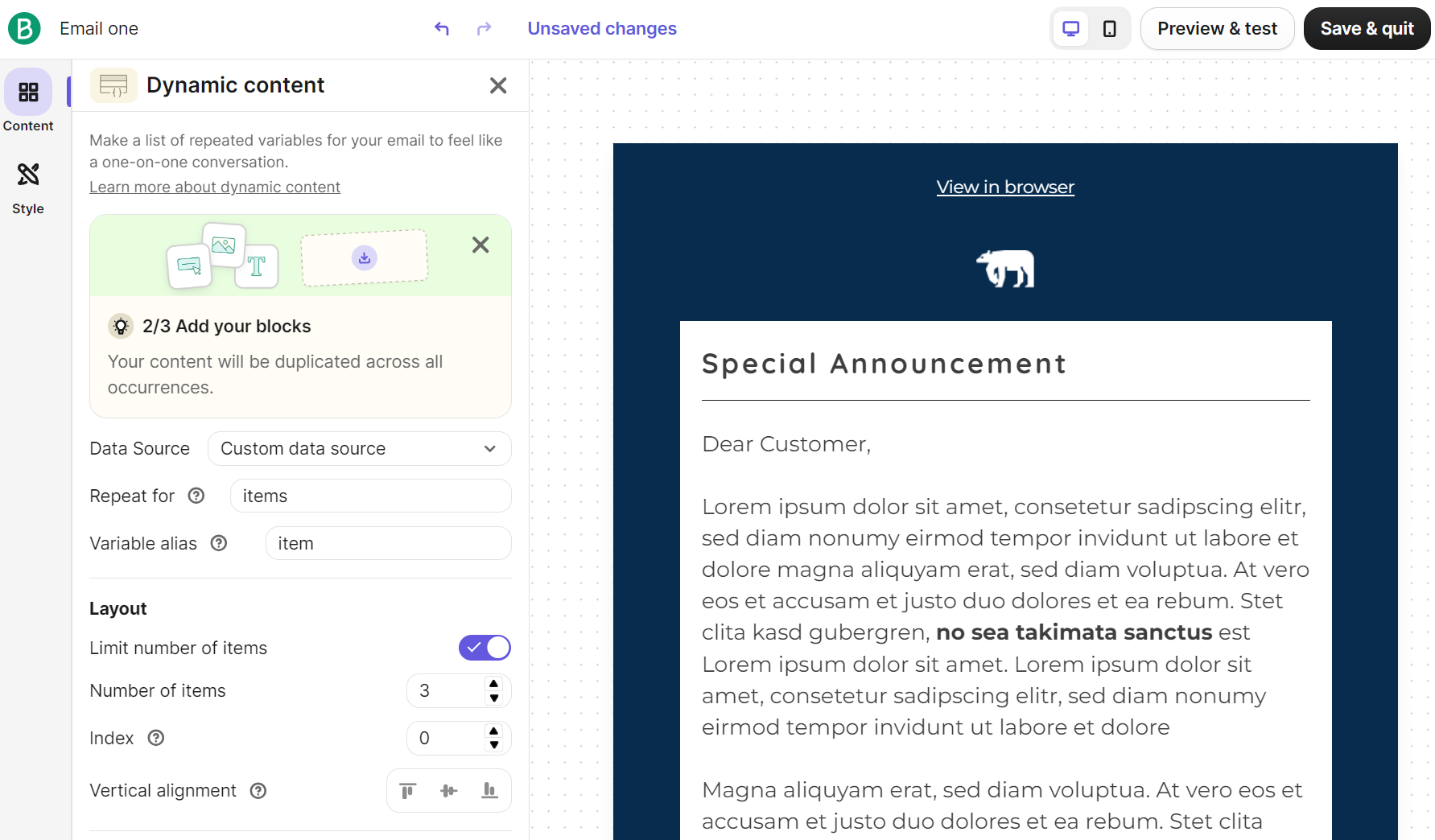
Brevo lets you personalize emails with contact attributes (names, dates), event data, product feeds, and coupon codes. Its Dynamic content block lets you use conditional content, which shows or hides sections based on recipient data and preferences:
Klaviyo also lets you personalize emails with profile properties (names, addresses), event data from customer actions, and custom properties you collect.
Advanced personalization uses if/elif/else statements to show different content based on conditions (such as loyalty points) and for loops to generate dynamic product lists.
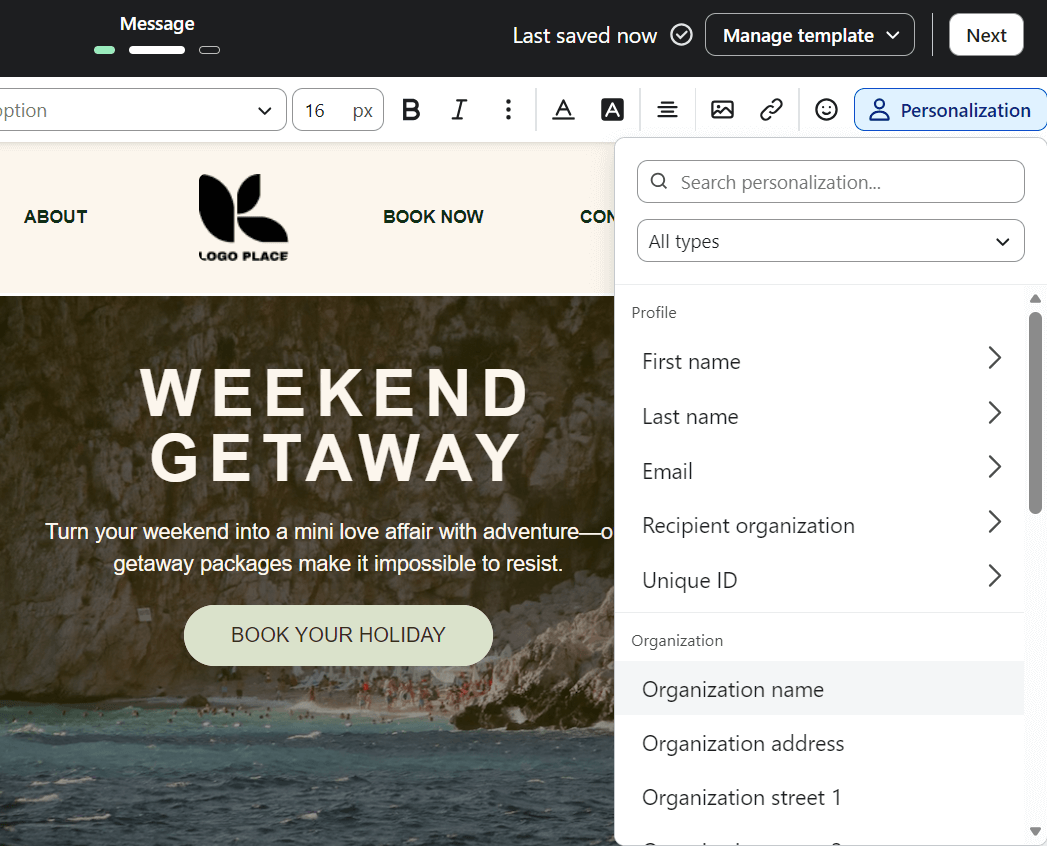
Despite being more complex than Brevo, accessing these features is as simple as selecting the Personalization menu in the editor:
A/B testing
A/B testing is available only on the Standard and Professional plans in Brevo. Klaviyo lets you run A/B tests across all plans, including the free plan, a key point in our Brevo vs. Klaviyo comparison.
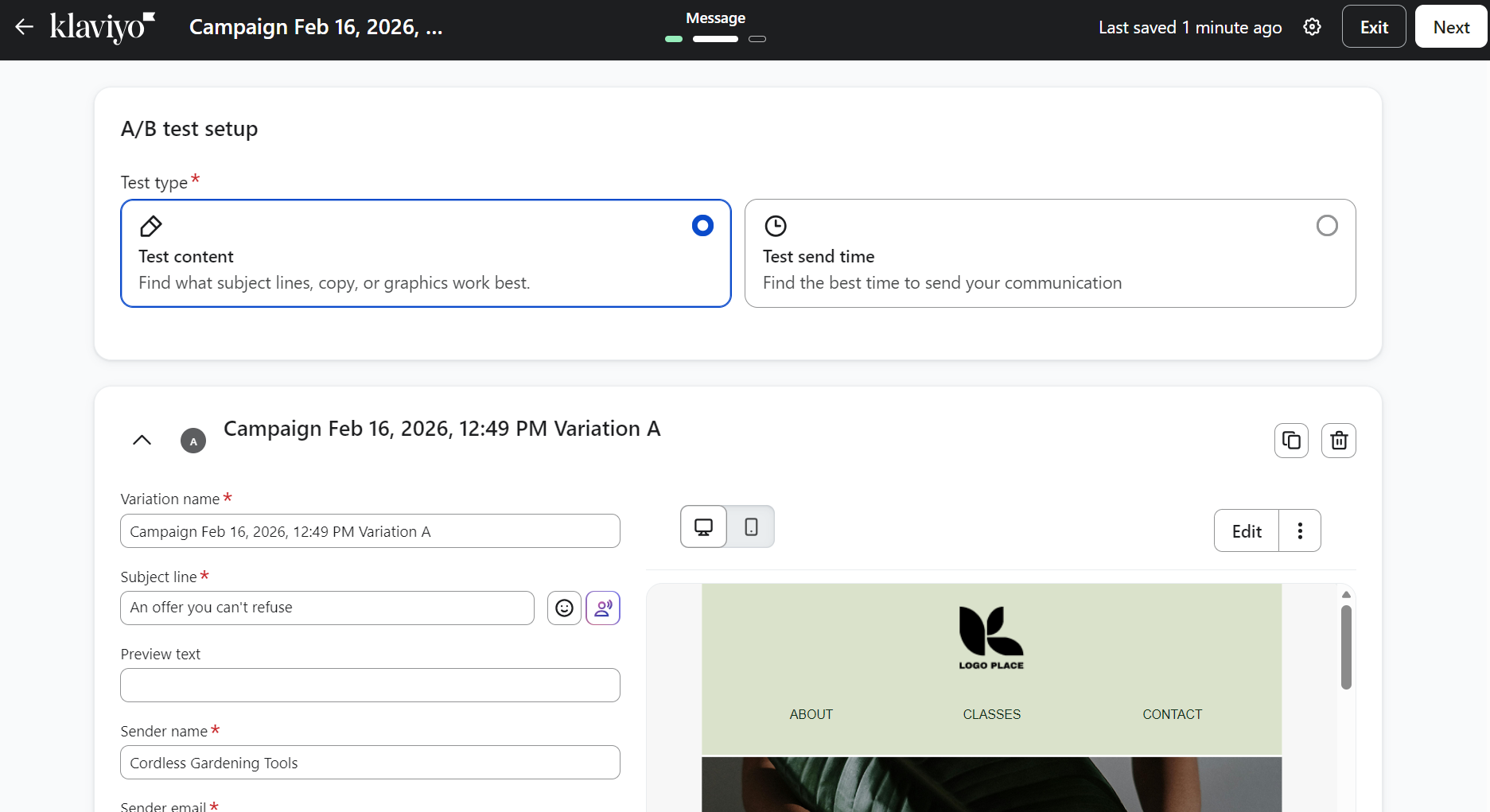
To create an A/B test in Klaviyo, you create a campaign, add your subject line and email content, then click Create A/B test above the subject line field. It then generates a second variation to test subject lines, content, or send times:
In Brevo, you navigate to Marketing > Campaigns > Email, click Create an email campaign, then select the A/B test tab. You can choose to test either subject lines or email content, set your test group size, select winning criteria (open or click rate), and define the test duration.
Feature comparison table
The table below compares Brevo vs. Klaviyo’s email marketing features:
| Feature | Brevo | Klaviyo |
|---|---|---|
| Email editor type | Drag-and-drop | Drag-and-drop |
| Template count | 48 designer templates | 160+ template |
| Personalization options | Contact attributes, event data, product feeds, coupon codes | Profile properties, event data, custom properties |
| Dynamic content | Conditional statements (show/hide sections), for loops for repeating blocks | If/elif/else statements, for loops to iterate through any list of data |
| A/B testing | Standard and Professional plans only | All plans, including free, let you test subject lines, content, or send times |
| Mobile preview | Available in the email editor | Available in the email editor |
| Design flexibility | Brand library auto-applies logo, colors, fonts | Brand styles (logos, colors, fonts, buttons) apply to new templates and flows |
User reviews
- Brevo
- “The drag-and-drop editor is smooth and actually enjoyable to work with, which isn’t something I can say about every platform.” Rupain G, G2.
- Klaviyo
- “The drag-and-drop editor for emails is extremely intuitive, allowing me to build out an email or email template within minutes.” Tom I, G2.
Conclusion
Klaviyo wins. It offers more and better email templates than Brevo, though both have equally intuitive editors. Names, dates, and other standard personalization features are decent across both of them, but only Klaviyo lets you A/B test across all plans.
Marketing automation capabilities
Brevo and Klaviyo will automate your customer experience across marketing and transactional flows. Pre-built flows are present for both standard ecommerce scenarios, or there’s the option to build from scratch using their editors.
Brevo automation
There’s an ecommerce focus to Brevo’s pre-built automations, and you can easily create multichannel flows by dragging the Send an email or Send an SMS action into them.
Its pre-built automations include:
- Abandoned cart
- Product purchase
- Welcome message
- Marketing activity
- Anniversary date
- Page visit
- Website event
- Transactional activity
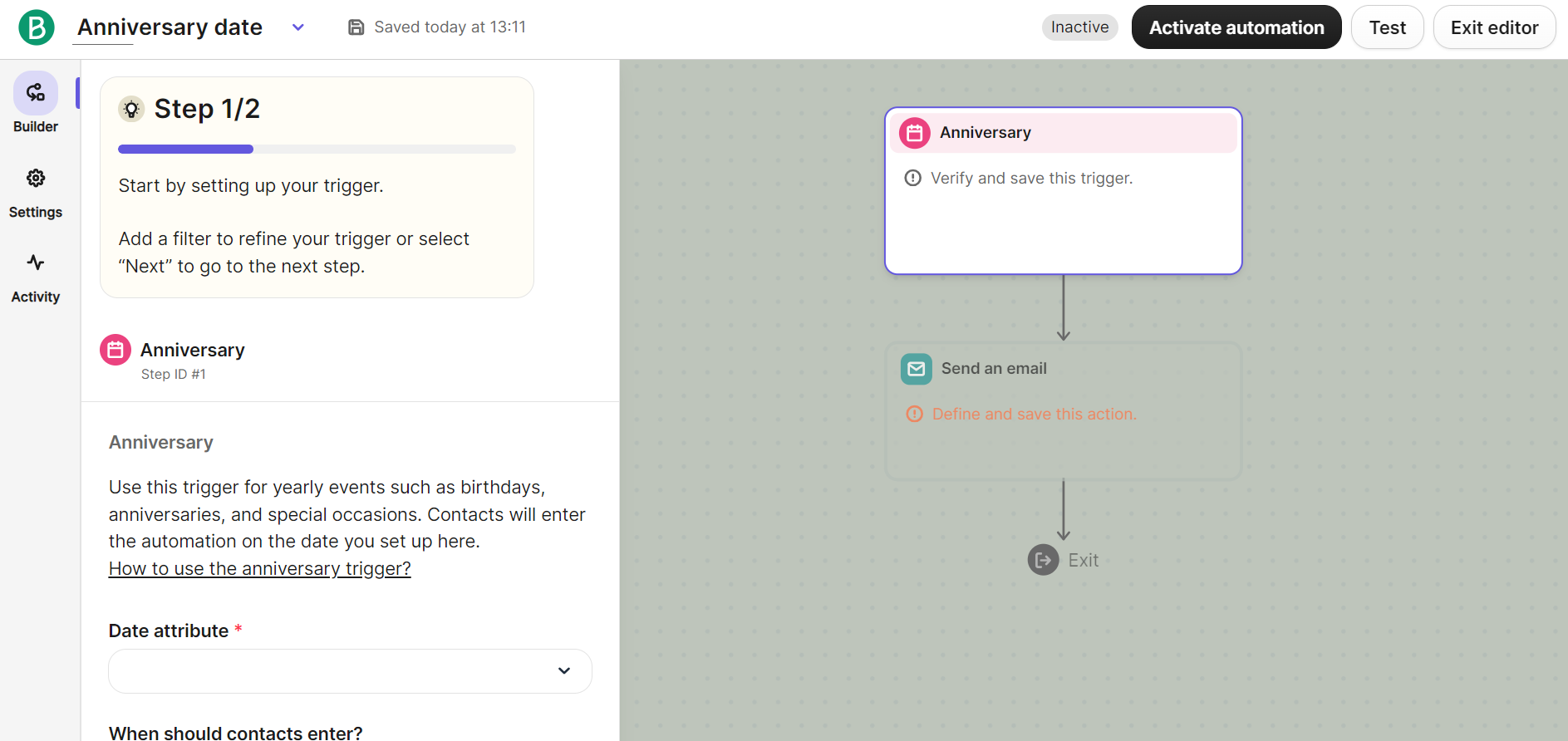
The image below shows the setup steps in Brevo’s flow builder:
Klaviyo automation
Klaviyo’s flow builder is more advanced than Brevo’s. By default, its pre-built automations have more elements, such as conditional splits and delays:
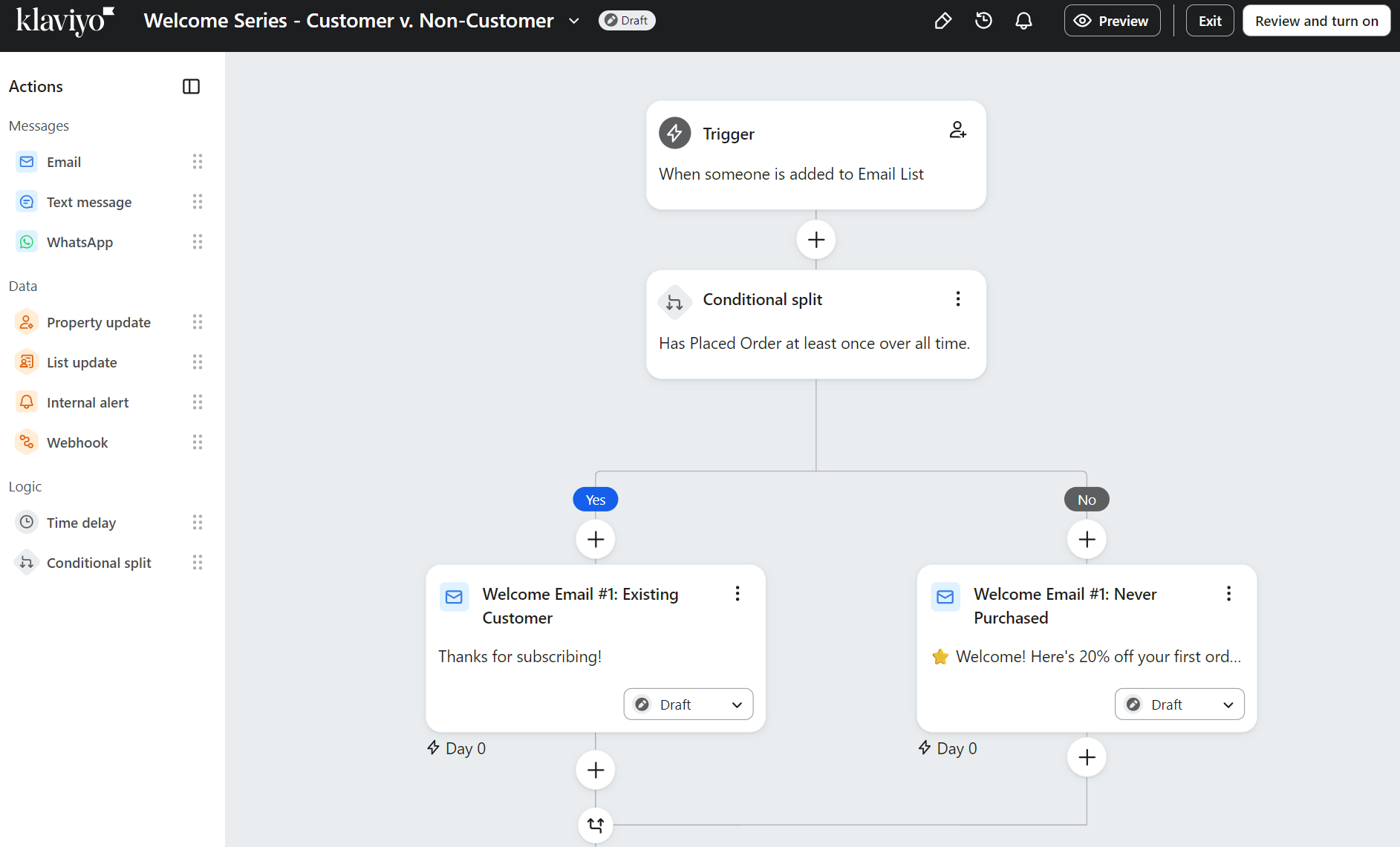
There are more pre-built flows in Klaviyo, too. 80+ versus fewer than 10. These cover most of your customer journey, including:
- Welcome series
- Browse abandonment
- Cart abandonment
- Review request
- Predicted next order
- Upsell and cross-sell
- Customer winback
Additional reading
Email automation in 2026: Best tools, in-depth guide & examples
Automation comparison table
The Klaviyo vs. Brevo comparison table below reveals more about their automation differences:
| Features | Brevo | Klaviyo |
|---|---|---|
| Automation feature | Drag-and-drop with an organized library, visual canvas | Drag-and-drop with visual canvas and sidebar actions |
| Workflow builder | Pre-built automation templates for welcome, abandoned cart, and birthday emails | 60+ pre-built flow templates from Flow Library |
| Pre-built templates | 20+ triggers, including contacts, forms, email, ecommerce, conversations, deals, meetings, payments, push, website, and custom events | Six trigger types (list, segment, metric, date property, price drop, low inventory) with extensive event options within metrics |
| Trigger types | Conditional split rule to branch based on events, behaviors, or contact details | Conditional splits based on profile information or trigger event data |
| Conditional logic | Percentage split for A/B testing, conditional split, and redirect to another step | Conditional splits, trigger splits, percentage splits |
| Branching | Cart updated/deleted, order created, webpage visited, form submitted, email opened/clicked | Metric triggers (started checkout, placed order, viewed product), list/segment additions |
| Behavioral triggers | Contact filters (location, device type, activity), dynamic segments | Trigger filters (event-level), profile filters (re-checked at every step), and additional filters per message |
| Advanced segmentation in workflows | Filter contacts by location, device type, activity, and behavior to control who moves through your automation steps | Filter by event data (trigger filters), profile attributes (checked before each step), or add filters to individual messages |
User reviews
- Brevo
- “Brevo makes it straightforward to organize distinct lists and set up clear automation flows for each region and product line, all within one platform.” Paco S, G2.
- Klaviyo
- “I love the automations and the ease with which to set them up. It was very easy to transfer information or automations.” Mingo B, G2.
Conclusion
Klaviyo wins on automations, with more advanced filtering options across workflows and stronger segmentation capabilities.
How Omnisend compares
Omnisend matches Klaviyo’s capabilities for most ecommerce needs, with pre-built flows, conditional splits, A/B testing, and audience filters. It continuously checks exit conditions and provides splits based on event data, contact properties, or message behavior. Your messages will always reach the right customers with contextual information.
Integrations and platform compatibility
The basics, such as native integrations with Shopify, Klarna, Google Ads, and CRM apps, are covered by both tools. However, there are differences in the depth of their apps.
Brevo integrations
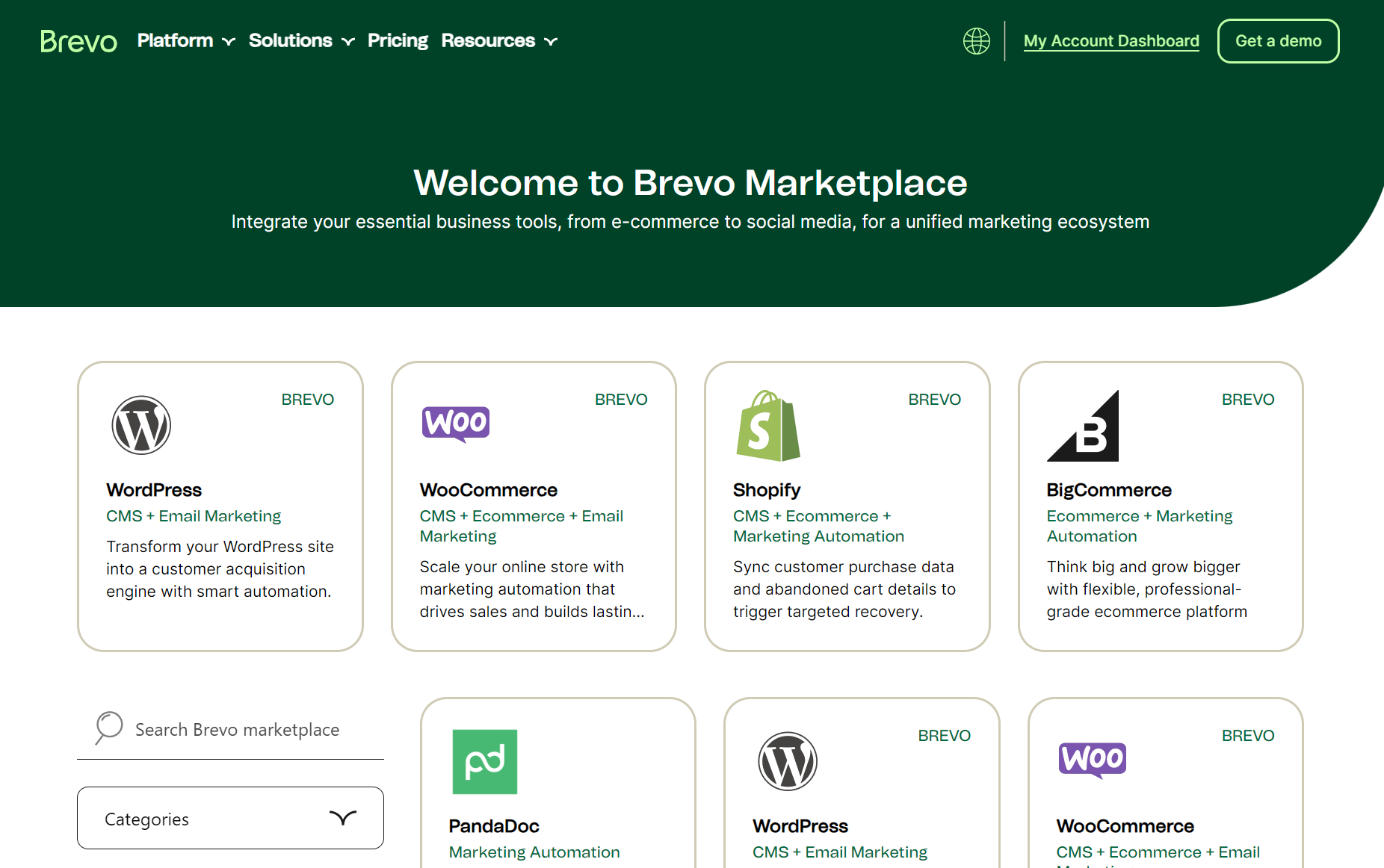
The Brevo App Marketplace contains 350+ apps, including Zapier, for thousands of additional connections. The built-in CRM integrates with Pipedrive, HubSpot, and Zoho, and natively syncs with Shopify, WooCommerce, and BigCommerce.
Its app categories include:
- AI
- Analytics
- CMS
- Contact management
- CRM
- Developer Tools
- Ecommerce
- Email Creation
- Email Marketing
- Event Management
- Helpdesk
- Lead Generation
- Loyalty
- Marketing Automation
- No-code
- Payment services
- Productivity
- Reviews
- Surveys
Klaviyo integrations
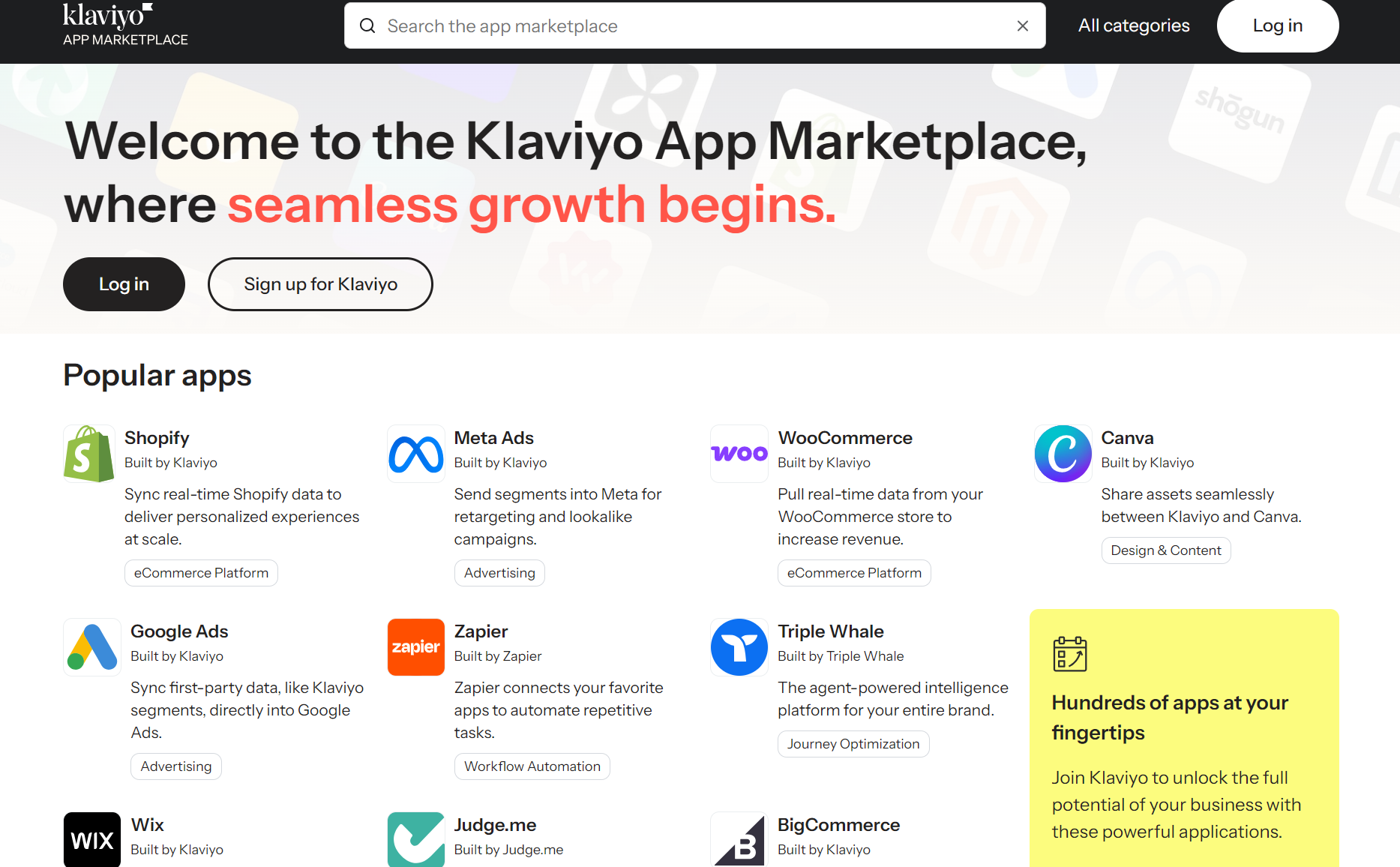
Klaviyo also offers 350+ pre-built integrations via its App Marketplace, many of which match Brevo’s. However, Klaviyo has more categories than Brevo, such as:
- Accounting
- Advertising
- CDP (Customer Data Platform)
- Data Warehouse
- Direct Mail
- Donations
Like Brevo, it natively connects to Shopify and other leading ecommerce platforms, CRM tools such as Salesforce, and marketing tools, such as Meta Ads.
Integrations comparison table
The Brevo vs. Klaviyo comparison table below details their integrations in more detail:
| Integration Category | Brevo | Klaviyo |
|---|---|---|
| Ecommerce platforms | WordPress, WooCommerce, Shopify, BigCommerce, PrestaShop | Shopify, BigCommerce, WooCommerce, Magento 2, Wix, Salesforce Commerce Cloud, PrestaShop, OpenCart, Shift4Shop, Volusion, Shoplazza, Shopware 6 |
| CRM systems | Salesforce, HubSpot, Pipedrive, Microsoft Teams, Microsoft Dynamics, Zoho CRM, FreshBooks, Copper CRM, Pure Chat, Onepagecrm | Salesforce, HubSpot (via Outfunnel), Zendesk, Intercom, Gorgias, eDesk, HelpScout, Zoho |
| Social media | Facebook Messenger, Google Ads | Meta Ads, TikTok Audiences, Pinterest Audiences, Snapchat Audiences, Google Ads, Twitter (X) Audiences |
| Analytics | Google Analytics, Triple Whale, Mixpanel, Amplitude, Contentsquare, Datadog, Snowflake, BigQuery, Tableau, Looker Studio, Microsoft Clarity, FullStory | Google BigQuery, Snowflake, Azure Synapse Analytics, Amazon Redshift, Segment, Triple Whale, Daasity |
| Marketing tools | PandaDoc, HubSpot, ActiveCampaign, Contentful, ClickFunnels, Facebook Messenger, Cookiebot, Klaviyo (migration), Mailchimp, ActiveCampaign, ConvertKit | Mailchimp (migration), Campaign Monitor (migration), Yotpo, Smile.io, LoyaltyLion, Postscript, Attentive, Okendo, Judge.me, Justuno |
| API availability | Webhook support, transactional email/SMS API | SDK available, webhook support, real-time event tracking |
| Native integrations | 350 integrations across categories | 350+ integrations with most built by Klaviyo or certified partners |
User reviews
- Brevo
- “I like Brevo because its API works well and is easy to test with for emails and integrations.” Dixit K, G2.
- Klaviyo
- “The initial setup was fairly straightforward, especially with Shopify, as core integrations, data syncing, and basic flows were quick to get live.” Abhishek S, G2.
Conclusion
Draw. Brevo and Klaviyo have similar app counts, with most being native apps that require no third-party tools such as Zapier. Of course, the best tool is the one that supports your tech stack, so check them both before committing.
Deliverability performance
Deliverability depends on your sending practices, list hygiene, and sending infrastructure, which Klaviyo and Brevo both excel at with reliable systems.
Brevo deliverability
- Requires three DNS records for authentication, including Brevo code for domain verification, DKIM for digital signatures, and DMARC to handle suspicious messages
- Auto-replaces unauthenticated domains with @brevosend.com to protect deliverability
- Dedicated IPs are available as an add-on on Professional plans at $251/year
- EmailTooltester rates it 4.0/5 for deliverability features, scoring well for the authentication wizard and basic deliverability dashboard
- Loses marks for lacking built-in list cleaning and complete SPF alignment
Klaviyo deliverability
- Deliverability Hub provides centralized monitoring with an overall health score, key metrics tracking, and inbox provider performance reports
- Offers branded sending domains and dedicated IPs
- Supports full authentication through SPF, DKIM, DMARC, plus BIMI for visual brand identity in inboxes
- IP warming protocols built in with gradual volume ramping over 10 to 30 days
- Domain engagement analysis tools diagnose deliverability issues at the root level
- Tracks open rates, click rates, bounce rates, and spam complaints at the account level
- Integrates with Google Postmaster Tools for Gmail sender monitoring
User reviews
- Brevo
- “The app creates a successful deliverability where any communication made is authentically defined and delivered.” Samantha L, G2.
- Klaviyo
- “Their deliverability rates keep my clients’ emails actually landing in inboxes instead of spam folders.” Verified user, G2.
Conclusion
Draw. Klaviyo offers monitoring and diagnostics through its Deliverability Hub. Brevo offers automatic domain protection and a simpler authentication setup.
Analytics and reporting
Brevo and Klaviyo give you oversight over open rates, click rates, bounce rates, spam rates, unsubscribe rates, delivery rates, conversion rates, and revenue tracking. You can drill down into campaign performance and see what’s working.
Brevo reporting
Brevo’s reporting lets you create custom dashboards and schedule automated report delivery using AI-powered natural language queries. Here’s where it works well:
- Default dashboards for automation, emails, SMS, revenue, and deliverability
- Built-in Business Intelligence tool (BI) for custom dashboard creation
- AI-powered natural language queries for instant data answers
- Automated report scheduling and real-time metric alerts
- Weighted average calculations to prevent campaign size skewing results
- Team dashboard sharing for collaboration
Something to watch out for: Brevo only allows you to create 10 dashboards per account. Also, custom time ranges cannot go over 12 months.
Klaviyo reporting
If you need benchmarking against similar businesses, Klaviyo provides Excellent/Fair/Poor ratings and cohort reports tracking customer behavior patterns over time.
- Pre-built dashboards covering campaigns, flows, and conversions across all channels
- Peer benchmarking with Excellent/Fair/Poor ratings against similar businesses
- Performance Highlights cards showing top and bottom metrics monthly
- Activity maps visualizing customer engagement by geography
- Cohort reports tracking customer behavior patterns over time
- Filtering by date range, campaigns, or individual flows
Our Klaviyo vs. Brevo comparison shows that Klaviyo’s email marketing reports are more granular, but Klaviyo still has the Brevo limitation of 12 months for custom date ranges.
Analytics comparison table
Check out the table below for a comparison between Brevo vs. Klaviyo’s analytics:
| Analytics Feature | Brevo | Klaviyo |
|---|---|---|
| Standard metrics | Open, click, bounce, spam, unsubscribe, and delivery rates for email and SMS | Open, click, bounce, spam, unsubscribe, conversion rates for email, SMS, mobile push |
| Custom reports | AI natural language queries, built-in BI tool, 10 dashboard limit | Filter by dates, campaigns, and flows with event and profile filters, and add cards from the library |
| Cohort analysis | Groups by coupons, products, months, sources, and tracks customer types with lifetime value | Tracks behavior over time with four pre-built reports, last 12 months, requires a paid add-on |
| Predictive analytics | Not available | Churn risk, customer lifetime value, and next order date predictions are built in |
| Revenue tracking | Weighted averages, lifetime value by cohort, revenue by coupons, products, months, sources | Revenue per recipient, attributed revenue, conversion value, flow revenue trends |
| Performance insights | Weighted averages and cohort markers vs. average | Peer benchmarks (Excellent/Fair/Poor), monthly highlights, geographic activity maps |
| Export options | Multiple formats, scheduled delivery, CSV export | CSV export is stored for 30 days in Downloads |
User reviews
- Brevo
- “I also appreciate the real-time reporting and clear analytics, as they’re easy to track and help identify what’s working.” Steven M, G2.
- Klaviyo
- “The marketing analytics tool is a great feature that stands out. The initial setup was very easy with the help of a Klaviyo team member.” Jessica F, G2.
Conclusion
Klaviyo wins. Predictive analytics, peer benchmarking, and geographic activity maps provide insights that Brevo can’t match. AI queries and scheduled reports help, but Brevo lacks the depth needed for data-driven decisions.
Additional reading
15 email marketing metrics that really matter in 2026
Customer support
There’s a decent chance you’re going to need support at some point, whether you’re using Klaviyo or Brevo. Both let you contact them by email, and Klaviyo adds live chat on paid plans.
Brevo support
All Brevo plans come with:
- Email support
- Tickets via the backend
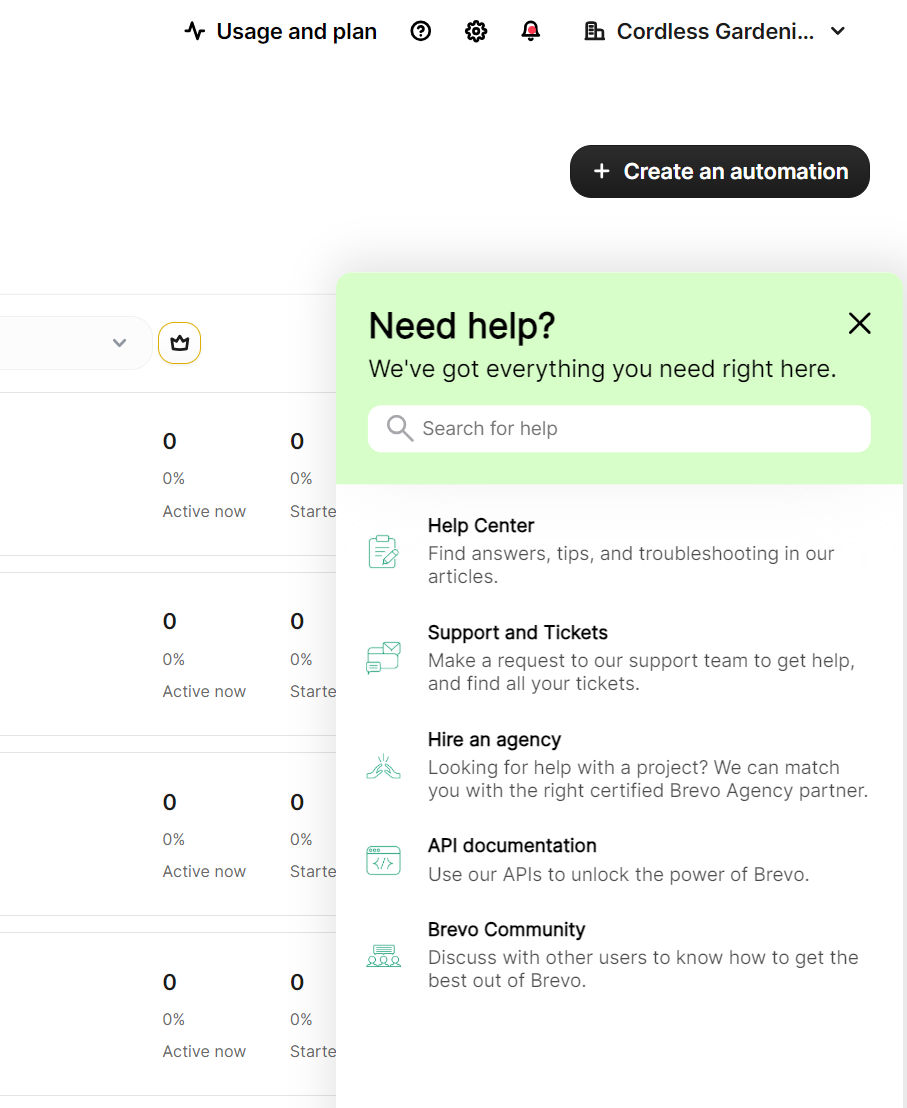
There’s a question mark icon in the dashboard that loads links to Brevo’s Help Center, Support, and Tickets, and additional pages:
Its $499/month Professional plan also includes:
- Phone support
- A deliverability specialist
- A digital onboarding kit and one hour with a Brevo expert
G2 reviewers have given Brevo’s support 164 positive comments, with responsive customer support ranking fourth in the pros list.
Klaviyo support
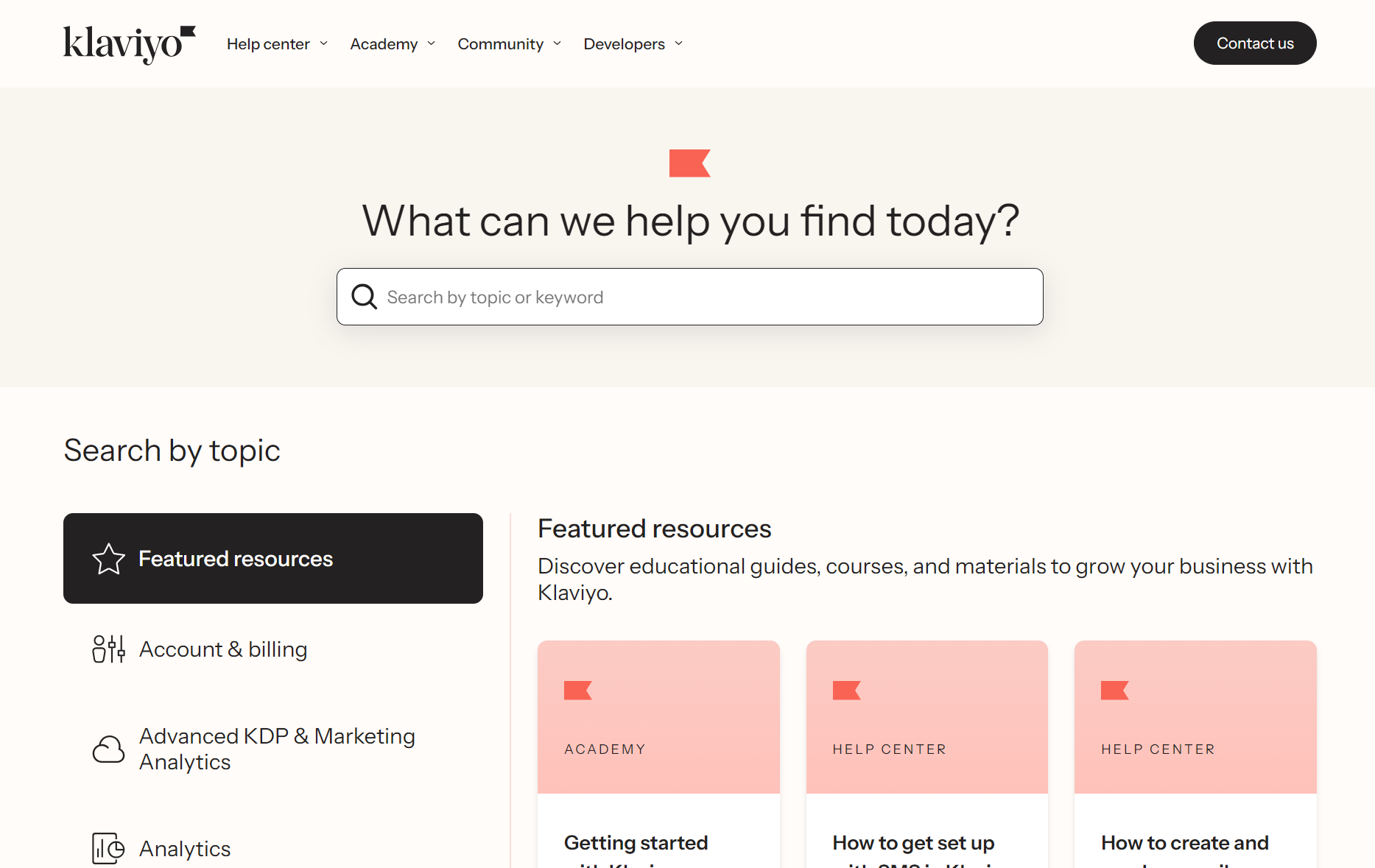
Klaviyo takes a hands-off approach to your email marketing, evident from only offering email support on its free plan and linking extensively to its Help Center:
All plans include:
- Email support (the free plan only gets it for 60 days)
- Kira, Klaviyo’s Virtual Product Expert
Paid plans also include 24/5 live chat, with weekend hours varying by plan.
Klaviyo’s G2 ratings for support are lower than Brevo’s; it ranks fourth on the cons list, with the marker “painfully slow” customer support.
How Omnisend compares
Omnisend is more available than either Brevo or Klaviyo, with 24/7 live chat and email support included across its Free Forever and paid plans. Additionally, all Standard and Pro plans with >$400/month spend get a dedicated Account Expert.
User reviews
- Brevo
- “I needed customer support once and have no complaints about it.” Aschi W, G2.
- Klaviyo
- “Chat support should be available 24/7, since waiting for a response via email can take a long time.” Abishek R, G2.
Conclusion
Brevo wins for this Klaviyo vs. Brevo comparison. Even though Klaviyo offers live chat, the results are mixed. Brevo’s email and ticketing system is rated highly by customers.
Brevo vs. Klaviyo: Pros and cons
Klaviyo vs. Brevo’s pros and cons come down to feature depth versus cost. You pay less for Brevo, but get a more capable tool in Klaviyo. These are the pros and cons you need to know:
Brevo pros and cons
Pros
- Multichannel marketing: You can trigger an email, SMS, and WhatsApp in flows (the latter requires a paid plan). Combining these in flows requires just dropping them in.
- CRM: Doesn’t just list your contacts and segments but also stores companies, deals, and tasks. The deals dashboard is great for pipelines.
- Transactional email: Can replace your default Shopify and WooCommerce transactional emails with professional templates.
- Contact storage flexibility: 100k contacts for starters on the free plan, letting you maintain large lists without paying for them.
- Free plan generosity: 300 emails/day is a fantastic quota. You can also run multichannel automations to 2,000 contacts.
Cons
- Automation limitations: It checks conditions at entry, not at every step, so your flows may not respond in real time to changes in behavior.
- Segmentation inflexibility: You can filter by city, device type, and email opens, but you can’t layer trigger filters on top of event data or re-check profile qualifications
- Only a handful of pre-built flows: Unless you need a basic abandoned cart or welcome email, you’ll be creating your flows from scratch.
- Learning curve: Not always straightforward, with the Business Intelligence tool and custom dashboards requiring time to master.
Klaviyo pros and cons
Pros
- Advanced automation: You can go much further to create complex customer journeys, with six trigger types and additional conditional and percentage splits.
- Sophisticated segmentation: Via AND/OR logic, which lets you layer multiple conditions. Plus, you can filter by event properties (what someone purchased), profile properties (location, behavior), and predictive data (churn risk, CLV).
- Analytics depth: Standard Klaviyo analytics includes marketing and segment reports, industry benchmarks, and predictive analytics. It also offers Marketing Analytics, with purchase patterns and catalog insights, cohort reports, and conversion dashboards.
- Diverse integrations: These span more categories than Brevo’s offerings and are nearly all native, meaning no third-party apps, such as Zapier.
- AI service tools: Customer Agent, Customer Hub, and Helpdesk (add-ons) integrate into your dashboard and provide a customer support workspace.
Cons
- Setup time: It can take a few days to properly import and organize your contacts in Klaviyo and create your flows.
- Pricing structure: It’s contact-based, so even if you send only a few emails, you’re going to pay more as your list grows.
- Lots of paid add-ons: Such as Reviews from $25/month and Marketing Analytics from $100/month.
- Learning curve: Working your way around Klaviyo’s campaigns, automations, and segments is easy enough, but mastering all its features takes considerable time.
- Potential for overkill: Your sending requirements may include transactional emails, abandoned-cart emails, and occasional campaigns. Klaviyo is overkill for such a small use case. It’s best for large and growing stores.
Who should choose Brevo?
Brevo works best if you’re a growing ecommerce or service business or if you have an enormous contact list and want to organize it.
Brevo is right for you if
- You’re a small ecommerce store: You can create campaigns, flows, and segments for appropriate targeting
- You’re a service business: Brevo’s email templates include plenty of newsletters and outreach templates, and you can add your brand assets
- You want a CRM: Pipelines, deals, and company information are available in Brevo
- You’re new to email marketing: Brevo’s dashboard is relatively easy to use, and it walks you through steps in its flow builder
- You need a large contact limit: Brevo charges by emails sent, or your expected send quota, so your costs increase as you send more emails
Brevo is not right for you if
- You have complex customer journeys: Such as customers who change their behavior regularly and need multiple follow-up messages
- You need predictive analytics: Brevo doesn’t cover this feature at all, so you’ll have to crunch the numbers yourself
- You need peer benchmarking: Brevo lacks comparison against similar businesses to gauge your performance
Who should choose Klaviyo?
Klaviyo suits you if you’re a mid-to-large ecommerce store or business collecting significant data around customer behavior and preferences.
Klaviyo is right for you if
- You have complex customer journeys: Its flows support multi-path customer journeys which adapt to behavior, engagement, and timing
- You want complete insights into your performance: All plans include industry benchmarks, customizable attributes and metrics, and predictive analytics
- You have a multichannel strategy: You can send messages across email, SMS/MMS, mobile push notifications, and WhatsApp
- You have a marketing team: Configuring and managing Klaviyo takes more time than Brevo and requires dedicated people to get the most from it
- You have lots of data: The Advanced Klaviyo Data Platform starts from $500/month, letting you sync data to warehouses and other platforms
Klaviyo is not right for you if
- You’re new to email marketing: Its feature set is complex for most beginners, and you could end up paying for features you don’t use
- You want to get started quickly: Klaviyo has loads of pre-built flows, forms, and email templates, but setting everything up takes a few days at least
- You want a cost-effective tool: $20/month is the minimum spend on Klaviyo’s Email plan, or it’s $35/month for the Email + SMS plan
Klaviyo’s pricing might push you toward Brevo, but you’ll lose the automation depth. Omnisend sits between both in terms of cost and features. Watch this video for a primer:
Omnisend as an alternative
All the data your Shopify, BigCommerce, or WooCommerce store collects from signups and purchases is fed into Omnisend, enabling you to trigger similarly complex, revenue-generating flows to those in Klaviyo.
Here’s where Omnisend vs. Klaviyo vs. Brevo fit in:
- Klaviyo positions itself as a B2C CRM and email + SMS automation tool. It’s the most expensive option and best suited for data-driven businesses.
- Brevo does the same with less complexity. It’s the cheapest of the lot, suiting small businesses and stores.
- Omnisend is an omnichannel marketing automation platform, suitable for ecommerce stores of all sizes. Its pricing sits in the middle.
What Omnisend offers
- A/B testing, forms, landing pages, flows, and campaigns have no feature restrictions across plans
- Support answers through live chat and email 24/7, even on Sundays
- Lifecycle maps show whether customers need winback messages or VIP treatment
- Automations can combine email, SMS, and push in one sequence, letting you control message timing and triggers for each channel
- AI handles the grunt work by building segments, writing subject lines, and generating email copy
- Scalable pricing, you’ll pay $16/month for 6,000 sends/month and 500 contacts on Standard, or $59/month for 2,500 contacts with unlimited sends on Pro
Who Omnisend is for
Omnisend is best suited for ecommerce stores that want to own their customer experience across transactional and marketing messages and combine email and SMS in flows.
Omnisend customers achieved a 79:1 ROI in 2025 across all channels in 2025. Join today and see what you can do
Quick sign up | No credit card required
Final verdict
Choose Brevo if you want CRM, email, and SMS marketing, and you have a large contact list to manage, or if you’re a small store that doesn’t need complex workflows.
If it’s complex flows and a more advanced CRM you’re after, then Klaviyo is a better tool than Brevo, although it might work out significantly more expensive.
Omnisend is best when you want to focus on omnichannel marketing, improve what your store already does, and maximize revenue from customer behavior.
All three have free plans you can sign up to without requesting a demo, but only Omnisend gives you access to all standard features.

TABLE OF CONTENTS
TABLE OF CONTENTS


Subscribe and don’t miss any updates!
No fluff, no spam, no corporate filler. Just a friendly letter, twice a month.