
 Omnisend AI


 OFFER
OFFER








Drive sales on autopilot with ecommerce-focused features
See FeaturesKey takeaways 
Brevo excels in automation features and CRM capabilities, making it ideal for ecommerce businesses needing complex customer journeys and transactional messaging.
MailerLite offers a more user-friendly experience with a robust email builder and unlimited landing pages on paid plans, making it suitable for creators and smaller audiences.
Both platforms are budget-friendly, with free plans that have significant limitations, but Brevo's free tier allows for a larger contact list compared to MailerLite.
For ecommerce stores seeking comprehensive omnichannel marketing, Omnisend outperforms both Brevo and MailerLite by providing extensive automation and integration features without the typical restrictions.
Reveal key takeaways
Brevo vs. MailerLite for your ecommerce store? It’s a question of what you want to prioritize between automations (Brevo) or campaigns (MailerLite). There’s some overlap, but those use cases are where they do best.
Both are cost-effective, too. We’re talking free plans to start with, and $9/month or $10/month when you pay, albeit with feature restrictions, lifted as you climb the tiers.
Even so, there’s no denying the excellent reputation for both tools among ecommerce and creators. Neither specializes in ecommerce or creator tools, but can cover both. That makes them perfect if you’re looking for a generalist app.
Where that leaves us is determining which is best for you. This article provides a complete, unbiased comparison between Brevo vs. MailerLite, covering pricing, ease of use, templates, integrations, landing pages, multichannel, and more.
Omnisend customers generated $79 for every $1 spent in 2025, with automations generating 30% of revenue
Quick sign up | No credit card required
Brevo vs. MailerLite 2026: A snapshot
Brevo and MailerLite are budget-friendly email marketing tools. Brevo handles large contact lists and includes transactional messaging on every plan. Go with MailerLite if you email a smaller audience often and only need newsletter tools.
The table below compares their pros, cons, and use cases:
| Brevo | MailerLite | |
|---|---|---|
| ✅ | 100K free contacts | Unlimited sends on paid plans |
| ✅ | Transactional email/SMS included | Unlimited landing pages on paid plans |
| ✅ | Send-based pricing (suits large lists) | Subscriber-based pricing (suits frequent senders) |
| ❌ | $12/month to remove branding on Starter | Transactional requires a separate MailerSend plan |
| ❌ | A/B testing available from Standard ($18/month) | 500 subscriber cap on free plan |
| Best for | B2B, SaaS, large contact lists | Creators, solopreneurs, newsletters |
Neither is purpose-built for ecommerce, for instance, Brevo hides back-in-stock alerts and dynamic coupons behind its Professional plan. MailerLite locks out smart sending and custom HTML editing until you purchase its top-tier Advanced plan.
Omnisend is a better match than Brevo if you’re an ecommerce store of any size. It doesn’t restrict access to standard features and covers omnichannel automation.
Pricing — who really gives you more for less
Brevo’s free plan is significantly more generous on contacts, at 100K vs. 500. Paid plans start on level ground, with both offering 500 contacts at base price.
From there, they diverge. Brevo gives you 500K contacts once you hit the $29/month tier, whereas MailerLite gives you unlimited sends but raises the price with subscriber milestones.
We’ll compare Brevo vs. MailerLite costs in more detail below.
Free plan comparison
There’s a massive gap between free plans. Brevo allows 100K contacts against MailerLite’s 500, though MailerLite offers a higher monthly send allowance:
- Brevo: up to 100K contacts, 300 emails/day
- MailerLite: up to 500 subscribers, 12,000 emails/month
What this means in practice is you’ll likely outgrow MailerLite’s 500 subscriber cap long before you hit Brevo’s 300 emails/day limit.
Both tools have severe limitations in their free plans, though. MailerLite restricts access to its newsletter templates, AI writing assistant, and popups. Brevo doesn’t allow A/B testing, popups, web push notifications, or contact scoring.
Omnisend offers all these features in its free plan. In fact, it gives access to all standard features and is good for 250 contacts and 500 emails/month. If your list is fewer than that, it’s the best place to start your ecommerce email marketing.
Additional reading
Omnisend vs. MailerLite: Features, pricing & more
Paid plan comparison
$1 separates their cheapest paid plans ($9 and $10), and both cap you at 500 contacts for that money. The difference is what you get beyond that:
- Brevo charges by email volume
- MailerLite charges by subscriber count
Brevo plans
The table below reflects Brevo’s pricing strategy by email volume:
| Monthly sends | Starter | Standard | Professional |
|---|---|---|---|
| 5,000 | $9/month | $18/month | — |
| 10,000 | $17/month | $35/month | — |
| 20,000 | $29/month | $69/month | — |
| 40,000 | $39/month | $84/month | — |
| 150,000 | — | — | $499/month |
MailerLite plans
You’ll notice the table below includes subscribers, not monthly sends. That’s because it reflects MailerLite’s subscriber count-based pricing:
| Subscribers | Growing Business | Advanced |
|---|---|---|
| 500 | $10/month | $20/month |
| 1,000 | $15/month | $30/month |
| 5,000 | $39/month | $50/month |
| 10,000 | $73/month | $110/month |
| 25,000 | $159/month | $200/month |
| 50,000 | $289/month | $340/month |
| 100,000 | — | $440/month |
Hidden costs
MailerLite’s generous unlimited emails on paid plans do not include transactional messages, which require a separate MailerSend plan. If you want to send more than 500 of those, up to 5,000/month, it’ll cost you an additional $7/month.
Branding removal is Brevo’s most significant hidden cost at $12/month, applied even on its Starter plan, which costs $9/month. The total price for that comes to $21/month, which tips the balance away from it being affordable email marketing software.
Brevo vs. MailerLite pricing round winner
Draw, based on what’s crucial to you. Brevo pricing wins if you need transactional messaging and generous free-tier contacts. MailerLite pricing wins if you send frequently to a smaller list and want unlimited emails on paid plans.
Ease of use — Brevo vs. MailerLite: Here’s which one’s easier
For this section of our MailerLite vs. Brevo comparison, we signed up for them as new customers. MailerLite asks for more information at signup (company or organization, name, and email address) versus Brevo (email only).
Brevo then sends you an email to verify your address and jump into onboarding. MailerLite provides its onboarding page immediately, and asks you to confirm your email after. So, it’s MailerLite that offers the more cohesive initial sign up process:
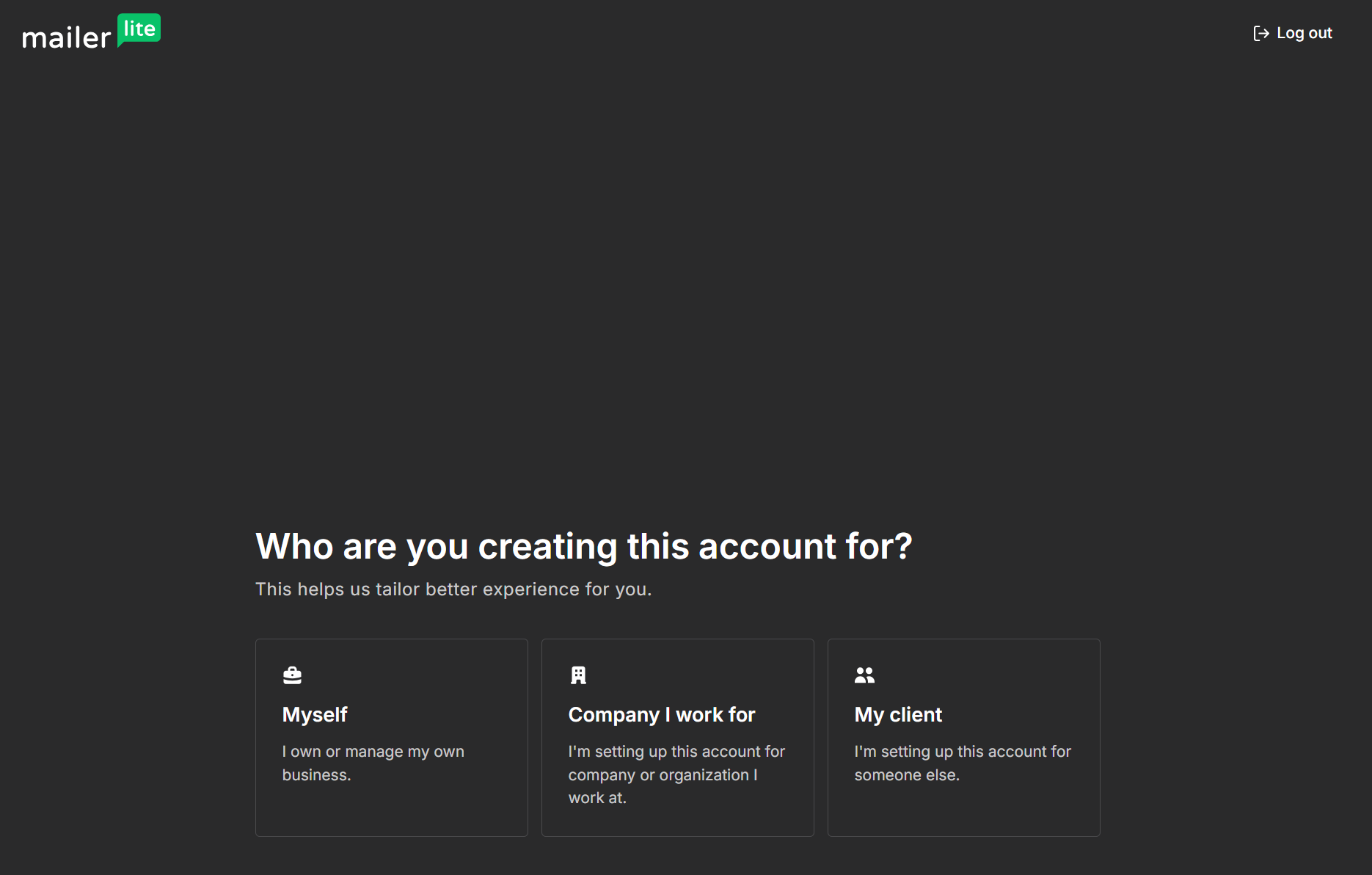
However, MailerLite has a stricter approval process. You must provide your address, city, and country to progress. Brevo lets you answer later, pick a plan, and get access.
Dashboard navigation
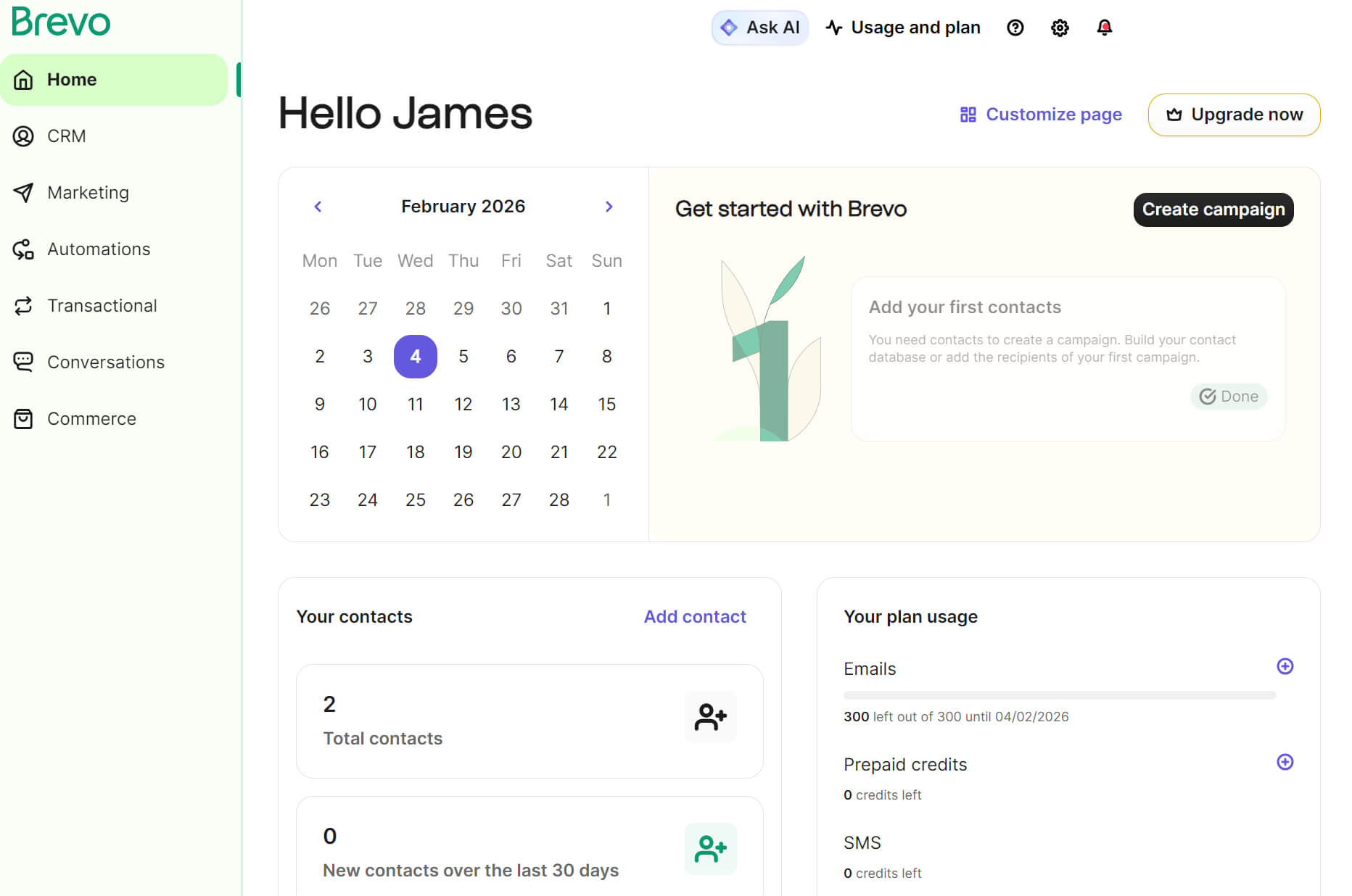
Once you’re in, Brevo has a more intuitive dashboard than MailerLite. It looks busier at first glance, but providing additional information about plan usage and a calendar helps you visualize your activity and move on to building your first campaign:
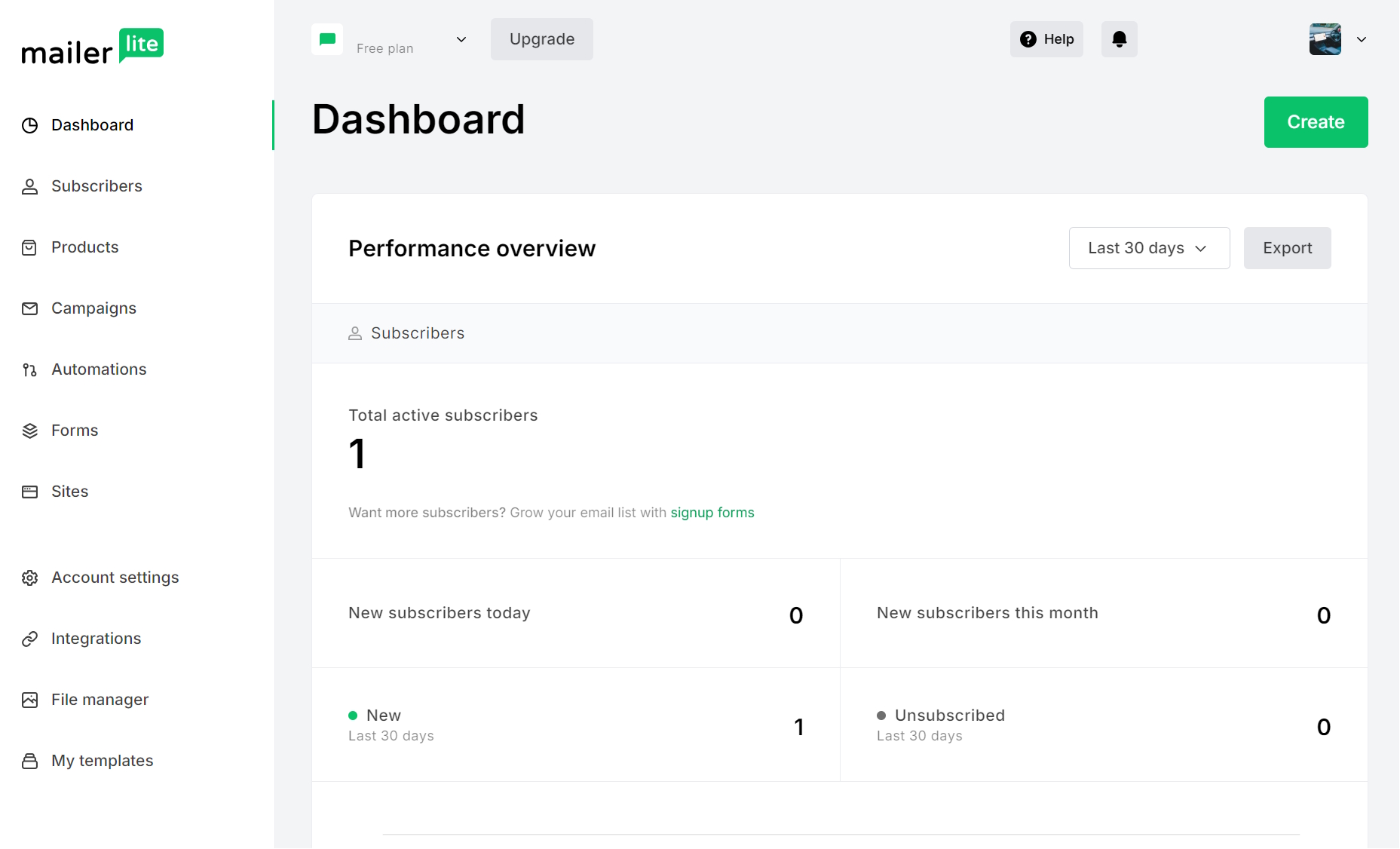
MailerLite’s dashboard is more minimalist and uses a right-hand sidebar like Brevo. Unlike Brevo, MailerLite lists forms, sites, and account settings as separate menu items. It makes things easier to access, but also clutters things:
Creating a campaign
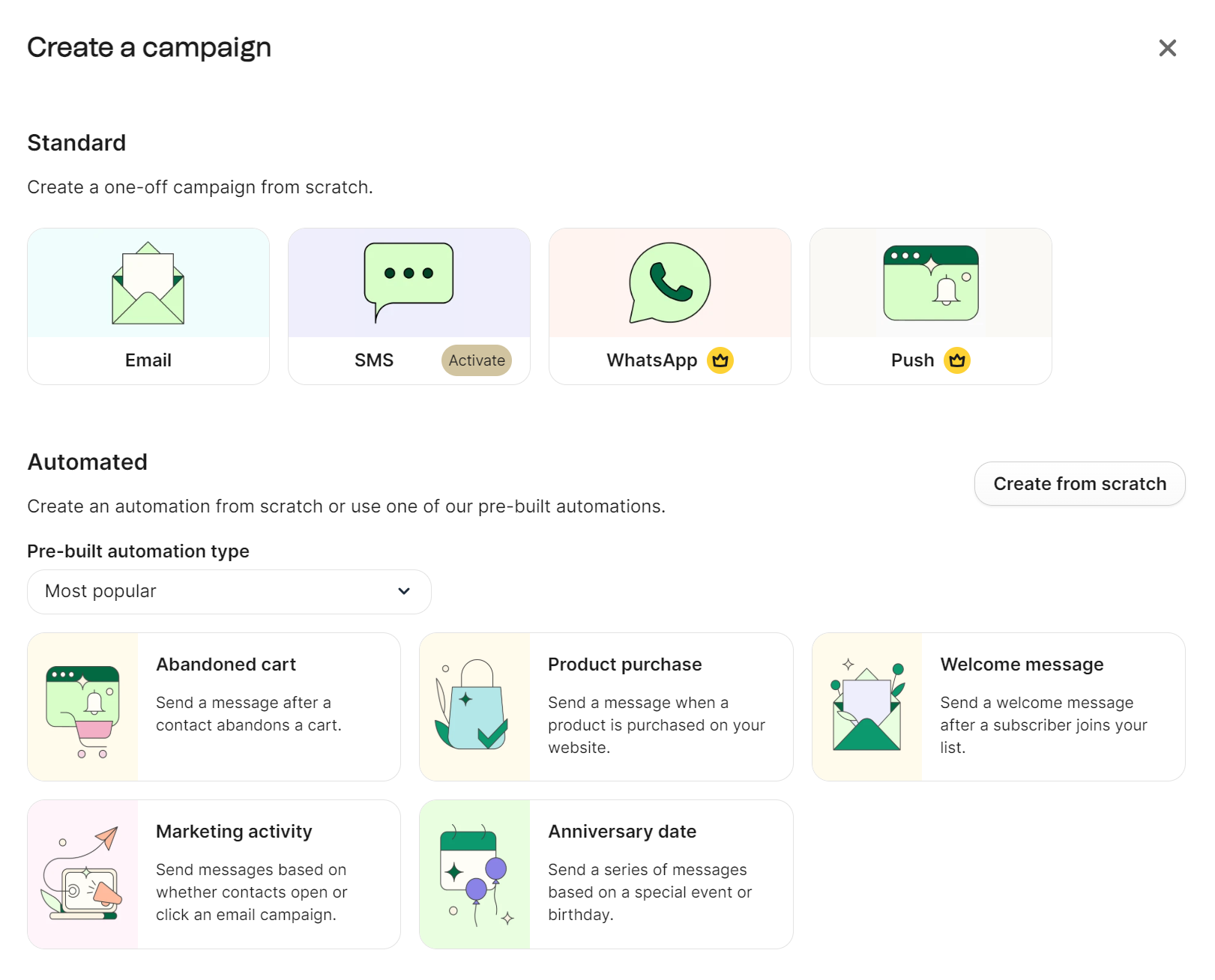
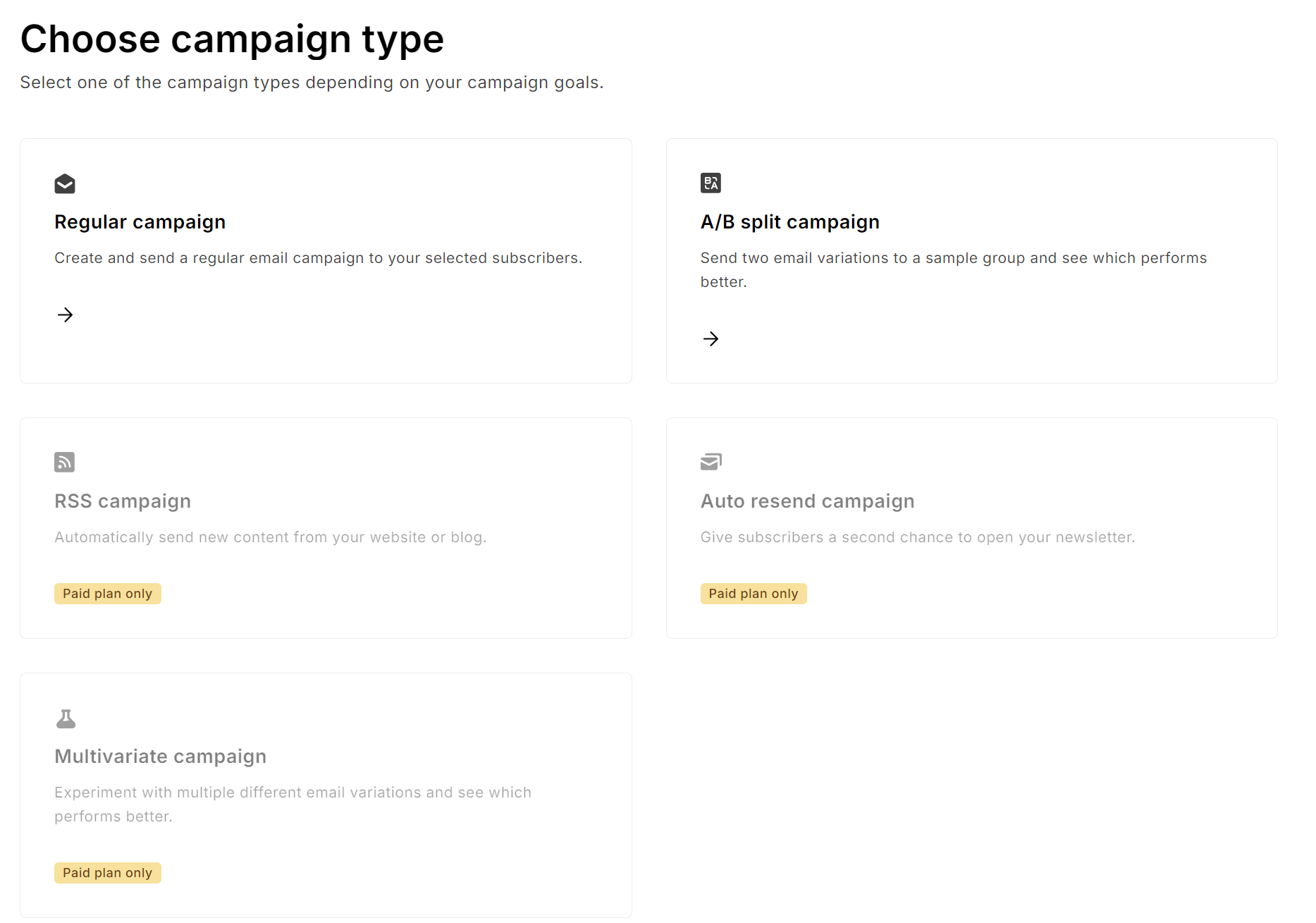
Creating your first campaign is easy enough using either tool:
- In Brevo, navigate to Marketing > Campaigns > click Create campaign, and then select Email:
- In MailerLite, navigate to Campaigns > Create new campaign, then select Regular campaign:
Email builders
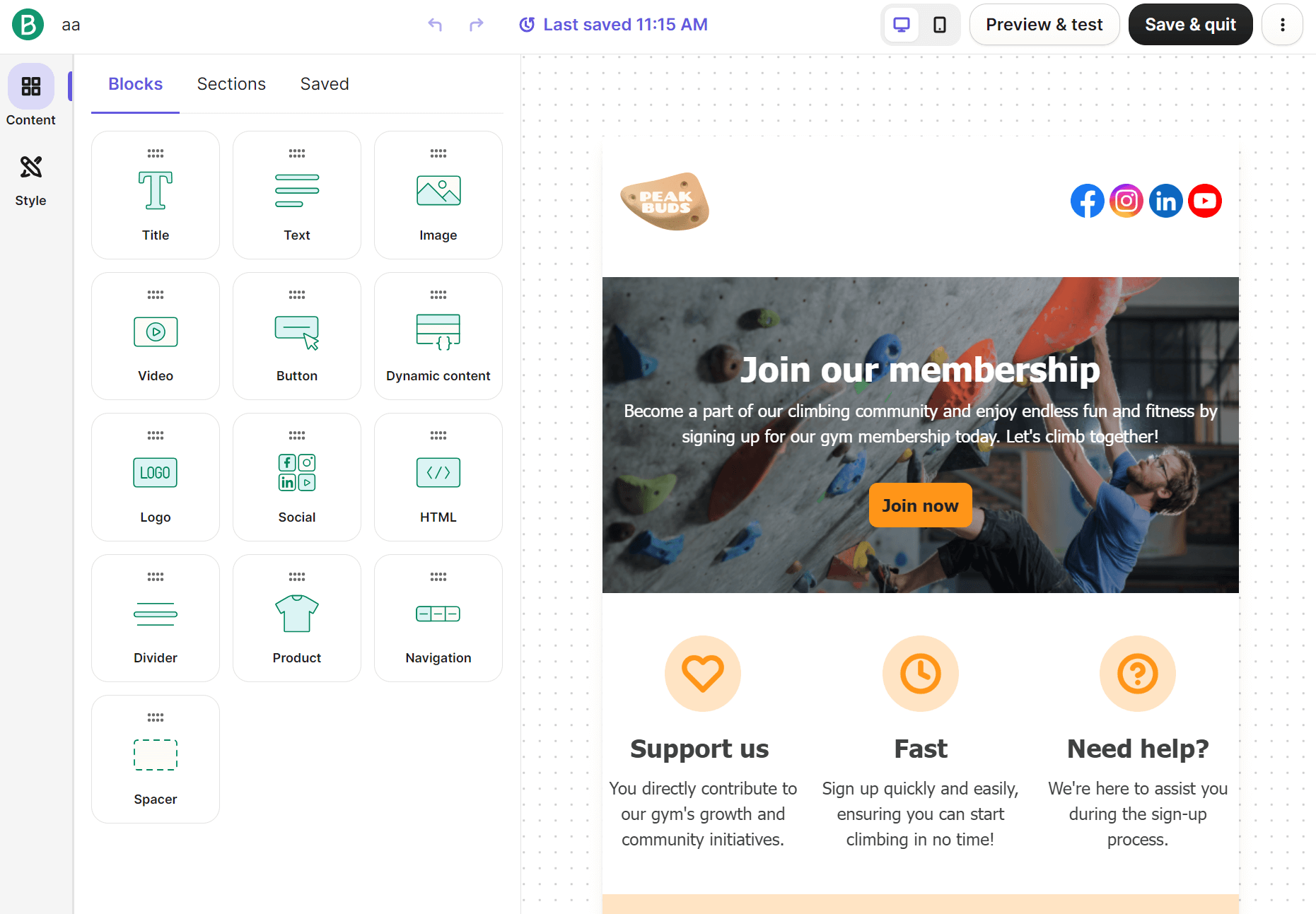
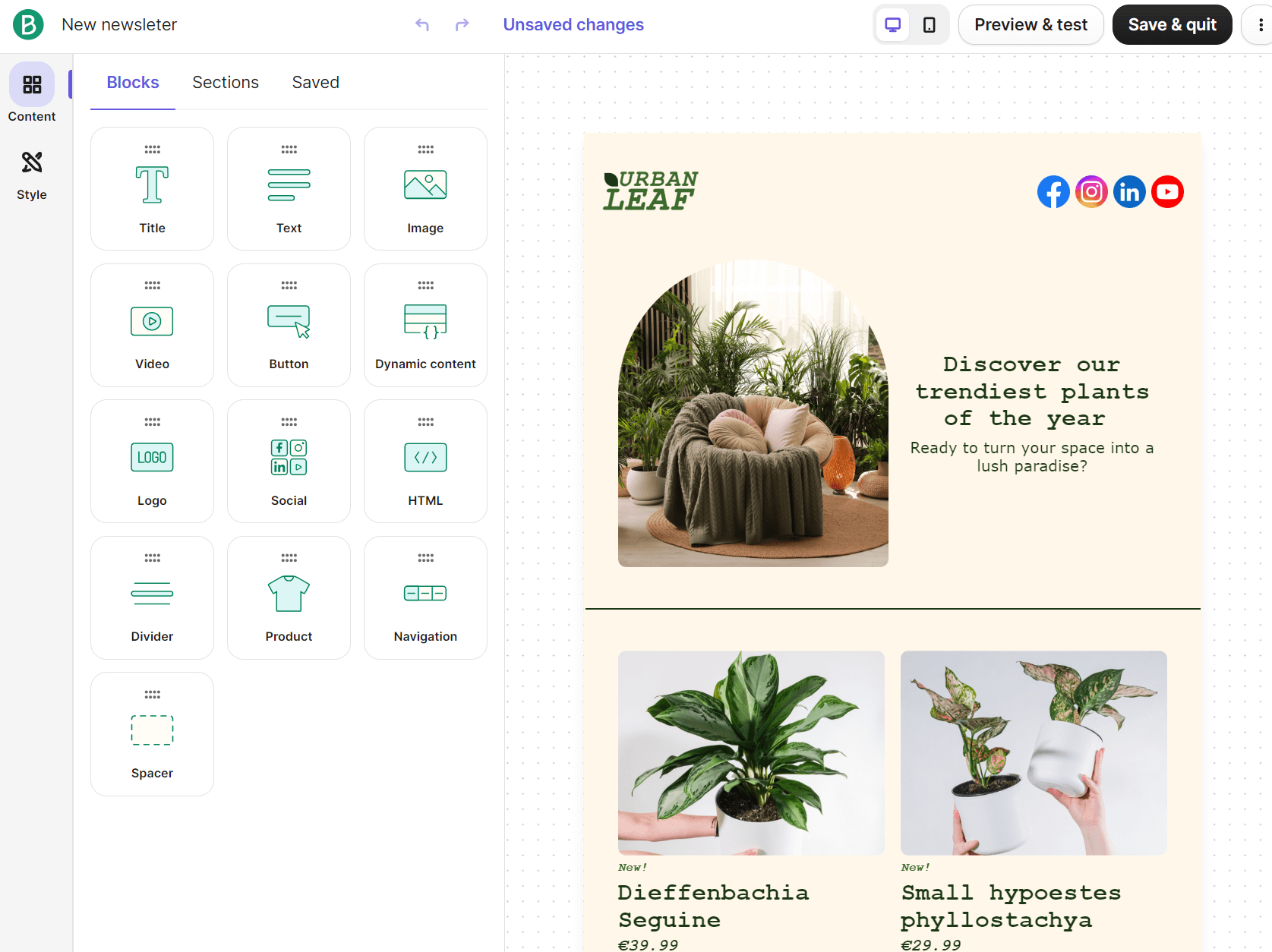
After going through those settings, you get the option to build your template using their drag-and-drop editors. Ease of use favors Brevo here because of its large block icons and three-menu structure for Blocks, Sections, and Saved:
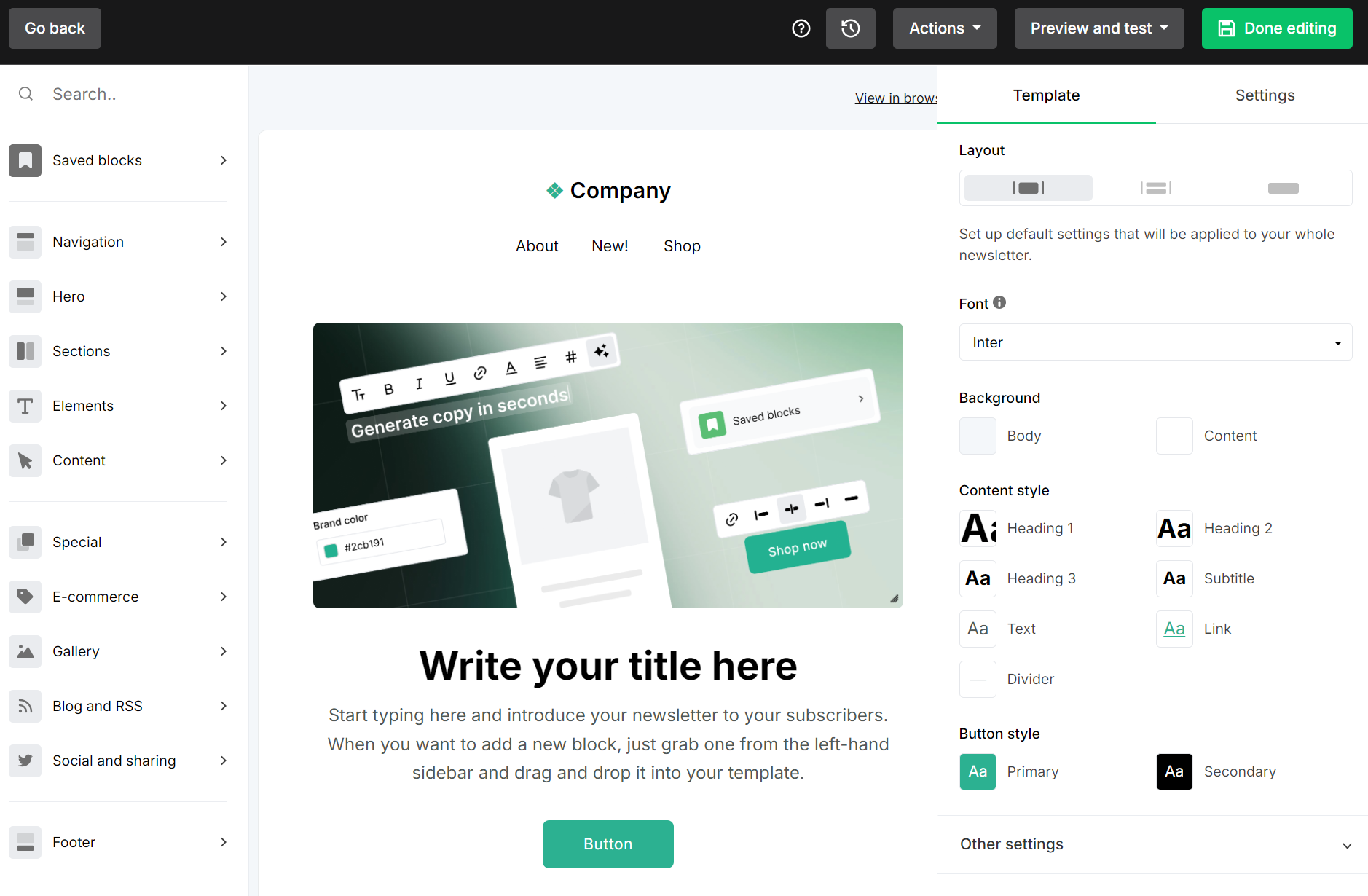
MailerLite’s email builder itemizes elements in its sidebar, which is helpful when you’re looking for something in particular. It makes switching between elements more difficult, but also makes building unique templates easier:
Of course, both drag-and-drop editors let you build emails to your liking with well-designed, pre-built items and sections.
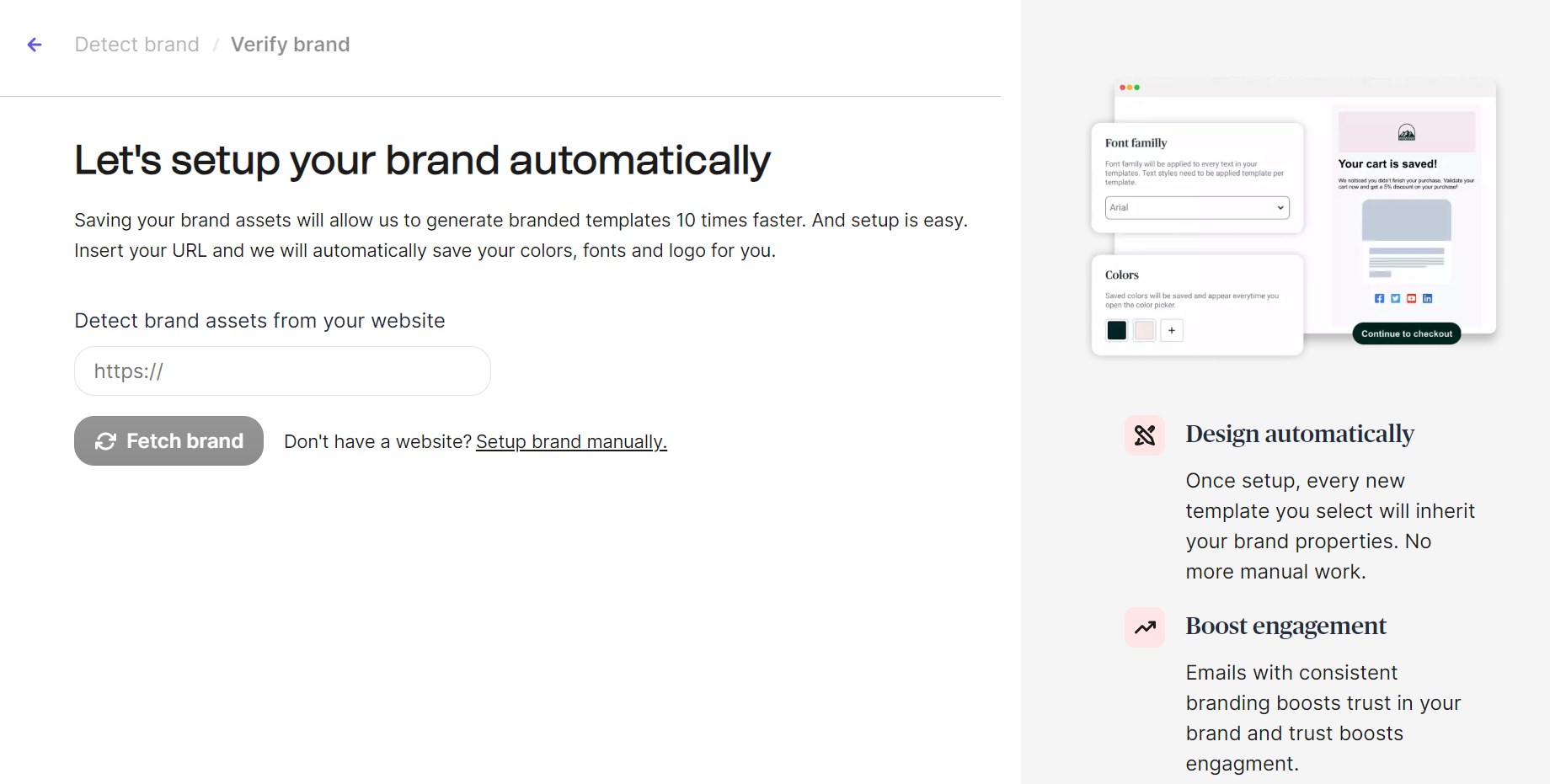
A bonus point goes to Brevo for its brand library feature. It ensures any new templates you create inherit your logo, colors, fonts, and social media links. You access it via the email editor, and it can detect assets from your website:
User reviews
G2 reviewers have little to complain about as far as ease of use goes when comparing MailerLite vs. Brevo:
- “MailerLite is easy to use and straightforward to implement, even for small teams. The interface is clean, and creating email campaigns, forms, and basic automations is simple. It offers good core features without being overly complex, which makes it practical for regular communication and outreach.” — G2 Review
- On Brevo, “It offers great and easy email marketing services – from getting users on your blog and integrating with other platforms, everything seems to be very easy. For a newbie, it’s definitely worth trying as they can implement everything on their own – from building a list and sending your campaigns.” — G2 Review
Brevo vs. MailerLite ease of use round winner
Brevo, because it onboards you faster and has better navigation. MailerLite is also fast to master and easy to navigate, but it lacks Brevo’s polish and professionalism.
Email editor and templates — what it’s like to build with each
Even though Brevo’s email editor and templates have less of a learning curve than MailerLite’s, that doesn’t automatically mean it’s going to suit you better.
Template libraries
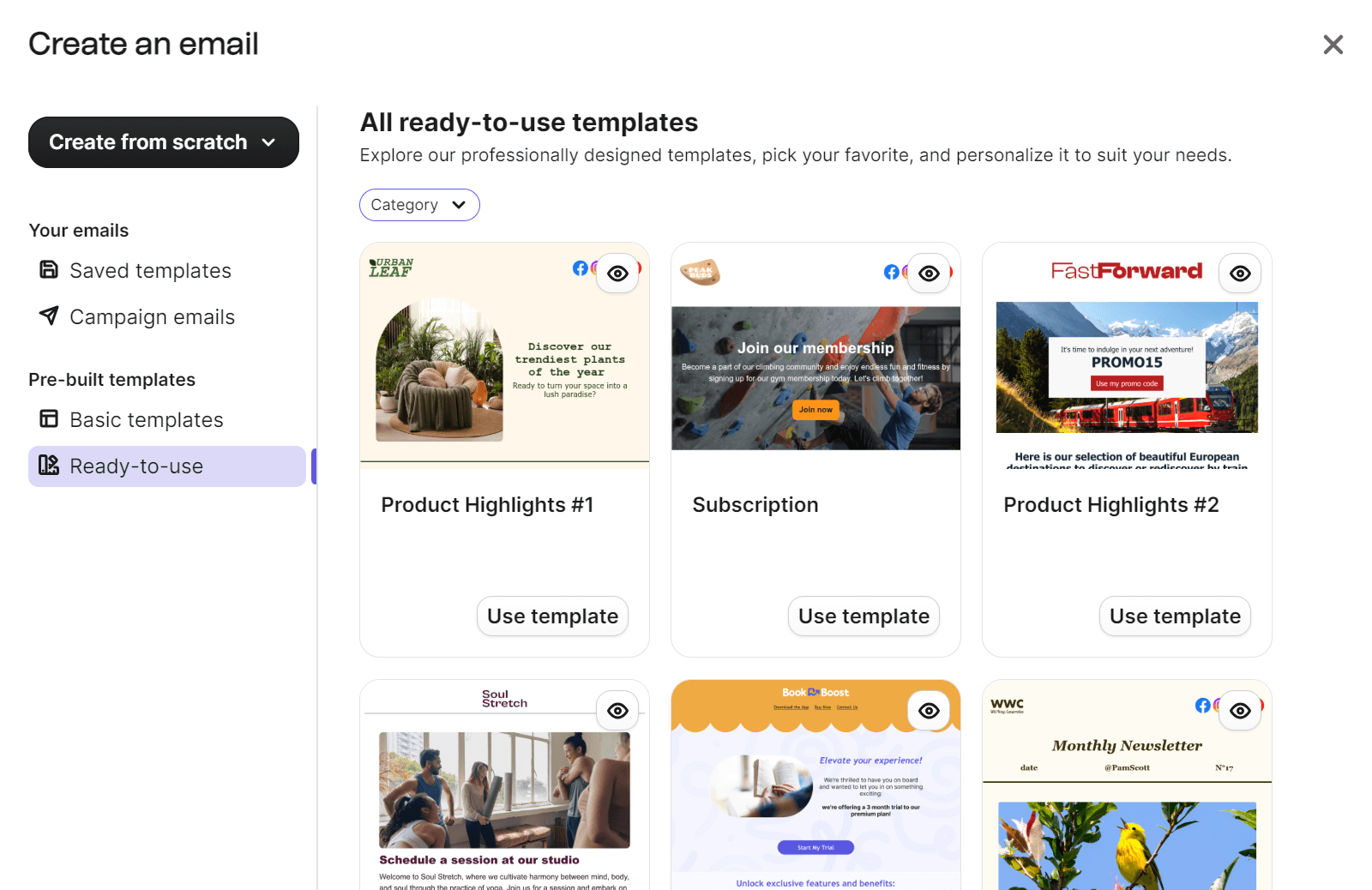
Crucial to note here before analyzing their editors that predefined templates are not available in MailerLite’s free plan. Brevo includes ready-to-use templates.
Picking a template in Brevo happens via a popup in the Create an email campaign page. You can choose from basic and ready-to-use templates:
MailerLite provides its template library after selecting to build a Regular campaign in the campaign builder. You can then pick a template:
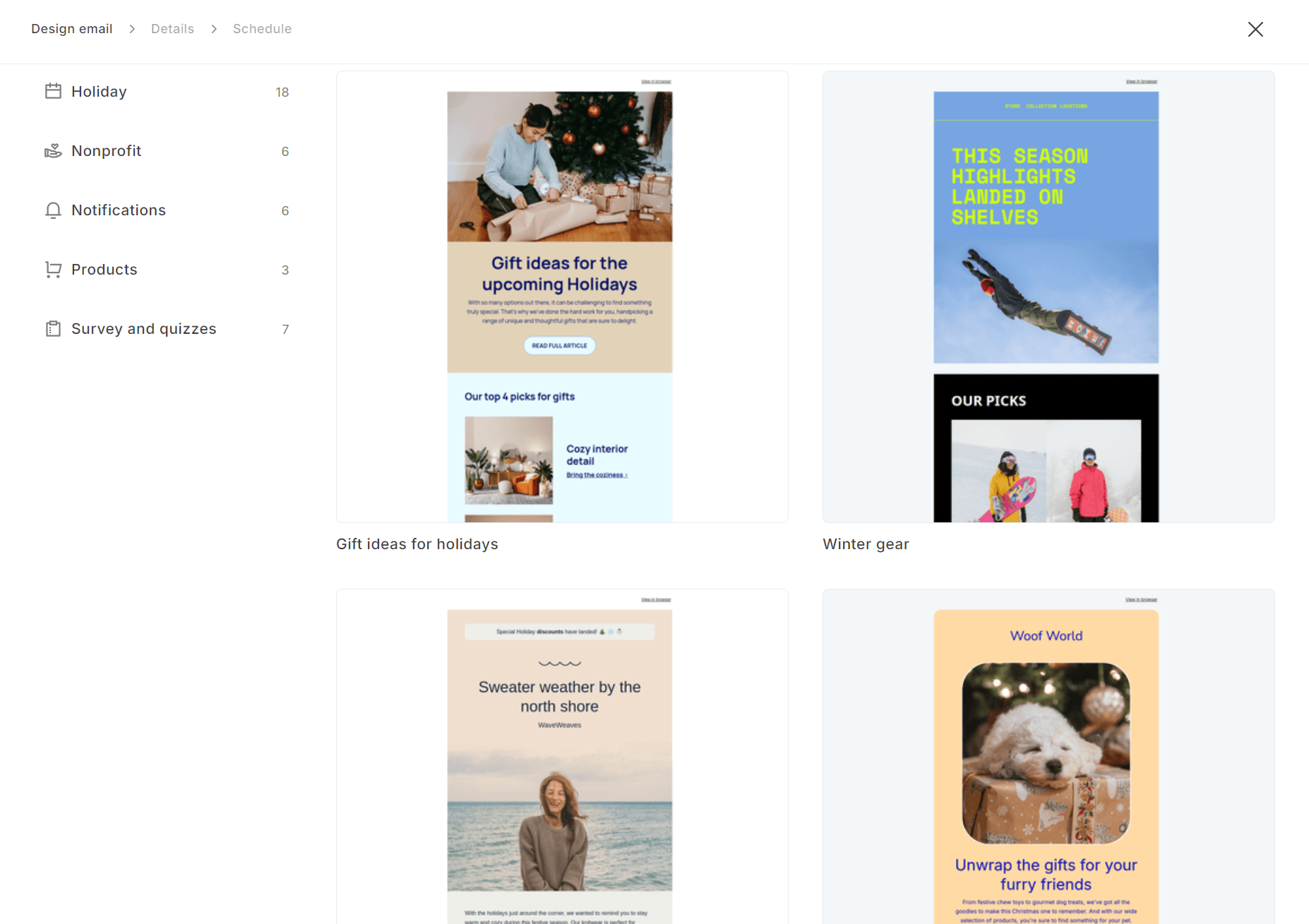
The total number of templates available in MailerLite is 108 as of 04/02/2026. Brevo provides 48 ready-made templates. For variety, MailerLite is best if you have a paid plan.
Drag-and-drop email builders
MailerLite provides significantly more options in its drag-and-drop editor. The sidebar has navigation, hero, sections, elements, content, special, ecommerce, gallery, blog, and RSS, social and sharing, and footer items. Hovering reveals slide-out options:
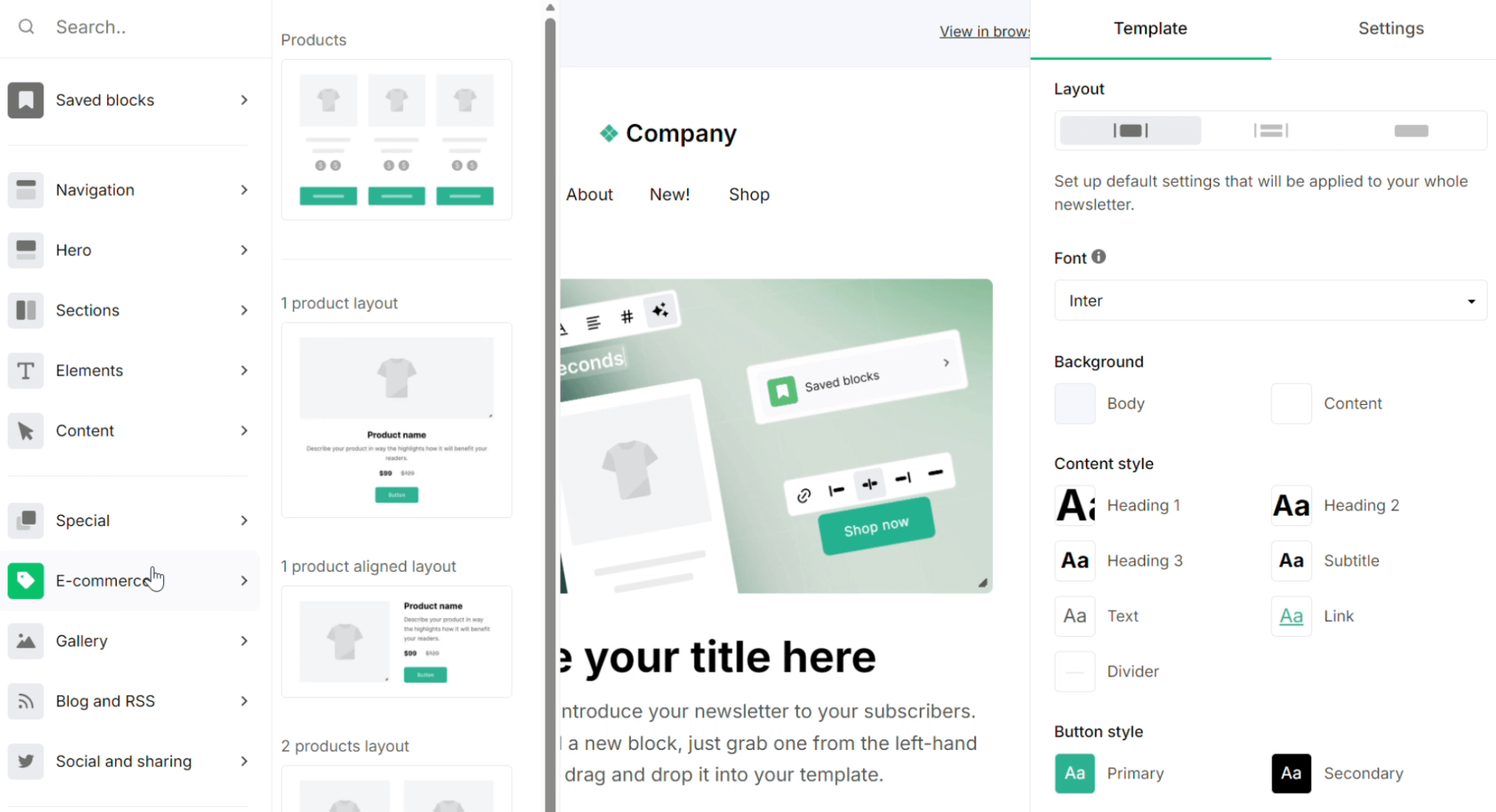
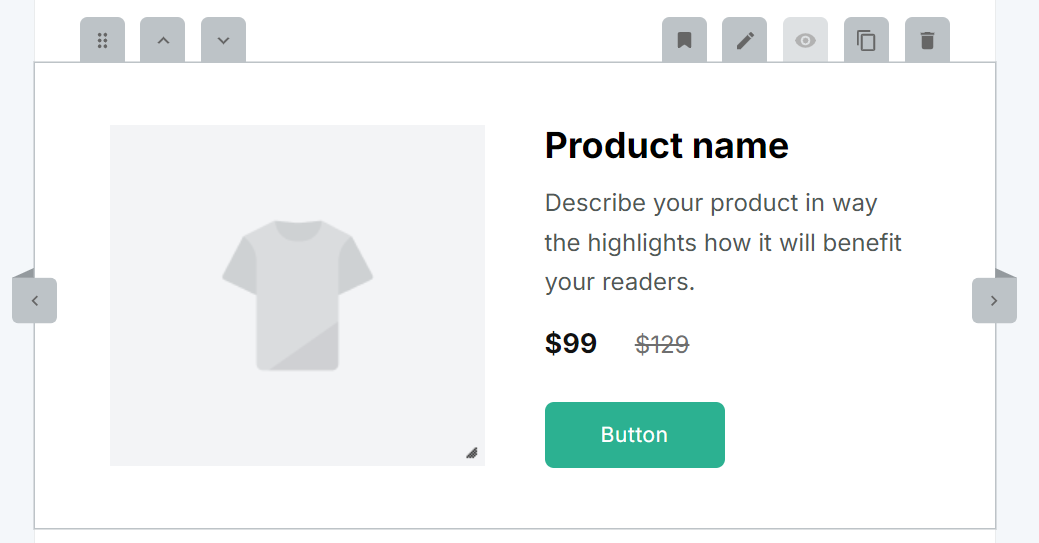
Its pre-built sections, such as one-product layouts and standard discount blocks, look fantastic and require no editing for proper sizing on mobile.
Selecting items within the editor loads a right-hand sidebar with options for padding, alignment, button styles, and content. Additionally, hovering over an item creates a sub-menu for that item, letting you move it up, down, or move it:
Brevo, in comparison, uses a simpler layout. The three-item menu includes Blocks, Sections, and Saved. The Blocks include title, text, image, video, button, dynamic content, logo, social, HTML, divider, product, navigation, and spacer:
Sections are pre-built elements such as text and images, headers, footers, signatures, and empty columns. You have to scroll to find these, but they are shown visually, and it’s easier to see how they’ll appear in your email than in MailerLite:
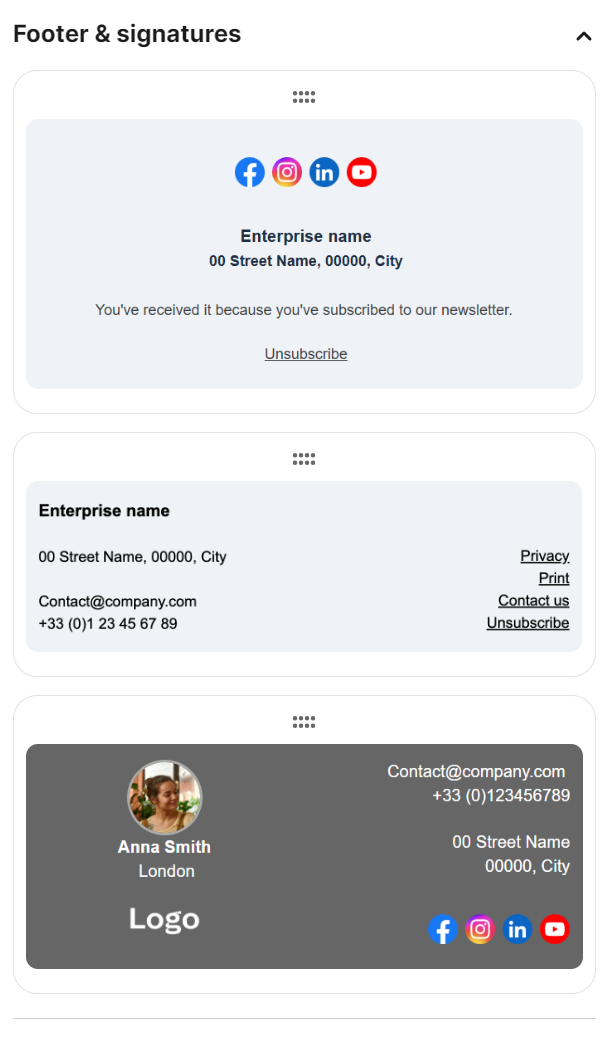
Brevo’s brand library auto-generates your logo and fonts into emails once set up. Both offer ecommerce blocks, such as dynamic content and products.
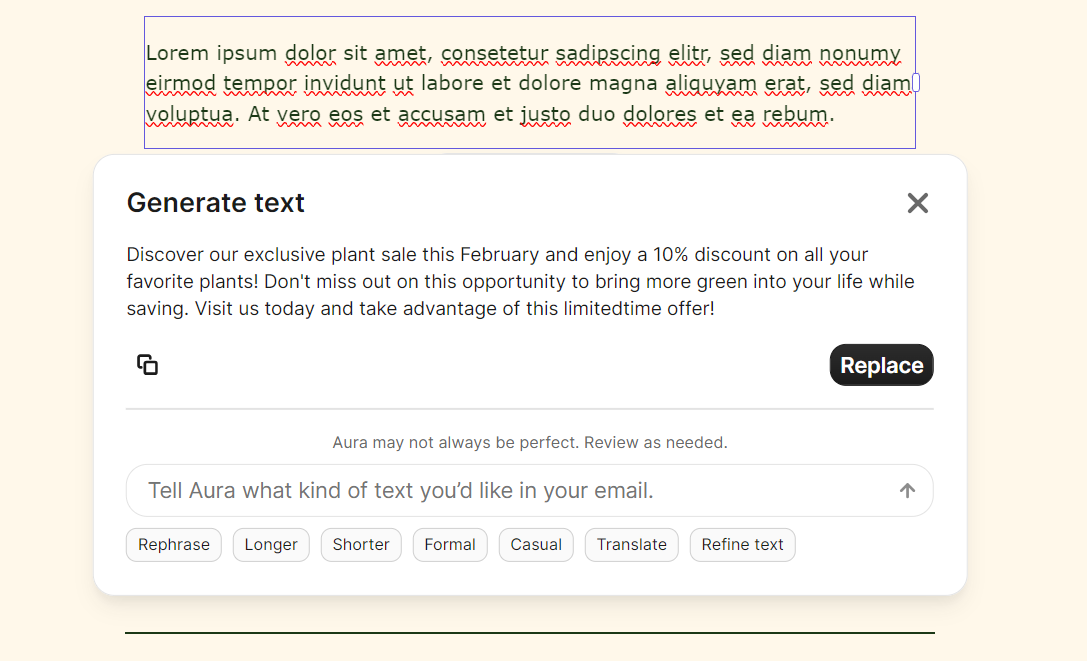
An AI content generator, called Aura, is included across all plans in Brevo. MailerLite restricts AI to its most expensive Advanced plan. Here’s Aura in action:
Brevo vs. MailerLite email editor and templates round winner
Draw. MailerLite offers more templates (108 vs. 48), more drag-and-drop options, and better pre-built sections. Brevo includes pre-built templates in its free plan, its editor is easier to learn, and it includes AI on all plans.
Marketing automation — where it makes the biggest impact
Comparing automations between Brevo vs. MailerLite reveals that both have drag-and-drop email automation builders that allow multiple automation steps.
Automation types
Brevo’s automations offer more complexity and scope for triggers, allowing real-time event triggers (such as purchases) and multiple entry points across all plans.
MailerLite only allows multiple automation triggers in its most expensive Advanced plan. That means if you want to build relatively complex customer journeys with email flows, then Brevo is the better tool at lower prices.
Both have pre-built automation libraries. Again, there’s a reaction with MailerLite. Only its Advanced plan offers complete template access, and even with that, its ecommerce templates only include feedback and reminder emails:
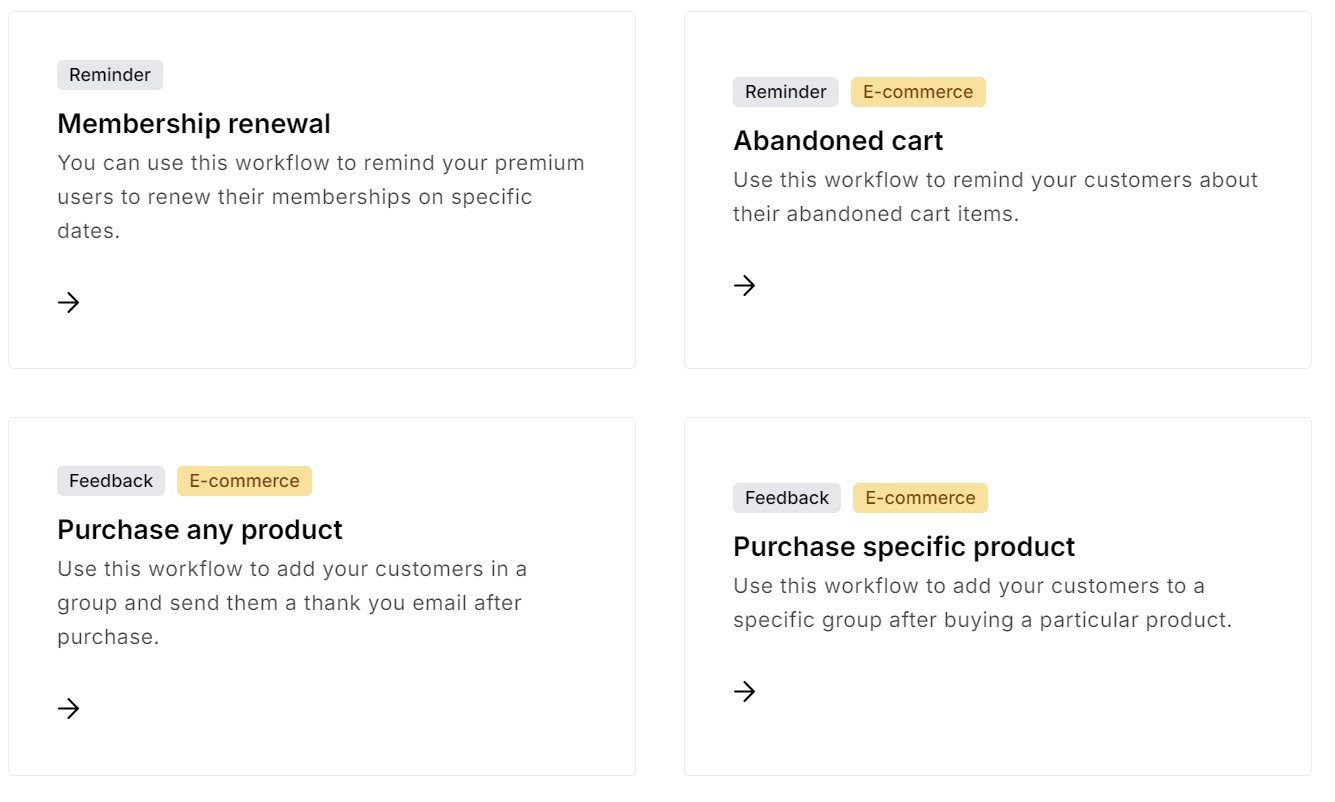
You can set up an abandoned cart email in MailerLite, but other than that, there are no pre-built revenue-generating ecommerce flows.
Brevo has more email automation tools for ecommerce scenarios, including product purchase, anniversary date, and transactional activity emails:
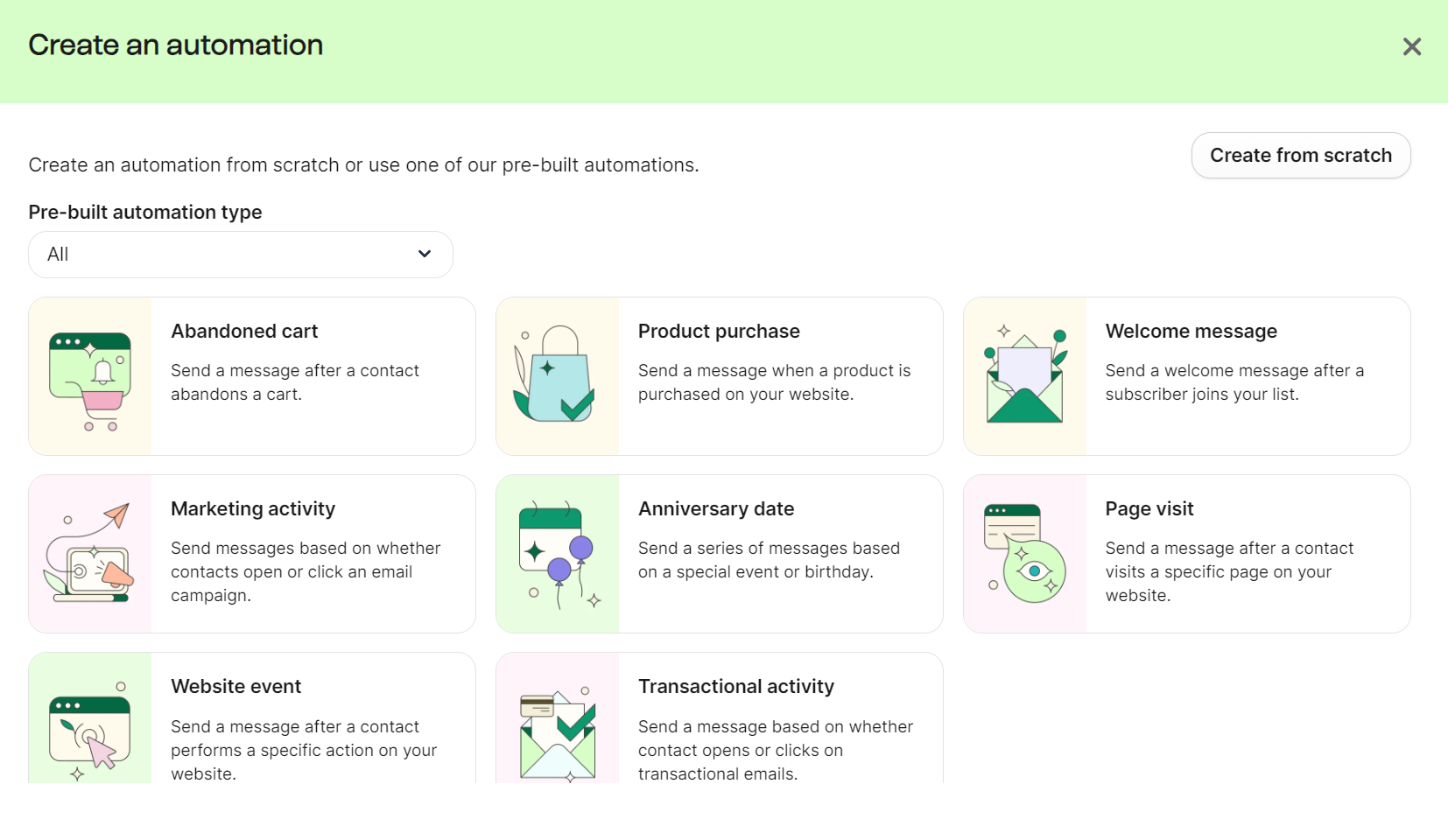
If you’re not interested in building automations from scratch, Brevo has a better pre-built flow library than MailerLite.
Automation builders
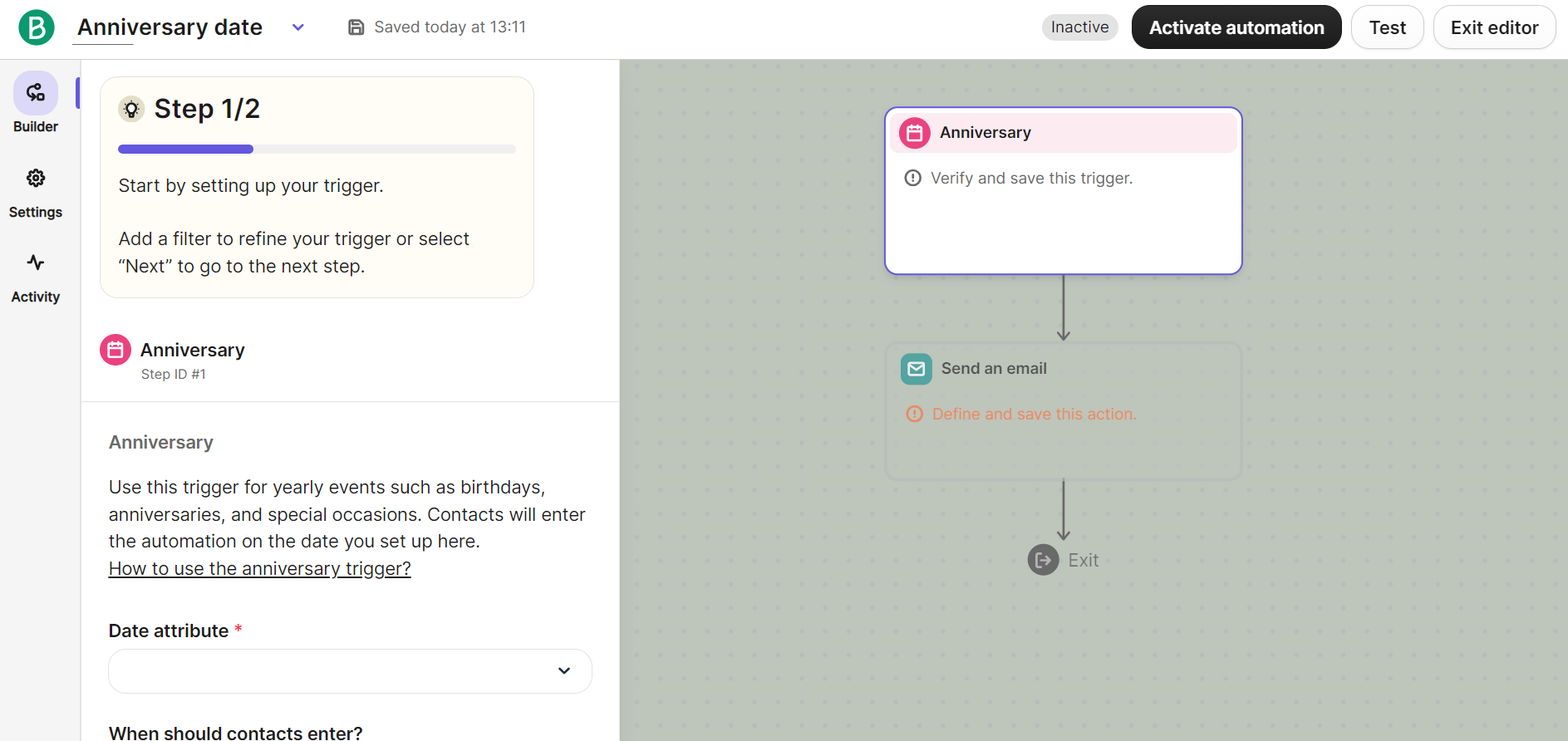
Brevo walks you through configuring its pre-built automations in its flow builder. It uses two steps to guide you through setup. Step one is setting up a trigger, after which you proceed to step two and edit your email template:
However, it isn’t easy to master. You can drag any number of contacts, forms, emails, conversations, deals, and other elements into the builder. The relationship between these is not always clear, and that spreads to actions and rules, too:
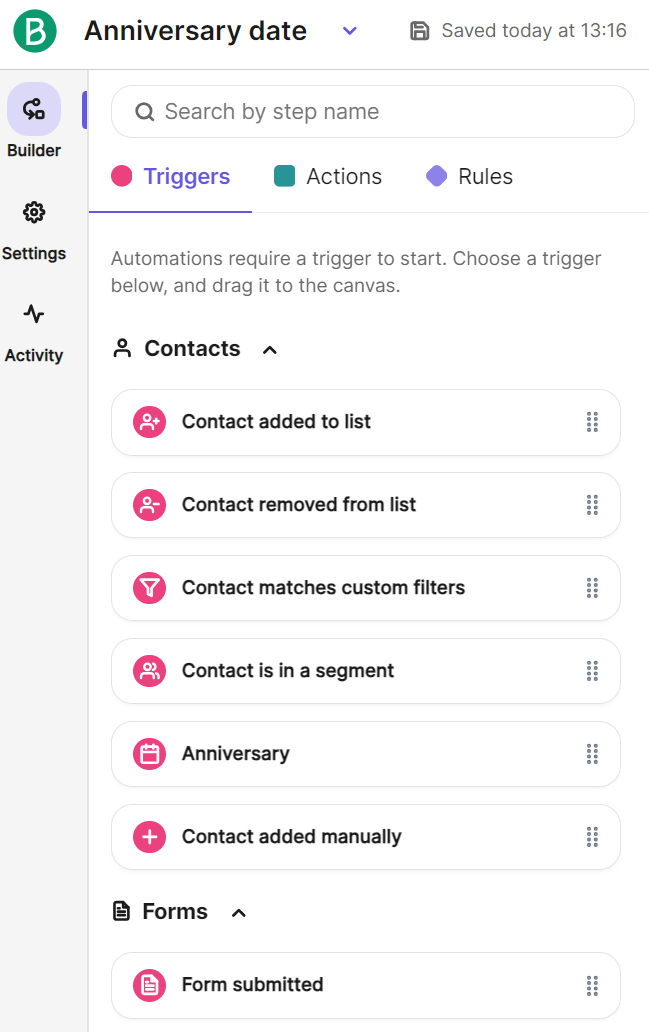
Once you learn it, Brevo’s flow builder is more capable than MailerLite’s. But you have to ask whether that complexity is worth it.
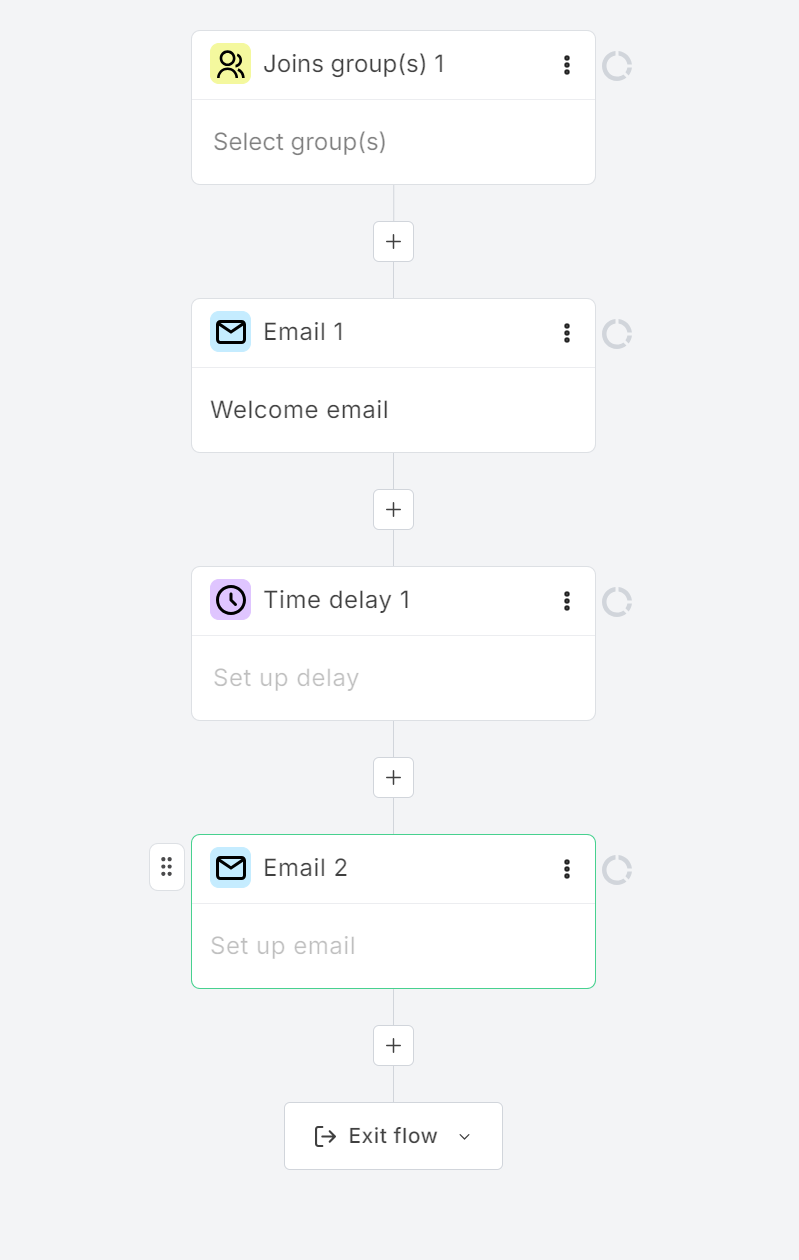
MailerLite’s flow builder is significantly more pleasant to use in terms of both its learning curve and appearance. It has fewer triggers, rules, and actions, with sidebar tabs revealing elements to drag into the flow builder:
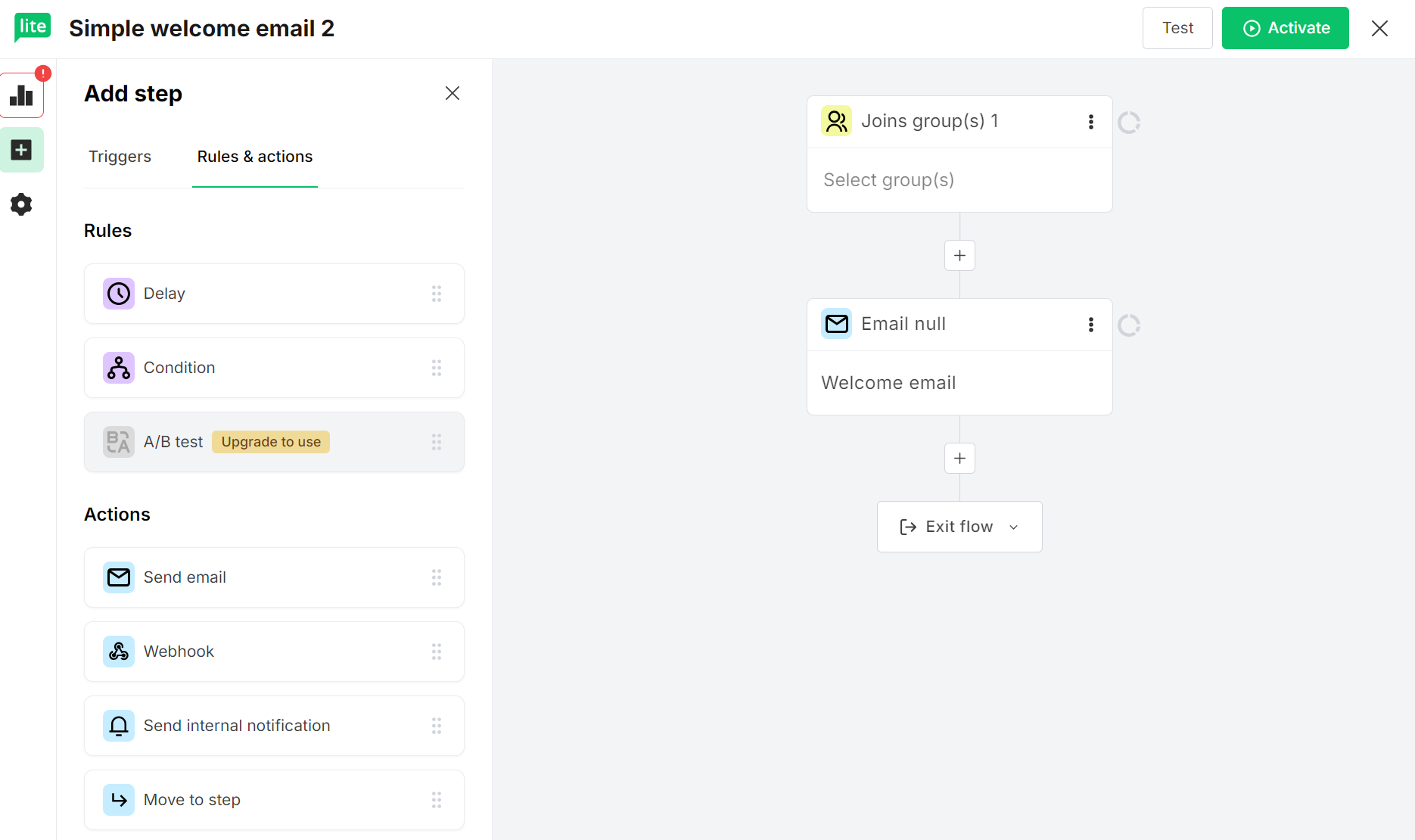
Dragging any trigger, rule, or action into the flow builder makes sense. For instance, adding a delay and a new email creates a clear visual:
Ecommerce automation comparison
We previously said in our Brevo vs. MailerLite comparison that Brevo has more ecommerce flows. That’s true regarding its automation library. You can build flows for:
- Abandoned cart
- Product purchase
- Welcome message
- Marketing activity
- Anniversary date
- Transactional activity
In MailerLite, unless you have the Advanced plan, you can only build:
- Abandoned cart
- Purchase any product (for a thank-you series)
- Purchase a specific product (for follow-up messages)
If you’re on an Advanced plan, you also get:
- Advanced welcome email
- Demo call invitations
- Webinar invitations
Both cover the most basic ecommerce scenarios, Brevo more so than MailerLite. However, neither comes close to Omnisend for covering your customer journey and generating revenue from personalized, contextual automations.
Omnisend’s automation library includes 27 pre-built templates from welcome series to follow-ups. Customers achieved a $79 ROI for every $1 spent in 2025 across omnichannel (email, SMS, web push notifications) combined:
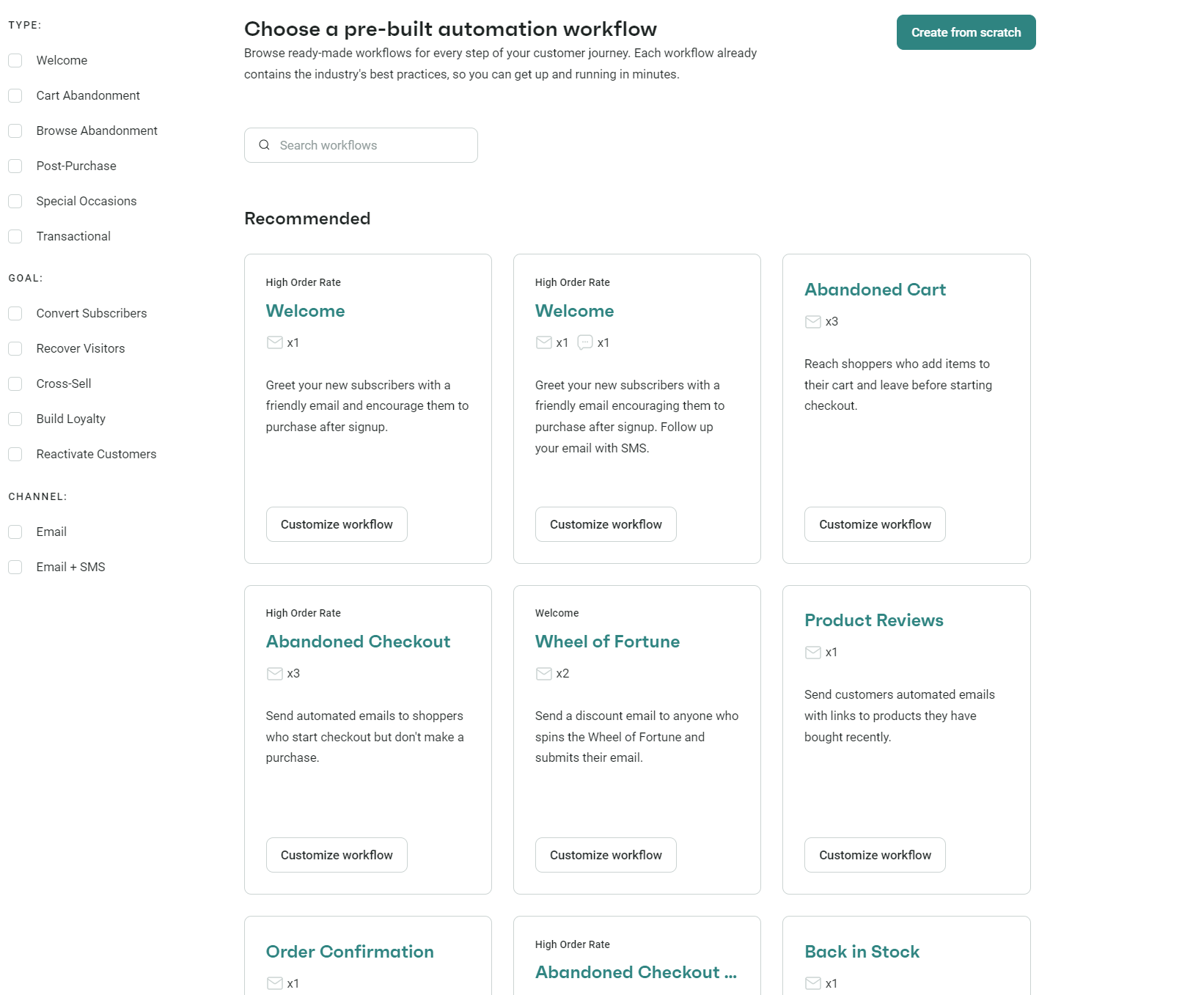
Additionally, behavior-based automated emails generated 25% of total email revenue from just 1.7% of sends, with Omnisend helping you cover more behaviors.
Brevo vs. MailerLite marketing automation round winner
Brevo. It has more triggers, flows, and real-time event triggers. MailerLite’s builder is more straightforward to master, but you’ll have to cover most scenarios from scratch.
Ecommerce and Shopify integration — how Brevo and MailerLite compare
Brevo and MailerLite integrate with your Shopify store via native apps:
The Shopify App Store ratings tell you a lot before you even test either tool. Brevo PushOwl has a 4.8/5 rating from 1,745 reviews, whereas MailerLite sits at 2.6/5 from 30 reviews.
MailerLite’s reviews flag broken tag syncing, automations failing to trigger, and support tickets going unanswered for weeks.
Brevo’s reviews consistently praise smooth Shopify syncing, hands-on support during setup, and easy data migration from other platforms like Klaviyo.
Their ratings are a bit closer on WordPress/WooCommerce. MailerLite has a 2.9/5 rating, Brevo sits slightly higher at 3.1/5.
Clearly, there’s a significant difference in quality between the integrations and how MailerLite vs. Brevo syncs your store data and handles contacts.
Now let’s compare those experiences to Omnisend, which has a 4.8/5 rating on Shopify based on 2,900+ reviews and an identical rating on WordPress/WooCommerce. Omnisend is the best for ecommerce integrations, and Brevo is better than MailerLite.
Integration limitations
You might think that syncing your Shopify or WooCommerce store would provide equal data sharing and functionality for both email marketing tools. It isn’t the case. Their limitations vary by platform, but in the case of Shopify, here’s what we have:
MailerLite
- Syncs customers to a single subscriber group only
- Popups require setup in your MailerLite account then, enabling in the Shopify plugin
- Embedded forms require manual installation (no native Shopify block)
Brevo PushOwl
- Doesn’t collate data into contact scores below its expensive Professional plan
- Shopify connection runs through PushOwl, not directly through Brevo, meaning you’re dealing with two interfaces
Omnisend connects directly to Shopify without a third-party app, syncs customers, products, orders, and browsing behavior in real time, and integrates with Shopify Flow for custom event triggers beyond pre-built automations.
Brevo vs. MailerLite ecommerce and Shopify integration round winner
Brevo. A 4.8 Shopify rating from 1,745 reviews against MailerLite’s 2.6 from 30 tells the story, plus its integration works more reliably based on user feedback.
Landing pages and forms — what it’s like to build and customize them
MailerLite is more capable for landing pages and popups because Brevo restricts them to Professional plans. MailerLite lets you build unlimited popups and 10 landing pages in its free plan, with paid plans letting you create unlimited landing pages.
However, free MailerLite plans do not include landing page templates, so you’re stuck building them from scratch as a free customer.
Landing pages
You create landing pages in MailerLite by navigating to Sites in the sidebar and then clicking Create under the landing pages tab. You then name your landing page, select subscriber groups, and select a template from the library:
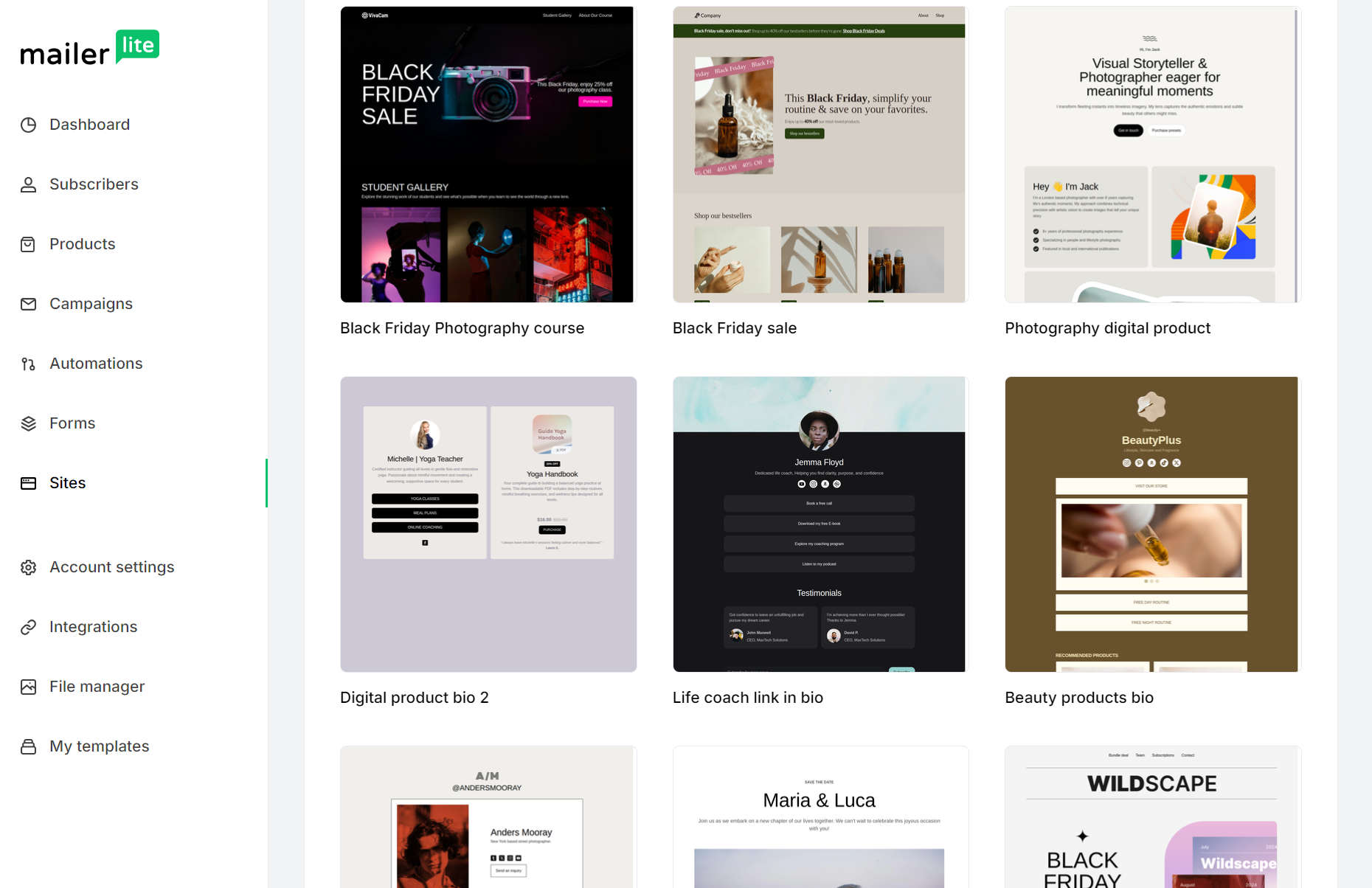
There are 30 pre-built landing page templates in MailerLite. The landing page builder is a drag-and-drop tool with a similar sidebar layout to the email builder. You drag elements into it and edit their individual elements, such as text and images:
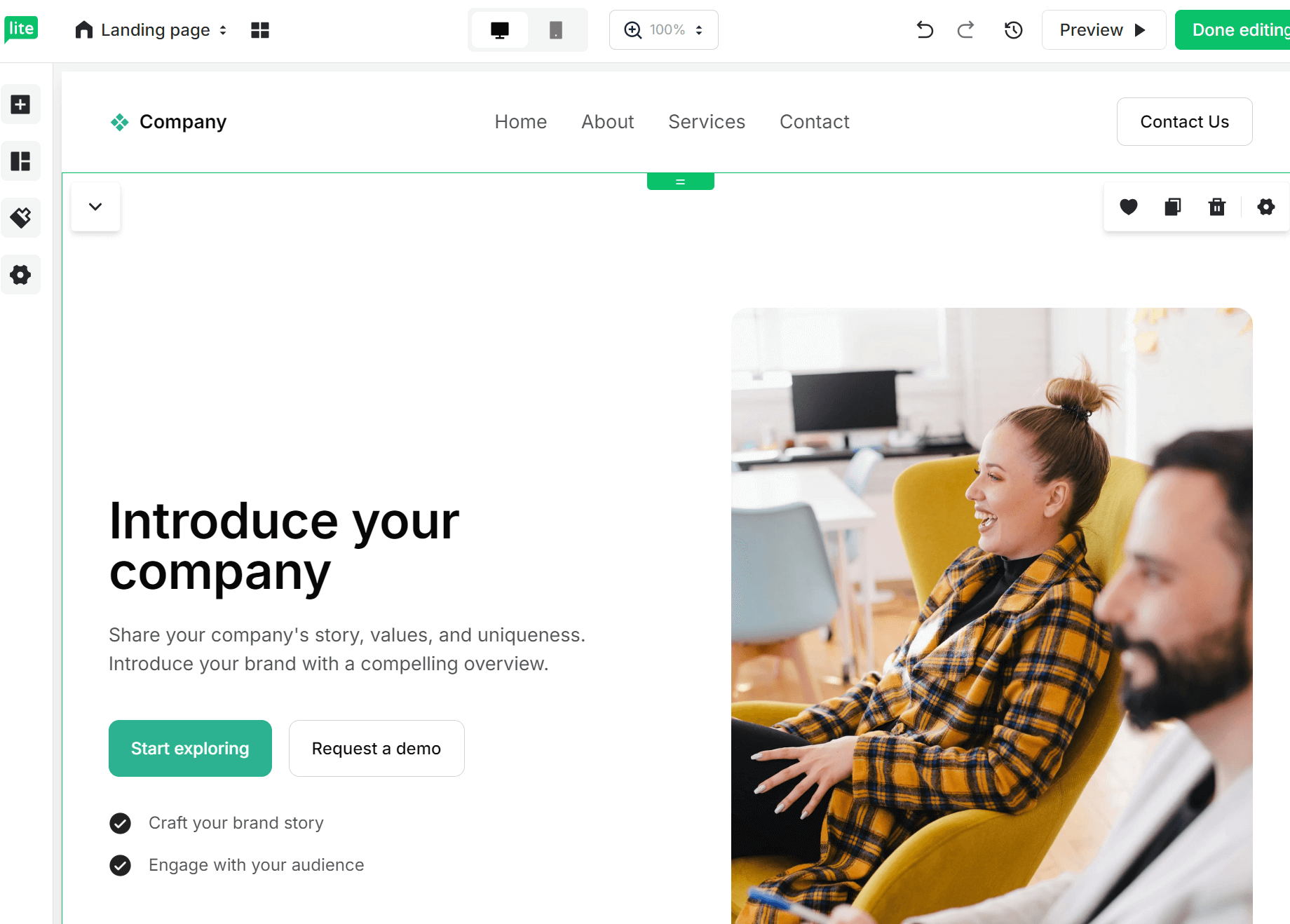
The sections tab includes everything needed to build landing pages that convert. Its Hero category is particularly good, with multiple designs and layouts that look professional without any edits. The example below shows this off:

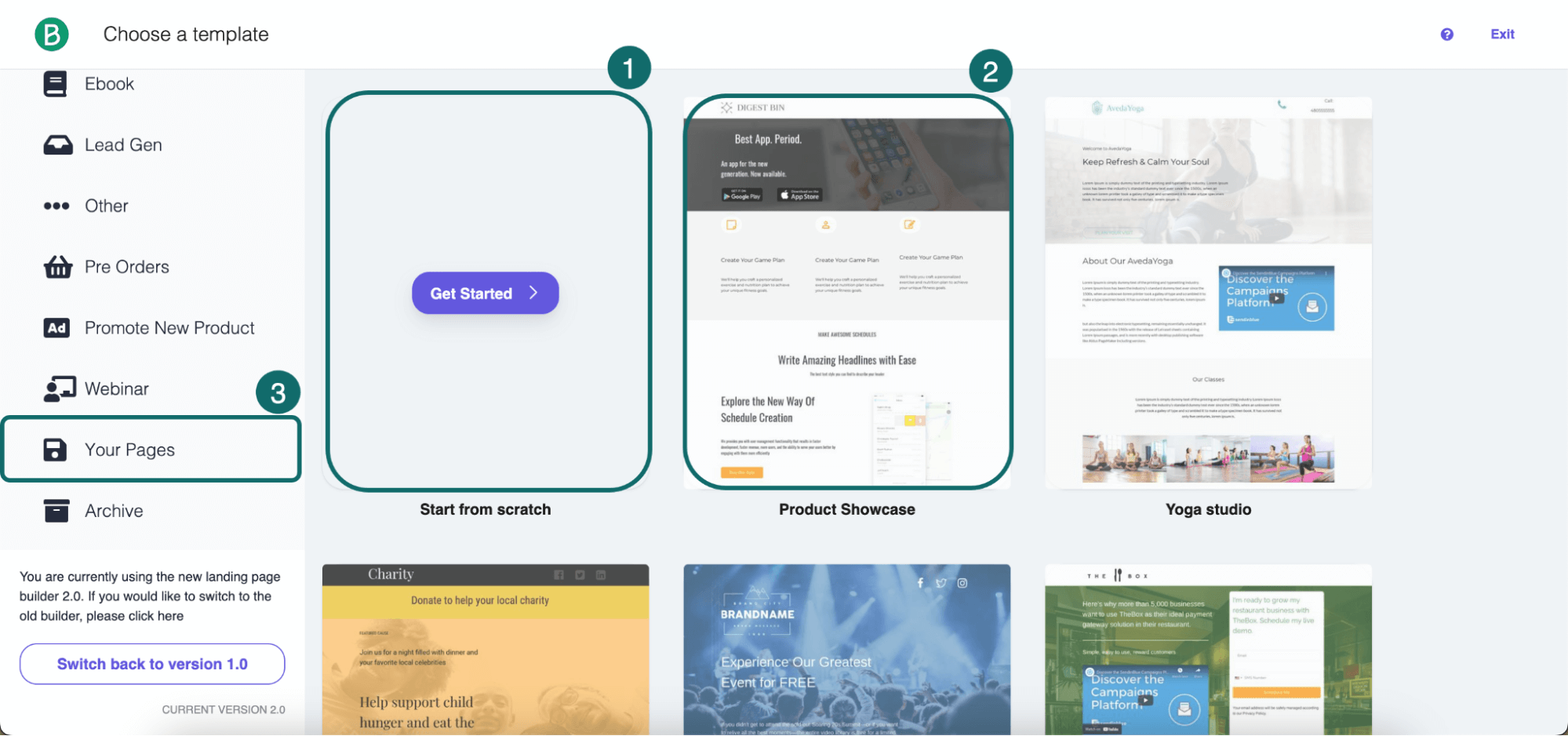
Moving on to Brevo, you create landing pages in Marketing > Landing pages. You can build from scratch, use a template from their gallery, or duplicate an existing page.
The settings editor lets you add brand colors, fonts, logo, and favicon. A live chat widget option lets visitors ask questions directly from the page. You can also duplicate landing pages, saving you time when creating multiple (but similar) versions:
Forms
Brevo lets you build full-page and embedded forms across all plans. Popups are a Professional plan feature, something that neither MailerLite nor Omnisend restricts.
The form builder is a basic affair. It lacks its own app and loads within the dashboard, giving you access to build elements and preview tools for desktop and mobile:
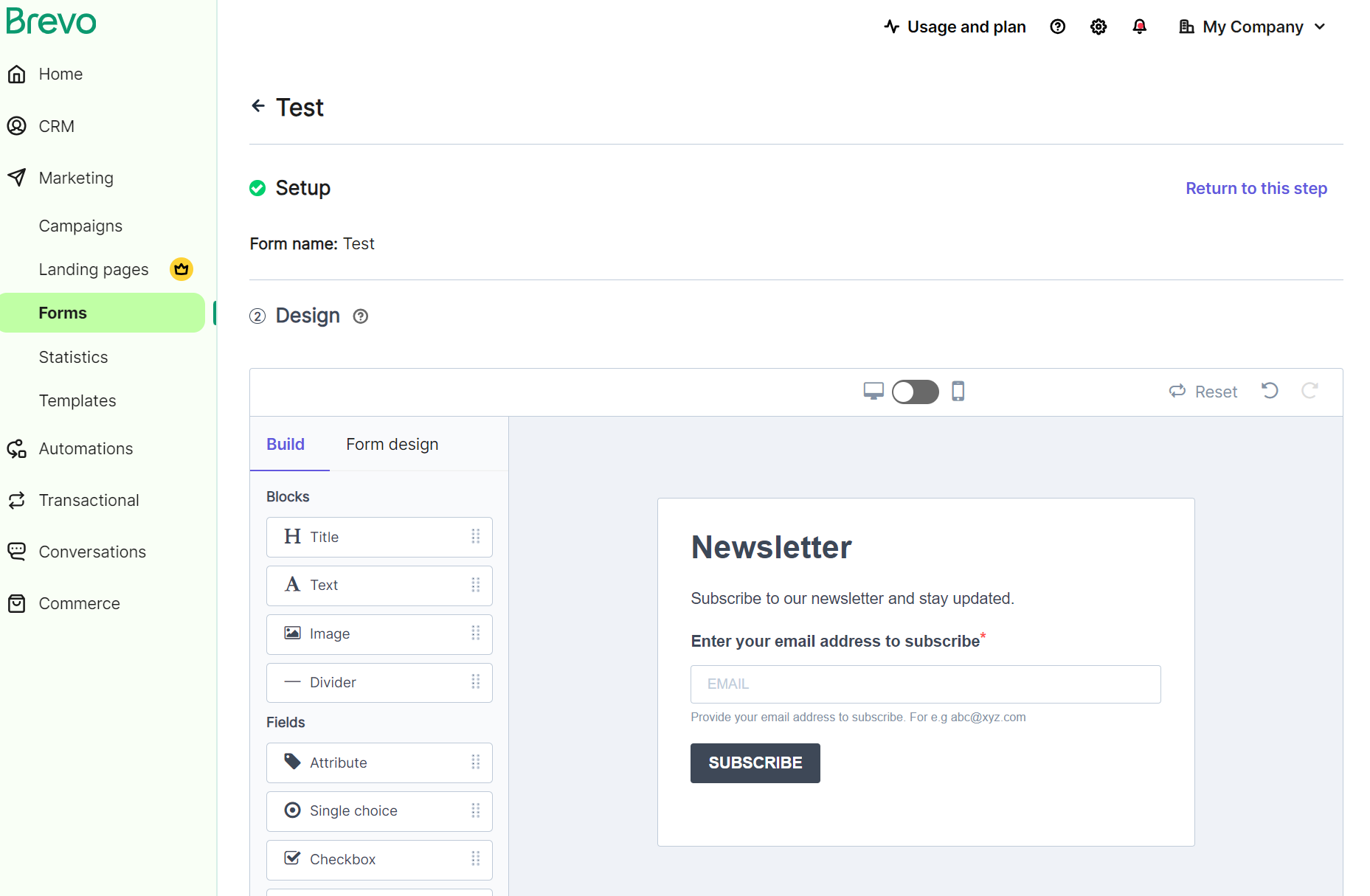
Brevo’s sign-up forms support Google reCAPTCHA (v2 and v3) and Cloudflare Turnstile CAPTCHA by default. You drag and drop the CAPTCHA block into your form and paste your site and secret keys.
Unlike Brevo, MailerLite’s form builder does have its own web app, and it’s much more pleasant to use than Brevo’s. It provides quick settings for confirmation checkboxes, privacy policy links, hidden segmentation fields, and more:
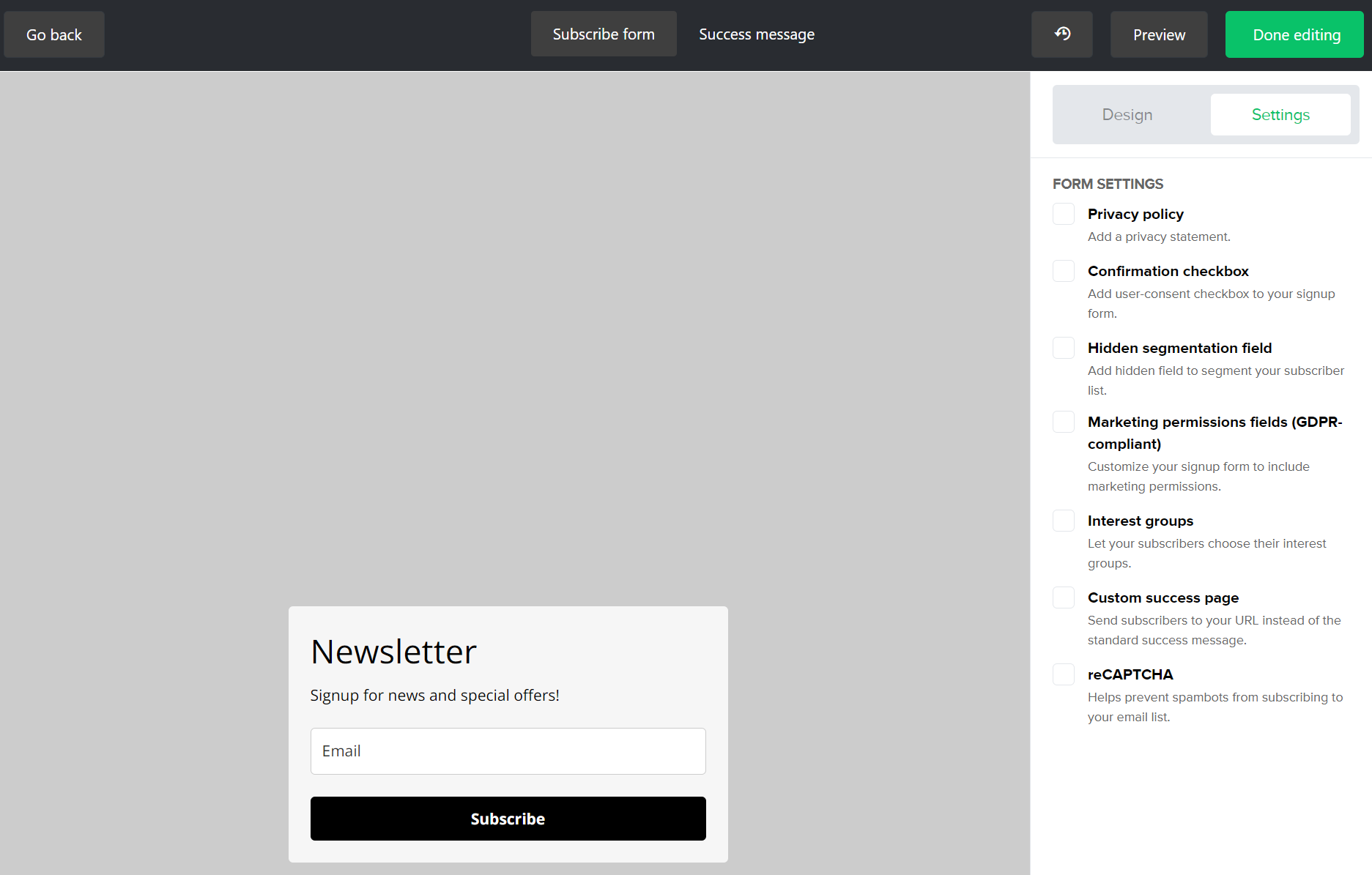
You can change the orientation from classic to landscape and card, the background, content style, and form elements more easily than in Brevo. Ultimately, forms feel like a natural feature in MailerLite, whereas in Brevo, they are more of an afterthought.
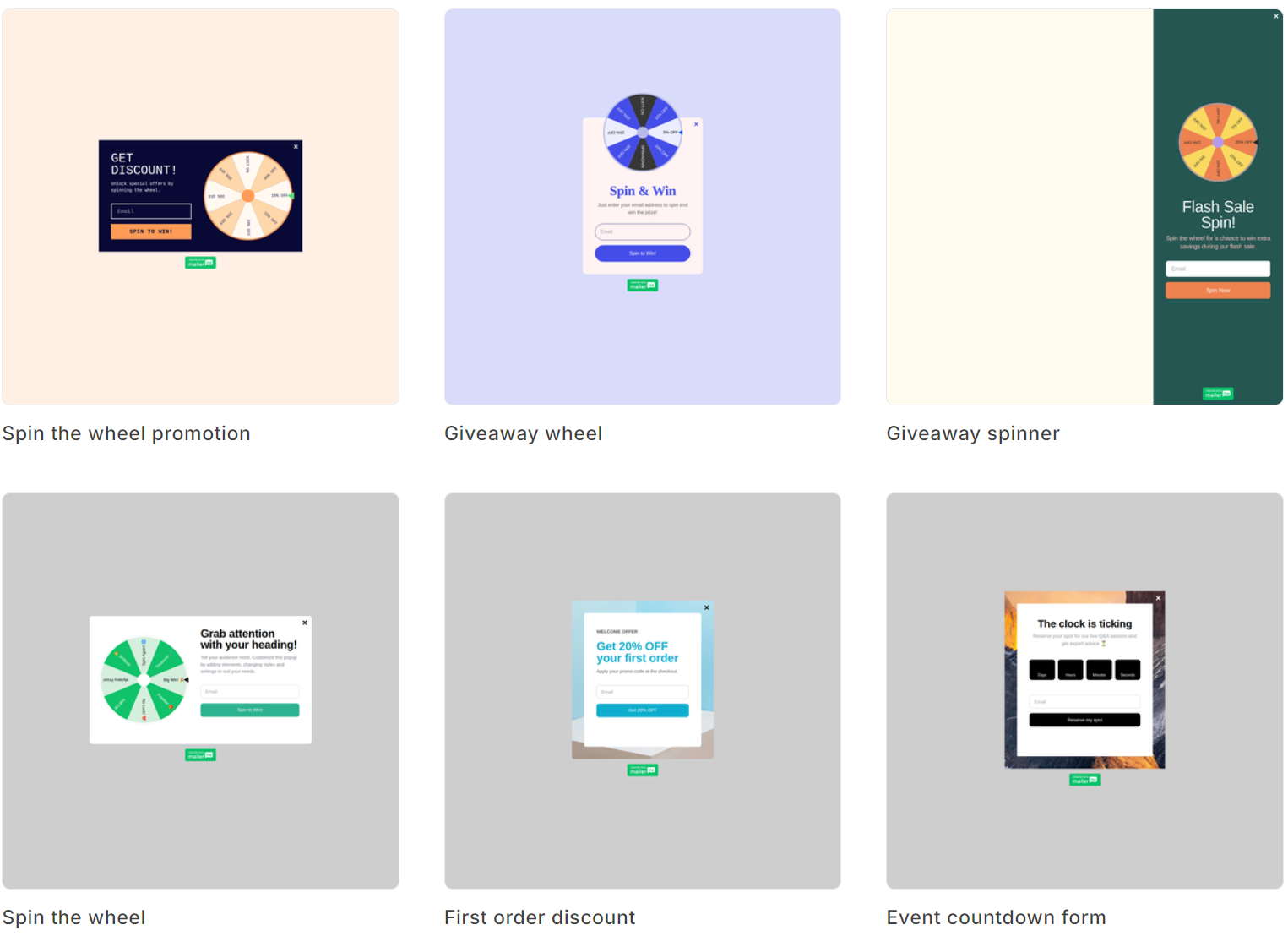
Because MailerLite supports popups in all plans, it provides opportunities to build your list at high-intent moments, such as when visitors are about to exit your store.
Its spin-the-wheel popup is a highlight, bringing gamification to your list-building efforts, and you can choose from multiple different designs:
Brevo vs. MailerLite landing pages and forms round winner
MailerLite. It gives you landing pages and popups across all plans, whereas Brevo asks you to spend at least $499/month for popups.
Deliverability — Brevo vs. MailerLite side by side
Provided you follow deliverability best practices such as maintaining your list, only sending to opt-ins, and authenticating your records, there’s little to choose between MailerLite vs. Brevo as far as deliverability goes.
Authentication
Both Brevo and MailerLite handle authentication, a crucial feature because your emails land in spam or get rejected without it.
Brevo requires three DNS records:
- A Brevo code for domain verification
- DKIM for digital signatures
- DMARC to handle suspicious messages
MailerLite uses:
- DKIM (as a CNAME)
- SPF (as a TXT record)
- A domain verification TXT record
The difference is in how they handle DMARC. Brevo includes it directly in its authentication setup. MailerLite provides DMARC documentation separately but doesn’t build it into the authentication wizard, and recommends using a DMARC consulting company to configure it.
Brevo also auto-replaces unauthenticated domains with @brevosend.com to protect your deliverability. MailerLite lets new accounts send during a 14-day trial without authenticating.
Dedicated IPs
Shared IPs are the standard for Brevo and MailerLite, as with most email tools. You can get a dedicated IP with either, giving you sole control of your sender reputation (most useful when you send high volumes and need maximum deliverability).
Brevo offers a dedicated IP as an add-on on Professional plans, and Enterprise plans get one dedicated IP by default. Unlike MailerLite, which asks you to contact sales for a price, Brevo publishes its price, which stands at $251/year/dedicated IP.
Deliverability ratings
EmailTooltester rates Brevo at 4.0/5 and MailerLite at 3.5/5 for deliverability features.
- Brevo scores higher for its authentication wizard, basic deliverability dashboard, deliverability score, and IP warmup support. It loses marks for lacking built-in list cleaning and complete SPF alignment.
- MailerLite scores well for strict anti-purchased-list policies and external list cleaning integrations, but the missing DMARC guidance and lack of a deliverability dashboard or score pulls it down.
Brevo vs. MailerLite deliverability round winner
Draw. Deliverability depends on your authentication, list cleaning activities, and sending practices. Both provide the infrastructure and features to ensure your emails reach inboxes.
CRM and contact management — Brevo vs. MailerLite features compared
You manage contacts in MailerLite under the Subscribers menu. In Brevo, you do it via the CRM menu. Brevo’s positioning as a CRM sounds fancier than MailerLite’s offering, but in practice, it’s MailerLite that offers the more intuitive dashboard:
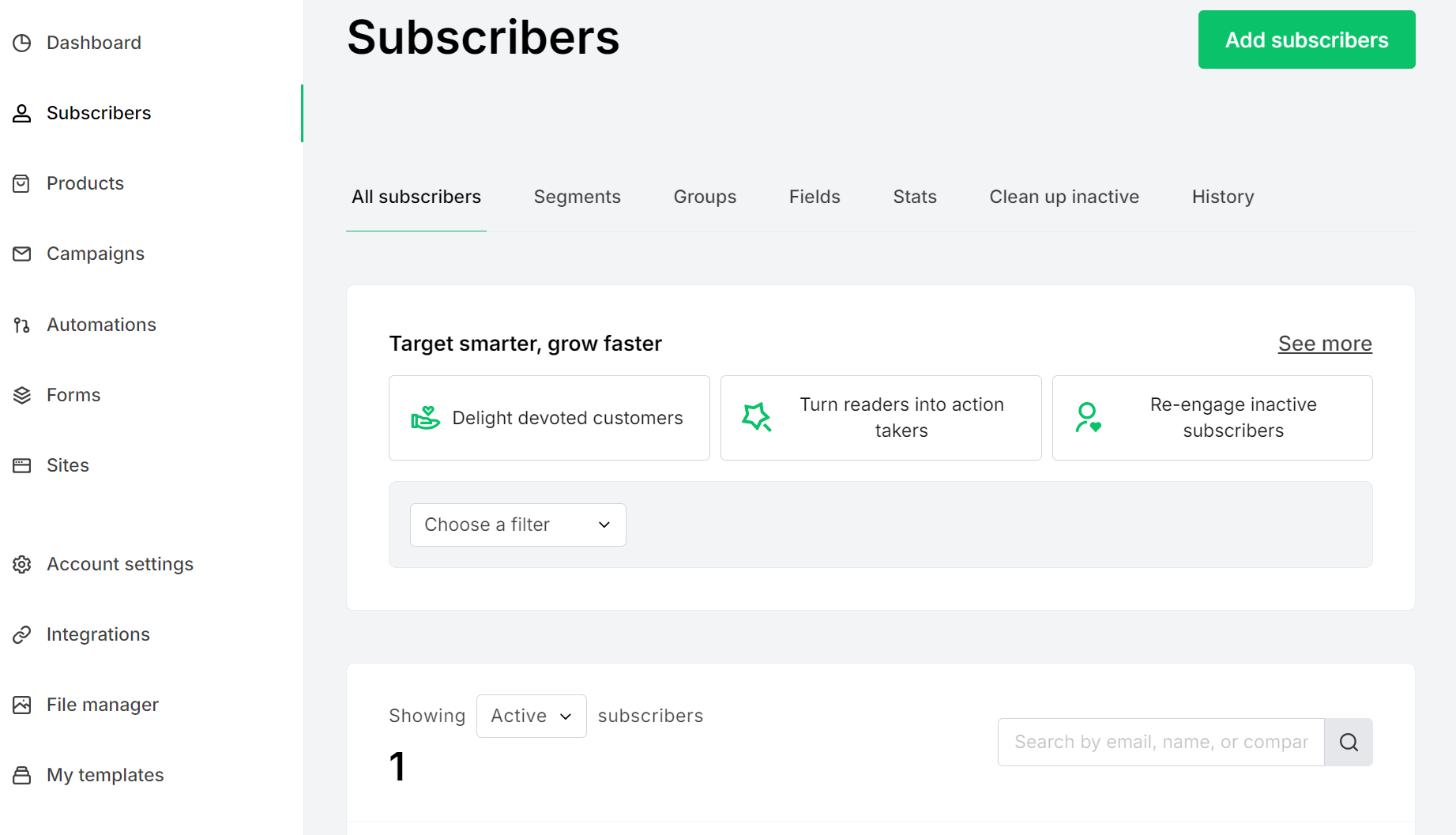
Tabs for all subscribers, segments, groups, fields, clean up inactive, and history make managing your contacts easy. It organizes your contacts into groups, which function like tags or lists in most email automation platforms.
You can split groups into equal parts, merge them, and export each as a CSV. Importing works via TXT, CSV, copy/paste from Excel, or API, with automatic field recognition.
Segments filter subscribers dynamically by engagement, location, signup date, or automation activity. Custom fields let you store additional data, as with Brevo.
MailerLite also includes an inactive subscriber cleanup tool that automatically removes disengaged contacts, keeping your list healthy without manual work.
Brevo uses folders and lists to manage contacts. Folders group lists by criteria, such as brand or region. Lists sort contacts by interests or behavior, up to 300 of each:
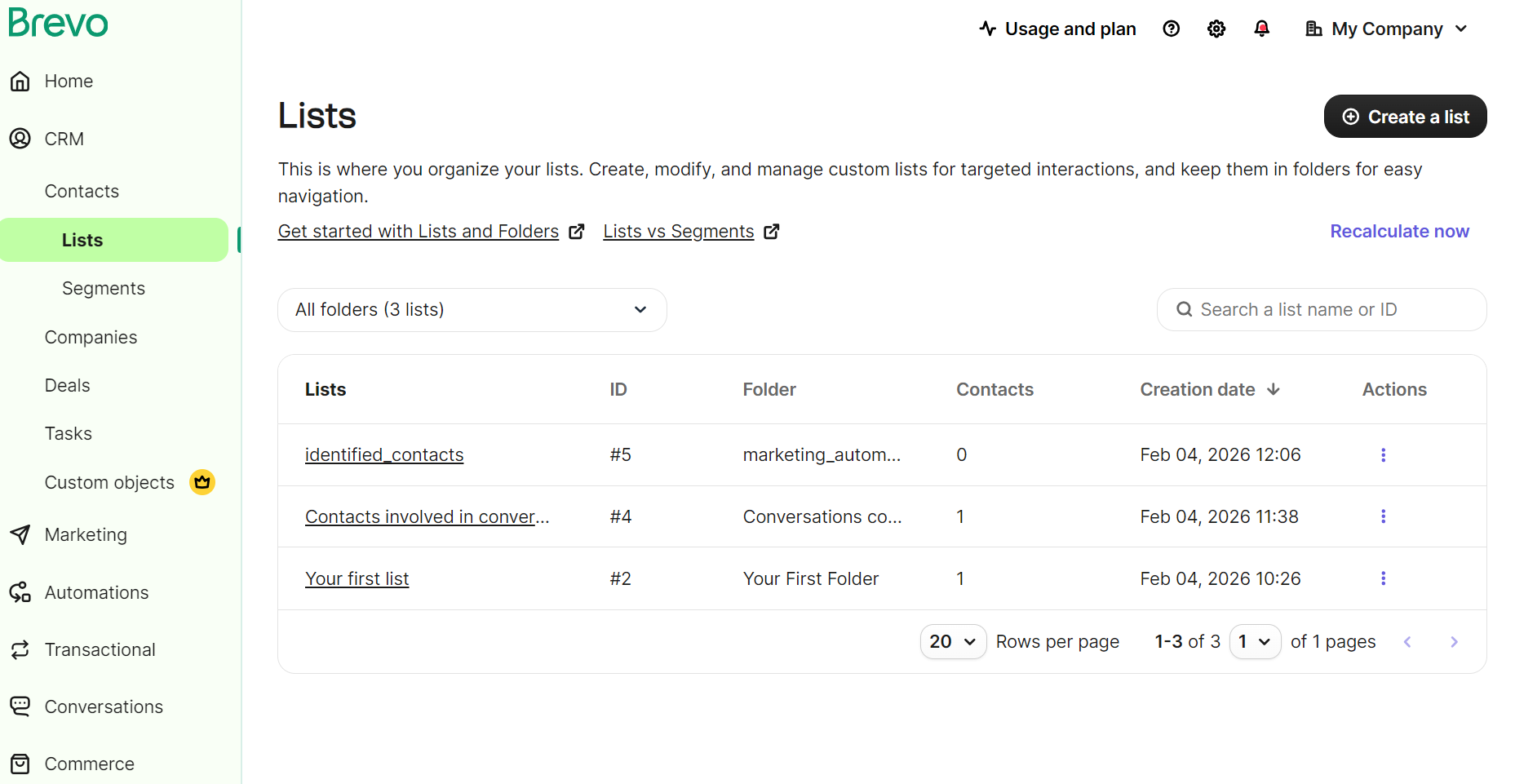
Segments sit on top of this, filtering contacts dynamically based on data or actions and updating on their own. You can create custom attributes, which store fields in addition to your customer’s name and email.
You can import contacts individually, in bulk, via integrations, or the API. Brevo deduplicates across lists automatically and lets you split segments into randomized lists for targeted campaigns, though that feature requires an Enterprise plan.
CRM features
Where Brevo pulls ahead is its built-in CRM. The free tier gives you a deal pipeline, task management, and live chat, capped at 50 deals and one pipeline.
Sales Essentials ($31/mo) unlocks unlimited deals, pipelines, and sales automation. Lead scoring lets you assign points based on actions like email opens or page visits to prioritize outreach. MailerLite has no equivalent to any of this.
Brevo vs. MailerLite CRM and contact management round winner
Brevo. It’s the only one of the two with a CRM, giving you deal pipelines, lead scoring, and sales tools that MailerLite can’t match.
SMS and multichannel marketing — how Brevo and MailerLite compare
For multichannel marketing, the best option is Brevo. All plans include SMS campaigns and access to the transactional SMS API. API access means you can trigger SMS by actions, such as order confirmations, and send them alongside email.
MailerLite also has an SMS API, but that requires a separate Starter or Professional MailerSend plan starting from $35/month.
A unique feature of Brevo is 1:1 SMS messaging, which lets you send personal SMS messages to your contacts. It requires an add-on plan, Sales Advanced, at $65/month, but if your products have a personal service, it could be worth it.
Multichannel marketing capabilities
Brevo’s multichannel automations let you combine email and SMS into single flows, and if you’re a Professional plan customer, you can also add a WhatsApp message:
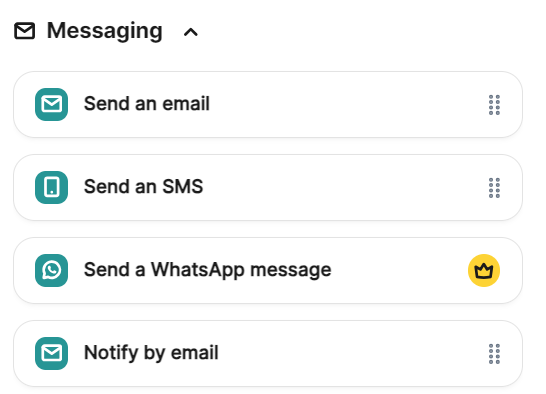
Additionally, you can build standalone email and SMS campaigns, such as newsletters and Black Friday promotions. Again, if you have the Professional plan, you can create standalone WhatsApp, mobile push, and web push campaigns.
MailerLite does not support SMS campaigns or automations. It only does email campaigns on its free plan, with paid plans letting you create RSS campaigns, too:
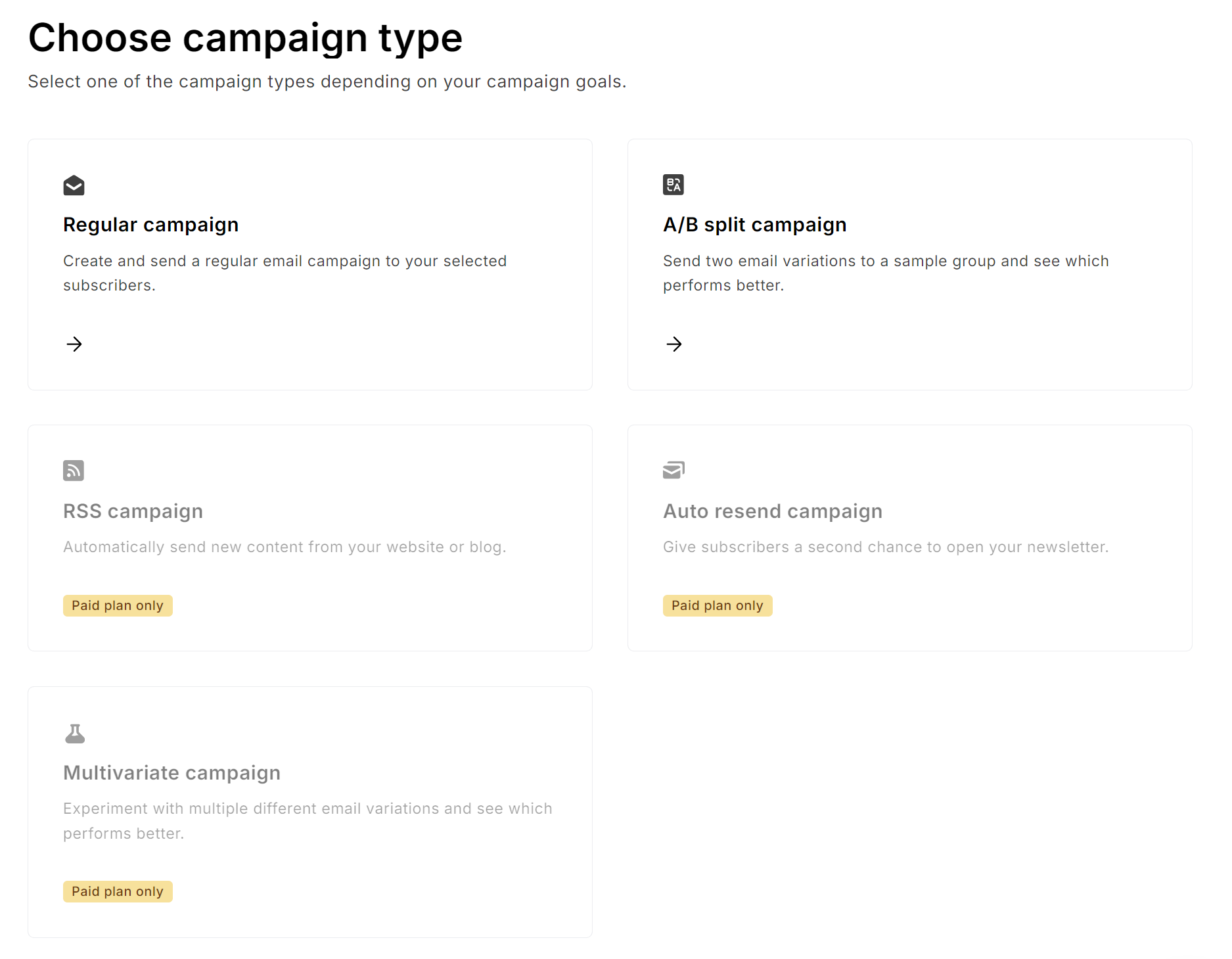
It’s clear MailerLite’s focus is on email since SMS isn’t available. Only Brevo supports it, so if SMS is a core channel, it’s your pick of the two.
Brevo lets you purchase SMS credits in bulk. A few price examples:
- 100, $1.09
- 500, $5.45
- 1,000, $10.90
- 10,000, $109.00
An even more capable platform for SMS and multichannel automation is Omnisend. All plans support multichannel automations and campaigns, with Pro plans providing bonus SMS credits equal to the price of your monthly plan.
Brevo vs. MailerLite SMS and multichannel marketing round winner
Brevo. Brevo. It’s the only one with SMS, web push, and WhatsApp built in. MailerLite is email-only, with SMS limited to a separate transactional product.
Customer support — how helpful is it when you really need it?
There’s an assumption among both Brevo and MailerLite that you’ll learn their platforms and require minimal support. Their knowledge bases are excellent, for instance, but contacting them relies on having a plan that offers human support.
Brevo support by plan:
- Free: Email support
- Starter ($9/month): Email support
- Standard ($18/month): Priority email support
- Professional ($499/month): Phone and priority email, deliverability specialist (three hours/year), digital onboarding kit plus one hour with a Brevo expert
- Enterprise: All of the above, fully guided onboarding, dedicated Customer Success Manager
MailerLite support by plan:
- Free: Email and live chat for the first 14 days, after that, you’re limited to the knowledge base and community forum.
- Growing Business ($10/month): 24/7 priority email support, no live chat
- Advanced ($20/month): 24/7 priority email and 24/7 live chat support
To summarize, MailerLite’s free plan leaves you without any human support after two weeks, whereas Brevo’s free plan keeps email support permanently.
At the top end, Brevo offers phone support and a deliverability specialist, but only on Professional. MailerLite gives you 24/7 live chat on Advanced, which is far more accessible.
A better alternative for both, if you need support, is Omnisend, which includes 24/7 live chat and email support across all plans. Its Pro plan also offers an account expert from $400.
User feedback
Brevo has 164 positive comments about customer support on G2, including:
- “Brevo’s support team has been prompt and genuinely helpful. It’s a relief knowing we won’t be stuck mid-campaign.” — Elias R.
- “Customer service is outstanding, with fast responses after contact. Implementation was hassle free. The setup process was intuitive, and features were ready to use almost immediately.” — Verified user.
However, it isn’t all positive. One customer noted, “Customer service was well below par, and promises were broken. They really can’t be trusted.”
MailerLite has 62 positive comments for its customer support on G2:
- “Step by step support is available. We use it each week, and it is super reliable.” — Verified user.
- “This is the kind of tech support I want but rarely get. There really isn’t any reason to go to other companies like MailChimp or AWeber (both of which I’ve used).” — Russell A.
Negative comments are typically around deliverability, with one customer saying, “Customer support is not good. I had issues with email deliverability that kept recurring. MailerLite would tell me the issue was resolved, but then it would break again.”
Brevo vs. MailerLite Customer support round winner
Draw. Brevo keeps free plan email support, where MailerLite cuts you off, but MailerLite offers 24/7 live chat on a far cheaper paid plan than Brevo offers phone support.
Final scorecard and verdict — Brevo vs. MailerLite, side by side
Here’s the final scorecard from our article:
| Round | Category | Winner |
|---|---|---|
| 1 | Pricing | Draw |
| 2 | Ease of use | Brevo |
| 3 | Email editor and templates | MailerLite |
| 4 | Marketing automation | Brevo |
| 5 | Ecommerce integration | Brevo |
| 6 | Landing pages and forms | MailerLite |
| 7 | Deliverability | Draw |
| 8 | CRM and contact management | Brevo |
| 9 | SMS and multichannel | Brevo |
| 10 | Customer support | Draw |
| Total | Brevo 8, MailerLite 5 (draws equal one point each) | |
| Winner | Brevo 🏆 |
Brevo bests MailerLite in five categories, MailerLite beats Brevo in two. However, the overall winner here is not necessarily the best email marketing tool for your ecommerce store. Consider the points below when choosing:
Who should choose Brevo
Your pick should be Brevo for multichannel and SMS automation and CRM features. It’s superior to MailerLite in both aspects.
Brevo is right for you if:
- Large contact lists are central to your business (100K free, 500K from $29/mo)
- Transactional email and SMS need to sit alongside campaigns without a separate product
- Deal pipelines, lead scoring, and sales automation matter to your workflow
- SMS, WhatsApp, or web push are part of how you reach customers
- Shopify is your ecommerce platform, and integration reliability matters (4.8/5 rating)
Brevo isn’t ideal if:
- A simple, minimal interface matters more than feature depth
- Template variety is a priority (Brevo offers 48 vs. MailerLite’s 108)
- A/B testing and branding removal are must-haves, but $18/month is a stretch
- Email is all you need, and CRM, SMS, and multichannel add unnecessary complexity
Who should choose MailerLite
MailerLite is your pick if you want a high-quality email builder. It’s also the best option for building popups and landing pages for free, since Brevo restricts them to its Professional plan.
MailerLite is right for you if:
- You send frequently to a smaller audience and want unlimited emails on paid plans
- Template variety and a feature-rich drag-and-drop editor matter to your workflow
- Landing pages and forms are central to how you grow your list
- You want 24/7 live chat support on an affordable paid plan
MailerLite isn’t for you if:
- You need a CRM and sales pipeline features
- You’ll use an app to integrate with Shopify or WooCommerce (MailerLite offers them, but they have poor review scores)
- SMS is a primary marketing channel
- Your customers have complex journeys, and you need email automations that target them across all touchpoints
When neither cuts it: Why Omnisend might be your better fit
MailerLite and Brevo are good enough if you’re a creator or a small ecommerce store. Building your list, running welcome series and abandoned cart emails, creating newsletters, segmenting your audience for appropriate targeting, and so on are possible with either.
However, you will outgrow them when:
- Their standard features no longer cover what you need
- Your customers take complex purchase paths that their flows can’t cover
- Your marketing strategy requires an omnichannel approach for SMS and email
Omnisend is purpose-built for online stores. It solves these challenges and offers proven results, with customers seeing an average $79 ROI for every $1 spent in 2025.
Additionally, with Omnisend, you get:
- Pre-built flows covering the 27 most common ecommerce scenarios, such as browse abandonment reminders and back-in-stock alerts
“Automations generated 30% of revenue from only 2% of sends in 2025, earning 16x more per send than scheduled campaigns. Omnisend’s template library and intuitive flow builder give you the tools to replicate these results.”
— Evaldas Mockus, VP of Marketing, Omnisend
- An AI segment builder that builds your segments for you, basically demystifying the process of adding filters and assigning contacts
- Customer breakdowns with average order value, % of returning customers, total customers, and AI lifecycle stage maps to influence your retention tactics
- Unlimited popups, flyouts, and embedded forms, giving you new ways to build your list
- Detailed reports, attributed to Omnisend, including store performance, marketing activity performance, channel performance, and deliverability
- Access to all standard features, no matter your plan, including award-winning customer service via 24/7 live chat and email
Conclusion
Our comparison ranks Brevo higher than MailerLite, beating it in five categories to two, with greater feature depth and potential use cases.
Brevo offers more for ecommerce automation than MailerLite, with more triggers and flows, CRM, and email + SMS. MailerLite is a capable newsletter tool, suited to you as a creator or service business rather than selling products online.
Both are budget-friendly with free plans and starting prices of $9/month and $10/month, but with feature caveats that could force you into expensive plans.
It’s worth exploring Omnisend as an alternative for ecommerce since it doesn’t restrict standard features and lets you combine SMS, email, and web push notifications into flows, in addition to standalone campaigns. You only pay more when your list outgrows the plan.
Join Omnisend to grow your ecommerce sales with omnichannel automations
Quick sign up | No credit card required
FAQs
Is Brevo better than MailerLite?
Brevo bests MailerLite in automation, SMS capabilities, ecommerce integration, and CRM features. MailerLite hits back with better campaigns and newsletters. If you sell online, then Brevo is the better option of the two.
Which has better Shopify integration for stores?
Brevo has better Shopify integration, with 1,740+ reviewers rating it 4.8/5, versus MailerLite’s significantly lower 2.6/5 based on 30 reviews.
Is Mailchimp or Brevo better?
Brevo’s going to be more cost-effective if you have a large list and need transactional emails, whereas Mailchimp suits you if you need landing pages and campaigns (Brevo doesn’t let you build landing pages unless you have a paid plan).
What is better than MailerLite?
Omnisend, Brevo, Klaviyo, and Sender, although they suit different needs. First, MailerLite is suitable for basic automations and campaigns. Once you need more, Brevo does it. Omnisend is your best option for selling online.
Is Brevo free to use?
Its free forever plan is free to use, for up to 100K contacts and 300 emails/day, but doesn’t allow A/B testing, popups, web push notifications, or contact scoring.
What is the best tool for email marketing?
MailerLite is decent for newsletters, and Brevo is good for creators and small stores. The win goes to Omnisend for ecommerce because of its omnichannel flows (email, SMS, web push) and faultless Shopify, WooCommerce, and Wix apps.

TABLE OF CONTENTS
TABLE OF CONTENTS


Subscribe and don’t miss any updates!
No fluff, no spam, no corporate filler. Just a friendly letter, twice a month.