Omnisend AI


 OFFER
OFFER









If you send more than 5,000 emails a day through Gmail, Yahoo, or Microsoft, this quick audit helps you stay compliant. You can run it in 10 minutes, and the downloadable PDF checklist helps you track progress step by step. For basic definitions, the comprehensive email deliverability guide (linked in the next section) has you covered.
These email deliverability best practices give you quick solutions you can implement today. For ecommerce stores, the stakes are higher, as deliverability issues first affect time-critical cart recovery and post-purchase flows.
How to use this checklist
Please note that this is a 10-minute email deliverability audit, not a comprehensive guide. You only need to check the email deliverability practices against your existing setup, spot problems, and fix them. Deliverability is important for your ecommerce brand because emails such as cart abandonment recovery and post-purchase follow-ups are highly time-sensitive. If your customers don’t get them at the right time, you miss revenue opportunities. Check out this complete guide to email deliverability for in-depth definitions and explanations.
Quick sign up | No credit card required
The 12 email deliverability best practices
These 12 steps cover your technical setup, email list hygiene, and sending behavior. These are the three main areas mailbox providers use to evaluate senders.
Use these email deliverability best practices to maintain a healthy sender reputation score.
1. Authenticate your sending domain (SPF, DKIM, DMARC)
Set up SPF, DKIM, and DMARC correctly. Gmail, Yahoo, and Outlook now expect this if you send more than 5,000 emails a day. SPF lists approved senders allowed to use your domain. DKIM signs your emails to prove they’re unchanged. DMARC tells servers what to do if checks fail. Strong email authentication is one of the email deliverability best practices that demonstrates you’re a trusted sender.
“SPF, DKIM, DMARC at enforcement, not p=none, actual quarantine or reject. Get your fundamentals locked in.”
– Jimmy Kim, ecommerce email and retention expert.
From Omnisend’s interview, “The new email deliverability rules”
Run your domain through mxtoolbox.com. Are all three protocols present and valid?
2. Use a branded sending domain
Stop sending emails from the shared domain your ESP provides. Instead, use your own custom-branded domain, like “yourstore.com.” It’s a quick way to improve your reputation and email deliverability for Shopify, WooCommerce, and other ecommerce platforms. A branded domain also appears more trustworthy to your subscribers, driving higher engagement and conversion rates.
Open the most recent campaign. Does the “From” address use your branded domain or a generic ESP one?
3. Warm up new domains and IPs before high-volume sends
Increase your sending volume gradually to build trust with ISPs. This applies if you have a new domain, a fresh dedicated IP, or an old, dormant account. Blasting thousands of emails suddenly can land you in spam folders or blacklists. Never try to warm up your email domain during huge sales events like Black Friday, as the volume can trigger spam filters.
When was the last time you used a new sending IP or domain? Did you ramp up your email volume slowly or jump to full volume immediately?
4. Build your list with double opt-in and form validation
Always send a confirmation email when a visitor signs up for your newsletter. It’s a core part of email deliverability best practices that prevents fake or mistyped addresses from ending up on your list. Add a CAPTCHA or a honeypot to block automated bot signups as well. You can skip double opt-in for cart recovery emails, since you already have a transactional relationship with the shopper.
Here’s how you can set up double opt-in using Omnisend:
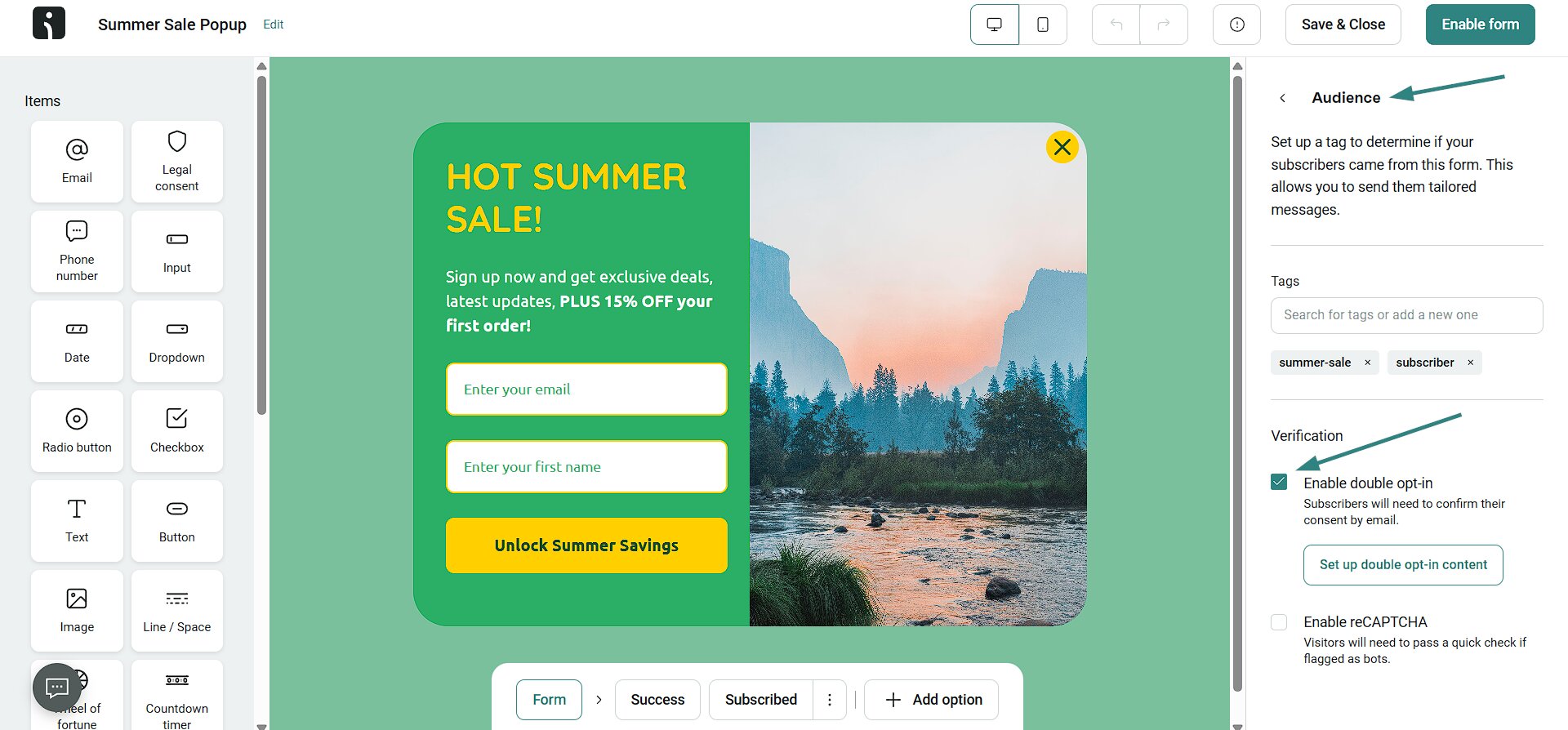
Check one of your signup forms. Is double opt-in active? Do you have bot protection in place?
5. Segment by engagement and apply a sunset policy
Divide your list into active (0–30 days), passive (30–90 days), and dormant (90+ days) users. Then send re-engagement campaigns to dormant subscribers. If they remain inactive, remove them from your list. It’s one of the most effective ecommerce email deliverability practices for keeping your email list clean and improving engagement.
This example from Omnisend shows two subscriber segments based on email opens and order placement:
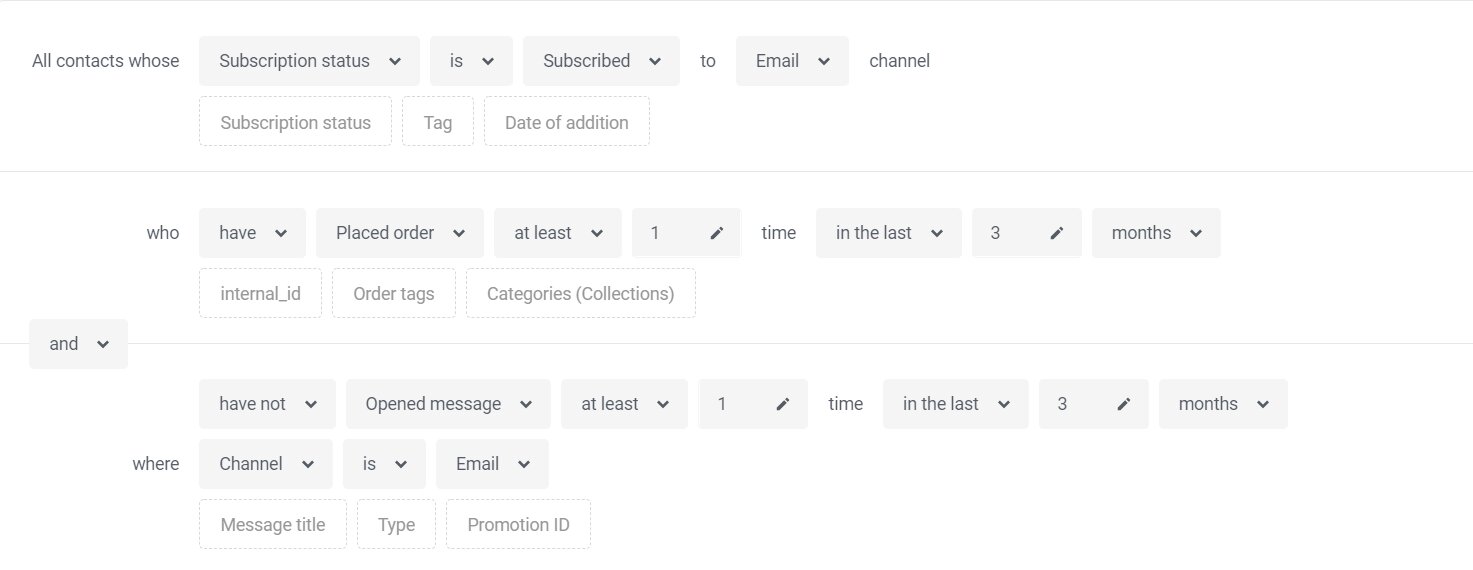
What share of your subscribers opened an email in the last 90 days? If it is under 50%, your sunset policy needs to be tightened.
6. Plan for Black Friday and seasonal volume spikes
If your domain is new, a sudden surge in email volume during BFCM can cause your messages to be marked as spam. One of the BFCM deliverability best practices is to start preparing early. Begin ramping up your volume four to six weeks before the event. Send to subscribers who engage the most with your emails first to build trust with providers.
Compare your planned BFCM volume to your normal November sends. If it’s three times as much, you should already be ramping up.
According to a recent study, 20.4 billion emails were sent during the Black Friday week in 2025.
7. Separate transactional emails from marketing emails
It’s a smart move to keep your transactional emails (like receipts and password resets) separate from your marketing emails. You can do this by using a different subdomain or IP address for each type. It’s among the ecommerce email deliverability best practices that can improve inbox placement. Separation ensures that critical transactional emails still reach your customers even if promotional campaigns are blocked.
“Shipping notifications and Black Friday blasts sending from the same place? No. Split them. send.brand.com for marketing, notify.brand.com for transactional.”
– Jimmy Kim, ecommerce email and retention expert.
From Omnisend’s interview, “The new email deliverability rules”
Check out this simple transactional vs. marketing email domain structure:
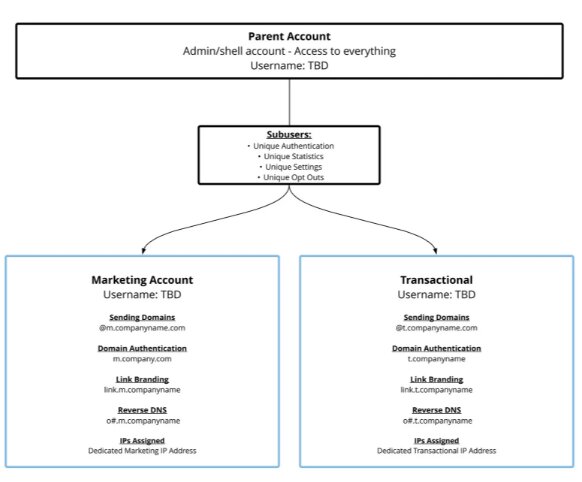
Do your transactional and marketing emails use the same domain or IP address? If yes, split them.
8. Keep your text-to-image ratio balanced
If you’re wondering what affects email deliverability, your text-to-image ratio is one factor. A good rule of thumb is to ensure at least 60% of your email is text. While pretty photos help sell products, Gmail may classify image-heavy emails as “Promotions.” Always add alt text to each image and keep the total size under 1MB. These email deliverability best practices make your emails more likely to land in the inbox.
Check out the ad below:
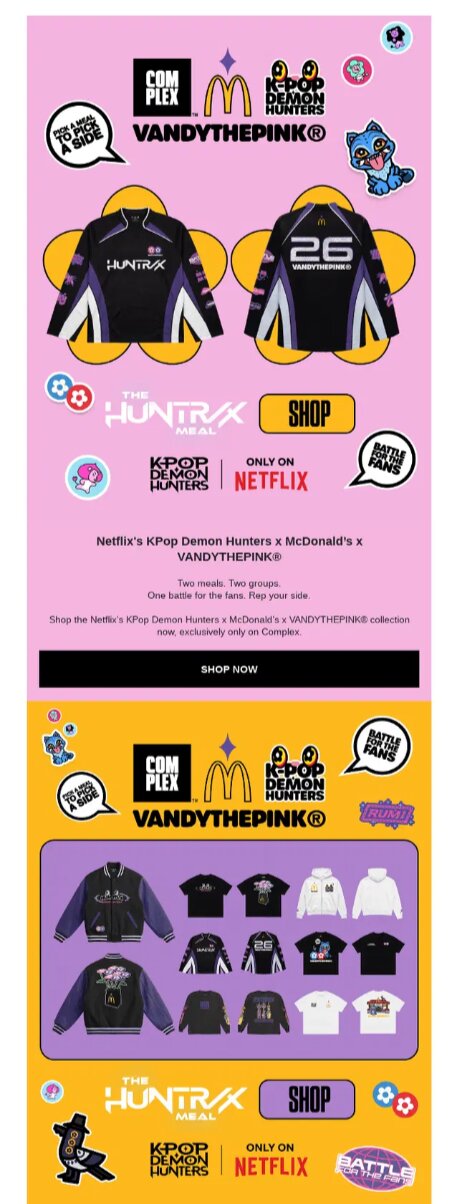
In contrast, this email example from Hello-Klean maintains a balanced text-to-image ratio:
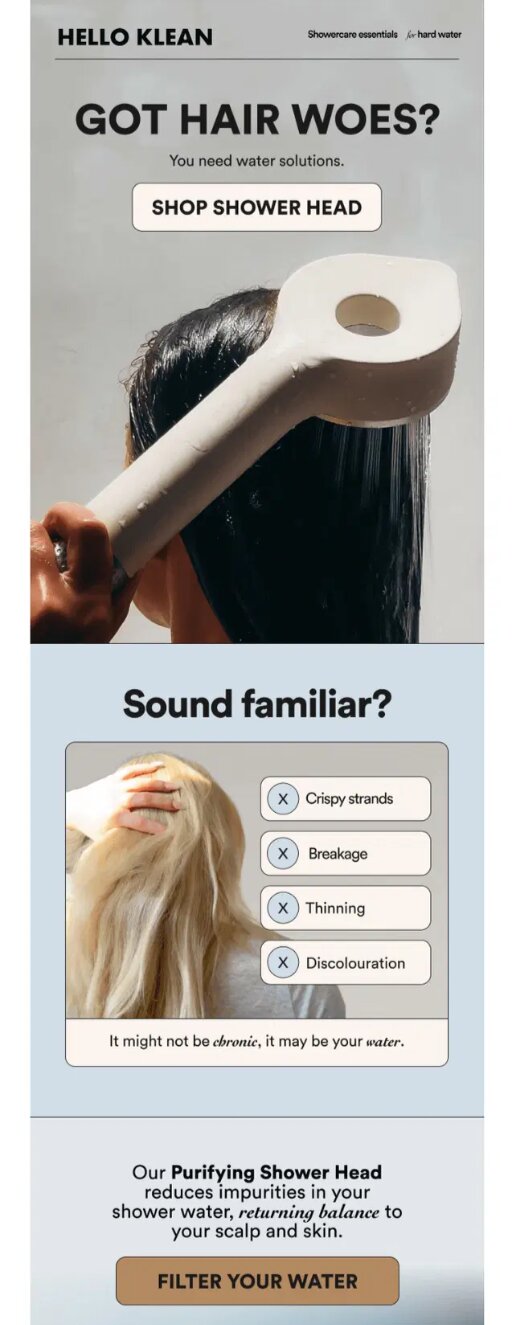
Open your last marketing campaign and hide the images. Can you still understand the message from the text only?
9. Honor unsubscribes with a one-click option
Google and Yahoo require high-volume senders to include a one-click (RFC 8058) unsubscribe header in every message. The unsubscribe process should work instantly, without extra steps. If you add a tiny unsubscribe link in the footer, customers will struggle to find it and instead mark your email as spam. Simple exits improve trust and support better email deliverability best practices.
Send a sample email to your personal Gmail account. Do you see a visible “Unsubscribe” link right next to the “From” address?
10. Monitor sender reputation weekly with Postmaster Tools
Check your email sender reputation every week. Use free Google Postmaster Tools to track Gmail-specific metrics like domain/IP reputation, delivery errors, and spam rate. Your ESP dashboard and third-party tools, like Sender Score, also provide additional insights. Sender reputation can drop quickly, even if your email delivery rate is high. Consistent tracking answers questions such as “What is a good email deliverability rate?” and helps you stay within safe ranges.
Here’s how sender reputation insights appear on Omnisend’s deliverability dashboard:
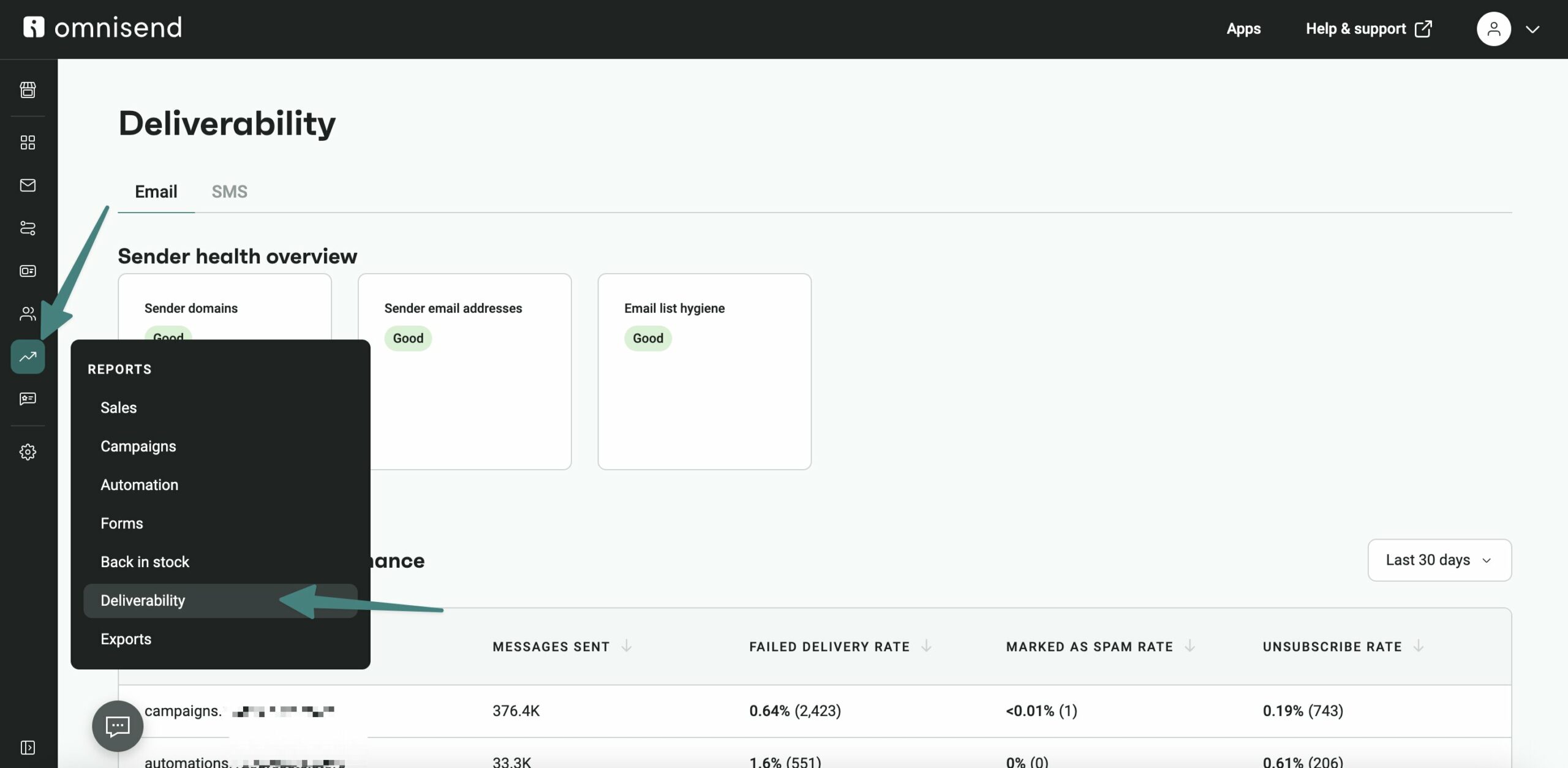
When was the last time you checked Google Postmaster Tools? If never, set it up before you complete this checklist.
11. Avoid spam traps and never buy lists
No matter how fast you want to grow your store’s subscriber base, never buy or rent email lists. These lists come with spam traps — old or inactive addresses that email providers use to catch bad senders. Even one hit can land you in the spam folder, or worse, on an email blacklist. Effective email deliverability tips for avoiding spam traps include focusing on organic growth and regularly cleaning your list.
When did you last run an email blacklist check or validate your list? When did you last remove users who’ve been inactive for 12+ months?
12. Test deliverability before every major send
Before you send major BFCM or product-launch campaigns to your entire list, run tests. Use seed testing tools like Mail-tester, GlockApps, or your ESP’s built-in pre-send checks. It’s among the email deliverability best practices that show whether your messages are heading for the inbox or the spam folder. With inbox placement benchmarks at 87.2% for Gmail and 75.6% for Microsoft, pre-send testing reduces the risk of landing in the junk folder.
Omnisend lets you preview and test your email marketing campaigns, as shown below:
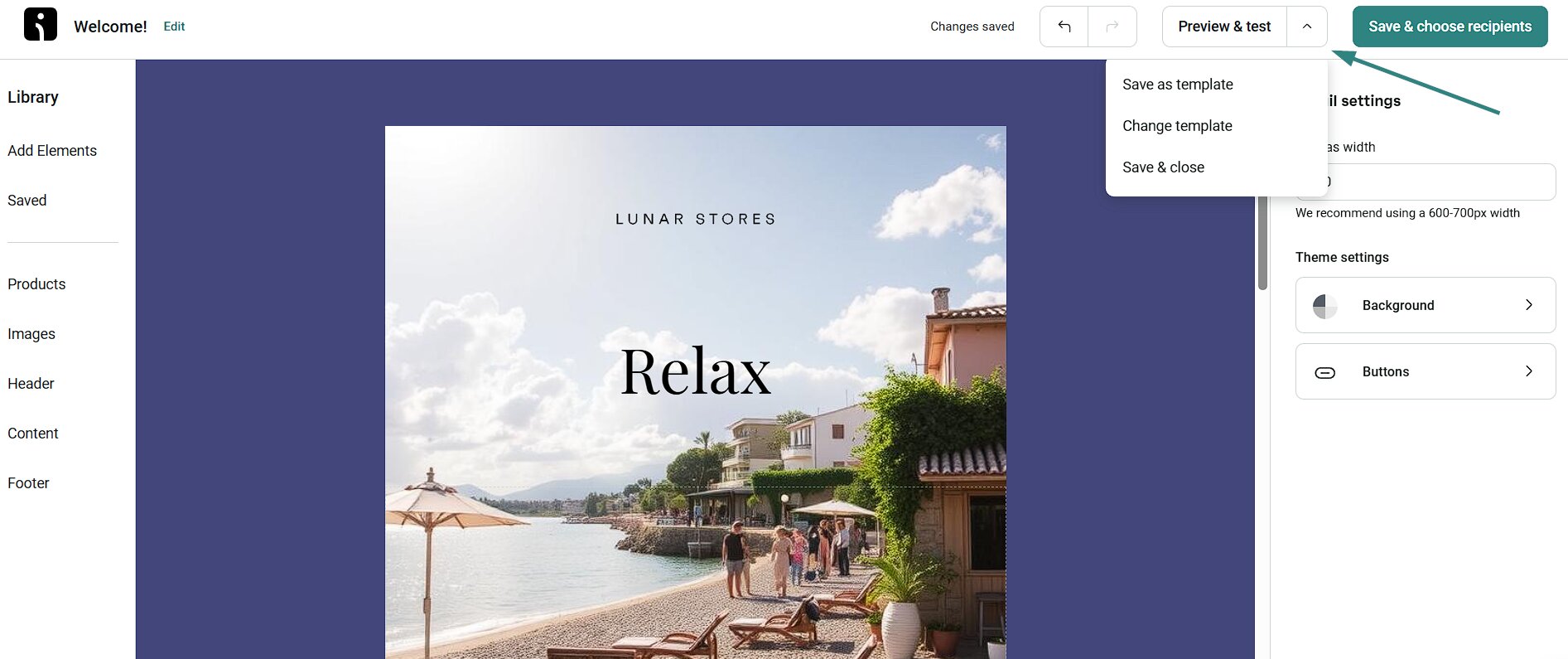
For your last three campaigns with over 50,000 recipients, did you run a test before sending? If you didn’t, make a “no-exceptions over 50K” rule now.
Audit your setup: 5 common ecommerce mistakes
Many ecommerce brands follow basic email deliverability best practices, but still miss everyday issues that affect inbox placement. Check yourself against these common mistakes to improve deliverability.
1. Sending welcome emails before list verification is complete
- Consequence: Fake, mistyped, or bot-generated addresses enter your flow, which increases bounce rates and reduces trust with ISPs
- Fix: Wait until your signup form finishes the double opt-in confirmation steps before sending your message
2. Mailing dormant subscribers during BFCM
- Consequence: Sending promo campaigns to inactive users during busy sales periods can trigger spam filters and damage your sender reputation
- Fix: Email deliverability best practices include removing inactive contacts and warming up your sending volume before BFCM
3. Using affiliate-tracker URLs
- Consequence: Spam filters often flag tracking links, which is a major reason why emails go to spam
- Fix: Limit unnecessary redirects and use trusted tracking domains connected to your own ecommerce store
4. Switching ESPs without warming up your new setup
- Consequence: Blasting your full list immediately after migrating to a new platform destroys your reputation with mailbox providers
- Fix: Send small batches to your most engaged contacts first to show inbox providers that you follow email deliverability best practices
5. Using the same domain for transactional and marketing emails
- Consequence: If your marketing emails get blocked, customers will never receive important order confirmations, receipts, or password resets
- Fix: Use separate subdomains or IP addresses for transactional and promotional email campaigns
Quick sign up | No credit card required
Frequently asked questions
Do transactional emails affect my marketing email deliverability?
Yes. When transactional and marketing emails use the same domain, complaints, bounces, and authentication problems affect both streams. Reliable email deliverability best practices recommend separate subdomains. Shopify and BigCommerce often send transactional emails through platform-controlled domains, which adds some protection.
How long does it take to fix poor deliverability for an ecommerce store?
Technical fixes, such as authentication and configuration updates, can improve results within one or two weeks. Reputation repair usually takes 30–90 days of following email deliverability best practices. For ecommerce stores, start fixes at least 90 days before BFCM. Waiting until October leaves too little time for recovery.
Got more questions? See our comprehensive email deliverability guide.