Omnisend AI


 OFFER
OFFER










Klaviyo SMS is a text messaging service available to all Klaviyo customers. It allows you to create standalone campaigns and multichannel flows that combine SMS with email.
We tested Klaviyo ourselves and focused on what matters most: features, pricing, limitations, and the Omnisend comparison. All the details are accurate as of August 2026.
Klaviyo offers SMS in a set list of countries and prices it per message, while Omnisend also bundles email and SMS but presents pricing and support more simply. That makes the choice less about “does it work?” and more about “does it fit how your team works?”
Check out this video for a quick comparison:
Quick sign up | No credit card required
What is Klaviyo SMS?
Klaviyo SMS lets brands send text messages inside Klaviyo’s email marketing platform. It is one channel inside a much bigger system.
Ecommerce brands use it for one-time SMS campaigns and for automated flows. These can include cart reminders, product drops, and post-purchase messages.
It also works well in mixed email and SMS journeys. A brand can use both channels together to reach customers at the right time.
Klaviyo SMS marketing is primarily built for brands that already use Klaviyo, or for those looking for a single platform to manage email and SMS.
Klaviyo SMS pricing: How it works
SMS in Klaviyo requires an active monthly plan; it can’t be bought without one. The Free plan includes $5 of mobile messages/month but doesn’t allow buying more, so a paid plan is the minimum spend on top of whatever you put toward SMS.
Klaviyo SMS pricing for new customers is based on a per-message rate, not a flat price per text. The rate covers SMS and MMS sends and changes by country and message type.
Klaviyo’s email pricing depends on your list size, so the bigger your list, the more you’ll pay. For up to 500 people, you can start as low as $20.
Now, if you want to add SMS to your plan, you’ll have to pay more. The price will depend on:
- The volume of messages you want to send
- The regions you want to target
- The type of messaging services you want (SMS, WhatsApp, MMS)
Note that one U.S. MMS costs roughly 3× one U.S. SMS, since Klaviyo prices each message type at its own per-send rate.
Klaviyo pricing also changes by country with different per-send rates. 1,000 SMS sends cost roughly:
| Country | Cost per 1,000 SMS sends |
|---|---|
| U.S. | $15 |
| Canada | $18 |
| Australia | $29 |
- $15 in the U.S.
- $18 in Canada
- $29 in Australia
Here’s how the structure varies by country:
- U.S.: Baseline rate
- Canada: Roughly 1.5× the U.S. rate
- Australia: Roughly 2.5–3× the U.S. rate
Here’s an example of the price you will need to pay for a 500-person email list and 1,000 U.S. SMS sends:
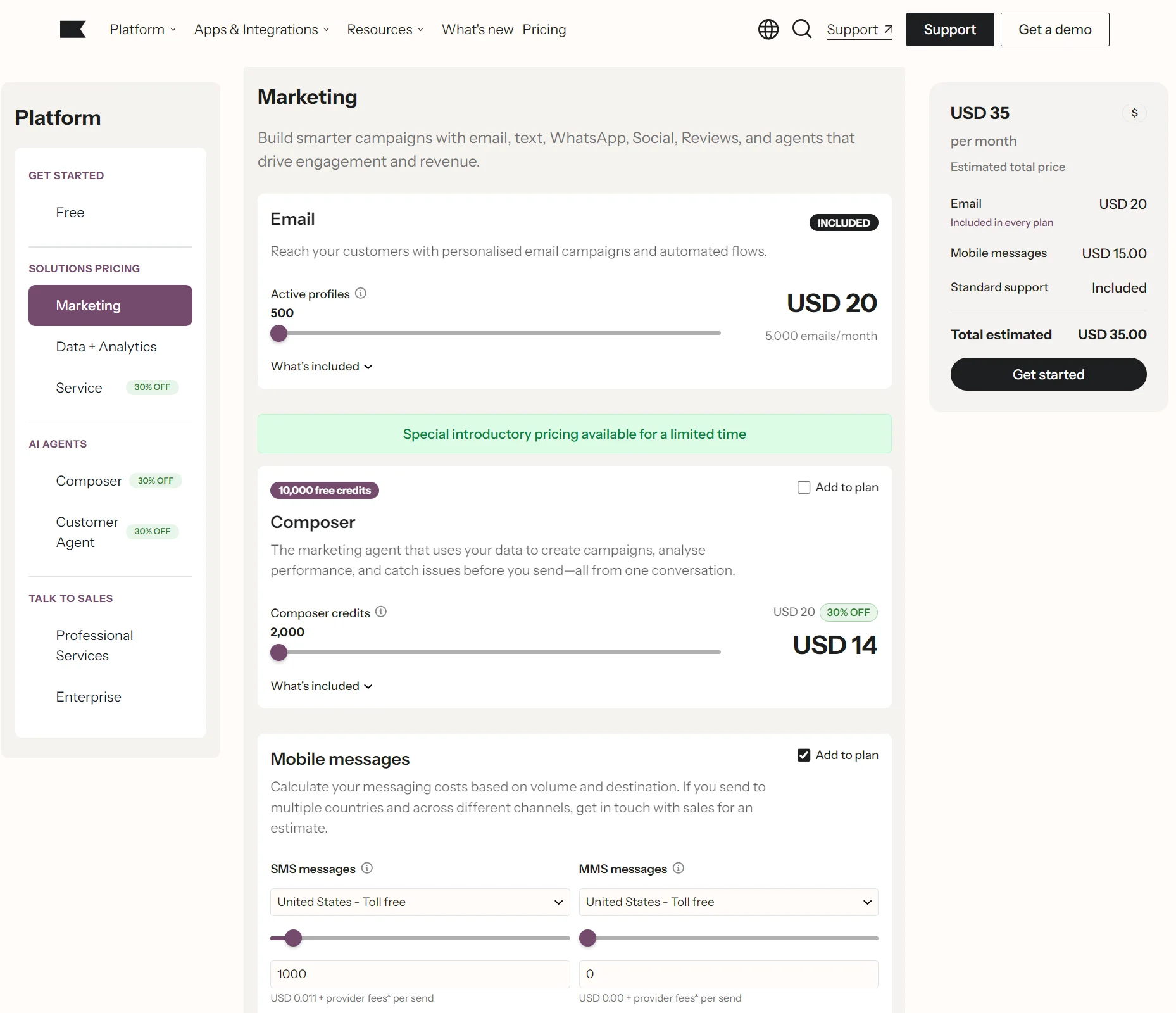
*Pricing verified from Klaviyo’s website in August 2026.
Now, let’s see how much it will cost for different mobile message volumes while keeping the email plan at $20. These are the combined prices:
| Monthly SMS volume | Combined cost (email + SMS) |
|---|---|
| 5,000 | $70 |
| 10,000 | $125 |
| 20,000 | $240 |
- 5,000: $70
- 10,000: $125
- 20,000: $240
Overall, the Klaviyo SMS pricing can climb quickly as you scale. You may see low starting prices, but they compound when you start adding volume.
Note: Klaviyo resets your mobile messaging balance at the end of each billing period with no rollover. You’re paying for a set monthly capacity, so if you underuse it, that spend is simply lost rather than carried forward.
So, calculate costs based on your sending volume requirements, or you might be blindsided by unexpected costs.
Klaviyo SMS pros and cons
| Pros | Cons |
|---|---|
| Segmentation on behavior, purchase history, and customer lifetime value (CLV) | Not a standalone product; requires an active Klaviyo plan |
| Native email + SMS workflows in a single platform | Coverage of only 22 countries as of mid-2026 |
| MMS support (U.S., Canada, and Australia) | Per-message pricing tied to your wider plan |
| Transactional SMS capability | Mobile messaging balance doesn't roll over at month's end |
| Smart Sending to prevent over-messaging (24-hour default window) | MMS throughput limits; campaigns can time out after around four hours |
| Pre-built automation flows (cart abandonment, browse abandonment, post-purchase, back in stock) | Learning curve for automation setup |
| No weekend live chat on standard plans |
Klaviyo SMS features
Klaviyo SMS features cover SMS campaigns, SMS automation, segmentation and personalization, reporting and analytics, list growth, and MMS support.
We’re breaking down the main features based on hands-on use, not just the product menu. So we’ll point out what felt simple, what needed extra work, and what felt more limited than expected.
SMS campaigns
Building one-off SMS campaigns in Klaviyo is quite easy. We were able to build a one-off message, pick a list or segment, choose when it should go out, and complete the setup with minimal hassle.
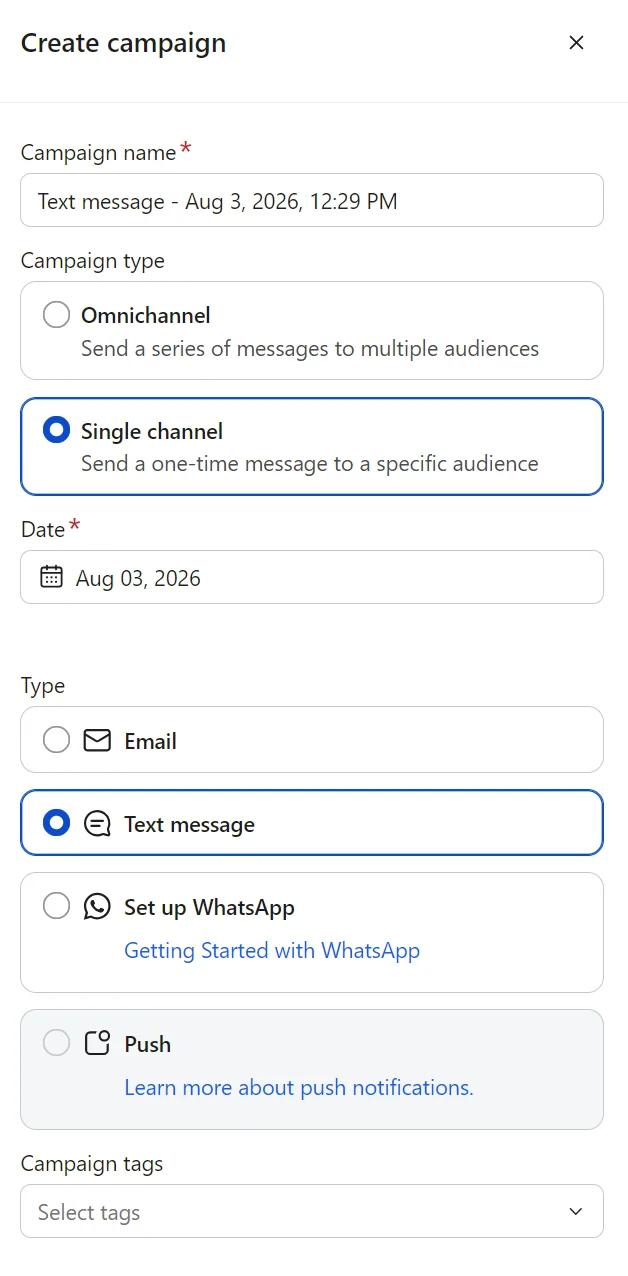
The audience targeting was one of the better parts. We could narrow the send based on lists and segments, which helped the message feel more personalized and less like a blast.
Inside the SMS builder, we liked that Klaviyo showed a live preview of the text message for both iOS and Android devices.
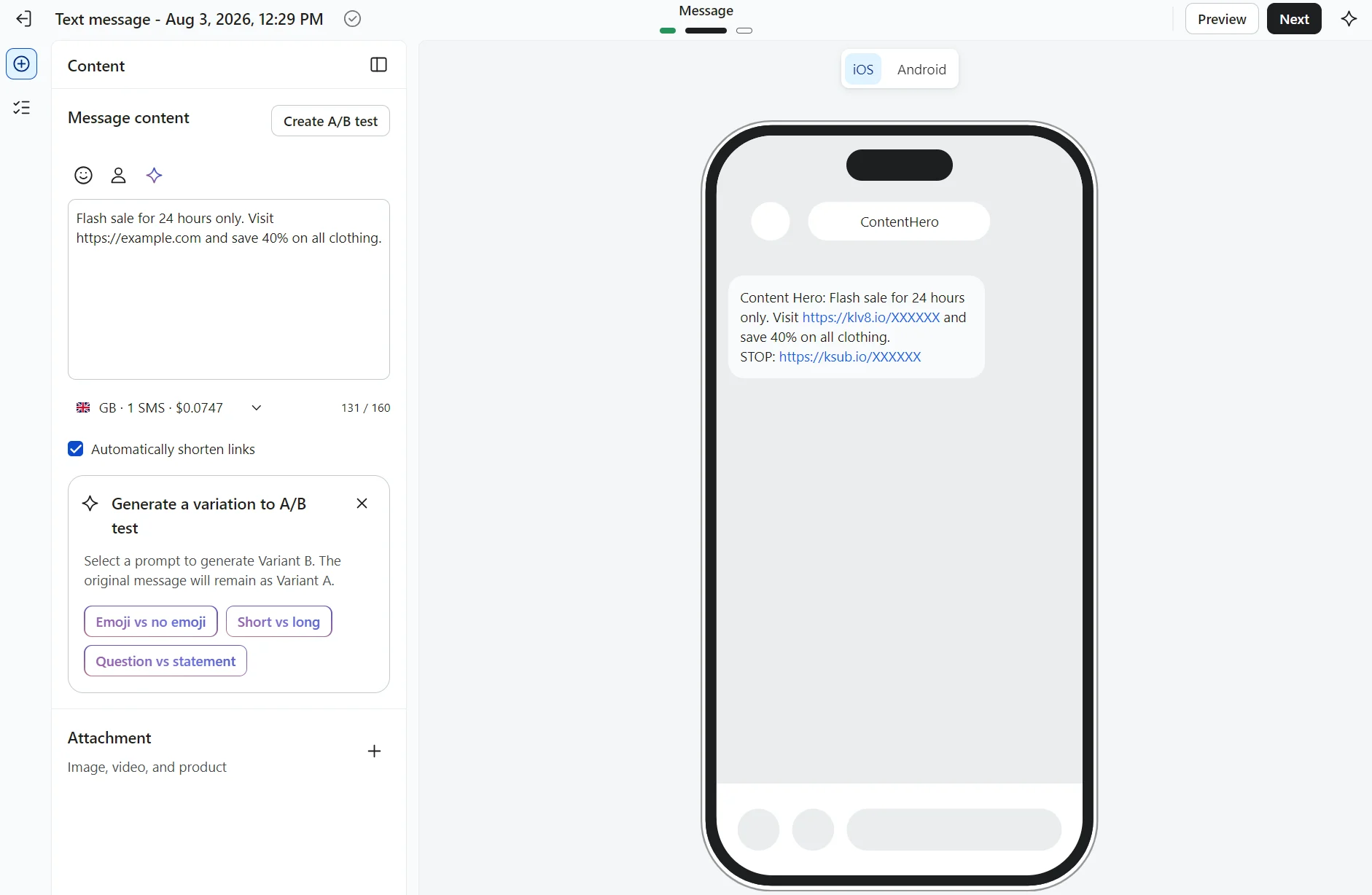
We were able to use customer data in the text, and the segment tools gave us a cleaner way to target the campaign rather than sending a flat blast. That lines up with Klaviyo’s focus on advanced segmentation for targeted messages.
For bigger sends, throughput became something to watch. Branded sender IDs, toll-free numbers, and long codes send at 10–25 messages per second. Also, Klaviyo SMS recommends using short codes once campaigns reach 30,000+ recipients.
So the default setup is fine for smaller sends, but not ideal if speed at scale is the goal.
SMS automation
Klaviyo’s automation setup goes further than its basic campaign tools. We built workflows that combined email and SMS in a single flow, so the whole journey connected rather than running as separate sends.
It has several useful SMS automation workflows. We saw the usual ones like cart abandonment, browse abandonment, and post-purchase, which cover a lot of the basics right away. Klaviyo also has pre-built flow options for things like back in stock.
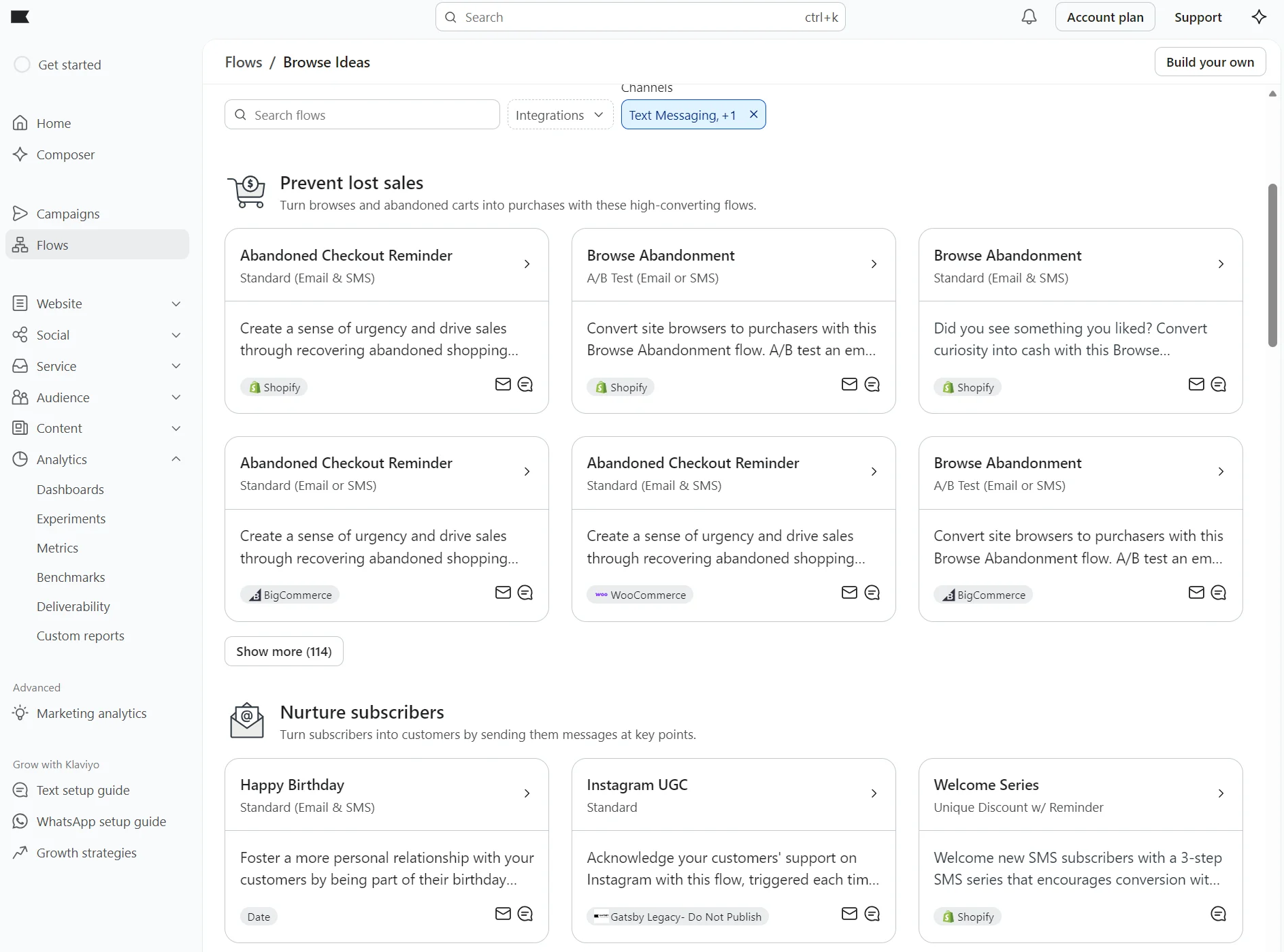
The trigger setup is done for you in pre-built flows, but it still needs review. We found that timing mattered a lot, especially when one message followed another too quickly.
That was the recurring theme with SMS automation. It does the job, but setup isn’t plug-and-play. We had to test the flow logic and preview messages before trusting them, especially where a flow depended on customer behavior or event data.
Klaviyo transactional SMS is also available for brands that need order updates, shipping notifications, and other non-promotional messages.
During testing, we found that transactional and marketing SMS are managed within the same ecosystem, although consent requirements differ. You can combine marketing automation with operational customer communications without relying on a separate SMS platform.
Overall, we can’t fault it for features, but it’s not as easy to use as some other email and SMS marketing tools like Omnisend.
Segmentation and personalization
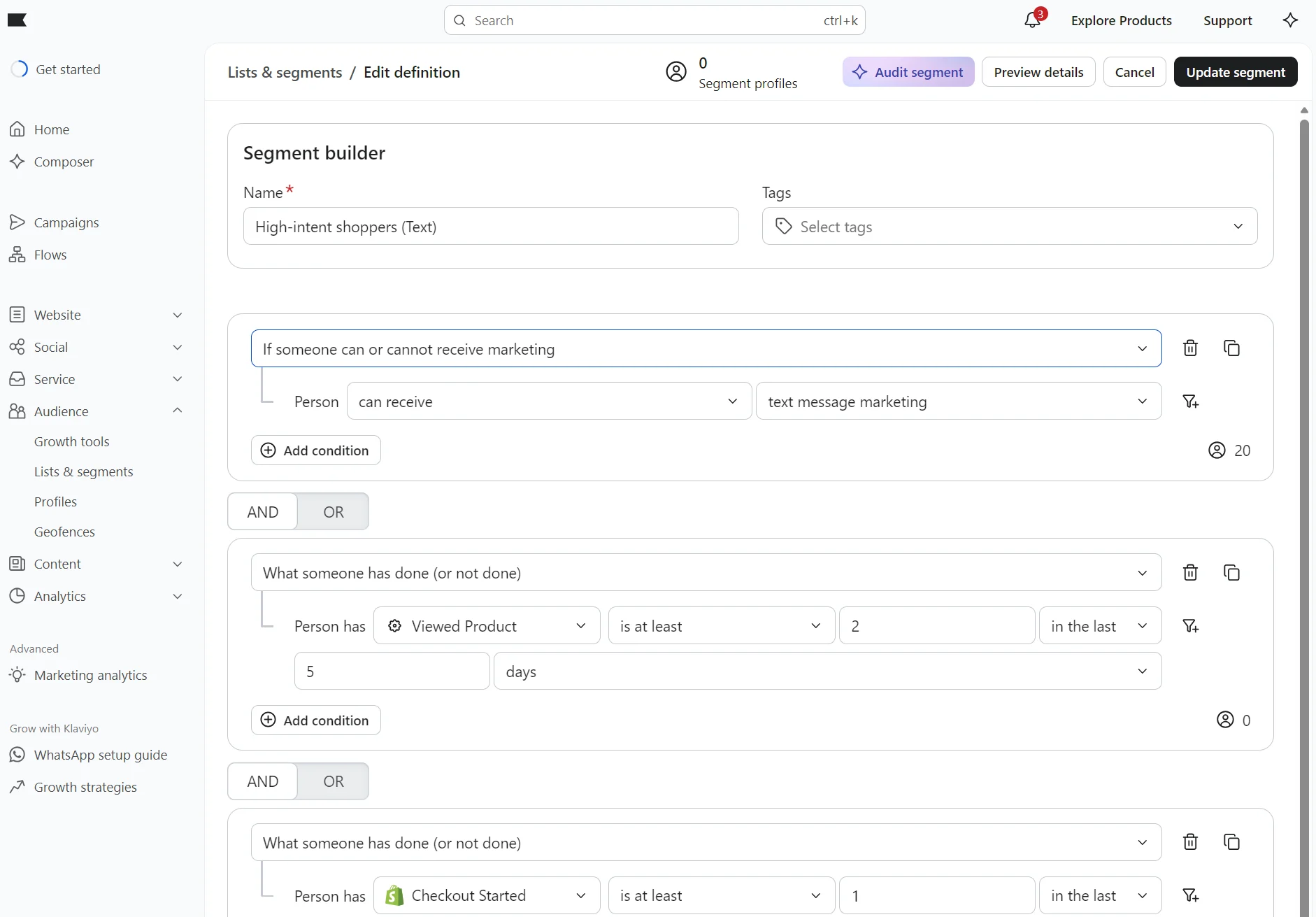
Segmentation proved to be one of the best features of Klaviyo SMS. We were able to target people based on behavior, purchase history, and past interactions with messages.
Segments can also be built around website visits, opens, CLV, and past purchases, so there’s no shortage of options. It might get a bit overwhelming for first-time users, but once you’re familiar with the setup, there’s minimal management burden.
Personalization is also simple. We could drop in dynamic fields such as a first name, a product name, or a discount code without much trouble.
We also liked that discount codes could be inserted directly into the message. Klaviyo supports unique coupon codes in SMS and MMS, which is useful when we want the text to do more than just notify. It can also push a sale or offer right away.
Subscriber list growth tools
Klaviyo gave us several ways to grow an SMS list. The setup felt most natural when we used sign-up forms. We saw Smart Opt-in, tap-to-text, a plain phone number field, subscribe links, checkout consent, and more. So, there was no shortage of entry points.
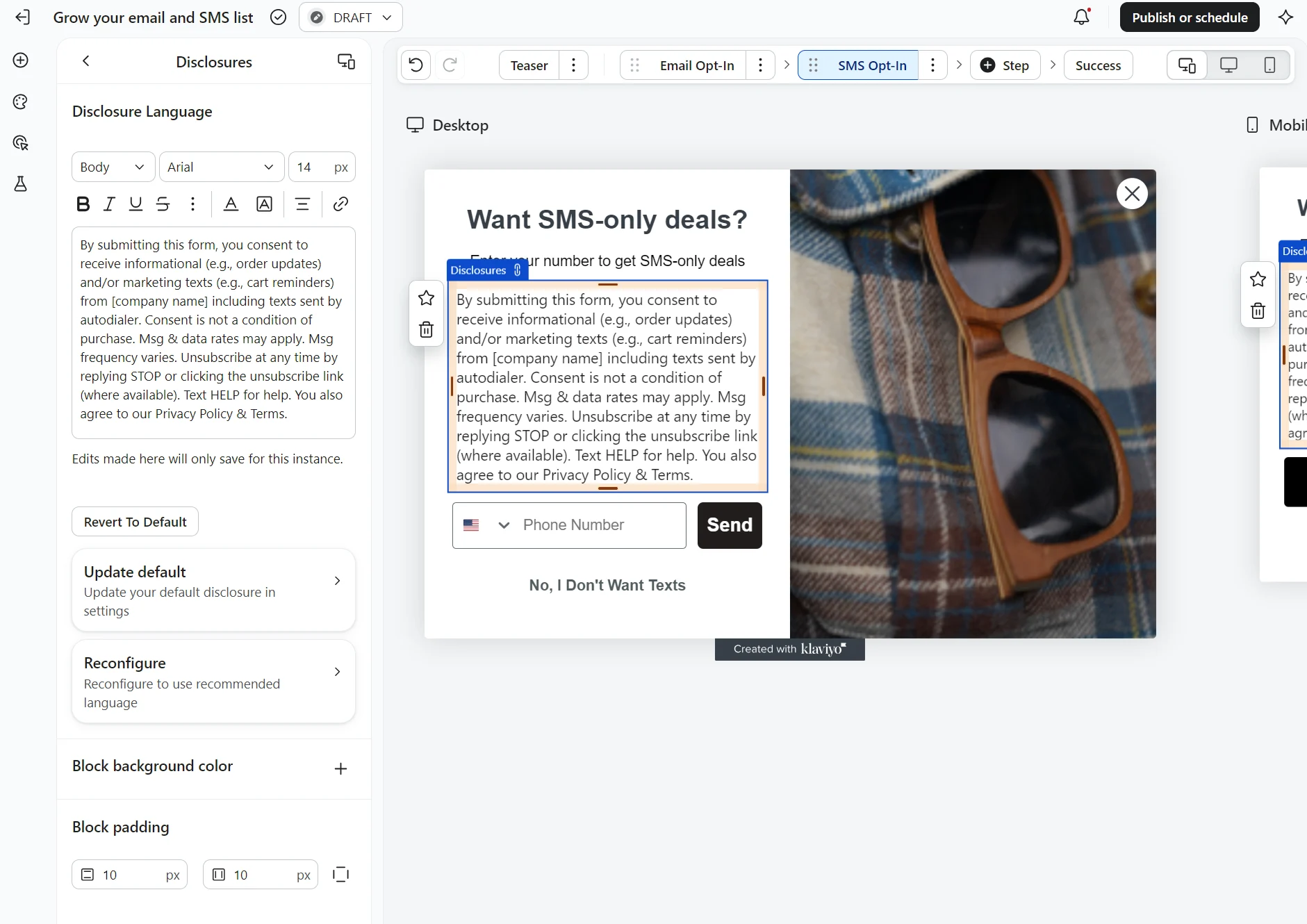
What made the forms useful was their flexibility. We could use dynamic blocks to show different opt-in methods on mobile and desktop. This made the form feel more practical across devices.
What stood out was how Klaviyo handled consent. It required SMS consent to be collected separately from other channels and tracked opt-in on the profile. That made it easier to see when and how someone subscribed, which is important for compliance.
That mattered because SMS consent is not something you want to guess about. Klaviyo’s setup made it clear that a person had to explicitly agree to receive texts, which is what we would want from a compliance standpoint.
MMS support
We tested MMS by adding images and GIFs to messages. The switch from SMS to MMS was automatic. The setup felt simple and required no extra steps.
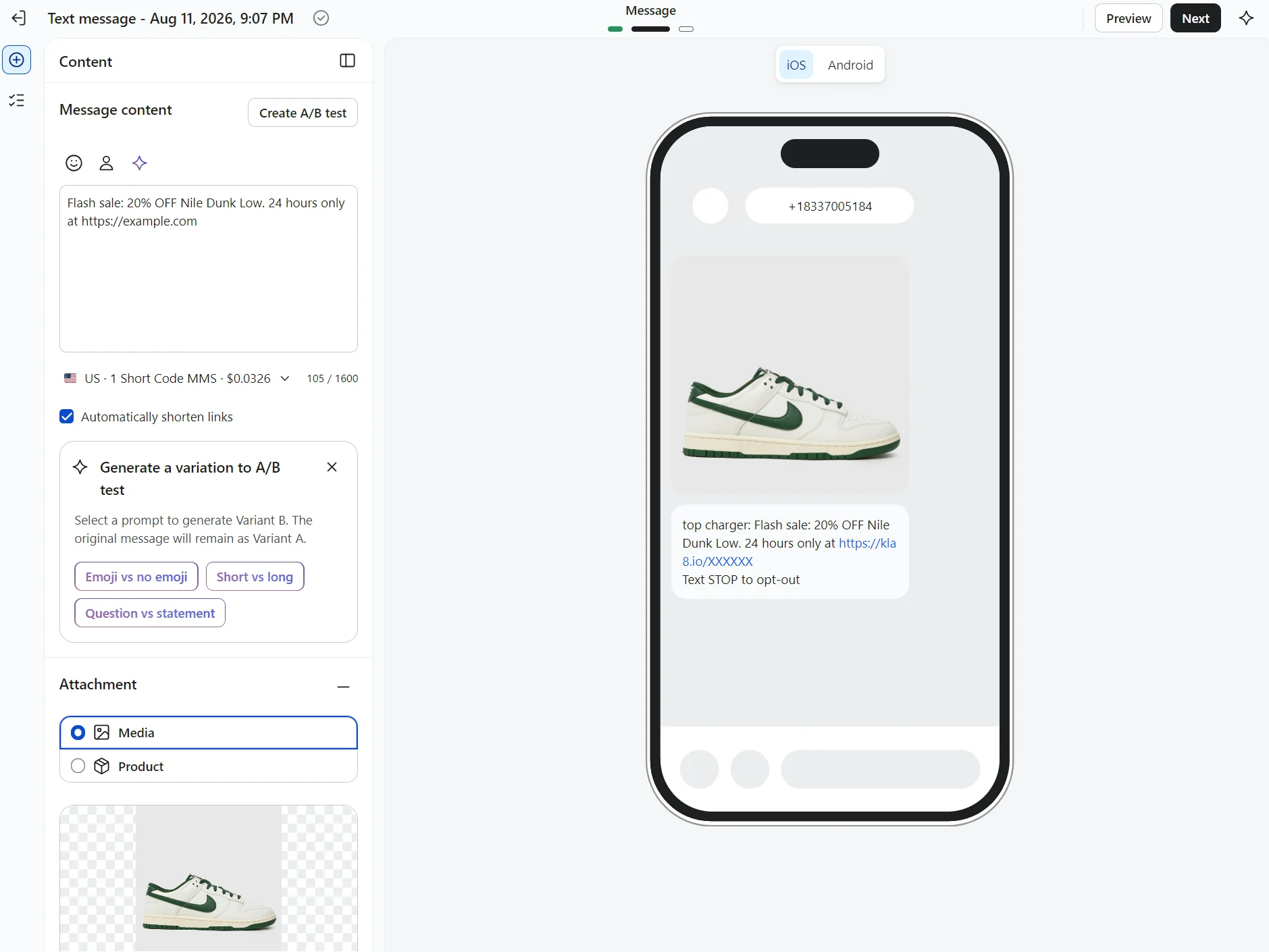
We did not have to change our workflow or learn a new setup just to attach media. Klaviyo SMS also supports PNG, JPEG, and GIF files for MMS.
What stood out was how little the builder changed. The process was almost the same as SMS, with the media added during message creation. That made MMS feel like a small extension of SMS rather than a separate tool. The only difference is adding the image or GIF in the content stage.
So while the feature didn’t have a significant setup burden, the coverage felt secondary. That meant we could use it for some audiences, but not treat it as a standard option for every market. MMS costs more than SMS per message, making it more expensive by design.
We also noticed that larger MMS sends need more care. MMS throughput is slower than SMS, and campaigns can time out after around four hours. That makes MMS useful for richer messages, but not ideal for very large or time-sensitive blasts.
Reporting and analytics
We found Klaviyo’s SMS reporting useful because it showed the numbers that mattered most. Clicks, conversions, and revenue were all there, and the SMS dashboard let us review performance around a chosen conversion metric.
The dedicated SMS dashboard was a nice touch. It was under Analytics and gave us a direct way to look at SMS results without relying on a broader account report first. That kept the review process simple.
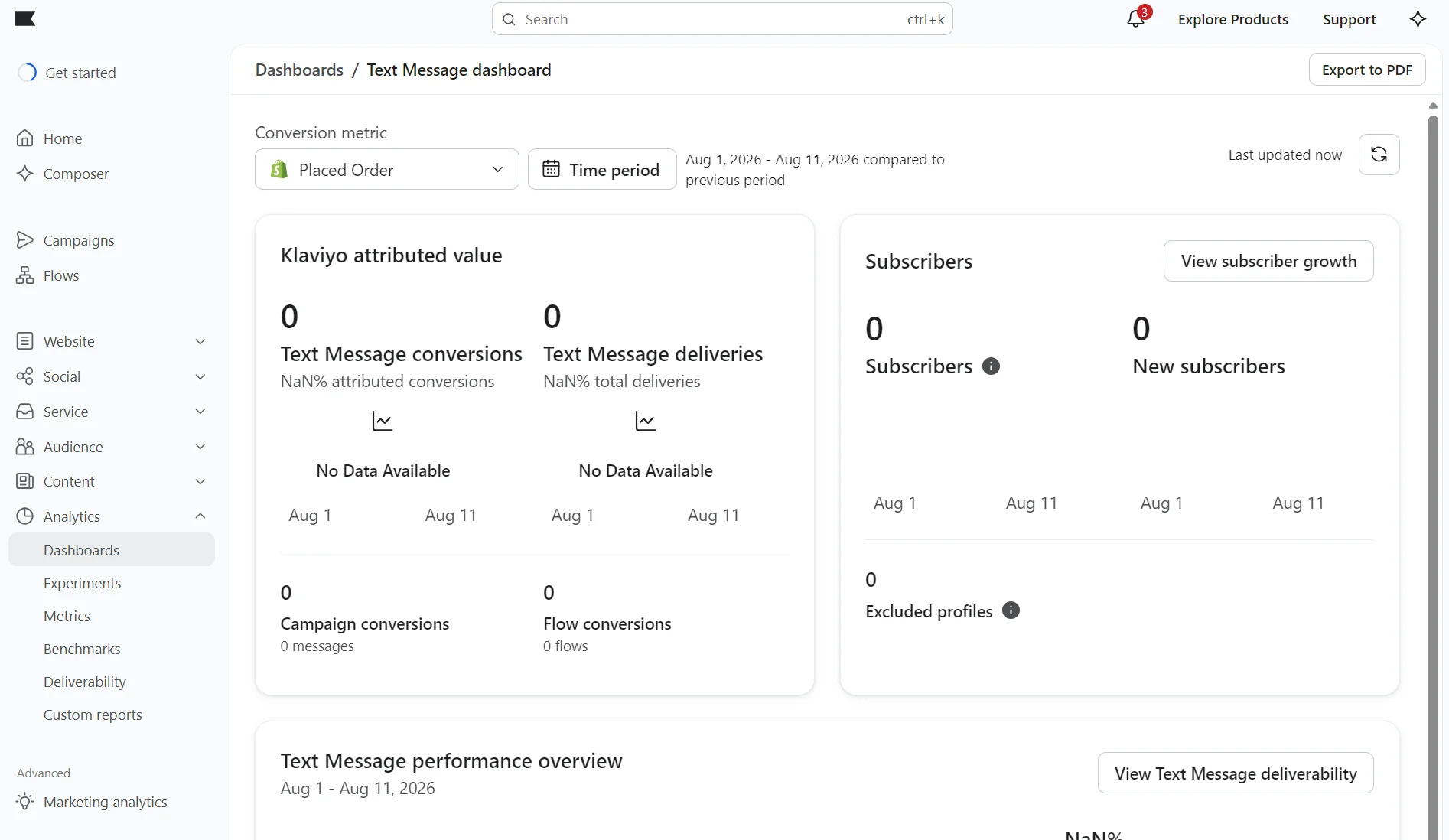
We also had access to shared reporting across email, SMS, and push. Klaviyo’s campaign and flow reports used message attribution across those channels, so we could see how SMS fit into the bigger picture. That was useful when we were comparing channel performance.
The only friction was that the reporting was spread across more than one place. We could get an SMS view, and it linked us across to combined reports, but we still moved between views to see the complete picture. The structure took some getting used to.
Where Klaviyo SMS falls short
While Klaviyo SMS is a good option for those who already use the platform for email marketing, it often falls short when you need broad country coverage, simpler pricing, fast sends at scale, or hands-on support.
Geographic restrictions
Klaviyo only supports 23 countries as of mid-2026, including the U.S., Canada, the UK, Ireland, Australia, New Zealand, and some European countries.
That’s fine for many ecommerce brands, but it’s a constraint once you’re selling internationally. If you need wider reach, compare a Klaviyo alternative built for global sending.
MMS is even more limited. It’s available on U.S. toll-free and short codes, Canadian toll-free numbers, and Australian long codes, but not on Canadian short codes or Australian branded sender IDs. Teams that rely on rich media can’t treat MMS as a universal channel.
MMS is even more limited. It’s only available for all U.S. numbers, Canadian toll-free numbers, and Australian long codes. It’s not available with Canadian short codes or Australian branded sender IDs. So, teams that rely on rich media can’t treat MMS as a universal channel.
Pricing complexity
The pricing model is one of the hardest parts to predict, because Klaviyo prices per message, and those rates are tied to the wider plan setup rather than a simple standalone SMS bill.
That makes the Klaviyo SMS pricing structure less transparent than a pure SMS-only tool, especially if a team primarily wants to estimate cost per message.
Recent review feedback matches that. A 2026 Capterra review said Klaviyo felt “quite pricey” when the team wanted to expand into SMS marketing.
As such, pricing complexity is a recurring concern. That doesn’t mean Klaviyo is overpriced for everyone, but it does mean SMS cost forecasting isn’t as simple as it looks at first glance.
Throughput limitations
Klaviyo’s own docs show that sending speed depends on the number type you use. Branded sender IDs, toll-free numbers, and long codes send at 10–25 messages per second, while short codes can send much faster.
Klaviyo also says campaigns of 30,000+ messages are a reason to consider a short code, which tells us the default setup is not built for the fastest possible delivery. That matters more at scale.
MMS campaigns can time out after around four hours, and any messages still queued after that are skipped. This is a big drawback when volume is high.
SMS automation setup complexity
The automation side has a logical interface, but it is not friction-free. Setting up SMS flows involves handling consent, quiet hours, sending numbers, Smart Sending, and trigger logic. That is manageable, but it is not a “two-click” experience, especially for teams new to SMS inside Klaviyo.
Recent reviews back that up. One G2 reviewer said, “Klaviyo can feel complex and overwhelming at first, especially when setting up advanced flows or managing large numbers of segments.”
That matches what we see in the product: the platform is capable, but the setup requires patience.
Support availability for SMS-related issues
Support feedback for Klaviyo SMS is mixed. Some reviewers praise Klaviyo’s help, but recent 2026 reviews also say support can be slow or unclear.
One G2 reviewer said, “Support is sometimes slow and not clear.”
Another said, “I find the support obnoxious. The chat is a bot and can’t handle specific questions, and email support can take hours or days. There’s no one to talk to when there are follow-up questions based on the response from support.”
That does not mean every SMS issue turns into a support problem. But for brands that need fast help on consent, deliverability, or flow setup, the slower support reports are worth noting. In practice, that can make simple troubleshooting feel heavier than it should.
Klaviyo SMS vs. Omnisend SMS
Klaviyo SMS is built for larger teams that need advanced segmentation and don’t mind the complexity. Its SMS reach is limited, and pricing is complex.
Omnisend has simpler pricing, global SMS reach, and 24/7 support in all plans. Customers generated an average of $79 for every $1 spent across email, SMS, and web push in 2025, according to Omnisend’s internal analysis.
So, your choice depends on what you need. Look at this quick comparison table to compare Omnisend vs Klaviyo SMS at a glance:
| Feature | Klaviyo SMS | Omnisend SMS |
|---|---|---|
| Countries supported for SMS | U.S., Canada, the UK, Ireland, Australia, New Zealand, and several European countries. | SMS is available worldwide. |
| MMS support | MMS is limited to U.S. toll-free and short codes, Canadian toll-free numbers, and Australian long codes. | MMS is available in the U.S. and Canada, and GIFs are supported. |
| SMS + email in the same automation workflow | Yes. Klaviyo’s flow library supports SMS, email, or both, and some flows can mix email and SMS in one workflow. | Yes. Omnisend lets you build SMS-only workflows or combine SMS with email and push in the same automation. |
| Pricing structure | Per-message pricing that varies by country and message type, tied to your wider plan rather than billed standalone. | Simpler credit-based structure with one credit equals $1 USD. |
| Transactional SMS | Supported. Separate consent for marketing and transactional SMS. | Supported. In the U.S., they can be sent only to subscribers. In other regions, they can be sent to any customer. |
| Subscriber list growth tools | Opt-in forms, tap-to-text, checkout consent, subscribe links, email-to-SMS, Instagram stickers, and API-based consent collection. | Sign-up forms, checkout, Text-to-Join, and imports |
| Support availability | Email support is available 24/7, but chat/virtual assistance varies by location and plan type. | 24/7 support for all users, regardless of plan. |
| Free plan availability | Yes, it includes $5 of mobile messages/month | Free plan includes core email marketing features, but not SMS |
Klaviyo works best for brands that already use it for email marketing and advanced automation. It also gives teams more control over SMS consent and flows within a single platform.
Omnisend is the cleaner fit for brands that want broader SMS reach, simpler pricing, and support that is available to everyone. It is also easier to understand fast, which helps when SMS is only one part of the stack.
For MMS, Klaviyo has a bit more reach because it supports Australia, but Omnisend wins on global SMS availability. For most ecommerce teams that do not need the extra complexity of Klaviyo, Omnisend is the more practical choice.
Want to switch from Klaviyo SMS to Omnisend SMS? It’s easy. Check out this video to learn how:
Is Klaviyo SMS worth it?
Klaviyo SMS marketing works best for brands that already use Klaviyo, want more precise targeting, or send a lot of messages in the U.S.
Outside of that, the trade-offs show up: SMS coverage is limited to 23 countries, pricing isn’t always predictable, mobile message spend resets each month without any rollover, and standard support limits live chat to weekdays with no weekend coverage.
Consider adding Klaviyo SMS to your marketing in these scenarios:
- You’re already on Klaviyo. Purchase a mobile messages bundle and create text campaigns and email + SMS flows in the tool you know.
- You’re a large U.S. sender. Klaviyo allows short codes in addition to toll-free numbers, and provides proven SMS infrastructure to get your messages delivered.
- You need advanced targeting. Klaviyo’s predictive analytics and CRM-based contact profiles feed segments.
For global SMS coverage, pricing, and faster support, Omnisend is a worthwhile Klaviyo alternative. SMS credits are available on the Pro plan, with bundles starting at $10/month and per-SMS rates falling to as low as $0.007 at high volume.
And if you’re already on Klaviyo, our migration service rebuilds your setup, including flows, lists, and templates, in around five business days. It’s available for all customers with more than 250 contacts in Omnisend.
Quick sign up | No credit card required
FAQs: Klaviyo SMS marketing
Does Klaviyo offer SMS?
Yes, Klaviyo includes SMS as part of its core platform, built into the same system as email. You can create messages and flows without switching tools, and it works best if you’re already using Klaviyo for email. Just note that Klaviyo SMS doesn’t have global reach, so it’s only useful if your customers are in the countries it supports.
How much does Klaviyo charge per SMS?
Klaviyo’s starting rate for a U.S. SMS is $0.011 per send plus provider fees where applicable, at about $15 for 1,000 sends. Rates vary by message type, country, and volume. Add an image and MMS rates apply, which cost more per message than SMS.
Which countries does Klaviyo SMS support?
Klaviyo SMS is available in 23 countries, including the U.S., Canada, the UK, Australia, New Zealand, Ireland, and several European markets like Germany, France, Spain, and the Nordics. For most ecommerce brands, that’s sufficient, but if you sell across a wider global footprint, the coverage gaps will start to matter.
What are the main limitations of Klaviyo SMS?
Klaviyo resets your mobile messaging balance at the end of each billing period with no rollover. SMS coverage is limited to 23 countries, and MMS throughput is limited, meaning large sends can be delayed or skipped.
How to set up SMS in Klaviyo?
Log in to your Klaviyo account and head to Settings. Click Text message in the top menu and then select Set up texting for free. You’ll be asked to select the countries you plan to send text messages in and to confirm your sending information. Click Done after following those steps to enter Klaviyo’s disclosure workflow and finish the setup.