
 Omnisend AI


 OFFER
OFFER








Drive sales on autopilot with ecommerce-focused features
See FeaturesKey takeaways 
When choosing between MailerLite and Klaviyo, consider if MailerLite's higher send limits and lower cost outweigh its simpler features compared to Klaviyo's advanced tools and analytics.
Klaviyo excels in providing a comprehensive CRM and advanced automation capabilities, making it ideal for ecommerce businesses with complex customer journeys.
MailerLite is perfect for small businesses or bloggers needing straightforward email campaigns and basic automations without the steep learning curve or cost of Klaviyo.
If multichannel marketing is essential, consider Omnisend, which offers robust features for combining email, SMS, and web push notifications at a competitive price.
Reveal key takeaways
Your big consideration when comparing MailerLite vs. Klaviyo is whether MailerLite’s significantly higher send limits are worth it for less advanced features.
Klaviyo’s toolkit is a better fit if you sell online, but it’ll cost you. You get predictive analytics, customer profiles, more flows, and a CRM. Pick MailerLite, and you get a newsletter focus, a smaller learning curve, and significant cost savings.
There’s nuance to those points, of course. Who’s to say Klaviyo’s extra features don’t generate so much ROI that they pay for themselves? Or that MailerLite’s basic flows don’t cover what you need and will do a good enough job?
This article provides the context you need to pick the right email tool with comparisons covering MailerLite vs. Klaviyo’s use cases, features, and pricing.
Grow your ecommerce revenue with Omnisend’s multichannel flows, available in all plans
Quick sign up | No credit card required
MailerLite vs. Klaviyo: Quick comparison
MailerLite is cheaper than Klaviyo and offers much larger send limits, making it best suited to campaigns and bulk sends, plus basic automations for your small store.
Klaviyo offers a CRM and more granular flows, segments, and reports, suiting your DTC brand and growing store with complex customer journeys.
The table below provides a quick comparison between Klaviyo vs. MailerLite:
Next, we’ll cover what Klaviyo and MailerLite are. Both are email marketing tools, but they have very different features and use cases.
What is MailerLite?
MailerLite is an email marketing tool for campaigns and basic automations. Its low learning curve and high send limits make it more appealing than Klaviyo if you’re sending frequently to a small list or are a growing business with lots of email sequences.
For free, it lets you send 12,000 emails/month to 500 subscribers. Increasing the email send limit to unlimited for the same subscriber count costs $10/month, versus Klaviyo’s $20/month entry point for 500 subs and 5,000 emails.
What you can do with those send limits is impressive. The email builder and templates let you craft high-quality newsletters that you can schedule or send in bulk, and they include RSS campaign features for sharing your blog content.
Another use case is ecommerce if you have a small store or moderate sales with simple customer journeys. It has pre-built templates for a welcome email, an abandoned cart email, a survey, and a winback email, all triggered by events and segments.
What is Klaviyo?
Klaviyo is an email automation and B2C customer relationship management (CRM) tool for ecommerce. Its advanced segmentation, analytics, and automation capabilities enable you to handle complex customer journeys across email and SMS.
Pre-built flows cover goals, such as nurturing, preventing lost sales, reminding customers to engage, and encouraging repeat purchases. There are 60+ flows to pick from versus MailerLite’s 15, and its flow builder lets you get more granular.
There’s a steeper learning curve to Klaviyo than MailerLite, but in return, you get more advanced features, such as predictive analytics and customer profiles with all-time data.
Another advantage to Klaviyo is its 350+ integrations, compared to MailerLite’s 130+, spanning more CRMs, email tools, and ecommerce apps.
Pricing is where Klaviyo loses out to MailerLite. For instance, 1,000 subscribers is $30/month with Klaviyo for 10,000 emails, whereas MailerLite’s cheapest plan is $15/month for 1,000 subscribers and unlimited emails.
Did you know?
Email automations offer significantly more revenue potential than campaigns. In 2025, they accounted for 30% of revenue from just 2% of sends.
Read our 2026 Ecommerce Marketing Report to find out more.
MailerLite vs. Klaviyo: Key features compared
Onboarding with Klaviyo and MailerLite takes five minutes. After signing up, both send a confirmation email to confirm your account. You can then log in to their dashboards and start exploring their features.
We’ve provided real-world insights and testing notes below across flows, email segmentation, personalization, templates, and more.
Automation
Section summary
Klaviyo reaches your customers at more high-intent moments and lets you target them at every stage of their journey. MailerLite covers welcome emails, abandoned carts, and other basic scenarios with less control over targeting.
MailerLite connects to your ecommerce store and can run automations based on customer events and segment activity. It lets you build from scratch or select from 15 pre-built templates:
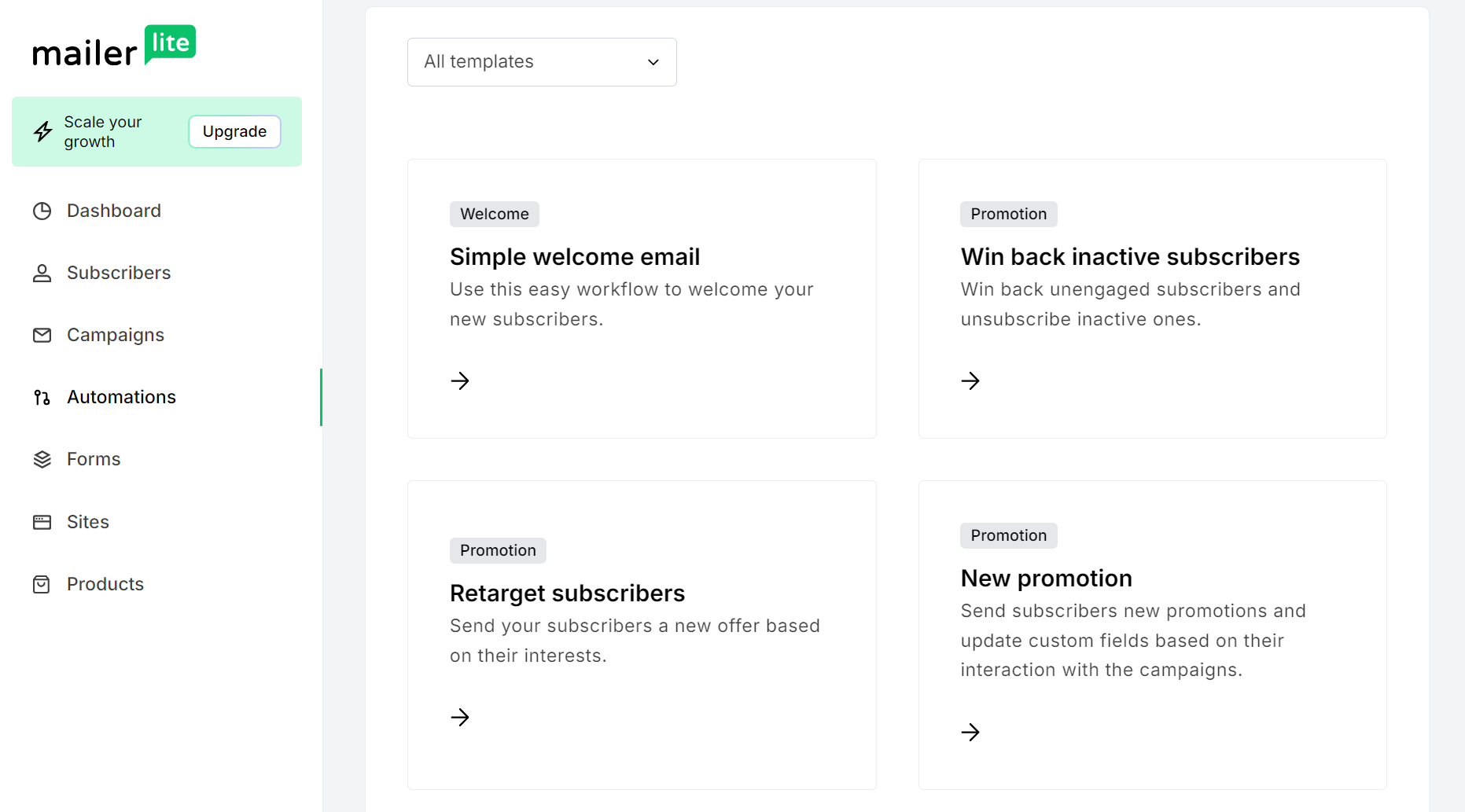
Its templates cover the crucial touchpoints, such as a welcome email, abandoned cart flow, a feedback email, and a membership renewal message. You can then set Rules, such as Delays, and add Actions, such as webhooks, into your flow:
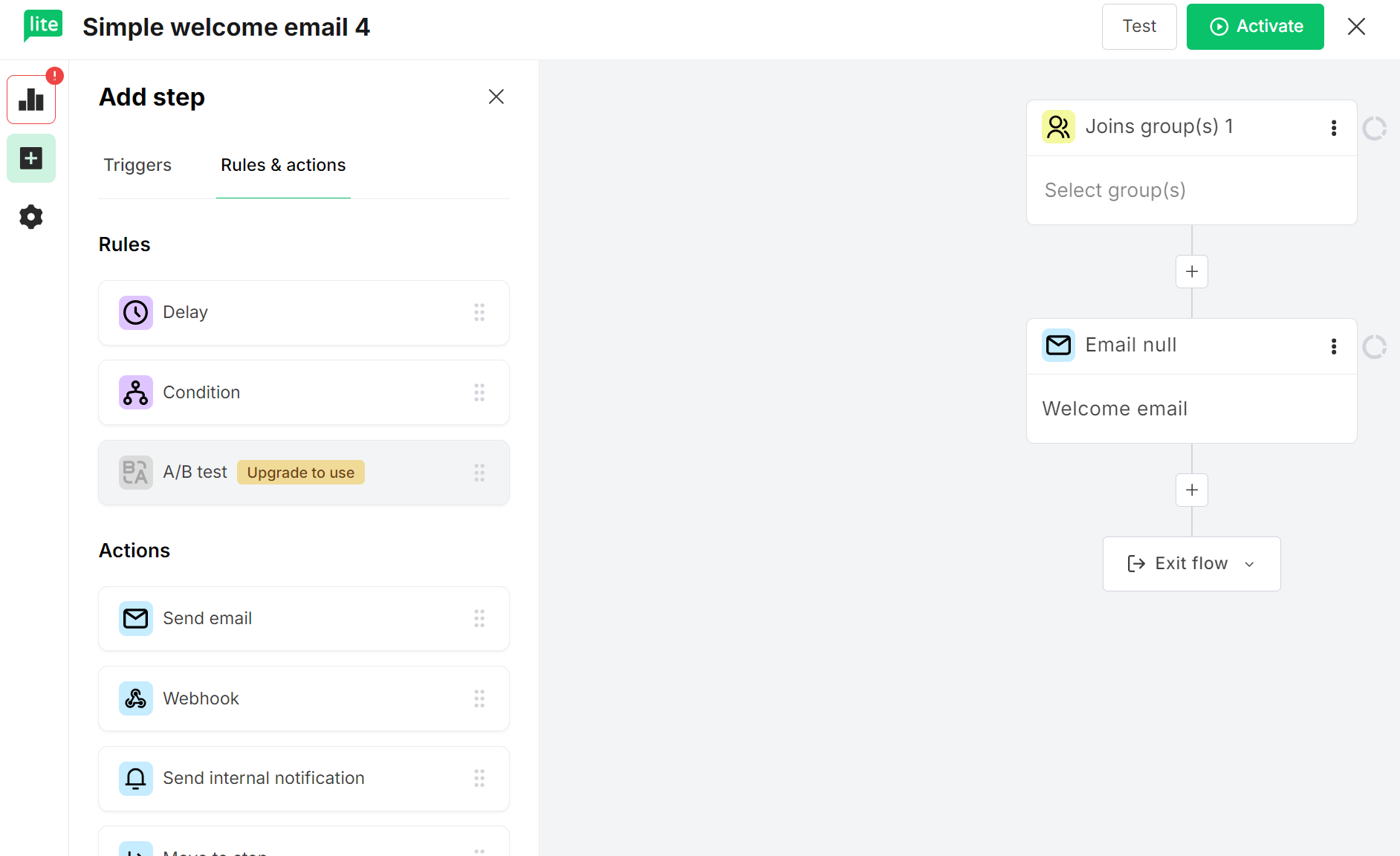
The flow builder is easy to use, flags any errors to fix, and gets you triggering emails within a few minutes. It works well for basic ecommerce scenarios.
Klaviyo’s automations, in contrast, are much more advanced. For starters, there are 60+ pre-built flows helpfully split into goals for easy finding, such as nurturing:
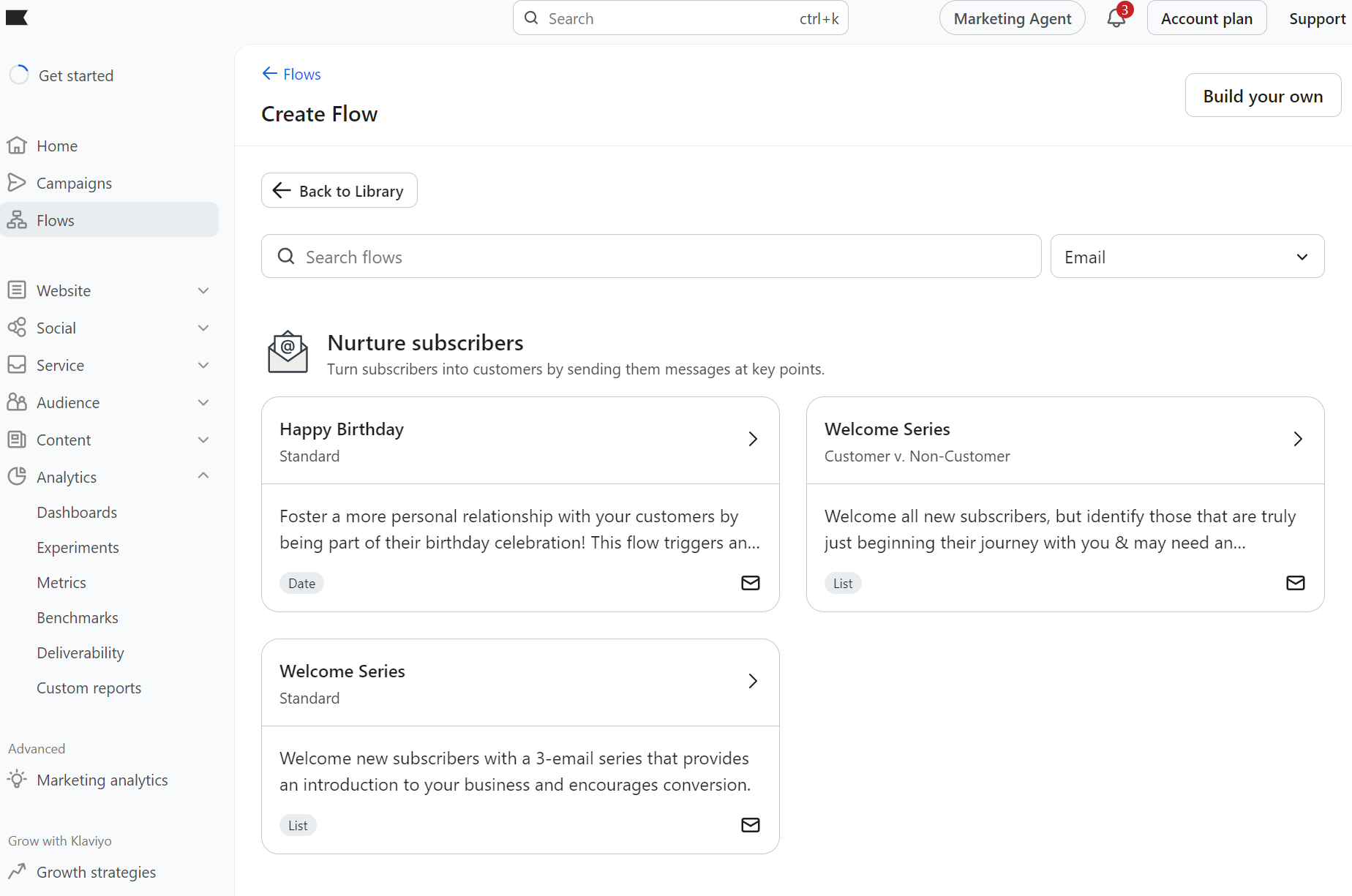
These cover most of your customer journey, regardless of what you sell, and the flow builder has more Actions, such as text messages and WhatsApp:
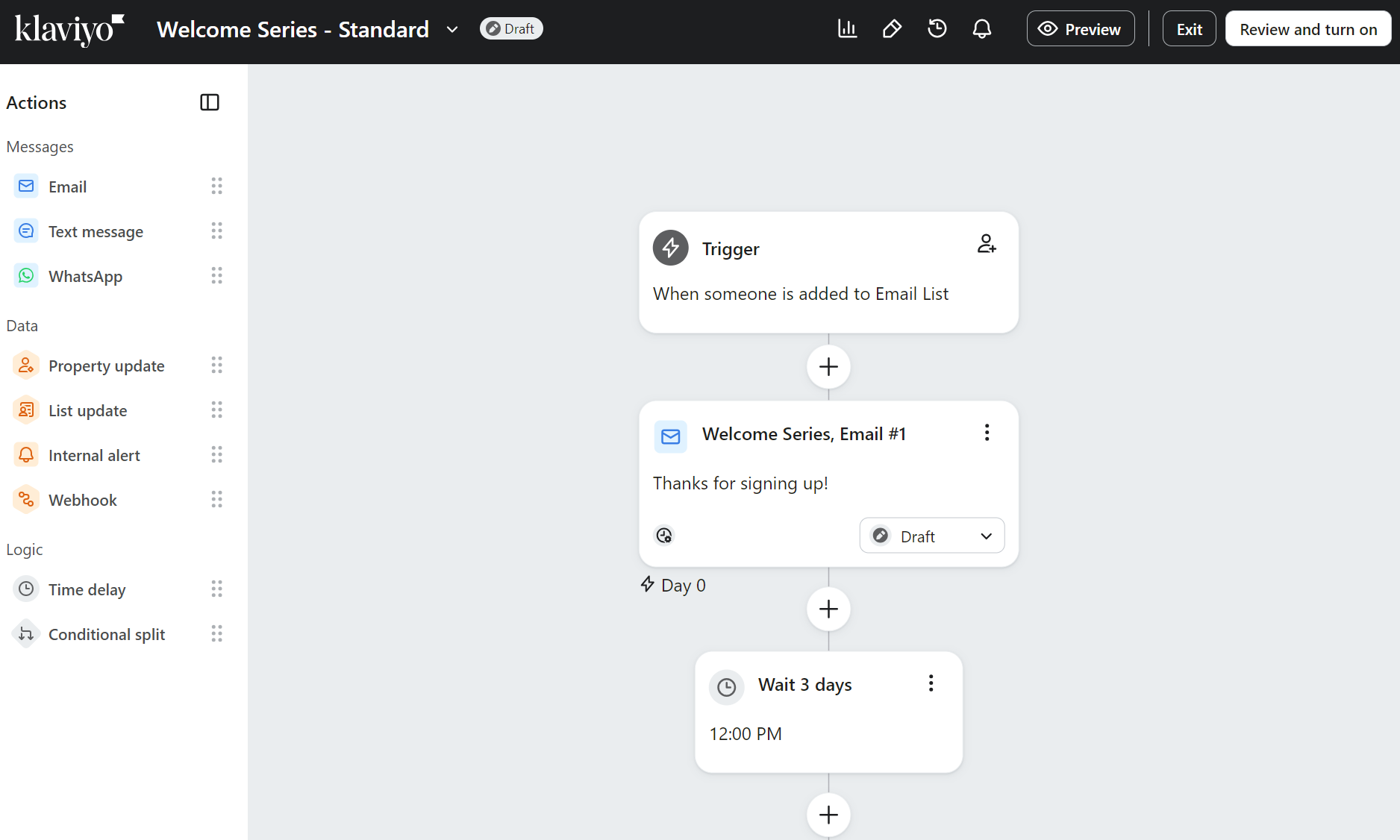
The big difference for your store, in addition to the more numerous pre-built flows, is the complexity you can build into sequences with price drop, low inventory, and metric-based triggers, such as order values and product categories viewed.
Additionally, if you want a hands-off approach to campaigns, Klaviyo offers AI send times in its Marketing Analytics and Advanced Klaviyo Data Platform packages.
Ecommerce Integrations
Section summary
Klaviyo integrates with significantly more apps, and its ecommerce integrations have consistently higher ratings across Shopify and other tools.
MailerLite loses out on the quantity and quality of integrations compared to Klaviyo. Its total integration count is 130+, compared to Klaviyo’s 350+, and Klaviyo’s ecommerce apps are consistently rated higher.
The table below compares their key integrations and ratings:
| Integration | Klaviyo Rating | MailerLite Rating |
|---|---|---|
| Shopify | 4.5/5 based on 2,572 reviews | 2.6/5 based on 30 reviews |
| WooCommerce | 4.1/5 based on 34 reviews | 2.9/5 based on 63 reviews |
| Wix | 3.5/5 based on 12 reviews | 1.9/5 based on seven reviews |
Notice how MailerLite has relatively low ratings? Customers frequently report problems with tagging and their accounts getting blocked. We can’t say the same for Klaviyo, which gets good reviews in comparison across all platforms.
Klaviyo also has deeper Shopify syncing and has made updating that integration one of its core priorities. For instance, in March 2026, it added Locale Aware Catalogs, which automatically sync localized product data from Shopify Markets.
Segmentation and personalization
Section summary
MailerLite has fewer pre-built segments and a less intuitive segment builder than Klaviyo, but it does what most small stores need. Klaviyo’s segmentation and personalization depth link back to those flows, letting you target customers at more moments.
MailerLite has seven pre-built segments covering these groups:
- Devoted customers
- Frequent link clickers
- Active openers
- Not active lately
- No opens yet
- Location-based segment
- Time zone-based segment
You access segments by heading to Subscribers > Segments. From there, you can select a segment or build one from scratch.
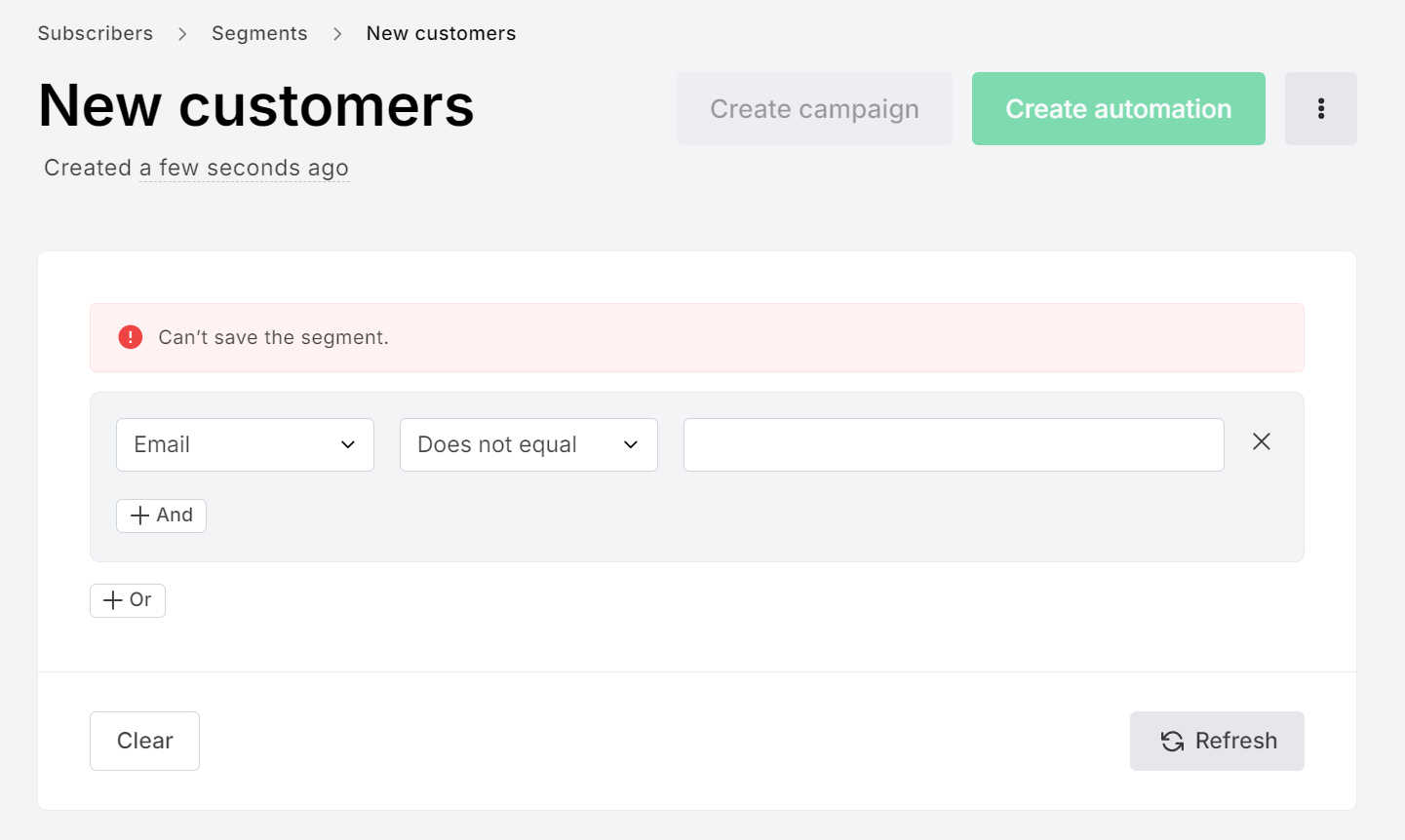
The segment builder requires knowledge of filters and operators and is less intuitive than the flow builder. The lack of feedback during development leaves you wondering whether it will work. Make a mistake, and it simply says “Can’t save the segment” with no context:
Once you have segments, you can use them as campaign recipients or exclusions, as condition steps in automations to split workflows into paths, and as automation triggers.
Klaviyo’s segment library includes 22 pre-built groups. As with flows, it categorizes segments using goals, such as converting customers and understanding consent:
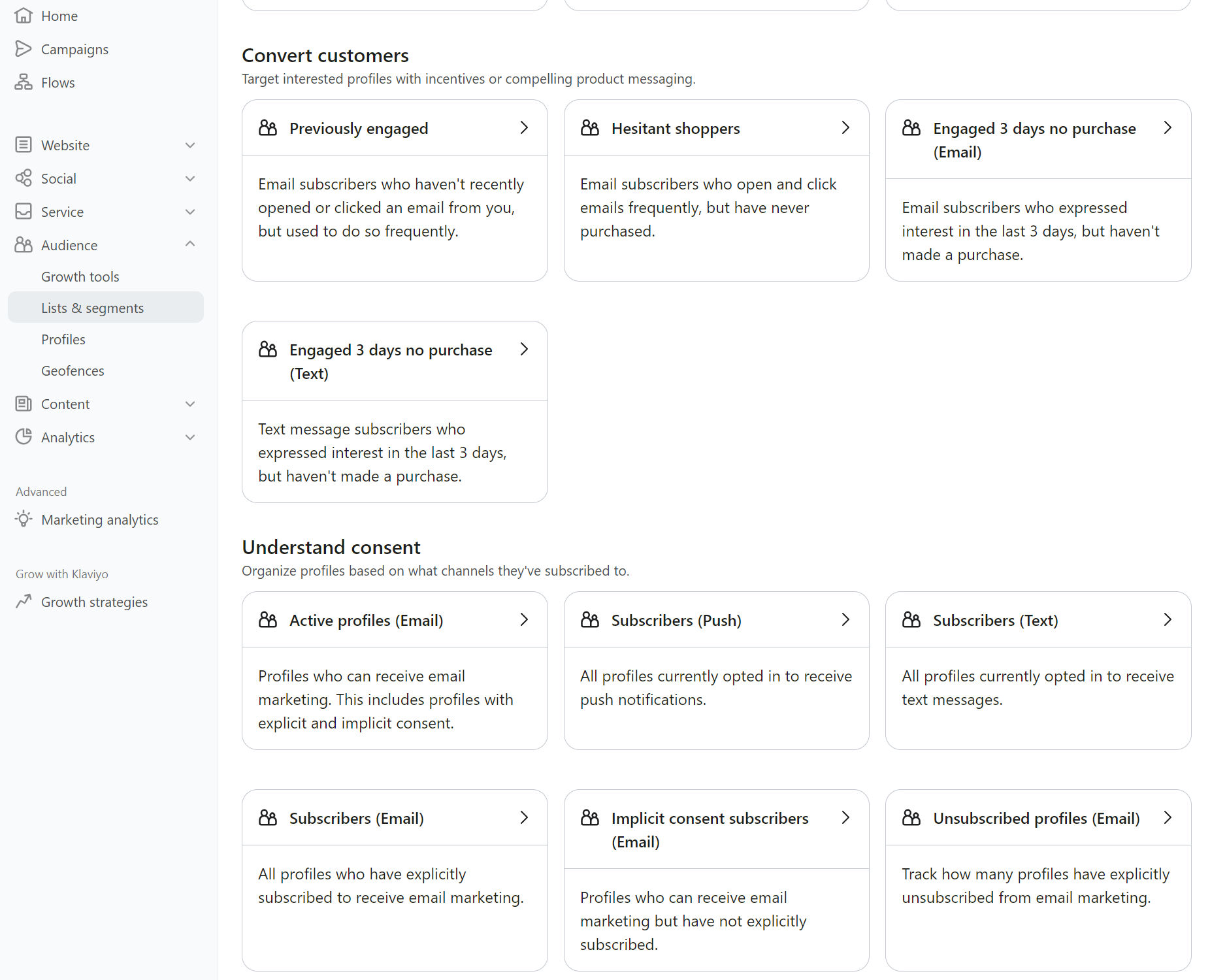
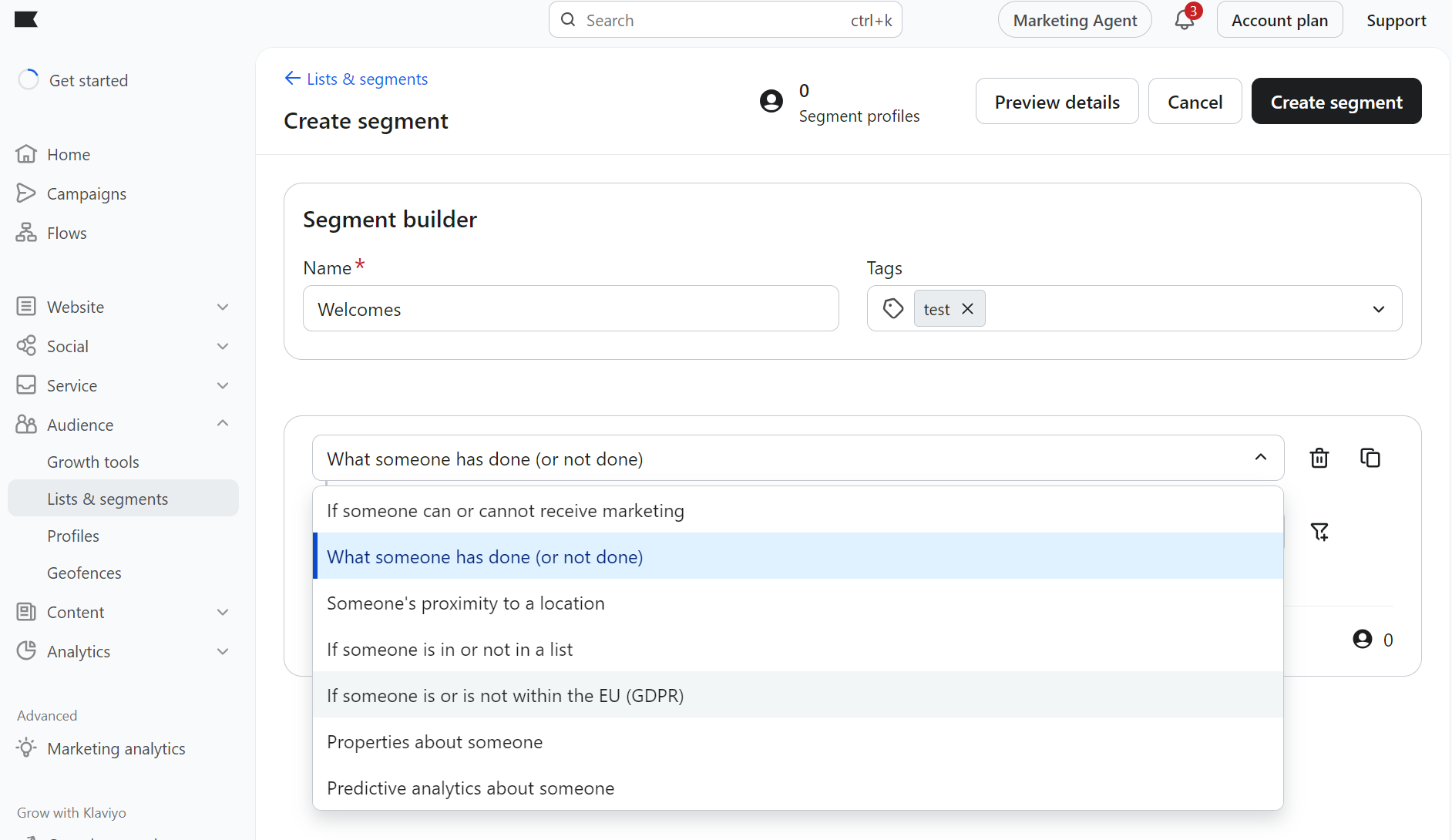
Those additional segments mean that it’s Klaviyo, not MailerLite, that makes it incredibly easy to organize your lists and start targeting them. Another bonus point goes to Klaviyo’s segment builder, which uses more descriptive examples for rules:
You’ll also want to personalize your content for different customers and segments, which both tools let you do with different degrees of detail.
MailerLite personalizes using merge tags tied to nine default fields (name, email, city, etc.) and custom text/number/date fields. The tags use a simple {$field} format, so there’s no conditional logic or event-based personalization as you get with Klaviyo.
Klaviyo brings personalization to your arsenal using profile properties, event data from purchases and browsing, and custom objects. It supports conditional if/else statements, for loops, nested properties, currency formatting, and default fallback values.
Templates and design
Section summary
A frustrating MailerLite reality is that pre-built newsletter templates are a paid-only feature, which puts a ton of design work into that 12,000-email send limit. Klaviyo has no such limits, and even so, its templates are more professional and numerous.
Comparing Klaviyo vs. MailerLite’s drag-and-drop email editors shows that both are extremely intuitive. There’s nowhere to get lost in either.
Klaviyo’s email editor provides basic blocks such as buttons, a header bar, and a review quote, and pre-built sections that drag into the template:
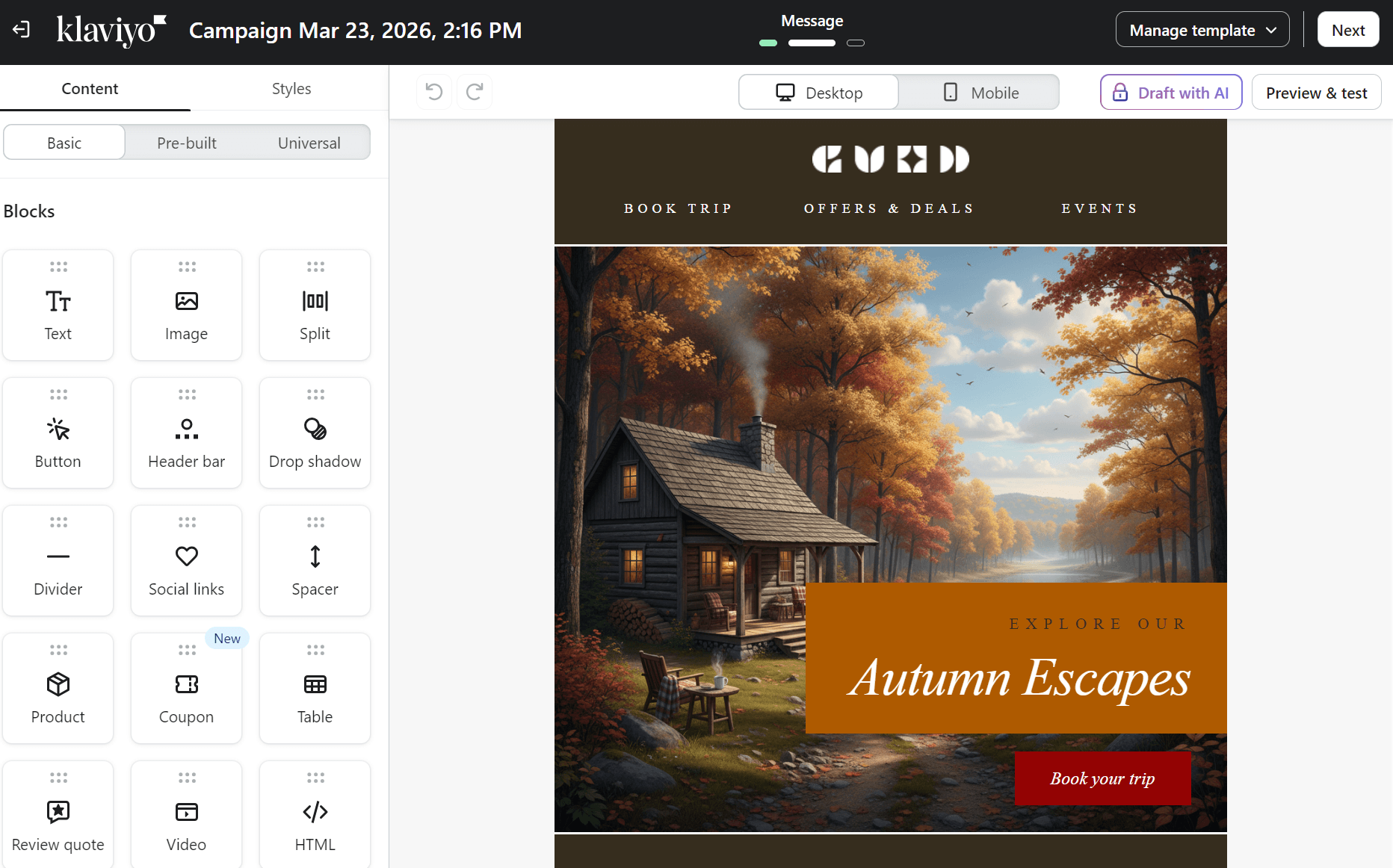
You can draft content with AI if you’re a paid plan customer and preview emails on desktop and mobile, with test sends available to check layouts.
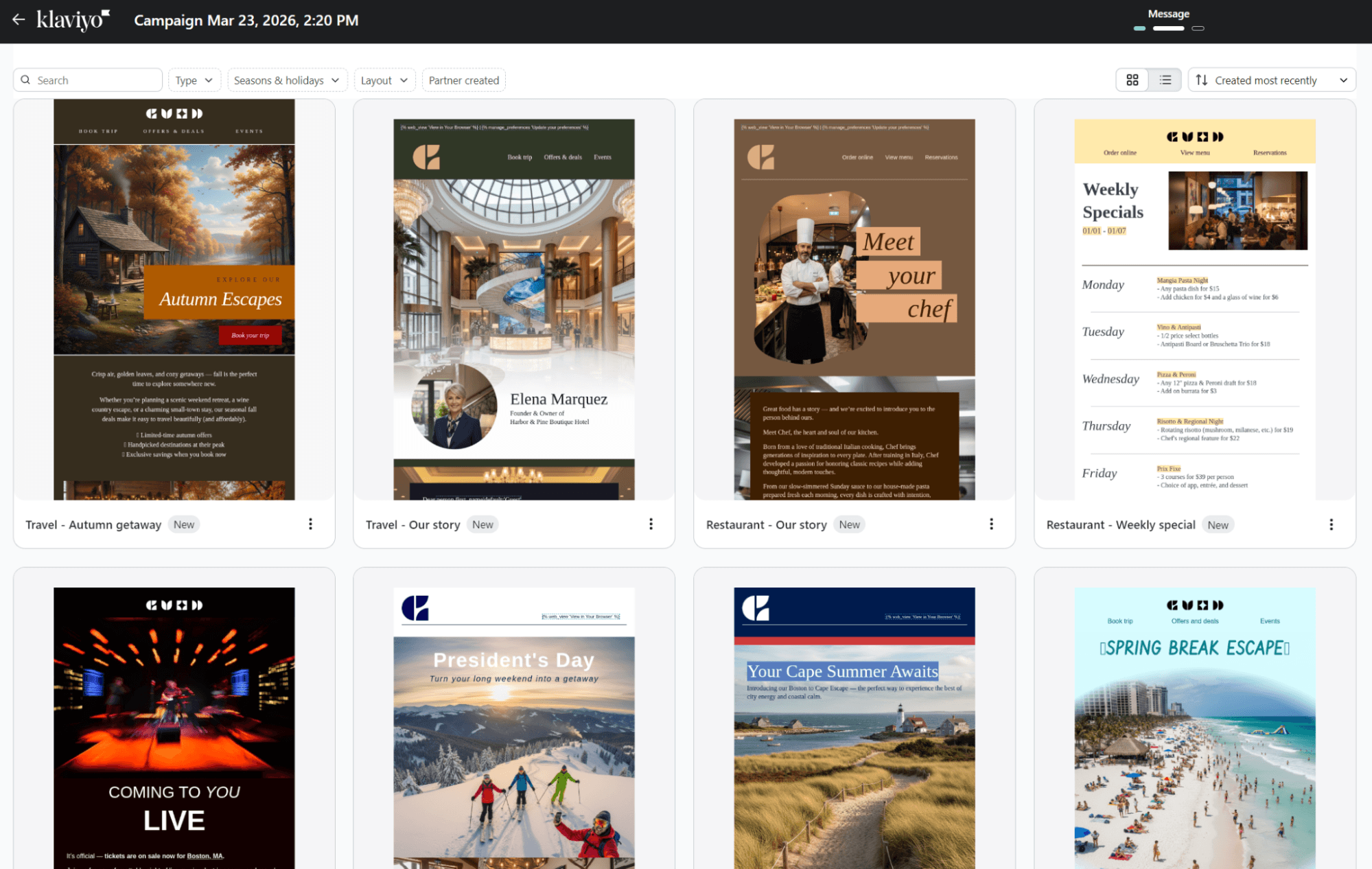
The template library in Klaviyo contains 160+ options, some designed by Klaviyo and others created and shared by partners. All its templates have responsive layouts and quality stock images:
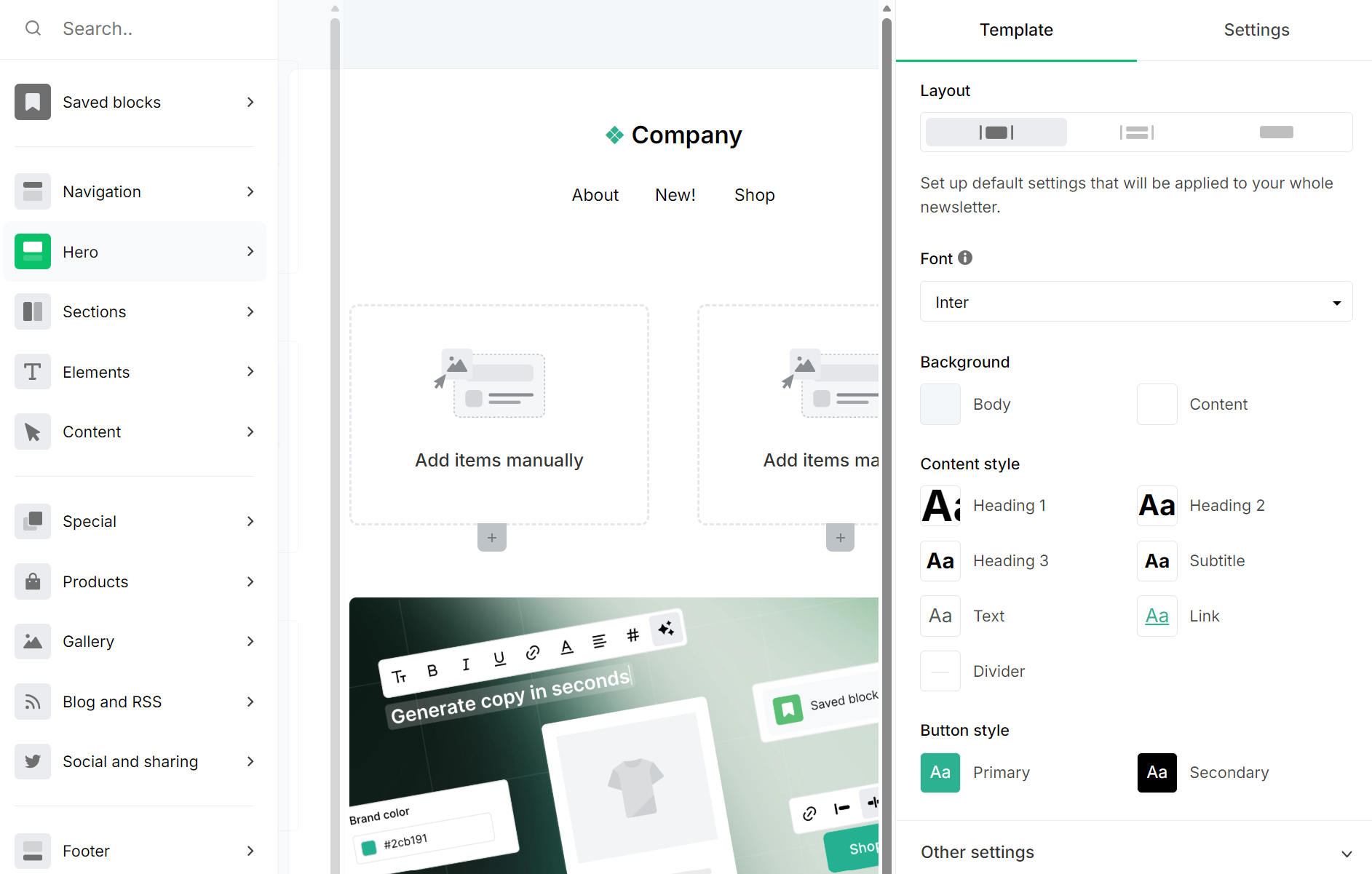
MailerLite’s template library contains 100+ pre-built designs, which, in contrast to Klaviyo’s, are only available for paying customers:

The drag-and-drop editor works extremely well. The sidebar lists the email’s layout (navigation, hero, sections, etc.), which you can select to reveal options. There are loads of blocks to choose from, even if you’re only using a basic template:
Deliverability
Section summary
Klaviyo gives you more tools to monitor and protect deliverability. MailerLite takes a simpler, more managed approach that works well if you’d rather not dig into the technical details.
MailerLite increases your inbox placement with DKIM and SPF records, which you add to your DNS, or you can let MailerLite detect your hosting provider and set them up automatically.
Beyond that, there’s not much to configure in MailerLite. It manages the sending infrastructure for you, which means less control, but less margin for human error.
One thing Klaviyo offers that is missing is deliverability reporting. Klaviyo’s Deliverability Hub dashboard scores your sender reputation and flags issues across inbox providers:
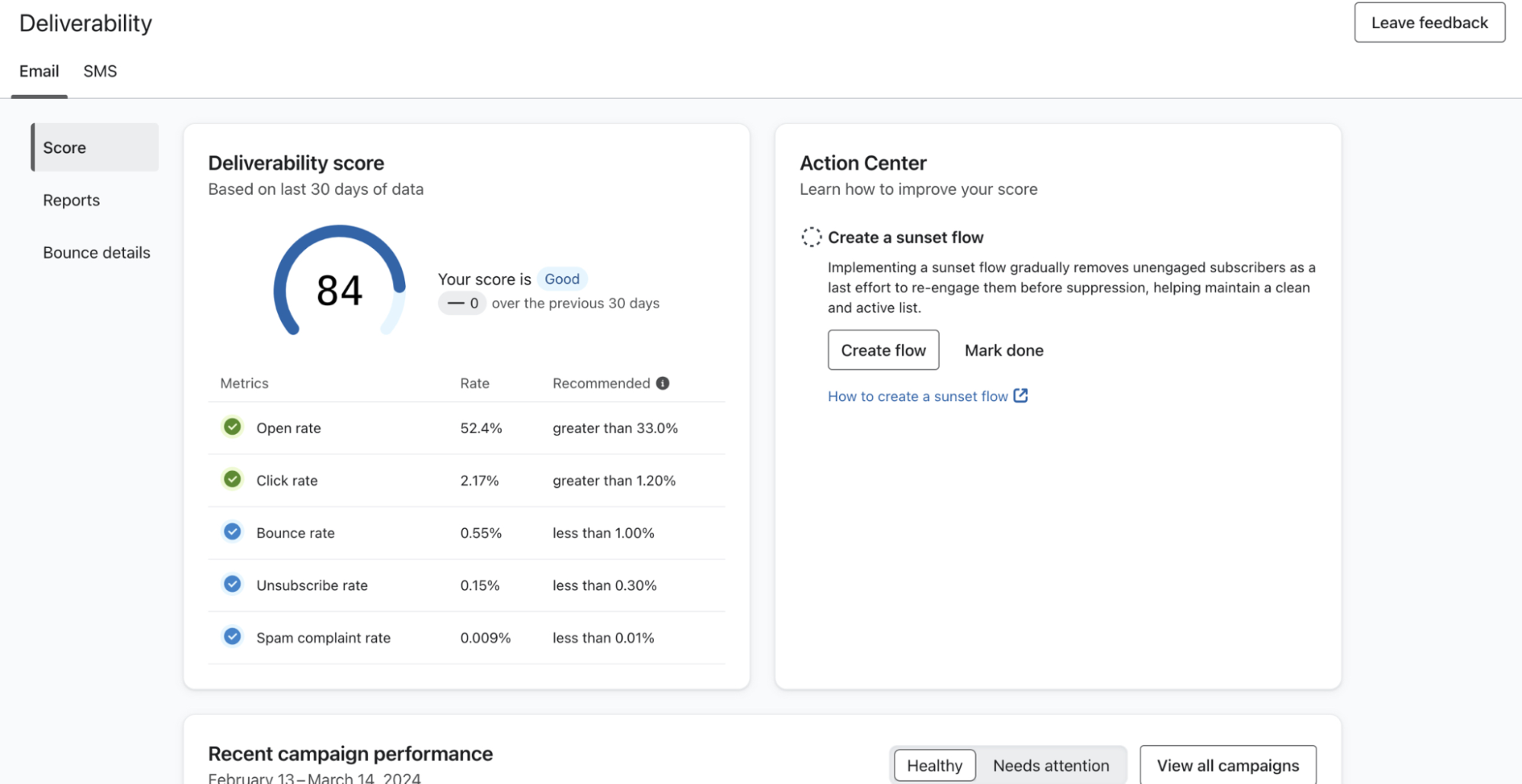
Both platforms offer dedicated IPs for high-volume senders. MailerLite pairs with MailerCheck for list cleaning, and Klaviyo walks you through warming and ramping when you first switch over.
Where Klaviyo pulls ahead are the extras, such as BIMI for showing your logo in inboxes, SSL click tracking domains, DMARC alignment guidance, and sunset flows that quietly stop emailing people who’ve lost interest. You don’t have to build any of that yourself.
MailerLite doesn’t try to match this. Instead, it screens every new account before they’re allowed to send, which keeps the shared IPs clean for everyone. Different philosophy, same goal.
Reporting and analytics
Section summary
Klaviyo’s reporting is best for ecommerce with revenue attribution and detailed customer profiles. MailerLite’s reports focus more on email performance, with its ecommerce angle catering to its own selling points.
Klaviyo vs. MailerLite’s reports are night and day in terms of detail, with Klaviyo offering more data on channel performance, revenue, and customers.
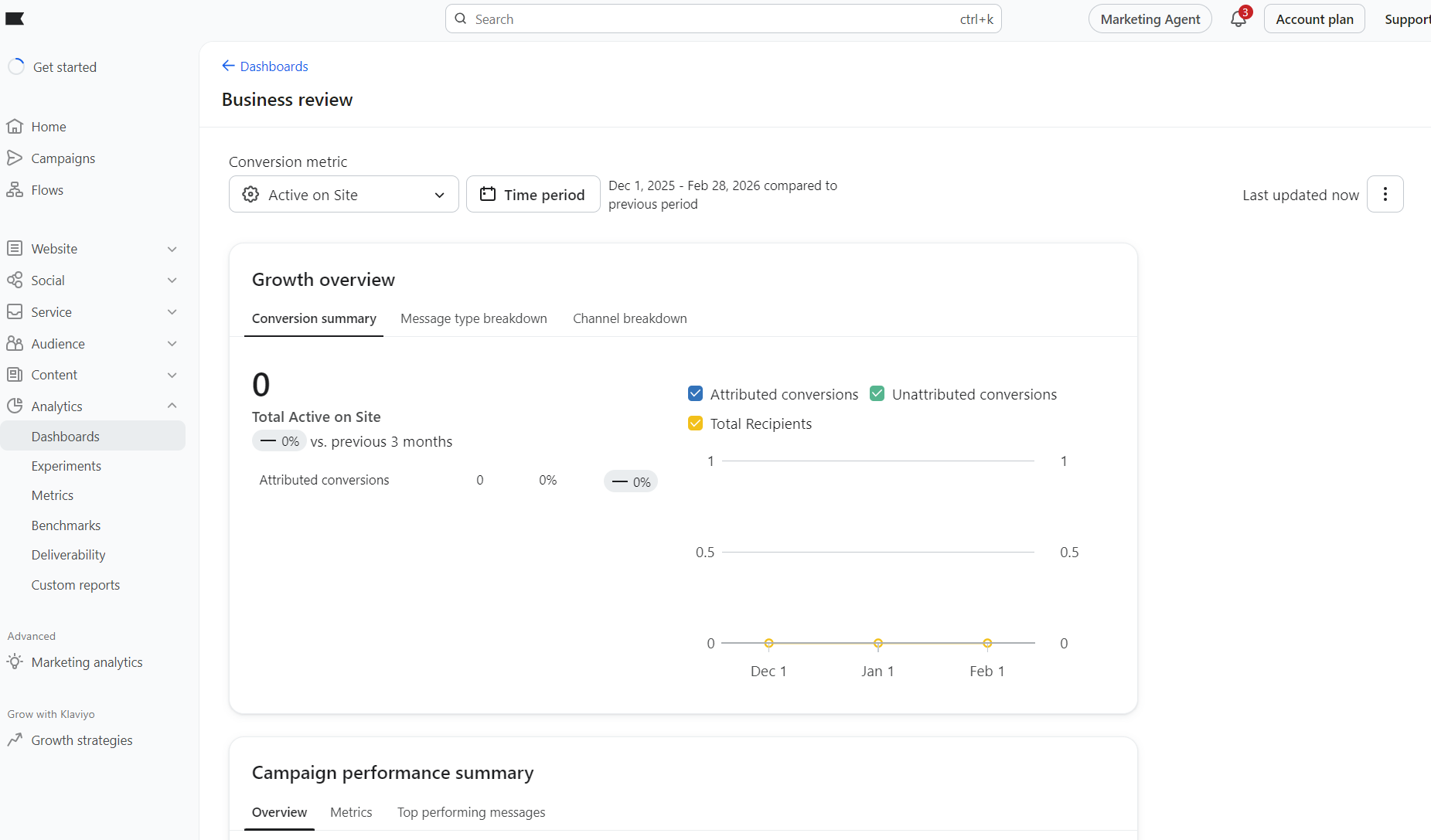
What we like about Klaviyo’s reports is the customization. The Home screen shows your business performance summary, top-performing flows, and recent campaign metrics, which you can click through to see additional details.
The image below shows the business review dashboard. You can see that it shows growth with attributed conversions and more:
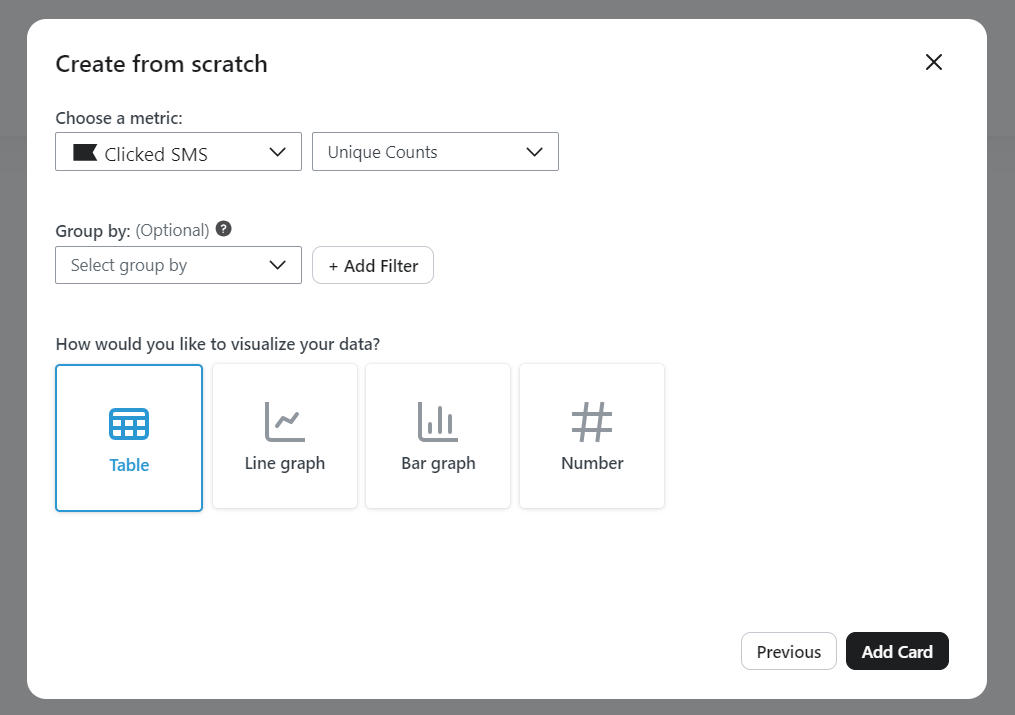
Click Dashboards under the Analytics tab, and you can build custom reports with tables, line graphs, and bar graphs. You can add cards for multiple metrics, including active on site, bounced email, clicked email, clicked SMS, and more, as shown below:
MailerLite doesn’t have a dedicated analytics or reports tab. Instead, you can view a performance snapshot in the dashboard, which splits reports into subscribers, campaigns, automations, ecommerce, forms, and sites:
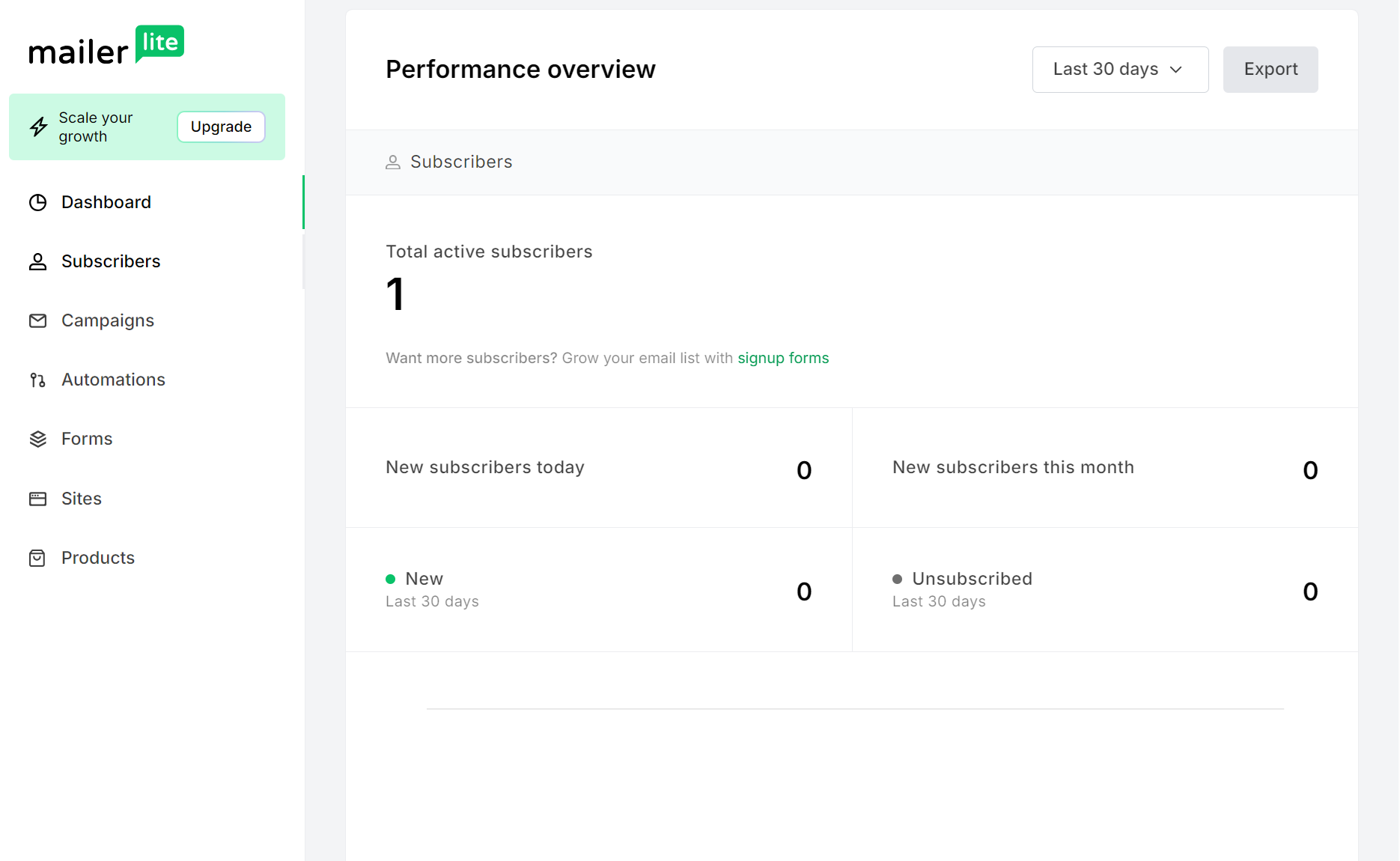
There’s less of a connection to your data than in Klaviyo, but there are several helpful features available across all plans. These include custom date-range reports, list growth reporting, and comparative reporting between specified dates.
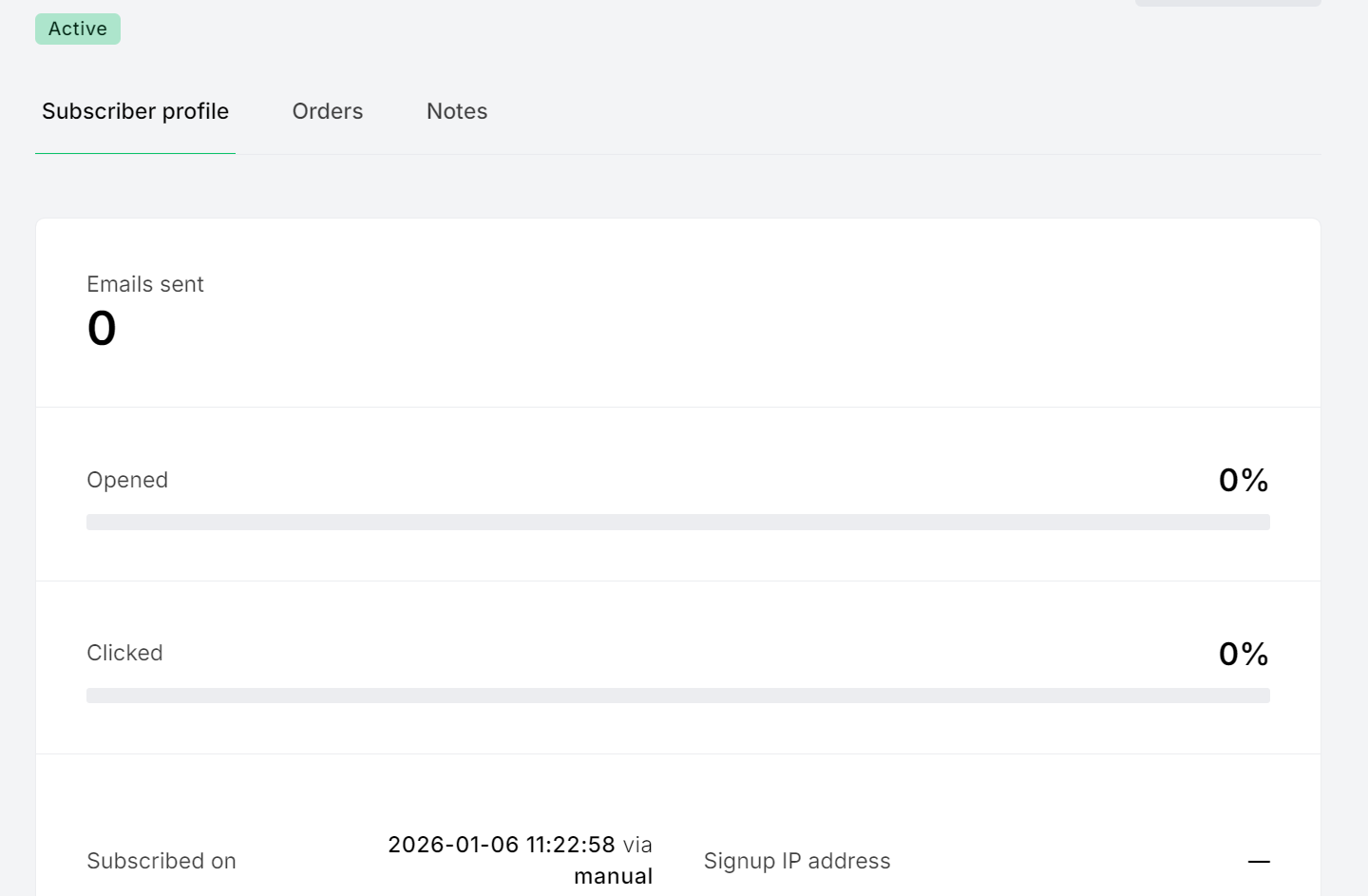
Like Klaviyo, MailerLite also offers subscriber profiles, albeit with less detail. In MailerLite, these show emails sent, opens, clicks, and orders via a tab:
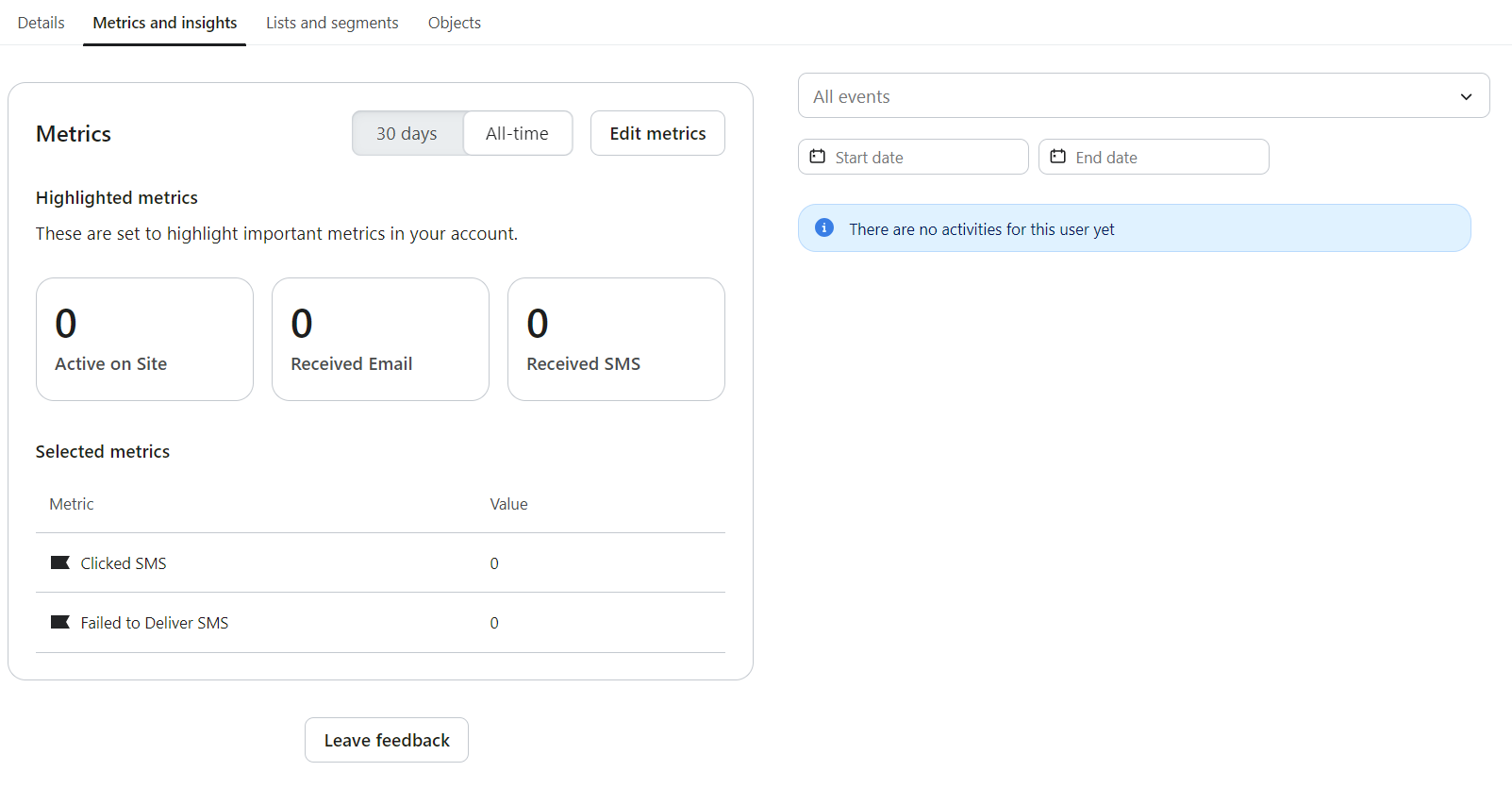
Klaviyo’s customer profiles contain more data about how they found you, activity, metrics, and the segments they live in:
Pricing comparison: MailerLite vs. Klaviyo
Klaviyo and MailerLite use contact-based pricing with send limits, so their monthly plans increase in price based on the number of subscribers you have.
Both have free plans:
- Klaviyo Free: For 250 active profiles and 500 sends/month
- MailerLite Free: For 500 subscribers and 12,000 emails/month
MailerLite is, by far, the cheaper platform across both of its plans. However, its cheapest plan, Growing Business, restricts promotion popups, Facebook Custom Audiences, the HTML editor, and more. Klaviyo doesn’t gate anything.
The table below covers Klaviyo vs. MailerLite’s pricing from 1,000 to 10,000 subscribers, using the aforementioned Growing Business plan for comparison:
| Platform | Plan | 1,000 subs | 5,000 subs | 10,000 subs |
|---|---|---|---|---|
| MailerLite | Growing Business | $15/month, unlimited emails | $39/month, unlimited emails | $73/month, unlimited emails |
| Klaviyo | $30/month, 10,000 emails | $100/month, 50,000 emails | $150/month, 100,000 emails |
There’s a price difference of over 50% across these plans. You’ll save money with MailerLite at the expense of advanced features.
If you need more advanced features than Growing Business provides, you’ll need MailerLite’s Advanced plan. Here’s how it stacks up versus Klaviyo:
| Platform | Plan | 1,000 subs | 5,000 subs | 10,000 subs |
|---|---|---|---|---|
| MailerLite | Advanced | $30/month, unlimited emails | $50/month, unlimited emails | $110/month, unlimited emails |
| Klaviyo | $30/month, 10,000 emails | $100/month, 50,000 emails | $150/month, 100,000 emails |
As you can see, we get closer to price parity here. Both plans cost the same at 1,000 subscribers, but once you hit 5,000 subscribers, MailerLite is 50% cheaper again. At double the contact count (10,000), Klaviyo is 27% more expensive.
The reality is that if Klaviyo’s advanced features are unnecessary for your marketing or won’t generate a ROI, MailerLite makes sense. If you’re a growing ecommerce store, then Klaviyo’s features could help you sell more and maximize revenue.
Klaviyo vs. MailerLite for ecommerce, which is best?
Klaviyo offers more pre-built flows, advanced triggers, predictive analytics, and a CRM, but MailerLite’s email marketing features are easier to use and better suited to basic customer journeys. The answer to which is best depends on your situation.
Choose Klaviyo if
- You have complex sales cycles and customer journeys. It bridges the gap between your customer data, targeting, and reports with more insights, a CRM, and advanced flows you can use to generate revenue.
- You’re a growing ecommerce store with modest sending requirements. Klaviyo’s send limits are less generous than MailerLite’s and suit targeted sequences.
- You have a Shopify store. Klaviyo’s Shopify integration goes deeper, pulling all your data across channels for use. An update in March 2026, for instance, introduced Locale Aware Catalogs, syncing localized product data from Shopify Markets.
Choose MailerLite if
- You’re a small business owner or store. All you might need is a tool that sends campaigns and runs your welcome series, forms, and abandoned cart, which MailerLite does well.
- You’re a blogger or creator. MailerLite’s Growing Business plan works here, letting you use all its pre-built newsletter templates and send unlimited emails.
- You want one platform for email marketing and content monetization. All paid plans let you send paid newsletters and sell recurring subscriptions. On Advanced, you can also sell unlimited digital products and take unlimited bookings.
When to look elsewhere
MailerLite lacks multichannel capabilities, and its automation and segmentation features lack the granularity of Klaviyo’s. But Klaviyo is much more expensive, and its features aren’t good value if you don’t use them.
An alternative for multichannel ecommerce marketing and advanced workflows is Omnisend, whose Free Forever plan lets you build multichannel flows with access to all standard features for free, with the same contact and send limits as Klaviyo.
If it’s multichannel you need, then Omnisend’s Pro plan costs $59/month for unlimited emails to 500 subscribers and includes SMS credits equal to the price of your monthly plan. With it, you can use email and SMS marketing together.
Final verdict: MailerLite vs. Klaviyo. Who wins?
Klaviyo suits you best if you’re an ecommerce store, a business sending infrequently to a growing list, or if automations make up most of your sends. Its flows, segments, and customer profiles better support revenue growth than MailerLite.
You should lean towards MailerLite if you want to send mass campaigns for cheap and automate simple customer journeys, such as welcome emails. It gets you sending quickly and offers extremely generous limits for bulk sends.
There’s also overlap potential. You could use a paid Klaviyo plan to manage your complex customer journeys, and MailerLite’s free send limits for campaigns.
Neither platform provides multichannel capabilities as standard. If you want flows to combine email, SMS, and web push notifications without add-ons, Omnisend is the pick. It has the tools to grow your store and is more cost-effective than Klaviyo.
Join Omnisend to create multichannel flows that target your customers during their high-intent moments
Quick sign up | No credit card required
Klaviyo vs. MailerLite FAQs
Is MailerLite good for Shopify?
It’s suitable when it works. The problem is that MailerLite’s Shopify app has a lower score than Klaviyo’s, at 2.6/5 based on 30 reviews, compared to Klaviyo’s 4.5/5 from 2,572 reviews. Customers report problems with tags and blocked accounts.
Is Klaviyo worth it for small stores?
Klaviyo’s free plan is what you’re after, and it’s a good pick for 250 contacts. You can send 500 emails/month and also 150 SMS/MMS credits. However, keep an eye on costs, since Klaviyo’s cheapest paid plan is $20/month for 500 contacts.
What’s cheaper: MailerLite or Klaviyo?
MailerLite’s Growing Business plan is at least 50% cheaper than Klaviyo’s Email plan at the expense of features, so yes, it’s cheaper. Even its Advanced plan is cheaper, although it lacks Klaviyo’s CRM capabilities and ecommerce focus.
Can I switch from Klaviyo to MailerLite or vice versa?
Neither tool has a native app for migration, but you can export your contacts as CSVs in either and import them into the other. Connecting your ecommerce store will also pull over the same data. Rebuilding flows and templates is a manual process in both.

TABLE OF CONTENTS
TABLE OF CONTENTS


Subscribe and don’t miss any updates!
No fluff, no spam, no corporate filler. Just a friendly letter, twice a month.