
 Omnisend AI


 OFFER
OFFER








Drive sales on autopilot with ecommerce-focused features
See Features
Implementing back in stock notifications can significantly recover lost sales by alerting interested customers when products become available again.
Omnisend offers a comprehensive solution that combines back in stock alerts with email and SMS marketing, providing higher engagement and conversion rates.
Utilizing apps for back in stock notifications streamlines the process, offering features like customization, automation, and analytics that manual methods lack.
Best practices include sending immediate notifications, providing clear product details, and allowing customers to choose their preferred notification method.
Setting up back in stock Shopify alerts can help you recover lost revenue. Every time products go out of stock, your store misses sales opportunities. Interested customers might not return to check availability later, especially if they find the product elsewhere.
Back in stock notifications solve this by capturing shopper interest and alerting them when a product becomes available again.
In this guide, we’ll walk through multiple methods to add back in stock notifications on Shopify. We’ll explore Shopify’s manual workaround, third‑party apps, and custom code solutions.
Most importantly, we’ll explain why Omnisend offers the most effective and scalable option for converting out-of-stock browsers into buyers.
Quick sign up | No credit card required
What are back in stock notifications?
Back in stock notifications are automated alerts sent to customers when previously out-of-stock products become available again.
They help shoppers regain interest and allow stores to capture otherwise lost sales. Here’s how it works:
- A customer visits a product page and sees that the item is out of stock
- The customer submits their email address or phone number to be notified
- When the product is restocked, they automatically receive a notification
- The customer clicks through the notification to buy the item
You can deliver these Shopify back in stock notifications via email, SMS, or both.
Each signup creates a small waiting list of customers interested in that product. That makes Shopify restock notifications especially useful for stores with limited inventory, fast-selling products, or seasonal items.
When customers say “Notify me when back in stock,” this means they’re highly interested. This results in higher open and click rates than regular marketing messages.
Why back in stock notifications matter for your store
Whenever an item goes out of stock, your store risks losing a sale. Here’s why implementing a “notify when back in stock” Shopify feature matters:
- Recover lost revenue: By notifying interested customers immediately when items restock, you convert missed opportunities into actual sales
- Increase conversion rates: People signing up want the product, which in 2025 translated to a conversion rate of 6.46% — the highest of any automation type
- Build customer loyalty: Letting shoppers know you’ll alert them shows you value their interest
- Capture demand data: Restock requests reveal which products generate the most interest, guiding smarter inventory decisions
- Reduce customer frustration: Instead of checking your site repeatedly or buying from competitors, customers can relax knowing they’ll be notified
- Automate process: Once set up, restock notifications run on autopilot, saving you time while driving results
Omnisend’s 2025 data shows that back in stock emails achieved 58.03% open rates, 21.19% click rates, and 30.5% click-to-conversion rates.
Consider if 100 customers sign up for back in stock notifications for a $50 product, and 30% convert when notified. That’s $1,500 in recovered revenue.
Now, let’s look at how to actually implement this Shopify “notify me when back in stock” feature on your store.
How to add “notify when back in stock” alerts on Shopify
You can add back in stock notifications on Shopify in three ways: theme-based workaround, third-party apps, and custom code solutions.
Method 1: Theme-based or manual “notify me” workaround
Shopify doesn’t offer a fully native feature that automatically sends back in stock notifications. However, some themes allow you to display a basic “notify me when available” Shopify form on out-of-stock product pages.
This theme-based approach simply captures customer emails. You’d need to manually email these customers yourself when items come back in stock.
Alternatively, you could integrate the captured data with a third-party email platform to automate the notifications. This makes it more of a lead capture tool than an actual notification system.
Key limitations to be aware of:
- Email only, with no SMS support
- No built-in waiting list management or visibility
- No automatic notifications when products restock
- No email customization, automation logic, or analytics
- Requires manual follow-up or an external email workflow
- Not officially supported or standardized across all themes
This option may be acceptable for very small stores testing demand or those planning to connect the captured leads to an external email automation platform.
How to display a notify me form (theme-dependent):
- Go to your Shopify admin dashboard
- Navigate to Online Store > Themes
- Click Customize on your active theme
- Access Theme settings (a gear icon)
- Look for a menu titled ‘Notify me’ when out of stock, Product Form, or Stock Availability
- Enable the feature by toggling the switch to “On” or checking a box labeled “Show when out of stock”
- Save changes — the form will appear when products are unavailable
Note that not all themes support this feature. Customizing appearance or messaging usually requires custom code.
Verdict: This method is free and simple, but it’s not a true Shopify “notify when back in stock” solution.
Method 2: Using Shopify apps
Most Shopify stores use a dedicated app to set up back in stock notifications.
Apps provide critical features that manual methods can’t match: customizable notification designs, SMS and push capabilities, analytics dashboards, automatic sending, and waitlist management. Plus, they don’t require coding knowledge.
What to look for in a back in stock app:
- Email and SMS notification: Help you reach customers in their preferred channels
- Customizable notification design: Makes alerts and messaging on-brand
- Dashboard for waiting lists: Lets you see who signed up for which products
- Automatic notifications: Alerts are sent instantly when inventory updates
- Analytics and conversion tracking: Help you understand how well notifications or alerts convert to sales
- Email marketing integration: Connects with platforms like Omnisend and unifies campaigns
- Easy, no-code setup: Gets you running in minutes, no technical expertise needed
- Scalable pricing: Offers reasonable pricing with scalable plans
How app-based solutions work:
- Install a back in stock app from the Shopify App Store
- Configure your notification email and SMS templates
- The app automatically adds signup widgets to out-of-stock product pages
- Customers enter their email or phone number to join a waiting list
- When you restock, the app automatically sends alerts
- Track clicks, purchases, and ROI generated from alerts
You can set up most apps in 15 to 30 minutes.
Pricing considerations
Costs vary widely. Some apps charge monthly fees, while others charge based on the number of notifications sent. Many have free tiers for small shops.
The best value often comes from platforms that combine restock notifications with full email and SMS marketing.
There are 50+ restock apps in the Shopify App Store with varying quality and features. Some focus solely on notifications. Meanwhile, Omnisend includes restock alerts as part of its comprehensive marketing solution, making it more versatile.
Verdict: Apps are the best solution for most Shopify stores. They provide essential features, easy setup, and strong ROI. The smartest approach is to choose a platform like Omnisend that combines back in stock notifications with broader marketing automation.
Method 3: Custom code solution
Technically savvy users can build custom back in stock notifications using Shopify’s APIs, webhooks, and theme code. You’ll have full control, but it’s complex and resource-intensive.
It requires knowledge of JavaScript development, Shopify Liquid, and email-sending systems such as SendGrid or Mailgun.
What’s involved:
- Add custom forms to product pages using Liquid templating and JavaScript
- Store customer emails in Shopify metafields or an external database
- Set up webhooks to detect inventory changes and trigger notifications
- Build an email sending system using third-party services like SendGrid or Mailgun
- Handle unsubscribes to ensure spam compliance and email deliverability
- Create an admin interface to manage waiting lists and view demand
- Ensure GDPR/privacy compliance with proper consent and data handling
Development can take hours for even a basic implementation. Additionally, you need ongoing maintenance whenever Shopify updates APIs, webhooks, or themes.
When this approach makes sense:
- You need very specific custom behavior not available in apps
- You have in-house developers or an agency on retainer
- You want full control over data and logic
- You’re running a headless or heavily customized Shopify setup
Drawbacks to consider:
- Developer costs exceeding app pricing
- Worrying about fixes, uptime, and compliance
- Time may be better spent on other business activities
- No vendor support when things break
Verdict: Custom solutions only make sense for stores with very specific technical requirements and dedicated development resources. For most Shopify merchants, a proven app like Omnisend is faster, more cost-effective, and more reliable.
Why Omnisend is the best solution for back in stock notifications
Many tools handle when back in stock Shopify alerts. However, Omnisend stands out by combining restock notifications with full email and SMS marketing on a single platform.
Omnisend isn’t simply a “notify when back in stock” Shopify app. It’s a full ecommerce marketing suite that provides abandoned cart recovery, welcome series, post-purchase flows, promotional campaigns, and more.
Key back in stock features:
- Pre-built, ready-to-use workflow: Activate the automation instantly and customize it in minutes
- Email + SMS notifications: Reach shoppers on their preferred channels from one workflow
- Automatic product details: Product image, name, price, and purchase link populate automatically
- Full customization: Use the drag-and-drop editor to match your brand’s look and feel
- Waiting list dashboard: See exactly who’s waiting for which products and manage demand effectively
- Conversion tracking: Measure clicks, purchases, and revenue from restock alerts
- Included in the free plan: Back in stock notifications are available even on Omnisend’s free tier (up to 250 contacts)
Customers who sign up for restock alerts join your email/SMS list.
You can then engage them with abandoned cart emails, promotional campaigns, product recommendations, birthday offers, and more. This unified strategy builds stronger customer relationships and brings lifetime value.
There’s a cost benefit as well. Why pay $15–30/month for a standalone back in stock app plus $30–50/month for email marketing? Omnisend provides both, starting at $16/month with email, SMS, and automation. Even its free plan includes restock alerts.
On average, Omnisend customers get $79 back for every $1 spent. They benefit from award-winning 24/7 support and join over 150,000 ecommerce businesses worldwide.
 | Dukier’s revenue growth story Dukier grew its revenue by 525% over three years by leveraging Omnisend’s automated workflows. Automations delivered 55% of total revenue, with back in stock flows playing a key role in recovering lost sales and maintaining customer engagement. Check out the Dukier case study to see how strategic automation drives real revenue growth. |
Setting up back in stock notifications with Omnisend
We’ll teach you how to set up Shopify when back in stock alerts using Omnisend. It’s easy, and you can launch automated restock notifications in under 30 minutes.
1. Install Omnisend from the Shopify App Store: Search for Omnisend in the Shopify App Store and click Install. This automatically connects Omnisend to your store.
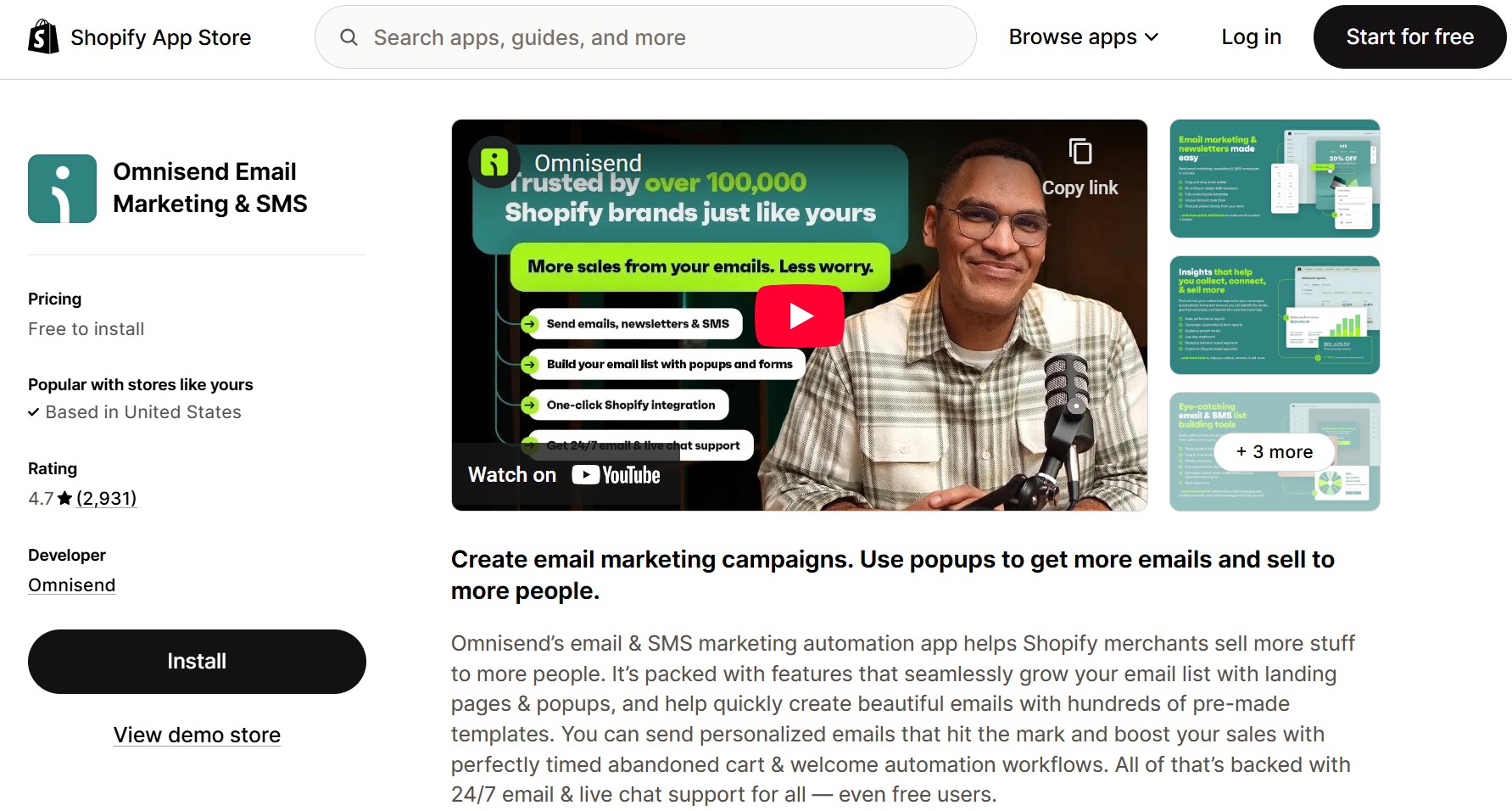
2. Create an Omnisend account: Sign up using your email, or log in if you already have an account. You can start with Omnisend’s free plan.
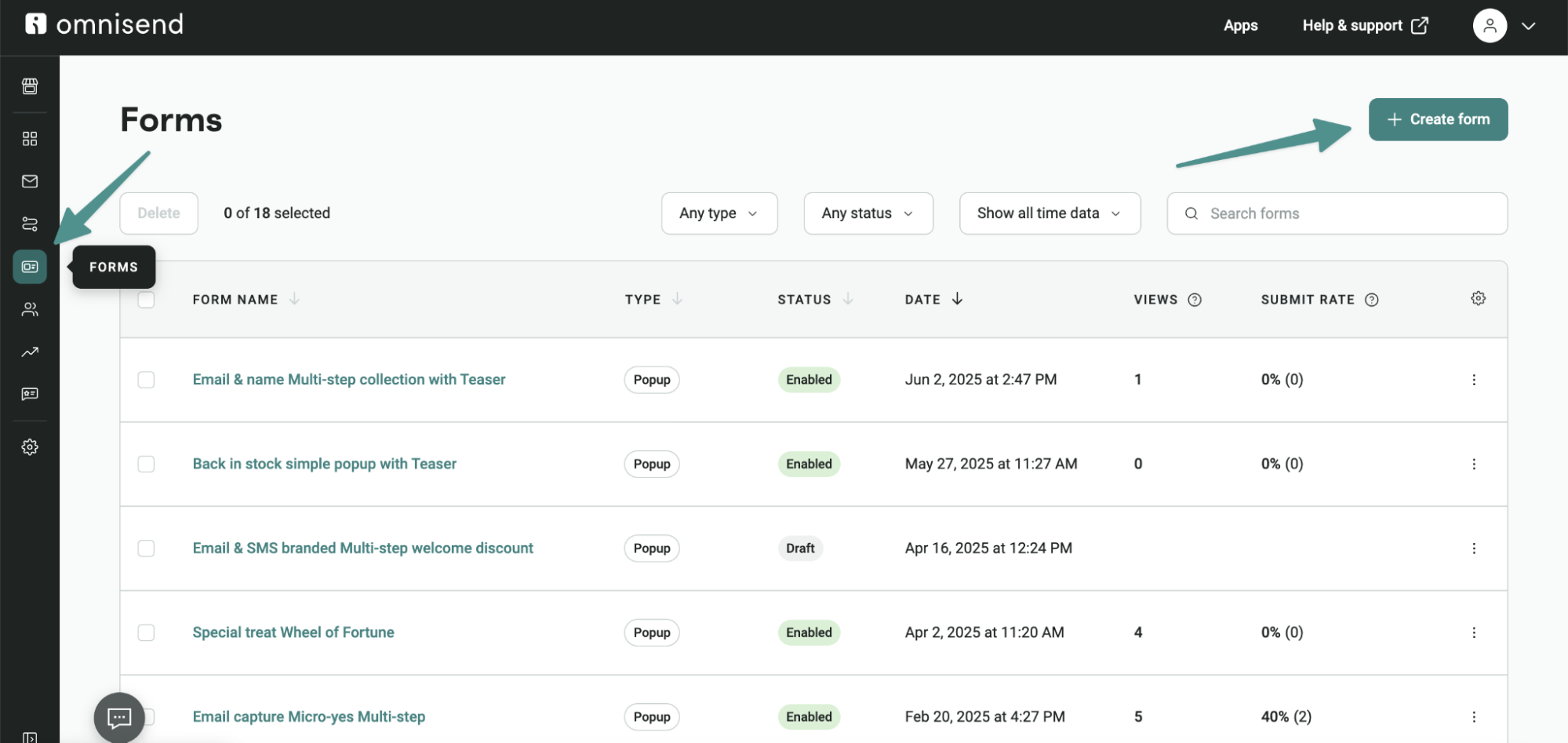
3. Create the back in stock signup form: Go to Forms → Create Form. Select the Gather interest in out-of-stock template to use it.
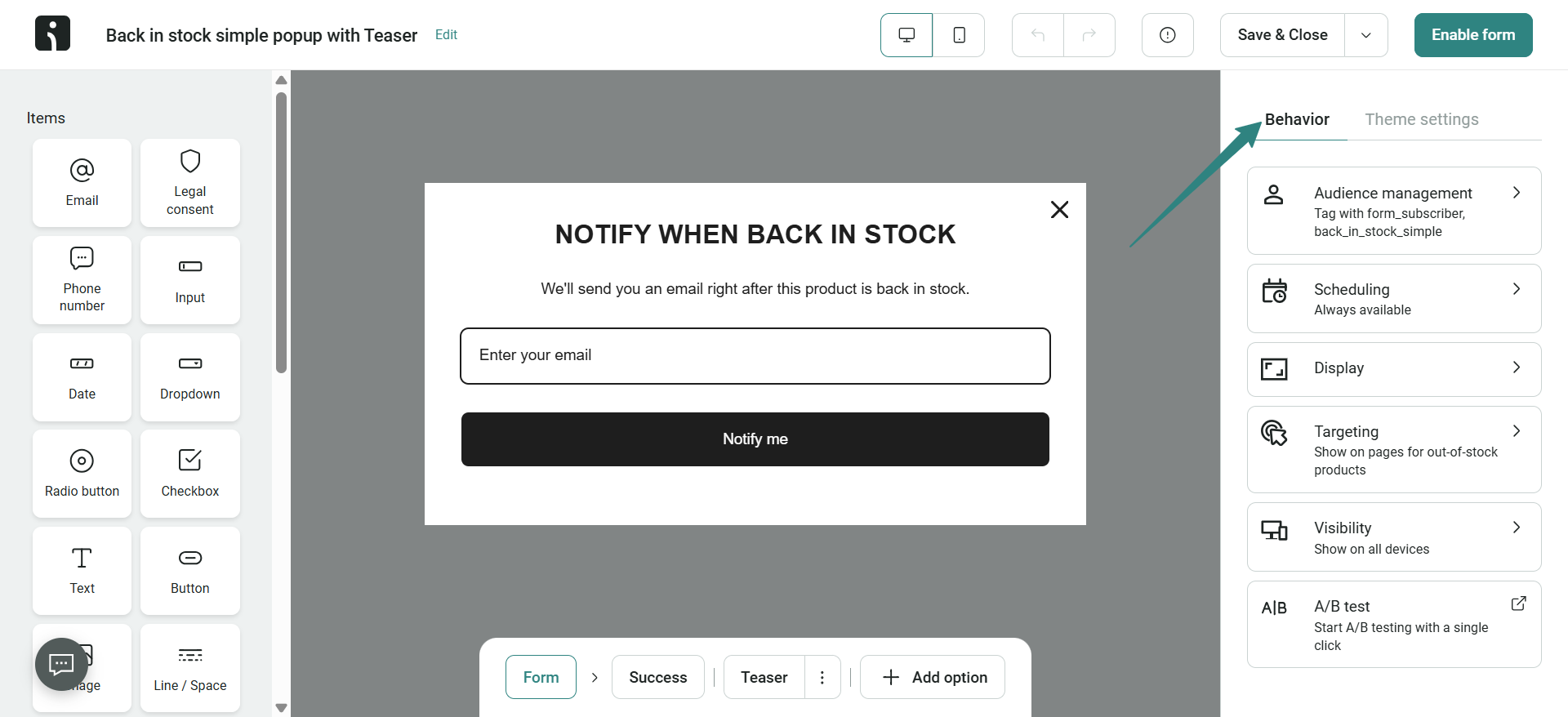
4. Customize and publish the form: Adjust the form design, messaging, and behavior before publishing. Set your form to Show on out-of-stock product pages.
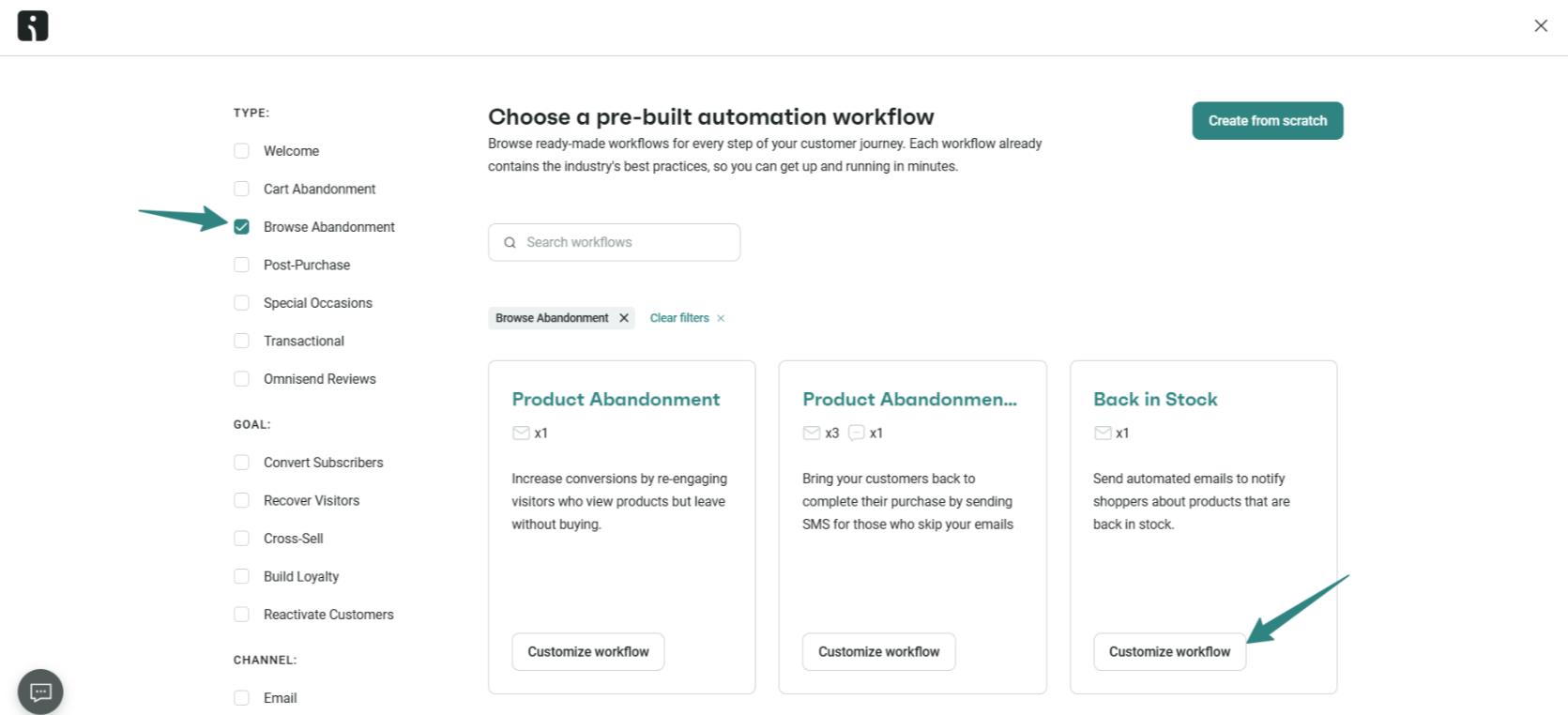
5. Access the pre-built back in stock workflow: In the Omnisend dashboard, go to Automation, click Add Automation, and choose Back in Stock from the templates. This gives you a ready-made workflow you can customize.
6. Customize the notification email: Open the workflow and edit the email’s design, copy, and branding using the drag-and-drop editor. Product image, name, price, and link populate automatically.
7. Add SMS notification (optional): Click Add SMS in the workflow to include text alerts. Keep messages short and include the product name and link.
8. Activate the workflow: Start by publishing the workflow edits you’ve made. Then, activate it to make it live.
9. Track performance: With the setup complete, monitor your metrics and the number of clients waiting for restock alerts in your automation stats. You can also view your Back in Stock report from the Reports menu.
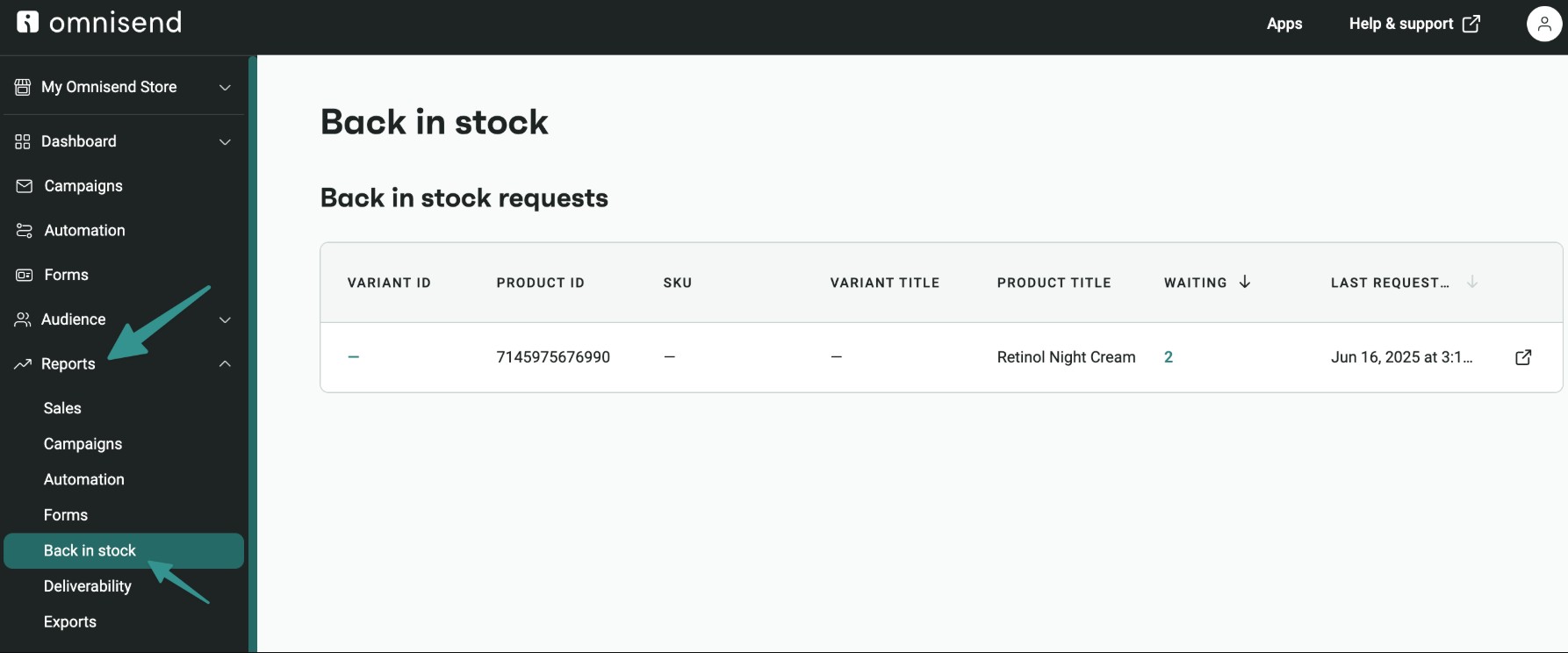
After setup, you can view waiting lists and track sends, opens, and purchases directly in the Omnisend dashboard. For a visual walkthrough, watch this helpful tutorial:
Best practices for back in stock notifications
When done right, back in stock notifications recover lost sales while building stronger relationships with your audience. Ensure you:
- Send notifications immediately when restocked: Speed matters, so notify customers within minutes of restocking while their interest is still high
- Include clear product information: Show the product name, image, price, and a direct link so shoppers can buy with one click
- Create urgency (honestly): Use real cues like “only 12 remaining” if there’s limited stock or high demand, but don’t fake scarcity
- Offer email and SMS options: Let shoppers choose how they want to be notified
- Personalize the message: Use the shopper’s name and reference the exact product they requested
- Make signup easy: Keep the form short and visible on out-of-stock product pages
- Set expectations: Tell customers how soon they’ll be notified and if stock is limited
- Track and optimize: Monitor opens, clicks, and purchases to improve performance over time
- Follow up if no purchase: A reminder email or SMS can gently recover additional sales
Common mistakes to avoid
Avoiding common mistakes ensures your “notify when back in stock” Shopify alerts deliver the best results. Avoid:
- Failing to test the system: Always test forms and workflows before going live to ensure notifications are sent properly
- Forgetting to re‑enable after testing: Double‑check that your automation is active once setup, changes, or testing is complete
- Poor email design: A cluttered layout and unclear message or CTA can cause customers to ignore the notification
- Using only email and ignoring SMS: Many shoppers respond faster to text messages, especially for high-demand items
- Not optimizing on mobile: Most customers open emails on mobile, so a mobile-friendly design is essential
- Ignoring the data: Failing to track opens, clicks, and conversions means missing opportunities to improve
- Mismanaging customer expectations: If stock is limited, provide expected restock dates to avoid disappointment
- Treating alerts as a standalone feature: Back in stock notifications work best when connected to broader email and SMS marketing flows
Measuring the impact of back in stock notifications
Tracking the ROI of your back in stock notifications helps identify optimization opportunities. Measuring the right SMS and email marketing metrics showcases the value of this feature to your business.
Some key metrics to track include:
- Signup rate: Percentage of visitors on out‑of‑stock product pages who sign up. Rates may vary depending on traffic and product demand.
- Notification open rate: Percentage of customers who open alerts. Omnisend data shows 58.03% open rates for back in stock automations.
- Click-through rate: Percentage who click to view the product. Omnisend reports 21.19% click‑to‑sent rates, showing strong purchase intent.
- Conversion rate: Percentage who purchase after being notified. Omnisend back in stock automations achieve 6.46% conversion rates, with 30.5% of clickers making a purchase.
- Revenue generated: Total sales attributed to notifications. Omnisend customers average $8.46 per email, with an average order value of $131.
- Time to purchase: How quickly customers buy after receiving alerts. Shorter times indicate stronger intent.
- Most requested products: Identify items with the most restock requests. This guides smarter inventory planning.
Omnisend provides built-in analytics that show these metrics in one dashboard. You can see revenue directly attributed to back in stock notifications.
Final thoughts
Back in stock notifications are essential for recovering revenue from out-of-stock products and reconnecting with high-intent shoppers. With the right solutions, you can easily implement it.
While Shopify’s theme‑based option is too limited for most stores and custom code is rarely necessary, apps provide the features you need.
Omnisend stands out by combining back in stock Shopify alerts with email and SMS marketing in one affordable platform. It delivers better value and functionality than standalone apps.
Setup is easy, but the revenue impact can be significant, especially for fast-selling or limited-inventory products.
Quick sign up | No credit card required

TABLE OF CONTENTS
TABLE OF CONTENTS


No fluff, no spam, no corporate filler. Just a friendly letter, twice a month.