
 Omnisend AI


 OFFER
OFFER








Drive sales on autopilot with ecommerce-focused features
See FeaturesKey takeaways 
Optimizing your WooCommerce checkout process is crucial, as even minor friction points can significantly increase cart abandonment rates and impact revenue.
Choosing the right checkout plugin should focus on features that enhance conversion, minimize friction, and integrate seamlessly with marketing automation tools like Omnisend.
WooCommerce checkout plugins offer quick setup and proven improvements over custom code, making them ideal for enhancing user experience and boosting sales.
Integrating checkout data with marketing automation allows for personalized follow-ups and abandoned cart recovery, turning one-time buyers into repeat customers.
Reveal key takeaways
If you treat WooCommerce checkout plugins like an afterthought, you could be missing out on potential sales. Minor delays, extra fields, or unclear steps can quickly deter buyers.
In this guide, we’ll break down how to choose WooCommerce checkout plugins. We’ll provide side-by-side comparisons, practical examples, and setup guidance.
More importantly, we’ll demonstrate how checkout optimization works in conjunction with email and SMS automation. Think pre-checkout intent, checkout behavior, and post-purchase follow-ups operating together.
Let’s get started.
Increase sales and profits with Omnisend’s powerful automation
Quick sign up | No credit card required
Why your WooCommerce checkout needs optimization
Before checking the numbers, let’s define checkout friction. Extra fields and inadequate payment options can be enough to stop shoppers from finishing their purchase.
This illustrates why checkout optimization has a direct impact on revenue.
How checkout friction kills conversions
Even minor friction points can leave a lasting impact. Beware of these typical friction points:
- Lengthy forms asking for unnecessary information
- Clunky mobile checkout that requires zooming or scrolling
- Slow-loading payment pages
- Lack of clear trust badges or security signals
- Confusing shipping or payment options
These factors increase cart abandonment. However, you can reduce these frictions with WooCommerce plugins.
Key stats on cart abandonment and checkout behavior
Research by Baymard Institute shows that checkout design and flow are primary causes of users abandoning their purchase mid-checkout.
- Recent data indicate that the average cart abandonment rate globally is approximately 70%.
- According to Baymard, 18% of US online shoppers have abandoned an order because of a “too long/complicated” checkout process.
- Baymard Institute estimates that improving checkout usability can recover a significant portion of abandoned carts.
These statistics highlight the need for improved WooCommerce checkouts that prioritize conversion optimization.
Why plugins beat custom code for most WooCommerce stores
WooCommerce’s default checkout works out of the box but is usually not optimized for sales. Custom development, on the other hand, is time-consuming, expensive, and often challenging to maintain. With WooCommerce checkout plugins, you get:
- Quick setup with pre-built optimization features
- Flexible field management to remove unnecessary friction
- Mobile-first design for a seamless shopping experience
- Built-in analytics and testing tools to track conversion impact
WooCommerce checkout plugins save time while offering proven, data-driven improvements. Plus, many of them integrate directly with Omnisend, allowing abandoned cart recovery with automated emails and SMS.
What to look for in a WooCommerce checkout plugin
Choosing the right WooCommerce checkout plugin involves several factors. You need a tool that enhances conversion, provides analytics, minimizes friction, and seamlessly integrates with your marketing automation workflows.
Focus on tools that help you create practical, conversion-focused checkout pages. Check out the clear evaluation framework below.
Must-have features for conversion-focused checkouts
The best WooCommerce checkout plugins strike a balance between features and accessibility. They give teams control without creating complexity.
When evaluating WooCommerce checkout plugins, focus on the following features that directly impact conversions:
- Support for both one-page and multi-step checkout options
- Guest checkout
- Address autocomplete
- Visible trust elements and security cues
- Multiple payment methods
- Order bumps and upsells
- Analytics to track abandonment and completion
Nice-to-have features include:
- Design flexibility without breaking layout
- Intuitive setup and configuration
- Clear documentation and reliable support
Performance, security, and compliance considerations
Conversion means nothing if checkout performance suffers. Speed and stability matter just as much as design. You should look for a reliable plugin that supports:
- Fast page loads across devices
- Mobile responsiveness without layout issues
- Compatibility with caching tools
- GDPR and CCPA compliance
- SSL and PCI-compliant payment gateways
The best WooCommerce checkout plugins ensure smooth checkout flows across devices while protecting sensitive customer data.
Marketing and CRM integration (including Omnisend)
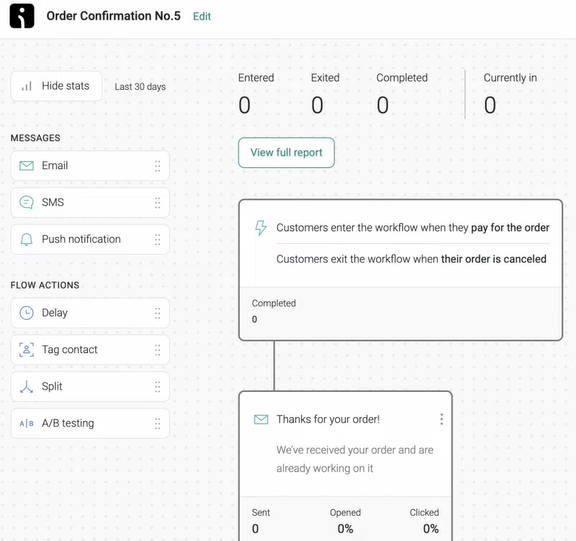
Here’s where many plugins fall short. Checkout data is a goldmine if it’s connected to your marketing stack. WooCommerce checkout plugins can send the following data to tools like Omnisend:
- Cart contents and order value
- Custom checkout fields
- Checkout start and purchase events
These data are helpful for:
- Abandoned cart email and SMS recovery
- More intelligent segmentation based on purchase intent
- Post-purchase follow-ups and upsells
Marketing and CRM integrations help close the loop from checkout to retention, ensuring a seamless customer experience. A plugin that looks great but doesn’t connect with your marketing tools limits revenue potential.
In short, the best WooCommerce checkout plugins combine smooth UX, strong performance, and powerful integration with marketing automation. Beyond function, these criteria ensure your checkout page converts and retains customers.
Best WooCommerce checkout plugins by use case
Checkout plugins improve checkout in several ways. In the comparison below, we’ll demonstrate how each plugin addresses a specific checkout issue. This should help you quickly identify what fits your store setup.
Here’s how we evaluated each plugin.
Overview: How we selected and evaluated these plugins
We focused on identifying plugins that genuinely encourage shoppers to complete their purchases. We are assessing plugins based on:
- Checkout simplicity
- Mobile performance
- User feedback
- Documentation
- Integration with email/SMS tools like Omnisend
- Suitability for specific store types
We also looked into user sentiments on Reddit threads, ecommerce forums, and social media groups. Real store owners provide valuable insight into pain points that marketing pages often don’t.
The goal is to recommend plugins that actually improve conversions, not just look good on paper.
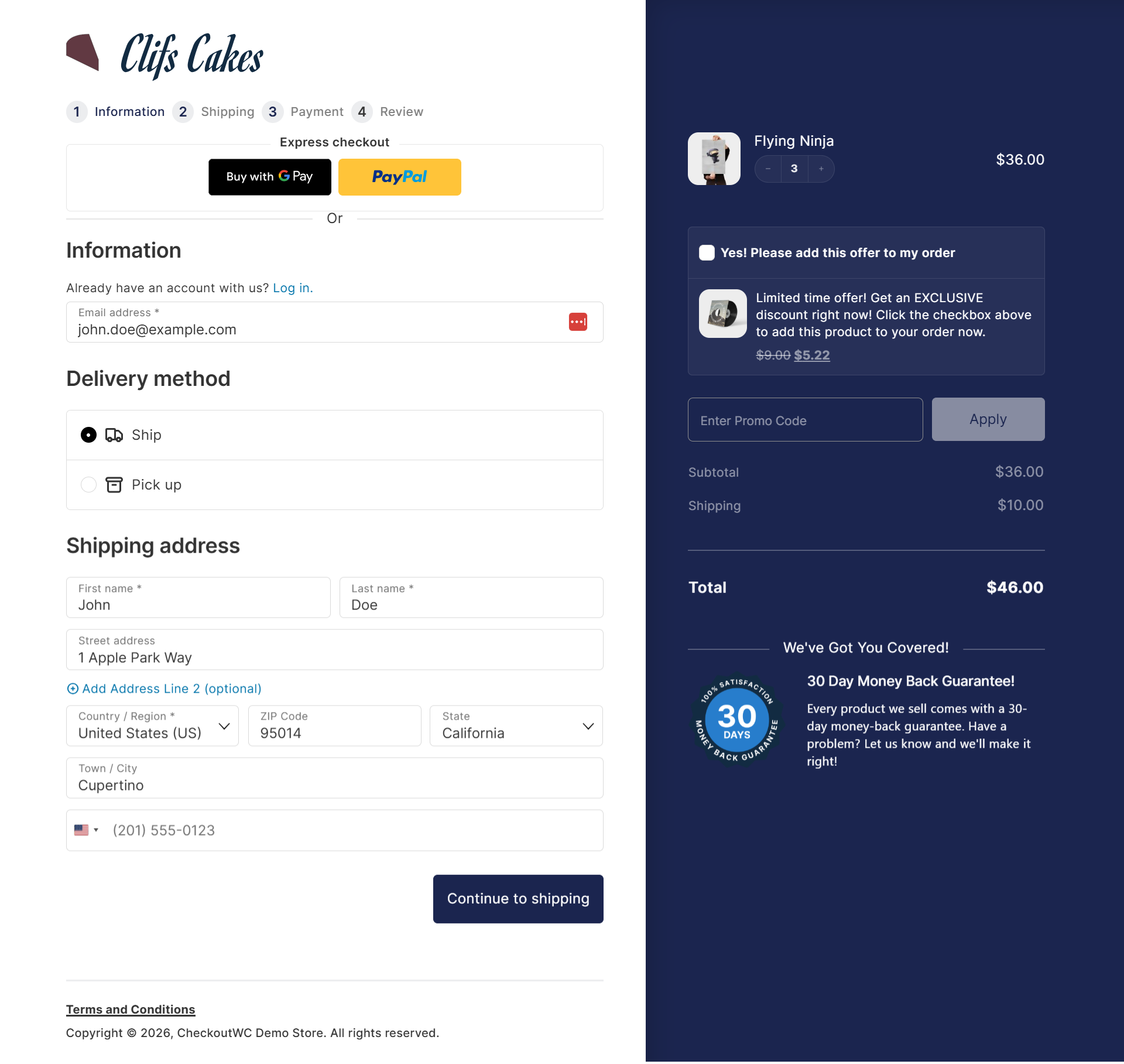
CheckoutWC — For a streamlined, Shopify-style checkout
If you’re tired of the default WooCommerce checkout plugins looking clunky and slowing down checkouts, this plugin is built for you.
Think of it as giving your store a Shopify-style checkout experience that feels clean, modern, and distraction-free.
Key features
- Fully redesigned, mobile-friendly checkout templates
- Built-in side cart (flyout cart) with cart editing
- Order bumps and post-purchase upsells
- Express payments (Apple Pay, Google Pay, PayPal, Amazon Pay)
Pricing
- Premium-only plugin with tiers: Basic, Plus, Pro, and Agency
Best for
Stores that want a fast, clean, and conversion-focused checkout without custom development
Pros
- Significantly reduces checkout friction and abandonment
- Strong support for order bumps and upsells
- Excellent mobile checkout experience
Cons
- No free version
- Advanced features are locked behind higher-tier plans
Integration and conversion
You can connect CheckoutWC with Omnisend to allow checkout events to automatically trigger abandoned cart emails or SMS messages.
For example, if a shopper leaves mid-checkout, Omnisend can send an automated reminder to increase recovery rates.
Checkout Field Editor for WooCommerce — For flexible custom fields
This plugin is perfect if you want complete control over your checkout fields. You can add delivery dates, gift messages, or special instructions during checkout. This makes it easy to customize WooCommerce checkout without touching code.

Key features
- Add, edit, or remove checkout fields from the billing and shipping sections
- Strategically place core WooCommerce fields
- Support for text fields, select fields, checkboxes, and date pickers
- Add custom fields like delivery dates or special instructions
- Manage everything from the WordPress admin dashboard
Pricing
- This is a premium-only plugin with a yearly plan
Best for
Stores that need flexible checkout forms to capture extra information without slowing customers down
Pros
- Simple and focused functionality
- Ideal for collecting specific customer information
- Lightweight compared to full checkout page plugins
Cons
- Not compatible with cart and checkout blocks
- Requires shortcode-based WooCommerce checkout pages
Integration and conversion
Pairing Checkout Field Editor for WooCommerce with Omnisend allows you to send custom field data to email or SMS campaigns.
For example, if a customer selects a gift option, you can trigger personalized follow-up emails to upsell related products.
WooCommerce Checkout Add-Ons — For order bumps and extras
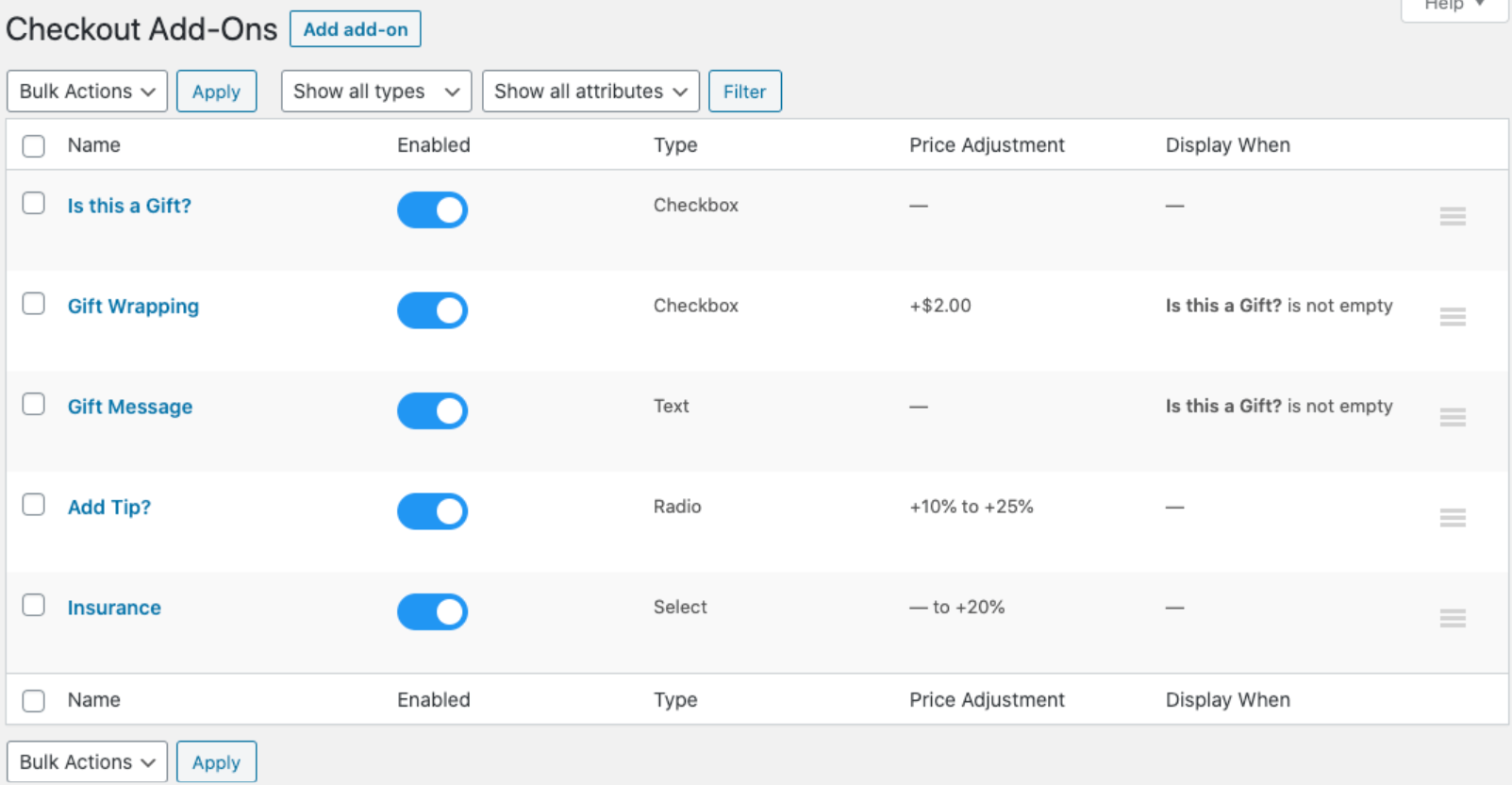
This plugin enables you to offer order bumps, product add-ons, and additional services directly on the checkout page. It’s perfect for stores that want to drive sales at the point of purchase without disrupting the checkout flow.
Key features
- Add order bumps and upsells directly on the checkout page
- Include optional product add-ons (gift wrapping, warranties, or extras)
- Conditional logic to show relevant add-ons
- Works with multiple product types and variations
- Simple integration with WooCommerce and most themes
Pricing
- This is a premium-only plugin with a yearly plan
Best for
Stores that want to increase average order value with optional services and add-ons
Pros
- Direct revenue increase through paid add-ons
- Highly flexible field and pricing options
- Works well with subscriptions and one-page checkout
Cons
- No inventory management for add-ons
- Can overwhelm checkout if overused
Integration and conversion
Pairing this plugin with Omnisend allows you to trigger automated post-purchase emails for add-on products. You can also suggest complementary items.
For example, if a customer selects the gift wrapping option, you can automatically send an email suggesting complementary products to increase repeat purchases.
Fluid Checkout — For modern, mobile-first checkout flows
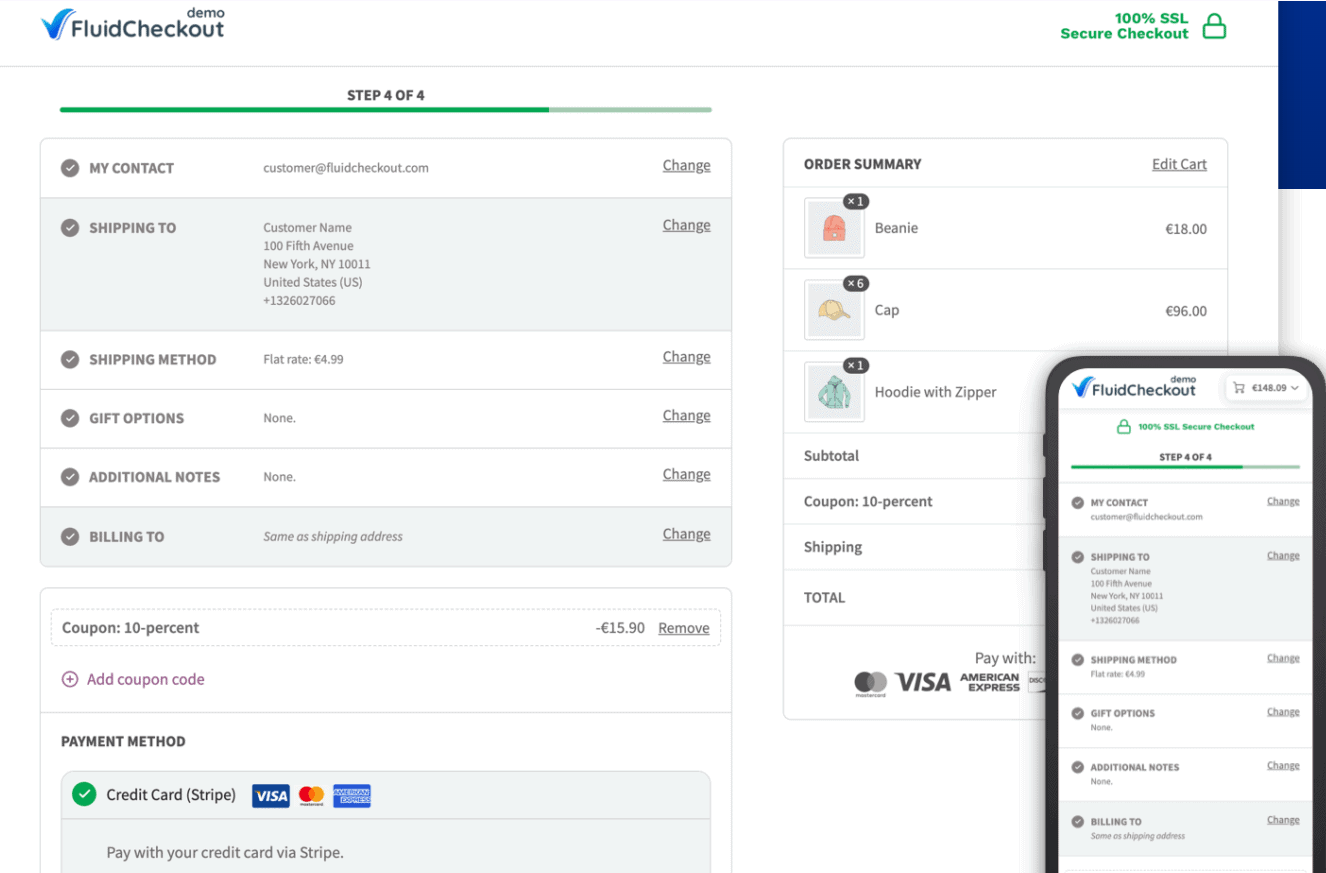
Fluid Checkout is a WooCommerce checkout plugin that focuses on fast, streamlined, and mobile-friendly checkouts. It helps encourage buyers toward a purchase.
It ensures fewer steps, cleaner layouts, and a smooth experience on any device.
Key features
- Optimized cart, checkout, order pay, and thank-you pages
- Automatic cart updates without clicking “Update cart”
- Mobile-friendly quantity controls with plus and minus buttons
- Edit cart items directly at checkout
- Express checkout buttons in a single, logical location
Pricing
- Fluid Checkout is premium-only and billed annually.
Best for
Stores with high mobile traffic that want a fast, sleek checkout experience
Pros
- Reduces cart abandonment by simplifying mobile checkout
- Clean, modern layouts improve user experience
- Flexible enough to suit small and mid-sized stores
Cons
- Some advanced features require the premium version
- Limited native upsell options
Integration and conversion
When paired with Omnisend, Fluid Checkout enables mobile checkout data to be fed directly into automated email or SMS marketing.
For instance, if a mobile shopper abandons their cart at checkout, mobile checkout data is fed into Omnisend. This then triggers abandoned cart reminders that include product details.
Here’s what a user has to say about this WooCommerce checkout plugin:

FunnelKit — For optimized checkouts, order bumps, and post-purchase revenue
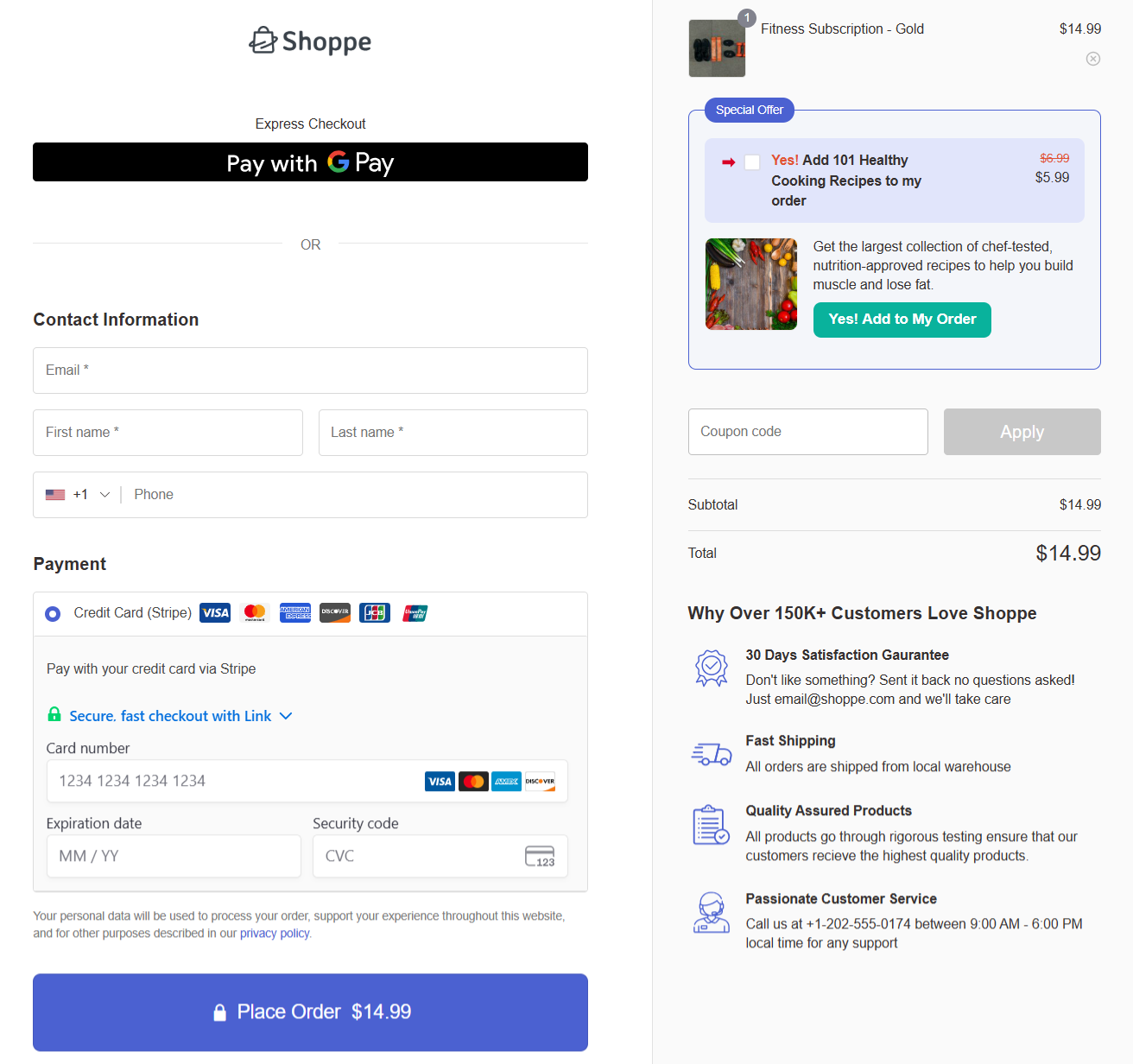
FunnelKit is a comprehensive WooCommerce checkout plugin designed to transform your standard checkout into a high-converting sales machine. It combines checkout customization, order bumps, one-click upsells, and funnel building into one powerful tool.
If you want complete control over your checkout design and post-purchase experience, FunnelKit delivers without requiring technical expertise.
Key features
- 20+ conversion-optimized templates with support for page builders
- One-page or multi-step checkout layouts
- Order bumps and one-click upsells/downsells
- Express checkout (Google Pay, Apple Pay), auto-apply coupons, Google address autocomplete, etc.
- A/B split testing for checkouts and entire funnel pages
Pricing
- Free: Basic checkout customization and funnel templates
- Premium: Paid plans unlock advanced features like pro templates, A/B testing, dynamic offers, and detailed analytics
Best for
Stores that want to optimize every stage of the buyer journey while maintaining complete design control over checkout pages
Pros
- Unlimited checkouts, funnels, order bumps, and upsells
- Advanced templates that work with various page builders
- Built-in deep analytics and conversion tracking
Cons
- Advanced features require the premium version
- Can take time to fully configure for complex sales funnels
Integration and conversion
FunnelKit integrates smoothly with Omnisend, allowing checkout data to trigger automated abandoned cart emails and SMS campaigns.
For example, when a shopper adds items but doesn’t complete checkout, Omnisend can automatically send recovery emails featuring the exact products left behind, helping recapture lost revenue.
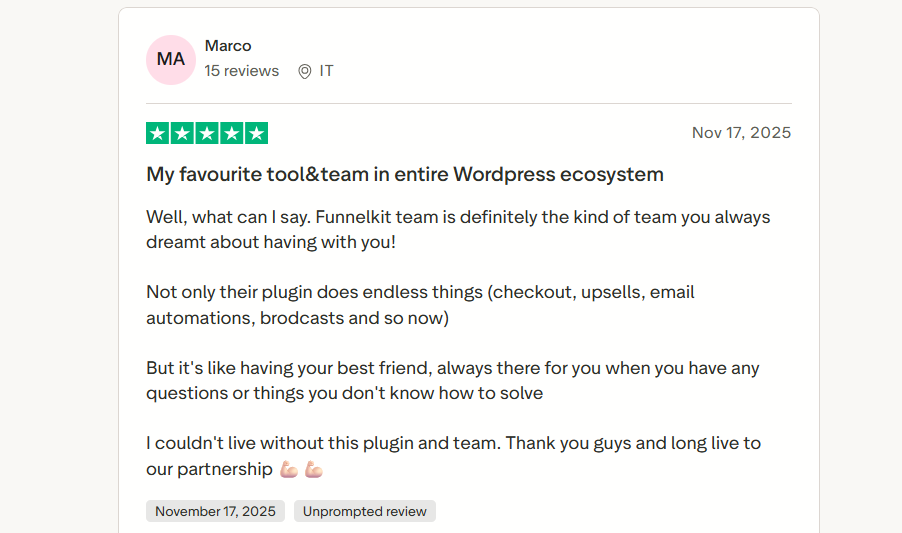
FunnelKit is trusted by more than 40,000 such WooCommerce stores with reviews like this:
SeedProd — For custom-designed checkout landing pages
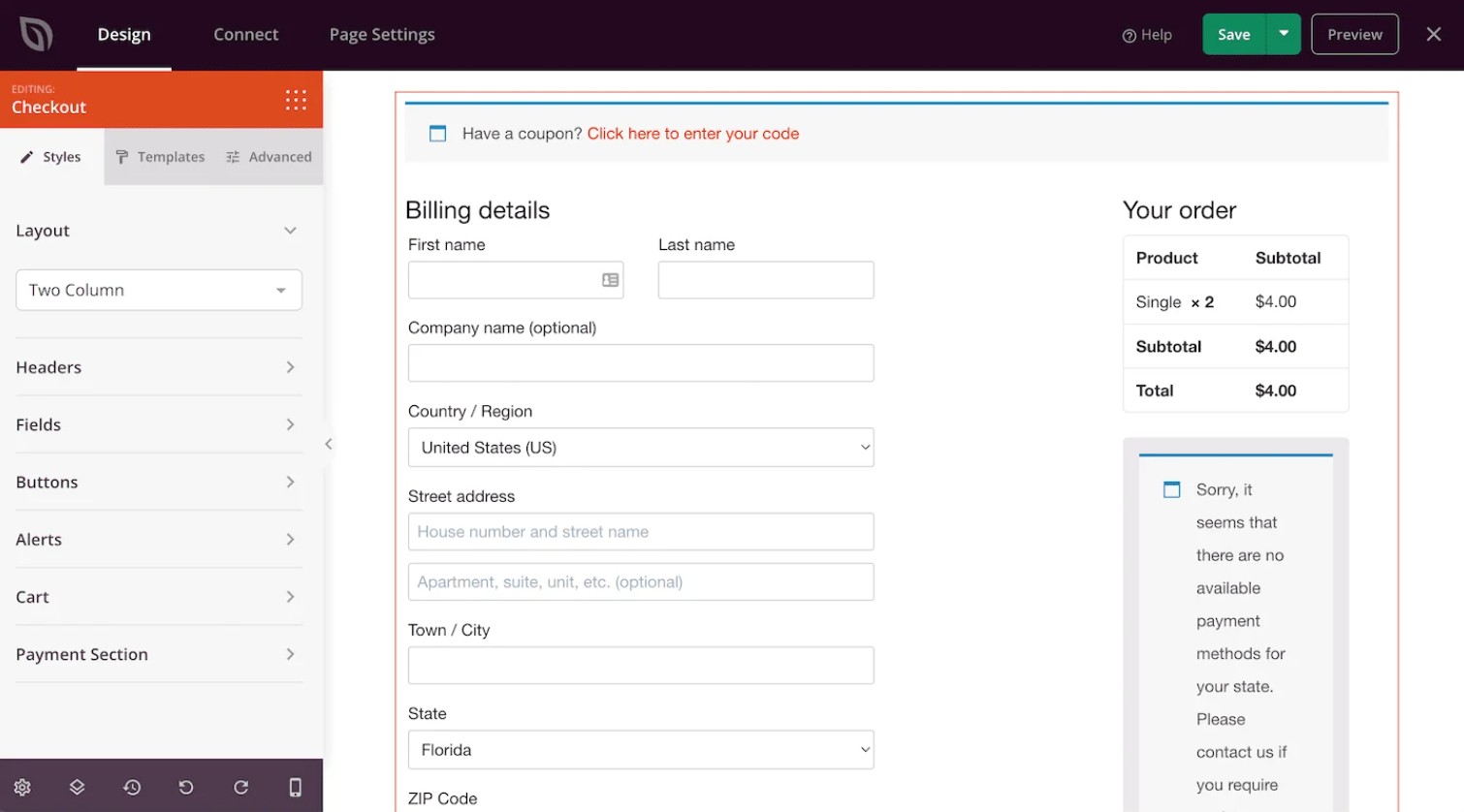
SeedProd is one of the best WooCommerce checkout plugins for creating custom checkout landing pages without coding.
Key features
- Drag-and-drop page builder (no code required)
- Pre-built landing page and funnel templates
- WordPress theme builder for WooCommerce pages
- Email marketing integrations for capturing leads
- Mobile-responsive, fast-loading pages
Pricing
- Free: Basic builder + AI site creation (up to three websites)
- Premium: Paid tiers (Basic, Plus, Pro, Elite) with advanced blocks, integrations, and theme-building tools
Best for
Stores that want complete control over landing and product page design without relying on complex tools
Pros
- Very easy to use for non-technical users
- Great for building focused landing and sales pages
- Works well alongside WooCommerce
Cons
- Not a checkout or order-bump tool by itself
- Advanced features require a paid plan
Integration and conversion
SeedProd works alongside WooCommerce and email marketing tools to support Omnisend-powered email and SMS automation. Abandoned custom checkout pages can trigger automated reminders via WooCommerce + Omnisend.
WPForms — For form-based checkouts and simple selling
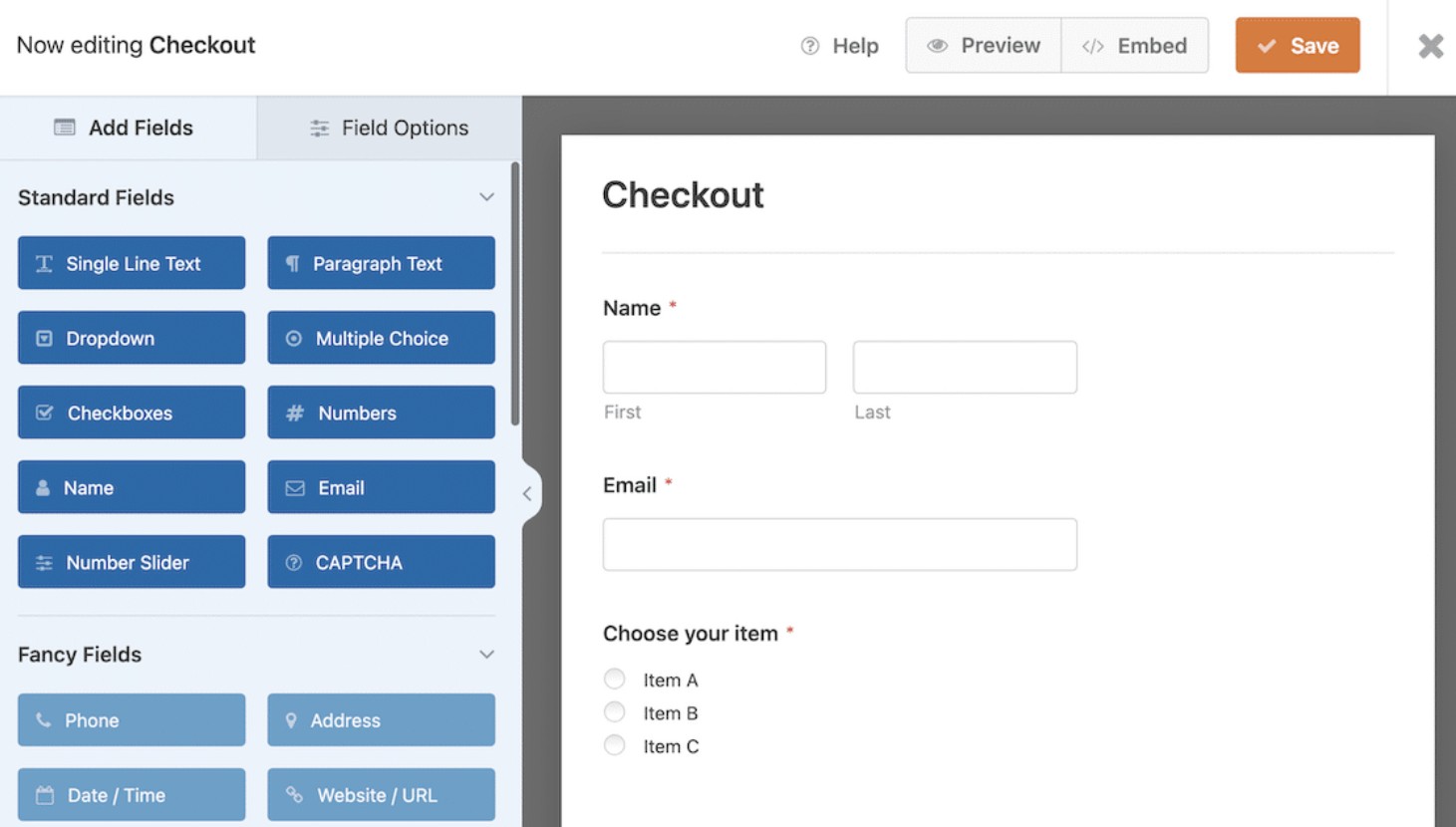
Not every store needs a complete checkout redesign. WPForms is a drag-and-drop form builder that works well for simple selling, payments, and lead capture.
It’s not a complete checkout replacement, but for lightweight checkouts and forms, it gets the job done fast.
Key features
- Drag-and-drop form builder that doesn’t require coding
- Pre-built form templates to help you launch faster
- Smart conditional logic to show or hide fields
- Mobile-friendly, responsive forms
- Payment and marketing tool integrations
Pricing
- Premium only: Paid tiers (Basic, Plus, Pro, Elite) unlock features as you progress through the tiers
Best for
Small stores, digital downloads, or stores selling limited products with a simple, clean checkout experience
Pros
- Very easy to set up and use
- Flexible forms with conditional logic
- Lightweight and mobile-friendly
Cons
- Not designed for complex WooCommerce checkouts
- No free plan available
Integration and conversion
WPForms connects to popular email marketing and CRM tools through its add-ons. However, it doesn’t natively integrate with Omnisend. Any Omnisend automation would rely on WooCommerce order events, not WPForms submissions themselves.
For example, save-and-resume forms reduce friction for shoppers leaving mid-purchase.
Other notable WooCommerce checkout page plugins
Beyond the big names, there are some WooCommerce checkout plugins worth considering, especially if you have niche needs or require a lightweight solution.
WooCommerce Direct Checkout skips the cart page, whereas WooCommerce One Page Checkout combines product selection and checkout on a single page. Both improve conversion when paired with Omnisend via WooCommerce.
While they don’t directly integrate with Omnisend, all checkout data still flows to Omnisend via WooCommerce. This lets you run abandoned cart reminders and post-purchase follow-ups.
Quick comparison table: Features, pricing, and best-for
Here’s a quick comparison of WooCommerce checkout plugins, including their features, pricing, and compatibility with Omnisend.
| Plugin | Key features | Pricing | Best for | Omnisend integration |
|---|---|---|---|---|
| CheckoutWC | Shopify-style checkout, one-page, mobile-first, order bumps, A/B testing | Premium | Stores want a high-converting checkout | Strong – can trigger abandoned cart and automation workflows |
| Checkout Field Editor for WooCommerce | Add/remove fields, conditional logic, text/select/checkbox/date fields | Premium | Flexible checkout fields | Limited – data passes via WooCommerce |
| WooCommerce Checkout Add-Ons | Order bumps, upsells, gift options, and conditional add-ons | Premium | Increasing average order value | Limited – works through WooCommerce |
| Fluid Checkout | Mobile-first, one-page flow, gift messages, coupon field, local pickup | Premium | Mobile-heavy stores | Limited – works via WooCommerce |
| FunnelKit | Checkout builder, one/multi-step, order bumps, one-click upsells, A/B testing | Free + Premium | Funnel-based stores and higher-converting checkout | Strong – triggers Omnisend workflows on checkout events |
| SeedProd | Custom checkout landing pages, drag-and-drop, prebuilt templates | Free + Premium | Design-focused stores and campaigns | Limited – checkout events flow via WooCommerce |
| WPForms | Form-based checkout, simple selling, conditional logic, payment integrations | Premium | Small/simple stores | Limited – email/SMS triggers via WooCommerce |
How to choose the right checkout plugin for your WooCommerce store
Picking the right WooCommerce checkout plugins can feel overwhelming. Here’s the truth: the “best” plugin depends on your store, your customers, and your goals. Let’s break it down so you can choose a tool that actually improves conversions.
Match the plugin to your business model and industry
Not all checkout plugins are suitable for every store. Ask yourself: what’s your setup and your volume?
- Prioritize speed, mobile-first design, and analytics. Plugins like CheckoutWC are ideal for this purpose.
- Look for smooth repeat payment handling and automated reminders. WooCommerce Checkout Add-Ons can help.
- Flexible layouts and fully customizable checkouts matter. SeedProd supports fully customizable checkout page designs.
- Ensure support for multiple currencies, languages, and payment methods. CheckoutWC or Fluid Checkout works well.
Matching plugin features to your business model ensures that your checkout not only functions, but also converts.
Evaluating support, updates, and ecosystem reputation
Even the most feature-packed WooCommerce checkout plugin is only as good as its support. Here’s what to check:
- Is the plugin updated regularly for compatibility with WooCommerce and WordPress?
- Are support channels responsive, such as email, live chat, or community forums?
- Does the developer provide clear documentation, guides, or tutorials?
Plugin compatibility and testing before going live
Before flipping the switch, test your plugin first. Conflicts with themes or other plugins can silently break checkout flows.
Before you decide, make sure your chosen plugin:
- Works on a staging site first
- Plays nicely with your theme and other essential plugins
- Loads fast and doesn’t slow your pages
- Integrates with your marketing stack, especially Omnisend, for abandoned cart recovery and post-purchase flows
As one store owner shared on Reddit: “I picked a popular plugin without testing, and it cost me two weeks of troubleshooting. Lesson learned: always test first.”
When paired with Omnisend, checkout events can flow directly into automated email and SMS communication instead of ending at the confirmation page.
Connecting your checkout plugin with Omnisend and marketing automation
Optimizing your checkout is only the first step. Checkout plugins become more useful when they feed data into a marketing automation platform, such as Omnisend.
Why? Checkout data is more than numbers, and you can turn that knowledge into revenue.
Why checkout data is critical for personalization and retention
Every field in your checkout page holds valuable information. What products were purchased? How much did customers spend? Which shipping options did they choose? This information lets you:
- Segment customers by product type, order value, or purchase frequency
- Personalize email and SMS campaigns based on real behavior
- Trigger targeted upsells, cross-sells, or replenishment campaigns
Checkout isn’t the end of the sale, but it can start a lasting relationship with the customer. A store using WooCommerce checkout plugins to capture detailed order info can turn a one-time buyer into a repeat customer with the proper follow-up.
Example Omnisend workflows powered by checkout events
“Checkout isn’t the end of the customer journey. When checkout behavior feeds into automation, it becomes the starting point for retention, repeat purchases, and long-term value.”
— Evaldas Mockus, VP of Marketing, Omnisend
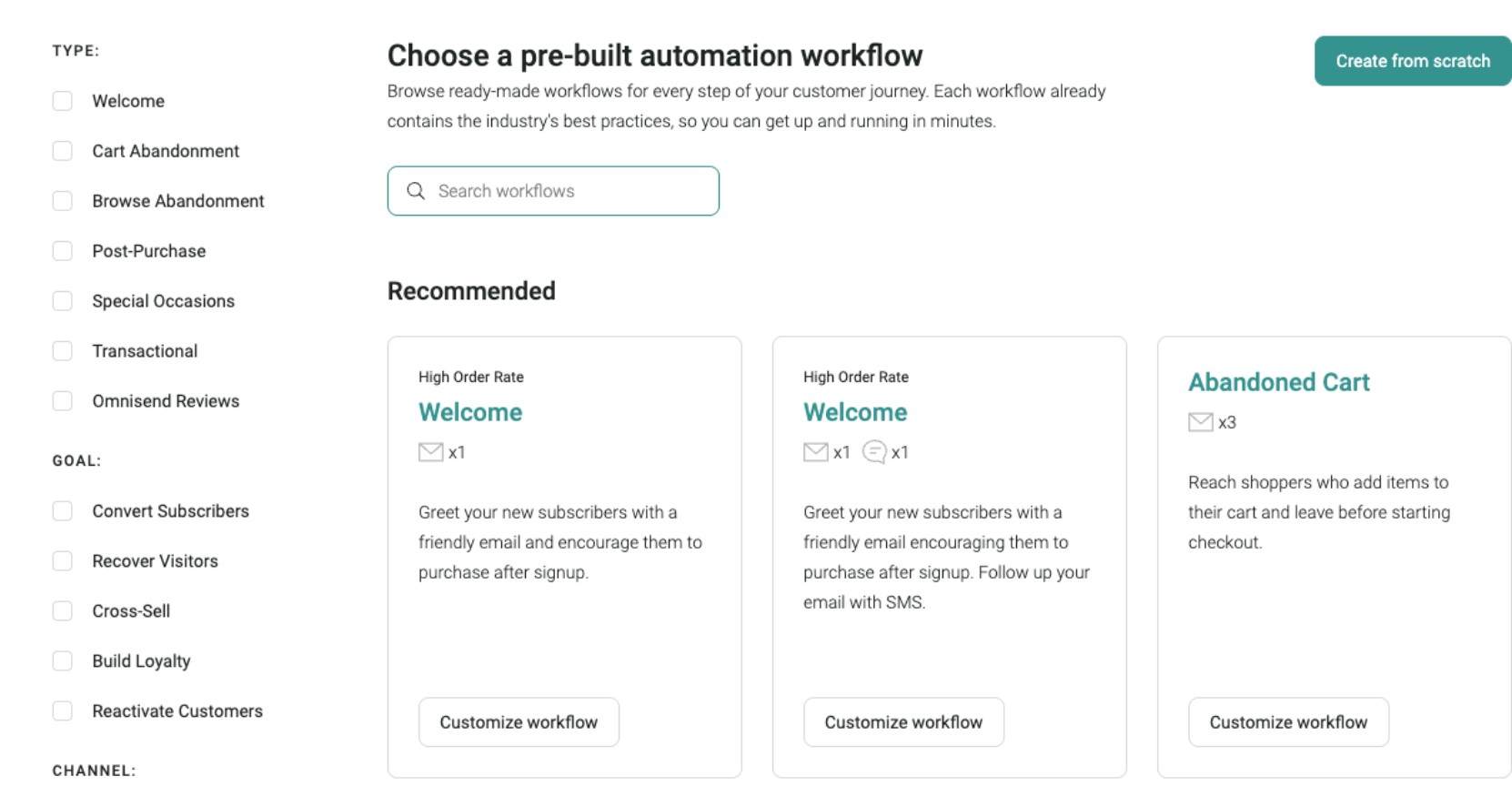
Once your data flows into Omnisend, you can automate almost every part of the customer journey. You can:
- Send an abandoned checkout series of emails and SMS when shoppers leave mid-purchase
- Provide order confirmation and shipping updates to assure customers and reduce support requests
- Run post-purchase cross-sell and replenishment campaigns to increase average order value.
- Request reviews and UGC to strengthen social proof and future conversions
Snatcher recovered over $120,000 in lost sales by combining cart abandonment automations with targeted follow-ups using Omnisend.
Omnisend + WooCommerce: Practical setup tips
Integration is simple. Just follow these steps:
1. Install and activate the Omnisend plugin
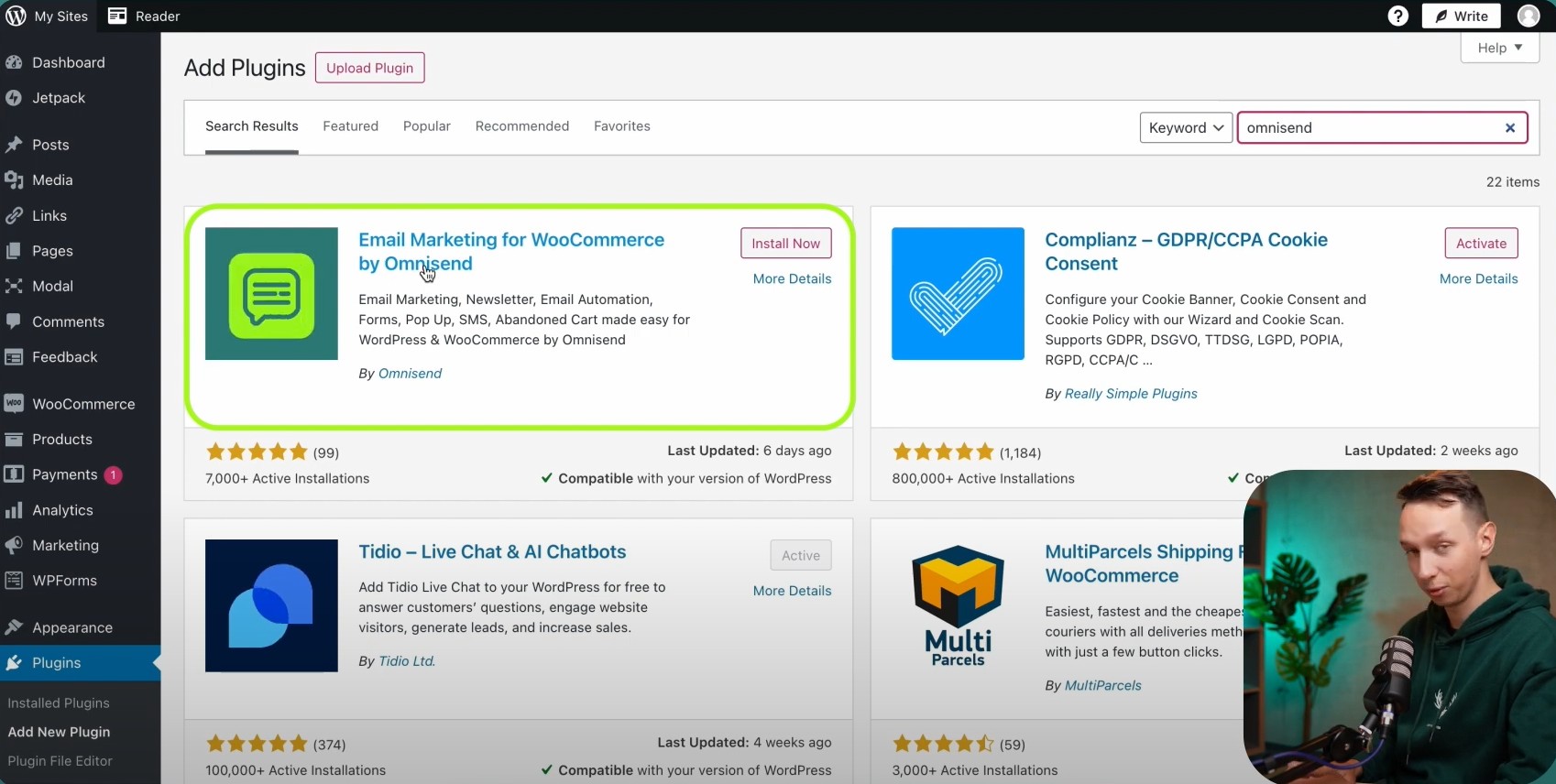
- In your WordPress dashboard, go to Plugins → Add New
- Search for Omnisend
- Install and activate the plugin
2. Open Omnisend from the WordPress sidebar
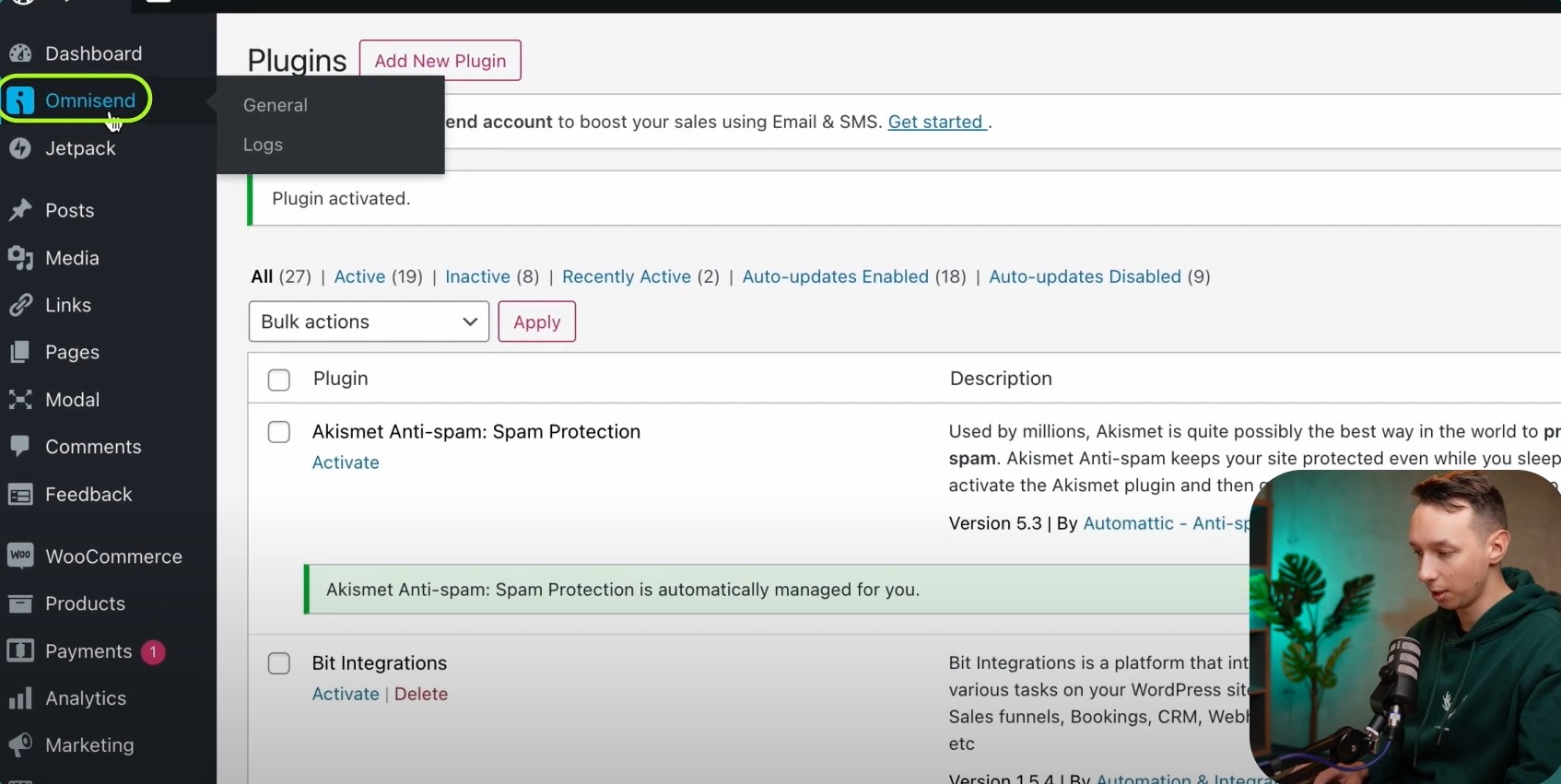
- Click Omnisend → General
- You’ll land on the Omnisend welcome screen inside WordPress
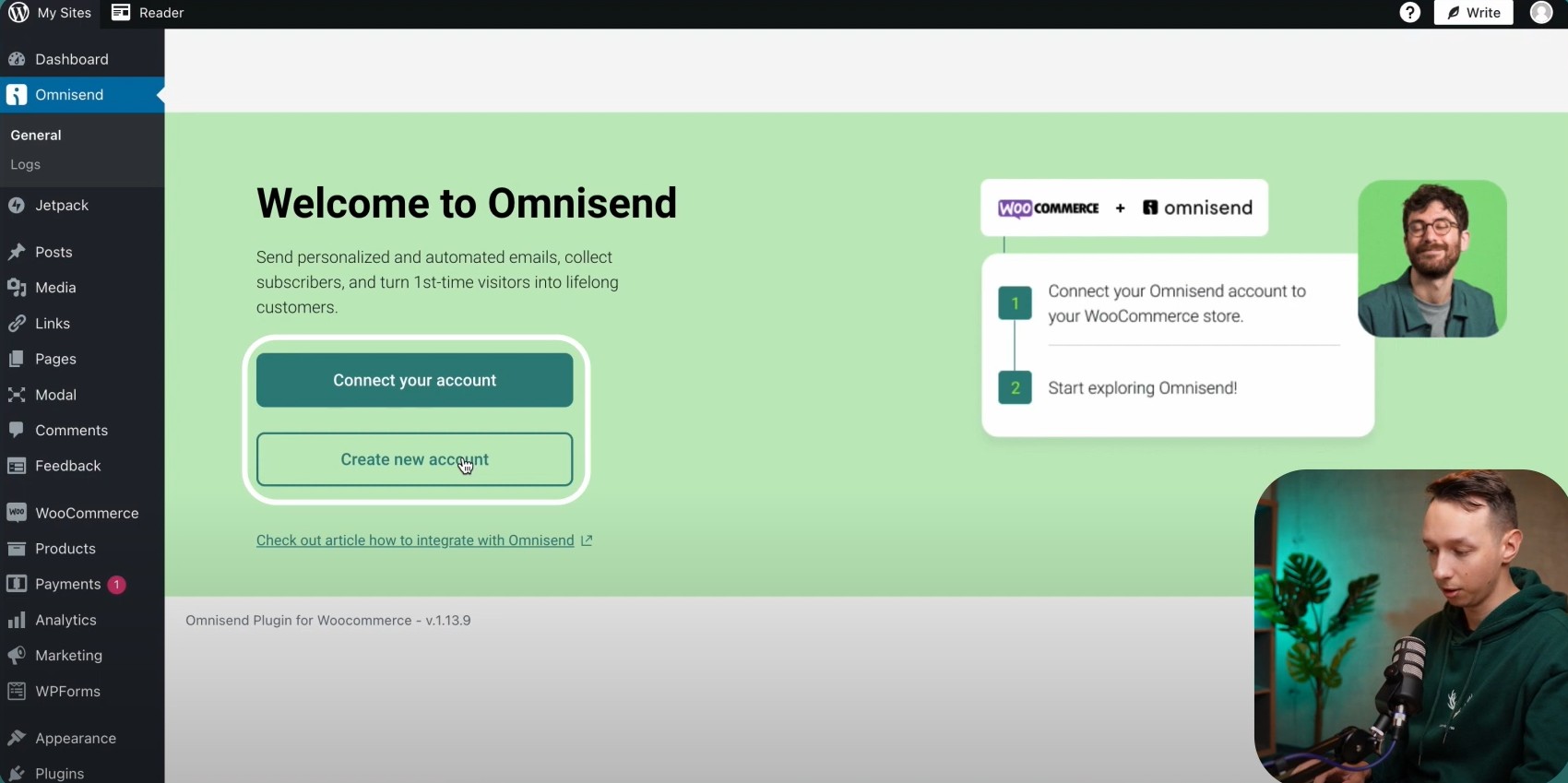
3. Connect or create an Omnisend account
- Click Connect your account if you already have an account, or Create a new account to sign up
- WooCommerce is automatically detected as the store platform
4. Confirm store details
- Enter your website URL and business details
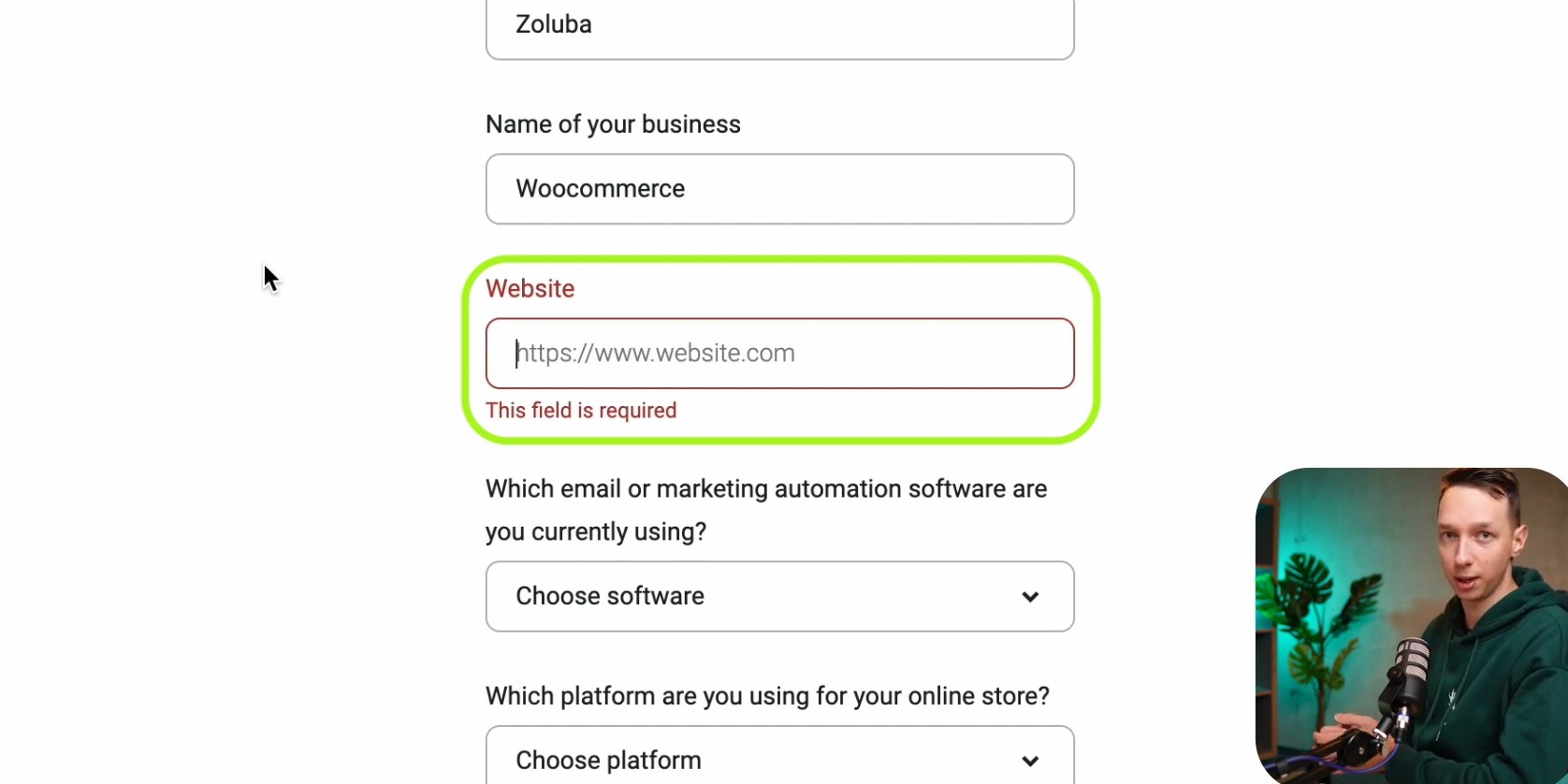
- Select your ecommerce platform if prompted
- Complete the connection to sync WooCommerce data
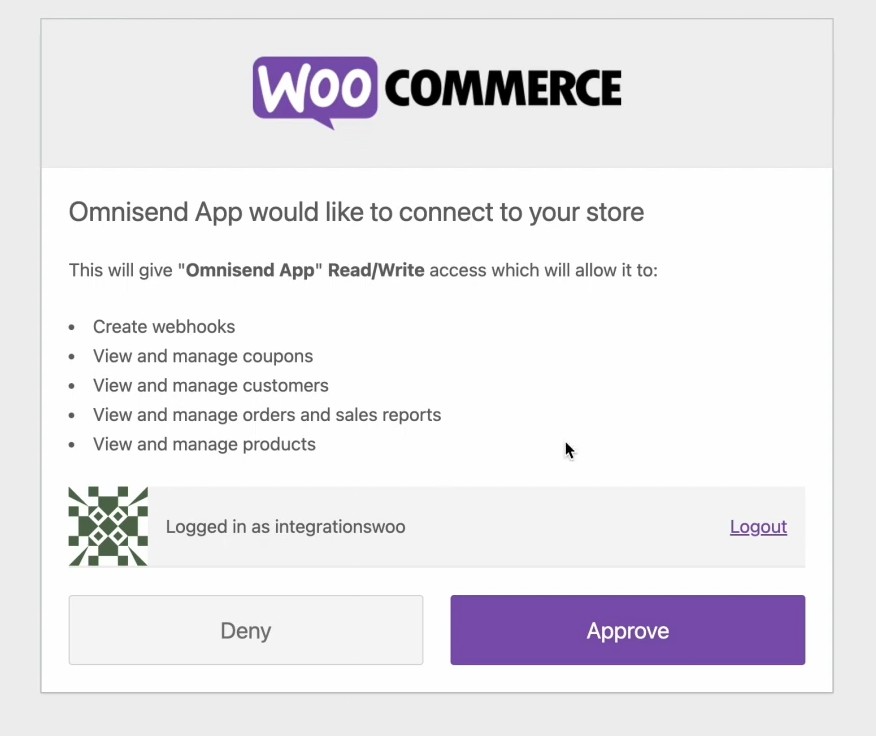
5. Connect Omnisend to WooCommerce
- Install the Omnisend for WooCommerce plugin
- Click Connect
- Approve read/write permissions (orders, customers, products, coupons, webhooks)
6. Create and configure signup forms
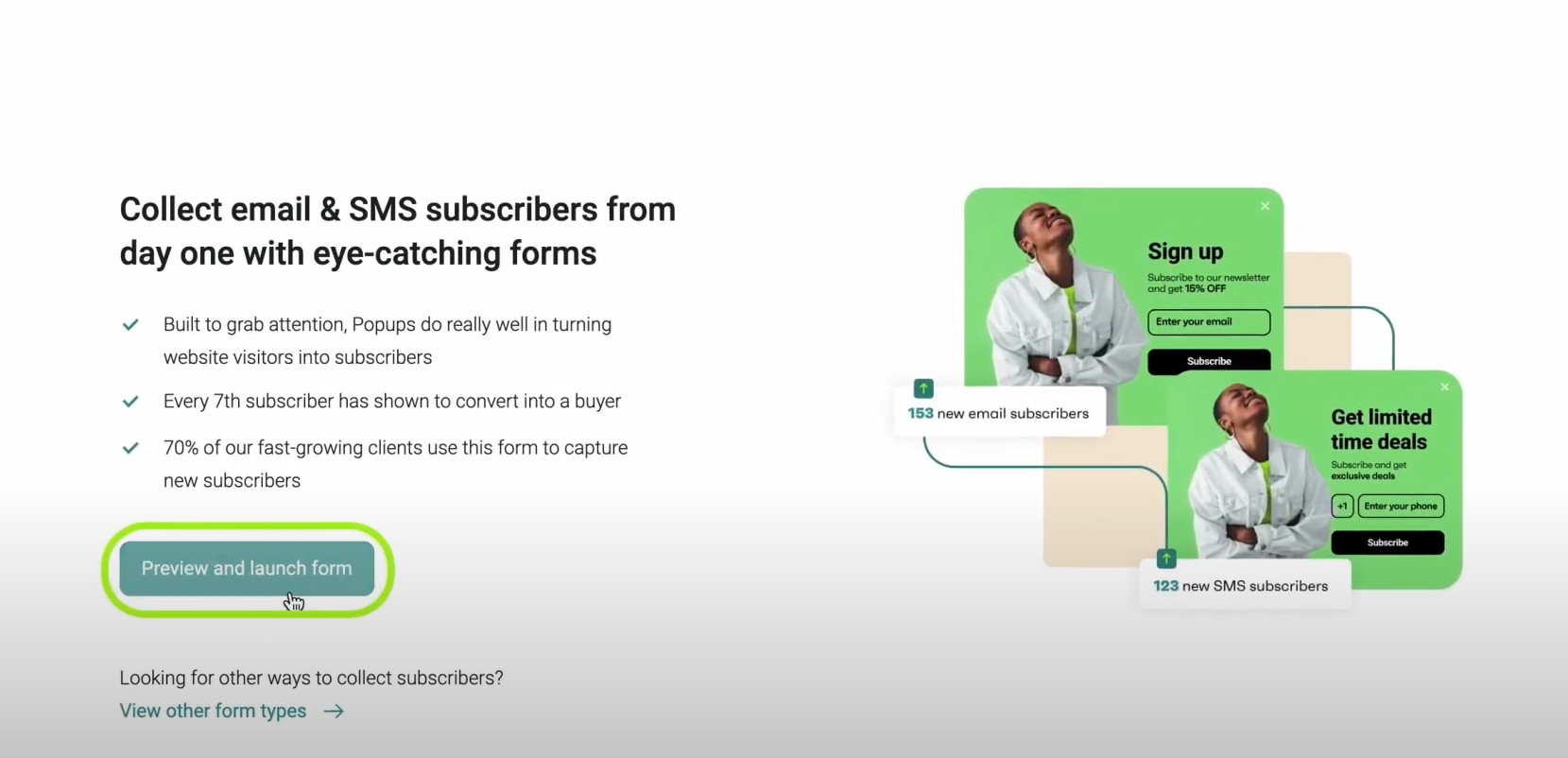
- Use Omnisend’s form builder to:
- Design popup or embedded forms
- Collect email and/or SMS consent
- Set up success messages (for example, discount confirmation)
Once connected, WooCommerce events, such as checkout started, checkout abandoned, and order placed, became available on Omnisend for automation.
When your checkout data seamlessly feeds into Omnisend, you close the loop between purchase intent and post-purchase engagement.
The combination of WooCommerce checkout plugins and marketing automation ensures every transaction works harder, capturing revenue that would otherwise be lost.
Common mistakes to avoid with WooCommerce checkout plugins
There are store owners who unknowingly sabotage conversions by misusing WooCommerce checkout plugins.
Let’s break down the most common mistakes and how to fix them.
Overloading the checkout with too many fields
It’s tempting to collect every possible piece of customer data at checkout, but more fields usually lead to fewer completed orders. Adding unnecessary fields for marketing or internal tracking slows shoppers down, potentially demotivating them from completing the purchase.
Keep the flow simple by adding only essential fields. Use tools like Checkout Field Editor for WooCommerce to minimize drop-offs.
Ignoring mobile users and page speed
Mobile shoppers now dominate ecommerce, yet many checkouts still rely on heavy scripts, uncompressed images, or non-responsive layouts. These issues cause slow load times and result in clunky experiences that hinder conversions.
Utilize mobile-first plugins like Fluid Checkout or CheckoutWC, optimize images, and regularly test mobile layouts to ensure optimal performance.
Skipping testing, analytics, and ongoing optimization
Even a well-designed checkout can underperform if it’s treated as a one-time setup. Leaving a plugin untouched without tracking results makes it hard to spot friction or leaks in the funnel.
Monitoring checkout analytics, running A/B tests, and continuously iterating based on real data ensures performance improvement over time.
A Reddit user noted that after simplifying checkout fields and removing optional elements, conversions improved almost immediately.
Pairing your WooCommerce checkout plugins with Omnisend’s analytics helps validate changes. You’ll see whether a streamlined checkout actually increases conversions and revenue, making every optimization effort count.
Conclusion: Turn your WooCommerce checkout into a conversion engine
Optimizing your checkout directly impacts revenue, conversion rates, and customer satisfaction.
Pick WooCommerce checkout plugins that match your store’s needs. This reduces friction and helps more customers complete purchases. Utilize features like order bumps and flexible fields to increase your average order value.
Lastly, there’s power in pairing your checkout optimization with marketing automation through Omnisend. Abandoned cart recovery, personalized follow-ups, and post-purchase campaigns turn one-time shoppers into repeat, loyal customers.
Start small by simplifying your forms, speeding up mobile checkout, or setting up a quick abandoned cart flow. Each improvement compounds, eventually driving measurable results.
Sync your WooCommerce checkout to Omnisend’s email and SMS automation
Quick sign up | No credit card required
FAQs: WooCommerce checkout plugins
What is the best WooCommerce checkout plugin for higher conversions?
The best WooCommerce checkout plugins focus on reducing friction, offering flexible fields, and supporting upsells. Plugins like CheckoutWC or FunnelKit are top choices for conversion-focused stores.
Do WooCommerce checkout plugins slow down my site?
High-quality plugins are optimized for speed. Always test performance on staging, ensure mobile responsiveness, and avoid unnecessary scripts to maintain fast checkout times.
Can I use more than one WooCommerce checkout plugin at the same time?
It’s possible, but there could be conflicts. Test carefully and only combine plugins that complement each other, especially if integrating with tools like Omnisend.
Which WooCommerce checkout plugins work best on mobile?
Mobile-first options, such as Fluid Checkout or CheckoutWC, ensure a seamless experience. They reduce drop-offs and drive conversions on mobile devices, including phones and tablets.
Are free WooCommerce checkout plugins enough for serious stores?
Free plugins can work for small stores. However, growing businesses often benefit from premium features like upsells, analytics, or advanced integrations with Omnisend.

TABLE OF CONTENTS
TABLE OF CONTENTS


Subscribe and don’t miss any updates!
No fluff, no spam, no corporate filler. Just a friendly letter, twice a month.