Omnisend AI


 OFFER
OFFER









WordPress is a blogging platform that also lets you create a professional storefront with the right theme. The best WordPress ecommerce themes are quick to set up, see regular updates, and require minimal work to start selling.
You have two main options to sell on WordPress. Either stick with the default CMS and install a cart/checkout system or embedded payment buttons, or install WooCommerce, which provides the checkout and an ecommerce framework.
This article covers WordPress ecommerce themes for both setups. We’ll cover themes for multi- and single-product stores from the official theme directory and the third-party ThemeForest.
Quick sign up | No credit card required
The 10 best WordPress ecommerce themes: Overview
The table below details our top theme picks with quick insights into their price, who they suit, their customization potential, and user ratings.
| Theme | Price | Best for | Standout ecommerce feature | Rating | Demo |
|---|---|---|---|---|---|
| Smartic | $59 | Single-product and hero-product stores | Landing-page homepage built to sell one product | 4.64/5 (Envato) | Link |
| Rey | $69 | Niche stores want a matching demo | AJAX search, filters, and navigation | 4.98/5 (Envato) | Link |
| Kiosko | Free | Barebones niche and creative stores | Category-page filters (price, color, size) | 4.5/5 (WooCommerce) | Link |
| Partdo | $39 | Auto parts and large attribute-heavy catalogs | Advanced attribute and brand search filtering | 4.88/5 (Envato) | Link |
| Hello Elementor | Free theme; builder from $7/mo | Elementor users | WooCommerce widgets via Elementor | 4.2/5 (WordPress) | Link |
| Flatsome | $59 | Widely used, well-documented all-rounder | UX Builder with sticky add-to-cart and live AJAX search | 4.83/5 (Envato) | Link |
| OceanWP | Free; ecommerce add-on $39/yr | Page-builder fans wanting flexibility | Works with most major page builders | 4.9/5 (WordPress) | Link |
| EmallShop | $39 | Multi-vendor marketplaces | Dokan, WC Vendors, and WC Marketplace support | 4.89/5 (Envato) | Link |
| Woostify | Free (Pro $49/yr) | New small-to-medium stores | Lightweight build with no jQuery | 4.9/5 (WordPress) | Link |
| Gon | $59 | Visual builders wanting bundled tools | Slider Revolution and WPBakery are bundled in | 4.93/5 (Envato) | Link |
The 10 best WordPress ecommerce themes: Reviews
Our list of WordPress store themes is grouped by store type. We’ll start with the best five themes for single-product and niche stores and then cover five WordPress ecommerce templates for multi-product stores and marketplaces.
Best themes for single-product and niche stores
Your single-product or niche WordPress store needs a theme that prioritizes product page design and simple layouts. The faster you can move people from that initial click towards your cart/checkout, the higher the likelihood of sales.
These are the WordPress ecommerce themes we recommend:
1. Smartic

Price: $59
Developer: Opal_WP
User rating: 4.64/5 based on 59 reviews on Envato
Smartic is a single-product theme for selling one hero product rather than a full catalog. The homepage works as a long landing page that pitches the product, with room for features, benefits, reviews, and a call to buy.
It runs on Elementor, so you edit the landing page by dragging blocks around and customizing their settings, rather than touching code.
You get 56+ pre-built homepage demos for single-product niches like skincare, supplements, coffee, and pet food, each importable with one click, plus quick view, wishlist, and comparison features.
What we like about Smartic is that it has recent reviews, and lots of them, spanning six years. Plus, it sees regular updates. The last one was in February 2026.
Best for
Launching or selling one main product, where your whole site exists to sell that item, and a sprawling shop layout would get in the way.
Skip it if
You carry a multi-product catalog or plan to expand in the future. Smartic’s landing page structure is the wrong shape for a store with lots of products to browse.
Additional reading to cover your ecommerce marketing
Smartic, nor any other ecommerce website themes on our list, have native email marketing features. To add those to your store, read this next:
Best WordPress email marketing plugins for growth in 2026
2. Rey

Price: $69
Developer: ReyCommerce
User rating: 4.98/5 based on 510 reviews on Envato
Rey’s one of the most customizable WordPress ecommerce themes, with sections, blocks, and design elements pre-built. It’s Elementor-native, so the page builder is part of the theme rather than a separate plugin bolted on.
You design in Elementor, with Rey’s own widgets and layouts built for it. We like that it’s built on a modular-coded system that loads only the features in use, which keeps it lighter than most feature-heavy themes.
The likes of AJAX search, filters, and navigation let customers browse and use your site without additional page loads.
The reviews for Rey include more recent ones than Smartic, on account of it being a more popular download. It was last updated in May 2026 and sees frequent updates that improve it.
Best for
Stores that fit one of Rey’s niches and want a ready-made demo close to their product type, rather than building a generic store from scratch.
Skip it if
You sell something outside those categories. Rey’s demos are built around set niches, so a general store gets less out of it than a true multipurpose theme.
3. Kiosko
Price: Free
Developer: WooCommerce
User rating: 4.5/5 based on 85 reviews on WooCommerce
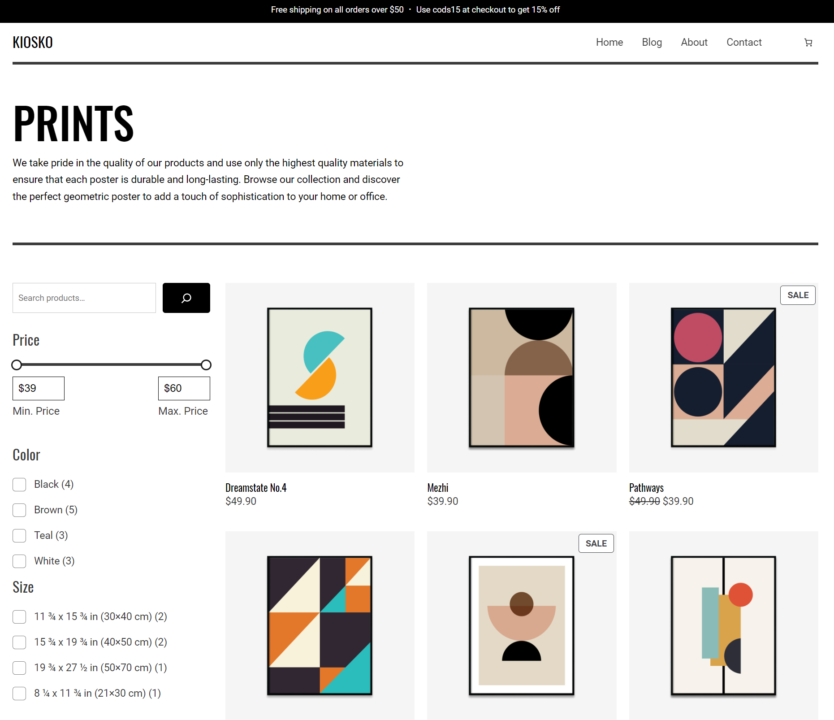
The Kiosko theme is free. It’s designed for art and homeware stores, but it equally suits any creative business. The standard template has a black and white design with a minimal layout, putting all the focus on your own images.
Kiosko is a WooCommerce theme, so the WooCommerce plugin is necessary to provide an inventory structure for the theme to pull through.
It includes a related products section, tabbed product pages, and the following search filters, which you can enable on category pages:
- Price (slider)
- Search box
- Color selector
- Size selector
The standard homepage is a multi-product listing page. It’s easy to change this to an informational homepage in WordPress by navigating to Settings > Reading > and then selecting the static page you want to show from the dropdown.
Best for
Kiosko is a decent WordPress ecommerce theme if you’re looking for a barebones niche template that doesn’t require loads of work to look good. The standard layouts for products, categories, and media work well without tinkering.
Skip it if
Your products need multiple layouts, you want demo imports for a head start on design, and fancy a more feature-rich page builder than the WordPress block editor.
4. Partdo
Price: $39
Developer: KlbTheme
User rating: 4.88/5 based on 147 reviews on Envato
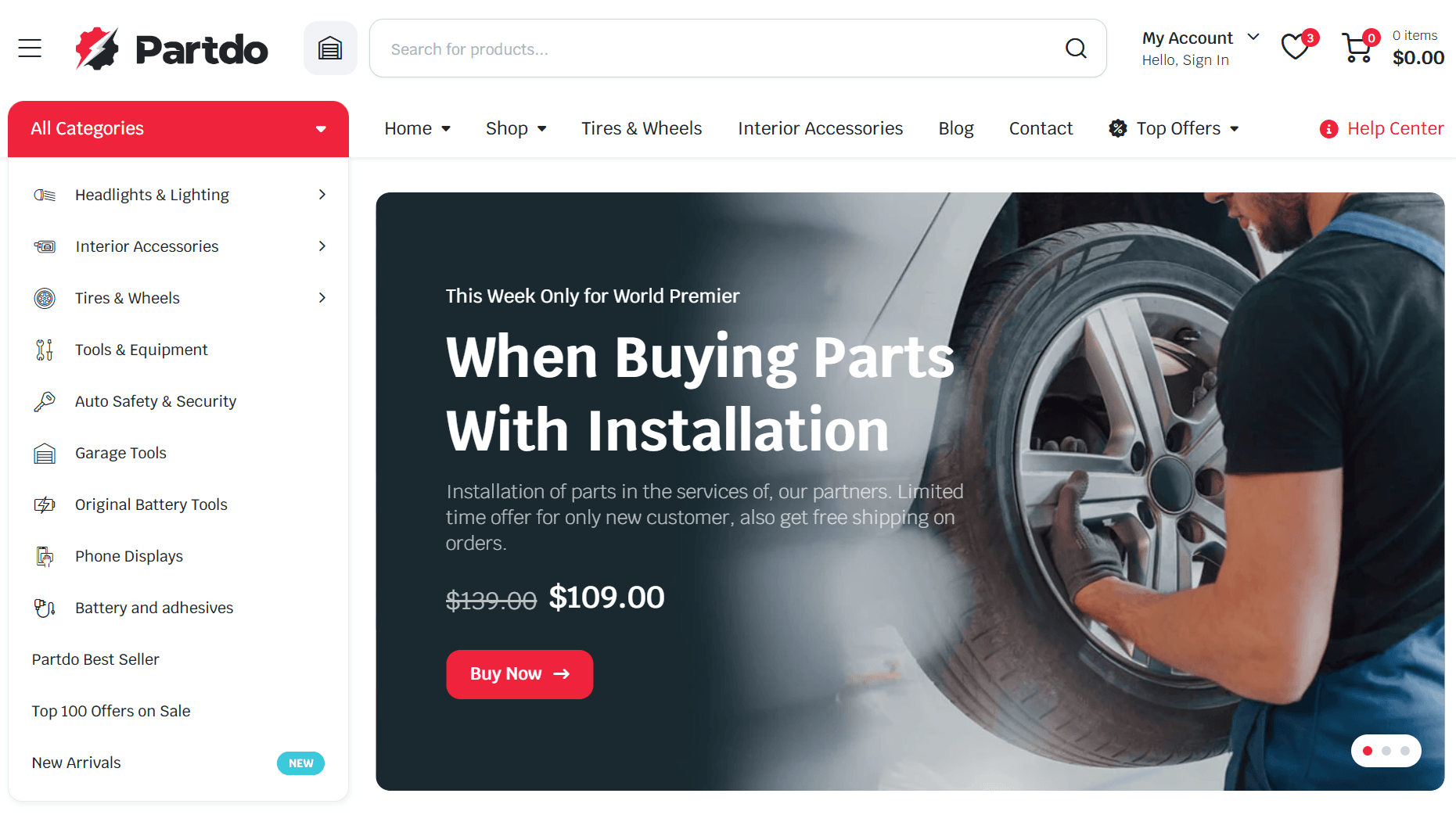
Partdo handles the deep filtering your auto parts catalog needs. It has an advanced attribute search filter, brand filtering, an A-Z brand list, and an AJAX search that updates as the shopper narrows down.
It’s an Elementor theme, so building pages is quick, and you get a stock progress bar, countdown timers, order tracking, order on WhatsApp, and an OpenAI integration that writes product descriptions.
The demo data installs in one click, and there are multiple pre-configured homepages and sections to use across your WordPress ecommerce store.
There are plenty of recent reviews on Theme Forest for Partdo, proving that it’s an active theme with a decent community. It was last updated in June 2026.
Best for
Auto parts, tools, and similar stores with big catalogs and a multi-vendor setup through Dokan or WC Marketplace.
Skip it if
You’re not in those trades. Partdo’s whole design is built around auto parts, so a general store inherits a look and a feature set aimed at something else.
5. Hello Elementor
Price: Free theme; the page builder is $7/month
Developer: Elementor
User rating: 4.2/5 based on 126 reviews on WordPress
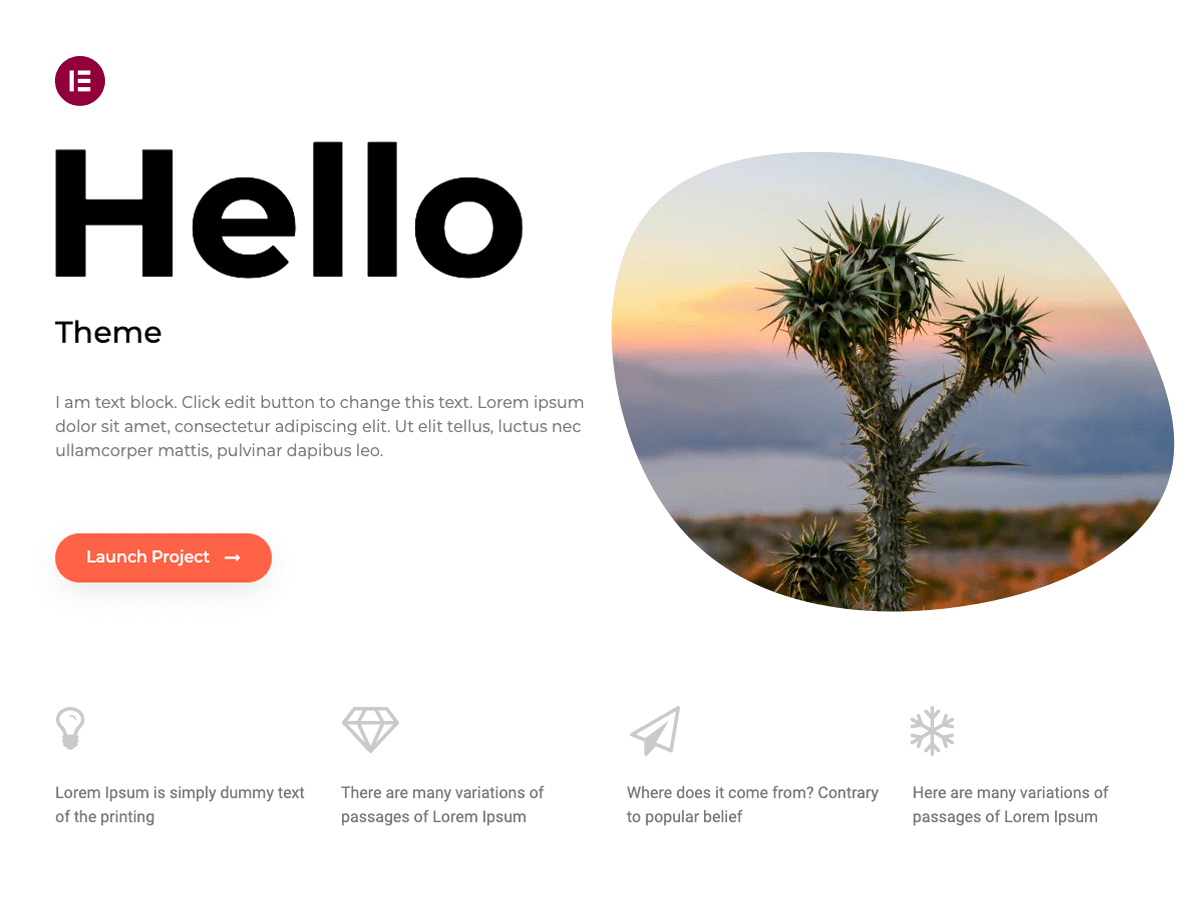
Elementor is a WordPress page builder that you can use with or without WooCommerce. The Hello Elementor theme is the default template for Elementor, and it works perfectly with all of the page builder’s free and Pro (paid version) features.
With the theme installed, you can use the Elementor page builder to create your homepage, categories, product pages, and static pages. You can embed buy buttons into your page or use them with WooCommerce using the built-in page builder widgets.
Ecommerce features are available in the Advanced Solo plan from $7/month. The WooCommerce widgets include a menu cart, a custom add-to-cart button for anywhere on your site, product grids, related products, and product data tabs.
The point of using Hello Elementor is building a site with Elementor without the additional cost of a paid theme, since several paid WordPress ecommerce templates also use it.
Best for
Anyone familiar with Elementor or wanting a page builder to create their site. Even the free version has pre-built blocks and pages you can use. The sticking point is the ongoing cost for the paid plugin, but you do get a proven ecosystem in return.
Skip it if
You don’t want to invest time in a page builder or pay a one-off cost for your WordPress ecommerce theme with a free builder.
Best themes for multi-product and multi-category stores
Selling multiple products calls for a WordPress theme with intuitive navigation, product discovery features, and category filters. Some of your customers will land on pages without a specific product in mind and will need guidance to find what they need.
6. Flatsome
Price: $59
Developer: UX-themes
User rating: 4.83/5 based on 8,114 reviews on Envato
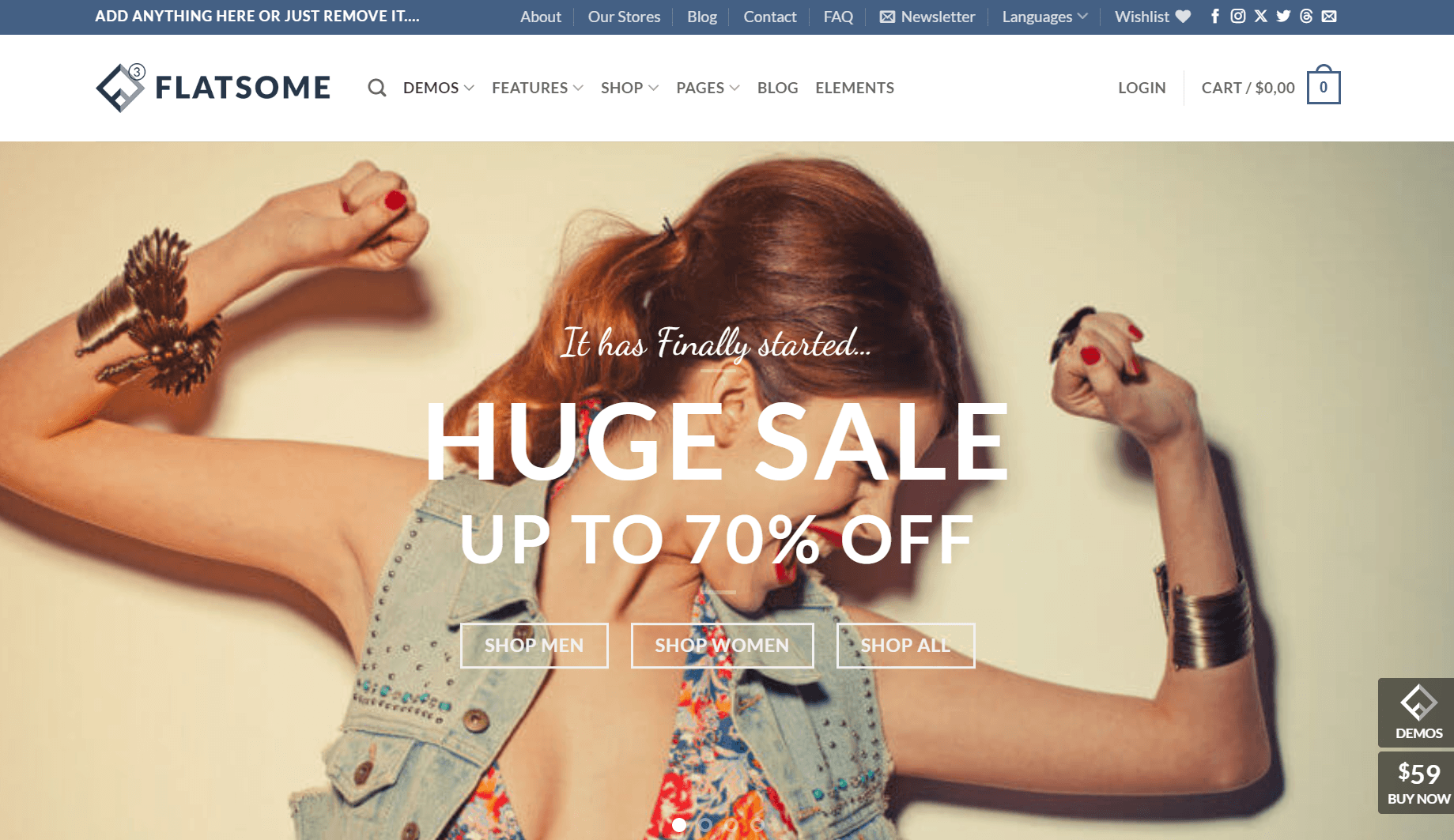
Flatsome is the best-selling WooCommerce theme on ThemeForest, with over 268,000 sales and updates every few weeks. It supports the latest versions of WordPress and WooCommerce.
It runs on its own page builder, UX Builder. The theme includes product variation swatches, quick view, a sticky add-to-cart bar, live AJAX search, and catalog mode.
There are importable demos and child themes. The image we added above is for the Classic Shop demo. Additional demos use parallax, fullscreen, grids, sliders, and other design elements for uniqueness, and all of them look good.
The recent reviews for Flatsome are numerous and mostly excellent. It was last updated in May 2026, and the developer is known for adding feature requests.
Best for
Stores that want a widely used, well-documented theme with a built-in page builder and a community to help out. It’s one of the few themes with a Facebook group, WordPress support, and multiple mentions across Reddit and forums.
Skip it if
You’d rather use the native WordPress block editor, or you want a lighter theme. Flatsome is tied to UX Builder and is large and feature-heavy.
7. OceanWP

Price: Free theme, $39/year for advanced ecommerce features
Developer: oceanwp
User rating: 4.9/5 based on 5,702 reviews on WordPress
OceanWP is a free, lightweight theme that works as a general-purpose base rather than a styled niche template. It runs with most major page builders, Gutenberg, Elementor, Beaver Builder, Brizy, Divi, and SiteOrigin, so you’re not stuck with one.
The free version is translation- and RTL-ready, and is accessibility-ready. The paid eComm Treasure Box adds WooCommerce modules like checkout field control, product tabs, and variation swatches, plus extra Elementor widgets, for around $39/year.
Best for
Fans of WordPress page builders. It literally lets you use all the best ones. Another benefit, even though it costs an annual fee, is the 12 months of support. It’ll come in handy as you grow and explore the theme’s more advanced features.
Skip it if
You have hardly any time to master a theme and launch your store. OceanWP needs a fair bit of setup to work at its best, even with demos.
8. EmallShop
Price: $39
Developer: PressLayouts
User rating: 4.89/5 based on 281 reviews on Envato
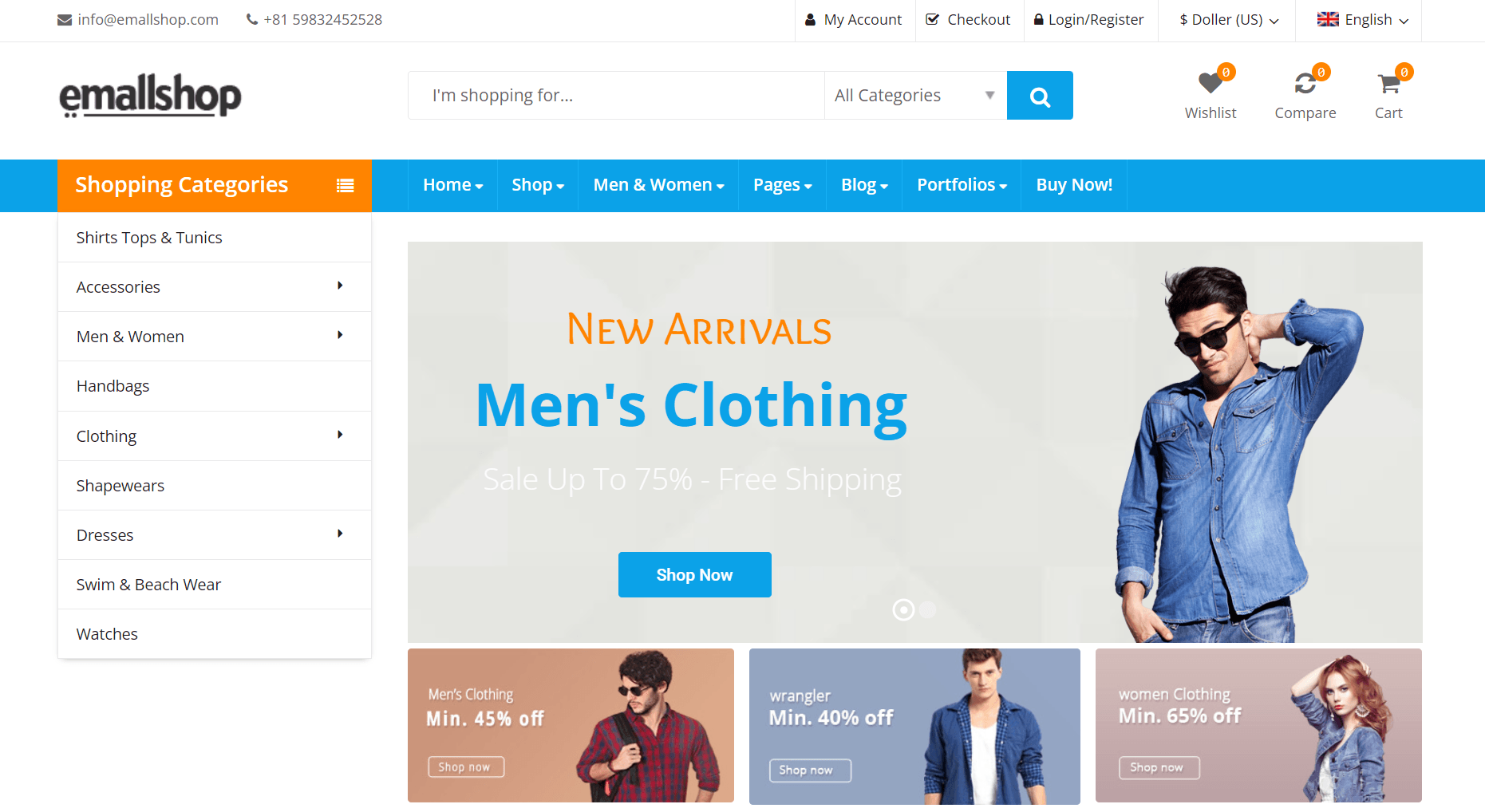
EmallShop is a WooCommerce theme built with Bootstrap and WPBakery Page Builder. It includes 15+ pre-built homepages, multiple header and footer styles, and Revolution Slider.
Store features include quick product view with a lightbox, live product search, grid and list views, product variation swatches, catalog mode, and four shop pagination types (infinite scroll, load more, AJAX, and default).
It’s GDPR-ready, RTL-ready, WPML-compatible, and supports Dokan, WC Vendors, and WC Marketplace, with one-click demo imports.
Best for
Marketplaces with multiple sellers. EmallShop is one of the few here with built-in support for the main WooCommerce multi-vendor plugins.
Skip it if
The multi-vendor features are a waste for you. Other themes, such as Flatsome, will do the job with fewer technical steps weighing you down.
9. Woostify
Price: Free
Developer: dylan ngo
User rating: 4.9/5 based on 126 reviews on WordPress
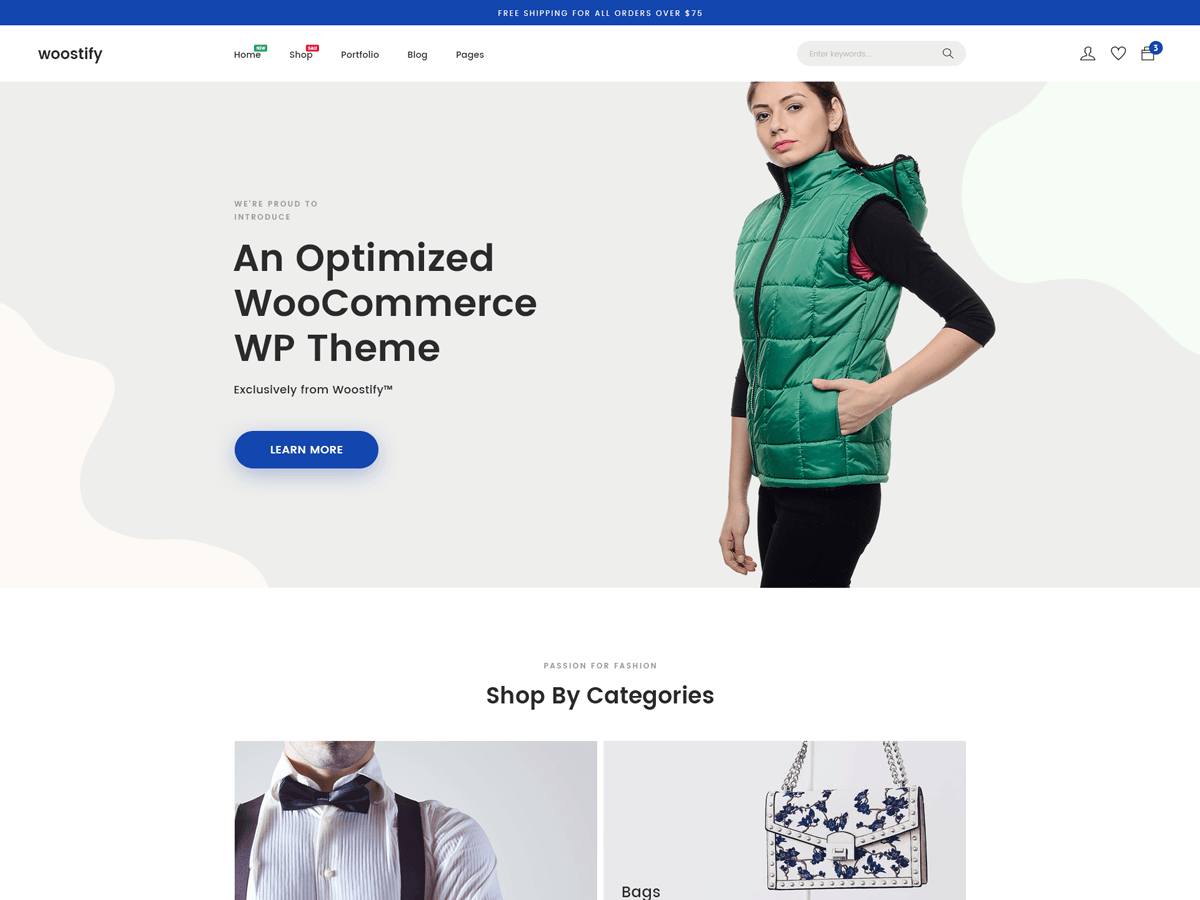
Woostify is built around being lightweight. It drops jQuery and large CSS frameworks in favor of vanilla JavaScript to keep page weight down and works with Elementor, Beaver Builder, SiteOrigin, and Divi.
It handles the storefront essentials: product swatches, a wishlist (YITH or TI), multiple product page and listing layouts, multi-step checkout, and video in the product gallery. It’s also multi-vendor compatible through Dokan and WCFM.
Woostify ships with importable starter sites, though many need Woostify Pro ($49/year), which also adds the advanced modules.
We like the multiple product and listing page styles. You can also configure a multi-step checkout to guide customers through the ordering process.
Best for
Your brand new store. The Pro starter sites require hardly any changes other than your own branding. It suits small to medium catalogs best.
Skip it if
You have hundreds of products. Also, if you want everything built into your ecommerce WP theme, it might not be the best fit, since some features require Elementor.
10. Gon
Price: $59
Developer: Skygroup
User rating: 4.93/5 based on 102 reviews on Envato
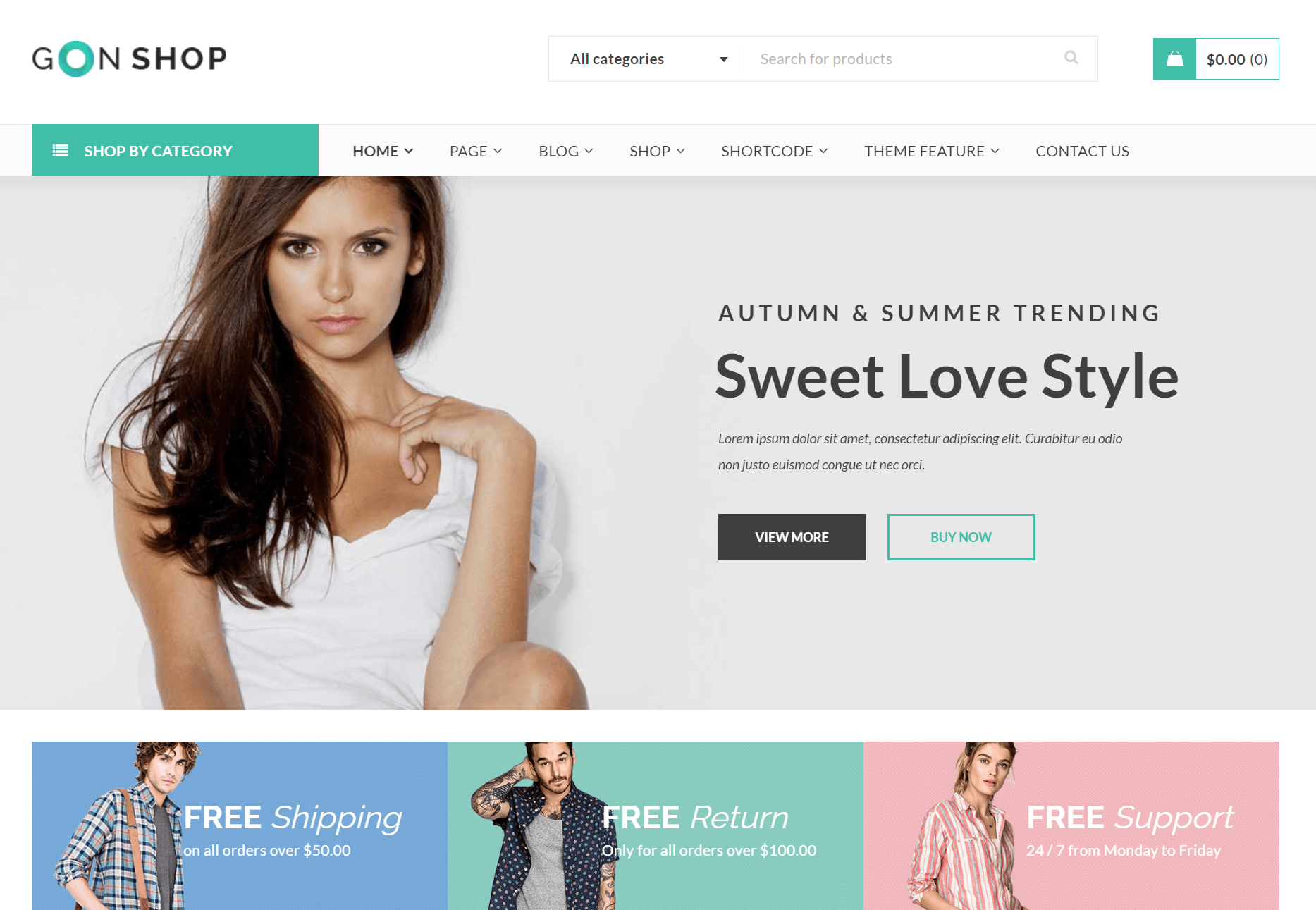
Gon is a multipurpose WordPress theme built on WPBakery Page Builder, with WooCommerce support for the ecommerce side.
It ships with 11+ homepage demos and a one-click installer, so you start from a built layout rather than a blank page. The bundled Slider Revolution and WPBakery licenses are included in the price, which the listing values at around $93 if bought separately.
The most useful features are the varied product layouts, the product quick view, and the filter-by-color option on shop pages. It’s also WPML-ready and RTL-ready if you sell across languages or regions, and Dokan-compatible if you ever run a multi-vendor marketplace.
One thing to consider is the user reviews, or rather, their recency. The last one was two years ago, even though the theme was last updated in May 2026.
Best for
Stores that want a lot of pre-built layouts and demos to pick from, plus the page builder and slider bundled in, without paying for them separately. Good if you’d rather customize visually than touch code.
Skip it if
You want a lightweight, modern block-editor theme. Gon leans on WPBakery and Slider Revolution, which are heavier page-builder tools rather than the native WordPress editor.
How to choose a WordPress ecommerce theme
The theme looks good, so you’re going to install it. Hold on just a minute. Installing themes without priorities and checks will only waste your time, and potentially, saddle you with one that doesn’t do your brand, sales, and revenue justice.
Here’s how to pick a WordPress theme for ecommerce:
- Look for demo imports. Demo imports let you install a fully functioning WordPress shop template, pending any products, media, and content you add later. Even if you intend to change the branding and layouts, the pre-built elements give you a head start.
- Run speed tests on demos or install the theme and run speed tests. Use both PageSpeed Insights and GTmetrix. Demos and initial installs are not representative of what to expect after build completion, but they are a good baseline. Themes that score highly on initial tests are likely to achieve high scores later on.
- Prioritize developer support. Free themes rarely have good developer support, but any paid themes you install should most definitely have support. Forums and ticketing systems are the most common support formats for themes.
- Update frequency. WordPress ecommerce themes that see regular updates do so to comply with the latest CMS standards. It’s a decent sign that the theme you’re looking at will continue to work as intended.
- Additional required plugins. Some WordPress themes require plugins to provide functionality, such as WooCommerce for the ecommerce framework. It’s fine for these to be necessary, but only when any additional costs are upfront.
- Theme costs. Any paid ecommerce WP theme should be a one-off cost. Some themes depend on Elementor Pro or other paid site builders for functionality. The same goes for support, with premium support sometimes requiring ongoing renewal. Don’t assume a theme will cost you once.
- Always read customer reviews. And pay attention to their frequency and any replies the developer makes. Themes for WordPress ecommerce should have multiple reviews, and ideally, no one-star ratings from legitimate customers.
“Marketplace ratings are the factor I always check first. WordPress ecommerce themes with at least a 4.2-star rating get opened into tabs for review. I also want to see good installation numbers, a sign that the marketplace is recommending the theme.”
— Evaldas Urbonas, VP of Product, Omnisend
Don’t neglect your WordPress email marketing plugin
What all WordPress shop templates have in common is that they don’t natively handle email marketing across your customer lifecycle.
Some themes will have popups and list-building features, but the sending infrastructure, automations, and segmentation capabilities aren’t there.
Yes, the WooCommerce plugin covers transactional emails and basic cart recovery, but that’s the extent of its email marketing capabilities.
A third-party email plugin is necessary to automate your customer experience from signup to post-purchase. Introducing Omnisend.
Omnisend is an ecommerce marketing tool for stores of all sizes. It has a WordPress plugin and a WooCommerce plugin, with the integration syncing your ecommerce store, including products, categories, customers, purchases, and activity.
You can then:
- Build your list with popups, flyout forms, and embedded forms, including the gamified Wheel of Fortune.
- Create multichannel flows spanning email, SMS, and web push notifications natively, without requiring additional plugins.
- Build standalone campaigns. For SMS marketing, email, and web push notifications. Send them immediately or schedule for later.
- Segment your audience based on behavior, activity, purchase history, and profile data, for targeting in flows and scheduled campaigns.
- Connect your email marketing to Claude or ChatGPT via MCP integration to analyze your data, create, adjust, and fix.
- Manage multiple stores with one-click store switching. Share assets across your stores and never leave your dashboard.
- Access 24/7 support regardless of your plan level. The support team can assist you with migration, setup, campaign refinement, and much more.
Automations are the lever you need to increase sales. Omnisend offers 28 pre-built flows you can customize. As per our 2026 Ecommerce Marketing Report, automations generated 30% of revenue from only 2% of email sends in 2025.
Watch this video to learn how to set up automations in Omnisend:
Additional reading
Ecommerce email marketing: Strategy and automation
Conclusion
We’ll get tight and tell you which two themes we’d choose from our list. For a single-product store, it has to be Smartic, and for a multi-product store, OceanWP.
Smartic’s landing pages are product showcases, serving as a homepage and product page to drive purchases as quickly as possible. The demos are high quality, and the reviews and support appear excellent.
OceanWP is among the best-regarded themes for multi-category WordPress stores using the Elementor plugin. It does have a learning curve, but also lots of documentation and a community to assist you in doing what you want with it.
The other WordPress ecommerce themes in our list are worth considering for different use cases. Regardless of which you pick, though, none handle your email marketing. Omnisend is the logical next step for that, once your theme is sorted.
Quick sign up | No credit card required
FAQs
Which WordPress theme is best for ecommerce?
The best theme depends on your niche, catalog, budget, and appetite for learning. A few top picks include Smartic, Rey, Flatsome, and OceanWP. You can get these from the WordPress and WooCommerce theme directories or Envato (ThemeForest).
Are there any free WordPress ecommerce themes?
Kiosko, Hello Elementor, and OceanWP are free themes suitable for WordPress ecommerce (selling via embedded payment links) and for use with the WooCommerce plugin. OceanWP also has a paid version that provides more site templates.
Which plugin is commonly used for ecommerce in WordPress?
WooCommerce is the most common plugin. It’s popular because it’s native, meaning it’s easy to manage from within your WordPress dashboard and requires no external tool. Also, it’s free and open source. Another recent option is the Shopify Plugin for WordPress, which can turn your WordPress site into an online store with the Shopify checkout.
Is WooCommerce needed for WordPress ecommerce?
It’s necessary for WooCommerce-dependent themes and plugins, but not to sell products on WordPress. The Shopify Plugin lets you show Shopify products on your site and add buy buttons. Or, you can add PayPal and Stripe buttons to your site and send people to payment gateways. WooCommerce is typically the best choice, though, as it provides an ecommerce framework you can scale with.