
 Omnisend AI


 OFFER
OFFER








Drive sales on autopilot with ecommerce-focused features
See FeaturesKey takeaways 
Validate your niche and product choices by researching demand, competition, and regulations to avoid oversaturated markets.
Set up your BigCommerce store with a clean theme and essential navigation, and prioritize email collection for future marketing automation.
Choose reliable dropship apps and suppliers that ensure fast shipping and clear return policies to enhance customer satisfaction.
Utilize Omnisend's marketing automation to nurture customer relationships and improve retention through targeted email and SMS campaigns.
Reveal key takeaways
Whether you’re new to BigCommerce dropshipping or ready to grow your business, you’re probably looking for a practical guide. You’ll want to know exactly how dropshipping works beyond setup.
Most guides walk you through opening a store and leave you wondering what comes next. This one goes further. It covers day-to-day operations, fulfillment, and profitability. It also discusses how to use marketing automation to grow your business.
You’ll also learn how Omnisend helps BigCommerce dropshipping stores grow profitably and sustainably through its powerful marketing features.
This isn’t a “get rich quick” promise. It’s a realistic, no-fluff walkthrough for people who want results.
In this BigCommerce dropshipping guide, we’ll detail the setup process, the most reliable suppliers and apps, and the process for fulfillment workflows. We’ll also explain how to use automation to turn your store into a profitable business.
Use Omnisend’s pre-built email workflows to automate your welcome series and follow-ups efficiently
Quick sign up | No credit card required
How to start dropshipping on BigCommerce: Step-by-step
BigCommerce dropshipping lets you sell products online without storing or managing inventory. You list items in your store, and when a customer buys a product, a supplier ships it directly to them.
This model works great on BigCommerce because the platform scales easily and offers strong built-in features. It also supports many third-party dropshipping, payment, and marketing apps.
Here’s a step-by-step guide on how to dropship on BigCommerce.
Step 1: Validate your niche and products
Before you dropship on BigCommerce, choose a product category with a clear target audience, such as home office accessories or pet travel gear.
Avoid low-demand items and oversaturated markets. The goal is to sell items that solve a particular problem or tap into an underserved need.
To validate your niche, research:
- Demand: Check Google Trends or Amazon bestsellers to see if people search for the products
- Competition: Search other stores. If most of them sell your exact items, the niche may be crowded
- Regulations: Avoid copyrighted, restricted, or fragile products
Pro tip: Price products high enough to cover ads, apps, and platform fees later on.
Step 2: Create and configure your BigCommerce store
Next, create your BigCommerce account. Choose a plan that fits early-stage sellers. Most beginners start with the Standard plan and upgrade later as sales grow.
Once inside the dashboard:
- Choose a clean theme that loads fast on all devices
- Add your store name, logo, and brand colors
- Set up basic navigation like Home, Shop, and Contact
BigCommerce will guide your next steps, as you can see below:
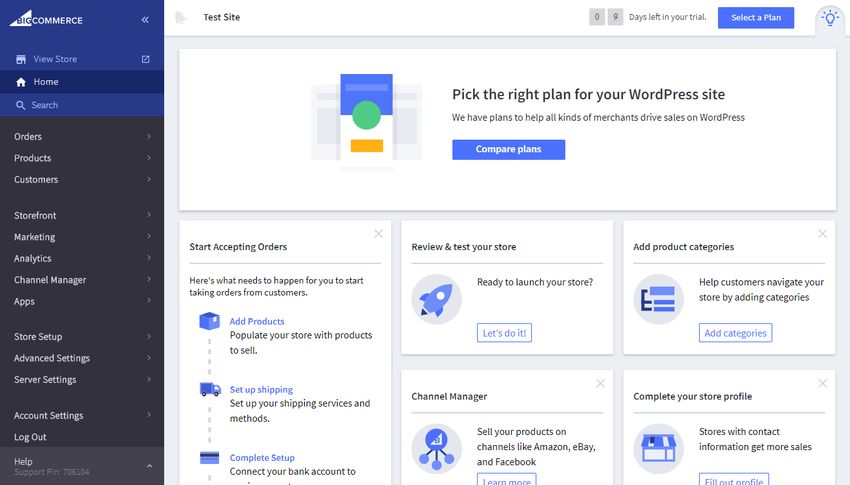
As you set up your BigCommerce dropshipping store, think about marketing early. Decide where you’ll collect emails, whether it’s popups or checkout opt-ins. This will be crucial later when integrating email automation tools like Omnisend.
Pro tip: First, set up an appealing and functional online store. Then, tweak design details later.
Step 3: Install your dropship app and connect suppliers
BigCommerce dropshipping doesn’t include suppliers by default. You’ll need third-party apps that connect your store to suppliers. These apps let you import products, sync inventory, and send orders automatically.
Popular BigCommerce apps include Spocket, Syncee, and Modalyst.
You just need to:
- Install your chosen app
- Connect it to approved suppliers
- Review shipping times and regions
Pro tip: Choose suppliers with fast shipping and clear return policies.
Step 4: Add and optimize products for conversions
Start by adding a small set of high-quality items and organizing them into collections. This makes it easier for shoppers to find what they need. Optimizing your product pages also helps you turn visitors into buyers.
Here’s how to do it:
- Rewrite supplier product titles and descriptions to communicate benefits
- Use clear, high-quality product images
- Add relevant keywords naturally in your descriptions
Pro tip: Add an email signup near product pages to start building your list for future marketing.
Step 5: Set up payments, shipping, and taxes
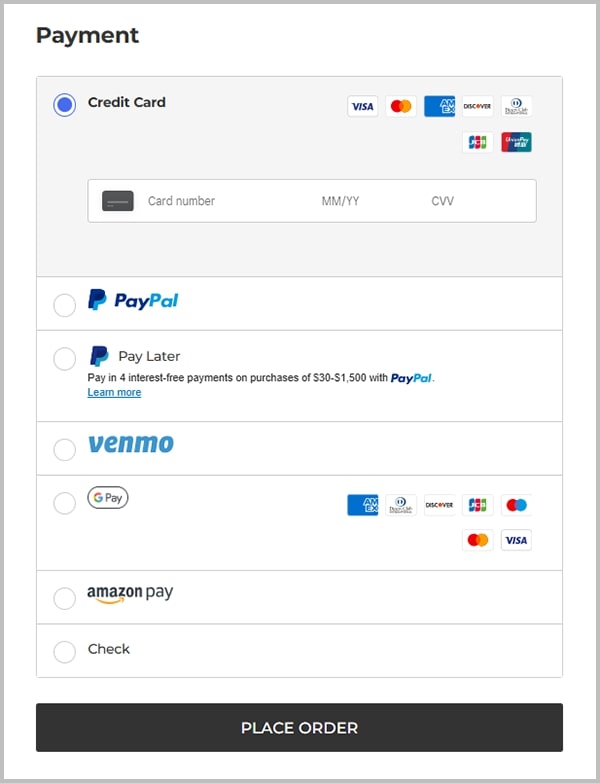
BigCommerce integrates with multiple payment and tax tools. Simply go to the BigCommerce settings menu. Then, set up payment gateways your audience trusts, such as PayPal, Stripe, or credit cards.
Here’s how these options will appear during checkout:
For shipping, create clear rules that match supplier delivery times. You can set a flat rate shipping fee for items under a certain amount and free shipping for a higher threshold. This encourages customers to buy more products, increasing your average order value.
Pro tip: Write clear shipping and refund policies to prevent checkout drop-offs.
Step 6: Test your BigCommerce dropshipping setup
Before launching your BigCommerce dropshipping store, test everything, from product pages and checkout to supplier orders. This helps you spot problems before they affect your customers.
Place a test order as if you were a real customer. Add an item to your cart and complete the checkout process. Confirm if:
- The supplier receives your order
- Payment goes through
- You receive customer emails and order status updates
- Order details on your BigCommerce dashboard are accurate
Pro tip: Test on both desktop and mobile to ensure the process is smooth on all devices.
Here’s a quick summary of how to start BigCommerce dropshipping:
“BigCommerce is highly scalable, which means it can grow with a business as its needs evolve.” Anonymous user, G2
Best BigCommerce dropship apps and integrations for 2026
A BigCommerce dropship integration or app connects your store to suppliers. It automatically syncs products, inventory, and orders, so customer purchases are sent to suppliers for fulfillment without having to manually manage stock.
Here are some of the main BigCommerce dropship app categories and the top tools in each one:
Best apps for general catalogs
These dropshipping BigCommerce apps offer access to many products across different niches.
Spocket
This app focuses on US and EU-based suppliers with faster shipping and higher-quality products. It’s ideal if you want reliable delivery times and a great customer experience.
The app also sends order and product data back to your store. A BigCommerce email marketing tool like Omnisend can use this data to segment your audience and send personalized messages automatically.
Pros
- High-quality products
- Branded invoicing
- Vetted suppliers
Cons
- Premium plans are needed for full access
Integration quality: Strong product sync, real-time inventory, automatic order forwarding
Pricing: Paid plans start at $39/month for 25 products.
Shipping regions: US, EU, global
Syncee
If you want access to many global suppliers and branded products, Syncee is a great pick. It’s best for stores that want supplier flexibility and versatile product options.
Syncee provides detailed product and supplier data. It also integrates smoothly with Omnisend’s intuitive automation builder. This allows you to trigger campaigns based on product categories, order history, or customer behavior.
Pros
- Great for niche testing
- Supports both dropshipping and wholesale
- Good automation features
Cons
- Shipping speed varies by supplier
Integration quality: Two-way inventory sync and automated order flow
Pricing: Free plan available. Paid tiers start from $39.99/month for 50 products.
Shipping regions: Global
Best apps for low-cost variety
These BigCommerce dropshipping apps suit sellers who want a wide product variety and low upfront costs.
AliDrop
This offers BigCommerce dropshipping integration designed specifically for AliExpress. It’s best for newer and smaller stores looking for the lowest possible product costs.
Since products are fulfilled from AliExpress suppliers (mostly China/Asia), shipping can be slow. Many stores rely on Omnisend’s automated order updates and follow-up emails to maintain communication and manage customer expectations.
Integration quality: Automatic product importing, order forwarding, and status tracking
Pricing: Paid packages start from $39.99/month for 50 products.
Shipping regions: US, EU, China, Asia
Best apps for print-on-demand (POD)
These BigCommerce dropshipping integrations let you sell custom-designed products directly from your store without inventory.
Printful
Printful prints, packages, and ships products directly to your customers globally. It’s suitable for creatives and brands who want high-end quality and custom branding.
Integration quality: Syncs products, variants, and orders automatically
Pricing: No monthly fee. You only pay after each sale.
Shipping regions: Global fulfillment centers
Here’s a quick comparison table for the best BigCommerce dropshipping apps:
| App | Best for | Catalog size | Shipping regions | Pricing | Omnisend data sync |
|---|---|---|---|---|---|
| Spocket | Fast shipping and quality products | Medium | US/EU (three to seven days) | $39.99–$299.99/month | Yes |
| Syncee | Large product variety and supplier network | Large | Global (varies by supplier) | Free plan, up to $99.99/month | Yes |
| AliDrop | Low-cost catalog | Large | China, Asia (10 to 20 days) | $39.99–$299.99/month | Yes |
| Printful | Custom, branded products | Medium | Global (two to five days) | Pay per item | Yes |
There’s no single best BigCommerce dropshipping app for everyone. The right one depends on your niche, product type, target region, and shipping expectations. BigCommerce categorizes apps based on your needs, as shown below:
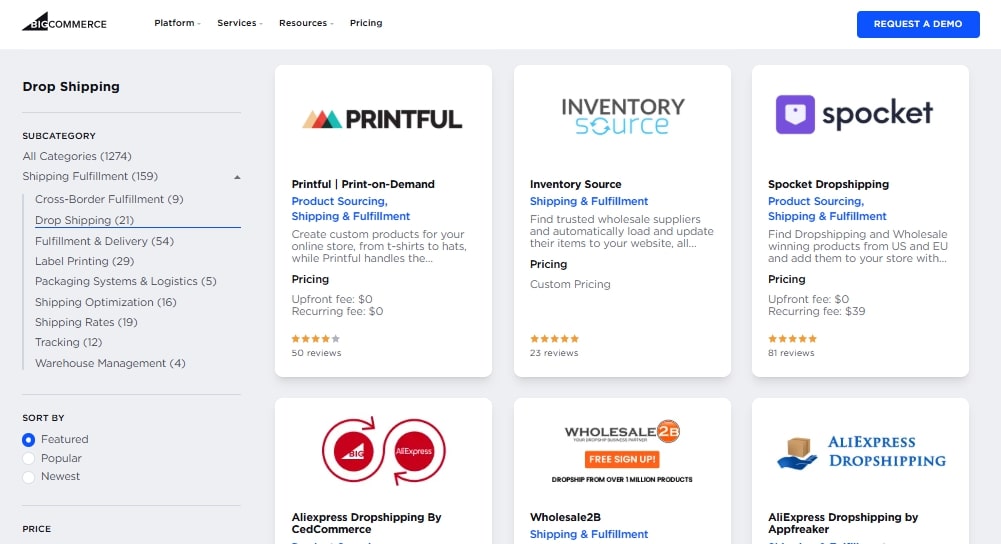
The best approach is to start with one or two apps that match your goals. Then, test them, review your data, and install more apps as you grow.
BigCommerce dropshipping suppliers: How to find and vet them
The supplier you choose directly affects your product quality, shipping speed, customer experience, and brand reputation. You’ll need reliable partners to earn buyers’ trust and loyalty.
Here are the different types of BigCommerce dropshipping suppliers, where to find them, and how to vet them the right way.
App-based vs. direct suppliers
When dropshipping with BigCommerce, you can choose between two types of suppliers:
- Suppliers found through dropship apps: These suppliers connect to your store through top dropshipping apps like Spocket or Syncee. You just need to install an app, browse products, and import them into your store automatically.
This is the easiest option when starting BigCommerce dropshipping, as it’s easy to set up and reduces manual work.
- Direct suppliers: If you prefer a one-on-one relationship with suppliers, you can contact them directly. Setup takes more time, and automation may require custom tools.
However, you get better prices, more control over branding and packaging, and stronger long-term relationships.
Where to find BigCommerce dropshipping suppliers
You can find reliable partners in these places:
- Inside dropship apps: Most dropshipping websites and apps, like Spocket and Syncee, show supplier details, shipping times, and product reviews and ratings
Here’s an example of top suppliers on Syncee:
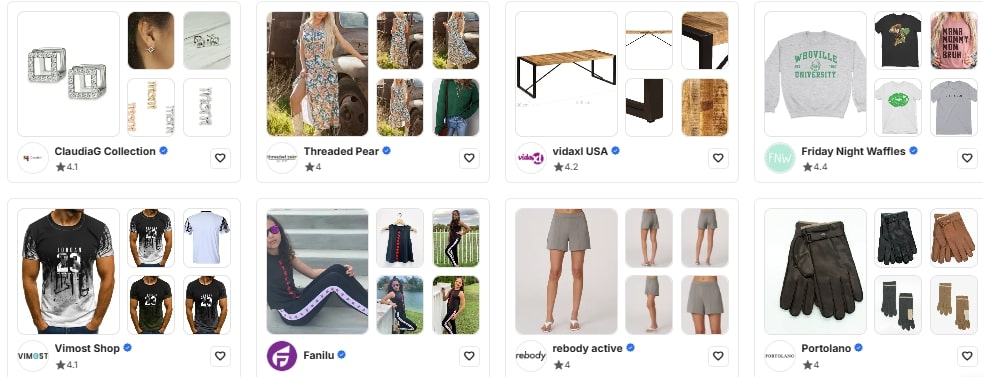
- Supplier directories: Platforms like SaleHoo list verified wholesalers and manufacturers
- Trade shows and expos: These events help you network and negotiate directly with suppliers
- Manufacturer websites: Many manufacturers openly accept dropship partners
Supplier vetting checklist
Before you work with any BigCommerce dropshipping supplier, review them carefully.
Here’s what to look for:
- Shipping times and regions: Check average delivery times and where products ship from
- Product quality: Order a sample and inspect its texture, fit, and size before committing
- Return and refund policies: You need clear rules on returns, refunds, and damaged items
- Responsiveness and support: Test how fast suppliers reply by sending an email
- Branding and packaging options: Check if the supplier offers branded, professional packaging
Reliable BigCommerce dropshipping suppliers don’t always mean you’ll have zero problems. Delays can still happen, especially during busy seasons. What matters most is that you communicate clearly with customers and set realistic expectations from the start.
“I struggled with delays, complaints, and chargebacks that affected my business. Once I switched to a dependable BigCommerce supplier, my support tickets dropped by half and repeat orders doubled.”
BigCommerce dropshipping features and advantages in 2026
While there are several BigCommerce alternatives, BigCommerce remains popular for its flexibility and scalability. It provides tools that support smooth automation, multichannel selling, and long-term business growth.
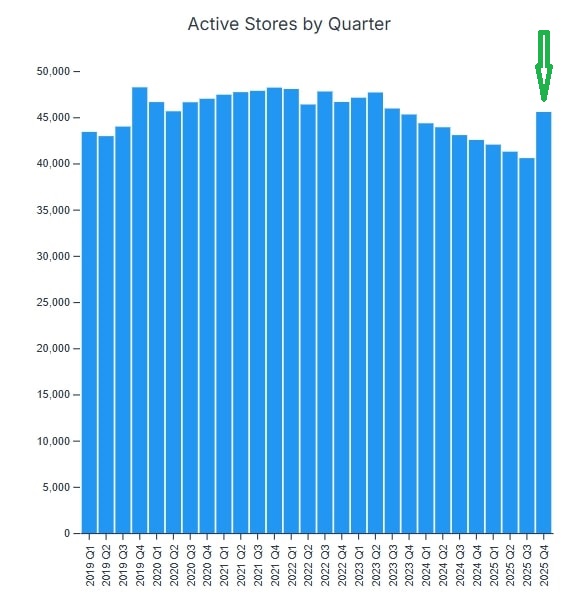
It’s for these reasons that most sellers are using BigCommerce. In fact, BigCommerce had 45,570 stores by Q4 2025. This saw an increase from 40,572 in Q3 2025.
Here are some of the key BigCommerce features that make the platform ideal for dropshippers:
- Large app marketplace and flexible APIs: BigCommerce supports many dropship apps and integrations. You can connect suppliers, automation tools, and marketing platforms without complex technical coding.
- Scalable infrastructure and multichannel selling: You can sell through your store, online marketplaces, and social platforms from one dashboard. This makes scaling easier as order volume increases.
- Built-in SEO and mobile-friendly themes: BigCommerce dropshipping includes optimized URLs and mobile-friendly themes that load fast. Unlike WooCommerce dropshipping setups, you don’t need extra plugins for SEO.
- Automated taxes and shipping rules: With BigCommerce dropshipping, you can set automated tax and shipping rules. These tools reduce manual work and checkout confusion, which results in smoother operations.
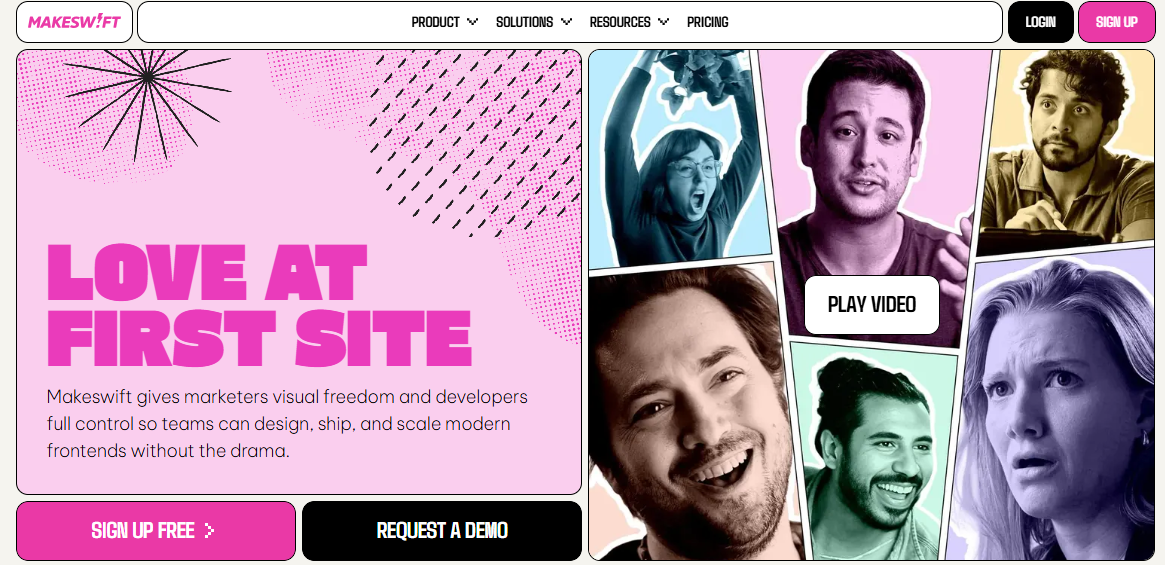
- Modern upgrades for 2026: BigAI, a suite of AI-powered assistants, helps you create unique product descriptions and offer relevant recommendations. Features like Catalyst and MakeSwift also help you launch and customize your store easily.
Here’s an example of the MakeSwift feature that lets you design a unique storefront for your dropshipping business:
When comparing BigCommerce vs Shopify or considering WooCommerce, think about your long-term goals. Shopify dropshipping may be great for smaller stores, while BigCommerce is more suitable for growing brands.
Profitability, pricing, and scaling your BigCommerce dropshipping store
Once you make your first few sales, it can seem promising. However, to build a profitable and sustainable BigCommerce dropshipping business, you must understand the costs involved and price products correctly.
Here are some main BigCommerce dropshipping expenses you should plan for:
- Product and shipping costs
- BigCommerce subscription fees
- Dropship app costs
- Marketing spend (paid ads and Omnisend subscription)
According to TrueProfit, most dropshippers see an average profit margin between 15% and 30%. Here’s a simple example of how pricing and margins work in BigCommerce dropshipping:
| Item | Cost |
|---|---|
| Selling price | $100 |
| Product + shipping cost | -$65.00 |
| Gross profit | $35.00 |
| Ad spend (to get one customer) | -$15.00 |
| Platform and app fees (per sale avg) | -$5.00 |
| Net profit (what you keep) | $15.00 (15% Margin) |
How to improve profitability over time
You can scale your profits without spending more on ads or customer acquisition. Here’s how:
- Increase average order value (AOV): Offer bundles, quantity discounts, or related add-ons
- Grow customer lifetime value with automation: Omnisend helps you retain customers through automated repeat purchase and personalized campaigns
- Negotiate supplier pricing: When your BigCommerce order volume grows, request better rates and discounts from suppliers
Consistent profitability in BigCommerce dropshipping usually takes a few months of testing and data-driven adjustments. Omnisend helps you not only market your brand, but also earn more from every customer with targeted automations.
Marketing automation and customer retention with Omnisend
Launching your BigCommerce dropshipping store is only the beginning. The secret to long-term profitability and growth is marketing your brand and retaining customers. That’s where marketing automation through Omnisend becomes essential.
BigCommerce dropshipping often involves longer shipping times and tighter profit margins. This means you need effective communication and well-timed follow-ups to keep shoppers informed, confident, and loyal.
Relying on paid ads alone can be expensive. Owned channels like email and SMS are more cost-effective and give you more control over the customer experience. They also deliver a higher ROI with consistent use.
With Omnisend, you can use these channels to nurture, convert, and retain customers. The tool connects directly with BigCommerce and pulls in customer, product, and order data. This lets you build audience segments and send relevant, personalized messages at the right time.
Here are some automated workflows you can send with Omnisend:
- Welcome series: These introduce your brand, set expectations, and help you convert new subscribers into first-time buyers
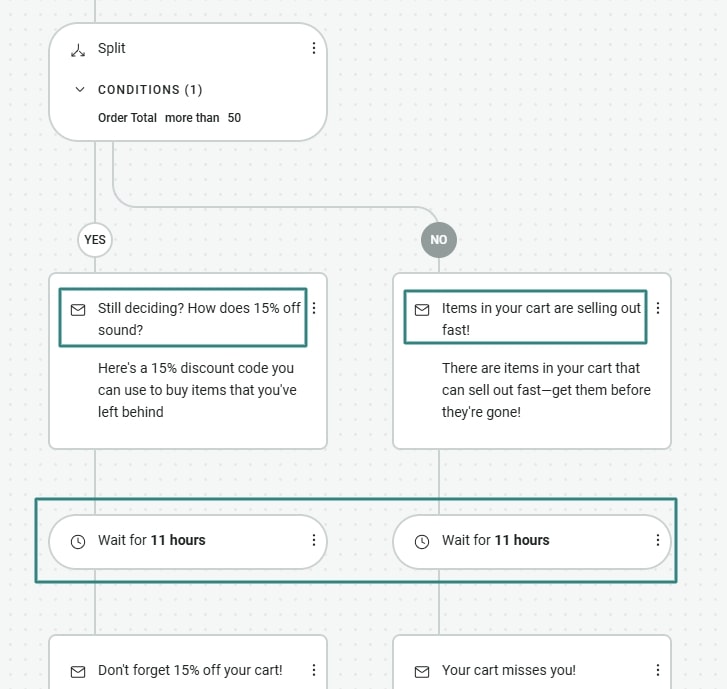
- Abandoned cart workflows: Critical automations that remind shoppers about items they left behind, helping recover lost revenue
Here’s an example of an abandoned cart flow from Omnisend:
- Order confirmation and shipping updates: Email and SMS messages that confirm orders and provide tracking links to reduce customer support tickets
- Post-purchase follow-ups and cross-sell flows: These messages request reviews, then suggest related products to increase repeat purchases
- Win-back and reactivation campaigns: If a buyer hasn’t returned in a while, these flows re-engage them with personalized offers and reminders
For example, a shopper may visit your BigCommerce dropshipping store, add a product to their cart, and leave before checkout. To recover the sale, Omnisend automates the following sequence:
- One hour later: A friendly email reminds them of the product with images and price details
- 24 hours later: An SMS follows up with a friendly nudge and reassurance about shipping
- 48 hours later: A final email highlights social proof or reviews
Omnisend offers excellent value with its free plan that includes powerful ecommerce automation workflows and multichannel (email and global SMS) features.
Its intuitive drag-and-drop editor helps you create high-converting campaigns that yield $79 for every dollar spent.
BigCommerce dropshipping checklist and common mistakes to avoid
Before you start or scale your BigCommerce dropshipping store, double-check the basics. A simple checklist keeps you focused, while knowing common mistakes helps you avoid costly setbacks.
BigCommerce dropshipping checklist
- Connect your domain, choose a clean theme, and set up payment gateways
- Link your dropship apps and confirm that inventory levels sync automatically
- Place a test order to evaluate your checkout flow
- Vet suppliers and confirm shipping times, return rules, and product quality
- Install Omnisend and activate welcome, abandoned cart, and order confirmation flows
Common BigCommerce dropshipping mistakes
- Not ordering product samples: Always order samples and test product quality before selling to customers
- Ignoring shipping expectations: Be clear about delivery times to avoid unhappy customers, refunds, and bad reviews
- Relying only on paid ads: Build email and SMS lists early and use Omnisend’s automation to nurture repeat buyers
- Weak product pages: Write clear and compelling descriptions, explain benefits clearly, and use high-quality images
- Launching without testing: Always test checkout flows, payments, and order sync before going live
By checking off these essentials and dodging common pitfalls, you can build and run a successful BigCommerce dropshipping store. Omnisend lets you turn many of these steps into automated workflows as you grow.
Conclusion
BigCommerce dropshipping is a great way to build a successful ecommerce business. However, it can only be profitable when you set the right foundation. This means choosing the right apps, working with dependable suppliers, understanding your workflow, and setting clear expectations.
To achieve sustainable growth, you need to continuously optimize your strategies and maintain customer communication. With Omnisend, you can turn data and behavioral insights into targeted email and SMS flows that increase retention and lifetime value.
So, launch your store, integrate Omnisend, and start turning visitors into repeat customers.
Leverage Omnisend’s automation flows to drive consistent revenue for your dropshipping store
Quick sign up | No credit card required

TABLE OF CONTENTS
TABLE OF CONTENTS


Subscribe and don’t miss any updates!
No fluff, no spam, no corporate filler. Just a friendly letter, twice a month.