
 Omnisend AI


 OFFER
OFFER








Drive sales on autopilot with ecommerce-focused features
See FeaturesKey takeaways 
Customer service emails are a powerful tool for driving revenue, retention, and loyalty; they can turn inquiries into upselling opportunities by providing timely and personalized responses.
Utilizing templates for common customer scenarios can streamline responses while ensuring that essential information, such as loyalty program details and compensation offers, are included to enhance customer experience.
The effectiveness of customer service emails hinges on clarity, empathy, and actionable solutions; addressing issues promptly and providing compensation can transform negative experiences into positive ones.
Automating customer service workflows with tools like Omnisend can save time and improve response rates, allowing businesses to focus on complex inquiries that require a personal touch.
Reveal key takeaways
Customers who fall outside what you’d call your typical pre- and post-purchase journey are going to email you for assistance in some form. A customer service email is necessary here, but it’s also an untapped revenue, retention, and loyalty opportunity.
Consider for a moment the customer who isn’t sure how wide your sneakers are. They email you, and you answer them plainly. But you missed out that upsell to a more expensive pair, and forgot to mention your loyalty program offering free delivery.
Of course, not every email calls for a deep-dive into how your responses shape customer experience and impact your sales. And yet, in some way, they all do, and that makes templates a fantastic tool in your arsenal to cover the basics.
In this article, you’ll find templates for customer service emails, an anatomy blueprint to reuse, learn how to write effective messages, and how to link everything to KPIs.
Join Omnisend to create personalized, automated customer service emails that generate revenue
Quick sign up | No credit card required
Customer service email templates you can use right now
The customer service email templates below will help you respond to people quickly for common scenarios and satisfy their desire for fast support.
Key principles before you copy-paste these templates
- Don’t unthinkingly copy and paste them into your email tool and press send. Edit the single brace [ ] placeholders to match your information first.
- Consider how your email tool implements personalization. For instance, Omnisend uses Liquid syntax with double square braces [[ ]], such as [[ contact.first_name ]]. The customer service email example below shows this in practice:
![Customer service email: Two people in workout clothes smile at each other in a gym, each holding a yoga mat. The text says [[contact.first_name|default: "customer"]] instead of genuine names.](https://www.omnisend.com/blog/wp-content/uploads/2026/01/1-Customer-service-email-example.png)
Templates for order and shipping issues
For: Order delays
Subject: Update on your order #[order_number]
Hi [[contact.first_name]],
Your order is running behind schedule due to [reason]. We now expect delivery by [new_date]. To apologize for the wait, here’s a [discount_amount] code for your next purchase: [code]. Track your package anytime: [tracking_link].
[Your_name]
Copy text
- Use this template to lessen the blow of order problems for high-value and at-risk customers. The discount shows you care and flips the situation with a positive outcome.
For: Lost packages
Subject: We’re replacing your lost package
[[contact.first_name]],
Bad news first: the carrier confirmed your package didn’t make it. The good news? We’ve already sent out a replacement at no charge. UPS will have it to you by [date], and you can track it here: [tracking_link]. If anything comes up, just hit reply.
Best, [Your_name]
Copy text
- Lost packages will damage your reputation even though they aren’t always your fault, so send this email as soon as you can to show you’re being proactive.
Templates for product and pre-purchase questions
For: Product compatibility inquiries
Subject: Re: To your product question
First of all, thanks for reaching out, [[contact.first_name]]
To the best of my knowledge, your [product] will work with [product] based on what our customers have experienced. If you purchase it and it’s a no-go, you can return it within 30 days providing it is in a saleable condition.
Cheers, [Your_name]
Copy text
- Send this email with the customer’s product information to ensure they have everything they need to make a purchase.
For: Sizing and fit guidance
Subject: Your sizing question answered
Hey [[contact.first_name]],
Here’s what I can tell you about sizing for [product]: [sizing_advice]. We put together a chart that breaks down all the measurements: [link]. One thing customers do when they’re uncertain is grab two sizes and send back whichever doesn’t work. Returns don’t cost anything if you’re within [timeframe].
Happy shopping, [Your_name]
Copy text
- Adding returns information and recommending your customers buy both is a fantastic way to turn sizing doubts into sales.
Templates for returns, refunds, and exchanges
For: Easy exchange process
Subject: Let’s get you the right one
Hi [[contact.first_name]],
No problem switching out [product] for [replacement_item]. Print your return label here: [link], pack up the original, and we’ll get the new one out to you today. You should have it by [date]. We ship the replacement before your return arrives, so there’s no wait.
[Your_name]
Copy text
- Shipping the replacement immediately shows you trust your customers and removes friction from the exchange process.
For: Refund confirmation
Subject: Your refund for order #[order_number]
[First_name],
I’ve processed your refund of [amount] back to your original payment method. Your bank should show it within [timeframe], though some take a bit longer. I also added [loyalty_points] to your account for the trouble. Hope to see you back soon.
All the best, [Your_name]
Copy text
- Send this email to your most loyal customers. Mentioning loyalty points turns a negative experience into a reason to return and shop again.
Templates for complaints and negative experiences
For: Quality issue acknowledgment
Subject: This isn’t what we stand for
[[contact.first_name]], you’re right to be disappointed with [product]. That’s not the quality we promise. I’m sending you a replacement via overnight shipping, and you’re getting a full refund too. Keep the original. Here’s [discount_amount] off your next order: [code].
Sincerely, [Your_name]
Copy text
- This email drops all defensiveness to reduce friction and accepts that the quality isn’t good enough, with a resolution that should be enough to salvage your relationship.
For: Service failure response
Subject: A resolution for our recent failure
Hi, [[contact.first_name]],
I’m personally reaching out to apologize for your recent customer service experience. The response was inadequate, and we completely failed to provide you with a solution that was acceptable.
I have gone ahead and provided a [amount, discount code] to this email for any future purchase you make. I have also credited your original payment method with [amount, e.g., $10].
Here to help if you need anything else.
[Your name]
Copy text
- If you failed to provide a good customer experience, then whatever you do, don’t end the conversation with a generic response. Adapt this template to make your resolution feel more personal and warm.
Templates for positive moments, loyalty, and reviews
For: Post-purchase satisfaction check
Subject: 15% discount code for a fast survey
Hi [[contact.first_name]],
I value your feedback so much that I’ll give you a 15% discount on your next order if you complete our survey: [link].
It’ll take less than a minute of your time,
Thank you.
Copy text
- Use this post-purchase email to get straight to the point about feedback collection and increase submission rates with an incentive.
For: Loyalty program invitation
Subject: Free shipping and more, just for you
Hi [[contact.first_name]],
You can enter our loyalty program following your recent [product] purchase.
In return, you’re going to enjoy free premium shipping on all orders over $20 and earn points (five points for every $10 you spend) worth 10 cents each. So, for every $100 you spend, you get 5% back to spend with us.
Your VIP link: [link]
I look forward to seeing you there!
[Your name]
Copy text
- Spell out your loyalty program perks in this email template to encourage new signups and set expectations.
What customer service emails are, and why they matter for ecommerce
Every email you have gotten back from an ecommerce store is a customer service email, regardless of whether it was from a person or an automation. The bit you might not have considered is how these emails contribute to revenue and sales.
What is a customer service email?
Customer service emails include automated and manual messages sent via your email tool to address the informational and transactional moments in your customer journey that require a response, such as shipping delays and compatibility inquiries.
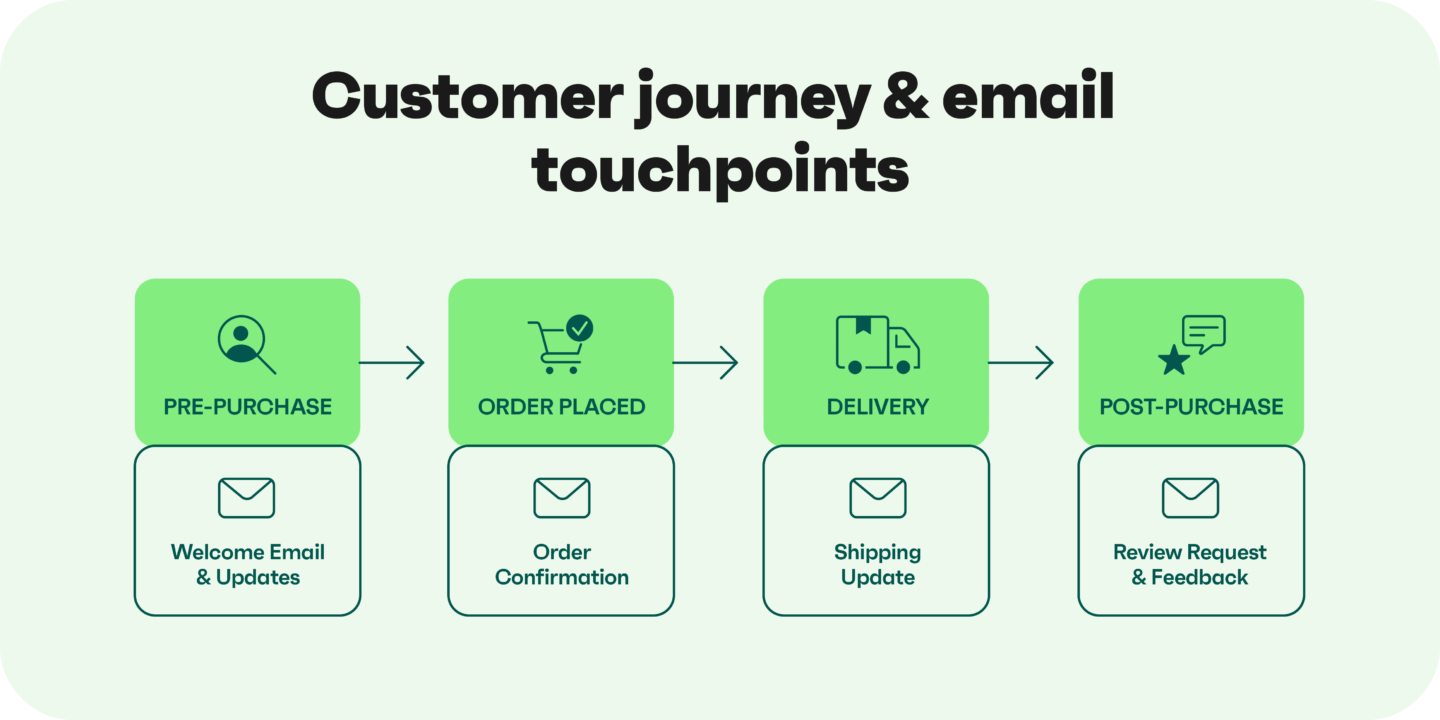
How ecommerce changes customer expectations
Box checked ✅ if your customers can buy products instantly, but they also expect rapid responses and resolutions to their inquiries.
Your reward is more sales, with 88% of customers saying good service makes them more likely to purchase from the same company again (Salesforce).
Timely and contextual customer service emails are non-negotiable to meet these expectations, appear at the optimal moment in their journey, and provide documents they can reference later.
From cost center to revenue-generating channel
Depending on the context and type of customer service email, it can be purely informational or a revenue lever and complement marketing campaigns. The distinction occurs depending on where in your customer journey the email appears. Here are a few examples:
- Pre-purchase emails answering product questions influence whether someone buys
- Post-purchase emails resolving quality issues determine whether they buy again
- Returns and refund emails decide if a customer leaves satisfied or files a chargeback
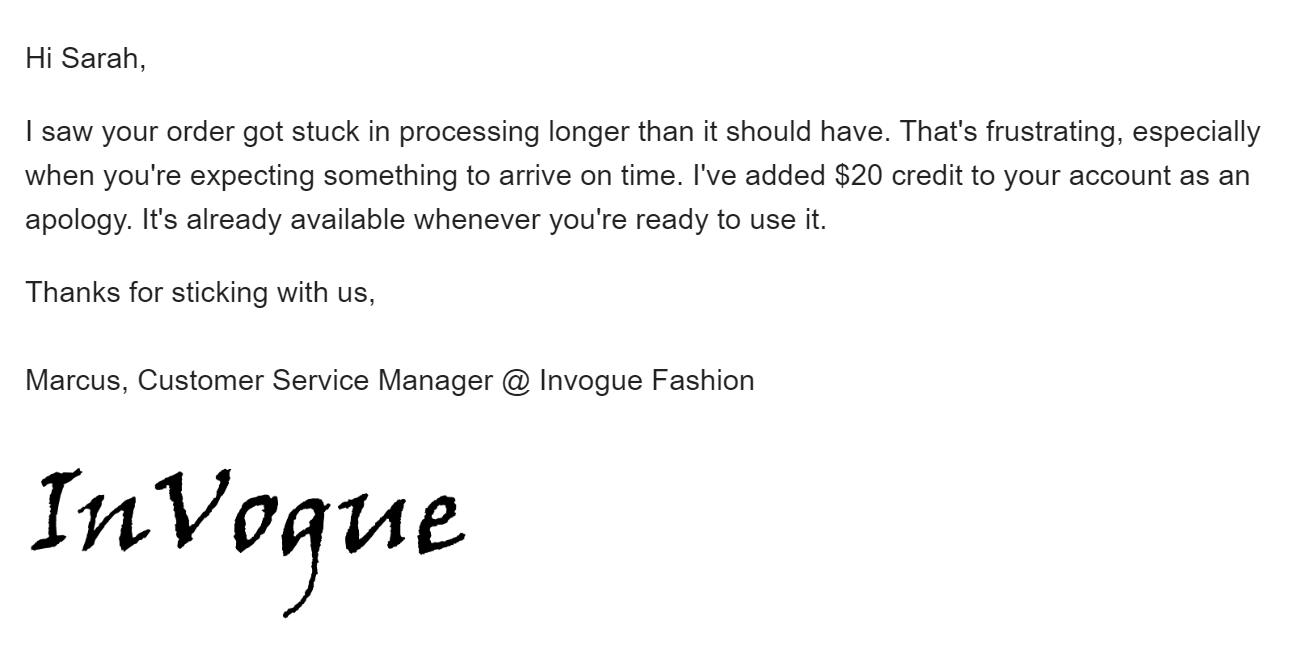
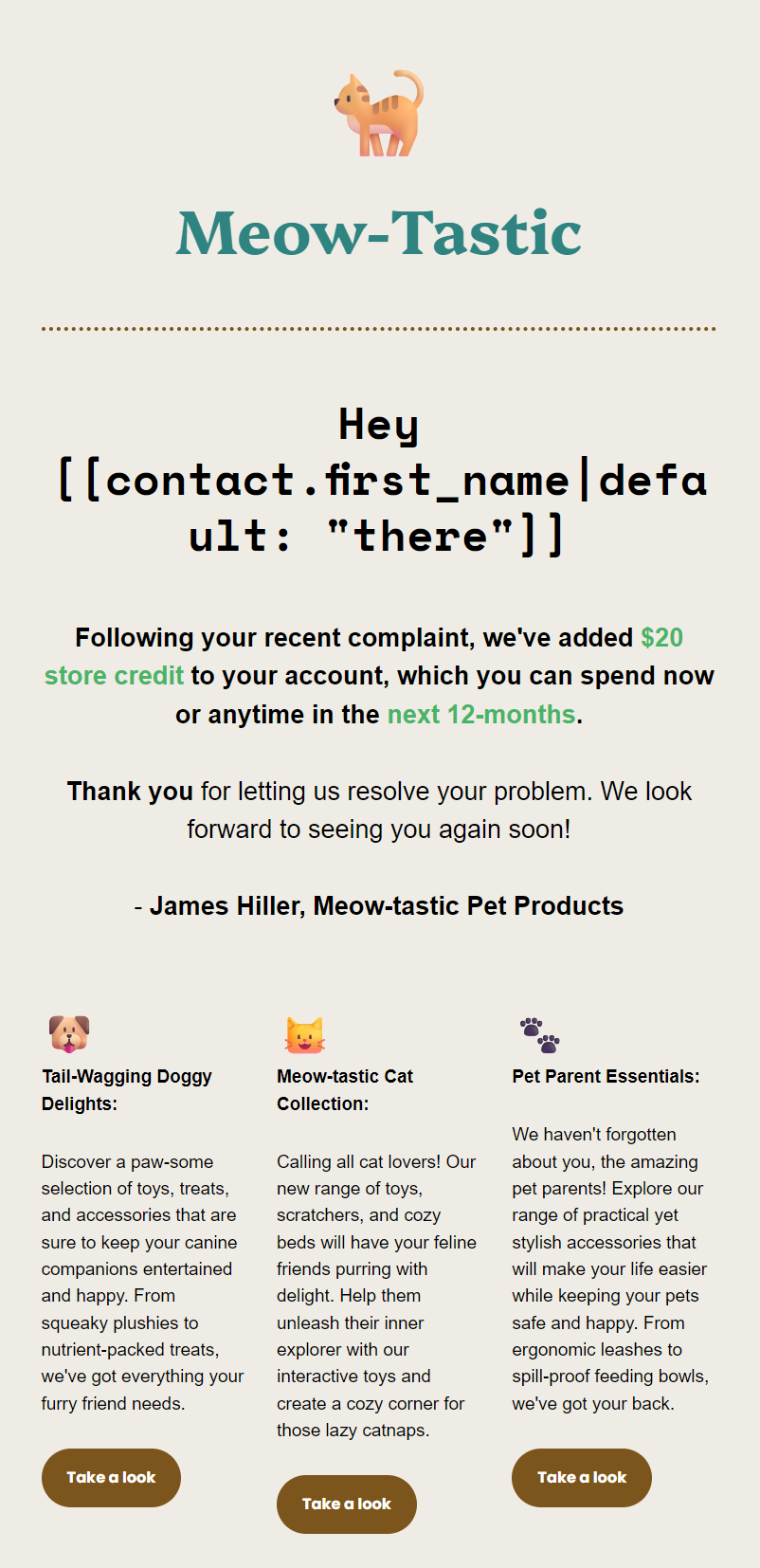
For example, the customer service email below turns an order processing hiccup into a sales opportunity with $20 store credit:
Provided your emails satisfy customers, expect these benefits:
- An uptick in revenue and sales
- Greater customer retention
- More five-star reviews
- Less churn
- Higher customer lifetime value
Omnisend amplifies these benefits by letting you create automated emails with contextual personalization, such as names and order information, and collect revenue, sales, and lifetime value data to understand your customer service email impact.
Anatomy of an effective customer service email
The anatomy below covers your subject line, initial greeting, body, sign-off, and personalization and revenue opportunities to create effective customer service emails.
Subject line that’s descriptive and isn’t spammy
A fantastic customer service email subject line meets these criteria:
- Mentions your customer by name when appropriate
- 21 to 40 characters, such as “Hi Sarah, an update about your complaint”
- Avoids ALL CAPS and overuse of emojis
- References the email’s purpose, such as a complaint or shipping resolution
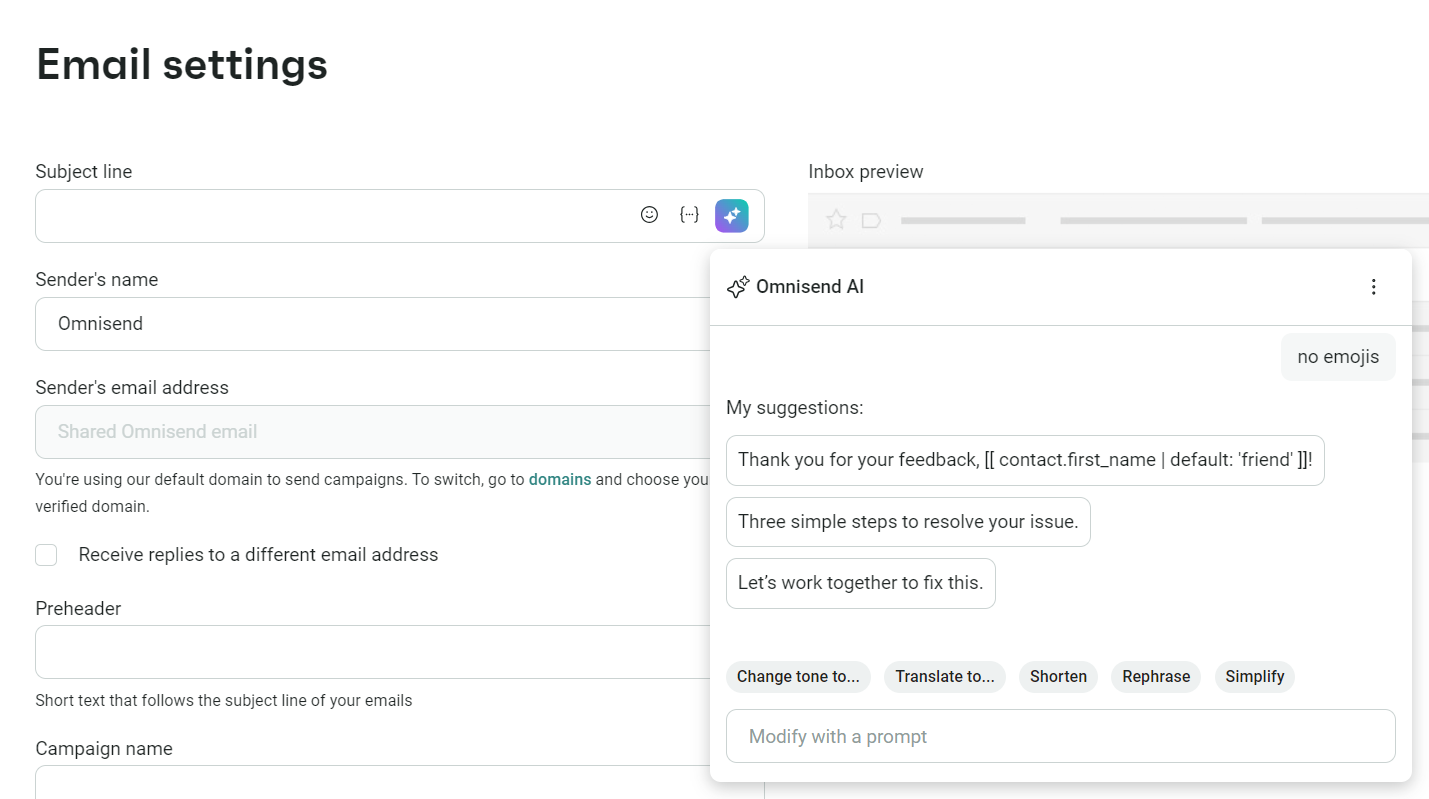
Omnisend’s free subject line tester will help you nail these basics. Additionally, you can use generative AI within Omnisend to create unique subject lines:
Greeting acknowledgement that sets the tone
The first line should prove you’ve read their message and haven’t sent a generic reply. If it’s a shipping update, then “Hi Sarah, your package is stuck at the Dallas facility” works fine.
Customers skip emails that open with mundane replies and filler. State the problem or answer their question in the greeting itself.
So, if they ask about sizing, open with the sizing answer, and if their order is delayed, open with where it is and when it’ll arrive. Everything else is noise.
Body structure: Empathy, explanation, solution, next steps
Tell your customer what went wrong in one sentence, then what you’re doing about it. For example, “The warehouse missed your order during Friday’s rush. Your replacement ships today and arrives Wednesday,” covers the problem and the fix.
Include timelines for every action:
- The vague option, “We’ll process your refund soon,”
- The detailed option, “Your refund will hit your account within three business days”
Bold dates, refund amounts, and tracking numbers so customers can scan for what matters, and use bullets/numbers when there are multiple steps.
If the issue points to a bigger problem, mention what you’re doing to prevent it. “I’ve flagged this with our fulfillment team,” shows you’re taking it seriously.
Using personalization and order data the right way
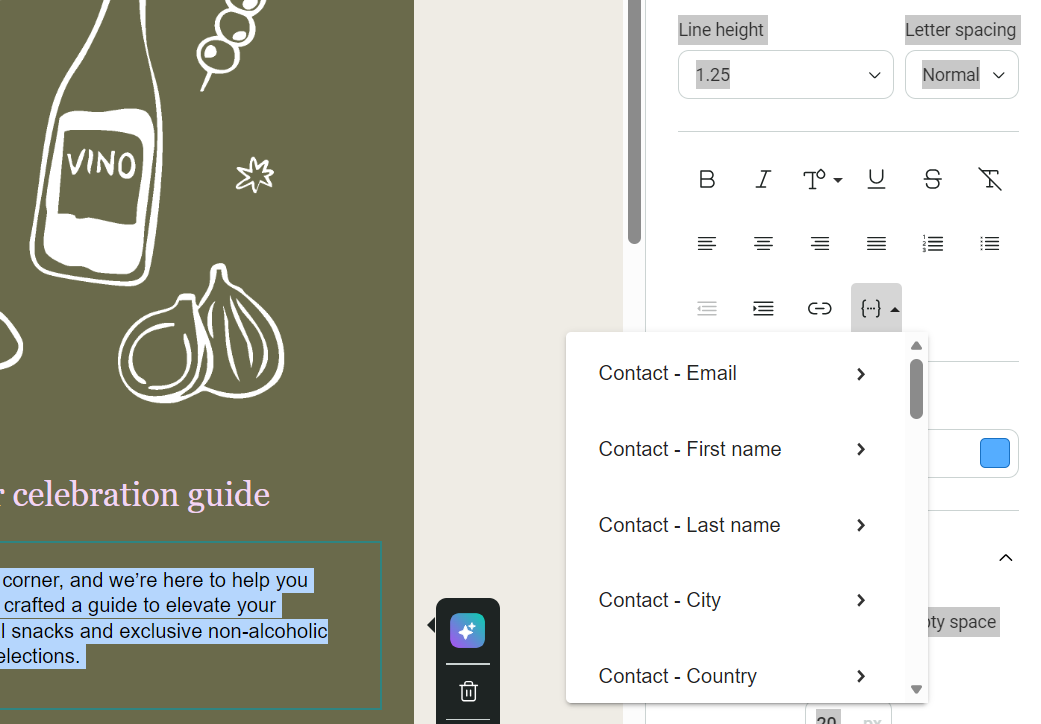
Mentioning people by their first name is personalization 101 for your customer care email. Also, add their last name for more formal customer service emails, such as responses to complaints, provided you have the data.
Additional personalization opportunities depend on your email’s context. For instance, you could add your customer’s:
- City
- Country
- State
- ZIP code
- Gender
- Birthday
- Phone number
You can add these personalization touchpoints easily in Omnisend using built-in Liquid syntax tags. The text editor has a dropdown for these:
Closing, sign-off, and subtle revenue opportunities
Some customer service emails create openings for revenue. For instance:
- A discount code after resolving a complaint turns frustration into goodwill
- Repeat customers might appreciate a loyalty program invite
- Pre-purchase questions about products open the door to complementary items
- Gift cards can compensate customers who experienced delays
However, don’t push revenue opportunities into every email because they can backfire in situations where customers are unhappy. Complaints are a prime example.
Sign-offs depend on whether your customer expects another email. “Yours sincerely” and “Thank you” close the loop. “Let me know if this doesn’t sort it,” keeps it open. Use your name and role, not “The Team.”
The image below shows a perfect customer service email format for resolving a complaint. It leads with the customer’s name, then immediately details $20 store credit and thanks the customer. Below that, it links to multiple product categories to encourage immediate shopping:
Essential customer service email types across ecommerce
You’ll respond with multiple different messages when people email customer service, depending on their lifecycle stage and inquiry type.
Some emails have revenue and retention opportunities, but not every response requires you to recommend or upsell. Here’s the lowdown on different email types:
Pre-purchase support emails
These emails answer questions and point your customers to information that nudges them further down your marketing funnel toward purchase.
Common scenarios
- Sizing and fit questions
- Compatibility inquiries
- Stock availability
- Manufacturing concerns
Micro-template structure
- Reference your customer’s inquiry in the subject line
- Answer the question in the first instance
- Provide links to supporting information when possible
- Remove purchase friction with returns and shipping information
Revenue opportunities
- Recommend products based on your customer’s query
- Link to bundles and upsells
- Offer waitlist and back-in-stock discounts for new signups
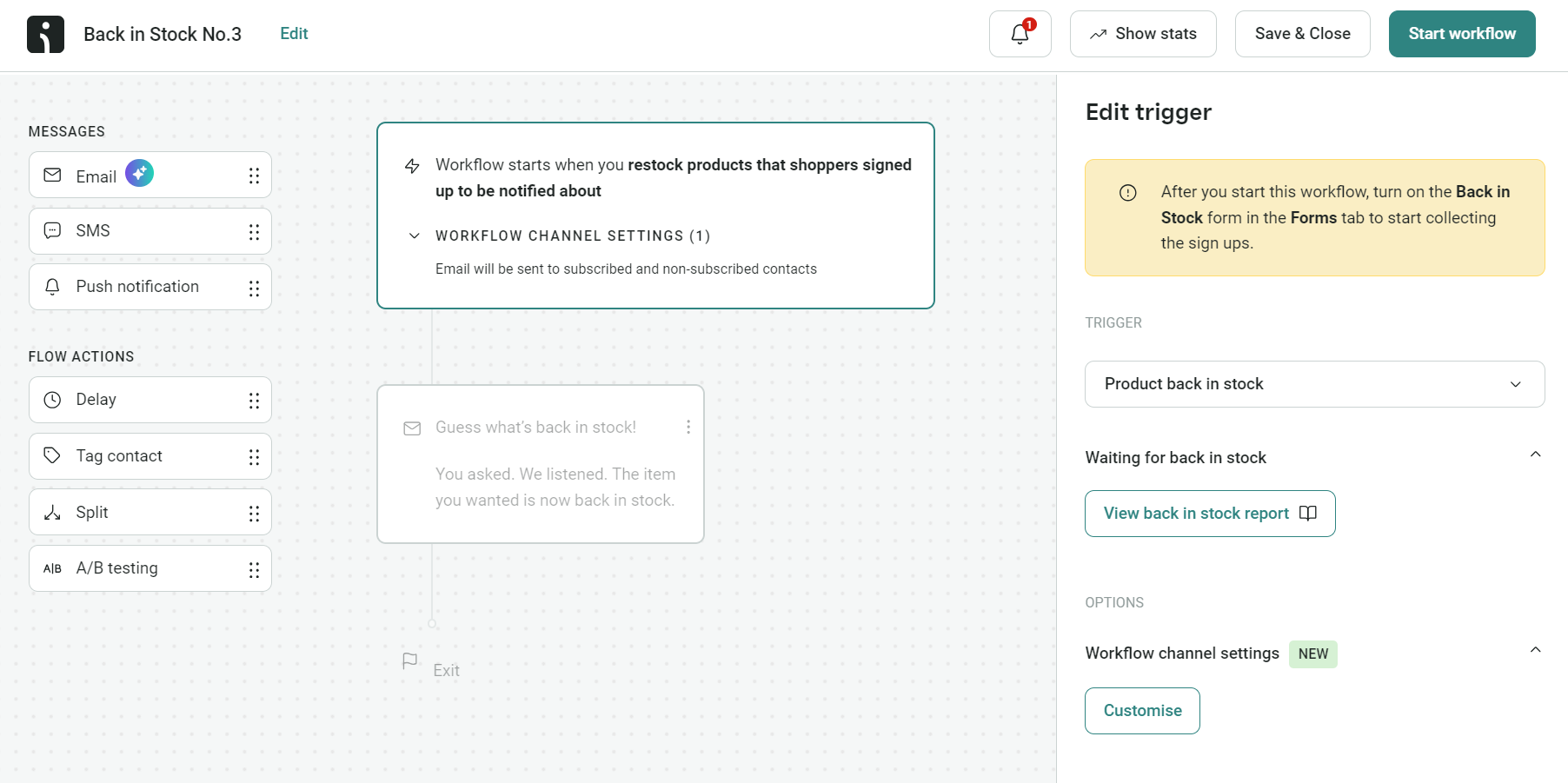
Back-in-stock emails had the highest conversion rates of any automation in 2025. You can create your own using Omnisend’s pre-built flow:
Order management emails
Your email tool, such as Omnisend, automates order confirmation emails following integration with your ecommerce platform, such as Shopify or WooCommerce. However, a portion of orders will require additional management and customer communication.
Common scenarios
- Address corrections
- Order cancellations
- Item additions or removals
- Payment method updates
Micro-template structure
- Confirm whether you can accommodate the request
- State the timeline for changes to take effect
- Provide alternatives when the original request isn’t possible
- Include order confirmation or updated tracking
Revenue opportunities
- Offer discounts to prevent cancellations
- Suggest store credit with bonus value instead of refunds
- Waive additional shipping when customers add items
- Recommend complementary products during modification requests
Fulfillment and shipping emails
Not all orders have perfect fulfillment and shipping scenarios. You’ll need to manage expectations before customers contact you and when customers contact you about issues.
Common scenarios
- Delivery delays
- Lost or stolen packages
- Tracking number problems
- Carrier issues
Micro-template structure
- State the problem and a brief reason
- Provide the new delivery date or resolution
- Include compensation for the inconvenience
- Add tracking links or next steps
Revenue opportunities
- Include discount codes with delay notifications
- Upgrade to expedited shipping at no charge
- Send product recommendations while customers wait
- Invite to loyalty programs in compensation emails
Pro tip
One of the best customer service upgrades you can make is providing fast, timely shipping updates via SMS. Omnisend lets you add SMS to email automations with global coverage, so that all your customers receive urgent information.
Post-delivery issue emails
Your customers expect their post-delivery product experience to be excellent. When it isn’t, the next best thing is a timely and empathetic customer service email.
Common scenarios
- Damaged items
- Quality complaints
- Wrong product shipped
- Missing components
Micro-template structure
- Acknowledge the problem without making excuses
- Provide immediate resolution (replacement, refund, or both)
- Add compensation for the trouble
- Confirm timeline and next steps
Revenue opportunities
- Let customers keep low-cost damaged items instead of processing returns
- Combine refunds with store credit for future purchases
- Offer product upgrades when replacing defective items
- Add loyalty points after resolving issues
Returns, exchanges, and refund emails
These emails enter your customer journey following initial emails about post-delivery issues. It’s crucial to provide a resolution as fast as possible here to satisfy your customer and avoid negative reviews.
Common scenarios
- Return approvals
- Exchange confirmations
- Refund processing
- Store credit options
Micro-template structure
- Confirm you’ve approved their request
- Provide return label or exchange shipping details
- State the refund or resolution timeline
- Thank them and include additional purchase incentives
Revenue opportunities
- Suggest exchanges before processing full returns
- Offer store credit with 10% bonus value
- Add loyalty points to their account
- Include discount codes for future purchases
Retention, loyalty, and win-back service emails
Customers who haven’t purchased in, say, the last 30 days are firmly in the idle camp and benefit from a reactivation email to encourage additional shopping. Best sent to those who are continuing to engage, such as clicking links in emails.
Common scenarios
- Post-resolution satisfaction checks
- Loyalty program invitations
- Win-back campaigns for inactive customers
- Review requests after positive outcomes
Micro-template structure
- Reference the previous interaction or purchase
- Request feedback or offer program enrollment
- List benefits or incentives
- Provide clear enrollment or action steps
Revenue opportunities
- Invite customers to loyalty programs with free shipping and points
- Request reviews in exchange for discount codes
- Offer VIP program access to repeat buyers
- Send targeted win-back discounts (20-25% off) for inactive customers
Pro tip
Omnisend has a pre-built customer reactivation flow that triggers an email and an optional SMS to those who haven’t ordered over a selected time period.
Best practices for writing high-performing customer service emails
Your customers expect a fast response, but what good is that if you don’t get to the point, resolve their problems, and satisfy their requests? You can do all that with the best practices below. Follow them to write decent customer service emails.
Tone, empathy, and de-escalation techniques
The best thing you can do is answer your customer honestly, irrespective of whether you’re empathetic. Echoing their feelings has its place, but it can read as if it’s filler. To respond to your customers without friction, read between the lines:
- Damaged items are frustrating. Your customer will want an immediate resolution.
- Receiving the wrong items is bewildering. Your customer will want to know how to send it back and get their ordered items as fast as possible.
Let’s say your customer emails about poor product quality. You might immediately feel defensive, but don’t let your customer know that. Own the situation instead.
For instance:
- “I’m sorry you feel disappointed with the product quality” sounds alright, but it says “you” and shifts all blame to the customer’s thoughts
- A better response would be, “You’re right, it isn’t the quality we promised, and I can send a replacement or refund you today”
Clarity, scannability, and formatting for fast resolution
How many times have you had to email customer service and absolutely dreaded reading their response because it’s long and poorly formatted?
Don’t be that business. Make information easy to find:
- Bold dates, amounts, tracking numbers, and discount codes
- Split information into chunks with bullet points
- Step-by-step processes benefit from lists, such as:
- 1. Visit https://example.com/labels
- 2. Enter your order number
- 3. Print your returns postage label
- Keep your points to one per paragraph and split them if necessary
- Put the answer in the first sentence
- Cut filler:
- Wordy: “I wanted to let you know that I’ve looked into your refund request and I’m happy to inform you that we can process that for you.”
- Direct: “Thanks. I’ve approved your refund of $47.50. You’ll receive it within three business days.”
Handling angry customers and sensitive situations
Some customers will be unhappy with their experience, but honestly, these are among your best retention and revenue opportunities. If you can resolve complaints amicably, those customers are likely to purchase again and recommend you to others.
Four-step framework
- Acknowledge what happened, for instance, “Your order arrived damaged,” not “I see you had an issue”
- Apologize rather than shifting the blame, with responses such as, “This is our mistake,” rather than “We apologize for any inconvenience”
- Offer a resolution (“I’m sending a replacement via overnight shipping and processing a full refund. You’ll have both by Wednesday”)
- Confirm what happens next (“Keep the damaged item, there’s no need to return it”)
Avoid
- Telling customers to calm down
- Explaining problems before offering solutions
- Generic template language
Accessibility, localization, and inclusive language
Follow these tips to send appropriate, contextual customer service emails:
Accessibility tips
- Write in plain language
- Design your email with appropriate font sizes, paragraph breaks, and bold and underlined text for important parts
- Use descriptive language for CTA buttons
- Offer a downloadable version of your email
Localization tips
- Check your customer’s time zone before sending, and schedule or automate your response based on the best sending times
- Match any pricing and currencies to your customer’s country
- Edit your language for your audience, such as US English for customers in the US
Inclusivity tips
- Use gender-neutral language across the board
- Avoid assumptions about holidays and celebrations
Turning resolved issues into loyalty and referrals
There will be revenue and loyalty opportunities within some customer service emails. However, you can’t simply add a discount code or recommend a product in any message. Your compensation and offers should be contextual instead.
When to offer discounts or credits
- Your mistake caused the problem
- Multiple issues with one order
- The problem impacted important events
Discount options
- Gift cards keep revenue in your business
- Discount codes work for first-time buyers
- Loyalty points for repeat customers
Incentives work as resolutions in customer service emails, and you can automate these across your customer journey in Omnisend. Automated emails earned $2.87 per send in 2025, compared to $0.18 for scheduled campaigns.
Automating and scaling customer service emails with Omnisend
Some of your customer service emails will require a manual, human response. For instance, complaints about sizing and fit. However, many scenarios repeat themselves and can be automated without losing the human touch.
When to automate vs. keep responses human-only
Automate:
- Order confirmations and shipping updates
- Delivery delays and tracking issues
- Post-purchase check-ins
- Return instructions
- Product availability notifications
Keep human:
- Complex complaints that require judgment
- Emotional or sensitive situations
- Unique product questions
- Escalated issues after failed automation
Core ecommerce workflows you can build in Omnisend
Omnisend lets you build flows for common customer service scenarios:
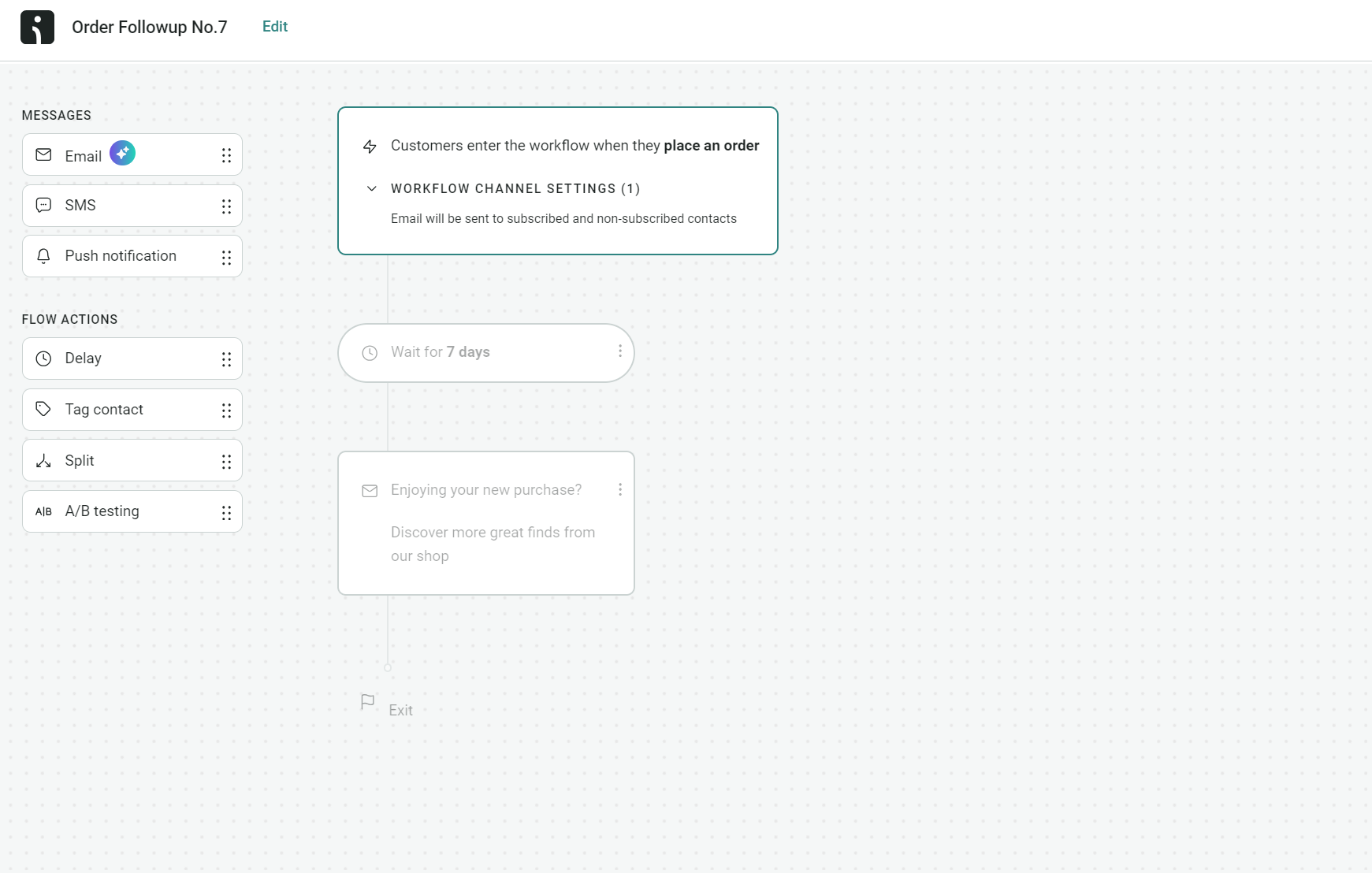
- Order followup. Trigger: Three days after delivery > Email asks how the product is working and offers a support link. There’s also a pre-built flow to help you get started:
- Shipping delay notification. Trigger: Expected delivery date passes > Email explains delay with new date and discount code > SMS backup if delay exceeds two days.
- Damaged/wrong item flow. Trigger: Customer reports issue > Immediate email with solution > Replacement tracking when it ships > Satisfaction check five days after new delivery.
- Return requested. Trigger: Return form submission > Instant return label and packing instructions > Exchange orders get replacement confirmation > Refund orders get timeline plus loyalty points.
- Service resolution to loyalty. Trigger: Issue marked resolved > Wait five days > Email thanks customer with discount or loyalty invite > Wait three days > Product reviews request if no response.
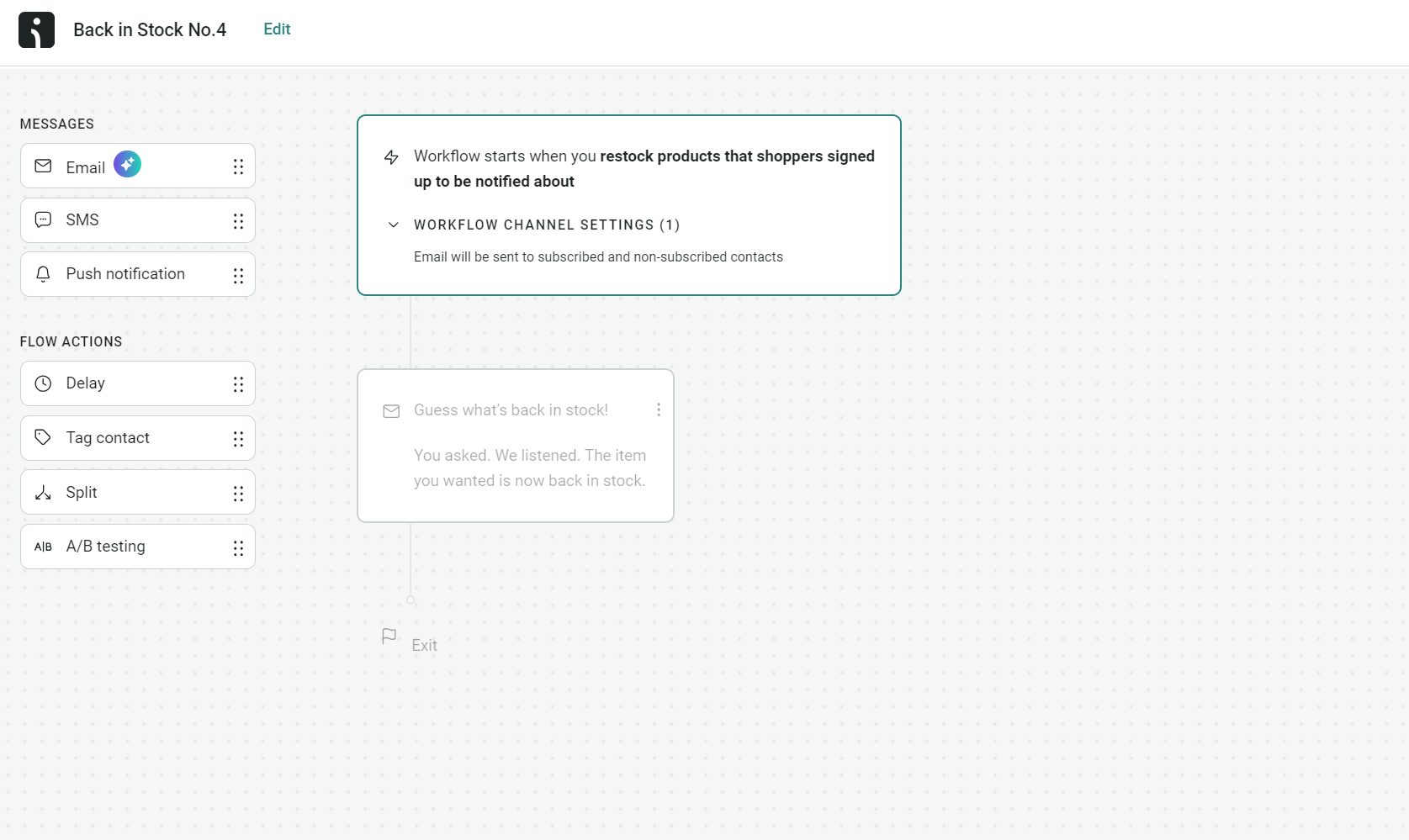
- Back in stock. Trigger: Customer requests notification > Email when product returns with early access discount. Omnisend provides a pre-built flow:
Connecting Omnisend with Shopify, WooCommerce, and helpdesk tools
Omnisend will prompt you to connect your ecommerce store during signup. Otherwise, visit the store integrations page and select Connect now on your platform:
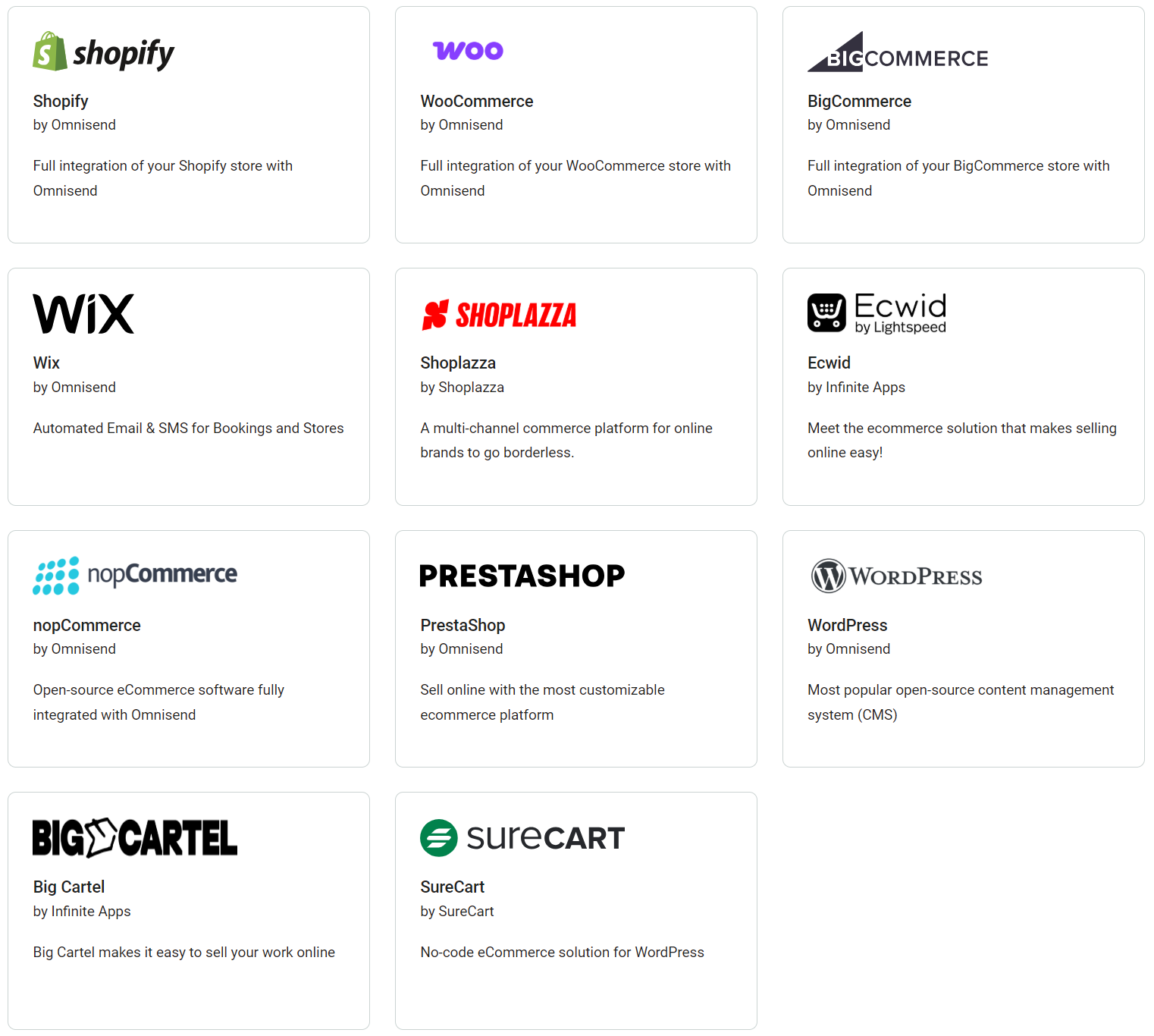
After connecting your store, Omnisend will sync and import your customer, product, status, and order information, including order IDs, automatically. You can then segment your customers and use your store’s imported data in automations.
Additionally, Omnisend connects to multiple help desk and customer service tools, such as Gorgias, Intercom, and Tidio. Customer service requests and interactions through these sync to Omnisend, helping you trigger email automations based on context.
Coordinating email customer service with SMS for urgent issues
Email and SMS work together to deliver information at speed and in-depth. Consider these factors when coordinating them:
- SMS works for time-sensitive updates. When orders are delayed, cancelled, or payment fails, customers need to know immediately. Same-day delivery alerts also belong in texts because people check them fast.
- Email handles anything that needs detail. Return instructions, product recommendations, satisfaction surveys, and loyalty invitations require more space than a text message provides.
- Use both channels for critical updates. Significant shipping delays get an SMS alert plus an email with compensation details. High-value orders and urgent account issues warrant both.
- SMS requires explicit opt-in. During checkout, explain which messages customers will receive via text. Keep messages under 160 characters and include your brand name so customers know who’s texting.
“Automated SMS earned an average of $0.74 per send, compared to $0.15 for campaigns in 2025. If there are revenue-generating opportunities in your customer service sequences, then text messages are definitely worth adding.”
— Evaldas Mockus, VP of Growth at Omnisend
Measuring and optimizing your customer service emails
Every customer service email has metrics you can track or extrapolate information from to optimize your efforts.
For instance, automated engagement stats collected by your email tool, such as open rates, show how effectively your emails encourage action. On top of that, you can gather resolution satisfaction rates via feedback request emails.
Good customer service pays off. Companies that put customers first saw 41% faster revenue growth, 49% higher profits, and 51% better retention than their competitors in 2024 (Forrester).
Key ecommerce KPIs for customer service emails
Omnisend collects all your email metrics and provides them in Reports with an overview and individual dashboards for sales, campaigns, and automations:
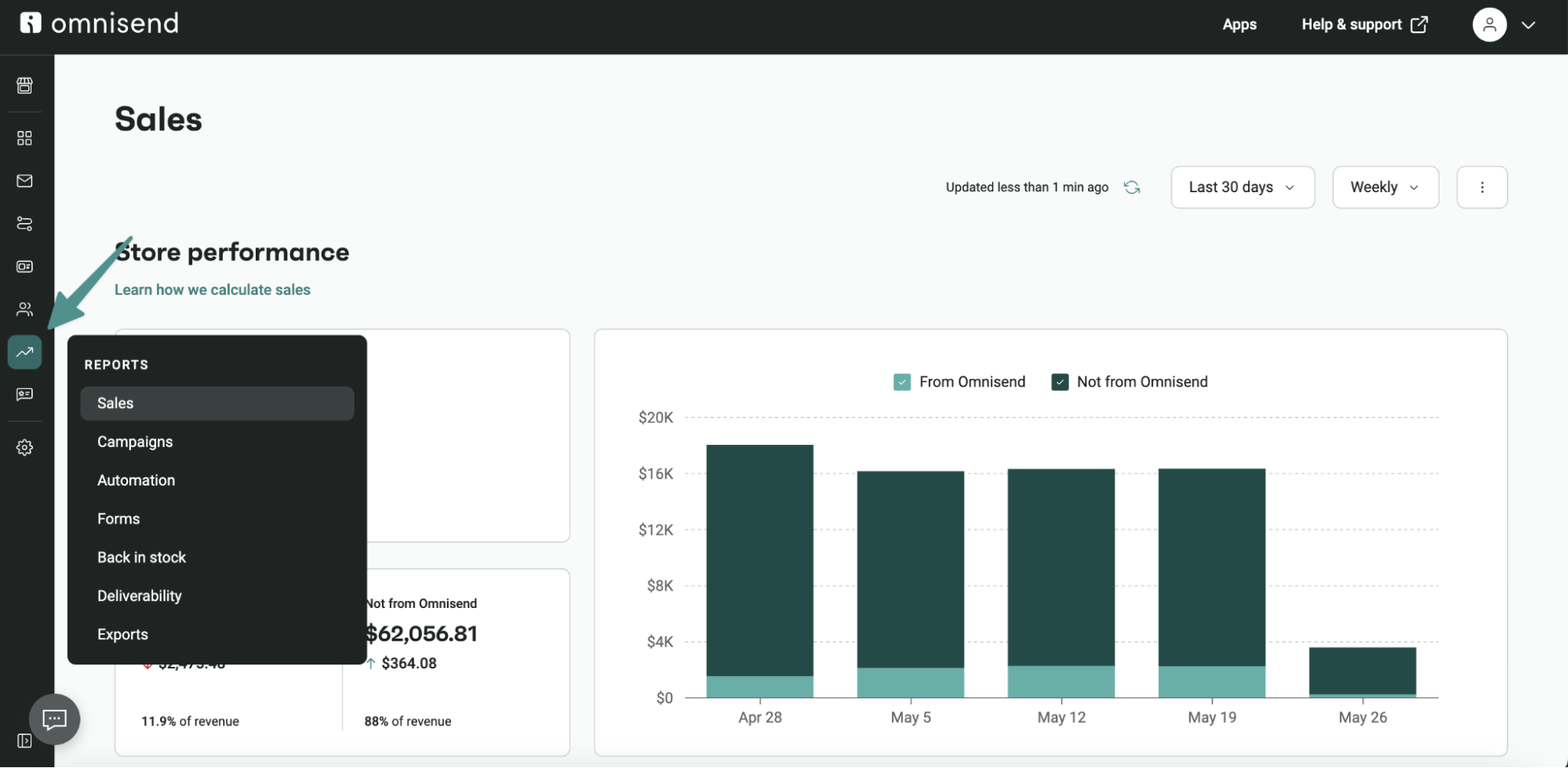
Email-level metrics
- Open rates show if subject lines encourage clicks
- Click rates on help links or return portals indicate helpfulness
- Reply rates reveal if customers need more information
Service-level metrics
- First response time measures how fast you acknowledge issues
- First contact resolution tracks problems solved in one exchange
- CSAT scores show satisfaction after resolution
- Escalation rate identifies when automated responses fail
Business-level metrics
- Repeat purchase rate after service interactions
- Refund and chargeback rates
- Customer churn within 30 days of service contact
Setting up tracking and tagging in Omnisend
Add tag blocks within customer service workflows to label contacts by issue type. When someone enters a shipping delay workflow, tag them “delayed-shipment.” Return requests get “requested-return.” Quality complaints get “quality-issue.”
UTM parameters on help center, return portal, and product page links show which service emails send traffic to resources.
Create segments based on service tags in the Audience section, then use workflow reports in Omnisend to track performance by workflow name and type. The animated image below shows how to segment contacts using source tags:
Once you’ve set up your tracking types, you can compare service workflow metrics against marketing workflows to understand their different impacts.
A/B tests to improve replies and resolutions
Run tests on email content and high-volume scenarios like shipping delays or return approvals where sample sizes support results. Use Omnisend’s A/B test block in automation workflows to split contacts and compare open rates, click rates, and placed order rates between versions.
Consider testing these elements:
- Subject line tone: “Action needed: Your order” vs. “We’re handling your order issue”
- Apology approach: “We apologize for the delay” vs. “Your replacement ships today”
- Email length: Full explanation vs. brief message with links
- Compensation timing: Discount in opening vs. closing
- Follow-up wait: Three days after resolution vs. seven days
Calculating ROI and LTV impact
Track revenue from customers who experienced service issues in the past 90 days. Compare their repeat purchase rates against those of customers with no service contact.
- ROI formula: (Increased repeat purchase revenue) – (Cost of improvements) / (Cost of improvements) × 100 = ROI %
- For LTV, compare customer lifetime value between fast response times (under four hours) and slow response times (over 24 hours). The difference shows the financial impact of response speed.
Continuous improvement loop
Use data from your service emails to refine templates and processes every month.
- Step 1: Review your top five service issues monthly using Omnisend’s workflow reports. Look at failed delivery rates, unsubscribe rates, and placed order rates by issue type.
- Step 2: Update your templates when you spot problems. Return emails getting lots of replies? Add clearer packing instructions or label download steps. Tracking links buried and ignored? Move them higher.
- Step 3: Pick one element to test each month, such as subject lines, compensation timing, or follow-up delays. Compare results after the test period.
- Step 4: Review the analytics for your efforts. Note down any changes in first contact resolution and repeat purchase rates as you refine templates.
Conclusion
Your complaint replies, shipping delay emails, and return confirmations reach customers at critical moments. How you handle these interactions affects repeat purchase rates and customer lifetime value.
Omnisend automates service workflows across email and SMS, tracks open rates and click rates for each workflow, and connects interactions to placed orders and revenue. Automate repetitive scenarios and write manual replies when customers need a human touch.
Join Omnisend to create automated customer service emails that generate revenue
Quick sign up | No credit card required
FAQs
What is a customer service email?
It’s an automated or manual email or series, sent and received when you or your customers require or submit information.
How to create an effective customer service email template?
Provide plain advice and use bullets, steps, and descriptive CTAs for accessibility. Check your email tool’s personalization scope and use your customer’s first name whenever possible.
What are examples of customer service emails for complaints?
A few include, “Thank you for reaching out, I’m sorry to hear that. We have a 30-day returns policy and will cover the returns shipping. Visit [link] to print your label,” and, “I’ve just received your complaint. I wanted to apologize personally. We failed to assist you. To thank you for your patience, I have added $50 store credit to your account.”
What is a customer email ID in ecommerce?
An identifier assigned by your email marketing platform. It tracks and manages each contact’s interactions, preferences, and purchase history.

TABLE OF CONTENTS
TABLE OF CONTENTS


Subscribe and don’t miss any updates!
No fluff, no spam, no corporate filler. Just a friendly letter, twice a month.