Omnisend AI


 OFFER
OFFER










Your email marketing ROI depends on automated messages that are driven by customer behavior, engagement, dates, and more. All of these require email automation triggers, which you set and then review and refine based on performance.
Nearly one in three clicks in automated emails resulted in a purchase in 2025, and they accounted for 30% of revenue from only 2% of sends.
Let’s start with the basics before going any further. A trigger tells your flow when to start. It works on events rather than schedules, such as a customer abandoning their cart and your tool triggering a cart recovery email.
There’s much more to unpack. The good news is we’ve done it all below. This article is your guide to email automation triggers. You’ll learn what they are and how to use them effectively.
Quick sign up | No credit card required
What is an email automation trigger?
A trigger is a rule you set in your email marketing tool that tells your flow when to run. Your email tool will have several pre-built triggers that you can choose based on when you want to reach customers.
Your email automation runs when the trigger activates. Provided your contact passes any audience filters or frequency rules you set, the email sends. For example, your welcome series triggers on form signup, your tool checks they’re a new subscriber, and the first email goes out.
There are five triggers you’ll primarily use in your marketing:
- Behavior-based, for targeting customer actions, such as abandoning carts and product pages
- Time-based, send to people after X amount of days, weeks, or months
- Date-based, these effectively run off the calendar for the likes of anniversary messages
- Lifecycle-based, sends emails as people move through their customer journey, such as from first-time to repeat buyer
- Cross-channel, such as reminder emails triggering SMS flows, and in-store purchases triggering email receipts
How email triggers work in practice
An email trigger on its own tells your tool when something has happened. The conditions you wrap around it decide whether that moment is worth emailing about, because not every customer who hits a trigger should get the email.
Conditions are the filters you set alongside the trigger, audience rules, frequency caps, and exit conditions to narrow who qualifies for the flow.
Browse abandonment is a good example. A customer views a product page. But you don’t want to email everyone who lands on a product. What about the customer who bought it yesterday? Or the one who’s already had three abandonment emails this week?
So, the flow runs through a few checks. The page view happens, your tool registers it, and it then runs the conditions you’ve set. If they pass, the abandonment email goes out. If not, the flow exits, and they don’t hear from you.
The trigger picks up the moment. The conditions decide whether to act on it. That combination is what makes a triggered email feel timely instead of just frequent.
The most common email automation triggers
These are the triggers most ecommerce stores set up first because they target the most significant revenue-generating moments:
Signup and list entry
Triggers when someone subscribes to your list, usually through a signup form, popup, or a checkout opt-in. Your welcome series runs from it, and it’s also where lead magnet delivery happens (sign up for the discount code, get the email).
The signup form is also an opportunity to collect zero-party data by asking subscribers what they’re interested in, so the welcome flow speaks directly to them.
May the Growth be with You used this approach to personalize welcome emails for its clients and hit a 68.8% click-to-order conversion rate.
Purchase completion
The customer pays, and the order’s in. That’s your moment for the order confirmation, then a review request a week or two later, cross-sells based on what they bought, and a longer post-purchase sequence that earns the second order.
To’ak Chocolate built its purchase completion flow around storytelling rather than discounting and grew email revenue 460% in six months.
Cart abandonment
Triggers when a customer adds something to their cart but doesn’t complete checkout within a set window. Your tool registers the abandonment and runs the recovery flow, with the abandoned items, prices, and a saved cart link pulled straight into the email.
Revenue recovery is the goal, with 76% of all automation-based email orders coming from abandoned cart and welcome emails in 2025.
Browse and product abandonment
Sits further up the funnel than cart abandonment. Someone’s looking at a product but hasn’t put anything in the basket, so the email needs to do more reminding than convincing.
Jewelry retailer Belle Fever targeted undecided shoppers with a product-abandonment email containing personalized product recommendations and saw conversions climb by 40%.
Commonly overlooked triggers in email automation
Omnisend and most other email automation tools have pre-built flows. These have triggers configured for you, but it’s easy to become dependent on them and never explore other triggers you can set in custom flows to cover more of your customer journey:
1. Back-in-stock trigger
Back-in-stock emails had the highest conversion rate (6.46%) and revenue per email ($8.46) among automation types in 2025.
They’re underused because stockout events aren’t common across all stores, but if you do experience stockouts, they can help you recover a significant portion of sales. Setting them up before stockouts, rather than after, is best for revenue recovery.
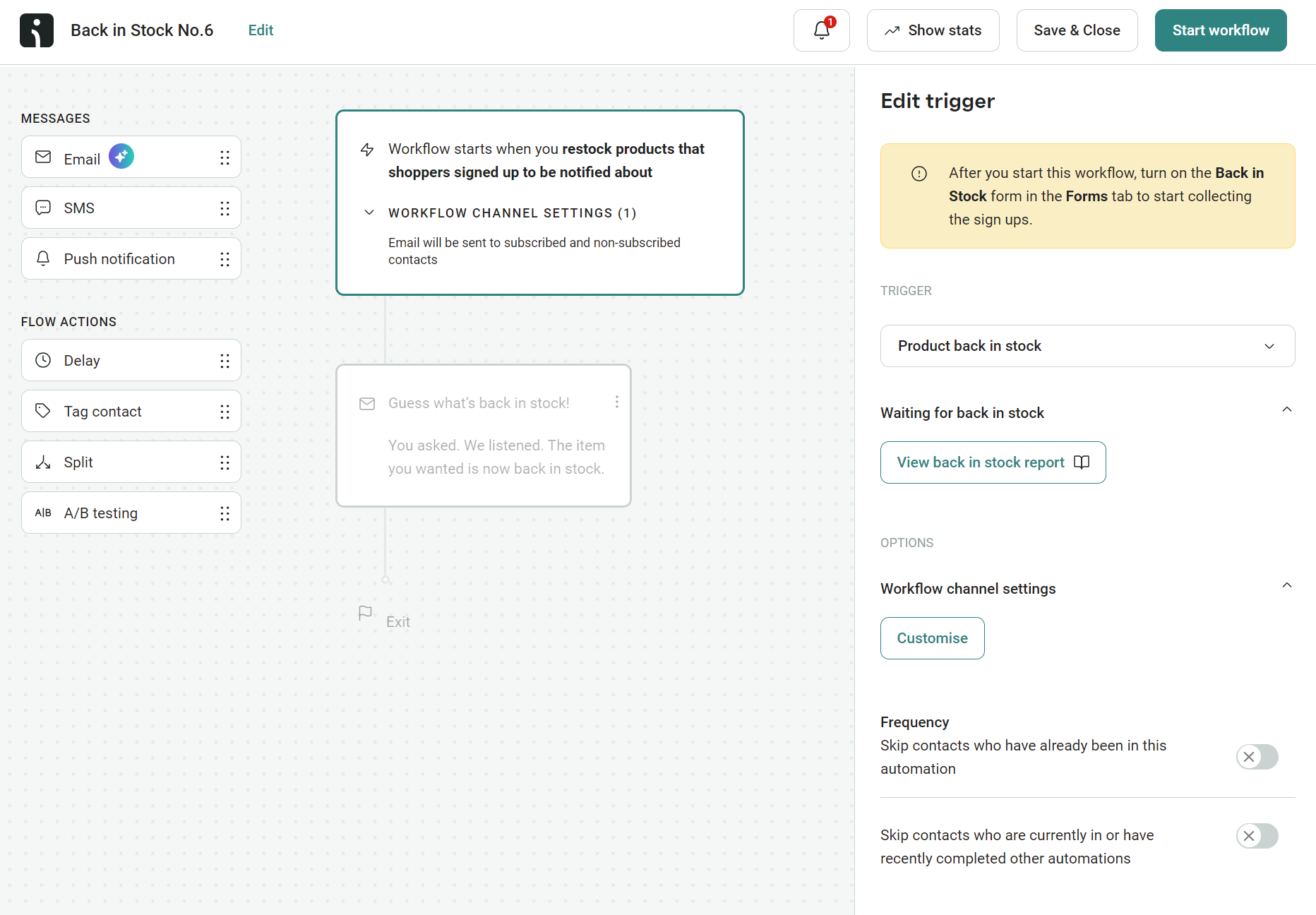
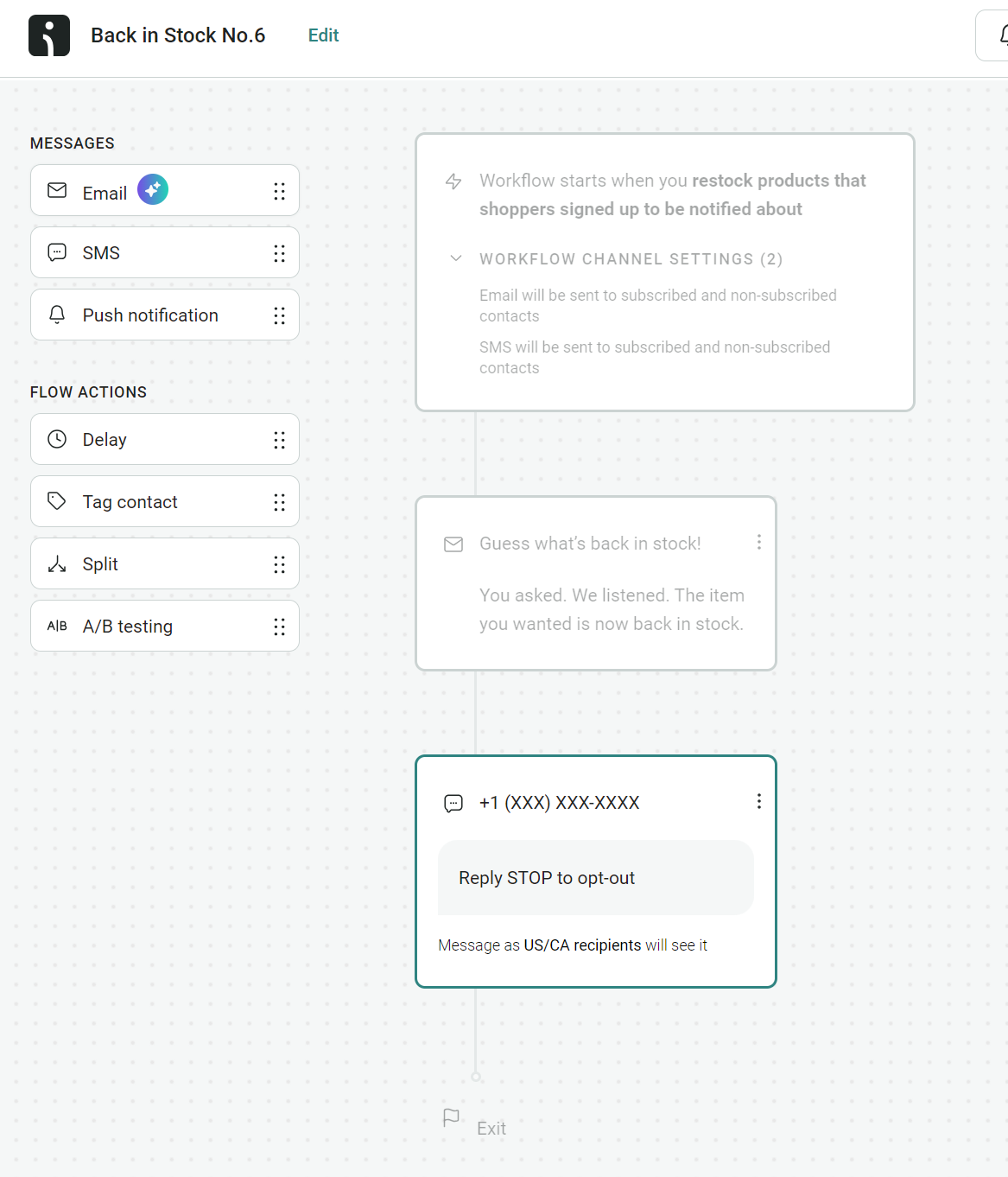
Omnisend’s trigger for back-in-stock alerts is “when you restock products that shoppers signed up to be notified about”. You can then select a frequency setting, such as skipping contacts who have already been in the automation, to avoid overload:
Also, since back-in-stock alerts are time-sensitive, it’s worth sending an SMS in your flow, provided your customer has opted into text marketing. Omnisend lets you create multichannel flows in its Pro plan. You can add an SMS directly under the email:
2. Date-elapsed-since-purchase trigger
A date-elapsed trigger sends a set number of days after a customer’s last order, rather than being triggered by the order event itself. Useful for catching customers at moments that a standard post-purchase sequence misses.
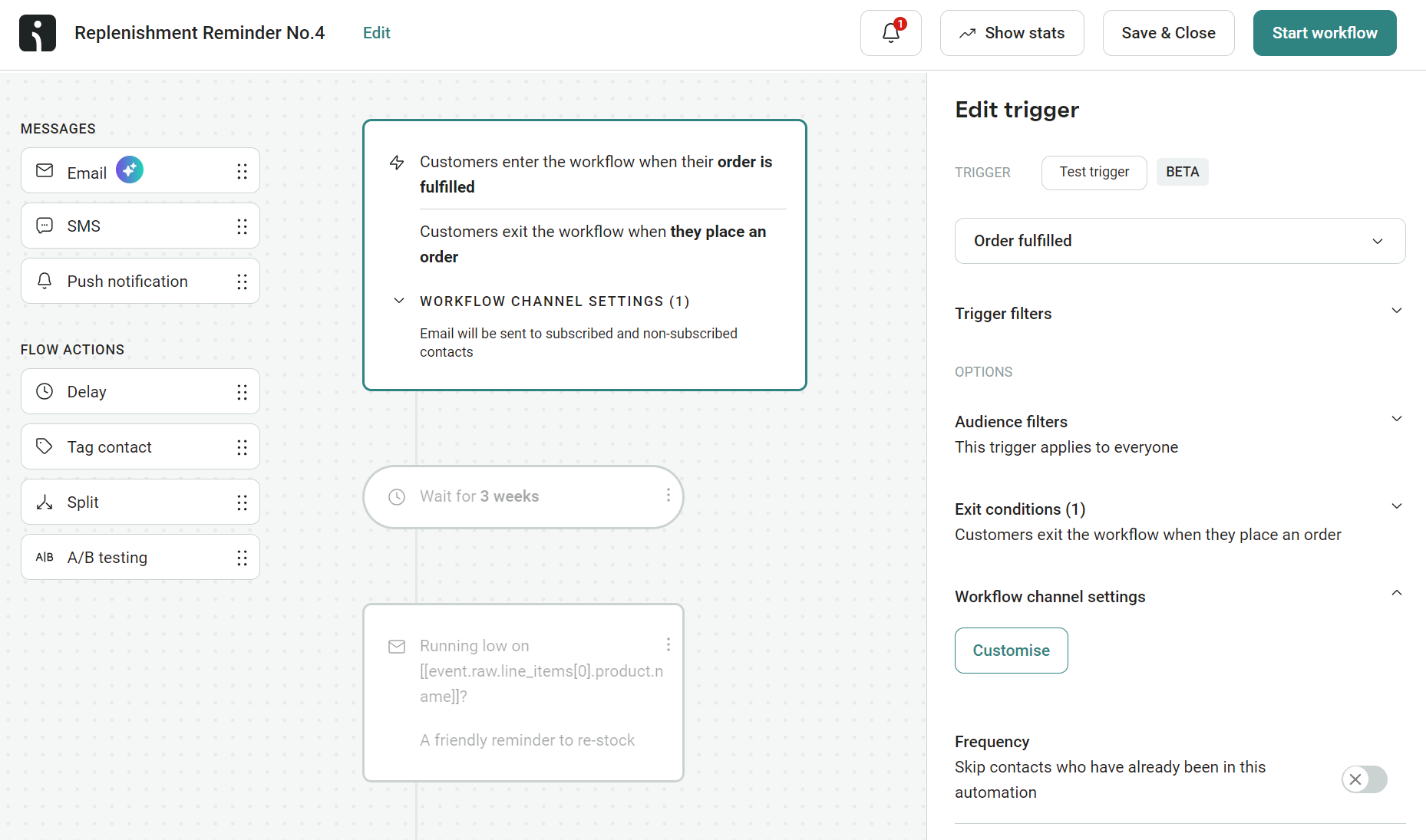
Replenishment is the obvious use case: 45 days after a coffee order, 60 days after skincare, 90 days after a supplement bottle. In Omnisend, you build it on a placed order or order fulfilled trigger with a delay step set to your chosen window. Here’s how it looks in the flow builder:
Date-elapsed triggers also work for loyalty point reminders, repurchase nudges, or surfacing related products once the original has had time to land.
Enflow Digital ran this for a hobby-appliances brand, sending loyalty-point reminders to customers 45 days after their purchase. The flow achieved a 70% open rate and generated over $28,000 in five months, all from emails timed to the customer’s purchase.
3. Lifecycle stage transition trigger
A lifecycle stage transition trigger runs when a customer moves between stages, prospect to first-time buyer, active to at-risk, repeat customer to lapsed.
The advantage is catching the customer at the inflection point. An “at-risk” customer is still partly engaged; the moment they cross into that stage is when a re-engagement email lands hardest. Wait until they’re fully lapsed and the email has more work to do.
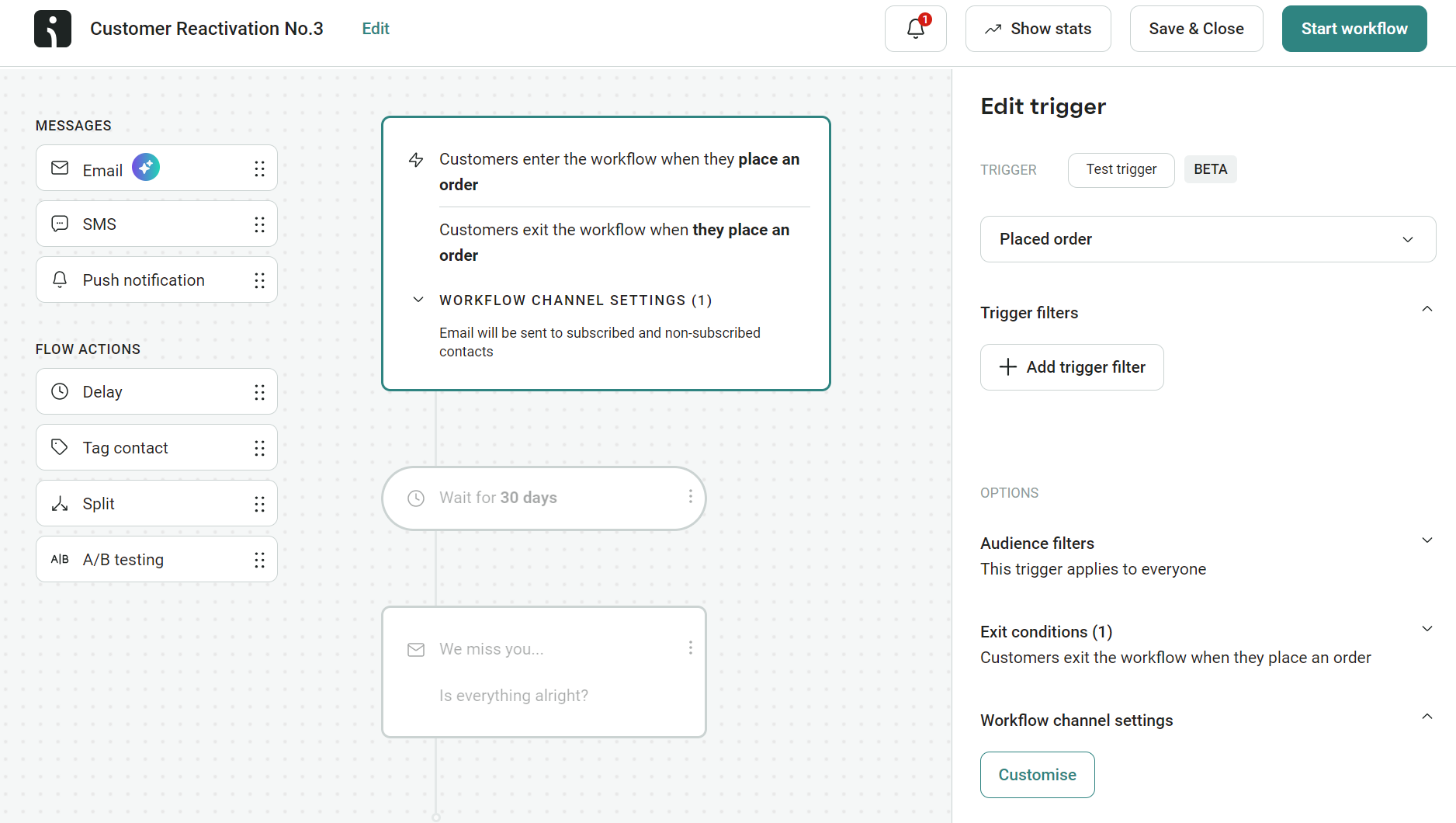
Omnisend’s Customer Reactivation workflow uses a Placed Order trigger combined with audience filters to identify customers who haven’t placed an order within your reactivation window.
The flow runs whenever a customer places an order, but only sends if the conditions are met (for example, no orders in the last 60 days, opened an email in the last 30):
Island Olive Oil ran at-risk lifecycle triggers and saw a 2,710% lift in revenue per email versus standard campaigns.
4. Birthday/anniversary trigger
Date-based trigger tied to a stored date on the contact profile, birthday, signup anniversary, or first-purchase anniversary.
Birthday emails had the third-highest revenue per automated email in 2025, earning $4.37 per send, behind only welcome and back-in-stock emails.
The trade-off is the setup. Birthday needs the date collected at signup (most signup forms don’t ask for it). Anniversary uses data you already have, the customer’s signup date or first order, so it’s the easiest one to add to existing automations.
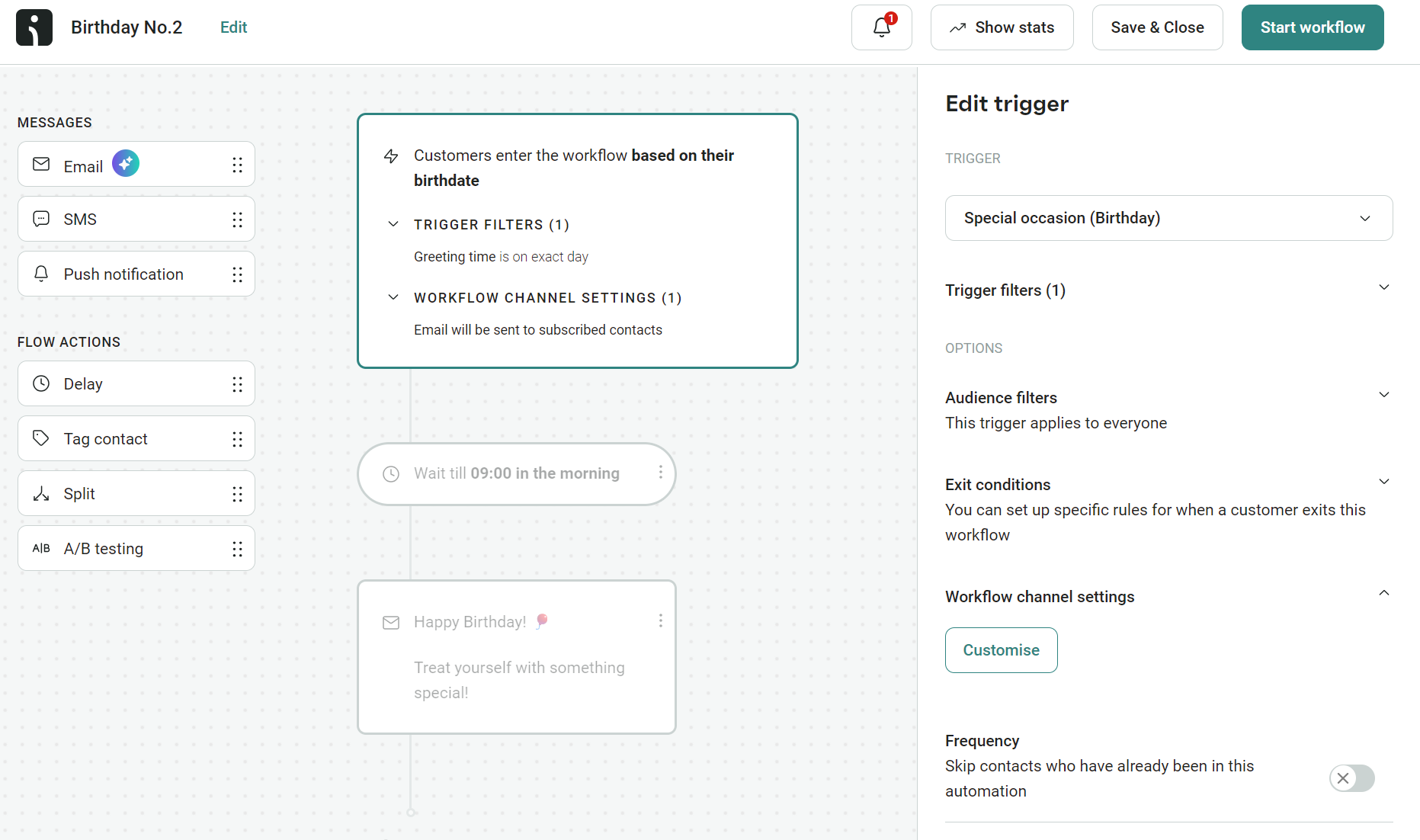
Creating an anniversary email in Omnisend will involve using a placed order or subscribed trigger with a yearly delay step. Birthday uses the birthdate trigger:
5. Inactivity trigger
Most triggers are triggered by something the customer did. Inactivity triggers a reaction to what they haven’t: no opens, no clicks, no orders for a defined window. The trigger lands when a customer crosses the line from active to dormant.
The catch is what happens if your list is already full of dead contacts. Sending inactivity-triggered emails to people who haven’t engaged in months is one of the fastest ways to tank deliverability, mailbox providers read it as bulk email to disengaged recipients and start filtering you.
CLVmaxers worked around this by cleaning 77% of its inactive contacts before launching the flows, which doubled open rates once the campaigns went out.
In Omnisend, an inactivity trigger uses a segment entry, with the segment built around your chosen engagement window. The Lapsed Email Subscribers pre-built segment defaults to 90 days, but the right window depends on your send frequency.
6. Cross-channel trigger
Cross-channel triggers ensure your flows reach customers on the channels they want, or that your most time-sensitive messages reach them on the best channels in addition to email.
The reason cross-channel is overlooked is that email usually comes first for ecommerce, and rightly so. It’s what customers expect most of the time. But an SMS or push notification can help to earn more revenue and increase your ROI.
Ovoko built its abandonment flows across email and push, with push notifications now contributing more than 20% of its overall revenue.
You drag SMS or push blocks into an existing Omnisend automation, alongside the email, to set up the flow. The trigger doesn’t change, but each contact only receives messages on the channels they’ve opted into.
7. Zero-party data trigger
These triggers use data your customers explicitly provided, such as their product preferences, interests, and quiz answers collected at signup.
The trigger itself isn’t new. It’s still a signup event. What changes is the data attached to that event. Your customer told you their favorite category, dog breed, or coffee preference, and the welcome flow speaks directly to that.
May the Growth be with You used this approach for its clients, tripling click rates by building trigger logic around signup form data rather than sending the same welcome series to everyone.
Custom fields on the signup form sync to the contact profile, giving the welcome flow data to branch on. Each path delivers products, content, or offers tied to what the customer asked for.
8. POS / offline behavior trigger
A POS trigger fires when a customer does something in your physical store, rather than online, such as making a purchase, scanning a loyalty card, or attending an event.
The trigger then runs an online follow-up, such as a thank-you email, a related product recommendation, or a review request.
It’s the trigger most ecommerce stores ignore because their POS and email tools aren’t connected. The data exists, just nowhere your automation can see it.
Lithuanian basketball team Žalgiris Kaunas pulled its POS and ticketing data into Omnisend, and triggered campaigns based on offline fan behavior, which now generate 39% of shop revenue.
How to choose the right trigger for each moment in the customer journey
The triggers available in your email tool suit multiple moments in your customer journey, from welcoming them to your newsletter to requesting a review following a purchase.
We can group these moments into acquisition, consideration, conversion, retention, and reactivation stages. Matching your email triggers to those moments ensures your messaging is relevant to your customers and, in turn, improves engagement.
Here’s how different email automation triggers fit into these stages:
- Acquisition stage. Calls for form signup, lead magnet, and zero-party data triggers.
- Consideration stage. Browse, product abandonment, and back-in-stock triggers.
- Conversion stage. Use cart abandonment and price drop triggers to encourage cart and checkout activity.
- Retention stage. Replenishment and milestone triggers work well. Post-purchase triggers are another option for reviews and follow-ups.
- Reactivation stage. Inactivity and winback triggers will help bring customers back. Also, use sunset triggers to remove unengaged subscribers.
Trigger timing and frequency: Avoiding the most common mistakes
Triggers start your email automations, but it’s the timing and frequency settings layered on top that determine when your emails reach customers.
Here’s what you need to know to avoid the timing mistakes that hurt customer experience and cost your store revenue:
Trigger delay windows
Such as immediate, after one hour, or 24 hours. These tell your flow when to send the email, provided all conditions in your flow are met.
You need to set a delay to ensure your emails reach people at appropriate times. Omnisend also lets you send on selected days of the week as part of its delay settings:
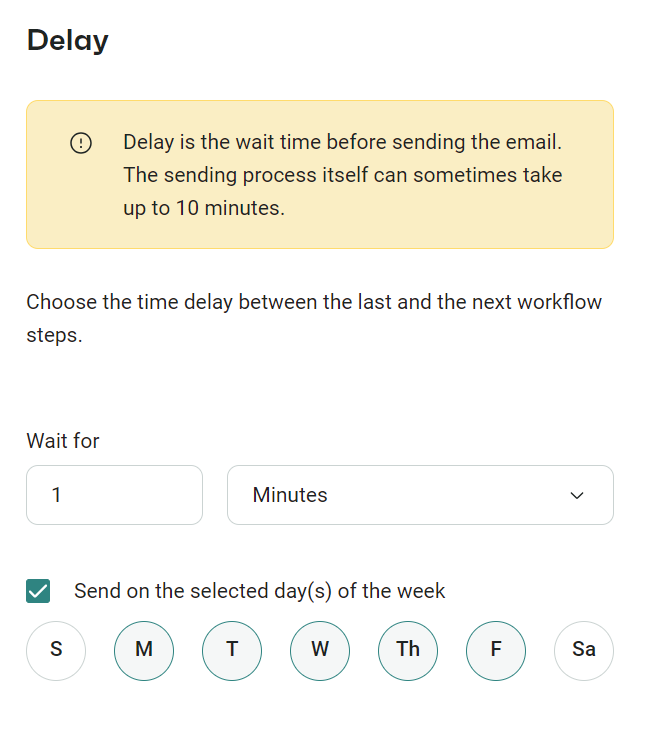
Your delays will change depending on the types of flow you create. A welcome flow, for instance, usually has an immediate initial send, whereas a browse abandonment flow might send the first email after one hour.
Trigger suppression logic and avoiding conflicts
You need to prevent the same contact from entering the same flow more than once or from receiving multiple similar emails across different flows.
Customers who qualify for multiple emails would ordinarily receive all of them, but you can exclude them using conditions.
The mechanics here are Omnisend’s Frequency setting (which controls how soon a contact can re-enter the same flow) and exit conditions (which drop them out of a flow when a relevant event occurs, such as placing an order while they’re in cart abandonment).
Why timing and frequency matter
Setting your flow to trigger without any delays or suppression tactics between messages will result in flooded inboxes and poorly targeted emails.
Omnisend’s 2026 Ecommerce Marketing Report found that click-to-conversion rates increased 53% YoY in 2025, a by-product of more appropriate targeting. A well-timed and contextual email is more likely to convert.
Setting up email automation triggers with Omnisend
Omnisend has 28 pre-built automations with triggers already set, so all you need to do is review the trigger filters to match what you want your automations to do.
You have complete control over email triggers in all automations. Omnisend’s flow builder lets you change your primary trigger via a dropdown:
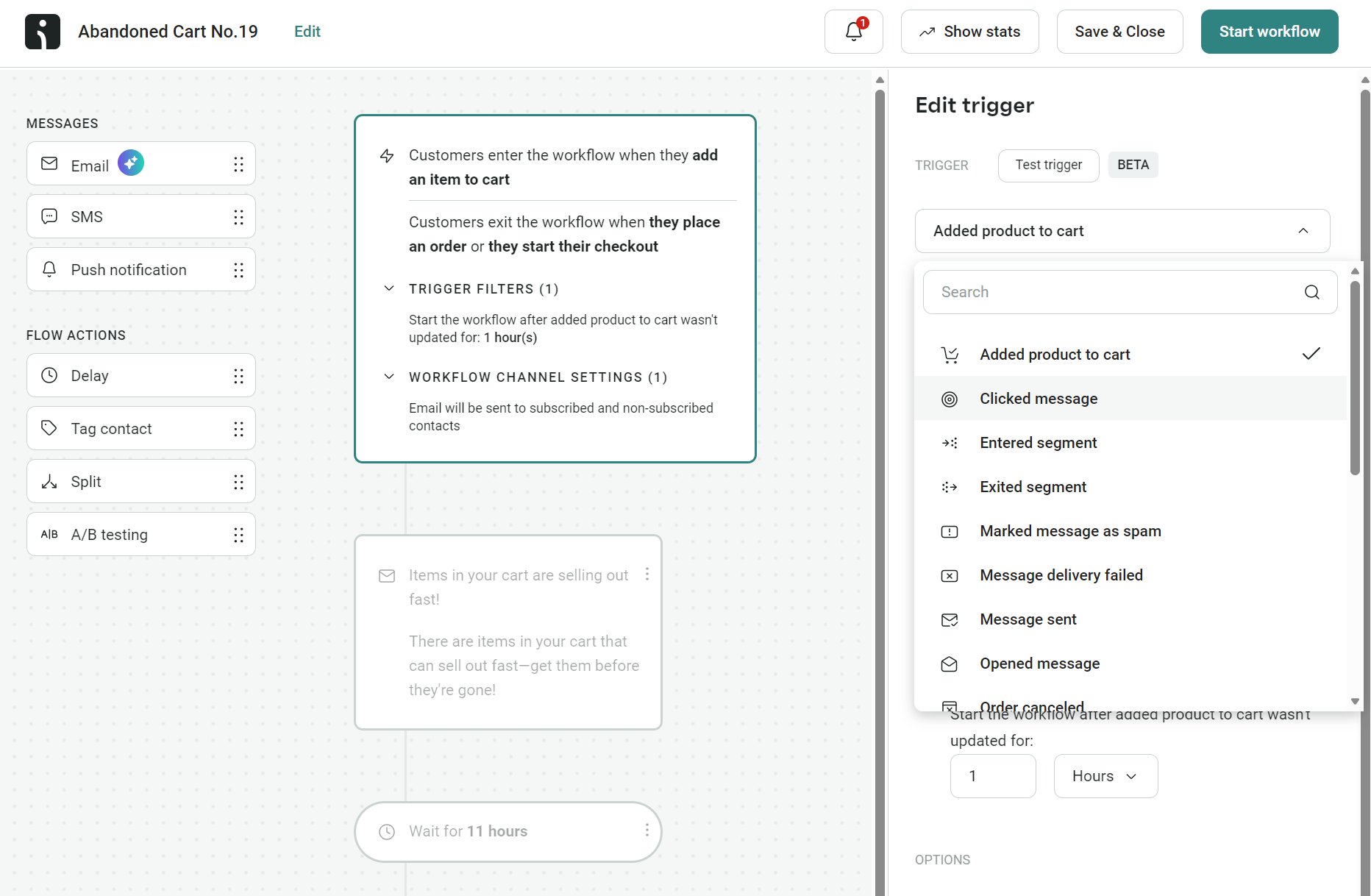
Here’s a complete list of the preconfigured triggers available in Omnisend:
- Added product to cart (behavior)
- Clicked message (behavior)
- Entered segment (lifecycle)
- Exited segment (lifecycle)
- Marked message as spam (behavior)
- Message delivery failed (cross-channel)
- Message sent (cross-channel)
- Opened message (behavior)
- Order canceled (behavior)
- Order fulfilled (behavior)
- Order refunded (behavior)
- Ordered product (behavior)
- Paid for order (behavior)
- Placed order (behavior)
- Product back in stock (behavior)
- Special occasion (birthday) (date-based)
- Started checkout (behavior)
- Subscribed to Marketing (behavior)
- Viewed page (behavior)
- Viewed product (behavior)
These triggers are available in both pre-built and custom flows. Building a flow from scratch requires selecting a trigger as one of the first steps. Omnisend then guides you through the settings to help you create unique automations.
All triggers also have trigger filters. Filters narrow which events qualify your contact, such as by order status, form name, or product details, with up to five filters per flow.
For instance, with an abandoned cart flow, you could set a filter so it only goes to those who add more than $500 to their cart and create a VIP-focused email to suit. Customers who add less than that to their cart can trigger a different flow.
You can also use custom events via Omnisend’s API, such as loyalty tier reached, review submitted, and subscription renewal. In practice, this requires a developer to hook your store and apps into the API to send event data to Omnisend.
Omnisend’s intuitive flow builder, high-level triggers, and filters ensure you can cover your complete customer journey with email automations. All plans include ecommerce flows, and as a Pro plan customer, you can create multichannel flows, too.
Quick sign up | No credit card required
FAQs
What is an email automation trigger?
An email automation trigger is the first setting in your flow that determines when customers enter the workflow. For example, when they place an order. That trigger is suitable for multiple flows, such as confirmations and thank-yous.
What are the most effective email automation triggers?
Behavior-based triggers are most effective. Omnisend’s 2026 Ecommerce Marketing Report found abandoned cart and welcome emails (triggered by Started Checkout and Subscribed to Marketing) accounted for 76% of all automation-generated orders. In terms of outright performance, back-in-stock alerts (triggered by Product Back in Stock) delivered the highest revenue per email at $8.46 and the highest conversion rate at 6.46%.
What are commonly overlooked triggers in email automation?
Birthday and anniversary triggers tend to get overlooked. Birthday needs a date field collected at signup, and anniversary runs off the purchase date you already have. Both are among the highest-value automations, with Omnisend’s 2026 report putting birthday automation AOV at $744, nearly 5× the average across other automations.
How many triggers should my email tool have?
Your store needs a signup trigger for welcome flows, a cart abandonment trigger, a post-purchase order-placed trigger, a back-in-stock trigger, and a date-based trigger for special occasions. That’s five. Omnisend has 20 pre-built triggers in its flow builder and lets you create custom event triggers via API.