Omnisend AI


 OFFER
OFFER










Klaviyo customer support is available via live chat, email, a Help Center, and a Community Forum. However, live chat is limited to paid plans. This article explicitly focuses on how to get help as a Klaviyo user. It’s important to note that it doesn’t cover the Klaviyo customer service software solution.
You can contact support by submitting a request through your Klaviyo account and selecting either live chat or email.
The Klaviyo customer support experience varies, depending on your plan. Higher-tier users often receive faster response times and direct access to support channels.
In this guide, you’ll learn about each support channel, real response times by plan, and honest user reviews from G2 and Trustpilot. You’ll also see how Klaviyo stacks up against other alternatives.
How to contact Klaviyo support
The table below covers various channels for reaching Klaviyo customer support, depending on your plan and urgency.
| Support channel | Access | Availability | How to use |
|---|---|---|---|
| In-app support widget (main) | All users | Depends on the plan | Log in → Click Support (top-right) → Choose Chat or Email |
| Live chat | Paid plans only (free for the first 60 days) | Standard: 24/5 weekdays Professional/Enterprise: Includes weekends | Via in-app widget |
| Email ticket | All users (free plan has limits) | Paid plans: 24/7 Free plan: First 60 days only | Submit through the in-app widget |
| Help Center | All users | Always available | help.klaviyo.com |
| Community Forum (for peer advice) | All users | Always available | community.klaviyo.com |
| Special emails | All users | Varies | [email protected] [email protected] [email protected] |
Important note for Klaviyo support phone number:
Klaviyo doesn’t offer phone support for technical issues or product help. The number 1-800-338-1744 listed on some sites is for sales only, not support. Avoid calling this Klaviyo phone number. The sales team doesn’t have access to your support tickets.
Klaviyo support channels explained
Klaviyo customer support offers several contact channels. Each works a bit differently and serves specific issues. We’ll cover every option, including access, Klaviyo support hours, and tips for getting faster help.
Live chat — The fastest option for paid plans
If you want quick help, Klaviyo live chat support is your best bet. You can access it inside your account through the Support widget. Just log in, click Support, and start a chat.
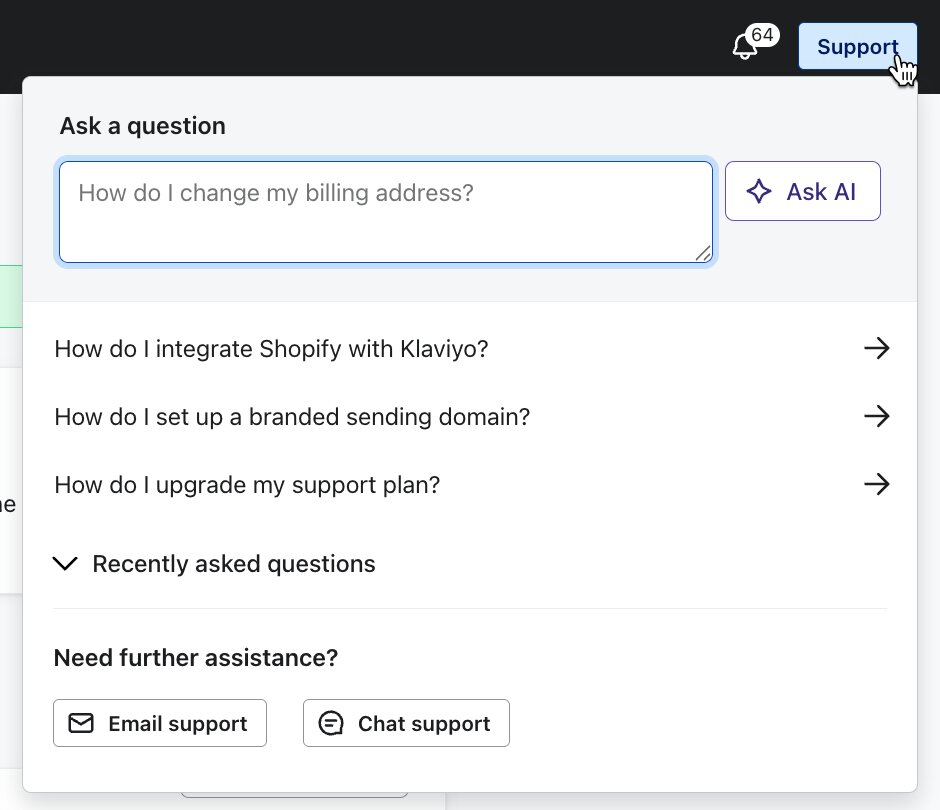
On paid plans, you’ll first interact with Kira, Klaviyo’s AI chatbot, before reaching a human agent. Free plan users can use live chat for the first 60 days. After that, you can’t move past Kira to talk to a human representative.
Note that Kira (the in-product support AI bot) is entirely different from K:AI (customer agent). The latter is another tool that merchants add to their own websites to help their customers.
Klaviyo support hours by region:
- Americas: 9 AM to 8 PM Eastern Time
- Asia-Pacific: 9 AM to 5 PM Australian Eastern Time
- Europe, Middle East, Africa: 9 AM to 5 PM Greenwich Mean Time/British Summer Time
Weekend access depends on your plan:
- Standard: No weekend chat
- Professional: Weekend support during local business hours
- Enterprise: 24/7 live chat, including weekends
During busy sales periods like Black Friday and Cyber Monday, Klaviyo customer support offers 24/7 live chat and email support for all paid plans. This is valuable for those running an ecommerce store.
Pro tip (Kira shortcut): To skip the bot replies and get into the human queue faster, type “connect to a person.” If you say “talk to an agent,” Kira may keep you in automated replies longer.
Email/ticket — Available 24/7 for paid plans
For complex issues that need more details, email support works well. It’s available 24/7 to paid users and offers a clear paper trail.
To submit a ticket to Klaviyo customer support:
- Log in to your account
- Go to Support > Email Support
- Fill out the form
- Click Submit
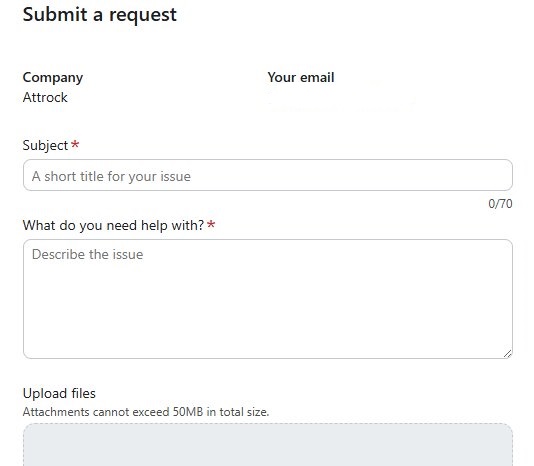
- You’ll receive a confirmation email with a ticket ID
Always start your ticket from your logged-in account. This automatically links your account ID and data to the ticket, helping the team resolve it faster.
Pro tip: Always write clear and specific subject lines so your request reaches the right team quickly. Instead of “Help please,” use something like “Abandoned cart flow not sending to Gmail users after 03-30-2026.”
Kira AI assistant — Always available, all plans
Kira is an AI chatbot built into your account. It’s available 24/7 for every user, even on the free plan. After 60 days on the free plan, it becomes your only real-time Klaviyo customer support option.
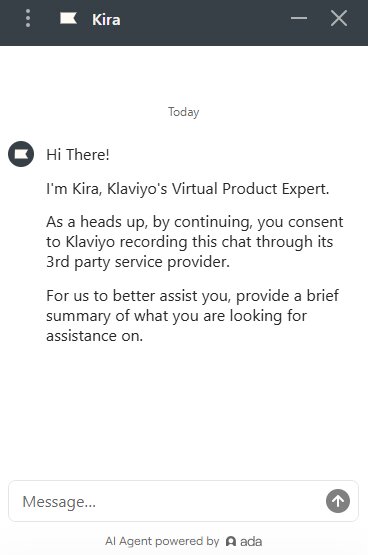
What Kira can do:
- Suggest relevant articles from the Klaviyo Help Center
- Walk you through the setup
- Answer basic questions
What Kira can’t do:
- Access your account data
- Fix bugs
- Escalate issues for free users after 60 days
Help Center, Academy, and Community Forum
Klaviyo’s self-service support options are available to all users and widely praised in G2 and Trustpilot reviews. They help you solve issues without contacting Klaviyo customer support.
The Help Center has over 1,000 articles, and the Academy offers detailed video courses. The Community Forum is also very active. You’ll quickly find answers from Klaviyo staff and experienced users (Champions).
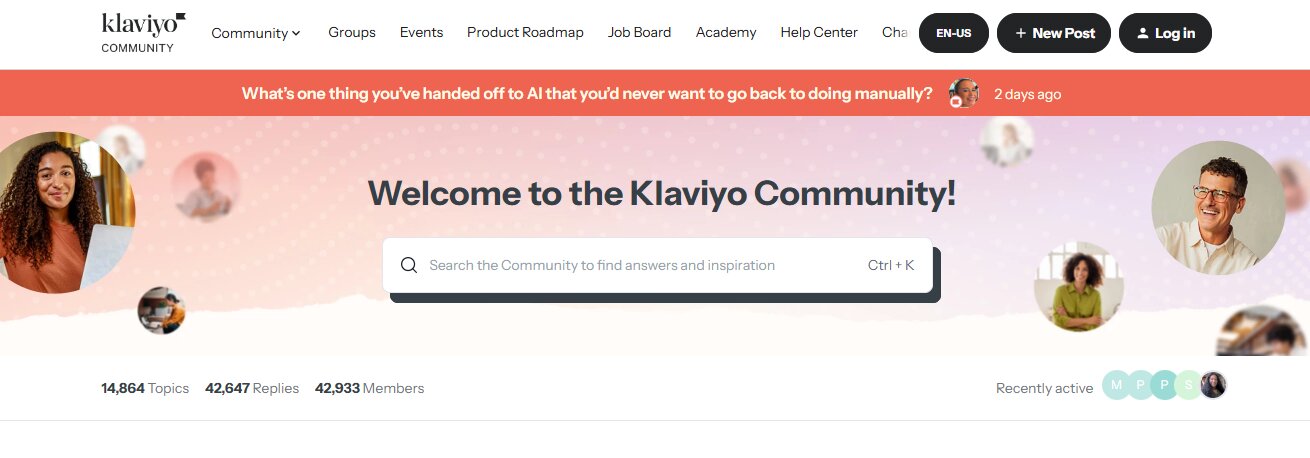
These options are especially useful if you’re on a free plan. That said, they also offer additional help to paid subscribers.
Pro tip: Search the Help Center before opening a ticket. You can find step-by-step fixes for common issues, such as email deliverability. This is faster than waiting for a response from Klaviyo customer support.
Professional services (paid add-ons)
If you need hands-on help, Klaviyo offers paid services like onboarding, implementation, and private training. They aren’t part of standard Klaviyo customer support but are useful for expert guidance.
Klaviyo support tiers: What your plan includes
The quality of Klaviyo customer support is directly linked to how much you spend, which is a deliberate design, not a flaw.
The table below breaks down Klaviyo’s pricing and what you get in each tier:
| Channel/Plan | Free (0-60 days) | Free (after 60 days) | Standard | Professional | Enterprise |
|---|---|---|---|---|---|
| Live chat | Limited (via Kira → human) | Kira only (no human) | Yes (weekdays only) | Yes (24/7) | Yes (24/7) |
| Email support | Yes | ❌ | Yes (24/7) | Yes (24/7) | Yes (24/7) |
| Urgent email SLA | — | — | Four hours | Two hours | One hour |
| High-priority SLA | — | — | 12 hours | Eight hours | Four hours |
| Normal SLA | — | — | 24 hours | 12 hours | Six hours |
| Low-priority SLA | — | — | 48 hours | 24 hours | 12 hours |
| Onboarding specialist | ❌ | ❌ | ❌ | ✅ | ✅ |
| Customer success manager | ❌ | ❌ | ❌ | Varies | ✅ |
| Deliverability strategist | ❌ | ❌ | ❌ | ❌ | ✅ |
| Solutions architect | ❌ | ❌ | ❌ | ❌ | ✅ |
What do these tiers mean?
- Standard Support ($20-$5k/month): This is the default Klaviyo customer support tier for most small to mid-sized stores. You get reliable support but only during weekdays. Weekends aren’t included.
- Professional Support ($5k-$10k/month): At this level, you likely run a growing ecommerce store with steady campaigns and flows. You may need weekend support because a broken flow on a Saturday can cost you thousands in sales.
- Enterprise Support ($10k+/month): This is Shopify Plus territory. You aren’t just paying for the software, but for the one-hour “Urgent” safety net and 24/7 access to human support agents.
Key insight for ecommerce merchants
With Standard SLAs (four hours for urgent, 24 hours for normal, 48 hours for low-priority), common issues often don’t get instant replies. If a flow stops working, a segment acts oddly, or billing looks off, you may have to wait one to two business days for a first response.
During busy seasons like Black Friday and Cyber Monday, delays can stretch even further. Even urgent tickets might be delayed due to the increased volume. At this time, most stores are contacting Klaviyo customer support.
At the Enterprise level, things feel very different. A one-hour urgent SLA means you get help almost right away. You also get priority routing and access to experts who can dig deeper into your issue.
If your business can’t afford a 48-hour wait for issue resolution, consider upgrading to a higher tier for quicker support.
Free plan support: What happens after 60 days
If you’re on the free plan, Klaviyo customer support becomes limited after the first 60 days. This catches many new users off guard, so you should know what to expect.
During your first two months, you get access to:
- Email ticket support
- Kira (with human agents)
- Help Center
- Community Forum
Once you pass the 60-day mark, you lose access to email support completely. At this point, Klaviyo customer support on the free plan only includes:
- Kira (no access to human agents)
- Help Center
- Community Forum
You can still ask Kira questions, but you can no longer access real human support. This can be challenging for most users, especially since they’re still learning to set up flows, segments, and integrations during the early months. You suddenly lose your only direct line to human support right when you need help the most.
Regardless, if you run into an issue while on the free plan, you have a few ways to bridge the Klaviyo customer support gap:
- Upgrade to a paid plan (starting at $20/month for 251-500 contacts) to gain access to email and live chat support
- Use the Community Forum to get answers from other experienced users
- Join Klaviyo’s live office hours to ask questions in real time (free for all users)
- Hire a certified expert through Klaviyo’s partner directory: connect.klaviyo.com
Note: If you can’t access your account, you can submit a request through help.klaviyo.com/hc/en-us/requests/new, regardless of your plan.
What users say: Real review data
When it comes to Klaviyo customer support reviews, the ratings vary widely depending on where you look. The score is higher on some platforms and much lower on others.
Platforms like G2 and Capterra mostly attract experienced marketers who understand the tool and review it in context. Trustpilot, on the other hand, tends to attract users who are already frustrated. They’re usually dealing with billing issues, account lockouts, or urgent problems.
Despite the gap, both perspectives are real, and together, they provide a more complete picture. Here’s a snapshot of how Klaviyo performs across major review platforms:
| Platform | Overall rating | Support score | Review volume | Date updated |
|---|---|---|---|---|
| G2 | 4.6/5 | N/A | 1,319 | April 15, 2026 |
| Capterra | 4.6/5 | 4.3/5 | 525 | February 17, 2026 |
| Trustpilot | 1.8/5 | N/A | 351 | April 5, 2026 |
| TrustRadius | 8.6/10 | N/A | 301 | September 11, 2025 |
What users praise
Many users report great experiences with Klaviyo customer support, especially when they reach a real person:
- Specific human agents: Many users praise individual agents for their helpfulness, patience, and skills. “Most recently, Luan was very helpful and went out of their way to find a solution to my problem.” – Mathilde Egede Andersen, Trustpilot, Nov 2025
- Excellent self-service resources: The Klaviyo Help Center and Academy get consistent praise on G2. “I appreciate Klaviyo’s self-help guides and the support/academy.” – Verified User, G2, March 2026
- Fast and helpful live chat: Many users say that the live chat assistant is efficient when they need instant assistance. “You can reach chat support in minutes for any questions and issues.” – Verified User, TrustRadius, March 2026
- Powerful platform: Many G2 users associate support success with the platform’s strength and automation depth. “It provides reliable performance through effective automation, and support/onboarding have been helpful when required.” – Chad T, G2, April 2026
What users complain about
You’ll also find clear patterns in negative feedback about Klaviyo customer support. These complaints show up across all review platforms:
- Slow response times: Many users consistently report waiting hours for chat replies and several days for email responses. “Despite emailing Klaviyo for more than 30 days, they still take up to 10 days to respond.” – Diana Swadling, Trustpilot, Feb 2025
- Decline in support quality: Long-term users say support quality has dropped since Klaviyo went public in 2023. “Kalviyo used to have amazing support, but now it’s far from where it used to be.” – Racehl D, Capterra, Feb 2024
- Tickets closed prematurely: Some users must repeat issues to multiple agents, and tickets are closed before problems are solved. “I tried reaching out to support many times, but my ticket was closed before I got help.” – Manuela Beneker, Trustpilot, Feb 2024
- Kira gatekeeper frustration: Many users say they struggle to get past Kira and reach a human agent, even with an active paid subscription. “As a small business, we don’t get any one-on-one human support beyond the live chatbot.” – Mandy G, G2, April 2026

Vape Superstore Success Story
After using Klaviyo for three years, Vape Superstore switched to Omnisend because Klaviyo’s high pricing didn’t match the results. The brand saw immediate gains, with signup rates increasing from 18% to 32%. It gained access to award-winning 24/7 email and chat support, plus hands-on help from account experts. The quality of support the brand received in just a few months surpassed what it had experienced over the past three years.
How Klaviyo support compares with alternatives
If Klaviyo customer support has been frustrating, or you’re conducting research before you sign up for other tools, here’s how Klaviyo alternatives compare when it comes to support:
| Features/ Platform | Klaviyo | Omnisend | Mailchimp | ActiveCampaign | Brevo |
|---|---|---|---|---|---|
| G2 score | 4.6/5 | 4.6/5 | 4.4/5 | 4.4/5 | 4.5/5 |
| Capterra service rating | 4.3/5 | 4.6/5 | 4.2/5 | 4.4/5 | 4.5/5 |
| 24/7 Live chat access | 24/5 (Standard) 24/7 only for Enterprise users | All plans | Paid plans only | ❌ | ❌ |
| 24/7 Email support | Paid plans only | All plans | Paid plans only | Paid plans only | Paid plans only |
| Free plan support | Email support for the first 60 days | 24/7 email and chat support | First 30 days | No free plan | Email support |
| Phone support | ❌ | ❌ | Premium plan only | ❌ | Professional plan only |
| Average first response time | One hour to two days | Four minutes | Varies | Varies | Varies |
| CSM threshold | 1,800/month | 400/month | Premium plan | Enterprise plan | Enterprise plan |
When comparing support alone, Omnisend stands out by offering 24/7 live chat and email access to all users, including those on the free plan. When comparing Klaviyo versus Omnisend, the latter also offers an average first-response time of just four minutes.
It’s a huge structural difference from Klaviyo customer support, where service quality only improves as your monthly spend increases. This model can feel limiting if you need consistent support on lower tiers.
For Klaviyo vs. Mailchimp, it sits somewhere in the middle. Mailchimp, ActiveCampaign, and Brevo offer solid support. Still, you might want to consider Brevo alternatives if you need real-time help on lower plans.
It’s also worth noting that many online comparison articles are written by competitors. They may highlight their strengths and downplay others. Third-party platforms like G2 and Capterra are more trustworthy and carry more weight. They collect thousands of verified user reviews to give a more balanced view of support quality across tools like Mailchimp and its alternatives.
Quick sign up | No credit card required
How to get faster, better support from Klaviyo
Even if you aren’t ready to switch platforms yet, you still deserve to get the most out of your email marketing software. You can improve your experience with Klaviyo customer support by following these simple tips:
- Initiate requests inside your account: Always open live chat or submit a ticket while logged in. This links your request to your account, plan, and data. It helps the Klaviyo customer support team understand your issue quickly, so they can resolve it faster.
- Use live chat during off-peak hours: Try early morning USA hours or weekends (if you’re on the Professional or Enterprise plan). During these periods, there are usually fewer people online, so you’ll get quicker replies from Klaviyo customer support.
- Write clear, specific subject lines: Describe the issue in more detail. This helps reduce unnecessary delays and resolves it more quickly.
- Share proof upfront: Include your account ID, steps to reproduce the issue, specific dates, screenshots, and error messages. Copy them exactly. This reduces the need for long back-and-forth emails with the Klaviyo customer support team.
- Bypass Kira the right way: To get past the automated assistant, type “connect to a person” in the live chat. This specific phrase usually moves you to a human agent faster than “talk to an agent.”
- Mark the ticket as “Urgent” for critical issues: Tag a ticket as urgent only if it affects revenue or blocks crucial campaigns. Klaviyo’s customer support SLA system relies on highly accurate priority tagging to resolve issues.
- Use the direct request form for billing or account issues: If you’re experiencing billing or login problems, go straight to help.klaviyo.com/hc/en-us/requests/new. It’s a shortcut that routes your issue faster than the standard widget.
- Follow up on the same email thread: If your ticket stalls, reply to the original confirmation email instead of opening a new one. This keeps your issue’s history and context in one place, thus speeding up resolution.
- Use the Community Forum for less urgent issues: For common issues with Klaviyo SMS or email flows, segments, or integrations, you may get quicker answers from other users than from Klaviyo customer support.
Common issues that lead to Klaviyo support tickets
Particular issues account for the largest share of Klaviyo customer support tickets. Let’s look at the most common problems and where you should start.
Email deliverability problems
This is the most common reason users reach out to Klaviyo customer support. You may notice lower open rates, more emails landing in spam, or sudden spikes in bounces.
Check if your domain authentication (SPF, DKIM, and DMARC) is set up correctly, and review Klaviyo’s email deliverability guides. If problems persist, free plan users are largely on their own, while those on paid plans can get help from dedicated deliverability strategists.
Account suspended or disabled
Klaviyo may suspend your account without warning. This can happen due to failed payments, compliance reviews, or poor sending habits.
For example, when comparing Brevo and Klaviyo, many users find that while Brevo offers a more generous free plan, Klaviyo’s account monitoring protects its ecommerce deliverability rates.
To fix this, go to help.klaviyo.com/hc/en-us/requests/new and submit your case. Include your account email, billing info, and a clear explanation of how you send emails. This speeds up review and avoids delays with the standard Klaviyo customer support routing.
Billing disputes and unexpected price increases
Many users feel frustrated by recent changes in Klaviyo’s pricing model. Klaviyo now charges based on the number of active profiles, including suppressed contacts. This can cause sudden price jumps that catch you off guard.
If you see a charge you don’t recognize, email [email protected] and submit a support ticket. The dual approach gets your issue resolved quickly.
If unexpected price increases are what brought you to support in the first place, it may be worth looking at alternatives. Omnisend runs up to 35% less than Klaviyo at comparable contact tiers, with all standard features included from the free plan upwards. Migration is free and runs in 5 days — our team rebuilds every flow, list, and template by hand. You add Omnisend as a user to your Klaviyo account; they handle the rebuild; you can revoke access anytime.
Integration sync failures
Problems with integrations often arise, especially with Shopify, WooCommerce, and Magento. Before contacting Klaviyo customer support, check for common causes like Cloudflare conflicts, missing permissions, or outdated API connections.
Klaviyo’s platform-specific help guides can also help you solve many problems without extra support.
Flow automation not triggering
It can be frustrating when your email automation flows aren’t sending, especially when they affect revenue. To resolve this, check whether your flow is live and not in draft mode. Then, review your filters, audience rules, and consent settings. Also, confirm that your contacts meet all conditions.
For tricky cases, you can get answers in the Community Forum from other users who’ve solved similar problems.
Conclusion
Klaviyo customer support is reliable, but its quality varies widely by tier. If you’re on the Standard plan, you’ll get helpful support but wait longer for a resolution. Enterprise users get quicker replies, priority access, and a more hands-on experience.
If you run a small or mid-sized ecommerce business on the Standard plan, the positive reviews on G2 and Capterra can feel encouraging. However, the sheer volume of negative comments on Trustpilot, particularly regarding billing, account suspensions, and slow response times, is also real.
For ecommerce store owners who value responsive support, especially those running lean teams or growing quickly, we recommend comparing your options. Even a quick 10-minute look at alternatives can help you make the best choice.
Omnisend offers 24/7 live chat and email support to everyone, even on the free plan, with an average first-response time of four minutes.
The pricing math often points the same direction — Omnisend runs up to 35% less than Klaviyo at comparable contact tiers. If you decide to move, our migration team rebuilds your full Klaviyo setup by hand in 5 days. You add Omnisend as a user to your existing account; they handle the rest; you can revoke access whenever.
Quick sign up | No credit card required
FAQs
How do I contact Klaviyo support?
You can reach Klaviyo customer support by logging in to your account and clicking the Support icon in the top-right corner. Then, choose Live chat or Email. You can also use the Help Center and Community Forum. For account access or billing issues, submit a request through the official support form.
Does Klaviyo have live chat support?
Yes, Klaviyo customer support includes live chat, but availability depends on your plan. Paid users can access chat support 24/5 during weekdays, with expanded weekend hours for select tiers. Free plan users lose access to human routing after the first 60 days.
How long does Klaviyo support take to respond?
Klaviyo customer support response time varies by plan and issue priority. Enterprise users get one to 12-hour replies, while those on the Standard plan wait four to 48 hours. During busy periods, wait times may increase.
Is Klaviyo support free?
Klaviyo customer support is only free for the first 60 days, with users getting access to live chat and email support. After that, they lose access to human support and rely on Kira, the Help Center, and the Community Forum, unless they upgrade to a paid plan.
What is Kira in Klaviyo?
Kira is the AI assistant built into Klaviyo customer support. It answers questions and suggests Help Center articles. If Kira can’t solve your issue, and you’re on a paid plan, you can ask to connect with a human agent for more detailed help.