
 Omnisend AI


 OFFER
OFFER








Drive sales on autopilot with ecommerce-focused features
See FeaturesKey takeaways 
Reminder emails can significantly boost customer engagement, leading to higher confirmation rates, increased sales, and reduced no-shows.
Utilizing personalized automation for reminders ensures messages reach customers at optimal times, enhancing their overall experience.
Omnisend’s data reveals that reminder emails, like back-in-stock notifications, achieve impressive open and conversion rates, making them a powerful tool in your marketing strategy.
Crafting effective reminder emails involves clear subject lines, a friendly tone, and strategic calls to action to encourage customer responses.
Reveal key takeaways
Writing a reminder email (or series) is something you should only need to do once for each customer scenario. Your email tool applies personalization, such as names, plan details, and payment information, to contextualize messages.
Get email reminders right, and you can increase confirmation rates, win more sales, reduce no-shows, and create better customer experiences.
Omnisend’s 2026 Ecommerce Marketing Report shows that reminders are effective, with back-in-stock emails achieving an open rate of 58.03% and a conversion rate of 6.46%. Even feedback requests, which offer little value for the customer, had 50.70% opens and 1.07% conversions.
This article provides 15 reminder email templates you can use right now, plus real-world examples to inspire your efforts.
Increase your sales, retention rate, and improve customer experiences with Omnisend’s reminder emails
Quick sign up | No credit card required
Did you know?
Back-in-stock emails had the second-highest open rates of any automated email in 2025, behind only shipping confirmations. Other reminder messages fared brilliantly, too.
Find out more in our 2026 Ecommerce Marketing Report.
What is a reminder email?
A reminder email is an informational message or series that nudges customers who need to act or haven’t completed something.
The technical side is that reminders are automations, with your email tool sending them via triggers you set, such as segment activity or time-based events. Those triggers ensure that all reminders arrive at optimal moments, in the right inboxes.
Here are some examples of reminders in practice:
- Customers who sign up for your newsletter but don’t complete double opt-in get reminders to verify every 24 hours
- Subscription customers with an upcoming renewal date receive three reminders over three weeks
- Cart and checkout abandoners receive a “complete your purchase” email within 20 minutes of ditching your store
Templates will help you with professional messaging, and when combined with appropriate triggers for delays and timing, you can satisfy your customers’ expectations for reminders that improve their experience and don’t clog their inboxes.
“Not all your customers know what to do next, or a portion will forget there’s something they need to do. A well-timed reminder can guide them to purchase, get them to confirm, improve their experience, and close the loop between interest and action. Building them into your email strategy makes sense when there’s any encouragement and additional information your customers need.” — Evaldas Mockus, VP of Marketing, Omnisend
How to write a friendly reminder email?
Do you want to learn how to send a reminder email that engages recipients? The following are tips to craft an effective reminder email, without sounding too demanding:
- Clear subject lines: Use pre-header texts and subject lines that clearly state the purpose of the email. Include relevant details, and if you need help, you can use a subject line generator.
- Highlight urgency (when relevant): If it requires prompt attention, use words that convey urgency in the subject line and body of the email.
- Concise message: Get straight to the point. A lengthy reminder email distracts your recipient from the primary purpose of the email.
- Friendly tone: Maintain a professional but friendly tone throughout the message. Use words that are firm but not too demanding.
- Clear CTA: Strategically position your CTA. Ensure that it clearly conveys the desired action to the recipient.
- Show appreciation: Thank the recipient for reading your message and acting accordingly.
Note: Don’t send a reminder email too early. As a rule of thumb, wait at least 24 hours since the most recent communication before sending a reminder email.
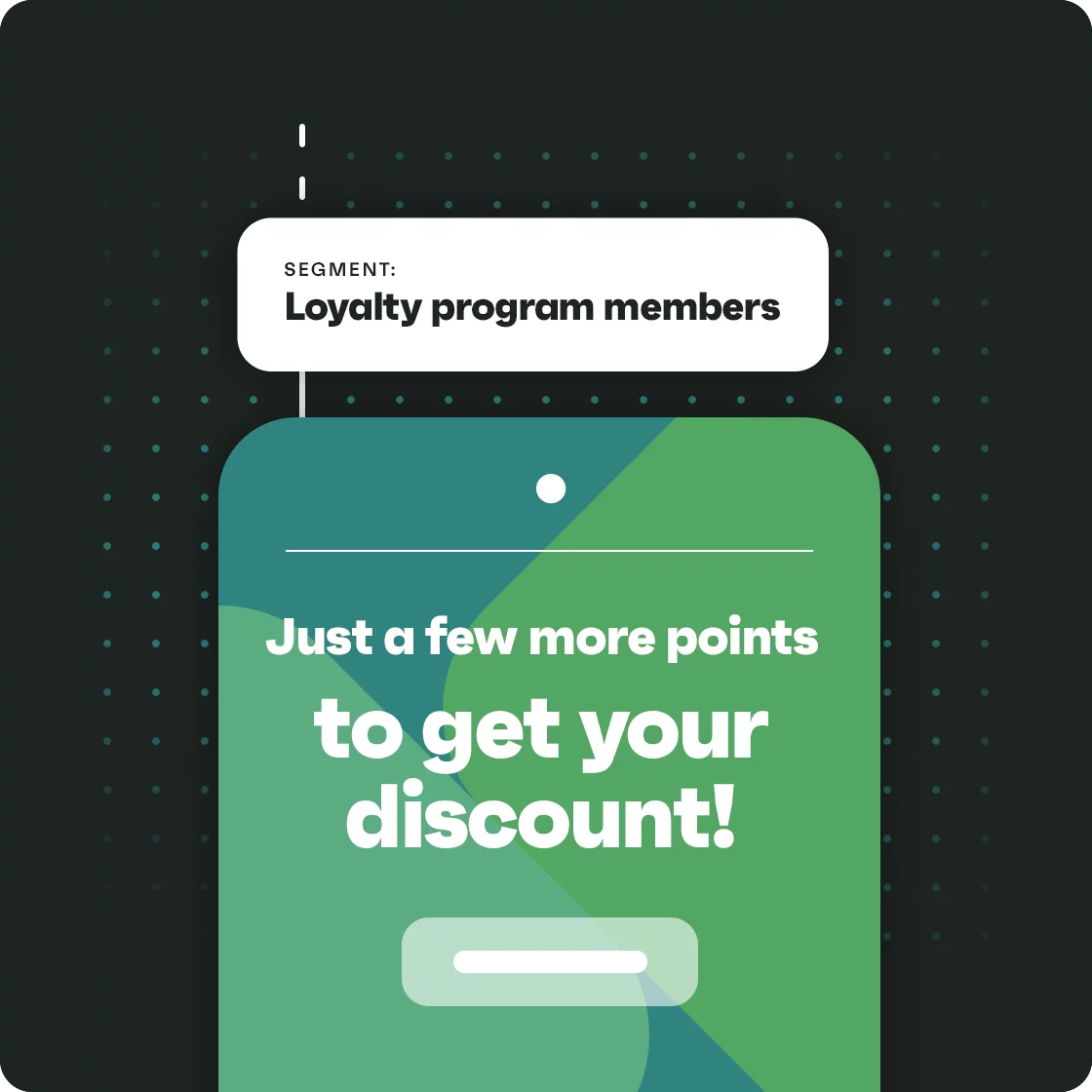 | Reminder email success story Enflow Digital integrated Omnisend with Smile.io to send loyalty point reminders to customers of a hobby appliance brand. The workflow triggered 45 days after the last purchase, targeting customers with 10-499 points. It achieved a 70% open rate, 12.23% click rate, and generated $28,371 in revenue in five months. Read the case study. |
15 reminder email templates by use case
1. Friendly reminder email
Sending a friendly reminder reduces friction and provides a more conversational basis for action. Your customer is more likely to respond or act the way you want them to because you’re building rapport in a non-pressurizing way.
Hi [name],
Just sending a friendly reminder to update your [payment preferences/subscription status/action] by [date/time]. It’s incredibly easy at [link], and best of all, we’ll provide a [discount/user account/other incentive] for your time.
Any questions? I’m here to help! Reply to this email, and I’ll respond within 24 hours.
Thank you,
[Your name]
[Business information]
Copy text
2. Meeting reminder email
A reminder email for a meeting informs recipients about an important meeting. However, this email should also contain specific details such as the time, location, and expected deliverables.
Hi [recipient name],
I hope this email finds you well. This is a quick reminder about our upcoming meeting on [date and time].
Looking forward to discussing [meeting purpose]. In the meantime, could you confirm your availability for the meeting?
Regards,
[Your name]
[Position held]
Copy text
3. Urgent reminder email
This reminder email often uses words that convey a sense of urgency. It’s time-constrained, prompting the recipient to respond as soon as possible.
For example, you could send it to a colleague to approve an upcoming project, or to a client for urgent confirmation of project details.
Dear [recipient name],
This is an urgent reminder concerning [purpose of email]. We’d like some feedback on this matter as soon as possible.
Please let us know if there will be any further delays so we can plan accordingly.
Regards,
Team [company name]
Copy text
4. Payment reminder email
You can send a payment reminder email to notify a client about an overdue payment or invoice. If the payment is due within a few days, you can forward it so the consumer can pay in advance.
Dear [customer name]
This is a gentle reminder of your overdue payment for [invoice number]. Please complete this payment to avoid any disruption to your services.
If you experience any difficulties processing your payment, please reach out, and we’d be happy to help.
[invoice attached]
Best regards,
[Company name]
Copy text
5. Reminder email to a client
If your clients’ delayed response is holding up a project, send a gentle reminder email without alluding to your frustration. A happy client is more likely to email right back.
Dear [client name],
I hope you’re having a productive day. I was wondering whether you have had time to take a look at the [project details] I sent over on [date]?
Please let me know your thoughts and questions. I’d like to get started on your project soon.
Best regards,
[Your name]
[Position held]
Copy text
6. Reminder email to colleagues
Not every reminder email goes to a client. Sometimes, you send a reminder email to a colleague to request project updates or follow-up actions.
Hi [colleague name],
I hope you are doing well. Just a quick reminder concerning the project updates for [project details], as we discussed in our last meeting.
Please send them at your earliest convenience.
Regards,
[Your name]
[Position held]
Copy text
7. Deadline reminder email
If there’s a project due soon, you can send a deadline reminder email to the team members involved. This notifies recipients of the deadline and confirms if they can deliver on time.
Dear [first name],
This is just a gentle reminder that your project [project details] is due by [deadline time and date].
Kindly confirm if we are still on track and if you can meet this deadline.
If you have any questions, don’t hesitate to reach out.
Regards,
[Your name]
[Position held]
Copy text
8. Appointment reminder email
This reminder email contains a confirmation text to alert a client about a scheduled appointment. This message ensures the client doesn’t miss the appointment or reschedules ahead of time if necessary.
We hope this email finds you well. Please be reminded that you have an appointment [appointment details] with us on the [precise date and time] at [appointment location]. Kindly confirm your availability.
We look forward to seeing you!
Best regards,
Team [company name]
Copy text
9. Subscription renewal reminder email
If you offer subscription-based services, send a gentle reminder email to your customers to renew their subscriptions. This message lets your clients enjoy uninterrupted access to your services.
Dear [customer’s name],
We hope you are enjoying our [product/service details].
Your subscription will expire on [expiry date and time]. Please renew your subscription to continue getting access to our [products/services].
To stay connected, simply [renewal link/instructions]. Let us know if you encounter any difficulties during payment.
We appreciate your continued support.
Best regards,
Team [company name]
Copy text
10. Discount expiry reminder email
This reminder email informs customers that their discount code or sale prices are about to expire. It encourages them to shop at discounted rates while they still can. The template below shows how to use a last chance email subject line to prompt the recipient to take action.
Dear [customer name],
We hope you’re enjoying your most recent purchase from us. Please be aware that your discount will expire by [expiry date].
You can still use this code and save on your next purchase before [expiry date]. Hurry now while the offer still lasts!
Regards,
Team [company name]
Copy text
11. Cart abandonment reminder email
Cart reminders should include either the products your customer was considering or a link to their cart with all the contents intact. You need to reduce friction and move your customers as close to purchase as possible to increase sales.
Hi [name],
Still thinking it over? Here’s 10% off if you decide to check out.
We saved your cart — use the link below to pick up where you left off. If you complete your purchase in the next 48 hours, you’ll get 10% off.
[LINK TO CART]
Thank you for shopping with [brand],
[Your name]
[Business contact information]
Copy text
12. Class or course reminder email
Classes and courses have physical or virtual appointments, so the purpose of any reminder here is to reduce no-shows and help customers plan their day around your offering.
Hi [name],
Just a quick reminder that your [course/class] takes place on [date, time].
You can manage your booking anytime at [your account link] and email us at [email] if you have any questions.
Otherwise, we look forward to seeing you there!
[Your name]
[Business contact information]
Copy text
13. Booking confirmation reminder email
Bookings can make do with one reminder email sent within 48 hours of your customer’s expected arrival date, but if there’s more than a few weeks between the booking and arrival, it’s best to create a series to remind customers over time gently.
Consider a two-part series. Part one (send this two weeks before arrival):
Hi [name],
We’re really looking forward to seeing you at [location] on [date]. Everything is good to go at our end, and we’ll be in touch in a week with additional booking details.
If you have any questions, you can manage your account [insert account link], call us on [number], or email us at [email address].
[Your name]
[Business contact information]
Copy text
And now, part two (send it 48 hours before arrival):
Hi [name],
The countdown is on! It’s only two days until your arrival on [date]. We’ve prepared some handy guides for you at [link] and look forward to seeing you.
[Your name]
[Business contact information]
Copy text
14. Refill or reminder email
Reminders for product refills and other subscriptions need payment information and product details so that customers don’t need to chase them.
Hi [name],
Your product refill for [product name] is scheduled for shipping on [date], so you should receive it by [date]. Information below:
- [product information, e.g., name and quantity, price]
- [payment information]
If you want to extend, cancel, or amend your order, please visit [link].
Thank you,
[Your name]
[Business contact information]
Copy text
15. Policy renewal reminder email
If your customers have policies that are renewing, then they need email reminders to ensure they continue with your brand on good terms. Failing to remind them about policy renewals could lead to complaints, refunds, and bad reviews.
Hi [name],
Your policy [policy number] will renew on [date] for [price].
If you want your policy to renew, there’s nothing you need to do. We’ll take payment on [date], and your coverage will extend for [term, e.g., one year].
You can manage your policy, including cancellations, at [link].
Thank you for your time,
[Your name]
[Business contact information]
Copy text
10 reminder email examples from real brands
In this section, we’ll show you 10 strategic reminder email examples to help you create your own scroll-stopping reminder emails.
1. Duolingo
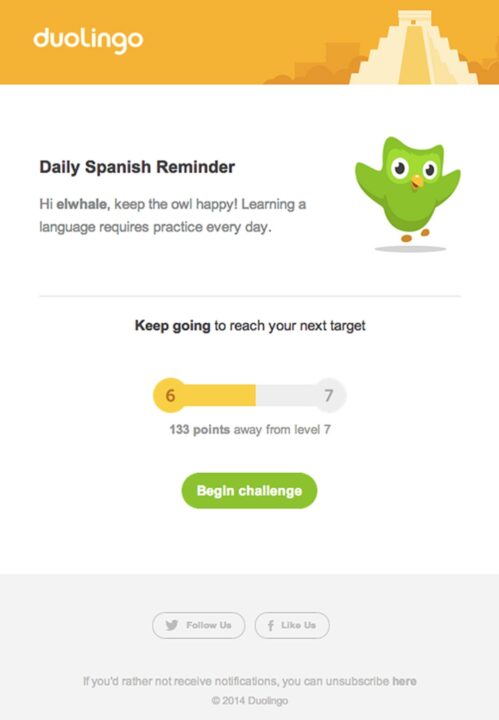
This is a daily reminder from Duolingo. It addresses the customer by their first name and gets straight to the point of the email. This reminder email makes it easy to take action by keeping it short and easily scannable.
It also uses an engaging visual to show viewers how far they are from their goal. For quick navigation, the CTA easily links viewers to complete the challenge.
2. Organics Ocean
Wellness brand Organics Ocean sends timely reminder emails to customers who opt in to receive dosing reminders, helping them take supplements safely. These trigger on a schedule the customer sets, such as daily, weekly, bi-weekly, or monthly:
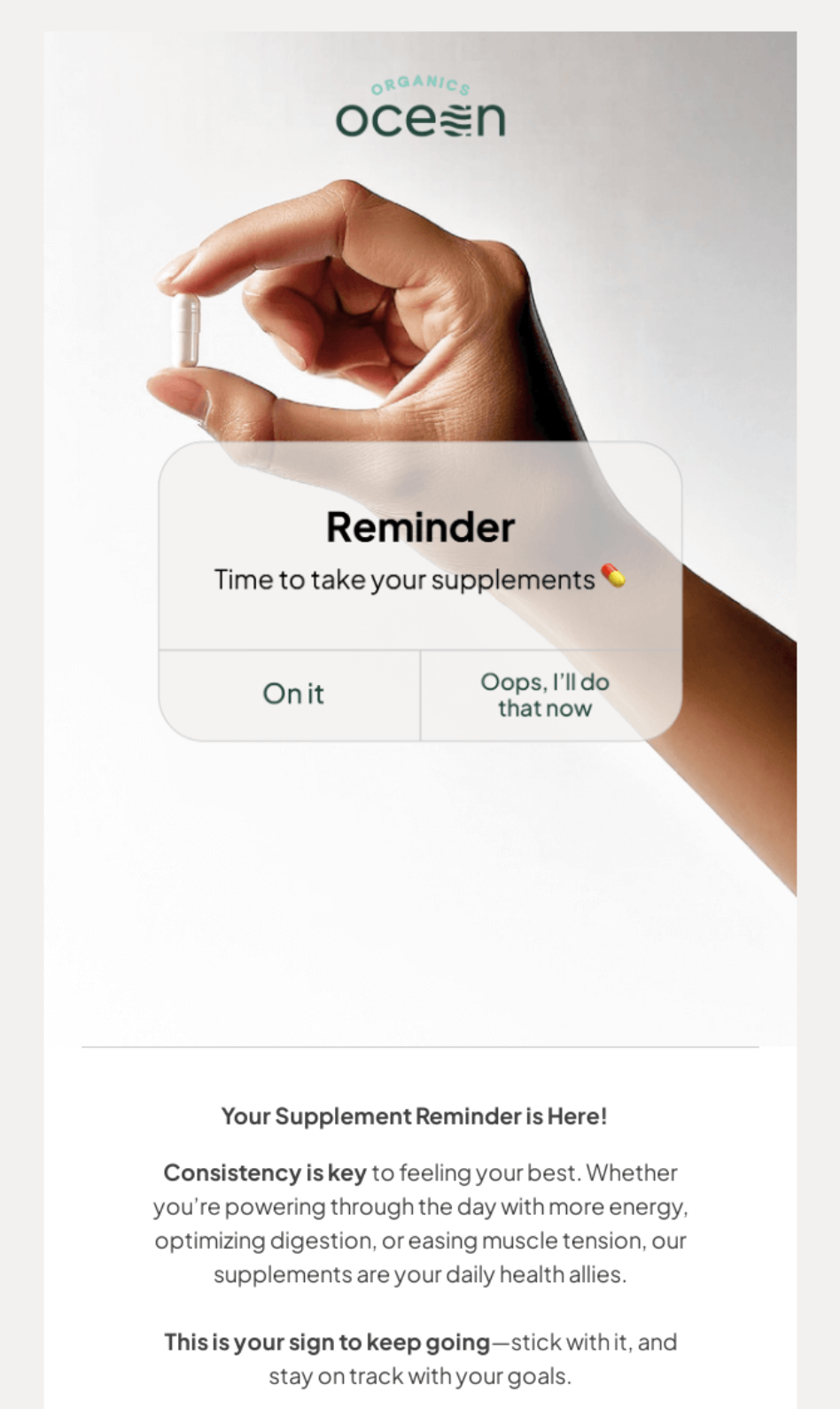
The email design reinforces the message with a translucent graphic that resembles a smartphone reminder notification, set against an image of someone’s hand holding a pill. Below that, customers can find tips and motivation.
3. Feeling Swell
Surf apparel brand Feeling Swell adds last chance reminders to its discount flows, using fear of missing out (FOMO) to move new customers closer to purchase:
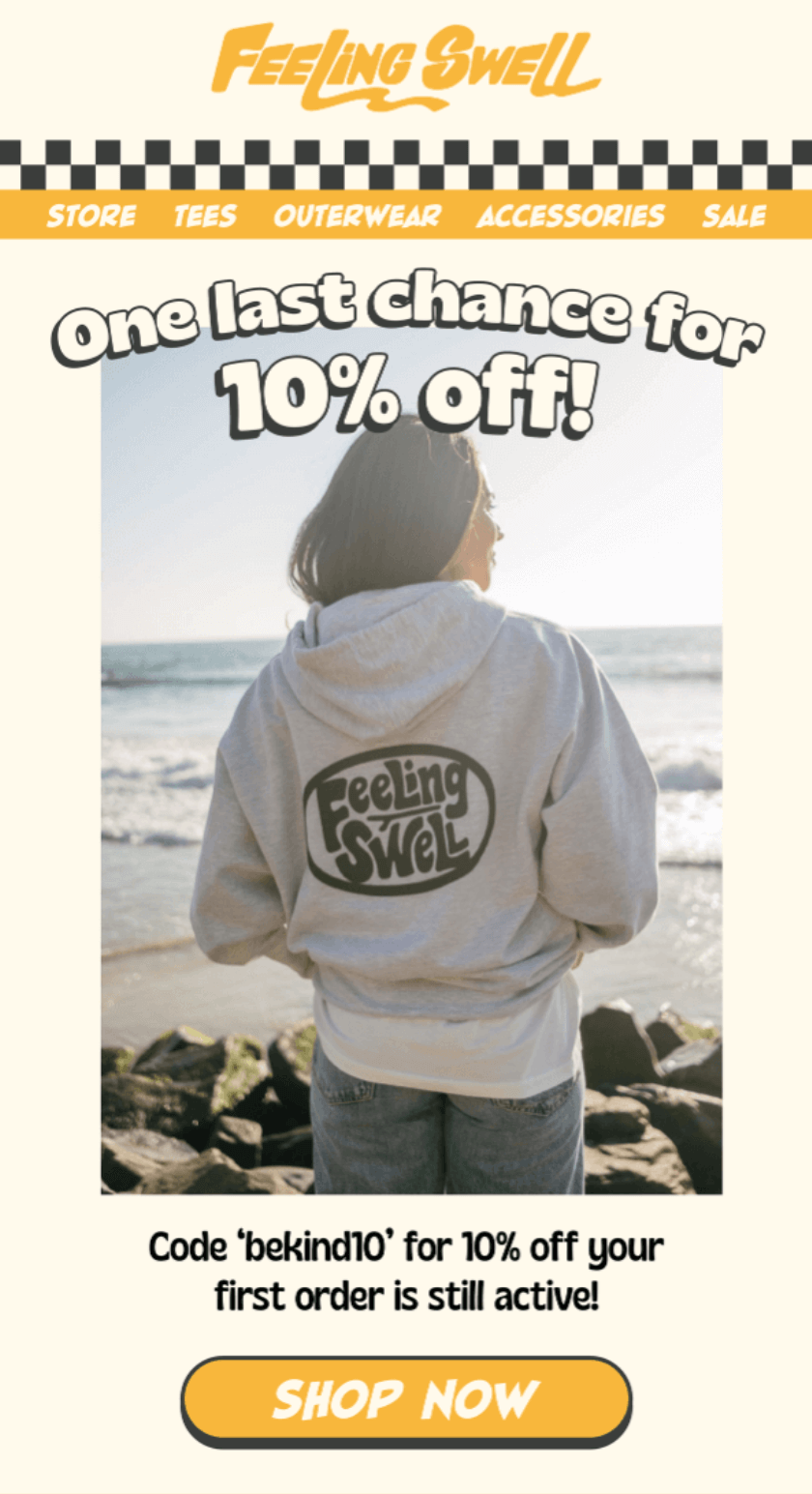
Its reminder email immediately captures attention with the heading “One last chance for 10% off,” with a prominent orange “SHOP NOW” CTA button at the bottom. Above that, it clarifies that the customer’s discount code is still active.
4. Hotel Drisco
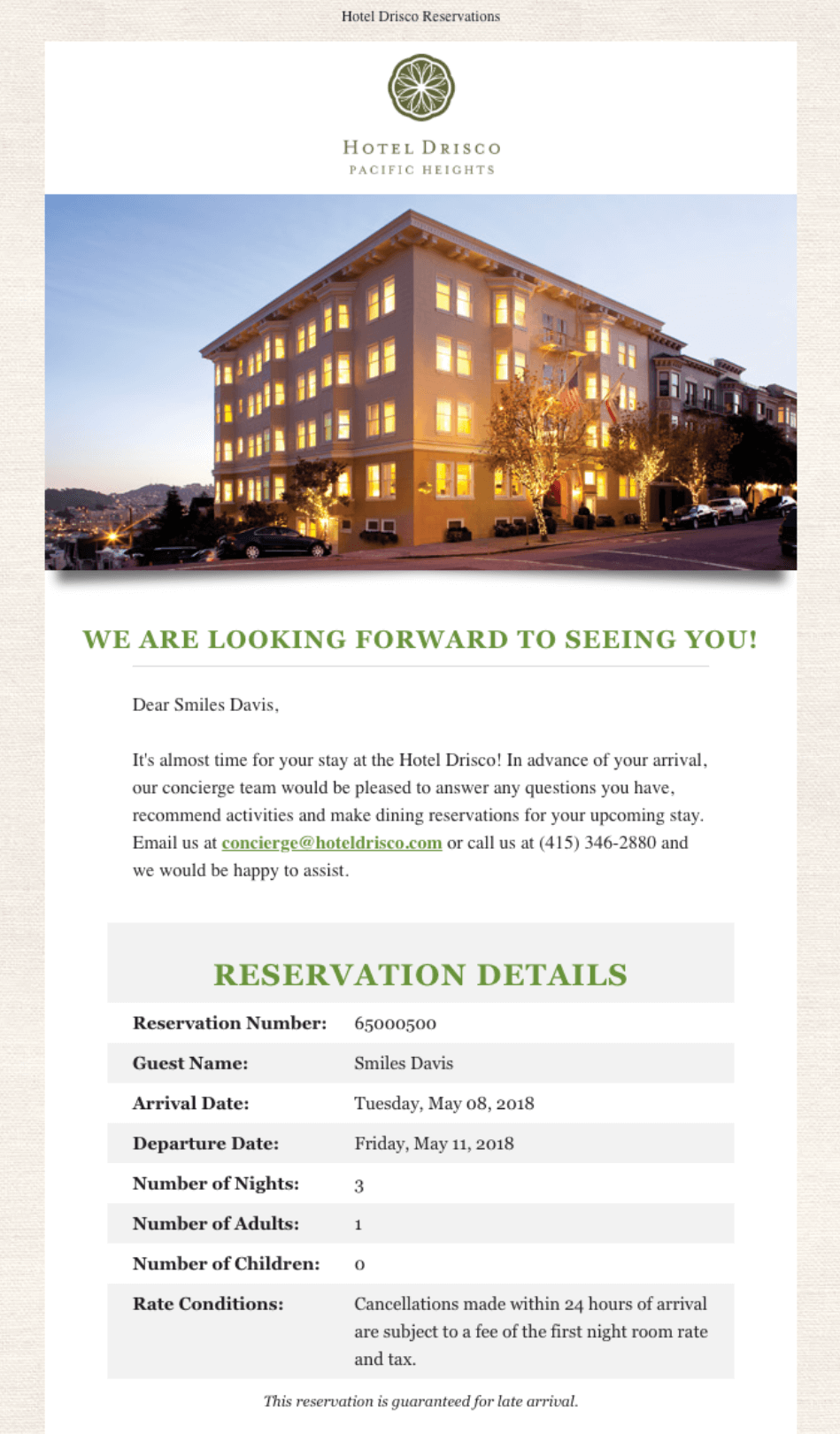
This is an excellent reminder email sample for a hotel reservation at Hotel Drisco. The subject line, “Your Upcoming Visit to Hotel Drisco,” is warm and welcoming, captivating readers and enticing them to browse.
It provides the necessary reservation details and facilitates a smooth check-in process for the hotel guests, improving their overall booking experience.
5. Grammarly
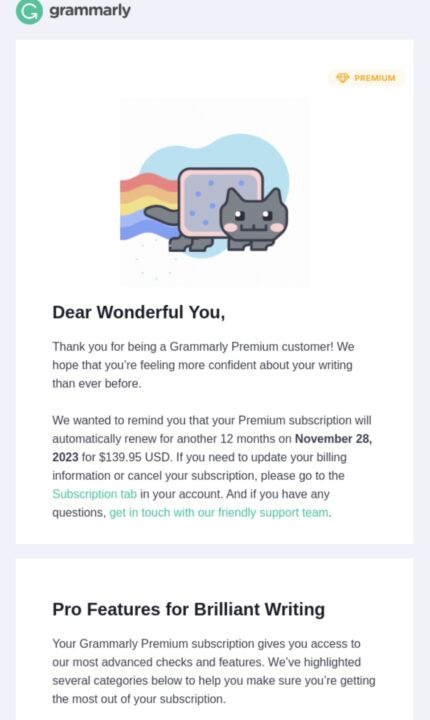
This email from Grammarly is a good example of a subscription renewal reminder email. You can send it before your client’s subscription expires.
It addresses the customer in a friendly way and shows appreciation for their loyalty. The email informs the reader of their subscription renewal and also includes some of the benefits of that subscription. This increases the chances of renewing.
Another professional touch is reminding recipients to update their billing information if necessary. It ensures that the subscribers will automatically pay without any hitches.
6. Handy
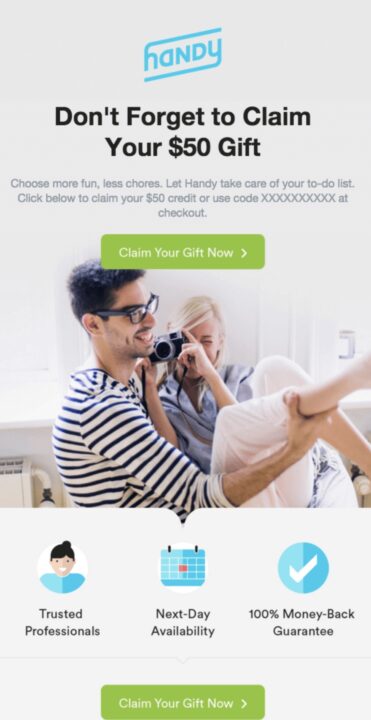
This is a typical discount reminder email sample. Its bold subject line entices the recipient with an attractive offer of a free $50 gift. It also uses short, direct copy in the body of the email.
Besides using an attractive CTA and subject line, Handy’s reminder email also nudges recipients into action. It highlights the benefits of its services, which include a 100% money-back guarantee.
7. The School of Life
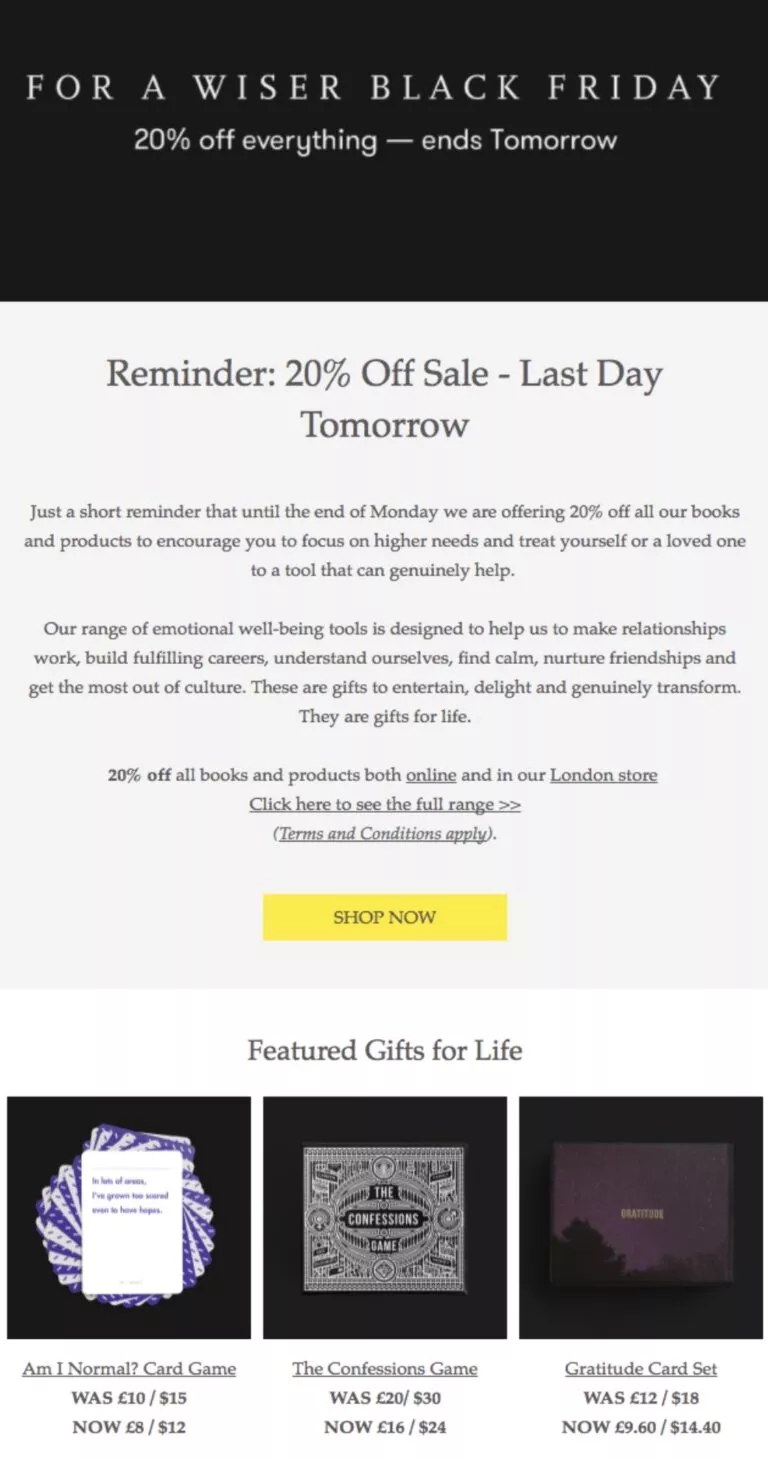
This reminder email strikes a balance between a slight sense of urgency and an element of FOMO. The headline offers an attractive discount with a deadline. All these encourage the recipients to buy.
The email highlights the benefits of purchasing the brand’s products and sheds more light on its vision. It also displays highlighted gifts to simplify purchases.
8. Frontier
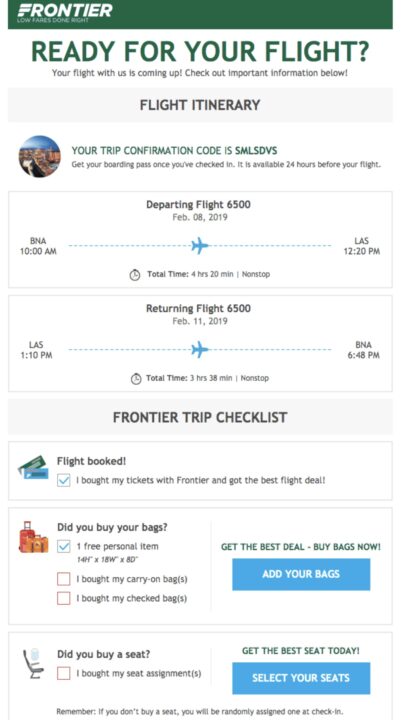
Frontier’s flight reminder email contains crucial travel information and outlines a helpful trip checklist. It also includes links to purchase other necessary items for the trip:
9. Tattly
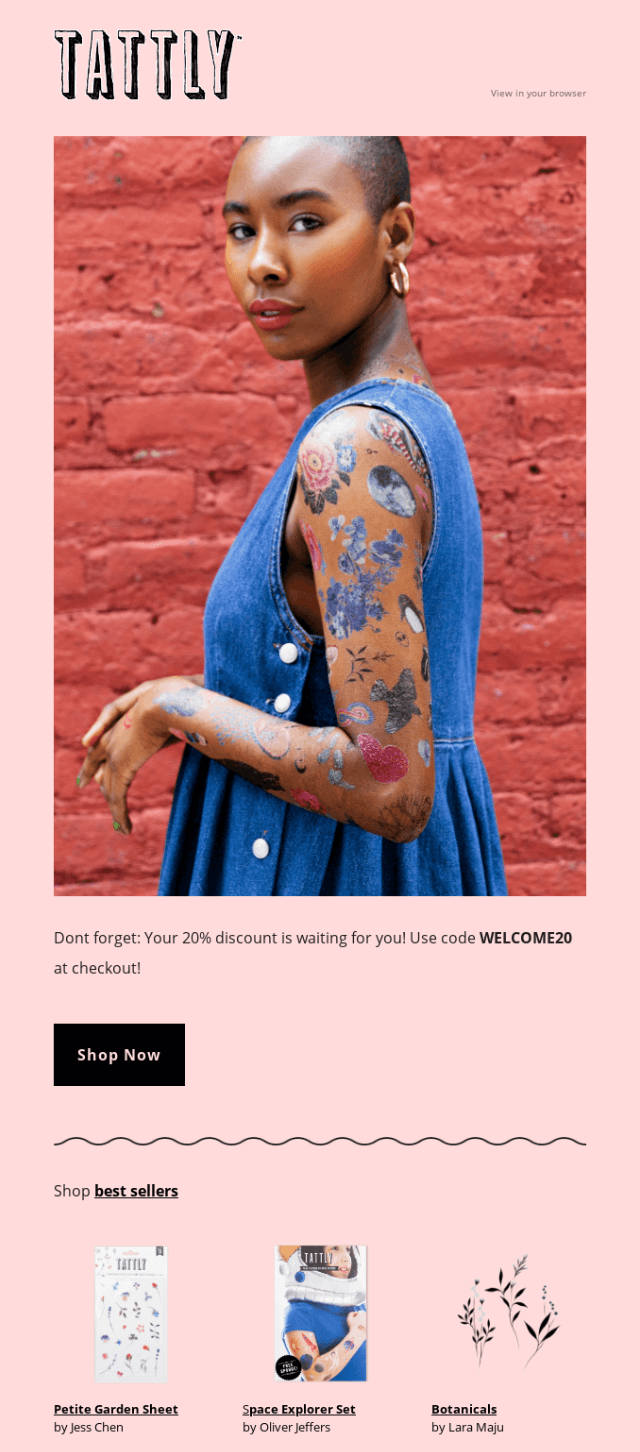
Tattly’s reminder email combines an attractive discount with engaging copy. It’s a friendly reminder email example that also shows how you can use visuals in your message. In this case, the visuals include lifestyle and product shots:
10. Outdoorsy
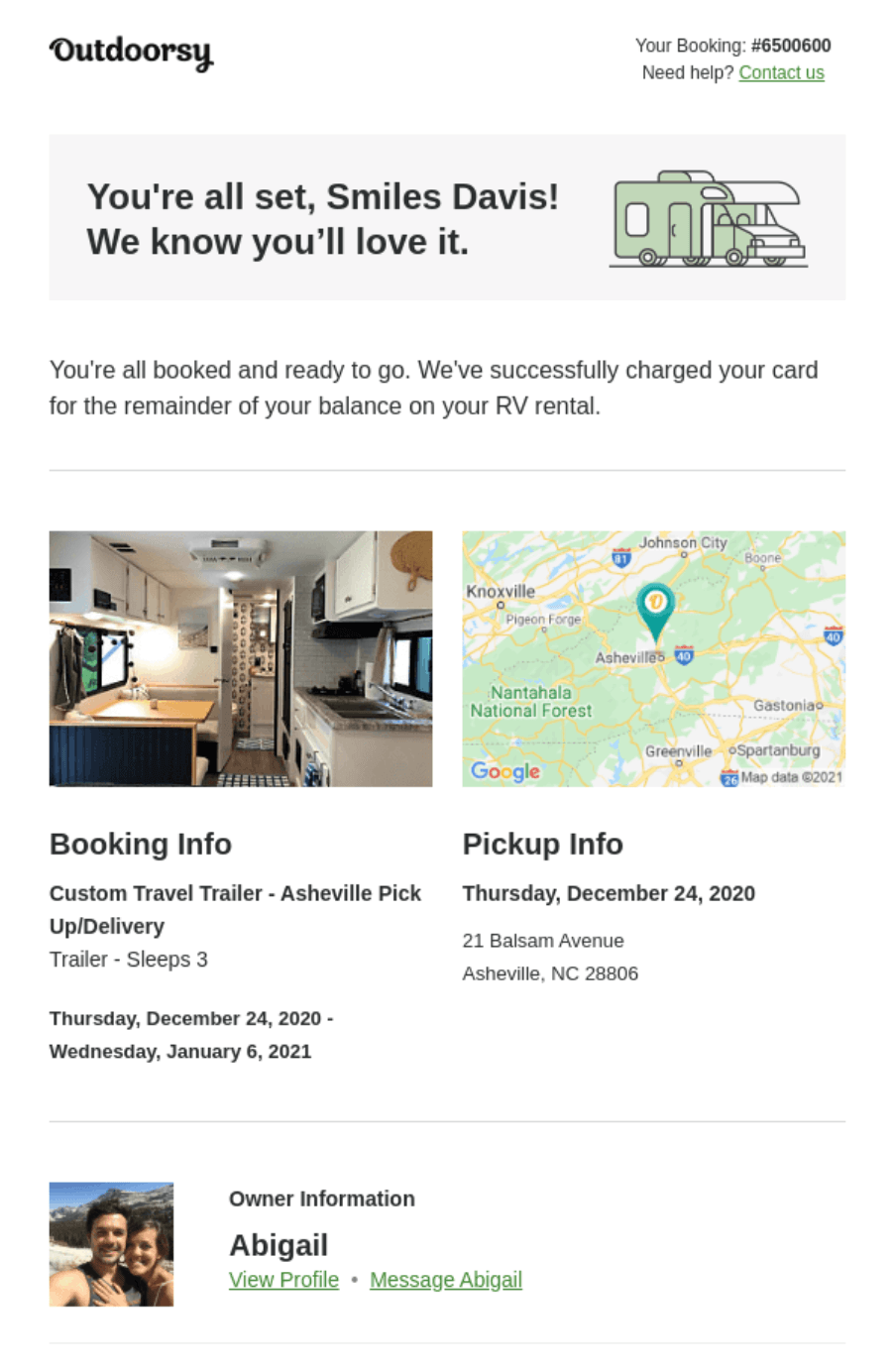
This is a booking reminder email from the RV rental company, Outdoorsy. The preheader text is exciting and inviting, which draws the reader in. Although it’s a lengthy email, it captures attention with valuable instructions and information the recipient should know about their trip.
It also contains a convenient map for easy pickup, navigation, and other booking information to streamline the rental process.
Ready to send better reminder emails?
A reminder email should be firm but friendly and compelling. Ensure your reminder email contains valuable information about the deadline, meeting, or appointment.
When crafting a reminder email, keep your message direct. Lastly, strategically position your CTAs for the recipient to easily take action.
Craft compelling reminder emails and boost engagement with Omnisend’s email marketing tools
Quick sign up | No credit card required
Reminder emails FAQs
How can I send a reminder email?
Sign up for an email tool, add your customer contact information, build an email template, and click send. Of course, that workflow is unrealistic if you have multiple customers and reminder scenarios, in which case, you need an email automation tool, such as Omnisend. With Omnisend, you can build a reminder flow with custom triggers and delays.
How many reminder emails should I send?
That honestly depends on why you are triggering the email. A customer who has abandoned their cart has a relatively small window for conversion, so you’d send one or two emails over one to three hours. A subscription customer with an upcoming renewal date will benefit from reminders leading up to two weeks before the next payment. Basically, it’s contextual, and you should always keep customer preferences in mind.
What is the best time to send reminder emails?
Two aspects are at play here. The first is the time you send, such as 10 AM, and the cadence, such as every 48 hours for two weeks. Our data shows that evening sends at 8 PM achieve the highest engagement (59%). As for cadence, only your internal data will show you the way. Test different frequencies and see which gets the highest opens and clicks.

TABLE OF CONTENTS
TABLE OF CONTENTS


Subscribe and don’t miss any updates!
No fluff, no spam, no corporate filler. Just a friendly letter, twice a month.