
 Omnisend AI


 OFFER
OFFER








Drive sales on autopilot with ecommerce-focused features
See Features
Shopify customer segmentation allows you to tailor marketing messages based on shared traits and behaviors, enhancing customer engagement and driving growth.
By utilizing demographic, behavioral, lifecycle, and purchase-based segmentation, you can create personalized campaigns that resonate with different customer groups.
Effective segmentation leads to higher retention rates, as customers are more likely to return when they receive relevant offers and content tailored to their interests.
Automating targeted messaging based on real-time customer actions ensures timely communication, improving conversion rates and overall marketing efficiency.
Shopify customer segmentation helps you move beyond one-size-fits-all marketing and connect with shoppers in a way that actually drives growth.
Online buyers have different preferences, behaviors, and needs, so using the same tactic for everyone simply doesn’t work.
By grouping customers based on how they shop, where they’re located, and what they’ve purchased, you gain a clearer understanding of what motivates them.
The result? Your messages feel timely, relevant, and intentionally crafted for each segment.
From engagement patterns to product interests, this guide will walk you through different segmentation criteria. You’ll see how to segment your customers on Shopify and apply real examples to your campaigns.
By the end, you’ll know how to connect with customers by turning simple interactions into meaningful conversions.
Let’s break it down!
Quick sign up | No credit card required
What is Shopify customer segmentation?
Customer segmentation in ecommerce is the process of grouping your shoppers based on shared traits or actions. Instead of sending the same message to everyone, you send tailored messages to each group.
When doing business on Shopify, segmentation helps you reach customers more effectively. You can send targeted emails and SMS, or make personalized offers.
Let’s look at some common types of customer segmentation on Shopify.
Demographic segmentation
It involves grouping customers by age, gender, location, or other personal traits. One example of demographic segmentation in action is promoting winter coats to shoppers in colder regions. Another option is to show men’s products to male buyers.
Behavioral segmentation
This is based on customers’ actions. These include browsing habits, purchase frequency, and email interaction.
The goal is to spot patterns. For example, you can send reminders to people who saw a product but didn’t buy it.
Lifecycle segmentation
Customers move through stages as they engage with your brand.
They start as new subscribers. Next, they become first-time buyers. Then they turn into repeat customers and eventually VIPs.
Understanding these stages will help you use lifecycle segmentation to send the right message at the right time.
An example is offering welcome bonuses to new buyers or special discounts to repeat customers.
Purchase-based segmentation
This group’s customers are defined by what they buy, how much they spend, and what they prefer.
This makes it easy to suggest similar products. For example, if someone buys face cream, you can also recommend sunscreen.
Shopify offers basic segmentation tools within its platform. However, as your store grows, these tools can feel limited. That’s why many stores use apps like Omnisend for advanced automation and targeting.
Why should you segment your customers on Shopify?
It’s not enough to understand Shopify customer segmentation. You also need to know why it matters.
When you create Shopify customer segments, you can match your messages to how people shop. Some buy on impulse while others need reminders.
When your message aligns with their actions, it feels personal. People respond to emails or SMS better when they feel the message is tailored to them.
That’s why Shopify customer segmentation matters. It helps you send personalized messages that perform better.
Here are the key benefits of Shopify customer segmentation:
Increase retention and loyalty
When customers get offers or content that match their interests, they’re more likely to come back. Segmentation helps you:
- Reach repeat buyers with special perks
- Remind first-time buyers to buy again
- Share content relevant to each segment
By sending tailored emails, you make people feel special. They’ll engage more and buy more when you tailor messages and offer to their needs.
Send more personalized emails and SMS
Personalized campaigns perform better than generic email blasts. They include birthday offers, product recommendations, and seasonal promotions. When sent via email and SMS, they deliver strong results.
Our findings show that 90% of marketers feel targeted emails perform better than generic ones. Segmentation makes that possible.
With email segmentation, you can target each customer based on their behaviour and purchase history. It makes your messaging more relevant and directly supports engagement and conversion.
Recover abandoned carts and re-engage lapsed buyers
Some customers check out a product but leave before buying.
Segmentation helps you spot and group these shoppers. You can then send timely reminders or incentives to encourage them to return.
You can also target buyers who haven’t purchased in a while and re-engage them.
Improve conversion rates with behavior-based triggers
Behavioral segmentation lets you act on real-time customer activity.
With behavioral segmentation, you can send targeted offers to your customers based on their actions.
For example:
- If someone views a product many times, send a special offer
- If someone clicks on a category often, promote related items
This gentle push can turn interest into a sale.
Save time with automated, targeted flows
Once your segments are ready, automation takes over. It ensures the right messages reach the right people. Segmentation paired with automation helps you run better email marketing campaigns.
Automation saves time for other important tasks. It keeps marketing campaigns consistent and effective by sending messages on time.
As a Shopify store owner, segmentation helps you get more value from each visitor.
Group your customers wisely. Then, send clear, timely messages that guide them toward a purchase.
Best ways to segment your Shopify customers
Below are the most effective ways to segment your customers, with practical examples.
By purchase behavior
Purchase-based segmentation focuses on how customers buy from your store. It groups buyers based on order history and spending habits.
Here are some groups based on buying behavior and how you should engage with them:
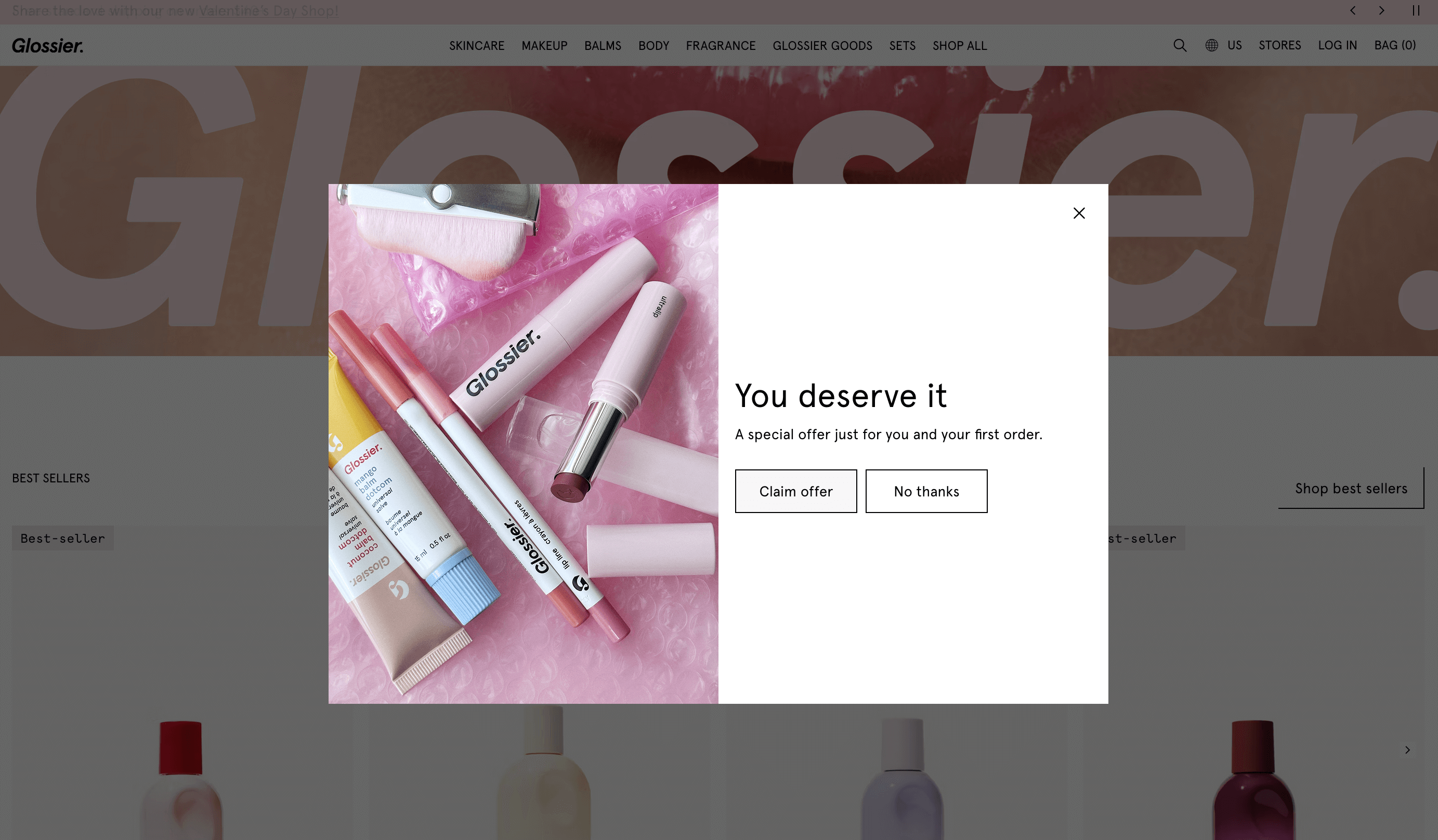
- First-time buyers vs. repeat customers: Welcome new buyers with a special offer. Also, reward repeat shoppers with loyalty incentives. The screenshot below shows how Glossier welcomes new shoppers with a special offer:
- High spenders (VIPs): Identify VIP customers with high average order values. Then, send them exclusive deals.
- Cart and browse abandoners: Group shoppers who leave items in their cart or browse products without purchasing. Then send timely reminders to prompt them to return and complete the sale.
 | “Omnisend gave us great tools, and Ecommerce Boost helped us learn how to use them. Their expertise sped things up and increased our revenue by 25%. ”Tushar Kapadia, Founder of Pasignia See how Pasignia boosted revenue by 25%, launched campaigns 50% faster, and achieved 55% average open rates. Read the full story here. |
By engagement
This group’s customers are based on how they interact with your store and marketing channels.
Here’s how to group by engagement:
- Active subscribers: These are the people who consistently open and click your messages. Send regular updates, new product launches, or special promotions to them.
- Dormant customers: These shoppers have been inactive for an extended period. Re-engage them with tailored campaigns or incentives to bring them back.
- Opened or clicked but didn’t convert: In this case, send them follow-up offers or reminders. These will nudge them to complete their purchase.
Here’s a segmentation workflow from Belle Fever:
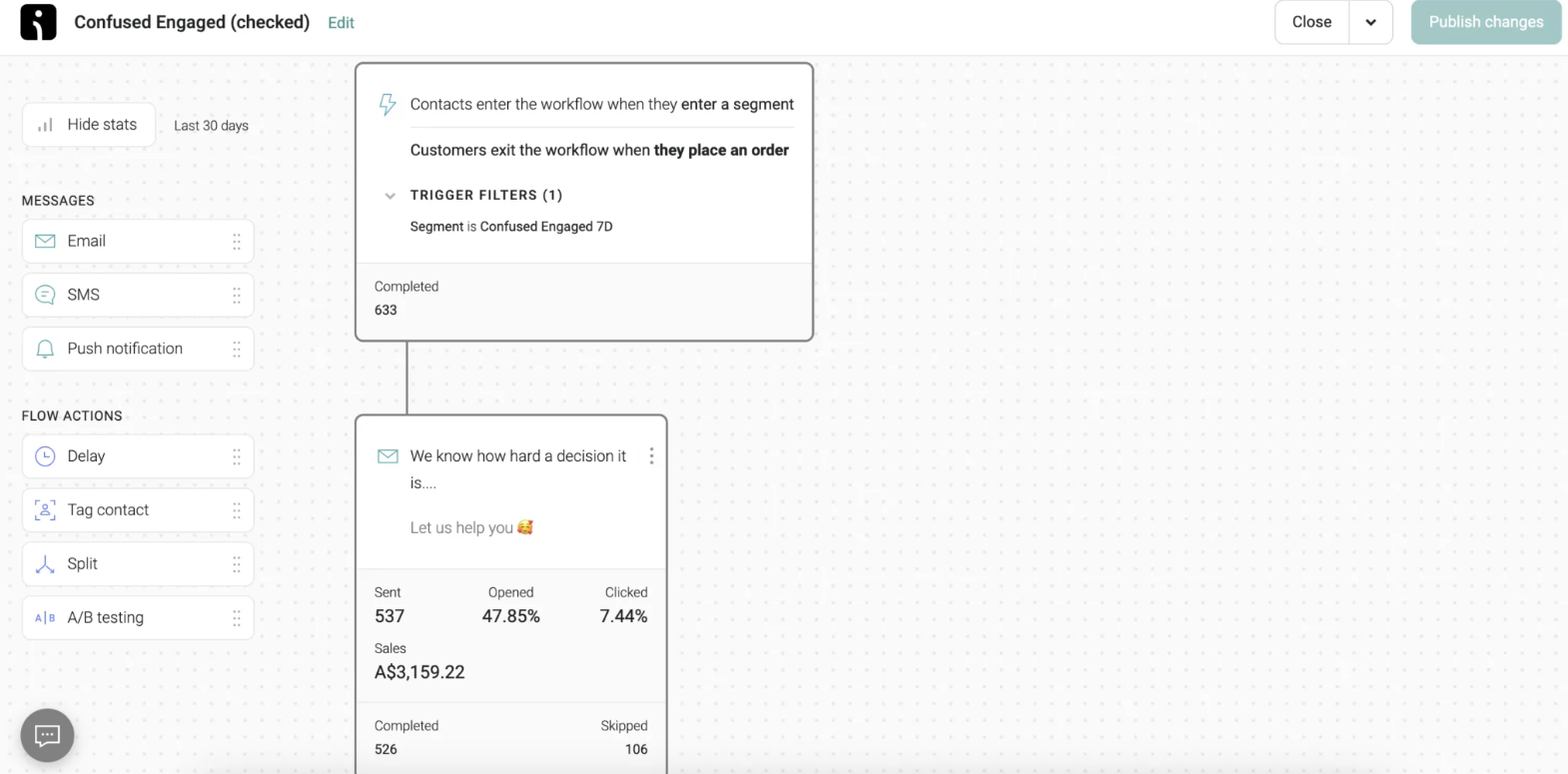
 | Segmentation helped Belle Fever engage undecided shoppers at the right moment, when interest was high, but purchase intent was not there yet. See how Belle Fever used segmentation to achieve a 52% open rate, a 25% reply rate, and a 40% lift in conversion rates. Read the full story here. |
By demographics
This uses customer traits, such as location, age, or gender, to tailor campaigns.
Here’s how:
- Location: Send regional promotions based on climate, shipping availability, or local trends
- Age/gender: Target products according to customers of the same age or gender
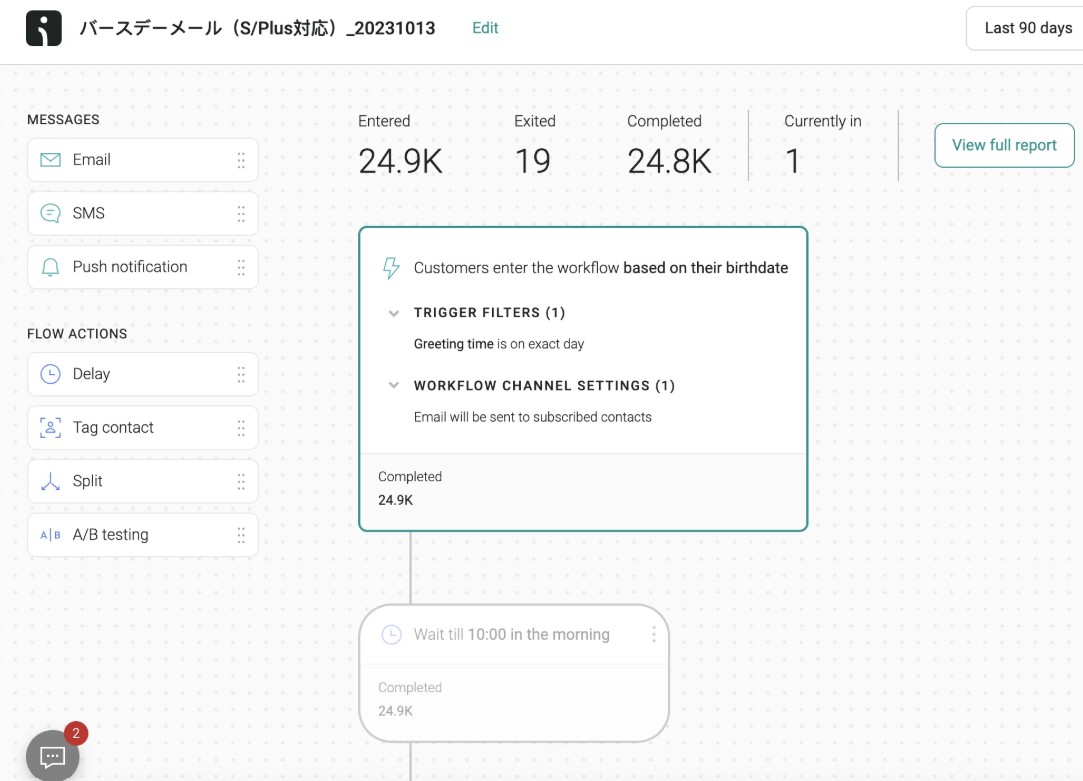
In the segmentation workflow created for Salomon, the customers move to the workflow based on their birthdate:
By product interest
You segment customers by the products or categories they buy.
You can group your customers’ product interests in the following ways:
- Collection-based: Group customers who purchased from a specific collection and cross-sell related products
- Category-based: Target segments such as skincare, makeup, or supplements, depending on past purchases
 | “We want to create emails that not only look great but also connect with our audience. Omnisend lets us do both.” Maria Nakazono, CRM and Digital Marketing Specialist, Salomon Japan See how Salomon Japan used smart segmentation to reach over 130K subscribers and generate ¥1.9M in revenue per campaign. Read the full story here. |
By channel
It segments customers by preferred communication channels. This can be Email, SMS, or any other channel.
Here are some tips you should follow:
- Send messages through the channel your customers engage with most
- Adjust the frequency and style depending on which channel they prefer
When you step back, all these segmentation methods point to one thing: relevance drives results.
Whether you segment by purchase behavior or engagement, the goal stays the same. That’s sending the right message to the right customer at the right time.
That’s why execution matters. Managing multiple segments manually can become messy and inconsistent. With Omnisend’s prebuilt segments and automatic updates, customer segmentation becomes simpler.
How to segment customers in Shopify (step-by-step)
Shopify customer segmentation is simple. You can use Shopify’s built-in tools or advanced third-party apps. Each approach has its benefits, and the right choice depends on your needs.
Using Shopify’s built-in segmentation
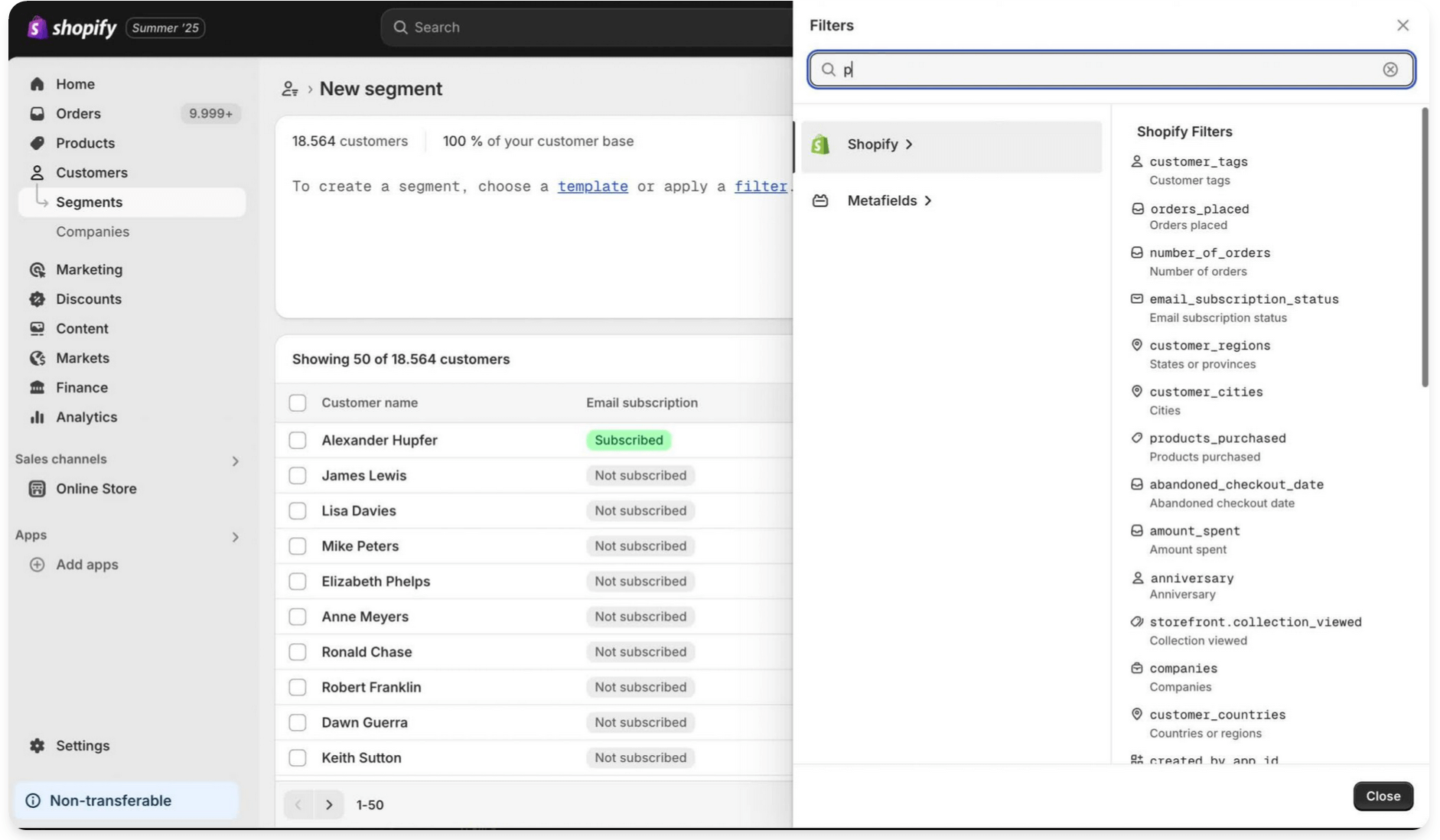
Shopify provides simple tools to filter and group your customers. To create a segment, use this step:
- Go to Customers → Filters
- Use filters to narrow down customers based on:
- Purchase history
- Customer tags
- Location
- Total spent
- Order count
- Email subscription status
- Save these segments for future campaigns or reporting
The image below shows the segments and filter section on Shopify:
This is useful for basic campaigns and one-off promotions. You can quickly identify first-time buyers, high spenders, or customers in specific locations.
However, Shopify’s built-in segmentation has limitations. You can’t trigger complex automated flows, and options for combining multiple behaviors are limited.
This makes it harder to scale marketing efforts or send real-time, behavior-based messages.
Using advanced segmentation tools like Omnisend
If you want better customer segmentation, consider using an advanced tool like Omnisend. Many top Shopify stores use it to automate campaigns and improve personalization.
Here’s what you can expect from Omnisend’s segmentation:
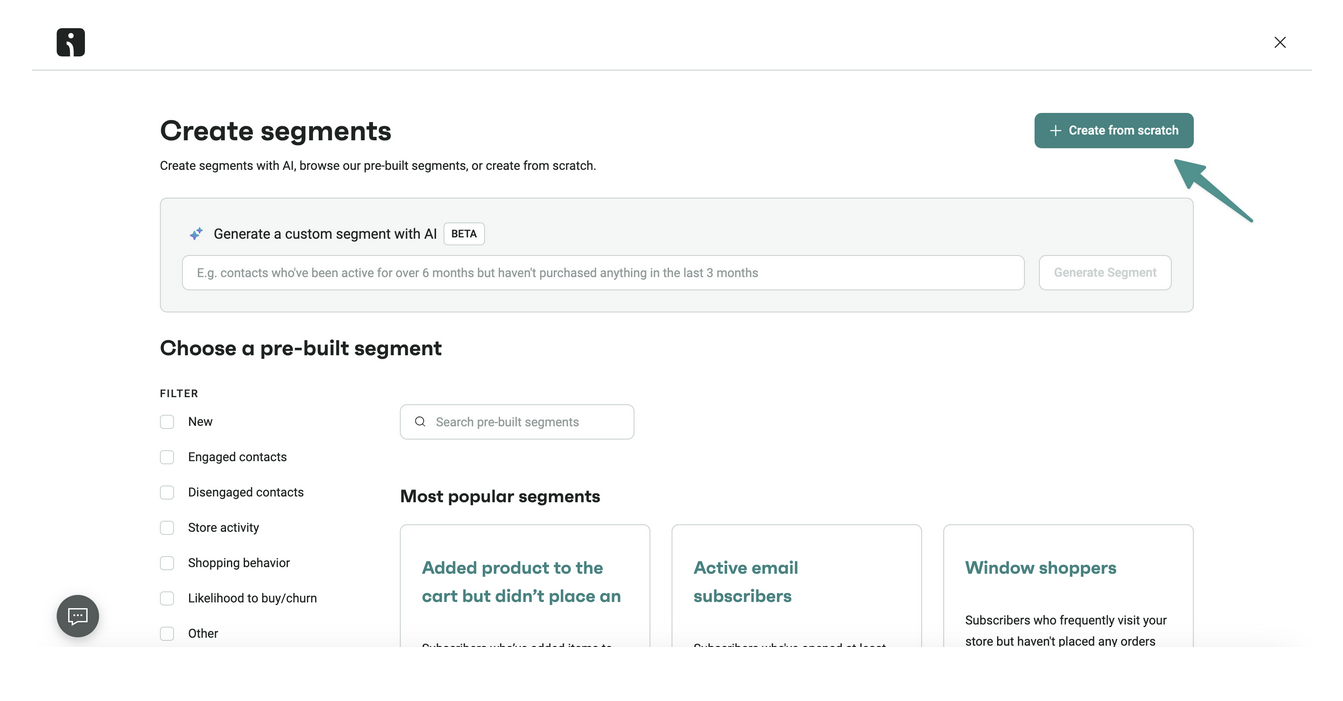
- Visual segmentation builder: Helps you create segments using a drag-and-drop interface. It also makes it easy to combine multiple filters for simultaneous use. These filters include shopping behavior, lifecycle stage, and others:
- Real-time updates: Segments automatically update as customers interact with your store. This ensures your campaigns target the right people consistently.
- Behavior-based triggers: Automate emails or SMS messages based on customer actions. Including opening a message but not purchasing, abandoning a cart, or browsing specific products.
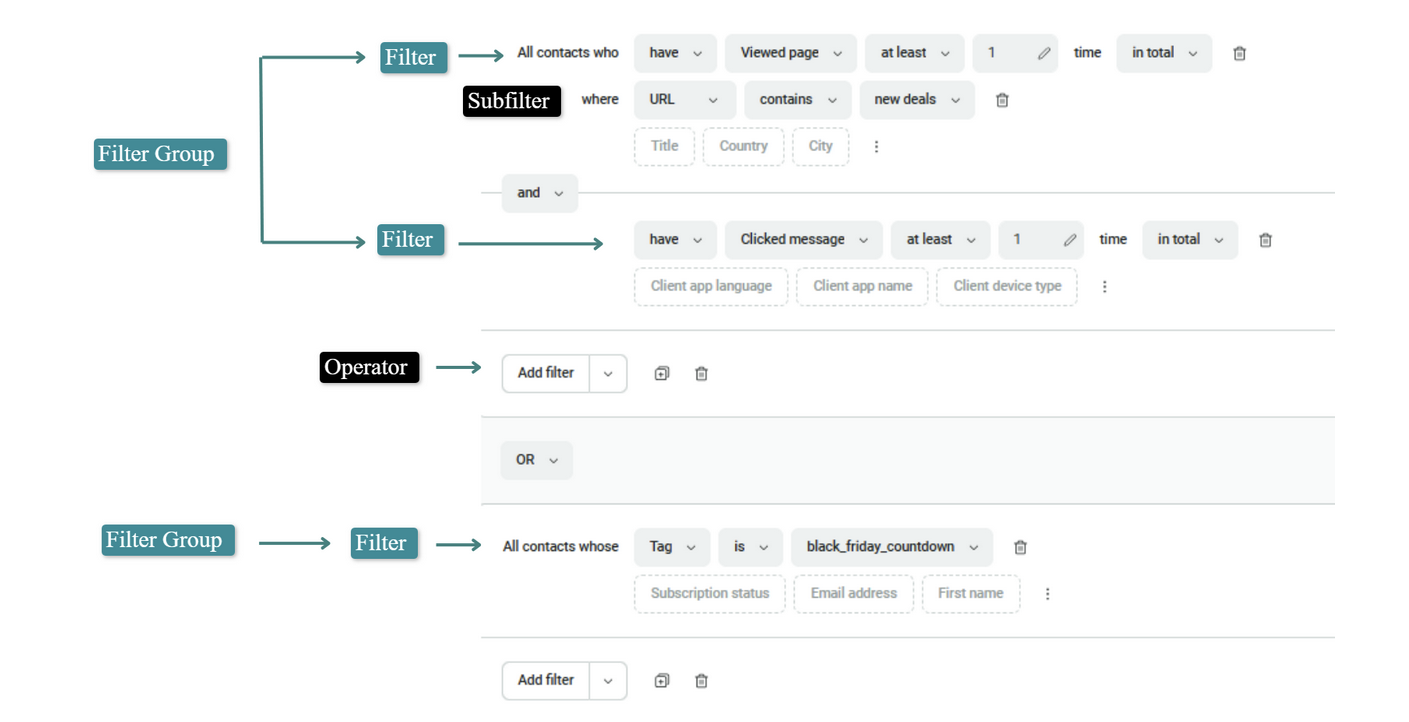
The image below shows a more detailed part of Omnisend’s segmentation filters:
Ready to grow with Shopify segmentation?
Shopify customer segmentation helps you run better marketing campaigns. It helps you reach the right customer at the right time and make every message more relevant.
With Omnisend, you can segment your customers even better. You can create dynamic segments, automate campaigns based on behavior, and create targeted campaigns.
Omnisend makes it easy to manage your goals. Whether you want to re-engage inactive buyers, reward loyal customers, or drive more conversions, we’ve got you covered.
If you want higher engagement, better retention, and more predictable revenue, this is your next move. Start building behavior-based segments, automate your flows, and personalize every touchpoint.
Take the next step today. Use segmentation to turn everyday interactions into meaningful, conversion-driven customer experiences.
Quick sign up | No credit card required
FAQs
To create segments in Shopify, define rules based on customer behavior and traits. Here’s how:
— Go to Customers in Shopify
— Click on Create segment
— Choose conditions like location, purchase history, or total spend
— Save the segment for marketing campaigns or automation
Different apps offer different features. Omnisend is ideal for Shopify stores. It allows real-time segmentation and combines multiple criteria. It also automates campaigns based on behavior, purchase history, and lifecycle stage.
Its free plan provides access to all ecommerce-focused features without limitations.
Customer behavior isn’t static, and your Shopify customer segmentation needs to reflect these changes. Regular updates ensure your messages reach the right people at the right time. Here’s how to update your Shopify customer segments:
— Use monthly or quarterly updates
— Adjust for new purchases, engagement trends, or changing behaviors
— Keep segments aligned with your marketing goals for maximum impact
Yes, combining segments with automation boosts efficiency. You can use advanced apps like Omnisend to trigger automated emails and SMS messages based on segments.

TABLE OF CONTENTS
TABLE OF CONTENTS


No fluff, no spam, no corporate filler. Just a friendly letter, twice a month.