
 Omnisend AI


 OFFER
OFFER








Drive sales on autopilot with ecommerce-focused features
See Features
Shopify SMS notifications are limited to basic order confirmations and lack customization, automation, and analytics, making them insufficient for eCommerce growth.
To maximize SMS marketing effectiveness, consider using dedicated platforms like Omnisend, which provide advanced features such as automated workflows, audience segmentation, and global reach.
Combining SMS with email marketing can significantly boost revenue, as brands utilizing both channels report a remarkable return on investment from multi-message campaigns.
To optimize SMS notifications, focus on crafting concise, value-driven messages, timing them strategically, and ensuring compliance with SMS regulations to enhance customer engagement.
People have their phones close to them most of the time. When a text message pops up, they’re usually seen right away.
That kind of quick engagement — and the potential revenue you could miss — is hard to ignore. Still, many Shopify stores barely scratch the surface of what Shopify SMS notifications can do. Instead, they only rely on basic transactional texts.
Yes, Shopify includes built-in SMS notifications. However, they’re limited, inflexible, and not designed for growth-focused ecommerce brands.
In this guide, we’ll explore what Shopify SMS notifications are, how they work, and how to set order status notifications properly. We’ll also look into where native functionality falls short, how SMS automation tools like Omnisend can help, and how to turn SMS into a serious revenue channel.
Quick sign up | No credit card required
What are Shopify SMS notifications?
Shopify SMS notifications are text messages sent automatically to customers to provide order updates.
When a shopper adds a phone number at checkout instead of an email, Shopify sends order confirmations by text. Specific events, such as order placement, fulfillment, confirmation, refunds, and exchanges, trigger these notifications. However, your store must be in a supported country.
Store owners don’t pay extra fees for these native Shopify SMS order notifications.
Types of Shopify SMS notifications
There’s only one true type of Shopify SMS notification: the order confirmation message.
When a customer checks out with a phone number, Shopify sends a transactional text message to confirm the order. The purchase event triggers this message, and you can’t modify it.
For orders containing digital products, order confirmations can also be sent via SMS For example, the customer:
- Purchases a digital gift card: They receive an SMS containing a link to the gift card
- Buys a digital download: The SMS confirmation links to the Thank You page, where they can download the purchased file
Shopify doesn’t natively send shipping updates, promotional messages, or abandoned cart SMS notifications.
Limitations of Shopify’s native SMS notifications
Although it’s free, Shopify’s SMS notifications have significant constraints:
- Texts are sent only if no email address is provided
- Customers who provide an email address can’t opt for SMS
- Abandoned checkout recovery via SMS isn’t supported
- Service is supported only in specific countries
- Messages can’t be edited or customized
To unlock customization, automation, and recovery flows, you must install a transactional SMS app from the Shopify App Store. Here’s a quick comparison of Shopify native SMS vs. a dedicated SMS marketing platform like Omnisend:
| Feature | Shopify native SMS | Dedicated platform |
|---|---|---|
| Customization | ❌ Not customizable | ✅ Full control |
| Automation | ❌ Limited | ✅ Advanced workflows |
| Global reach | ❌ Limited to certain countries | ✅ International support |
| Omnichannel | ❌ SMS only | ✅ Email + SMS + push |
| Abandoned cart recovery | ❌ Not supported | ✅ Supported |
How to set up SMS notifications in Shopify
Setting up Shopify’s native SMS notifications is straightforward. However, your store must first meet certain Shopify requirements:
- The business address is in a supported country
- The checkout settings allow customers to enter a phone number
The real limitation? These text alerts only work when customers provide a phone number, not both a phone number and an email address.
Step-by-step setup in Shopify admin
Here’s how to enable SMS order notification on Shopify:
- In your Shopify admin, go to Settings > Checkout
- In the Customer contact method section, select Phone number or email (This gives customers the option to enter a phone number at checkout instead of an email address)
- Click Save
- Go to Settings > Notifications
- In Customer notifications, select Order confirmation (under Order processing)
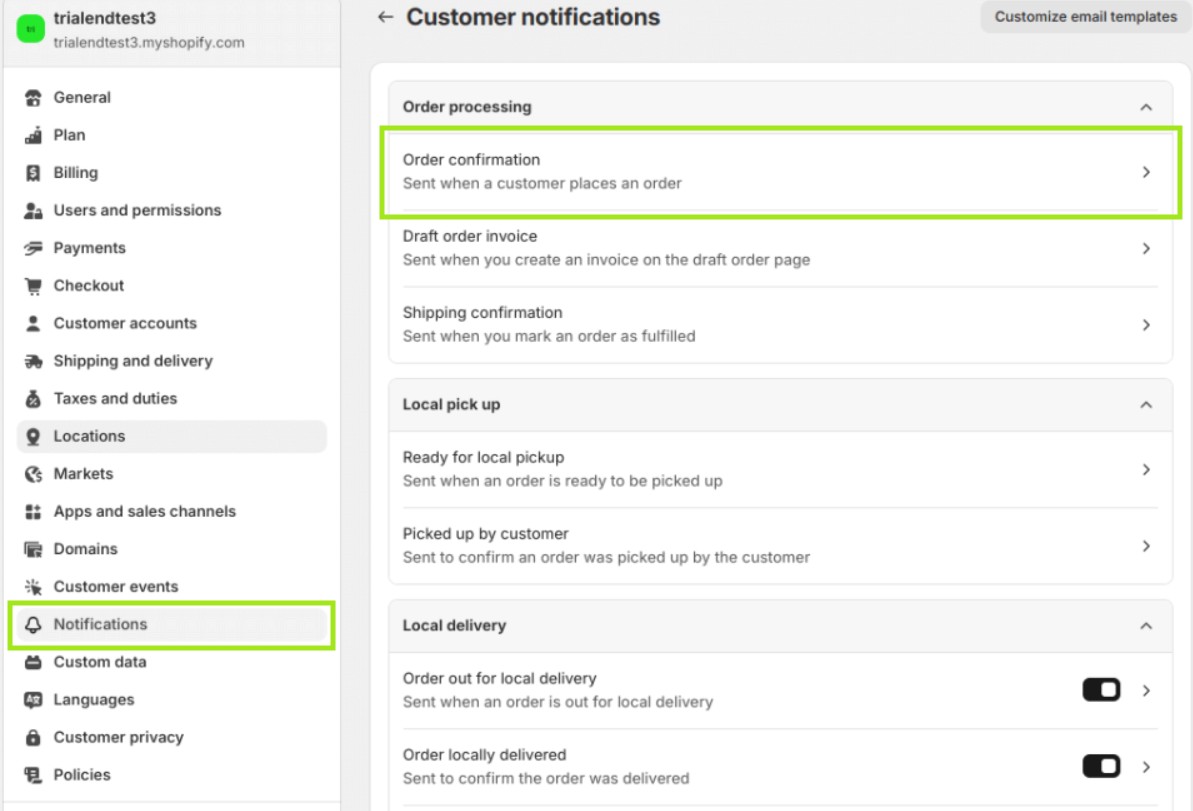
6. Click the SMS tab to verify that SMS notifications are active
- They’re enabled by default once you’ve allowed phone number checkout
- If using third-party texting apps, turn off Shopify order confirmation SMS notifications here to avoid duplicate texts
7. Place a test order using a phone number only (no email) to confirm that the SMS sends correctly
Customizing your SMS sender ID
Shopify automatically generates an SMS Sender ID based on your store name.
IDs longer than 11 characters are truncated, and non‑alphanumeric symbols are removed.
In some countries, dynamic sender IDs aren’t supported. This means customers may see a numeric phone number instead.
To maximize recognition, keep your store name short, simple, and brand‑consistent.
Why native Shopify SMS notifications aren’t enough for ecommerce growth
Shopify’s native SMS notifications solve one problem. They send order confirmations to customers who provide a phone number instead of an email at checkout. That’s useful, but it’s also where the functionality ends.
There’s no support for promotions, segmentation, automation, or analytics. Without these, SMS can’t grow into a real revenue channel.
So, is the Shopify SMS setup enough for marketing?
The short answer is no. Shopify depends on third-party SMS marketing apps to extend functionality. A dedicated platform that goes beyond basic confirmations is essential, especially for growing brands.
What a dedicated SMS marketing platform adds
A purpose-built platform like Omnisend goes far beyond order status notifications. It transforms text messaging from a basic notification tool into a revenue channel. Here’s what it brings:
- Automated SMS workflows: Offers automated SMS messages for welcome, cart recovery, winback, and post-purchase follow-ups
- Audience segmentation: Targets customers based on purchase history, browsing behavior, lifecycle stage, and engagement
- Customizable message templates: Crafts on-brand, personalized messages with product recommendations and dynamic content
- Real-time analytics with revenue attribution: Tracks revenue per SMS, measures conversion rates, and optimizes based on data
- Global SMS reach: Sends messages to customers worldwide without country restrictions
- Compliance management: Tracks consent, handles opt-outs, and complies with TCPA and GDPR
Omnisend offers all these features on a single platform and integrates seamlessly, eliminating the need to juggle multiple tools.
Why combining email and SMS in one platform drives more revenue
Omnichannel automation matters. Brands that use both email and SMS see 50x ROI from multi-message campaigns.
Email handles longer narratives, detailed product showcases, and educational content. SMS adds speed, urgency, immediacy, and quick calls to action that beat email clutter.
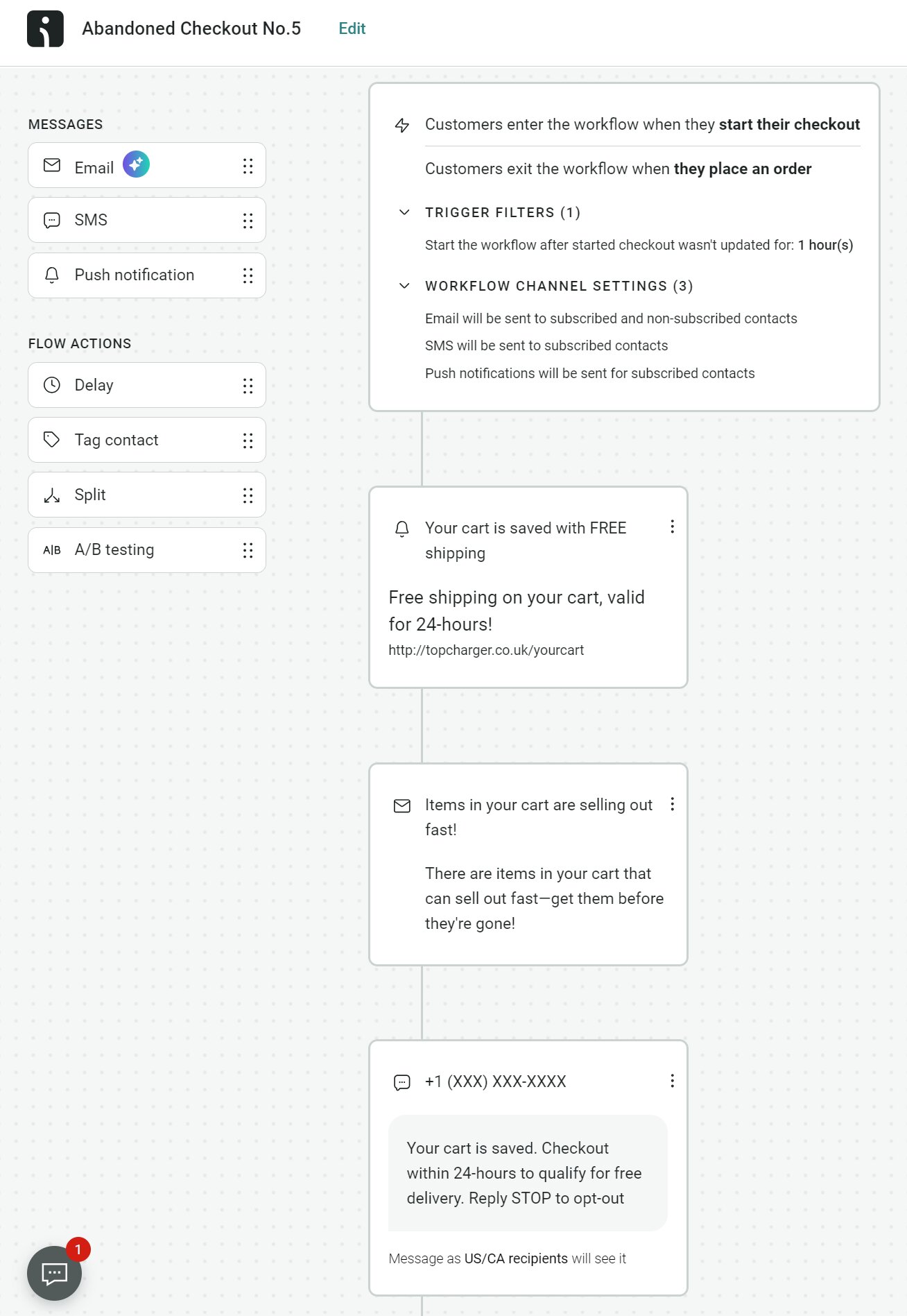
Omnisend lets you build workflows that combine email, SMS, and push notifications. This coordinated approach explains why merchants using Omnisend report earning $79 for every $1 spent.
Example: Cart recovery can start with an email, followed by an SMS a few hours later, and then a push notification if no action is taken. See this multi-channel flow in Omnisend:
Best practices for Shopify SMS notifications
Setting up Shopify SMS notifications is only the start. Optimizing them is what drives results. This involves being deliberate with message crafting, timing, and compliance.
Crafting effective SMS messages
What makes a good SMS notification? It’s clear, concise, and action-driven. Here’s how to make it count:
- Lead with value: Put the discount, update, or urgent reminder first
- Keep it short: Use the standard 160 SMS characters wisely, or switch to MMS for richer content
- Personalize: Add names, reference orders, or tailor recommendations based on purchase history
- Include a CTA: Tell customers what to do next, and include a trackable link to measure performance
For inspiration, check out proven SMS templates that follow these rules and convert consistently.
Timing and frequency that maximize engagement
SMS is an interruptive channel, so what you send matters as much as when you send. Here are a few considerations:
- Best sending window: Weekdays, 9 AM to 12 PM and 5 PM to 9 PM (local time)
- Abandoned cart SMS: Within one to six hours of abandonment
- Promotional campaigns: Limit to two to four per month
Remember, message fatigue is real. In fact, 23% of consumers would stop supporting a brand that sends too many messages.
Importantly, segmentation ensures relevance. Send the right message to the right audience, not your entire list. A strong SMS notification strategy prioritizes precision over volume.
Staying compliant with SMS regulations
Compliance is non-negotiable in Shopify SMS marketing:
- Obtain explicit opt-in before sending marketing texts
- Include opt-out language in every message (like “Reply STOP”)
- Follow TCPA (USA), GDPR (EU), and CASL (Canada) regulations
A 2025 SimpleTexting study shows that 84% of consumers are open to texts from trusted businesses. Therefore, a consent-first approach doesn’t limit your reach. It builds a more engaged, higher-converting subscriber base.
Platforms like Omnisend simplify compliance with built-in opt-out management and consent tracking. This cuts risks as you grow.
Shopify SMS notification strategies that drive sales
Shopify SMS notifications don’t have to stop at order confirmations. When used strategically, they can quickly become a high-performing marketing channel.
Abandoned cart SMS recovery
Abandoned cart SMS is one of the highest-converting ecommerce automations. Industry benchmarks show conversion rates ranging from 24.6% to 39.4%.
The most effective approach is a staggered, omnichannel sequence:
- Email reminder within one hour of abandonment
- SMS follow-up at the six-hour mark with a direct checkout link
- Push notification at 24 hours for shoppers who still haven’t converted
The main reason abandoned cart SMS messages work is because they’re timely and direct.
A good example is INGLOT Canada. The cosmetics brand generated 2,130% higher revenue per message by combining email and SMS in Omnisend’s cart recovery flows.
Post-purchase and transactional notifications
SMS is also powerful after a sale. Transactional SMS builds trust, for one, and opens the door to repeat purchases. Beyond order confirmations, you can use SMS to:
- Request reviews
- Deliver loyalty rewards
- Cross‑sell complementary products
- Share shipping or delivery updates
Use post-purchase SMS strategies to build trust, reduce support inquiries, and increase customer lifetime value.
Promotional campaigns and flash sales via SMS
Promotional SMS works especially well for urgency-driven campaigns, including:
- Product launches
- Back-in-stock alerts
- VIP exclusives
- Flash sales
Here’s Omnisend’s intuitive content builder, showing a preview of a flash message:
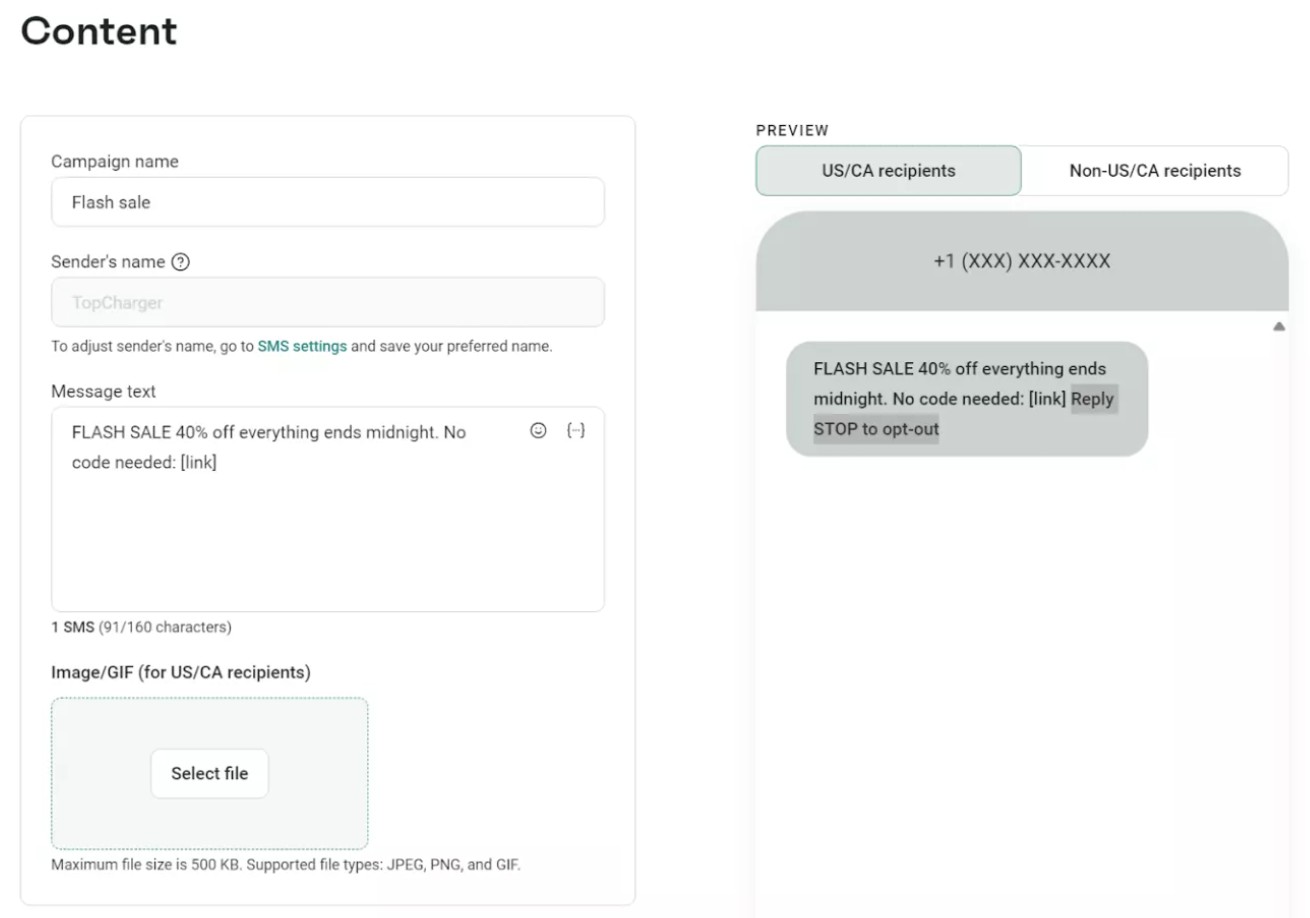
The aforementioned SimpleTexting study found that most businesses (36%) report average SMS marketing click-through rates between 21% and 35%. That makes time‑sensitive campaigns, like flash sales, among the highest-performing formats available.
The key is segmentation. Consider a back-in-stock alert sent only to customers who previously viewed that product. It’ll convert at a higher rate than a broadcast to your entire list.
Always run promotional SMS alongside email to maximize reach and reinforce urgency.
Measuring the impact of your SMS notification strategy
You can’t optimize what you don’t measure. Tracking the right metrics ensures you know what’s working and where to refine.
Key performance metrics to track
To find out if your SMS notifications ecommerce program is driving engagement, focus on:
- Delivery rate: Percentage of messages successfully delivered
- Click-through rate (CTR): Percentage of recipients clicking links within your texts
- Conversion rate: Percentage of clicks that result in purchases
- Revenue per message (RPM): Total revenue divided by messages sent
- Subscriber growth rate: Net new opt-ins over time
- Opt-out rate: Percentage of subscribers who unsubscribe
- ROI: Revenue generated versus SMS costs
Using data to optimize your SMS flows
SMS performance metrics only matter if you act on them. Here are a few ways you can use this data to guide your strategy:
- Use segmentation insights, like lifecycle stage, to refine targeting
- A/B test message copy, timing, and offers to see what resonates
- Monitor opt‑out rates as a health check for relevance and message fatigue
A structured SMS notification workflow makes optimization easier. Platforms like Omnisend provide real-time dashboards that tie every click and conversion to specific text messages. This makes ROI transparent and actionable.
Start sending Shopify SMS notifications that actually grow revenue
Shopify’s native SMS notifications are a useful starting point. However, they’re not built for ecommerce growth.
For that, you need to turn simple order confirmations into a high-performing revenue channel. This requires automation, segmentation, global delivery, and unified email + SMS flows in one place.
Omnisend gives you all that, plus a free plan with access to all core ecommerce features. This allows you to start driving results without upfront investment.
Quick sign up | No credit card required
FAQs
Go to Settings > Checkout in your Shopify admin and select Phone number or email as the customer contact method.
Then, navigate to Settings > Notifications and verify SMS is enabled under Order confirmation. Customers who enter a phone number without an email at checkout will receive an SMS order confirmation.
Shopify only sends SMS confirmations when no email address is associated with the order. If a customer provides an email, Shopify defaults to email notifications. SMS is also limited to supported countries based on your store’s business address.
Not with Shopify’s native SMS feature, as it only supports order confirmations. For automated abandoned cart SMS workflows, you’ll need a third-party SMS marketing Shopify app like Omnisend. This platform also offers email and push notifications.
Look for a platform that combines email, SMS, and push notifications into a single system. Omnisend is a strong option, offering prebuilt automation workflows and advanced segmentation. It also has global SMS reach, compliance tools, and a free plan.
Transactional messages should be sent immediately when triggered. For marketing SMS, limit it to two to four per month. Use segmentation to ensure each message is relevant and timely.

TABLE OF CONTENTS
TABLE OF CONTENTS


No fluff, no spam, no corporate filler. Just a friendly letter, twice a month.