
 Omnisend AI


 OFFER
OFFER








Opting out from text messages: Your complete guide for 2025
With over 130+ pre-built integrations and flexible APIs, you can easily centralize data from across your tech stack
Make the most out of your data and unlock powerful growth marketing possibilities with these other top marketing tools.
Build any custom integration with our open, flexible APIs that are simple to use and implement.
Check out apps that have been stealing all the spotlight.
Email and SMS marketing insights, ecommerce resources, and the latest Omnisend news
Expert-led sessions covering email, SMS, and ecommerce marketing strategies.
Educational video and live training to help you make the most out of Omnisend.

Drive sales on autopilot with ecommerce-focused features
See Features
Delayed text messages in SMS marketing can significantly impact customer engagement and lead to missed sales opportunities, making timely delivery crucial.
Common causes of message delays include network congestion, technical glitches, carrier issues, and device-specific factors, all of which can disrupt communication flow.
To mitigate delays, businesses should verify recipient information, monitor network status, and utilize SMS analytics to track delivery success.
Implementing message scheduling can optimize delivery times, ensuring that promotional texts reach customers when they are most likely to engage.
Delayed text messages in SMS marketing can hurt business communication flow. When your messages don’t arrive on time, it can weaken the impact of your marketing campaign and reduce engagement. This delay can happen with both inbound and outbound messages.
Message delays are more common than many people realize. They can occur for a variety of reasons, ranging from simple network issues to problems with your SMS service provider.
When promotional messages are delayed, customers may miss time-sensitive deals, resulting in lost sales.
Understanding why SMS delays happen is key to maintaining proper communication with your customers. In this post, we’re going to explore the top reasons for delayed text messages and provide clear, practical solutions to each problem.
Let’s get started.
Quick sign up | No credit card required
Delayed text messages are SMS marketing messages that don’t reach their intended recipients at the expected time. This can happen with outgoing marketing texts and incoming customer replies.
For example, a promotional SMS may reach subscribers after a sale offer has ended. Customer replies, such as opt-ins or inquiries, may also arrive late, disrupting follow-ups and workflows. In some cases, delayed SMS messages may not arrive at all, causing businesses to miss leads or feedback.
SMS marketing messages can be delayed for several reasons, including technical or system-related factors. However, you can also intentionally delay text messages. In marketing and business communication, bulk text messages can be scheduled for future delivery.
Scheduling allows businesses to send promotional campaigns at optimal times for engagement, such as during peak customer activity hours.
Here are some common reasons for delayed text messages that have little to do with your SMS marketing strategy.
Congestion on the network carrier due to heavy traffic can cause delayed text messages.
This tends to occur if many people send SMS blasts simultaneously, such as on New Year’s Day. The high volume of traffic can cause messages to be queued for delivery, leading to delays.
Delayed text messages can result from software bugs and synchronization issues with the server.
It can interfere with message routing, processing, and delivery algorithms. This leads to message queuing that causes delays.
Carrier issues such as misconfigured network settings, Distributed Denial-of-Service (DDoS) attacks, and routing table issues can disrupt network operations.
This can cause messages to get stuck in transit or take a longer route, resulting in delayed delivery.
Rural areas and locations with poor weather and significant obstructions, such as mountains, cliffs, and large buildings, often have zero or inferior network coverage.
If the recipient is in such a location, there’s likely to be a delay in message delivery.
A subscriber could experience a delay receiving text messages due to issues with their phone.
An old or outdated device, for instance, could have limited processing power, which could delay incoming messages.
Other issues could be:
If you’re sending a message from a network that’s different from the recipient’s network, the process may be delayed.
This is because some mobile networks prioritize traffic from their own network over others.
Interoperability challenges can also occur. Different carriers use differing technical protocols for messaging. It could call for additional processing to ensure messages are routed correctly and delivered, which can cause delays.
Routine maintenance, planned upgrades, unanticipated technical problems, and hardware failures can cause temporary service outages.
Similarly, if your messaging system relies on third-party services or APIs for some of its functionality, an outage of these services can cause delayed text messages.
Delayed text messages can occur if servers can’t process the volume of messages efficiently.
This can be caused by:
Compliance with regulatory requirements in the respective jurisdictions can prevent carrier filters from blocking message delivery.
This can include:
Another common cause of delayed text messages is problems within the messaging app itself. Issues such as outdated app versions, syncing failures, and temporary app glitches are common app-level problems that can contribute to delays.
Messaging apps are usually updated to fix bugs, improve performance, and maintain compatibility with mobile operating systems. Using an older version can slow message processing and cause delayed text messages.
Also, many messaging apps rely on server synchronization to deliver messages accurately. If syncing fails, messages may remain stuck in the outbox or inbox until the app reconnects properly.
Both Android and iOS devices have features designed to save battery life, reduce data usage, and improve performance. While these features are helpful, they can sometimes delay message delivery.
When enabled, these settings may pause message syncing or delay notifications.
Also, operating systems can limit background activity. This means messaging apps may not run or refresh data until the device allows them to.
Mobile carriers and messaging systems often use filters to prevent unwanted, suspicious, or potentially harmful messages from reaching users.
Messages that include specific keywords, links, or formatting may trigger a temporary hold. This type of delay is automated and is separate from compliance-related delivery failures.
The occasional delayed text messages are inevitable. The most important thing is to know when it happens and what actions to take.
Step 1: Verify the recipient’s information
Poor list quality is a common cause of delivery failures. Check if the numbers in your SMS list are valid.
You should also check whether you have your subscribers’ consent to send marketing messages.
Confirm whether any customers on your SMS list have opted out or blocked your number, and remove those numbers from your list.
Step 2: Check network status
Check the delivery status of recipients that are using different networks and compare their delivery times and success rates.
It can confirm if a network issue of a specific carrier is the cause of the delayed text messages.
Step 3: Set up tracking and analytics
Reliable SMS providers offer tracking and analytics features to verify message status.
For instance, using Omnisend’s SMS automation provides you with access to reports on subscribers who have successfully received your SMS, as well as delivery failures.
Step 4: Consider issues related to the carrier
Some mobile network operators communicate about upcoming routine maintenance and planned upgrades that may cause temporary network outages.
Be on the lookout for these communications. It can help you anticipate and plan for potential delays in text messages.
Step 5: Consider issues related to the SMS service provider
Assess the dependability of your current SMS service provider. Check if they:
Step 6: Consider issues related to third-party messaging apps and services
If delivery to a specific subscriber is failing, check if message delivery to other recipients using the same network carrier is successful and timely.
If this is the case, the recipient could be using third-party messaging apps and services instead of the standard messaging app.
You can take these actions once you’ve established why the message isn’t delivered.
1. Resend the message
Try resending the message to see if the network and carrier issue has been resolved. However, be careful not to retry too many times. It could trigger the spam filter.
Before resending, check if the message content needs modification. You can try to:
2. Use alternative communication methods
A multi-channel marketing approach can help you reach customers who don’t receive your text messages.
You can use email or set up push notifications on your website to send order confirmations, product recommendations, and cart recovery messages to customers.
3. Contact technical support
Reach out to the technical support of your SMS provider. They can investigate the issues causing delayed text messages and provide a solution.
4. Contact your carrier
Contact your carrier about the delayed text messages. They can confirm if there’s an issue with their network or with sending text messages to other networks.
They could also provide a workaround.
5. Use message scheduling
This is where you set your text messages to be sent out at a specific time in the future.
Message scheduling optimizes your send times. It ensures that your messages are sent out during off-peak hours when traffic is low, or at a time that is most convenient for the customer.
Here are some measures you can take to prevent delayed text messages.
Update your devices and messaging apps regularly
SMS providers regularly update their apps to improve their compatibility with the latest network protocols.
Updates also fix bugs and issues that could affect the messaging app’s functionality.
Monitor signal strength
Pay attention to the network indicator on your device.
In case there’s a poor network, enhance your signal reception using a signal booster.
Clear cache and data
Clearing the cache for the messaging app’s settings can resolve a misconfiguration that may be causing delayed messages.
It also creates more storage space. This can reduce app lag and stabilize the messaging app’s performance.
Not all delayed text messages are caused by technical problems or network issues. Some delays are intentional within SMS marketing campaign strategies.
Typical cases of intentionally delayed text messages in SMS marketing include:
Intentionally delayed text messages are a strategic tool to improve engagement and maximize the benefits of SMS marketing. This is unlike unintentional delivery issues caused by network, device, or app problems.
“I always recommend scheduling messages strategically. It ensures that every message arrives at the right time for maximum impact.”
— Andrius Šeršniovas, Conversion Specialist at Omnisend
Omnisend is a powerful SMS marketing platform you can use to schedule messages at the most convenient and respectful times for subscribers across different time zones.
During events and holidays, schedule messages for off-peak network usage times, when network congestion is lower.
All you have to do is add a delay block to one of the workflow nodes in your SMS marketing automation.
Here’s an illustration:
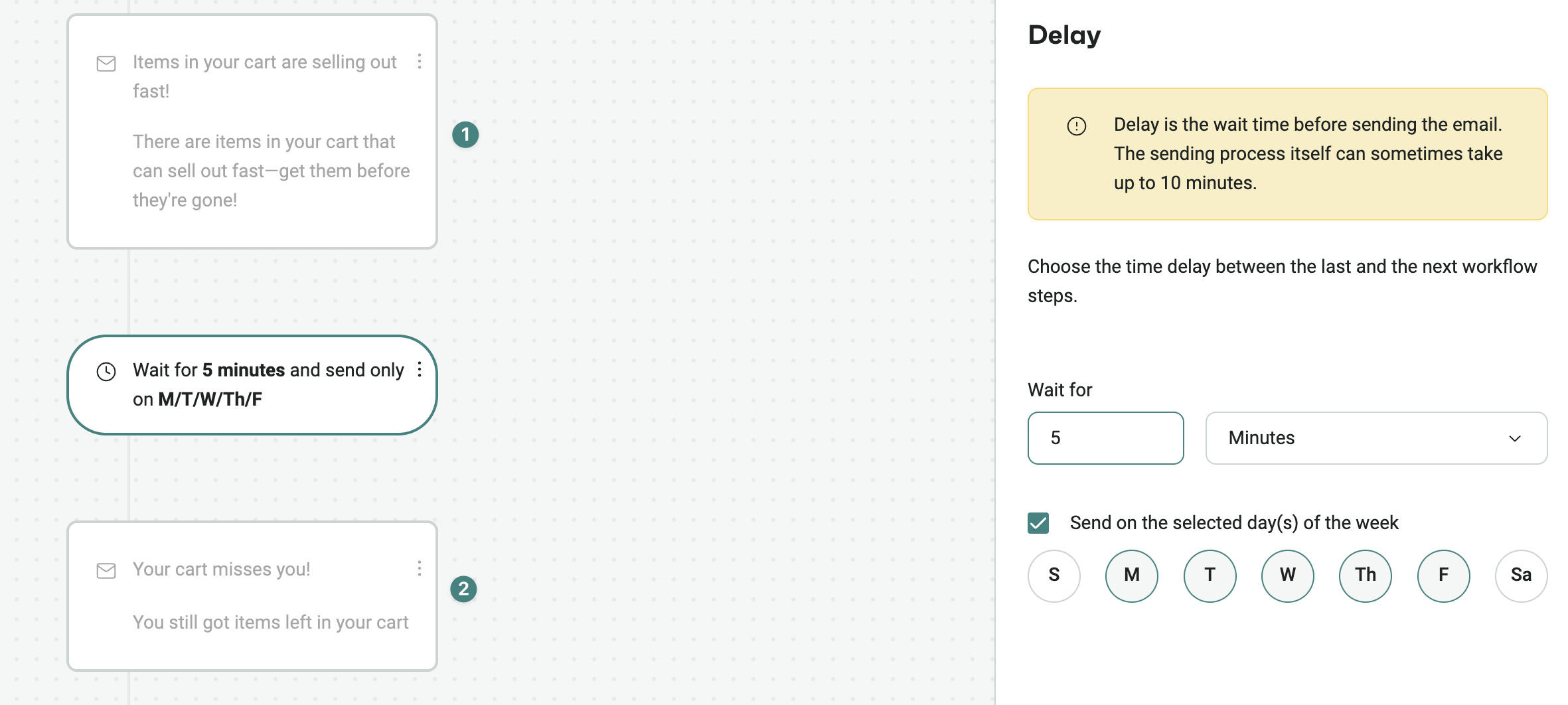
You can set the delay to a specific time or day, as you see fit.
Delayed text messages are very real, and businesses sometimes struggle to address them. It can result from faults on your side, the recipients’, or the network carriers’.
The good news is that you can control and prevent delayed text messages by adopting effective strategies and precautionary measures.
You can resend the message and see if it resolves it. If it still fails, contact your SMS provider or carrier. They can investigate the problem and provide you with a solution.
Ensure you’re using a powerful SMS platform like Omnisend to track your delivery and bounce rates.
Omnisend can also help you take corrective and preventive measures, like scheduling text messages for times when they’re likely to be delivered, and much more.
Quick sign up | No credit card required
Yes, you can send a delayed text message by using scheduling features in messaging apps or SMS marketing platforms. This way, your message can be sent at a specific time instead of immediately.
Yes, you can schedule a text on an iPhone using the Messages app. Simply long-press the send button and select Send Later. If this option isn’t available, you can schedule texts using the Shortcuts app.
Text message delays can happen due to poor network coverage, device issues, carrier problems, or server congestion. Background restrictions, app glitches, or spam filtering may also cause delays.
You can fix delayed text messages on Android by checking your network connection and disabling battery optimization for your messaging app. Clearing the app cache and updating your phone software can also help resolve the issue.
A delayed text means the message didn’t reach the recipient at the expected time. The message may arrive later than intended or, in some cases, may not arrive at all.
Your text messages may come in delayed due to network congestion, weak signal, or temporary carrier issues. Device settings, app glitches, spam filtering, or server delays can also affect message delivery timing.
You may not be receiving messages immediately due to a weak network connection, carrier delays, app restrictions, or temporary server issues.

Milda is a Senior Content Marketing Manager at Omnisend, with extensive experience in communication, helping brands establish a unique and authentic online presence.
TABLE OF CONTENTS
TABLE OF CONTENTS

What’s next



No fluff, no spam, no corporate filler. Just a friendly letter, twice a month.
Start Omnisend for free today.
Powerful omnichannel marketing, all at your fingertips.
No fees, no limits, no surprises.