Omnisend AI


 OFFER
OFFER










Automated emails produce 30% of email-generated sales from just 2% of total email volume, as the Omnisend Ecommerce Report showed. While social channels rely on unpredictable algorithms, email marketing provides you with a direct communication channel that you own.
It’s one of the most profitable digital strategies available, and that’s backed up by returns as high as $76 for every $1 spent, as shown by internal Omnisend data.
By the end of this guide, you’ll be able to build an engaged subscriber list, understand data privacy regulations, select the appropriate sending platform, and launch targeted campaigns that measurably increase ecommerce revenue.
Definition: Email marketing is the practice of sending commercial emails to opted-in subscribers to drive sales and build loyalty.
Campaign types:
- Welcome emails
- Abandoned cart reminders
- Transactional emails
- Newsletters
Core benefits:
- Audience ownership: Businesses reach their subscribers directly without relying on social media algorithms.
- Cost-effectiveness and ROI: Omnisend merchants earned $76 per $1 spent on email in 2025.
- Drives repeat purchases: Targeted messaging re-engages lapsed buyers to consistently increase sales and customer lifetime value.
Platform categories:
- Ecommerce-focused platforms
- General all-in-one small business suites
- Deep-automation enterprise tools
What is email marketing?
Email marketing is the practice of sending commercial emails to opted-in subscribers to drive sales and build loyalty. For ecommerce stores, it combines scheduled campaigns, like newsletters and promotions, with automated emails triggered by shopper behavior, like welcome series and abandoned cart reminders.
Stores use it to announce new products, share discount codes, and promote events. To get started, you need people’s permission to email them, which privacy laws like the GDPR require. Most stores collect sign-ups with pop-ups that offer a first-purchase discount in exchange for an email address.
What are the benefits of email marketing?
The benefits of email marketing are plenty: direct communication with an interested audience, measurable and cost-effective returns, increased repeat purchases, automation, and full audience ownership.
Unlike social media channels that are associated with unpredictable algorithms, you can use email to have a direct line to your subscribers at all times. If done correctly, you’ll be able to achieve high ROI consistently and make use of internal engagement data to improve your communications.
We’ve seen customers consistently increase revenue using automated email sequences like abandoned‑cart and welcome flows. It’s enough proof that smart email marketing strategies are the key to driving business growth.

1. Direct communication
Email gives you a direct line to people who opted in to hear from your brand, with no algorithm deciding who sees your message. Connect it to your store data, and you can tailor each message to what a subscriber has browsed and bought.
When every brand is competing for attention, a list of people who chose to hear from you is a real advantage. Segmented campaigns consistently outperform generic mass emails on conversion rate.
2. Cost-effectiveness, ROI, and measurability
Email returns more per dollar than most other marketing channels because sending costs stay low even as your list grows. In 2025, Omnisend merchants on paid plans earned $76 for every $1 they spent on email, according to Omnisend’s internal analysis.
Industry-wide estimates are lower but still strong: $36–$40 for every $1 spent across all business types.
You can also measure every send. Open rate, click-through rate (CTR), conversion rate, and revenue per email show which campaigns make money, so each send tells you how to improve the next one.
3. Drives repeat purchases for ecommerce
Targeted emails bring past buyers back to your store. That matters, because repeat customers make up only 21% of shoppers but generate 44% of revenue, according to Gorgias. Even a small lift in repeat purchases has an outsized effect on sales.
You don’t have to build these emails by hand. Automations can send past buyers product recommendations, restock alerts, and special offers, plus thank-you emails for your most loyal customers. Learn more in our guide to ecommerce email marketing.
4. Automation and efficiency
Automated emails send themselves when a shopper takes an action, so they arrive while interest is high. A shopper who leaves items in their cart gets a reminder, new subscribers get a welcome series, and past buyers get follow-ups.
In 2025, automated emails drove 6× more clicks and 19× higher conversion rates than scheduled campaigns, according to the Omnisend 2026 Ecommerce Report.
5. Audience ownership
Owning your email list means no platform algorithm decides which subscribers see your messages. If a social network changes its rules or suspends your account, you can lose your followers overnight. Your email list stays yours.
Social engagement is also hard to win: on Instagram, business posts average an engagement rate of just 0.45%.
How does email marketing work?
Email marketing works through three main elements: an opt-in contact list, a sending platform, and a goal that you have.
The contact list
Before you can send campaigns, you need to build a legitimate list of subscribers who agree to receive messages from you. Businesses usually collect these opt-ins via website pop-ups or checkout checkboxes. This is important to maintain compliance with privacy regulations like the General Data Protection Regulation (GDPR) and Controlling the Assault of Non-Solicited Pornography and Marketing (CAN-SPAM).
You may be tempted to buy an email list, but that’s a bad idea regardless of how you look at it. People on the list won’t know who you are, so they will either ignore your message or open it and report it, which is bad news for your sender’s reputation and deliverability. Eventually, you may even face consequences with data privacy regulatory institutions.
The sending platform
To send emails in bulk and set up automated sequences, you need to find a reliable email service provider (ESP). Once you do, you’ll need to authenticate your sender email with SPF, DKIM, and DMARC security protocols, and you’re good to go.
Make sure to choose a platform that reflects your needs instead of just going with the most popular one. While costs may seem similar at the beginning, they may escalate significantly once your business grows.
The objective
Every single message should aim for a single goal to achieve the best results. While the end result is the same (revenue), the path to it is not the same for different customer segments.
You’ll need to create:
- Promotional emails (focused on selling)
- Nurturing emails (warming the customer up for a sale down the line)
- VIP emails (focused on showing gratitude to your best customers so they continue buying from you)
- Loyalty emails (incentivizing your customer to continue buying to unlock rewards)
The list doesn’t end there. You’ll likely come up with more communication strategies as you go and as your business dictates the path forward.
What are the main types of email marketing?
Email marketing divides into two types: campaigns and automations. Campaigns are one-off sends the marketer schedules, including newsletters, promotional emails, product launches, and seasonal sales. Automations are triggered by shopper behavior, including welcome sequences, abandoned cart reminders, post-purchase confirmations, win-back flows, and feedback requests. Most ecommerce stores run both. Campaigns drive revenue on a set date, while automations send continuously once a shopper meets the trigger condition.
Welcome emails
Welcome emails go out right after someone subscribes, usually with a thank-you, a quick brand introduction, and a first-purchase discount. They’re among the highest-converting automated emails: in 2025, 52.98% of clicks on Omnisend welcome emails led to a purchase.
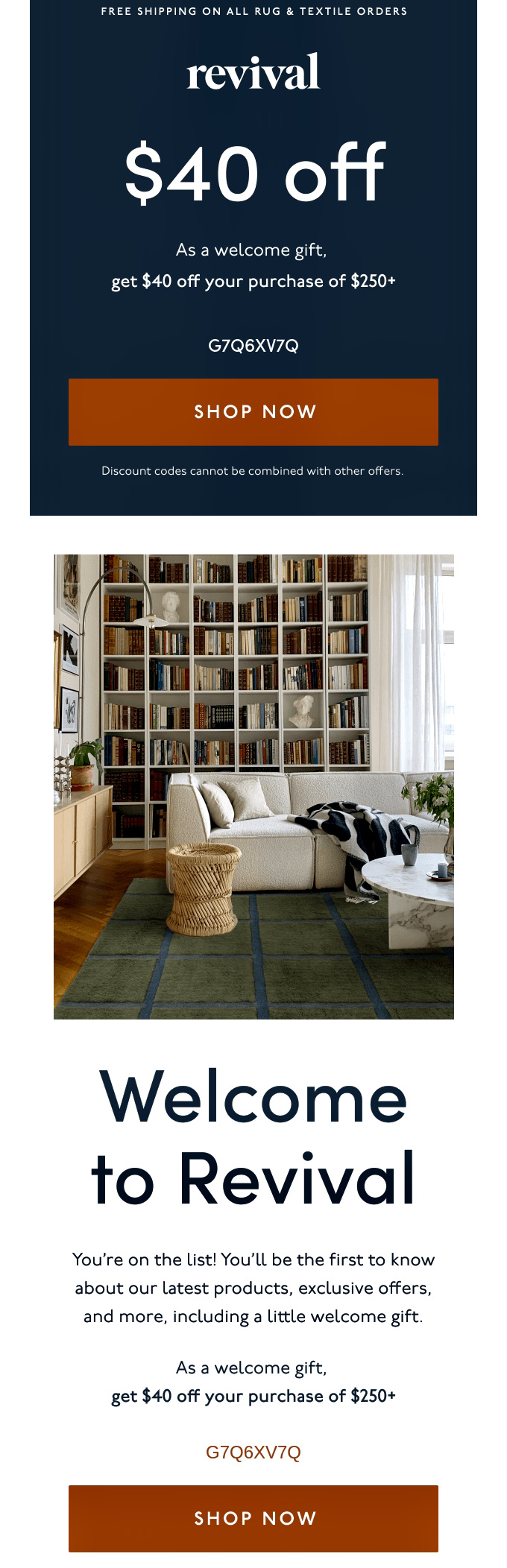
For example, Revival’s welcome email uses a friendly tone, simple design, and a strong offer. It grabs attention with a clear $40 discount and a bold “SHOP NOW” CTA.
Promotional emails
Promotional emails highlight discounts, special offers, or limited-time deals. They can be used to increase sales for welcome sequences or cart abandonment. You can also use promotional emails during holidays (like Black Friday).
They’re effective at converting hesitant buyers into repeat customers by using personalized offers based on behavior.
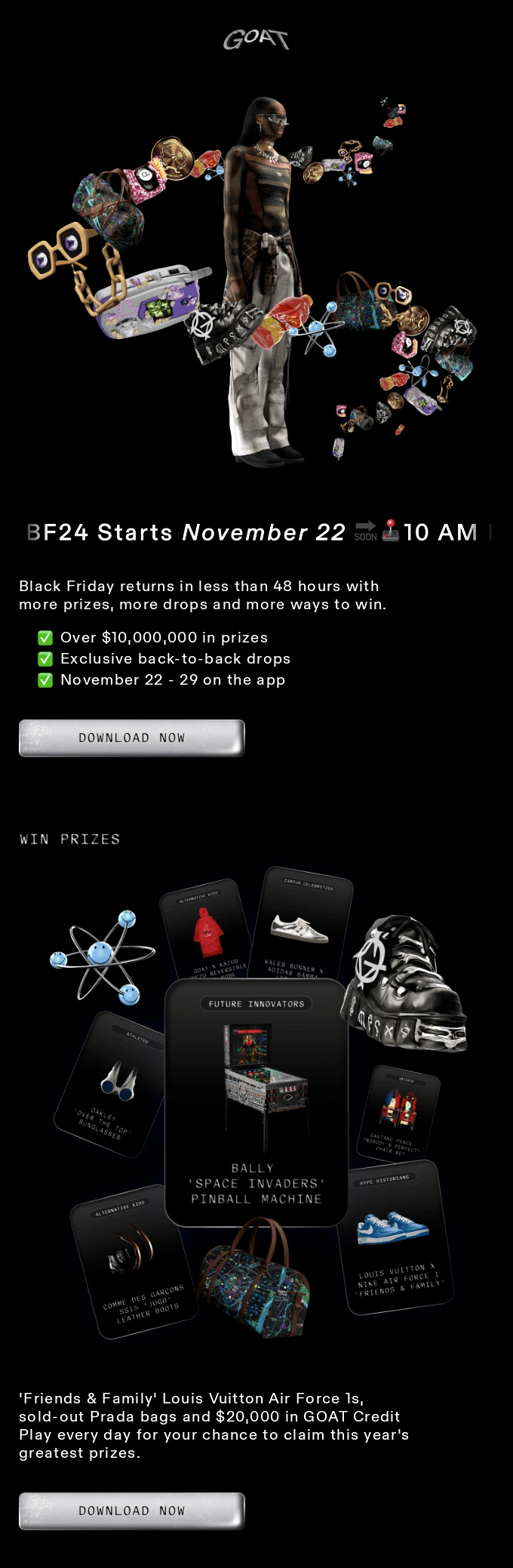
For example, GOAT’s email highlights “over $10M in prizes,” with a “Download now” CTA. This creates excitement around the event and gets more people to download the app.
Abandoned cart emails
Abandoned cart emails are automated reminders sent to shoppers who add items to their cart but leave without buying. They typically show the items left behind, with images and prices, plus a link back to the cart and sometimes a discount.
They’re also among the hardest-working automations: in 2025, welcome and abandoned cart emails together accounted for 76% of orders from automations. Send the first reminder within one to two hours of abandonment, while the purchase is still on the shopper’s mind.
Newsletter emails
Newsletters build loyalty between purchases by sharing useful content instead of pushing a sale. They often include product tips, behind-the-scenes content, or brand stories.
Send them on a consistent schedule, such as weekly or every two weeks, so subscribers know when to expect you.
Post-purchase and order confirmation emails
Post-purchase emails confirm the order and share shipping details right after checkout. Use them to reassure customers that their transaction was successful.
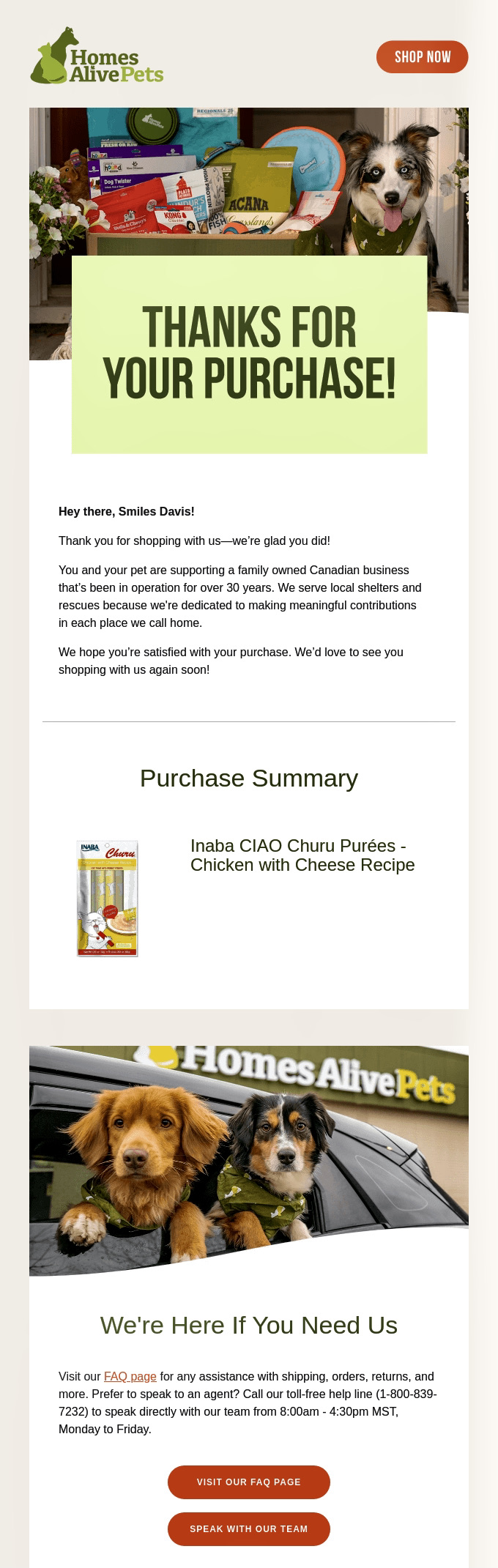
Homes Alive Pets nails its post-purchase email with a warm thank-you that makes customers feel valued. The email is concise, features pet images, and provides order and contact details. It also gently encourages future purchases.
Re-engagement and win-back emails
These target inactive customers who haven’t opened emails or made purchases recently. They often use discounts or free shipping to boost opens and conversions.
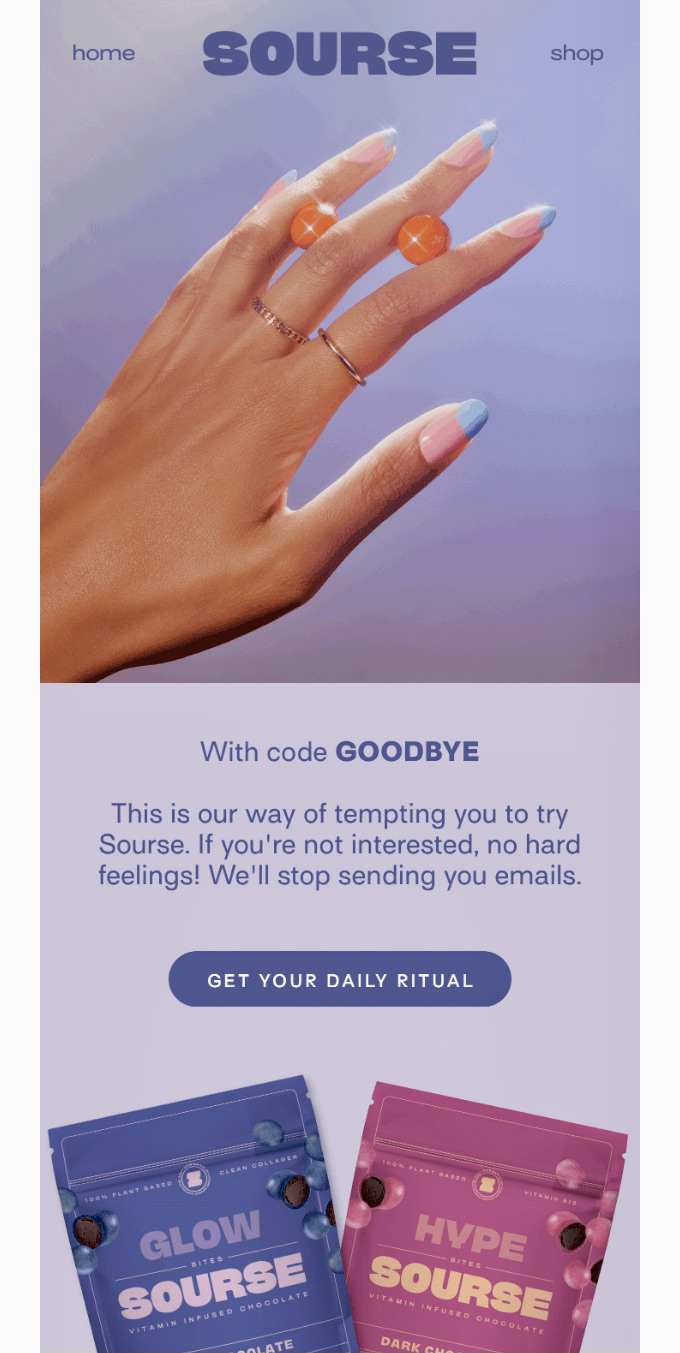
This Sourse email starts with a subject line: “We’ll give you 25% off to open this email.” This immediately creates curiosity and helps increase open rates. The “Goodbye” drives sales and reactivates customers.
Product launch and announcement emails
Product launch emails announce new products to your subscribers, often giving loyal customers early access before the public release. Early access brings in sales before launch day and shows you how much demand to expect.
For example, Ray-Ban’s launch email pairs a bold product image with a “Preorder now” CTA, letting subscribers order before the release and making them feel like insiders. See more product launch email examples.

Feedback and survey request emails
These emails ask customers for feedback on a product. Send them after some time has passed after a purchase to make sure they’ve had the time to check it out.
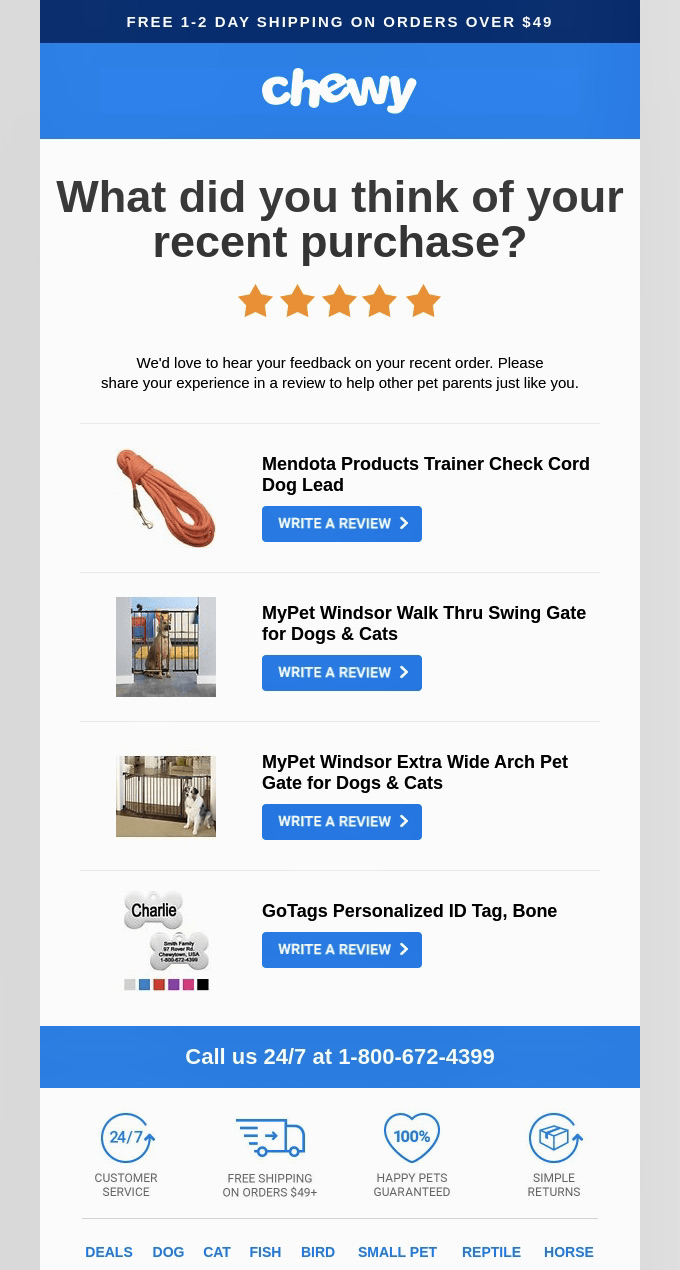
For example, Chewy’s product review email is polite and direct. It lists the purchased items, with clear CTAs, so customers can easily leave reviews. This helps build social proof and brand trust.
Seasonal and holiday emails
Seasonal and holiday emails promote time-limited offers around peak shopping dates like Black Friday, Cyber Monday, and the December holidays. Urgency drives their results, so give every offer a clear end date.
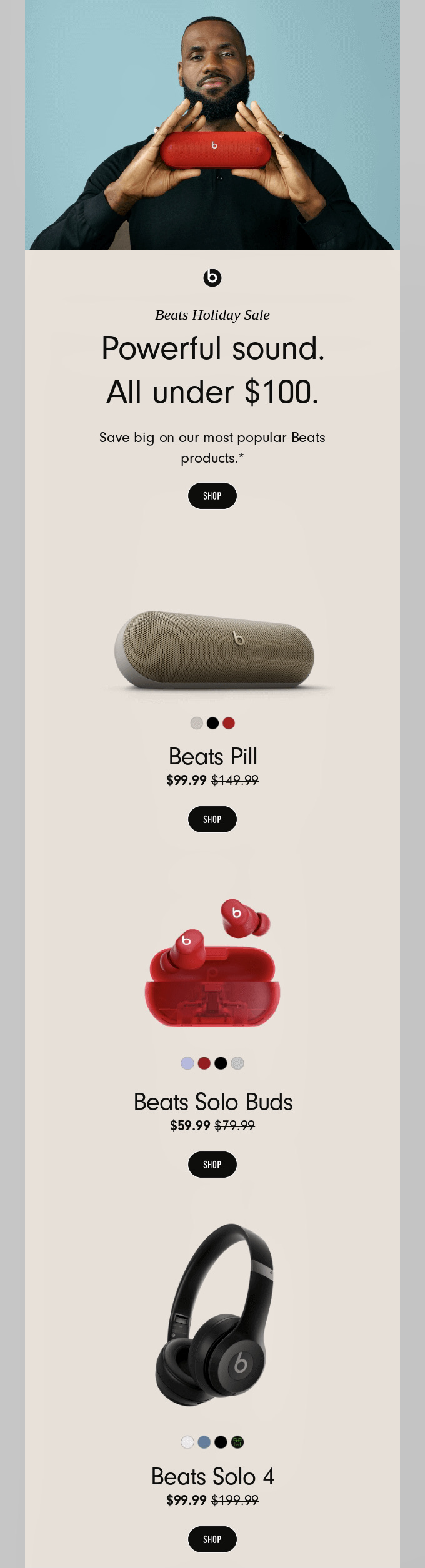
For example, Beats puts “Last chance to shop our holiday sale” in the subject line, so the deadline is clear before subscribers even open the email. Inside, a minimal layout keeps the focus on product images, an “under $100” offer, and a single “Shop” CTA.
Email marketing metrics and benchmarks: what good looks like in 2026
The three metrics that are the most important for ecommerce stores are conversion rates, click-through rates, and revenue-per-email. These metrics provide direct measurements of how email marketing affects your bottom line.
Open rates used to be the main way to measure engagement, but they’ve been less reliable since Apple launched Mail Privacy Protection (MPP) in 2021. MPP preloads emails, tracking pixels included, so an email can show as opened even when nobody reads it.
Here’s a brief rundown of the metrics we recommend you track to accurately evaluate performance:
- Conversion rate: It’s arguably the best metric that shows how well your campaign is performing. If your conversion rate is above industry benchmarks, it means all elements of your email (subject line, content, and offer) set accurate expectations and deliver the recipient to your checkout page.
- Click-through rate: While not as powerful as the conversion rate, CTR still shows how well your subject line and content align to the recipient’s expectations. If your CTR is high, but conversion rates are lacking, your landing page is likely the problem.
- Revenue-per-email: Your ESP can calculate this number using revenue numbers per campaign and total sends. It helps you see the raw number you can associate with your campaigns. You can use this number to compare different campaigns and automations to see what works best.
To expand upon more metrics you should know, we’ve provided a table below with explanations and benchmarks. However, you’ll notice there are average generic industry benchmarks, and Omnisend benchmarks next to them.
These will be different because ecommerce-focused benchmarks aren’t inflated by non-profit and B2B emails. Also, high-frequency ecommerce sends typically yield lower average clicks but significantly higher revenue.
Here’s what good looks like right now, comparing general industry standards against ecommerce-specific data from Omnisend.
| Metric | What it measures | How to calculate it | Industry benchmark | Omnisend 2026 benchmark (date published) |
|---|---|---|---|---|
| Open rate | The percentage of delivered emails opened by recipients | (Opens ÷ Delivered) × 100 | 21% to 39% | 30.7% for campaigns, 38% for automations (June 2026) |
| Click-through rate (CTR) | The percentage of delivered emails that received at least one click | (Clicks ÷ Delivered) × 100 | 2.1% to 3.7% | 0.74% (May 2026)* |
| Click-to-open rate (CTOR) | The percentage of opened emails that received a click | (Clicks ÷ Opens) × 100 | 10% to 25% | 2.40% for campaigns, 11.40% for automations (June 2026)* |
| Click-to-conversion rate | The percentage of clicked emails that result in a purchase | (Conversions ÷ Clicks) × 100 | 1.5% to 3% | 9% (June 2026)** |
| Bounce rate | The percentage of emails that could not be delivered to the inbox | (Bounces ÷ Sent) × 100 | <2% | N/A |
| Unsubscribe rate | The percentage of recipients who unsubscribed from your list | (Unsubscribes ÷ Delivered) × 100 | 0.1% to 0.5% | 0.2% (May 2026) |
| Revenue-per-email | The average revenue generated for every email sent | Total revenue ÷ Total emails sent | $0.08 to $0.15 | $0.18 for campaigns, $2.87 for automations (June 2026)*** |
*Omnisend’s rate is lower because ecommerce promotion emails naturally generate fewer clicks per send.
**Omnisend’s rate is higher because most emails are centered around making a sale instead of other actions.
***Omnisend’s numbers exceed generic averages because automated ecommerce flows reach shoppers at the time when they’re ready to buy.
How much is an email list worth?
A 1,000-subscriber email list is worth roughly $1,294 per month, or $15,528 per year. We’ve achieved this number by taking Omnisend 2026 Ecommerce Report benchmarks, which stand at $0.18 for campaigns and $2.87 for automations. You can do the same math based on your own data and come up with your own number.
To calculate the expected value of your audience, use your performance data and apply it to a standard sending routine. For example, if you send one weekly campaign to a 1,000-subscriber list, that makes 4,000 campaign emails a month. That’s your campaign-centered number.
When it comes to automations, let’s say, for argument’s sake, that 20% of your list triggers an automation based on user behavior. That could be abandoned carts, welcome flows, browse abandonments, win-backs, and more. With 20%, you get 200 automated emails on top of the 4,000 that we calculated for campaigns.
Here’s a visual breakdown of the math:
| Monthly volume | Revenue per email (Omnisend 2026 benchmarks) | Projected monthly revenue | |
|---|---|---|---|
| Campaigns (4 weekly sends) | 4,000 emails | $0.18 | $720 |
| Automations (20% of your list) | 200 emails | $2.87 | $574 |
| Total estimated value | 4,200 total emails | - | $1,294 |
There are three variables that move this estimate the most:
- List engagement defines how many people actually open and click your campaigns.
- Average order value determines the total revenue each of those clicks brings in.
- Automation coverage decides how often you capture high-intent buyers with triggered messages.
However, this estimate assumes only active subscribers; a list of 1,000 unengaged contacts is worth close to nothing, and that is the point.
What are the biggest challenges in email marketing?
The biggest challenges in email marketing are strict inbox deliverability standards, subscriber fatigue, privacy-related measurement gaps, and list-scaling costs.
Deliverability and domain authentication
Email deliverability is about making sure your emails land in subscribers’ inboxes. Some emails may get blocked or land in the spam folder. One big reason for this is sender reputation.
- SPF (Sender Policy Framework) lists the IP addresses authorized to send from your domain.
- DKIM (DomainKeys Identified Mail) attaches a cryptographic signature to verify message integrity.
- DMARC (Domain-based Message Authentication, Reporting, and Conformance) defines how receiving servers handle emails that fail SPF or DKIM checks, which is required for bulk sends by Google and Yahoo.
These protocols, however, are hard to miss since most providers will throw this interface at you at the very beginning with clear instructions on how to complete the authorization. Also, it’s likely that you won’t be able to send emails using the ESP until you complete this process.
Inbox competition and email fatigue
Crowded inboxes can lead to email fatigue, where users ignore or unsubscribe from generic messages. In fact, 43% of people unsubscribe from being emailed too often. To stand out, you need to set up automations for personalized experiences.
Personalized automated messages deliver 52% higher open rates, 332% higher click rates, and 2,361% higher conversion rates.
You can segment your audience based on behavior like:
- Shoppers who abandoned carts
- First-time buyers
- Users browsing specific product categories
Measurement gaps from privacy features
Open rates no longer show how many people actually read your emails. Since 2021, Apple Mail Privacy Protection (MPP) automatically downloads the images in every email sent to Apple Mail users who turn it on, including the tracking pixel email platforms use to count opens.
Because the pixel loads whether or not anyone opens the email, your reports record opens that never happened. This affects anyone reading email in the Apple Mail app with MPP turned on, including people using Gmail or Outlook addresses on an iPhone or Mac.
Inflated opens cause three practical problems:
- Misleading subject line tests: A/B tests that pick a winner by open rate can choose the wrong version, because machine opens inflate both variants and drown out the real difference between them.
- Broken engagement segments: Subscribers who never read your emails can still look “engaged,” so they stay out of win-back flows and sunset segments.
- Unreliable automation triggers: Workflow conditions like “opened the previous email” can fire for people who never saw it.
For a more accurate picture, judge campaigns by clicks, conversions, and revenue per email. Define “engaged” by clicks or purchases within a set window, such as the last 90 days, and run subject line tests on click rate instead of open rate.
Escalating list costs
Most ESPs charge based on total subscriber count; others charge by monthly email volume. It’s essential that you connect your business model with the pricing strategy that works best for you. Otherwise, it may hurt your ROI.
Make sure you follow best practices like regularly conducting an email marketing audit to remove cold contacts who haven’t responded to any win-back campaigns. It will help you manage your resources better and see your performance for what it really is.
| Email marketing challenge | Business impact | Practical fix |
|---|---|---|
| Authentication and deliverability | Messages land in spam, lost revenue | Configure SPF, DKIM, and DMARC records |
| Inbox competition | Fatigue, lower clicks, spam complaints | Segment audiences by purchase behavior |
| Privacy protections | Inaccurate open-rate tracking | Optimize for clicks, orders, and revenue |
| List scaling costs | Bloated ESP fees from cold subscribers | Prune inactive addresses regularly |
How to start email marketing in five steps
Learning how to start email marketing for beginners and advanced users alike comes down to capturing, engaging, and analyzing your audience. Here’s a sequence you should follow:
- Choose an email marketing platform
- Add your first sign-up form
- Create a welcome email
- Send your first campaign
- Review and improve
1. Choose an email marketing platform
Choose a platform based on six factors: store integration, automation depth, segmentation, deliverability support, pricing as your list grows, and customer support. This choice shapes your costs and capabilities for years, because moving your flows, templates, and contact data to another platform later takes real time.
Don’t default to the most recognizable name. Check how each platform’s price changes at 2× and 5× your current list size. Our platform comparison criteria break down what to check for each factor.
2. Add your first sign-up form
Your form should be easy to spot. You can also provide incentives like a discount, exclusive updates, or early access to products in exchange for sign-ups. This value should be stated clearly in the sign-up form. You can choose between different types of forms, including:
- A prominent pop-up that appears based on user behavior, such as exit intent
- An embedded form to place on your homepage or footer
- A gamified form offering discounts or prizes in exchange for emails
3. Create a welcome email
Send a welcome email the moment someone subscribes, while their interest in your brand is at its peak. Welcome emails generated $6.30 in revenue per email for Omnisend merchants in 2025, the second-highest of any automation, compared with $0.18 for regular campaigns.
Include four things in your welcome email:
- A thank-you for subscribing
- A short introduction to your brand
- The discount or offer you promised in the signup form
- What subscribers can expect next, such as how often you’ll email
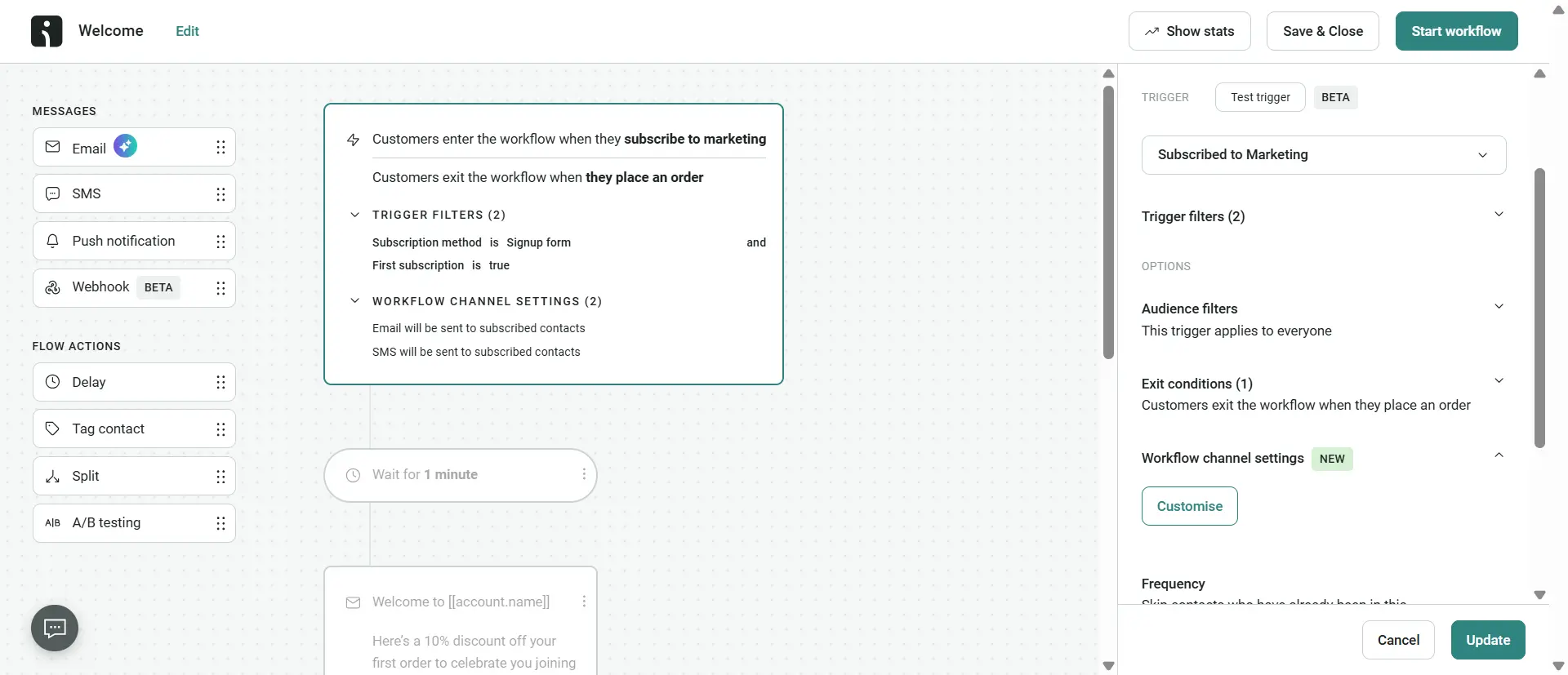
Here’s how Omnisend’s interface looks when creating a new welcome sequence:
4. Send your first campaign
When sending a manual campaign, focus on a single objective instead of asking for three different actions. Most popular choices are promotional campaigns where businesses highlight two or three of their best-selling products or offer a limited-time deal to drive a first purchase.
Maintain strict consistency with your brand’s colors, fonts, logos, and tone of voice across every campaign, unless the situation demands otherwise. It will help you build recognizability and trust with your recipient. Last but not least, always double-check if your links work and preview the design on both desktop and mobile before sending.
5. Review and improve
Review each campaign and automation by revenue per email, click-through rate, conversion rate, and unsubscribe rate, then change one variable in the next send based on what underperformed. Check results three to five days after a campaign sends, once most orders have come in.
Compare your campaign numbers against ecommerce benchmarks from the Omnisend 2026 Ecommerce Report:
| Metric | Campaign benchmark | What to test if you're off target |
|---|---|---|
| Revenue per email | $0.18 | The offer, or which products you feature |
| Click-through rate | 0.74% | A clearer CTA, or a narrower segment |
| Unsubscribe rate | 0.2% or lower | Sending frequency, or how well content matches the segment |
Treat open rates as a rough signal only, since Apple Mail Privacy Protection inflates them (see the measurement gaps section above).
Automations need their own baseline: Omnisend automations average $2.87 in revenue per email, so compare each flow against that figure instead of campaign numbers.
Email marketing laws: CAN-SPAM, GDPR, and CASL
Email marketing laws, or data privacy regulations, require you to obtain clear consent and offer a clear opt-out mechanism. These laws are there to protect people from spam and make sure that businesses use email marketing ethically.
| Regulation | Who it applies to | What it requires | Maximum penalty |
|---|---|---|---|
| CAN-SPAM (USA) | Commercial emails sent to US recipients | No deceptive subject lines, a valid physical address, and an easy unsubscribe option | Up to $53,088 per email (FTC, 2026) |
| GDPR (EU/UK) | Data collection and emails sent to EU and UK residents | Explicit opt-in consent (no pre-checked boxes), ability for users to access or delete their information | Up to €20M (EU) / £17.5M (UK) or 4% of global annual turnover. (GDPR, 2026) |
| CASL (Canada) | Commercial messages sent to or from Canadian residents | Opt-in consent, clear sender identification, and unsubscribe options | Up to $10M for businesses and $1M for individuals per violation (CRTC, 2026) |
Additionally, the California Consumer Privacy Act (CCPA) gives California residents the right to opt out of the sale or sharing of their personal data. Most email providers automate consent capture and technical authentication by default, so you need to carefully evaluate these features when you choose an email marketing platform.
How to choose an email marketing platform
To choose the right platform, you need to check how it integrates with your store, compare the depth of automation capabilities against your needs, and how costs scale as your subscriber list grows. It’s worth spending the time now to avoid potentially expensive and time-consuming migration processes down the line.
Core selection criteria
- Store integration: Does the platform sync product data, historical purchases, abandoned carts, and user activity natively, or do you need to configure custom APIs for that?
- Automation depth: Can you build multi-step workflows based on user behavior with conditional splits, or does it only support basic autoresponders?
- Deliverability handling: Does the platform manage sender reputation, monitor spam traps, help configure technical domain authentication, or do you need to handle it all on your own?
- Support availability: Can you reach a human support agent instantly at any time, or is it restricted to higher-tier plans or working hours?
- Pricing scale: How does the platform manage pricing if your subscriber list inevitably doubles or triples in size?
Best platforms for different businesses and their trade-offs:
| Platform | Best for | What it gives you | Trade-off |
|---|---|---|---|
| Mailchimp | Local small businesses wanting several marketing tools in one account | A broad marketing suite beyond email, in a familiar interface | Ecommerce depth is shallower than purpose-built tools |
| ActiveCampaign | B2B teams with long sales cycles and heavy CRM needs | Deep conditional logic for multi-stage lead nurturing | Higher cost, and more setup before it earns its keep |
| Omnisend | Ecommerce stores on Shopify, WooCommerce, or BigCommerce | Native sync of product data, cart activity, and purchase history, plus email and SMS in one workflow | Built around ecommerce, so less suited to B2B or service businesses |
With Omnisend, you also get award-winning 24/7 human customer support (free plan users included) and sophisticated AI functionality. Omnisend AI helps you build audience segments in seconds by simply writing a prompt of what you want to see, generate product recommendations, run RFM analysis, and forecast customer lifetime value.
There’s also the MCP integration that lets you query your store’s performance inside ChatGPT or Claude without constantly switching tabs. All these features are woven into existing workflows instead of just being bolted on.
Outdoor gear brand Flextail built a welcome automation flow using Omnisend that directly generated $235,000 in attributed sales, which proves the value of using an ecommerce-focused email marketing platform.
Start your first email marketing campaign
Email marketing is one of the most effective and affordable ways to connect with your audience, nurture leads, and drive revenue. With the right tools and strategies, email marketing can increase revenue and give you insights on how to optimize emails.
Quick sign up | No credit card required