Omnisend AI
 OFFER


The best giveaway email examples make the prize clear and entering a one-click job. We pulled these 13 giveaway email examples from Milled and Really Good Emails, and 10 went out in 2026.
Each comes from a different brand, from jewelry brand Pandora to pet treats brand Bullystick, but the tactics repeat. Expect a valued prize and one entry action, plus a visible deadline and a reason to buy for readers who don’t win.
For each email, you’ll see the subject line, trigger, and send timing, plus why it works and what to copy. After the examples come 20 subject lines you can use and the Omnisend setup.
13 giveaway email examples
We chose each example because it’s a recent giveaway email with one tactic you can reuse in your email marketing campaigns. Pandora, for example, makes a holiday giveaway double as a loyalty sign-up, while Bullystick asks dog owners to complete a seven-day walking streak.
| Brand | Industry | Differentiator |
|---|---|---|
| Pandora | Jewelry | Wishlist as the entry |
| Ellis Brigham | Outdoor and ski retail | A prize you can shop |
| Pants & Socks | Apparel (underwear) | Purchase as the entry |
| Year & Day | Tableware and home | Multi-brand collaboration |
| Schneiders Saddlery | Equestrian supplies | A weekly giveaway habit |
| White Stuff | Fashion | Survey as the entry |
| KicKee Pants | Kids’ clothing | Partner prize told as a routine |
| Bullystick | Pet treats | Activity as the entry |
| Ketone-IQ | Health and wellness (energy drinks) | Entry confirmation that sells |
| ~Pourri | Personal care | Reminder inside a launch email |
| Kate Somerville | Skincare | Three-step entry reminder |
| Anglepoise | Lighting and furniture | Exact deadline in the subject line |
| Freck Beauty | Clean beauty | Winner email that sells |
1. Pandora: Wishlist as the entry
Subject line: Enter to Win a Holiday Advent Calendar 🎁
Trigger: Holiday campaign promoting the My Pandora loyalty program
Sent: October 23, 2026, the second day of a two-week sweepstakes (October 22–November 5)
Why this email works
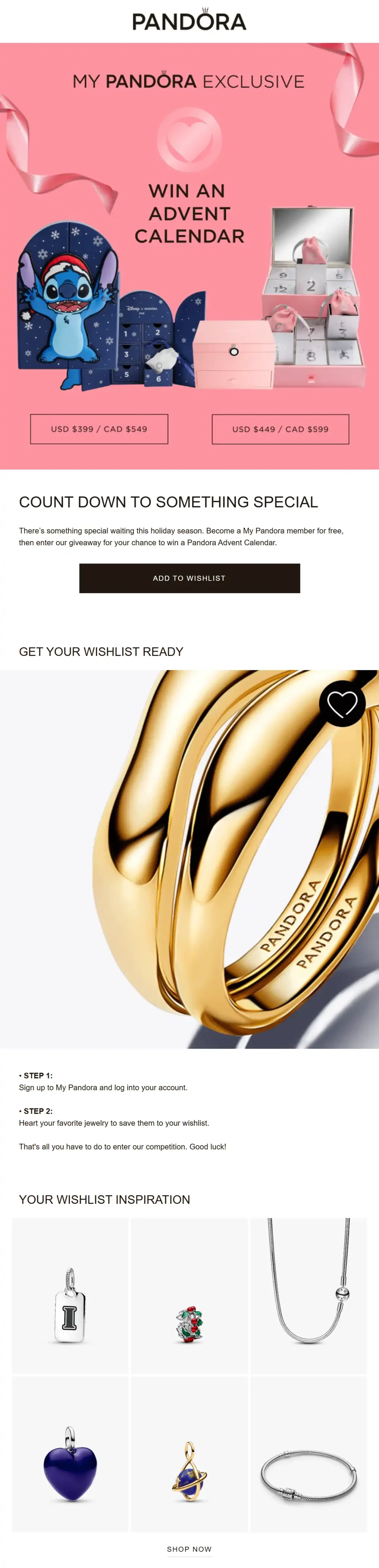
Pandora puts the prize right in the subject line, and the preheader, “Join My Pandora and add to wish list,” spells out how to enter. The giveaway promotes Pandora’s holiday advent calendar while encouraging people to sign up to the brand’s loyalty program.
The email design follows Pandora’s branding, and the email copy is brief. Readers immediately know what to do, as the email shows only two steps: sign up for My Pandora and then add a favorite item to their wishlist. To make the transition from reading to acting smoother, Pandora adds a “wishlist inspiration” grid of six products, followed by category buttons.
What you can learn from it
Take advantage of entry actions that tell you what customers want, such as saving products to a wishlist, and use that data to recommend holiday products.
Try it with Omnisend: Collect entries on a giveaway landing page built with Omnisend sign-up forms.
2. Ellis Brigham: A prize you can shop
Subject line: Win a ski holiday and £2000 of Salomon gear
Trigger: Partner campaign with Salomon and Heidi
Sent: October 25, 2026, as the announcement
Why this email works
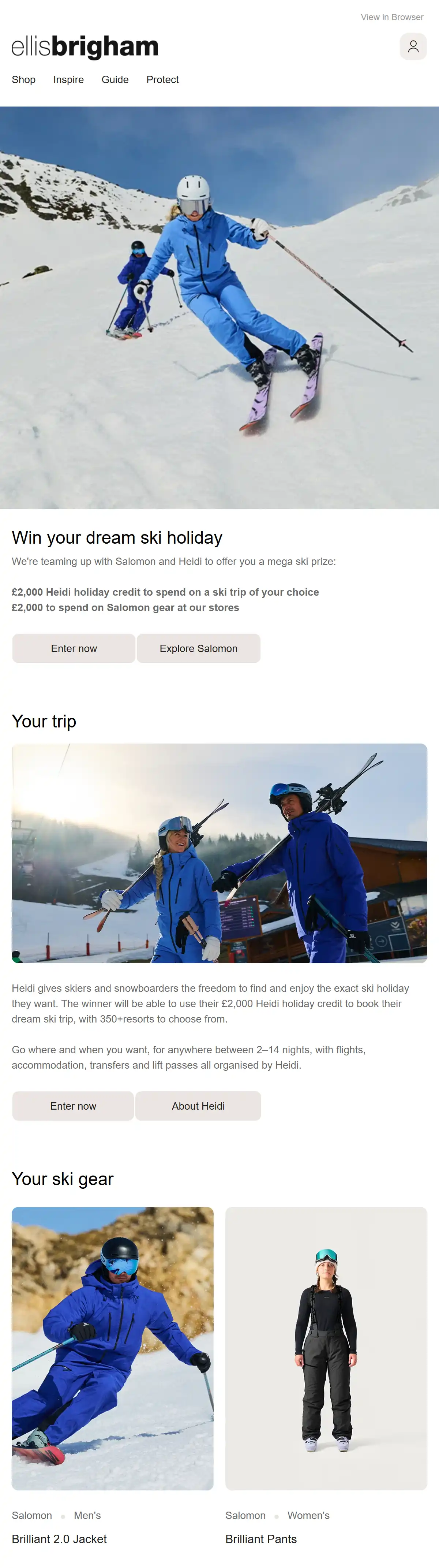
Ellis Brigham puts a value on both halves of its prize, right under the “Win your dream ski holiday” headline: £2,000 of Heidi holiday credit and £2,000 to spend on Salomon gear. The email also names the giveaway and introduces Heidi, its travel partner for this event.
Ellis Brigham separates information about the two prizes, so readers know what they can expect to win and how.
What you can learn from it
Make the giveaway email also work as a catalog for readers who don’t win by showing the prize as products from your own store.
3. Pants & Socks: Purchase as the entry
Subject line: 🏆Buy pants. Win your basket.
Trigger: Monthly purchase-based prize draw campaign
Sent: October 23, 2026, one week before entries close on October 31
Why this email works
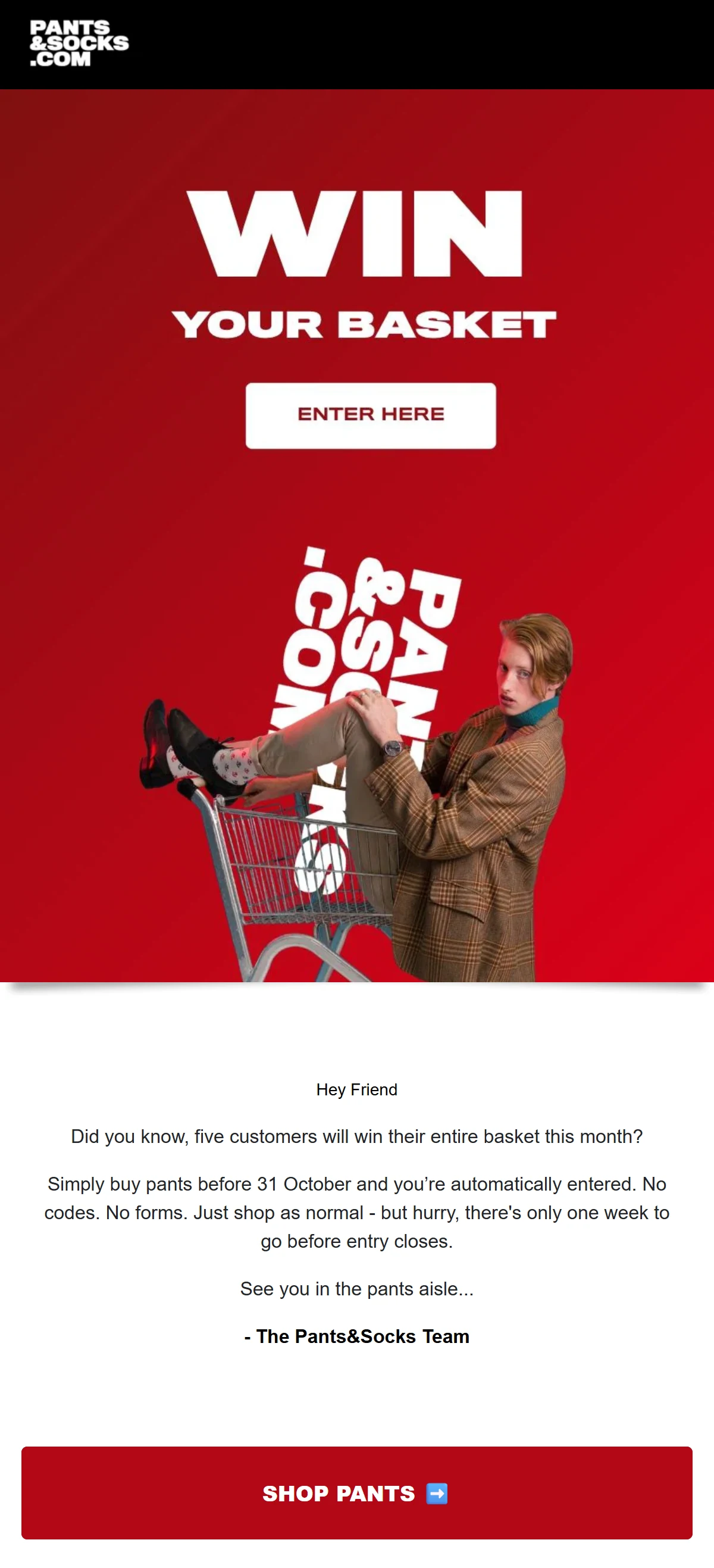
Pants & Socks lays out its giveaway in five words: “🏆Buy pants. Win your basket.” The subject line tells buyers what they could win and how to enter before they even open the email.
The preheader adds that there are five winners this month and that every October pants order counts as an entry, with only one week left. The email body then makes clear there are no codes to enter and no forms to fill out. All you need to do is buy, and you’re automatically involved in the giveaway.
What you can learn from it
Count every order in a set period toward the giveaway, so the giveaway drives sales rather than only sign-ups. Be sure to read local prize-draw rules first.
4. Year & Day: Multi-brand collaboration
Subject line: The Winning Host Giveaway Is Here
Trigger: Collaborative campaign with 10 partner brands
Sent: November 2025, as the announcement
Why this email works
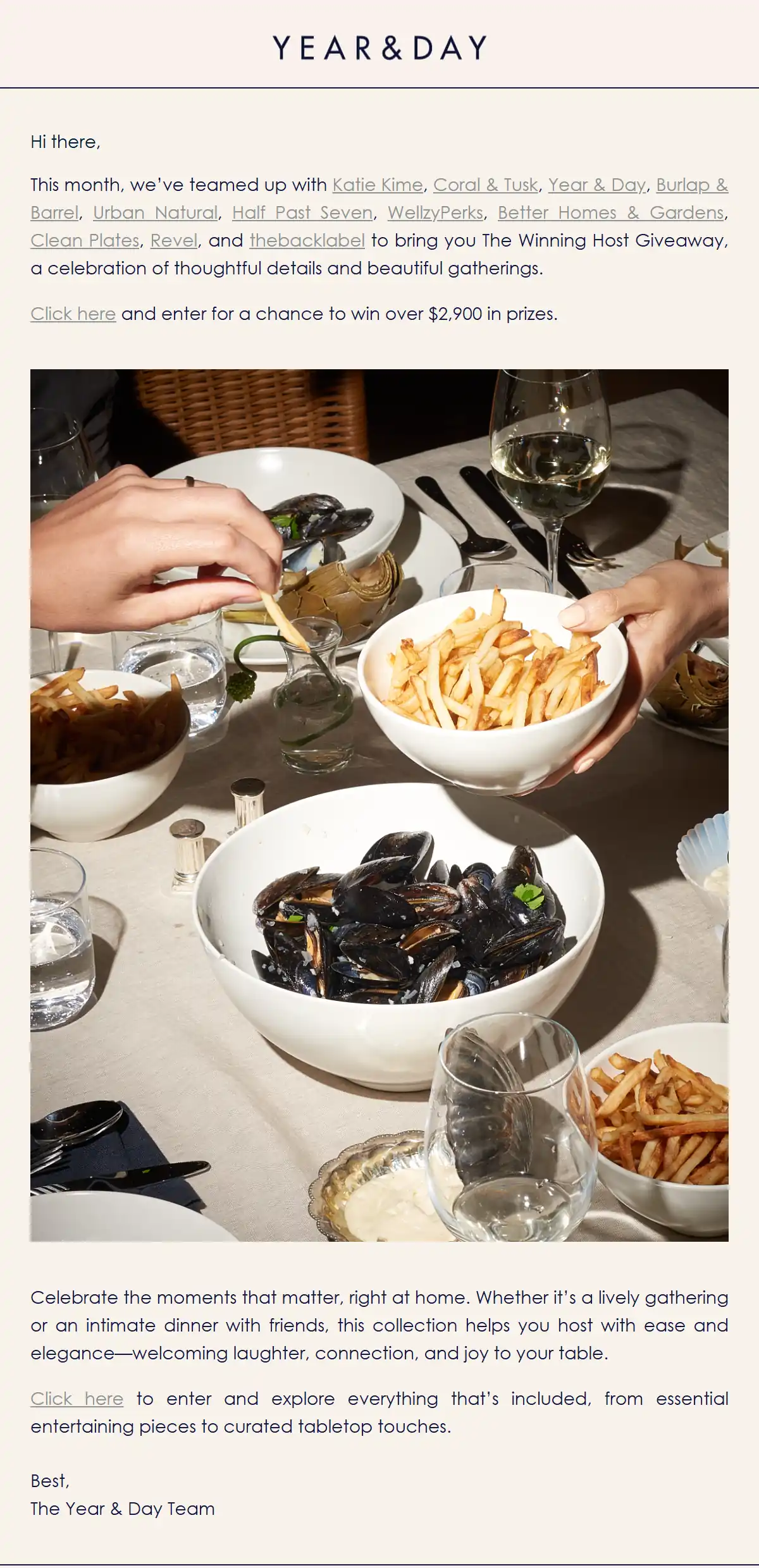
Year & Day makes a multi-brand giveaway feel personal by sending it as a short letter from the team instead of a designed announcement. The copy includes two short paragraphs, a single dinner-table photo, and a straightforward sign-off. Notably, there’s no banner or button.
The first paragraph talks about Year & Day’s partners, linking to each one for readers to read more if they want to. After each of the two paragraphs comes a “Click here” text link to enter, so a reader can act after the first paragraph or wait for the second.
What you can learn from it
Partner with non-competing companies that share your customers to offer a prize themed around how they use your product.
Try it with Omnisend: Recreate this letter-style layout with Omnisend’s email templates.
5. Schneiders Saddlery: A weekly giveaway habit
Subject line: ✨ GIVEAWAY ALERT ✨
Trigger: Recurring weekly campaign
Sent: August 4, 2026, the day the week’s giveaway opened (entries close August 11)
Why this email works
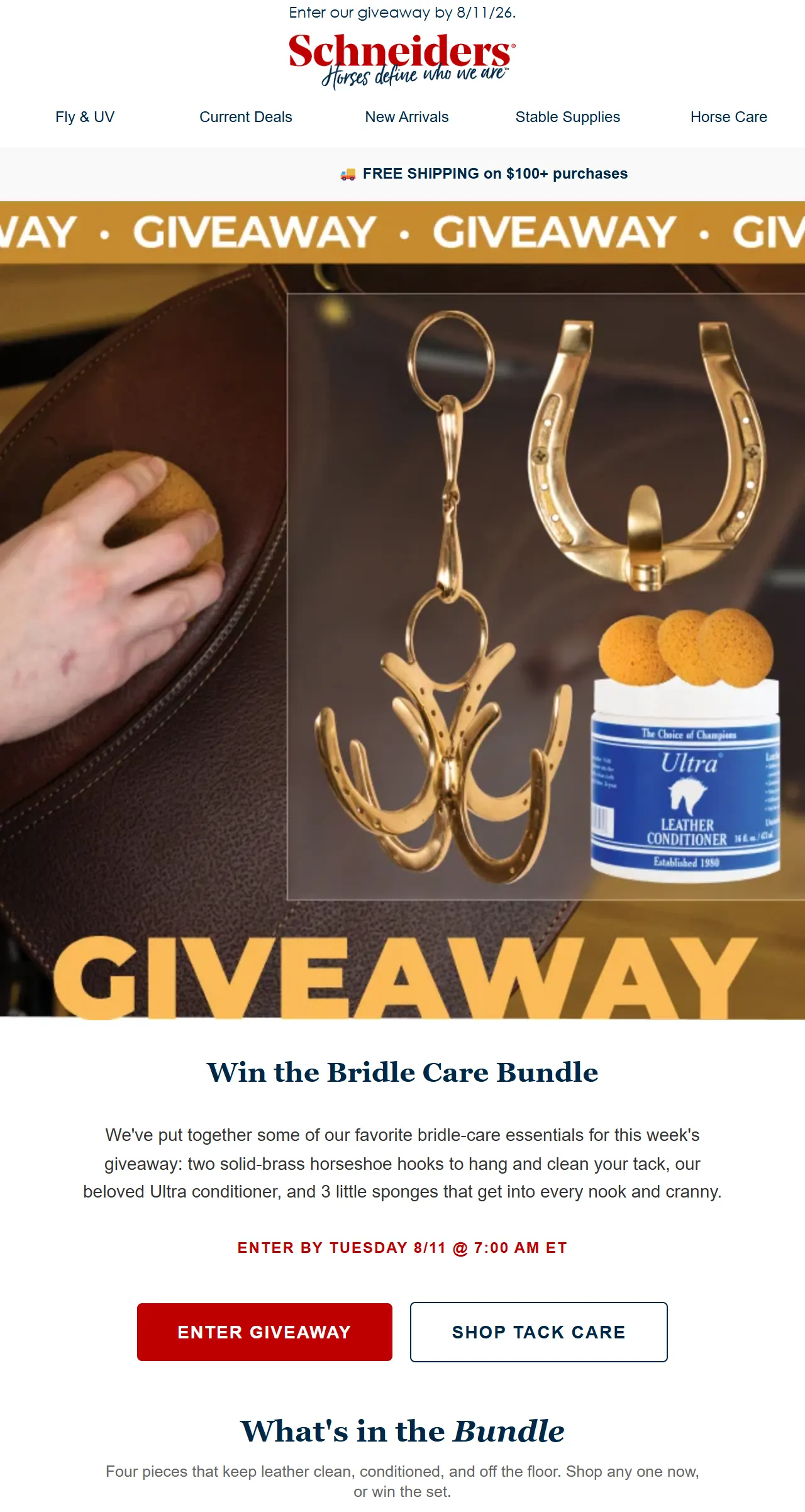
Schneiders’ short subject line announces the giveaway, while the preheader, “This week’s giveaway has arrived,” lets readers know it’s part of a weekly series they can expect again.
While the prize is relatively modest compared to other giveaways, the selected items are those that riders use. So, Schneiders’ buyers have a reason to remain buyers, and new readers get an incentive to try the brand.
What you can learn from it
Use a product bundle for a small weekly giveaway, and give the series a label subscribers recognize, such as “✨ GIVEAWAY ALERT ✨”.
6. White Stuff: Survey as the entry
Subject line: Help shape our next collection (and win a £250 voucher)
Trigger: Customer feedback campaign
Sent: September 14, 2026, as the announcement (no closing date in the email)
Why this email works
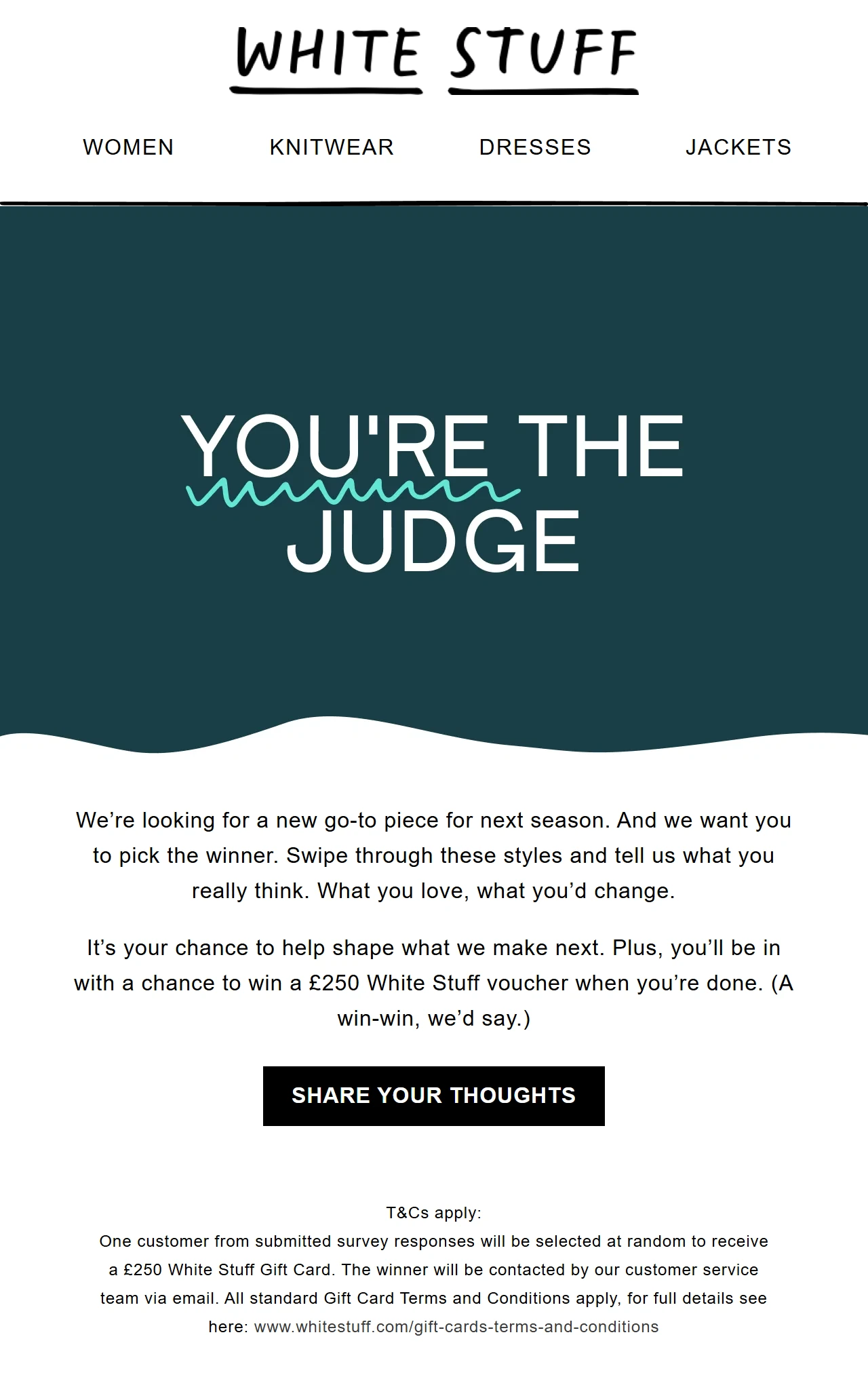
White Stuff’s email combines a £250 voucher giveaway with product research, so both the brand and its customers benefit. The copy starts off by asking readers to be a part of the brand’s new collection, and by doing so, they are in with the chance of winning a voucher.
The “You’re the judge” hero bills the survey as a vote on next season’s styles, and the voucher draw gives readers a reason to finish it.
What you can learn from it
Swap the plain sign-up for a short survey, and use the answers to build segments or plan products.
7. KicKee Pants: Partner prize told as a routine
Subject line: ✨ PJs, Tooth Fairy Magic & a BIG giveaway!
Trigger: Fall collection newsletter
Sent: October 24, 2026, as the announcement
Why this email works
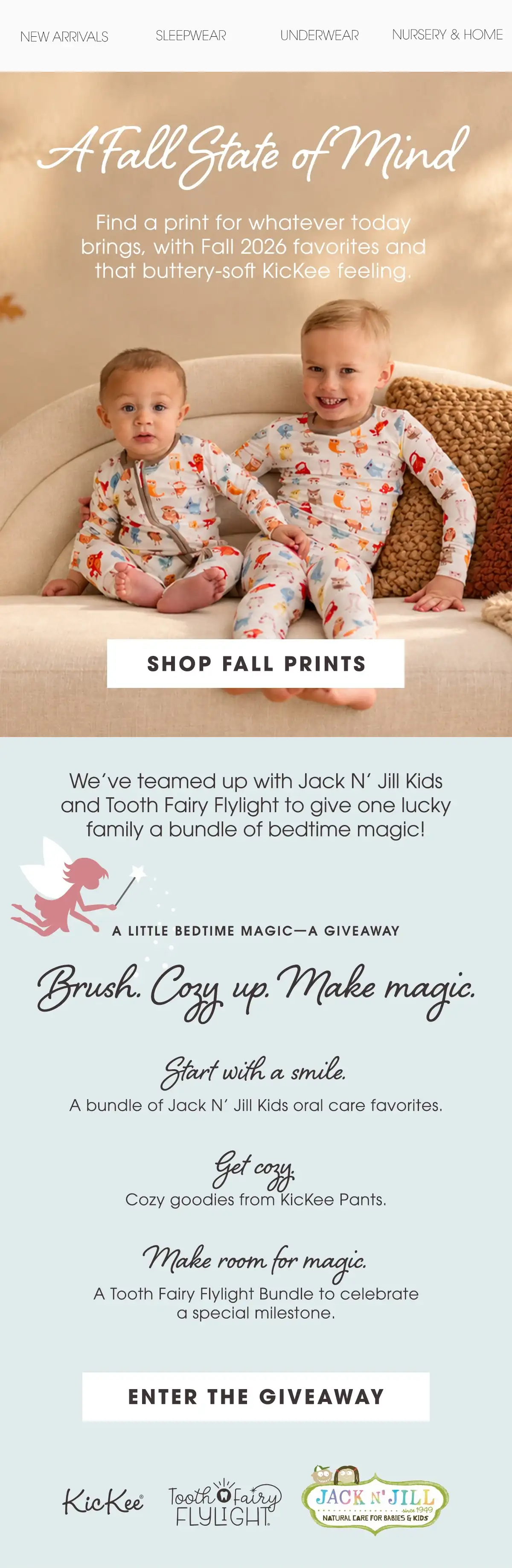
KicKee Pants’ email does two jobs at once, launching a new collection and announcing a giveaway, each with its own CTA. The subject line reflects both: “✨ PJs, Tooth Fairy Magic & a BIG giveaway!” The email body continues to introduce the new collection with a direct “Shop fall prints” CTA button.
The giveaway section talks about what readers can expect, and also mentions partners involved in the giveaway. A single call to action at the end of the block invites readers to enter.
What you can learn from it
Bundle partner products so they feel like one prize. Arrange them as a routine your customers already follow.
8. Bullystick: Activity as the entry
Subject line: 🎃 Walk Your Dog. Win a Halloween Treat Box!
Trigger: Partner challenge campaign with WeWard and Fi
Sent: October 22, 2026, three days into the October 19–November 13 challenge
Why this email works
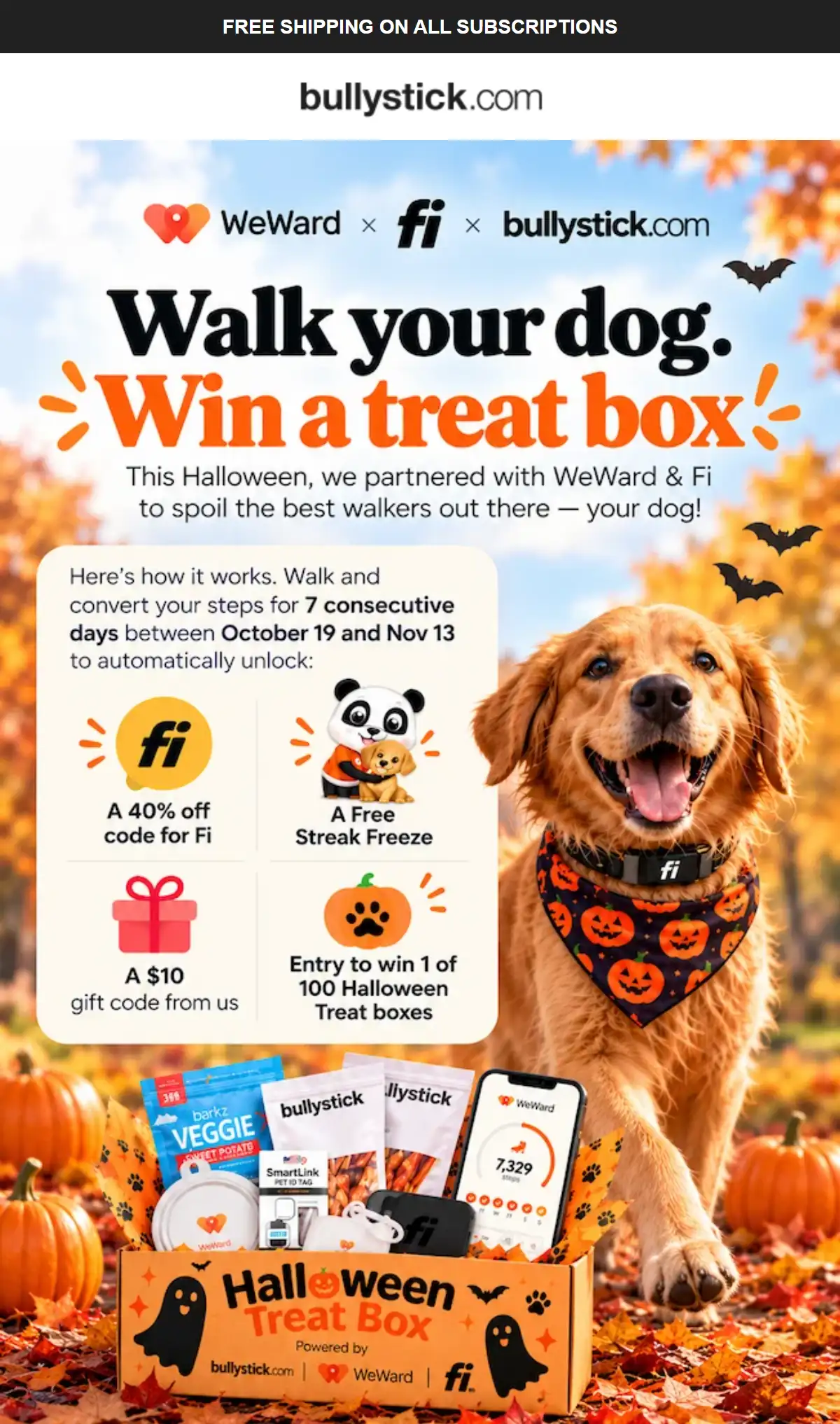
Bullystick has dog owners earn their entry by walking their dogs and logging the steps in a partner app, so there’s no form to fill out. For a brand that sells dog treats, that’s an entry action built on a routine its customers already have.
The brand partners with the WeWard app to track steps, and if pet owners hit a seven-day streak, they can get a 40% off Fi code, a free streak freeze, a $10 gift code, and an entry to win one of 100 Halloween treat boxes. Everyone who completes the streak gets something, and only the treat boxes are left to chance.
What you can learn from it
Pair the giveaway entry with guaranteed rewards for completing a challenge, so everyone gets something.
9. Ketone-IQ: Entry confirmation that sells
Subject line: You’re Officially in the Running
Trigger: Automated confirmation after a giveaway entry
Sent: Right after each entry (automated, 2025)
Why this email works
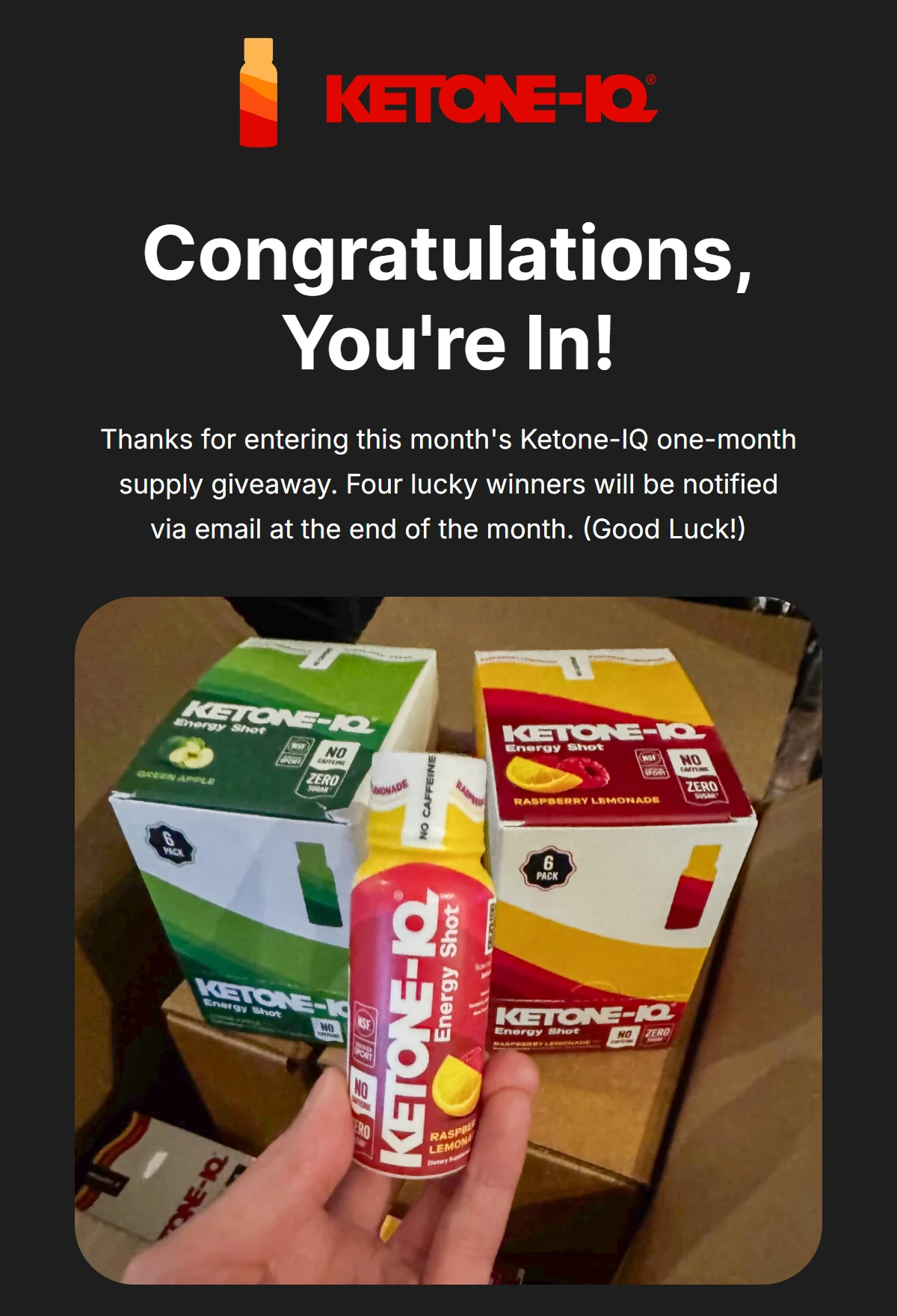
Ketone-IQ’s entry confirmation opens with “Congratulations, You’re In!” and gets straight to what happens next. The email body goes on to explain that this is a monthly giveaway of a one-month supply and that they will notify four winners by email at the end of the month.
It also works as a welcome email that introduces the products and provides two testimonials, one of which is from an NBA coach. The last email section leads readers from interest to action with the CTA button asking them to subscribe and save 30%.
What you can learn from it
Send an instant confirmation with the draw date and explain how you’ll notify winners.
10. ~Pourri: Reminder inside a launch email
Subject line: Pumpkin Mania Has Arrived 🎃
Trigger: Seasonal product launch campaign
Sent: September 2025, the day before the giveaway ended
Why this email works
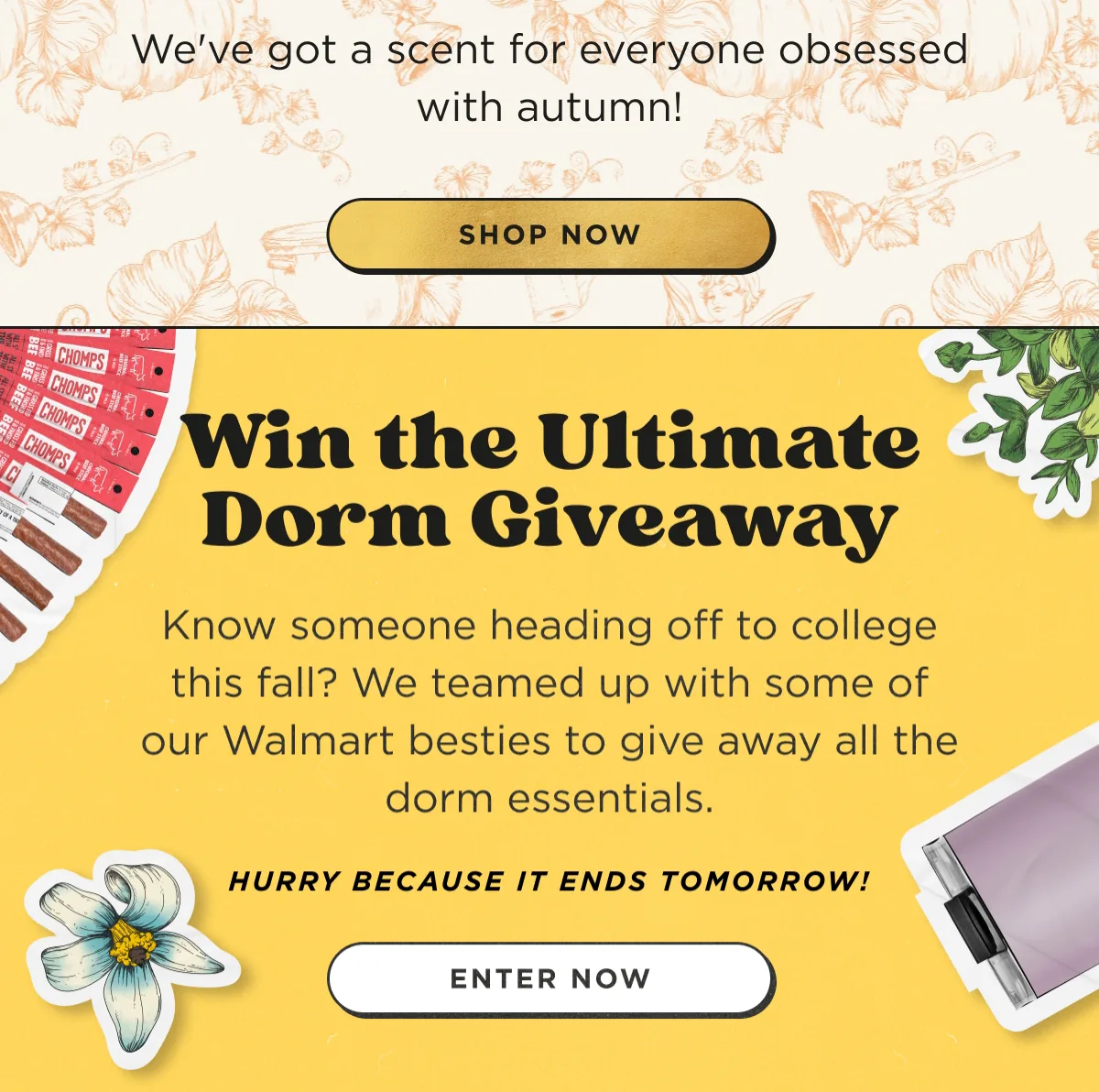
~Pourri gets its giveaway reminder out without a separate send by putting it inside a product launch email. The beginning of the email talks about a new Maple Pumpkin Poo~Pourri launch with a witty headline, a short copy line, and a clear CTA button.
The bottom block announces the Ultimate Dorm Giveaway, run with “some of our Walmart besties,” and speaks to readers who know someone heading off to college. With its “Hurry because it ends tomorrow!” line and its own “Enter now” button, the block reads as a last-chance reminder.
What you can learn from it
Add a last-chance giveaway block to an existing campaign to avoid sending a separate reminder.
11. Kate Somerville: Three-step entry reminder
Subject line: Don’t Forget To Enter Our Fall Giveaway
Trigger: Reminder campaign during the giveaway
Sent: October 22, 2026, as a reminder while the giveaway runs
Why this email works
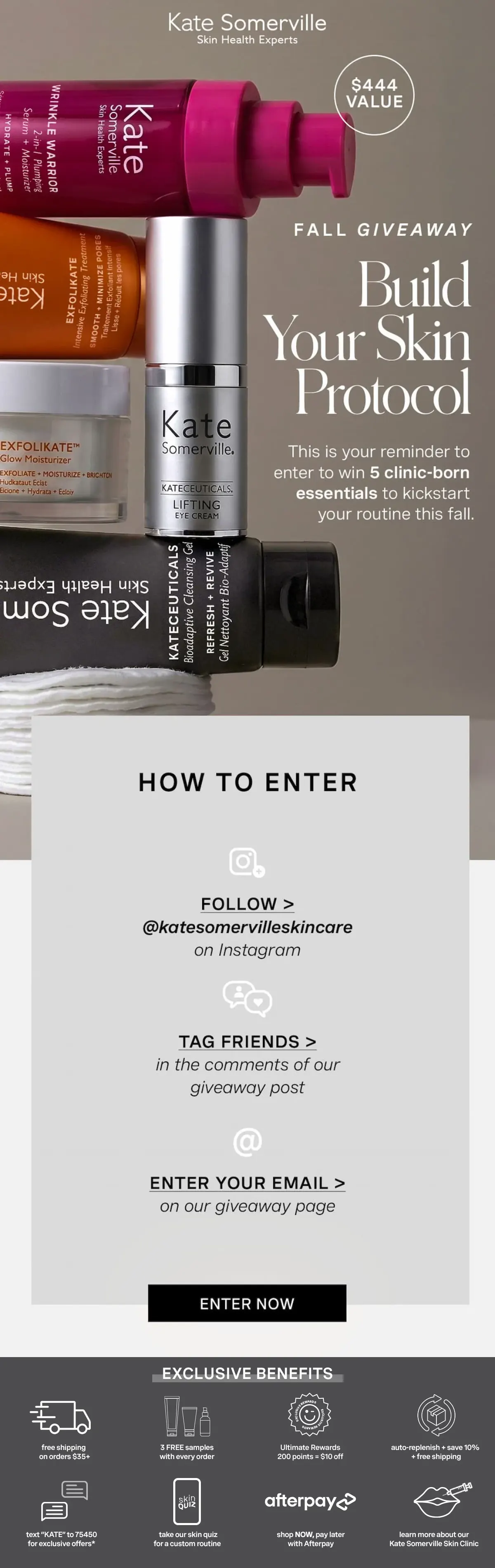
Kate Somerville’s subject line opens with a reminder, the hero with “This is your reminder to enter,” and both say what the giveaway is about. The hero section of the email shows five products which collectively amount to $444 in value.
The email then explains how to enter this giveaway in three steps. Readers only need to follow Kate Somerville on Instagram, tag their friends under the brand’s giveaway post, and enter their email to finalize the entry process.
What you can learn from it
List each entry step alongside an icon, and include a separate email sign-up step to collect subscribers from the social giveaway.
12. Anglepoise: Exact deadline in the subject line
Subject line: Anglepoise & String Furniture Giveaway – ends midnight.
Trigger: Last-chance campaign for a partner Instagram giveaway
Sent: June 2026, on the giveaway’s last day
Why this email works
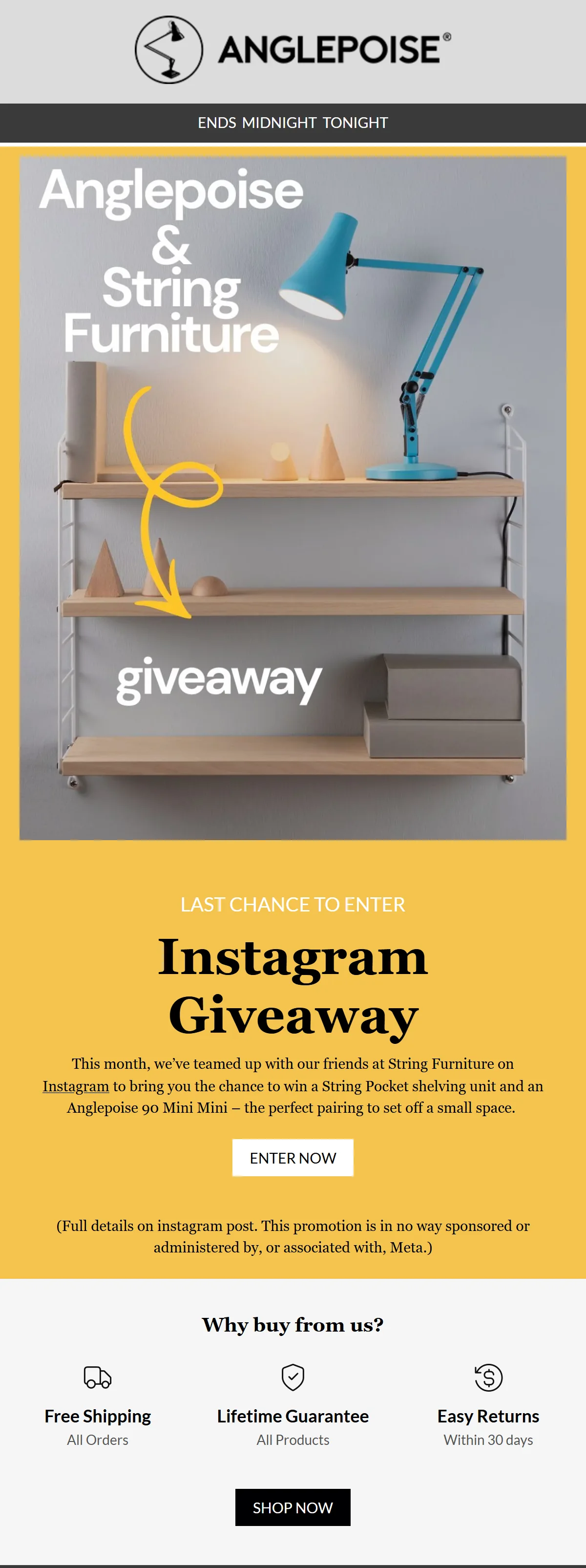
Anglepoise opens its email with a direct subject line that names the brands and the giveaway deadline. The beginning of the email repeats the message that the giveaway is about to end, mentioning that this is an Instagram giveaway, featuring a String Pocket shelving unit and an Anglepoise 90 Mini Mini lamp.
The email then leads to an “Enter now” button readers can click to enter the giveaway, followed by a disclaimer stating that this giveaway isn’t sponsored by Meta. Below the disclaimer, a “Why buy from us?” strip lists free shipping on all orders and a lifetime guarantee, plus returns within 30 days.
What you can learn from it
Include the exact closing time in your subject line, plus a short trust strip that encourages non-winners to buy. If you run a giveaway on social media platforms, name which ones and include relevant details.
13. Freck Beauty: Winner email that sells
Subject line: 20% Off + The Winner of Our Cart Giveaway 💫
Trigger: Winner announcement closing a cart giveaway
Sent: October 20, 2026, the day the giveaway email promised the winner
Why this email works
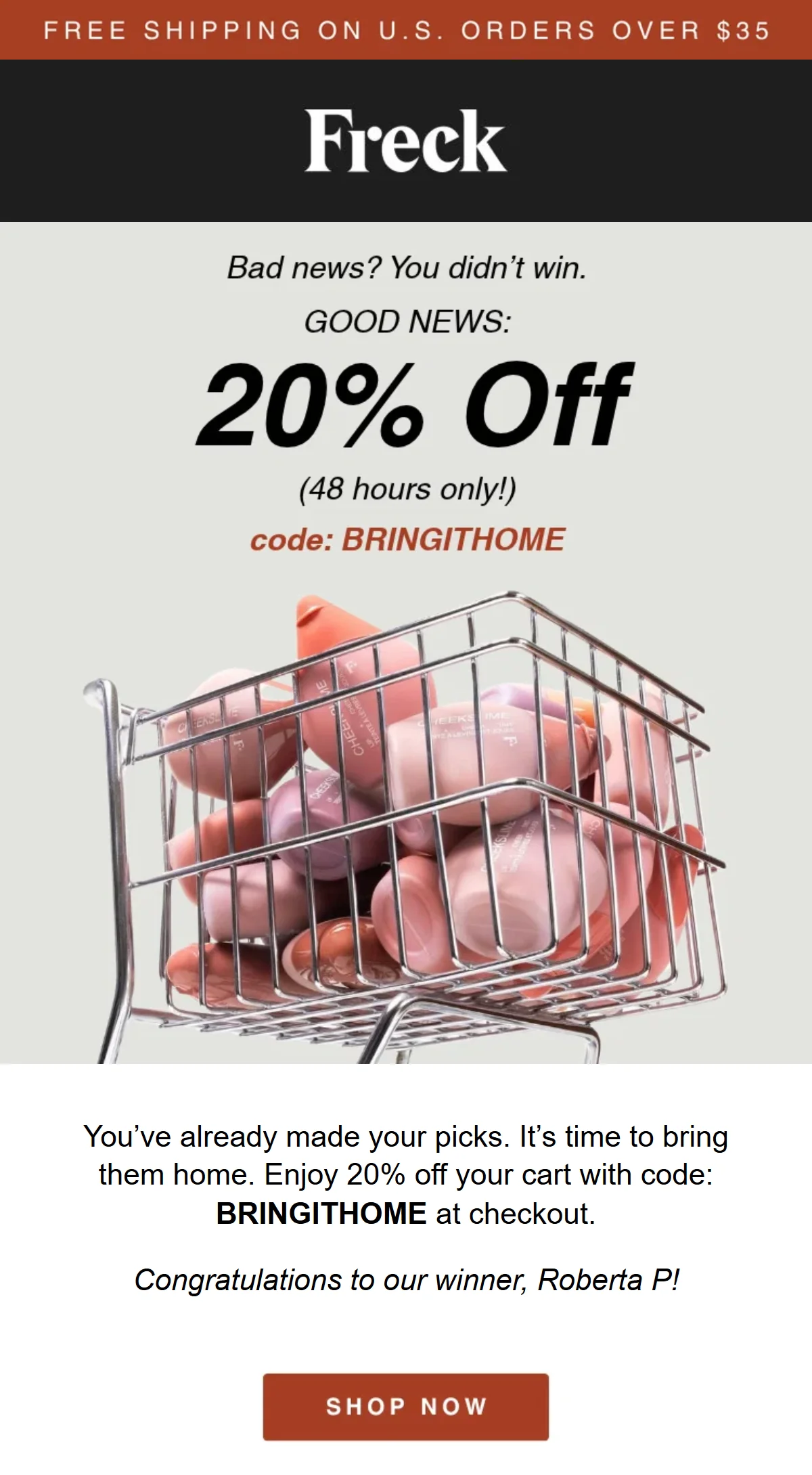
Freck Beauty closes its giveaway sequence with this winner announcement, sent on Tuesday, October 20, the day its “Lucky You: Win Your Cart” email had promised. The email opens with what most readers need to hear: “Bad news? You didn’t win.” The lines after it bring the offer the subject line already led with: 20% off for 48 hours with the code BRINGITHOME.
To enter, subscribers had filled a cart with their wish list, so the copy around the code builds on that: “You’ve already made your picks. It’s time to bring them home.” The winner gets one line, first name and last initial, above the SHOP NOW button. Below it, a “Most Wanted” list of what entrants kept adding to their carts gives everyone else something to buy.
What you can learn from it
Send the winner announcement on the day you promised, and don’t let the non-winners walk away empty-handed. A short-lived code on the products they picked when they entered gives them a reason to buy.
What makes a great giveaway email
A great giveaway email includes four key elements: a named prize, giveaway process, deadline, and a reason to buy for readers who don’t win. The first three bring in the entries, and the fourth gets the non-winners to buy anyway.
Put a number on the prize
A price on the prize shows its value at a glance and can carry a subject line alone. Five of the 13 examples we chose state the prize and put a price tag on it. Year & Day says “over $2,900,” Pandora shows each calendar’s price, and Kate Somerville puts a $444 value badge on its hero image.
Spell out how to enter.
Tell readers exactly what to do: every announcement and reminder in the list spells out its entry action, even though the action differs from brand to brand. Pandora asks for a loyalty sign-up and a wishlist, and White Stuff for a survey, while Bullystick sets an app challenge. Kate Somerville asks for the most, three steps, so its reminder lists each one.
Email carries the details, while SMS marketing can add a last-day nudge for the subscribers who opted in to texts. As for social proof, Ketone-IQ adds two testimonials and Pants & Socks its Trustpilot rating.
Define the deadline and keep it visible
State a closing date or time, and put it where readers look first. Six of the 13 emails give one, and three put it up front: Anglepoise in the subject line, Pants & Socks in the preheader, and Schneiders in the line above its logo. A sign-up form that announces the giveaway can carry the deadline too.
Give non-winners a reason to buy
Most entrants won’t win, so the email should give them a reason to buy. Seven of the 13 giveaway email examples add something for non-winners. Anglepoise lists free shipping and its guarantee, Ellis Brigham shows the prize as shoppable gear, Schneiders tells readers to “Shop any one now, or win the set,” and Kate Somerville adds a benefits strip.
Bullystick rewards every walker who completes the streak, Ketone-IQ adds a subscription discount, and Freck Beauty gives everyone who didn’t win 20% off their cart.
Giveaway email subject lines
The best giveaway email subject lines name the prize, the deadline, or the reader. Choose an approach based on the email’s job in the sequence: curiosity for teasers, urgency for reminders, the prize for announcements, and personalization for confirmations and winner emails.
| Approach | When to use it | Subject line examples |
|---|---|---|
| Curiosity | Teasers and launch announcements | Something big lands in your inbox Friday 👀 We hid a prize in this email Guess what we're giving away Open this before you shop again We can't keep this one quiet |
| Urgency | Reminders and last-chance sends | Last day to enter: the giveaway closes at midnight 12 hours left to win Final call: our giveaway ends tomorrow Still time to enter (but not much) Entries close tonight ⏰ |
| Prize-led | Announcements where the prize does the selling | Win $500 of our best sellers Enter to win a year of our best sellers 3 winners, $100 each: enter now Your chance at our entire fall bundle One entry, $2,000 in prizes from 5 brands |
| Personal | Confirmations, winner emails, and engaged segments | Your entry is confirmed, [first name] [First name], help us pick our next winner [First name], did you see this week's prize? [First name], here’s your entry to our holiday giveaway Congrats [first name], you won! |
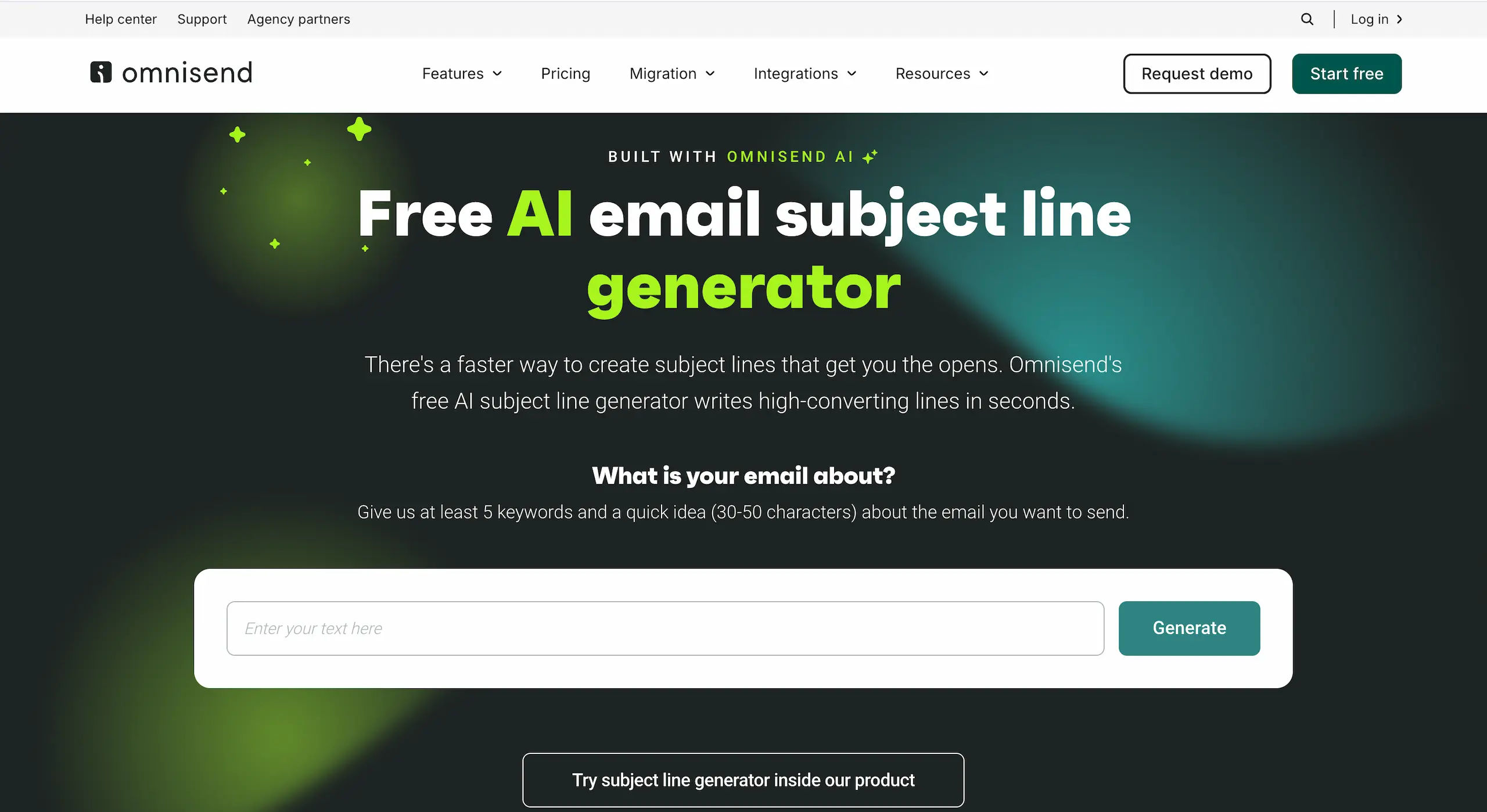
Copy any subject line, swap in the details, and test which subject line performs better. And if you need more variations to test, there’s Omnisend’s free subject line generator. Give it at least five keywords and a short idea of the email (30–50 characters), and it drafts a set of subject line variations.
How to create giveaway emails with Omnisend
Create giveaway emails with Omnisend using a sign-up form to collect entries, an automation to confirm them, and campaigns for announcements and reminders.
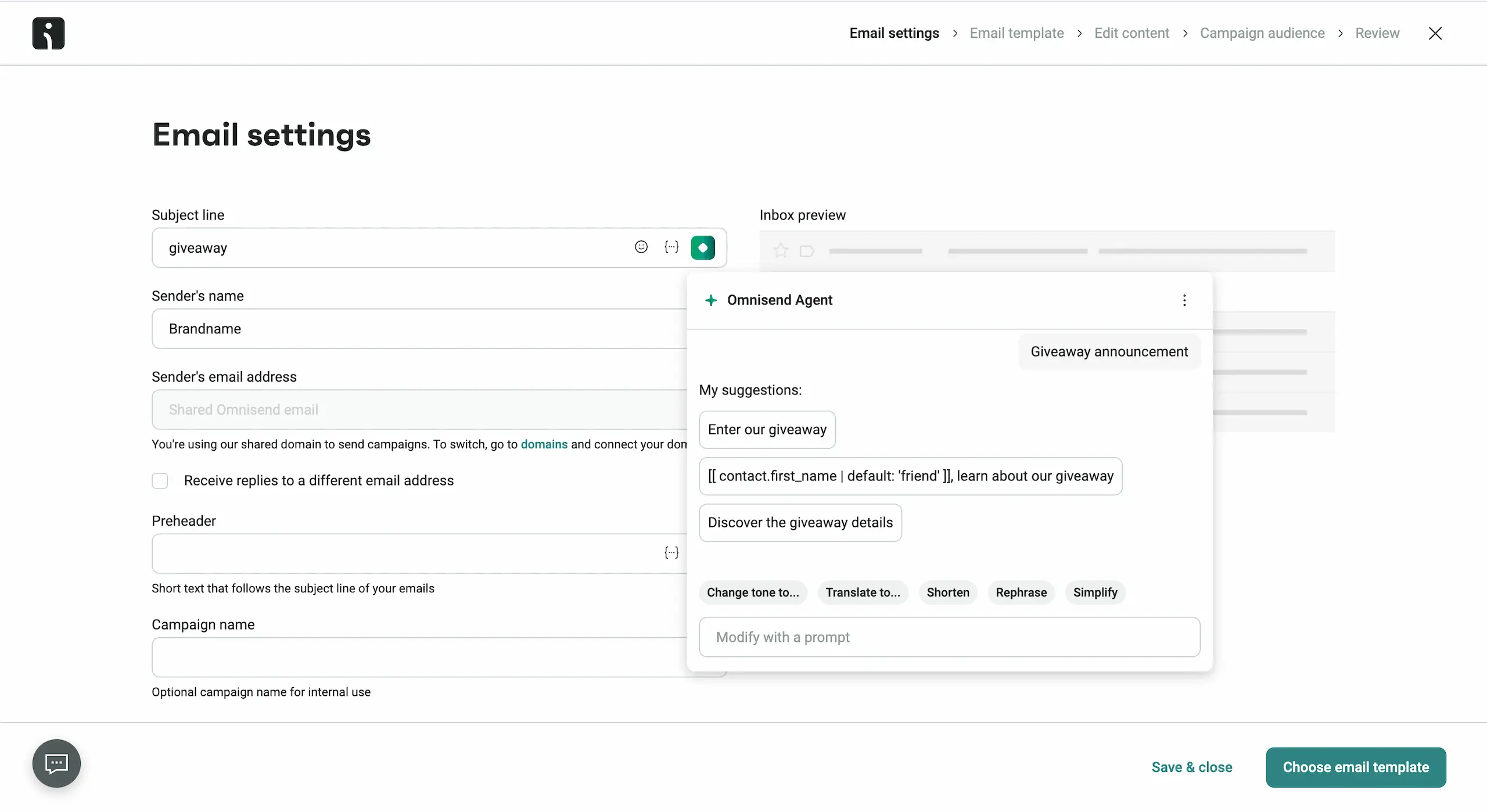
Set up an automation with the Subscribed to marketing trigger, filtered to your giveaway form, so every entrant gets an instant confirmation with the draw date. Starting from the Welcome preset, drop its First Subscription is True filter, which blocks contacts who already opted in. Write the subject line and preheader, or let Omnisend Agent do it in Email settings.
Use Omnisend’s drag-and-drop email building tool, or choose from a library of available giveaway email templates you can filter by goal, theme, and type. When a template looks right, open it and make your changes in the builder.
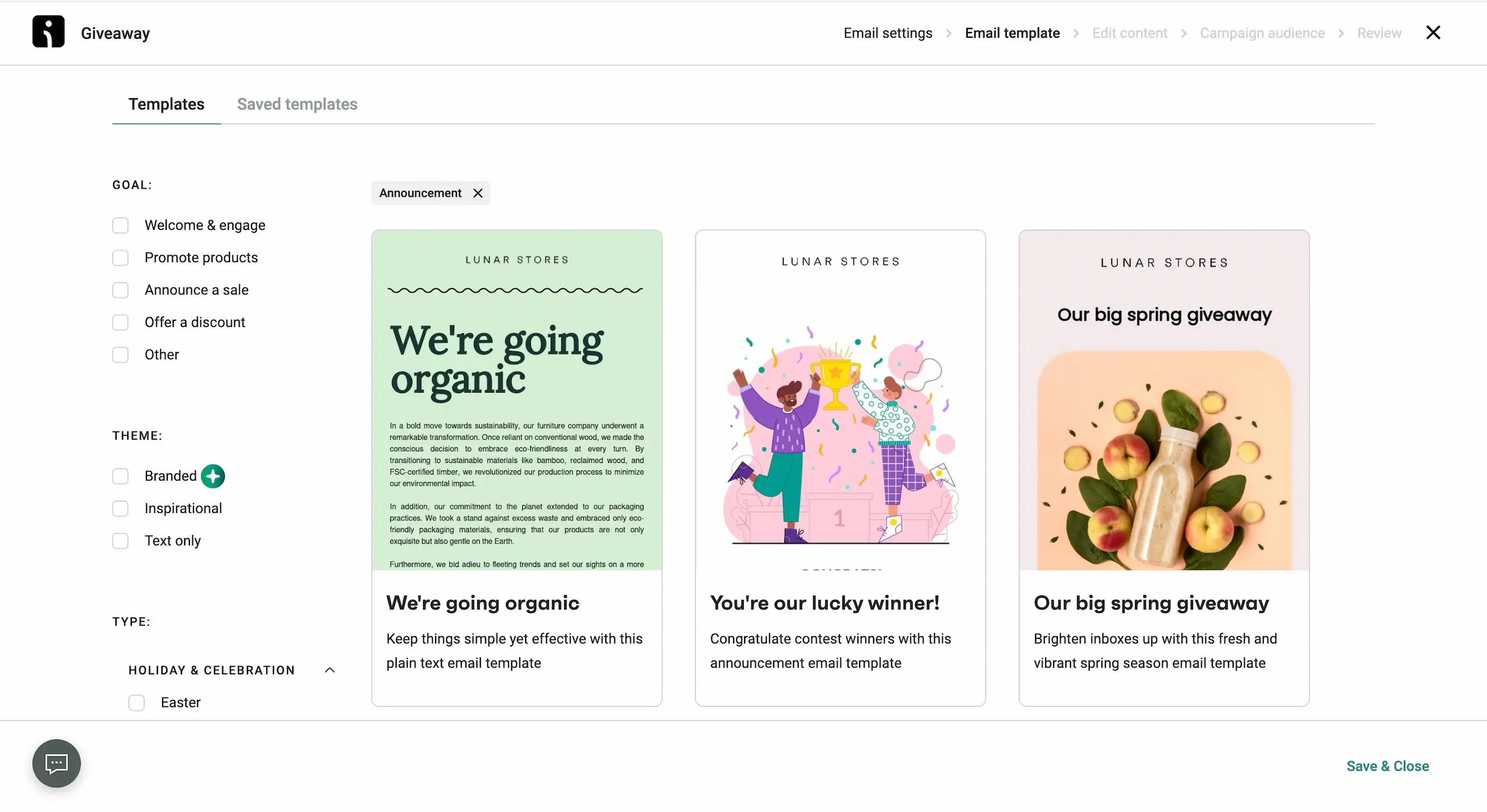
Filter Omnisend’s templates by “Announcement” and you’ll find ready-made giveaway and winner emails in the results.
Send the announcement, reminder, and last-chance-to-enter emails as email campaigns, but send the reminders only to subscribers who haven’t entered. To do that, add a tag in the giveaway form’s settings and exclude it in the reminder’s segment. Once the giveaway ends, the winner announcement goes to everyone with that tag.
Wrapping up
Giveaway emails work best as short sequences that include a main announcement, an instant entry confirmation to those who entered, a reminder to enter if there are subscribers who haven’t entered yet, and a winner email to all giveaway participants.
Use one or two tactics from the 13 giveaway email examples we analyzed and customize them to fit your brand and giveaway theme. When the giveaway ends, keep your new entrants engaged with these tips on how to build an email list.
Quick sign up | No credit card required