Omnisend AI


 OFFER
OFFER









According to Omnisend’s ecommerce marketing report, email is still a popular channel with open rates rising from 26.6% in 2024 to 30.7% in 2025. This guide covers the main types of email marketing campaigns, examples, and how to build and send one. Most examples here carry a verified result.
Quick sign up | No credit card required
What is an email marketing campaign?
An email marketing campaign is one email, or a short series, created to make a sale, get a sign-up, or bring back a customer who had stopped buying.
You can run a campaign on a schedule or let customer actions trigger it. Scheduled campaigns include newsletters or seasonal sales, which go to a selected segment at your chosen time. Automated campaigns start when someone takes an action, such as joining your list or leaving items in their cart.
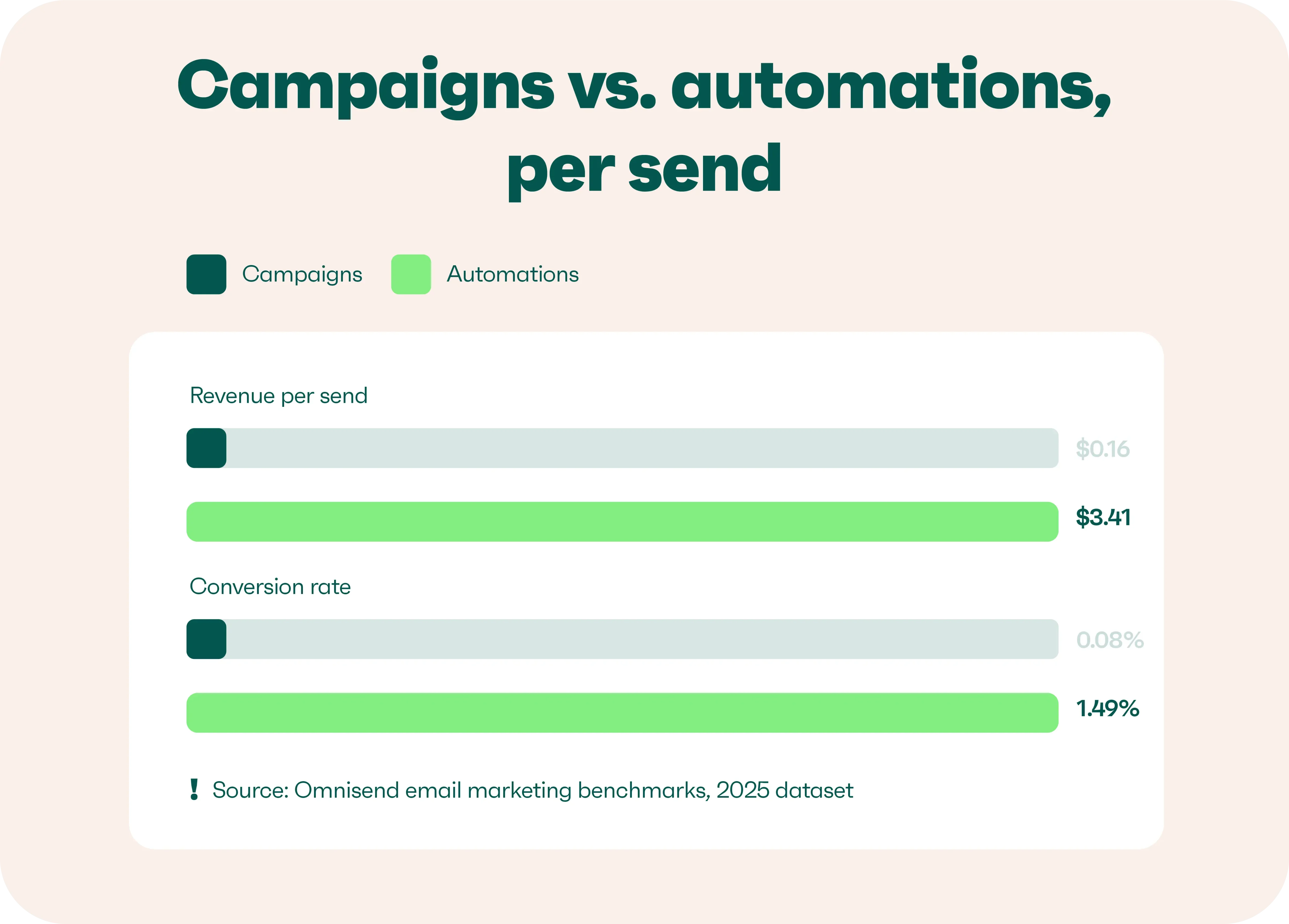
Omnisend research shows that they do not earn the same returns because each one reaches customers at different points.
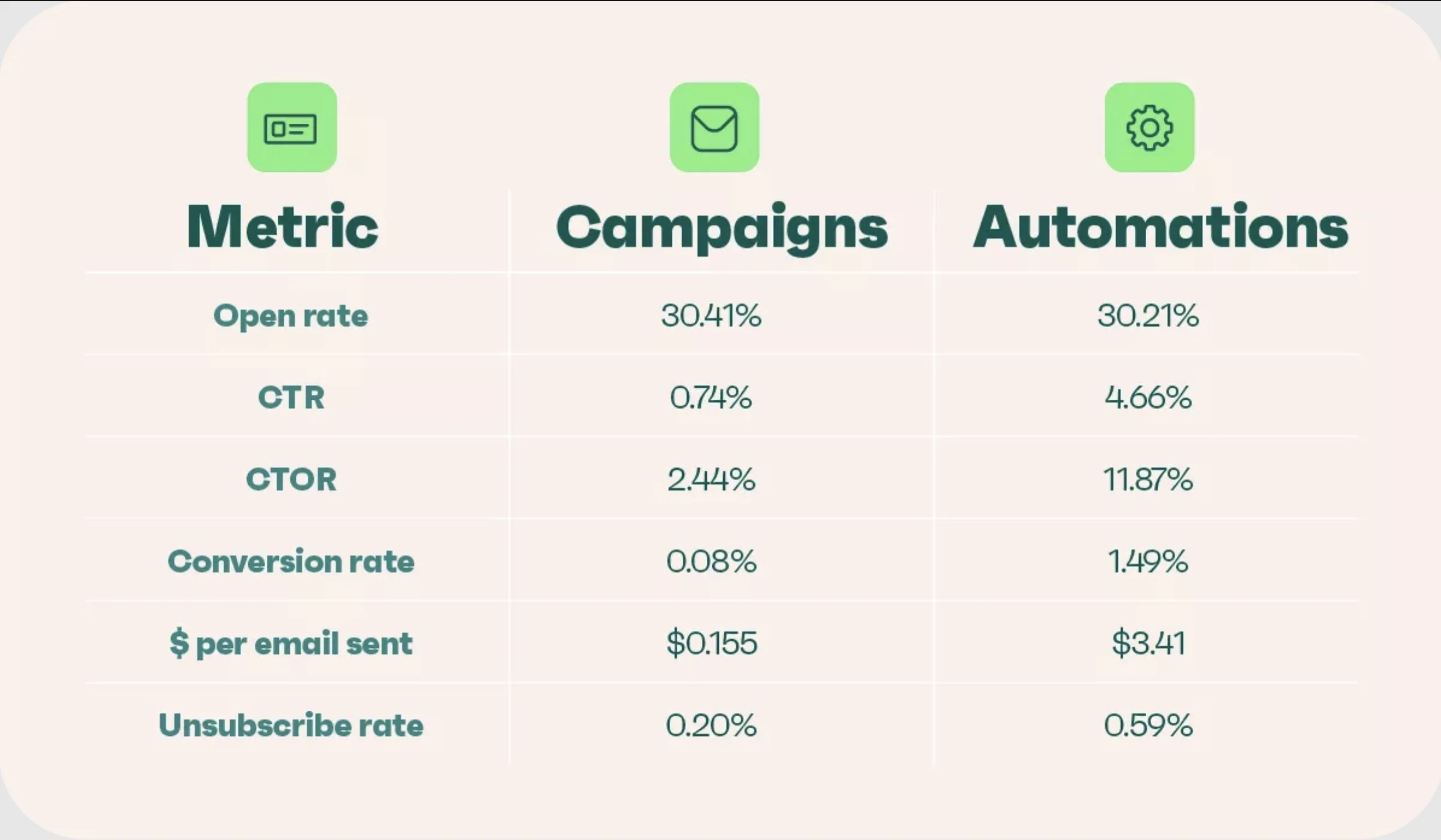
Omnisend’s 2025 email dataset, covering more than 20 billion campaign emails sent by 27,000+ brands, shows that automations offer significantly better CTR (4.66% vs. 0.75%) and return ($3.41 vs. $0.16) than campaigns.
Why email marketing campaigns work
Scheduled sends can get people interested, while automated sends respond when shoppers show they’re ready. Using both helps you stay connected from the first email through the point of purchase.
Our 2026 report shows what the main automated types earn per order and per send:
| Email type | Avg. order value | Revenue per email |
|---|---|---|
| Back in stock | $131 | $8.46 |
| Welcome | $315 | $6.30 |
| Birthday | $744 | $4.37 |
| Abandoned cart | $168 | $2.54 |
| Product abandonment | $152 | $1.13 |
| Cross-sell | $106 | $0.79 |
| Browse abandonment | $126 | $0.74 |
| Win-back or lapsed | $94 | $0.49 |
Nearly one in three clicks on an automated email ends in a purchase, our 2026 report found.
Related:
Email marketing strategy for how to make every campaign pull its weight.
Types of email marketing campaigns
Email marketing campaigns fall into seven main categories: acquisition, broadcasts and promotions, revenue recovery, consideration, retention and loyalty, re-engagement and list health, and feedback.k. Most ecommerce brands use both scheduled broadcasts and behavior-based flows across these categories. The table below shows what each campaign does and where it fits.
| Category | Campaign type | Goal |
|---|---|---|
| Acquisition | Welcome | Turn a new subscriber into a first-time buyer |
| Broadcasts and promotions | Promotional or sale | Drive purchases with an offer |
| Seasonal | Capture demand in a set window like BFCM or back to school | |
| Product launch | Build anticipation and early sales for something new | |
| Newsletter | Keep subscribers engaged with regular value, no discount | |
| Revenue recovery | Abandoned cart | Recover checkouts that were left behind |
| Browse abandonment | Re-engage shoppers who viewed but did not add to cart | |
| Back in stock | Alert interested shoppers when an item returns | |
| Price drop | Tell interested shoppers a watched item is now cheaper | |
| Consideration | Product recommendation | Help an undecided customer find the right product |
| Quiz or product finder | Match a shopper to a product and collect first-party data | |
| Product comparison | Help a customer choose between two options | |
| Retention and loyalty | Post-purchase or cross-sell | Encourage the next order with related items |
| Loyalty or VIP | Reward and retain repeat customers | |
| Birthday or anniversary | Build goodwill with a timed gift | |
| Replenishment | Remind buyers to reorder a consumable | |
| Re-engagement and list health | Win-back | Revive lapsed subscribers before you suppress them |
| Sunset | Remove dead profiles to protect deliverability | |
| Feedback | Survey or review request | Gather feedback and product reviews |
Email campaign templates
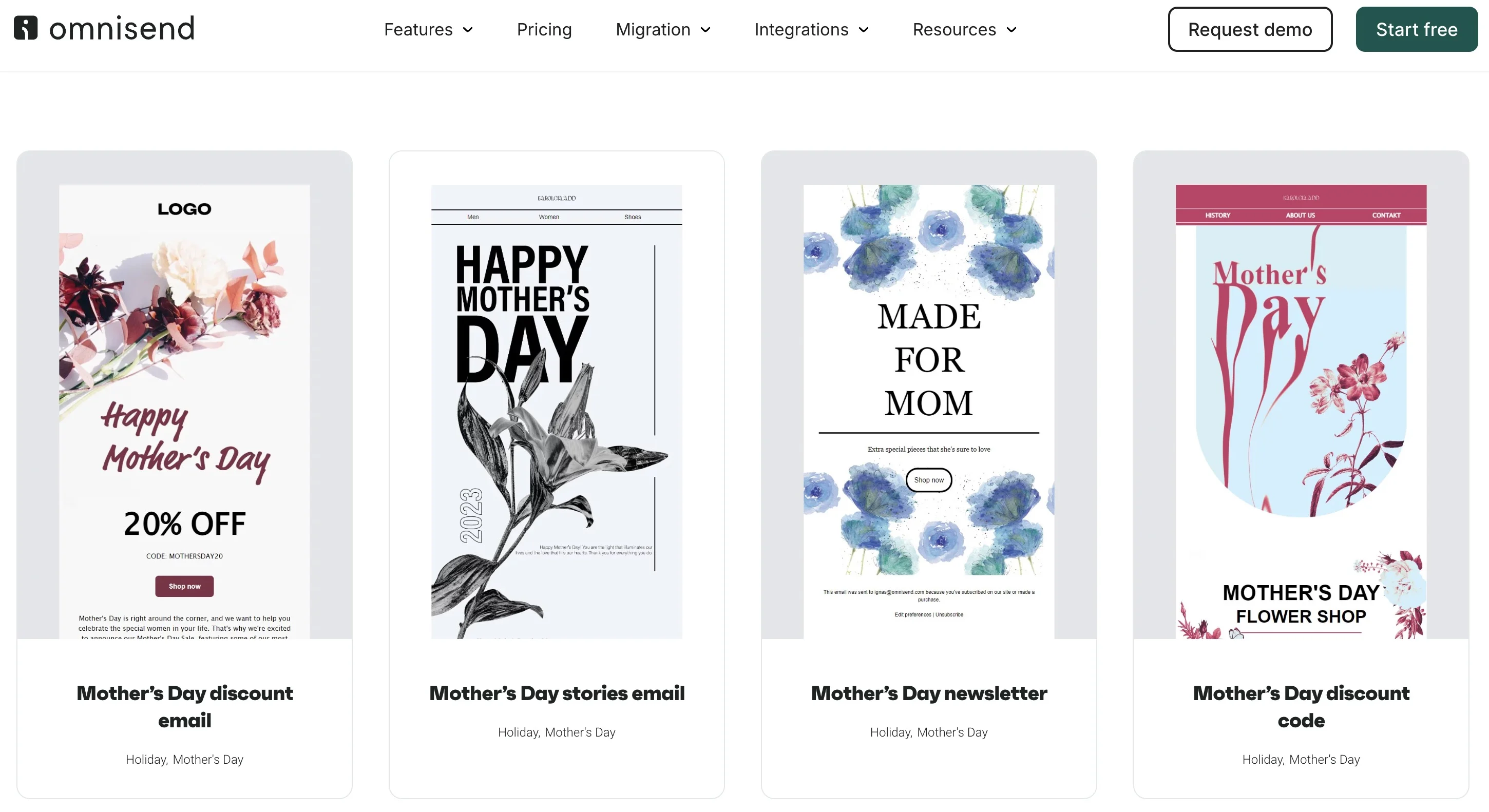
You don’t have to design a campaign from scratch. Omnisend has a library of pre-built, mobile-ready email templates you can filter by goal and category. You can then edit in a drag-and-drop editor.
Pick one close to your campaign type, swap in your brand colors and products, and you have a send-ready email in an afternoon.
Real email marketing campaign examples
We’ve picked 15 email marketing campaigns to show what these emails look like in practice. Eight come from Omnisend customers with verified results, while seven break down formats that are worth trying yourself. For more ideas, see our complete gallery of email marketing examples.
Promotional: FiGPiN
Subject line: SPEND $75, GET A MYSTERY AP FiGPiN!
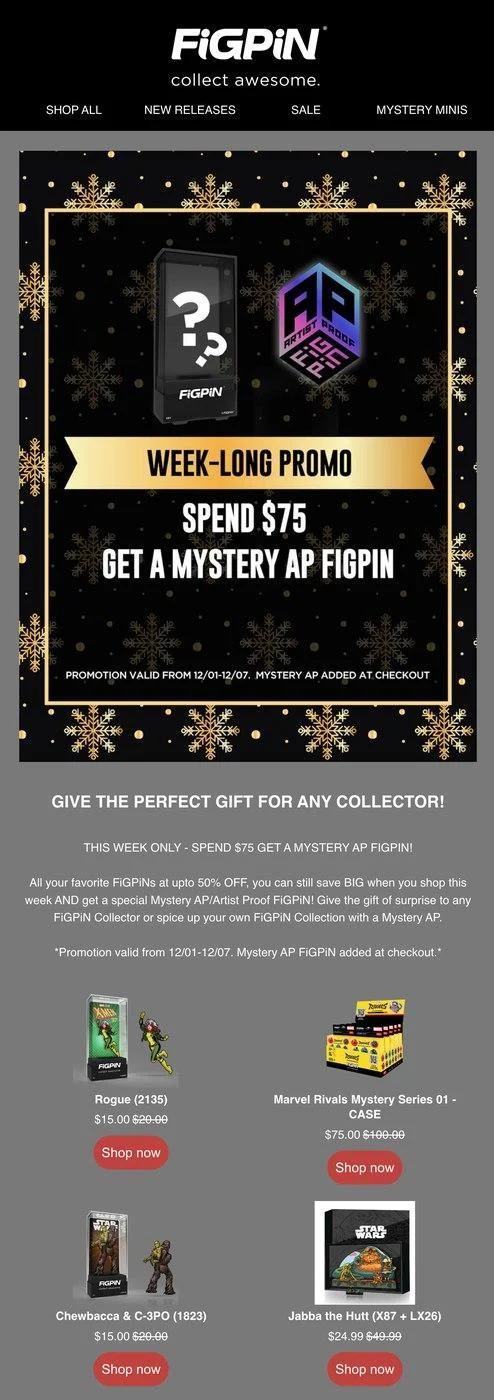
Spend $75 and a mystery collectible comes free. The offer runs for a week, with discounted products underneath to help readers reach the mark.
- How it works: The spend target gives shoppers a reason to add something else to their cart
- Watch out for: If the prize is not worth it, shoppers may not bother reaching the threshold
- What to copy: State the target and deadline once at the top and then show products that help reach it
- The data: Opens are not useful for this offer, so track revenue per email and basket size instead
Result — FiGPiN
Automated messages drive 24% of FiGPiN’s email revenue from 9% of sends. Its abandoned-cart flow converts at 87%, after a move from Constant Contact.
Read the story
Seasonal: Rachel Riley
Subject line: Back To School FLASH SALE! 🍎
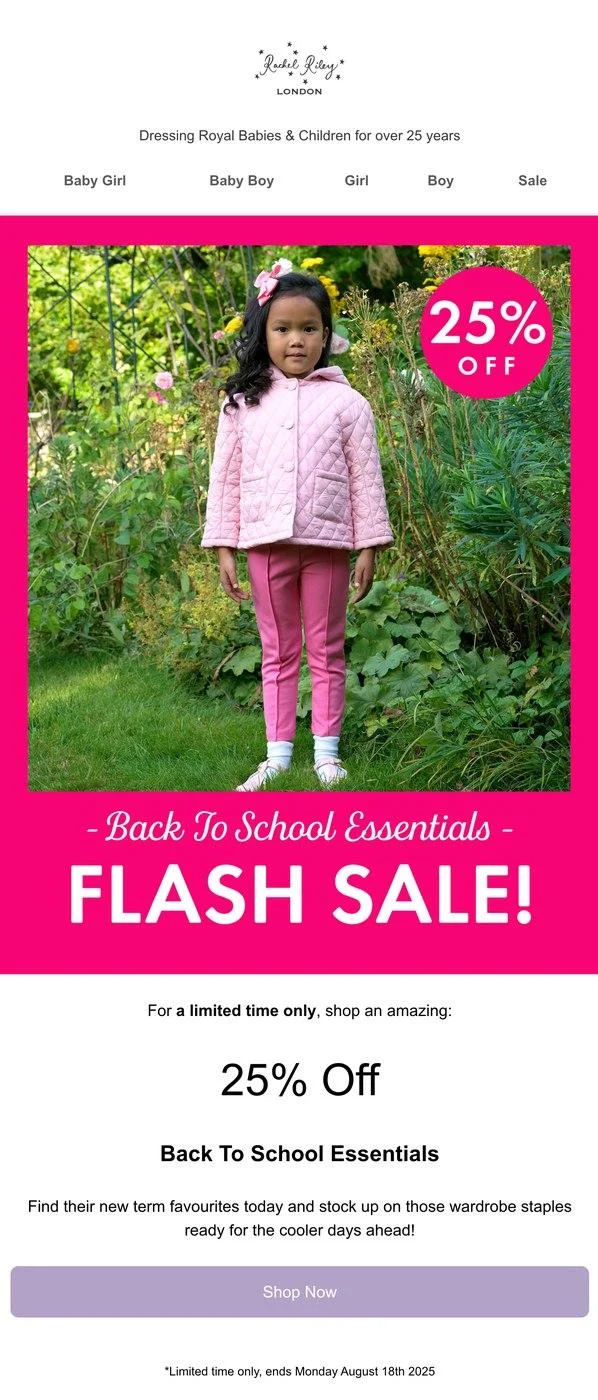
25% off back-to-school, one hero image, one button, one deadline. Nothing else competes for the click. You can find more ideas in our fashion email marketing guide.
- How it works: There is no complicated offer to figure out, just a discount and an end date
- Watch out for: Save sitewide percentage discounts for occasions when a wider sale makes sense
- What to copy: Put the season and discount in the subject, then repeat the end date near the button
- The data: Measure revenue and first-time buyers, but also check how many people unsubscribe
Result: Rachel Riley
Rachel Riley grew BFCM 2024 revenue 77% over 2023. Omnisend carried 48.1% of store revenue across that period.
Read the story
Launch: Naked & Famous
Subject line: Guardian 2 Selvedge: Japanese Denim Reinforced with Kevlar®
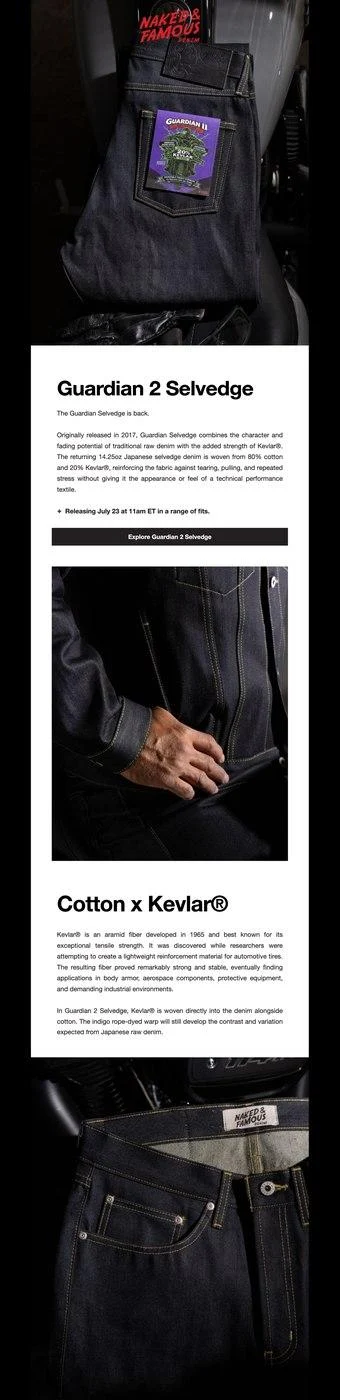
The launch gets the attention first, while the product details come later. Readers see the date, time, and one button near the top. Our lifecycle email examples cover more launch flows.
- How it works: A launch time gives people something specific to put on their calendar
- Watch out for: This doesn’t work well for impulse purchases
- What to copy: Put the launch details up top, then give the main photo most of the space
- The data: Check day-one revenue and sell-through, while the waitlist shows who missed the launch
Result: Naked & Famous
Automations drive 19.75% of email revenue from under 2% of sends. Resending to non-openers added 7.47% of campaign revenue, after a switch from Mailchimp.
Read the story
Welcome: Bowy Made
Subject line: John, here’s your 10% off code!
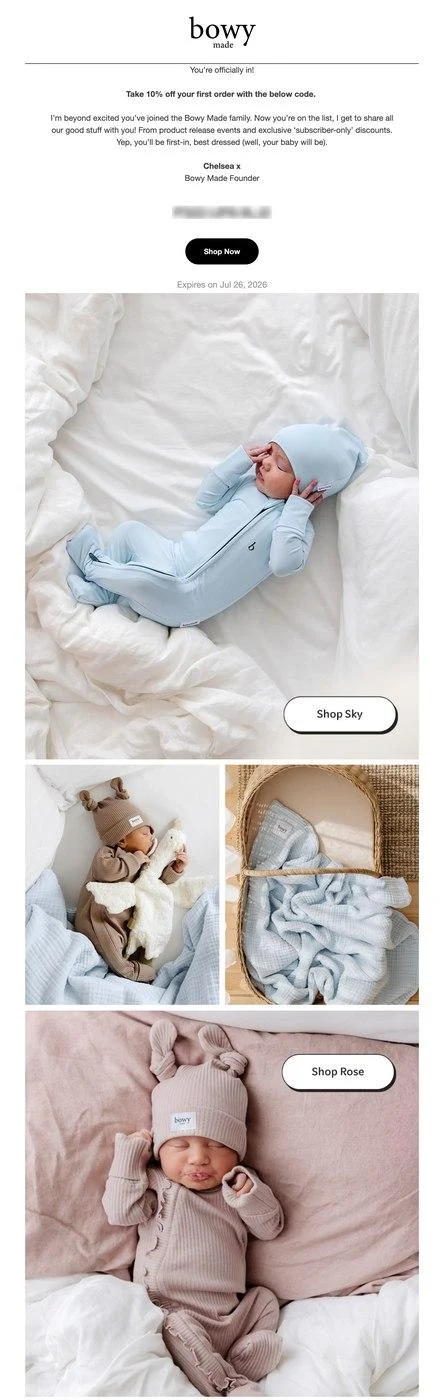
You get the name first, then the promised 10% code, followed by a simple note about what comes next. A welcome automation template can help you set up the same flow quickly
- How it works: Sign-up is when interest is highest, so giving the code right away can lead to a purchase
- Watch out for: This is a triggered email, so it starts after sign-up rather than running on a schedule
- What to copy: Lead with the code, put the expiry next to it, and explain what emails come next
- The data: Welcome emails convert at 2.11% in our benchmarks, second only to back-in-stock emails
Result: Bowy Made
Bowy Made drives about 70% of revenue from automations, at an average automation open rate near 52%.
Read the story
Brand-story welcome: To’ak
Subject line: It all started in a rainforest… 🌿
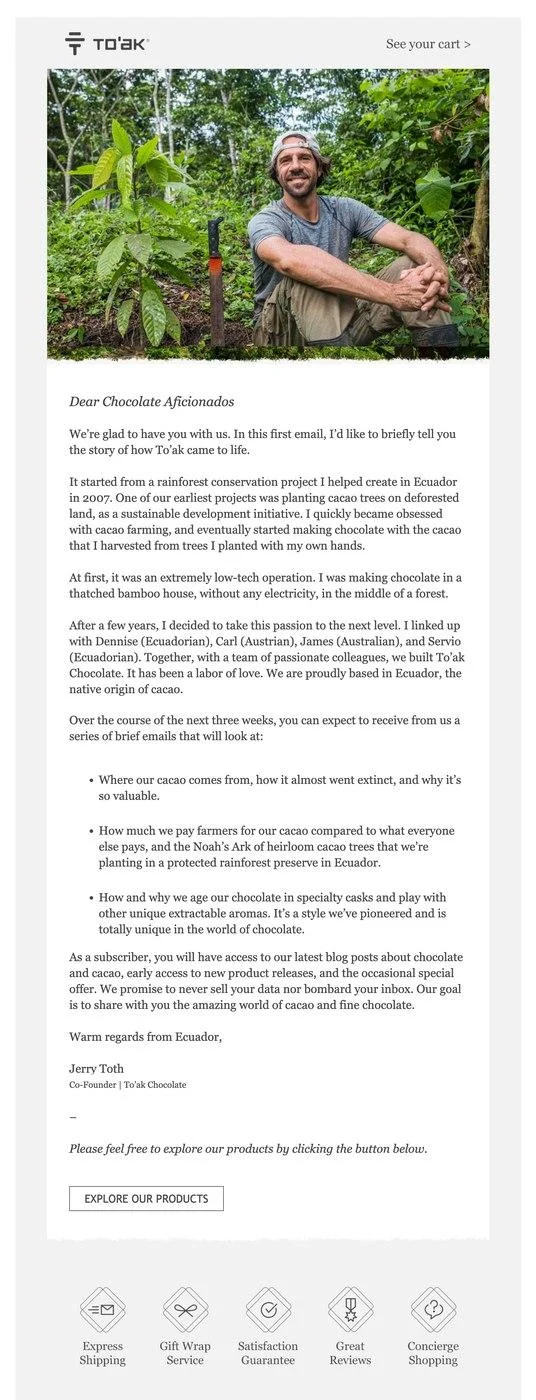
There are no product shots here. The founder explains where the chocolate came from and tells readers what the next emails cover. Our guide to lifecycle email marketing shows how a series like this is built.
- How it works: People need to trust a premium product, and a founder’s note can help build that
- Watch out for: This works better when shoppers need time to decide
- What to copy: Start with a specific detail, then tell readers what they can expect from you next
- The data: Welcome emails convert at 2.11%, against 0.08% for scheduled campaigns in our benchmarks
Result: To’ak
To’ak turned email into a storytelling channel and grew email-generated revenue 460%, with welcome-series emails converting at 18%.
Read the story
Newsletter: Snowe
Subject line: Always comfy
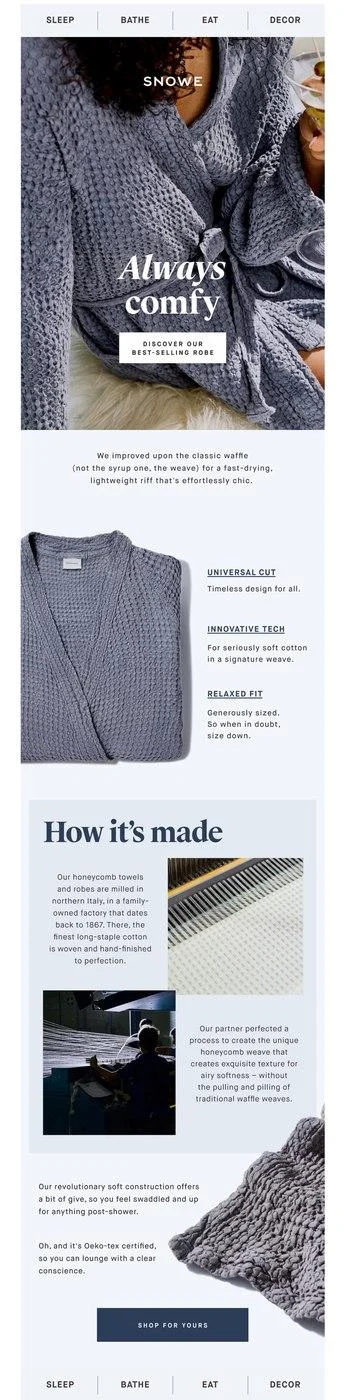
One product carries the entire email, a waffle robe, with an explanation of how it’s made and why it feels the way it does. No discount anywhere. Our email marketing guide places the newsletter among the other types.
- How it works: If something already sells well, you can talk about the product instead of offering a discount
- Watch out for: Don’t keep putting the same product in front of subscribers every time
- What to copy: Start with a product that sells, explain how you make it, and give two or three reasons to buy
- The data: This email is about the longer relationship, so track engagement and repeat purchases
Product comparison: Kerrits
Subject line: Compare Our Coolest Summer Fabrics
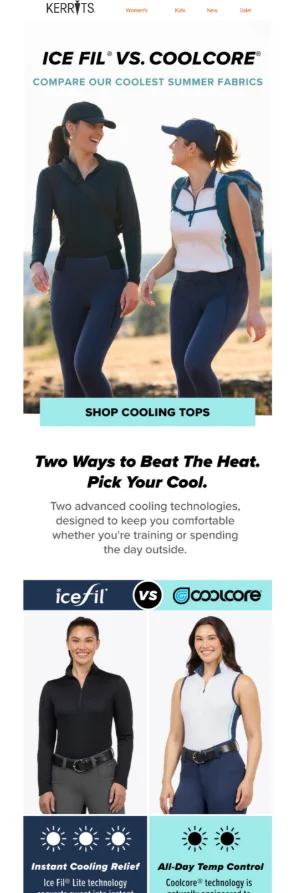
Two cooling fabrics go head to head, with a simple “choose this if” line and a button for each. Our ecommerce email marketing guide shows how this fits into a wider email program
- How it works: Giving shoppers simple reasons to choose helps them make the decision without help
- Watch out for: Similar products can make the choice harder instead of making it easier
- What to copy: Put the two options side by side, then give clear reasons to choose each
- The data: Track each product’s clicks and return rate to see which one fits better
Result: Kerrits
Kerrits lifted revenue per email on promotional campaigns by 50%. Automations now drive 23% of email sales from under 4% of sends.
Read the story
Product recommendation: Syos
Subject line: Haven’t found your sound?
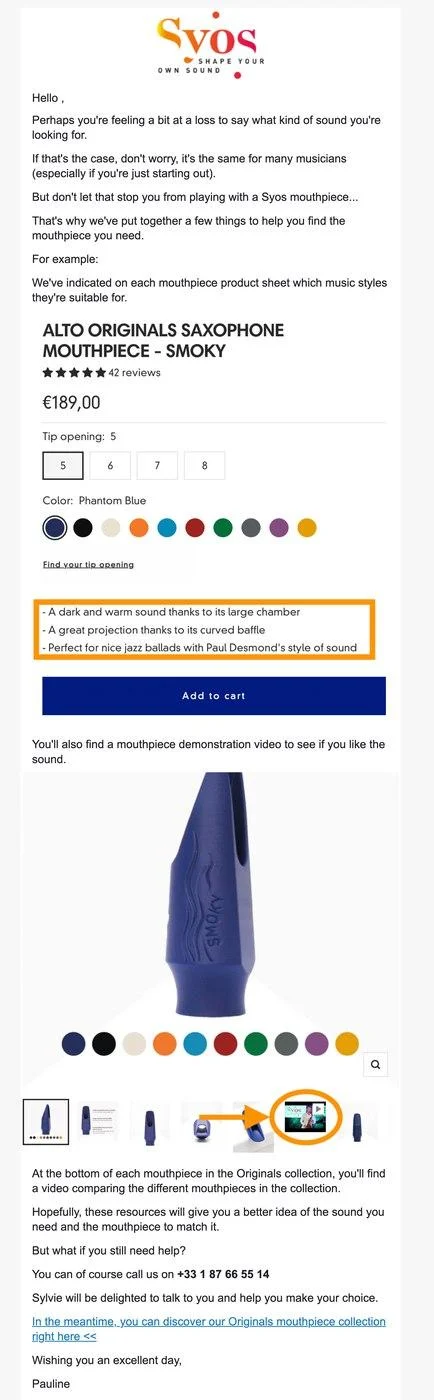
Instead of pushing for a sale, this email gives an undecided consumer several ways to learn more. They get product sheets, a guide, a demo video, and a phone number. It belongs in a drip campaign because the goal is to nurture the lead.
- How it works: A complex product can leave buyers with questions, and answering them can help without adding sales pressure
- Watch out for: Simple products do not need this much explanation, and extra information may only slow someone down
- What to copy: Say what might be making the buyer hesitate, give them an answer, and offer a person to talk to
- The data: Direct conversions don’t tell the whole story here, so look at assisted conversions and replies
Quiz: Huel
Subject line: The easiest way to start with Huel.
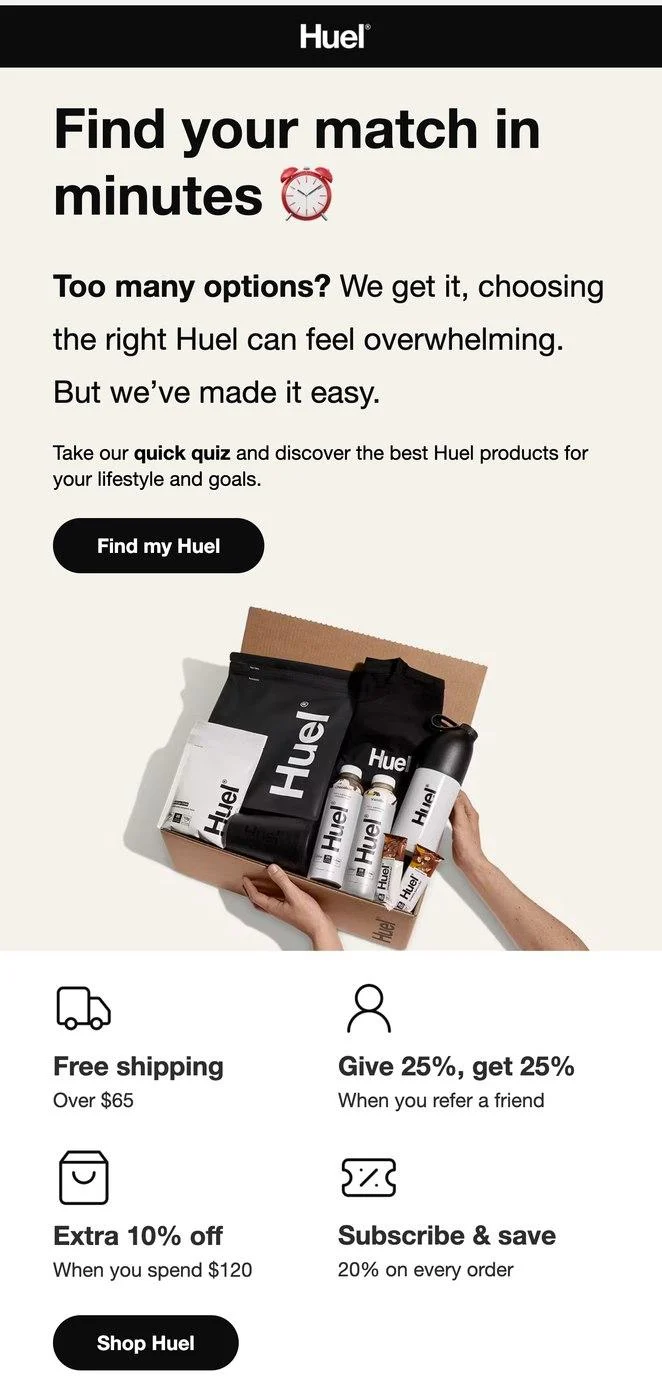
Instead of showing the whole catalog, this email sends shoppers through a short “find your match” quiz. There is one main button, with a few extra perks underneath. Their answers also give you useful data for email segmentation.
- How it works: Shoppers get a recommendation based on their answers, and you get first-party data to use later
- Watch out for: The quiz adds time to the buying process, so shoppers need a good reason to take it
- What to copy: Tell shoppers what the quiz will help them find, promise a quick result, and use one CTA button to start
- The data: The data pays off across future emails by helping you make each segment more specific
Back in stock: Amundsen
Subject line: Back in Stock | Chukka Shorts
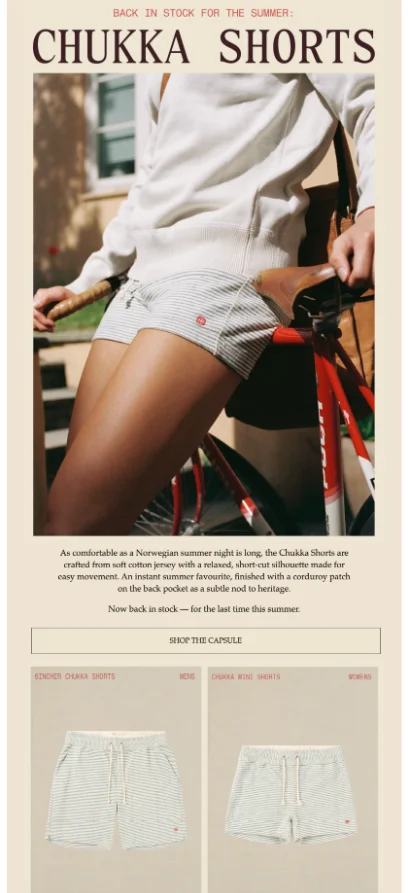
The email keeps things focused on one product, with a short description, one shop button, and a quiet last-chance note below.
- How it works: The shoppers already asked about the product, so they are a much warmer audience
- Watch out for: This only works when you have waitlist or browse data to build the audience
- What to copy: Use the product name in the subject and a low-key scarcity line at the bottom
- The data: Our benchmarks show a 6.72% conversion rate, yet only 0.6% of brands use back-in-stock emails
Result: Amundsen
Amundsen generates about 30% of its Omnisend-attributed sales through automations, the category our benchmarks show back-in-stock leads.
Read the story
Cart recovery: Island Olive Oil
Subject line: Hurry! Your cart is about to expire!
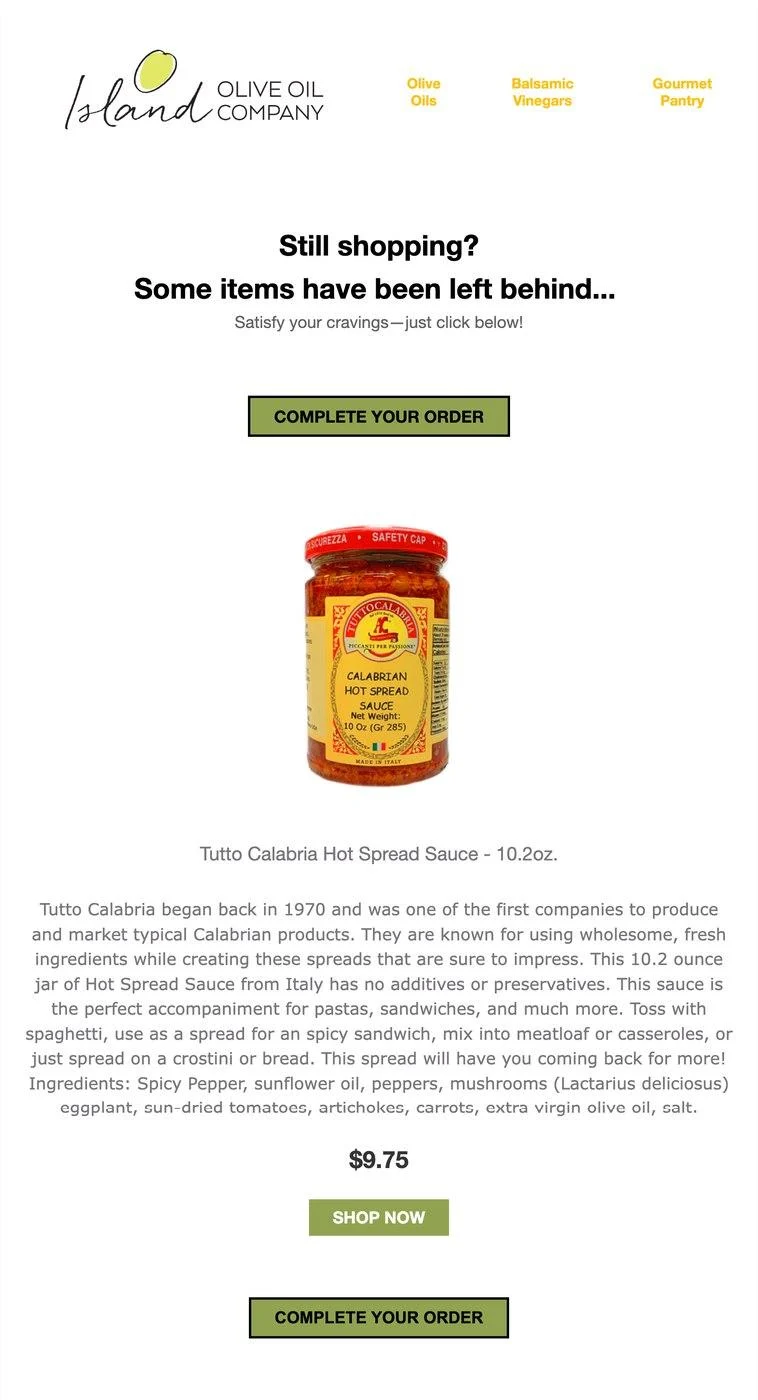
The abandoned product appears with its price, framed above and below by complete-your-order buttons.
- How it works: Showing the exact item saves shoppers from having to remember what they left behind
- Watch out for: Urgency loses its effect when it’s overused, so only use a deadline that is real
- What to copy: Put the product in the abandoned cart email, use one CTA, and place it at both ends
- The data: Cart emails convert at 1.72%, over 20 times higher than scheduled campaigns, yet only 22.5% of brands send them
Result: Island Olive Oil
Automated emails make up just 1.22% of sends for this brand and still drive 39% of email revenue.
Read the story
Win-back: Snif
Subject line: Still interested?
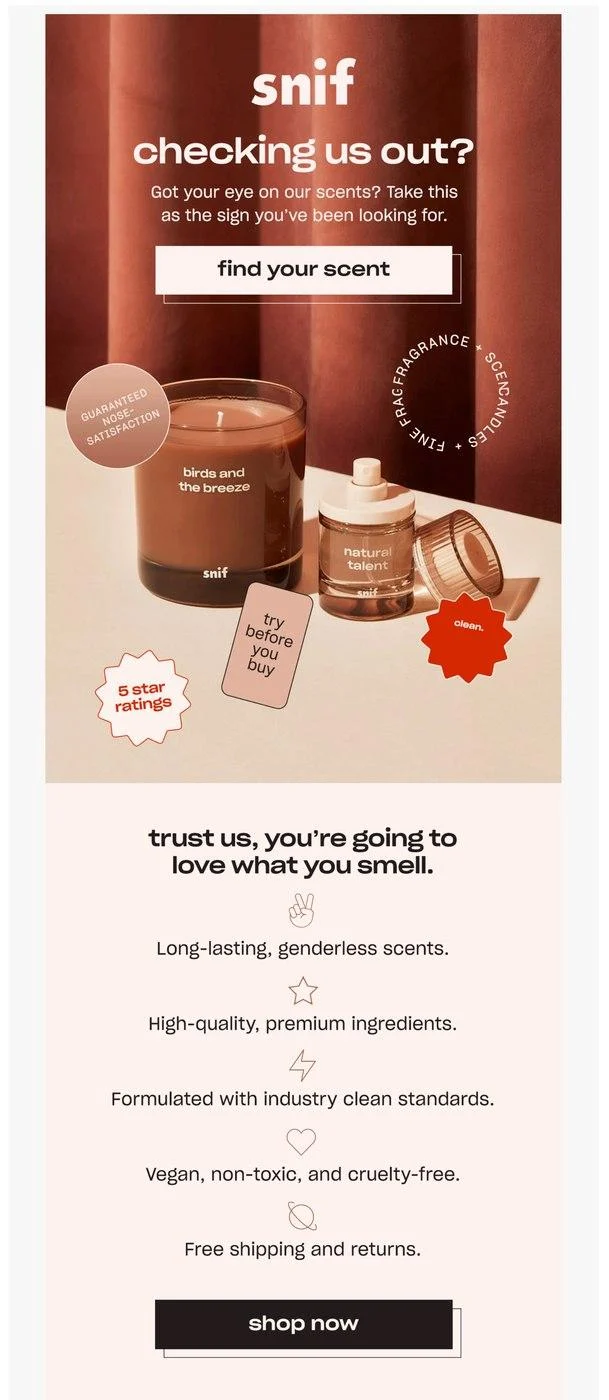
The email opens with a simple question, then gives the product benefits and a try-before-you-buy option. Our guide to win-back emails covers the full approach.
- How it works: A simple question can restart the conversation without cutting into your margin with a discount
- Watch out for: Holding back the discount saves margin, but you may bring back fewer subscribers
- What to copy: Keep the subject short and curious, then give people one easy thing to do
- The data: Focus on reactivations here, then suppress anyone who stays inactive after the campaign
Survey and feedback: DB Journey
Subject line: Help us understand how you choose your bags
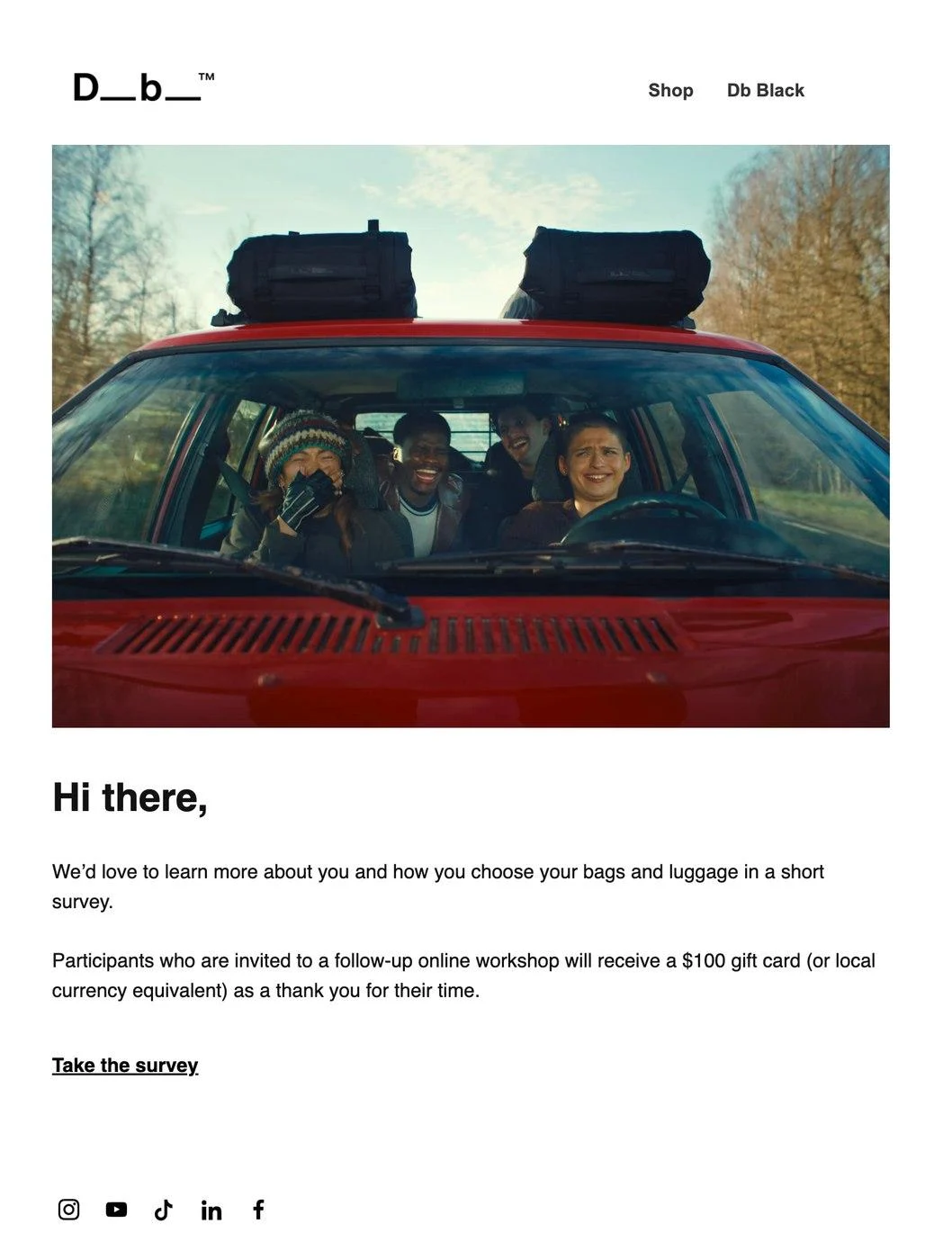
A clear ask, one button, and a $100 gift card for anyone who reaches the follow-up workshop.
- How it works: A small, specific question is easier to answer, especially when there is a real reward
- Watch out for: Rewards can attract people with little interest, so qualify anyone who reaches the paid step
- What to copy: Keep the question focused, say how long it takes, and make the reward easy to spot
- The data: This is not about sales, so look at response rates and the quality of the feedback
Birthday: Timberland
Subject line: Don’t miss out on your EXCLUSIVE birthday gift!
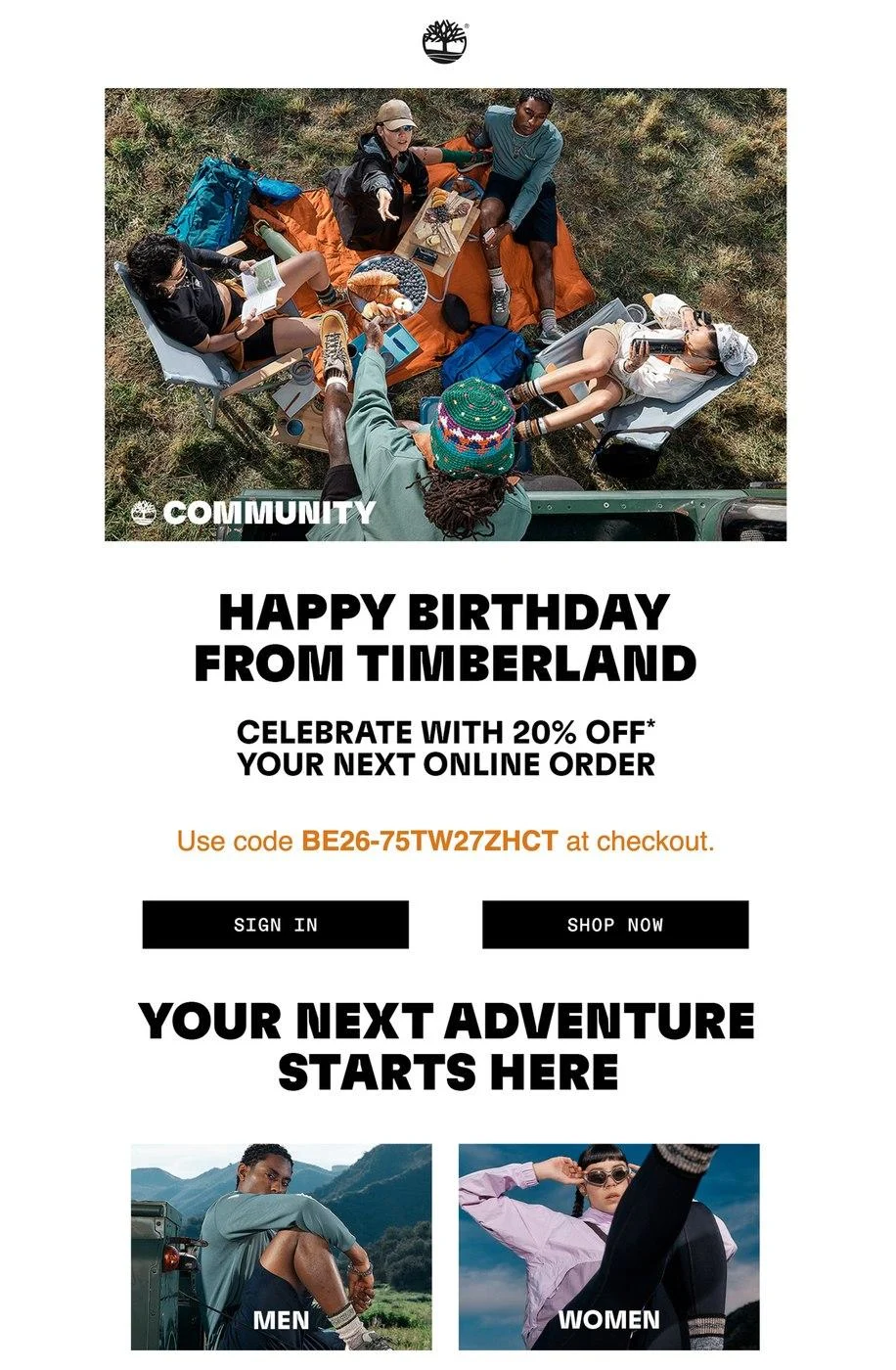
A 20% code arrives as a present, with a unique code and both sign-in and shop buttons.
- How it works: The birthday gives the offer a personal touch that a normal discount doesn’t have
- Watch out for: You need the birthday on file, so collect it when subscribers sign up
- What to copy: Tell people It’s a birthday gift, then give them a code and an expiry date
- The data: The average order from a birthday email is $744, higher than any other automated email type
Loyalty: Rachel Riley
Subject line: Join Our Loyalty Program! 💜
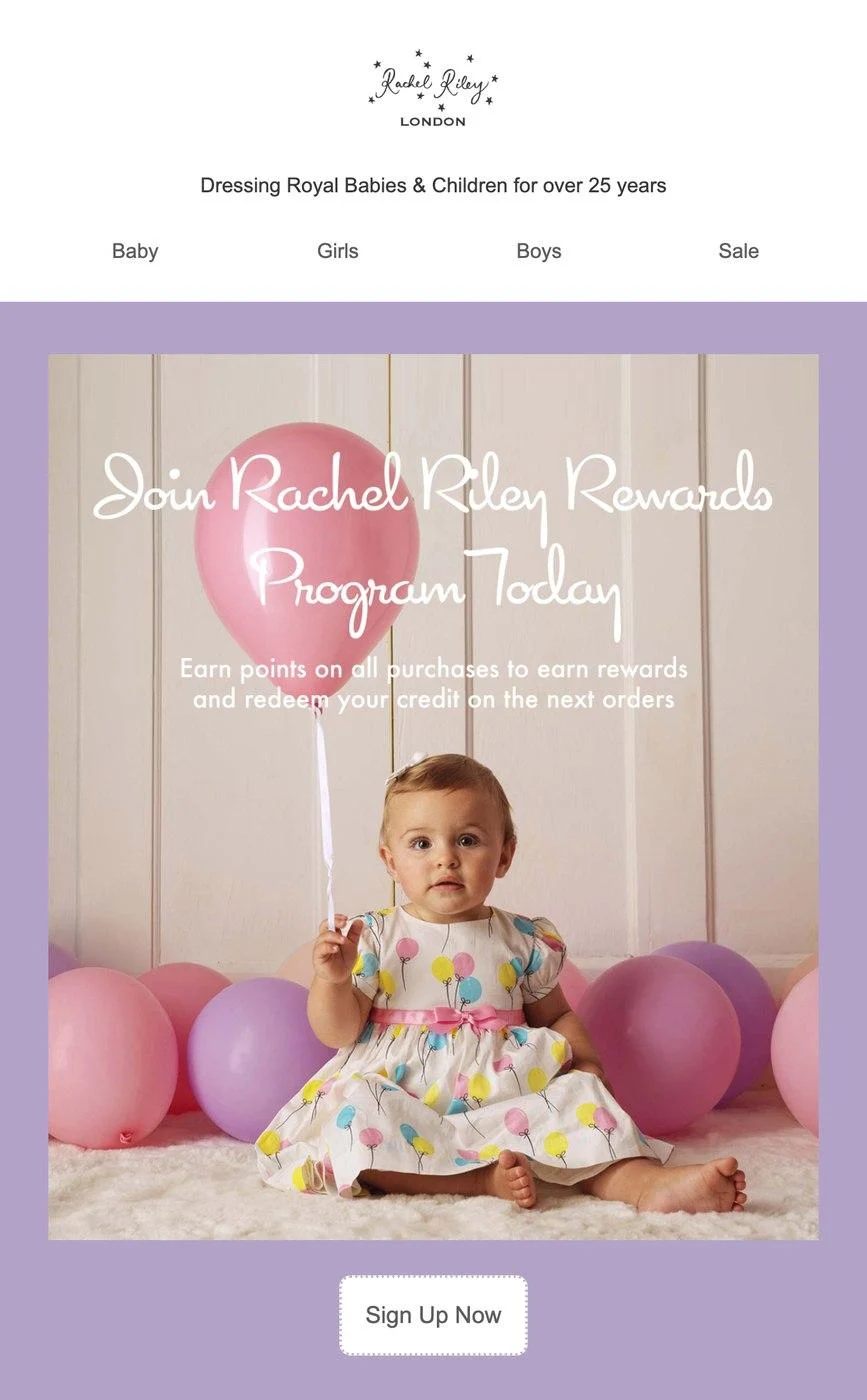
The offer is easy to understand: earn points when you buy, then use those points as credit on your next order. One sign-up button follows.
- How it works: Points give repeat buyers a reason to come back instead of shopping just once
- Watch out for: Don’t make the loyalty program harder to understand than it needs to be
- What to copy: Tell how the points work, explain the member benefit, and give people one link to join
- The data: Do not judge it from one email; watch repeat purchases and lifetime value over time
How to create an email marketing campaign
Follow these steps to build your first professional email campaign:
Pick a campaign type to start
You’ll eventually have a few email campaigns running, but let’s pick a promotional campaign as our starting point. The instructions below are applicable to all campaign types anyway.
Manage your list and create a segment
Your campaign can reach all your contacts or a segment. I always recommend a segment so that your least engaged subscribers don’t waste your send quota.
If you have your ecommerce store synced into Omnisend or another email tool, then you’ll be able to create a segment for subscribers who have purchased at least once, or recent buyers. Create that recent buyers segment in Omnisend with these steps:
- Log in to Omnisend
- Click Segments in the sidebar > click + Create segment
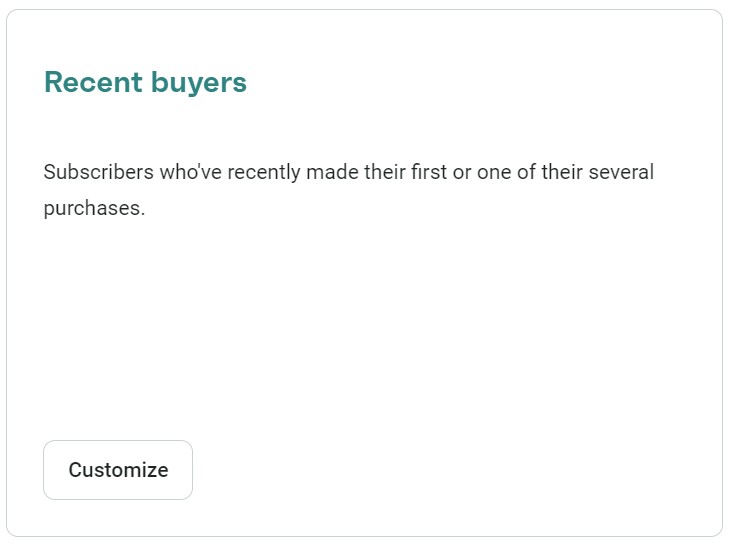
- Select the Recent buyers pre-built segment:
4. Click Save & show contacts, and any relevant ones will sync automatically:
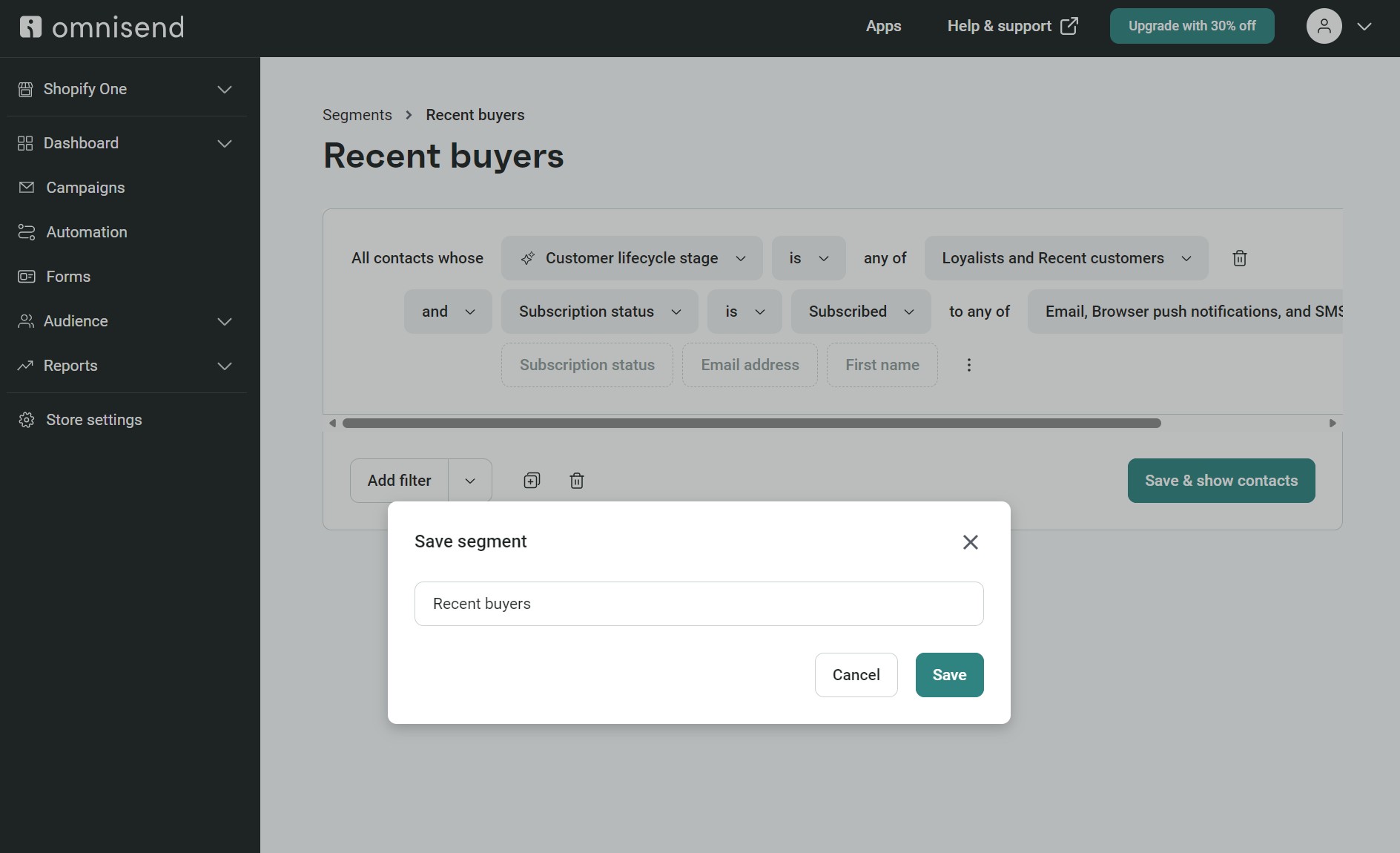
We’ll assign this segment to your campaign in step four.
Create a campaign
Follow these steps to create your campaign in Omnisend:
- Log in to Omnisend
- Click Campaigns in the sidebar > Click + Create campaign
- Select Email
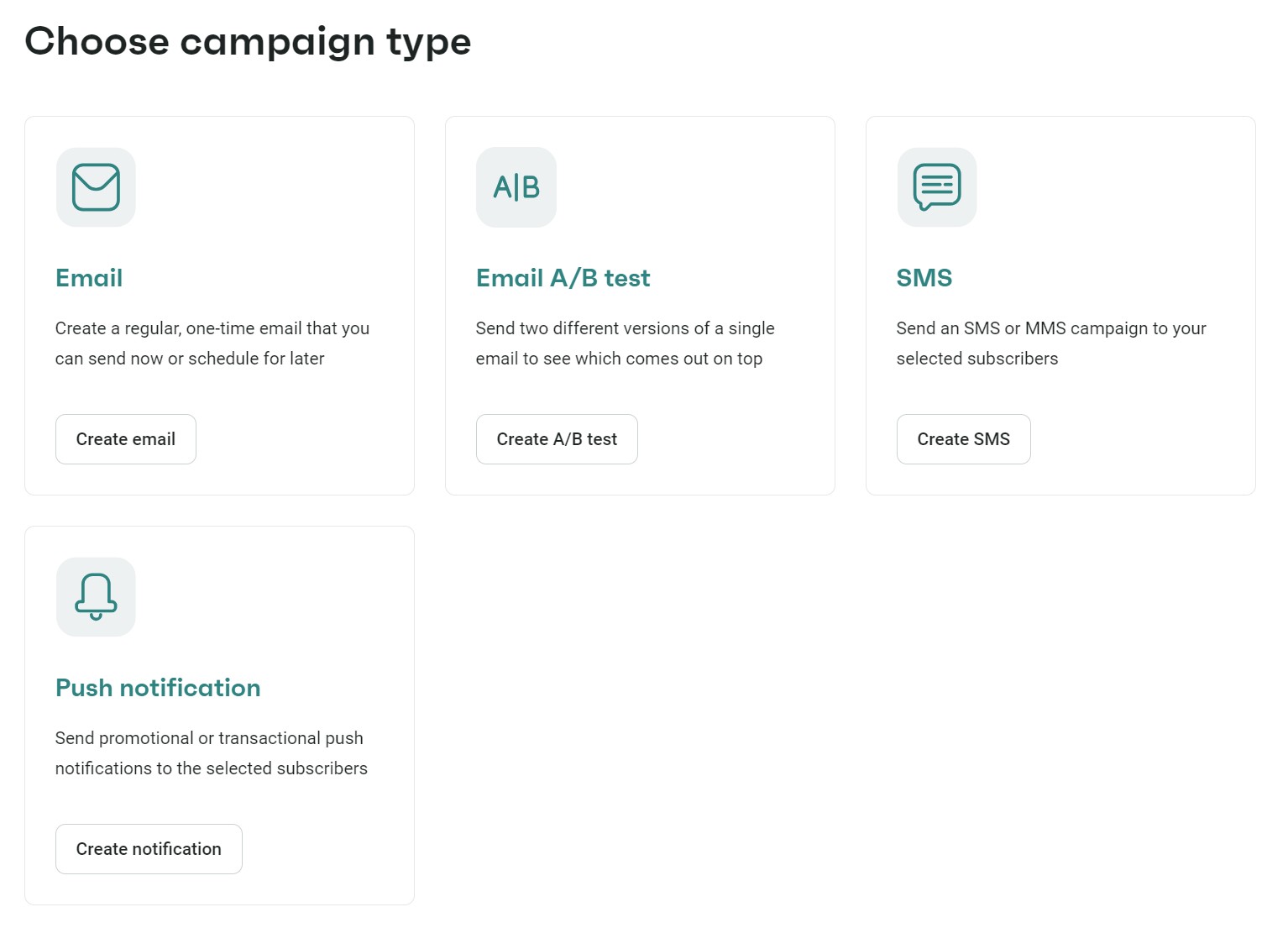
4. Enter these details:
- Subject line
- Sender’s name
- Preheader
- Campaign name
Pro tip: You can generate the subject line and preheader with AI, a feature that’s available across all Omnisend plans.
5. Click Choose email template to proceed to designing your email
Build your email template
Now that you have a segment for your promotional campaign and an initial campaign configuration with a subject line and preheader, you can build your email template (or, as I like to call it, the really fun part).
Omnisend has 250+ pre-built email templates to choose from. Select the Promote products filter to load a few seasonal and general-use ones, or you can scroll through all the templates. Hover over any and click Use template to start editing:
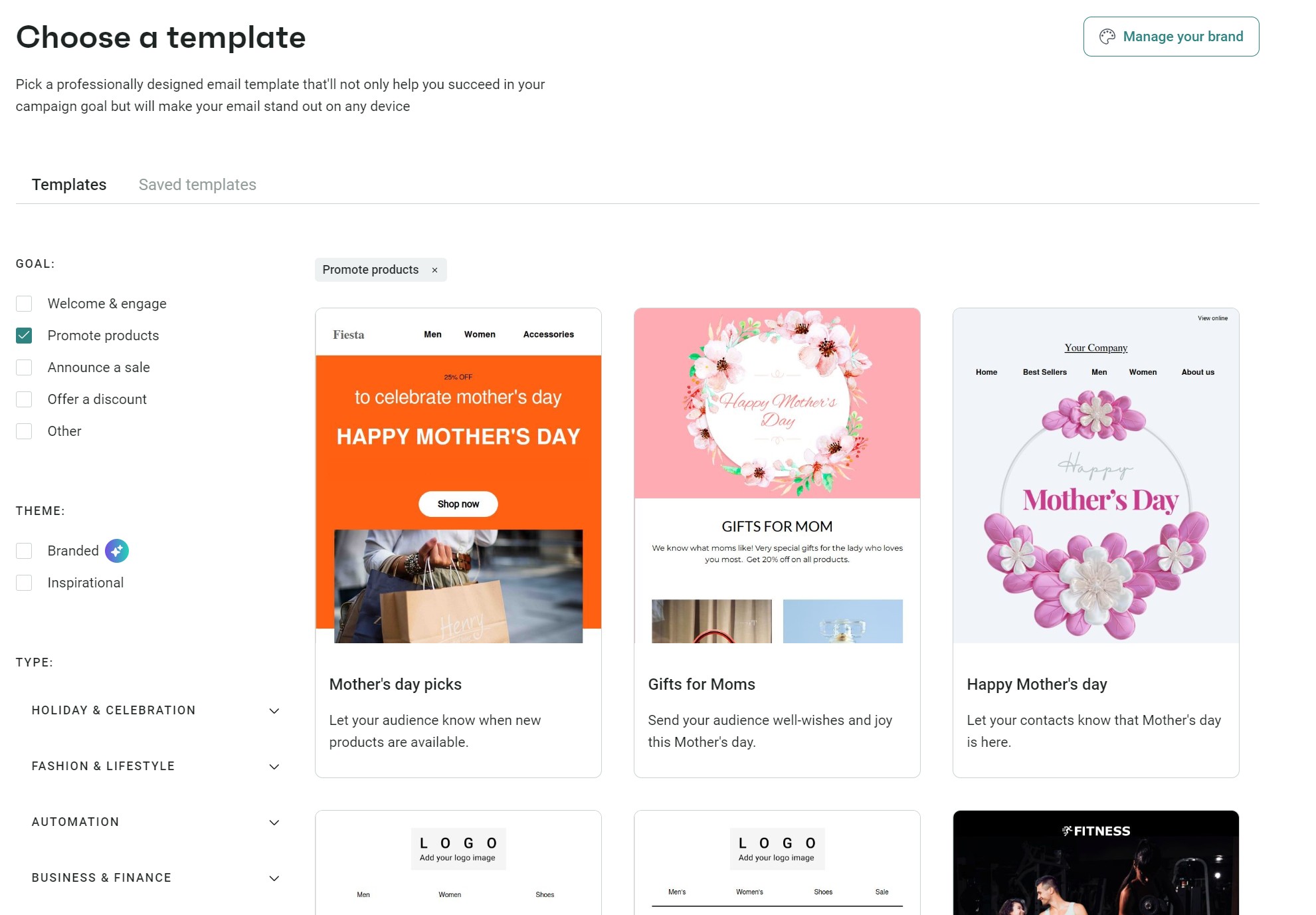
Once you’re in the email editor, follow these steps:
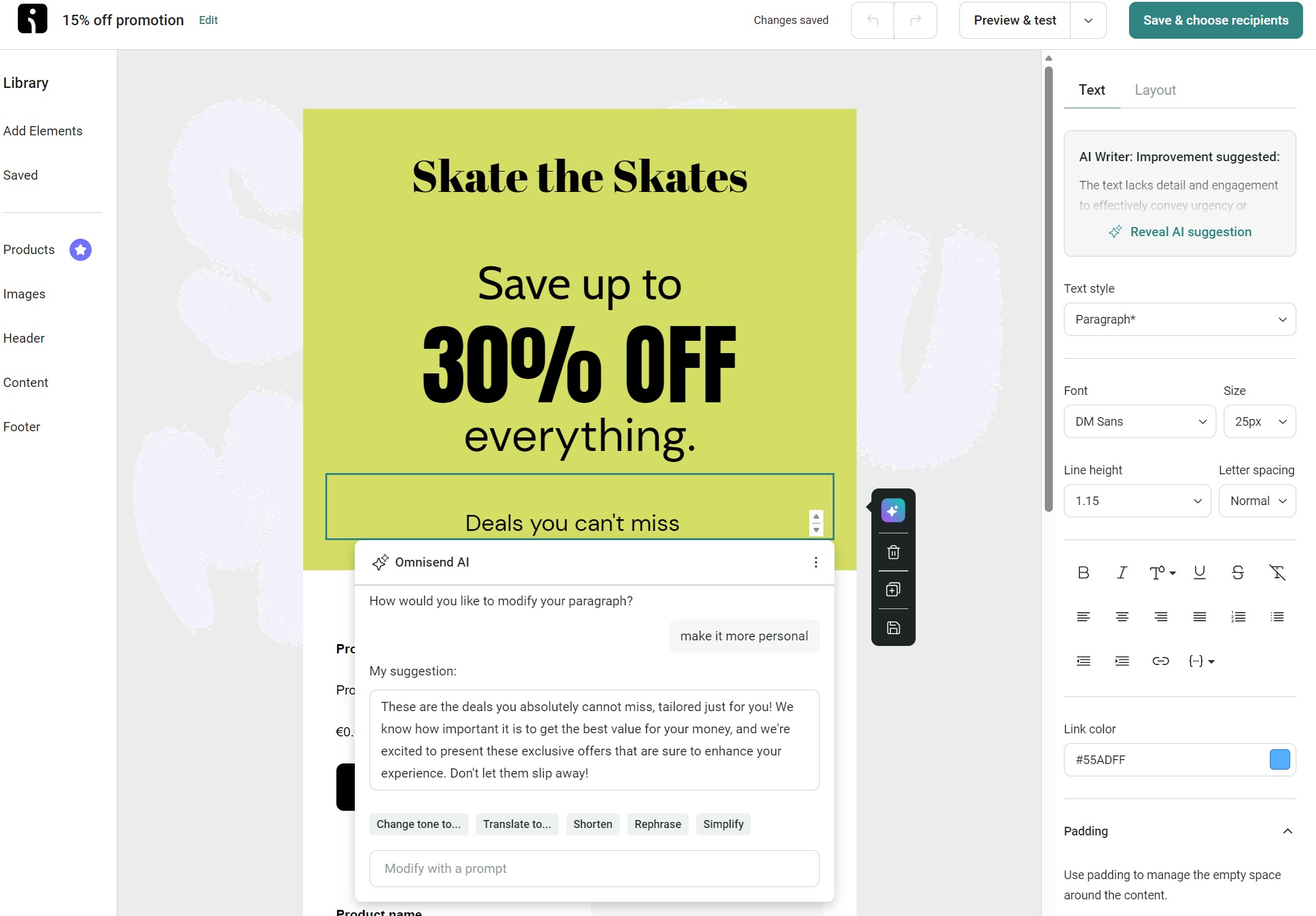
Click the text elements in the email and edit the content to match your offer and language. You’ll notice a colorful icon in the editor when you select it; this is the AI content tool. Prompt it to create professional content:
2. Assign a product element to your email. All Omnisend plans let you add best-selling, recently added, and most-viewed products. If you have the Pro plan, you can add recently viewed products and products similar to past purchases, which use browsing and purchase activity to personalize recommendations:
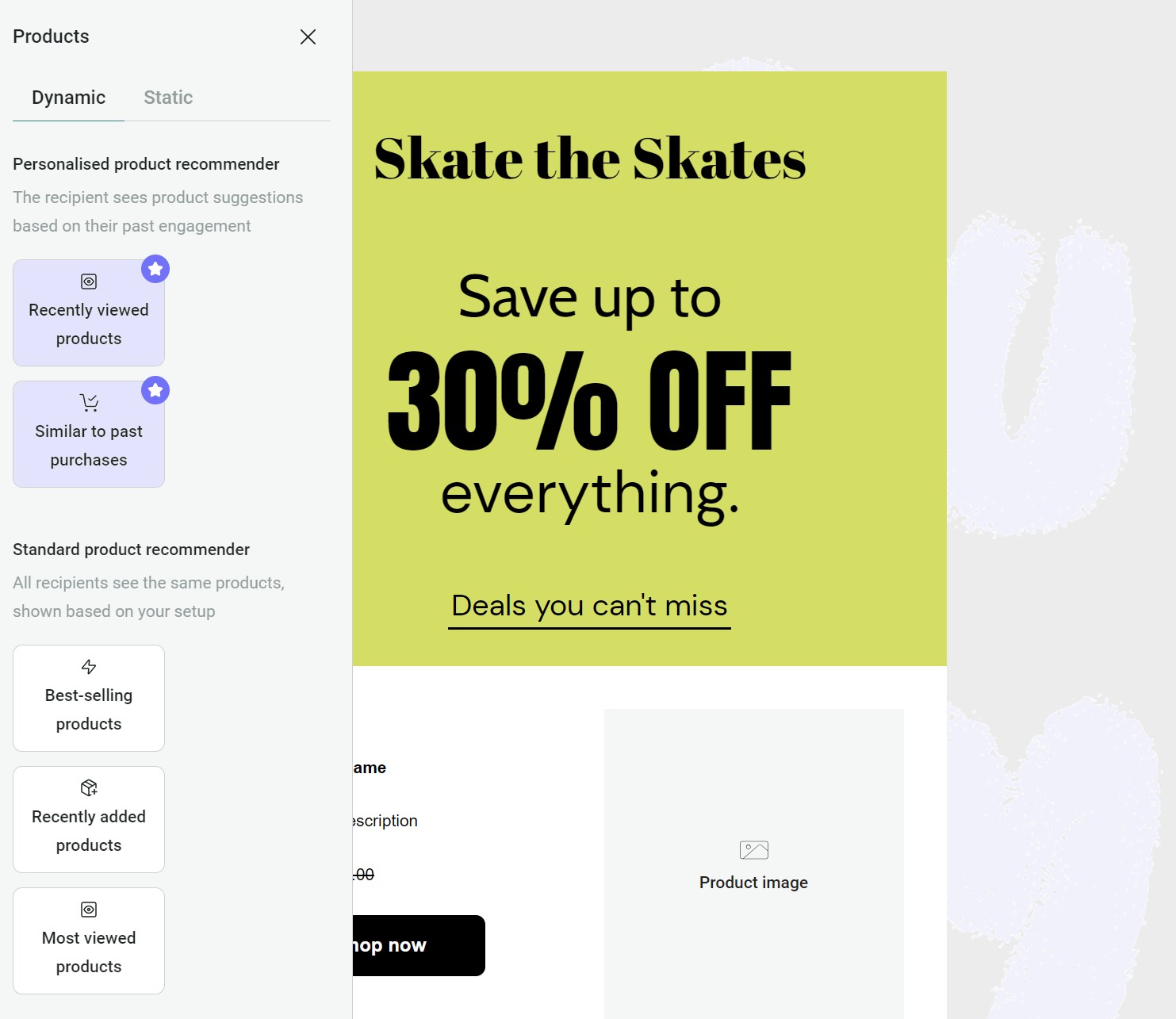
Click the product block and change its settings. These are contextual to the block, not universal. For instance, the Most-viewed products block includes a date range and a price from setting.
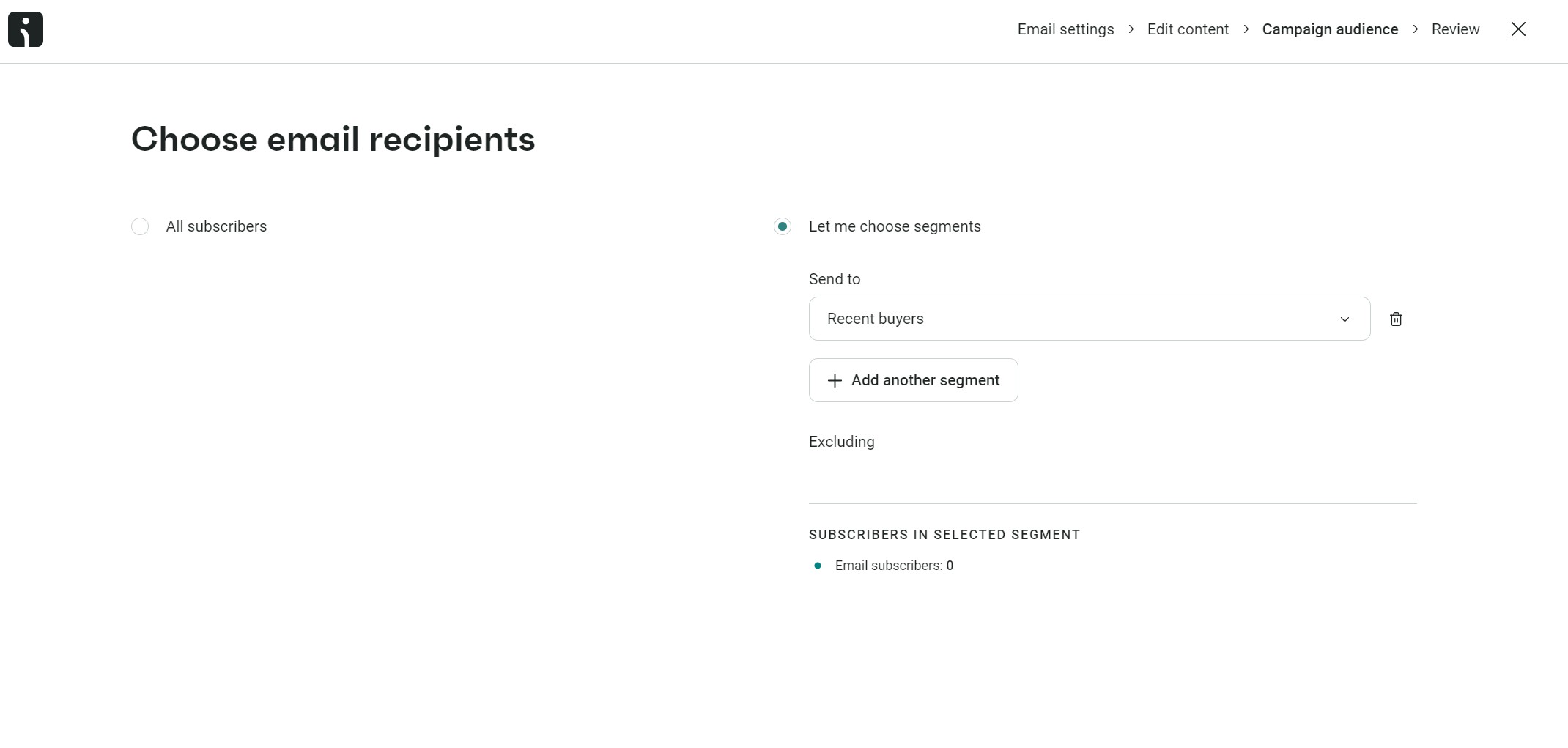
3. Assign your campaign to a segment. Click the Save and choose recipients button, and then select Let me choose segments. A dropdown will then load > select the Recent buyers segment we created earlier:
4. Click Review campaign and amend these settings:
- Campaign booster: toggle it on. It uses AI to resend to non-openers.
- Send. Click Schedule for later and input the date and time. Doing this is best practice in case your campaign has a typo or other error you might catch in another review.
5. To test your email, click the Send test email button, and then add an email address to receive a test email. I recommend sending it to a Gmail and Outlook address to ensure the email formats properly in these popular email clients.
6. Click the Schedule campaign button to set it in motion.
Monitor your email metrics (post-send)
Head to the Reports tab in Omnisend and click Campaigns:
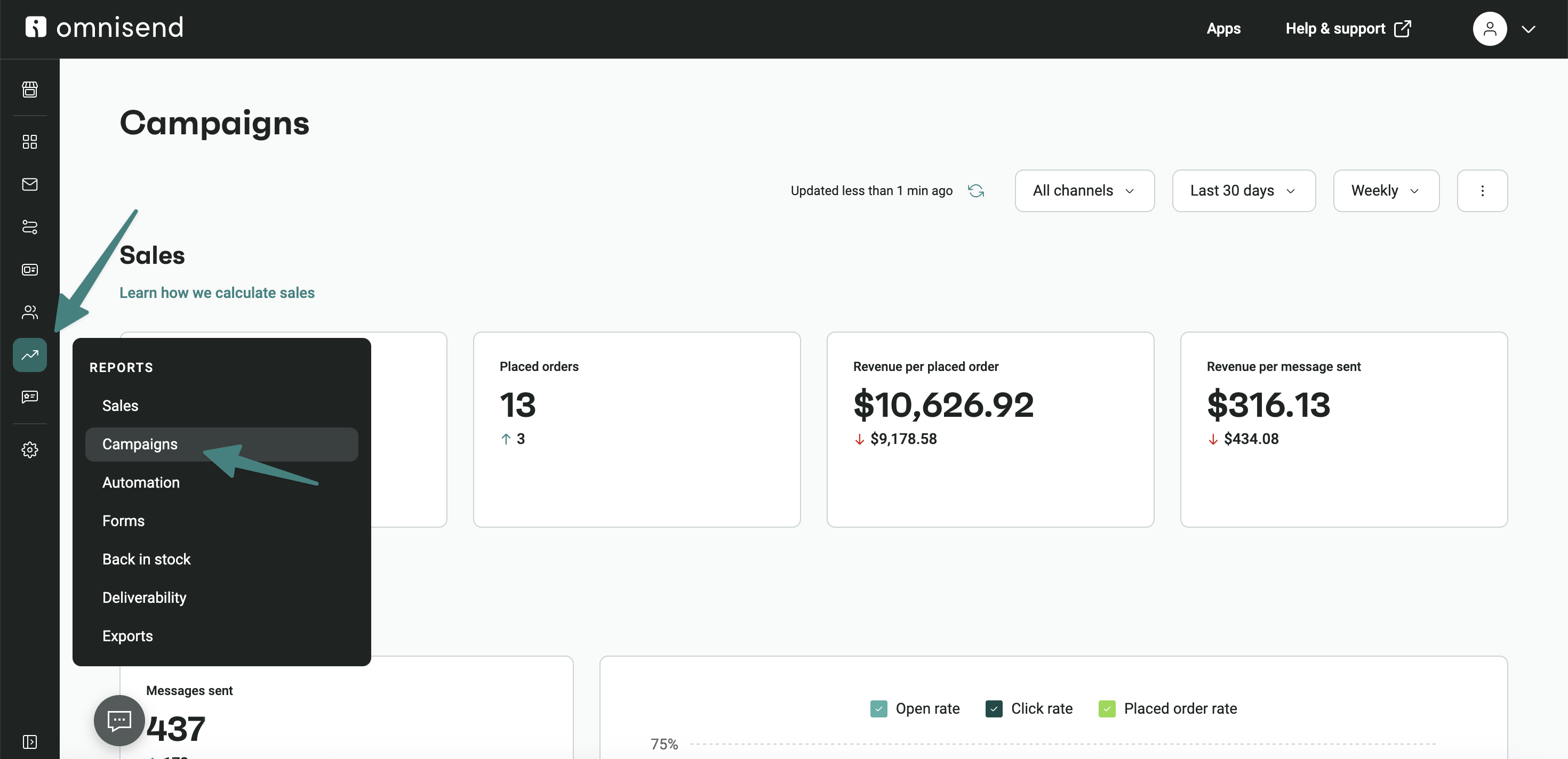
You’ll see these metrics at the top:
- Revenue
- Placed orders
- Revenue per placed order
- Revenue per message sent
Note that the above metrics are the total across all campaigns. If you scroll down to Campaign performance, you can then see the following information per campaign:
- Send date
- Messages sent
- Open rate
- Click rate
- Placed order rate
- Revenue
- Failed delivery rate
- Marked as spam rate
- Unsubscribe
Monitor these metrics one week after the initial send date to give your customers a good chance to open your email, and compare them like-for-like with other campaigns once you have a few under your belt.
Choosing a tool? See our roundup of the best email marketing software, or see how we compare.
Best practices for effective email marketing campaigns
Strong campaigns are relevant, clear, and easy to act on. The rest follows from those three.
Segmentation
People on your list are not all looking for the same thing. Start by separating new subscribers, active buyers, and quiet contacts with email segmentation.
Personalization
A first name does not make an email personal. Use product recommendations based on browsing history, then pair them with subject lines that reflect what the reader was looking for
Actionable CTAs
A good call to action tells people exactly what they get after the click. “Get your 20% discount” does that much better than “click here,” so keep it near the top.
Email campaign design
Keep the phone version simple because that’s where most people will read the email. A single column, short copy, and one button are enough. Preview in Gmail, Outlook, and Apple Mail before sending.
When to send
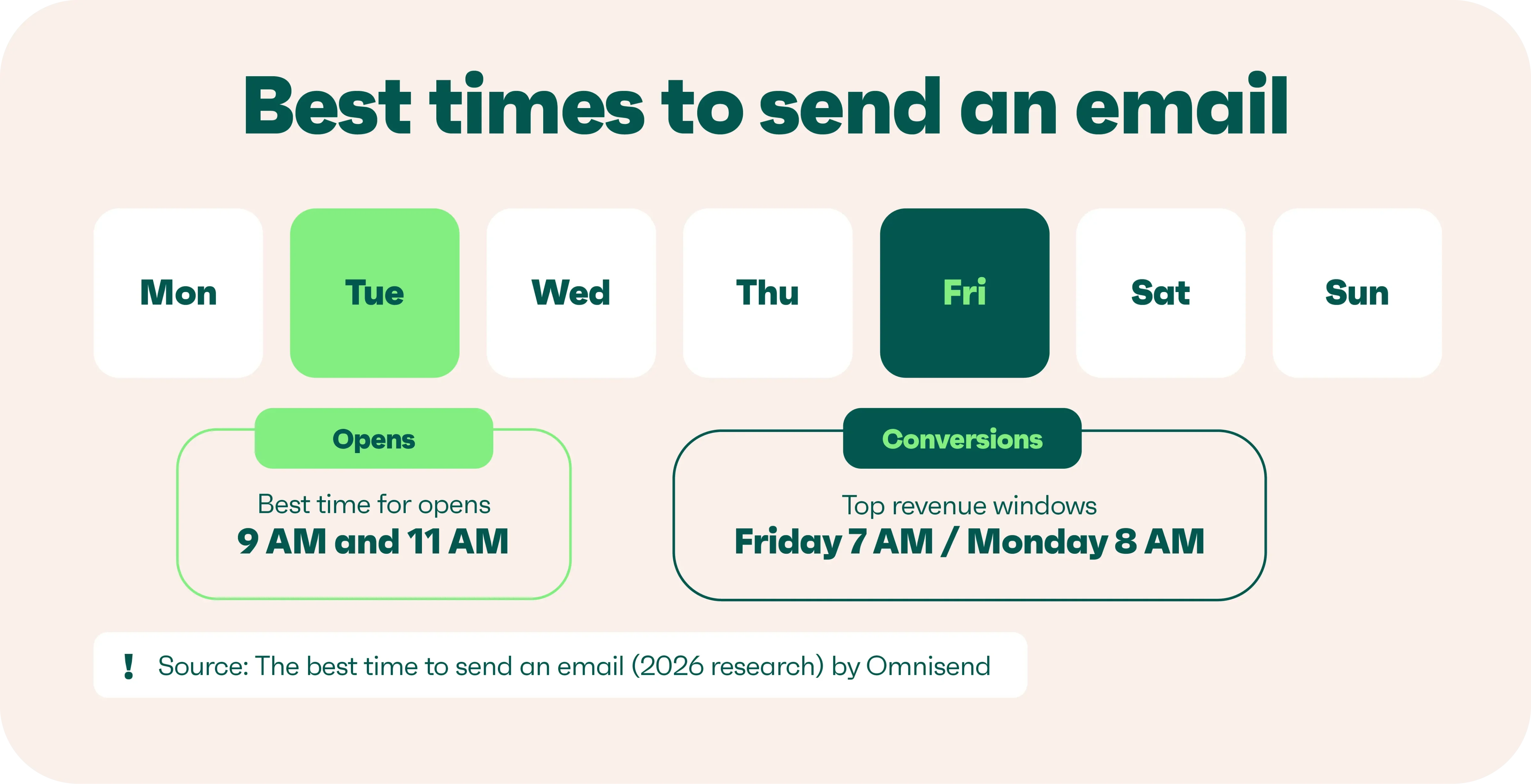
The day and time you send can change the results, so it is worth testing. In our study of roughly 26 billion emails, Tuesday came out on top for opens at 31.27% and clicks at 0.81% in our best time to send research. Friday led conversions, with 7 AM as the strongest time. Best times for opens are 9 AM and 11 AM. Use these numbers as a starting point, then check your own list.
Get your deliverability infrastructure in order
Send from a branded domain, authenticate it with SPF, DKIM, and DMARC, then warm it up before any large send. Full checklist: email deliverability.
Have a goal for all your campaigns
Pick one goal per campaign and hold to it. Mixed asks dilute the result. Define what success looks like, then judge the send against it.
Content that resonates
Answer the reader’s problem before trying to sell anything. A rough three-to-one mix of helpful and promotional content can keep the emails useful.
List cleaning
A big list is not much use if a lot of the contacts never engage. You should look into email list management: remove inactive, invalid, and duplicate contacts to keep deliverability healthy and avoid paying for contacts you do not need. See our email list cleaning guide for more.
Tracking your results
There is more to campaign performance than the open rate. Look at conversions and revenue per send first, then check engagement, deliverability, and sales. Just make sure you compare similar sends.
Common email marketing campaign mistakes to avoid
Email campaigns build loyalty and increase sales when executed properly. I’ve watched marketers repeat the same errors that tank their results. These are the ones you should avoid:
Spammy subject lines
Those “URGENT!!!” and “Act NOW!!!!” subject lines? Subscribers spot them instantly and hit delete, or report you as spam, and reduce your deliverability.
Clarity wins over wordplay in my experience. “20% off your next purchase this week only” beats “Don’t miss this crazy deal!” because readers know what they’re getting.
I use Omnisend’s free subject line tester to score my headlines from zero to 100. It analyzes length and word choice to help me write subject lines that get opened.
Ignoring mobile optimization
Responsive templates save hours of formatting work. One design adapts to phones, tablets, and computers, keeping your message readable everywhere.
Mobile readers skim, so put value up front. Short paragraphs, clear headlines, and bullets help people find what matters.
Lack of personalization
Mass emails feel like junk mail in any format. Subscribers expect recognition as individuals with unique needs and interests. Names create a connection where generic greetings fail. “Hi Sarah!” works better than “Dear Customer” every time.
Segmentation multiplies results without multiplying work. Group subscribers by behavior: runners see shoes, yogis see mats, everyone gets relevant content.
Sending too frequently or infrequently
Email frequency was challenging for me to determine when I first started marketing.
I’ve found weekly works for product updates, and monthly sends suit newsletters. Your ideal frequency depends on content type and what subscribers want.
Metrics reveal frequency problems before subscribers complain. Unsubscribe spikes and falling opens mean you’ve crossed from helpful to annoying.
How to improve email marketing campaign results?
Email campaigns can be a significant revenue generator for your store. For example, Omnisend’s customer Dukier derived 45% of email revenue from campaigns, with the other 55% from automations.
Crucial to Dukier’s success was segmentation. After segmenting by customer type and language, campaign revenue grew by 532%.
The takeaway is that campaigns are most effective when they have appropriate targeting and are complementary touchpoints alongside your email automations.Omnisend provides the campaign, automation, and segmentation tools you need to create the best experiences for customers, just like in Dukier’s example.
Quick sign up | No credit card required