Omnisend AI


 OFFER
OFFER









Two-way SMS lets customers text you back, turning one-directional messages into conversations. Your SMS automation tool either supports two-way texting natively or will integrate with the likes of Gorgias to surface replies as tickets.
There are cases where allowing two-way SMS is beneficial for your ecommerce store, such as support, order management, and moving customers closer to purchase.
This article provides a concrete definition for two-way SMS and explains how it works for your business. Is it worth pursuing? Read on for our top tips.
Quick sign up | No credit card required
SMS is easier to use and more cost-effective than ever. Discover the real impact behind SMS marketing and why you should incorporate this valuable channel.
Quick sign up | No credit card required
What is two-way SMS?
Two-way SMS is a text messaging service for sending and receiving messages from your customers, facilitated by your two-way SMS service and optionally paired with a helpdesk.
The mechanism works like so: your SMS tool sends a text, your customer replies to the same number, and your tool routes the response to your helpdesk.
You’ll sometimes see two-way SMS referred to as 2-way SMS or two-way texting. They’re the same, each allowing you to receive replies.
There is a difference between one-way and two-way SMS, though. One-way SMS is what you send for no-reply-needed messages; two-way texting works best when replies are necessary for, or improve, your customer experience and SMS marketing.
Here’s an example of a two-way SMS:
Business (SMS 1): “Hi there! You left some items in your cart. Would you like to complete your purchase? Reply ‘YES’ for assistance or ‘NO’ if you have any questions.”
Customer (SMS 2): “YES”
Business (SMS 3): “Great! We’re here to help. Do you need a discount code to sweeten the deal?”
This interaction can convert potential lost sales into successful transactions.
We’ll explain more below.
One-way vs. two-way SMS — what’s the difference?
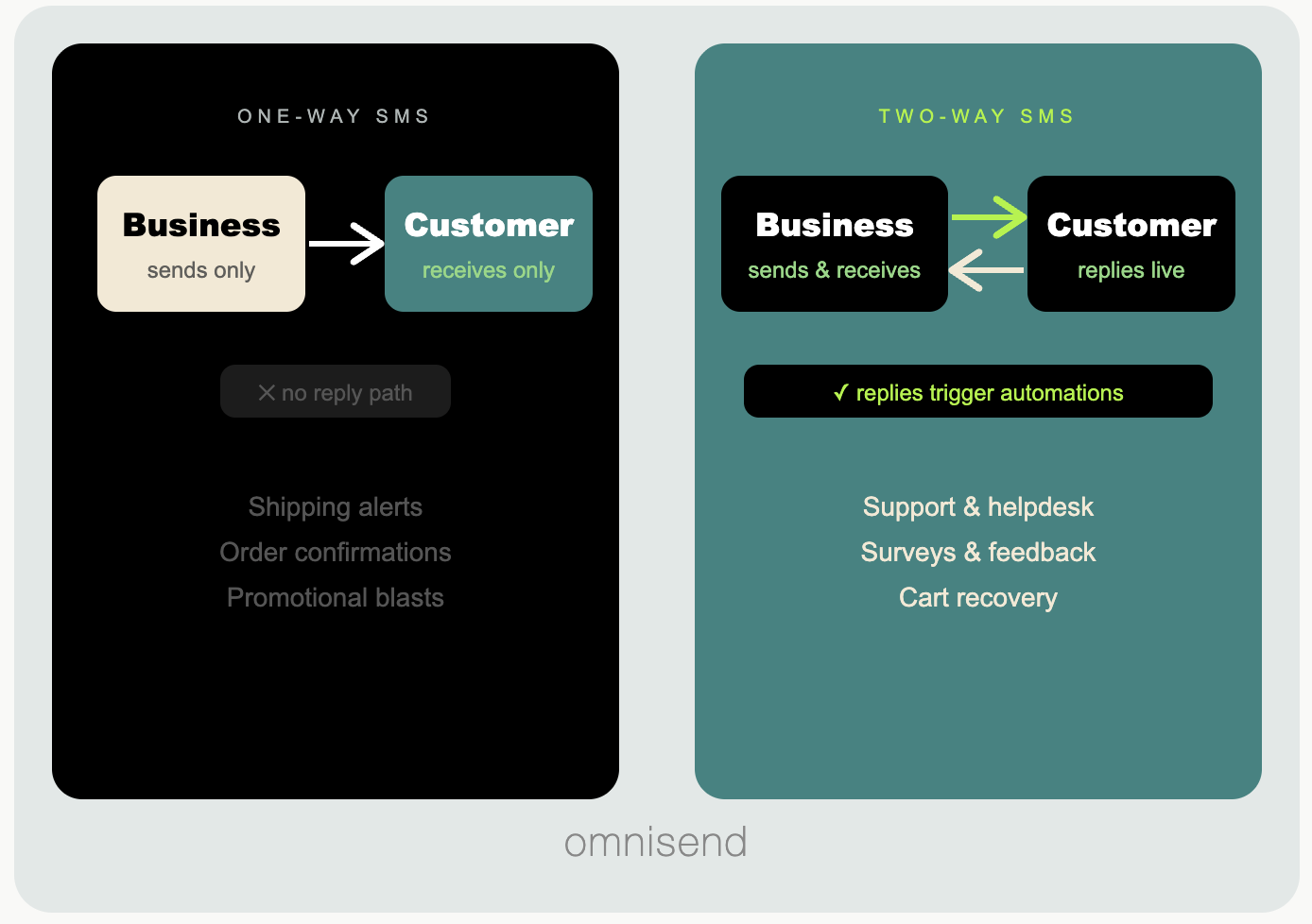
One-way SMS includes messages that customers can’t reply to, aside from automatic opt-outs like STOP. Two-way SMS adds a reply channel for back-and-forth conversations. We’ve prepared a table to explain the differences:
| Feature | One-way SMS | Two-way SMS |
|---|---|---|
| Replies | Not accepted, except opt-outs like STOP | Full back-and-forth conversations |
| Best for | Alerts, confirmations, promotions | Support, order queries, conversational selling |
| Customer experience | Broadcast only | Interactive, personal |
| Cost | Lower (outbound only) | Higher (outbound + inbound handling) |
| Setup | Standard SMS tool | SMS tool, optionally paired with a helpdesk |
The image below explains the differences between two-way and one-way SMS as a visual:
How does two-way SMS messaging work?
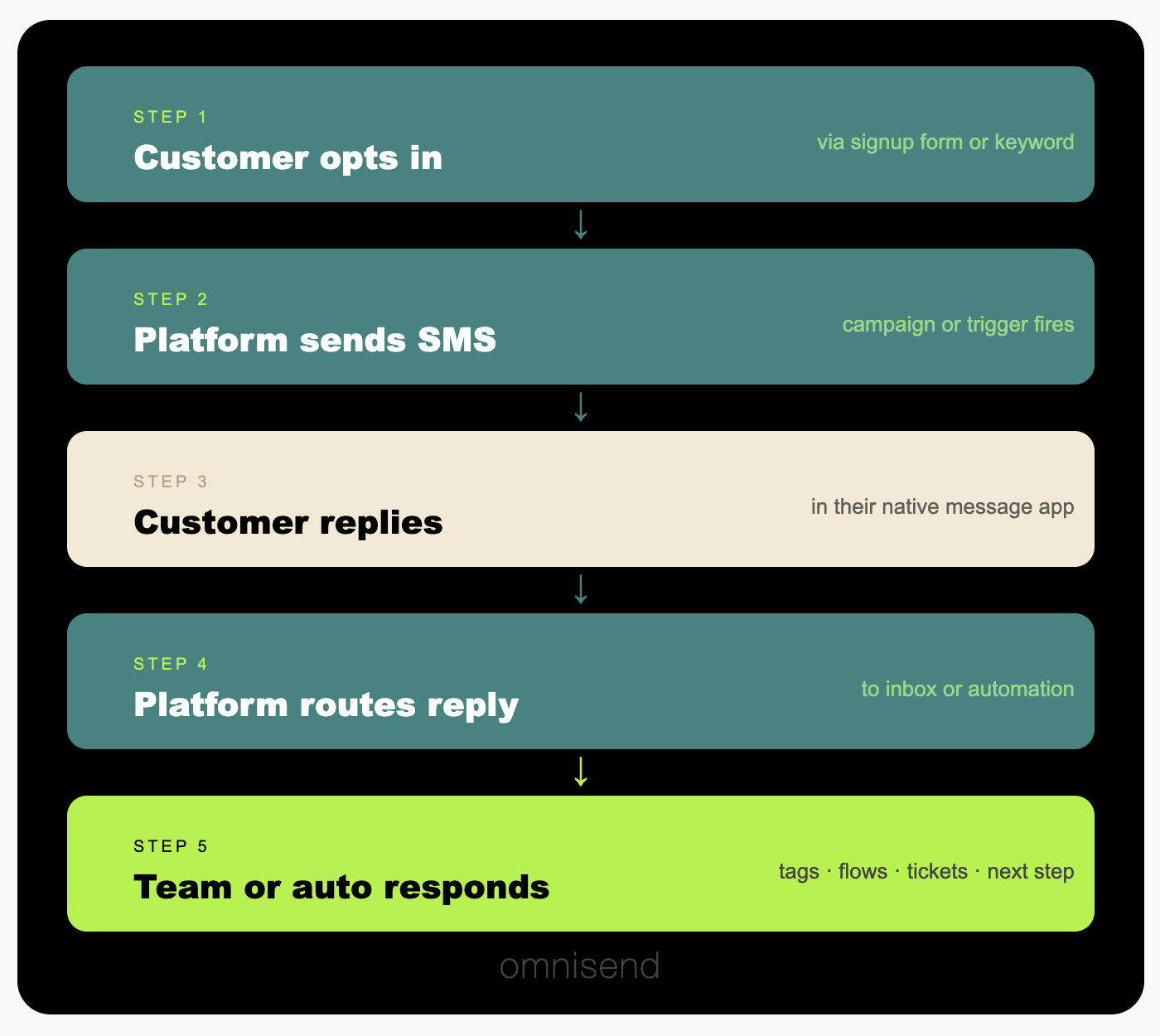
Your SMS tool sits between your business and your customers’ phones. Your customer replies to a text, and your SMS tool captures that reply and routes it to a human inbox, an automated flow, or both, within seconds.
Here’s how the process plays out, step by step:
- Your customer opts in. They join your list via a signup form, a checkout opt-in, or a keyword reply, such as texting “JOIN” to your short code.
- Your SMS tool sends an SMS. A campaign, automation, or triggered message goes out to your customer’s phone.
- Your customer replies, and your SMS tool captures their response, typically within seconds.
- Your SMS tool routes the reply. Depending on your setup, the customer gets an automated response, the message continues an existing flow, or it lands in a support inbox for your team to handle.
- Your team or automation responds. A human agent picks it up in your customer service tool, or your SMS tool sends the next automated message.
Your customer experiences this as a normal text conversation. On your side, it’s a fully trackable, automatable channel that feeds your segmentation data:
SMS short code vs. long code for two-way texting
Short codes and long codes are phone numbers suitable for 2-way SMS.
A short code is a five- or six-digit number for high-volume sending; a long code is a 10-digit number for 2-way SMS messaging.
The “code” in both cases is the sending number your texts come from. The difference is that a long code is a full-length phone number, and a short code is a purpose-built abbreviated one.
You can use either number type for 2-way SMS, although they suit different sending needs as the table below explains:
| Long code (10-DLC) | Short code | |
|---|---|---|
| What it is | A standard 10-digit number, same format as a mobile | A five or six digit number only for messaging (e.g. 711711) |
| Throughput | Lower, set by your brand vetting and each carrier's limits rather than a fixed rate | Very high, hundreds of message segments per second |
| Best for | Triggered flows, post-purchase messages, one-to-one conversations | Large-scale campaigns and keyword opt-ins for big subscriber bases |
| Cost | Lower overall: no monthly lease, just one-time 10-DLC registration, depending on the provider | Higher: monthly lease plus carrier approval fees |
| Setup | Days to a few weeks | Several weeks for carrier approval |
| Compliance | A2P 10-DLC registration required for US sending | Carrier approval per use case; shared short codes phased out in 2021 |
Ecommerce stores are usually best off with a long code as the first step. It’s lower cost and doesn’t sacrifice 1:1 messaging capabilities.
Did you know?
SMS is one of the fastest-growing ecommerce channels
Ecommerce stores are increasingly reaching customers with SMS. Omnisend’s 2026 Ecommerce Marketing Report found that send volumes grew 40% in 2025, following 2024’s 31% increase on 2023. Our early data suggests that 2026 will see even greater growth.
Two-way SMS is part of the reason behind the growth. Automated texts such as welcome messages, order confirmations, and follow-ups reach customers at high-intent moments and provide conversational opportunities that improve their experience.
5 two-way SMS use cases (with examples)
There’s two-way SMS marketing for campaigns and revenue-generating flows, and texts without promotional intent, such as confirmations. These are the primary use cases in ecommerce:
| Use case | How it works | What it enables |
|---|---|---|
| Satisfaction surveys | Send a survey after purchase; your customer replies with a score | Collect CSAT/NPS data and segment customers by score for follow-ups |
| Contest opt-ins | Your customer texts a keyword (e.g. WANT100) to enter | Identify entrants and trigger a prize or follow-up offer |
| Data collection | Ask new subscribers for preferences like location or interests | Build segments and send more personalized messages |
| Appointment booking | Send a reminder; your customer replies to confirm, reschedule, or cancel | Cut no-shows and prompt rescheduling |
| Opt-out handling | Your customer replies STOP or UNSUBSCRIBE | Automatically removes them and sends an unsubscribe confirmation |
1. Customer satisfaction surveys
Survey texts trigger on a delay you define in your flow. They provide a post-purchase experience and assist in collecting reviews and ratings.
“Hi James, we want to know how you’d rate your (product) purchase. Please reply on a scale of 1-5. Reply STOP to opt-out”
2. Contest opt-ins
Contests are prime for SMS marketing. These are one-time or scheduled sends rather than automations and will help you build a segment for active participants.
“Win $200 store credit. Text us back to enter our competition. 3 winners announced on (date). Reply STOP to opt-out”
3. Collecting customer data
Your signup forms won’t collect everything you need. A post-signup SMS campaign can do much more to gather information.
“Sneakers or heels? Reply here with your favorite, and we’ll send you a 25% discount. Reply STOP to opt-out”
4. Appointment/booking confirmations
An immediate automated send to put your customers’ minds at ease. The two-way texting approach opens the door for additional support.
“Confirmed, your booking at (location) on (date) at (time). You can text this number to manage your booking or visit (link). Reply STOP to opt-out”
5. Opt-out management
Not a conversational 2-way SMS, but still two-way by definition. Your customer replies to opt-out, and your SMS tool sends an auto-reply.
“You have successfully opted out of future SMS. To opt back in, text YES. Thank you.”
Two-way SMS compliance
All your text messages should only go to subscribers who explicitly opted in. The TCPA applies to the U.S., requiring prior express written consent, satisfied by your customer checking a box.
There are two ways to comply with opt-in requirements:
- Single opt-in: Your customer provides their number and is added immediately
- Double opt-in: Your customer provides their number and confirms by replying YES before being added
Tip: The best way to collect proper consent is with checkboxes on your forms. Omnisend’s forms collect phone numbers and SMS opt-ins with TCPA-compliant consent language.
Additional reading: Compliance best practices in SMS
How to set up two-way SMS messaging with Omnisend
Omnisend’s integration with Gorgias enables two-way SMS messaging. It’s an excellent opportunity to create new customer experiences as part of your broader SMS marketing efforts.
Let’s look at the steps to get started:
Step 1: Link your Omnisend account to your Gorgias account. Here’s a comprehensive step-by-step guide.
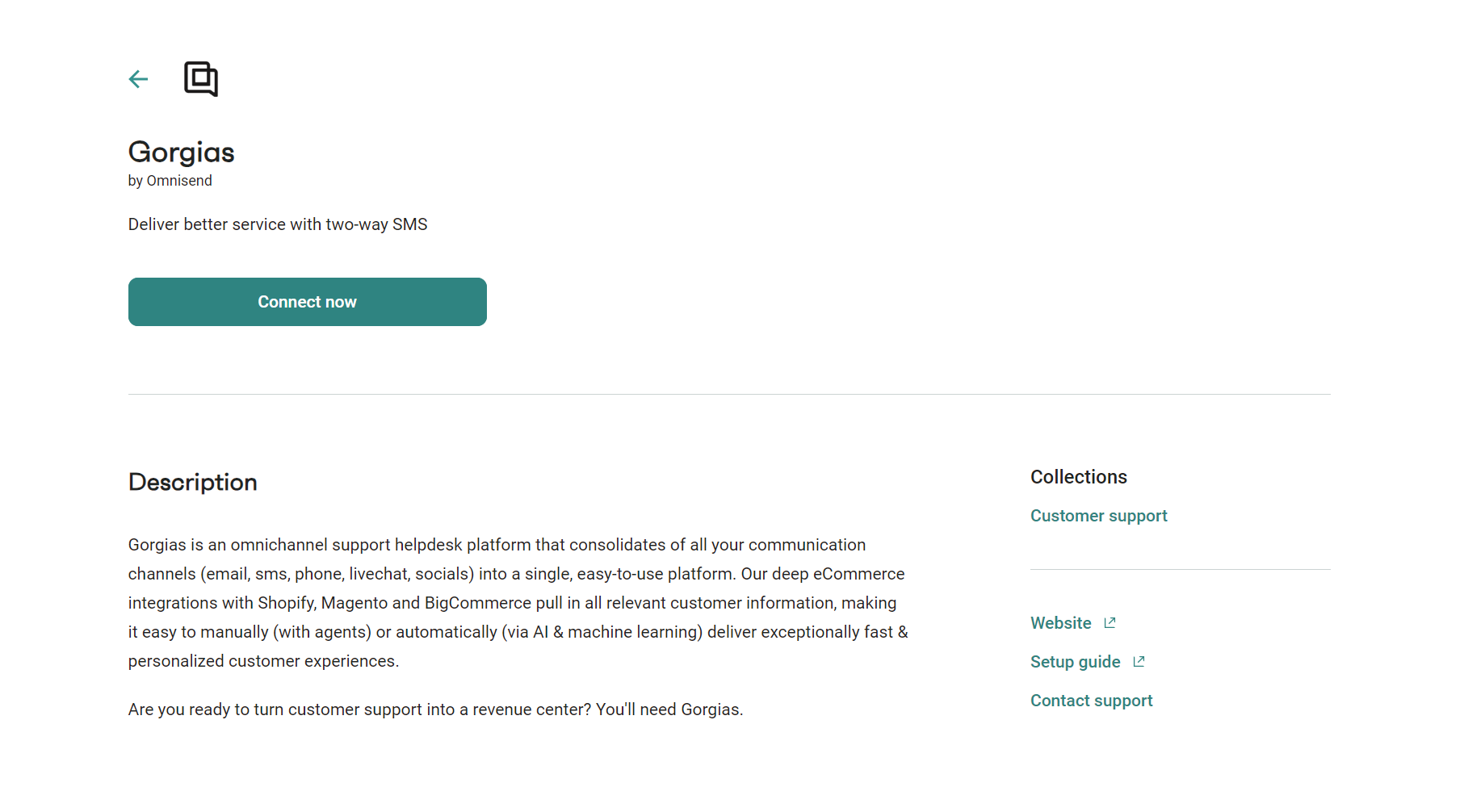
Step 2: Ensure you’re on the Pro plan. As of May 2026, Pro (starting at $59/month) is the only plan that lets new customers send SMS. SMS is billed on volume-based pricing starting at $0.009 per message.
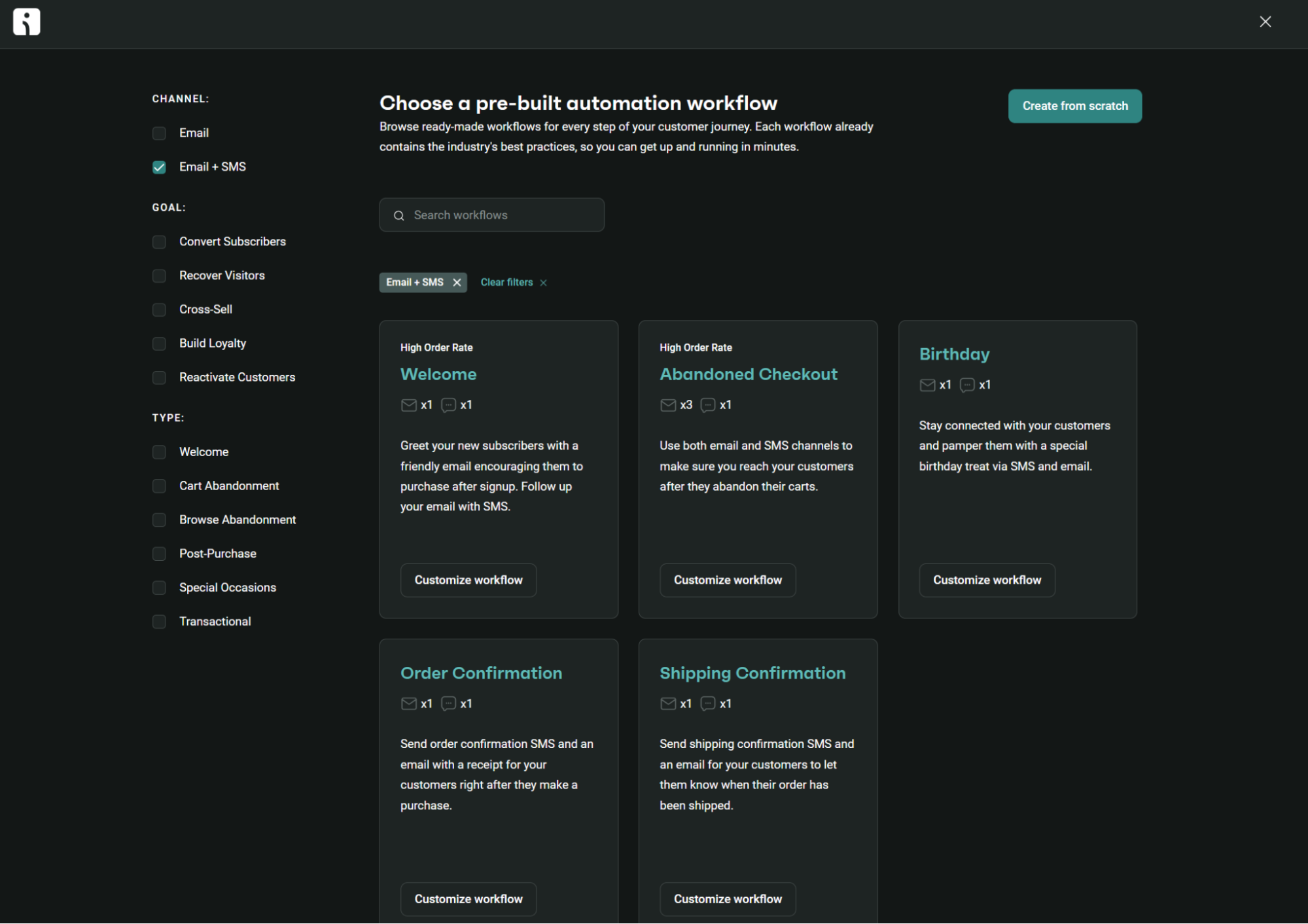
Step 3: Build a standalone SMS campaign to schedule or send immediately, or create an SMS automation. Omnisend has pre-built marketing and transactional flows. High-impact options include a welcome text, abandoned checkout text, birthday text, and order confirmation:
Step 4: Let replies flow into Gorgias. When a U.S. customer replies to your SMS, Omnisend creates a new ticket in your Gorgias helpdesk. Each ticket is tagged “Omnisend,” and its subject line begins with “SMS via Omnisend.”
STOP and HELP keywords are excluded from the Gorgias integration, on the basis that Omnisend processes those automatically for compliance, so they don’t create Gorgias tickets. All other U.S. customer replies flow into Gorgias.
Step 5: Process those replies. When you or your helpdesk agent replies in Gorgias, the responses go back to the customer via SMS through Omnisend, using the same phone number.
You might wonder, “What else is possible with two-way messaging?” Well, with an omnichannel marketing automation platform, your email, SMS, and web push notification channels can work together to reach customers at more high-intent moments.
Quick sign up | No credit card required
FAQs
What is the difference between one-way and two-way SMS?
Two-way SMS lets customers reply to your texts, routing their responses to your SMS tool or helpdesk. Your SMS tool sends the initial text. One-way SMS includes messages your customers can’t reply to, aside from automatic opt-outs.
What’s the difference between SMS broadcasts and flows?
SMS broadcasts are one-time and scheduled sends to your audience. Flows are automated texts triggered by customer actions and events. Both support 2-way SMS, but suit different use cases, such as broadcasts for competition entries and flows for confirmations.
Is two-way SMS more expensive than one-way SMS?
Usually, yes, because you pay to handle both inbound replies and outbound messages. That doubles your volume, although not every outbound text will receive a reply. Those extra costs could be worth it if they provide better customer experiences and generate additional revenue.
What is a short code in SMS messaging?
A short code is a five- or six-digit phone number for text messaging. It suits high-volume messaging, but could be overkill for your ecommerce store if it’s only just getting started with two-way SMS.
Can I use two-way SMS on Shopify?
Shopify doesn’t have native two-way SMS, but you can add the channel with an app or an API. Omnisend automates your text messages and connects to Gorgias, so U.S. customer replies become support tickets. Twilio offers an SMS API you can build two-way messaging on, though it takes more developer setup than an app-based option.
How do I get customers to respond to SMS messages?
Near your signup forms, mention that customers can reply to your texts. Then, encourage them to reply to your text message. Say “Reply to this message to speak to an expert,” or “Share your thoughts here” to gather their responses.