Omnisend AI


 OFFER
OFFER










SendGrid is best for transactional emails; Brevo is best for marketing emails. But they can both handle either for your business. The difference is that Brevo does it in one plan compared to SendGrid’s two plans and is marketer- rather than developer-oriented.
We signed up for both for this Brevo vs. SendGrid comparison, priced them at common send and contact tiers, and tested the features marketers use.
Brevo vs. SendGrid: quick comparison
Brevo is marketing-first, and SendGrid is transactional-first. Ecommerce stores and small marketing teams suit Brevo’s customer relationship management (CRM) toolkit. SendGrid is a fit for developers and product teams.
| Brevo | SendGrid | |
|---|---|---|
| Built as | Marketing messaging platform | Email delivery platform |
| Best for | Marketing and transactional messaging in one tool | Transactional email at scale, with marketing sold separately |
| Pricing model | Monthly email volume with contact caps per tier | Contact tiers with monthly send caps for Marketing Campaigns; monthly send tiers for Email API |
| Free plan | Yes, 100,000 contacts | No, 60-day trial only |
| Ease of use | Built for non-technical users | Developer-oriented; API integration expected |
| Email editor and templates | 48 pre-built templates, five basic templates, drag-and-drop editor | 60 pre-built templates, drag-and-drop editor |
| Segmentation | Segments and a CRM with companies, deals, and pipelines | Segments only; no CRM |
| Email automation | All plans, ecommerce-first | Advanced tier only, from $60/month |
| Transactional emails | Available in all plans | Email API only |
| Deliverability | 99% claimed; dedicated IP add-on on Professional | 99% claimed; dedicated IP included on Pro |
| Analytics and reporting | Opens and clicks at entry; heatmaps, geography, and device from Standard; predictive analytics and scores in Professional | Opens, clicks, and bounces by mailbox provider, geography, and device, all tiers |
| Integrations and application programming interfaces (APIs) | 140+ apps, better for CRM, sales, and other ready-made integrations | One native integration (Segment); everything else via API or SDKs |
| Customer support | Email in all plans; Professional plans have phone support | 24/7 tickets and live chat on all paid plans; phone callbacks from Pro |
| G2 rating | 4.5/5 (2,600+ reviews) | 4.0/5 (300+ reviews) |
Accurate as of September 2026.
Brevo vs. SendGrid pricing
It’s cheaper to send marketing emails with Brevo, and cheaper to send transactional emails with SendGrid below 250,000 a month and again at high volume. Brevo’s pricing is based on monthly email volume. SendGrid’s transactional email is also based on email volume, with marketing pricing based on stored contacts.
Brevo supports marketing and transactional emails in all plans via API or simple mail transfer protocol (SMTP). It counts both toward your allocated monthly email volume. SendGrid sells Marketing Campaigns and the Email API separately, each with its own send allowance.
SendGrid works out cheaper for transactional emails at most volumes. A 50,000-email plan is $19.95/month. Brevo charges $56/month in Starter for that send volume.
Transactional email cost comparison
| Monthly emails | SendGrid Email API | Brevo |
|---|---|---|
| 50,000 | $19.95 | $56 (Starter) |
| 100,000 | $34.95 | $82 (Starter) |
| 250,000 | $249.00 (Pro 300k) | $249 (Standard) |
| 500,000 | $499.00 (Pro 700k) | $429 (Standard) |
| 1,500,000 | $799.00 | $1,479 (Professional) |
Accurate as of September 2026. Where a plan has no matching tier, the nearest one is shown.
For marketing emails, SendGrid’s contact-based pricing works out to be more expensive than Brevo’s monthly email volume pricing. Storing 50,000 contacts costs $120/month on SendGrid.
Marketing email cost comparison
| Contacts | Brevo Starter | Brevo Standard | Brevo sends/month | SendGrid Basic | SendGrid Advanced |
|---|---|---|---|---|---|
| 5,000 | $9 | $18 | 5,000 | $15 | – |
| 10,000 | $17 | $35 | 10,000 | $25 | $60 |
| 20,000 | $32 | $69 | 20,000 | $50 | $100 |
| 50,000 | $56 | $97 | 50,000 | $120 | $250 |
| 100,000 | $82 | $139 | 100,000 | $200 | $450 |
Accurate as of September 2026.
SendGrid Basic charges $200/month for 100,000 contacts versus $82 on Brevo Starter. That’s more than double the price, and it doesn’t include transactional emails.
Does Brevo or SendGrid have a free plan?
Only Brevo has a Free plan. It stores 100,000 contacts and lets you send 300 emails/day, with access to both marketing and transactional emails. A limitation to know is that only 2,000 contacts can enter active automations.
SendGrid had a Free plan until May 2025. It retired its Free Email API and Free Marketing plan; paid plans now include a 60-day trial, after which you must move to a paid plan.
Interested in Brevo? Read our Brevo review and Brevo pricing articles.
Brevo vs. SendGrid ease of use
Brevo is quicker to navigate for campaigns and automations, and its CRM provides a contact-management hub that SendGrid lacks.
The Brevo Home dashboard shows more information than SendGrid’s, with a calendar, your contacts, your plan usage, your last campaigns, automation, and transactional widgets.
You can add and remove marketing widgets and build a dashboard that reduces the need to navigate to other screens.
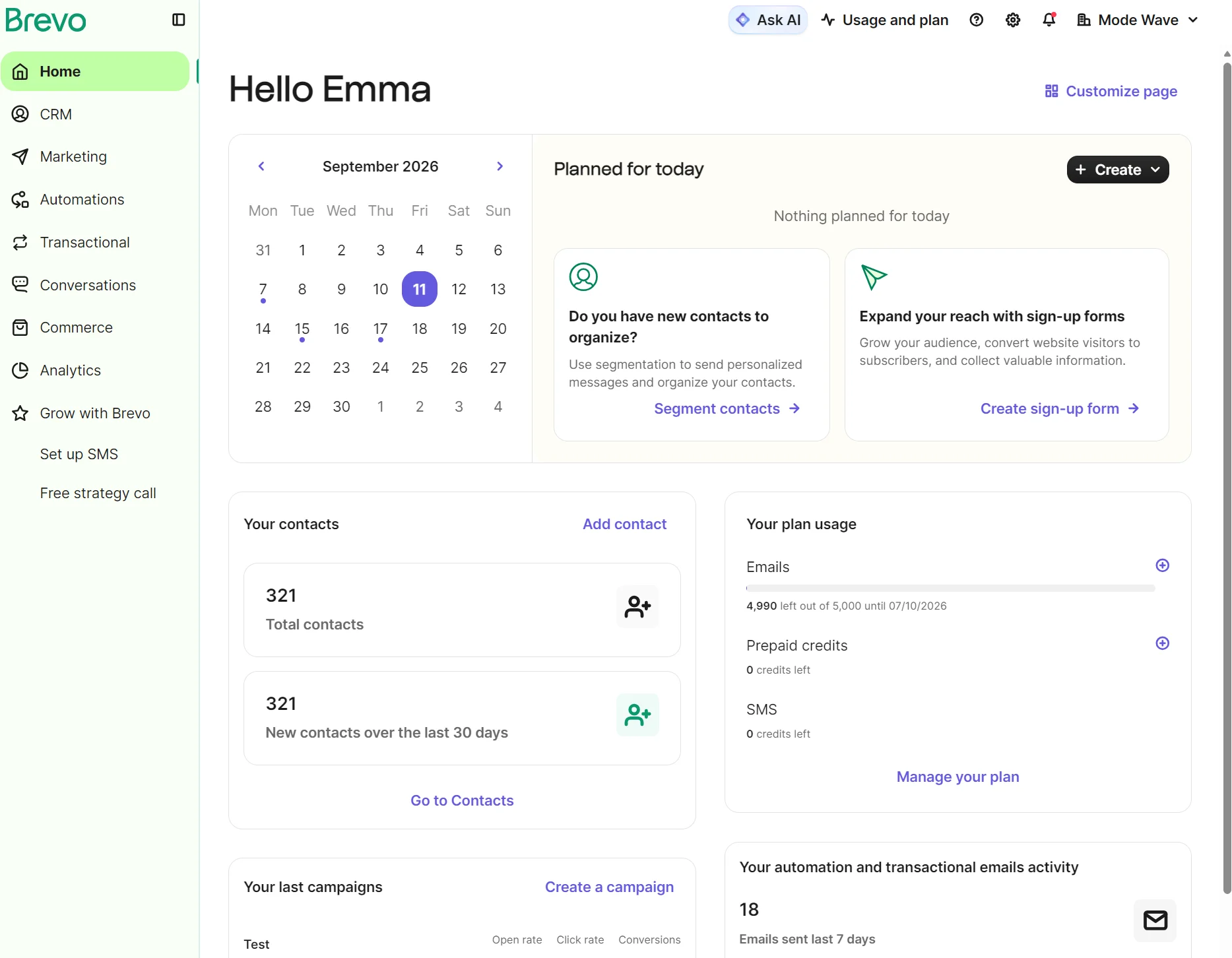
Each widget links to its respective dashboard for more controls, or you can use the sidebar.
SendGrid’s dashboard leads with email activity at the top and lists three Important Next Steps to complete, including sender authentication.
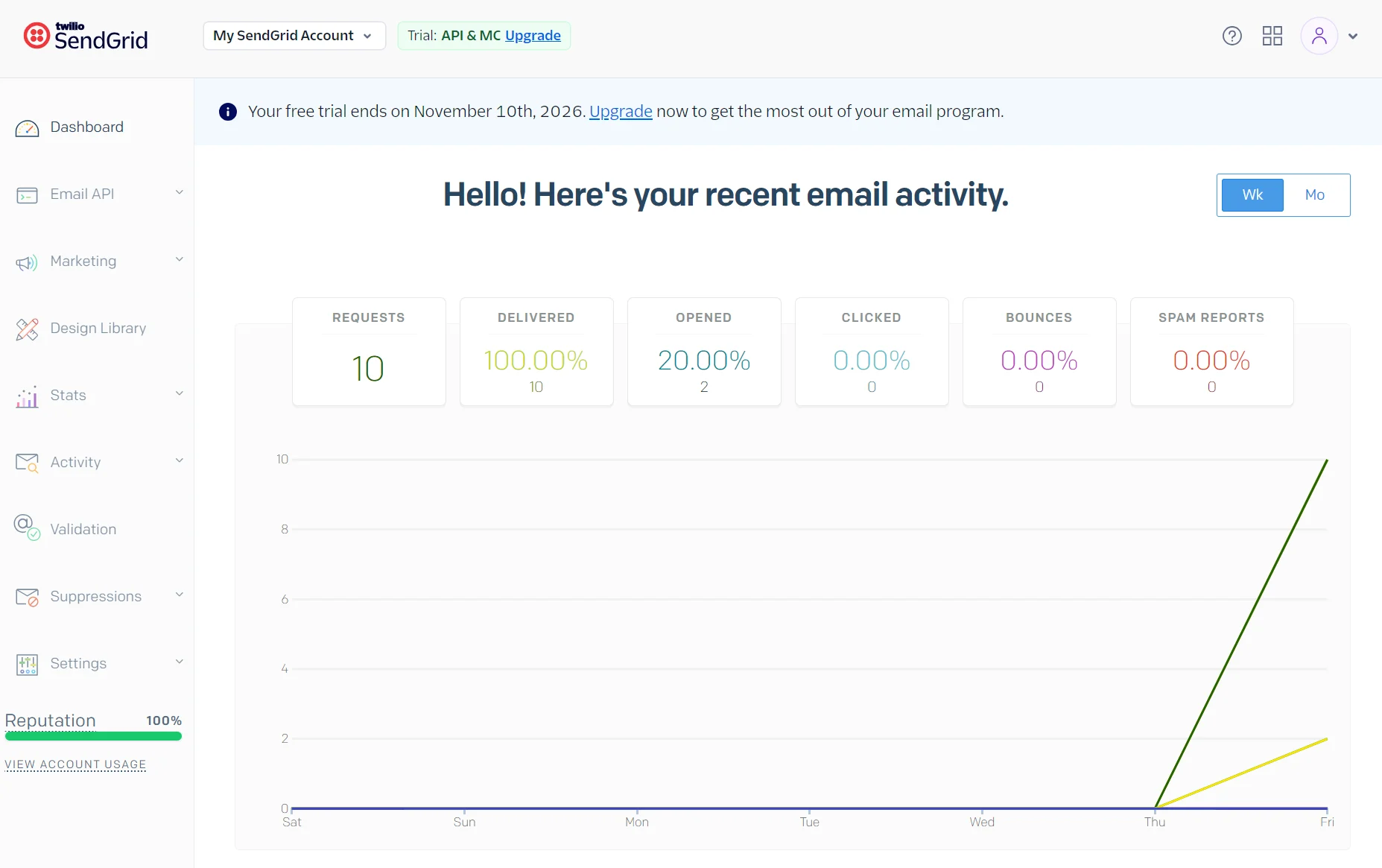
SendGrid’s menu has more items in its dropdowns than Brevo’s, and some labels assume technical knowledge, such as Parse webhook.
The reputation score in the sidebar is something that Brevo doesn’t have, and settings pages are accessible from the sidebar, rather than in a dropdown menu at the top as in Brevo.
Brevo vs. SendGrid email editor and templates
Brevo’s editor is faster to build in, with more blocks and sections, although SendGrid has more pre-built templates to choose from.
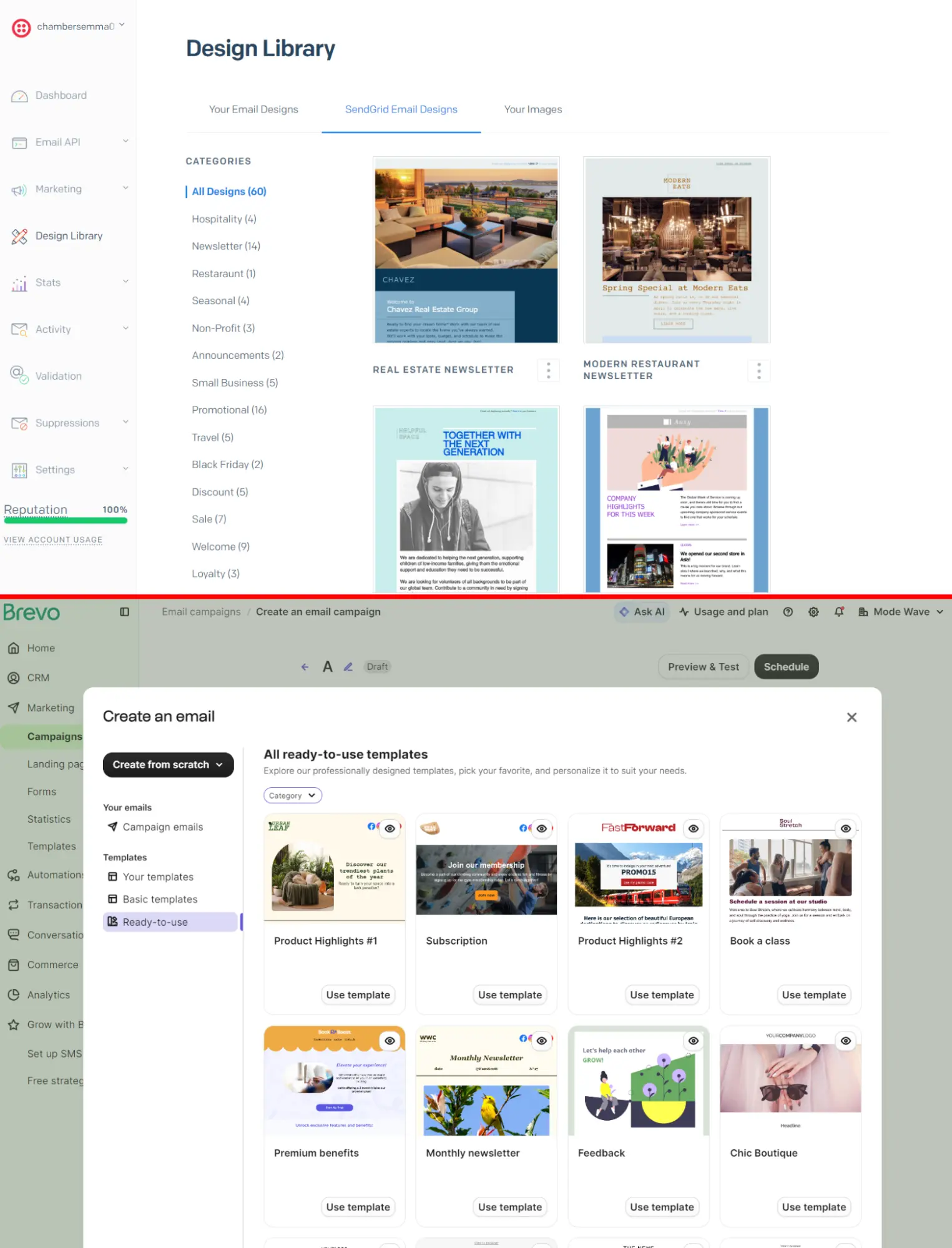
SendGrid has 60 email templates with a larger share of newsletter designs compared to Brevo’s total of 53 templates built primarily for ecommerce.
You access SendGrid’s email library via a Design Library item in the sidebar. Brevo lets you view them in Templates, a sub-item dashboard under Marketing, or when building an email campaign. If you have a Professional plan, then you can create folders to organize templates.
Brevo’s drag-and-drop editor includes a product block that supports up to nine products to your email templates, plus a dynamic content block that uses custom data feeds. Sections are pre-built layouts for images and text; SendGrid doesn’t have these.
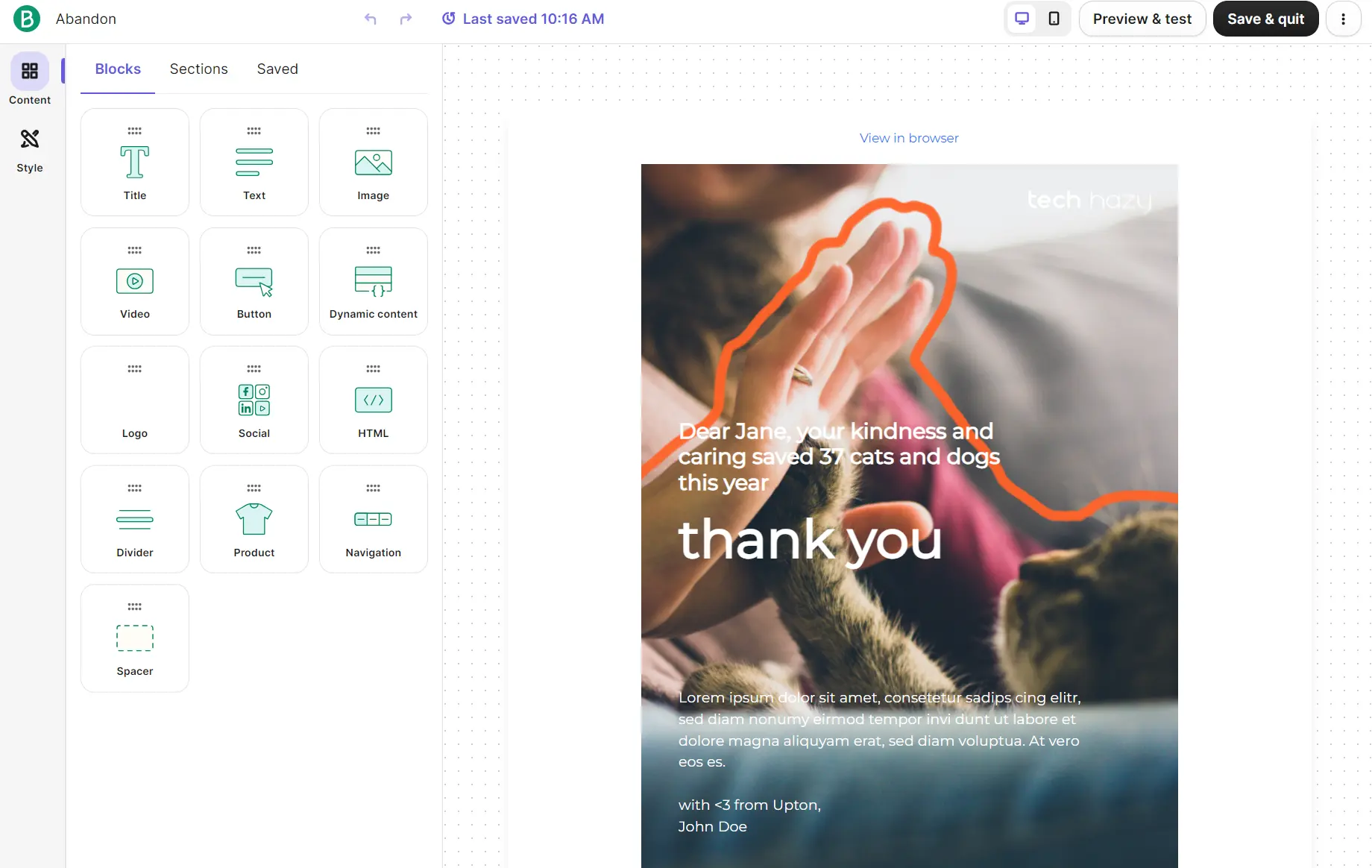
Brand assets in Brevo’s Style tab are a time-saver. You can click Apply brand assets, and your logo and colors are inserted into the template.
SendGrid’s email editor doesn’t have a product or dynamic content block. Instead, it has nine blocks for basic elements such as buttons, image and text, columns, and social. Brevo has 13 blocks in total.
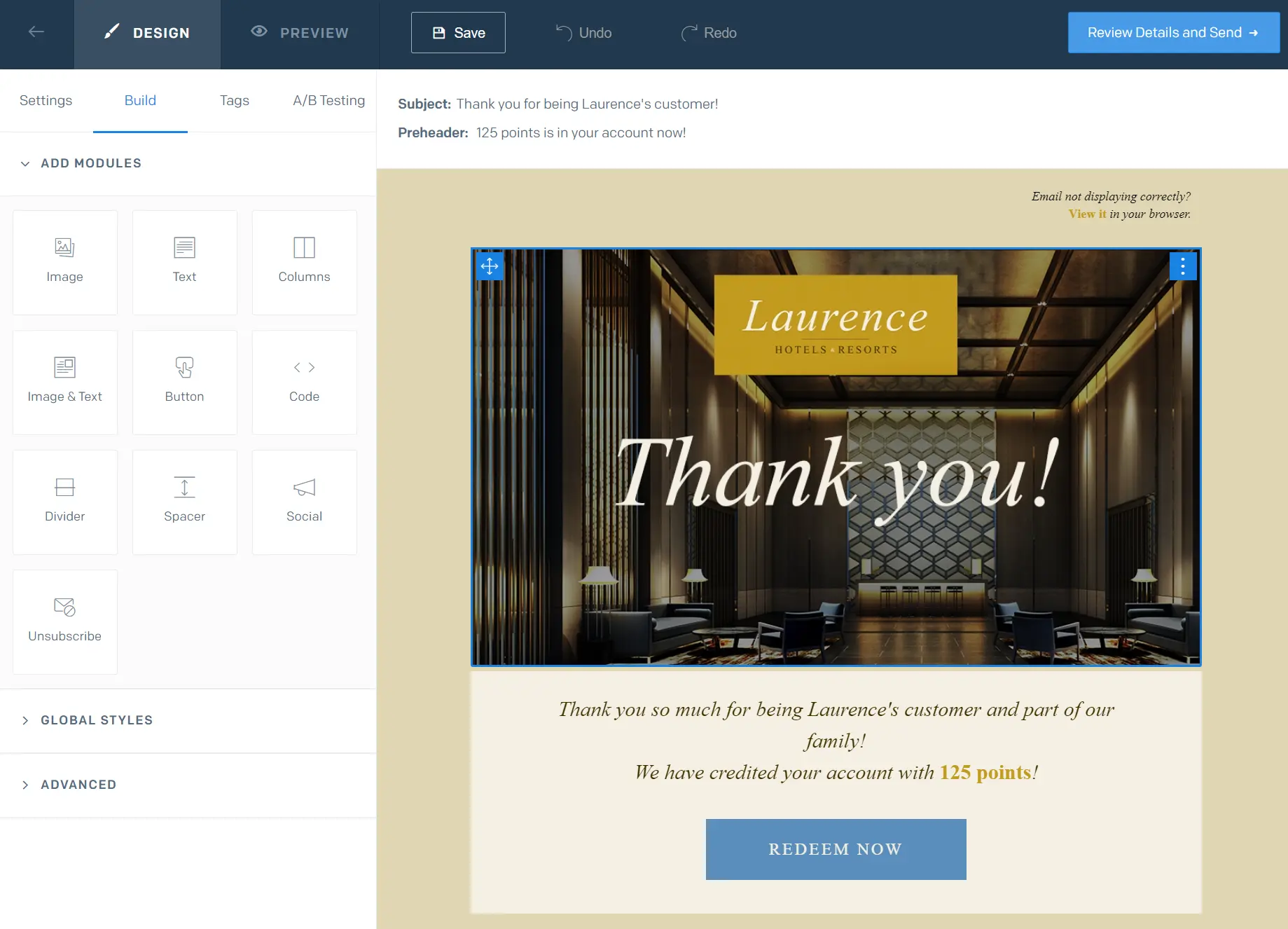
HTML controls are unique to SendGrid. The Advanced dropdown has options to Edit HTML Head, Import Drag & Drop HTML, and Export HTML. Brevo has an HTML block in templates for sections only, and an HTML custom code option when creating a template from scratch.
SendGrid also has A/B testing inside the editor. You use a toggle to enable A/B testing and select email subject or email content as your variable. Brevo requires you to select A/B test as your campaign type during setup.
Brevo vs. SendGrid segmentation
Brevo wins. Whereas SendGrid lets you segment based on who someone is and how they respond to emails using pre-existing filters, Brevo covers what they did on your site and what they bought.
SendGrid doesn’t have an equivalent to Brevo’s CRM, which lists contacts, companies, and segments in separate dashboards and supports deals and tasks per contact. There’s also a segment template titled Your next task for the contacts with whom you have a task to do.
Other Brevo capabilities include 20+ pre-built segments, including distinct groups for email marketing, SMS, and push notifications. The ecommerce library has 11 segments for high-spending customers and recent customers, among others.
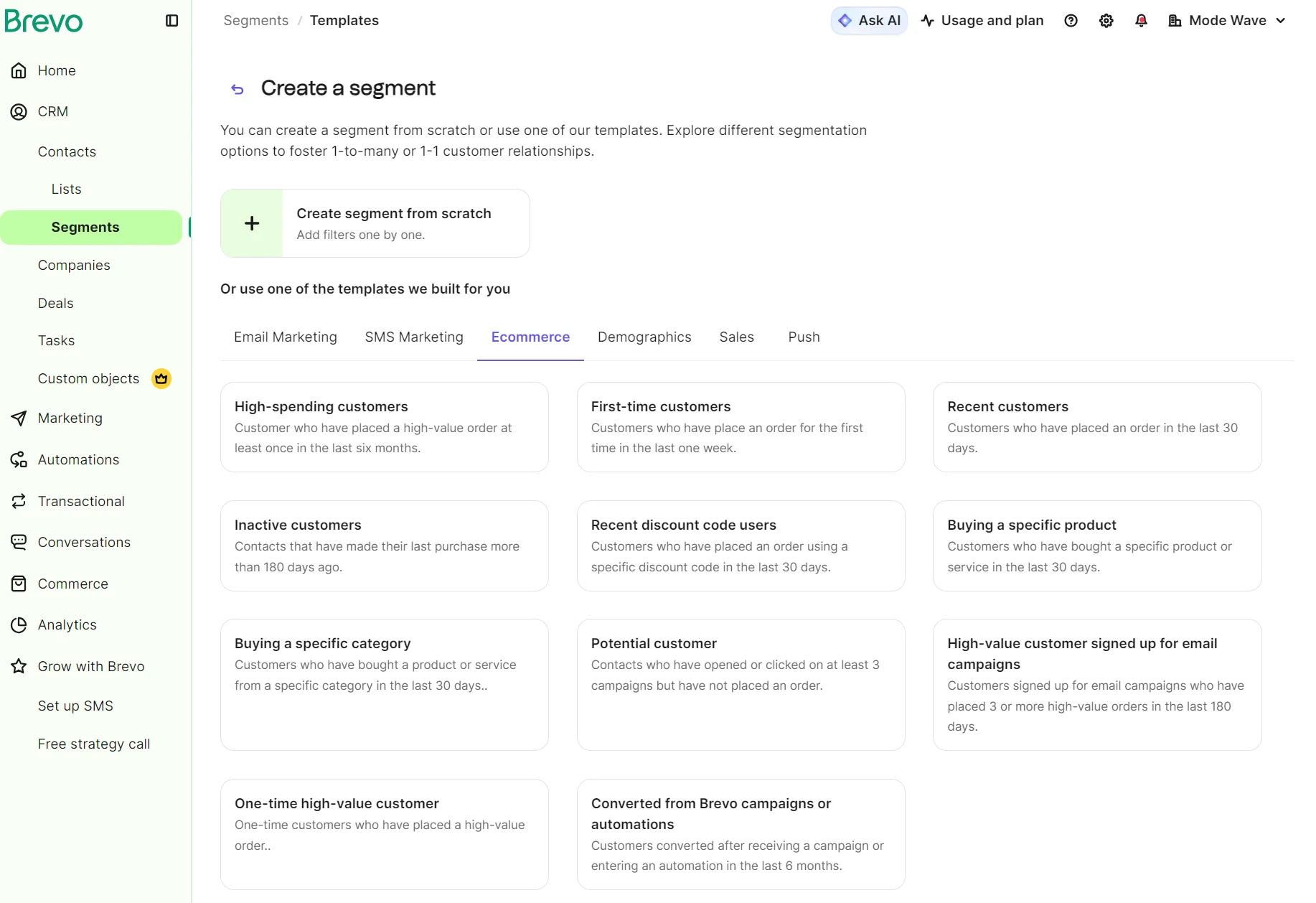
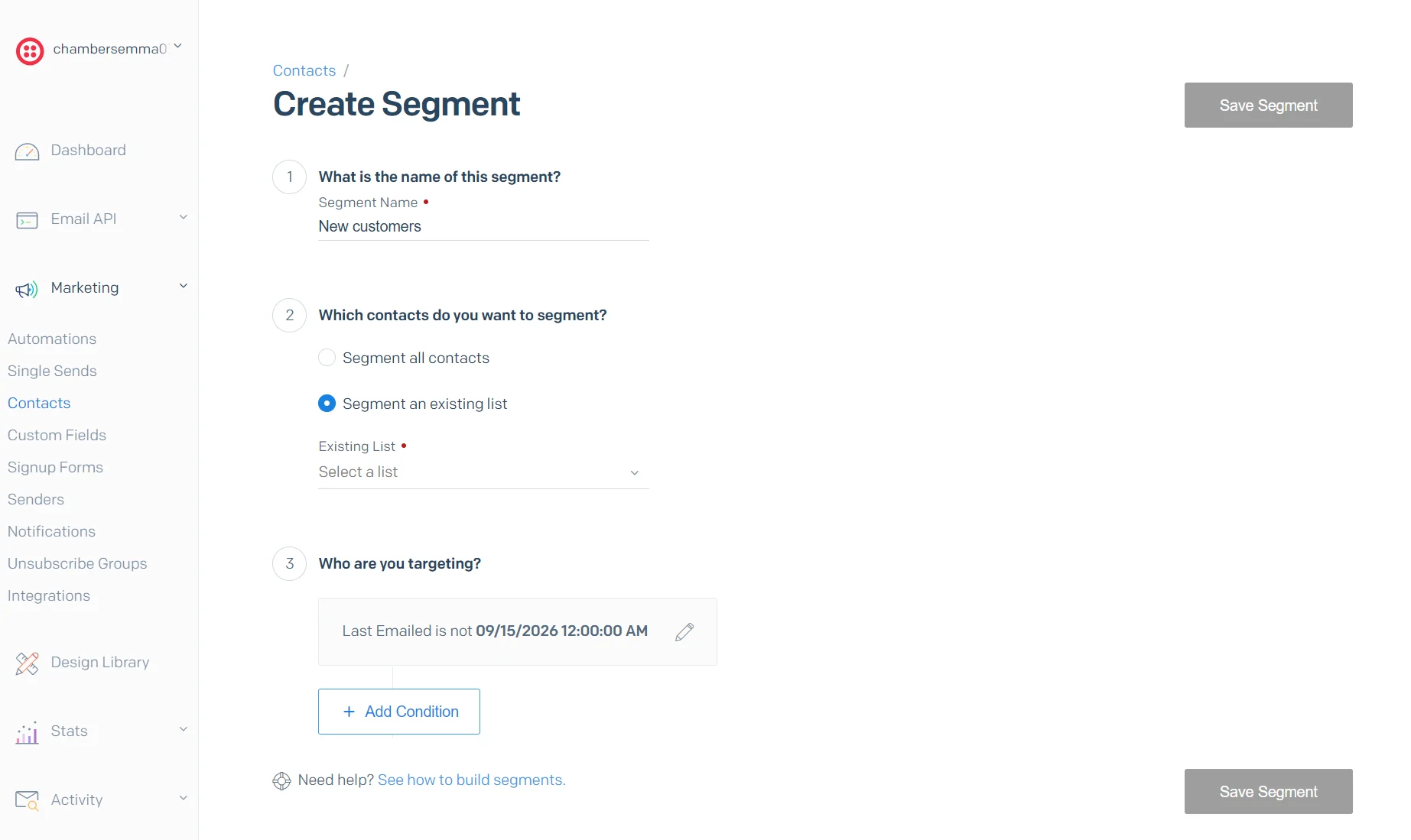
SendGrid’s marketing segments are manually built based on conditions from contact fields and email engagement, such as last clicked and opened. You can combine those conditions with AND or OR logic. There aren’t any pre-built segment templates.
It lacks behavioral triggers and doesn’t support ecommerce filters, such as purchase history. There’s a way to get purchase data in with an API; you can then segment on that field like any other.
Which platform offers better email automation, Brevo or SendGrid?
Brevo is better for ecommerce and marketing automations, with more templates and support for A/B split testing within a flow.
Brevo has an automations library with 15 email templates and four SMS templates. SendGrid doesn’t have a comparable automations library.
In Brevo, abandoned cart, anniversary date, welcome, and product follow-ups exist as templates that you can select and edit.
SendGrid has only one welcome email automation template and the option to build a custom one, and it doesn’t offer abandoned cart or stock triggers. Your store has to detect the abandonment and then call SendGrid’s Mail Send endpoint with the cart contents.
Brevo’s drag-and-drop automation builder has a three-step guided setup that walks you through selecting a trigger, a time delay, and email settings, or you can skip it.
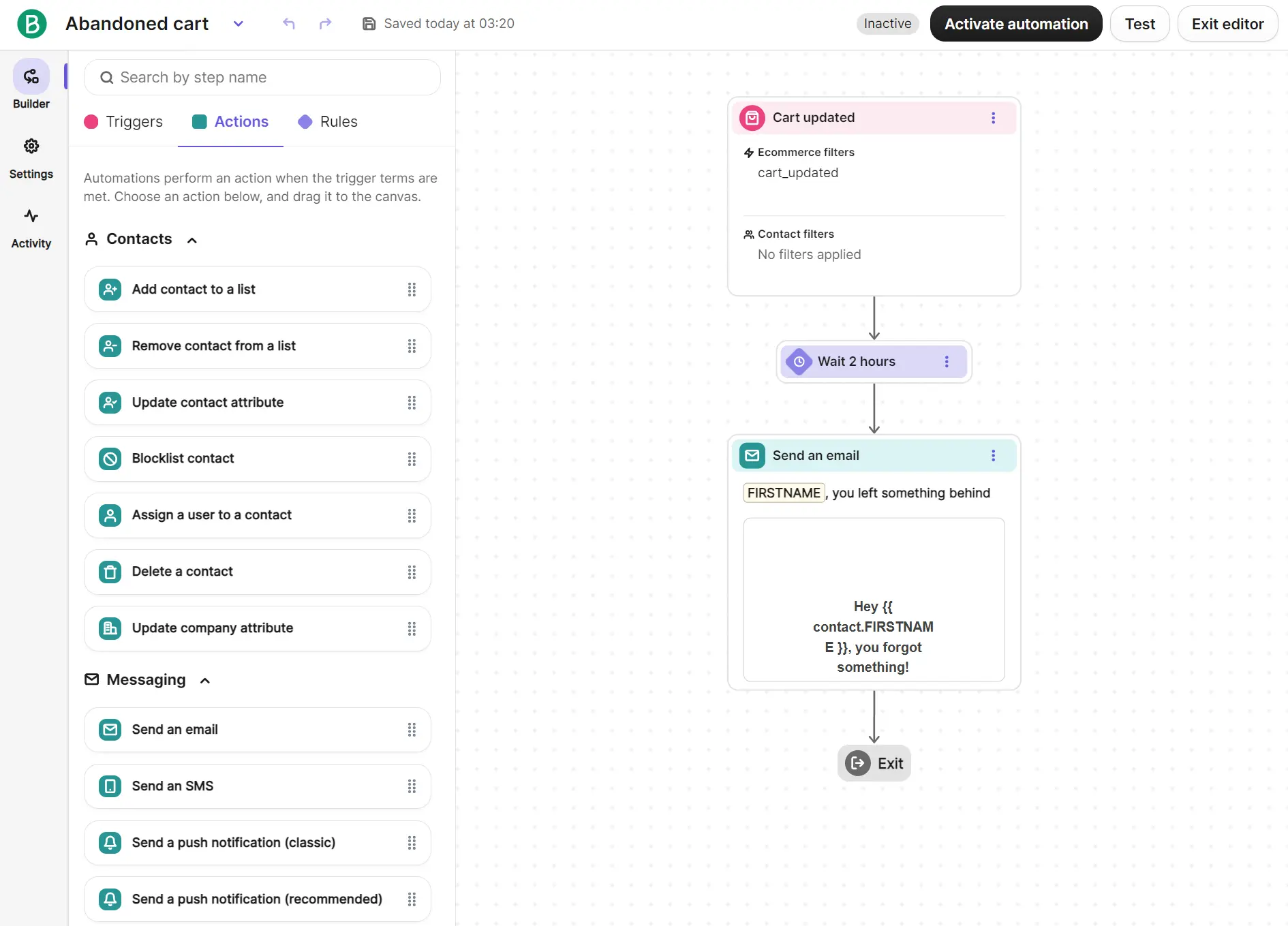
Each automation you build can have more than one trigger. Triggers span contacts, forms, email engagement, ecommerce, website visits, conversations, deals, meetings, payments, and custom events.
You can create a percentage split in the automation to test different paths against each other or distribute traffic between emails.
SendGrid’s automation builder uses linear, selectable elements rather than a visual canvas where you drag elements. The welcome automation is a three-part series by default with one-day delays between them.
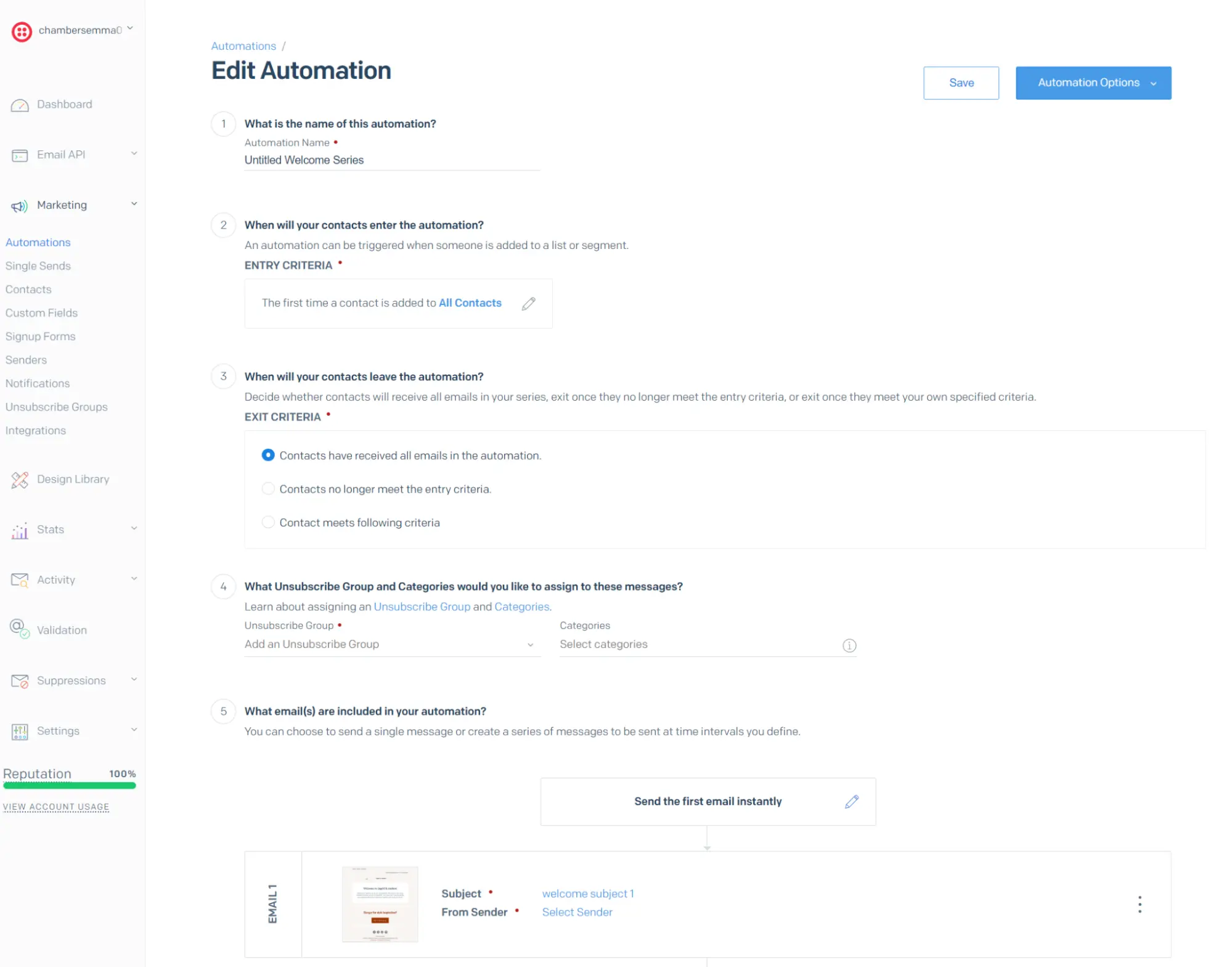
You’re limited to using one entry point in SendGrid automations: a contact joining a list or segment. You also have three exit options: receiving all emails, no longer meeting entry criteria, or meeting a condition you build.
Note that if you’re a developer, SendGrid’s Email API and SMTP relay are where automations happen. The five-step form will largely be unused. You’ll build triggers and timing in your application and call SendGrid to send. Brevo’s API can do the same.
Additional reading
8 benefits of email automation: Data from 150,000 brands
Brevo vs. SendGrid deliverability
Both tools quote a 99% deliverability rate. Brevo is the only tool with an automatic domain authentication option; SendGrid provides more detailed deliverability reports.
Brevo asks for three records to authenticate your domain compared to four with SendGrid. The three records are DKIM, DMARC, and Brevo code. If you have a dedicated IP, it also needs SPF and MX records.
An Automatic option logs into your domain provider, adds the records, and verifies them for you, and there’s a Delegate option that sends a secure link to your DNS admin.
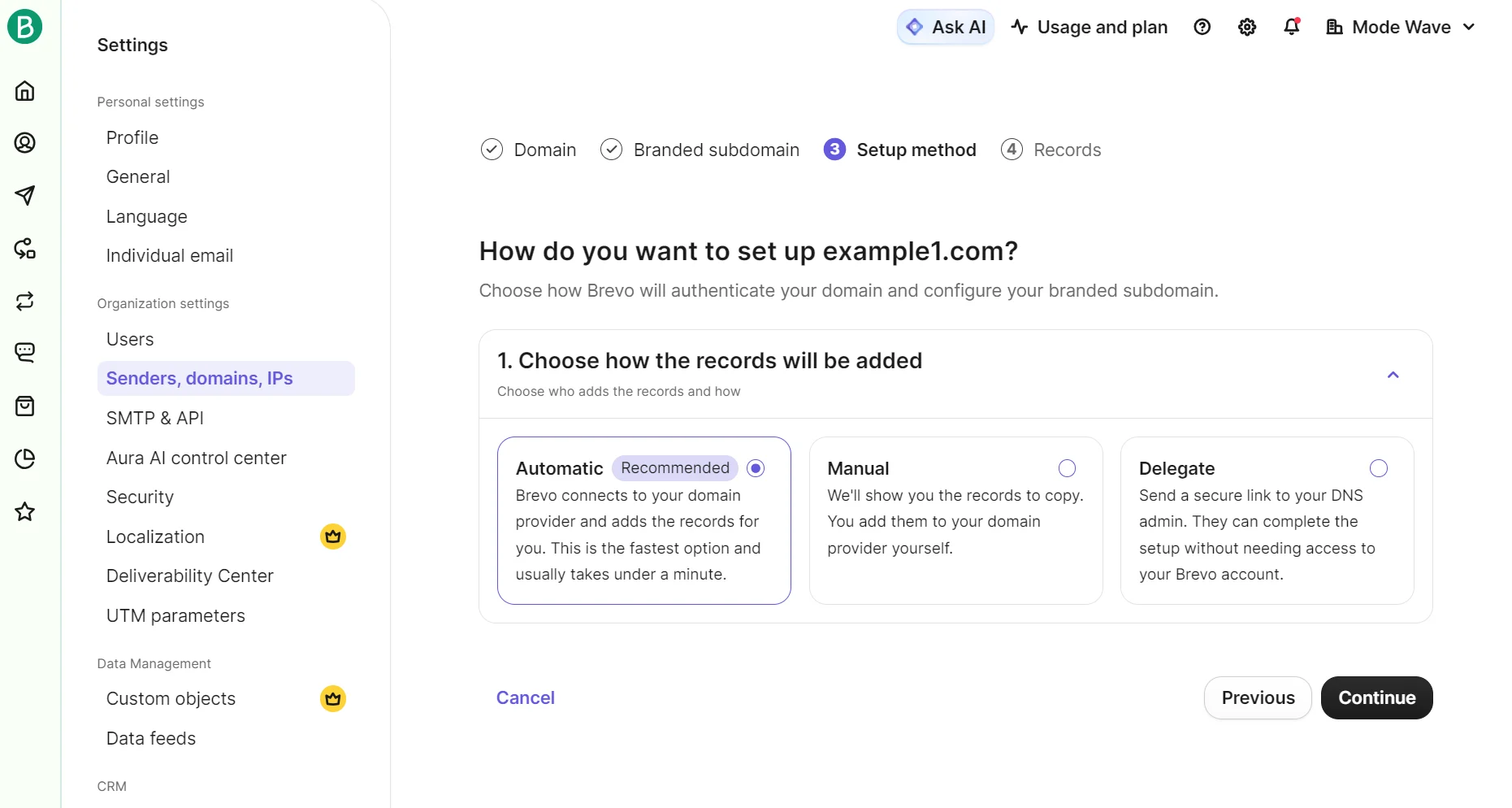
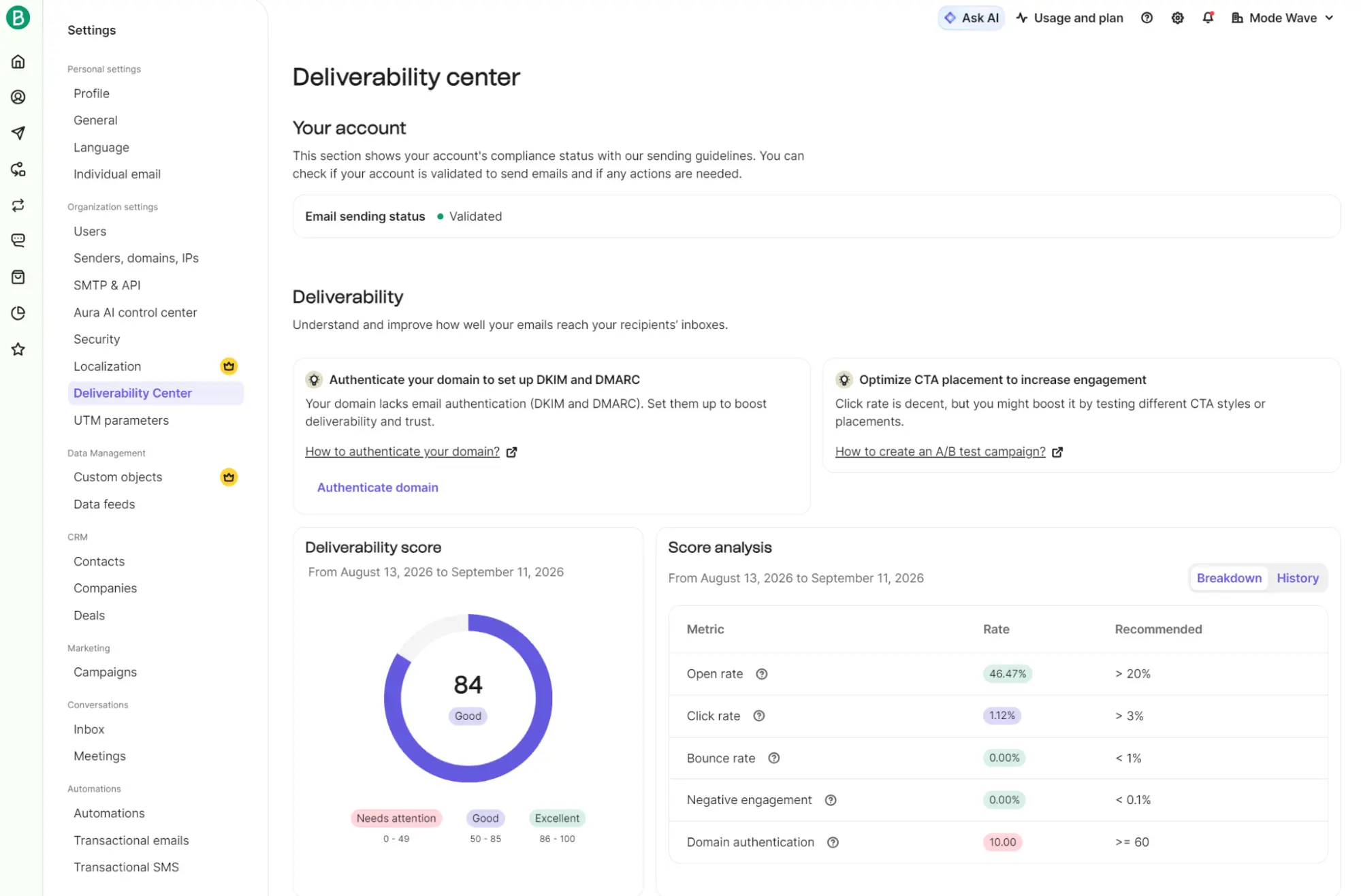
We like Brevo’s Deliverability Center for tracking how emails are performing in inboxes without hunting for data. The deliverability score is a feature with no SendGrid equivalent, with analytics based on open rate, click rate, bounces, and other metrics.
SendGrid generates four records for your DNS via an Automated Security feature. One CNAME points mail from your branded URL to SendGrid and supports SPF and DKIM. Additional CNAME records handle link branding.
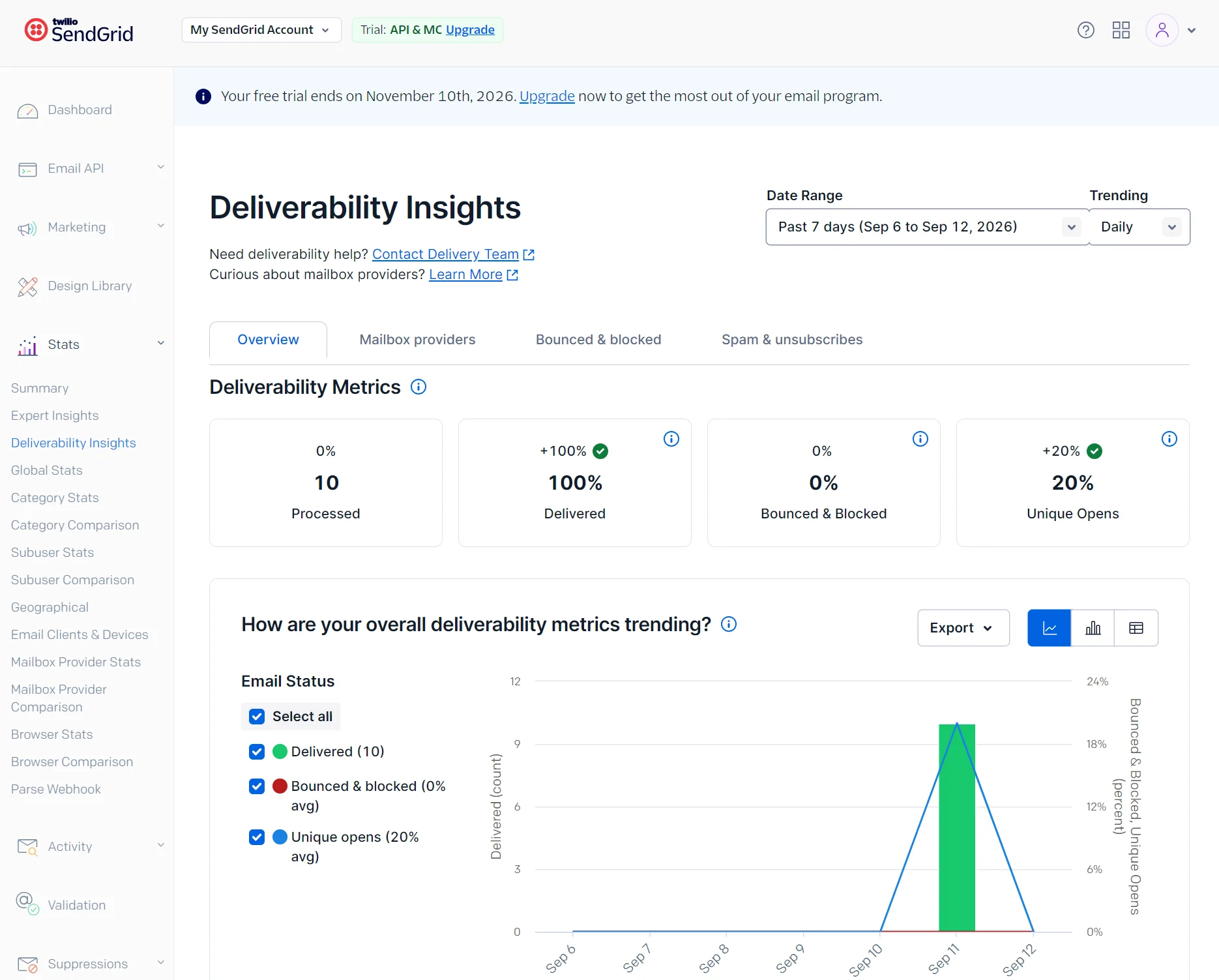
Once you’re sending, SendGrid’s Deliverability Insights dashboard contains graphs and bar charts that visualize Processed, Delivered, Bounced & Blocked, and Unique Opens.
SendGrid doesn’t offer a deliverability score like Brevo does. SendGrid pulls all your sending data into one dashboard, whereas Brevo splits it across individual campaign reports.
Brevo deliverability feedback
Deliverability has been solid, the automation workflows cover my newsletters and follow-ups without custom code, and as an EU-hosted service it fits my GDPR requirements cleanly.
– Mathias B, G2.
Setting up automated email campaigns, managing subscriber lists, and tracking delivery performance is straightforward and fast, even without technical expertise.
– Litun N, G2.
SendGrid deliverability feedback
I love its rock-solid email deliverability, which ensures our company’s newsletters, updates, and transactional emails don’t end up in spam.
– Juan R, G2.
The deliverability is exceptional, ensuring our emails land in primary inboxes rather than spam or promotions folders.
– Comnick K, G2.
SendGrid vs. Brevo analytics and reporting
SendGrid wins for reporting on campaigns and transactional emails; Brevo wins for ecommerce reporting and attributing revenue to marketing.
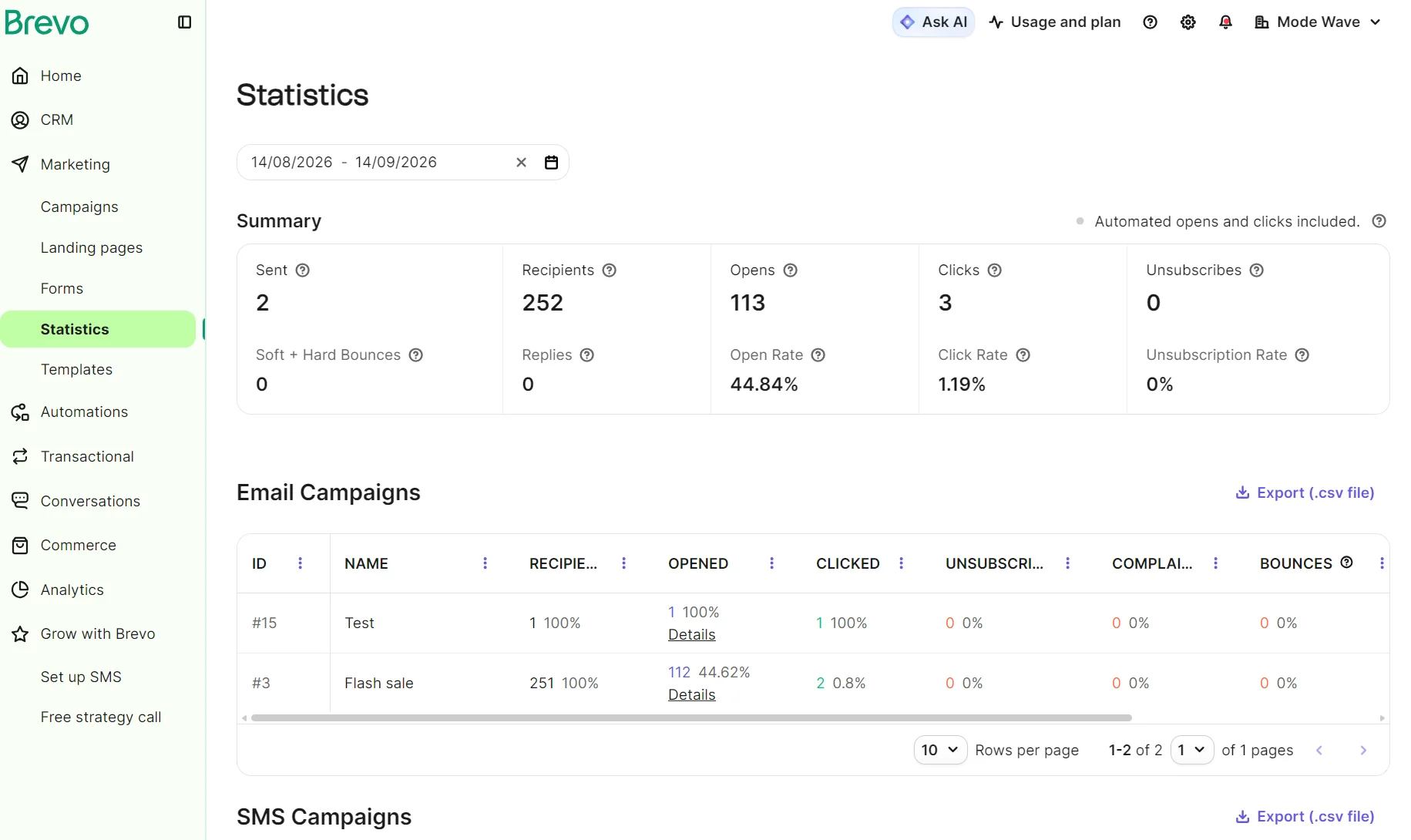
Starter and Standard plans on Brevo have Statistics pages under Marketing and Transactional with summaries of performance. Professional and Enterprise plans have pre-built analytics dashboards and predictive scores such as churn risk.
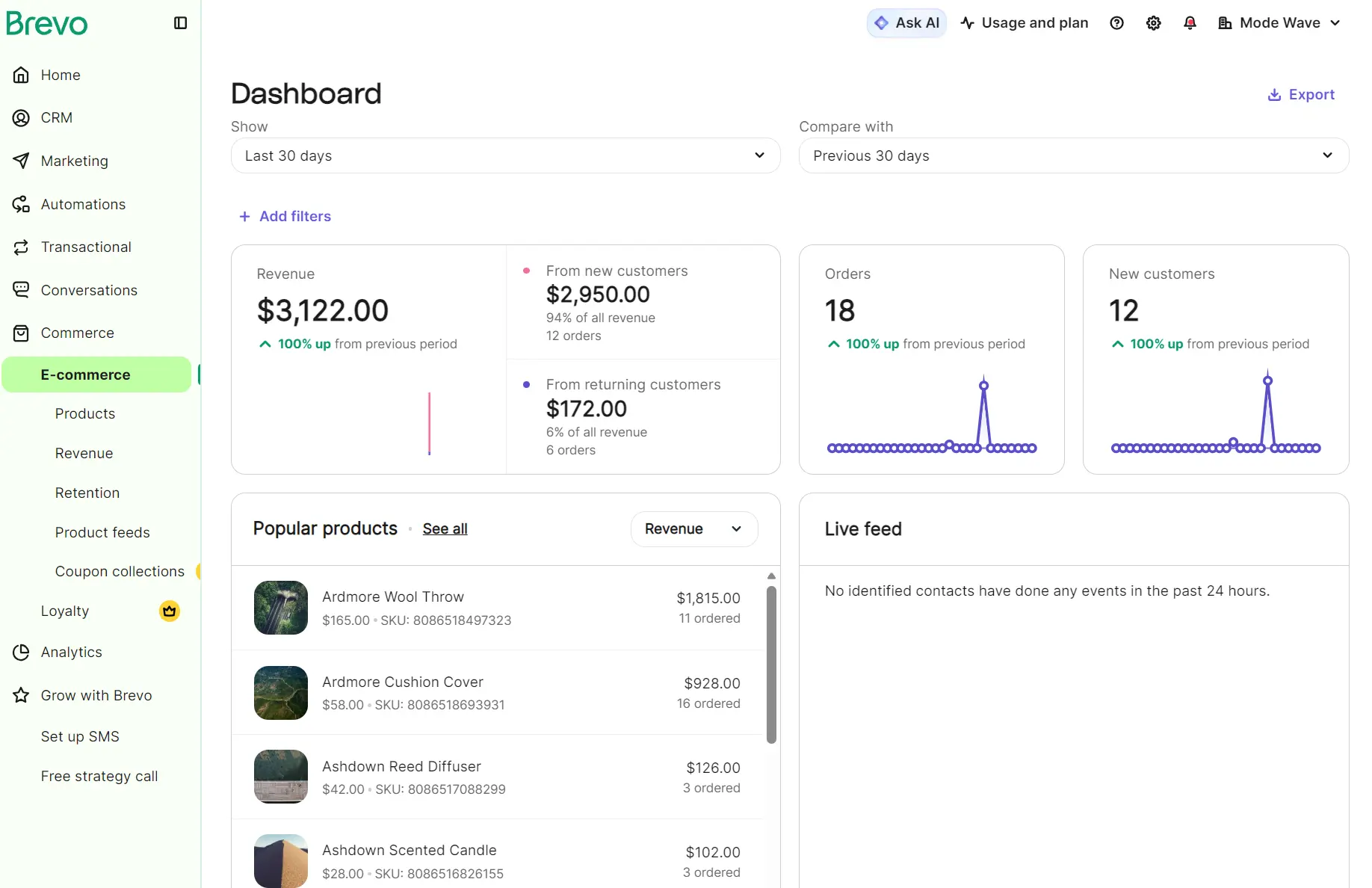
Brevo also has a Commerce report for a connected store. It shows revenue, orders from new and returning customers, popular products, and a live feed. A retention dashboard contains all-time revenue and customer lifetime value (CLV).
Conversions use last-touch attribution by default. Professional plans support linear attribution to split conversion credit between channels.
The analytics in SendGrid include a Statistics Overview dashboard that goes into much more depth than Brevo’s, with 14 selectable filters and a top categories tally.
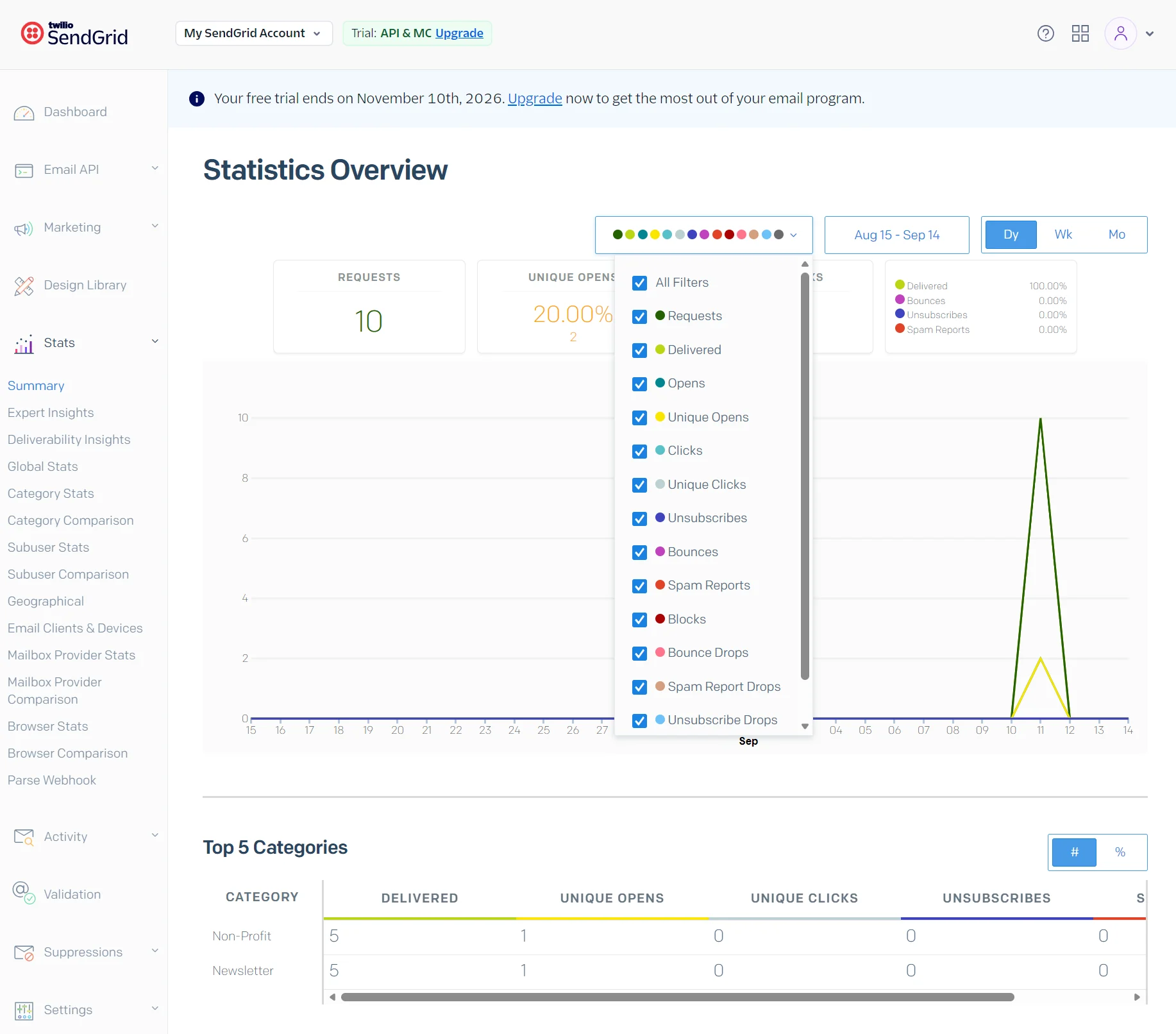
Separate dashboards for Deliverability Insights, Global Stats, and Geographical assist in finding winning campaigns and spotting areas for improvement.
SendGrid shows basic email stats, such as delivered and unique opens, under Marketing for single sends and automations, and Brevo reports the same metrics.
An Expert Insights paid add-on is available for SendGrid Pro and Premier accounts. It analyzes your email funnel, with human consulting sold alongside it.
SendGrid vs. Brevo integrations and APIs
Brevo is better for native integrations with 140+ apps. SendGrid has no marketplace that compares and expects you to connect with code and develop apps for other tools.
SendGrid’s Marketing Campaigns catalog holds one native connection: Twilio Segment, a customer data platform.
There are no off-the-shelf connections to ecommerce or content management system (CMS) tools. Instead, you have SendGrid’s REST API and SMTP relay.
Seven official software development kits (SDKs) cover PHP, Python, Node.js, Ruby, Go, Java, and C#, and Brevo publishes the same seven.
Transactional email, SMS, WhatsApp, contacts, ecommerce data, and custom events all run through one Brevo API. Email is the scope of SendGrid’s, with SMS and WhatsApp sold as separate Twilio products.
Brevo vs. SendGrid: which offers better customer support?
SendGrid has better customer support with 24/7 tickets and live chat in all plans. In Brevo, email support with internal tickets is the only channel until the Professional plan.
| Support channel | Brevo | SendGrid |
|---|---|---|
| All plans | All plans | |
| Tickets | All plans | All plans |
| Live chat | Not available | All plans |
| Phone | Professional | Not available |
| Callback requests | Not available | Pro |
| Documentation | All plans, marketer-first | All plans, developer-first |
Accurate as of September 2026.
We asked SendGrid’s AI chat assistant a question about sending campaigns and transactional emails from the same domain. It provided an instantaneous answer with advice and next steps.
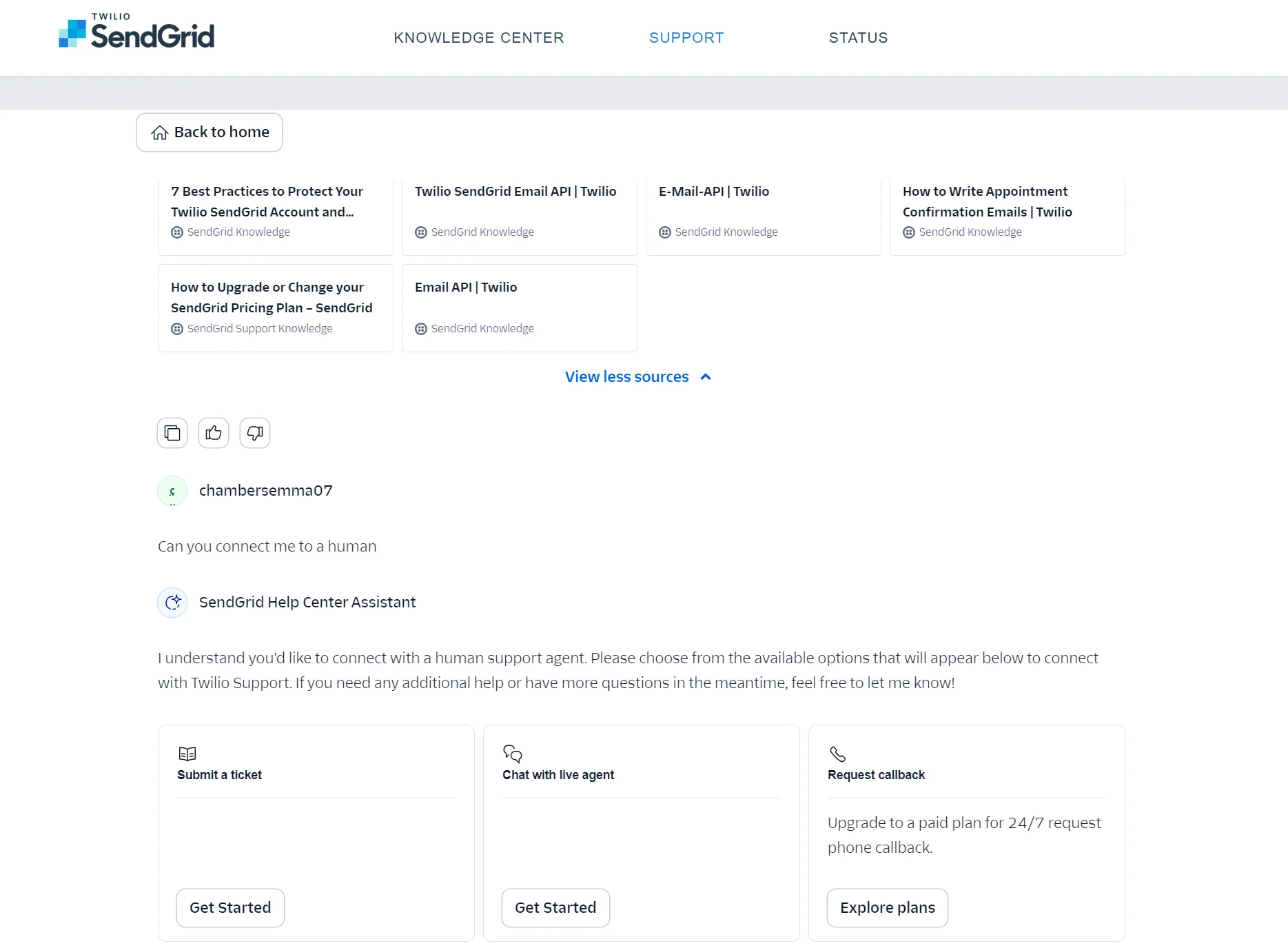
Because you focus on APIs and developer integrations, the quality of SendGrid’s documentation is a primary consideration for your business. We found the documentation to be in-depth, properly linked between sources, and helpful when testing features.
The ticket we submitted in Brevo received a response in just under 16 hours; it resolved our question without needing a follow-up.
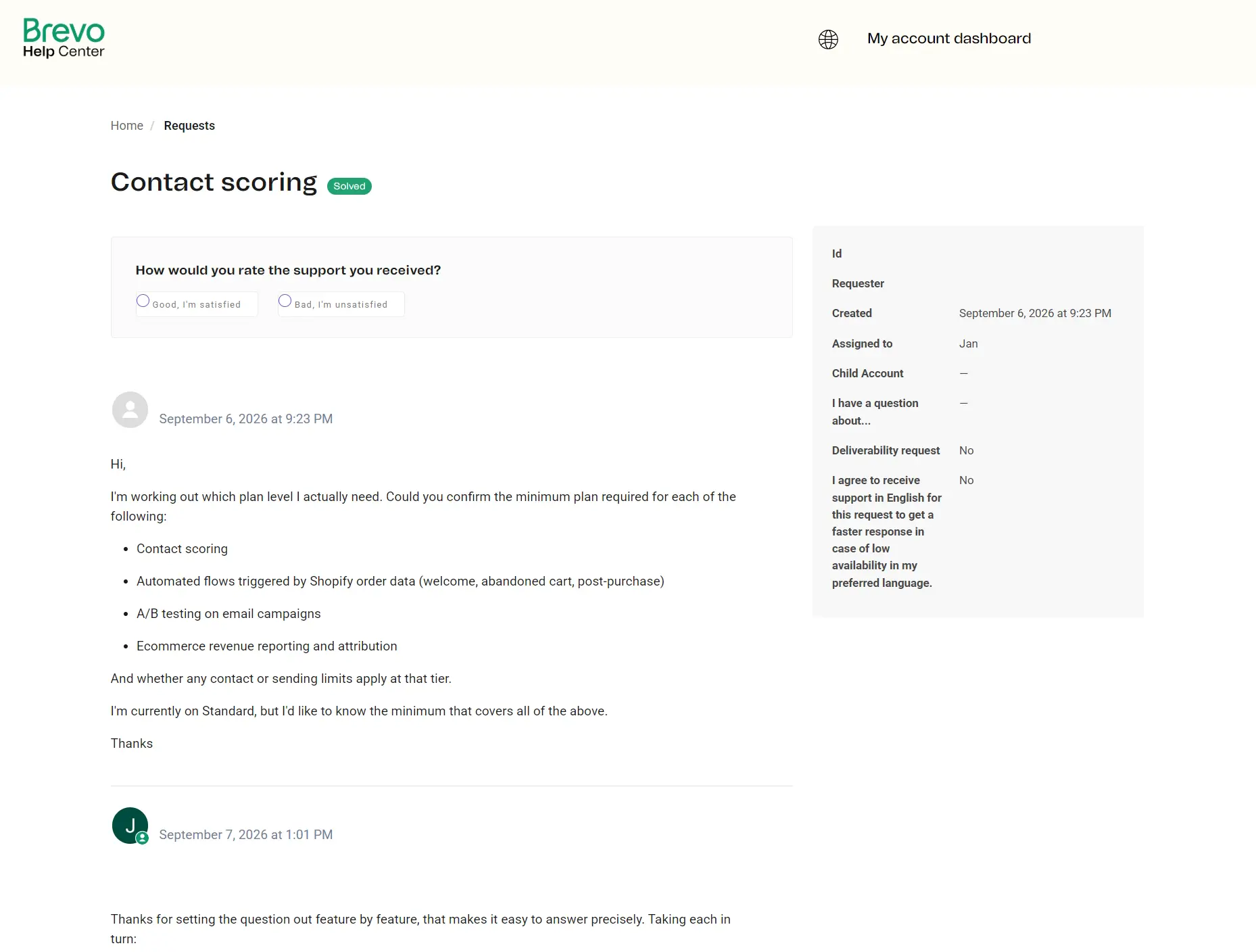
Brevo’s documentation is mostly for marketers, not developers. It has an “Available in” banner at the top of most pages that indicates the minimum plan required for the feature. API documentation lives under the developers.brevo.com subdomain, along with technical setup docs.
SendGrid support feedback
Pricing can get confusing as you scale or combine services, and customer support can be slow at times.
– Verified user in information technology and services, G2.
The support team was also helpful during the onboarding process, walking us through the issues over a few days, and once we understood what we were working with, it was easy.
– Trevor G, G2.
Brevo vs. SendGrid: which platform should you choose?
Choose Brevo for ecommerce integration and pre-built segments and automations for customer journeys. Pick SendGrid when you’re sending transactional emails and want developer-first documentation and support.
| Category | Better choice |
|---|---|
| Pricing | 🤝 Tie |
| Ease of use | 🏆 Brevo |
| Email editor and templates | 🏆 Brevo |
| Segmentation | 🏆 Brevo |
| Automation | 🏆 Brevo |
| Transactional emails | 🏆 SendGrid |
| Deliverability | 🤝 Tie |
| Analytics and reporting | 🤝 Tie |
| Integrations and API | 🏆 Brevo |
| Customer support | 🏆 SendGrid |
Not sure either one is right for you?
10 best Brevo alternatives for ecommerce (2026)
8 best SendGrid alternatives for 2026 (free & paid)
Looking for a Brevo or SendGrid alternative?
Omnisend’s ecommerce-first approach to omnichannel marketing puts email and SMS in one workflow. You can segment customers with AI in all plans and reach customers with 30+ pre-built automations, including browse abandonment.
Once Omnisend has customer and marketing data from your store, AI analysis of recency, frequency, and monetary value (RFM) builds customer lifecycle maps that group customers by stage. Build segments from those stages to create a retention strategy and maximize CLV.
Pro plans have unlimited monthly emails starting at $59/month for 2,500 contacts. You can view all plans on our pricing page and see our Omnisend vs. Brevo comparison for more.
Quick sign up | No credit card required