Omnisend AI


 OFFER
OFFER










Customer lifecycle automation is a key practice for many businesses. But when operations scale, keeping up with customer acquisition, retention, and first-time buyers becomes challenging. Automation is how you keep up with the growing business pace.
Customer lifecycle automation uses trigger workflows based on customer interactions to send the right email to the right customer at different stages of the customer journey. This effectively allows businesses to shift from time-consuming manual email marketing to fully automated workflows.
This guide will cover the core elements of customer lifecycle automation, what it is, and walk you through exactly how to set up your own email automation flows.
Quick sign up | No credit card required
What is customer lifecycle automation?
Customer lifecycle automation is a system that sends emails to customers based on a series of factors, including behavioral triggers and buyer’s journey stages. Companies can then introduce a high level of personalization to nurture customer relationships without investing time and resources.
Customer lifecycle automation vs. lifecycle management
Customer lifecycle automation isn’t the same as lifecycle management. The key difference here is automation, which functions on an operational level under the overall lifecycle marketing umbrella.
Customer lifecycle management covers the strategic side, setting up emails based on target audience behavioral data to define every action along the buyer’s journey. Once those decisions are made and emails planned, automation takes over.
| Lifecycle management | Lifecycle automation |
|---|---|
| Strategic planning and analysis | Automatic strategy execution |
| Defines actions for every stage | Triggers the right action (email) for every stage |
| Requires manual input | Runs 24/7 without manual intervention |
| Focuses on direction and data | Focuses on delivery and scale |
Customer lifecycle automation vs. standard marketing automation
Standard marketing automation centers around specific campaigns, defining the core message, ad copy, email flows, and triggers. Customer lifecycle automation encompasses the entire email automation strategy, regardless of campaign.
In practice, a standard marketing automation could look like sending a discount code to first-time buyers after signing up. Lifecycle automation would send a discount code to customers in the acquisition stage and reward existing customers with special offers.
Why automation is the engine of lifecycle marketing
Lifecycle marketing is a broad strategy that relies heavily on calculated action. If executed correctly, it can bring in new customers, convert them, and maintain relationships with existing customers. Automation makes this significantly smoother:
- High-level personalization at scale: Targeted emails that keep track of individual customers’ journeys have much higher conversion rates. In fact, we found that automated emails bring in 2361% higher conversions.
- Consistent and uninterrupted email chains: Email automation eliminates one of the biggest challenges to email marketing — sending the right emails at the right time. Doing so helps maintain and increase engagement.
- Customer behavior-based triggers: Automation responds to customer triggers on time and sends appropriate emails to customers to either inform or educate, like sending order details or previously purchased product restock reminders.
- Thoroughly optimized operational costs: Correctly executed automation can reduce marketing overhead costs and optimize resource allocation for strategy. Forrester found that email automation saved 360 hours on marketing activities.
The key lifecycle stages where automation applies
Automation can be used to support the entire customer lifecycle, from the first contact to loyal and repeat buyers:
- Acquisition: Automating the acquisition stage directly impacts conversion by establishing a connection with interested customers through a welcome email series.
- Onboarding: Post-purchase automation takes care of building familiarity over an extended period of time, working in the background to inform customers about the brand, new products, deals, etc.
- Retention: Infrequent buyers who purchase from businesses occasionally are a great opportunity for automation to tap into by sending restock reminders, loyalty incentives, and cart abandonment notifications.
- Win-back: In cases where customers go quiet for 90 days or more, some businesses consider them gone, but automated emails can reach out to every single person to re-engage lapsed buyers at precise intervals.
What customer lifecycle automation looks like in practice
Nearly all ecommerce businesses base their operations on customer lifecycles, but not many know how to properly implement automation. In this section, we’ll go over real-life examples of how automation can work for each of the customer lifecycle stages.
Acquisition automation
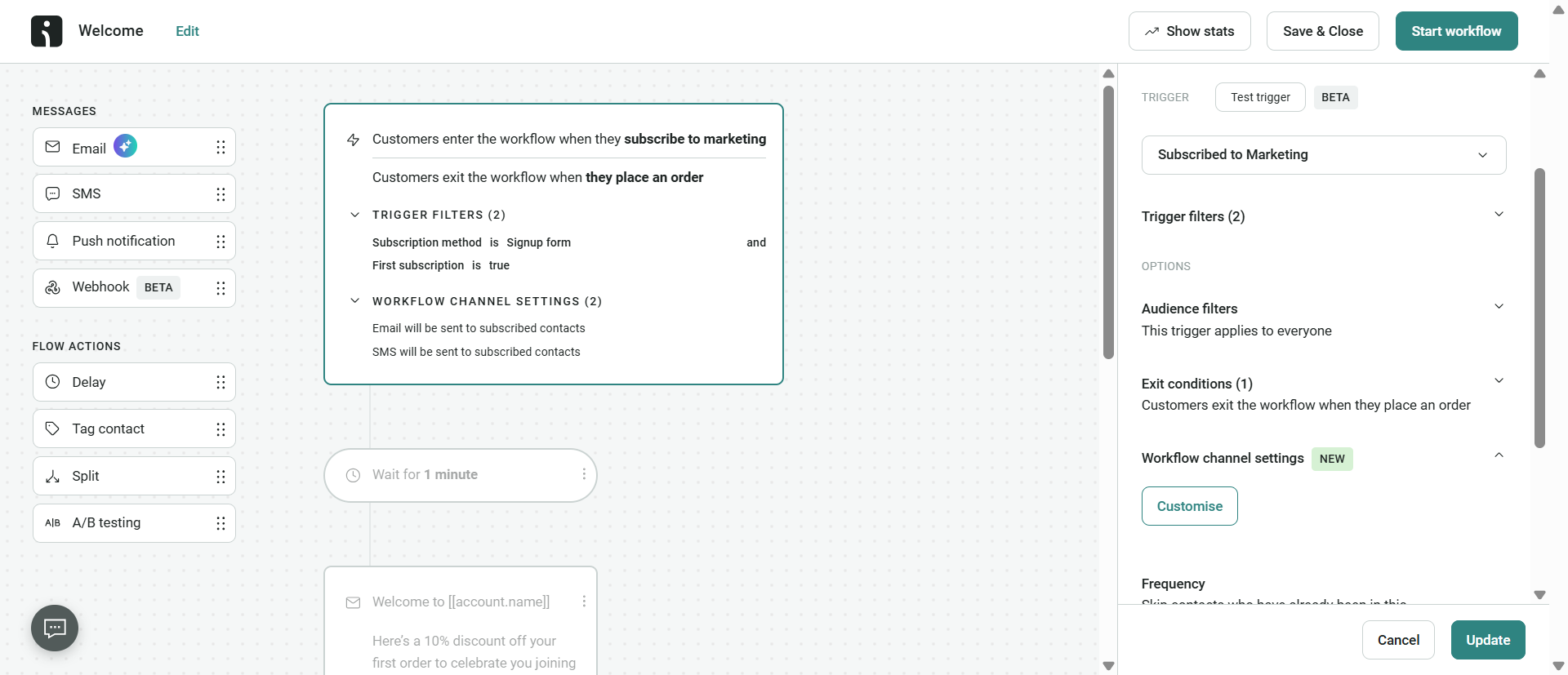
A visitor goes to a website and enters their email address via a sign-up form, which then immediately triggers welcome series emails. In this case, usually three emails are sent over five to seven days in order to introduce a new subscriber to a brand and guide them towards their first purchase.
Here’s an example of a well-planned welcome series with Omnisend:
- Email 1: Sent immediately after a potential customer signs up, includes a brand story and a short, but well-thought-out, welcoming message.
- Email 2: Sent on the third day, showcases bestselling products based on the products subscribers browsed previously.
- Email 3: Sent on the seventh day, offering a limited deal to encourage subscribers to make their first purchase.
Onboarding automation
Customers finalize their first purchase and receive an order confirmation email as soon as the payment is confirmed. Once this post-purchase email automation kicks in, customers receive updates about their order status. This is a non-negotiable element for any ecommerce business, and email automation triggers make it easier to make sure all proper order details are always sent on time to build confidence and trust.
- Email 1: Sent right after the purchase to confirm that the purchase was completed successfully. Some companies may combine this email with shipping details, while others mention that shipping details will be sent once the order is shipped.
- Email 2: Sent after three to five days, includes tips for the purchased product(s), how to use them, and care instructions if applicable.
- Email 3: Sent after seven to ten days, asking to leave a product review, could also contain information on related products or show how the purchased product can be used with other products.
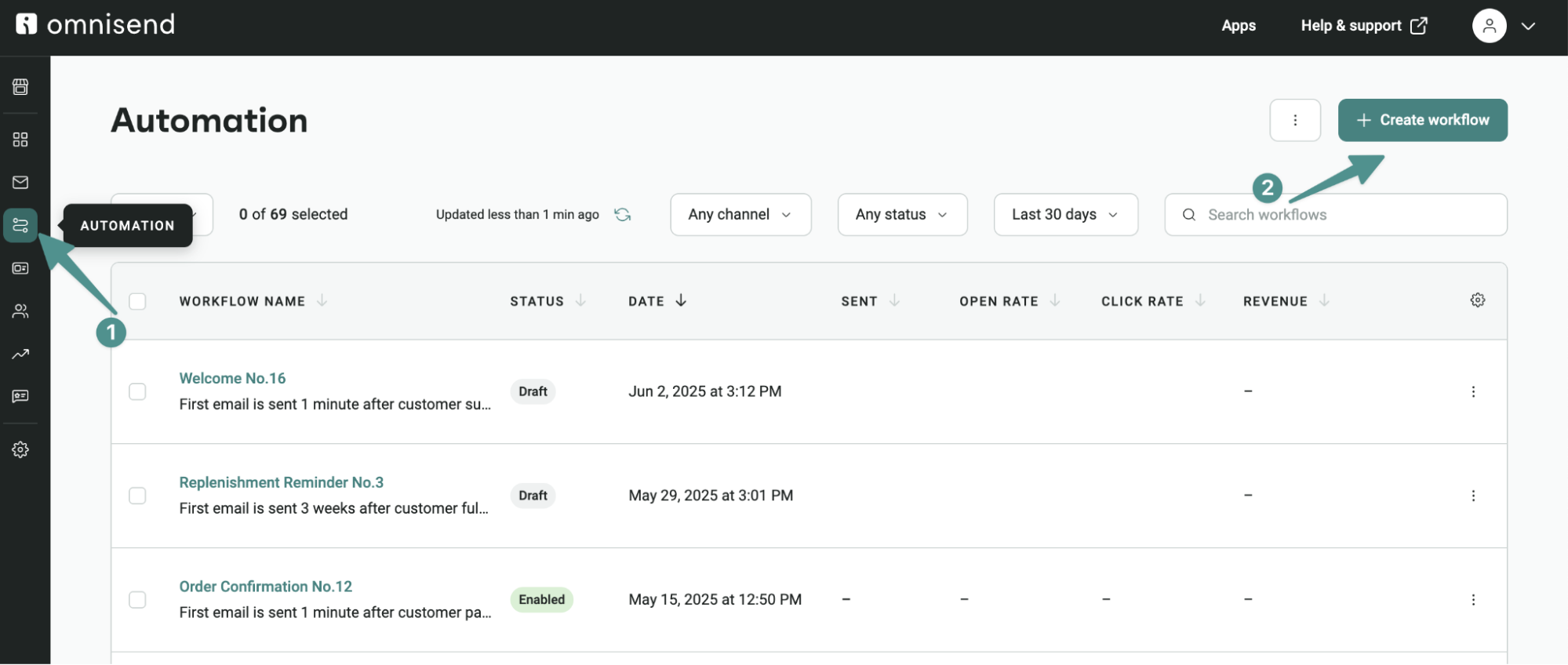
Retention automation
When customers who have previously bought once or repeatedly go silent and stop engaging and buying, it’s an opportunity to include automated emails to support a business’s retention marketing.
With Omnisend, businesses can define the exact period of time after which to reconnect with inactive users. For example, a skincare company could send out regular product replenishment reminders based on when customers are likely to repurchase products.
- Email 1: Sent after 45 to 90 days to inform customers about the possibility of restocking on their favorite products.
- Email 2: Sent after seven days if customers don’t engage with the first email, reminding customers of the value they can get by buying products, like loyalty points.
- Email 3: Last email sent if both email 1 and email 2 are in the retention stage and haven’t been opened yet, can offer a unique discount as a last resort in an attempt to attract customers before they lapse.
Win-back automation
Ideally, new visitors would convert and become loyal customers — but that’s not always the case. Whether it’s competition or changing customer needs, churn is unavoidable, but it doesn’t have to be the end of the road.
Businesses can automate a win-back campaign to reconnect with customers or clean their email address lists as part of consistent hygiene. But before that, ecommerce brands need to flesh out a high-quality email chain sequence with strong messaging aimed at giving customers benefit-based reasons to return.
- Email 1: Usually sent after 90 days of customer inactivity. These emails are generally more emotionally-driven to show customers you care about them and want to keep them as customers.
- Email 2: Often sent after 97 days with a personalized offer, like a 10-15% discount on select products based on previous purchase history.
- Email 3: Sent around 104 days with a final notice to inform customers of a “last chance” offer to create urgency without pushing it too hard.
- Email 4: If customers still don’t re-engage, businesses can automate the process of removing those customers from their email lists to protect email deliverability and keep metrics accurate.
How to get started with lifecycle automation
Automation is a powerful tool, but getting everything right from the get-go, particularly for the entire customer lifecycle, isn’t the easiest task. For smaller businesses or ecommerce brands with complex customer lifecycles, it’s generally advised to start by automating a workflow that could have the highest impact.
Here’s a brief but practical walkthrough to help decide where to start with automation:
- Regularly check sent emails manually to see which stage requires the most effort. This could potentially already identify the segment to focus on for introducing automation. A common example of this could be automating welcome emails to increase visitor interest.
- Gather consistent and accurate customer engagement data. Map the collected data from behavioral analysis, purchase history, last order date, browsing patterns, and sign-up date to create a strong base for creating effective automation flows.
- Start by automating your welcome flows first. Welcome emails are usually the ones that bring the highest engagement for virtually every ecommerce brand, and they’re arguably the easiest to plan as welcome emails don’t require extensive customer data.
- Choose an email automation software that’s specific to ecommerce. While there are plenty of marketing automation solutions, these can require a high level of customization to fully integrate with your business. In contrast, email automation tools, like Omnisend, are built specifically for ecommerce to integrate with Shopify, WooCommerce, BigCommerce, and Wix.
- Track, adjust, and scale. Monitor your email open, click, and conversion rates for every lifecycle stage separately to set reliable benchmarks for further improvement and automation expansion.
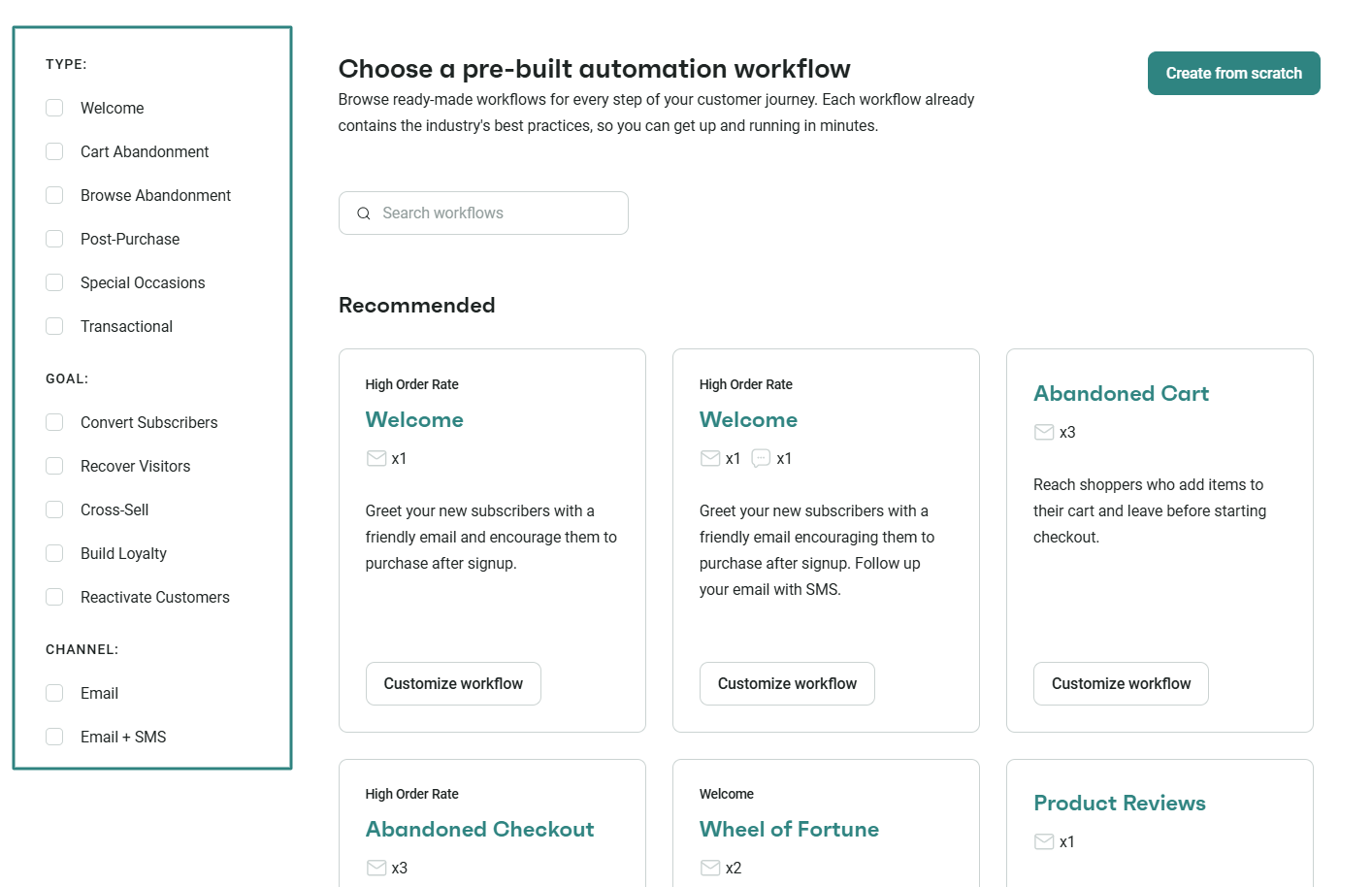
On average, Omnisend customers see a $79 return on every dollar spent on email automation. Additionally, email marketing delivers $36–$40 per $1 for ecommerce businesses.
Conclusion
Customer lifecycle automation is a major mechanism that drives ecommerce email marketing. It doesn’t matter if a business is just starting or has a global standing — having a proper customer lifecycle that covers all four lifecycle stages, acquisition, onboarding, retention, and win-back, is crucial.
Automating these stages one by one allows ecommerce businesses to always show up where it matters most, while keeping operational costs low. Moreover, consistency adds up over time, bringing quantifiable results.
Quick sign up | No credit card required
Frequently asked questions
How does lifecycle automation differ from standard marketing automation?
What triggers a win-back automation in ecommerce?
Win-back automation focuses on targeting inactive customers. These emails are typically set to trigger after 90 or more days. This activates the win-back automation, which then proceeds to send out a series of emails to re-engage customers before they churn.
How does customer lifecycle automation improve retention?
Customer lifecycle automation can identify at-risk customers before they leave by using individual purchase histories and behavioral signals to automatically send highly targeted emails. Some of the most popular examples include restock notifications, replenishment reminders, and loyalty nudges.
What tools are used for customer lifecycle automation?
Lifecycle automation requires reliable tools designed for ecommerce platforms. Klaviyo, Mailchimp, and ActiveCampaign are all great options, but Omnisend is built specifically for ecommerce lifecycle automation with native integration options.