Omnisend AI


 OFFER
OFFER









![Email deliverability: A complete guide for ecommerce [2026]](https://www.omnisend.com/blog/wp-content/uploads/2021/12/Email-Deliverability-Guide-1280x720.webp)

Email deliverability determines whether your emails reach your subscribers’ inboxes or get sent to spam. For ecommerce brands, low deliverability translates to a direct revenue problem.
Think about your cart abandonment emails. If 15% of them never reach the inbox, you’re losing sales on customers who were already interested in buying.
According to Validity’s 2025 benchmark, only 83.5% of emails worldwide reach the inbox. This means roughly one in six emails your store sends never gets seen.
You may have a good subject line or a strong offer. However, if the email only ends up in spam, it doesn’t matter.
This comprehensive email deliverability guide covers everything you need to know, including what it is, what affects it, and how to measure it. We’ll also provide practical, proven steps to keep your emails out of spam and in front of the people who want to hear from you.
Quick sign up | No credit card required
What is email deliverability?
Email deliverability measures whether your emails actually reach recipients’ inboxes, rather than being filtered to spam or blocked entirely.
Most ecommerce marketers assume that every email they send is received. The reality is that’s not how it works.
According to Unspam’s 2025 Email Deliverability Report, 36% of emails land in spam folders, with another 4% getting blocked or going missing. That means roughly 40% of emails never reach the inbox, regardless of how good the content is.
Deliverability for email marketing is one of the key metrics that tells you whether your investment is actually paying off.
Understanding what happens after you hit send helps clarify why this matters. Your email goes through a multi-step journey before it reaches the recipient. If you’re wondering why your emails go to spam, you’ll likely see several recurring patterns.
Email delivery vs. email deliverability
These terms get used interchangeably, but they measure very different things. Email delivery simply tells you whether a receiving server accepted your message.
Email deliverability goes further — it tells you whether that message actually reached the recipient’s inbox or just ended up in spam.
| Email delivery | Email deliverability | |
|---|---|---|
| What it measures | Whether the server accepted your email | Whether your email reached the inbox |
| Tracked by | Your ESP's dashboard | Engagement metrics and inbox placement tools |
| Sign of failure | Being rejected or bounced | Landing in spam or promotions |
| Bottom line | The email was sent successfully | The email reached its destination |
A high email delivery rate shows your emails didn’t bounce. It doesn’t tell you whether anyone actually saw them. That’s the distinction that contributes to ecommerce revenue.
Major mailbox providers, including Gmail, Yahoo, and Microsoft, have raised the bar on authentication. Those sending over 5,000 emails per day must now have SPF, DKIM, and DMARC in place and keep spam-complaint rates below 0.3%.
Fall short, and your emails won’t make it through, regardless of how clean your list is.
Why deliverability matters for ecommerce
Why is email deliverability important? It has to do with revenue.
For ecommerce brands, emails touch every stage of the customer journey. Here are some key examples:
- Cart abandonment
- Welcome series
- Order confirmations
- Browse abandonment
- Promotional campaigns
- Re-engagement
- Upsell/cross-sell
When any of these emails miss the inbox, you lose a touchpoint. Here’s what that looks like in actual numbers. If your store sends 50,000 emails a month and deliverability drops from 95% to 80%, that’s 7,500 emails not reaching inboxes.
With a 2% conversion rate and a $50 average order value, this results in $7,500 in lost revenue every single month. On top of that, your sender reputation can also suffer over the long term.
Ecommerce sellers who invest in email marketing deliverability services consistently outperform those who don’t.
Research on Shopify merchants found that strong inbox deliverability translated to a 17% higher conversion rate and a 40% lower bounce rate. These gains will likely compound over time.

The proof of improved email deliverability shows up in actual brand results as well.
After fixing its deliverability issues with Omnisend, 123Presets saw its revenue at least double compared to the last few months on its previous platform.
The brand saw a 62.3% increase in open rates and 600% in click rates.
Read the full success story here.
When deliverability is strong, the benefits are direct and measurable:
- Increased cart recovery revenue: Abandonment emails reach shoppers while intent is still high
- Better customer experience: Order confirmations and shipping updates arrive on time, reducing support tickets
- Stronger campaign performance: Promotional sends actually reach their intended segment
- Lower list churn: Subscribers who get your emails regularly are more likely to engage and remember that they signed up
- Higher ROI per send: With more emails reaching the inbox, you’ll have a higher likelihood of driving results
When left unchecked, poor inbox deliverability drags down every part of your email campaign. This damage can compound faster than most brands realize.
Email deliverability rates: Benchmarks for 2026
A good email deliverability rate is 95%+ with 80%+ inbox placement.
Although this is the target, many senders operate well below it — and many don’t realize insufficiency until engagement starts to drop.
According to Validity’s email deliverability report, the global inbox placement rate sits at 83.5%. Spam accounts for 6.7% of emails, and another 9.8% go missing entirely. That’s roughly one in six marketing emails failing to reach the recipient’s inbox.
The email delivery rate, which is the simpler metric reported by your ESP, tells a different story. Because it only measures whether the receiving server accepted your email, it’s significantly higher, at 98.5% globally.
The gap between email delivery and inbox placement is where most ecommerce brands unknowingly lose revenue.
Inbox placement rates by mailbox provider
Where your emails land also depends heavily on your subscribers’ mailbox providers. The previously mentioned Validity report breaks this down clearly:
| Mailbox provider | Market share | Inbox placement | Spam rate | Missing rate |
|---|---|---|---|---|
| Gmail | 48.5% | 87.2% | 6.8% | 6.0% |
| Microsoft (Outlook) | 16.8% | 75.6% | 14.6% | 9.8% |
| Yahoo/AOL | 14.0% | 86.0% | 4.8% | 9.2% |
| Apple Mail | 3.8% | 76.3% | 14.3% | 9.4% |
Source: Validity 2025 Email Deliverability Benchmark Report
Microsoft is the toughest inbox to crack, with a 75.6% inbox placement rate. Apple Mail isn’t far behind with 76.3%.
Gmail, which handles nearly half of all global marketing emails, currently sits at 87.2%. However, this declined from 89.8% at the start of 2024 to 84.2% by Q4, largely due to tighter spam-filtering updates.
For ecommerce brands with subscriber lists spread across these providers, your overall inbox deliverability is a weighted average of all of them. For example, a weak Microsoft score can quietly drag your numbers down even if Gmail’s deliverability rate looks fine.
Ecommerce inbox placement benchmarks
Retail and ecommerce senders perform slightly better than some other industries, with an inbox placement rate of around 87.6%, according to Validity’s industry breakdown.
That’s partly because ecommerce emails, such as order confirmations, shipping updates, and cart abandonment nudges, generate higher engagement than generic newsletters.
However, that advantage only holds when you have a clean list and solid sending practices.
During high-volume periods like Black Friday and Cyber Monday, even well-managed campaigns see a dip in inbox placement. This happens because mailbox providers apply stricter filters when the send volume increases.
What these benchmarks mean for your store
If your delivery rate is above 95% but your open rates are consistently low, you likely have a problem with inbox placement, not content. This is the most common misdiagnosis in email deliverability — and it’s exactly why tracking both metrics matters.
What affects email deliverability: The key factors
Several factors affect email deliverability, including technical setup, sending behavior, and content quality. Mailbox providers weigh all three when deciding where your emails land.
Here’s a breakdown of the factors.
1. Technical factors
These basic setup factors help providers trust that your emails are safe and really come from you.
Authentication (SPF, DKIM, DMARC, BIMI)
Authentication tells inbox providers that your emails are genuinely coming from you. Without it, your messages may look suspicious.
Gmail, Yahoo, and Microsoft now require bulk senders to have SPF, DKIM, and DMARC and keep spam complaint rates below 0.3%. Omnisend’s guide on meeting Google, Yahoo, and AOL sending requirements covers everything you should do.
IP reputation
Your sending IP has its own reputation score, separate from your domain. If you share an IP with poor senders on a shared plan, their behavior affects your deliverability.
For high-volume ecommerce senders, we recommend getting a dedicated IP to keep your reputation isolated and stable.
Domain reputation
Inbox providers track how recipients across the entire internet respond to emails from your domain. A history of spam complaints, bounces, or blacklisting can hurt your ability to reach inboxes and may take time to recover from, even after you fix the issue.
This is why your email sender reputation is one of the most important long-term assets.
Sending infrastructure
Erratic sending patterns raise flags. Jumping from 1,000 to 50,000 emails overnight looks like spam behavior to mailbox providers. Consistent, predictable volume builds trust — and if you’re warming up a new domain, a gradual ramp is a must.
2. Behavioral factors
These factors show how you manage your email list and how people react to your emails.
List quality
Sending to invalid, outdated, or purchased addresses inflates your bounce rate and signals poor list hygiene. Inbox providers use this as a trust indicator.
A clean email list with verified, permission-based contacts is one of the most surefire ways to ensure deliverability.
Engagement signals
Gmail and other providers monitor how recipients interact with your emails. They look at your opens, clicks, replies, and even deletions.
Low engagement over time trains spam filters to deprioritize your sends. Segmenting by engagement level and removing consistently inactive contacts keeps your engagement signals healthy.
Complaint rates
Every time a subscriber marks your email as spam, it damages your sender reputation. Gmail and Yahoo set their complaint threshold at 0.3%, but we recommend targeting below 0.1%. Even one complaint per 1,000 emails increases your risk.
Bounce rates
A bounce rate above two percent signals inbox providers that your list isn’t well-maintained. Hard bounces or permanent failures from invalid addresses cause the most damage. Remove these email addresses immediately after your message bounces.
3. Content factors
These factors encompass the design and content of your emails. This helps spam filters decide where your emails should go.
Spam triggers
Certain words, phrases, and formatting patterns are associated with spam and can trip filters. Examples include excessive punctuation, all-caps subject lines, and phrases like “act now” or “100% free.”
Consider reviewing the full list of spam triggers to avoid before sending any major campaign.
Email structure
Poorly formatted HTML, broken links, and missing ALT text create red flags for spam filters. According to the Unspam report, 74% of emails contain HTML structural issues. Such emails are 18-25% more likely to land in spam than well-structured ones.
Text-to-image ratio
Emails that are heavy on images and light on text commonly signal spam. Some mailbox providers block images by default, so a message with mostly images may appear blank.
A balanced ratio — with enough readable text to carry the message — keeps you out of trouble with filters and improves accessibility.
How to improve email deliverability
Good email deliverability results from consistent habits across authentication, list management, engagement, and content. Here are the essential steps for improving email deliverability.
1. Authenticate your emails
Set up SPF, DKIM, and DMARC on your sending domain. This is now mandatory for bulk senders at Gmail and Yahoo.
Beyond the baseline, consider adding Brand Indicators for Message Identification (BIMI). This specification lets your brand logo appear next to your emails in supported inboxes. It builds recognition and signals inbox providers that you’re a verified, trustworthy sender.
Keep your spam complaint rate below 0.1% at all times. Staying compliant with GDPR, CAN-SPAM, and CASL also protects your sender standing in the long term.
In Omnisend: Follow this step-by-step authentication setup guide to configure SPF, DKIM, and DMARC. Then, use this BIMI implementation guide to add your brand logo.
2. Clean your email list
Remove invalid addresses, hard bounces, and contacts who haven’t engaged in six months or more. A bloated list full of cold addresses drags down every metric that inbox providers use to evaluate your email deliverability.
Use double opt-in when building your email list to verify contacts from the start. This is the best way to prevent list decay.
You can also run re-engagement campaigns for dormant subscribers. This gives them a last chance to respond before you remove them from your list entirely.
In Omnisend: Use the built-in list cleaning tools under Settings to automatically remove unengaged and invalid contacts.
3. Segment by engagement
Sending the same email to your entire list, regardless of activity level, is one of the most common email deliverability mistakes.
Inbox providers pay close attention to how different segments of your audience respond. When you send to your most engaged contacts first, you build positive signals before broadening your reach.
With Omnisend’s help, AcreValue did this. It focused on engaged segments and moved to a dedicated IP. Within two to three weeks, open rates climbed from five to seven percent to 60-70%.
In Omnisend: Improve deliverability for engaged contacts by using Omnisend’s pre-built engagement segments to automatically target active subscribers.
4. Optimize your email content
Write subject lines that reflect what’s actually in the email. Avoid spam-associated words, excessive punctuation, and all-caps.
For the email content, maintain a healthy balance of text and images, use clean HTML, and always include a clear unsubscribe link. Every email should bring value and give the recipient a reason to stay subscribed.
Relevant and timely content, such as a cart reminder or personalized offer, drives engagement signals that improve deliverability. Omnisend offers a comprehensive guide to optimizing email content for better deliverability. This email deliverability blog also includes a full content checklist.
In Omnisend: Use the built-in subject line tester before sending to flag potential spam triggers.
5. Optimize your sending practices
Maintain a consistent sending schedule so inbox providers can predict and reward your behavior. Leverage email automation to build this consistency.
Avoid sudden volume spikes, such as sending five campaigns in a week after a long silence. These trigger spam filters fast.
During high-stakes periods like Black Friday and Cyber Monday, follow holiday deliverability best practices. These proven steps protect your sender’s standing when send volumes are highest. Also, if you’re switching to a new ESP, make sure you don’t carry over bad habits. Start fresh with a clean sending setup.
In Omnisend: Use Time Zone Optimized sending to reach subscribers when they’re most active. You don’t have to manually manage send schedules across regions.
6. Build your sender reputation
Your sender reputation takes time to build and very little time to damage. Send consistently, keep complaint rates low, and prioritize engagement over volume.
Use Google Postmaster Tools to monitor your domain and IP reputation scores week over week. When you detect dips early, recovery is much easier.
If your reputation is already suffering, the fastest fix is to pull back on volume and send only to your most engaged contacts until your scores stabilize. Omnisend’s holiday season deliverability guide covers reputation protection strategies during peak periods when they matter most.
In Omnisend: Check your deliverability score dashboard to monitor sender domain health, list hygiene status, and sender email address standing in one place.
Email deliverability tools: How to test and monitor
Regularly testing and monitoring your email deliverability helps you catch problems early. You can make adjustments before your revenue drops.
However, you don’t have to do it manually. You can leverage email deliverability tools, which fall into five broad categories. Understanding what each type does helps you build a foolproof monitoring setup:
- Inbox placement testing: These tools send test emails to seed accounts across major inbox providers and tell you where your emails land. GlockApps, Mailgun, and Validity Everest are great options. Run these before sending a campaign to catch placement issues so they don’t affect real subscribers.
- Authentication checking: Platforms verify that your SPF, DKIM, and DMARC records are properly configured. MXToolbox and Mail-Tester are the go-to free options. However, Moosend is also an excellent choice. Do a quick check after any DNS change to avoid authentication failures that silently hurt your email deliverability.
- Blacklist monitoring: They alert you if your sending domain or IP appears on a spam database. MXToolbox covers this too, checking against dozens of blacklists at once. Other top options include Warmforge and MailMonitor. Getting blacklisted without your knowledge is actually more common than senders expect.
- Reputation monitoring: These tools inform you how inbox providers perceive your sending over the long term. Google Postmaster Tools is great for those looking for a free option to start with. It shows your domain reputation, IP reputation, spam complaint rate, and authentication compliance directly from Gmail’s perspective. Another free option is Microsoft SNDS.
- Built-in ESP tools: A well-built ESP shows your deliverability data alongside your campaign report, which is where you want to catch issues. Check what your ESP offers before reaching for third-party options. That said, Omnisend also provides a dashboard that consolidates these metrics for easy monitoring.
The table below compares the most widely used email deliverability tools across these categories:
| Tool | Strengths | Key features | Pricing |
|---|---|---|---|
| Omnisend | Powerful and intuitive email marketing platform with built-in deliverability tools | Deliverability insights and performance reports, integration with Google Postmaster, built-in email list cleaning and segmentation, dedicated IP, subject line tester, pre-built email automation workflows | Free plan available. Paid plans start at $16/month. |
| Google Postmaster | Free tool for analyzing email performance via Gmail data | IP and domain reputation insights, spam complaint rate monitoring, authentication, encryption compliance analysis, and reports | Free |
| Mailtrap | Ideal for developers who want to safely test and preview email deliverability before going live | Email sandbox testing, spam score analysis, authentication check, deliverability insights, email API for automated testing | Free plan available. Paid plans start at $15/month. |
| MxToolbox | Powerful email diagnostics focusing on blacklist monitoring | Blacklist check, SMTP diagnostics, DNS health checks, SPF/DKIM analysis, delivery reports | Free plan available. Paid plans start at $129/month. |
| GlockApps | Advanced deliverability testing for inbox placement analysis | Spam filter testing, email placement reports, authentication checks | Free trial available. Paid plans start at $85/month. |
| DMARKOFF | Modern platform with user-friendly widgets, clear authentication insights, and smart alerts for users of all experience levels | DMARC/SPF/DKIM monitoring, sending-source visibility, authentication issue detection, smart alerts, multi-domain management, AI-powered DMARC report analysis, MCP server | $10/month per domain or $100/year per domain. 14-day free trial, no credit card required. No message caps, per-user fees, or feature-based tiers. |
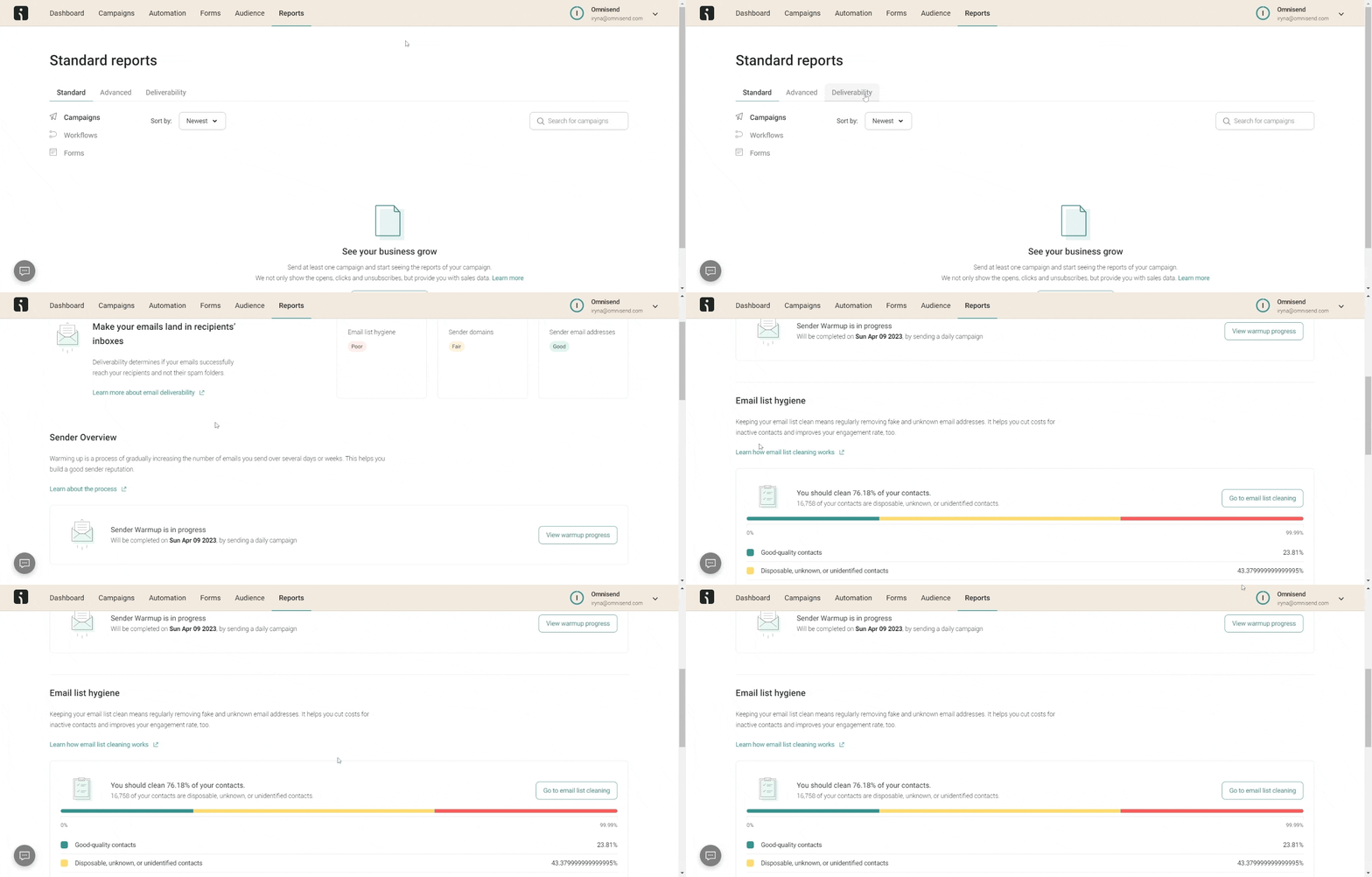
Omnisend’s built-in list cleaning tool is a good example of how an ESP can handle this process directly within your workflow. Rather than exporting lists to a third-party tool, you can identify and remove unengaged contacts without leaving the platform.
Here’s what the dashboard looks like:
Optimize with a layered approach. Use Google Postmaster Tools for ongoing reputation monitoring, an inbox placement tool before major sends, and your ESP’s built-in dashboard for weekly performance. This is a practical testing cadence, along with running a full deliverability audit once a month.
Omnisend’s built-in email deliverability tools handle monitoring, list hygiene, and authentication support in one place. This way, you’re not piecing together insights from five different platforms every time something looks off.
Email deliverability by platform: Which ESPs deliver best?
Your ESP affects your email deliverability. However, it’s not the only factor, and it’s often not the biggest one.
Platforms have varying levels of shared IP reputation, authentication enforcement, list hygiene tools, and bounce handling. These differences can contribute to email deliverability.
A study by EmailToolTester found that the average inbox placement rate across 15 ESPs was 83.1%. The study also noted that providers provided varying results. Sender behavior often matters more than the platform used.
EmailToolTester has since updated its methodology to evaluate ESPs based on deliverability features and infrastructure, rather than on seed-test rankings alone.
In truth, a good ESP provides tools to protect your reputation — but what you do with those tools determines your actual results.
That said, not all ESPs are built the same. Some rely entirely on shared IPs, which means your reputation is tied to every other sender on that pool. Others offer dedicated IP options, stricter bounce handling, and built-in list cleaning, all of which significantly reduce the risk of your emails landing in spam.
Here’s how a few widely used platforms compare on critical features for email deliverability:
| ESP | Free plan with deliverability features | Built-in list cleaning | Authentication support | Ecommerce focus |
|---|---|---|---|---|
| Omnisend | Yes | Yes | SPF, DKIM, DMARC, BIMI | Yes |
| Mailchimp | Limited | Limited | SPF, DKIM | Partial |
| Klaviyo | Limited | Limited | SPF, DKIM, DMARC | Yes |
| Brevo | Yes | Limited | SPF, DKIM, DMARC | Partial |
Omnisend is built specifically for ecommerce senders and maintains a 99%+ delivery rate.
Its infrastructure includes dedicated IP options, automated list hygiene, integration with Google Postmaster Tools, and full authentication support. What’s more, you can access these features without switching between platforms. If deliverability infrastructure is a deciding factor for you, it’s worth digging into these Klaviyo alternatives in more depth.
Ecommerce brands on Shopify, WooCommerce, BigCommerce, and similar platforms get email deliverability tools built into the same workflow they use to send campaigns.
Ultimately, it doesn’t matter as much which platform you use. The ESP sets the floor, but your sending practices determine how high you can exceed it.
Common email deliverability issues
Email deliverability problems plague even the best senders at some point. That said, most issues follow clear patterns. They’re easy to fix once you know what to look for. Here are the most common ones and how to resolve them.
Spam traps
Spam traps are email addresses used by inbox service providers to catch senders with poor list habits. Some are recycled from abandoned accounts, while others are made exactly for this purpose and were never used for real signups.
Hitting one signals to inbox providers that your list hygiene is poor. This can result in serious reputation damage.
To resolve this, you must regularly clean your list. Also, use double opt-in when building your email list to filter out invalid and fake addresses.
Authentication failures
Missing or broken SPF, DKIM, or DMARC records make your emails appear suspicious to inbox providers, regardless of your content or sending history. Many email clients also show warnings to recipients when authentication fails. This can damage trust before the recipient even reads your email.
Set up SPF, DKIM, and DMARC and validate them regularly using a tool like MXToolbox.
High bounce rates
A bounce rate above two percent shows inbox providers that your list isn’t well managed. Even worse, hard bounces from invalid addresses cause the most damage. You should remove them right after each send. Don’t wait for them to accumulate and drag down your sender reputation.
Keep your list up to date with regular audits. Consistent email list cleaning catches problematic addresses early.
Engagement decay
When a large portion of your list stops opening or clicking, inbox providers start filtering your sends more aggressively. This happens gradually. Inactive subscribers quietly pull down your engagement metrics while your risk of complaints increases.
Improve deliverability by segmenting out unengaged contacts. You can also run a re-engagement campaign before cutting them loose.
Content triggering spam filters
Spam-associated words, excessive punctuation, broken links, and messy HTML can all flag your emails before recipients see them. The problem isn’t always obvious, though. A single broken link or an all-caps subject line can be enough to cause a negative impact.
Review your content before every send. Learn proven ways to avoid spam filters, such as familiarizing yourself with spam laws.
Blacklisted domain or IP
A spam blacklist, such as Spamhaus, can stop your emails from reaching major inbox providers. You may not notice the problem until your open rates drop sharply.
Domains and IPs are usually blacklisted due to high complaint rates, excessive bounces, or emails sent to purchased lists. Check your email blacklist status regularly using MXToolbox.
If you’re listed, follow the delisting steps right away. You can also ask subscribers how to whitelist an email address so your campaigns are more likely to reach their inboxes. The longer your domain or IP stays listed, the harder it can be to rebuild your sender reputation.
Sudden volume spikes
Jumping from a few hundred emails a week to tens of thousands triggers spam filters fast, even when you have valuable content and a clean list. Inbox providers expect consistent, predictable sending behavior. Abrupt increases look like spam activity, especially on a newer domain or a shared IP address.
Scale up gradually. Follow BFCM deliverability best practices if you’re planning a large seasonal campaign.
Key takeaways
To achieve good email deliverability, you must consistently do three things: authenticate your domain, keep your list clean, and monitor your performance regularly.
Authentication tells inbox providers your emails are legitimate. A clean list keeps bounce rates low, and engagement signals healthy. Regular monitoring, through Google Postmaster Tools or your ESP’s dashboard, helps you spot issues before they escalate.
That said, deliverability isn’t something you set up once and forget about. Be mindful of any changes in inbox provider standards, subscriber behavior, or sending habits. Make adjustments if necessary.
A drop in open rates or a spike in complaints and bounce rates are all signals worth investigating before they affect your revenue.
Brands that consistently show up in inboxes treat deliverability as part of their regular workflow. It’s not something they only fix after the damage is done.
Quick sign up | No credit card required
FAQs
Email deliverability measures whether your emails reach recipients’ inboxes or get filtered to spam or blocked. It’s more than just determining whether an email was technically accepted by a server. It tracks whether the recipient actually had a chance to see it.
A good email deliverability rate is 95%+ with at least 80% inbox placement. Validity’s 2025 benchmark puts the global inbox placement rate at 83.5%. Most senders have real room to improve their inbox deliverability.
Email delivery shows whether a receiving server accepted your email. Email deliverability measures whether it reached the inbox. An email can pass delivery and still end up in spam, which is why inbox deliverability is more useful for ecommerce senders.
Three broad categories affect email deliverability:
— Technical (authentication setup, IP reputation, domain reputation)
— Behavioral (list quality, engagement rates, complaint rates)
— Content (spam triggers, HTML structure)
Inbox providers weigh all three when deciding where your emails land.
Here’s how to improve your email deliverability:
— Set up SPF, DKIM, and DMARC on your sending domain
— Clean your list regularly
— Segment contacts by engagement level
— Monitor your sender reputation using Google Postmaster Tools
— Maintain consistent sending habits
— Send relevant content
Google Postmaster Tools is the best free tool for reputation monitoring. MXToolbox covers blacklist checks and authentication validation. GlockApps handles inbox placement testing. Omnisend’s built-in deliverability dashboard combines monitoring, list hygiene, and reporting into a single platform.
The most common deliverability issues include:
— Spam traps
— Authentication failures
— High bounce rates
— Engagement decay
— Content that triggers spam filters
— Blacklisted domains or IPs
— Sudden volume spikes
Most are preventable with consistent list hygiene and steady sending practices.
Campaign deliverability refers to how well your bulk email campaigns reach the intended inbox. It’s different from transactional emails like order confirmations. Promotional campaigns face stricter filtering because recipients often don’t interact with these emails. Sending relevant content to well-segmented audiences is the best way to protect your campaign’s deliverability rate.