Omnisend AI


 OFFER
OFFER











The best email deliverability tools in 2026 are GlockApps for inbox placement testing ($85/month), EasyDMARC for DMARC enforcement ($44.99/month), ZeroBounce for list verification ($99/month), MailSoar for managed reputation repair, and Google Postmaster Tools plus MXToolbox for free diagnostics. Most ecommerce brands under 50,000 subscribers only need the free tools and their email service provider (ESP).
Choosing between email deliverability tools and services depends on what’s actually broken in your sending setup.
Inbox placement standards have tightened: Google and Yahoo introduced new sender requirements in February 2024, and Microsoft added its own enforcement for high-volume senders on May 5, 2025.
“Email deliverability service” covers three different things: managed agencies, self-serve software, and features built into your ESP. This guide covers the 10 best tools across all three, each with current pricing, honest limitations, and who it’s a good fit for.
Omnisend is an ESP, so it isn’t ranked in this list. We evaluated 10 third-party tools and services, and we flag the cases where an outside tool beats what any ESP — including ours — can do.
Email deliverability tools and services compared (10-tool table)
We’ve grouped these email deliverability tools by what each one actually does, not by overall ranking. Pricing is sourced from each tool’s 2026 pricing page.
Some of these are standalone email deliverability software platforms, while others are agency services or ESP-bundled features. The stage framework at the end of this article maps these email deliverability tools to your growth stage:
| Email deliverability tool | Category | Best for | Starting price (2026) | Free tier |
|---|---|---|---|---|
| MailSoar | Managed agency | Full-service reputation rehab | Custom quote | ❌ |
| Mailgun Optimize | Managed service | High-volume senders needing a dedicated TAM | $49/month | ❌ |
| Folderly | Managed platform | Ongoing inbox placement monitoring | $96/mailbox/month | ✅ |
| GlockApps | Self-serve testing | DIY inbox placement testing at scale | $85/month | ✅ |
| EasyDMARC | DMARC management | Non-technical marketers enforcing DMARC | $44.99/month | ✅ |
| dmarcian | DMARC management | Technical teams needing deep DMARC reporting | $24/month | ✅ |
| ZeroBounce | List hygiene | Combined verification and deliverability consulting | $99/month | ✅ |
| NeverBounce | List hygiene | B2B teams cleaning CRM or ZoomInfo data | $49/month | ✅ |
| MXToolbox | Diagnostic and monitoring | Quick SPF, DKIM, DMARC, and blacklist checks | $129/month | ✅ |
| Google Postmaster Tools | Free diagnostic | Gmail-specific delivery monitoring | Free | ✅ |
How we evaluated these tools: every entry was checked against its public 2026 pricing page in June 2026, tested or reviewed for the specific job it claims to do, and scored on three things — what it diagnoses, what it actually fixes, and the minimum sending volume that justifies its cost. Pricing changes; verify before you buy.
Do you need an email deliverability tool, or can your ESP handle it?
Most ecommerce brands on a good ESP don’t need a separate email deliverability service. If your authentication works, your list stays clean, and your ESP tracks bounce and spam complaint data, you’re likely covered.
Inbox placement rate — the share of your emails that reach the inbox rather than the spam folder — is visible only to mailbox providers such as Gmail, Yahoo, and Outlook. Neither ESPs nor third-party tools can measure it directly, so industry benchmarks only give you directional context.
You likely need outside help if:
- Engagement and delivery metrics decline consistently across mailbox providers
- Campaigns keep landing in spam after you’ve already reviewed authentication and list quality
- You send at very high volume and need advanced monitoring, infrastructure management, or sender reputation guidance
You’re likely fine as you are if:
- Your spam complaint rate stays below 0.3%
- You’ve got authentication and IP warm-up properly managed
- You monitor bounce rates, complaints, engagement trends, and sender reputation signals
Omnisend handles most of this for you: managed sending infrastructure, reputation-based shared IP pools, IP warm-up guidance, authentication tools, list cleaning, and deliverability monitoring and reporting — all built in.
The three categories of email deliverability services explained
There are three categories of email deliverability services bundled under this term, and they solve different problems. Knowing which one fits your situation will save you from paying for help you don’t need.
Managed deliverability agencies and consultancies
This category includes experienced deliverability specialists who review your email setup. They can fix authentication issues, manage IP warmups, and help remove your domain or IP from blocklists. You engage them on a monthly retainer or a fixed project fee. They do the work for you, which makes this the most hands-off option. It’s also the most expensive and suits high-volume senders.
Self-serve deliverability software
This category includes testing, monitoring, authentication, and warmup tools you run yourself. Most email deliverability services in this category are priced by mailbox or test volume. It’s a good fit for in-house marketers who can read deliverability data and act on it. One important distinction to note is that these email deliverability tools only surface problems. They don’t fix them for you.
Built-in deliverability inside your ESP
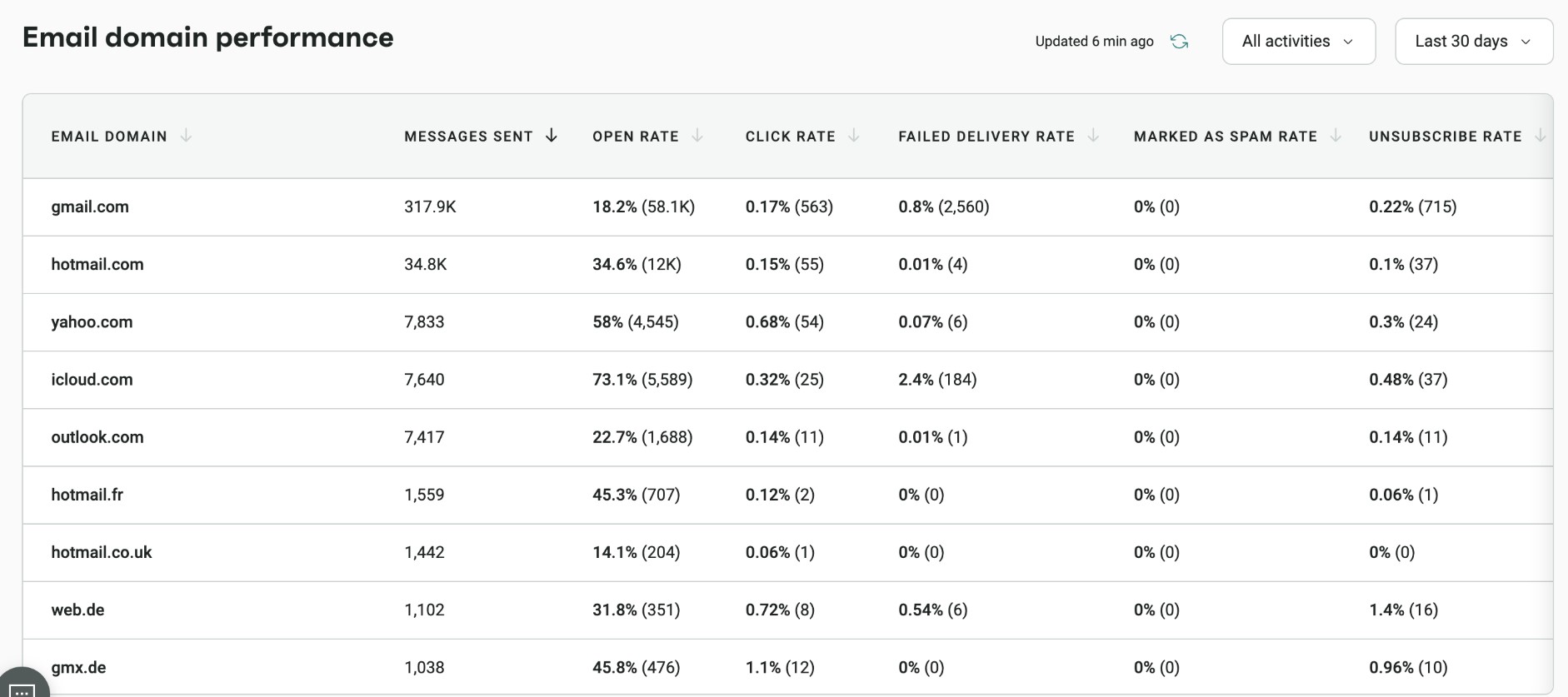
This category covers email deliverability tools that come bundled with your email service provider. They’re great for most ecommerce senders under 50k subscribers. Modern ecommerce ESPs like Omnisend handle authentication setup and manage shared IP reputation. They also surface bounce and complaint data inside the platform. Here’s a look at Omnisend’s email domain dashboard showing key metric performance:
Quick sign up | No credit card required
Best managed deliverability agencies
Managed email deliverability companies or agencies that work for senders with over 500k emails per month. It’s also great for brands dealing with a real reputation crash. If you’re under 50k subscribers, you don’t need these email deliverability tools.
MailSoar — Best agency for full-service deliverability rehab
- Category: Managed agency
- Price: Custom quote
- Free plan: No
- Best for: Blocklist recovery
- Skip if: You send under 50,000 emails/month
MailSoar is a pure-play email deliverability agency, not a software tool. It takes on brands whose sender reputation has already taken a hit and works through fixed audits or ongoing retainers.
Engagements cover authentication setup, IP warmup, email blacklist remediation, and inbox placement strategy.
Strengths:
- A pure-play deliverability focus eliminates the need to divide efforts across unrelated services
- The entire breadth is covered by hands-on remediation, from blocklist removal to authentication fixes
- True human proficiency at every level
Limitation: Pricing is opaque — you’ll need to request a quote to get figures
Ideal fit: Brands recovering from a blocklist event or a major sender-reputation crash
Mailgun Optimize — Best for high-volume senders needing a dedicated TAM
- Category: Managed service
- Price: From $49/month
- Free plan: No
- Best for: 1M+ emails/month with expert oversight
- Skip if: You want a self-serve dashboard
Mailgun Optimize is a paid add-on suite that works with any ESP, not just Mailgun. It covers inbox placement testing, blocklist monitoring, and reputation tracking.
The Contract plan includes a dedicated Technical Account Manager — a team with 320+ years of combined experience. This TAM team handles ongoing strategy, issue monitoring, and remediation. Paid plans start at $49/month, with the TAM-led tier on a custom pricing plan.
Strengths:
- Mailgun’s deliverability customers average a 97.4% email delivery rate
- Works with any ESP, so you don’t need to switch sending platforms to use it
- TAM-led tier provides hands-on strategy, not just a dashboard with alerts
Limitation: The TAM-led Contract tier is priced for enterprise budgets
Ideal fit: High-volume senders (1M+ emails/month) who need dedicated expert oversight
Folderly — Best for ongoing inbox placement monitoring
- Category: Managed platform
- Price: From $96/mailbox/month ($56 at higher volumes)
- Free plan: Yes
- Best for: Continuous monitoring without an agency retainer
- Skip if: You need a one-off diagnostic
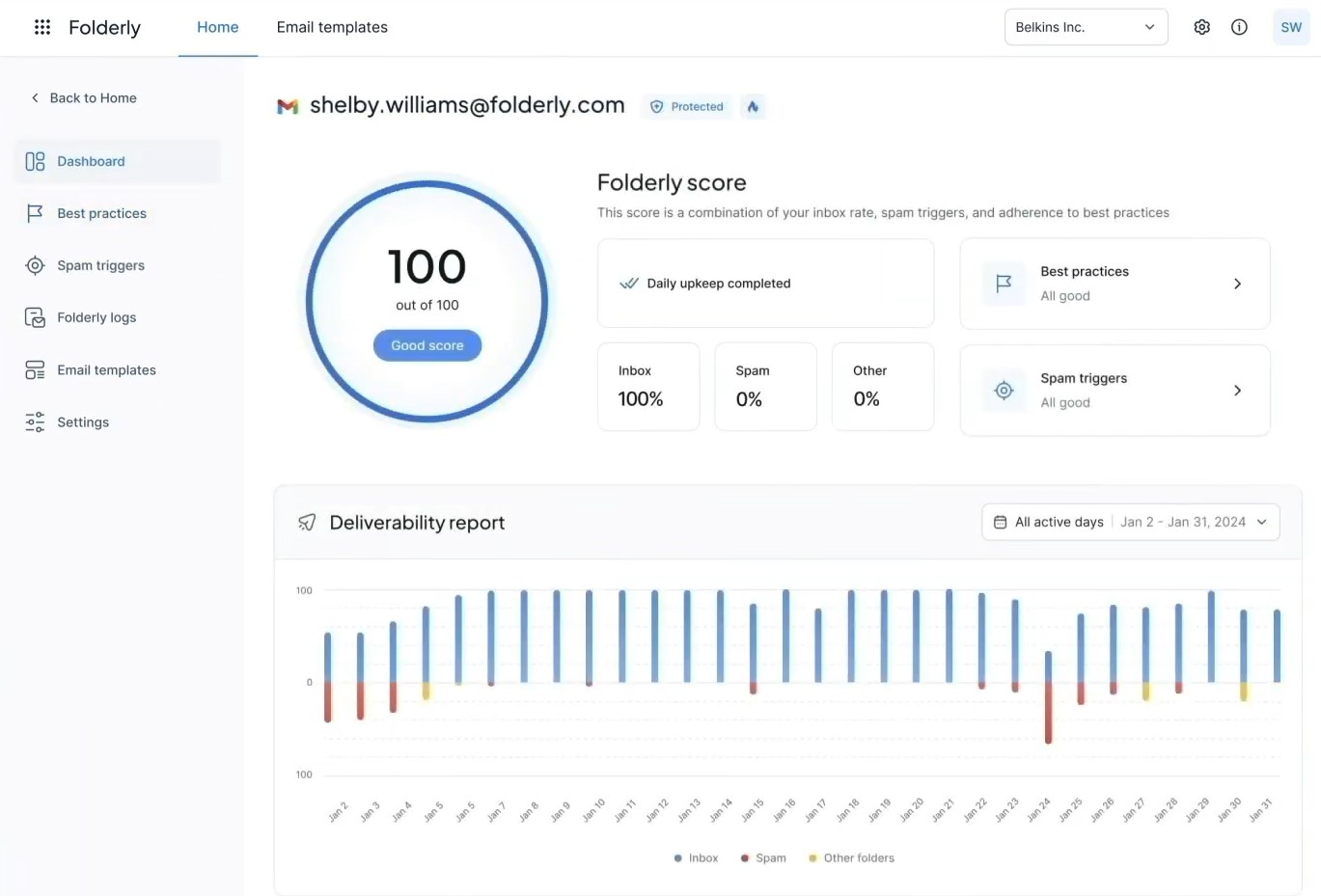
Folderly is a managed email deliverability service. It combines automated inbox placement tests, real-time spam alerts, and human consulting in one place. It works with most major ESPs and supports both cold email and marketing senders.
You get ongoing monitoring without signing a full agency retainer. Plans start at $96/mailbox/month for one to nine mailboxes. It drops to $56/mailbox/month for larger teams.
Strengths:
- You get wide placement visibility across providers with a seed list of more than 100 inboxes
- It is adaptable across use cases and supports both cold email and marketing senders
- Connects to the majority of popular ESPs without the need for a platform changeover
Limitation: At $96/mailbox/month, the entry price can feel steep before you’ve seen results
Ideal fit: Marketing teams that need continuous monitoring without hiring a full agency
Best inbox placement testing tools
Open rates can’t tell you why emails go to spam, or whether they reached the inbox at all. Apple Mail Privacy Protection broke open tracking in 2021, and iOS 18 AI summaries made it worse in 2024.
Inbox placement tools — also called email deliverability checkers — send test emails to seed lists, which are controlled inboxes across Gmail, Outlook, Yahoo, and other providers, then report where each message landed.
One caveat: seed addresses carry no engagement history with your domain, so the results are directional. A 90% seed placement can sit alongside 70% real-world placement.
GlockApps — Best DIY testing for inbox placement at scale
- Category: Self-serve testing
- Price: From $85/month
- Free plan: Yes
- Best for: Per-ISP placement data you interpret yourself
- Skip if: You want someone to fix what the test finds
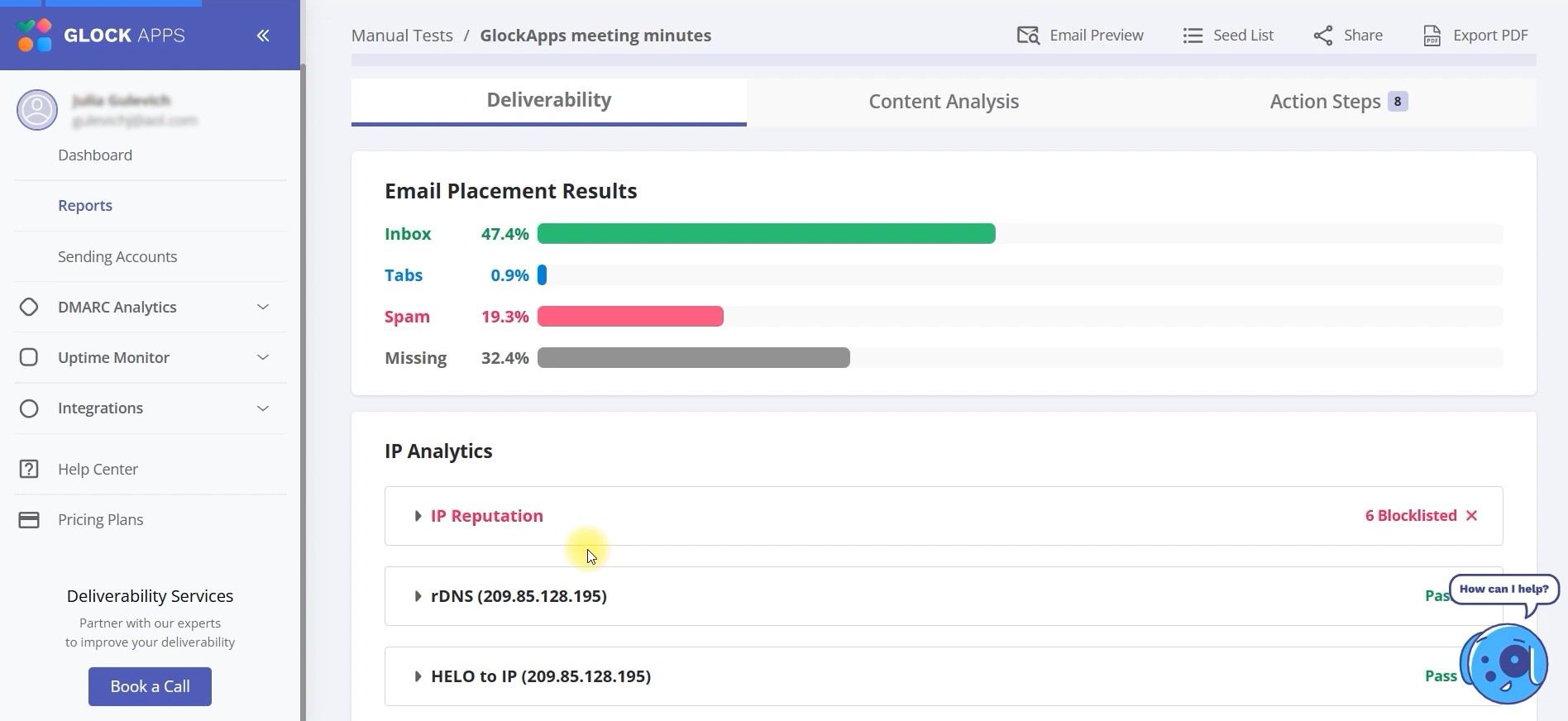
GlockApps runs inbox placement tests across 100+ seed addresses, covering Gmail, Outlook, Yahoo, AOL, Zoho, and more.
It reports a breakdown of where your emails land at each provider. It also surfaces spam-trigger words in your content and includes DMARC analytics and blacklist monitoring.
It’s a self-serve email deliverability tool, so you run the tests yourself and interpret the results. Plans start at $85/month per GlockApps’ 2026 pricing page.
Strengths:
- Granular per-ISP visibility shows exactly which providers are sending your emails to spam
- Spam-trigger terms are flagged by content scoring prior to the launch of your campaign
- Uptime alerts and monitoring of blacklists provide you with updates in between tests
Limitation: The data is only as useful as your ability to act on it. There’s no consultant attached, so you’ll need to diagnose and fix issues yourself.
Ideal fit: Technical marketers and email ops teams comfortable acting on raw deliverability data
Best email authentication and DMARC management tools
DMARC enforcement is no longer optional. Google and Yahoo have required it since February 2024 for senders sending more than 5,000 emails per day, and Microsoft introduced comparable rules on May 5, 2025.
DMARC (Domain-based Message Authentication, Reporting, and Conformance) tells mailbox providers how to handle email that fails SPF and DKIM checks. If you haven’t set yours up yet, start with the DMARC setup.
EasyDMARC — Best DMARC tool for non-technical marketers
- Category: DMARC management
- Price: From $44.99/month
- Free plan: Yes
- Best for: Getting from p=none to p=reject without an engineer
- Skip if: You need deep multi-domain reporting
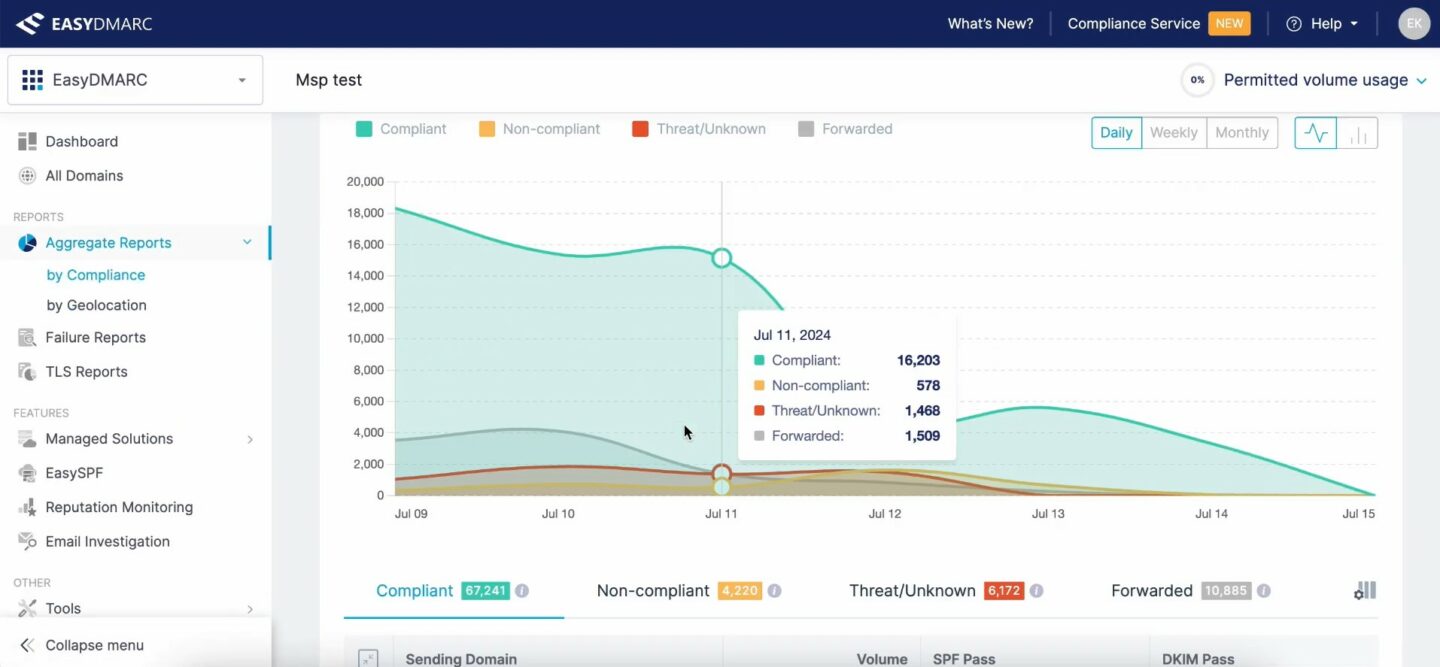
EasyDMARC manages DMARC, SPF, and DKIM across multiple domains from one dashboard. It’s built for marketers who need to enforce authentication without a deliverability engineer on staff.
The interface is the most approachable in this category. It walks you through policy progression from p=none to p=quarantine and p=reject. All these without requiring deep technical knowledge.
Plans start at $44.99/month per EasyDMARC’s 2026 pricing page.
Strengths:
- There is a free tier that you can use before committing to a paying plan
- Covers DORA, NIS2, and PCI DSS 4.0 requirements for regulatory compliance
- Monitors DKIM, SPF, and DMARC for multiple domains in one place
Limitation: It’s not as robust as dmarcian for multi-domain setups requiring advanced reporting
Ideal fit: Ecommerce brands moving from p=none to p=quarantine or p=reject
dmarcian — Best for technical depth and EU/APAC sovereignty
- Category: DMARC management
- Price: From $24/month
- Free plan: Yes (non-business domains)
- Best for: In-house deliverability engineers
- Skip if: Interface polish matters more than reporting depth
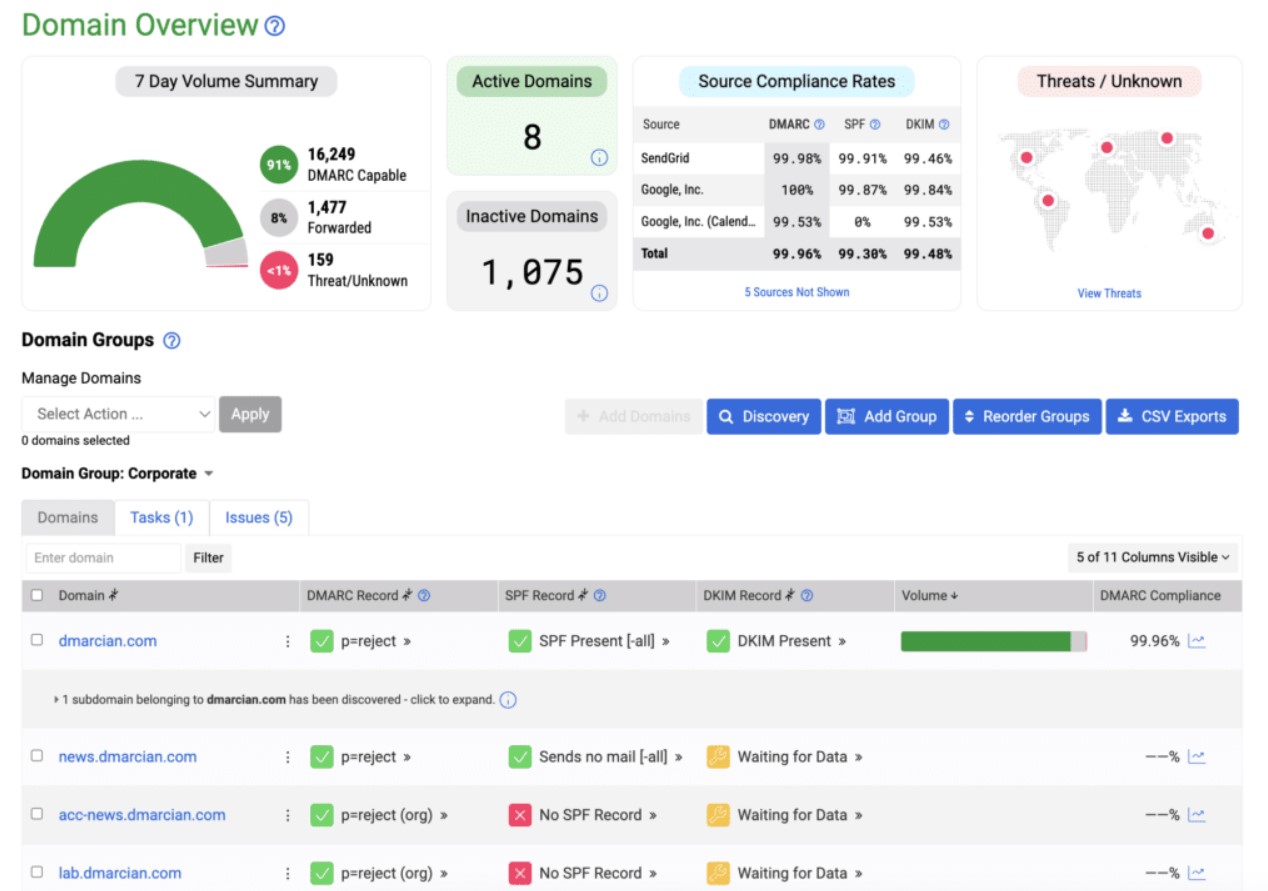
dmarcian was co-founded by one of the original authors of the DMARC protocol. It runs offices across North America, Europe, and the Asia-Pacific. Regional data centers are available for teams with data sovereignty requirements.
The platform offers real-time authentication failure notifications, SPF and DKIM visibility, and comprehensive DMARC aggregate report analysis.
There is a free tier for personal usage, and plans start at $24 per month.
Strengths:
- Deepest DMARC reporting analytics in the category, built by the people who wrote the spec
- EU and APAC data centers give teams with sovereignty requirements a compliant option
- Transparent, volume-based pricing with a free tier for non-business domains
Limitation: The interface is less polished than EasyDMARC, making it harder to navigate
Ideal fit: Enterprise senders and teams with a deliverability engineer in-house who need technical depth over simplicity
Best email list hygiene and verification tools
Every hard bounce chips away at sender reputation, and a spam trap hit can get you listed by Spamhaus or another blocklist. A spam trap is an address created solely to catch senders with poor list practices. Cleaning costs far less than recovering, and it keeps email bounce rates down.
Clean your list in three situations: before an ESP migration, before peak-season sends like BFCM, and quarterly as routine maintenance.
ZeroBounce — Best for combined verification and consulting
- Category: List hygiene
- Price: From $99/month, or $0.0138/credit pay-as-you-go
- Free plan: Yes (100 verifications/month)
- Best for: Dirty data plus broader deliverability problems
- Skip if: You only need placement testing
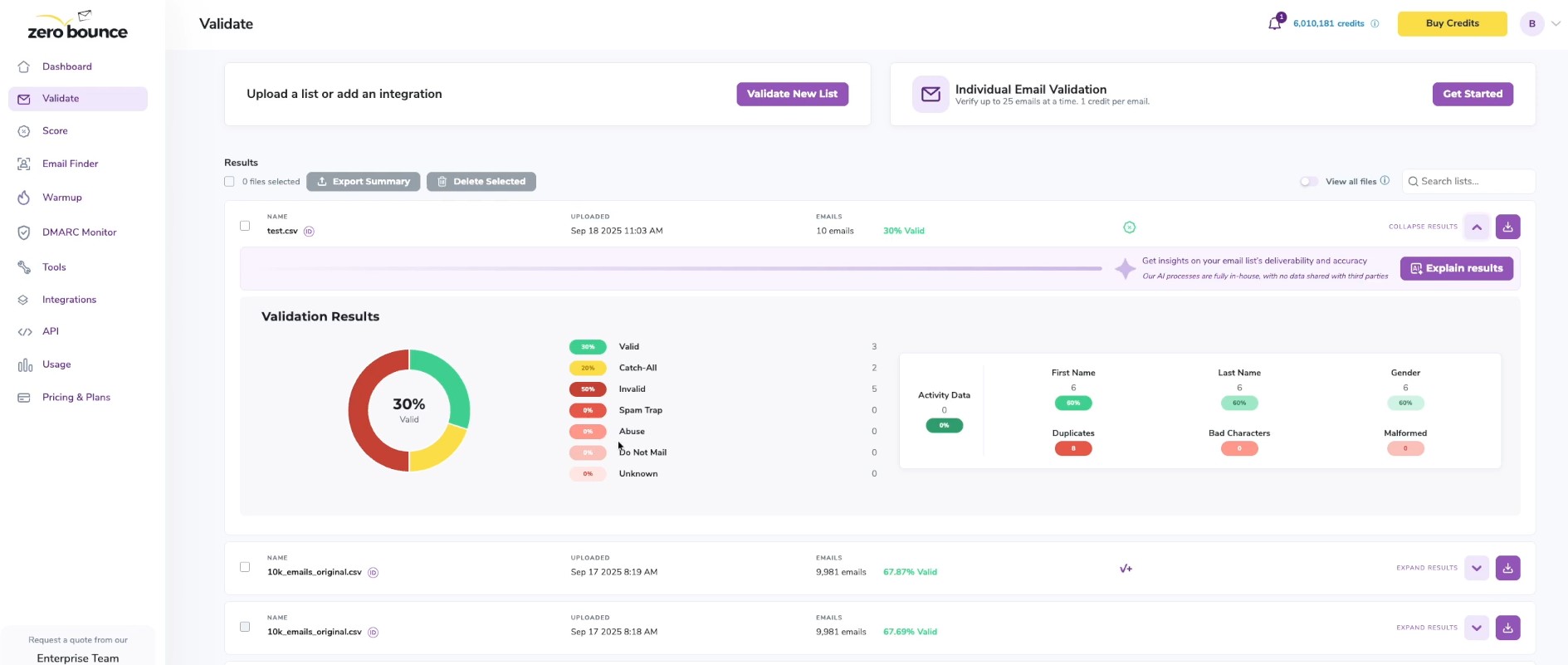
ZeroBounce combines email verification, server analysis, a domain warm-up tool, and deliverability consulting. ZeroBounce claims 99.6% verification accuracy.
Beyond verification, real consultants help diagnose broader issues. This makes it one of the few email deliverability services that combine verification with human guidance. The ONE plan starts at $99/month, with a pay-as-you-go option from $0.0138/credit.
Strengths:
- Inbox placement testing, blacklist monitoring, and verification are all included in the full-stack diagnostic suite.
- Teams in need of direction have access to actual consultants.
- 100 monthly verifications are included in the free tier.
Limitation: Teams focused on inbox placement may find a pure-play tool more cost-effective
Ideal fit: Ecommerce brands dealing with both dirty list data and broader deliverability issues
NeverBounce — Best for B2B teams cleaning ZoomInfo or HubSpot data
- Category: List hygiene
- Price: From $49/month, or $0.008/email
- Free plan: Yes
- Best for: Cleaning CRM exports in place
- Skip if: You buy credits in bulk and send infrequently (they expire after 12 months)
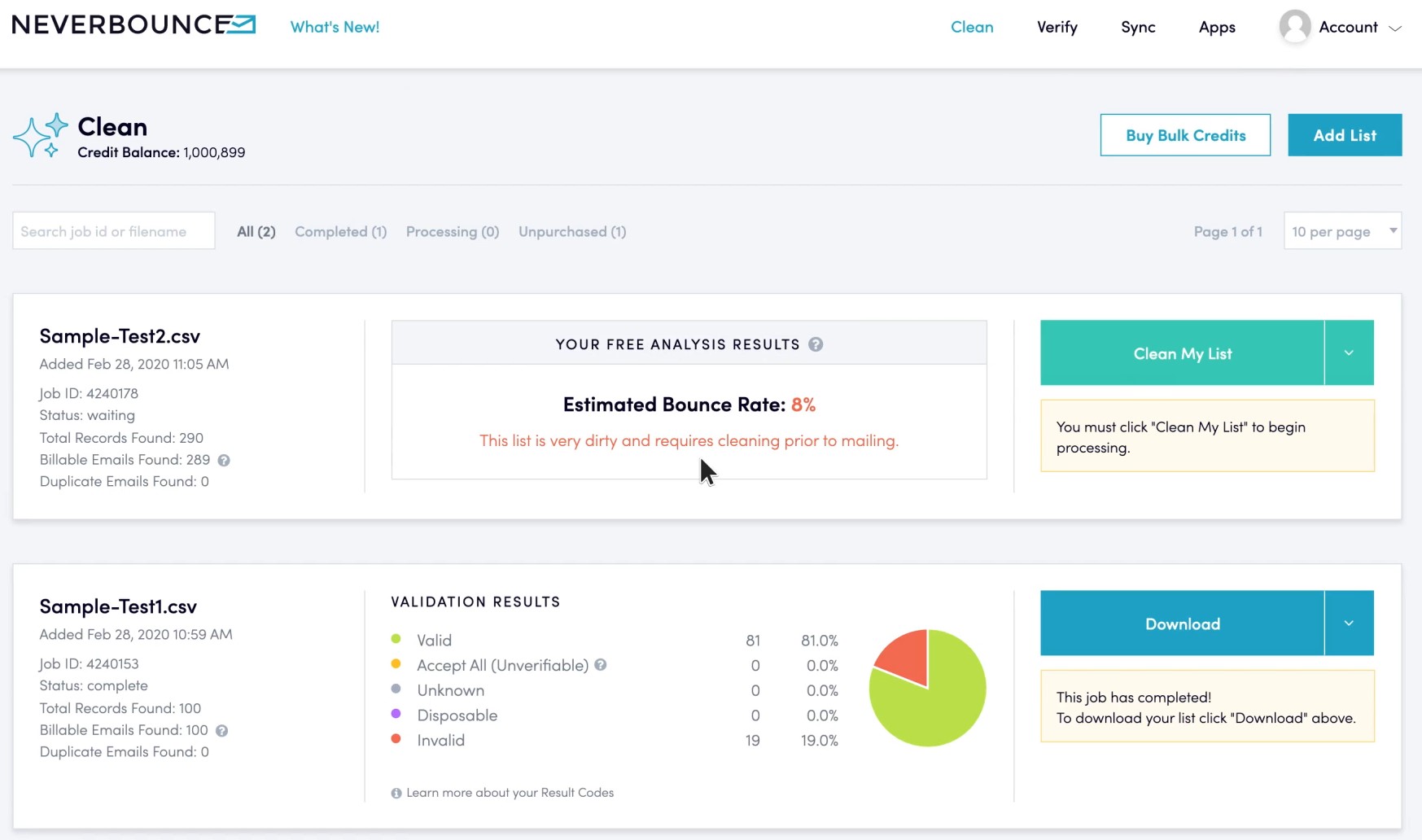
NeverBounce is owned by ZoomInfo and integrates with 80+ platforms. Popular integrations include HubSpot, Salesforce, and Marketo. It’s built for B2B teams who need to clean CRM exports without a manual upload-and-reimport workflow.
The pay-as-you-go pricing starts at $0.008/email, with a paid plan from $49/month.
Strengths:
- Native integrations with 80+ platforms let you clean lists inside your CRM
- Real-time API verification catches invalid addresses at the point of entry
- It is a perfect choice for B2B sales teams, given its deep compatibility with ZoomInfo data
Limitation: Credits expire 12 months after purchase, which can catch bulk buyers off guard
Ideal fit: B2B SaaS or services brands cleaning sales and marketing list data pulled from ZoomInfo, HubSpot, or similar CRM platforms
Best free email deliverability tools
Run the free diagnostics before you spend anything. Two tools cover most of the ground: MXToolbox for DNS and authentication health, and Google Postmaster Tools for Gmail-specific monitoring. Both take minutes to set up. For coverage beyond Gmail, add Microsoft SNDS and Yahoo Sender Hub, which are also free and provider-specific.
MXToolbox — Best free check for SPF, DKIM, DMARC, and blacklists
- Category: Diagnostic
- Price: Free for one-off checks; Delivery Center from $129/month
- Free plan: Yes (one domain, top 30 blocklists)
- Best for: Live incident troubleshooting
- Skip if: You need inbox placement data
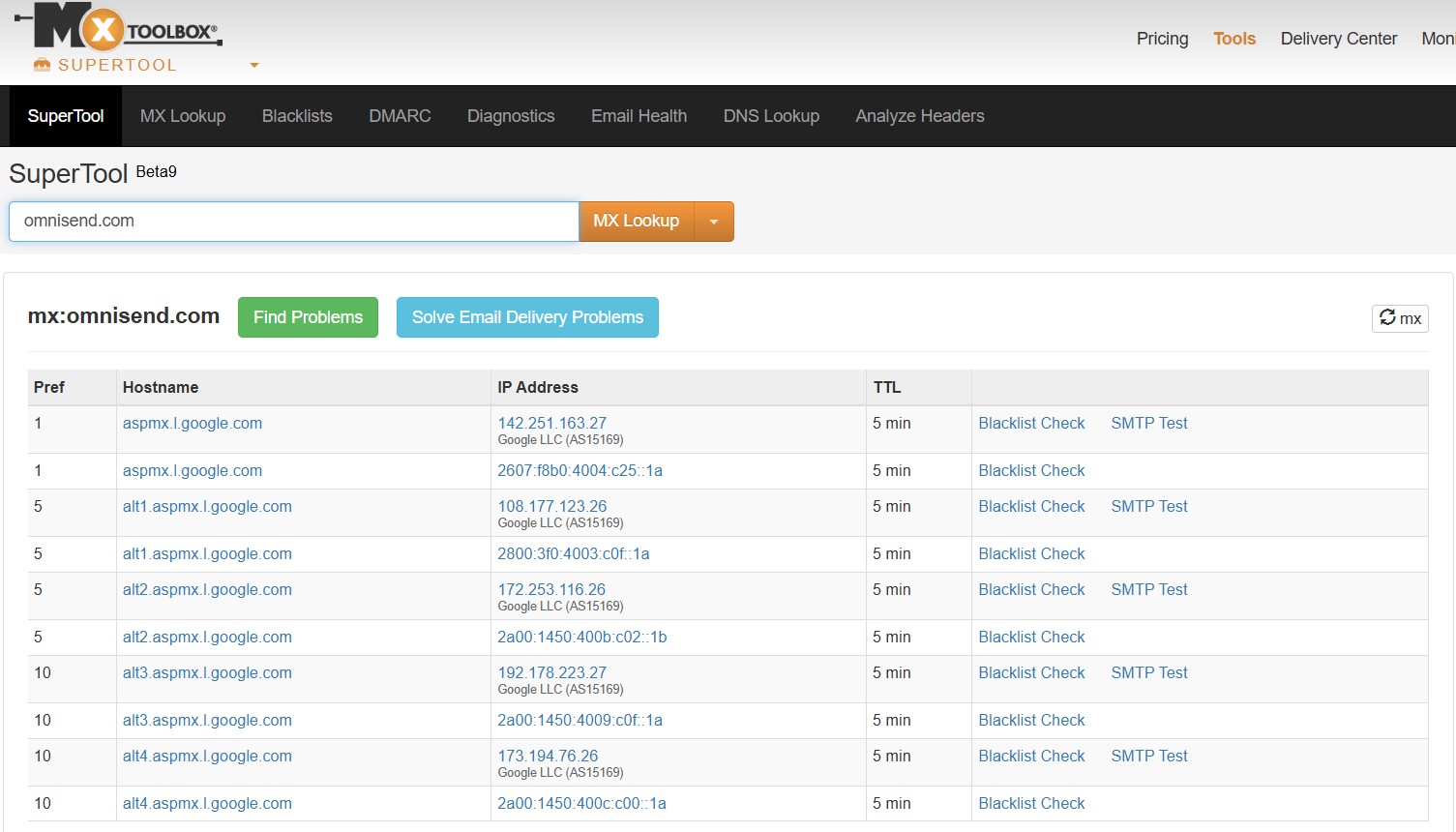
MXToolbox’s SuperTool runs DNS checks, SPF/DKIM/DMARC validation, and blacklist lookups in seconds. No account is required for one-off checks. It’s the fastest way to audit your authentication setup before a vendor call or during a live incident.
The free tier covers one domain and the top 30 blacklists. Paid Delivery Center plans start at $129/month and include continuous monitoring and DMARC analytics.
Strengths:
- Free for one-off diagnostic checks, with no account or credit card required
- Covers DNS, SPF, DKIM, DMARC, and blacklist checks in a single tool
- Trusted across the email industry for over two decades
Limitation: MXToolbox surfaces problems. Unlike other email deliverability tools, it doesn’t fix problems or test inbox placement
Ideal fit: Anyone troubleshooting a specific deliverability incident or auditing their setup
Google Postmaster Tools — Best free Gmail-specific monitoring
- Category: Diagnostic
- Price: Free
- Free plan: Yes
- Best for: Majority-Gmail B2C lists
- Skip if: Your audience skews Outlook or Yahoo
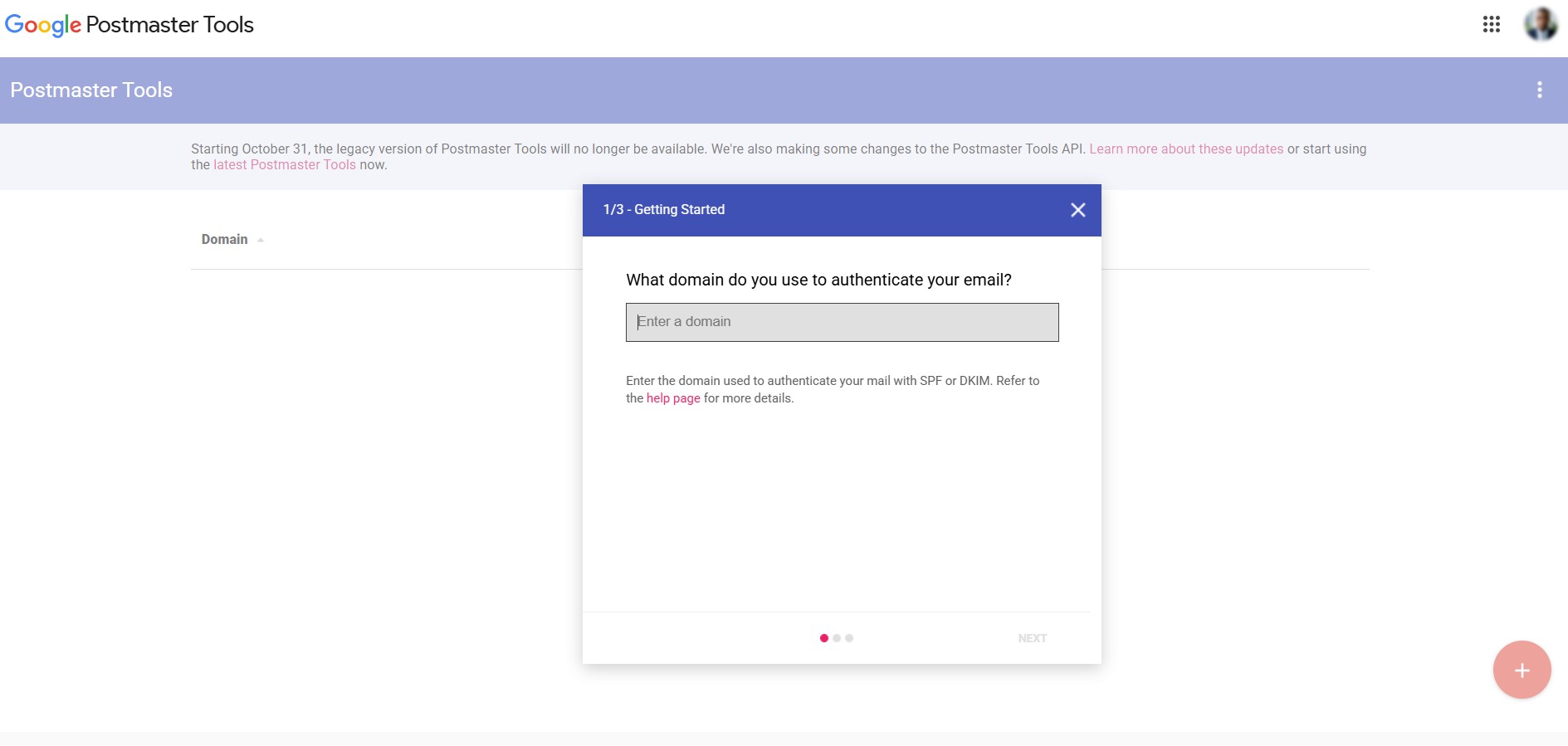
Google Postmaster Tools is a free dashboard from Google. It shows your spam rate, authentication results, compliance status, and feedback loop data for Gmail specifically.
After the new sender requirements Google introduced in February 2024, checking it regularly isn’t optional for high-volume senders. There’s no paid tier — Google Postmaster Tools is completely free.
Strengths:
- Data comes directly from Google, making it the most reliable source for Gmail placement insights
- Tracks spam rate, authentication compliance, and compliance status in one place
- Free with no usage limits or paid upgrade required
Limitation: Postmaster Tools covers Gmail only, and V2 no longer shows the domain and IP reputation scores many teams relied on. You’ll still need Microsoft SNDS and Yahoo Sender Hub for full coverage across providers.
Ideal fit: Ecommerce brands with majority-Gmail lists, which describes most B2C senders
What changed in Google Postmaster Tools V2
The domain and IP reputation dashboards were retired when Postmaster Tools moved to V2 in late 2025. Google has said it plans to introduce new dashboards with more actionable data, but those haven’t launched yet, so V2 leans on compliance status and spam rate instead of a reputation score.
Are email warmup tools worth it?
Short answer: usually not. Mailbox providers are getting better at spotting synthetic warm-up networks, and warm-up creates only a temporary signal — it won’t fix the authentication or content problems behind most deliverability issues. If your list is active and your sending history is established, your domain is already warmed up.
Tools in this category include Warmy, MailReach, and the warm-up features bundled into Folderly and ZeroBounce. Rather than paying for one, authenticate your domain, keep your list clean, send to engaged subscribers, and ramp volume gradually on a new domain or IP. For the full process, see how to warm up your email domain.
How to choose an email deliverability tool by sending volume
Most ecommerce brands don’t need a full stack of email deliverability tools. The right combination depends on where you are in your growth. Use this framework to match your stage to the email deliverability best practices that actually make sense.
| Stage | Subscriber range | Recommended email deliverability tool stack | Monthly budget estimate |
|---|---|---|---|
| Foundation | Under 50k | ESP built-in features (Omnisend) + Google Postmaster Tools + MXToolbox | $0 |
| Scaling | 50k–500k | Foundation stack + GlockApps + EasyDMARC or dmarcian | $130–$200 |
| Enterprise | 500k+ | Scaling stack + ZeroBounce or NeverBounce + MailSoar or Mailgun Optimize | $228–$278+ |
Most ecommerce brands stay in stage one longer than they think — and that’s not a problem. A quality ESP with built-in email deliverability services covers most of what you need.