Omnisend AI


 OFFER
OFFER










The 15 best AI email writers include Omnisend for ecommerce campaigns, Lavender for sales outreach, and Gemini in Gmail or Microsoft Copilot in Outlook for everyday correspondence. The right tools depend on your email workflow. For example, use an AI email writer built for ecommerce if you send marketing campaigns.
An AI email writer is software that generates or revises email copy from your instructions and available context. Some AI email writers help you write emails inside a campaign builder. Others can help you draft replies directly in Gmail or Outlook.
This comparison covers writing capabilities, integrations, pricing, and limitations for all 15 best AI email writers.
Best AI email writers at a glance
The 15 best AI email writers include marketing platforms such as Omnisend and MailerLite, sales outreach tools such as Lavender, general AI assistants like ChatGPT and Claude, and inbox assistants such as Gemini in Gmail. Each tool serves a different email-writing workflow.
Compare each tool’s use case, writing features, supported platforms, free access, and starting price. Click a tool name to read its review:
| Tool | Tool category | Recommended use case | Key writing capability | Where it works | Free plan or trial | Starting paid price |
|---|---|---|---|---|---|---|
| Omnisend | Marketing email writer | Ecommerce campaigns | Creates subject lines, preheaders, and body copy in the builder | Omnisend platform | Free plan. 250 contacts, 500 emails/month. AI features included | $16/month |
| Jasper | Marketing email writer | Brand-consistent campaign copy | Generates content using brand voice guidelines | Web app | Seven-day trial. All plan features included | $69/seat/month |
| ChatGPT | General AI assistant | Flexible prompt-based drafting | Drafts and rewrites emails from prompts and context | Web, desktop, mobile | Free plan | $8/month |
| Claude | General AI assistant | Emails built on detailed background | Drafts and revises emails from supplied documents and samples | Web, desktop, mobile | Free plan | $20/month |
| Grammarly | Everyday inbox assistant | Drafting and refining professional email | Use AI features while writing emails in Gmail. Checks grammar, clarity, and tone | Gmail, Outlook, browser, desktop | Free plan. 100 AI prompts/month | $30/month for up to 2,000 AI prompts/member/month |
| Gemini in Gmail | Everyday inbox assistant | Writing inside Gmail | Write emails from scratch, polish existing drafts, and suggest replies to incoming emails | Gmail | 14-day free trial. AI features included | $8.40/user/month |
| Microsoft Copilot in Outlook | Everyday inbox assistant | Drafting inside Outlook | Drafts emails from prompts. You can also use Coaching by Copilot to improve tone, clarity, and wording | Outlook | One-month free trial for all plans except Individual Pro | $9.99/month |
| Lavender | Sales outreach tool | Prospecting emails and coaching | Live scoring with rewrite suggestions | Gmail, Outlook, Outreach, Salesloft | Seven-day free trials on paid plans + free plan with five email analyses and five personalizations/month. | $29/month |
| MailMaestro | Everyday inbox assistant | Replies to detailed messages | Thread-aware replies and rewrites | Outlook, Gmail via Chrome | Free with 3 AI requests/week | $15/seat/month |
| MailerLite | Marketing email writer | Newsletter and campaign copy | AI writing assistant inside the editor | MailerLite editor | Free. 250 subscribers and 2,500 emails/month. No AI writing assistant | $12/month |
| Rytr | Everyday inbox assistant | Short, template-led emails | Generates full emails from short prompts or keywords. Choose from 20+ preset tones. | Web app, Chrome extension | Free. 10,000 characters/month | $9/month |
| Copy.ai | Sales outreach tool | Repeatable outreach workflows | Workflows that run one brief across many emails | Web app | No free plan or trial | $29/month. Includes five seats |
| Anyword | Marketing email writer | Comparing message variations | Generation with predictive performance scores | Web app | Seven-day trial on the Starter and Data-Driven plans only | $49/month. Includes one seat |
| Superhuman Mail | Everyday inbox assistant | Drafting inside a dedicated client | Drafts emails with AI, generates instant replies, and prepares automatic drafts for incoming messages | Superhuman client | No free plan | $30/member/month |
| Shortwave | Everyday inbox assistant | AI drafting and replies in Gmail | Writing style learned from emails you’ve sent | Shortwave client, Gmail only | Free plan and 14-day free trial | $18/seat/month. Daily AI usage limits apply |
*All prices verified as of October 2026.
Learn more about AI in email marketing to see how ecommerce brands use AI for campaign personalization, audience segmentation, and performance.
How we selected the best AI email writers
The best AI email writers were assessed using five criteria. These cover drafting, tone controls, brand or recipient context, workflow compatibility, and cost.
- Drafting and rewriting: How well the tool generates new email drafts and revises them
- Tone controls: How easily you can adjust the wording to match the recipient and purpose of the email
- Brand or recipient context: Whether the tool uses brand guidelines, email threads, or documents you provide to generate emails
- Workflow compatibility: Whether the tool works with your email setup and email process
- Cost: The price of its email-writing features and any free-plan limits
The list covers marketing email writers, general AI assistants, sales outreach tools, and inbox assistants. Each serves different email needs.
We assessed each tool based on official vendor documentation and product pages. Pricing and tier details were checked on vendor websites. We didn’t conduct hands-on testing.
To compare the best AI email writers yourself, use the same brief for tools serving similar purposes. Assess factual accuracy, instruction adherence, clarity, tone, and editing required.
15 best AI email writers
The best AI email writers depend on your needs. Some focus on creating marketing campaigns, while others support sales outreach or everyday emails.
1. Omnisend — best for ecommerce marketing emails
Intended user: Omnisend is suited to ecommerce business owners who create marketing emails. Its AI writing tools are built into the email workflow, so you can draft and edit copy without switching platforms.
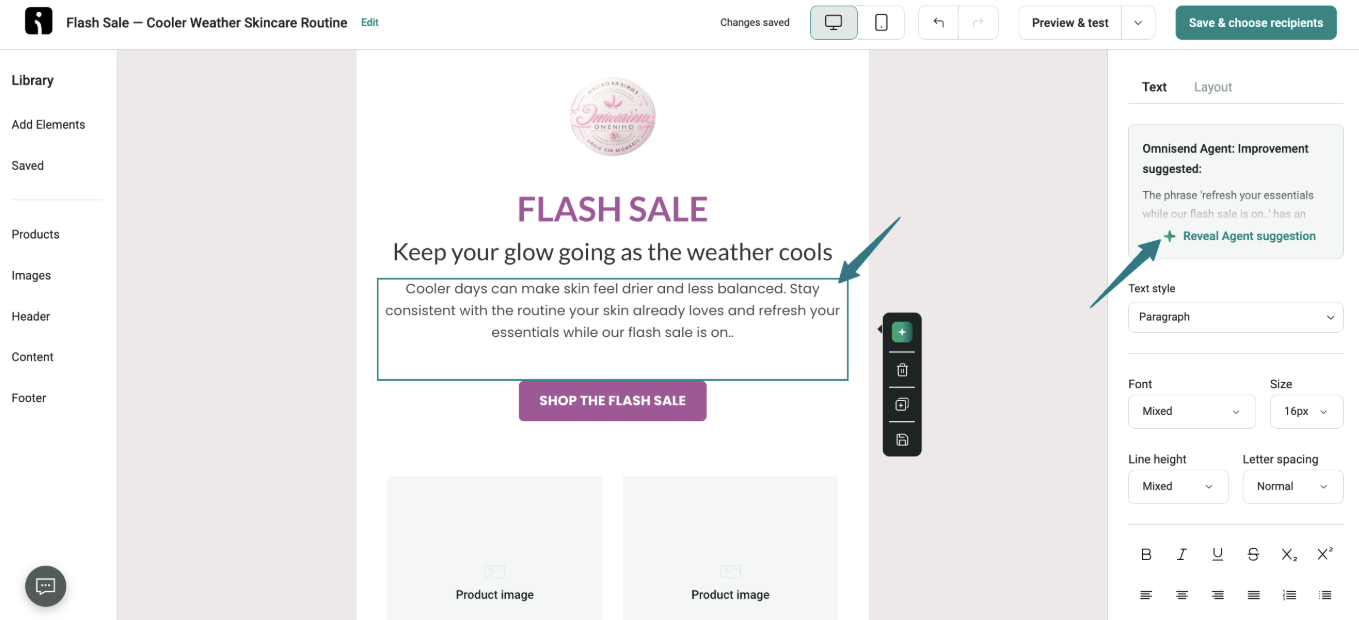
Writing capabilities: Omnisend Agent generates subject lines, preheaders, and body copy in the campaign builder. It suggests three subject line variations with a matching preheader. When you select a text block in the Email Builder, it reviews the copy and provides feedback.
You can also run standalone tools. Omnisend’s free AI email generator writes a full marketing email from a description, an email type, a tone, and a length. There’s also a free AI subject line generator and a free subject line tester that scores a line you’ve already written.
Practical example: If you’re launching a promotional campaign, such as a flash sale, open an email draft in Omnisend’s Email Builder. Select the copy and review Omnisend Agent’s suggestions in the right panel:
Pros
- Omnisend generates subject lines, preheaders, and body copy inside the same builder you use to send campaigns
- You can use Omnisend Agent and AI subject line generation in all plans, including Free
- Omnisend integrates natively with Shopify, WooCommerce, and BigCommerce to bring product and customer data into the campaign workflow
Fit considerations: Omnisend is made for marketing emails, not inbox replies or individual sales outreach. Teams needing both will have to consider using two products.
Pricing
- Free: 250 contacts and 500 emails/month
- Standard: $16/month, 500 contacts, and 6,000 emails/month
- Pro: $59/month, 2,500 contacts, and unlimited monthly emails
2. Jasper — best for marketing teams managing brand voice
Intended user: Jasper suits marketing teams that need to produce email copy consistently, at scale. It uses your brand guidelines to inform its email drafts, so team members have a consistent starting point.
Writing capabilities: Upload writing samples so Jasper can analyze their tone and style and develop a personalized brand voice. Knowledge Assets and Jasper IQ use company context to make drafts more relevant.
Practical example: A clothing brand can use Jasper’s Audience feature to draft two versions of an email for its latest collection. One introduces the brand and collection to new subscribers, while the other highlights what’s new for existing customers.
Pros
- Audience context and brand voice are reusable, making the outputs more consistent
- Knowledge Assets store company facts and brand guidelines, so you don’t have to repeat them in every prompt
- Create and repurpose content in 30+ languages
Cons
- Setup is front-loaded, since brand voice and knowledge assets need building first
- The Pro plan caps you at two brand voices and one seat
- Jasper isn’t the email sending platform, so you need another tool to send campaigns
Pricing
- Seven-day free trial for the Pro plan
- Pro: $69/seat/month, two brand voices, five knowledge assets, and three audiences
- Business: Custom pricing with a 12-month commitment and unlimited brand voices plus audiences
3. ChatGPT — best for flexible, prompt-based email drafting
Intended user: ChatGPT is designed for users who like to describe their requirements rather than select a template when writing different emails. It’s one of the best AI email writers for prompt-based customization.
Writing capabilities: ChatGPT creates emails based on your prompts. It also rewrites copy and adjusts tone or length through follow-up instructions.
Ecommerce teams can connect ChatGPT with email marketing platforms. For example, using AI assistants with Omnisend lets teams access campaign information through AI chat.
Practical example: Ask ChatGPT to put together a project update email for your client. If it sounds like a formal notice, ask it to make the tone more relaxed.
Pros
- No template constraints, so it handles email types a purpose-built tool won’t cover
- Follow-up instructions refine a draft without starting a new chat
- The free tier covers unlimited everyday text chats
Cons
- ChatGPT may state things confidently that aren’t true, which makes fact-checking non-optional
- Vague prompts often produce generic email drafts
- No inbox connection by default, so drafts must be copied manually
Pricing
Personal plans
- Free
- Go: $8/month
- Plus: $20/month
- Pro: $200/month
Business plans (for teams of 2–200 employees)
- Standard seat: $25/month
- Premium seat: $125/month
OpenAI reports paid plans may have usage limits, including message caps during high demand.
4. Claude — best for drafting emails from detailed context
Intended user: Claude suits professionals writing emails about complex situations, such as project delays, complaints, or changing plans. These emails need more context than a one-line prompt can provide.
Writing capabilities: Claude works with the information you provide, from previous correspondence to briefs and writing samples. Its drafts reflect the details and tone found in that material.
Practical example: Paste a client’s email and your notes into Claude. Ask it to draft a reply that answers the client’s questions.
Pros
- Handles long supplied context, which suits emails that reference documents
- Projects retain reference materials and tone guidelines, so you don’t need to upload them again
- Can follow multiple instructions in one prompt
Cons
- Free usage limits reset every five hours, which can interrupt longer writing sessions
- The Microsoft 365 connector can’t draft or send emails with attachments
- Drafts may need manual editing to match your usual writing style
Pricing
Individual plans
- Free
- Pro: $20/month
- Max: $100/month
Team plans (for teams of 2–150 employees)
- Standard seat: $20/month
- Premium seat: $100/month
- Enterprise: $20/seat/month + usage costs, billed annually, 20-seat minimum
Your usage limits depend on your plan and the work you ask the model to do. Longer messages, large files, research tools, and lengthy conversations can also affect them.
5. Grammarly — best for drafting and refining professional emails
Intended user: Grammarly is a practical option for anyone who struggles to phrase an email or wants to edit a draft. It provides writing support in Gmail and Outlook.
Writing capabilities: Grammarly can draft text according to your prompts and revise existing messages. It can also adjust the tone to make a blunt reply more polite while preserving the main point you need to make.
Practical example: Install the Grammarly plugin, and it will make suggestions to your draft right in the browser or email app.
Pros
- Works in Gmail, Outlook, browsers, and desktop apps
- The free plan includes 100 monthly AI prompts for generating and rewriting text
- Tone detection analyzes word choice and phrasing to help refine emails
Cons
- Every generative AI prompt counts toward your monthly allowance, regardless of length
- Heavy use can quickly exhaust the free allowance
- Full-sentence rewrites and tone adjustments require a paid plan
Pricing
- Free: 100 AI prompts/month
- Pro: $30/month with 2,000 AI prompts/member/month
- Enterprise: Custom pricing with unlimited prompts/member/month
6. Gemini in Gmail — best for writing within Gmail
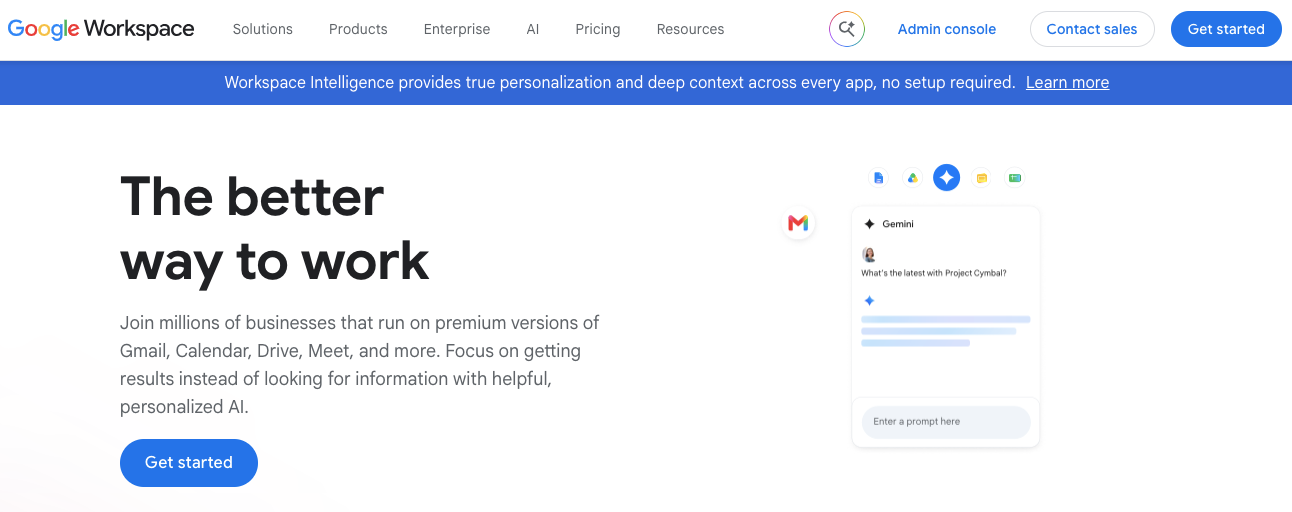
Intended user: Gemini in Gmail suits Gmail and Google Workspace users writing everyday emails. Users can draft and revise messages without leaving their inbox.
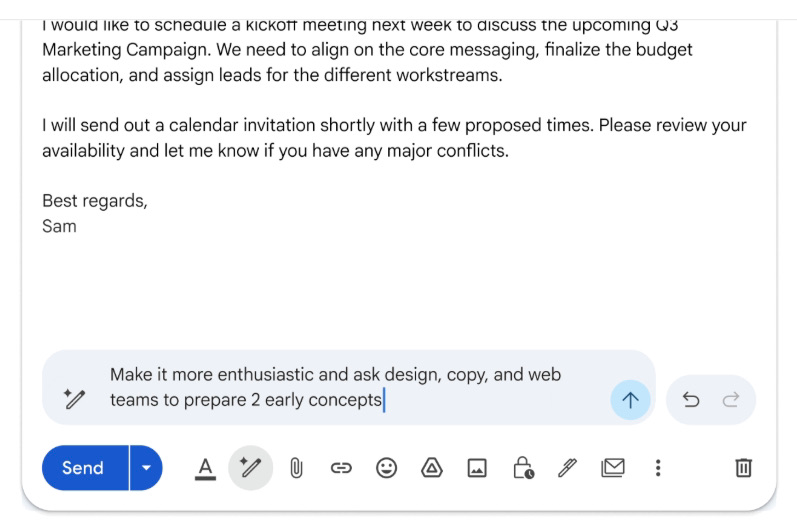
Writing capabilities: With Help me write, you can generate an email from a prompt. The Proofread feature flags issues with grammar, tone, and conciseness, while Smart Reply suggests responses to incoming emails.
Practical example: Draft a follow-up email. Then use Help me write to change the tone or add new information:
Pros
- Works inside Gmail, so you can draft and revise emails without switching apps
- Tone and length controls to refine drafts before sending
- Ad-free email experience on all Workspace plans
Cons
- Gemini access in Workspace apps is more limited on the Starter plan
- Personal accounts outside the United States need an eligible paid Google AI or Workspace plan to access Help me write
- You can only proofread your drafts with Gemini in English and Spanish
Pricing
- 14-day free trial on all plans except for Enterprise
- Starter: $8.40/user/month
- Standard: $16.80/user/month
- Plus: $26.40/user/month
- Enterprise: Custom pricing
Gemini is available across Workspace plans. Personal Gmail users can access it through a paid Google AI plan. Help me write and Suggested Replies are free for personal Google Accounts in the United States.
7. Microsoft Copilot in Outlook — best for Outlook email drafting
Intended user: Outlook users who need email drafting and revision assistance. It’s now bundled into consumer Microsoft 365 subscriptions.
Writing capabilities: Outlook has three documented Copilot features for email. Draft with Copilot writes emails and replies, Coaching by Copilot checks tone, reader sentiment, and clarity, and Summary by Copilot shortens long email threads.
Practical example: Draft a follow-up email to your customer. Review the tone and clarity of the email using Coaching by Copilot before sending it.
Pros
- Coaching by Copilot reviews tone, clarity, and reader sentiment before sending
- Copilot summarizes long email threads so that you can understand previous conversations faster
- Works inside Outlook, so you can draft, review, and refine emails without leaving your inbox
Cons
- AI access is limited to the subscription owner on consumer plans
- Business users need an eligible Microsoft 365 license to add Copilot
- Copilot requires Exchange Online mailboxes and doesn’t support on-premises Exchange or third-party email hosting
Pricing
Individual plans:
- Personal: $9.99/month
- Family: $12.99/month
- Premium: $19.99/month
- Pro: $99.99/month
Business plans:
- Copilot Business (add-on): $25.20/user/month
- Business Standard with Copilot: $28.20/user/month with Teams and $24.36/user/month without Teams
- Business Premium with Copilot: $38.40/user/month with Teams and $34.56/user/month without Teams
- Enterprise Copilot (add-on): $30/user/month, billed annually
A one-month free trial is also available for all plans except the Individual Pro plan.
8. Lavender — best for sales email writing and coaching
Intended user: Lavender is one of the best AI email writers for sales reps writing cold outreach and follow-up emails. It details improvements to prospecting emails before sending.
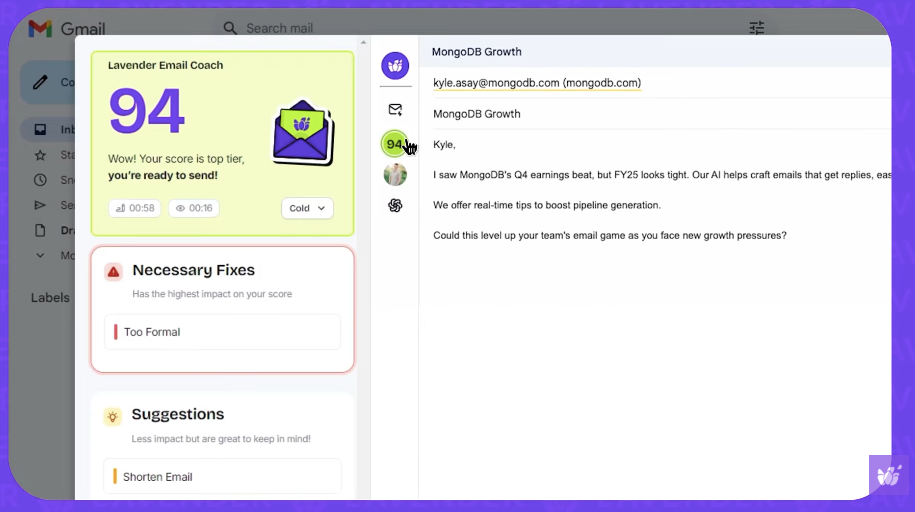
Writing capabilities: The Email Coach scores a draft in the inbox, flags what’s likely to hurt a reply, then provides suggestions for improvements. A Personalization Assistant pulls prospect data into the compose window, and an AI writer produces the first draft.
Lavender has two separate products. Email Coach writes and refines emails, while Ora is an AI sales agent. Ora researches prospects, personalizes emails, and can send outreach autonomously. Each product has separate pricing.
Practical example: Write a prospecting email and use Email Coach’s score and suggestions to refine it:
Pros
- Scoring happens as you write, so feedback arrives before you send
- Integrates with Gmail, Outlook, Outreach, and Salesloft
- The free plan covers five email analyses and five personalizations monthly
Cons
- Focuses on sales outreach, making it less suitable for support or internal emails
- Email Coach and Ora are separate products with separate pricing
- Accelerated Dynamic Scoring feature is only available on Team Plan
Pricing
- Seven-day free trial on paid plans
- Basic: Free, includes analysis and personalization of five emails/month
- Starter: $29/month, includes unlimited emails and personalization
- Individual Pro: $49/month, all features are unlimited and includes integrations
- Team Plan: $99/month
Paid Email Coach plans include unlimited emails and personalizations. Ora (AI agent) costs $500/month per agent.
9. MailMaestro — best for professional email drafting and replies
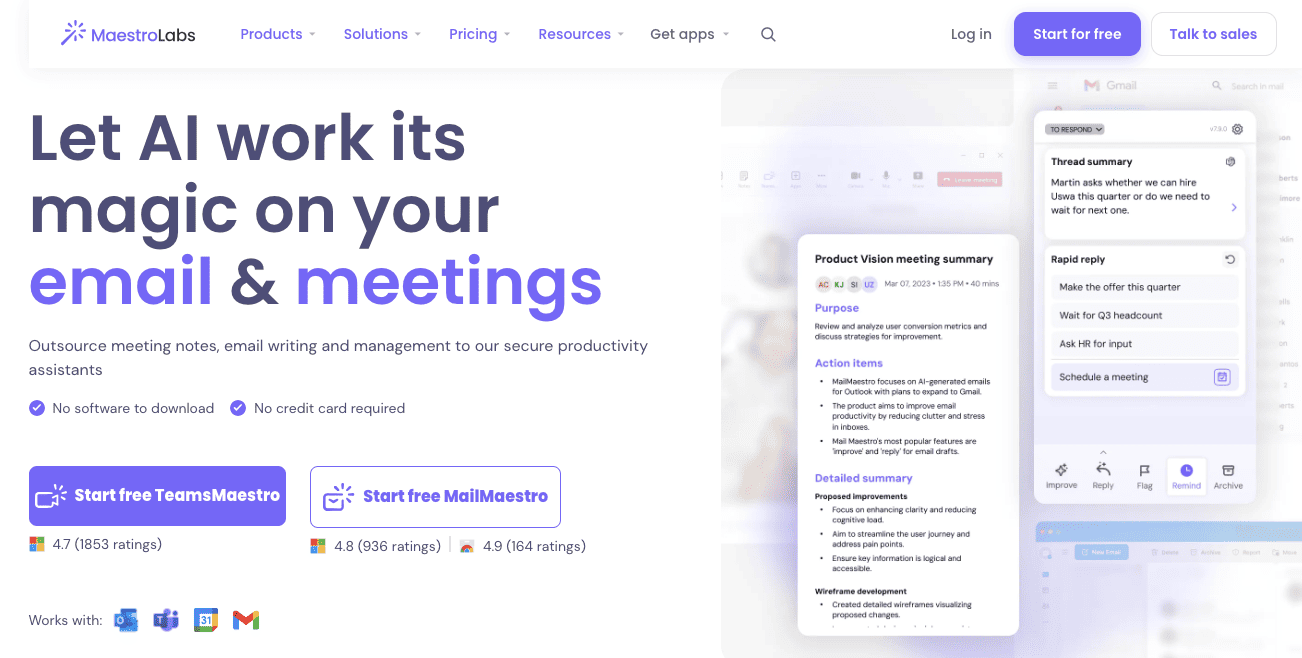
Intended user: Suits professionals handling correspondence in Outlook or Gmail who spend more time replying than composing. MailMaestro is MaestroLabs’ AI email writer that analyzes the thread before it drafts emails.
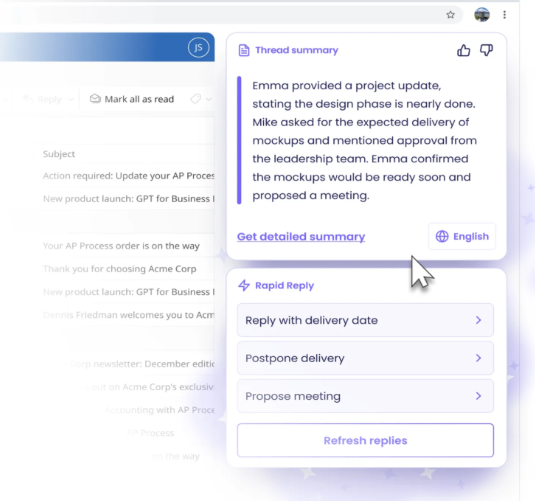
Writing capabilities: MailMaestro’s Compose feature drafts emails, while Improve rewrites existing text, and Reply generates responses. For replies, it draws on the email thread and lets you choose the tone, language, and length.
Practical example: Open a client request covering specific questions. MailMaestro summarizes the detailed client request and suggests responses:
Pros
- Thread summarization runs automatically
- Integrates with both Outlook and Gmail
- Summarizes email attachments alongside threads to provide more context
Cons
- Some Pro features, like reminders, attachment summaries, and Ask AI, are for Outlook and not Gmail
- The free plan allows only three AI requests weekly
- Gmail users need a Chrome extension
Pricing
- Free
- Pro: $15/seat/month
- Enterprise: Custom pricing
The Pro plan comes with a 14-day free trial.
10. MailerLite — best for newsletter and campaign copy
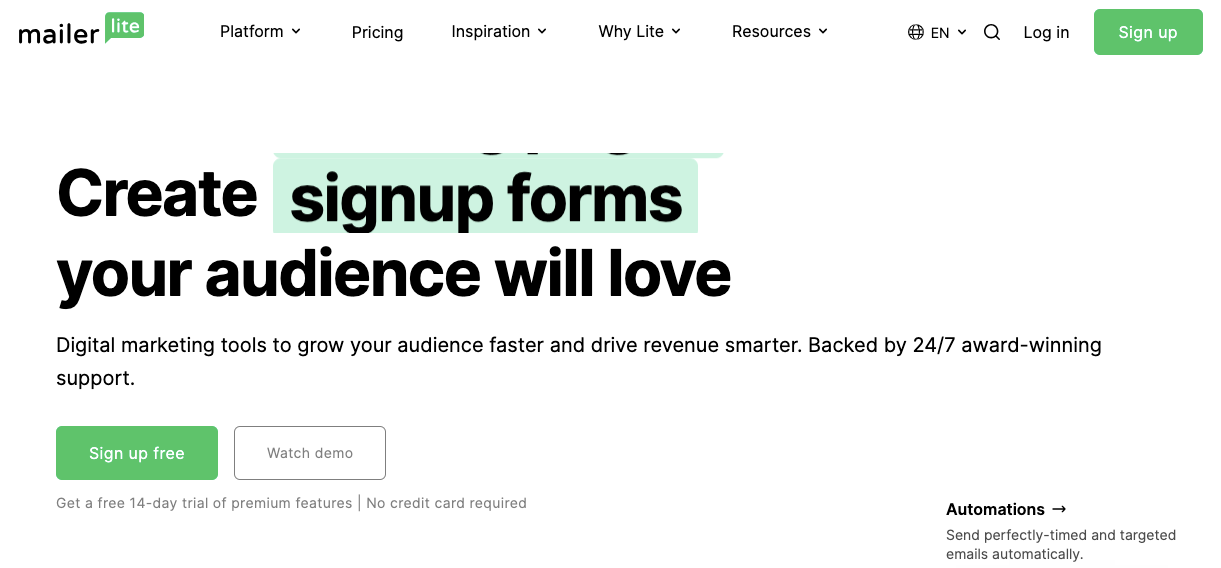
Intended user: MailerLite suits businesses and creators writing newsletters and campaigns. Its AI email writer works directly inside the editor.
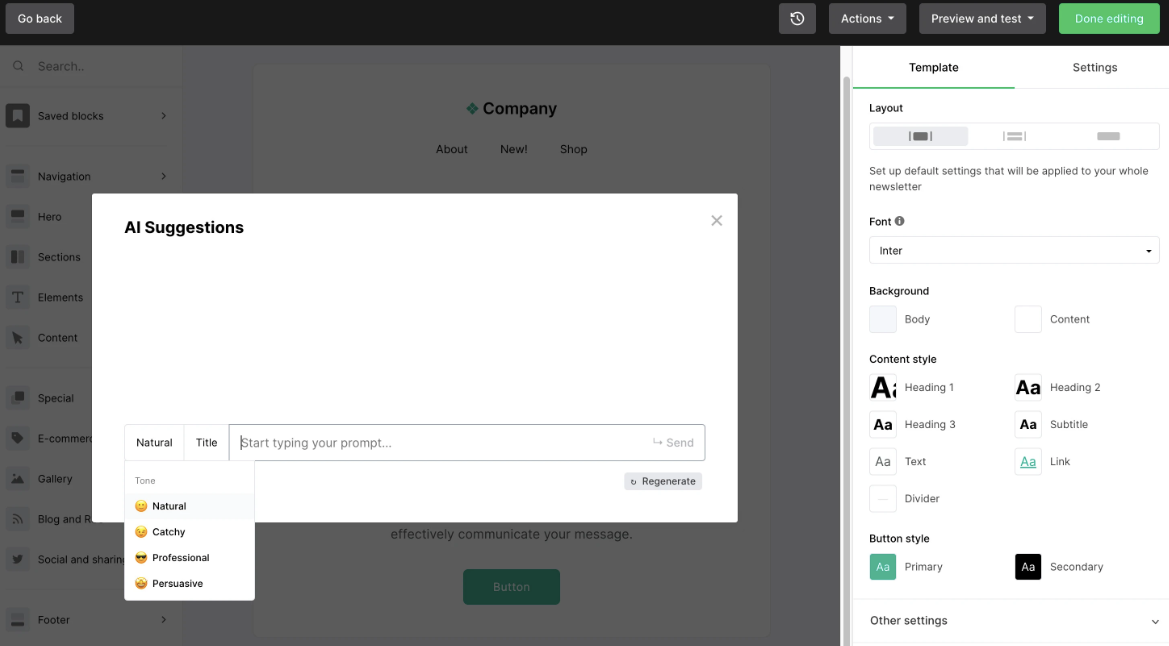
Writing capabilities: Generates campaign copy and suggests subject lines in four tones. These are Natural, Catchy, Professional, and Persuasive.
Practical example: Add a text block in the email editor, open the AI text generator, choose a tone, and enter a prompt to generate a newsletter introduction:
Pros
- The AI assistant works inside the campaign editor, so you can write email copy and build your campaign without switching to another tool
- The free plan allows 250 subscribers and 2,500 monthly emails
- A subject line generator is available in limited form even on the free plan
Cons
- The AI writing assistant is only available on paid plans
- AI generations use credits, and extra credits can’t be purchased separately
- You can regenerate a response only three times before you have to change the prompt
Pricing
- Free: up to 250 subscribers, 2,500 emails/month, and two user seats
- Comfort: $12/month, up to 500 subscribers, 5,000 emails/month, and three user seats
- Power: $25/month, up to 500 subscribers, plus unlimited emails and seats
- Enterprise: Custom pricing with 200,000+ subscribers
11. Rytr — best for template-based email drafting
Intended user: Rytr is one of the best AI email assistants for individuals and small teams writing short email drafts. Its templates help users create copy quickly without a full marketing platform.
Writing capabilities: Choose from 40+ writing use cases, with 20+ tone options. You also get built-in AI rewriting, editing, and text modification tools to refine and improve existing copy.
Practical example: Pick an email use case, such as a product announcement, enter the product and audience, select a tone, and generate a draft.
Pros
- With templates, you won’t have to write prompts from scratch to create emails
- You get 20+ pre-programmed tones of voice even on the free plan
- You can provide guidelines and tone preferences for more relevant drafts
Cons
- The free plan is limited to 10,000 characters a month
- Tone matching is limited to one voice on the entry paid plan
- Longer emails may require more editing to match a specific structure or message
Pricing
- Free
- Lite: $9/month
- Personal: $19/month
- Pro: $49/month
The free plan lacks tone matching and plagiarism checks, although it does support 30+ languages. Custom use cases are available only on the Pro plan.
12. Copy.ai — best for repeatable sales and marketing email workflows
Intended user: Sales and marketing teams that need to create marketing copy and repeatable outreach emails. Copy.ai has shifted from a general AI copywriting tool toward GTM (go-to-market) workflows that support repeatable sales and marketing processes.
Writing capabilities: Customizable workflows generate email copy from your inputs and data sources. This feature lets you tailor outreach to each prospect.
Practical example: Build a follow-up email workflow, enter prospect details and the offer, then generate personalized drafts for each account.
Pros
- Workflows help teams create multiple outreach drafts from a single setup.
- Copy.ai’s Chat plan includes unlimited words and access to multiple AI models
- Copy.ai connects with other tools like customer relationship management (CRM) systems to bring relevant data into workflows
Cons
- No free plan or free trial listed
- Unlimited customizable workflows require Enterprise plan
- The setup is better suited to recurring outreach than one-off emails
Pricing
- Chat: $29/month
- Enterprise: Custom pricing
Workflow features depend on your plan. Workflow usage is credit-based, with estimates depending on the use case. Teams can add credits as usage grows.
13. Anyword — best for generating and evaluating marketing email variations
Intended user: From the list of best AI email writers, Anyword suits marketers comparing promotional email variations. Its predictive scoring evaluates copy before sending.
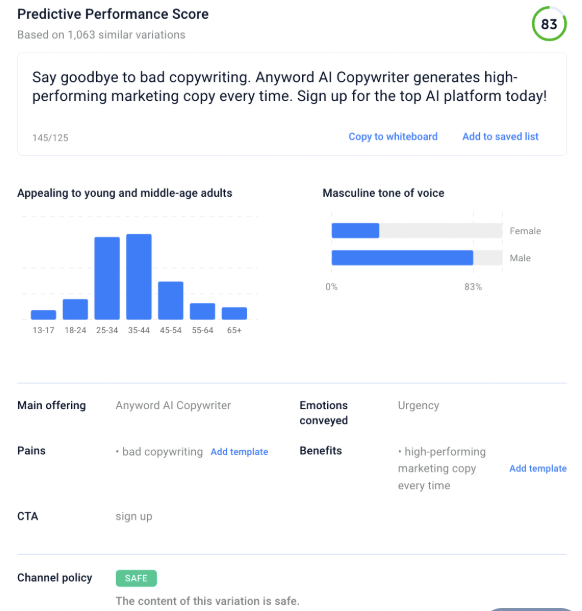
Writing capabilities: Generates marketing copy using brand voice settings and assigns predictive performance scores to variations.
Practical example: Write several promotional emails or subject lines. Anyword scores each variation and shows age and gender demographics and tone to help assess audience fit:
Pros
- Predictive scoring gives a basis for choosing between variations
- Brand voice settings keep generated variants aligned with company messaging
- Unlimited copy generation is included from the entry plan
Cons
- Prediction scores aren’t the same as measured A/B test results
- There’s no free plan, only a seven-day trial capped at 2,500 words
- The entry plan allows only one seat and one brand voice
Pricing
- Starter: $49/month, one seat, and 50 performance predictions
- Data-Driven: $99/month, three seats, and 100 performance predictions
- Business: Custom pricing, three seats, and 250 performance predictions
- Enterprise: Custom pricing and number of seats, plus over 500 performance predictions
The free trial runs for seven days on the Starter and Data-Driven plans, with a limit of 2,500 words.
14. Superhuman Mail — best for drafting within an email client
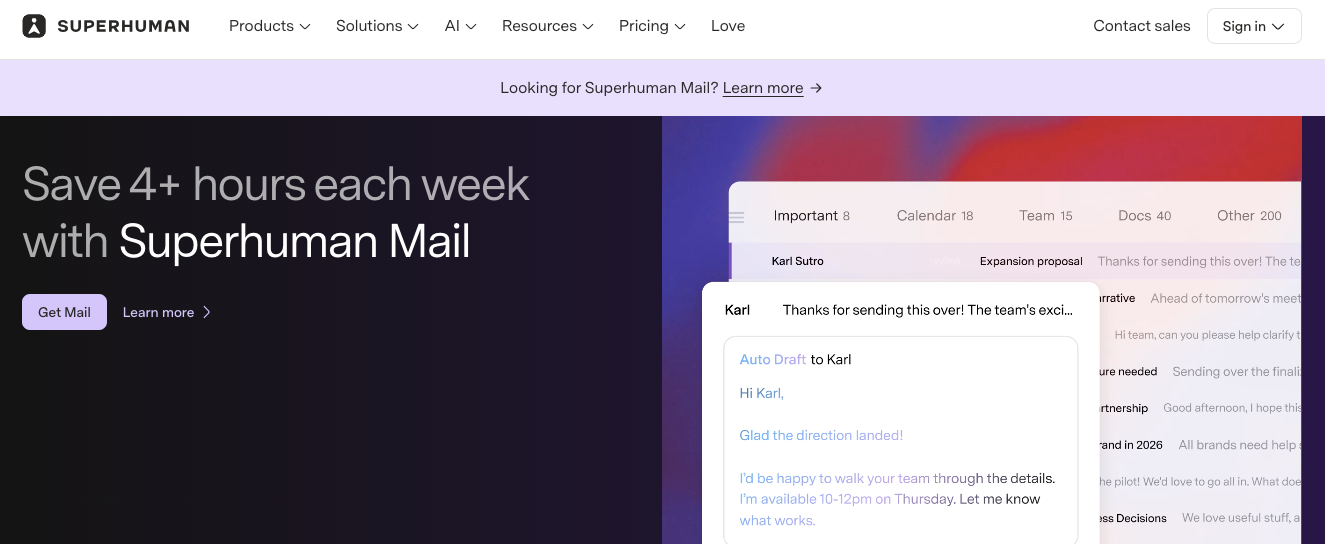
Intended user: Superhuman Mail is best for professionals who want a dedicated email client with built-in writing assistance. Its AI suggests improvements as you write.
Writing capabilities: Superhuman provides AI drafting and reply suggestions. You also get rewriting tools inside the email client. Voice and Tone Match adjust messages to fit your preferred style.
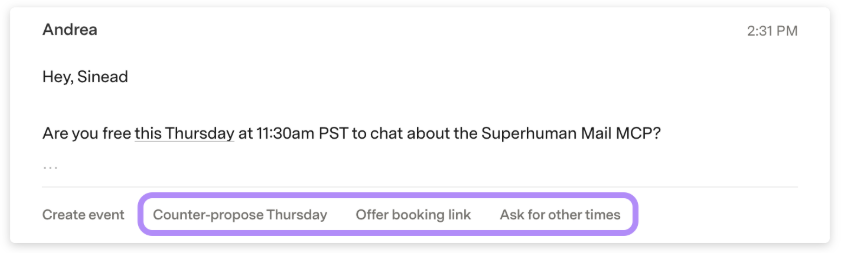
Practical example: Open an email thread and select Instant Reply. This generates response options based on the conversation:
Pros
- Writing assistance is native to the client rather than bolted on
- Supports both Gmail and Microsoft 365 hosted accounts
- Voice and Tone Match keeps generated replies closer to how you write
Cons
- Adopting it means replacing your email client
- No free plan
- Auto Drafts and Ask AI are reserved for the Business tier
Pricing
- Starter: $30/member/month
- Business: $40/member/month
- Enterprise: Custom pricing
Starter and Business cap at 25 seats; Enterprise includes unlimited seats. Write with AI is available on all plans.
15. Shortwave — best for AI-assisted email drafting and replies
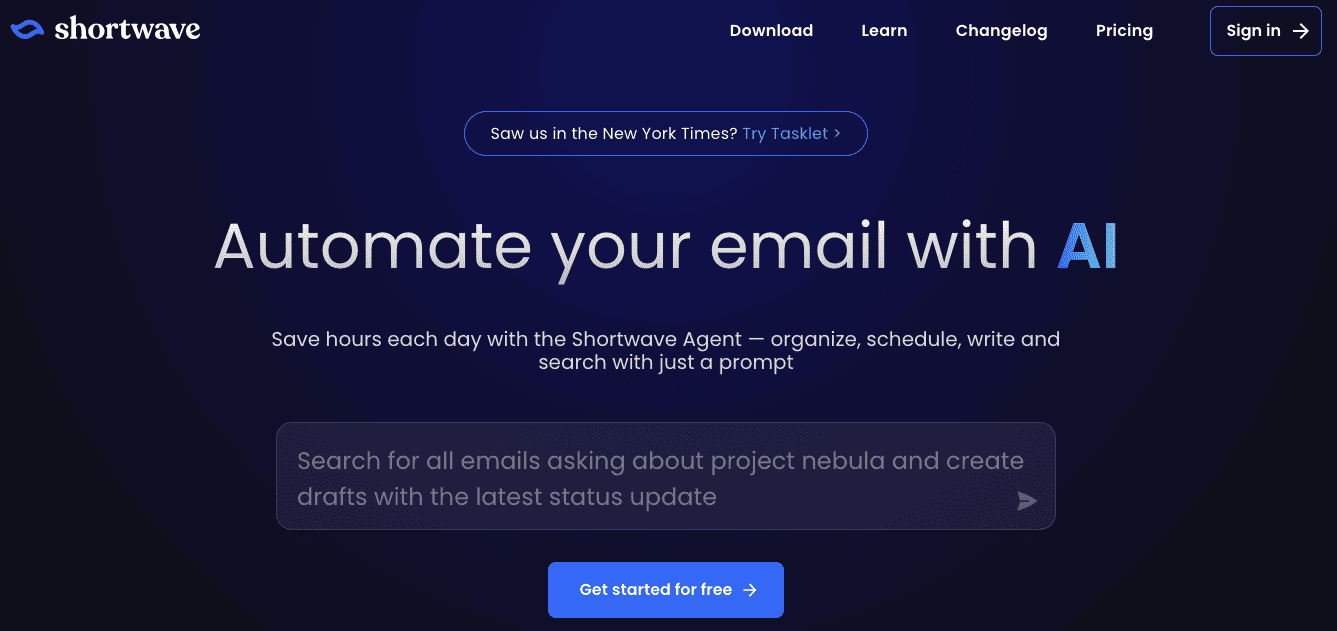
Intended user: Shortwave suits people who want AI writing tools inside their email app. It combines drafting, reply assistance, and autocomplete.
Writing capabilities: Shortwave uses your sent emails to learn your writing style and draft replies based on the conversation. You can also give it custom instructions or use autocomplete to finish sentences.
Practical example: Use a customer email thread to draft a follow-up with Shortwave. Ask it to match your writing style and refer to the earlier conversation.
Pros
- Learns your writing style from sent emails, reducing the need for manual setup
- Lets you revise drafts with follow-up prompts and remember your preferences using AI memory
- Plans name the underlying models, so you know what you’re paying for
Cons
- Shortwave works only with Gmail and Google Workspace, and Microsoft 365 isn’t supported
- Using it means adopting a new email client
- The Business plan allows only 150–300 Standard AI requests daily, depending on usage
Pricing
Individual plans:
- Free
- Pro: $18/seat/month
Business plans:
- Business: $30/seat/month
- Premier: $45/seat/month
- Max: $120/seat/month
Paid plans offer a 14-day free trial. The Free plan has limited daily AI usage. Premier gives you twice the AI usage of Business, while Max gives you six times as much.
How to choose the right AI email writer
Choose by the emails you write and where you need to write them. Here’s a table that breaks down needs and the capabilities to prioritize when choosing the best AI email writers. You’ll also see tool examples to consider:
| Need | Capability to prioritize | Tools to consider |
|---|---|---|
| Ecommerce campaigns | Marketing copy generation within an email campaign workflow | Omnisend |
| Newsletters | Drafting introductions and content blocks, plus assembling the finished email | Omnisend, MailerLite |
| Sales outreach | Prospecting copy, personalization, and sales email coaching | Lavender, Copy.ai |
| Professional correspondence | Drafting and replying within the reader's email environment | Gemini in Gmail, Microsoft Copilot in Outlook, MailMaestro |
| Editing assistance | Grammar, clarity, tone, and rewriting controls | Grammarly, ChatGPT, Claude |
| Team brand consistency | Shared brand guidance and repeatable writing workflows | Jasper, Anyword |
Check the total cost of a tool and required subscriptions before committing. For example, for six users, a $30-per-user monthly plan costs $180 per month. Confirm whether you need specific licenses. For example, Copilot requires a qualifying Microsoft 365 license.
Test the best AI email writers that you shortlist with your regular emails. Compare how much editing each draft needs for accuracy, tone, and clarity.
How to get better drafts from an AI email writer
Use specific prompts and provide your AI email writing tool with clear, essential inputs. These include recipients, purpose, verified facts, desired action, tone, length, and constraints:
- Recipient: Who will read the email and what they already know
- Purpose: What the email needs to achieve
- Verified facts: Confirmed names, prices, dates, and terms
- Desired action: What you want the reader to do next
- Tone and length: The style to use and the word count or line limit
- Constraints: What the draft must not claim, offer, or invent
Here’s an annotated example of a prompt and how the inputs can guide the draft:
“Write a product launch email for existing customers of an online skincare store. Introduce our new fragrance-free moisturizer, priced at $24 and available from October 15. Use a warm, straightforward tone and keep the body under 120 words. Include a subject line and one CTA: “Shop the moisturizer.” Do not invent benefits, discounts, or product claims.”
The recipient is an existing customer of a skincare store, and the purpose is a launch. The verified facts are the product name, the $24 price, and the date.
The desired action is the single named CTA. Take a look at these email CTA examples to get inspired. Tone and length are warm, straightforward, and under 120 words. The constraint closes the door on invented claims.
Revision works in a similar way. You need to be specific in your prompt. Instead of saying, “Make it better,” say, “Cut the second paragraph and move the offer into the first line.”
Run every email draft through a short review before it sends:
- Names, company details, and product names are correct
- Dates, prices, discounts, and offer terms match the brief
- Links work and lead to the intended pages
- No facts, benefits, promises, or offers have been invented
- The tone suits the audience and brand
- The next step is clear
For more guidance on refining your email drafts, see our email copywriting tips.
Which AI email writer should you choose?
Choose the best AI email writers based on the emails you write most. For example, Omnisend suits ecommerce campaigns. This is because it lets you generate copy within the campaign workflow.
Lavender helps sales teams improve cold emails with scoring and coaching. Gemini in Gmail and Copilot in Outlook support everyday correspondence. But this depends on the email provider.
If you only need help drafting or polishing everyday emails, check your current email software first. Its built-in AI features can meet your needs without another subscription.
Quick sign up | No credit card required
FAQ
Is there a free AI email writer available?
Some tools offer trials instead of ongoing free access. Jasper’s trial lasts seven days. Anyword’s trial includes 2,500 words.
Can I use AI to write my emails?
Don’t include any sensitive customer data in AI software. This can include personal data and details a contract requires you to keep confidential. Always read and verify the vendor’s data policy before sharing customer information.
What’s the best AI email writer for freelancers?
The free version provides 100 AI prompts/month. The Grammarly Pro subscription costs $30/month for monthly payments. Rytr offers an alternative for short, template-based emails, with a free plan that includes 10,000 characters per month.