Omnisend AI


 OFFER
OFFER











According to a 2026 report by ZeroBounce, the average annual email list decay rate is 23%. Inactivity, email changes, and unsubscribes cause this. This means even a well-built list can lose value over time without proper email list management.
Email list management is the ongoing process of organizing, cleaning, segmenting, and maintaining your subscriber data. When done right, it protects your email deliverability and helps you reach the right people at the right time.
Poor list hygiene leads to higher bounce rates, lower engagement, and damage to your sender reputation. In this guide, you’ll learn how to manage your list and why it matters. You’ll also learn how often to review it and which tools you need to stay on track.
TL;DR
- Email list management is the process of maintaining organized and engaged subscriber data for better performance
- Email lists decay by 23% annually as contacts disengage or become invalid (ZeroBounce, 2026)
- You should review your email list at least once every three to six months
- Keeping bounce rates below 2% helps protect your sender reputation and maintain strong email deliverability
- Automating your email list management helps segment audiences, remove inactive contacts, and trigger re-engagement workflows
What is email list management?
Email list management is the ongoing process of organizing, validating, segmenting, and maintaining subscriber data to improve engagement, reduce bounces, and support consistent email performance.
With a few simple steps, you can keep your list accurate for effective email list building. Start by qualifying subscribers through proper opt-in methods so only valid contacts join your list.
From there, segmentation group subscribers based on behavior, preferences, or purchase history, so your emails stay relevant. List maintenance also includes removing hard bounces and monitoring soft bounces before they affect your sender reputation.
Re-engagement campaigns help win back inactive subscribers, while those who remain unresponsive are gradually removed.
To keep this process consistent, automation helps manage email list hygiene tasks such as tagging, suppression, and engagement tracking. The diagram below shows email list management as an umbrella process with five sub-activities:
EMAIL LIST MANAGEMENT
Five sub-activities include:
- Opt-in
- Segmentation
- Bounce renewal
- Re-engagement
- Automation
Email list management vs. email list cleaning: Is there a difference?
Email list cleaning is one part of the broader email list management process. It focuses specifically on removing invalid, inactive, or risky contacts, such as hard bounces and unengaged subscribers.
Email list management goes further by including segmentation, subscriber verification, re-engagement, and ongoing performance monitoring.
Cleaning improves list quality, while management keeps performance steady over time.
Email list management vs. mailing list management: Terminology note
Email list management and mailing list management mean the same thing. Both refer to keeping your subscriber data clean and up to date. You may also see contact list management used interchangeably across platforms and resources.
Understanding what email list management involves is the first step. Next, we look at why every email marketer needs to prioritize it.
Why does email list management matter?
Email list management and strong email list hygiene matter because they directly control your email deliverability rate, sender reputation, and campaign ROI. Poor list hygiene can cause your emails to land in spam folders instead of inboxes.
When your list isn’t maintained, engagement drops and invalid contacts build up over time. As a result, inbox providers start to lose trust in your emails, and this affects where your messages land and how often they’re seen.
Over time, even a high-quality list can lose value if inactive or invalid contacts remain. That’s why consistent email list management is essential for keeping your campaigns effective and your audience responsive.
Key email list management benchmarks
- The average list decay rate is 23% per year as subscribers become inactive or change email addresses (ZeroBounce, 2026)
- Sending to invalid or inactive contacts can waste up to 20% of your email budget (Emailable, 2025)
- Clean email lists can drive up to 50% higher open rates and 75% higher click-through rates compared to those neglecting list maintenance (eMercury, 2024)
These benchmarks show how fast performance declines when you ignore list maintenance.
A clean list improves engagement signals, helping your emails reach inboxes rather than go to spam. For a deeper breakdown, see this email deliverability guide and review email bounce rate benchmarks to understand acceptable thresholds.
Signs your email list needs attention
- Open rates always falling below 15% indicate low engagement or irrelevant targeting
- A hard bounce rate above 2% signals invalid or outdated email addresses
- Unsubscribe rates above 0.5% suggest content mismatch or weak targeting
- Click-through rates below 2% point to low audience interest
- Spam complaints above 0.1% can quickly harm your sender’s reputation
- A large portion of your list remains inactive for over 90 days
What happens if you ignore email list management?
Ignoring email list management has clear, measurable consequences. First, inbox placement drops as engagement falls and bounce rates rise. As a result, email deliverability decreases. When fewer emails reach the inbox, visibility and campaign performance suffer.
Second, your sender reputation takes a hit. When you often send emails to invalid contacts, you risk triggering spam filters. This increases the risk of your domain being flagged or even blocklisted by inbox providers.
Third, costs increase. Most email service providers charge based on the number of contacts or emails sent. When you keep emailing inactive or invalid addresses, you pay unnecessary costs and lower ROI.
Finally, there are legal risks. Sending emails to contacts without proper consent or failing to honor unsubscribe requests can result in violations of the CAN-SPAM Act and the GDPR. These violations expose your business to penalties and compliance issues.
Quick sign up | No credit card required
How to manage your email list: 7 steps
Managing your email list involves seven steps: using double opt-in, asking about subscriber preferences, tagging and segmenting contacts, removing hard bounces, running re-engagement campaigns, removing unresponsive contacts, and automating your contact management.
Step 1: Use double opt-in to verify subscribers
A double opt-in option confirms every new subscriber. This two-step process involves users submitting a form and then confirming their email via a follow-up message. This way, only valid, interested contacts are added to your list.
To set it up, trigger a confirmation email right after signup with a clear call to action. This reduces spam complaints, improves list accuracy, and aligns with GDPR requirements.
Verified subscribers also engage more, which strengthens your sender reputation from the start.
Step 2: Ask for subscriber preferences at signup
Before you start sending emails, ask subscribers what they want to receive from you. Adding preference fields to your signup forms helps you collect useful data early on. You’ll know what kind of content they want to see, how often they want to receive it, and which products they’re interested in.
For example, an ecommerce store can let users choose between product updates, discounts, or educational content.
This allows subscribers to self-select into relevant groups, making your messaging more targeted and reducing the likelihood of later unsubscribes. It also makes future segmentation easier.
Step 3: Tag and segment your contacts
Use tagging and email list segmentation to group subscribers based on behavior and attributes. Tagging assigns action-based labels, and segmentation categorizes contacts based on shared attributes.
Tagging could include labels like “purchased sneakers” or “clicked summer sale.” Segmentation, on the other hand, could group “repeat buyers” or “first-time visitors.”
For example, tag users who clicked a discount email. Segment customers who purchased in the last 30 days. Another example is tagging abandoned cart users and segmenting high-value buyers for VIP campaigns.
Combining email segmentation strategies with tagging enables you to send highly relevant campaigns that align with behavior and intent.
Step 4: Remove hard bounces to protect deliverability
Removing hard bounces protects your sender’s reputation and email deliverability. A hard bounce occurs when an email address is permanently invalid or doesn’t exist.
Most email service providers automatically remove hard bounces. However, you should still monitor your bounce rates regularly. If your hard bounce rate exceeds 2%, inbox providers may flag your domain.
Higher bounce rates indicate poor email list quality, increasing the risk of ISP penalties. Removing these contacts helps maintain strong deliverability and allows your emails to reach real, active users.
Step 5: Run a re-engagement email campaign for inactive users
Use a re-engagement email campaign to win back inactive subscribers. Contacts who haven’t opened your emails for 90 days should be entered into a winback sequence.
Start with a subject line that sparks interest, such as an exclusive offer or a simple “Still interested?” message. Send two to three emails over two weeks, offering value or incentives.
If subscribers remain inactive after this sequence, it’s time to remove them from your list. This re-engagement email campaign guide helps you recover inactive users, reduce wasted sends, and improve campaign performance.
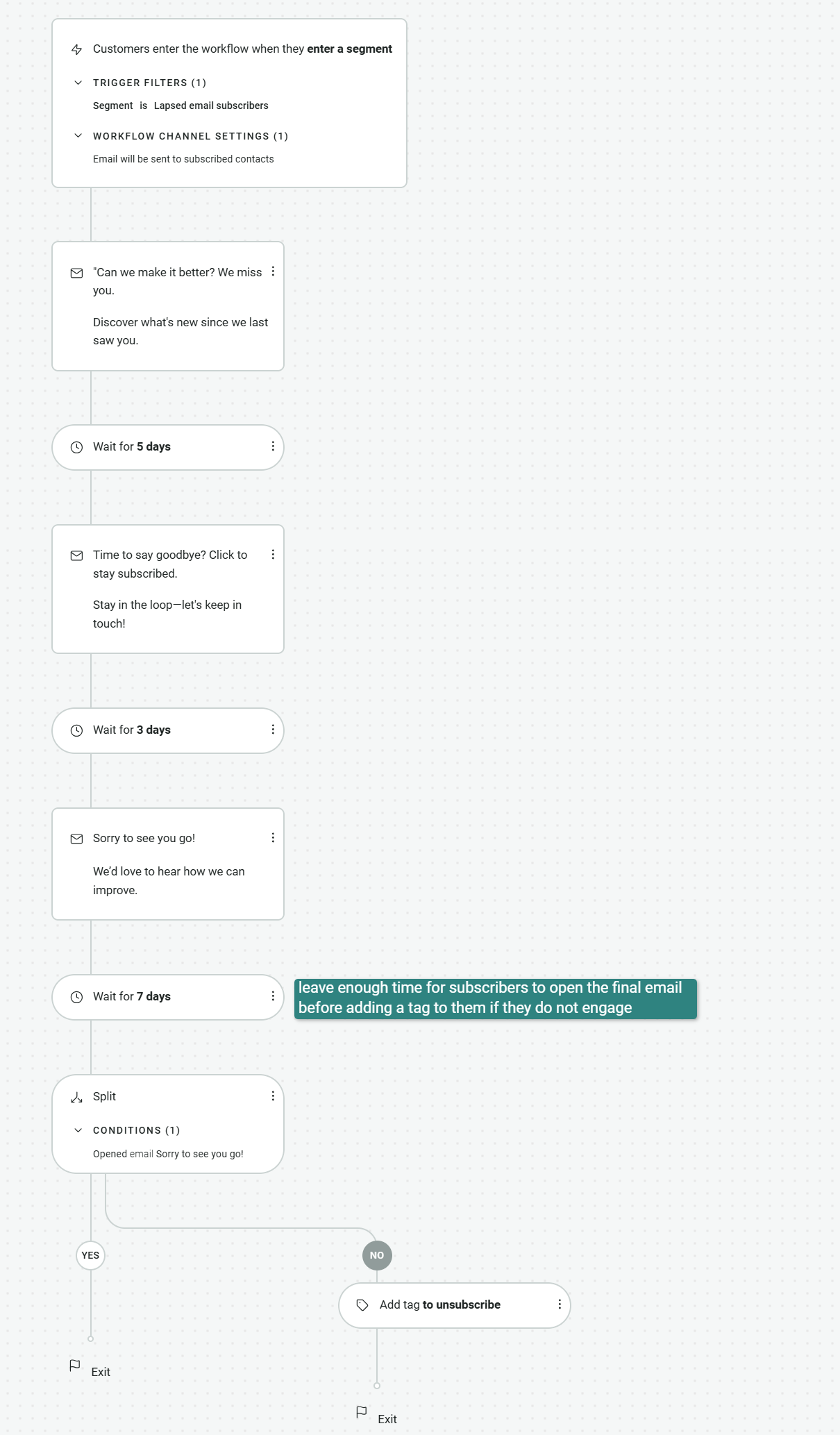
The image below is a re-engagement workflow on Omnisend for contacts inactive for 90 days:
Step 6: Remove unresponsive contacts after re-engagement
Remove contacts who stay inactive after re-engagement attempts. Keeping unresponsive subscribers hurts your engagement rates and signals low relevance to inbox providers.
A good rule is to remove contacts who have remained inactive for 6 months after a re-engagement campaign. This improves your overall list quality and ensures your emails are sent only to engaged users, which supports long-term performance.
Step 7: Automate your email list management
Use email list management software to automate this routine task. Automation keeps your list clean and up to date without constant manual work.
You can set triggers based on engagement, dates, or events. For example, automatically tag active users, move inactive subscribers into re-engagement flows, or remove contacts after a set period of inactivity.
Omnisend’s automation workflows make this process seamless. With Omnisend, you can trigger actions like tagging subscribers, kickstarting re-engagement sequences, or adding and removing inactive contacts based on behavior, all without manual effort.
Quick sign up | No credit card required
How often should you manage your email list?
You should manage your email list with a minimum monthly review, a quarterly deep clean, and event-based updates after major changes. Consistent email list management reduces list decay, supports engagement, and ensures that inactive subscribers are removed at the right time through regular email list cleaning.
Email list management frequency by sender type
| Sender type/scenario | Recommended cadence |
|---|---|
| Small list (<5,000 contacts) | Review monthly, clean quarterly |
| High-volume sender | Monitor weekly, clean monthly |
| Seasonal ecommerce | Clean before and after peak seasons |
| Post-major list acquisition | Clean immediately after import and re-verify contacts |
| Pre-peak season (for example, Black Friday) | Full cleanup 2–4 weeks before campaigns |
Trigger-based events for email list hygiene:
- After importing a purchased or co-registration list, verify and clean immediately before sending to remove invalid or low-quality contacts
- After a major campaign, review engagement and remove inactive subscribers
- After a platform migration, audit your list to confirm data accuracy and consent status
Best email list management tools
The best email list management tools include Omnisend, Mailchimp, Brevo, HubSpot, Klaviyo, and Kit — each suited to different list sizes, budgets, and automation needs.
Choosing the best email list management service depends on how much control you need.
Some teams need email list management software with automation, segmentation, and campaign tools, while others focus on standalone verification. Some platforms also offer free email list management tools, though limits vary by the number of contacts, sends, or features.
Here’s a comparison of the leading email list management software:
| Tool | Best for | Key list management feature | Free tier? | Pricing from |
|---|---|---|---|---|
| Omnisend | Ecommerce brands | Automated re-engagement sequences with engagement filters and one-click inactive subscriber segments | Yes | $16/month |
| Mailchimp | Small to mid-sized businesses | Audience tags, segments, and basic contact management | Yes | $13/month |
| Brevo | Budget-conscious teams | Contact segmentation and email/SMS list management | Yes | $9/month |
| HubSpot | CRM-focused businesses | Advanced contact management with lifecycle tracking | Yes | $15/month |
| Klaviyo | Data-driven ecommerce brands | Behavior-based segmentation and predictive analytics | Yes | $20/month |
| Kickbox | Email verification needs | Real-time email validation to reduce bounces | No | $5/month |
Email list management software vs. standalone tools: What is the difference?
Email list management software includes tools for segmentation, automation, and ongoing list hygiene. Standalone tools focus on a single function, such as email verification or list cleaning.
If your platform supports automation, tagging, and engagement tracking, an all-in-one solution is often the better choice. It allows you to manage your list continuously without switching between tools.
Standalone tools are useful when your ESP lacks built-in verification. They help clean lists before uploads or major campaigns.
If your list exceeds 10,000 contacts, automation-driven hygiene becomes essential, and manual cleanup becomes harder and less reliable.
For example, the Omnisend email marketing platform lets ecommerce teams manage contacts, segments, automations, and re-engagement in one place. This simplifies list management at scale.
If you are comparing options, reviewing the best email marketing platforms can help you evaluate automation, reporting, and ecommerce features.
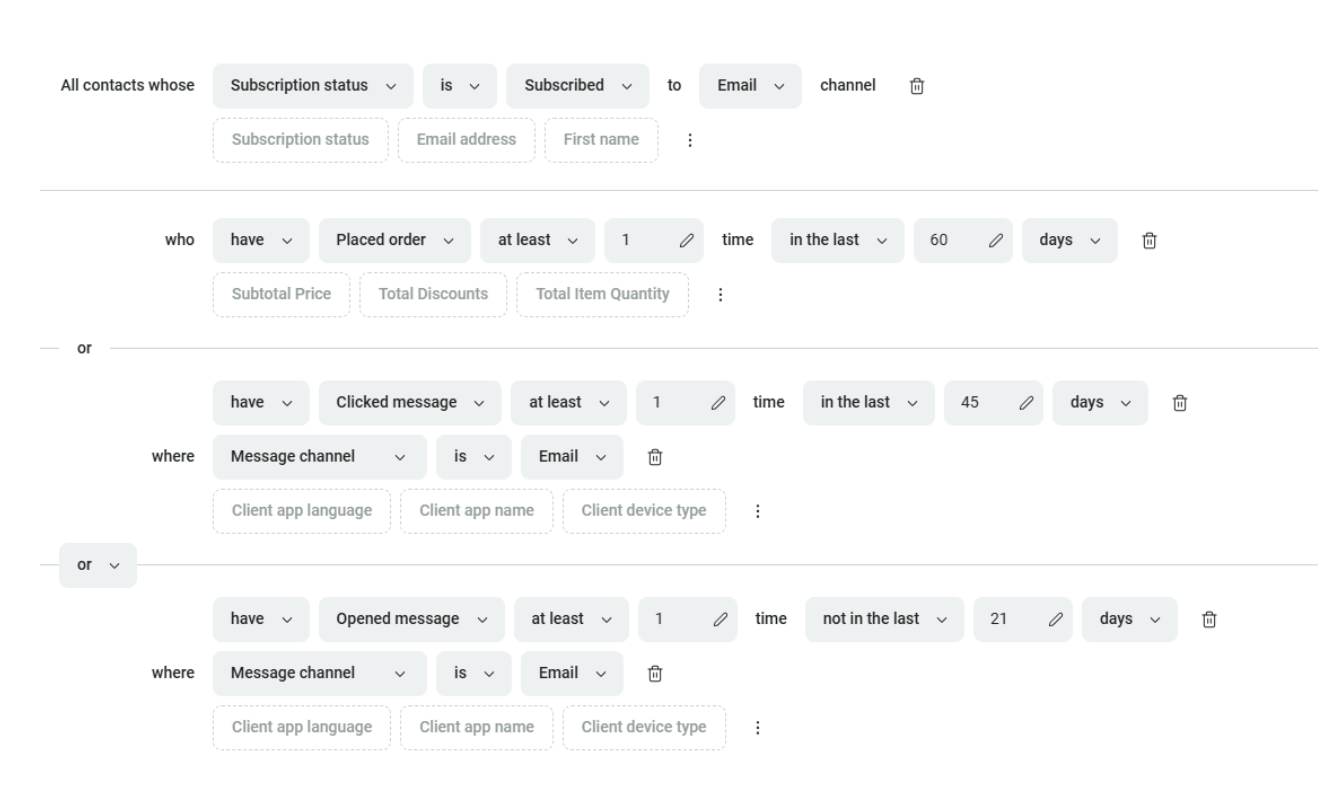
Here’s how engagement filters can help identify inactive subscribers for list management:
Email list management best practices
To improve email deliverability, the email list management best practices you should observe include using confirmed opt-in, maintaining strong email list hygiene, segmenting by behavior, setting engagement thresholds, avoiding purchased lists, automating list management, and applying lead scoring.
1. Use confirmed opt-in for stronger email list hygiene
Double opt-in verifies every subscriber before they join your list. This reduces fake signups and improves data quality from the start.
2. Never buy email lists
Purchased lists often contain unverified and low-intent contacts. They harm deliverability, reduce trust, and increase spam complaints.
3. Segment by behavior, not just demographics
Behavioral segmentation targets users based on actions like clicks, purchases, or browsing activity. This approach aligns with email marketing best practices and improves subscriber engagement.
4. Set clear engagement and bounce thresholds
Monitor monthly open rates, unsubscribe rates, and hard-bounce rates. A common benchmark is to remove contacts who remain inactive for 6 months after a re-engagement attempt.
5. Run regular re-engagement campaigns
Target inactive subscribers every three to six months. This also supports your efforts to grow your email list by keeping it active and responsive.
6. Automate list hygiene with the right tools
Automation helps maintain clean lists without constant manual effort. Platforms like Omnisend offer pre-built segments for inactive subscribers. This makes automation-triggered list cleaning available out of the box.
7. Use lead scoring to prioritize engaged contacts (advanced)
Lead scoring assigns points to subscribers based on actions such as opens, clicks, or purchases. This helps you identify high-value contacts who are more likely to convert.
Consistent list management is not a one-time task — it is an ongoing process that compounds into better deliverability, engagement, and ROI over time.
Email list management best practices checklist
- Double opt-in
- Behavioral segmentation
- Hard bounce threshold
- Re-engagement cadence
- No purchased lists
- Automation
- Lead scoring
Email list management FAQ
What is email list management?
Email list management is the process of organizing, maintaining, and optimizing your subscriber data to improve engagement and campaign performance.
It includes verifying new contacts, segmenting audiences, removing invalid email addresses, re-engaging inactive subscribers, and maintaining email list hygiene to protect deliverability and sender reputation.
How do I manage my email list?
To manage your email list effectively, follow a structured process that includes using double opt-in, collecting preferences, segmenting contacts, removing bounce, running re-engagement campaigns, removing inactive subscribers, and automating list updates.
These steps will help you maintain your list quality, improve engagement, and support consistent email performance over time.
How often should I clean my email list?
You should clean your email list with a light review every month and a deeper cleanup every three months to control list decay.
It’s also important to clean your list after key events, such as major campaigns, list imports, or platform migrations. This will help you maintain accurate data, consistent engagement, and good email deliverability.
What is the best email list management software?
The best email list management software depends on your needs and goals.
Top options include Omnisend for automation-driven list management, Mailchimp for flexible templates and integrations, Brevo for budget-friendly multichannel tools, and Klaviyo for advanced segmentation.
The right choice for you depends on your list size, budget, and the level of automation and segmentation you need.
What is double opt-in, and why does it matter?
Double opt-in is a sign-up process in which subscribers confirm their email address via a follow-up message after submitting a form.
This extra step verifies intent, reduces spam complaints, and prevents fake signups. It improves list quality, strengthens engagement, and supports better email deliverability over time.
What is the difference between email list management and email list cleaning?
Email list management is the broader process of maintaining and optimizing your subscriber data over time. Email list cleaning is one part of that process, focused on removing invalid, inactive, or risky contacts.
Management includes cleaning alongside segmentation, subscriber verification, re-engagement, and ongoing performance monitoring to improve overall campaign results.