Omnisend AI


 OFFER









An email prompt tells an AI tool what kind of email to write, who the audience is, and what information to include. The quality of an AI-generated draft depends on the information supplied in that instruction. A vague request with no relevant information produces generic copy, so you need to combine a clear task with relevant facts and constraints.
We’ll provide a reusable prompt framework and 10 marketing examples, such as welcome sequences and promotional campaigns. For more complex examples, we’ll use a “draft, refine, check” approach and show not only the initial prompts but also the follow-up prompts to improve the output. Always remember that the final result needs a careful check before sending.
What is an email prompt?
An email prompt is a specific instruction you give an AI tool that outlines precisely what it needs to generate, for whom, and using what facts. The AI produces the email, and the prompt is the brief that defines its content.
You can write a prompt that asks for a complete first draft, subject line options, revisions to existing copy, or even an outline for an entire welcome sequence.
For example, asking a supplier for a delivery update would require a prompt like
“Draft a short email to our supplier, [Name], asking for the confirmed delivery date for order #12345. Use a polite but direct tone, and ask for a reply by Friday.”
How do you write an effective email prompt?
You write an effective email prompt by focusing on one task at a time, defining audience context, and providing necessary facts for the output.
The amount of detail needed depends on the campaign. Prompts for a promotional newsletter and an abandoned cart email are completely different because their purposes, audiences, and products differ.
In every case, you need to provide just enough facts so the AI won’t resort to hallucinating discounts, dates, product claims, or any other elements to fill the gaps in the prompt.
| Prompt component | What to supply | Example |
|---|---|---|
| Task and goal | Email type and intended action | Welcome new subscribers and introduce the store |
| Audience | Relevant recipient context | People who signed up but have not purchased |
| Approved facts | Product details, offer terms, or source material | 100% water-resistant material, 10% discount for first purchases |
| Voice and tone | Guidance or an approved writing sample | Warm, direct, and restrained |
| Output format | Required email elements and length | Three subject lines, a preheader, and a short body |
| CTA | The desired next step | Explore the collection |
| Boundaries | What AI must avoid or flag | Do not invent discounts or deadlines |
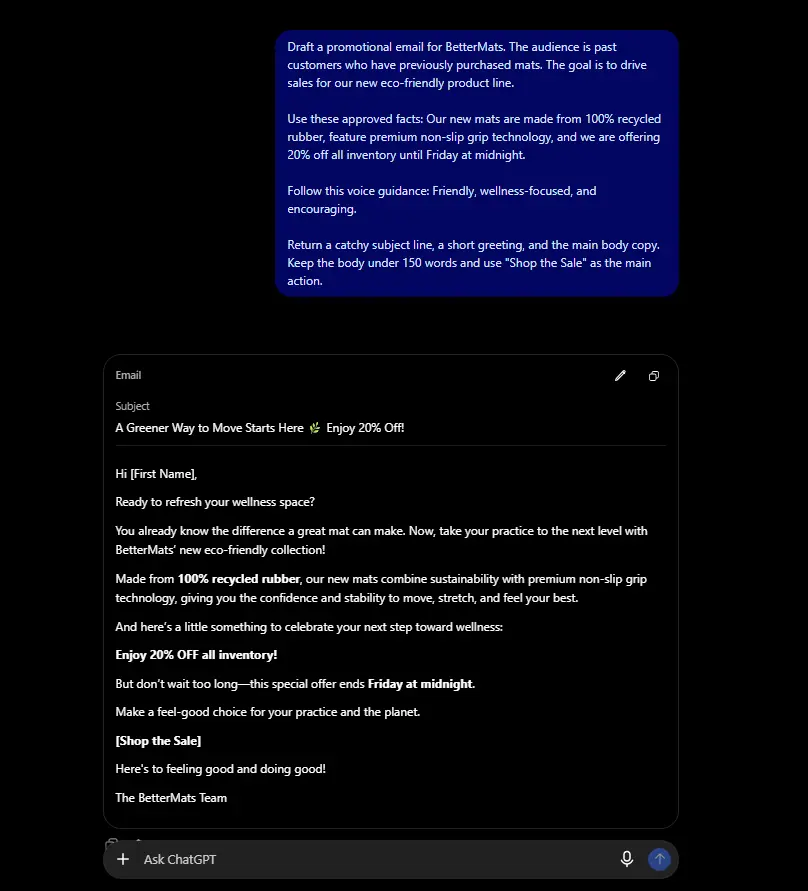
If you want to use this template, replace the placeholders in the brackets with your own campaign details. For example, change [brand] to “BetterMats,” [email type] to a “promotional email,” and [offer terms] to “20% off all inventory until Friday at midnight.”
How do you prompt ChatGPT to write an email?
To prompt ChatGPT to write an email, define the task and audience, provide the needed facts, request a specific output format, and review the result. If you fail to provide these elements, you’ll get a generic result.
Here are the four steps you need to follow to write better prompts.
1. Choose the task and prepare the facts
Identify the email type, the recipient, the goal, and the approved information.
For example, a short prompt for a welcome email must state that the recipient is a new subscriber who hasn’t purchased yet. The goal is to introduce the brand and promote the 10% sign-up discount.
The approved information would be the brand’s values and the discount code, like “WELCOME10.” You can also include information like the sign-up form’s content or circumstances.
Omnisend tip:
Readers who use Omnisend can connect to ChatGPT or Claude using Omnisend MCP. It allows you to pull real context into the brief, such as best-performing recent subject lines or featured products, instead of pasting it in by hand.
2. Fill in the prompt template
Supply the prompt to the AI and request specific output elements so it can write the email you expect. Tell the AI tool whether you need a subject line, preheader, body copy, or a CTA.
3. Request a targeted revision
Identify one concrete issue in the initial draft (excessive length, vague benefits, an unclear CTA, or an unsuitable tone). Once you’ve identified the problem, give instructions to fix the draft while preserving the approved facts.
Don’t use a single prompt to fix a multitude of problems, since that results in a completely new draft with hallucinated information. AI tends to prioritize instructions based on what it thinks is more important.
If the draft is too long, for example, ask ChatGPT to reduce it to under 100 words without removing any factual information or product features. If the tone is too formal, give an example from your past campaigns or find a blog on your website and ask the tool to match that voice.
4. Review the draft before using it
Check the final output for accuracy, offer terms, tone of voice, and purpose. The output is only a draft, not a finished campaign, so you’ll need to transfer the copy into your email platform where final changes will be made. Adapt the copy to the email design and do a final check before scheduling.
Omnisend tip:
With Omnisend MCP connected and write access granted, ChatGPT or Claude can create the campaign draft in Omnisend and send a test email. The final review still happens in Omnisend.
| Version | Example prompt | What it demonstrates |
|---|---|---|
| Weak | “Write a welcome email.” | Leaves the audience, brand, facts, and purpose unspecified |
| Improved | “Draft a welcome email for BetterMats, a gaming mat store. Address new subscribers who have not purchased. Introduce the brand using [approved brand facts]. Use a warm, direct tone, keep the body under 120 words, and end with ‘Explore the collection.’ Include a subject line and preheader. Do not add a discount.” | Defines the task, context, output, and factual boundaries |
10 AI prompts for email marketing
The best AI prompts for email marketing depend on the task and the information you supply. AI is now utilized by 88% of organizations, and 65% of CMOs believe that AI will alter their roles, so it’s important to learn how to properly use it. This prompt library focuses exclusively on marketing applications.
If you decide to copy one of the email prompt templates, don’t forget to replace every [bracketed] placeholder with your own campaign details. Keep your email platform’s personalization tags (such as [[contact.first_name]] in Omnisend) exactly the same so they work properly in the system.
For the welcome, promotion, and newsletter emails, you will find an additional “Refine prompt” right below the main instruction so you can improve the initial output.
1. Generate subject lines and preheaders
Use when: The campaign brief or email body is ready.
Provide: Email copy, audience, campaign goal, and approved offer details.
Example prompt:
Check: Each pair accurately represents the email and stays within the requested limits.
2. Draft a welcome email
Use when: Someone has subscribed to the email list.
Provide: Brand facts, sign-up context, what subscribers were promised, and CTA.
Example prompt:
Refine prompt:
Check: The email fulfills the sign-up promise and describes the content subscribers will receive.
3. Announce a product launch
Use when: Introducing a new product or collection.
Provide: Approved product facts, benefits, availability, audience, and CTA.
Example prompt:
Check: Product benefits and availability match the approved information.
4. Write a sale or promotional email
Use when: Announcing a confirmed promotion.
Provide: Discount, eligible products, exclusions, deadline, timezone, code, and CTA.
Example prompt:
Refine prompt:
Check: Every offer term matches the actual promotion.
5. Turn approved content into a newsletter
Use when: Sharing an article, resource, or useful update.
Provide: Source material, audience, key message, link, and CTA.
Example prompt:
Refine prompt:
Check: The summary and opening accurately represent the source.
6. Draft an abandoned-cart reminder
Use when: Preparing copy for a configured cart-recovery workflow.
Provide: Brand voice, the personalization tags the email uses, checkout CTA, and approved support details.
Example prompt:
Check: Personalization tags remain intact, and the message contains no unsupported incentive or stock claim.
7. Write a post-purchase follow-up
Use when: Sending useful information after an order.
Provide: Workflow timing, approved product guidance, support details, and CTA.
Example prompt:
Check: The message fits its sending time and uses accurate product guidance.
8. Draft a back-in-stock announcement
Use when: A product becomes available again.
Provide: Product facts, confirmed availability, audience, product link, and CTA.
Example prompt:
Check: Availability is confirmed before the email campaign is sent.
9. Create a reengagement email
Use when: Reconnecting with a defined inactive audience.
Provide: Audience definition, relevant updates, approved incentive if applicable, and CTA.
Example prompt:
Check: The reason to reconnect is genuine, and the copy makes no assumptions about the recipient.
10. Outline a short welcome sequence
Use when: Planning several coordinated welcome emails.
Provide: sign-up promise, audience, brand facts, resources, approved offer, and sequence goal.
Example prompt:
Check: The three emails have distinct purposes and fulfill the sign-up promise.
Keep in mind that the outline still needs to be built and configured in the sending platform.
How do you improve an AI email draft?
Improve an AI email draft by identifying the problem in the first output and prompting the desired change. Keep it to one change at a time for the best results.
Instruct the AI to preserve your original facts, discount codes, offer conditions, voice, and other elements that it got right so it doesn’t invent new details every time.
Use these four revision tasks to fix common draft issues.
Shorten the copy:
Match the brand voice:
Clarify the CTA:
Create meaningful variations:
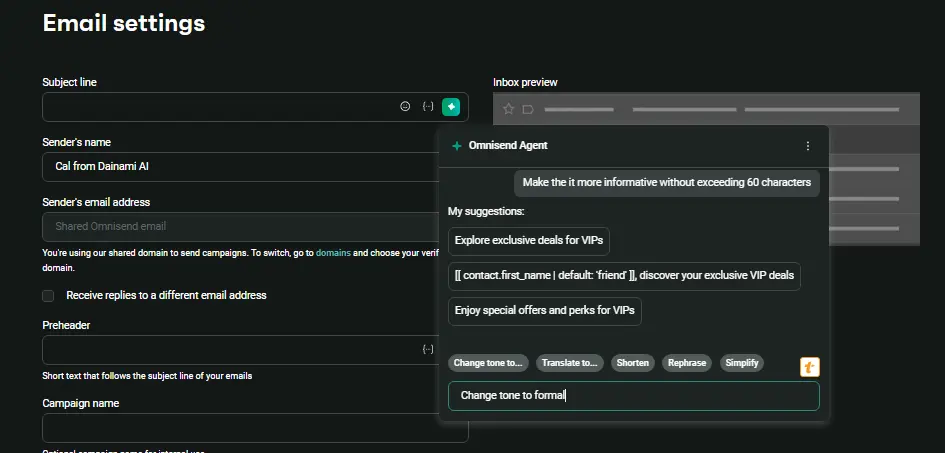
Omnisend Agent suggests subject lines and preheaders from your campaign context. It’s available across all plans to help you optimize your campaign’s open rates.
What should you check before sending an AI-written email?
Before sending an AI-written email, you should check the content against your approved campaign brief. A prompt cannot guarantee accuracy, performance, or inbox placement.
Use this checklist to review your AI-written email:
- Facts: Product details, claims, dates, prices, and availability match approved sources
- Offer terms: Discounts, codes, exclusions, and deadlines are correct
- Brand voice: The wording fits the supplied guidance and avoids generic filler
- Message alignment: The subject line, preheader, body, and CTA communicate the same promise
- Personalization: Personalization tags remain intact, use the platform’s syntax (in Omnisend, [[contact.first_name]]), and have fallback values
- Campaign setup: Check links, audience, rendering, and workflow settings in the sending platform
Turn your email prompt into a campaign draft
To turn your AI prompt into a usable campaign draft, you need to provide accurate context, specify the desired output, and iterate. Define the audience, the facts, and the tone upfront to get the best results.
Save your most effective prompts to your brand guidelines so others can get the same results without your supervision. Once the copy is ready, the next step is to double-check everything in the campaign builder. Make sure there are no broken links, check audience segments, and schedule the campaign.
You can draft and revise your content using Omnisend MCP if you draft in ChatGPT or Claude.
Quick sign up | No credit card required