
 Omnisend AI


 OFFER
OFFER








Drive sales on autopilot with ecommerce-focused features
See FeaturesKey takeaways 
Effective cross-selling on Shopify should span the entire customer journey, from product pages to post-purchase communications, maximizing revenue opportunities.
Utilize strategic placements for cross-sell offers, such as on product pages, in carts, and during checkout, to capture high-intent buyers at key moments.
Automate cross-selling through email and SMS to maintain engagement and drive additional sales after a purchase, leveraging personalized recommendations based on customer behavior.
Focus on providing relevant, complementary product suggestions while avoiding overwhelming customers with too many offers, ensuring a seamless shopping experience.
Reveal key takeaways
Many merchants think Shopify cross-sell means adding a widget under a product page. But real results come from using cross-selling across the entire customer journey. That includes product pages, cart, checkout, post-purchase, and automated email and SMS.
This guide shows you how to build a full-funnel Shopify cross-selling workflow that drives revenue.
You’ll learn where to place cross-sell offers, create smart bundles, build high-converting automations, and use email and SMS to extend cross-selling beyond a single visit.
If you manage marketing for a growing Shopify store, this is for you. Let’s get started.
What is cross-selling on Shopify?
Did you know that 35% of Amazon’s revenue comes from its AI product recommendations? This includes “frequently bought together” style recommendations.
That’s cross-selling. It means suggesting related products that go well with what a customer is buying.
On Shopify, a Shopify cross-sell strategy works across your store journey. A shopper views a product, sees a relevant recommendation, and then adds it to their cart. That extra step raises order value.
For example, if a customer adds running shoes to their cart, you can suggest socks. You can also suggest a water bottle. This is cross-selling in action.
Now let’s talk numbers.
A McKinsey case study shows that cross-selling works well. It helped a retailer raise sales by 20% and profitability by 30%.
So how does cross-selling on Shopify work? It usually begins with product page widgets or cross-sell apps. These show related products.
Strategic cross-selling on Shopify goes further. It means pairing products based on what customers do and when they buy. Then you send those offers through automated emails, SMS, or post-purchase messages.
That’s where Omnisend comes in. You can use built-in automation workflows to send personalized cross-selling offers. These should be based on what customers view or add to their cart.
Make cross-selling an automated revenue channel. It should work at every step of the customer journey. Don’t rely on static suggestions.
Cross-selling vs. upselling: What’s the difference?
Upselling is getting customers to pick a more expensive version of a product. Cross-selling means recommending complementary products to increase the overall order value.
The main difference between cross-selling and upselling is what you’re selling. Upselling helps you sell your more premium products. Cross-selling increases the total order value by adding related items.
For example, if someone is looking at a camera, suggest a newer model. This model has better features. That’s called upselling. Recommending a camera lens, protective case, or memory card is cross-selling.
When should you use each strategy?
Use upselling when customers are comparing options and are open to upgrading. Use cross-selling when they’ve already chosen a product and are ready for useful add-ons.
Why cross-selling matters
Cross-selling is an easy way to increase AOV. You don’t need to spend more on getting new customers. When done right, it improves revenue, retention, and customer experience.
Here’s why it matters:
- Increases average order value (AOV): Adding related products to a cart raises total order value. This happens without extra costs.
- Adds to customer lifetime value (CLV): Relevant recommendations help shoppers feel valued. This leads to more repeat purchases.
- Enhances the shopping experience: Helpful add-ons are supportive. They work best when shown at the right time.
Effective Shopify cross-sell strategies focus on reaching customers at the right moment. It can be on the product page, in the cart, and at checkout, and this can be automated easily with email and SMS automation tools.
Where to implement Shopify cross-sell offers
The real revenue comes from knowing where to place your Shopify cross-sell offers. Placement affects visibility, timing, and conversion rates. Here are the top cross-sell touchpoints across your store and post-purchase journey.
Product page cross-selling
The product page is the perfect place to start cross-selling on Shopify. Shoppers are deciding what to buy, making it ideal for discovery-stage recommendations.
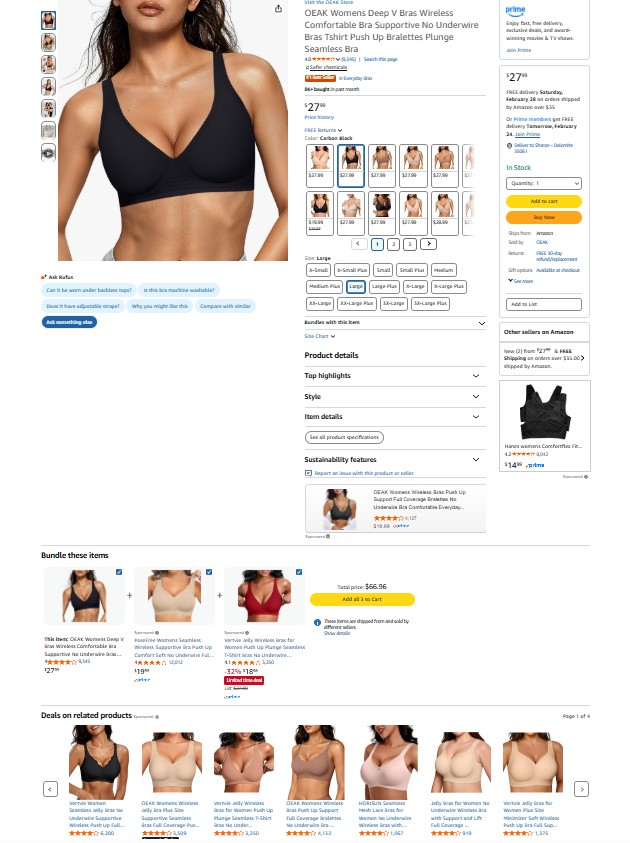
Widgets like “customers also bought” show related items without disrupting browsing. You can also add product add-ons below the main item. For example, recommend a phone case when someone buys a phone.
Cart page and cart drawer cross-selling
The cart page is one of the best spots for cross-selling on Shopify. At this stage, shoppers have already decided to buy, so their buying intent is high. Now is the perfect time to suggest products that enhance their order.
Here’s an example.
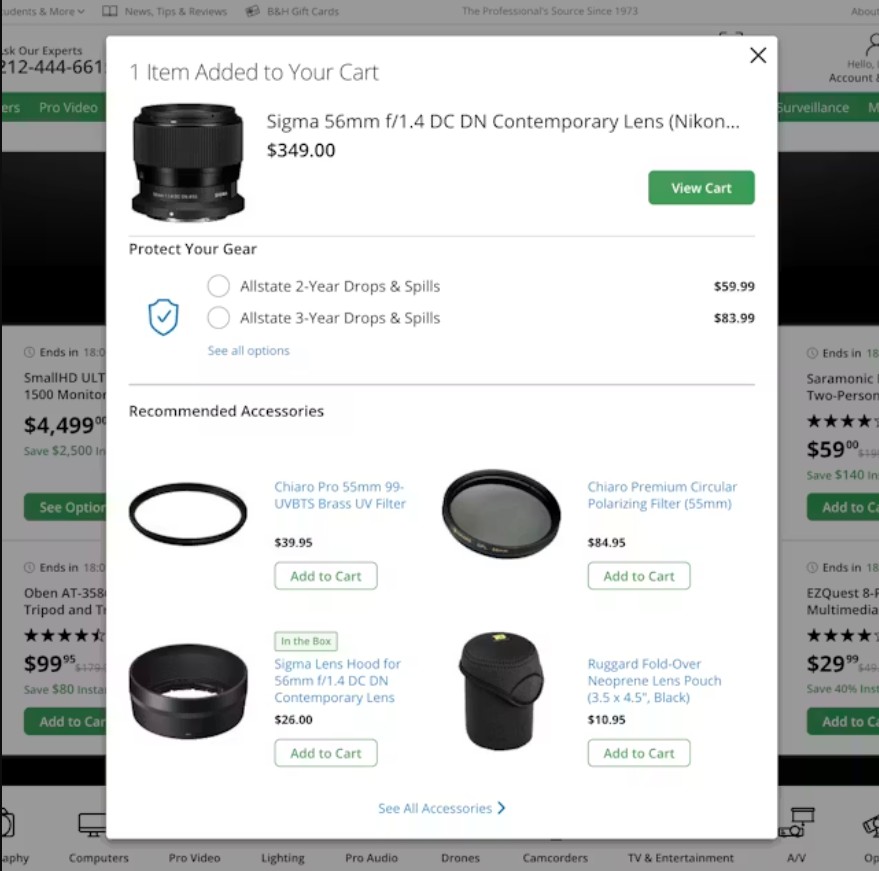
Cross-selling on the cart page is becoming quite popular. You can use side panels show related items without taking shoppers away from their cart. This keeps the checkout flow uninterrupted while asking people to buy more.
Popup suggestions right before checkout also work well. It offers last-minute add-ons like accessories, warranty plans, or matching products.
These placements are ideal for impulse additions.
Pairing cart page cross-selling with Shopify checkout optimization makes the process smooth. It also helps you earn extra revenue.
Checkout cross-selling
The checkout page is your last chance to increase AOV before a purchase. Shoppers are ready to buy, so any extra offer must be relevant and subtle.
Keep recommendations minimal to avoid slowing the process or causing cart abandonment. Extended warranties, protection plans, or small complementary products work best here.
Shopify Plus checkout lets you show targeted cross-selling offers. Done right, it can increase AOV while keeping the experience smooth and friction-free.
Post-purchase page cross-selling
The post-purchase page is a high-trust moment for Shopify cross-selling. Your customer has just completed a purchase, so they’re more open to suggestions. Offering complementary products here can be helpful.
One of the best tactics is a one-click add-to-order feature. This lets customers add items without re-entering payment details. Thank-you page recommendations work well, such as accessories, upgrades, or matching products.
Post-purchase cross-selling captures extra revenue while the customer is engaged and satisfied. It increases AOV without disrupting the shopping experience.
Email and SMS cross-selling
On-site Shopify cross-sell targets buyers during their visit. Email and SMS campaigns can keep cross-selling going after they leave.
Automated post-purchase emails drive impressive results. Omnisend data shows these cross-sell emails convert 2361% higher than regular campaigns. SMS adds another layer, delivering fast, high-open-rate suggestions that capture attention immediately.
Here’s a quick look at how on-site and email/SMS cross-selling compare:
| Feature | On-site cross-sell | Email/SMS cross-sell |
|---|---|---|
| Timing | During browsing or checkout | Post-purchase or after site visit |
| Reach | Only customers on your site | Customers who left without buying |
| Conversion potential | Medium | High (automated workflows give results) |
| Personalization | Basic, product-based | Behavior-based, dynamic, automated |
| Setup effort | Low to medium | Medium (once automated, runs continuously) |
With Omnisend’s pre-built cross-sell automation workflows, you can suggest complementary products. Once set up, your cross-sell engine runs constantly across email and SMS.
Cross-selling examples
Now, let’s look at some cross-selling examples you can take inspiration from.
Frequently bought together examples
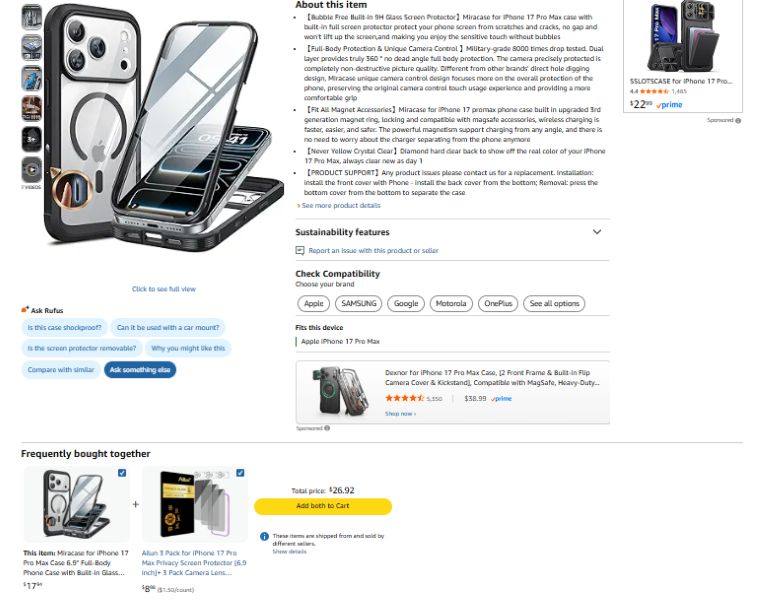
A great example of cross-selling is Amazon’s “frequently bought together” section. It shows how to drive sales effectively.
When you click on a product, you’ll see related items below. These are things that other customers bought together.
Amazon’s “Frequently bought together” section is a gold standard.
Fashion stores use this to complete an outfit — dress, shoes, and a bag. Electronics brands bundle accessories such as chargers or cases with new devices. Beauty brands build full routines with cleanser, toner, and moisturizer.
For Shopify stores, this approach pairs perfectly with strategic product bundling. When the combinations feel natural, customers don’t see it as cross-selling. They see it as helpful. And that’s what drives results.
Complementary product recommendations
The focus is on suggesting products that work well with the original product.
Take a coffee maker, for example, you can suggest coffee beans, filters, or a matching mug. If someone’s buying running shoes, adding socks or extra laces makes sense. They improve comfort.
The wording also matters, “you might also like” feels casual and exploratory. “Complete your purchase” feels more intentional and action-driven. Both work, it just depends on where the customer is in their journey.
When recommendations genuinely add value, customers are more likely to say yes.
Bundle and discount examples
Bundles work because they give customers a clear reason to buy more. Group items together. Offer a small incentive. Don’t suggest them separately.
“Buy together and save” messaging is simple but powerful. It tells shoppers exactly what they gain. A skincare trio at 15% off is a smart choice. It saves you money compared to buying each product separately.
You can make pre-built bundles. These bundles have fixed products. Customers can then choose their add-ons. It depends on your store setup.
Smart stores test percentage discounts versus dollar discounts. Sometimes “Save 20%” performs better, other times, “Save $10” wins. Testing both helps you find what drives higher AOV.
If you’re exploring tools to build these offers, many Shopify bundle apps make the setup easy.
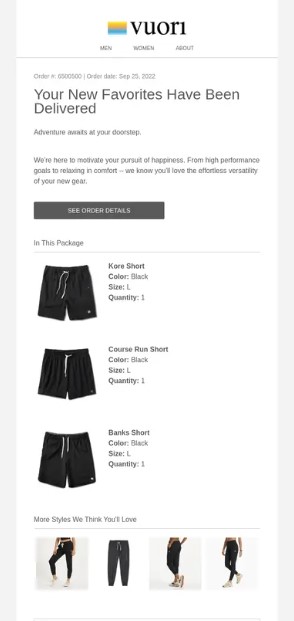
Post-purchase email cross-sell examples
Most stores stop cross-selling at checkout, but smart brands keep selling through email.
Here’s a sequence you can follow:
- Email one (order confirmation): Keep it simple and clean. You can include a subtle complementary product suggestion. You can include premium beans or a filter in the confirmation email. Subject line idea: “Your order is confirmed, don’t forget this.”
- Email two (value-focused follow-up): This helps customers get the most from their purchase. This is the perfect place to recommend accessories that improve the experience. An example angle is “How to get the most from your new coffee machine.”
- Email three (time-based cross-sell): Ideal for consumables or replenishable products. Reminds customers when it’s time to restock. Subject line example: “Running low? It might be time to restock.”
Omnisend’s cross-sell email templates run automatically, triggered by purchase behavior.
8 Shopify cross-selling best practices to increase AOV
If you want cross-selling to increase AOV, you need a strategy. You don’t need difficult tactics, but proven best practices that work together.
Here are eight Shopify ecommerce cross-selling techniques and best practices you can follow.
1. Recommend lower-priced complementary products
Small additions can have a big impact. Lower-priced add-ons tend to convert better. This is because customers see it as a small extra choice, not a second big purchase.
For example, if someone buys a $100 backpack, a $12 water bottle feels reasonable.
Avoid recommending products that compete with the main purchase. This can confuse or frustrate buyers. Instead, focus on items that naturally complement the primary product.
2. Use “frequently bought together” bundles
A great way to cross-sell is product bundling on Shopify. Bundles leverage social proof and reduce friction. When customers see frequently bought-together products, it simplifies their buying decision.
For example, if someone buys a smartphone, suggest a bundle with a case, screen protector, and charger. The key is to highlight convenience, compatibility, or savings clearly.
3. Create urgency with limited-time cross-sell offers
Limited-time cross-sell offers work because customers don’t want to miss out. FOMO (fear of missing out) is strongest right after a purchase. That’s when customers are already committed and more open to small, relevant additions.
A short window to add a complementary item encourages quick action without requiring a second checkout later.
Here are examples of phrases that create urgency:
- “Add this within 10 minutes and save 15%”
- “One-time post-purchase offer”
- “Exclusive add-on — available today only”
- “Complete your order now and save”
- “Limited-time bundle upgrade”
- “Offer expires at midnight”
These tactics work especially well for accessories, consumables, warranties, or protection plans. Keep the message clear and highlight the immediate benefit.
4. Personalize recommendations based on behavior
Personalization is key to making cross-sells feel relevant. Customers respond best when suggestions match their past behavior.
Focus on three core tactics:
- Browse history-based suggestions: Recommend products similar to what customers recently viewed. If someone explores running shoes, show related styles or performance accessories.
- Purchase history recommendations: Suggest complementary products based on past orders. For example, offer coffee beans to someone who bought a coffee maker.
- Segment-specific cross-sell offers: Tailor recommendations by customer type. New buyers might see starter accessories and repeat shoppers’ premium add-ons.
Omnisend’s segmentation capabilities make this effortless. You can automate personalized cross-sell offers for each segment to increase conversions while strengthening customer trust.
5. Automate post-purchase cross-sell sequences
Post-purchase is a prime moment to capture more revenue, and automation makes it simple. A three- to five-email sequence guides customers from their first order to related purchases. Here’s an example:
- Day one: Order confirmation with a relevant product suggestion
- Day three: Tips on getting the most from their purchase, including add-ons
- Day seven: Time-sensitive cross-sell, like refills or consumables
Adding SMS follow-ups gets you visibility and reaches customers who missed the email.
Omnisend’s pre-built post-purchase flows make setting this up effortless, you can launch in minutes, not hours. These automated sequences drive sales and give customers helpful, timely recommendations.
6. Combine on-site and email cross-selling
On-site recommendations capture impulse buys when customers have an intent to buy. Meanwhile, email cross-sells reach shoppers who need time to consider additional products.
By combining both, you can create a unified strategy that maximizes every opportunity to increase AOV. Tracking attribution across channels helps you understand which touchpoints drive the most revenue.
Omnisend’s omnichannel reporting makes this easy. It shows performance across email, SMS, and push notifications.
7. Test placement, timing, and messaging
Optimizing cross-sell offers is about testing and learning. Start by A/B testing the headlines for your offers. Then, experiment with product selection algorithms to show items that resonate with each customer.
Timing is just as crucial. Compare immediate cross-sells at checkout with delayed follow-ups via email or SMS.
For email sequences, subject line testing can significantly increase open rates. Testing where, when, and how you show offers helps increase sales. It also keeps customers happy.
8. Track and optimize cross-sell performance
Cross-selling without tracking is like flying blind. Focus on metrics such as conversion rate and AOV, and on optimization tactics to evaluate performance.
Compare results across channels, on-site, email, and SMS to see which drives the highest impact. Identify top-performing product combinations and scale them, while phasing out underperformers.
Omnisend’s reporting dashboards simplify this process by showing clear revenue attribution per automation. Regularly reviewing and optimizing your cross-selling strategy ensures it keeps improving.
How to automate Shopify cross-selling with email and SMS
Cross-selling doesn’t stop at the cart. Shopify stores use email and SMS to reach customers after they’ve made a purchase. These automated flows keep the momentum going, turning single orders into multiple-item sales.
Setting up cross-sell automation workflows
After a customer completes a purchase, the next hour is critical. This is when cross-sell automation can turn a single order into multiple sales.
A well-structured workflow typically moves like this:
- Email one (Immediately after purchase): Thank you email
- Email two (Day one to two): Product tips or usage guidance
- Email or SMS (Day two to three): Cross-sell offer with complementary items
- Email and SMS (Day three to five): Reminder message
Each step nudges customers to explore related items. You can combine email and SMS in the same workflow to reach customers wherever they engage most.
For example, an order confirmation email can show accessories, while an SMS a day later reminds them of limited-time bundle deals.
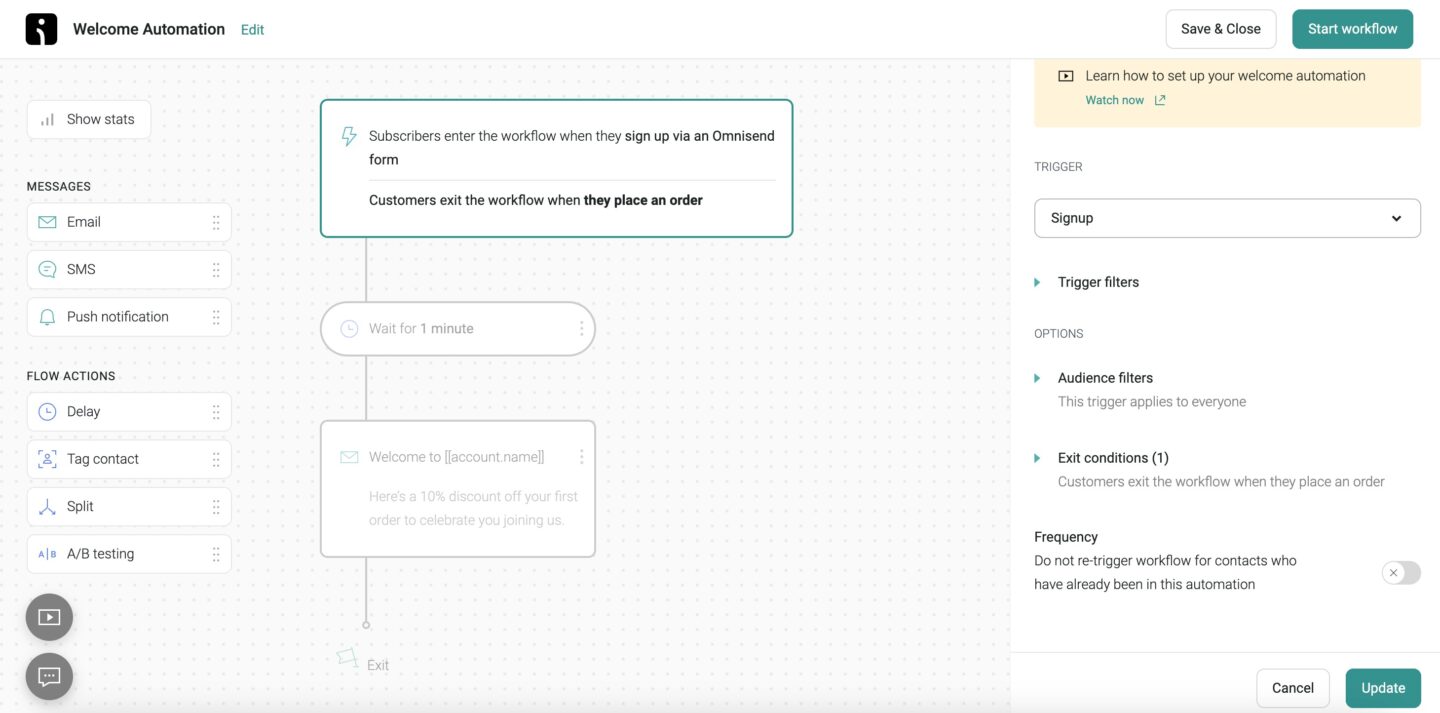
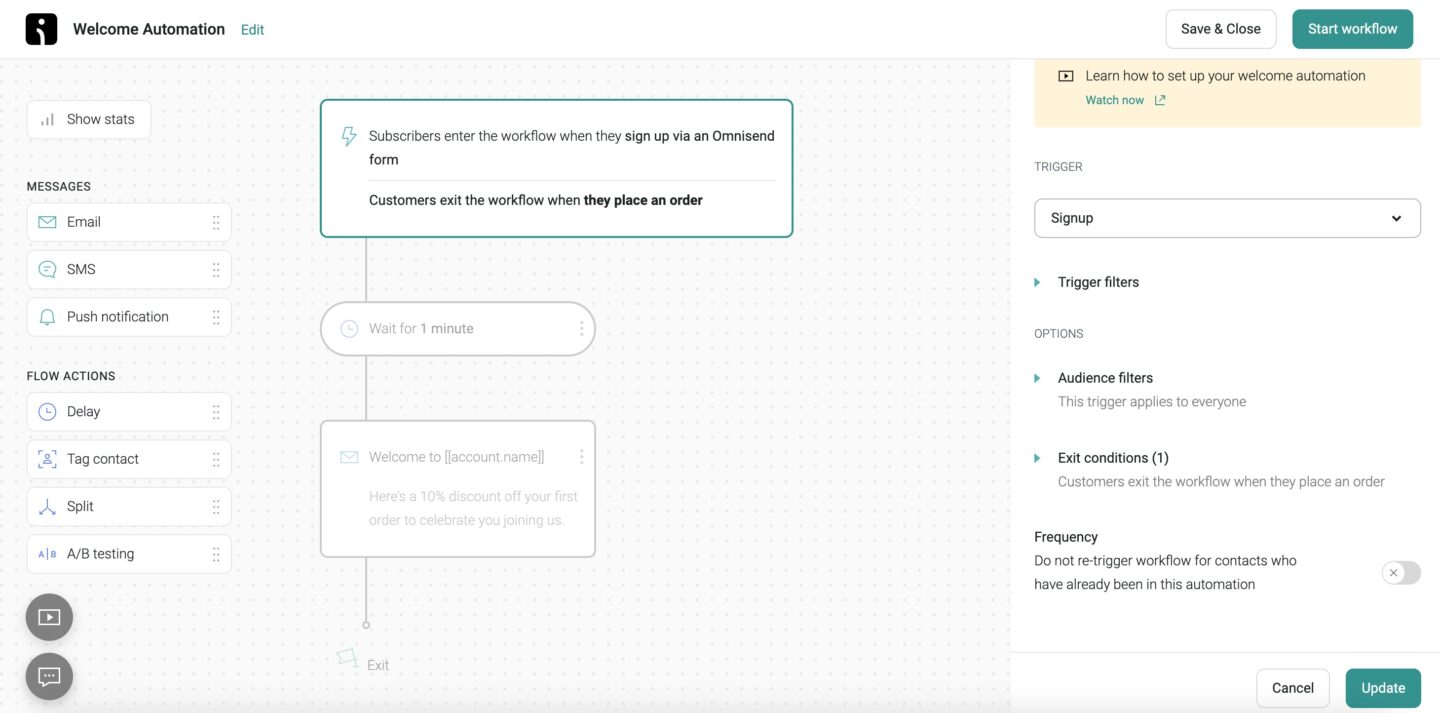
Omnisend’s email automation workflows make this setup effortless. Drag, drop, and connect triggers visually, no complicated coding required.
Timing your cross-sell messages for maximum impact
Timing can make or break your Shopify cross-selling strategy. Sending a cross-sell message at the right moment can increase add-on purchases.
A customer is most receptive immediately after buying, and that window is short. Follow this:
- Send immediate cross-sell messages (within the first hour): Reach customers while purchase excitement is still high. Use email or SMS to suggest complementary products, such as accessories or consumables.
- Plan short-term follow-ups (three to five days later): By then, customers have received their order and may have additional needs. Suggest relevant add-ons, such as a travel mug for a new coffee maker or socks for running shoes.
- Schedule medium-term replenishment reminders: Promote refills or products customers will likely need again. This keeps your brand top-of-mind and encourages repeat purchases.
- Choose the right channel for each message: Use email for detailed recommendations and product education. Use SMS for quick attention, especially for time-sensitive or limited offers.
Segmenting customers for relevant cross-sell offers
Segmenting your customers is a game-changer for cross-selling on Shopify. By grouping customers based on behavior, you ensure every cross-sell feels relevant, not random. Here’s what you can do:
- Start with purchase history segmentation: Customers who bought running shoes may be interested in socks, insoles, or water bottles.
- Use product category segments to match related items: Pair coffee makers with beans or mugs. Match skincare products with serums or masks.
- Target VIP or high-value customers separately: These shoppers respond well to premium add-ons or limited-edition bundles. Helps increase AOV without extra acquisition costs.
- Segment first-time buyers and repeat customers: New buyers respond better to gentle nudges like “Complete your purchase”. Repeat customers are more likely to convert on advanced bundles or replenishment offers.
Tools like Omnisend make this effortless. Its AI-powered segmentation automatically sends personalized cross-sell emails and SMS. This increases revenue while saving hours of manual work on behavioural segmentation.
Common Shopify cross-sell mistakes to avoid
Even the best Shopify stores can lose revenue by making simple mistakes. Here are the pitfalls to watch out for when cross-selling on Shopify:
1. Recommending irrelevant or competing products: Suggesting unrelated products confuses shoppers and lowers conversions. Keep recommendations complementary.
2. Being too aggressive: Too many cross-sell offers on a page can overwhelm customers. Less is more; focus on one to three high-value recommendations.
3. Ignoring mobile experience: Most Shopify traffic comes from mobile. Widgets that break layouts or popups that cover checkout can cost sales. Always optimize for smaller screens.
4. Same offers to everyone: Generic recommendations ignore customer behavior. Personalization based on purchase history, category interest, or VIP status drives higher engagement.
5. Not testing or tracking performance: If you don’t monitor conversion rates, revenue per offer, or AOV lift, you won’t know what works. A/B testing placement, timing, and messaging is crucial.
6. Only using on-site cross-sell: Only showing offers on product or cart pages misses post-purchase revenue. Email and SMS cross-sell capture buyers who didn’t add extras during checkout.
7. Pricing cross-sell items too high: Expensive recommendations compared to the main product can stop add-ons. Aim for smaller complementary items, around 10%-15% of the main product price.
Avoiding these mistakes ensures your Shopify cross-selling strategy increases revenue without frustrating customers.
Tools and apps for Shopify cross-selling
Cross-selling on Shopify without the right tools can be difficult. The right apps and platforms make cross-selling simple, measurable, and profitable.
Whether using on-site widgets or automated email and SMS, the right solution is key. Let’s break down your options so you can see where Omnisend fits in.
Here are the key ways to implement cross-selling with apps and automation:
On-site cross-sell apps
On-site apps are the traditional starting point for Shopify stores. Tools like ReConvert, Honeycomb, and Selleasy show recommendations on product, cart, or thank-you pages.
They make it easy to create frequently bought together widgets or product add-ons.
When evaluating on-site apps, focus on:
- Flexibility: Can you customize placement, design, and recommendations?
- Reviews and support: Look for apps with responsive customer service
- Pricing: Many offer tiered plans depending on the number of orders or products
Keep in mind, these apps handle on-site cross-selling only. They don’t automate email or SMS follow-ups. This means you might miss revenue from customers who leave without adding the suggested items.
Email and SMS cross-sell automation platforms
Post-purchase emails and text messages extend offers beyond the website. They capture buyers who didn’t complete their purchase at checkout.
Omnisend integrates directly with Shopify, pulling product data automatically to power personalized recommendations.
With Omnisend, you can:
- Create automated cross-sell workflows triggered by purchases
- Send multi-step sequences via email and SMS, increasing the chance of additional sales
- Track revenue per campaign, conversion rates, and AOV lift in one dashboard
Omnisend users see an average $79 return for every $1 spent on automated cross-sell emails and SMS. The platform also offers a free plan to test features and 24/7 support for all users.
Here’s a quick look at how on-site apps stack up against Omnisend’s all-in-one solution:
| Feature / Platform | On-Site Cross-Sell Apps (ReConvert, Honeycomb, Selleasy) | Omnisend Email and SMS Automation |
|---|---|---|
| Channel coverage | On-site (product page, cart, checkout) | On-site + Email + SMS |
| Automation | Limited, manual setup | Fully automated post-purchase workflows |
| Reporting and analytics | Basic, on-site metrics | Advanced revenue attribution, channel performance tracking |
| Integration with Shopify | Native | Native, seamless with product and customer data |
| Segmentation and personalization | Minimal | AI-powered behavioral segmentation and personalized recommendations |
| Post-purchase reach | None | Yes, email and SMS sequences extend cross-sell beyond the website |
| ROI potential | Limited by channel | High with automated sequences proven to increase AOV |
On-site apps handle the first touchpoint. Omnisend connects that with automated email and SMS to create a unified cross-sell strategy.
Start cross-selling on Shopify today
Shopify cross-sell goes beyond product page widgets. Successful stores combine on-site offers with automated email and SMS to reach customers.
This multi-channel approach increases AOV. It turns one-time buyers into repeat customers, without raising acquisition costs.
Automation makes it scalable. Once workflows are live, they deliver personalized recommendations, timely reminders, and post-purchase offers.
Whether through bundles, complementary products, or follow-up messages, you capture revenue you otherwise would have missed.
Ready to automate your Shopify cross-sell strategy? Omnisend’s free plan gives you cross-sell automation, email, and SMS campaigns. It also provides advanced segmentation to achieve higher AOV.
Quick sign up | No credit card required
FAQs
What is the difference between cross-selling and upselling?
Cross-selling recommends complementary products that enhance a purchase. Upselling encourages customers to upgrade to a higher-priced version of the same product.
How can I increase average order value with cross-selling on Shopify?
Offer cross-sells at multiple touchpoints: product pages, cart pages, and post-purchase emails. Use bundles, “frequently bought together” suggestions, and data-driven recommendations.
The key is to encourage extra purchases without interrupting the shopping experience. Personalized offers and urgency tactics add to results.
When is the best time to show cross-sell offers?
The most effective moments are during browsing, when intent is high, and right after checkout.
What are the best apps for cross-selling on Shopify?
Popular on-site tools include ReConvert, Honeycomb Upsell and Cross-sell, and Selleasy, while platforms like Omnisend handle automated email and SMS cross-selling beyond your website.
Does cross-selling actually increase sales?
Yes. Research shows cross-selling can drive sales by 30% and profitability by 20%. Done right, it’s a proven way to increase AOV while improving the shopping experience.

TABLE OF CONTENTS
TABLE OF CONTENTS


Subscribe and don’t miss any updates!
No fluff, no spam, no corporate filler. Just a friendly letter, twice a month.